RSS
 

Posts Tagged ‘Flash’

Balancing Flash and Ambient Light Using an Incident Light Meter

22 Nov

Contribution by Shiv Verma

Balancing Exposure

Ambient underexposed by two stops by changing the shutter speed to 1/40th of a second

Why is an incident meter important for flash photography?

How often have you struggled trying to capture a well-exposed portrait in a dimly lit room or hall. All you have is the ambient light and your speedlight. With an understanding of exposure and flash techniques you can learn to successfully balance ambient and flash exposures to create exceptional photographs. Ones that look natural, without the harsh appearance of flash, and without detracting from the ambient light.

For the most part, your camera’s meter and exposure evaluation will be just fine when you are capturing images in even light situations.  However, the onboard system will usually fail when you are trying to properly expose a subject in a dimly lit room.  In these situations, you must be in a position to balance the ambient light that is in the room ,and the light from the flash that will light your subject.  The same concept applies to photographing subjects in low light situations outdoors.

The camera’s metering system is not capable of evaluating the two light sources and establish the correct exposure for the scene, or in other words, balancing flash and ambient light.  The camera’s meter when set to evaluative (Canon) , matrix (Nikon), centre-weighted, or spot metering works great for a balanced scene, but not when the exposure of the environment is vastly different than the exposure of the flash lit subject.

Two examples of how in-camera metering systems fail

Choose a camera capable of using a hot shoe or off-camera flash to follow along.  The pop-up flash is not suitable for this exercise. Keep the aperture value at f/4 and the ISO at 400 for each scenario.

In the first image, below, the flash is set to ETTL (electronic through the lens meter system).  The camera is set on aperture priority and evaluative metering mode.

Notice that the subject is reasonably well lit but the background is under exposed.

Notice that the subject is reasonably well lit but the background is under exposed

For this next example, set the meter to the spot metering mode and take the reading for the background. All other settings remain the same and the flash is still on ETTL. Notice the overall image is now underexposed.  The metering system is unable to properly evaluate the scene and the primary subject. (image below)
flash-photography-lighting-metering-02b

For the third image in the sequence turned off your flash, and set your camera evaluative/matrix metering.  The idea is to try and get the best exposure for the background. Make note of your shutter speed and exposure settings.

Shutter speed 1/13th second and the background is reasonably well exposed, though not perfect

Shutter speed 1/13th second and the background is reasonably well exposed, though not perfect

Using a hand-held incident light meter to solve the problem

Good hand-held meters have multiple modes: a spot metering mode which is a reflective reading (usually 2 degrees or less), an incident mode using the meter’s light dome, and one or more flash modes.  It is imperative you learn the proper use of these modes in order to be successful at flash photography.

You want all your images to be good, not the occasional 1%.  You need to stop struggling and juggling settings to produce the image you want.  Experiments are good only if you know what you are doing and what your tools are.  Realize that there are infinite ways to light your subject with strobes, as there are infinite scenarios that your subject can be in. So learn how to expose correctly, learn how to balance ambient light and flash, but most of all, learn how to read light.

Set up the ambient exposure first

Let’s go back to the scene as we had above.  Set your camera to manual exposure mode. As before, keep your aperture at f/4. Next, to properly expose the room you measure the ambient light using the spot meter function of the hand held meter pointed at an area that is mid tone (approximately the same as medium grey) in the scene.  In this test case the meter indicated 1/10 sec at f/4.  Set your camera to these settings. Take a test shot to ensure your exposure is correct for the ambient light. See below:

Test exposure using ambient light only

Test exposure using ambient light only

Next set the flash exposure for the primary subject

You can experiment with off-camera flash if you do not have remote triggering capability, using an off-camera remote flash cord (for Canon, or Nikon). On-camera hot shoe flash use is not recommended as it produces harsh, flat lighting. But in order to simplify this exercise, you can use the hot shoe flash mounted on you camera.  It will be just slightly off center when you have your camera oriented in portrait mode.

To read the flash exposure, set the hand held meter to “incident” mode, and the exposure on the “flash non-cord” setting (do not use the corded or triggered setting). This will read the light falling on the subject when the flash is fired.  If you are using a remote trigger, then the next step is easy.  If not, then have someone assist you for the next reading.  Position the meter such that the dome points to the camera and fire the flash.  At full power, in this test case, the reading was f/19.  See the image below:
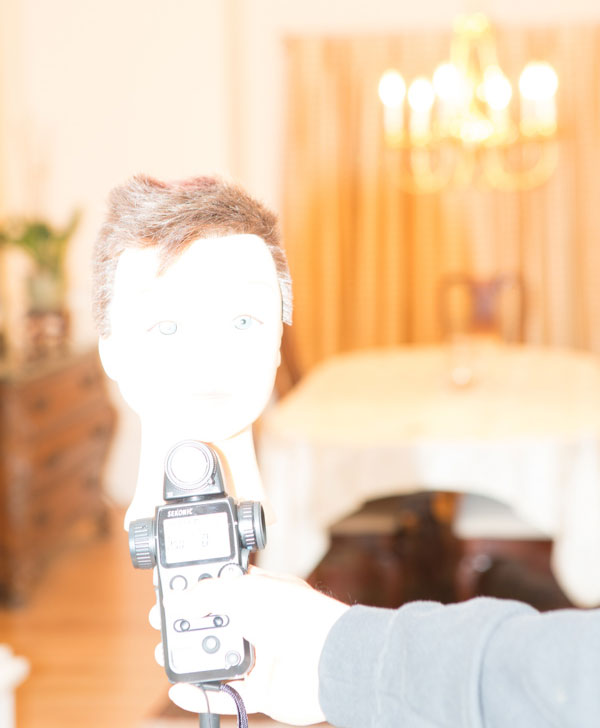
How to point your meter and measure the flash

How to point your meter and measure the flash, this is obviously too much power

An f/19 reading indicates overexposure, as your camera is set at f/4 for the depth of field you want. To resolve this, you need to dial down the output of the flash by five stops (f4 > f5.6 > f8 > f11 > f16 > f19>.  Set the flash to 1/32 power which is five stops below full power. It is always good to take another test reading and adjust the distance of the flash to subject to compensate for a half stop variance (to f/19).  Now you should get a reading of f/4 and you are ready to shoot.

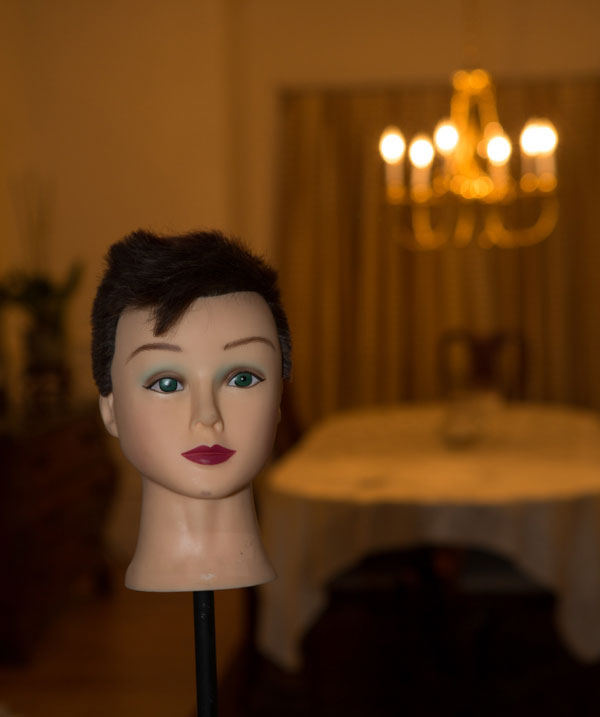
Flash and ambient balanced successfully

Flash and ambient balanced successfully. The exposure on the subject is perfect and the room is properly exposed too.

Adjust shutter speed to feature the subject more

Basically, the settings on camera indicate equal exposure and you can see that both the subject and the room are exposed correctly at an aperture of f/4.  This is good. But, if you want to emphasize the subject more, you want to underexpose the room. With the way you have your exposure already set up, this is really easy. All you need to do is increase the shutter speed by a stop, two stops, or more. This under exposes all the areas lit by the ambient light but the exposure on the subject remains the same and is always correctly exposed.

Ambient underexposed by one stop by changing the shutter speed to

Ambient underexposed by one stop by changing the shutter speed to 1/20th of a second

Ambient underexposed by two stops by changing the shutter speed to 1/40th of a second

Ambient underexposed by two stops by changing the shutter speed to 1/40th of a second

The reason for this is that the meter reading for the background is based on the ambient light. The subject however, is lit using the flash, an instantaneous light source. Your flash exposure is controlled by its power output, increasing or decreasing the flash’s distance from the subject and by the aperture setting on your camera. Typically, flash exposure is not affected by shutter speeds as long as your camera’s shutter speed is set to the flash sync speed or slower. As a result, changing the shutter speed affects the ambient light exposure (the exposure of the room) without affecting the flash exposure (the exposure of the subject).

Summary and action plan

In conclusion, relying on your camera’s metering system, be it evaluative, spot or centre-weighted, never gives you the kind of exposure control that you can achieve when using a good hand-held incident light meter.

If you have additional tips or tricks please share them in the comments below, and if you haven’t tried your flash off the camera yet why not give it a go!? Grab yourself a light meter and try it!


shiv-smShiv Verma, is a photographer, educator and technologist and lives in Wrentham Massachusetts. He is an avid wildlife and commercial photographer and conducts photo workshops and tours worldwide. You can check out more of his work on his website at: www.shivverma.com. Follow him on:  Google+, Facebook  and Twitter  

Post originally from: Digital Photography Tips.

Check out our more Photography Tips at Photography Tips for Beginners, Portrait Photography Tips and Wedding Photography Tips.

Balancing Flash and Ambient Light Using an Incident Light Meter

The post Balancing Flash and Ambient Light Using an Incident Light Meter by Guest Contributor appeared first on Digital Photography School.


Digital Photography School

 
Comments Off on Balancing Flash and Ambient Light Using an Incident Light Meter

Posted in Photography


Fro Knows Photo Beginner Flash Guide – Review

29 Oct

It’s a little past 4:00 a.m. and I just finished watching all three hours of the just-released Fro Knows Photo Beginner Flash Guide.  A lot of photography-related books and videos come across my desk, and my favorites are always those that have something to offer not only the beginner, but the advanced photographer as well. This is absolutely one of them. In this follow-up video to his Fro Knows Photo Beginner Guide, Jared Polin (the aforementioned Fro) leads you on an off-camera flash adventure, taking you from hopelessly intimidated to supremely confident in a style all his own. Not bad for a three-hour tour.  With expert assistance from friend and professional photographer Adam Lerner, viewers have a front-row seat to everything from breaking down the contents of an affordable-but-effective light kit, to a behind-the-scenes look at six professional-grade photo shoots, all lit with a single speedlight and a convertible umbrella.

fro-knows-photo-flash-guide

The Beginner Flash Guide starts literally from the ground up, planting a light stand firmly on the floor and explaining not only the contents of the light kit, but how those five or six pieces all work together to achieve professional-quality lighting without breaking the bank. Jared launched FroKnowsPhoto.com in 2010– a brand and a website that quickly became synonymous with making advanced photography techniques accessible not only to professional photographers, but also to beginners, hobbyists, and enthusiasts. The Beginner Flash Guide maintains and elevates that educational philosophy, taking what can be the confusing language and landscape of photographic lighting, and essentially handing the viewer a dictionary and a road map.

Among the nuts and bolts laid out are: The Lighting Kit Explained, Four Ways to Trigger Your Flash, Flash-to-Subject Distance, How Shutter Speed Affects Ambient Light, Understanding Flash Zoom, and Quality of Light. Plus, thirteen “Quick Tips” interspersed throughout the lessons cover some minor and some not-so-minor details on topics ranging from which rechargeable batteries you should use (lithium) to how best to interact with your subject. Word to the wise– make sure you take notes– they’ll make retaining and applying the information to your own photography much easier. An additional, non-video element is the included Flash Photography Field Guide– a six-page PDF designed to be printed and tucked away in your camera bag for quick, easy reference. The field guide does a great job of summarizing the basics covered in the videos, as well as offering suggestions for overcoming some real-world lighting challenges.

Not everyone is lucky enough to have a mentor or someone to show them the ropes when they are first trying to learn this stuff. The BFG can and will fill that void. But even if you already have a firm grasp of off-camera flash principles– or just need a refresher– the lessons in this video guide can enhance and build upon what you already know. There will always be trial and error when it comes to learning and experimenting with photographic lighting. The Beginner Flash Guide, though, can help you minimize the error.

Get your copy of the Fro Knows Photo Beginner Flash Guide here.

Post originally from: Digital Photography Tips.

Check out our more Photography Tips at Photography Tips for Beginners, Portrait Photography Tips and Wedding Photography Tips.

Fro Knows Photo Beginner Flash Guide – Review

The post Fro Knows Photo Beginner Flash Guide – Review by Jeff Guyer appeared first on Digital Photography School.


Digital Photography School

 
Comments Off on Fro Knows Photo Beginner Flash Guide – Review

Posted in Photography


All About Flash [Book Review]

15 Sep

All About FlashIf there’s one thing that flummoxes many of us, it’s flash. Onboard or off camera.

Mark Cleghorn’s book gives away the techniques he’s learned over the course of nearly 30 years as a photographer, well-known in Europe and the US.

Beginning with a single on-camera flash effectively and creatively, then moving all the way up to four or more units in multiple wireless groups, he describes how to shoot the best images possible in a variety of situations.

He outlines the methods in minimising distracting details in an image with a single flash; he shows how to diffuse and spread the light by using a number of flash accessories; then, a method of illuminating the background with a second flash; described is an unusual ‘sandwich’ trick with two flash units pointing towards each other; finally, a method of establishing a basic studio set up on location using only three accessory flash units.

Some photographers begin sweating and shaking at the slightest talk of using flash. The trick is to use flash for the right reasons and with the right approach. The approach is to use it for the right reason, not out of habit!

Early on in the book a question is posed: is flash really necessary? Now that top end DSLR cameras can capture high quality images at high ISO settings, with fast lenses, image stabilisers and slow shutter speeds, we can shoot almost round the clock both outdoors and indoors.

Despite this benefit, you still need quality light of the right quality and appropriate strength pointed in the right direction. That is not to say that tonnes of light will answer the need.

As Cleghorn says: ‘I have always had to control the light in some way, whether to increase the amount to record an accurate skin tone, or perhaps to use a desired aperture setting to control the depth of focus.’ His underlying message is ‘control’. Which is right about where most budding, ambitious photographers go wrong.

Then, the question is posed: what is flash good for?

Most will use it as a fill light, which is arguably the best use of onboard flash illumination; this is optimised further if you can lower/lift the flash’s output.

Some will use flash as a key light, some will use it as a catch light for the eyes and others will deploy flash as means of separating the planes in a subject, to lift background information, create a mood of drama, add an accent or introduce modeling into the subject.

Then there are the special talents of flash that no other lighting can rival: one is to freeze motion, with or without the use of first or second shutter curtain sync.

Another use is to add light to a scene where there is no other light, by bouncing it off a wall or ceiling or by taking the flash off camera and increasing the amount of shadow in the image.

Types of flash are listed: all the way from portable accessory units to portable strobes and all the way up to powerful (and not so portable) studio strobes.

More topics: how flash works; output consistency of different units; the role of ISO, lens aperture and shutter speeds.

A subject which often baffles many is the role of a flash meter. These can accurately measure the balance between ambient light and flash output. Cleghorn emphasises that he has used a meter throughout his career and, while he has changed cameras and flash units over the years, use of a meter has remained constant.

The book moves onto info on using wireless flash, the role of accessories such as umbrellas, soft boxes, bounce cards, gels etc.

There are ample illustrations throughout, making the book a rare beast on the photographic bookshelf.

Top book for a tricky subject.

Author: M Cleghorn.
Publisher: Pixiq.
Distributor: Capricorn Link.
Length: 112 pages.
Size: 28x22x10mm.
ISBN: 13 978 1 4547 0244 3.
Price: Get a price on All About Flash at Amazon.

Post originally from: Digital Photography Tips.

Check out our more Photography Tips at Photography Tips for Beginners, Portrait Photography Tips and Wedding Photography Tips.

All About Flash [Book Review]


Digital Photography School

 
Comments Off on All About Flash [Book Review]

Posted in Photography


News Flash Fellow Photographers You’ve Already Sold Your Soul To Facebook

09 Sep

The past week has been an interesting roller coaster ride with photographers and other creatives sounding the alarm about Facebook’s pending Data Policy and Statement of Rights and Responsibilities changes. On one hand good for photographers for taking note and on the other hand too bad photographers don’t realize their pact with the “devil” is already signed regardless of this particular revision to Facebook’s governing documents. Let me be blunt. If you’ve been using Facebook to this point everything you fear has already been realized… too little, too late.

First, let’s cover one thing, you should care about my opinion because I’m intimately familiar with Facebook advertising.  Second, I’ve been writing for a long time about the pitfalls of  social media on my blog and in magazines, terms of use changes and social media best practices. Third, I’m a photographer and I care a great deal about protecting my photographic work and passing on that information to fellow photographers of an equal mindset. The one caveat you need to take into account before reading on is that I am not a lawyer and what I’m sharing with you is just one man’s opinion, so take it for what you will.

If you’d like to follow along I’ll be referencing the following documents quite heavily, the redlined revisions that Facebook is now reviewing feedback on.

• Statement of Rights and Responsibilities (SRR)

• Data Use Policy

Why you’re already “screwed” if you’re using Facebook (& even if you don’t)

Point #1

You’ve already signed away the rights to have your posted images on Facebook used even if you decide to jump on a high horse and leave Facebook. Yes, you’ve already committed the content you’ve posted on Facebook to the terms you hate because you sought the attention of your peers in the hope they’d share it. The following is a portion of the SRR that are unchanged and have been in place for a long time:

2. Sharing Your Content and Information

You own all of the content and information you post on Facebook, and you can control how it is shared through your privacy and application settings. In addition:

1. For content that is covered by intellectual property rights, like photos and videos (IP content), you specifically give us the following permission, subject to your privacy and application settings: you grant us a non-exclusive, transferable, sub-licensable, royalty-free, worldwide license to use any IP content that you post on or in connection with Facebook (IP License). This IP License ends when you delete your IP content or your account unless your content has been shared with others, and they have not deleted it.

So if you leave and delete your account, any image that has been uploaded and shared will stay on Facebook until every single person that shared it deletes their share. And… will be subject to how Facebook decides to use the content.

Point #2

You already volunteer data to Facebook about your activities and interests through Facebook social plugins, namely the “Like” button found on most 3rd party web sites. (See What are Social Buttons) Even more interesting is that you’re sending data about your activity to Facebook even if you don’t have a Facebook account or are logged out of Facebook. Don’t believe me? “Read Facebook’s FAQ entry What information does Facebook get when I visit a site with the Like button or another social plugin? For many unfamiliar I’m sure this will be an eye opener.

“If you’re logged out or don’t have a Facebook account and visit a website with the Like button or another social plugin, your browser sends us a more limited set of information.”

To top that off as of a year ago it was estimated nearly 1/2 of all web pages (49.3%) were Facebook integrated as compared to Twitter (41.7%), Google+ (21.5%) and LinkedIn (3.9%) (worst case numbers via Pingdom)

The Sky is Falling, Again… Thanks to A Court Settlement

Photographers everywhere including professional, semi-pro and amateur have recently been airing concerns and alerting peers because of this highly offending update:

You can use your privacy settings to limit how your name, and profile picture may be associated with commercial, sponsored, or related content (such as a brand you like) served or enhanced by us. You give us permission to use your name, and profile picture, content, and information in connection with commercial, sponsored, or related that content (such as a brand you like) served or enhanced by us, subject to the limits you place. This means, for example, that you permit a business or other entity to pay us to display your name and/or profile picture with your content or information, without any compensation to you. If you have selected a specific audience for your content or information, we will respect your choice when we use it.

This does at first glance sound bad, but it represents activity that Facebook was already performing with Facebook Sponsored Ads and Sponsored Stories. Due to a class action lawsuit, Angel Fraley vs. Facebook Inc. CV 11-01726 RS (PDF) in Northern California District Court concerning privacy and permission issues in Sponsored Ads & Stories, a settlement was reached requiring Facebook to include this very text word for word. See page 6 section 2.1(a) under Settlement Terms.

If you keep reading though in section 2.1(b) Facebook is also required to provide their users the ability to manage which of their content can be used in Sponsored Stories.

User Visibility and Control Over Sponsored Stories. Facebook will create an easily accessible mechanism that enables users to view, on a going-forward  basis, the subset of their interactions and other content on Facebook that have  been displayed in Sponsored Stories (if any). Facebook will further engineer  settings to enable users, upon viewing the interactions and other content that are  being displayed in Sponsored Stories, to control which of these interactions and  other content are eligible to appear in additional Sponsored Stories. Without  limiting the foregoing, but for the sake of clarity, these settings will include the ability to enable users to prevent individual interactions and other content (or categories of interactions and other content) from appearing in additional  Sponsored Stories.

Good and Bad

As a long standing ASMP member I highly respect their opinions on the matter (see Beware Facebook’s New Terms of Service), but the alarm is really too late. They should have read the tea leaves (that were pretty well spelled out) in the class action lawsuit settlement noted above. The email alert I received from ASMP highlights how even the savviest of photographers and associations missed the boat long ago.

The new Facebook Terms of Use have been modified to allow the company to sell virtually anything that is uploaded to the service, including all your photos, your identity and your data. Facebook has also explicitly removed the privacy protection from the commercialization rights.

This means that any photos uploaded to Facebook may be sold, distributed or otherwise commercialized with no compensation to the photographer.

Facebook has and will continue to commercialize content uploaded to the service. The latest changes to the SRR reflect past Facebook activity and just spell it out in greater detail. Facebook is free in a monetary sense as you don’t pay a subscription, but you do pay daily with the currency of your privacy and content.

On the other hand Facebook does provide a valuable and good service to its members allowing an incredibly streamlined platform to interact with friends, fans and customers. While many Facebook users likely are unaware of the tradeoffs they’ve made, they benefit from the service overall. Still for many how the  sausage is made isn’t pretty and it is scary. Case in point Facebook’s own definitions of how everyday Facebook activity is used to make the service work overall (via Facebook Data Use Policy):

We receive data about you whenever you use or are running interact with Facebook, such as when you look at another person’s timeline, send or receive a message, search for a friend or a Page, click on, view or otherwise interact with things, use a Facebook mobile app, or purchase Facebook Credits, or make other purchases through Facebook

And if that interests you there are 4 more paragraphs following that one in the Data Use Policy detailing other types of behavior and data that are tracked. On the upside most user data is kept anonymous so even if reading this scares you know all is not lost… if you trust Facebook.

Is Facebook Really the Photographer’s Boogieman?

ASMP has one important point that has to be repeated, “One of the things ASMP and its allies are most concerned about is that these usage terms and attitudes towards users’ content are becoming the norm.”  On this front I agree. Of all of Facebook’s transgressions it is this repeated effort to erode individuals expectation of online privacy. Without fail Facebook regularly makes changes that reach very far and then they pull back a little. This amounts to taking 5 steps forward and then 2 steps back, netting 3 steps forward. Privacy and content that qualifies as a photographer’s intellectual property (IP)  is certainly a different subject right?

Photographers have a knack for sounding the alarm when it comes to the unauthorized use of their intellectual property and rightly so. Adding to the concern is when usage terms are vague and the manner in which IP is used is completely new. In this regard photographers need to weigh the pros and cons of the service and its terms.  Since writing about Facebook I’ve yet to see Facebook steal or misuse images in a traditional sense and I doubt they will. As most stock photographers know the value of stock continues to plummet so Facebook is likely to continue making billions with advertising versus creating a new stock agency with pilfered images. Facebook is and will always continue to be about the data and the ads. If anything Facebook is a privacy boogieman not a photography boogieman.

If you’re concerned about how your content (updates, photos, video, etc.) are being used and you’re just now alarmed you have missed the boat. That ship sailed long ago, but on the upside if you haven’t seen wide spread abuse of your content yet then you’re unlikely too. It’s not to say it couldn’t happen, but so far I’ve yet to see it. Flickr by comparison actually had egregious abuse of  IP. Two things to remember as you worry about your IP on Facebook:

1. How are you using Facebook to your advantage to further your business and has it been profitable?

2. Where was your alarm when Facebook laid claim to distribute your content unconditionally?

I’m really not trying to be facetious. My point is that Facebook does provide value by allowing photographers to expand their audience, introduce their work to others and convert sales from that audience. If Facebook’s terms are truly offensive then it is the right thing to stop using Facebook. For years I’ve taken an incredibly cautious approach with Facebook uploading and sharing 60 low resolution photos over the course of 7 years. All my other updates have been links back to my blog and web site(s). It’s not the best way and certainly not the most profitable way to use Facebook, but it’s the one I feel most comfortable with. There lies the kernel of it all, balance your use of Facebook to your comfort (or discomfort) level. It is certainly possible to make far more with Facebook through creative means even if it means sacrificing traditional revenue streams and IP best practices. On the other hand if your traditional means of creating revenue are working for you then it’s a no brainer to stop using Facebook with photographer unfriendly terms.

Oh and about those Facebook changes to the Statement of Rights and Responsibilities, feedback ended last week and any changes that Facebook makes will be announced this week barring the FTC gets involved. I wouldn’t hold your breath that many changes will be forthcoming if the FTC decides not to intervene.


Copyright Jim M. Goldstein, All Rights Reserved

News Flash Fellow Photographers You’ve Already Sold Your Soul To Facebook

The post News Flash Fellow Photographers You’ve Already Sold Your Soul To Facebook appeared first on JMG-Galleries – Landscape, Nature & Travel Photography.


Related Stories

  • News Flash Fellow Photographers You’ve Already Sold Your Soul To Facebook – Enclosure
  • Recommended Reading: Move Forward With Social Media
  • Recommended Reading: Move Forward With Social Media – Enclosure
Feed Ads by FeedBlitz
powered by ad choices


JMG-Galleries

 
Comments Off on News Flash Fellow Photographers You’ve Already Sold Your Soul To Facebook

Posted in Equipment


Ricoh introduces weather-resistant flash units

28 Aug

AF540FGZII.png

Ricoh has announced the AF540FGZ II and AF360FGZ II Pentax-branded flash units. Both are updates to existing models, now boasting weather-sealed construction to match Pentax’s line of weatherized DSLRs. The new flash units also feature built-in LED lights, intended for video recording. The AF540FGZ II offers a guide number of 54 at ISO 100/ft (178 ft) and the AF360FGZ II has a guide number of 36 at ISO 100/m (118 ft). Click through for the full press release.

News: Digital Photography Review (dpreview.com)

 
Comments Off on Ricoh introduces weather-resistant flash units

Posted in Uncategorized


Check Out the RoundFlash Ring Flash Adapter

12 Aug

See this little bag? It's about six inches across, yet it contains a ~17", collapsible ring flash adapter.

Curious? I was too. So I ordered one and had it shipped over from Poland. Full test drive, inside.

Read more »
Strobist

 
Comments Off on Check Out the RoundFlash Ring Flash Adapter

Posted in Photography


Yongnuo YN622C TTL Flash Trigger Review

28 Jul

Phil Steele from Steele Training has put together this good review of the Yongnuo YN622C TTL Flash Trigger.

Get more from Phil Steele in his great course – How to Shoot Professional looking head shots on a budget with Small Flashes.

Post originally from: Digital Photography Tips.

Check out our more Photography Tips at Photography Tips for Beginners, Portrait Photography Tips and Wedding Photography Tips.

Yongnuo YN622C TTL Flash Trigger Review


Digital Photography School

 
Comments Off on Yongnuo YN622C TTL Flash Trigger Review

Posted in Photography


Triggertrap Flash Adapter harnesses smartphones for high-speed digital photography

29 Jun

splash_trigger.jpg

Triggertrap’s new flash adapter activates any hot shoe-equipped flash from an iPhone using a specialized mobile dongleflash adapter and iOS app – ideal for freezing high-speed action using your off-camera flash. If you’re trying to catch a bullet mid-flight, it is very difficult if the flash is connected to your camera, but Triggertrap’s sound-activated system makes it a little easier. Learn more about how it works on connect.dpreview.com.

News: Digital Photography Review (dpreview.com)

 
Comments Off on Triggertrap Flash Adapter harnesses smartphones for high-speed digital photography

Posted in Uncategorized


Sony introduces HVL-F43M flash with Multi Interface Shoe, video lamp

27 Jun

HVL-F43M_front.png

Sony today announced its new HVL-F43M flash. This flash, which replaces the HVL-F43AM and is compatible with Sony’s Multi Interface Shoe, which can be found on the modern SLT, NEX, and R-series cameras. Another new addition is a LED video lamp for brightening up subjects for still and video recording. The HVL-F43M retains the ‘Quick Shift Bounce’ feature of its predecessor, which allows you to rotate the flash 90 degrees for portrait shooting. The flash will be available in July for $ 400.

News: Digital Photography Review (dpreview.com)

 
Comments Off on Sony introduces HVL-F43M flash with Multi Interface Shoe, video lamp

Posted in Uncategorized


How to Keep Your Old Flash from Exploding

14 Jun

Have a flash that's been sitting, unused, for a long time? Or did you buy a used flash with an unknown history? Turn it on the wrong way and you may be in for a bit of a surprise.

Doesn't matter if it is a speedlight, an Alien Bee mono, a Profoto pack-and-head or whatever. Keep reading for a nifty little tidbit of info that may help you avoid seeing that "magic smoke" escape from your babies.

Read more »
Strobist

 
Comments Off on How to Keep Your Old Flash from Exploding

Posted in Photography