RSS
 

Posts Tagged ‘Flash’

Overview and Test of the New Cactus V6II Wireless Flash Trigger for High-Speed Sync

28 Oct

Cactus Image recently launched a new version of their radio trigger for speedlights and strobes, the Cactus V6II. In this review, I’ll go over the features of this trigger, how to use it, and do some example photo shoots to test it.

Features of the Cactus V6II Wireless Flash Transceiver

This is a 16 channel system with 4 groups. That means 16 systems can run concurrently, and each photographer could have four sets of flashes of which they can control the power (and zoom for the RF-60/TTL Flashes). It runs off two AA batteries, mini-USB 2.0, or a 5v DC input. Like most modern flash triggers, it runs at 2.4Ghz, which helps it work reliably up to 100 meters. It supports High-Speed Sync up to 1/8000 sec (if your camera goes that high).

The mini-USB port also allows you to update the firmware on the device, giving it a certain amount of future proofing. The main difference between the V6 and the V6II is that the latter allows you to use High-Speed Sync across a range of cameras and flashes, including that of the Fuji X series (which lacks the ability normally). The V6II HSS is based on the use of camera and flash profiles. This allows both Cactus and the photographer to make profiles for flashes they may not already have in the system.
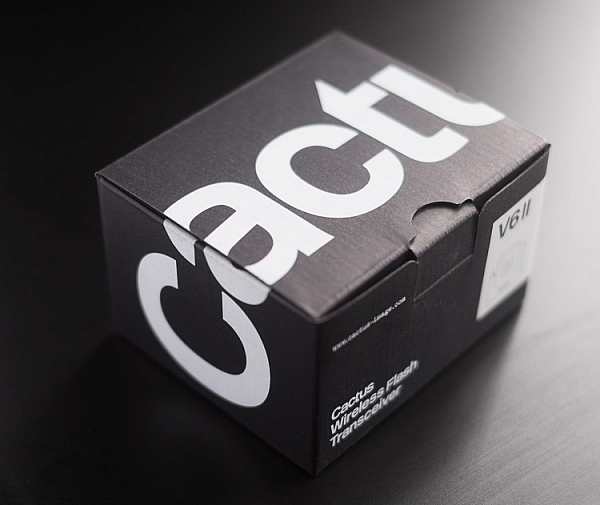
Cactus Wireless Flash Transceiver V6 II - box

The Cactus V6II transceiver box.

This means there’s practically universal support for any flash you may have. The exception is flashes that have a high sync voltage. The units are cross compatible between systems, so you can use Pentax cameras with Olympus flashes, etc.
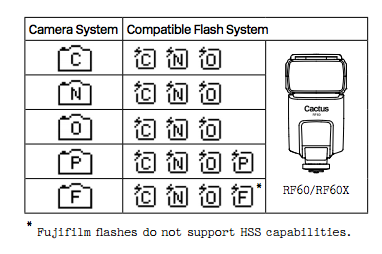
Camera and flash compatibility list for the v6II

Camera and flash compatibility list for the v6II

There are two High-Speed Sync modes; Normal and Power. Normal High-Speed Sync works up to 1/8000th of a second and uses a pulsing flash fire. Power Sync uses the full power flash as a normal fire, but allows you to exceed the normal sync-speed of the camera.

Getting started with the Cactus V6II

The trigger comes in a nicely designed box, containing the user manual, the trigger, and a hotshoe foot. Unlike other hotshoe feet, this one doesn’t have a screw thread for a lighting stand. It’s not an issue as I wasn’t expecting one anyway. The unit can be configured as either a transmitter or a receiver by selecting Tx or Rx from the power switch.

When it is on-camera as a transmitter, you have the four groups visible on the camera left-hand side. Marked A, B, C and D, pressing one toggles it on and off. This way you can select a specific group of flashes to change settings on. This works especially great with Cactus’ own flash, the RF60. Using the dial on the back you can change the power of the flashes on the group, or by pressing in the dial, swap to the lens zoom setting and change that instead.
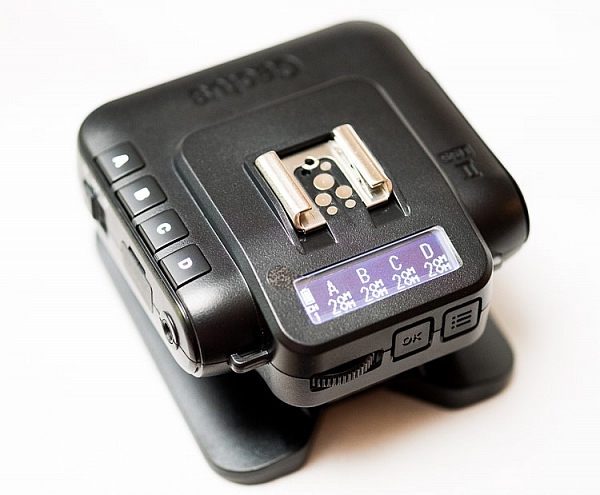
The unboxed Cactus V6II

The unboxed Cactus V6II

On the right hand side at the front is the test button. You can press it to test that the signal is going to either the RF60, or to another V6II set to receiver mode. One other useful feature is that there’s a hotshoe on the trigger, where you can add your existing trigger system, or another flash. Using your current triggers will allow the High-Speed Sync signal to pass through the V6II and into your flash system.

Setting up

My main portable system is based around Godox v850 flashes (more precisely, the Neweer versions rebranded as the TT850 – it’s the same flash). I also have the more powerful AD360, which responds to the same trigger (the older FT-16), so I find it a really useful system. All of the flashes are High-Speed Sync capable and have profiles in the trigger. I don’t actually use the built-in profiles for High-Speed Sync with Fuji cameras.

The Gear Setup for HSS

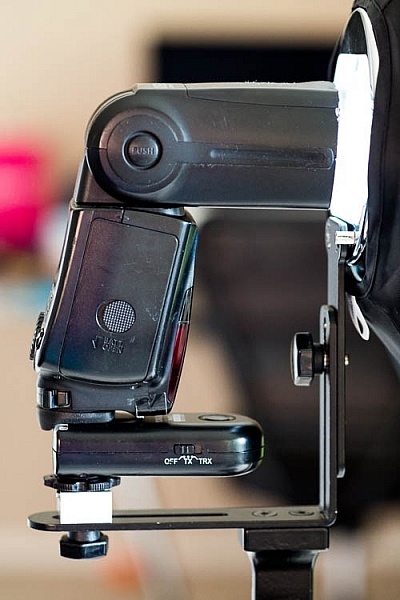
Using the older triggers, I set up the flash as normal. Once it’s all working I take the trigger off the camera and put the Cactus V6II on instead (switched to Tx mode). Next I put the old (FT-16) transmitter on top of the hotshoe on the V6II. Finally I set the flash to HSS mode by pressing a two button combination on the back. Each system has its own way of turning on HSS. Yes, this does mean you only need one Cactus V6II trigger with this system to get HSS working.

To get started, press the Menu button on the back right of the V6II unit. Turn the dial to Camera and Flash Setup. Set Camera to Auto, then set Flash to the brand that you use. Next use the Auto Profile for your Flash. For Fuji, you have an additional step, where you make the trigger learn the HSS response of the flash. For the AD360, I set the Flash to Nikon and the Profile to Auto (Nikon).

The Beta Test

So I set it all up, and with my trusty Godox 120cm Octabox on the Ad360, I sweet-talked my son into posing on his bike. That’s roughly three minutes of attention span before boredom hits. I’ve included some behind the scenes shots as well. The exposure was 1/4000th, f/2.8, ISO 200 with a 35mm f/1.4 lens. Even the nearby trees are out of focus. I absolutely love the bokeh in my first shoot with the trigger.
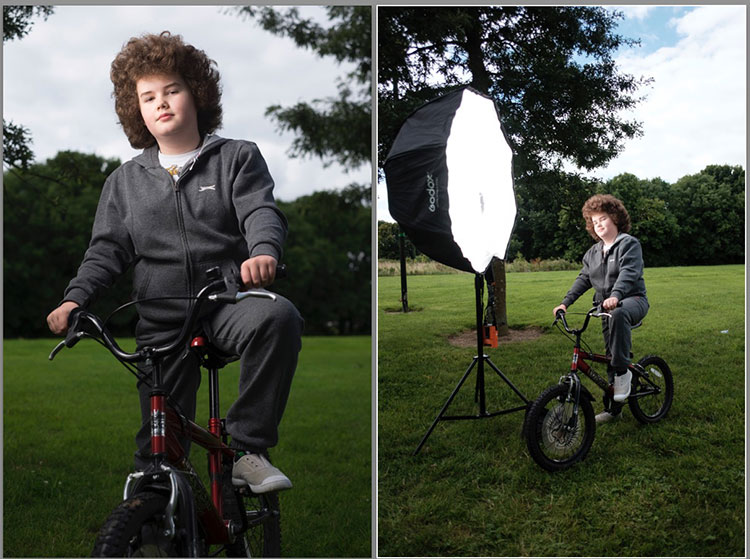
Cactus image v6ii review matt

Test Shoot #1

Testing means dragging out a range of people to shoot with. It also means working around their schedule. So this next shoot happened a little later than I would’ve liked, but I still got some good shots.

Once the trigger is set up, your main issue is dealing with power. Normally with manual flash, only the aperture has an effect on the apparent power of the flash. Below sync-speed, you can change the shutter speed to your heart’s content, and it won’t affect the flash. Not so with High-Speed Sync. Any change of shutter speed changes the flash power. The faster the shutter speed, the more flash power you need. It’s a new experience if you’ve gotten used to normal manual flash. Each stop increase in shutter speed requires about a stop of increase in the flash power.

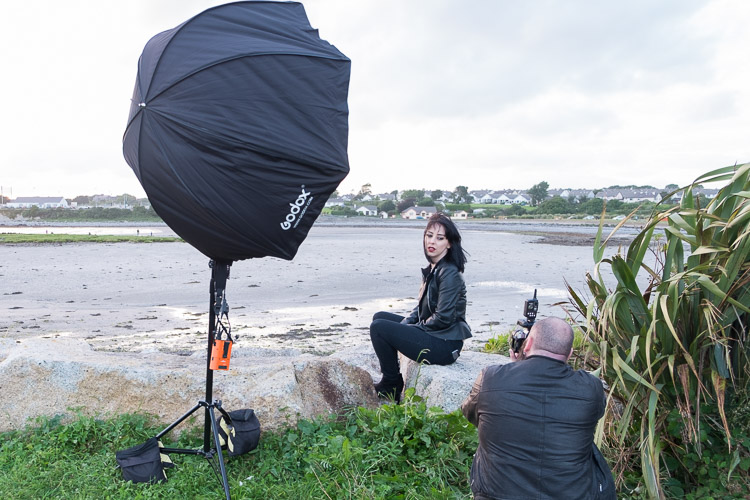
Here’s the first setup and the resulting image.
Cactus image v6ii review sunset 1

Behind the scenes shot showing the Godox AD360 flash with Godox 120cm Octabox. Taken by Ola.

The shot with HSS. The background is beautifully out of focus. ISO200 f1.8 1/4000sec 35mm on Fuji X-T10

The shot with HSS. The background is beautifully out of focus. ISO 200, f/1.8, 1/4000th, 35mm on Fuji X-T10.

I still managed to blow out the sun slightly, but the flash was at full power, so I couldn’t change the aperture to compensate. The octabox was just out of frame too. Normally, I shoot vertical portraits but for articles, horizontal looks better, so I just recovered this highlights in Lightroom.

Test Shoot #2

For the second shoot, I had more time, better planning, and less wind! Due to the model’s availability, it was later than I’d have like, but still had enough light to get shots using HSS (out of want rather than need!).

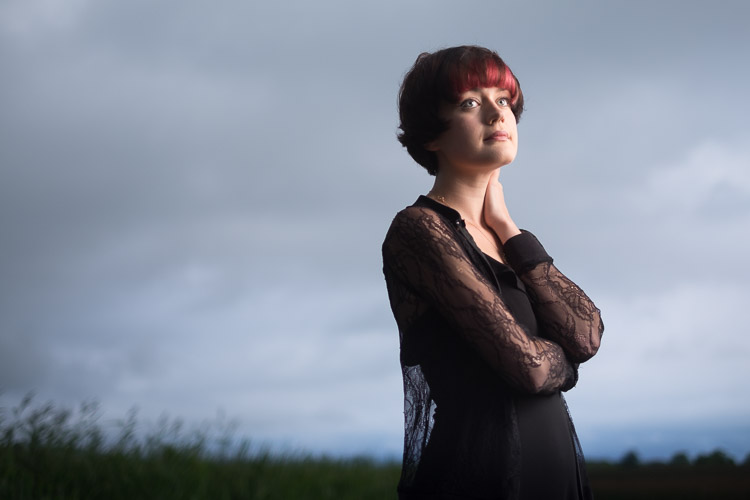
Here I’ve used my typical short lit Godox Octa setup for this using the Fujifilm X-T10 with a 35mm f/1.4 lens. I wanted to create tension and go for a cinematic feel to the image. The grass at the bottom is well out of focus and gives a slightly ethereal feel to the shot. The black clothes and the model peering out of frame seem to reference things in the past as if a loved one has passed.
cactus-v6ii-review-emma-1

ISO 200, f/1.4, 1/1600

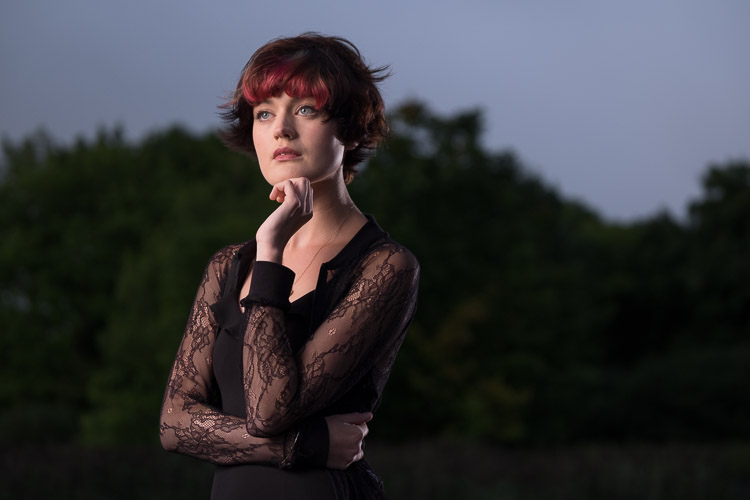
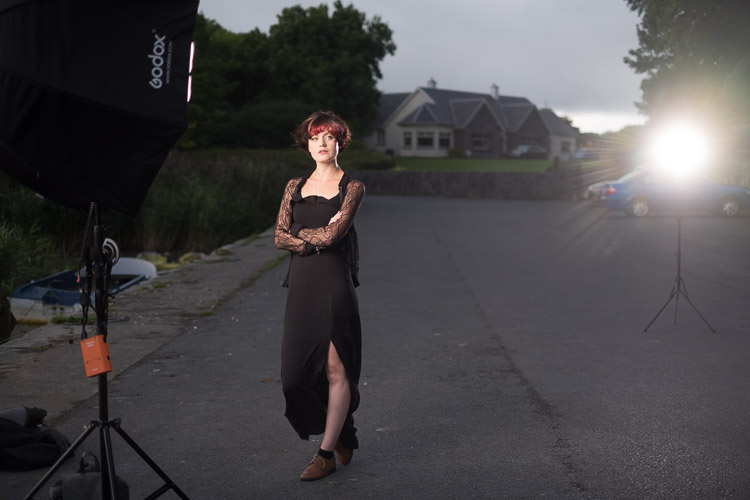
For the second shot, I wanted to bring in an additional element – a back light. I could’ve used one of the 850’s, but instead, I opted for the Cactus RF-60 flash. This has the receiver built-in and communicates directly with the Cactus V6II receiver. I set this to Group B and zoomed the flash to 105mm to allow it to throw the light further. Once in HSS mode, it triggered every time along with the AD360. I also went for the 50-140mm lens to get further back and compress the background more.
ISO200 f2.8 1/500sec. Shot with the 50-1400 f2.8 lens

ISO 200, f/2.8, 1/500th. Shot with the 50-140mm f/2.8 lens.

Here’s how the gear looked behind the scenes:
Cactus image v6ii review emma 3

Headshot variation

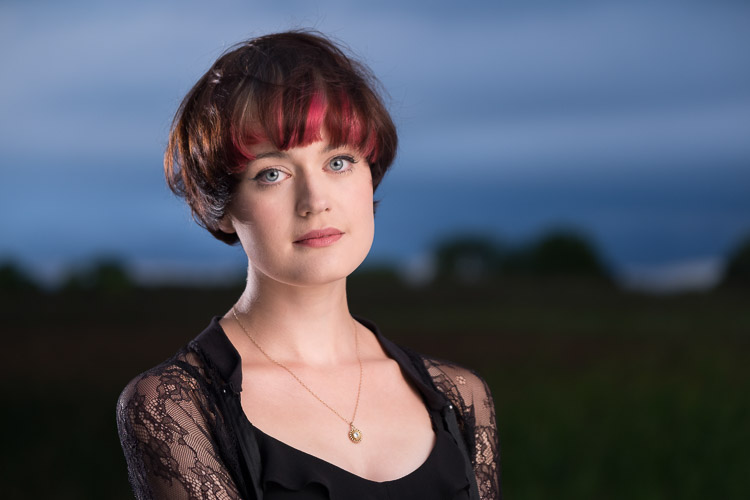
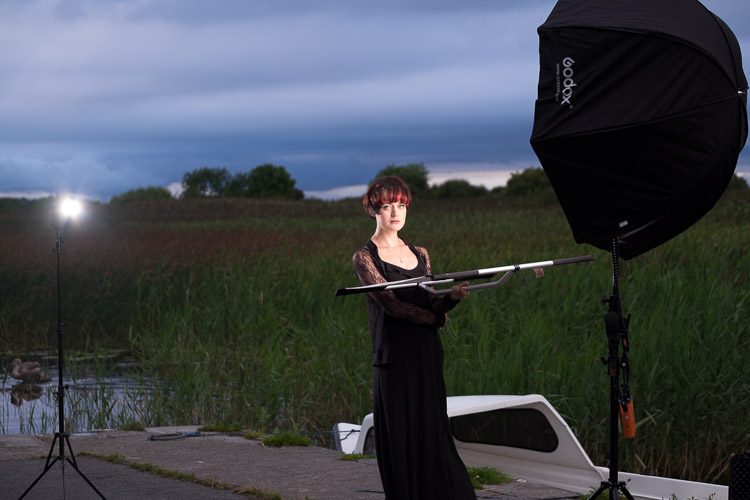
For the final look, I went for a headshot, so the Octa was moved to give her a soft loop light. I got the model to hold a reflector (in this case a California Sunbounce silver-white mini, using the silver side for contrast). It’s very similar to the last setup with the Cactus RF-60 acting as a kicker.
cactus-image-v6ii-review-emma-3

ISO 200, f/2.8, 1/500th.

Here’s the setup shot:
Cactus image v6ii review emma 5

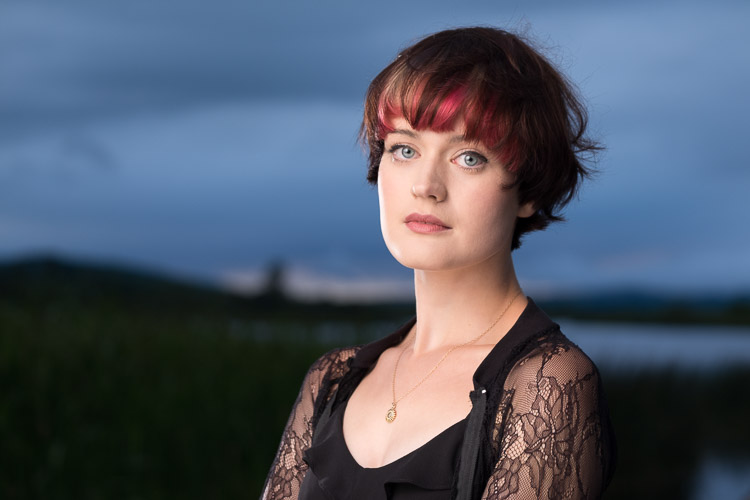
By swapping the side the Octa is on, so the kicker and the key are on the same side, you get a very different look for only a few minutes work.
cactus-image-v6ii-review-emma-5

Cross Platform Test: Fuji Camera – Canon Flashes

Using a second Cactus V6II trigger, I added a Canon 580EXII Speedlite to the setup to use with the Fuji camera. In this case, I set the flash up as Canon with an Auto Canon Flash Profile. Again with the flash set to HSS, I went through the learning process for HSS, and the flash worked perfectly with the Fujifilm in HSS mode. The 580EXII was set to ETTL, and I could control both the flash power and the flash from the V6II transceiver on the camera.

I still have my Canon 5D MarkIII (not for much longer), so I did a quick test with that as a system check. Again I used the Canon 580EXII Speedlite on ETTL, set to HSS. Because both transceivers were set to Auto, switching the units off and back on began a new detection cycle, successfully recognizing both flash and camera as Canon. After one or two test fires, it all worked perfectly. No pretty models for this demo, but something close to my heart instead.
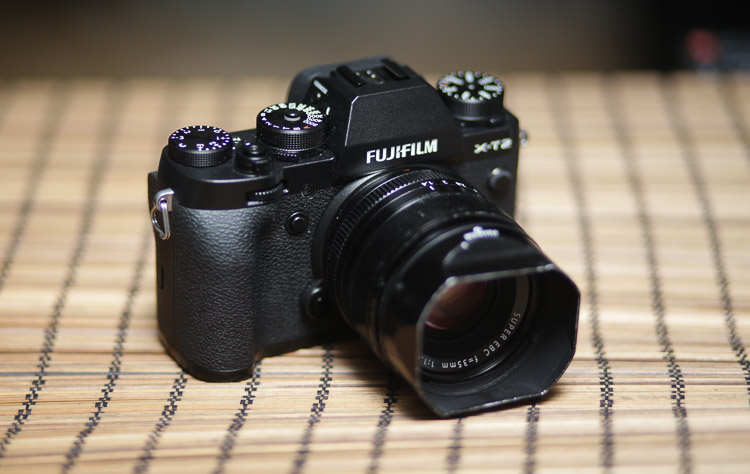
Shooting the X-T2 using a Canon 5DIII. The 580EXII flash was set up off camera, with the trigger set to auto detect camera, and the receiver set to auto detect flash. Set to ETTL mode, both power and zoom can be controlled from the trigger. The flash was bounced into the ceiling. ISO200 1/500sec f1.8.

Shooting the Fuji X-T2 using a Canon 5D MarkIII. The Canon 580EXII flash was set up off-camera, with the trigger set to auto-detect the camera, and the receiver set to auto-detect the flash. Set to ETTL mode, both the power and zoom of the flash can be controlled from the trigger. The flash was bounced into the ceiling. ISO 200, 1/500th, f/1.8.

Firmware Updates for the V6II

Another feature of this trigger is you can update the firmware as new features and profiles are added. During my testing period, two firmware updates became available. I also had the chance to test a beta version of the new Fuji X-T2, another testament to Cactus’ support for their product. For the public updates, I simply downloaded the updater app, ran it, and followed the instructions.
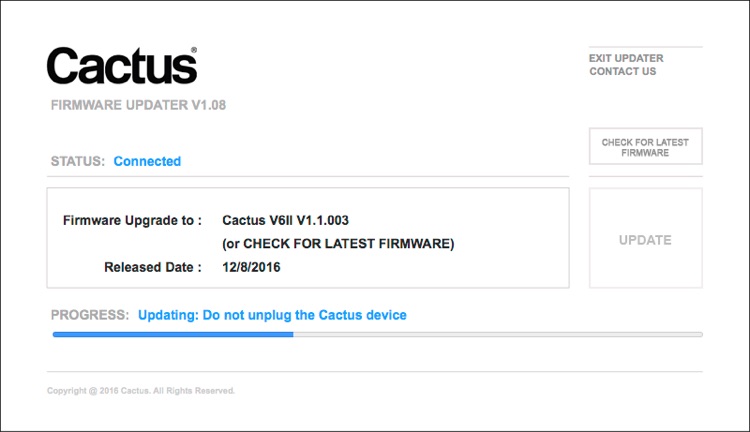
Cactus Firmware Updater

Cactus Firmware Updater

Pros of the Cactus V6II Triggers

  • Gives you High-Speed Sync ability across a range of camera systems and flashes.
  • Firmware upgradeable.
  • Works directly with the Cactus RF-60 flash.
  • Good range of channels and groups.
  • Power Sync allows additional sync speed options for non-HSS flashes.
  • Can work with only one transmitter and your existing triggers.

Cons of the Cactus V6II Triggers

  • Clunky – the shape isn’t as elegant as many others with a hotshoe passthrough.
  • One of the units I had suffered from a really tight battery clip. It’s more an annoyance than a real con as the batteries last a really long time. The clip on the other unit was perfect.
  • For Fuji users, there’s more work to get it going. For everyone else, no problem.

Verdict

I’m delighted with the Cactus V6II wireless flash trigger. It really works.

During the short time I’ve had the trigger, I’ve used it on a few magazine shoots, as well as the fun shoots I did to test it. It’s been great. Their support has been fabulous, and there’s a lot of information on their community page.

Would I recommend these triggers? Absolutely. They bring a new dimension to shooting portraits outdoors that can change your style completely.

googletag.cmd.push(function() {
tablet_slots.push( googletag.defineSlot( “/1005424/_dPSv4_tab-all-article-bottom_(300×250)”, [300, 250], “pb-ad-78623” ).addService( googletag.pubads() ) ); } );

googletag.cmd.push(function() {
mobile_slots.push( googletag.defineSlot( “/1005424/_dPSv4_mob-all-article-bottom_(300×250)”, [300, 250], “pb-ad-78158” ).addService( googletag.pubads() ) ); } );

The post Overview and Test of the New Cactus V6II Wireless Flash Trigger for High-Speed Sync by Sean McCormack appeared first on Digital Photography School.
Digital Photography School

 
Comments Off on Overview and Test of the New Cactus V6II Wireless Flash Trigger for High-Speed Sync

Posted in Photography


Overview of the Yongnuo RF-603 Wireless Flash Trigger

26 Oct

Off-camera flash is a key technique that can really differentiate your photography style and make you and your imagery appear more professional. The tools needed to achieve off-camera flash are relatively simple, consisting of just a flash unit and a cord or triggers to connect the flash to your camera. While a cord is by far the cheapest and most straightforward option, it’s also inconvenient since it physically binds you to your camera. Wireless triggers are a simpler solution, but they tend to be pricey, especially if you opt for Pocket Wizards. Enter a budget option: the Yongnuo RF-603 wireless flash trigger.

Yongnuo RF-603 wireless flash trigger

Features

Priced at under $ 35 for a set of two, the Yongnuo RF-603 works as both a wireless flash trigger and receiver. It can also function as a remote shutter release for your camera.

Yongnuo wireless flash triggers

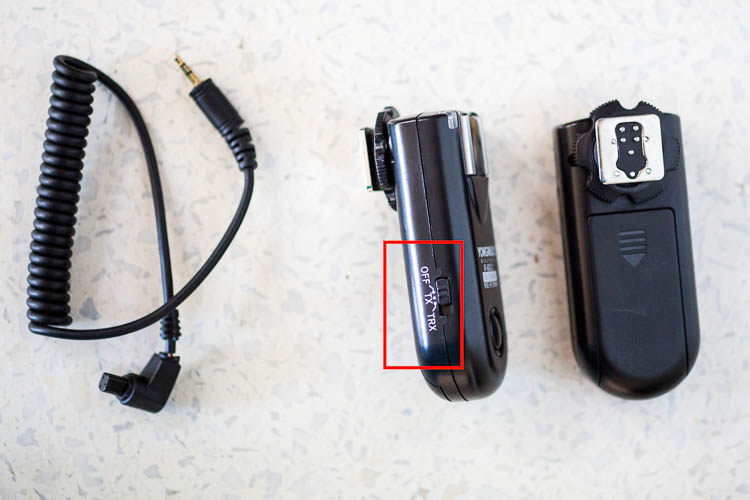
What’s in the box: two (2) flash triggers, one (1) N1 shutter release cable. AAA batteries not included.

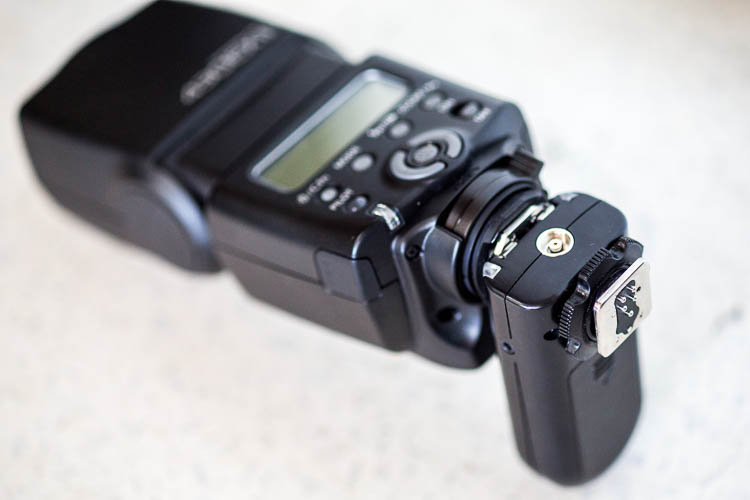
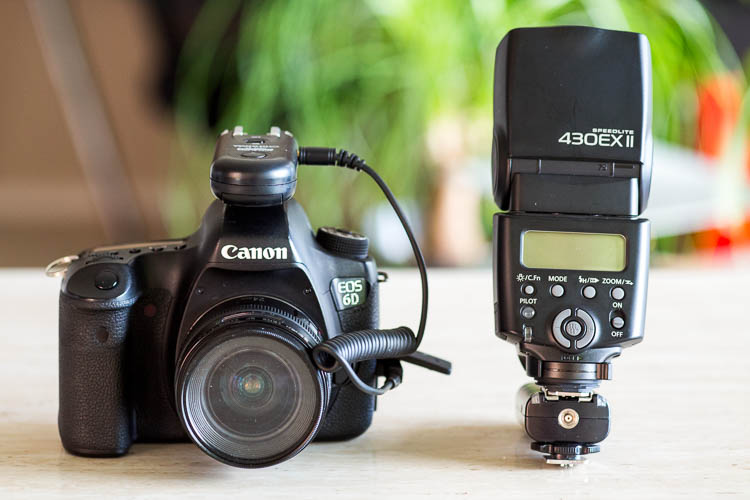
One of the triggers attaches to your off-camera flash unit via the hot shoe mount. Ihe other slides onto your camera’s hot shoe mount and also connects via the included N1 shutter release cable. Then you simply turn the triggers, camera, and flash on and you’re good to start firing away!

You can also purchase additional Yongnuo transceivers to trigger multiple flashes at once. To use the Yongnuo RF-603 as a shutter release, simply attach one unit to your camera’s hot shoe mount, turn both units on, and use the second unit to remotely fire your camera.

Yongnuo wireless flash triggers

How to Yongnuo RF-603 trigger attaches to your camera.

Yongnuo wireless flash triggers

Batteries

Besides being very reasonably priced, these Yongnuo triggers are powered by two normal AAA batteries. They use the battery power very efficiently, meaning you won’t have to constantly switch out drained ones. The triggers are also very slim and lightweight in size at just three inches long, making them easy to slip into a bag or pocket. These triggers are compatible with most DSLR cameras, but double check to make sure you order the correct model that is compatible with yours.

Yongnuo wireless flash triggers

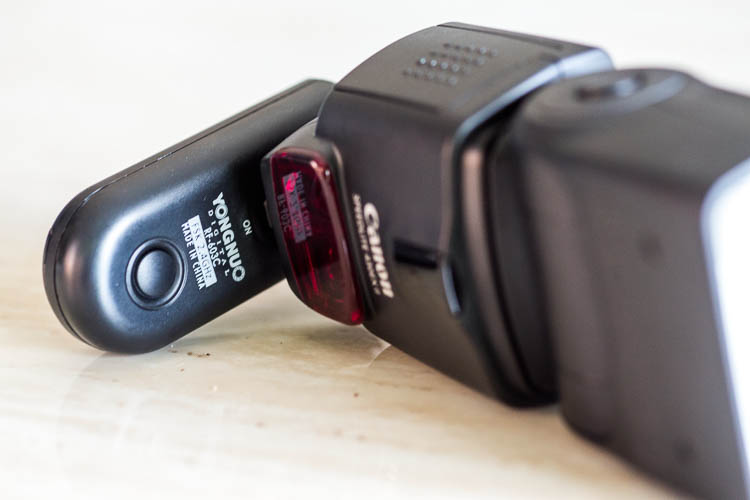
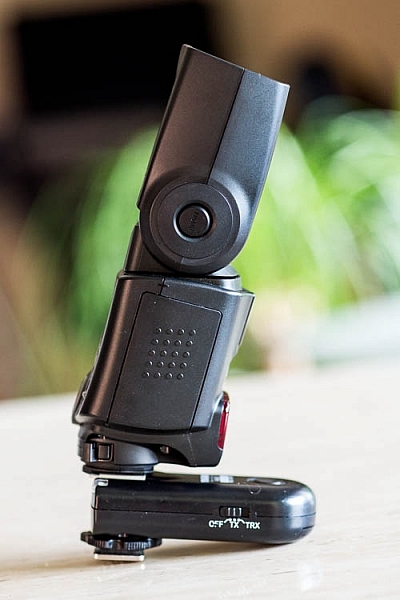
Slim and low-profile, the Yongnuo RF-603 doesn’t add a lot of bulk to your flash unit.

Shooting distance

Another point to note is that these Yongnuo triggers use a 2.4GHz wireless frequency, and the remote control distance is up to approximately 100 meters (328 feet). Synchronization speed can reach 1/320, but may only reach 1/250 depending on the exact scenario you’re shooting in.

Yongnuo wireless flash triggers

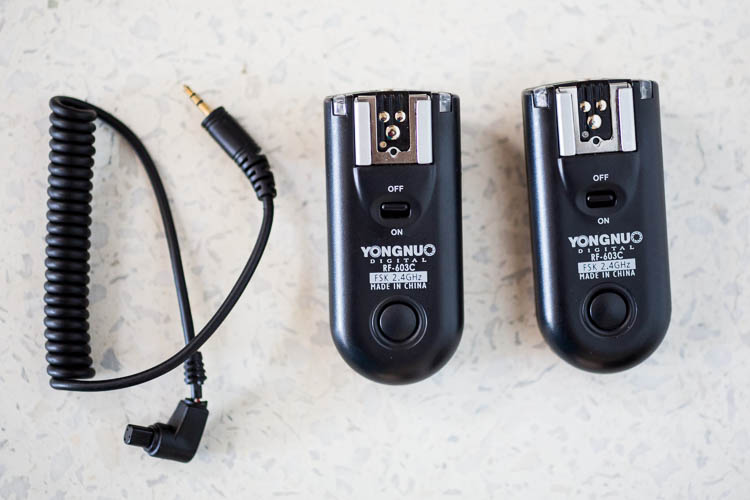
Yongnuo RF-603, the original version.

Yongnuo wireless flash triggers

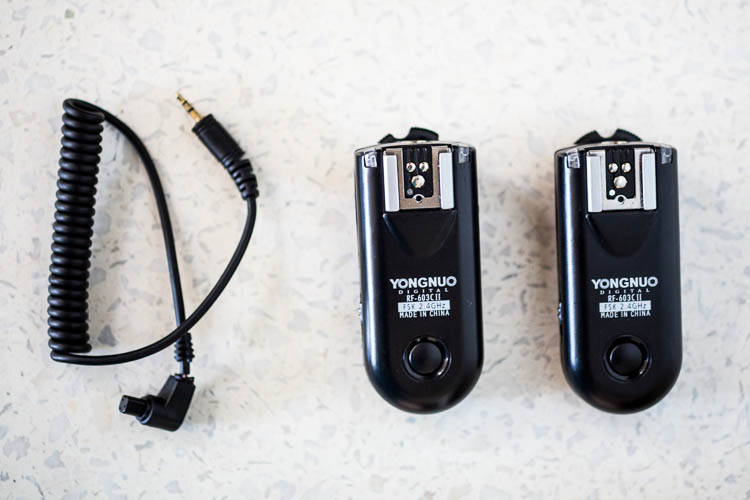
Yongnuo RF-603 II, the latest version.

Why the Newer Version is Better

When shopping around, you might notice that there are two Yongnuo RF-603 models: RF-603 and RF-603 II. The older, original version looks like it has recently been discontinued by the manufacturer, but it is still available for sale. Thus, it’s important to note several key differences between the two models, and why you’ll probably want to opt for the newer version. Also note that the original and newer transceivers are compatible with each other, so you can mix and match if you happen to have both versions.

Yongnuo wireless flash triggers

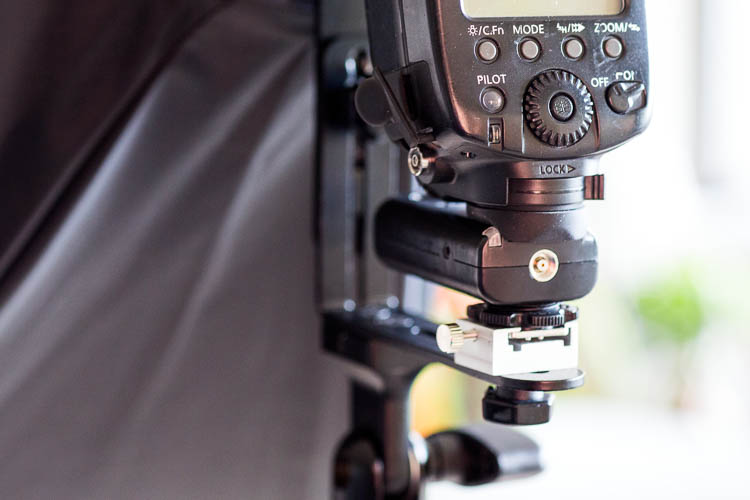
The round locking mechanism above the metal hot shoe of the Yongnuo RF-603 II (the original version does not have this feature).

Yongnuo wireless flash triggers

An example of the locking mechanism being used to attach the flash to a lighting stand.

Enhanced on/off switch is on the side for easier access

The original trigger has the on/off button on the top surface, which means it is completely covered up when attached to your flash. Thankfully, Yongnuo fixed this problem in the second version, and moved the on/off button to the side of the trigger. The newer version also includes the option of designating the trigger as off, in TR mode or TRX mode, rather than simply on or off.

Yongnuo wireless flash triggers

Even before the flash unit is fully attached, the on/off switch of the original Yongnuo RF-603 is already covered and hard to access.

Yongnuo wireless flash triggers

The newer Yongnuo RF-603 II added options to the on/off button and moved it to the side of the trigger.

Yongnuo wireless flash triggers

Having the on/off button on the side of the trigger makes it easier to access with the flash attached.

Who should use Yongnuo RF-603 Triggers

If you’re a photographer looking for a low-cost way to experiment with off-camera flash, Yongnuo triggers and even their own brand name flash units are highly recommended. Based on multiple user reviews and my own experience with Yongnuo products, they are dependable, efficient, and incredibly easy to use despite being considered budget options.

The only downside to these Yongnuo RF-603 triggers lies in their simplicity. Since this base model trigger only has a simple on/off button, you still have to manually adjust your flash settings if you want to tweak the flash power, flash zoom, etc. Upgrading to a more sophisticated trigger system such as the Yongnuo 622N TX ($ 85 for a pair approx.) gives you the full power of adjusting flash settings without having to even touch your flash. However, given the extra cost and complication of the Yongnuo 622N, only opt for this version if you truly need the extra features (in other words, stick with the RF-603 if you’re a beginner or on a budget).

googletag.cmd.push(function() {
tablet_slots.push( googletag.defineSlot( “/1005424/_dPSv4_tab-all-article-bottom_(300×250)”, [300, 250], “pb-ad-78623” ).addService( googletag.pubads() ) ); } );

googletag.cmd.push(function() {
mobile_slots.push( googletag.defineSlot( “/1005424/_dPSv4_mob-all-article-bottom_(300×250)”, [300, 250], “pb-ad-78158” ).addService( googletag.pubads() ) ); } );

The post Overview of the Yongnuo RF-603 Wireless Flash Trigger by Suzi Pratt appeared first on Digital Photography School.

Digital Photography School

 
Comments Off on Overview of the Yongnuo RF-603 Wireless Flash Trigger

Posted in Photography


3 Tips for Creating Double Exposures In-Camera Using Flash

20 Oct

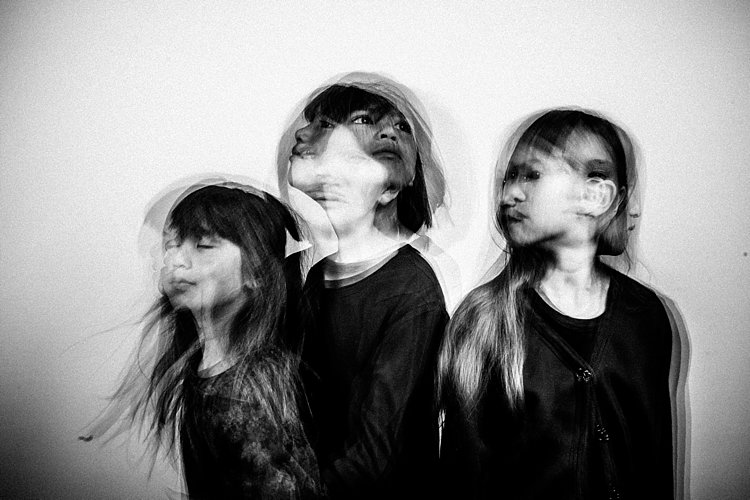
Have you ever wondered how double exposures are done in digital cameras? I have. Back in film days, we knew that to double expose a frame, all you needed to do is rewind it back to the frame you have just exposed, thereby taking two separate shots using one frame of the film. Nowadays with digital SLRs, there is no film to re-expose and no rewind mechanism to go back to a previous photo so you can re-shoot on top of it. However, double exposure and multiple exposures can be done in post-production quite easily. But this little tutorial will focus on how to take double exposure in-camera using a digital camera.

double-exposures-in-camera-tutorial

Equipment needed for double exposures

What you will need:

  • A tripod.
  • Your camera.
  • Remote trigger, receiver or transceiver.
  • Flash guns (speedlights) or strobes (one or two).
  • Some light modifiers (optional) such as umbrellas, softboxes, or octaboxes.
  • A backdrop or wall.

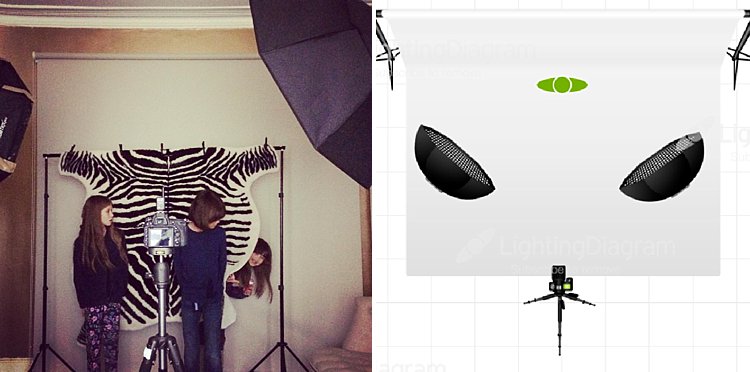
For my experiment below, I used two strobes mounted on stands and modified by gridded octaboxes. I used Paul Buff’s Cybersyncs for the wireless remote transceiver system. I also had three backdrops: one black, one beige and one patterned. See the image below for my studio setup and an iPhone picture of behind the scenes.

double-exposure-tutorial-in-camera

The camera and flash settings

The strobes were kept on a constant setting and I chose the lowest power. My ISO was also on the lowest setting (ISO 100) for most of the shots except for the f/16 ones where I cranked it up a little. The aperture varied between f/8 – f/16, depending on the look I was after and the length of my exposure. Shutter speed also varied between one second to a few seconds, to bulb. In other words, experiment until you get the look right.

How to take the double exposure

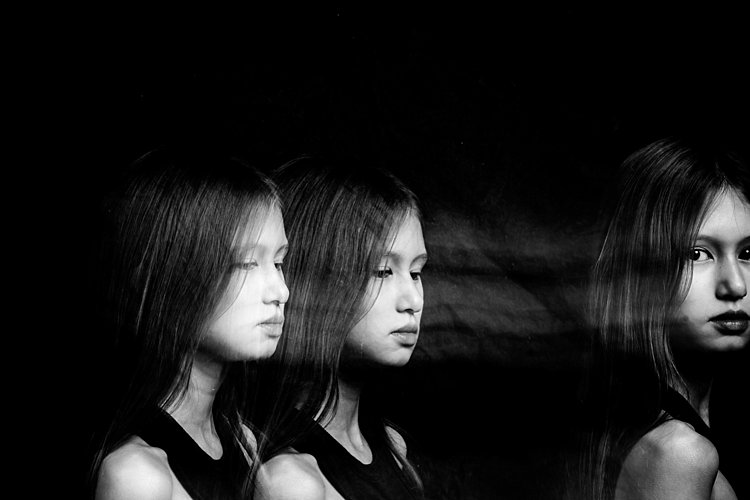
This is the trick. While the camera is exposing the image so that the shutter is open, keep triggering the flash. For these shots, I triggered the flash 2-4 times depending on the length of the exposure and how fast I could press the trigger button. The flash freezes the action so the more time the flash fires the more frozen actions you get on your image.

This leads us nicely to the first tip.

#1 Exaggerated movement is key

double-exposures-in-camera-tutorial

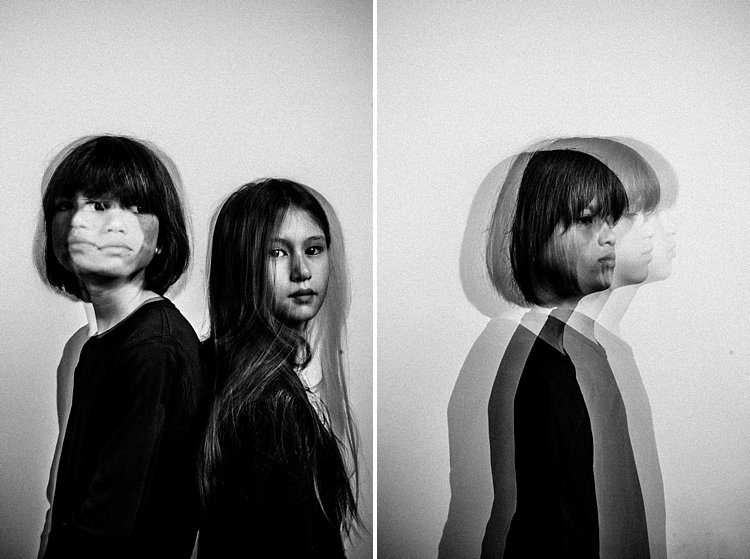
If your subject makes very small and minor movements, the likelihood is the images will sit on top of each other. This may result in one final image that looks like a blurry mess as in the photo above rather than many separate frozen images on a single photo as shown in the photo below. It is better to tell your subject to move distinctly away from the first position so the movements are separate. The camera still captures the trail of movement as a blur. But when you trigger the flash, that particular moment is rendered sharp and still.

double-exposures-in-camera-tutorial

I asked my kids to walk across the frame, counting each step and on a certain count to turn their heads. I would trigger the flash when they moved sideways or turned their heads. At other times I asked one of the children to only join the frame on the third flash so that there is only one of her that registers. I also got them to walk towards me (see photo at top of article). It was at that stage that I changed my aperture to the smallest my lens allowed, in this case, f/16 so that I could still get the head sharp at various depths of field.

double-exposures-in-camera-tutorial

In the photo below, I got my kids to shake their heads as fast and as many times as they could. I wanted the focus here to be the movement rather than their frozen faces. Don’t be afraid to experiment. The beauty of digital is that unlike film, you have an infinite number of frames at your disposal so can afford to make many mistakes until you get what you are looking for.

double-exposures-in-camera-tutorial

#2 A dark background is better

Compare the image above with the light background to the other images with the black background. The difference in the final image is vast. I prefer the dark background where my intention was to freeze several portraits and the lighter background where my focus was on capturing the trail of movements. Overall I shot and preferred more of the images with a dark background as the delineation between actions and the clarity of subjects are easier to see. Contrast between the skin and other lighter parts of the image was also easier to achieve compared to images shot with the beige background. In the photo below, I edited quite aggressively to get the contrast I wanted. I also added grain to simulate a film look.

double-exposures-in-camera-tutorial

#3 Experiment with materials and textures

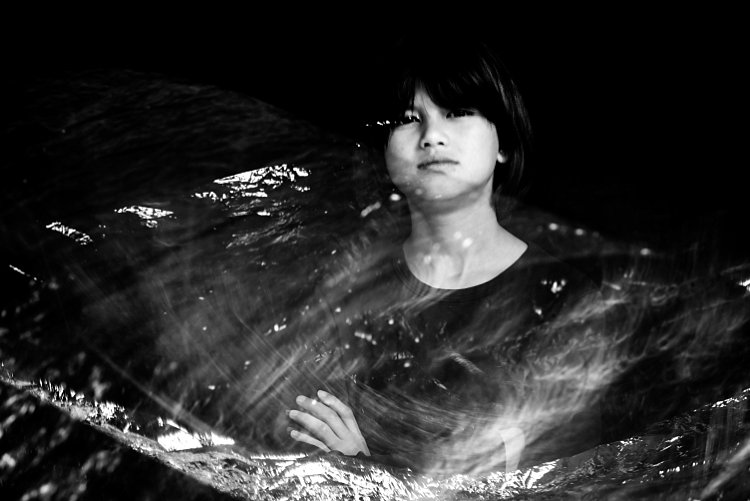
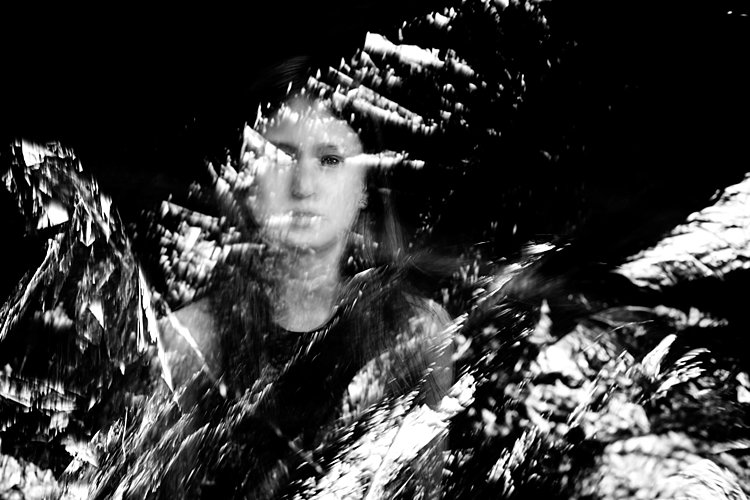
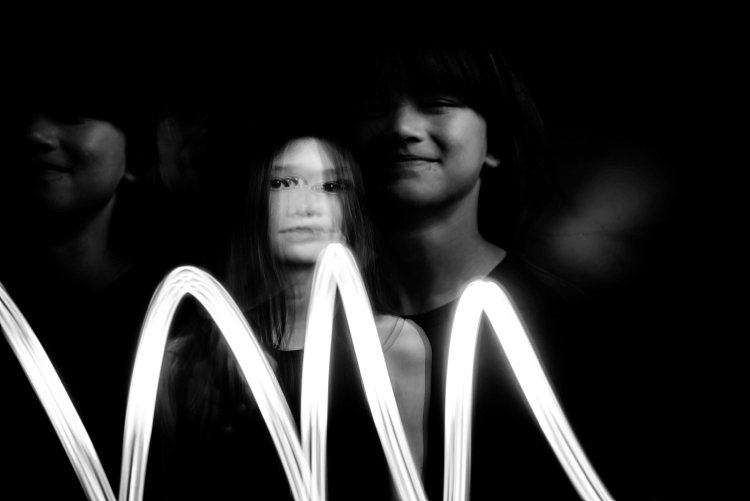
Bring in other materials such as aluminum foil. This one here is an emergency blanket. Two of my kids stood on either side, held and waved the blanket up and down in front of the middle child so the slow shutter captured some of the movement of the foil. The kids also carried  a torch (flash light) and did some light painting. The problem I found with both photos was the blurry look of their faces. Because they did not do big movements with their bodies, hence the frozen photos captured by each flash just got stacked up in roughly the same spot. Other things you can use are glow sticks, flashing lights, moving lights, iPhone and iPad screens – pretty much anything that reflects or emits light.

double-exposures-in-camera-tutorial

double-exposures-in-camera-tutorial

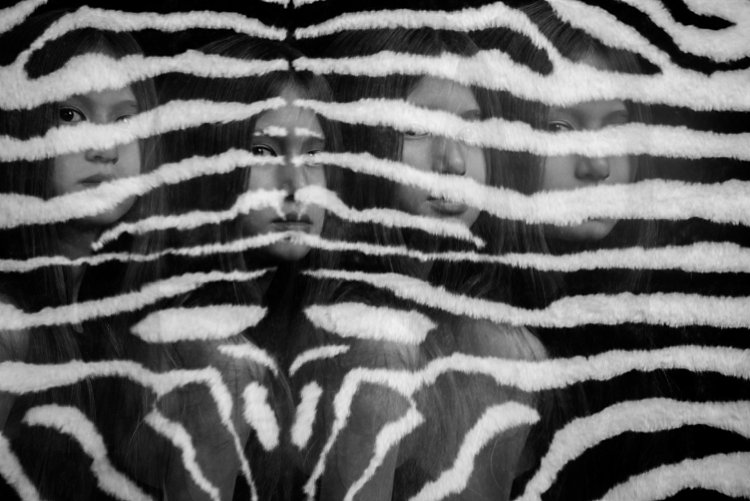
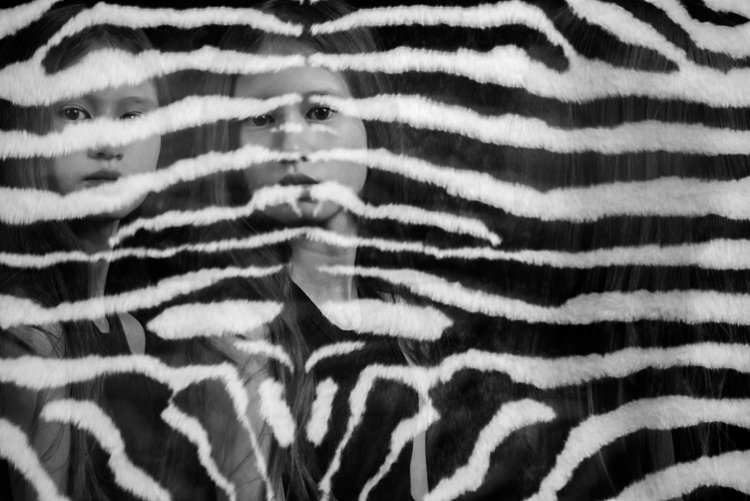
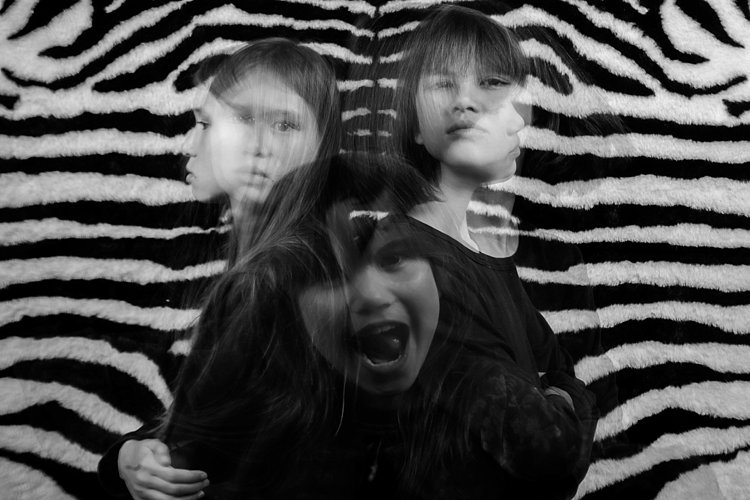
Don’t be afraid to experiment with backgrounds too. In the photos below, I changed the background to a zebra striped black and white rug just because I wanted to see what would happen. I used the same movement techniques as above and the same camera and light settings but the results were very different and unique. The last image below was a happy accident. My third child popped her head up on the third flash, but she came closer to the camera than I had intended so the flash didn’t quite illuminate her face enough. However, I thought this looked really effective as it provided the gray tone of the image as well as a solid form in the middle thereby making the overall image more dynamic and interesting.

double-exposures-in-camera-tutorial

double-exposures-in-camera-tutorial

double-exposures-in-camera-tutorial

I hope you enjoyed this little tutorial on in-camera double exposures using flash. If you have more ideas, do share them here in the comments below!

googletag.cmd.push(function() {
tablet_slots.push( googletag.defineSlot( “/1005424/_dPSv4_tab-all-article-bottom_(300×250)”, [300, 250], “pb-ad-78623” ).addService( googletag.pubads() ) ); } );

googletag.cmd.push(function() {
mobile_slots.push( googletag.defineSlot( “/1005424/_dPSv4_mob-all-article-bottom_(300×250)”, [300, 250], “pb-ad-78158” ).addService( googletag.pubads() ) ); } );

The post 3 Tips for Creating Double Exposures In-Camera Using Flash by Lily Sawyer appeared first on Digital Photography School.

Digital Photography School

 
Comments Off on 3 Tips for Creating Double Exposures In-Camera Using Flash

Posted in Photography


Bowens introduces Generation X studio and portable flash heads with TTL radio control

07 Oct

UK flash manufacturer Bowens will use the PhotoPlus Expo to launch its new range of Generation X flash heads in the USA. The new range has a completely new design and features a portable model that is powered by an in-body rechargeable battery.

There are four heads in the new range: the XMT 500, XMS 500, XMS 750 and XMS 1000, all of which offer radio controlled triggering and control via new on-camera transceiver XMSR Trigger. The XMS mono-block heads are designed for indoor and in-studio use while the XMT 500 takes a removable lithium ion cell that the company claims delivers up to 500 full power bursts per charge. This portable head also offers TTL control for Canon, Nikon and Sony users.

All of the new heads have a high speed sync mode that allows shutter speeds as short a 1/8000sec, and the XMSR radio remote allows such high speed shooting with any brand of camera. The XMT 500 has a minimum flash duration of 1/10,309sec, and the XMS heads have shortest durations of 1/5180sec, 1/4800sec and 1/4400sec, which makes them all suitable for freezing action and moving subjects.

The XMS 500 has 7 stops of adjustable power, while the XMS 750 and XMS 1000 offer 8 stops. The XMT can manage 9 stops and has a lowest output of just 2Ws. The battery-operated head has recycle times of between 0.01 and 2 seconds, and the XMS 1000 can also recover from a full power burst in 2 seconds. Bowens claims each of the heads has a flash-to-flash consistency of +/-30°K and +/-0.05 stops.

Bowens is particularly proud of a new adjustment lever that allows the heads to be tilted very quickly without the user having to wind open a bolt. The new lever just flips open to allow the angle of the head to be adjusted and then flips back to lock the head in position.

XMT 500            $ 1,799.99/£1199
XMS 500            $ 1,099.99/£799
XMS 750            $ 1,299.99/£899
XMS 1000          $ 1,499.99/£999
XMSR Trigger    $ 289.99

For more information see the Bowens website.

Press release

Bowens Launches Game Changing Generation X Flash Range

Upper Saddle River, N.J. (October 5, 2016) – Manfrotto Distribution, Inc., distributor of Bowens products in the United States, proudly announces the launch of the new Generation X flash range by Bowens. These innovative units will debut in the U.S. at PhotoPlus Expo in New York City later this month and mark a renaissance for the legacy lighting manufacturer.

Generation X comprises two new flash systems: XMT – an all-in-one battery unit for location lighting and XMS – engineered to be the go-to system for photographers who need a function-rich and completely reliable flash in the studio.

Announcing the launch, David Hollingsworth, Marketing Manager, said, “Generation X is just the first step in relaunching Bowens to the imaging world. These barrier-breaking new products combine state-of-the-art technology and cutting-edge design and are the result of many months of very intense market research and product development. They will be the vanguard of our plans for ongoing and regular new unit roll-outs in coming months and years.”

Added Hollingsworth, “We believe these are simply the best lights in their class available on the market today. New-look Bowens is creating beautifully designed and engineered products, tailored to our customers’ needs.”

John Gass, Technical Director said, “Generation X is the result of highly-focused analysis of our customers’ feedback through the years. These new units are revolutionary products which we believe are absolutely unbeatable in their class in terms of functionality, aesthetics and cost.”

He added, “For decades, customers have frequently described our products as ‘workhorses’ in the studio and on location. Now the workhorse has been transformed into a stallion; we tested the XMS at full power every five seconds over consecutive days and we couldn’t force this product to overheat.”

Generation X – at a glance:
The all-new 500Ws XMT boasts TTL and high speed sync functionality (up to 1/8000s) compatible with Canon, Nikon and Sony cameras: 9-stops of flash power adjustment; flash durations as short as 1/10309s: faster recycle times than ever before (as rapid as 0.01s): easy swap lithium-ion battery provides up to 500 full power flashes per charge: rear curtain sync; sync delay and strobe mode allow creative set-ups on the move.

The XMS, available in 500,750 and 1000Ws models (all fully controllable via the XMSR 2.4 Ghz radio control and trigger) features multi-voltage operation. These units offer outstanding specification with faster recycling times and flash durations. The XMSR model includes groundbreaking Bowens ‘Sync Offset’ functionality, enabling photographers to embrace any brand of camera to shoot at high sync speeds – up to 1/8000s.

The following models will be available this fall:
XMT 500 $ 1,799.99
XMS 500 $ 1,099.99
XMS 750 $ 1,299.99
XMS 1000 $ 1,499.99
XMSR Trigger $ 289.99

For additional information or to learn more about Bowens products, visit: https://www.manfrotto.us/bowens.

Articles: Digital Photography Review (dpreview.com)

 
Comments Off on Bowens introduces Generation X studio and portable flash heads with TTL radio control

Posted in Uncategorized


Phottix introduces Canon RT version of its battery-powered Indra500 TTL studio flash head

23 Sep

Flash and accessory manufacturer Phottix has announced a new version of its Indra500 studio head that has a built-in TTL radio receiver for Canon’s RT flash system. The new head can be controlled directly from a Canon RT radio Speedlite in the hotshoe of a compatible camera or by using a Canon ST-E3 or Phottix Laso transmitter instead. The head can be used in flash networks alongside 600EX ll-RT and 430EX lll-RT radio-controlled Speedlites as well as non-RT flash guns that are fitted with a Laso receiver. The Laso receiver converts optically-triggered flashguns so that they can be controlled via 2.4GHz radio signals.

In all other ways the Indra500 LC TTL head is the same as Phottix’s standard Indra500 heads that offer TTL control with Canon, Nikon and Sony cameras via the Phottix Odin radio communication system. The heads have a maximum output of 500W/s and provide high speed sync options as well as manual output control across eight stops from 1/128th power. The heads take Bowens S-mount accessories and can be powered by the Phottix Indra 500mAh li-ion battery pack or via a mains adapter.

The company hasn’t announced a price for the Indra500LC TTL but the existing heads retail for $ 1419 including the battery, battery cable, a 5in reflector and a carry case.

For more information see the Phottix website.

Press release

Another Phottix First: Phottix Indra500LC TTL Studio Light compatible with the Canon RT System

Phottix presents the first studio light system compatible with Canon’s radio flash system. The Indra500 TTL, introduced in 2014, was the next generation of Phottix’s innovative TTL products – the Indra500LC takes that one step further – incorporating the radio control and triggering of the Canon RT and the Phottix Laso triggering systems. The Indra500LC gives photographers 500W/s of TTL power, opening up new possibilities and allowing photographers to shoot in shutter and aperture priority modes with incredible power.

High Speed Sync
With the Phottix Indra500LC TTL’s High Speed Sync function photographers can shoot at higher sync speeds* allowing wider apertures while still being able to control ambient light. In manual mode the Indra500LC offers 8 stops of power adjustments – from full power to 1/128 in 1/3rd stop increments. With Stroboscopic Mode, the Phottix Indra can be used for special effect and creative shooting with flash frequencies of 1-100HZ and flash counts of 1-100 times.

Built-in Triggering
The Phottix Indra500LC TTL has the power and control of the Canon RT and Phottix Laso triggering systems built-in. Switch between TTL and Manual modes, adjust EV and manual power levels and use high speed sync, all from the Canon ST-E3, compatible Canon RT Speedlites and the Phottix Laso Transmitter – no extra hardware is needed.

Canon non-RT Flashes
One of the best things of the Phottix Laso Triggering system is its ability to incorporate older non-radio Canon flashes into a photographer’s workflow. There’s no need to set aside older non-RT flashes such as the venerable 580 EXII – add a Phottix Laso Receiver and gain the ability to control and trigger it. Add legacy flashes, Canon RT-enabled flashes – and the Phottix Indra500 LC for a complete lighting solution.

“This the next logical step for the Indra series,” said Phottix CEO Steve Peer. “Canon users can now build on their current lighting system and retain the amazing functionality that system offers”

The Indra500LC comes with a Li-Ion battery, cables, charger, carrying bag and a new, smaller 5” reflector to make the Indra500 LC easier to pack and take on location.

*On compatible cameras.

Articles: Digital Photography Review (dpreview.com)

 
Comments Off on Phottix introduces Canon RT version of its battery-powered Indra500 TTL studio flash head

Posted in Uncategorized


Metz mecablitz M400 flash unveiled at Photokina

20 Sep

As promised earlier this month, Metz has launched a new flash at Photokina, the Metz mecablitz M400. This model is the flagship for the company’s new line of compact flash devices; it is more than 30-percent smaller than ‘traditional flash units,’ says Metz. Despite its compact size, the M400 is said to offer high-performance for all varieties of photographers and videographers.

The mecablitz M400 flash offers Auto TTL mode, an adjustable LED video light, a max guide number of 40 (ISO 100), a 24-105mm motor zoom function, a 12mm integrated wide-angle diffuser and a completely pivotable reflector including a removable reflector card. The flash also includes an integrated OLED display with what Metz says is a simplified user interface for viewing and adjusting settings.

The flash is available in variants for Sony, Nikon, Canon, Fujifilm, Pentax and Olympus/Panasonic/Leica cameras. Though the M400 is currently listed on Metz’s website, pricing and availability information hasn’t yet been provided.

Via: Metz

Articles: Digital Photography Review (dpreview.com)

 
Comments Off on Metz mecablitz M400 flash unveiled at Photokina

Posted in Uncategorized


Minimum flash duration of 1/63,000sec makes the Profoto D2 the fastest TTL monolight in the world

17 Sep

Flash manufacturer Profoto has launched what it is describing as the fastest TTL monolight heads in the world. The Profoto D2 studio flash heads have a shortest output duration of 1/63,000sec, can run at a rate of 20 bursts per second and can sync with camera shutter speeds as short as 1/8000sec. The heads come in two output varieties, 500Ws and 1000Ws, with both featuring full TTL control for Nikon and Canon users via the company’s AirTTL 2.4GHz radio system. The heads can also be controlled in manual mode with 10 stops of output in 1/10th stop increments.

The heads are available to order now, retailing for $ 2000/£1554 for the Profoto D2 1000Ws AirTTL Monolight and $ 1500/£1194 for the Profoto D2 500Ws AirTTL Monolight.

For more information see the Profoto website.

Press release

Profoto releases the D2, the world’s fastest monolight with TTL

With the ability to freeze action at up to 1/63,000 of a second, to shoot bursts of 20 images per second and sync with camera shutter speeds as fast as 1/8,000 of a second the D2 is redefining the definition of speed in monolights.

“For a photographer, every new day is a new challenge. So for them, speed isn’t one thing – it’s many. That’s why we created the D2 to be remarkably fast in every way” says Johan Wiberg, Product Manager at Profoto.

A photographer might need to freeze action with absolute sharpness. The D2 brings pin sharp clarity with a flash duration of up to 1/63.000 of a second, which makes it faster than most high end studio packs on the market. Better still, it offers supershort flash duration across the full energy range.

If flash duration is exceptionally fast, recycling time is equal to it. With the D2 you can shoot up to 20 flashes per second . That allows you to catch 20 versions of the same moment, and quite often that’s the difference between capturing a good image and a great image.

Bringing yet another dimension to speed is Profoto’s High-Speed Sync technology (HSS). This allows the D2 to sync with the fastest shutter speeds available. An advantage when you need to catch a deep blue sky or take full control of ambient light.

The D2 can also help to speed up workflow because it’s equipped with patented TTL technology. You can point-andshoot and the D2 will automatically adjust its output for perfect exposure. But manual mode is available at click of a button, so switching between both modes with settings intact just makes everything move faster.

In terms of output, the D2 is available in 500Ws and 1000Ws versions. At full power you’ll easily overpower the sun, or fully illuminate a larger Light Shaping Tool. Both versions come with a super wide 10 f-stop energy range and superior color consistency over the entire range. So leave the ND filters at home and add just a hint of light if needed.

Above all, this is Profoto Light Shaping equipment. So the design is smooth and minimal, it’s intuitive to use, the build quality as you’d expect, is rugged and sturdy, and it can be used with more than 120 different Light Shaping Tools.

“We designed the Profoto D2 to be the world’s fastest monolight,” says Johan Wiberg, Product Manager at Profoto. “But the speed is not a gimmick. We truly believe that more speed allows you to be more creative and consistently take better images regardless of what challenge you face – with the D2, you’re always up to speed.”

For high volume production when you shoot thousands of images per day, like packshot photography, there is an optional Quartz flashtube available.

The D2 is released Sept 15, 2016. Both the 500Ws and 1000Ws versions are available in different kits configurations.

Learn more at profoto.com/d2

Articles: Digital Photography Review (dpreview.com)

 
Comments Off on Minimum flash duration of 1/63,000sec makes the Profoto D2 the fastest TTL monolight in the world

Posted in Uncategorized


Metz teases 30 percent smaller flash ahead of Photokina

07 Sep

German company Metz has teased a new generation of flash products ahead of Photokina, where it plans to launch the first flash model in this new product line. According to a post on the company’s Facebook page, the new flash will be 30% smaller than previous models thanks to ‘new developed technologies and construction.’ Metz says it will post more details about the flash on its Facebook in the days leading up to Photokina.

Via: Photo Rumors

Articles: Digital Photography Review (dpreview.com)

 
Comments Off on Metz teases 30 percent smaller flash ahead of Photokina

Posted in Uncategorized


How to Use Your On-Camera Speedlight to do Bounce Flash Effectively

26 Jul

An on-camera flash (or speedlight) is the tool many photographers own, but few know how to use. Every day I see this amazing piece of equipment go to waste, slamming harsh light into a subject, when it could be caressing it with soft, directional illumination. The flash is a sculptor’s chisel, not a sledgehammer. You just need to know some basic technique.

Photo6

In the 400-plus weddings I’ve photographed over the years, much of what I shoot indoors is lit with a speedlight. I have a trunk full of studio lights that I’ll set up and use sometimes at events, but more often than not, I end up preferring the photos from my little on-camera flash (not to be confused with the built-in one). You can create beautiful light bouncing your flash off of walls, ceilings, mirrors, professional wrestlers or herds of sheep.

Let me illustrate with a few examples, using my favorite model, my wife Karen. Every photo below is taken with the same lens (50mm), shutter speed (1/180), and aperture (f/4). We also don’t move at all. We are about 10 feet in front of a gray paper backdrop, white walls to the left and right are about seven feet away. The ceiling is also white. The only thing that changes in these photos is that I am spinning my flash head into different positions.

WHAT NOT TO DO

Photo1

In our first example, I’ve photographed Karen with direct flash. (She is laughing because she thinks I’m incompetent for having my flash in that position).

This is harsh, flat light. There is a nasty shadow on the background. This is the opposite of bounce flash, and typically a last resort flash position. Let’s move on.

A SLIGHT IMPROVEMENT

Photo2

Here I’ve improved things a bit by bouncing my flash off the ceiling. This has softened the light, but it is still coming from overhead, creating unattractive shadows under her eyes, and a lack of catchlights. We can do better!

LOOKING GOOD

Photo3

Here I’ve pointed my flash to the side, so it bounces off the wall to my left, giving me some softness and better directionality and volume of light. I think this is a keeper!

WHAT HAPPENED HERE?

Photo4

Just for fun, I turned my camera upside down here and pointed the flash at the floor, so the light is coming up from below. We call this Franken-light (monster lighting). Not something you are going to do a lot, but if you ever get hired to photograph a vampire, this is a good one to have in your toolkit.

All of these photos illustrate the two main factors I think about when shooting bounce flash: light direction and light quality (softness).

LIGHT DIRECTION

This just refers to the direction the light is coming from, something that is very easy to control with a bounce flash. If you point your flash up at the ceiling, it will hit your subject coming from above. If you bounce your light off a wall to the right, the light will come back from the right, etc.

Photo5

Check out this simple portrait of a wedding guest (above). She was looking to her right in the photo, so I bounced the light off a wall on that side to get some beautiful light into her face. If the next person I want to photograph is facing the other way, all I have to do it spin my flash 180 degrees and bounce it off the opposite wall. This sort of versatility is wonderful when shooting live events.

Photo6

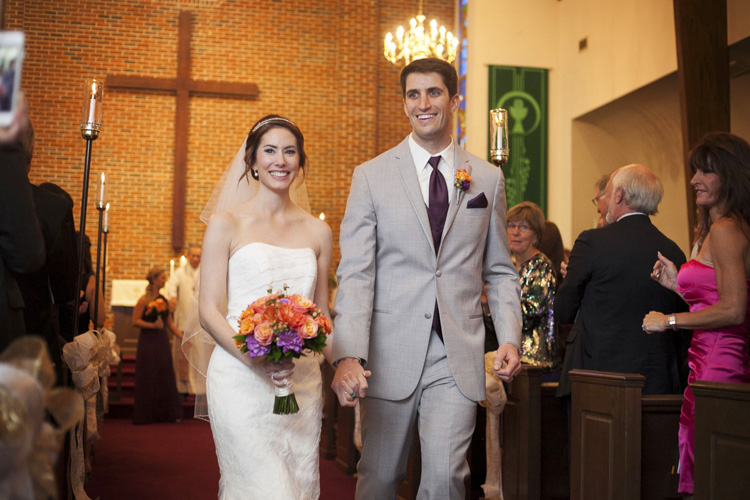
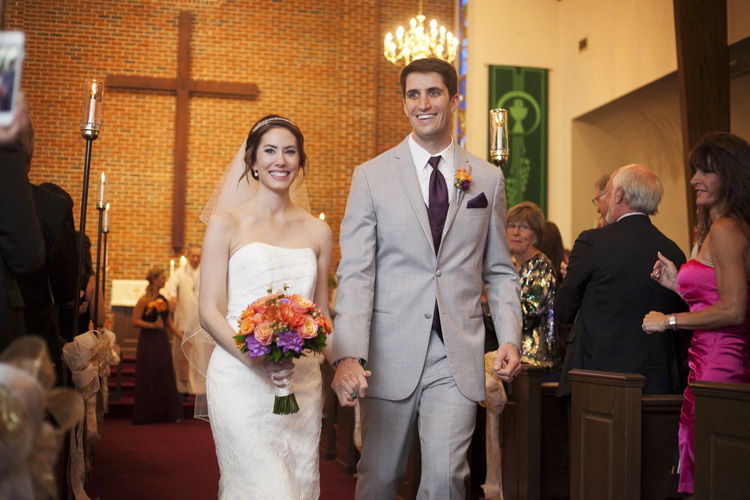
In this photo of a just married couple walking down the aisle, I bounced my flash off a wall to the left again, to get some wonderful light on them. If you look at the people in the background, you can get an idea of the ambient illumination in the room.

The nicest light often comes more from the side than from above. If you fire your flash 90 degrees to your left, the light will come back from the left at 90 degrees. Incidentally, this is a similar angle to the great light you can get at dusk and dawn.

LIGHT QUALITY (SOFTNESS)

The softness of your light is mainly affected by the size of your light source. With bounce flash that is the section of wall or ceiling illuminated by your flash. I think this is the hardest concept for people to get with bounce flash. Just think of your light source as the surface that is illuminated by your flash (rather than the flash itself).

The bigger the light source, the softer the light. In other words, the larger the area you cover with your flash, the softer the light coming back. To cover a larger area with bounce flash, simply move farther from your bounce surface, to allow the light from the flash to spread out more. A lot of flashes also allow you to zoom the flash head in and out, creating a narrower or wider beam (a wider beam allows the flash to spread out faster, and vice versa).

Bounce sample 1

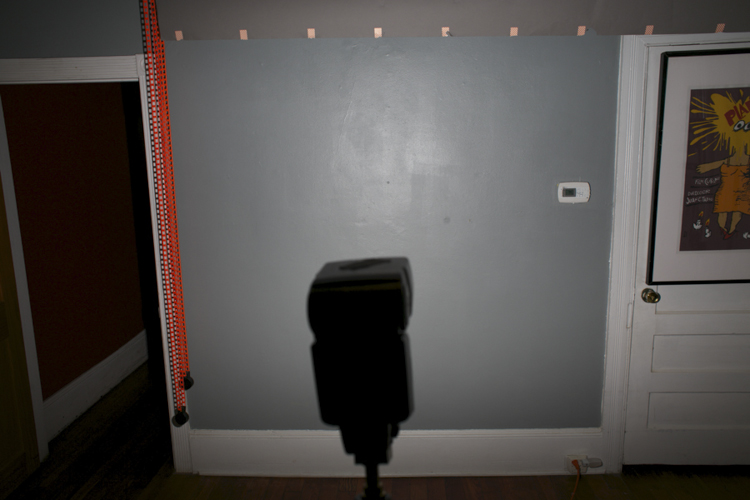
This can be a little hard to visualize, so I’ve taken a couple of photos to help illustrate how it works. In the first photo (above), I have my flash head zoomed all the way out, to create the widest beam possible. I then fired it at a wall in my studio about 10 feet away. As you can see, the flash lights up most of the wall. This would makes for some nice soft light bouncing back towards us.

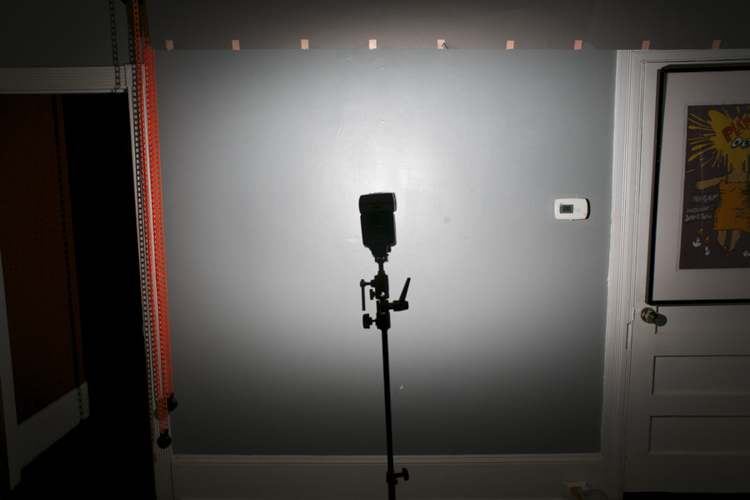
In the second photo (below), I have moved my flash closer to the wall with the same amount of zoom. As you can see, it is lighting up less wall now, meaning the light source is getting a bit smaller (more harsh/hard – less soft).

Bounce sample 2

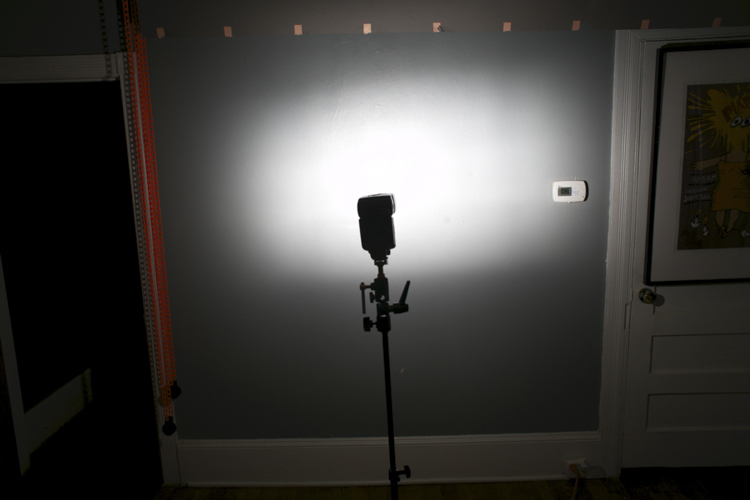
In the third photo, I’ve kept the flash in the same position, but zoomed in the flash head all the way. So the light source is now smaller still (the area on the wall which is reflecting light is the light source).

Bounce sample 3

What you may not realize is that you can send your light all the way across a massive hotel ballroom, for example, and have it come back nice and soft. In the photo below of adoring parents listening to a wedding speech, the light from my flash is traveling 20 or 30 feet to the wall and back. The farther it goes, the more it spreads out, and the softer the resulting light. Beautiful!

Photo7

POWER ISSUES AND TRICKY LOCATIONS

Now there is a limit to your flash power, and therefore, to how far away you can be from your bounce surface. Fortunately with digital cameras it’s easy to do some quick tests to see what you can get away with.

For example, let’s say you find yourself in a huge convention space photographing the keynote speaker at the annual prune sellers convention. The lighting in the room is from horrible overhead spotlights, and if you don’t improve upon it you’ll never get another job from this plum client. So you try bouncing your flash off a wall to the speaker’s left, but your flash just isn’t powerful enough. Your image is underexposed and your camera batteries are straining to recharge the flash.

In this situation, you can try a couple of different things to fix your problem:

  1. Ramp up your ISO as high as you can.
  2. Open your aperture up as much as possible.
  3. Zoom your flash head in as far as it will go, to narrow the light beam you are firing at the wall.

If nothing works, you may have to resort to shooting direct flash, but that should be a last resort.

Off course you won’t always be in white-walled rooms, but you can usually find something to bounce off if you look around. White ceilings and dark wood walls? Bounce off that ceiling (but try to point your flash slightly to one side or the other to give some better directionality to your light). You can also bounce off of darker surfaces. If the surface isn’t black, that means it is still reflecting some light and you can bounce a flash off it.

I’ve bounced off of everything from brick to wood paneling, though admittedly these surfaces do suck up a lot of your flash output and drain your batteries faster, so they aren’t ideal (they will also add a color cast to your image).

When I walk into a space where I’m going to use bounce flash, I immediately look around and think about what my bounce surfaces (light sources) could be. I’ll identify the surfaces that look good (generally light colored/reflective things), and position myself so I can use them to my advantage.

Let’s look at some more examples:

Photo8

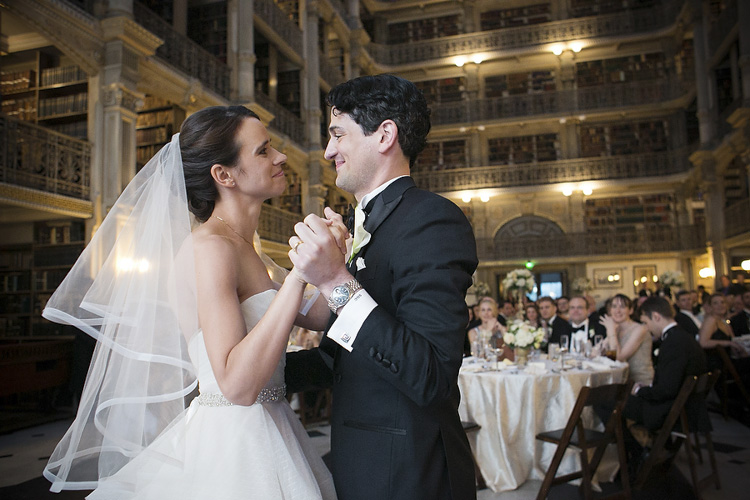
This wedding couple is having their first dance at the Peabody Library in Baltimore, a very large space that doesn’t even have complete walls to bounce off, just columns, because of the way the library stacks are arranged. But I cranked my ISO up to 4000 and was able to bounce my flash and get some nice light for the photo.

Photo9

I’ve also included a photo above showing the entire space so you can get a better idea what I was dealing with.

Photo11

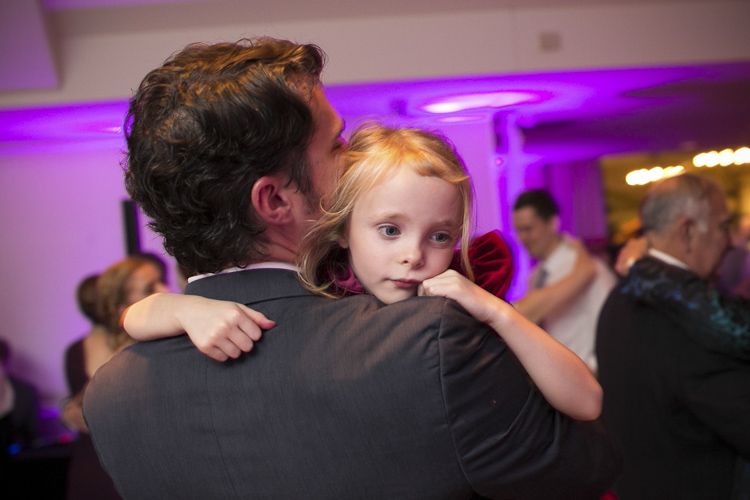
This sleepy little girl was photographed at a wedding reception at a country club in Virginia. I bounced my flash off a wall about 30 feet to my left, and got a little help from the purple lighting in the background.

Photo12

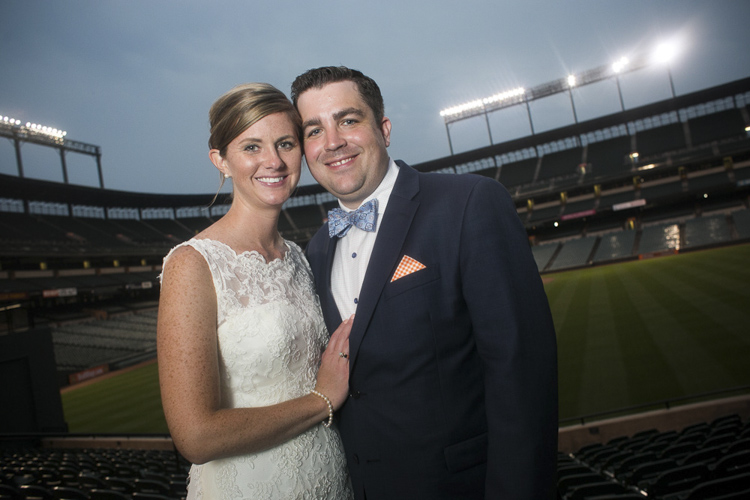
This wedding portrait was made at night at Camden Yards baseball stadium in Baltimore. This was outside and there was nothing to bounce a flash off, so I had an assistant hold a white reflector behind me to camera left, and I bounced my flash into that.

As I write this article, I’m sitting in a dark restaurant with a black ceiling, dark walls, dark carpet and dark furniture. It’s a real light-sucking pit, but there are a bunch of framed photos on the wall, and also a mirror. I’m pretty sure I could bounce a flash off of those and get some decent light if I needed to.

You can get really good at bounce flash fast. Once you are aware of the possibilities, it’s just a matter of experimenting, and refining your technique. Look around your environment and ask yourself what you can use as a bounce surface. Look at your subject and think, “Where do I want the light to come from?”

Then experiment, point your flash to the right, to the left, behind you. Before you know it, you’ll be a bounce flash master!

Please share your bounce flash tips and images in the comments below.

googletag.cmd.push(function() {
tablet_slots.push( googletag.defineSlot( “/1005424/_dPSv4_tab-all-article-bottom_(300×250)”, [300, 250], “pb-ad-78623” ).addService( googletag.pubads() ) ); } );

googletag.cmd.push(function() {
mobile_slots.push( googletag.defineSlot( “/1005424/_dPSv4_mob-all-article-bottom_(300×250)”, [300, 250], “pb-ad-78158” ).addService( googletag.pubads() ) ); } );

The post How to Use Your On-Camera Speedlight to do Bounce Flash Effectively by Dennis Drenner appeared first on Digital Photography School.

Digital Photography School

 
Comments Off on How to Use Your On-Camera Speedlight to do Bounce Flash Effectively

Posted in Photography


Why Off-Camera Flash Isn’t as Scary as you Think

23 Jul

Flash

The word alone has the potential to cause dread, even among experienced photographers, bringing to mind images of overexposed faces and red eyes. Because of this, many photographers avoid flash altogether, keeping a safe distance at all times. I think that’s too bad.

It’s a missed opportunity. Sure, flash may not always be applicable to your situation – but it’s very helpful to have another tool in your bag of tricks if and when it is needed.

Portrait

Off-camera flash gives you an incredible amount of control. Yes, understanding natural light is an important part of being a photographer – but working with off-camera flash lets you create your own lighting conditions. You can even mimic the elusive golden hour.

This guide will explain off-camera flash in its simplest components, giving you the knowledge to begin to experiment, and to explore how it could help your photography.

What you need to start

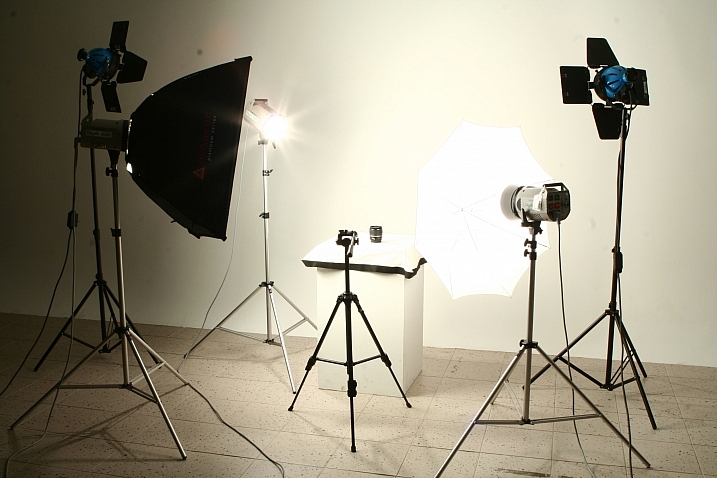
When I talk about off-camera flash, you might be picturing something like this:

? ?? / Chris Lim

By ? ?? / Chris Lim

If that’s the case, I don’t blame you for being a bit nervous. In reality, all you need to get started with off-camera flash photography is:

  • A camera
  • An independent flash unit
  • A way to make them fire simultaneously
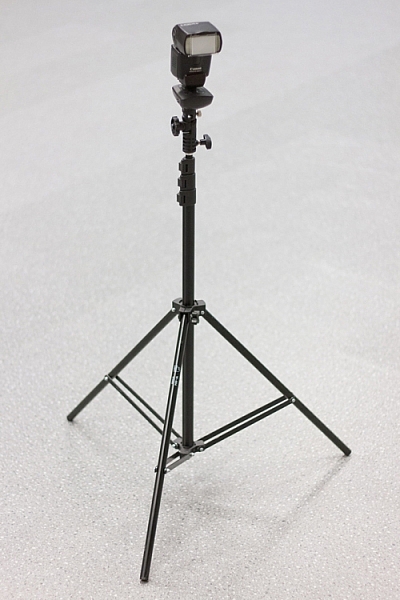
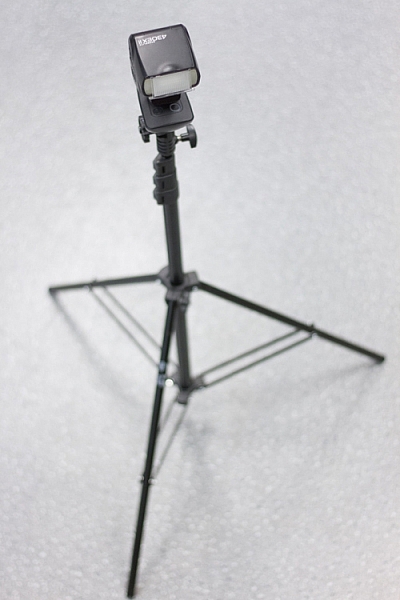
  • Something to hold your flash, like a light stand or a friend
light-stand-1 light-stand-2

Once you take your flash unit off of the camera, it won’t know that it is supposed to fire when you hit the shutter button. Fortunately, there are several ways that you can sync your flash.

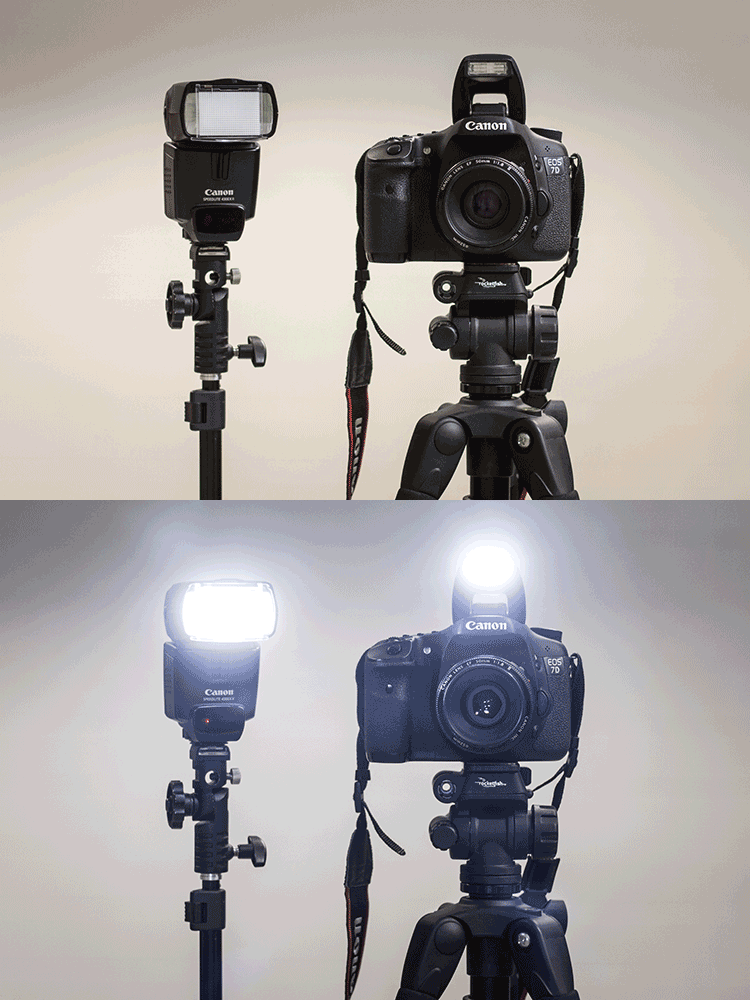
Built-In Flash Control: Some cameras have a built-in setting that uses the pop-up flash to tell your off-camera flash to fire. Most flash units have a sensor on the front that recognizes the sudden burst of light (optical sensor), and fires accordingly.

pop-up-flash

Flash Sync Cord: This is a cord that runs from your camera to the flash. Think of it like an extension cord. These are useful and reliable, but it also limits how far away the flash can be from your camera.

Wireless Radio Transmitters: The preferred option, radio transmitters can sync your flash to your shutter even if they are at a significant distance away.

bts-6855-edit

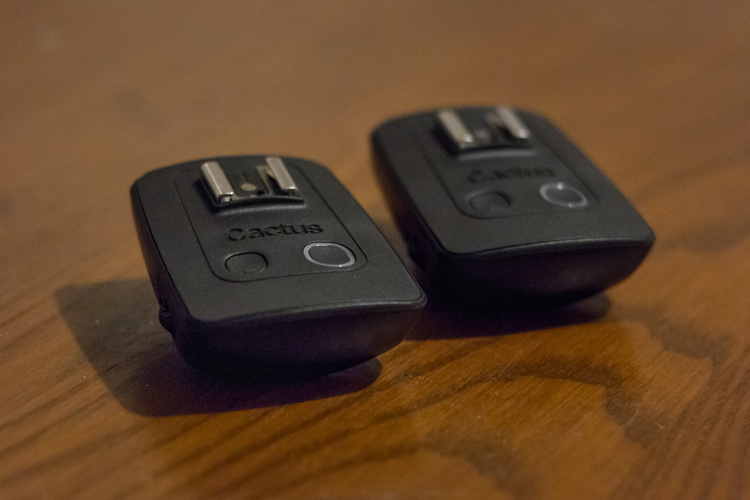
Cactus brand remote triggers

bts-6859-edit

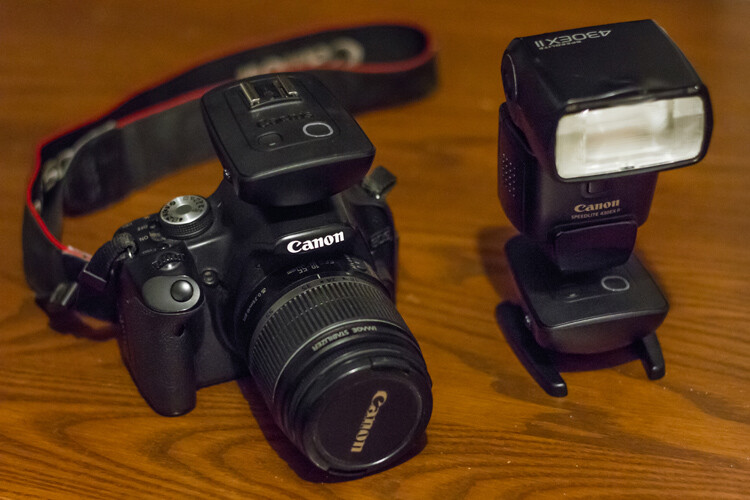
One remote goes on the camera, the other attaches to the flash. When the camera fires the one on the camera sends a signal to the other remote to fire the flash.

Editor’s note: for more great tips read, A Beginner’s Guide to Working With Flash Off-Camera

The basics – controlling your off-camera flash

When you use a flash on-camera, it can determine the correct power settings and fire accordingly (TTL). Once you take the flash off the camera, however, you’re going to need to tell both the camera and the flash what to do manually.

bts-6851-edit

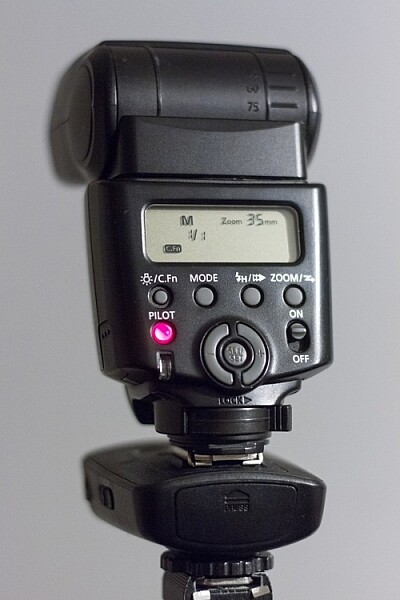
M is Manual mode, and 1/1 is full power. Zoom level shows 35mm. Read the user manual for your flash to see how to adjust these items.

If that sounds scary, just take a deep breath – we’ll get through this together.

Fortunately, controlling flashes is quite simple. In manual mode (on the flash), you choose the amount of power at which the flash fires. This is expressed as a fraction: 1/1 means the flash is firing at full power, ¼ means the flash is firing at a quarter of its total power, and so on. Easy, right?

Alright, so now we know how to control the flash. What about the settings on your camera?

This is the cool part. You can control the effects of the flash using your ISO and aperture. Adjusting these two settings controls how sensitive your camera sensor is, and how much light it can collect.

So here are the four ways to make the flash in your image stronger (more flash):

  • Turn up the flash power
  • Move the flash closer to your subject
  • Turn up the ISO
  • Make the aperture wider (smaller f-stop number)

Piece of cake! Is your flash in your picture too strong? Well, simply do the opposite of one of the criteria mentioned above (turn the flash down, move it away from the subject, turn the ISO down, use a smaller aperture).

You’ll notice that I haven’t mentioned shutter speed yet. That’s because your shutter speed doesn’t affect flash at all.

Well, almost not at all. Every camera has a flash sync-speed. This is because if the shutter speed goes too fast, it won’t sync perfectly with the flash (the shutter will open and close before the flash goes off). As a result, part of your picture won’t see the effects of the flash – resulting in a black bar across part of the shot. For most consumer cameras, your maximum flash sync speed will be around 1/200 or 1/250. Keep your shutter speed under that (slower like 1/125th or 1/60th) and you’ll be fine.

flash-sync-1

Correct sync speed used the flash lights the entire image

flash-sync-2

If your shutter speed is too fast (higher than the sync speed) you will get something like this, where part of the image is not lit by the flash and is dark, or even black.

Two exposures: Ambient and flash

This is the key to understanding off-camera flash photography.

Think of every picture taken with flash as being two exposures, overlapped on top of each other. The way you decide to balance the ambient lighting and the flash, sets the tone for the image. Let’s take it one layer at a time, and you’ll see how easy it can be to build an image using off-camera flash.

THE FIRST LAYER: AMBIENT LIGHTING

Ambient light is that which is already available in the area from the sun, window light, street lights, etc. At certain times of the day, your ambient light is going to be quite nice, like at Golden Hour. Other times, you may not be so lucky.

Sunsets, for example, are especially tricky. This is because in order to bring out the colour and texture of a sunset, you need to keep the exposure dark – and as a result, your subject will be completely silhouetted.

Here’s the first step for taking your off-camera flash picture – ignore your flash altogether. Turn it off.

Find the normal, correct exposure for the existing (ambient or available) light, and then adjust your settings to intentionally make your image too dark. The darker your ambient exposure, the more dramatic the light from your flash will be.

1 ambient

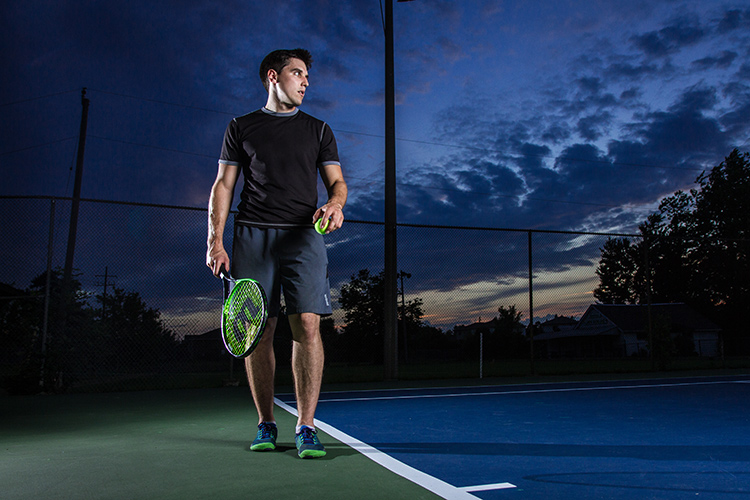
Here is my exposure for the ambient light (above). We’re off to a good start! For this shot, I want to keep the dark, dramatic sky in the background, and I will rely on my flash to light up the tennis player.

THE SECOND LAYER: FLASH

Alright, now turn on your flash. By using flash to light my subject, I can get the best of both worlds – my sky remains dark and dramatic while my subject is well-lit.

It will probably take a few shots to get your lighting right. That’s perfectly normal! Use the tips mentioned in the previous section to add more or less power to your flash.

1 flash

When we add the flashes, we get to keep the dramatic background, with the benefit of crisp lighting on our subject. This shot simply isn’t possible without flash.

You can use what you know about ambient and flash lighting to set the tone of the image.

If you keep your ambient light levels high, the flash will add just a kiss of light. If you start with a very dark ambient image (like the one above), your flash will sculpt and define the image much more strongly.

1 behind the scenes

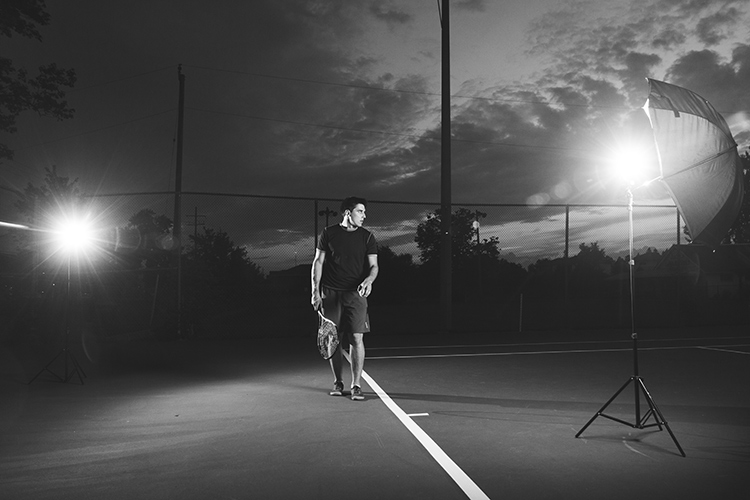
Here’s the behind-the-scenes of our setup. Since the light is hitting the subject from an angle, it is dramatic and shows shape much more effectively than if the flash had been on the camera. One flash is to camera right, bouncing into an umbrella to soften it, the other is to camera left (and behind the subject) to add an accent light.

Putting it into Practice

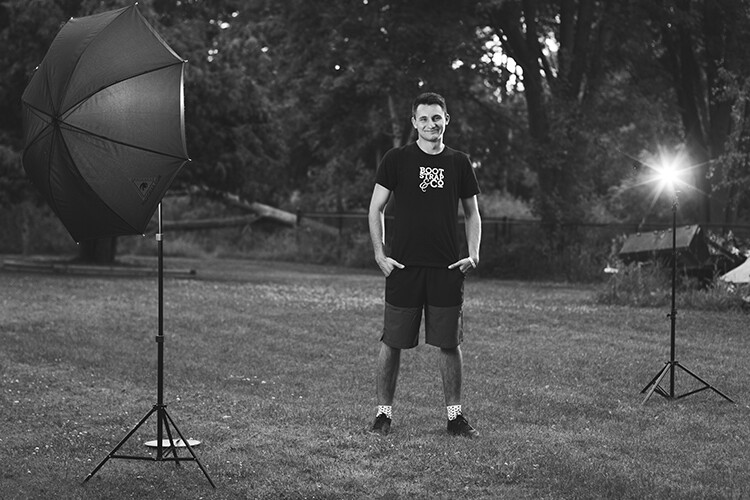
Here’s another example, this time using flash to give a simple kick, to a liven up a portrait.

2 natural

This was shot with no flash, exposed for the skin tones.

2 ambient

Ambient light only, darkened for the background.

The first step was to push the “correct” exposure down, making the overall image darker, so that we could use flash to highlight the subject.

2 flash 2 double flash

In the image above (left), the flash is coming from just left of the camera. It brightens the subject up (compared to the background), and makes the image seem more three dimensional. The background also pops more than it did with the “correct” exposure.

If we want to, we can play around with the effects of a second flash (above right), maybe letting it aim directly toward the camera to create some lens flare?

2 behind the scenes

Here’s the simple setup.

Shaping and modifying your light

Well done! You’ve made it through the basics of off-camera flash photography. Next, you can push your newfound skill to a whole new level by learning how to modify the light.

If you’re familiar with how the light on a cloudy day is softer than the light on a sunny day, then you already know nearly everything you need to know about flash modifiers.

The basic rule is this: the larger the light source, the softer the light.

A flash unit is a small light source that creates harsh shadows. That isn’t always so flattering.

The purpose of umbrellas, soft boxes, and other light modifiers, is to make the source of light larger. This softens the light, which is especially useful for portraits.

flash-3

Learning how to modify light lets you build a style that matches your image.

Looking for a gritty photo? Shoot with a bare flash (no modifiers) and get sharp shadows. Looking for softer, more flattering light? Use a softbox.

Practice, practice, practice

Once you’ve got a feel for how to use your flash off-camera, you’ll have a whole new world of photography to explore. Try it. The worst thing that can possibly happen is that you’ll learn something.

Using digital equipment gives you the ability to try things without any financial repercussions. Learning flash photography through trial and error was probably pretty expensive back in the days of film; today you can fire as many shots as you need in order to learn, without breaking the bank.

Nobody ever got off-camera flash right on their first try – experiment and stick with it, and you’ll add a valuable new tool to your bag of tricks.

flash-2

More articles for you to read on dPS about off-camera flash:

  • How to Create Compelling Wide-Angle Portraits Using One Off-Camera Flash
  • 9 Steps to Get Over Your Fear of Off-Camera Flash
  • Supporting Your Off-Camera Flash – Tripods, Monopods or Light Stands?
  • Beginners Guide to Using TTL Off-Camera Flash
  • How to Get Started with Off-Camera Flash Photography – Start With One!
  • Getting Started with Off-Camera Flash
  • How to Balance Off-Camera Flash and Ambient Light on Location
  • A Beginner’s Guide to Working With Flash Off-Camera
  • The Ultimate Flash Photography Guide FAST FLASH FOR PORTRAIT PERFECTION a dPS ebook

googletag.cmd.push(function() {
tablet_slots.push( googletag.defineSlot( “/1005424/_dPSv4_tab-all-article-bottom_(300×250)”, [300, 250], “pb-ad-78623” ).addService( googletag.pubads() ) ); } );

googletag.cmd.push(function() {
mobile_slots.push( googletag.defineSlot( “/1005424/_dPSv4_mob-all-article-bottom_(300×250)”, [300, 250], “pb-ad-78158” ).addService( googletag.pubads() ) ); } );

The post Why Off-Camera Flash Isn’t as Scary as you Think by Frank Myrland appeared first on Digital Photography School.

Digital Photography School

 
Comments Off on Why Off-Camera Flash Isn’t as Scary as you Think

Posted in Photography