RSS
 

Posts Tagged ‘Exposure’

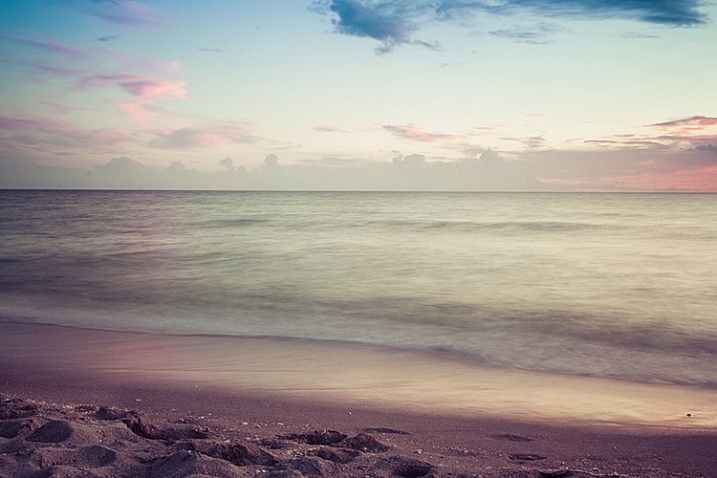
What is a Stop? The Common Currency of Exposure Explained

30 Sep

What are stops? Are they the same as f-stops? How are they measured? Are they the same for different exposure controls? Are they still useful now?

These are common questions for those just starting out in photography. They are good questions, and the exposure concepts surrounding them can be confusing. You have probably been told that a stop is a “doubling of light,” which of course is true. That is helpful, but it doesn’t show how stops really works and how they tie your exposure controls together.
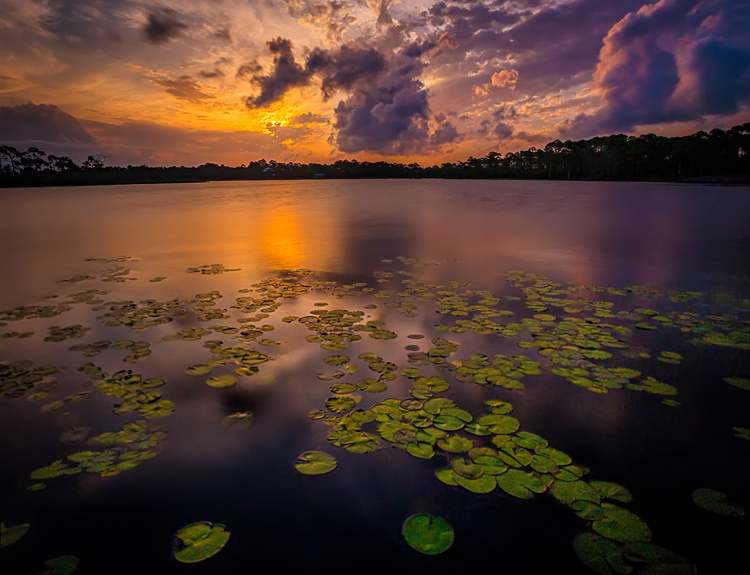
WesternLake

What I want to show you in this article is how the concept of a stop acts as a common currency in exposure, and allows you to take complete control of it. Rather than being confusing, stops are really a simplification tool. Without stops, we’d have a hard time controlling our exposure between the three controls; aperture, shutter speed, and ISO.

Introduction

I’m using the term “common currency” to describe stops. To see what I mean, think about the barter system before we had money. If you sold chickens, I sold apples, and someone else sold bricks, how would we all trade? And what if the person selling the bricks didn’t value your chickens as much as I did? It was a mess, which is why the concept of money was developed. Now we all value our goods using money and we exchange money with each transaction. This has proven to be a remarkably useful tool, which is why it has stuck around for a few thousand years.

Similarly, in photography we faced trade-offs when it came to exposure. For example, how could we value a change in the size of the aperture versus lengthening the time of shutter speed? And then how would we value the sensitivity of the digital sensor (or film in the old days) as compared to these other two adjustments? It isn’t apples to apples. The concept of stops is how we square everything up.
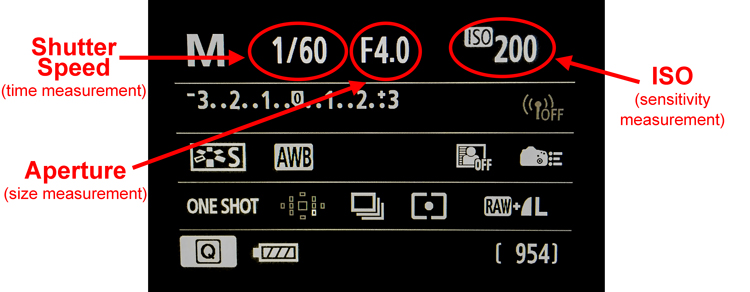
CameraBack

Understanding this is a necessary precondition to mastering your camera and controlling the exposure process. Hopefully this will help you grasp your exposure controls better. First, we’ll take a brief looks at each of them and show you how they are measured in stops. After that, we’ll get into how to use them together.

Shutter Speed

Your shutter speed is a measurement of time. As you probably already know, when you open up the shutter, the camera is gathering light. The longer you allow the camera to gather light, the higher the exposure value. Most shutter speeds you use will be a fraction of a second, but here are the common values for shutter speed you will see when you look through your viewfinder or at your LCD:
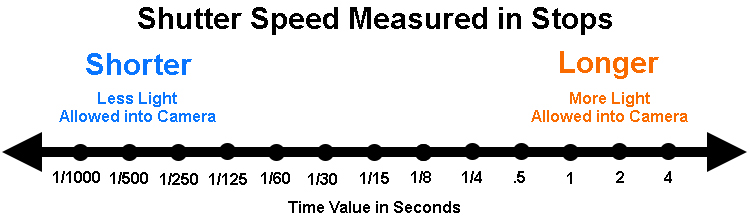
Shutter Speeds measured in stops

The segments in this chart are 1-stop increments. Again, a stop is a doubling of light. Remember that shutter speed is a measurement of time, so a doubling of the time your shutter is open is the same thing as a doubling of light. Therefore, for example, a move from 1/250th of a second to 1/125 is a one stop change. You have doubled the time the shutter is open so you have also doubled the exposure value.

Something that might confuse you is that your camera doesn’t change settings (each click of your dial) in 1-stop increments. Most cameras are set to move in 1/3 stop increments. So rather than moving from 1/250 to 1/125, each click of the dial on your camera will only move part of the way there. It will take three clicks to move a full stop. It looks something like this:
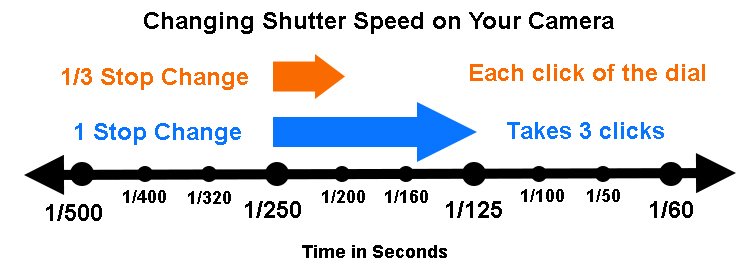
Changes to Shutter speed in thirds of stops

The point is to understand that we are taking a time measurement and converting it into a stop. Each doubling of the amount of time the shutter is open equals a stop. Conversely, you reduce by a stop every time you cut the shutter speed in half. We’ll be able to use that stop in connection with the other controls in a bit.

Aperture

Now let’s look at this in the concept of aperture. As you probably know, the aperture is the hole in the lens that lets light through into the camera, and it is adjustable. Making it larger lets more light into the camera; making it smaller lets less light in. To change your exposure value using the aperture control, you are changing the size of the aperture.

Aperture measurements can be confusing. To begin with, the measurement is actually of the size of the aperture compared to the focal length (The F-number of a lens is the ratio of its focal length divided by the diameter of the aperture.). That makes it a ratio or reciprocal figure, which means that the larger the aperture the smaller the measurement, and vice versa. Secondly, different lenses have different maximum and minimum aperture values. With that in mind, here are common aperture values:
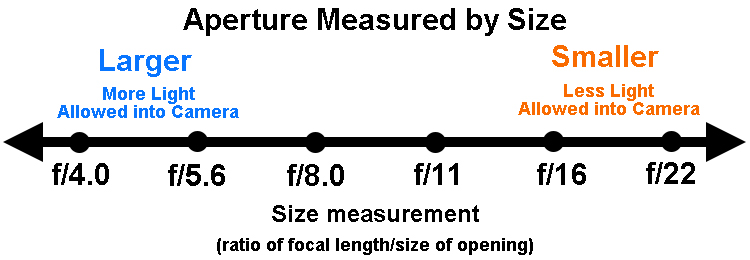
Aperture values in full stop increments

Again, remember that your camera is probably set up to change values in 1/3 stop increments. So, for example, you camera won’t go directly from f/5.6 to f/8.0. Instead, it will probably go from f/5.6 > f/6.3 > f/7.1 > f/8.0 as you click the dial.

I’m ignoring the concept of depth of field here because it isn’t important for purposes of this discussion. All we care about now is converting these measurements into stops. So, on that front, what we have done here is convert a size measurement into a stop. That means we can easily compare it to shutter speed changes as we saw above. We’ll also be able to compare it to changes in ISO, which we’ll talk about next.

ISO

Finally, we get to ISO, the third exposure control. This is a measure of the sensitivity of your camera’s digital sensor to light. Making it more sensitive to light increases exposure but leads to increased digital noise in your pictures. Conversely, decreasing the ISO lowers the exposure value but also decreases digital noise. Here is a chart showing common ISO values in one stop increments:
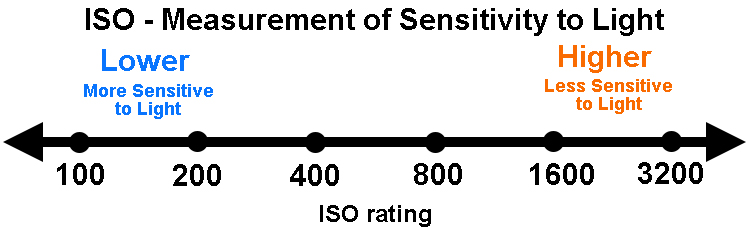
ISO values in full stop increments

As you can see from the chart above, the ability to change ISO is pretty limited. Whereas there are 18 stops within the range of common shutter speeds, there are only seven in ISO. There are cameras with ISO values that go higher (such as ISO 12,800 and even 25,600), but they lead to pretty dramatic digital noise. This limited range though does show why increases are important.

In any case, as you can see what has been done is create a system where we have taken a measurement of sensitivity to light and converted it into stops. Each doubling in sensitivity doubles the exposure value, which equals a stop. What’s great is that (unlike the aperture measurements) ISO is simple. It is easy to understand that an ISO of 200 is double that of ISO 100.

Putting it all together

Now that we have covered the concept of stops for each of the three exposure controls, we are ready to talk about them together.

The key thing to understand here is that a stop, is a stop, is a stop. By that I mean that a stop of shutter speed exposure, equals a stop of aperture, equals a stop of ISO. In other words, lengthening your shutter speed by one stop is the exact same thing as opening your aperture by one stop. And that is exactly the same thing is changing the ISO by one stop. The measurements all equate.

Why does this matter? Because you will face the need to change your exposure values all the time. This will allow you to take complete control over the exposure process. For example, when you want to increase your depth of field you know you need to make the aperture smaller. But that will cause your picture to be underexposed. By using stops, however, you can increase the exposure by the exact same amount using either the shutter speed or ISO.

An example of using stops

If this seems confusing, an example should help make it clearer. Let’s say you are out shooting a landscape scene and you hold up your camera and set up a correct exposure. It is 1/500th of a second at f/5.6, with an ISO of 100.

That’s just fine, except that remember that this is a landscape photo. You want a much deeper depth of field than f/5.6 is going to allow, so let’s move that to something like f/11. You know that this is a 2-stop decrease (check the charts above for confirmation).
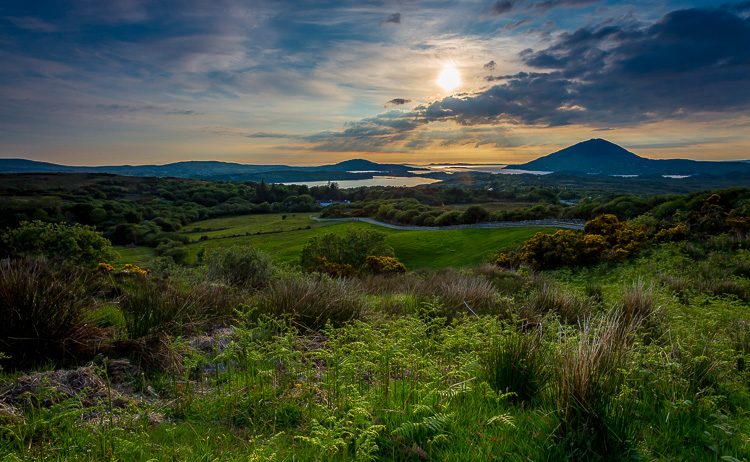
Landscape shot at 1/125 of a second at f/11.

Landscape shot at 1/125 of a second at f/11.

If you made no other change, your photo would be very underexposed. But you now know that you can just increase (lengthen) your shutter speed by the same amount (two stops) to offset this move. In other words, since we have converted all these exposure changes to stops, we have a common currency that we can interchange freely. A 2-stop shutter speed increase takes you to 1/125th. In other words, you started at 1/500, twice that is 1/250, and doubling that again is 1/125 (again, check the chart above to see).

You could also change ISO if you wanted (to ISO 400), but you probably don’t want to do that to keep noise to a minimum. Your new settings of 1/125, f/11, ISO 100 are much better for this situation.

For those who do better with visuals, here is how the two offsetting moves appear:
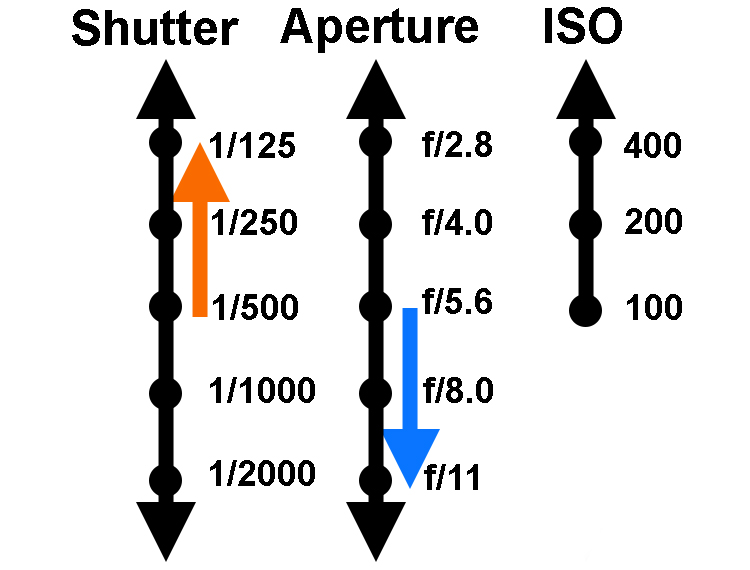
Two-Stop-Move

Another example

Let’s walk through another example to make sure you’ve got it. Let’s say you are photographing a friend or a family member and your camera settings are at 1/40, f/16, ISO 200. The camera’s meter says you have a correct exposure. Take a look at the shutter speed and aperture settings and you’ll see a few problems though.

First, the aperture is too small for this situation. You don’t need a small aperture like f/16. Not only do you not need the small aperture, which costs you light, but you actually don’t want the deep depth of field that f/16 gives you. You’d rather have an extremely shallow depth of field to blur out the background. Secondly, a shutter speed of 1/40 is probably a too slow for this situation. This shutter speed could lead to a lack of sharpness due to the camera shaking slightly or your subject moving while the shutter is open.

The good news is that both your problems can be solved by making changes to the shutter speed and aperture. You can use a stop as the common currency to make sure they offset and your exposure stays the same. You decide to open up the aperture all the way to f/4. That’s a 4-stop increase. Check the chart above, and you’ll see it goes like this; you start at f/16> f/11 > f/8 > f/5.6, and the fourth stop takes you to f/4.0.

Now that you’ve made that change you have the depth of field situation fixed. If you made no other change, your picture would be quite overexposed though. But that’s okay, this just allows you to shorten your shutter speed which you wanted to do that anyway avoid any possible camera shake or subject movement. Now you know you can shorten the shutter speed by four stops to offset the change you just made to the aperture. Starting at 1/40, moving fours stop gets you: 1/40th > 1/80th > 1/160th > 1/320th, and finally to 1/640th. That’s much better.
Shot at 1/620 second with aperture of f/4.0.

Shot at 1/640th of a second with an aperture of f/4.0.

Using stops to master exposure controls

Hopefully you see the utility of the concept of stops. It acts as a common currency so that all changes in exposure equate. One click of the dial that controls your shutter speed equates to one click of the aperture control. And that equals one click of the control for your ISO settings (if you can adjust your ISO in 1/3 stops). It all works out, and that is extremely important in the exposure process.

So many times you want to change one exposure control but keep the overall exposure setting the same. You may want to stop down the aperture to increase the depth of field, lower the ISO to reduce digital noise, or shorten the shutter speed to avoid any camera shake. Using stops you can do this with confidence.

Why can’t you just rely on the camera to do all this for you? In other words, why couldn’t you just use Aperture Priority mode, set the aperture you want, and then watch as they camera sets the right shutter speed? You can just change the aperture and ISO settings until the camera sets the shutter speed you want. And, yes, you can do it that way. But even so, you should understand the process so that you know what is going on under the hood. In addition, if you ever use neutral density filters or find yourself in a situation where you camera cannot meter light properly, you’ll know how to do it for yourself.

googletag.cmd.push(function() {
tablet_slots.push( googletag.defineSlot( “/1005424/_dPSv4_tab-all-article-bottom_(300×250)”, [300, 250], “pb-ad-78623” ).addService( googletag.pubads() ) ); } );

googletag.cmd.push(function() {
mobile_slots.push( googletag.defineSlot( “/1005424/_dPSv4_mob-all-article-bottom_(300×250)”, [300, 250], “pb-ad-78158” ).addService( googletag.pubads() ) ); } );

The post What is a Stop? The Common Currency of Exposure Explained by Jim Hamel appeared first on Digital Photography School.

Digital Photography School

 
Comments Off on What is a Stop? The Common Currency of Exposure Explained

Posted in Photography


Alien Skin Exposure X2 launches with several new tools and Exposure Bundle

28 Sep

Alien Skin has announced the launch of Exposure X2, the second iteration of its non-destructive photo editor and organizer. The company has added several features to its latest version of Exposure, some of which have been frequently requested by users, including faded presets, a spot healing tool, metadata search and a history panel. An updated Exposure Bundle is also available, bringing with it Alien Skin’s Blow Up, Exposure and Snap Art apps.

As expected, the new spot healing tool enables users to quickly fix small imperfections in photos without opening a separate photo editor; the tool supports both healing and cloning. The faded presets, meanwhile, are customizable and add a hazy look to images. The history panel tracks any changes you make to your images, and the metadata search, of course, enables searches based on various criteria including the camera used, shutter speed, ISO and more.

Alien Skin Exposure X2 is available now for $ 149 for new customers, and $ 100 for existing Exposure X owners. The Exposure X2 Bundle is higher at $ 199 for new customers, or $ 119 for existing customers who need the upgrade.

Via: Alien Skin

Articles: Digital Photography Review (dpreview.com)

 
Comments Off on Alien Skin Exposure X2 launches with several new tools and Exposure Bundle

Posted in Uncategorized


How Playing With Manual Mode Can Help You Learn Exposure Faster

21 Sep

I have a disclaimer before I even begin this article. I shoot much more often in Shutter or Aperture Priority than I do in Manual mode. I save Manual mode specifically for studio shooting, for some tripod work where I have a lot of time to get the settings perfect, or for situations where the lighting is very consistent.

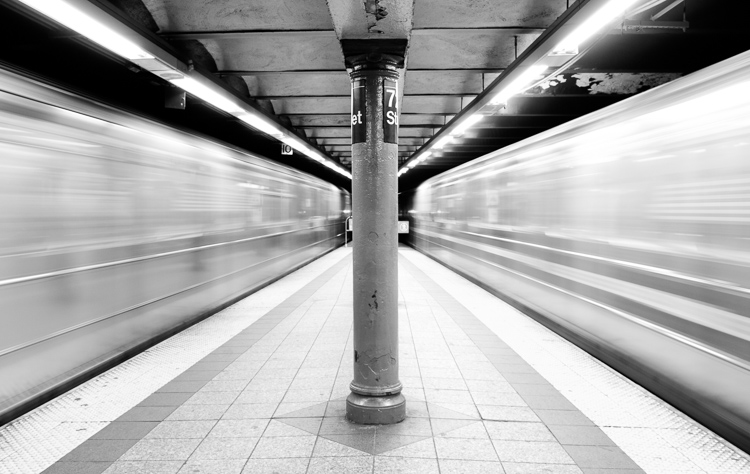
Subways in Motion, New York

Learn Manual Mode to better understand exposure

However, I think it is immensely important for you to try to periodically shoot in Manual early on, especially if you’re just learning. Take a look at your camera. How many buttons does it have on it? New cameras these days can have 20 or more buttons on them all doing different things, but in reality, there are only three settings that make the photograph: the ISO, the Shutter speed, and the Aperture.

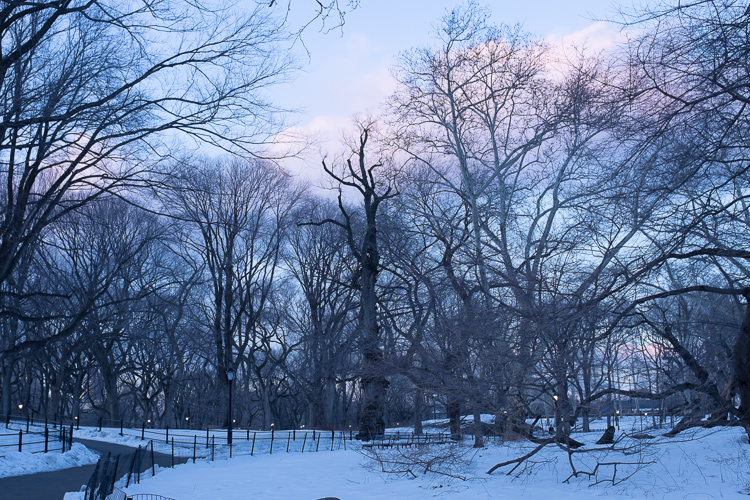
Central Park, New York

Before you even go out, turn your camera to Manual mode and figure out the fastest and most comfortable way to change each of these settings. You’re going to do a lot of that in Manual.

Understanding shutter speed

The next step is to understand a couple of important points. The shutter speed always needs to be at least one over your focal length to offset handheld camera shake. So if you are at 50mm (on a full-frame camera), then your shutter speed needs to be 1/50th of a second. To freeze the motion of moving subjects such as people, I like a shutter speed of around 1/250th or 1/320th of a second, but you can get away with a little slower than that. You will need a faster shutter speed to freeze faster moving subjects like cars, etc.

Understanding aperture

For your aperture, the lower the number (such as f/2.8), the less depth of field and more bokeh there will be. This is counterintuitively called a large aperture because the size of the aperture hole in the lens is actually larger. This will also let in a lot of light due to the size of the hole. A small aperture (such as f/11 or f/16) will create a much larger depth of field, but the tradeoff is that it will let in less light.

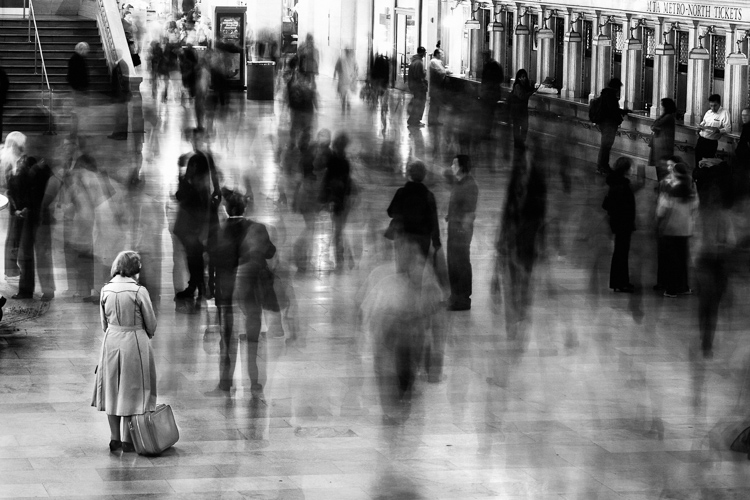
Waiting in Grand Central Terminal, New York

Understanding ISO

The ISO is the sensitivity of your camera’s sensor to light. The higher the number, the more noise that an image will have, but the more sensitive to light it will be. Newer cameras can make beautiful photos up to ISO 3200 or even 6400, but older or entry level cameras can have a lower limit of around ISO 1600 (test your camera to find your comfort zone with its upper ISO limits).

If you want a lot of bokeh in your image, and you set your lens to f/2.8, that means the camera will be letting in so much light that you will usually want a low ISO. However, if you are shooting street photography, fast moving subjects, you want a shutter speed of 1/250th or faster, and/or a smaller aperture such as f/11 – unless you are in bright sunlight, you will often have to raise your ISO to be able to let in enough light to use those settings. In general, if it’s darker out, then your ISO will often have to go up unless you are on a tripod.

Now play with them

Those are the main considerations that you need to learn; now just walk out the door and mess around with your settings. Screwing around with the settings in Manual is the fastest way to start to learn them well. Start off with your aperture. How much depth of field do you want in the image? Once you pick that, then take a guess at the shutter speed and ISO and see how it looks. View the back of the screen, look at the histogram, and zoom in on the details.

If an image is too dark, then slow the shutter speed, raise the ISO, or use a larger aperture. If the main subject is too blurry, then speed up the shutter speed.

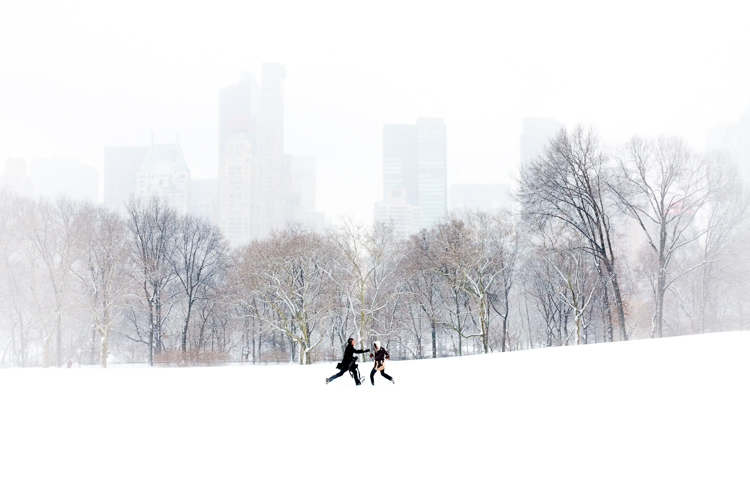
Couple in Sheep Meadow, New York

Try different lighting scenarios

Explore different lighting situations. Paying attention to lighting is the first thing that you should do before you take a photograph. How strong is the light? Where is the sun or artificial light in relation to what you are shooting? The strength of the light will be the number one factor in helping you figure out your settings. From there, you can figure out the depth of field that you want and if you need to freeze the motion of your subjects or not.

Get comfortable walking from one lighting situation to another. If you walk from the sun into the shade, what will you need to change to expose the scene correctly? Pay attention to scenes with both bright highlights and darker shadows. With these scenes you need to figure out which is most important to expose correctly. If the shady area is more important, then let in more light. If the highlights are the most important, then darken the scene so they are correctly exposed and the shadows are closer to black. If you are in sunlight, learn how your settings will change if you are shooting into the sun versus shooting away from it.

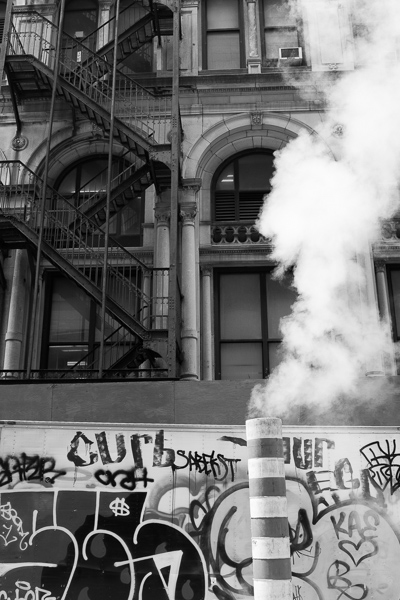
Smokestack and Graffiti, New York

Go out in the morning, in the middle of a sunny day, at dusk, or in light rain. Learn how your settings change in each of these lighting situations.

Most digital cameras will show you the light meter reading for what they believe will correctly expose your image. For instance, if you choose the three settings, the light meter might show you that it thinks you are underexposed by one stop (look in your viewfinder for a + 0 – scale, press the shutter button part-way down to activate it). Keep an eye on this because it can help you, but also try to not pay too much attention to it. The point of Manual shooting is to learn the numbers yourself without relying on the camera. You can rely more on the camera later.

Conclusion and practice

The only way to learn these things is to experiment and do them. Shooting in Manual at first will make you screw up much more than in Shutter or Aperture Priority, but a handful of dedicated days of doing this will have you understanding the settings in a much more intuitive way. Then if you decide to shoot in Shutter or Aperture Priority, you will have a strong understanding of how to use those modes to the best of their ability.

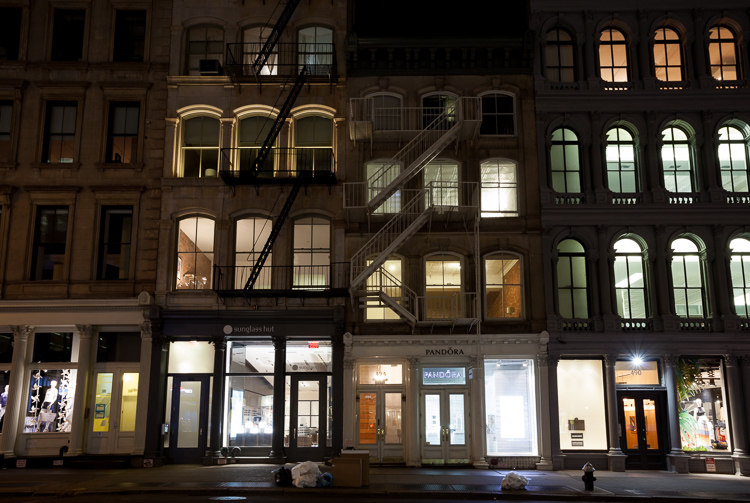
SoHo at Night

googletag.cmd.push(function() {
tablet_slots.push( googletag.defineSlot( “/1005424/_dPSv4_tab-all-article-bottom_(300×250)”, [300, 250], “pb-ad-78623” ).addService( googletag.pubads() ) ); } );

googletag.cmd.push(function() {
mobile_slots.push( googletag.defineSlot( “/1005424/_dPSv4_mob-all-article-bottom_(300×250)”, [300, 250], “pb-ad-78158” ).addService( googletag.pubads() ) ); } );

The post How Playing With Manual Mode Can Help You Learn Exposure Faster by James Maher appeared first on Digital Photography School.

Digital Photography School

 
Comments Off on How Playing With Manual Mode Can Help You Learn Exposure Faster

Posted in Photography


PABLO is a long exposure and light painting app for the iPhone

17 Sep

Czech photographer Miroslav Tichy once described photography as painting with light. Now there is an app for that, but instead of naming it after Tichy, its makers decided to call it PABLO for Pablo Picasso, who created some of the first notable light art images with photographer Gjon Mili in 1949.

PABLO has been developed for light painting with the iPhone. You can create pictures and video by moving a light source in front of the camera while capturing a long exposure. Alternatively, you can illuminate a subject, shine a point of light directly at the camera, or move the camera itself during exposure.

In the app’s ‘live view’ you can watch as light paintings are created and a community feed lets you see a continuous gallery of light images by PABLO users around the world. Additionally, you can create light paintings by uploading existing video clips. Any lights in the video will freeze to create light trails.  You can find more information in the video below and on the PABLO website. How-to videos are available in the PABLO Youtube channel and if you’d like to try the app yourself you can now install it for free from the App Store. 

Articles: Digital Photography Review (dpreview.com)

 
Comments Off on PABLO is a long exposure and light painting app for the iPhone

Posted in Uncategorized


2 Long Exposure Photography Hacks to Try if You Don’t Have an ND Filter

20 Jun

We all love long exposures, well I personally do. They are a great way to create dynamism, movement, and add depth to your images.

In this tutorial, I’ll show you two long exposure hacks that can be useful if your Neutral Density filters are not dark enough, if it’s too bright outside and you cannot get a long exposure, or if you simply don’t have any ND filters. Dark ND filters can be really expensive, so this is a good alternative.

IMG 8076

Long exposures create this surreal, and yet very pleasing effect to give a WOW factor to your images. Whenever you take a photo at night you will automatically get a long exposure, unless you use a very high ISO. For this tutorial I am talking about long exposures during the daytime, which are a bit more complicated to achieve.

The two hacks involves taking nine different images, and stacking them together. Now before I actually explain them, I will briefly give you the best camera settings and shooting conditions:

Shooting and camera settings

  • You will ultimately get the best results if you shoot on a cloudy day with a lot of wind. Why? Because on a cloudy day you will get clouds, and the wind is going to give them movement, and that’s what you want – movement. On a cloudy day, you will also get the minimal amount of light to be able to extend your shutter time.
  • You absolutely need a tripod, first all of all because your images need to be aligned, and you want your images as sharp as possible. With a shutter speed slower than 1/60th, you will start to get blurry results without a tripod.
  • Use a cable release or a 2-second timer every time you take an image. This again is a great way to avoid camera shake and get sharp results.
  • Focus on your subject and put the lens to manual focus, before you start taking your images. DO NOT refocus between the nine shots you are going to take.
  • Use an ISO of 100. You are on a tripod, so you don’t really need a higher ISO.
  • Use a very small aperture, like f/22. This will cut down the light entering your camera as much as possible and with an ISO of 100, will help slow down the shutter speed.
  • Shoot one or two hours before sunset, then you will also have a minimal amount of light to extend your shutter speed even slower.
  • Use your ND filters if you have some. If your ND filters are very dark (10 stop for example) you won’t need these hacks because you will directly get long exposures. If your filters are not dark enough, I would still recommend using them even if you have a one second exposure.
  • I recommend exposing, and focusing before putting your ND filters on, because after that – well you won’t be able to see clearly.

Hack #1 – multiple exposure mode

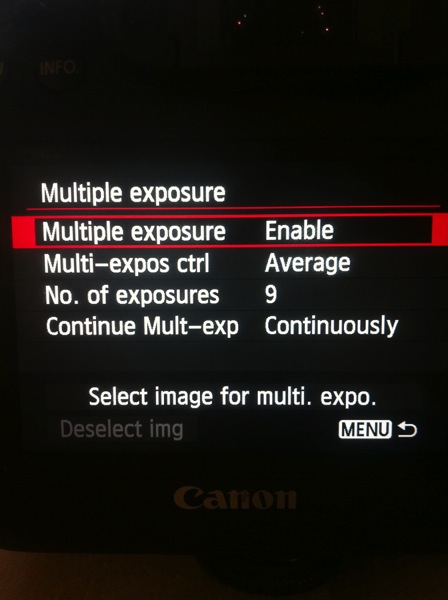
The first hack consists of using the multi-exposure mode on your DSLR. If you do not have this mode, don’t worry the second hack works for all cameras. I personally use a Canon 6D, but this multi-exposure mode is mostly available for all sorts of advanced DSLRs.

You will find this mode on your menu, you just need to enable it.

IMAGE1

For the settings:

  • Average for the Multi-expos ctrl option
  • Continuously for Continue Mult-exp setting

You have the choice to pick how many exposures you want to shoot, the maximum will depend on your DSLR. I usually pick nine exposures to get as much movement on the clouds as I want.

This mode will allow you to multiply your shutter speed by the number of exposures you shoot. For example, If you shoot a single image with an exposure of one second, you will get a total exposure of nine seconds if you shoot nine exposures. It works the same if you have an exposure of 15 seconds.

With this mode, the camera will automatically stack the images together and give you one single image with all the cloud movement. This trick also works if you want some nice silky water.

If the clouds are moving really fast, then I recommend waiting around two seconds before you take another shot. The main trick is to not have the clouds at the same position one shot after the other. If the clouds are moving very slowly then I recommend waiting around 10-15 seconds between shots.

This mode will also tell you on your screen, how many images you have left to complete your multi-exposure.

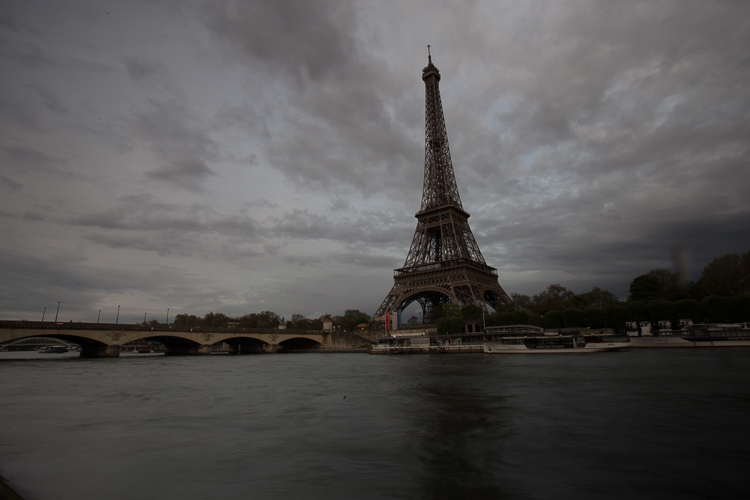
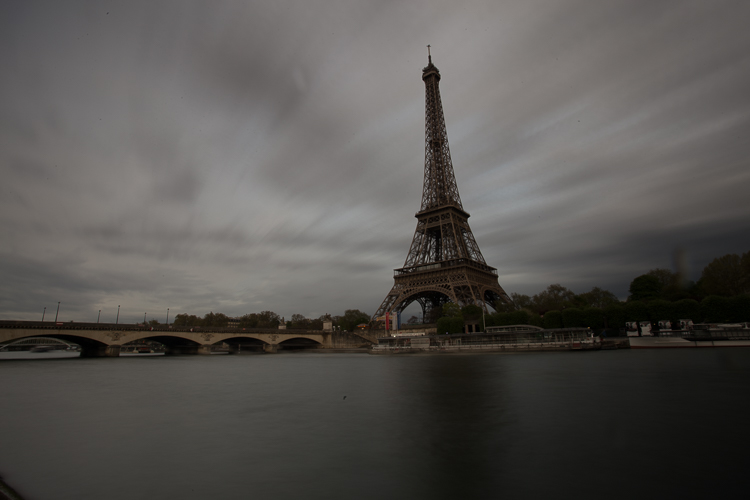
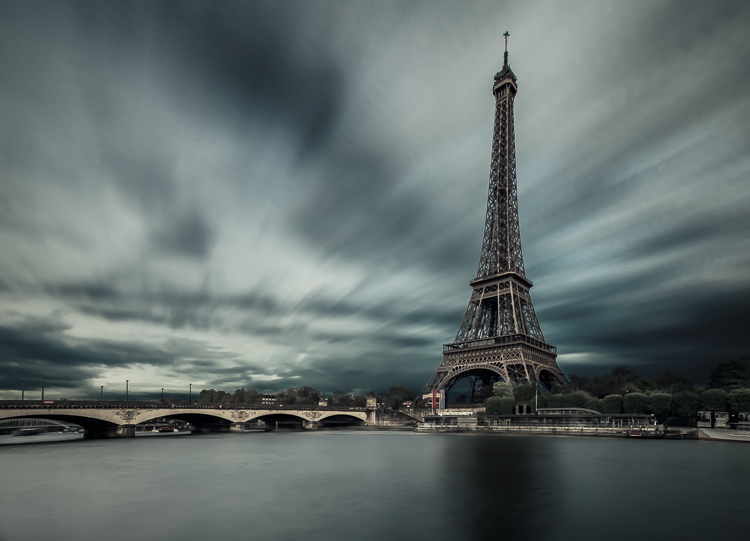
This is an example of a long exposure I got using this method. My aperture was f/22, ISO 100, and I had a shutter speed of one second after using my ND filters. That wasn’t enough to get a long exposure with stretchy clouds, so I decided to use the multi-exposure mode. I took a total of nine shots, and you can see below the before and after using this mode. You can see that it does not only affect the clouds, my water looks nice and silky as well.

IMAGE2

Single image

IMAGE3

Nine shots using multi-exposure in-camera.

IMAGE4

After some retouching, I got this result!

Hack #1 – multiple exposures merged in Photoshop

The second hack consists of doing exactly the same thing but manually. If you are used to shooting time lapses, then this shouldn’t be too complicated to understand.

The multi-exposure mode in-camera gives you automatically, and directly, the long exposure result in one image. For this hack, will shoot nine separate images, one after the other.

You need to use the same camera settings I mentioned above (manual mode, manual focus, tripod, small aperture, ISO 100, release cable or 2-second timer). For the shooting conditions I would also recommend the same thing, and use ND filters if you have some.

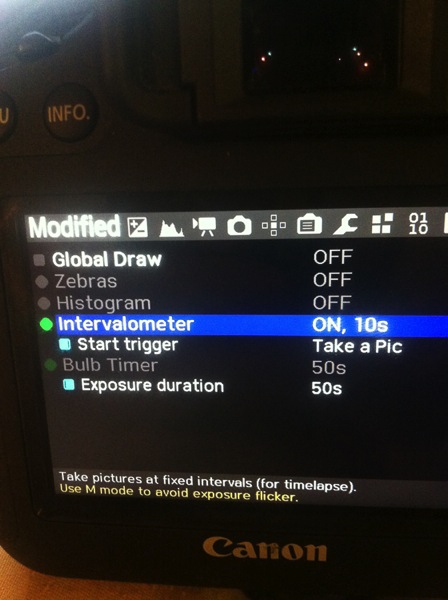
You will basically shoot a time lapse of nine images only. Do not forget to have an interval of 10 seconds minimum between each shots. This process can be quite boring. I personally use the magic lantern camera hack that has an intervalometer built inside the camera. I can then pick how long I want my interval to be between each shot, and the camera will automatically take an image every 10 seconds, for example, until I decide to stop.

IMAGE5

You can buy an intervalometer or use the timer on your phone to count your intervals. It’s really up to you.

Here’s an example of nine images I shot one after the other with an interval of 15 seconds between each. You can clearly see that the clouds are moving. For demonstration purposes, I have intentionally underexposed these shots.

IMAGE6

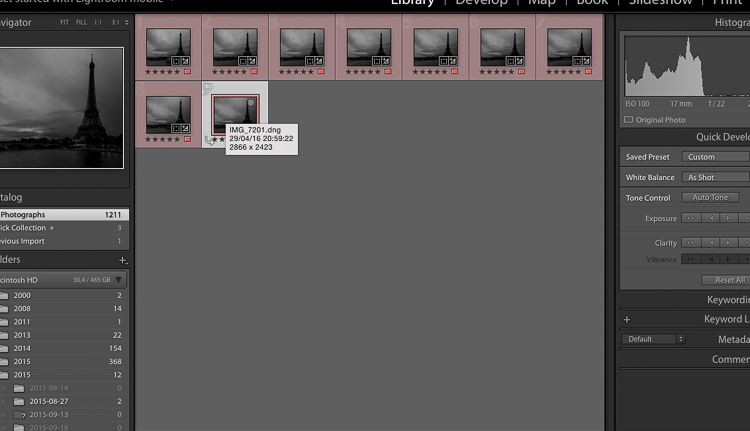
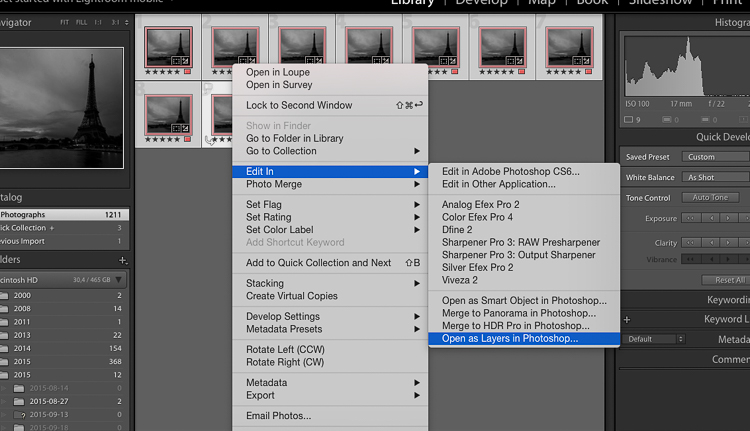
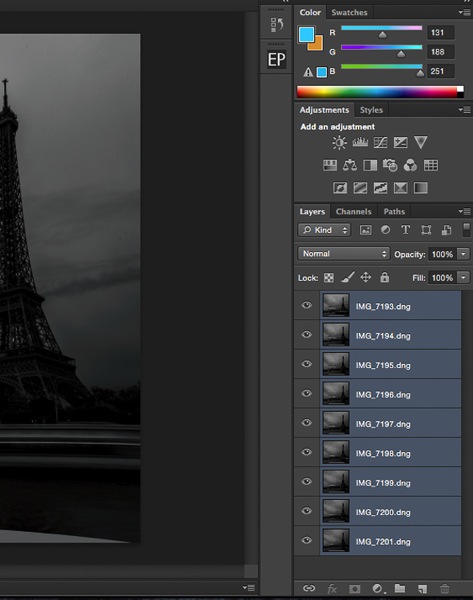
So after you get all your images, import them into Photoshop as layers (from Bridge or Lightroom whatever fits with your workflow).

IMAGE7

Open as Layers in Photoshop after selecting the images in Lightroom.

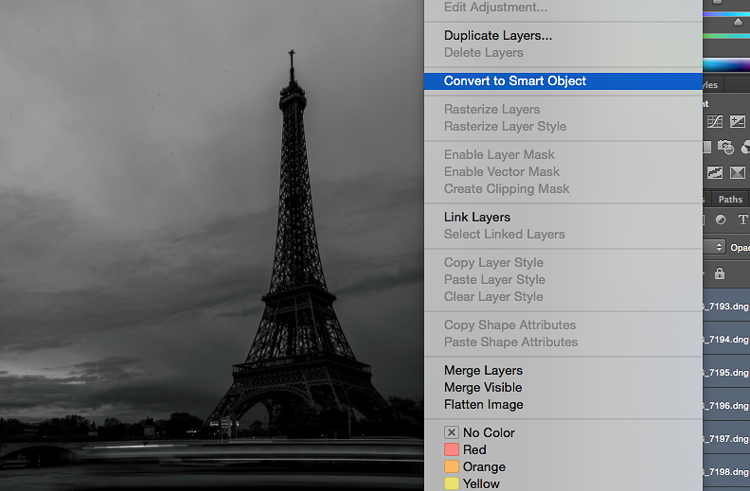
Then next thing you want to do is to select all the layers, and create a smart object.

IMAGE8

IMAGE9

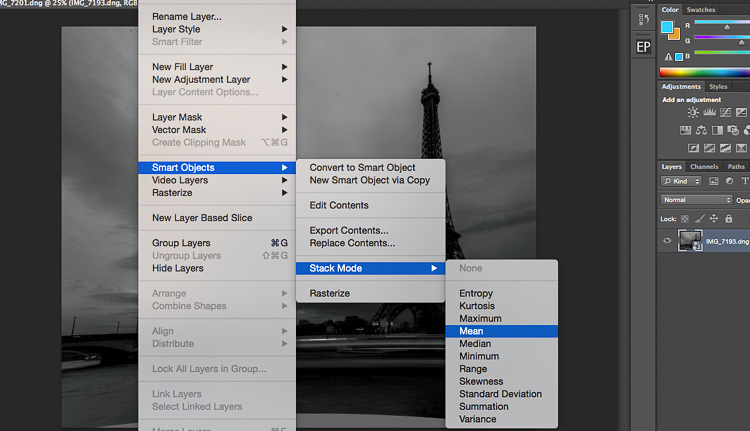
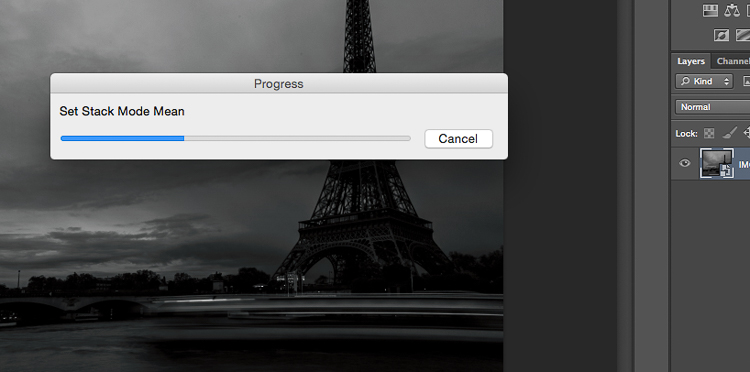
After that go to Layers -> Smart Objects -> Stacking -> Mean.

IMAGE10

IMAGE11

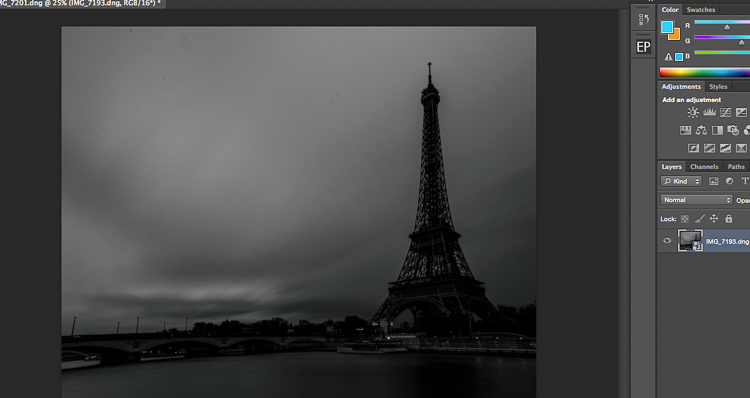
Photoshop will create a nice long exposure now, combining all the layers.

IMAGE12

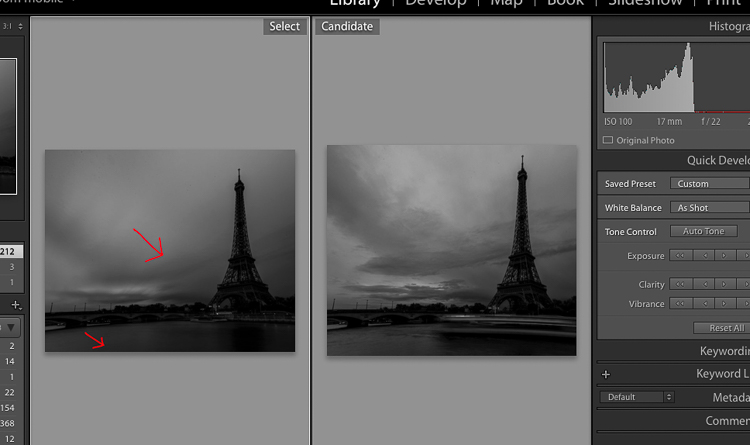
Here’s the before and after:

IMAGE13

Before is on the right of a single image – after is on the left.

Conclusion

You don’t need super dark expensive filters to create long exposures. Of course, you will get the best results with them, but this is a pretty cool alternative. Now personally as a 19 year old student, I cannot spend a lot of money on gear, and so far these two hacks have worked perfectly for me.

IMG_7663-Edit

Enjoy the art, and share your hacked long exposure images in the comments below. I’d love to see your results.

googletag.cmd.push(function() {
tablet_slots.push( googletag.defineSlot( “/1005424/_dPSv4_tab-all-article-bottom_(300×250)”, [300, 250], “pb-ad-78623” ).addService( googletag.pubads() ) ); } );

googletag.cmd.push(function() {
mobile_slots.push( googletag.defineSlot( “/1005424/_dPSv4_mob-all-article-bottom_(300×250)”, [300, 250], “pb-ad-78158” ).addService( googletag.pubads() ) ); } );

The post 2 Long Exposure Photography Hacks to Try if You Don’t Have an ND Filter by Yacine Bessekhouad appeared first on Digital Photography School.

Digital Photography School

 
Comments Off on 2 Long Exposure Photography Hacks to Try if You Don’t Have an ND Filter

Posted in Photography


How to Use the Zone System to Learn about Metering and Exposure Compensation

16 Jun

When you first move off auto, you realize how much control you have over your camera. You get to choose the aperture, shutter speed, ISO, and be able to manually select the autofocus point, among many other things. In short you get control over everything!

You also get full control over the exposure, or brightness, of the image. You decide you where to set the exposure for each image – something that the camera does not always get correct. The reason the camera doesn’t get it right all the time is because the in-camera light meter doesn’t always know how the brightness level of the subject. What tricks the light meter is bright or dark tones.

So how do you take back control of the exposure, and compensate for the camera’s errors? The process of correcting your exposure is referred to as Exposure Compensation. For more on that read: How to Use Exposure Compensation to Take Control of Your Exposure. However, before you add any exposure compensation, you first need to know how much to compensate, and understand exactly what your camera’s light meter is doing. This is why learning how to meter is important. If you are unfamiliar with the term metering, it is the process of measuring light values.

The first thing to grasp when is how your camera’s light meter sees the world. Put simply, it sees everything in grayscale. This means that all your camera sees is a world of tones; a colourless world. It cannot differentiate trees from people, people from snow, etc. (Although more modern in-camera light meters will now also recognize colour, the same basic principles apply.)

The other critical element to know is that your meter wants to make everything middle-gray, commonly referred to as 18% gray. Remember that! Right it down! Keep it with you in your camera bag until it’s firm in your memory! It’s very important!

Everything you need to know about doing exposure compensation correctly hinges off 18% gray. If your scene has a lot of bright areas in it, such as snow or sand for example, your camera will want that to be 18% gray. If you’re photographing a person in dark clothing, your camera will also want to make that 18% gray. Your camera doesn’t know your subject is actually meant to be black, nor does it know that all of that white in the viewfinder is actually snow. Leaving your camera’s meter at zero, or Meter as Read (MAR), can cause your photo to be over or under exposed.

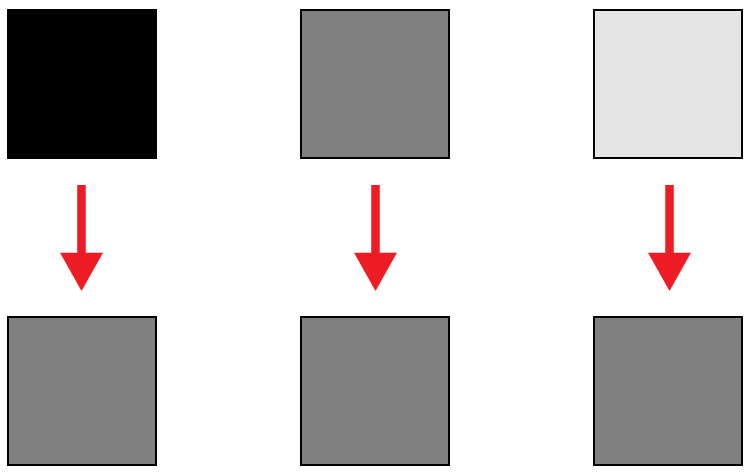
Here is an illustration of what your camera meter will do. Tones will end up 50% grey.

Here is an illustration of what your camera meter will do. All tones will end up 18% or middle gray.

So how does knowing how your camera will meter, help you to decide how much exposure compensation to apply? This is where knowing a little about the Zone System can come in handy.

What is the Zone System?

The Zone System was developed by the late Ansel Adams and Fred Archer. In essence, it was a system used to meter and continue on in the dark room when developing images. I’m not going to discuss the Zone System in its entirety – that could be something for a future article – but at its core, the Zone System will greatly help you decide how much exposure compensation to add or subtract.

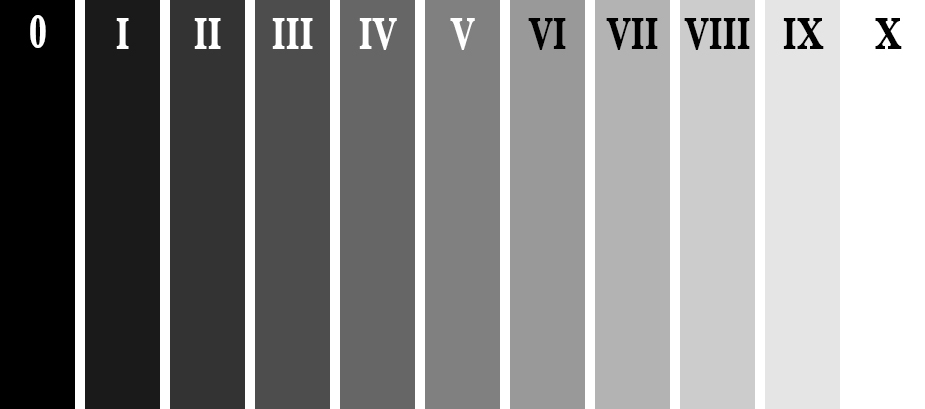
The Zone System

The Zone System

Above is an illustration of the Zone System. In it are 11 zones, denoted by Roman numerals. Here is a quick rundown of examples for each Zone:

  • Zone 0: Pure black, no detail. This is would be the edge of a negative film.
  • Zone I: Near pure black with slight tonality, but no detail.
  • Zone II: This is the first Zone where detail starts to show; the darkest part of the image where detail is recorded.
  • Zone III: Average dark materials.
  • Zone IV: Landscape shadows, dark foliage.
  • Zone V: Middle-gray, what your light meter sets to.
  • Zone VI: Average Caucasian skin tone.
  • Zone VII: Very light skin; shadows in snow.
  • Zone VIII: Lightest tone with texture.
  • Zone IX: Slight tone without texture, (e.g., glaring snow).
  • Zone X: Pure white with no detail. This would be light sources, or reflections of light sources.

This next piece of information is the other piece to the exposure compensation puzzle:

Each Zone is separated by exactly one stop of exposure.

Now that you have the information, how do you use it?! You know that you camera is metering for Zone V, or middle-gray, now consider your subject. How light or dark is it? If you were photographing a bride’s white dress, that would be very bright with texture; so going by the chart that would fall into Zone VII or VIII, which makes the exposure compensation required for correct exposure PLUS two or three stops (the difference between Zone V and where your subject should fall).

RV-02383-slideshow

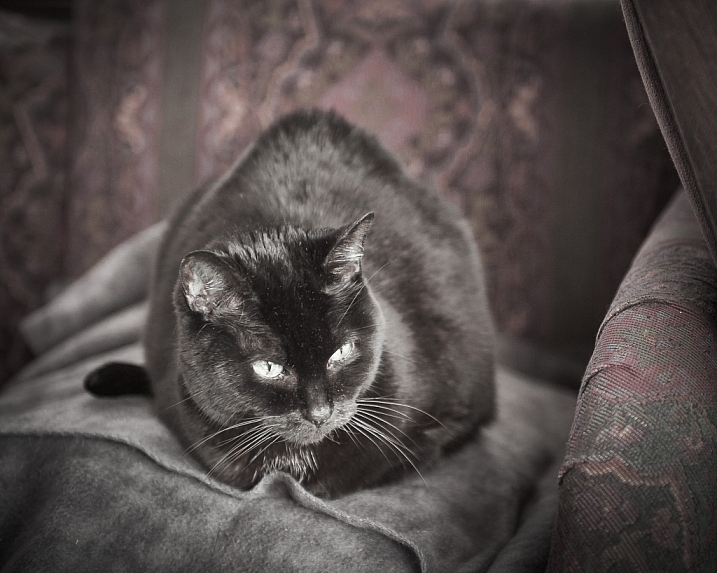
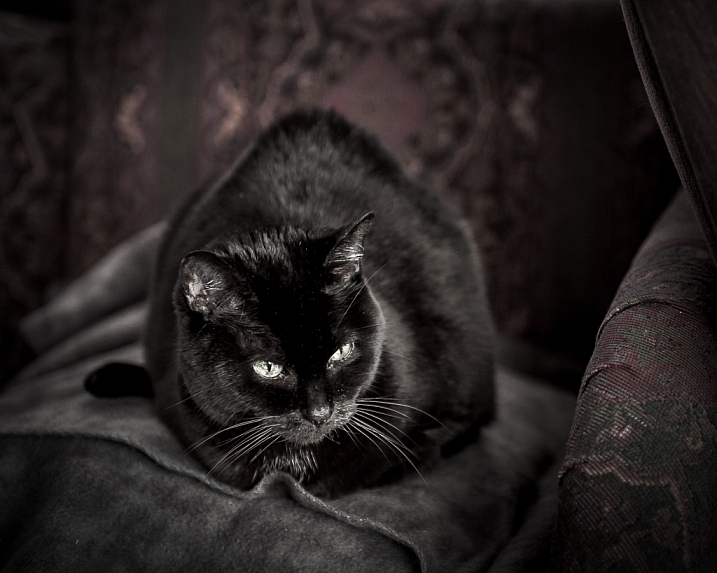
Shot at zero exposure compensation. Black cat is gray or Zone V.

RV-02383-slideshow (1)

Shot at -2 stops black cat is now black or Zone III.

As an experiment, try photographing a piece of plain white paper. First, make sure that there is no exposure compensation added – your meter should be in the middle. Take a photo. Next, add +2-stops of exposure compensation. This will bring your exposure to Zone VII. Then, take another photo. Notice the difference? The first image should be very close to middle-gray, or Zone V, where the last image should be bright white, but still show detail in the paper.

External Light Meters

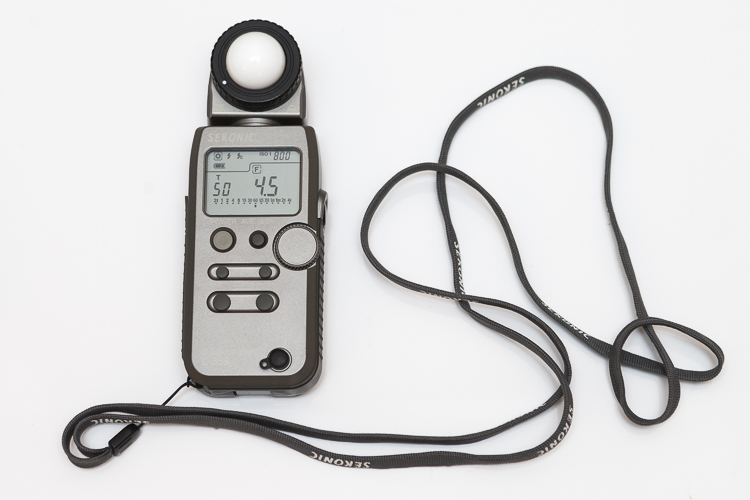
Another tool that may be helpful to you, is an external handheld light meter. They work the same way as your camera’s light meter in that they meter for middle-gray, but they have the added advantage of being to reading what’s known as Incident Light: that which is falling on the subject, not reflected from it. Your camera’s meter is a reflected light meter; it reads the light that has been reflected or bounced off your subject. This may seem obvious, but there is a big difference between incident light and reflected light. Reflected light is greatly affected by tone – the darker your subject is, the less light that will be reflected, whereas the brighter your subject is the more light that will be reflected. However, the incident light – or light coming from the light source – will remain the same no matter what the tones are in your subject. By using an external light meter, you are reading the light directly from the source; unaffected by the tone of the subject.

However, do be careful when you are using an external light meter that you read the incident light from the subject’s position. You may be in the shade, for example, and your subject in the sun. If you were to read the incident light for your position,you would be getting a reading for the shade area, and not the sun, which is the light that’s falling on your subject!

This is an external light meter. It's a Sekonic L-358, and is able to meter ambient light but also meter flash.

This is an external light meter. It’s a Sekonic L-358, and is able to meter ambient or natural light as well as flash.

Summary and application

Now that you know what your light meter is doing, and how to correct it with exposure compensation, you are on your way to getting more consistent and correct exposures.

Before you press the shutter button next time, do consider what the tones in your scene are like. Are there lots of brighter tones, or more darker tones? If your frame has more brighter tones, the exposure compensation will need to be more on the plus side to render them correctly. However, if there are more darker tones, your exposure compensation will be more toward the minus side of your meter. If you feel there are equal amounts of bright and dark tones, you may find that you don’t need to add any compensation at all.

teaching-eg-028-slideshow

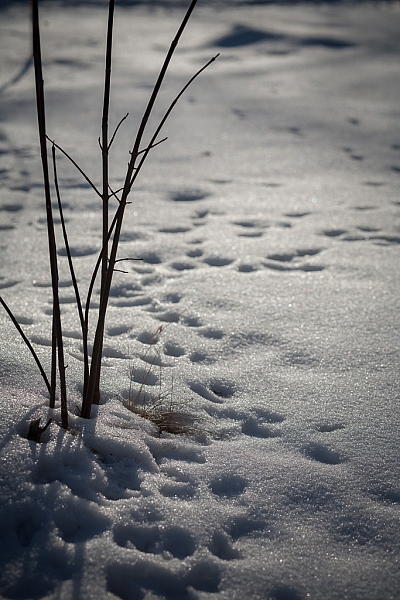
Snow shot at zero exposure compensation is gray, or Zone V.

teaching-eg-028-blog1100

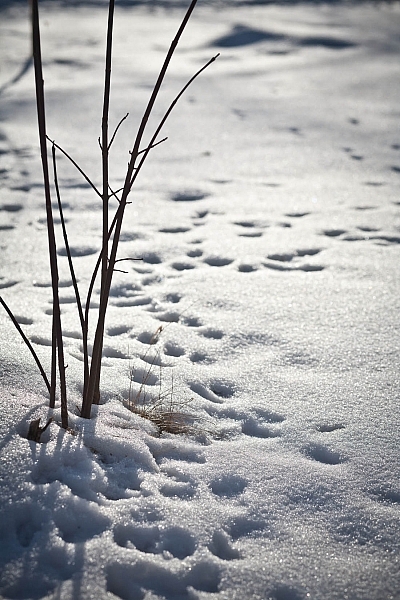
Snow shot at +2 is now white with detail or Zone VII.

If you’re ever unsure of how much exposure compensation to add or subtract, take a test shot at zero, or in the middle. This will help you decide the direction in which you need to go.

googletag.cmd.push(function() {
tablet_slots.push( googletag.defineSlot( “/1005424/_dPSv4_tab-all-article-bottom_(300×250)”, [300, 250], “pb-ad-78623” ).addService( googletag.pubads() ) ); } );

googletag.cmd.push(function() {
mobile_slots.push( googletag.defineSlot( “/1005424/_dPSv4_mob-all-article-bottom_(300×250)”, [300, 250], “pb-ad-78158” ).addService( googletag.pubads() ) ); } );

The post How to Use the Zone System to Learn about Metering and Exposure Compensation by Daniel Smith appeared first on Digital Photography School.

Digital Photography School

 
Comments Off on How to Use the Zone System to Learn about Metering and Exposure Compensation

Posted in Photography


How to Get the Correct Exposure at Night with These Helpful Tips

25 May
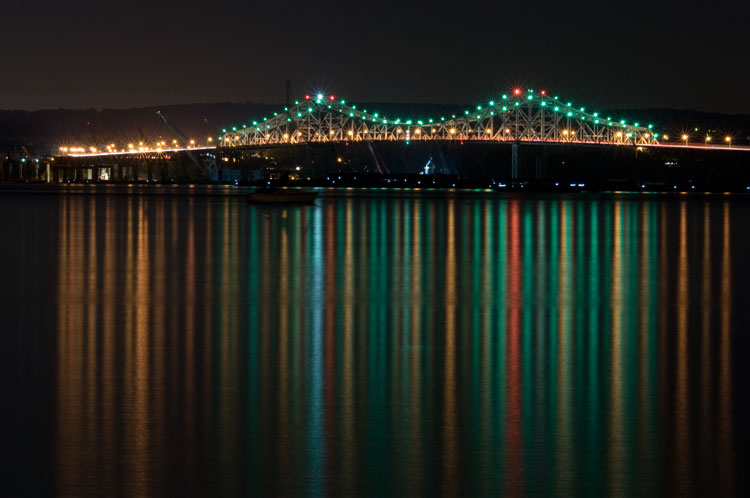
Tappan zee bridge

Colorful lights on the Tappan Zee Bridge reflected in the Hudson River at night. Behind the shot: ISO 200, aperture f/8, shutter speed 90 seconds, White Balance tungsten, lens used 80-200mm f/4.5 manual Nikkor zoom.

Exposing your photos correctly at night can be a bit challenging, and will certainly require some trial and error. In this article, you will learn helpful information to minimize the learning curve. Follow the tips outlined below and you will be taking better night photographs in no time.

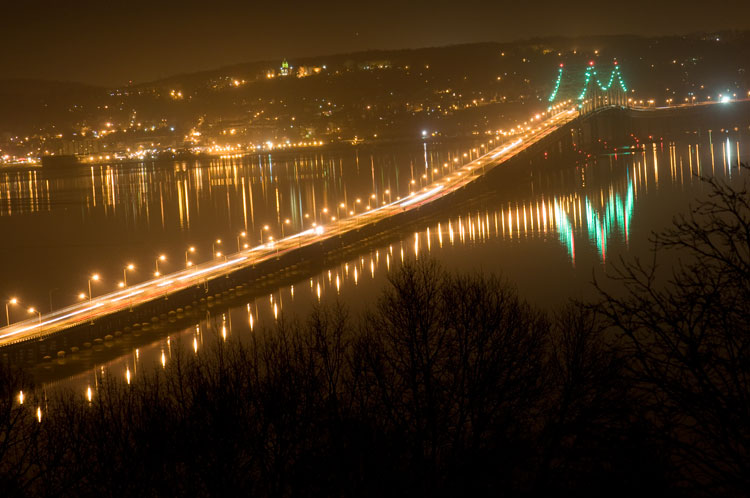
Tappan zee bridge at night

View of the Tappan Zee Bridge and surrounding landscape at night. Behind the shot: ISO 400, aperture f/8, shutter speed 10 seconds, White Balance auto, lens used 105mm f/2.8 Nikkor.

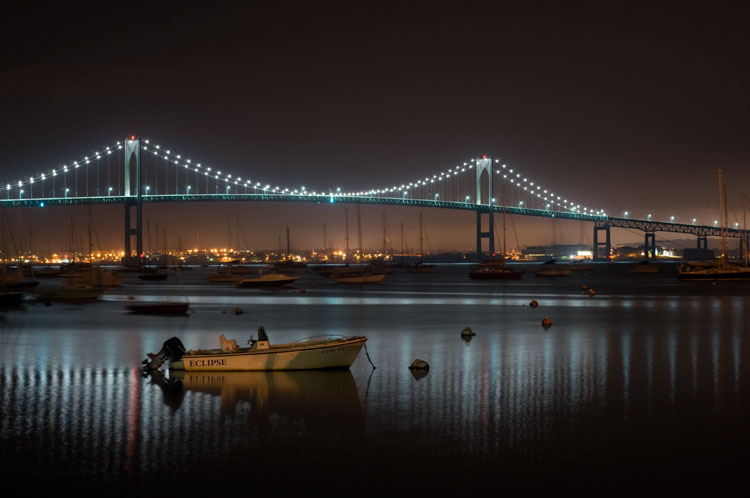
Claiborne pell newport bridge

Night-time view of the Claiborne-Pell Newport Bridge and Narragansett Bay, taken in Jamestown, Rhode Island. Behind the shot: ISO 200, aperture f/8, shutter speed 25 seconds, White Balance fluorescent, lens used 50mm f/1.8D Nikkor.

Things You’ll Need

A Tripod

If you’re shooting at night, your exposures are going to be pretty long (anywhere from one to 30 seconds, or more). Since it is impossible to hold your camera perfectly still for that long, you will need a sturdy tripod, so that your camera does not move at all during the exposure. For added stability, you can hang your camera bag (or another somewhat heavy object) from the hook on your tripod’s center column. This is especially handy in windy conditions.

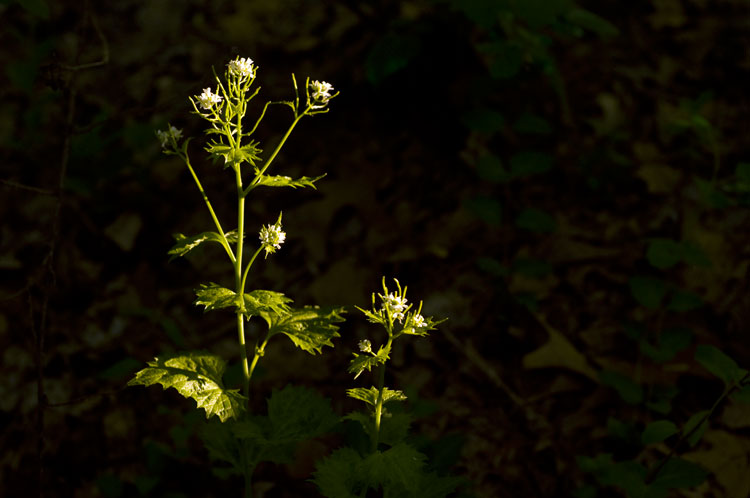
Plants at night

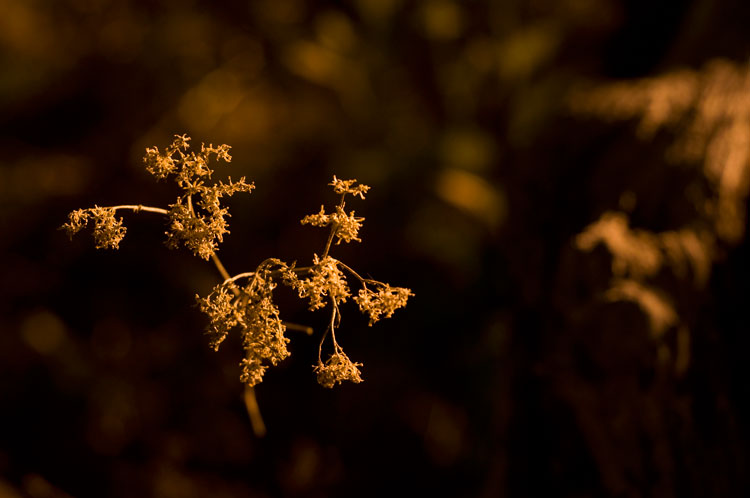
Long exposure of plants illuminated by streetlight at night in Nyack, New York. Behind the shot: ISO 400, aperture f/4, shutter speed 30 seconds, White Balance tungsten, lens used 50mm f/1.8D Nikkor.

Illuminated plant at night

Golden plant illuminated by streetlight at night in Nyack, New York. Behind the shot: ISO 400, aperture f/4, shutter speed 30 seconds, White Balance tungsten, lens used 50mm f/1.8D Nikkor.

Remote Shutter Release

With a long exposure, any camera movement can ruin the shot, making it soft or blurry. To ensure you get a sharp image, use a remote shutter release (remote trigger). The best type of shutter release to use is the kind that functions as a timer remote as well. If you don’t have a remote shutter release, you can use your camera’s self-timer. The only downside to using the self-timer is that you will have to keep your shutter speed at 30 seconds or less. If you don’t have too much light, you can always increase your aperture (decrease the f-stop) or increase your ISO to speed up your shutter speed.

Colors of night

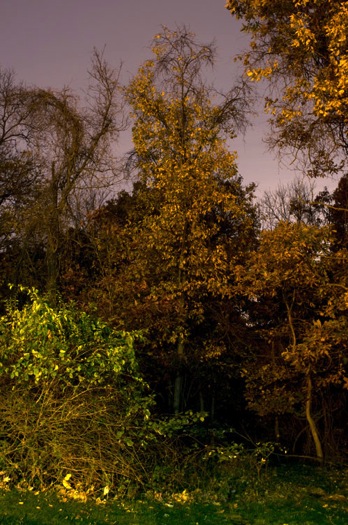
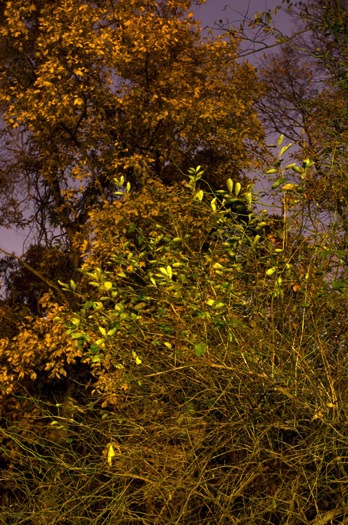
Assorted foliage illuminated by streetlights in Nyack, New York. Behind the shot: ISO 200, aperture f/5.6, shutter speed 30 seconds, White Balance fluorescent, lens used 24mm f/2.8D Nikkor.

Colorful night

Colorful plants and trees in Nyack, New York. Behind the shot: ISO 200, aperture f/5.6, shutter speed 30 seconds, White Balance fluorescent, lens used 24mm f/2.8D Nikkor.

Camera Settings

Shoot RAW

Keeping image quality in mind, you should always strive to shoot in RAW format. It records more pixel information, and does not compress your images at all. RAW provides you with more post-processing options, including white balance correction. If you happen to under or over expose an image, you can easily adjust the exposure if your image is in RAW format.

ISO

When taking photographs with little available light, you are better off using a low ISO (400 and below) and longer exposure times. This is important so you don’t get too much noise (or grain) in your images. Also, make sure you have Long Exposure Noise Reduction turned on in your camera’s settings.

Yellow leaved tree moving clouds at night

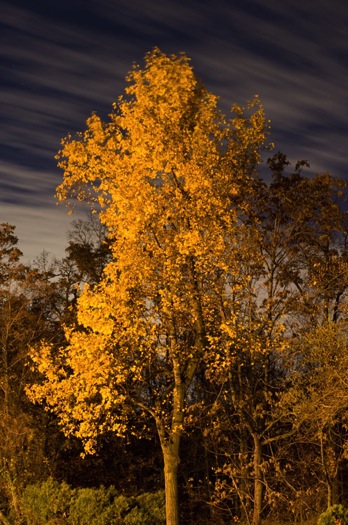
Yellow-leaved tree and moving clouds at night in Nyack, New York. Behind the shot: ISO 200, aperture f/5.6, shutter speed 30 seconds, White Balance tungsten, lens used 50mm f/1.8D Nikkor.

Tree in wind

Tree in wind at night in Valley Cottage, New York. Behind the shot: ISO 400, aperture f/2.8, shutter speed 30 seconds, White Balance tungsten, lens used 50mm f/1.8D Nikkor.

Use Manual Mode

While shooting in very low light, your camera’s light meter may not read the scene too well. Your best bet is to use Manual mode, where you control both the aperture and the shutter speed. To find a baseline for the correct exposure, you can use the following trick (which I learned in this blog post):

  1. Set your ISO to 6400
  2. Set the aperture you would like to use
  3. Set your shutter speed at one second

Take a test shot using these settings to get an idea of what your image will look like. Note, these settings are almost equivalent to a 1-minute exposure at ISO 100, a 30-second exposure at ISO 200 and a 15-second exposure at ISO 400, etc. If your scene is too bright with these settings, you can see what a half second exposure at 6400 looks like. This would equal a 30-second exposure at ISO 100, a 15-second exposure at ISO 200 and a 8-second exposure at ISO 400. This baseline is a great guide, you can easily take test shots to figure out what shutter speed to use.

Autumn leaves in motion

Autumn leaves in motion at night in Valley Cottage, New York. Behind the shot: ISO 400, aperture f13, shutter speed 30 seconds, White Balance fluorescent, lens used 24mm f/2.8D Nikkor.

Tree at night

Tree and clouds in motion at night in Nyack, New York. Behind the shot: ISO 400, aperture f/5.6, shutter speed 30 seconds, White Balance tungsten, lens used 50mm f/1.8 manual Nikkor.

If you use the above trick, you won’t unnecessarily waste time taking a bunch of long test exposures. As it is, long exposure night photography is rather time-consuming. Make sure you switch your ISO back to 400, or below, before you start taking photos that you intend to keep.

In scenes where you have a decent amount of available light (e.g. places with numerous streetlights), you may be able to use Aperture Priority mode instead of Manual mode.

In Conclusion

Night photography can be rather tricky, and requires a good amount of practice. In time, you will have a feel for the amount of light in various night scenes, and be able to figure out accurate camera settings with relative ease. Hopefully, the information contained in this post will help you capture great long exposure night shots, that don’t need much post-processing.


googletag.cmd.push(function() {
tablet_slots.push( googletag.defineSlot( “/1005424/_dPSv4_tab-all-article-bottom_(300×250)”, [300, 250], “pb-ad-78623” ).addService( googletag.pubads() ) ); } );

googletag.cmd.push(function() {
mobile_slots.push( googletag.defineSlot( “/1005424/_dPSv4_mob-all-article-bottom_(300×250)”, [300, 250], “pb-ad-78158” ).addService( googletag.pubads() ) ); } );

The post How to Get the Correct Exposure at Night with These Helpful Tips by Marshall Reyher appeared first on Digital Photography School.

Digital Photography School

 
Comments Off on How to Get the Correct Exposure at Night with These Helpful Tips

Posted in Photography


Long Exposure Fire Photography – 5 Tips for Beginners

15 May
tips for long exposure fire photography

ISO 100, f/10, shutter speed 5.0 seconds

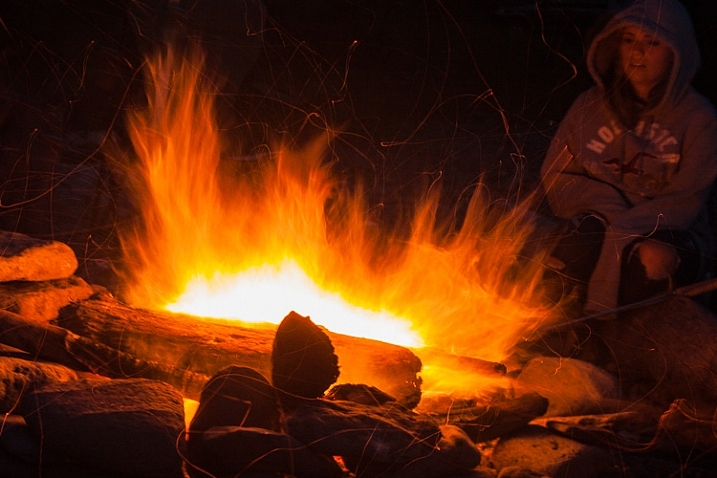
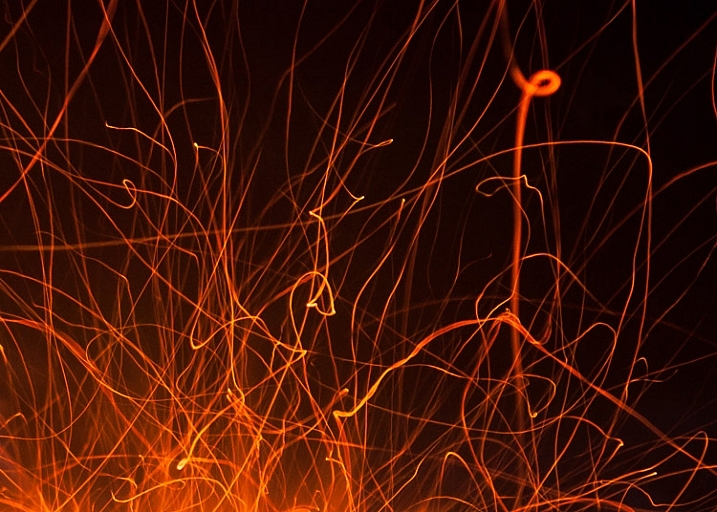
A long exposure photo can make flames look soft and feathery, capture spark trails, and be used to create a romantic or cozy mood. The tips in this article will help you get started with long exposure fire photography.

Long exposure fire photography: 5 tips for beginners

Remember to be careful as you practice your fire photography. Fire can be dangerous, and it’s easy to be careless when we’re thinking more about our photography than the fire. Maintaining a safe distance is important for you and your gear.

1. Use a slow shutter speed

To take a long exposure photo, the shutter in your camera needs to be open long enough to blur motion and light. Here are a couple of ways to ensure that the shutter stays open:

  • Shutter Priority: you choose the shutter speed
  • Aperture Priority: the camera chooses the shutter speed

Shutter Priority

Put your camera in Shutter Priority mode, choose your desired shutter speed, and let the camera do the rest.

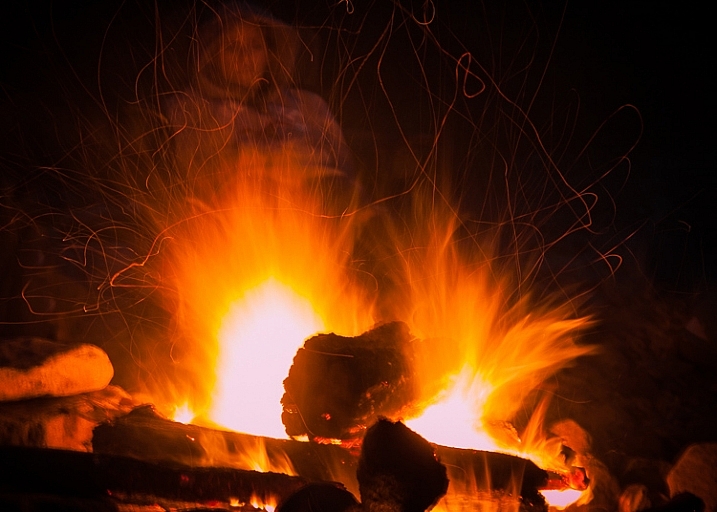
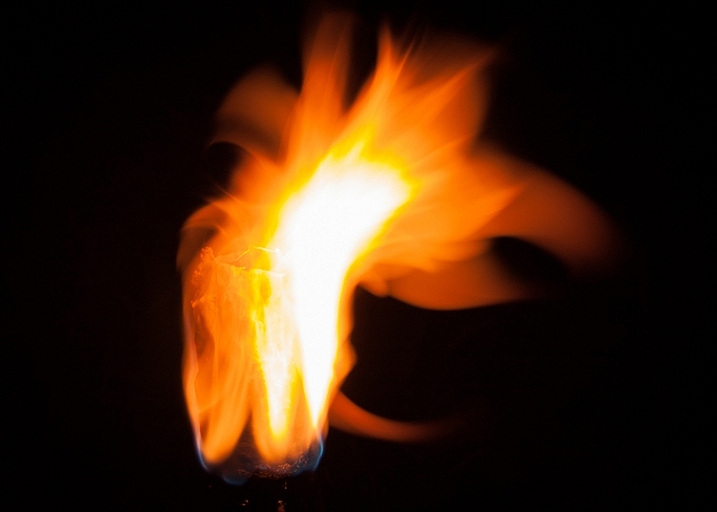
This will force your camera to let in light for the amount of time you’ve chosen. This means your camera will be choosing your ISO (if it’s set to auto) and your aperture. This will give you varied results depending on how much light is available. Using Shutter Priority in this way can be fun. When you choose a shutter speed of five or six seconds, you can capture interesting flame shapes, and lots of spark trails. The bonfire and torch photos in this article were captured in Shutter Priority mode.

long exposure fire photo

ISO 100, f/11, shutter speed 6.0 seconds

Aperture Priority

You could also put your camera in Aperture Priority, choose a mid-range aperture (f/8 – f/11,) set a low ISO (100 – 200,) and let your camera choose the shutter speed. If you’re shooting at night (when it’s really dark) and the fire is your light source, your camera will choose a slow shutter speed. This should give you a photo with large depth of field, relatively free of grain (noise).

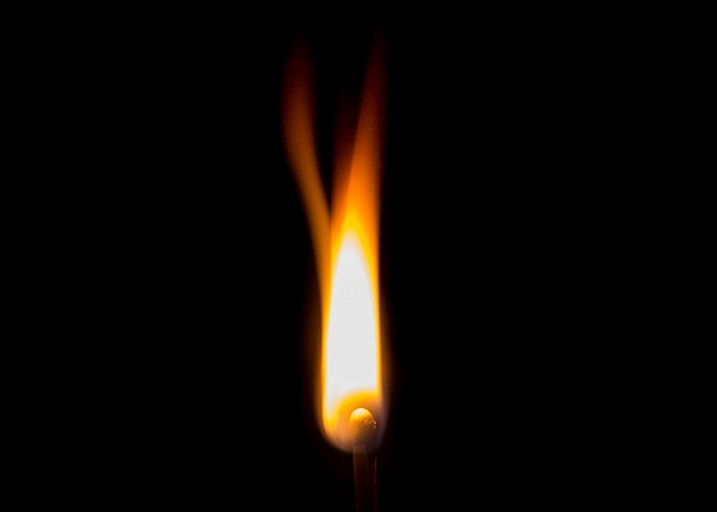
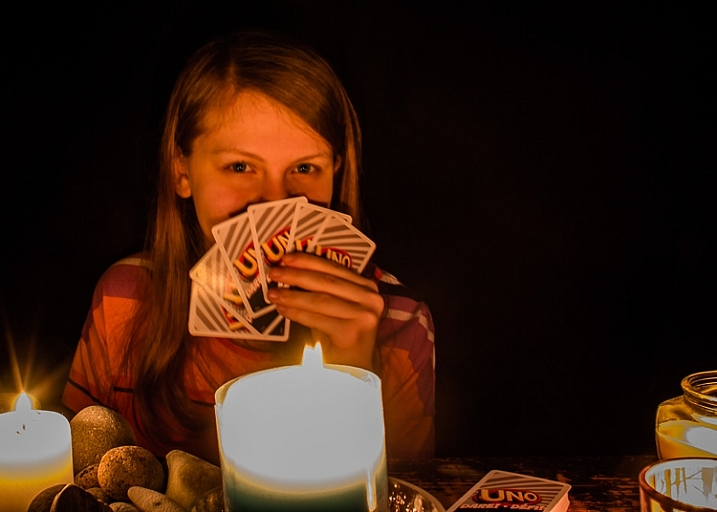
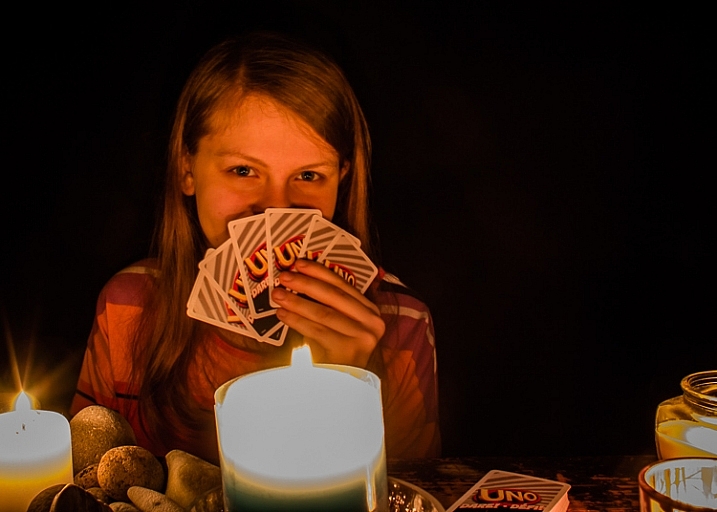
If this causes your shutter to be open for longer than you want, increase the ISO. This will start adding noise, which can be reduced during editing. The card game and match photos in this article were shot using Aperture Priority.

long exposure flame photo

ISO 100, f/11, shutter speed one second

Those are a couple of suggestions to get you started. Long exposure fire photography is all about playing around and having fun. Try lots of different apertures and shutter speeds. If you’re like me, you’ll get excited as you review each shot, and see the interesting shapes you’ve captured.

2. Set your camera on a tripod

When using a long exposure, you’ll want to reduce camera shake which results in blurry photos. Camera shake occurs when the camera moves while the shutter is open. Slow shutter speeds (of more than one second) make it impossible to hand-hold your camera, and still get sharp images. Using a tripod will keep your camera steady.

3. Use a remote shutter release or set the self-timer

Your remote (or the camera’s self-timed shutter release) can also help you cut down on camera shake. When you press the shutter release manually the camera moves a little, this could cause blur in your photo. But when you use a remote shutter release (or set your camera’s self-timer) you don’t have to worry about that. This may seem like a small thing, but it can make a big difference to your image sharpness.

long exposure fire spark trails

Spark trails. ISO 320, f/6.3, shutter speed 6.0 seconds

When capturing match flames the remote works best. It’s super frustrating trying to capture that flame burst while waiting for the camera’s self-timer.

4. Choose your subject

Do you want your main focus to be the fire itself? Or are you trying to capture more of the mood created by the fire? While capturing the mood, it can be tricky to focus on people. It’s not easy to sit still during a long exposure and any movement will create blur in your photo.

The following photos were shot in Aperture Priority mode, with an aperture of f/8. For the first photo, I set the ISO at 100, and my camera chose a shutter speed of 5 seconds. That was too long for my daughter to stay still, so the photo is blurry.

long exposure fire photography tips 3

ISO 200, f/8, shutter speed 5.0 seconds (blurry)

For the second photo, I set the ISO to 400 which cut the shutter speed in half = 2.5 seconds. That was a little easier for her, and the photo is clearer.

long exposure fire photography tips 2

ISO 400, f/8, shutter speed 2.5 seconds

5. Switch to manual focus

Sometimes auto focus doesn’t work well in the dark.

Here’s how to focus on something other than the fire: Shine your flashlight on the subject, and press the shutter release button halfway. When autofocus locks on, turn off the light and switch to manual focus. Without moving or adjusting anything on the camera, take your shot. Your camera will maintain the same focus point – as long as nothing is adjusted.

Note: you could also try back button focus.

Where will you practice?

Do you enjoy a cozy fire at your campsite, or having bonfires at the beach? Do you like candlelit dinners? Or what about backyard marshmallow roasts? All of these would be great places to practice long exposure fire photography.

long exposure bonfire

ISO 160, f/5.6, shutter speed 6.0 seconds

Experimenting with long exposures around a campfire can be a little addictive. I’ll bet the more you practice, the more fun you’ll have.

Don’t forget your flashlight! You’ll need it to see your camera controls, for help with focusing, and to get safely back to your car.

long exposure fire photography tips

ISO 100, f/16, shutter speed 5.0 seconds

Please share your tips and photos by commenting on this article.

googletag.cmd.push(function() {
tablet_slots.push( googletag.defineSlot( “/1005424/_dPSv4_tab-all-article-bottom_(300×250)”, [300, 250], “pb-ad-78623” ).addService( googletag.pubads() ) ); } );

googletag.cmd.push(function() {
mobile_slots.push( googletag.defineSlot( “/1005424/_dPSv4_mob-all-article-bottom_(300×250)”, [300, 250], “pb-ad-78158” ).addService( googletag.pubads() ) ); } );

The post Long Exposure Fire Photography – 5 Tips for Beginners by Dena Haines appeared first on Digital Photography School.


Digital Photography School

 
Comments Off on Long Exposure Fire Photography – 5 Tips for Beginners

Posted in Photography


8 Reasons to Love Long Exposure Photography

06 May

Long exposure photography is not a new type of photography, but it is one that is gaining in popularity. Many photographers are buying Neutral Density filters (ND Filters – more on them below) to capture their own long exposures. It is quite an addictive form of photography. Over the last couple of years I have added many different ND filters to my kit. I use Formatt Hitech filters, though there are other brands that have them as well. Here are some reasons why I love this type of photography.

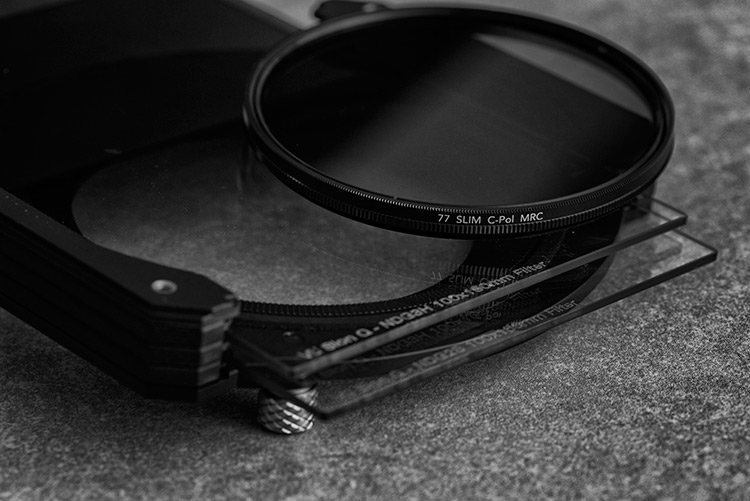
Drop-in and screw-in filters

Note: Neutral Density filters or ND Filters are designed to restrict the amount of light that enters the lens and camera. They can either screw onto the end of the lens or you can buy brackets that will fit square ones. They came in different densities, and how dark they are is referred to by how many stops of light they block. The most common ND filter is the 10 stop which many brands make. The neutral refers to them having no colour, supposedly. They are meant to have no colour and cause no colour cast in your images, though the more stops the filter has, often the more likely you are to get some colour cast. Cheap ND filters always have a colour cast, usually magenta. If you want to get serious about doing long exposure photography, then purchasing good quality filters from the start is something you will never regret.

1 – Get a smooth look to water, or show how the water moves

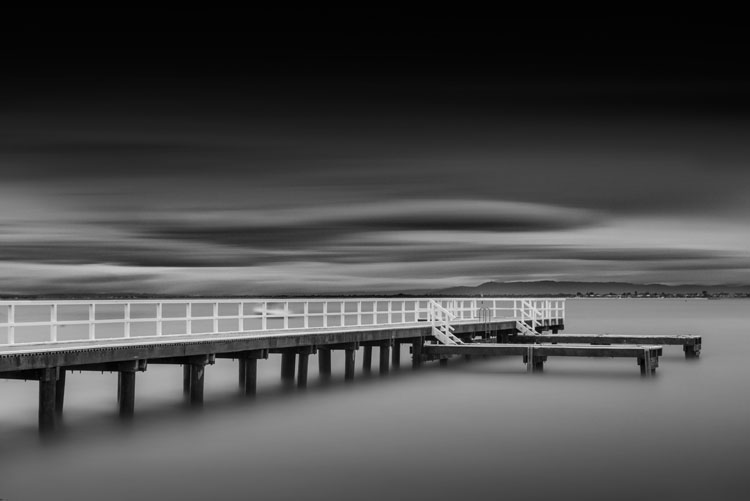
One of the more popular ways of using long exposures is to smooth out water to make it look still or frozen. This can be done with the ocean, rivers, and lakes. It can make the water in a scene less distracting because the water doesn’t have any movement in it. The image is then more about the sky, the rocks or whatever else is there.

LeanneCole-7reasons2lovelongexposures-daveysbag

A pier at Davey’s Bay, the long exposure has blurred the clouds and smoothed the water – 5 minute exposure.

Another alternative is to do long exposures of around a second, so you can see the movement of the water. As the tides come in and out on the beach, you can see where it has been, it almost looks like a slow motion capture. It’s a wonderful effect and we are seeing it a lot more. Though water moving on the beach isn’t the only way to use it, water falling over rocks can be just as engaging.

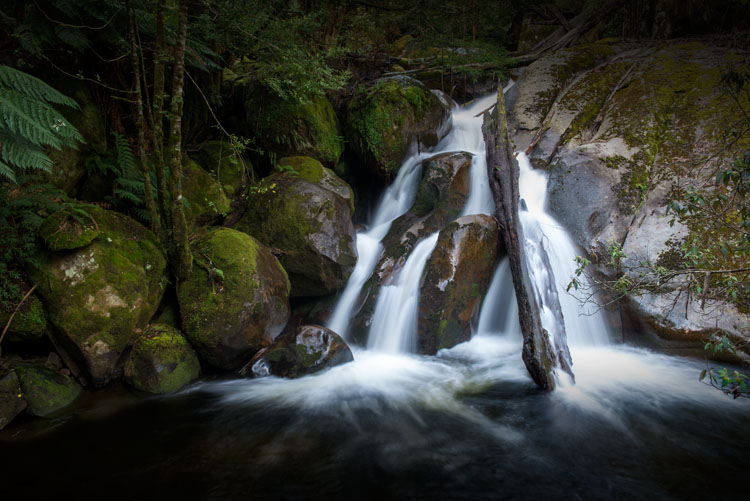
Waterfalls are another type of long exposure that people love. Though many waterfalls are down in canyons, you still need a ND filter to get that smooth marshmallow effect with the water as it flows down. Though, you don’t often need a multi-stop one like you would for the previous water examples.

LeanneCole-7reasons2lovelongexposures-taggertycascades

Adding a few seconds (1.33 seconds) to an image of a waterfall gives it a lovely marshmallow effect. You can also see the movement of the water.

2 – Get blurred clouds

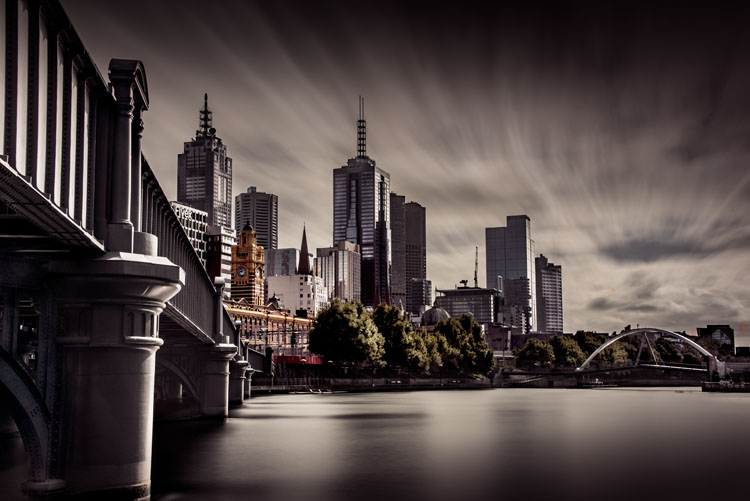
Architecture is a very popular subject for long exposures because you can blur the clouds. It gives the image a different look, and it almost seems like your subject is lost in time. With blurring the clouds, it also makes the building(s) you are photographing your main focus point, and gets rid of any distractions.

LeanneCole-7reasons2lovelongexposures-melbourne

Melbourne from across the river. The long exposure (4 minutes for this shot) gives the view a different feel to what we normally get.

3 – You can clear spaces of people and traffic

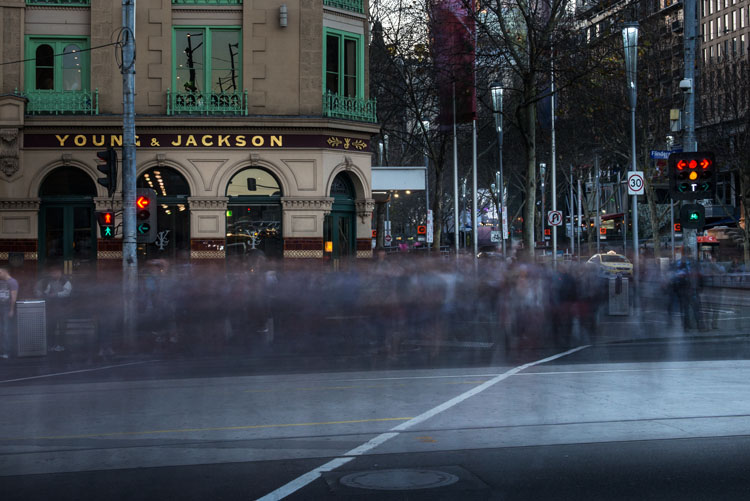
If you love photographing areas in towns and cities, but one of the challenges of that type of photography is that people are always around, long exposures using filters will help you clear those distractions. Exposures of several minutes can almost clear a scene of people, though it depends on the density of them. A scene where there are only a few people walking around can come out with the appearance of being empty with a long exposure. However, where there are many people you will find that they just blur, though this can be a great effect as well.

LeanneCole-7reasons2lovelongexposures-youngandjacksonscorner

Photographing a busy intersection with a ND filter makes people look like ghosts – 30 second exposure.

4 – There is a quietness about the work

Once people are introduced into a scene that you are photographing, it brings with it noise, as in how people see the images. They can be noisy, and whether people looking at the images realize it or not, they hear what they would hear if they were actually there. Vehicles can have a similar effect.

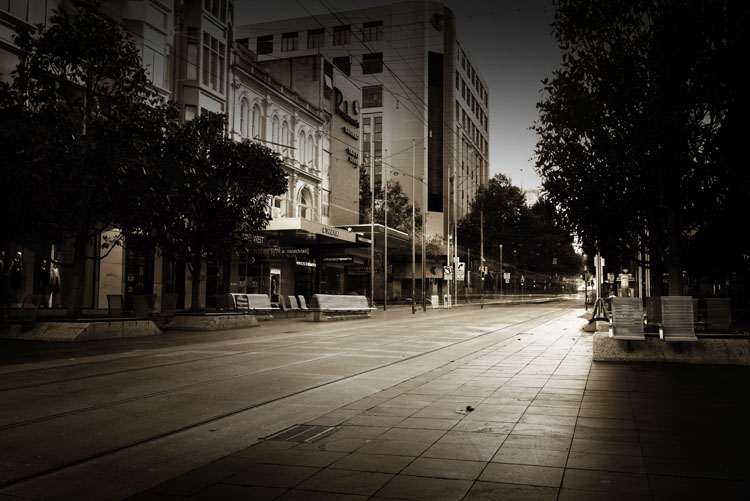
LeanneCole-7reasons2lovelongexposures-bourkestmall

Bourke Street Mall at peak hour, a 10 minute exposure has removed the people and given it an empty feeling.

If you do a long exposure of the same thing, that noise is gone. Often when you see a long exposure image it has a quietness to it. Fill a room with images done this way and put people in it, they will feel as though they have to be quiet.

5 – Take photos of a common subject and give it a completely different feel

In every city around the world there are iconic places and scenes that everyone is trying to photograph differently than others. If you have some ND filters and your tripod, you can create an image that not many others get. Especially when travelling, not many people have filters with them. You would have an opportunity to get something quite different to the thousands of other photos that are taken in those places. Of course it is a given that they are places where you can set up a tripod.

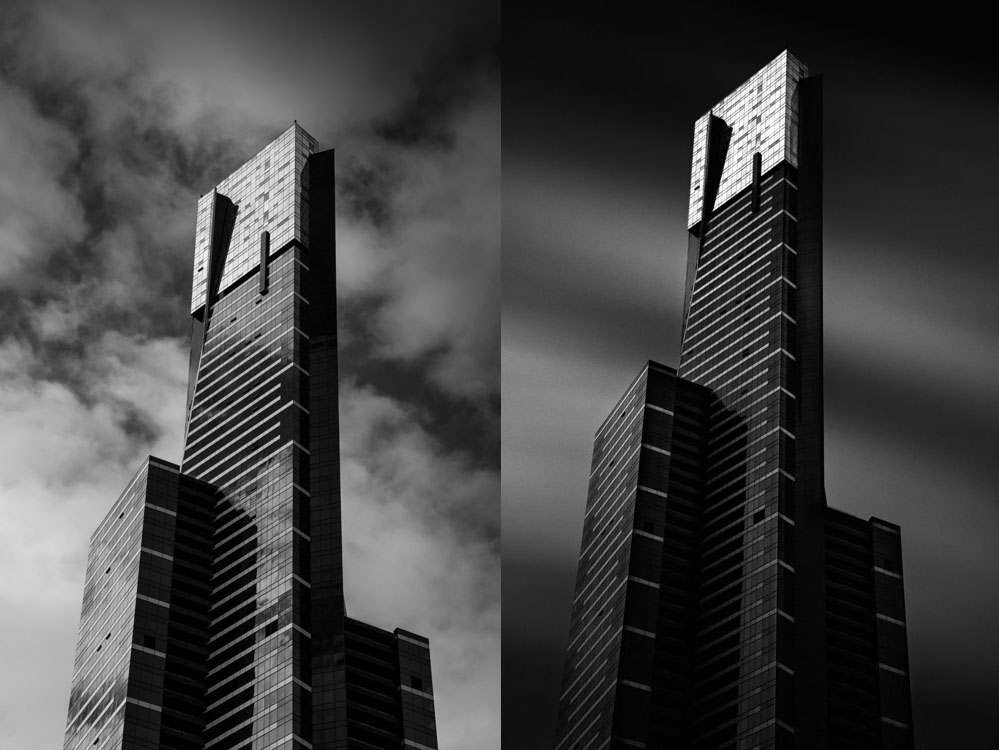
LeanneCole-7reasons2lovelongexposures-eurekatower

Eureka Tower is a very photographed building in Melbourne, the image on the right is similar to what most people get, but by adding a ND filter you give a well photographed building a different look. Left image: 1/200th – Right image: 6 minutes.

6 – Give a landscape a sense of time, or time passing

When you have images of clouds being blurred as they go over the top of a building or a landscape, it seems like you have captured time. Many people feel like they are looking at time passing. The long exposure is taken over a period of time, so it makes sense that you would get that feeling when you look at those images.

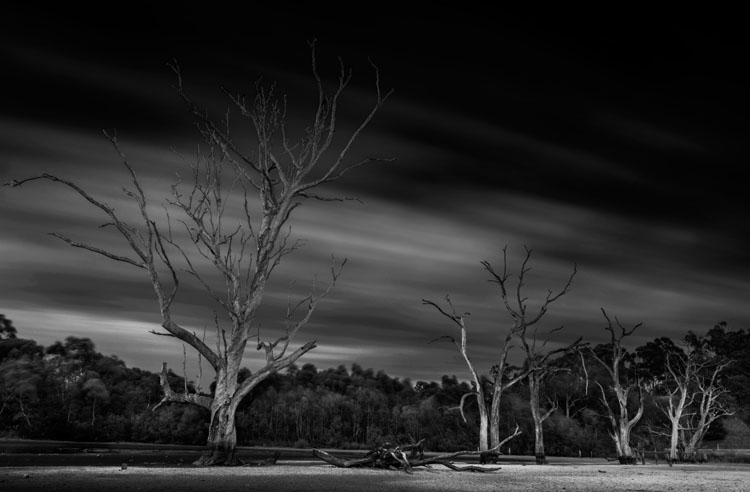
LeanneCole-7reasons2lovelongexposures-banyuleflats

Dead trees in a dried out swamp, and the moving clouds give the impression they have been there for an eternity – 3 minute exposure.

7 – Images have a surreal look and give you a different perspective

One of the great aspects of long exposure photography is that you can set up your camera, your tripod, and slot in your neutral density filter, but you won’t know what you will get until the image is taken. It will give you an image that is nothing like what you can see with your eyes. When you get the images onto your computer it is always a surprise to see exactly what you have captured.

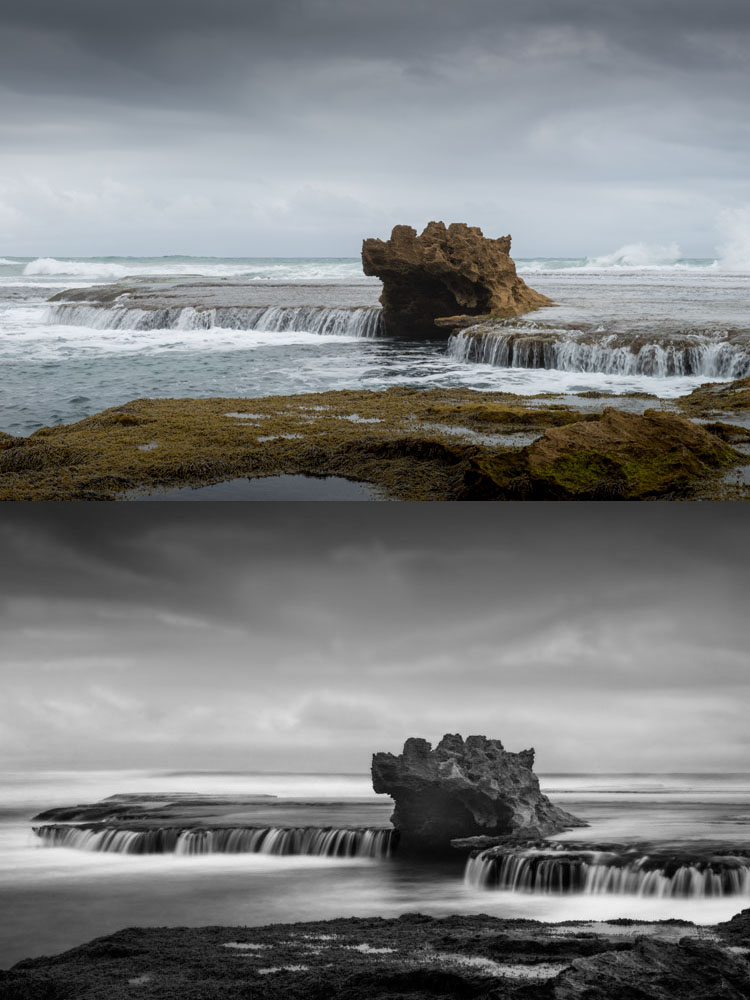
LeanneCole-7reasons2lovelongexposures-dragonshead

The same image, one take without the ND Filter and the second one with it. It gives the scene a completely different feel. Top image: 1/50th – Bottom image: 13 seconds.

8 – Night Photography is great for the same reasons

Night photography gives you an opportunity to take photos and not have to worry about filters. You can expose for however long you need. If it;s a windy evening and there are clouds in the sky, you will get movement in your images. If you are taking photos across a water way, then the water will be smooth, and you will get reflections of the lights if there are some on the other side. For all the reasons stated for long exposures, night photos have the same effect.

LeanneCole-7reasons2lovelongexposures-melbournestar

A night long exposure makes the Melbourne Star blurred and you can see how it moves – 2 minute exposure.

These are the reasons why I think long exposure photography is wonderful. If you are curious and want to try doing these then I am sure you will become addicted like many others. If you already do them, you might have your own reasons and perhaps you would like to share with us what they are in the comments below as well as your long exposure images.

googletag.cmd.push(function() {
tablet_slots.push( googletag.defineSlot( “/1005424/_dPSv4_tab-all-article-bottom_(300×250)”, [300, 250], “pb-ad-78623” ).addService( googletag.pubads() ) ); } );

googletag.cmd.push(function() {
mobile_slots.push( googletag.defineSlot( “/1005424/_dPSv4_mob-all-article-bottom_(300×250)”, [300, 250], “pb-ad-78158” ).addService( googletag.pubads() ) ); } );

The post 8 Reasons to Love Long Exposure Photography by Leanne Cole appeared first on Digital Photography School.

Digital Photography School

 
Comments Off on 8 Reasons to Love Long Exposure Photography

Posted in Photography


8 Steps to Great Long Exposure Landscape Photography

21 Mar

longexposure_landscape2

In this article I will outline eight steps, that will help visualize what you’ll need to capture beautiful, well-planned, and unique images that you’ll be happy with.

Long exposures are the true artworks of photography; a normally static and bland scene can become a dynamic masterpiece when the shutter is left open, and the capturing of movement occurs. Surf on a beach becomes a swirling, cloud-like mass, and grasses flowing in the wind become a single, beautiful entity. This is a situation where what you see, and what you end up with, are usually two very different things, and the results are often breathtaking.

But capturing that beauty can be challenging. So what do you need to focus on to make a long-exposure landscape shot work? Let’s explore that a bit more.

David McAughtry

By David McAughtry

1. Choose your location wisely

Before you even shoot your landscape, you’ll need to decide what type of shot you’ll tackle, and what environment you’d like to shoot in – whether it be a grassy plain, a seascape, or a busy highway.

Long exposure photography is about capturing, and translating movement within a frame. Spend some time deciding what you’re trying to capture, and what movement you want to accentuate. Rolling waves? Swaying grass? Flowing clouds?

Take a moment to envision what your scene will look like, and what parts of it will be stationary, and which parts will be fluid.

Aaron

By Aaron

2. Be patient and wait for the right time

Long exposures, at their very basic premise, require one of two things to work properly. Either very dim light situations such as the golden hour time periods, very early, or very late in the day – OR modifiers added to the camera to diminish the light that is coming in through the lens.

The reason you need one of these is because leaving the shutter open for longer periods of time, monopolizes one corner of the exposure triangle. When a normal amount of light strikes the camera’s sensor for an extended period of time, you’re guaranteed an overexposure. Therefore, you’ll need to change one of the variables to reduce that amount of light.

longexposure_landscape

The solution? Plan your shoot for very early in the morning, and very late in the evening. The darker it is outside, the longer you’ll be able to leave your shutter open, and therefore the more motion you’ll be able to capture in your image.

If you’re unable to shoot at those times, you’ll need to invest in a neutral density filter, preferably one with the ability to reduce the amount of light coming in to your lens by 10 stops, or more. These filters also add an extra layer of uniqueness to your images, because they allow you to shoot these long exposures at times of the day you normally don’t expect to see them.

3. Select the perfect lens

Of course, there are no hard and fast rules about which lens you’ll need to use, but traditionally, landscapes are captured with wide-angle lenses, to broaden the view and translate a sense of expansiveness.

Can you capture a landscape with a standard 50mm lens? Of course you can! But to maximize the open feel of a scene, consider using something wider. Keep in mind that the more you capture within the frame, the more movement it will contain.

070515_

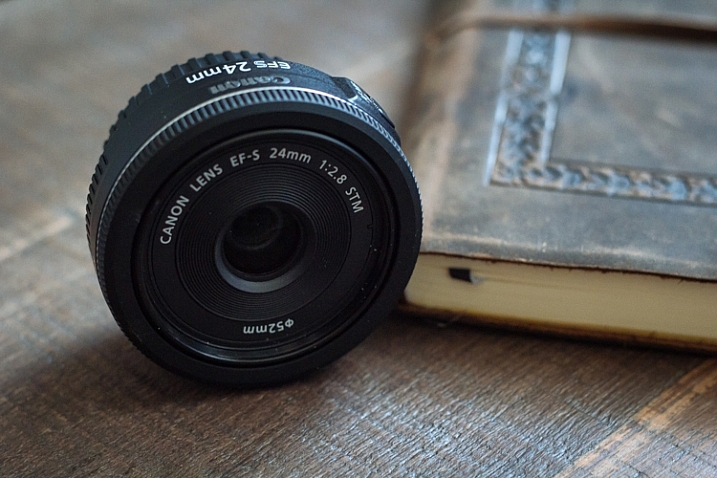
I personally use a 24mm f/2.8 pancake lens for most of my landscape shots. While it’s not as wide as what some people use, I find it gives me a good middle ground, with a wide focal length, and very little of the distortion traditionally associated with super-wide glass.

4. Bring the proper equipment

While we’re speaking about the planning phase of your shoot, it’s a perfect time to consider what gear you’ll need to pull off a long exposure landscape. As it happens, it’s the same equipment you’d need for any other long exposure shot.

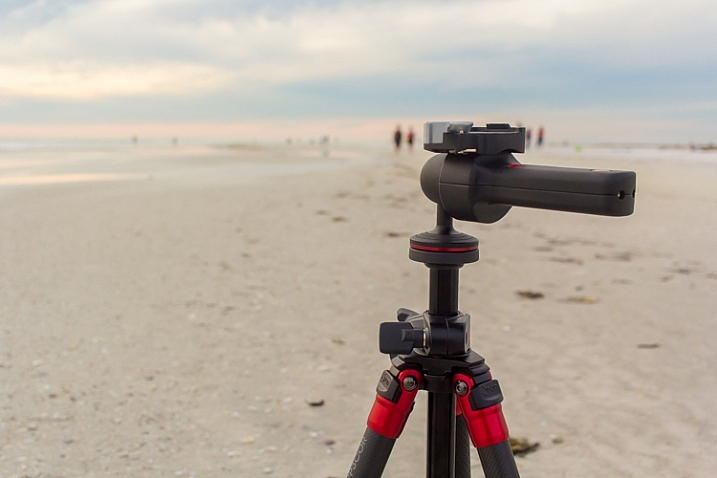
A tripod is a invaluable piece of gear for any landscape photographer, and for a long exposure, it’s an absolute requirement. Exposures of several seconds, which are required to produce movement within the image, need a stable base for the camera. The slightest amount of movement can cause blurriness, and that is amplified with longer and longer shutter times. Invest in a good, sturdy tripod, and ensure nothing will blow or bump into the unit while in operation.

013016_

Another essential accessory for this situation is a remote shutter release. There’s really no excuse for any landscape photographer to not have one, as they can be found for your camera model for $ 10, or so. These releases connect to your camera, and allow you to activate the shutter without ever touching the camera body itself. This keeps the vibration during the shutter click to an absolute minimum.

5. Use the correct camera settings

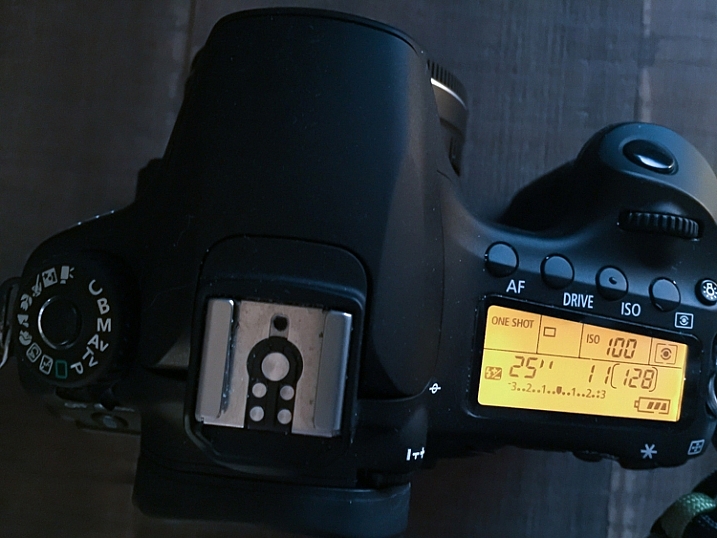
Since you’re using longer exposure times to pull off this type of shot, you’ll need to make adjustments to other parts of the exposure triangle. Generally, this means you need to stop your aperture down as far as you can, while maintaining sharpness, and reducing your ISO to the lowest setting. These two settings will allow you to bump your exposure time up, to long enough to capture movement in your image.

Fortunately this also gives you some bonus advantages; a lower ISO (such as 100), will keep the noise and artifacts in your shot to a minimum, giving you the best possible image quality. In addition, lenses tend to be sharper in the middle aperture ranges. Using apertures such as f/8, f/11 or f/16 will give you a nice, deep depth of field throughout the picture, while also taking a sharper, clearer photo than what you’d generally get with an extreme aperture of f/22 (due to diffraction).

022916_

As always, shoot in RAW. This will capture as much data as possible, and allow you to make non-destructive edits to the file later. Shooting in RAW format also negates the need to fiddle with white balance while shooting, since that can be adjusted in post-production.

If you do set white balance at the time of the shot, it’s usually a good idea to select the Daylight preset, or a custom white balance setting of your own, that counterbalances the extreme warmth encountered at sunset, and vice-versa for a shot at sunrise, which is a cooler time of the day, color temperature-wise.

6. Focus on your composition

Ekaitz Arbigano

By Ekaitz Arbigano

When you have your equipment and settings where they need to be, it’s time to take a moment to compose your shot. What are you capturing? The movement of a body of water like the surf from the ocean? Adjust your composition to allow for more of the water to be in the composition, instead of the sky. Are you trying to focus on the movement of clouds across the sky? Then give that part of the scene more attention within your frame to accentuate it.

7. Envision and anticipate movement

Shooting a moving scene, and attempting to capture that movement involve a bit of foresight, not unlike a marksman leading his target, by visualizing where the target will be when the shot gets there.

longexposure_landscape3

How far will the clouds move in the duration of the exposure? In which direction? Plotting this out before you click the shutter will improve your final image.

For example, capturing the ebb and flow of surf pounding a beach, requires knowing where the surf-line will end, and begin to recede back into the ocean, to properly compose it. Watching the movement of the subject you’re shooting, will help anticipate where it will appear in the final image. It’s always pays to plan ahead!

8. Enhance beauty in post-production

Finally, (and yes, this can be a touchy subject), learn to excel with the post-production process. A long-exposure image will already by eye-catching just by its inherent properties, but it’s important to take time during editing to enhance the beauty you’ve already captured in camera.

This shot initially had a cooler white balance, due to being shot in the morning, as opposed to during sunset.

This shot initially had a cooler white balance, due to being shot in the morning, as opposed to during sunset.

Since you’ll be shooting early or late in the day, tones will most likely already be dramatic, but may require some light boosting of the colors, or dodging and burning in Photoshop to add a bit more.

Since you shot at a low ISO to begin with, you likely won’t have to deal with noise reduction. After your exposure and tones have been taken care of, a little sharpening is all that stands between you and the final image.

Aaron

By Aaron

So that’s it folks, the eight steps to get you started on the path to taking great long exposure landscape shots. What other tricks of the trade do you use to get the perfect capture? Sound off in the comments below, and as usual, let your voice be heard.

This week on dPS we are featuring articles on special effects. Check out the others that have already been published here:

  • How to Photograph the Full Band of the Milky Way
  • Fire Spinning with Steel Wool – A Special Effects Tutorial
  • Special Effect – How to Create Multiple Flash Exposures in a Single Frame
  • Stacking Light Trails for Night Photography Special Effects
  • 26 Unique Special Effects Photos to Spark Your Creativity
  • Weekly Photography Challenge – Special Effects
  • Tips for Shooting Through Objects to Create a Special Effect
  • How to Add Vintage Frame Overlays Using Alien Skin Exposure X

googletag.cmd.push(function() {
tablet_slots.push( googletag.defineSlot( “/1005424/_dPSv4_tab-all-article-bottom_(300×250)”, [300, 250], “pb-ad-78623” ).addService( googletag.pubads() ) ); } );

googletag.cmd.push(function() {
mobile_slots.push( googletag.defineSlot( “/1005424/_dPSv4_mob-all-article-bottom_(300×250)”, [300, 250], “pb-ad-78158” ).addService( googletag.pubads() ) ); } );

The post 8 Steps to Great Long Exposure Landscape Photography by Tim Gilbreath appeared first on Digital Photography School.

Digital Photography School

 
Comments Off on 8 Steps to Great Long Exposure Landscape Photography

Posted in Photography