RSS
 

Posts Tagged ‘Exposure’

How it was Done – Zooming the Exposure

13 Nov

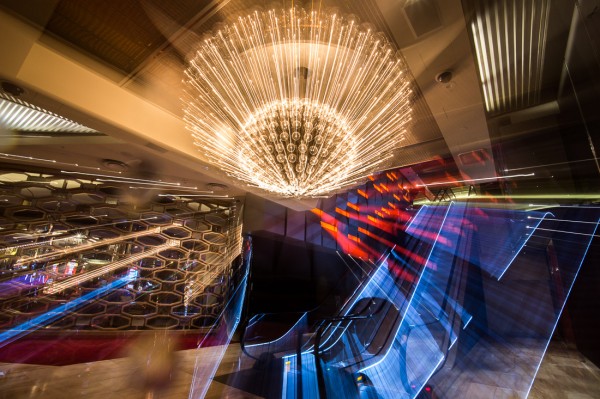
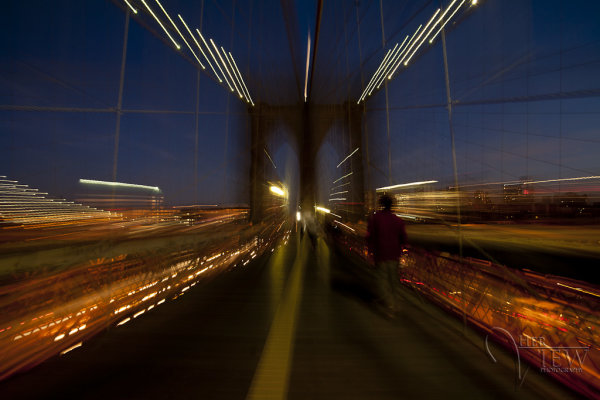
This is a technique I learned years ago in photography school and have been having fun with lately. Hope you have as much fun playing with it as I do!

zoom-exposure2

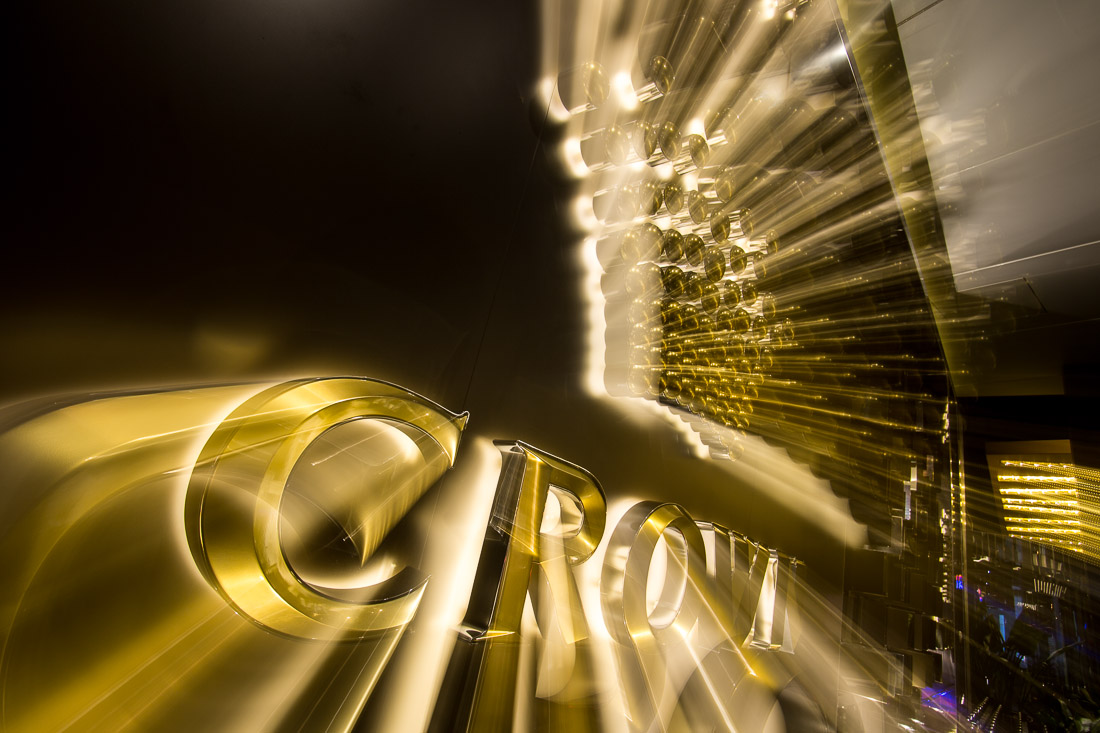
Zooming during a long exposure tips

  • Works well on night scenes and ones with many light sources
  • Set up your camera on a tripod with a remote trigger or release
  • Set your camera to Manual mode
  • Set your focus by zooming in all the way, then lock the focus (using either back button focus or focus using Auto-focus and then switch it off to Manual focus)
  • Zoom out so you can see the whole image as you want it framed
  • Then start your exposure and zoom your lens out while the shutter is opened (you may need to practice a few times to make it go smoothly)
  • Experiment with different zooming speeds and timing, as example: if you exposure is 5 seconds do one with 3-4 seconds at the beginning, then zoom at the end; then do another when you zoom immediately and do most of the exposure at the end
  • Exposure must be 2 seconds or longer to make this work, otherwise it becomes really tricky to zoom
  • If it is too bright to get a 2 second exposure, make sure your ISO is as low as your camera goes and your aperture is set to your smallest setting (f/22 or f/32). If it is still too bright you may need to use a Neutral density filter to cut down the amount of light coming through the lens

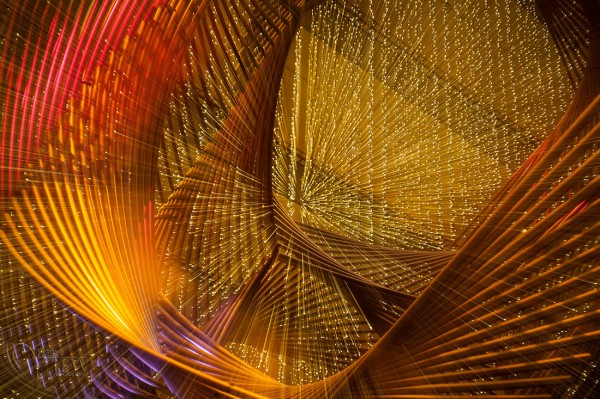
Here are a few examples done using this technique.

SanFran-2012-1039-blog1100zoom-exposure1

zooming-3

ACTION PLAN

I encourage you to experiment and play around with technique and other similar variations. Share your images in the comments below and if you have other tips please tell us!

Post originally from: Digital Photography Tips.

Check out our more Photography Tips at Photography Tips for Beginners, Portrait Photography Tips and Wedding Photography Tips.

How it was Done – Zooming the Exposure

The post How it was Done – Zooming the Exposure by Darlene Hildebrandt appeared first on Digital Photography School.


Digital Photography School

 
Comments Off on How it was Done – Zooming the Exposure

Posted in Photography


Digital Exposure Handbook: Book Review

11 Nov

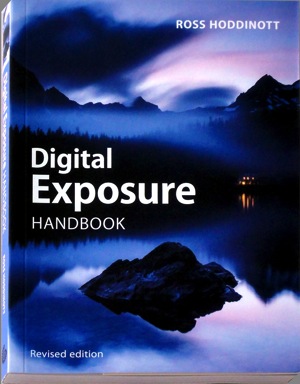
Digital Exposure HandbookThis revised edition of ‘Digital Exposure Handbook’ could well be the only book you’ll ever need in your digital photography adventures.

It begins as a guide to understanding camera settings and the basics of exposure, then moves on to putting this info into practice in a variety of situations. It teaches you how to cope with the quality, quantity and contrast of natural and artificial light, how to effectively use on-camera and external flash illumination, how to apply polarising and ND digital filters and concludes by teaching you how to enhance exposures in the digital darkroom.

Many enthusiasts buy advanced digital cameras, such as DSLRs, with little more knowhow than they had with their earlier cameras, most likely of the compact point-and-shoot variety. And the first thing that brings them unstuck is the matter of how to set the appropriate and/or correct exposure. This book will put you on the straight and narrow.

Author Hoddinott describes exposure as ‘the heartbeat of photography.’ He adds that ‘Understanding and being able to control exposure us critical to successful photography.’

Basically, exposure to a digital camera’s sensor is a combination of the length of time and the level of illumination impinging on the camera’s sensor. This depends on three settings: shutter speed, lens aperture and ISO setting.

While today’s digicams make the task of correctly exposing a shot a simple task, leaving the camera to do all the work removes you as the creator of the final image and result in your image making efforts becoming little more than ‘pleasing snapshots.’

Subjects covered: the book begins by explaining exposure basics; metering reflected and incident light with the camera’s own TTL system or a separate handheld meter and the differences between centre-weighted, spot and partial metering; image sensor types — from CCD to CMOS to Foveon and sensor size; dynamic range and its control; understanding histograms and how to manipulate them. At this point the book offers the little known fact that images saved in RAW format tend to have a greater latitude than the histogram indicates …

There are many tricks of the trade in the book’s pages: one is that by saving in RAW and exposing to the right of the histogram will lead to the image containing the majority of tonal values. The downloaded image will look too bright and washed out but final processing will leave the image looking correct.

High and low key images are discussed and the advice given that these types of images are best served by adjustment of the original exposure and not leaving the final rendering to software tweaking.

Also discussed: ISO sensitivity; understanding f stops; depth of field; hyperfocal distance; the use of shutter speeds when rendering motion; avoiding camera shake, how to blurr and how to freeze action; second guessing metering systems and how to adjust exposure compensation.

Many will get help from advice on understanding exposure mode programs such as auto, shutter and aperture priority as well as manual settings. Hoddinott claims that using manual exposure is the most flexible exposure mode but also ‘the one that relies most heavily on the photographer’s knowledge and input.’

I reached about a third of the book’s length and slowly became aware that it was far more than a basic guide to exposure and more a general primer to the ins and outs of digital photography, with chapters on viewfinders, file formats, composition, dealing with landscapes, architecture, wildlife, people, still life, abstracts and patterns, close ups,.

Then there follows detailed help in shooting subjects in ambient light, silhouettes, white balance, using reflectors, flash, filters, calibrating monitors, printing and the overall role of the digital darkroom.

While it is obvious from the latter two paragraphs that the book wanders off topic, it also results in it becoming more than just a primer on exposure.

As I’ve said, it could also be the only book you’ll ever need for digital photography!

Plenty of useful pictures. Perhaps some may find the 7 point type a little small!

Author: R Hoddinott.
Publisher: Ammonite Press.
Size: 15x21x1cm.
Length: 192 pages.
ISBN 978 1 90770 895 4.
Price: Get a price on the Digital Exposure Handbook at Amazon (currently 29% off).

Post originally from: Digital Photography Tips.

Check out our more Photography Tips at Photography Tips for Beginners, Portrait Photography Tips and Wedding Photography Tips.

Digital Exposure Handbook: Book Review

The post Digital Exposure Handbook: Book Review by Darren Rowse appeared first on Digital Photography School.


Digital Photography School
 
Comments Off on Digital Exposure Handbook: Book Review

Posted in Photography


Turn Your Photos Into Beautiful Photo Narratives With Exposure

07 Nov
Extra photos for bloggers: 1, 2, 3

There are plenty of places on the web to post a photo your friends will “like.”

Our pals at Exposure have created a way to share photos that’ll make your friends straight up marvel!

Exposure is a super simple way create a photo narrative with your photos. Drag and drop your very best shots onto the page and an algorithm arranges them for you.

Type in a few words and you have a beautifully laid out photo story ready to share.

It takes the tricky out of making a stunning spread so you can concentrate on having adventures and taking great shots.

For inspiration, check out the very best Exposure photo stories already created.

Exposure is rolling out invites as we speak and we’ve got a link that’ll get you to the front of the line.

Sign up for Exposure, Share Your Photo Stories

Related posts:

  1. Turn Your Photos into Beautiful Glass Etchings! Extra photos for bloggers: 1, 2, 3 Before printers spewed…
  2. DIY: Turn Photos Into Beautiful Watercolor Portraits Extra photos for bloggers: 1, 2, 3 Photography and stencil…
  3. Black and White Conversion: The Best Ways to Turn Color Digital Photos Into Beautiful B&W ~Have a cool photo product or site? Reach 270,000 photo…


Photojojo

 
Comments Off on Turn Your Photos Into Beautiful Photo Narratives With Exposure

Posted in Equipment


The Surreal Landscape: Long Exposure Photography

09 Oct

Long exposure photography

It seems to me that we live in a world orientated to a digital generation demanding instant gratification. This extends to photography, encouraged by the prevalence of camera phones and Instagram type apps. How many photographers, when they come across a beautiful scene, just stop and snap a photo with a camera phone and then move on?

Long exposure photography is different. It demands patience, an appreciation of beautiful light and a deep understanding of composition. It is as much about the mind-set of the photographer as it is about the subject. It’s not brash or flashy – you rarely see long exposure photographers use techniques such as high dynamic range (HDR) photography or adding texture layers.

What is long exposure photography? There is no precise definition. I think of it as involving shutter speeds of ten seconds or longer, but I’m sure some photographers will be thinking in terms of shutter speeds of a minute or more. But the aim is the same – to create beautiful and surreal images by leaving the shutter open long enough to record anything that moves within the landscape, such as water, as a blur.

That’s why most long exposure photography tends to take place along the coast. The sea creates an interesting subject, helped by natural features such as rocks and islands, and man-made ones like piers and jetties.

Painting with light is also a form of long exposure photography.

Long exposure photography

Contemplation and the landscape

You may be wondering what one does while waiting for the camera to take a photo when the shutter speed is longer than a minute.

The answer is that long exposure photography is a naturally contemplative pastime. While waiting, take some time to enjoy the beautiful location you are in. Breathe and enjoy the smell of the air. Listen to the sounds. Watch the light as it fades away. This meditative approach will help you notice things an instant gratification seeker will miss.

Getting started

Interested? How then, do you get started? One of the nice things about long exposure photography is that the basic requirements are not extensive:

  • A camera that lets you take control of the exposure settings and has a Bulb setting so that you can use shutter speeds longer than 30 seconds.
  • A tripod and a good ball-and-socket head. Beware of inexpensive models – they may be too flimsy to support your camera properly during long exposures. A good aluminium or carbon-fibre tripod is required.
  • A cable release or remote release so that you can activate the shutter without touching the camera.

Filters

A polarising filter is useful for eliminating reflections from shiny surfaces, such as a concrete jetty made wet by sea water. It also blocks between one and two stops of light, helping you obtain longer shutter speeds.

Some photographers use neutral density (ND) filters, but they are not essential. You can get started without them by turning up late in the day and taking photos as the sun sets. During twilight you can obtain shutter speeds of thirty seconds or later by setting a low ISO and a narrow aperture.

The benefit of neutral density filters is that they extend the period of time during which you can use long exposures. They come in various strengths; three, four, nine and ten stop ND filters are the most common. Nine and ten stop ND filters are designed to enable long exposure photography during the middle of the day – you won’t need them if you are shooting at dusk.

Learn more about neutral density filters.

Long exposure photography

Noise reduction

Shoot in Raw and turn off the long exposure noise reduction setting. The software you use to process your Raw files will take care of noise reduction for you.

Resources

Here are some more resources that will help:

BW Vision

Slices of Silence

Interviews with long exposure photographers

Long Exposure Photography: 15 Stunning Examples

Eight Tips for Long Exposure Photography

Photo Tutorial – Long Exposure Photography

Final thoughts

That’s a lot to take in, so don’t forget the most important thing of all – to go out and take some photos. It takes a while to get the hang of long exposure photography, so don’t be discouraged if your first attempts aren’t as polished as you would like. It takes time to master the techniques and develop the eye for graphical composition required for successful long exposure photography.

Mastering Photography

My ebook Mastering Photography: A Beginner’s Guide to Using Digital Cameras introduces you to photography and helps you make the most out of your digital cameras. It covers concepts such as lighting and composition as well as the camera settings you need to master long exposure photography and take photos like the ones in this article.

Long exposure photography

Post originally from: Digital Photography Tips.

Check out our more Photography Tips at Photography Tips for Beginners, Portrait Photography Tips and Wedding Photography Tips.

The Surreal Landscape: Long Exposure Photography

The post The Surreal Landscape: Long Exposure Photography by Andrew Gibson appeared first on Digital Photography School.


Digital Photography School
 
Comments Off on The Surreal Landscape: Long Exposure Photography

Posted in Photography


Exposure: Jason van Genderen on ‘pocket filmmaking’

15 Aug

920.png

Sometimes, the best thing that you can do creatively is to give yourself limitations. For filmmaker Jason van Genderen, that meant putting down his camera and picking up his smartphone. Van Genderen prides himself on being a ‘pocket filmmaker.’ Living in Terrigal, Austrailia, van Genderen spends his days running a creative agency and whenever he gets a chance, he uses smartphones to create films. We spoke to van Genderen about his experience using the Lumia 920 for filmmaking. Click through to read the full interview on connect.dpreview.com.

News: Digital Photography Review (dpreview.com)

 
Comments Off on Exposure: Jason van Genderen on ‘pocket filmmaking’

Posted in Uncategorized


Long Exposure Photography and the Square Format

04 Aug

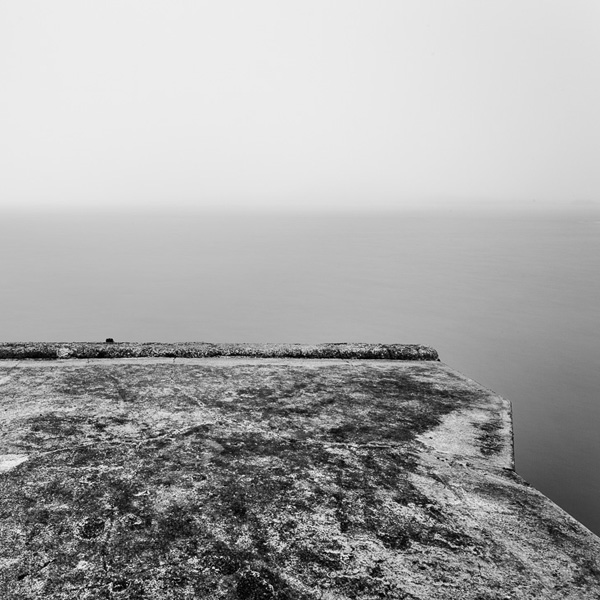
Square format black and white photograph

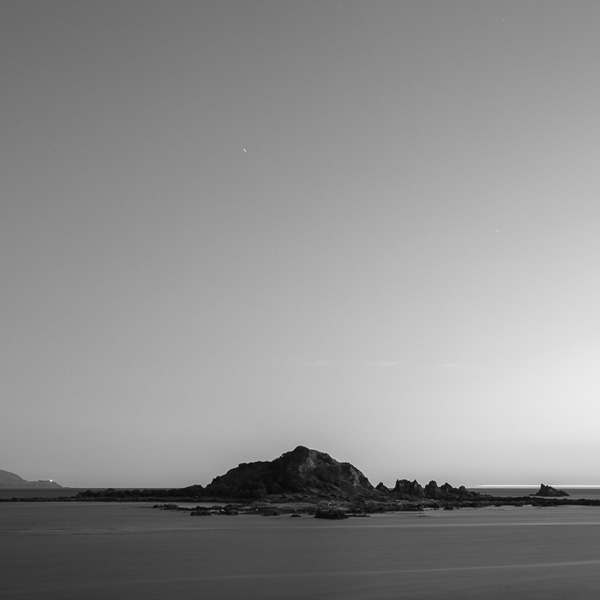
The rise in popularity of digital cameras over the past decade has coincided with the emergence of a new genre of photography – long exposure photography. Long exposure photography involves using shutter speeds of anything from one second to five minutes or more while using a tripod to keep the camera still. The result is a landscape or architectural study characterised by still elements, such as rocks or a building, contrasting with moving elements, such as water or clouds in the sky. Most long exposure photographers use neutral density filters to obtain long shutter speeds and would probably aim to use a shutter speed of at least thirty seconds to obtain their effects.

Digital cameras greatly assist with long exposure photography because there is no reciprocity failure with digital and the instant feedback provided by the LCD screen lets photographers see right away how effective the composition is.

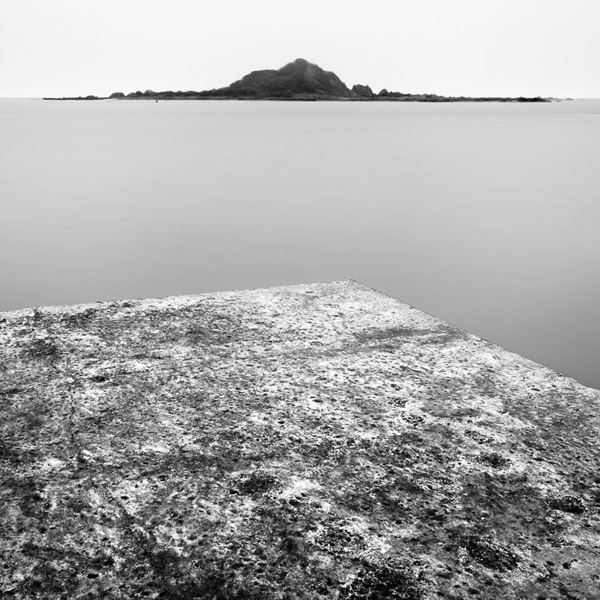
Square format black and white photograph

If you are familiar with the work of some of the more well-known long exposure photographers then you would no doubt have noticed that many of them choose to work in both black and white and the square format. Why is this?

Let’s start with black and white. Monochrome is the medium of choice for many fine art photographers. It’s moody, timeless, evocative and expressive. Removing colour from the composition concentrates attention on texture, contrast, line and light – the visual building blocks of powerful imagery.

The square format is different from other aspect ratios because of its balanced shape. The four sides of a square are equal in length and encourage the viewer’s eye to move around the frame in a circle, rather than side-to-side or up and down. The square frame lends itself to compositions that contain strong shapes, lines or other graphic elements. The strong shape of the square frame seems to emphasise other shapes that appear within it.

Not all long exposure photographers work exclusively in black and white or the square format, but many of them do. The heavy emphasis on simplicity led composition in the long exposure photography genre marries well with the compositional strengths of the square format.

Square format black and white photograph

Long exposure photographers

Looking at the work of other photographers is an excellent way to learn more about the creative side of photography. The following is a list of some of my favourite long exposure photographers. Each photographer in this list works predominantly in black and white and the square format. You will learn a lot from their work.

I have interviewed many of these photographers on my website. You can work your way through the interviews here.

Photographer Nathan Wirth has also interviewed some of these photographers on his blog Slices of Silence.

  • Joel Tjintjelaar
  • Moises Levy
  • Keith Aggett
  • Julia-Anna Gospodarou
  • Hengki Koentjoro
  • Spencer Brown
  • Didier Demaret
  • Thomas Leong
  • Andy Brown
  • Will Le
  • Maria Strömvik
  • Nathan Wirth
  • Steve Landeros
  • Paul Wheeler
  • Gavin Dunbar
  • Håkan Strand
  • Josef Hoflehner
  • Michael Kenna
  • Jeff Gaydash
  • Michael Diblicek
  • Xavi Fuentes

Conclusion

I hope you enjoyed looking through the work of the photographers listed above. If you’d like to find out more about long exposure photography, then Joel Tjintjelaar’s website BWVision is an excellent place to start. The tutorials page has plenty of information to get you started.

Post originally from: Digital Photography Tips.

Check out our more Photography Tips at Photography Tips for Beginners, Portrait Photography Tips and Wedding Photography Tips.

Long Exposure Photography and the Square Format


Digital Photography School

 
Comments Off on Long Exposure Photography and the Square Format

Posted in Photography


Announcing My New Flipboard Magazine: Inspired Exposure

31 Jul
My New Flipboard Magazine: Inspired Exposure

I’m curating inspiring photos on Flipboard subscribe here http://flip.it/itDGO

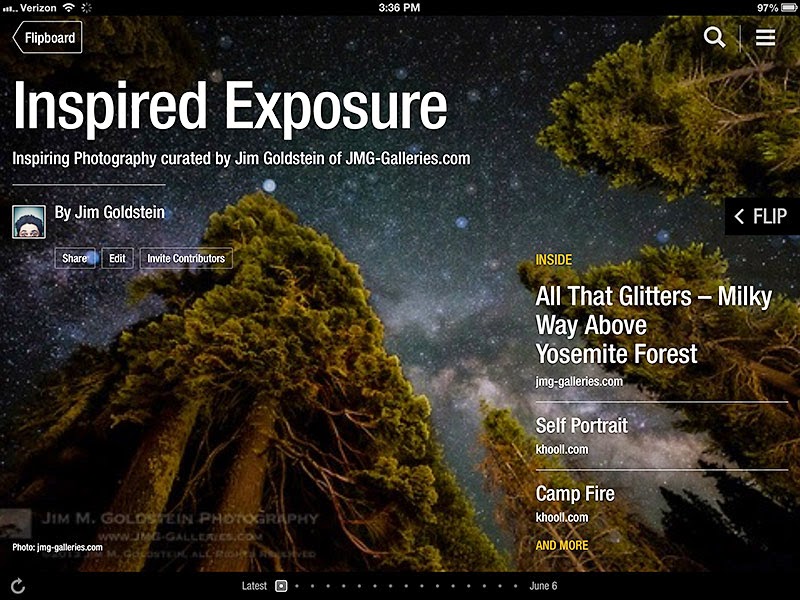
If you have yet to try Flipboard, an Android & iOS app for your phone or tablet, I highly recommend it. Up until a few months ago it was primarily a fancy news reader, but they’ve opened it up for people to curate “magazines” with interesting content. I’ve recently created a Flipboard magazine titled “Inspired Exposure” to curate inspiring photography and artistry. I invite you to subscribe to Inspired Exposure the Magazine  to find amazing photos, tutorials, and more that inspire me creatively.  Enjoy!

Copyright Jim M. Goldstein, All Rights Reserved

Announcing My New Flipboard Magazine: Inspired Exposure

The post Announcing My New Flipboard Magazine: Inspired Exposure appeared first on JMG-Galleries – Landscape, Nature & Travel Photography.


Related Stories

  • Announcing My New Flipboard Magazine: Inspired Exposure – Enclosure
  • Primitive Coast IV
  • Primitive Coast IV – Enclosure


JMG-Galleries

 
Comments Off on Announcing My New Flipboard Magazine: Inspired Exposure

Posted in Equipment


Announcing My New Flipboard Magazine: Inspired Exposure

10 Jul
My New Flipboard Magazine: Inspired Exposure

I’m curating inspiring photos on Flipboard subscribe here http://flip.it/itDGO

If you have yet to try Flipboard, an Android & iOS app for your phone or tablet, I highly recommend it. Up until a few months ago it was primarily a fancy news reader, but they’ve opened it up for people to curate “magazines” with interesting content. I’ve recently created a Flipboard magazine titled “Inspired Exposure” to curate inspiring photography and artistry. I invite you to subscribe to Inspired Exposure the Magazine  to find amazing photos, tutorials, and more that inspire me creatively.  Enjoy!

Copyright Jim M. Goldstein, All Rights Reserved

Announcing My New Flipboard Magazine: Inspired Exposure

The post Announcing My New Flipboard Magazine: Inspired Exposure appeared first on JMG-Galleries – Landscape, Nature & Travel Photography.


JMG-Galleries – Landscape, Nature & Travel Photography

 
Comments Off on Announcing My New Flipboard Magazine: Inspired Exposure

Posted in Equipment


100 Fantastic Examples of Long Exposure Photography to Take Your Breath Away

01 Jun

Today I’m gonna bring you an exciting showcase of long exposure photography that will take your breath away! Long exposure is used when you want to blur moving objects in the frame and you want to leave still objects sharp. To do that, you should place your camera on a tripod to avoid any camera shake for a long time. Continue Reading

The post 100 Fantastic Examples of Long Exposure Photography to Take Your Breath Away appeared first on Photodoto.


Photodoto

 
Comments Off on 100 Fantastic Examples of Long Exposure Photography to Take Your Breath Away

Posted in Photography


Save Time with Batch Exposure Blending

10 May

A Guest Post by Nick Rains.

Do you ever shoot a bunch of exposure-bracketed shots and then never get around to blending them together?

Maybe you don’t shoot multiple exposures in the first place because you don’t want to spend hours in front of the computer blending together the individual images. If you are like me, the thought of individually exposure-blending a whole load of images is just not what photography is all about – I know I can produce better images with better tonal range this way but it seems like a lot of work in front of the computer.

What if I told you I do most of my exposure blends automatically?

Here’s how :

You need Lightroom and a Lightroom plug-in called LR/Enfuse.

This is free to download but is restricted to work only on low resolution images. The good news is that the full version is donationware and when you find out just how genuinely useful it is you’ll be happy to pay a modest amount. The guys who write these plugins do need support – I’d suggest $ 10 – $ 20 – but it’s up to you

So, here we go…

1. Shoot your exposure blend image sets as normal – I recommend using the two-second self-timer combined with auto-bracket so that you get all three shots with one press of the shutter button. I normally set the auto-bracket to plus and minus 2 stops which seems to cover most high contrast scenes.

2. Import the images into Lightroom as per usual.

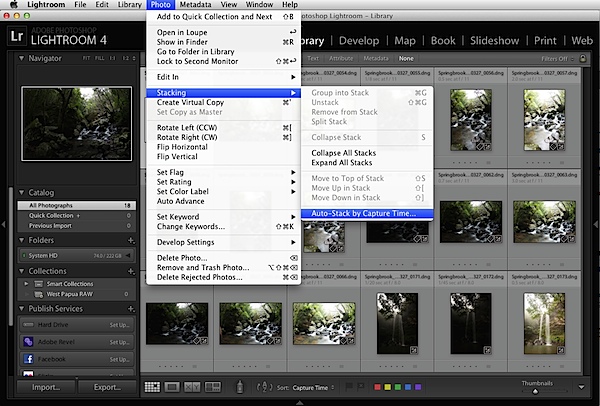
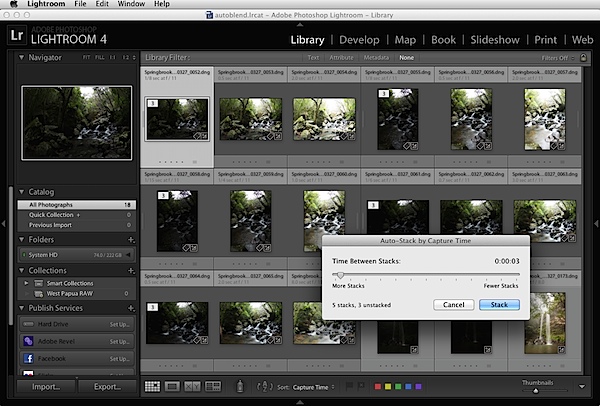
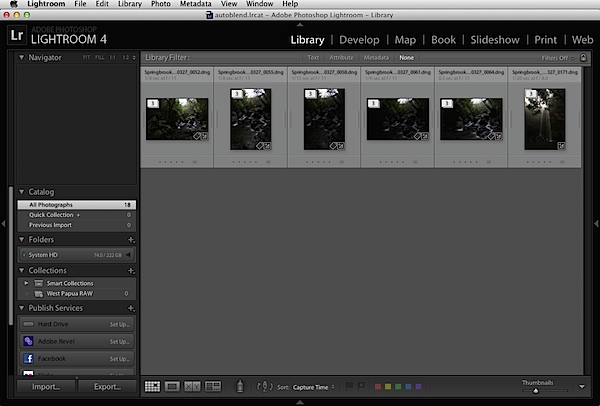
3. In the Library Module, view the folder of the images you just imported and choose Photo / Stacking / Auto-stack by Capture Time. Set this to about three seconds and Lightroom should collect all your sets of bracketed images into stacks because they will normally have been shot less than three seconds apart. Adjust the slider and you’ll see them stack and unstack in ‘real time’. Choose Photo / Collapse All Stacks and you should now see single stacks each containing the images which make up each exposure blend sequence.

Batch Exposure Blending 1.png

Batch Exposure Blending 2.png

Batch Exposure Blending 3.png

Auto-stacking is not foolproof, but you will soon get the hang of it – the trick is to make sure the folder only contains bracketed images that need stacking. If you mix them up with single captures it’s possible that you’ll get a few odd stacks.

4. Now select all the stacks that are made up of your three exposure brackets (command or control-click to multi-select).

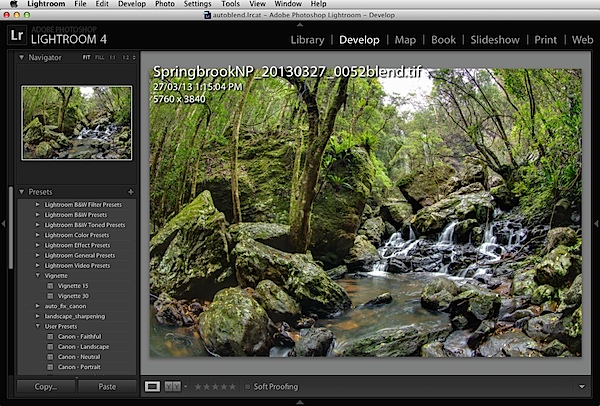
5. Choose File / Plug-in Extras / Blend Exposures using LR Enfuse.

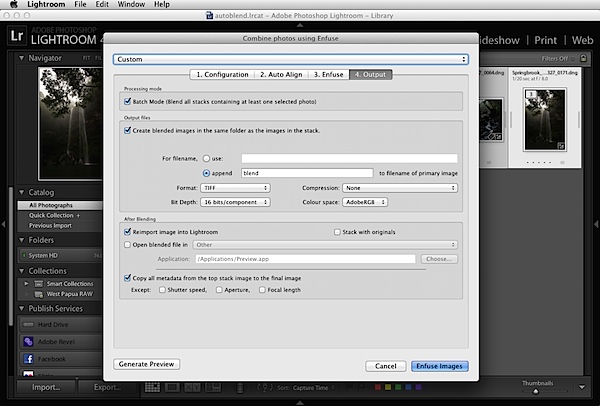
6. Use the default settings under the Enfuse tab but on the Ouput Tab check the box at the top called “Batch Mode”, check the box labelled “Create blended image in the same folder as the primary image in the set” and check the box labelled “Reimport image into Lightroom”.

Batch Exposure Blending 4.png

You can ignore ‘Auto-align’ if you used a tripod, otherwise, if you shot hand held, turn this one.

7. Hit the “Enfuse Images” button.

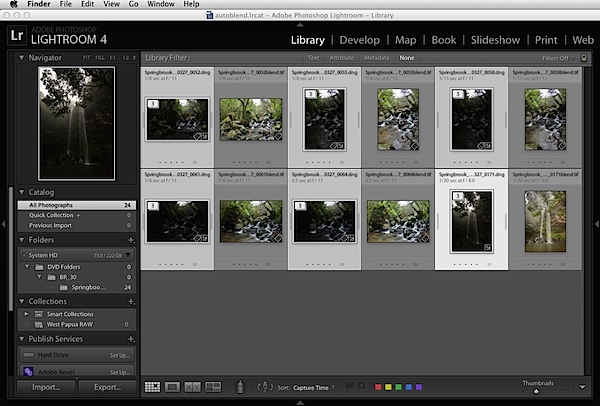
8. Go get a cuppa whilst LR/Enfuse works its way through each individual stack of images, converts them according to any raw settings in the Lightroom Develop Module, exposure blends them, saves the result into the same folder as the originals, and imports them back into the Lightroom catalogue. All on full automatic.

What you’ll see is one new file pop up next to each stack in the folder. These will be your exposure blended images.

Batch Exposure Blending 5.png

Batch Exposure Blending 6.png

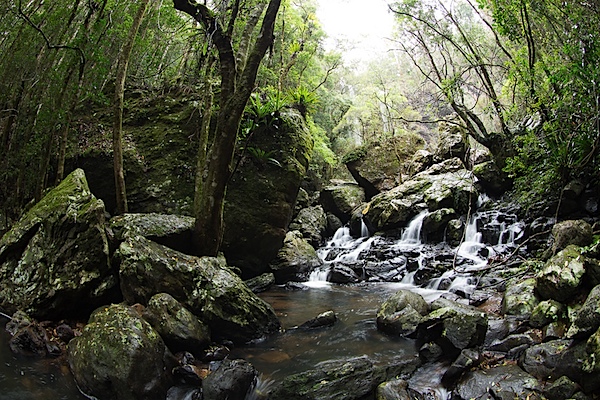
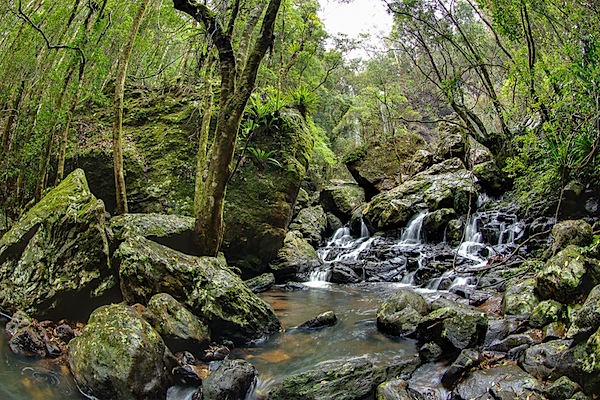
Pretty cool huh? Here’s the before (top) and after (bottom) of the image we processed (click to enlarge to full size).

Before.jpg

After.jpg

Images: Springbrook National Park, QLD – Twin Falls. Shot on a Canon EOS 5D Mk III – EF8-15F4L

This is only a quick run through the method, it’s not completely foolproof and occasionally you’ll have to go back and manually blend a difficult image using Photomatix or something similar, but, on the whole, LR Enfuse does a superb job.

One refinement would be not to do much adjustment in LR before blending, set LR/Enfuse to create 16bit TIFFs and then use LR’s extensive tone mapping tools to adjust the new output file to suit your tastes. I intend to go through this process in greater detail in a Lightroom eBook I am currently working on.

In the meantime, automating your workflow like this can save you a huge amount of time. Setting it up in the first place might take a bit of thought and effort but, believe me, it’s well worth it.

Nick Rains has been a professional photographer for almost thirty years, doing mostly editorial work for clients such as Australian Geographic and has made a point of keeping up to date with technology. His latest forays into the world of current technology have been shooting more and more video and creating an iPad app called Photique where he publishes articles and interactive eGuides as well as free image portfolios.

Post originally from: Digital Photography Tips.

Check out our more Photography Tips at Photography Tips for Beginners, Portrait Photography Tips and Wedding Photography Tips.

Save Time with Batch Exposure Blending


Digital Photography School

 
Comments Off on Save Time with Batch Exposure Blending

Posted in Photography