RSS
 

Posts Tagged ‘Effect’

Sony’s new Sky HDR app mimics the effect of a graduated ND filter

19 Dec

Sony has released Sky HDR, a new PlayMemories app for capturing landscape scenes that have wide ranging levels of brightness. Sky HDR aims to replace a graduated ND filter, with various adjustment ‘themes’ along with control over exposure and white balance of sky and landscape areas separately.

Sky HDR works by capturing two different exposures of the same scene and combing them into a single image. The interface, demonstrated in the video above, is tailored to landscape photography, and resulting photos can be saved as JPEG or Raw files. The app is available for $ 10, and is compatible with the following cameras:

  • Sony NEX-5R
  • Sony NEX-6
  • Sony NEX-5T
  • Sony a7
  • Sony a7R
  • Sony a6000
  • Sony Cyber-shot DSC-RX100 III 
  • Sony a7S
  • Sony a5100
  • Sony a7 II
  • Sony Cyber-shot DSC-RX100 IV
  • Sony Cyber-shot DSC-RX10 II
  • Sony a7R II
  • Sony a7S II
  • Sony Cyber-shot DSC-RX1R II.

Sky HDR can be purchased from Sony’s PlayMemories website.

Articles: Digital Photography Review (dpreview.com)

 
Comments Off on Sony’s new Sky HDR app mimics the effect of a graduated ND filter

Posted in Uncategorized


How to use Color Grading for Effect and Tone Control in Photoshop

07 Nov

Photoshop is a massive tool that can be used to do just about anything on your images. But, knowing how and when to use which tool can be daunting.

In these two videos you can see how to use color grading with adjustments layers to make special effects and add or control color and tone in your images.

This one from Clay Cook shows you how to “Color Grade like a Pro” as he walks you through two portraits as he processes them in Photoshop:

In this second one from SLR lounge photographer, Lauri Laukkanen, goes through how it takes one image from camera to a fashion look using color grading:

Lastly if you really want to put this information to use here’s an in-depth tutorial on using color grading to make a cinematic poster look to an image:

Have you tried color grading before? Please show us your results below in the comments if you follow along and give it a go.

googletag.cmd.push(function() {
tablet_slots.push( googletag.defineSlot( “/1005424/_dPSv4_tab-all-article-bottom_(300×250)”, [300, 250], “pb-ad-78623” ).addService( googletag.pubads() ) ); } );

googletag.cmd.push(function() {
mobile_slots.push( googletag.defineSlot( “/1005424/_dPSv4_mob-all-article-bottom_(300×250)”, [300, 250], “pb-ad-78158” ).addService( googletag.pubads() ) ); } );

The post How to use Color Grading for Effect and Tone Control in Photoshop by Darlene Hildebrandt appeared first on Digital Photography School.


Digital Photography School

 
Comments Off on How to use Color Grading for Effect and Tone Control in Photoshop

Posted in Photography


PhotoshopUser TV: Masking Text Effect and Cyborg – Episode 423

16 Sep

This week on PSUTV, Corey shows a masking text effect and Pete has a cool tip on making a cyborg.

This Week’s Sponsors:

Wacom | mpix | B&H Photo | Kelby Training | NAPP | onOne Software | Peachpit | Squarespace | Expo Imaging | Intel | Athentech

Photoshop User TV Episode 423 is now playing!

Download Episode 423
(In order to download this file directly to your computer, right-click (Control-click on Mac) on the Download link and choose the Save As option.)

Photoshop User TV

 
Comments Off on PhotoshopUser TV: Masking Text Effect and Cyborg – Episode 423

Posted in Photography


Parallax View: Apple patent hints at 3D effect in photos

22 Aug

Patent spotting site Patentlyaple has discovered an Apple patent application titled “Parallax Depth Rendering” which describes a methodology for rendering images and video that, when viewed on a standard 2D display, give the impression of showing a 3D view. Click through for more details

Articles: Digital Photography Review (dpreview.com)

 
Comments Off on Parallax View: Apple patent hints at 3D effect in photos

Posted in Uncategorized


Flooded Sky: ‘Northern Lights’ Effect Fills Air with Blue Waves

11 Mar

[ By WebUrbanist in Art & Installation & Sound. ]

StudioRoosegaarde_Waterlicht_HR2

Floating above an 18,000-square-foot area of Dutch land that would be underwater were it not for defensive measures, the ethereal effect hovers between simulated aerial floodwater and imitation aurora borealis.

waterlicht surreal sky led

A temporary work in Westervoort, this latest pieced dubbed ‘Waterlicht’ by Daan Roosegaarde was created using LED projectors located on surrounding dykes, highlighting the essential role of flood prevention technology in keeping so much of the Netherlands dry. As the beams cross in the air, moved slowly up and down by motors, the effect seen in these images is created.

waterlicht northern lights effect

Visitors walking along those adjacent barriers perceive the illumination like an eerily lit surface of water below – those passing below the plane of light see something akin to the Northern Lights, normally a natural atmospheric effect reserved for rare and special conditions. “we create a virtual flood. Walking on the dike the light lines are perceived as high water, once in the flood channel you find yourself in an underwater world.”

waterlicht projected at night

The work was commissioned by the Dutch water board to keep up awareness about this vital element of the country’s infrastructure. “In Waterlicht people experience what the Netherlands would look like without its dykes. Awareness is crucial, because the Dutch (water)artworks need every day maintenance and our national water awareness is the foundation of that maintenance.”

waterlicht against the sky

No stranger to working with nighttime illumination, Roosegaarde is famous for other works including a night-lit bicycle path in the style of Van Gogh as well as schemes for glow-in-the-dark highway infrastructure.

Share on Facebook


[ By WebUrbanist in Art & Installation & Sound. ]

[ WebUrbanist | Archives | Galleries | Privacy | TOS ]


WebUrbanist

 
Comments Off on Flooded Sky: ‘Northern Lights’ Effect Fills Air with Blue Waves

Posted in Creativity


How to Add a Grunge Effect to Your Portraits Using Lightroom

26 Oct
Grunge Main 600

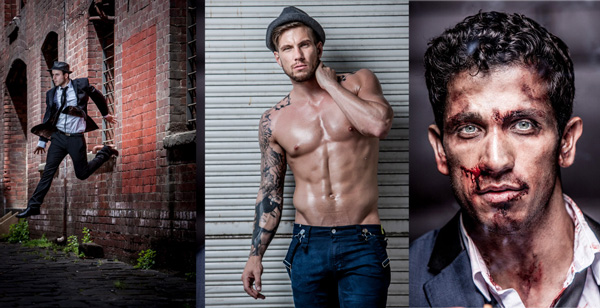
All images copyright Gina Milicia – Model credits from left to right: Jess Kenneally, Nathan Kennedy, Firass Dirani.

Gina has a new dPS ebook just released – Portraits: After the Shot – check out out!

The style of side lighting (in the image below) is a great way to enhance muscle definition, and the post-production technique complements the lighting style. You can see that it appears as if Nathan has far better muscle definition in his after shot. I love using this post-production technique in character portraits for the entertainment industry, advertising and editorial shoots. It deliberately gives the skin a hard, detailed, gritty look, which is perfectly suited to character-style portraits.
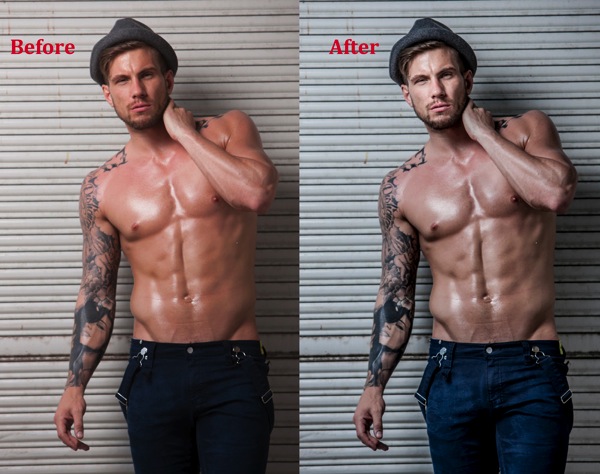
Nathan Kennedy for ML Denim

Model credit: Nathan Kennedy for ML Denim. In this image I used fill flash from my Elinchrom Quadra lights with a Rotolux Deep Octabox camera left, which is lighting Nathan from a 45-degree angle.

If you want to see a full tutorial on my favourite lighting style for this type of effect, check out: How to Create this “Fight Club” Inspired Portrait using One Light.

It’s not the most flattering technique for skin post-production, so I’m selective about which projects I use it on and tend to avoid using it on female skin tones. There are very few women who will say, “Wow, I love how detailed and large my pores look.”
Don’t forget my overnight rule. After you’ve edited your image, try not to look at it for a minimum of 12 hours. When you look at it again with fresh eyes, you should trust your gut instinct on how it looks. If your first reaction is “Ewww”, then you may have gone too far!

Here’s my step-by-step recipe for adding a grunge effect to your portraits using Lightroom:

LW GRUNGE 1 LW GRUNGE 1B

Note: Every lighting style is going to give you a slightly different result. I suggest you use my recipe as a rough guide only, tweaking your images until you get the results that best suit your image and personal style.
LW Grunge 2

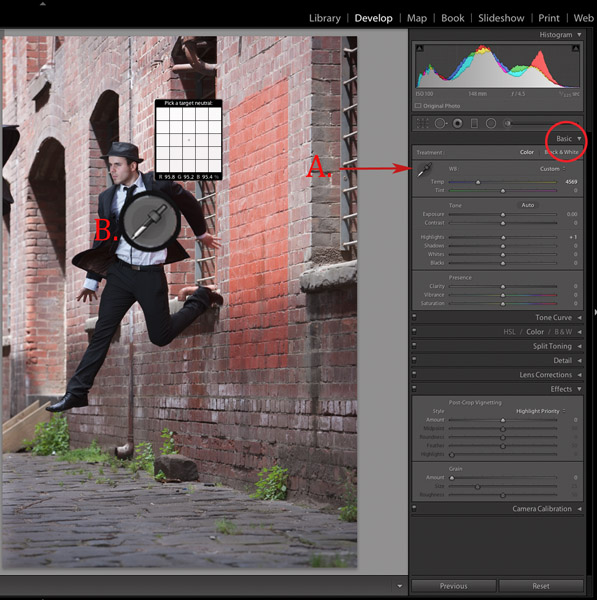
Find a neutral area of your image and use it to correct white balance. In this case I’ve selected a very light gray section of the white shirt the model is wearing.

Step 1. Import the file into Lightroom and in the Develop module, use the eyedropper tool (A.) and do a custom white balance (B.). This is achieved by finding a neutral area on your image (gray or white works best) then using your eyedropper tool (A) click on this (Neutral area) and Lightroom will automatically adjust your white balance.

The best and most accurate technique to achieve a good white balance is to ask your model to hold a gray card in front of their face for the first frame. This gives you an accurate neutral gray to select from for your white balance.

The third option to achieve white balance is to use Lightroom’s auto white balance. Test them all if you can and see which option best suits your shooting style.

I like working with a combination of gray card and finding neutral areas. I will use Lightroom’s auto function if I am shooting television stills or theatre productions where I need to color correct images that were shot under tungsten lights.
LW GRUNGE 3

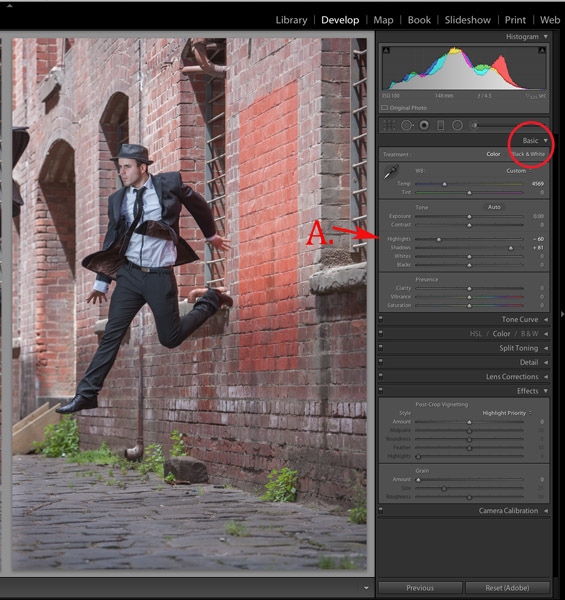
Step 2. As a starting point, increase shadows (+81) and decrease highlights (-60). The image starts to look a little wrong, but stay with me.
LW GRUNGE 4

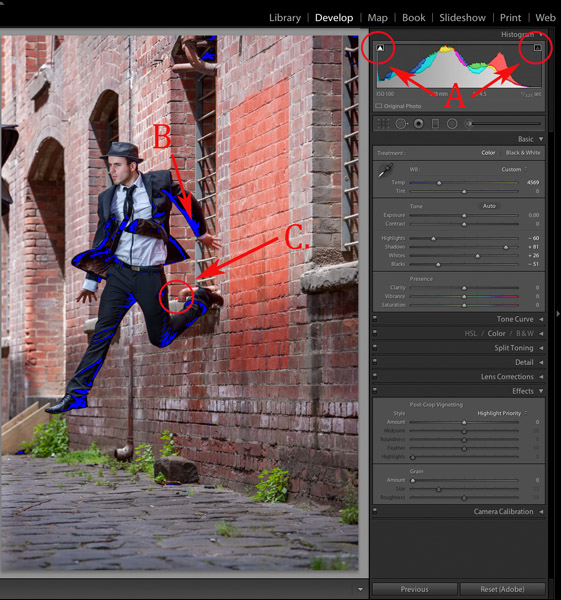
Step 3. Switch on clipping mask (A.) by clicking on little triangles above the histogram.

Move the blacks slider to the left until your image gets a good black tone. The areas in blue highlight loss of detail in the shadows, and areas highlighted in red indicate loss of detail in highlights.

Purists will probably start twitching at this point because I am crunching my black tones (B.) and blowing my highlights (C.). I believe this gives the image a more realistic feel because we don’t always see detail in shadow areas with our naked eye.

I personally like my images to look good overall, and if that means losing some detail in the shadows to gain good contrast across the whole image, I’ll do it. Just because Lightroom gives us the technology to see the entire gray scale doesn’t mean we have to.
LW GRUNGE 5

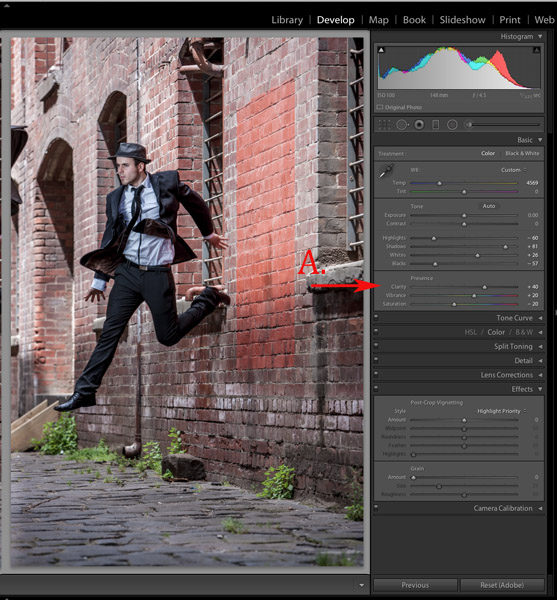
Step 4. In the next step, I increase the mid-tone contrast or clarity) (A.). I also decrease saturation to counter the digital orange glow the skin tone tends to take on in Step 3. Then I increase vibrance to bring some tone back to the muted tones.
LW GRUNGE 6

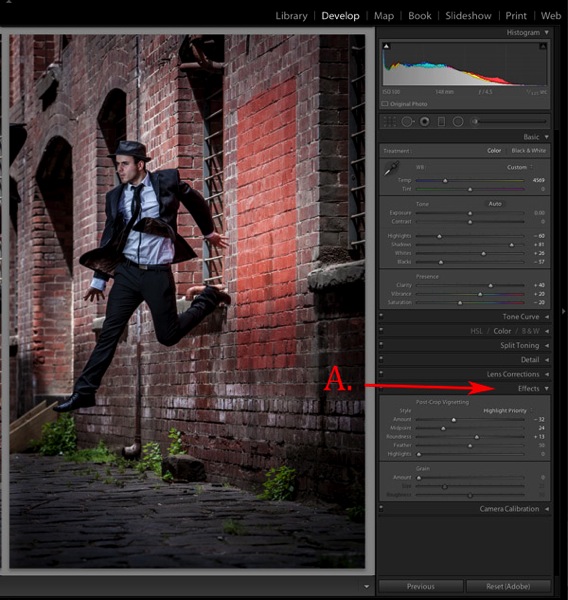
Step 5. The next step is to add a vignette from the Effects menu (A.). This is optional, but I feel it finishes the image off nicely and draws our eye to the hero of the shot, Jesse.
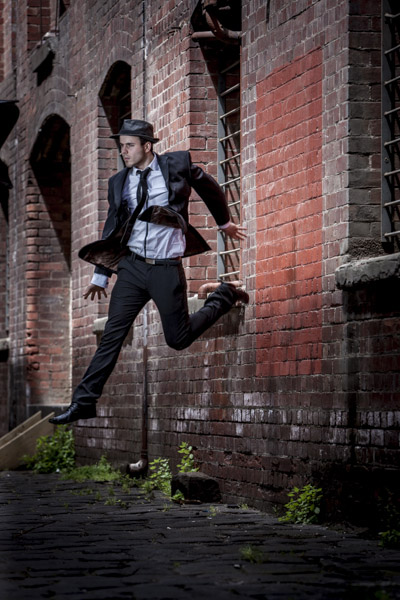
LW GRUNGE Main 2

Step 6. Finally, I enhance the eyes slightly using my eye-enhancing technique for Lightroom.

If you’d like to try it, you can check it out here: 3 Simple Ways to Create Stunning Eyes in Your Portrait Photography.
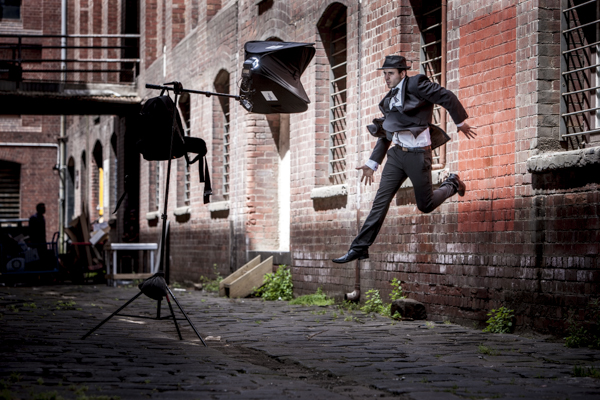
LW GRUNGE BTS

Behind the scenes on my air shoot with actor Jess Kenneally and my MacGyver-inspired lighting boom.

  • Canon 1DS MK3 ISO 100, F/5.6, 1/125th, 70-200mm IS zoom @ 200mm.
  • Jess has been lit using a Canon 580EX Speedlite and a medium softbox.

How do you create a grungy, gritty look to your portraits? Should we keep detail in the blacks and highlights, or is it okay to crunch and blow out to create the right vibe? I’d love to hear what you think.

Gina has a new dPS ebook just released – Portraits: After the Shot – check out out!

The post How to Add a Grunge Effect to Your Portraits Using Lightroom by Gina Milicia appeared first on Digital Photography School.


Digital Photography School

 
Comments Off on How to Add a Grunge Effect to Your Portraits Using Lightroom

Posted in Photography


Filmmaker links 50 Lumia 1020s to create ‘bullet time’ effect

24 May

Arc-of-Wonder-feat1.jpg

Filmmaker Paul Trillo has teamed up with Microsoft to build an apparatus which they call the ‘Lumia Arc of Wonder’. It consists of 50 Nokia Lumia 1020 smartphones fixed to a custom-built metal arc on casters, some networking equipment and external power sources. Click through to read more, and see the results on connect.dpreview.com

News: Digital Photography Review (dpreview.com)

 
Comments Off on Filmmaker links 50 Lumia 1020s to create ‘bullet time’ effect

Posted in Uncategorized


Google Camera app now on Kitkat and adds Lytro-like effect

18 Apr

Google_Camera_app.jpg

So far Google’s in-house camera app has only been available on Nexus devices but now a new version of the app is available to anyone in the Google Play Store. The app only works on devices running Android Kitkat 4.4 but Google is planning to make it work on older versions too. It comes with a minimalist design and a brand new feature called Lens Blur to simulate shallow depth-of-field. Learn more

News: Digital Photography Review (dpreview.com)

 
Comments Off on Google Camera app now on Kitkat and adds Lytro-like effect

Posted in Uncategorized


Space in Miniature: Tilt-Shift Effect Shrinks Galaxies

14 Jan

[ By Steph in Art & Photography & Video. ]

Tilt Shift Space Photos 1

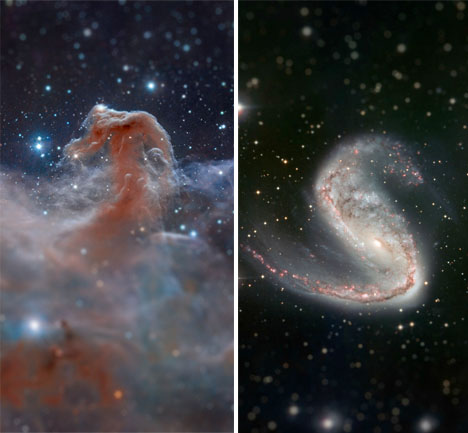
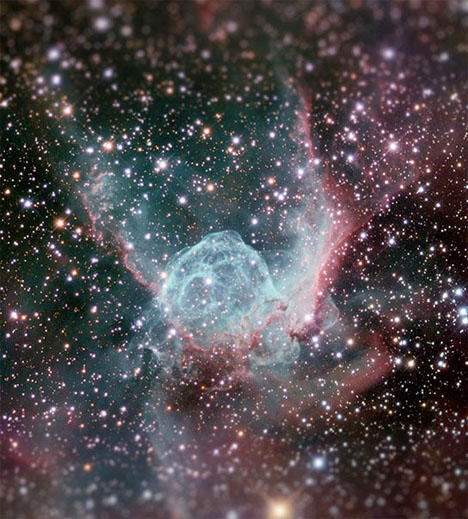
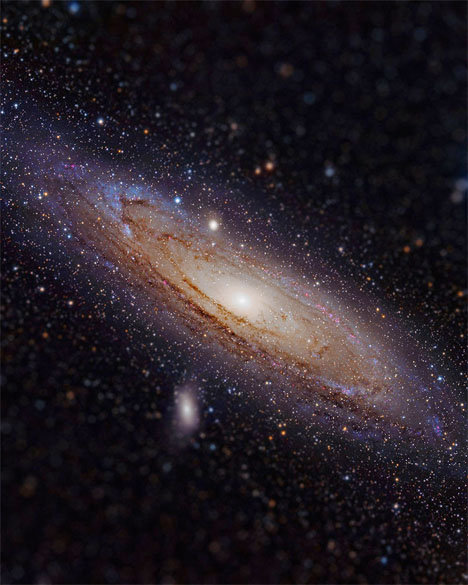
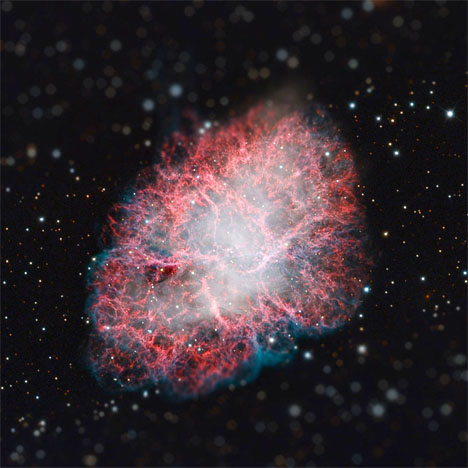
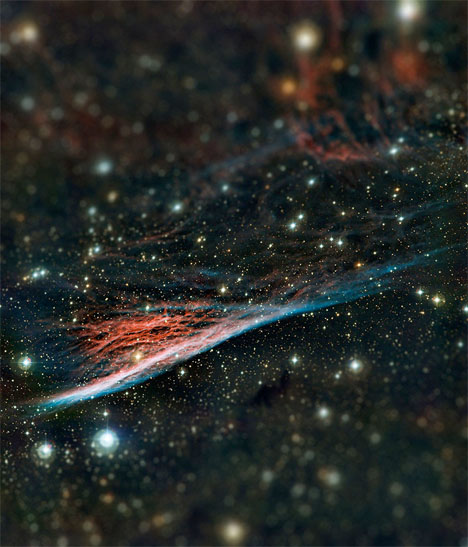
The scope of all that exists beyond our own planet is so large, it’s mind-boggling to contemplate. Yet a simple Photoshop trick can seemingly reduce shots of outer space, including those taken by powerful Hubble telescopes, to miniature scenes.

Tilt Shift Space Photos 5

Reddit user TheScienceLlama took a bunch of space imagery from NASA and ESA and transformed it with the Tilt-Shift filter in Photoshop, including the Horsehead Nebula, Crab Nebula, Meathook Galaxy, Thor’s Helmet Nebula and Andromeda Galaxy.

Tilt Shift Space Photos 3

Tilt Shift Space Photos 2

The tilt-shift effect blurs the top and bottom of an image to mimic a shallow depth of field, making it seem as if life-sized scenes are actually miniatures.

Tilt Shift Space Photos 6

The effect is especially effective on urban scenes, making planes, city buses, cruise ships and people look  like toys.

Share on Facebook


[ By Steph in Art & Photography & Video. ]

[ WebUrbanist | Archives | Galleries | Privacy | TOS ]


WebUrbanist

 
Comments Off on Space in Miniature: Tilt-Shift Effect Shrinks Galaxies

Posted in Creativity


Government Shutdown Effect – Yosemite National Park

07 Oct
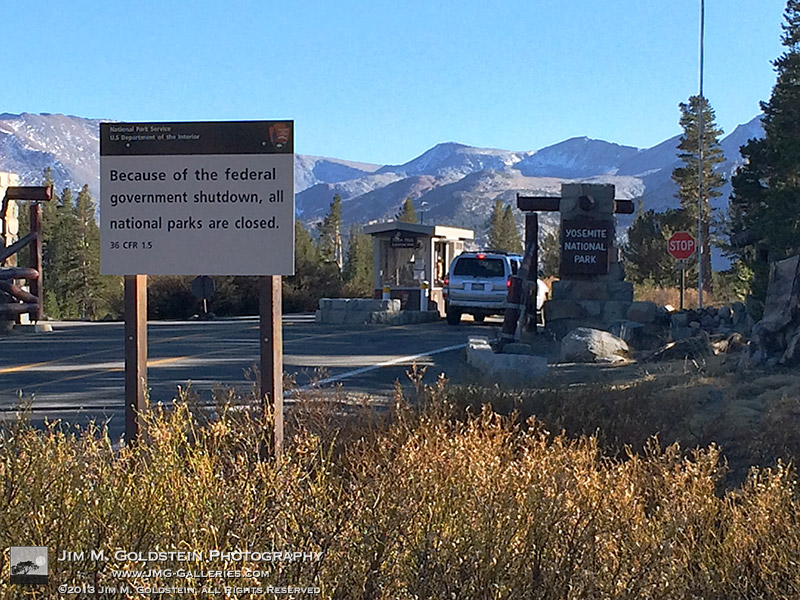
Tioga Pass East Entrance with Sign - 2013 Federal Shutdown - Yosemite National Park

Tioga Pass East Entrance with Sign – 2013 Federal Shutdown

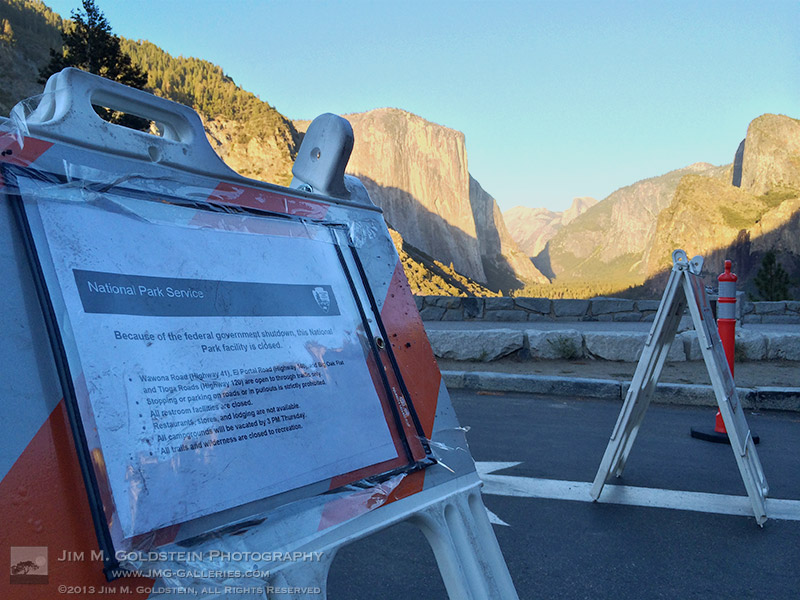
Day 1 of the partial U.S. government shutdown just happened to fall on the day I left for my fall photography and new moon astro-landscape trip. My first stop was Yosemite National Park which was a high profile casualty of the shutdown. All highways were open to the park so as to drive through, but visitors were asked to refrain from stopping. Quite ironic that the public was and still is being advised to avoid using public land.

Tunnel View Signs - 2013 Federal Shutdown - Yosemite National Park

Tunnel View Signs – 2013 Federal Shutdown

Having traveled through Yosemite so many times it was incredibly sad and frustrating to not be able to enjoy the scenery as I might normally. I cannot emphasize how frustrating it was to have something of such beauty in reach, but yet deliberately taken away. Lucky for you though I’ve developed a set of images taken during my trip that just might evoke that frustration as I felt. Below are the amazing views of Yosemite as taken during my time in Yosemite during the first days of the U.S. government shutdown.

El Capitan Sunset - 2013 Federal Shutdown - Yosemite National Park

El Capitan Sunset – 2013 Federal Shutdown

Tuolumne Meadows - 2013 Federal Shutdown - Yosemite National Park

Tuolumne Meadows – 2013 Federal Shutdown

Half Dome from Olmstead Point - 2013 Federal Shutdown - Yosemite National Park

Half Dome from Olmstead Point – 2013 Federal Shutdown

El Capitan - 2013 Federal Shutdown - Yosemite National Park

El Capitan – 2013 Federal Shutdown

Tunnel View - 2013 Federal Shutdown - Yosemite National Park

Tunnel View – 2013 Federal Shutdown

Deer in El Capitan Meadow - 2013 Federal Shutdown - Yosemite National Park

Deer in El Capitan Meadow – 2013 Federal Shutdown

Tenaya Lake - 2013 Federal Shutdown - Yosemite National Park

Tenaya Lake – 2013 Federal Shutdown

Photo Details:

iPhone 5S with blur achieved in camera at the time of capture.

For more on why the national parks were shut down I recommend this NPR article and broadcast:

National Parks Close As Other Public Lands Stay Open

Copyright Jim M. Goldstein, All Rights Reserved

Government Shutdown Effect – Yosemite National Park

The post Government Shutdown Effect – Yosemite National Park appeared first on JMG-Galleries – Landscape, Nature & Travel Photography.


Related Stories

  • Government Shutdown Effect – Yosemite National Park – Enclosure
  • Primitive Coast V + Thoughts On The Singh-Ray 10-Stop Mor-Slo Filter
  • Primitive Coast V + Thoughts On The Singh-Ray 10-Stop Mor-Slo Filter – Enclosure
Feed Ads by FeedBlitz
powered by ad choices


JMG-Galleries

 
Comments Off on Government Shutdown Effect – Yosemite National Park

Posted in Equipment