RSS
 

Posts Tagged ‘dSLR’

5 Lessons Learned Switching from DSLR to Mirrorless for Travel Photography

23 Mar

Two months ago, after shooting for 10 years with Canon, I completely switched to Sony. It surprised some readers of my blog, as well as some fellow photographers. To address the issue, I published a detailed post on my blog with the reasons behind my switch. To save you time, I will summarize my reasoning, not only in one sentence but in one word: INNOVATION. I could see that, in the last two to three years, the main innovation was happening in the realm of mirrorless systems and I felt that Canon was simply an outside observer.

I considered the switch for a long time. I first waited because mirrorless systems were not up to DSLR standards to which I was accustomed. Then suddenly, about a year ago, all mirrorless manufacturers began releasing new camera models that could compete with any DSLR and, in some cases, even surpassed them.
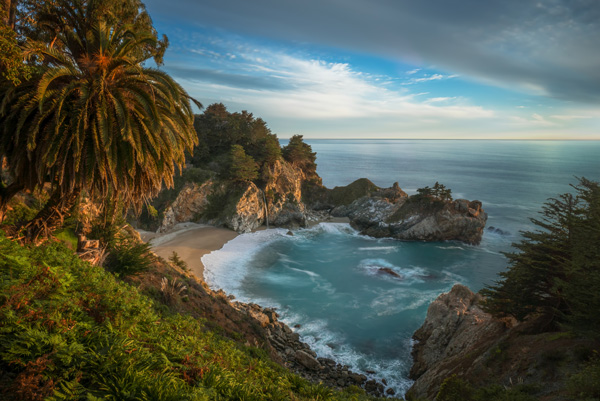
SwitchingfromCanont Sony Photo 1

Big Sur, California – Sony A6000, Sony 10-18mm lens

That was when I decided to switch. But, it took another six to seven months to choose the right kit (camera and lenses) for my travel photography needs.

My initial choice was the Panasonic Lumix GX-7 which was the perfect camera for me feature-wise but I was not too crazy about the selection of high-end wide angle lenses.

My second choice was the full frame Sony A7 and, I almost pulled the trigger last fall. However, after holding it in my hands, the Sony A7II in combination with the newly released Zeiss 16-35mm lens was almost comparable to the DSLR in weight and size.

That was when my choice was made. Just before the Christmas holidays, I sold all of my Canon gear to prevent cold feet. Then, I ordered the Sony A6000, Sony 10-18mm f/4, and Zeiss 16-70mm f/4 in one shot. I paid $ 2000 in total. Sony lenses are always pricy but I found that the price of the complete kit was very reasonable.
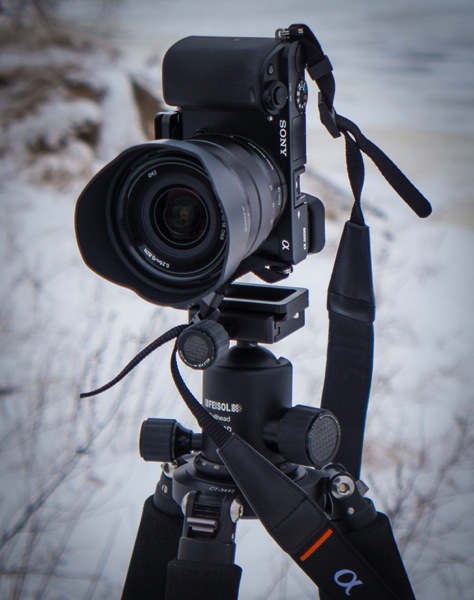
SwitchingfromCanont Sony Photo 2

Sony A6000, Sony 10-18mm lens and Feisol Tournament Tripod

I just returned from my first photography trip of the year; I spent two weeks in Hawaii and Northern California where I exclusively shot with my brand new Sony gear.

Below are my thoughts after putting this new equipment through the real life test of travel photography. Please note, I only addressed the features of the camera which are important to me as travel photographer.

Lesson 1: Size does matter in travel photography

As a DSLR shooter, when preparing for a long and demanding sunrise/sunset hike, I always faced the same dilemma – what equipment to bring? Should I carry everything and look (and feel) like a Sherpa tackling Everest? Or should I hike light and risk missing important gear?

I do not have to compromise anymore as I can now put everything in a small camera bag and bring it with me. The Sony A6000 (344g) and the Sony 10-18mm (220g) weigh 564g (19.9oz) total. I still cannot believe that a high-quality wide angle zoom lens can weigh only 220g. I call it freedom.

Don’t get me wrong, the size and the weight were not the main reasons for my switch. I would never jeopardize quality for the sake of weight reduction but it was important consideration.
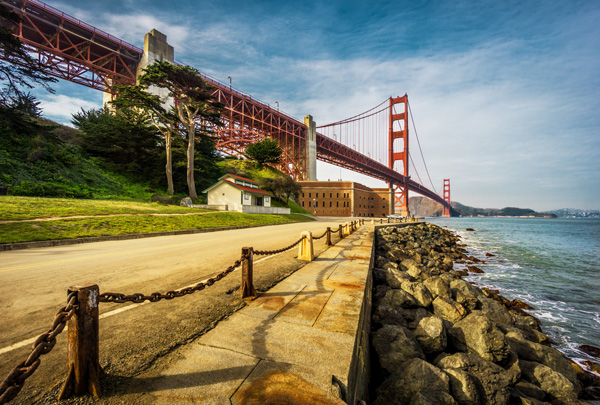
SwitchingfromCanont Sony Photo 3

San Francisco, California – Sony A6000 with Sony 10-18mm lens

Lesson 2: Electronic Viewfinder (EVF) – a new way of looking at the scene

Somehow, in many mirrorless reviews, the EVF is presented as a negative factor and is portrayed as somewhat of a disadvantage compared to the DSLR optical viewfinder. I do not agree with that conclusion. For me, the EVF is one of the main advantages of mirrorless cameras. Finally, when I look through the viewfinder I can see what the camera’s sensor sees.

It is a very new and refreshing experience with the EVF, when you can assess the depth of field of the scene before taking the picture.

Here’s a real life scenario. Earlier I was shooting using exposure compensation -2EV and I forgot to reset it to zero. Now, when looking through the EVF, I can see right away that the exposure is wrong because the EVF picture is too dark.

When I shoot wide at 10mm, I can even see barrel distortion which realistically represents the photo I am about to take.

I often use manual focusing when shooting landscapes, which was pretty much an impossible task with the DSLR in bright conditions because of the display screen glare. Now, not only can I easily use the manual focus in any condition, I can also take advantage of Focus Peaking, an amazing feature that highlights areas that are in focus with the bright color. There is no more guess work.

In one of the reviews, I read how awful and pixelated the EVF picture becomes in dark conditions. I can confirm that it looks pretty bad but it is good enough for composing the shot and beats the DSLR where all you can see is pitch black.

For me, the EVF simplifies the process of taking pictures and makes it more predictable.
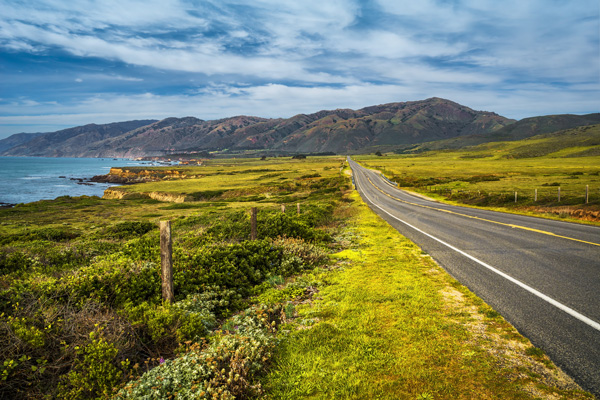
SwitchingfromCanont Sony Photo 4

California State Route 1 – Sony A6000 with Zeiss 16-70mm lens

Lesson 3: I love the 24 megapixels sensor

During the silly megapixel war between major camera manufacturers, I decided for myself that 16Mpx was the right pixel count for my needs and I had no plans of upgrading only for that reason.

The Sony A6000 comes with 24Mpix, which I initially did not consider as an important upgrade. What I realized later, after starting to process photos, is that the 24Mpx sensor produces unbelievably clean and sharp images and, in combination with native quality lenses, it resolves an insane amount of detail. Photos look acceptable even at 100% magnification.

Although, I have to admit the higher pixel count is more taxing on my computer and I might need to upgrade it soon.

High ISO photography is not something that I do often when I travel and it was hard for me to assess low light performance of the sensor. But, what I can see based on family photos from the holidays is that ISO 3200 is still acceptable and excessive noise is easy to eliminate in Lightroom.
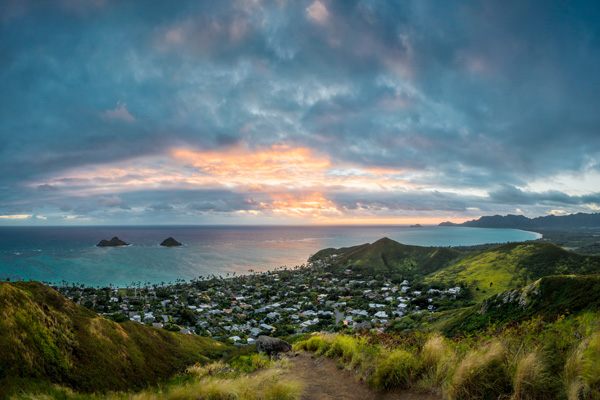
SwitchingfromCanont Sony Photo 5

Lanikai Beach O’ahu, Hawaii – Sony A6000 with Sony 10-18mm lens

Lesson 4: 11fps is a game changer

Sports photography is somewhat of a hobby for me. The only times when I shoot sports are when professional cycling peloton comes to Montreal every September and when my daughter is playing water polo. In order to test 11fps in combination with the fastest focusing system in the industry, I went to the beach in Hawaii to photograph surfers.

I switched from RAW to JPEG, set the camera to a continuous shooting mode and enabled Object Tracking. I was amazed not only with the new experience of shooting but with the results as well. Shooting at 11fps reminded me of filming the video and then going frame by frame in the editing software, selecting the best frames. There are no missing moments. The focus was spot on, in pretty much every frame.

I can see how the Sony A6000 can be a game changer for sports and wildlife photographers.
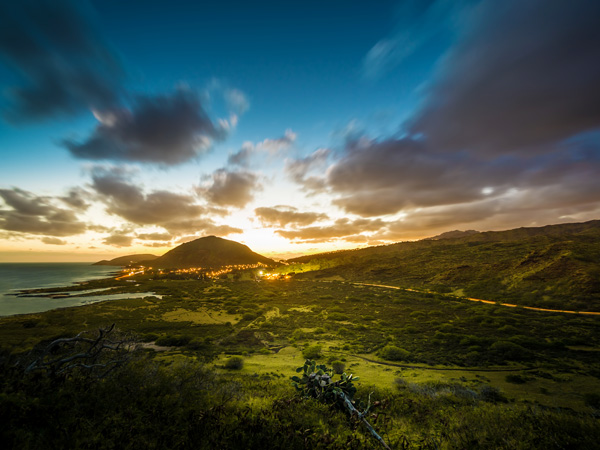
SwitchingfromCanont Sony Photo 6

Makapu’u Point O’ahu, Hawaii – Sony A6000 with Sony 10-18mm lens

Lesson 5: Not everything is perfect in paradise

Even though my initial experience of using the Sony A6000 is very positive, there are some shortcomings and annoyances I want to address.

Battery life:

According to Sony, you can take up to 360 shots on a single battery charge and I found this number to be pretty accurate. I even managed to take close to 390 shots when shooting in bracketing mode. It is not bad at all considering the small battery size and the EVF high power consumption. However, when you are accustomed to shooting 1500 shots on a single charge with the DSLR, the difference is very obvious. Now, I carry three spare batteries with me at all times and I have to remember to keep them charged.

Bracketing:

For some inexplicable reason you can shoot five bracketed shots at 0.7EV intervals only, which makes it completely useless. In extreme lighting conditions I have to shoot two sets of bracketed shots (-2, 0, +2), offsetting them manually using exposure compensation (-1 EV). This is very annoying.

No GPS tagging:

Even though the camera has decent wireless connectivity, the GPS tagging utilizing a mobile phone is missing.

Buffer writing lock:

When a camera transfers photos from the buffer to a memory card, the system is completely locked. You cannot even preview images during the transfer.

2-Second delay shortcoming:

You cannot trigger bracketed shots using the 2-second delay functionality. I had to buy, and carry around, an unnecessary extra piece of equipment: Wireless Shutter Release ($ 10).
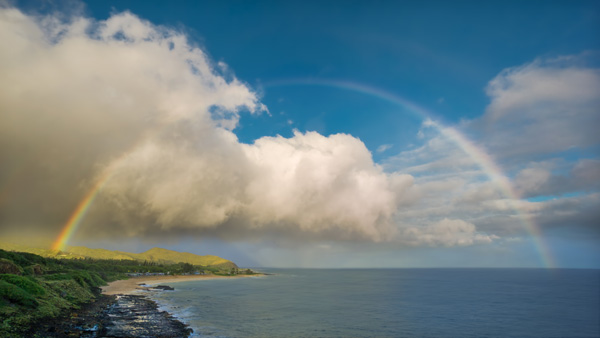
SwitchingfromCanont Sony Photo 7

Sandy Beach, Hawaii – Sony A6000 with Sony 10-18mm lens

Conclusion

The switch from a Canon DSLR to the mirrorless Sony A6000 was less stressful and less painful than I expected. I believe that one of the main factors that made it possible was my purchase of native Sony lenses so I did not have to deal with the glass from other systems with the converters.

I am waiting for the widely rumored Sony A7000 which is supposed to be the successor of the Sony NEX-7. I hope Sony addressed the shortcomings of the A6000 and introduces new pro features like: weather sealing, built-in body stabilization, GPS tagging and advanced bracketing. I am definitely planning to get the new A7000 and keep the A6000 as a backup body.

googletag.cmd.push(function() {
tablet_slots.push( googletag.defineSlot( “/1005424/_dPSv4_tab-all-article-bottom_(300×250)”, [300, 250], “pb-ad-78623” ).addService( googletag.pubads() ) ); } );

googletag.cmd.push(function() {
mobile_slots.push( googletag.defineSlot( “/1005424/_dPSv4_mob-all-article-bottom_(300×250)”, [300, 250], “pb-ad-78158” ).addService( googletag.pubads() ) ); } );

The post 5 Lessons Learned Switching from DSLR to Mirrorless for Travel Photography by Viktor Elizarov appeared first on Digital Photography School.
Digital Photography School

 
Comments Off on 5 Lessons Learned Switching from DSLR to Mirrorless for Travel Photography

Posted in Photography


CP+ 2015 Ricoh Imaging interview – full-frame DSLR may have ‘something extra built-in’

08 Mar

We recently returned from the CP+ show in Yokohama, Japan, where we sat down with Kazunobu Saiki – General Manager of the Marketing Communication Department, in the Global Marketing Division of Ricoh Imaging. We spoke to Mr Saiki about Ricoh’s forthcoming full-frame DSLR, the success of the 645Z and about his desire to improve AF performance in Pentax’s DSLRs and lenses. Click through to read the interview

Articles: Digital Photography Review (dpreview.com)

 
Comments Off on CP+ 2015 Ricoh Imaging interview – full-frame DSLR may have ‘something extra built-in’

Posted in Uncategorized


Turn your DSLR Camera into a Wildlife Camera Trap

02 Mar

If you have an old DSLR camera lying around, you could be putting it to work as a camera trap for photographing wildlife.

What is a camera trap?

A camera trap is simply a camera that fires automatically when an animal is detected. All you need in order to turn your DSLR into a camera trap is a sensor that can detect animals, then trigger your camera. Once set up, a camera trap can be left for days or even weeks at a time. The longer you leave it, the greater your chances of capturing a shot of an elusive animal.

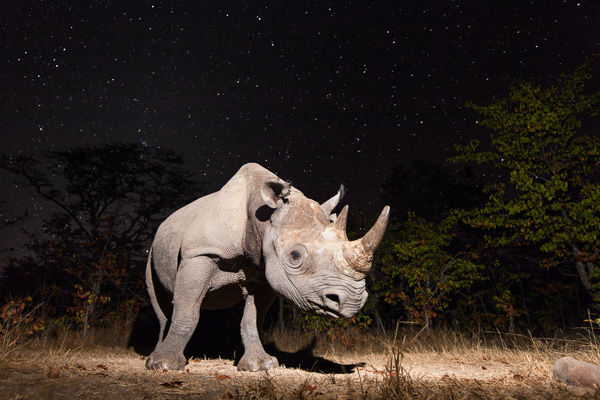
Camera trap 1

Black rhino at night in Zambia. A 30 second exposure time captured the stars. The rhino was illuminated by a flash at the start. I left my camera in the clearing for a week to capture this shot.

One of the main advantages of a camera trap is that you can take your time setting up off-camera flashes in order to achieve dramatically lit shots of nocturnal creatures. If you try to do this any other way, then the creature is likely to disappear well before you have finished setting up your lights!

As a result of these benefits, camera traps have become a key tool for wildlife photographers aiming to photograph shy and nocturnal animals.

So how do you set up a camera trap?

First, dig out that old DSLR that you don’t use any more. I mostly use a Canon EOS 1Ds Mark III. Camera traps can get much closer to animals than a human holding a camera, so you can use a wide-angle lens. My preferred lens is a 17-40mm f/4 lens.

Next, you need a way of detecting the animal and triggering your camera. If you are a handy, DIYer then you can do this by modifying a security device (I provide more information about how to do this on my website). The two most commonly used types of detector are beam-break and motion detectors.

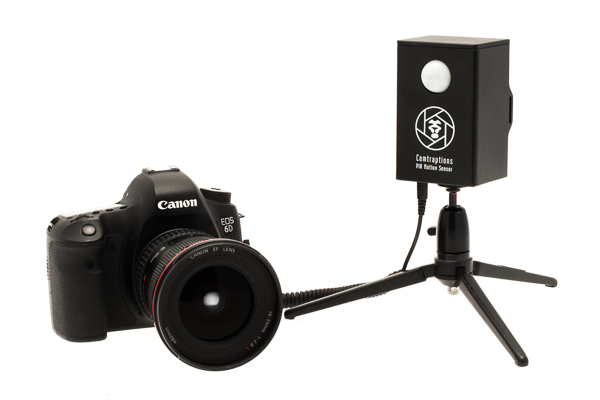
My preferred method of detecting animals is to use a Passive Infrared (PIR) motion sensor. This is similar to the sensor used on automatic patio security lights. I like these because they don’t consume much power, so they can remain on standby for a long period of time. They are also very easy to set up – you just point them at the trigger zone and wait for the animal to show up.

Camera trap 2

A PIR Motion Sensor plugs in to your camera’s shutter release socket

Now you have the camera and the trigger sorted, the next thing you need is a speedlight (flash), or two, so that you can capture nocturnal subjects.

I recommend setting up one or more off-camera flashes, connected to your camera with a TTL flash cord. It is important to get the flashes away from the camera itself because this will reduce redeye and make the shadows look more natural.

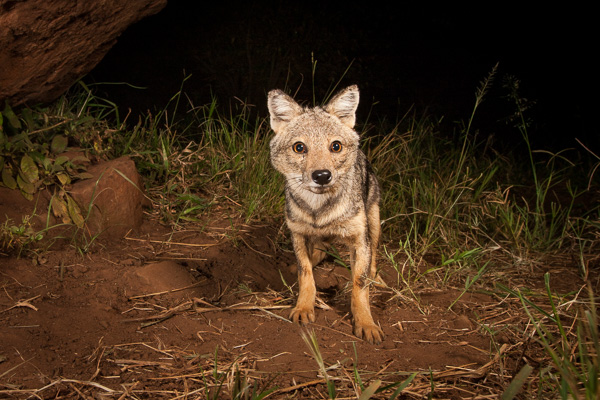
Camera trap 3

Side-striped Jackal, Kidepo Valley, Uganda. This is an example of a dual flash setup, with a primary light source on the right and a fill flash on the left.

I often just use one flash because I quite like dramatic shadows. However, sometimes, it is preferable to use a second flash to fill-in the shadows on the subject. If you want to get even fancier, you can also add more speedlights to illuminate the background.

Camera settings

The challenge with camera traps is that you don’t know when the animal will pass and therefore the camera and flashes need to be programmed so that the scene is attractively exposed in any lighting condition. Here are some general settings that I find work well in most situations.

Use manual focus and either low speed burst or single shot mode. Set the camera to aperture priority mode with a reasonably small aperture to provide a large depth of field. This means, if the animal isn’t quite in the right position, you should still get a sharp shot.

Camera trap 4

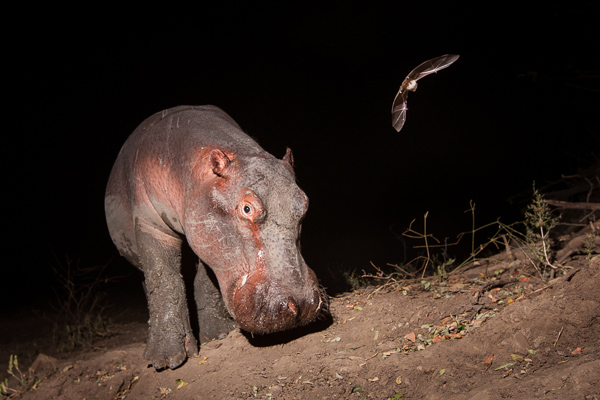
A hippo and a bat in Zambia. This was a lucky shot where the bat happened to be flying around the hippo. A small aperture ensured both animals were in focus.

Selecting aperture priority means that in darkness, the camera will select a long shutter speed. This means it will capture details in the background such as twilight colours in the sky, or even stars. However, if there is too much ambient light, then you may get ghosting when the animal moves. If ghosting is a problem for you then, limiting the shutter speed to one second or faster can help.

If I am using a single flash then I will leave it in TTL mode so the camera automatically determines the flash output based on its metering. For a multiple flash setup, it is usually easier to set the flash outputs manually. With manual flash output and your camera in Av mode, you may need to under-expose your camera (using exposure compensation) by a stop so that daylight images don’t blow-out.

Power considerations

If you plan to leave you camera trap set up for more than a night, then battery life will be an issue. Make sure your camera is set to power off and that it can be woken by the sensor. I also recommend turning off the image preview to conserve battery. Your camera should now be able to last for many days, assuming it isn’t firing the whole time.

Keeping your flashes powered is more challenging. Speedlights have a capacitor inside them which needs to be charged for the flash to fire. However, capacitors drain over time so flashes needs to constantly keep them topped up. If your flash isn’t set to sleep, then the batteries are likely to drain over the course of a single night. If your flashes are set to sleep then when you need them to fire, the capacitor may not have enough charge and so the flashes won’t be ready to fire immediately.

There are three ways to deal with these issues:

  1. Disable your flash’s sleep function – your flash will always be ready to fire but you will probably have to change the batteries every day, or power them with an external power supply.
  2. Use a flash that holds its charge well, even when sleeping. The best I know of is the Nikon SB-28, which can sleep for many days and still have enough charge in the capacitor to fire instantly.
  3. Set your camera to continuous drive mode and let your flashes sleep. The first and second shots may be black, but eventually your flashes will charge and fire.

If you are letting your flashes sleep, then you will need to connect them to your camera via a TTL cable. This allows your camera to wake the flashes. You will need long cords and a TTL splitter hub if you want to fire multiple speedlights.

Positioning your camera trap

Next you will need to find somewhere to set up your camera trap. The most productive places I have found are animal trails, particularly ones that cut through a difficult obstacle such as thick bush or a steep bank. I set my sensor up so that it covers a small section of the trail and then position the camera off to one side (so that it doesn’t block the animal’s path).

Camera trap 5

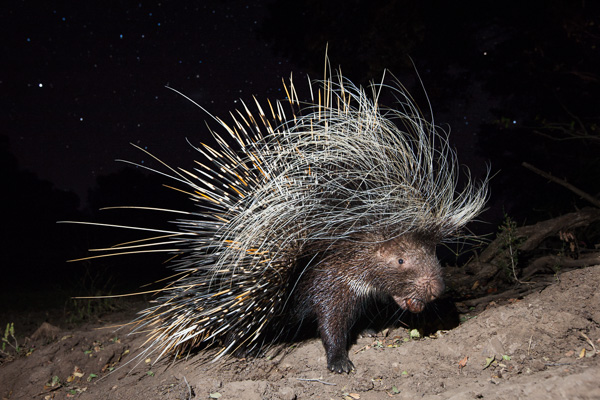
A porcupine photographed in Zambia. My camera was positioned next to an animal trail that lead up a steep bank. It captured many creatures including this porcupine.

The last thing to do is to camouflage, waterproof, and protect your equipment. Rain covers can be made from plastic sheeting. If you need protection from animals such as hyenas and lions then you will need to buy or build your own protective housing.

Once everything is set up, I recommend leaving your camera trap as long as possible in order to maximize the chances of getting results. You may just need to visit it from time to time to change batteries and check your settings.

I have created a series of videos that help illustrate the process of setting up a camera trap. You can watch the first video in this series below.

If you want more wildlife related tips and articles try these:

  • Writer’s Favorite Wildlife Lens – Tamron 150-600mm
  • Why Manual Exposure is Better for Winter Wildlife Photography
  • Nature and Wildlife Photography Tips for Beginners
  • Top 5 Tips for Wildlife Photography
  • Guide to Attracting Critters to Your Garden for Backyard Wildlife Photography

googletag.cmd.push(function() {
tablet_slots.push( googletag.defineSlot( “/1005424/_dPSv4_tab-all-article-bottom_(300×250)”, [300, 250], “pb-ad-78623” ).addService( googletag.pubads() ) ); } );

googletag.cmd.push(function() {
mobile_slots.push( googletag.defineSlot( “/1005424/_dPSv4_mob-all-article-bottom_(300×250)”, [300, 250], “pb-ad-78158” ).addService( googletag.pubads() ) ); } );

The post Turn your DSLR Camera into a Wildlife Camera Trap by William Burrard-Lucas appeared first on Digital Photography School.

Digital Photography School

 
Comments Off on Turn your DSLR Camera into a Wildlife Camera Trap

Posted in Photography


Review: slingShot DSLR Remote Control App

18 Feb

One of the great advantages of smartphone technology is the way that it makes photography more convenient. I’m not just talking about using the camera that came with your phone. There are now smartphone apps coming out that allow you to connect with, and even control, your DSLR camera. One of these apps is the brand new slingShot DSLR Remote Control, which just came to the Google Play Android market on January 25, 2015. Using this app makes it possible to adjust the settings on your camera, see what the camera sees in live view, and view the resulting image after it’s snapped. All of this, and you don’t even have to be standing right next to your camera.

How it Works

The slingShot app connects with your camera in one of two ways: via Wi-Fi if your camera has it, or via a physical USB On-The-Go (OTG) cable. If you have a Wi-Fi enabled camera, you’re already likely to be familiar with how the function works in that your camera will create its own Wi-Fi network that your phone will then sync with. For photographers with non-Wi-Fi cameras, the connection to your phone is made with the aforementioned OTG cable. While these cables definitely aren’t as common as others, they are cheap, easy to find online, and really convenient for connecting other devices to your phone or tablet besides your DSLR, such as a wireless USB mouse or keyboard.

slingShot Remote DSLR Controller

Compatibility

At this moment, the app claims on its website to only support the following models:

  • Camera Via Wi-Fi Connection: Canon EOS 6D, Canon EOS 70D and Nikon 5300.
  • Camera Via USB Connection: Canon EOS 6D, EOS 70D and Nikon D5300 and D7000.
  • Phone: Android 4.0 or higher; phone must also have Wi-Fi or full USB host support capabilities.

Despite the app’s relatively short list of supported devices, you may want to try it out for yourself. For example, the app doesn’t specify compatibility with the Canon EOS 5D Mark III, but it worked just fine with mine.

How to Control Your Camera with the App

1. Assuming you have a supported camera model and Android phone (no iOS support at the moment), the first step is to download the slingShot app from the Google Play store. This app does cost $ 8.99, but its features may make it worth the cost, depending on how useful you find them.

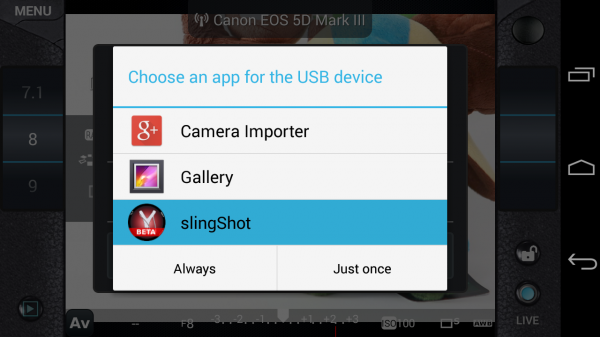
2. After you install the slingShot app, proceed to connect your camera to the phone. If your camera has Wi-Fi, walk through the procedures to enable the wireless connection, or simply connect the camera by using a OTG USB cable. When your camera and phone are successfully connected, you’ll see the screen below pop up, asking which app you want to activate. Choose the slingShot app.

slingShot Remote DSLR Controller

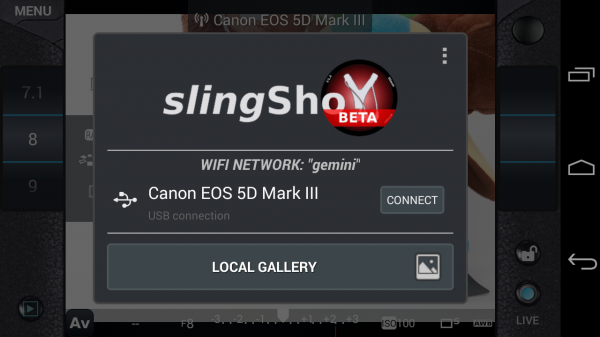
3. A screen will then flash up on your phone indicating that your camera has been detected. Press the “Connect” button to continue.

slingShot Remote DSLR Controller

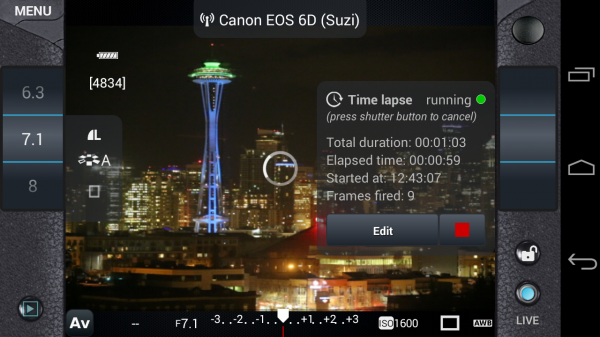
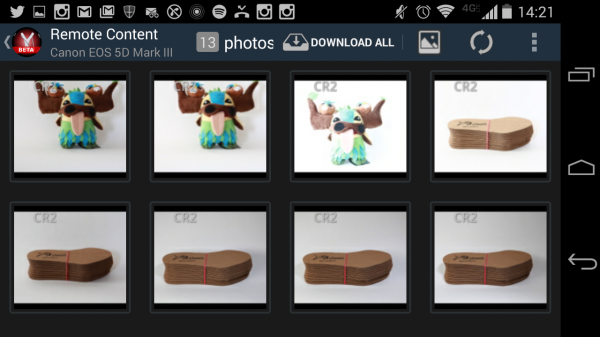
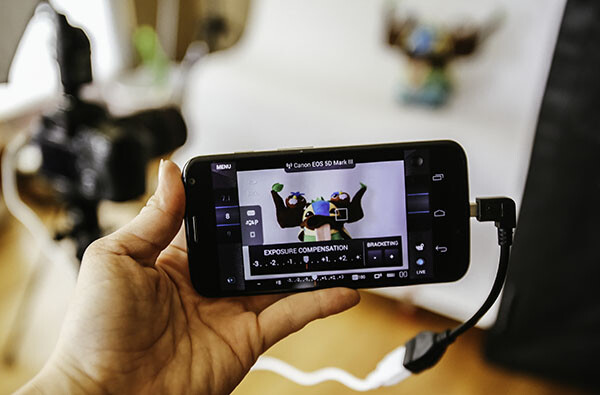
4. You will then see the menu controls on your phone (see below), as well as an indicator in the upper middle of the frame confirming that your camera is connected; in this case, I have my Canon 6D connected via Wi-Fi. You will also have the ability to use your phone to control aspects of your DSLR such as shutter speed, aperture, exposure, ISO, white balance, and image quality; you can even tap on the button in the upper right corner to take a photo.

However, you won’t be able to see what the camera is seeing until you enable live view mode on your camera and then press the “LIVE” button on the lower right corner of the app. Once the live view is on, the rest of the app controls are very smooth and easy to use, requiring just a tap or swipe of the finger to enable. There are also some extra features that appear when you tap on the menu button in the upper left corner, one of the most notable being the ability to do time lapse shots.

slingShot Remote DSLR Controller

Time lapse feature

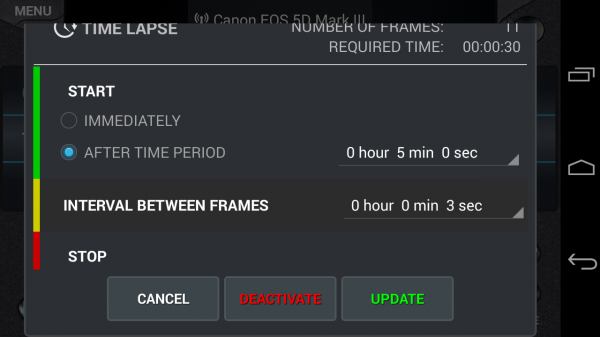
I’ve played around with quite a few DSLR remote control apps, but none have come with the time lapse functionality. slingShot’s time lapse feature is in the Menu and it offers a range of customizable settings. You can set it to start immediately or after a set period of time, you can also set the interval between frames, and give it a time to stop or have it stop after a certain number of frames are snapped. I tried the time lapse function out on both my Canon 6D and 5D Mark III and it worked perfectly the first time around.

There are a couple things that didn’t work so well. First, if your camera falls asleep, the time lapse function is turned off, even if you have a timer set. Second, the ability to reset the time lapse with different conditions is difficult to do; each time I had to simply reconnect my camera and phone to get rid of the initial settings I input. However, the fact that this app can do basic time lapses is still impressive and will likely be improved upon in future updates.

slingShot Remote DSLR Controller

Previewing images

Another simple use of the slingShot app is to use it to preview DSLR content on your phone. Simply connect via Wi-Fi or OTG cable and press the play button in the app’s lower left corner. You’ll then see the screen show (see image below) a neat gallery of photos from your CF or SD card. Even if you have older content that wasn’t shot with the app,  you’ll be able to see it and download it to your phone, or share via email or social media. This app will even read and convert RAW files at pretty decent speeds.

slingShot Remote DSLR Controller

Potential Deal Breakers

While there are many positive aspects to the slingShot app, there are a few possible deal breakers. First, there are a few bugs in the app that don’t necessarily affect its overall functionality, but make its cool trick features such as time lapse not work as well as one might hope. On the other hand, the team behind the app is still actively making updates, so there’s a good chance these errors will be fixed. Another possible point of contention is the app’s $ 9.99 price tag. While you can download slingShot’s Beta version for free, you can only use it for 11 days before you’re made to purchase the actual app in order to keep using it. While the price isn’t super extravagant, it is on the steeper side compared to some other apps available. Also, there are a few other DSLR controller apps that offer the same functionality at lower prices. In fact, if you have a Wi-Fi DSLR, such as the Canon 6D in my case, there’s a (free) app from Canon that comes with it that enables DSLR control.

If the idea of being able to control your DSLR with your phone sounds like a winning deal, be sure to download slingShot app! Has anyone else given it a try? Thoughts?

googletag.cmd.push(function() {
tablet_slots.push( googletag.defineSlot( “/1005424/_dPSv4_tab-all-article-bottom_(300×250)”, [300, 250], “pb-ad-78623” ).addService( googletag.pubads() ) ); } );

googletag.cmd.push(function() {
mobile_slots.push( googletag.defineSlot( “/1005424/_dPSv4_mob-all-article-bottom_(300×250)”, [300, 250], “pb-ad-78158” ).addService( googletag.pubads() ) ); } );

The post Review: slingShot DSLR Remote Control App by Suzi Pratt appeared first on Digital Photography School.

Digital Photography School

 
Comments Off on Review: slingShot DSLR Remote Control App

Posted in Photography


Ricoh announces development of long-awaited full-frame Pentax DSLR

05 Feb

And so it was written that since the beginning of recorded time, Pentax shooters have predicted the release of a full-frame K-mount DSLR. Today, their prayers have been answered, as Ricoh has announced the development of exactly that. The company didn’t share a whole lot of detail, other than to say that it will be compatible with DA lenses via a crop function and that it will be available by the end of 2015. Click through for (very little) additional information

Articles: Digital Photography Review (dpreview.com)

 
Comments Off on Ricoh announces development of long-awaited full-frame Pentax DSLR

Posted in Uncategorized


Manueller Fokus im Zeitalter der DSLR

14 Jan

Ein mann in der Natur

Ein Beitrag von: Christopher Wesser

Kennt Ihr das auch? Ihr habt Hunger, geht in eines der berühmt-berüchtigten Systemgastronomie-Restaurants à la Burger-Donalds, Sub-Piano oder Dunkin Fried Chicken und blickt voller Ehrfurcht und Vorfreude auf diese talentierten Meister der Gaumenfreuden, die voller Inspiration und Leidenschaft ein Gourmet-Essen zaubern. Nein? Ich auch nicht. Mal ehrlich: So ziemlich jeder gönnt sich diese ungesunden Zwischenspeisen hin und wieder, weil sie schlicht einfacher und schneller sind.

Trotzdem läuft uns doch erst dann der Saft im Mund zusammen, wenn wir uns aus einer Speisekarte etwas aussuchen, von dem wir wissen, dass es von einem Koch zubereitet wird, der liebt, was er tut. Der das beste Stück Fleisch heraussucht, es nach seinem ganz persönlichen Bauchgefühl auf den Punkt brät und nochmal eine Prise Salz dazu gibt, weil er das Gefühl hat, dass genau das dem Gericht noch fehlt.

Warum sollte es sich beim Fotografieren anders verhalten? Klar, als ich zum ersten Mal eine Spiegelreflexkamera in der Hand hielt, stand der Programmregler auf „P“ und ich war begeistert, als meine Katze vor einem unscharfen Hintergrund freigestellt war. Als ich dann merkte, welche unglaublichen kreativen Möglichkeiten mir die einzelnen Einstellungen boten, befand sich meine Kamera bald nur noch im M-Modus.

Das Einzige, was ich mir noch vorkauen ließ, war der Fokus. Aber ich dachte mir irgendwann: „Warum eigentlich?“ Wenn die manuelle Veränderung von Blende, Verschlusszeit und ISO-Leistung ein Bild so ausschlaggebend verändern kann, dann sollte das doch beim Fokus nicht anders sein.

Also los, ist ja nichts dabei. Ich stellte einfach den Schalter von AF auf MF und ab ging die Post. Raus in den Garten, die Blumen ins Visier nehmen, Blende auf 1.4 (soll ja schön freigestellt sein) und am Fokusring drehen, bis es scharf aussieht. Pustekuchen.

Die Sichtung meiner ersten manuell fokussierten Bilder auf einem Computerbildschirm ergab folgende Erkenntnis: Ich hatte keine Ahnung, was ich da eigentlich tat. Aber andere schaffen’s doch auch, oder nicht? Manche Objektiv-Schmieden machen sich noch nicht einmal die Mühe, überhaupt ein Autofokus-System in ihre Linsen zu bauen, irgendwie muss es also möglich sein.

Portrait einer jungen Frau

Früher, als die Leute noch auf Film fotografierten, gab es lange Zeit überhaupt keinen Autofokus, wie hat das denn da funktioniert? Da gab es verschiedene Mattscheiben, die dem Nutzer das Fokussieren erleichterten. Die wohl am meisten genutzte war die sogenannte Schnittbild-Mattscheibe. Diese Scheibe hat einen Kreis in der Mitte, der horizontal geteilt ist. Das Bild in der oberen Hälfte des Kreises wird versetzt zum Bild in der unteren Hälfte des Kreises dargestellt.

Würde man eine Person in diesem Kreis sehen, dann würde es so aussehen, als wäre diese Person in der Mitte durchgesägt und Ober- und Unterkörper etwas nach links bzw. rechts versetzt. Dreht man jetzt den Fokus auf die Person, dann passen obere und untere Kreishälfte perfekt zusammen, der Fokus „sitzt“. Klingt jetzt kompliziert, aber wenn man einmal durch den Sucher schaut, versteht man sofort, was man tun muss. Das klang jedenfalls genau nach dem, was ich suchte.

Leider hatte Canon für meine EOS 550D nicht vorgesehen, dass die Mattscheibe gewechselt wird. Dennoch gab es für ca. 25 € auf dubiosen Hong-Kong-Webseiten Schnittbild-Mattscheiben für dieses Kameramodell zu kaufen. Okay, den Preis war es mir wert, auch wenn ich ewig darauf warten musste.

Stolz wie Oskar befreite ich mein Wohnzimmer so weit es eben ging vom Staub und meine arme Kamera musste eine 30-minütige Operation über sich ergehen lassen, in der ich mit filigranen und teils wirklich komplizierten Bewegungs-Kombinationen meine alte Mattscheibe aus- und die neue einbaute.

Ein junger MannEine junge Frau

Es war ganz schön viel Aufwand für so ein kleines Stück Glas, aber ich war endlich soweit. Ich brachte die Kamera an mein Gesicht, schaute durch den Sucher und tatsächlich, da war er: Der Kreis mit den zwei Hälften, die ich perfekt übereinander setzte, abdrückte und… unscharf? Wie jetzt? Nochmal… unscharf! Ich hatte tatsächlich so viel Aufwand und Schweiß investiert, nur um am Ende festzustellen: Kaufe keine komplizierten Kamerateile für kleines Geld aus Hong Kong.

Damit stand es 2:0 für den manuellen Fokus. Meine nächste Herangehensweise erwies sich allerdings als wesentlich fruchtbarer. Moderne Digitalkameras bieten alle die Möglichkeit des sogenannten Live-View-Modus und der eignet sich tatsächlich super, um manuell zu fokussieren. Normalerweise hat man die Möglichkeit, den Bildausschnitt auf dem Display nochmal heranzuzoomen, was das Scharfstellen zusätzlich erleichtert.

Genau so sah dann auch lange Zeit mein Fokus-Workflow aus: Ich schaltete meine Kamera auf Live View um, rückte den Bildausschnitt zurecht und zoomte dann an die Stelle, an der ich den Fokus haben wollte. Jetzt ließ sich das Bild wunderbar und ohne große Probleme scharfstellen und ich hatte es endlich geschafft, erfolgreich manuell zu fokussieren. Zu dieser Zeit fotografierte ich sowieso hauptsächlich Natur- und sehr ruhige, unbewegte Motive, wofür sich diese Methode wunderbar eignete.

Zwei Personen und eine Laterne

Bis ich anfing, Menschen vor meine Kamera zu stellen und mit Live View zu fokussieren. Habt Ihr das schon einmal probiert? Irgendwie peinlich, oder? Ihr habt eine super Location, super Licht, Euer Modell ist in Pose geworfen und wartet nur noch darauf, dass Ihr den Auslöser drückt. Und was macht Ihr? „Warte…“ – Bildausschnitt heranzoomen – „Warte…“ – am Fokusring drehen – „Warte, hab’s gleich…“ – Bildausschnitt wieder rauszoomen und die Komposition nochmal korrigieren – „Ahhh, Mist, jetzt hast Du Dich aus dem Fokus rausbewegt…“ – alles wieder von vorn.

Dieser ewige Fokus-Prozess hat mir bei der Portraitfotografie wirklich viele Dinge zerstört. Die Stimmung, die Spontaneität und vor allem die Kommunikation zwischen Modell und Fotograf. Außerdem kann man eine Tatsache nicht abstreiten: Ein Fotograf, der sich die Kamera ca. 15 cm vor sein Gesicht hält und wie gebannt auf das Display starrt, erinnert einfach wesentlich mehr an einen nervigen Touristen als an einen Künstler.

War es das also mit dem manuellen Fokussieren? Mein Schwerpunkt verlagerte sich immer weiter auf die Portraitfotografie und für mich war klar, dass ich auf keinen Fall weiterhin mit dem Live View Menschen fotografieren wollte. Es war aber noch etwas anderes klar: Ein Upgrade auf Vollformat musste demnächst durchgeführt werden. Das hat mir in vielerlei Hinsicht die Augen geöffnet.

Eine Frau und ein Cello

Habt Ihr schon einmal direkt hintereinander durch den Sucher einer Vollformat- und dann durch den einer Crop-Kamera geschaut? Ich musste eine halbe Stunde lang lachen, als mir klar wurde, was ich die letzten Jahre alles verpasst habe. Der Sucher meiner neuen 5D Mark II war einfach größer, heller und formatfüllender als alles, was ich bisher gesehen hatte. Na also, das sollte mir doch auch beim Fokussieren neue Möglichkeiten bieten!

Etwas Recherche brachte mich dann bald darauf, dass Canon extra für diese Kamera (und übrigens auch für die 6D) eine Mattscheibe mit dem Namen „EG-S“ verkauft, die speziell für das manuelle Scharfstellen gebaut wurde. Konkret heißt es in der Produktbeschreibung: „Erhöht die Kontraste und erleichtert dadurch das manuelle Fokussieren.“

Klingt jetzt etwas weit hergeholt, funktioniert aber tatsächlich! Die Mattscheibe hebt scharfe von unscharfen Bereichen viel stärker ab, was die Trefferquote beim Fokussieren extrem erhöht. Allerdings erfordert diese Methode einiges an Übung. Ich fühlte mich anfangs ein wenig wie beim Augenarzt. Ich stellte scharf, vertraute aber noch nicht genug auf meine Fähigkeiten, deshalb drehte ich noch etwas weiter am Fokusring und fragte mich dann innerlich: Besser oder schlechter?

Eine Person im Wald

Es war immer noch ein extrem langsamer und unbeholfener Prozess, aber mit mehr Übung und Erfahrung wurde ich immer schneller. Bis ich irgendwann sogar den Autofokus übertreffen konnte. Während bei anderen Fotografen noch der kleine Motor im Objektiv summte, hatte ich schon drei Bilder geschossen. Bei schlechten Lichtverhältnissen sogar fünf.

Zudem war mein Ausschuss aufgrund fehlfokussierter Bilder praktisch bei null. Der „Käfig“, der durch die wenigen Fokusfelder meiner Kamera früher bestand, war ebenfalls aufgebrochen. Ich konnte scharfstellen, was immer ich wollte und musste dafür nicht einmal die Kamera bewegen.

Als ich mir kürzlich die Fujifilm X100s als Reisekamera zulegte, lernte ich eine vollkommen neue Methode der Fokushilfe kennen, das sogenannte „Focus Peaking“. Dabei werden die Kanten von fokussierten Bereichen durch überspitzte weiße Linien hervorgehoben, was wirklich wunderbar funktioniert. Bei der X100s lässt sich das Ganze sogar im digitalen Sucher darstellen, wodurch man sich wiederum mehr als Fotograf fühlen kann und nicht ständig auf das Display an der Rückseite starren muss.

Manueller Fokus bedeutete für mich Beschleunigung und Entschleunigung zugleich. Mittlerweile fotografiere ich ganze Hochzeiten zu 100 % manuell und treffe auch bewegte Motive ohne Probleme. Nach so viel Übung und Schweiß drehe ich einmal am Fokusring und weiß ganz genau, wann die Schärfe getroffen ist und wann nicht.

Gleichzeitig heißt es aber auch, dass ich mir, wenn ich genug Zeit habe, viel mehr Gedanken über mein Bild machen und die Schärfe millimetergenau dort setzen kann, wo es das Bild am meisten bereichert. Egal ob es kleine Äste sind oder sogar Haare. Ich hatte sehr schnell das Gefühl, das manuelle Fokussieren bringt mich dem Bild noch ein ordentliches Stück näher und zwingt mich vor allem dazu, mir intensiver Gedanken darüber zu machen, was scharfe und unscharfe Elemente in meinen Fotos bedeuten.

Eine junge Frau mit Wunderkerzen

Wenn Ihr das manuelle Fokussieren selbst ausprobieren wollt, kann ich Euch ein paar Tips geben, die ich vor einigen Jahren selbst gern bekommen hätte:

Startet mit Tele-Festbrennweiten, also alles ab 85 mm. Zum Einen ist der Sucher durch die offene Blende schön hell, zum Anderen lässt sich aufgrund der hohen Freistellung der Fokus sehr leicht erkennen. Geht erst mit etwas Übung auf weitwinkligere Brennweiten. Ab 35 mm wird es verdammt schwierig und erfordert schon einiges an Erfahrung. An einer Vollformatkamera ist es zudem noch um einiges einfacher, da der Sucher wesentlich größer und heller ist als an Crop-Kameras.

Habt Ihr „nur“ eine Crop-Kamera und wollt trotzdem manuell fokussieren, dann versucht es entweder mit der Live-View-Methode oder recherchiert mal, ob es für Euer Kamera-Modell eine Mattscheibe mit Mikroprismen gibt. Diese hatte ich kurz vor meinem Upgrade auf Vollformat ausprobiert und war sehr angetan.

Einfach war mein Weg nicht und vor allem nicht kurz. Aber gelohnt hat es sich definitiv. Ich bin in der Anfangszeit teilweise von Shootings ohne ein einziges scharfes Bild nach Hause gekommen, aber ich habe es immer weiter versucht und fühle mich dadurch mehr mit der Fotografie und meinen Bildern verbunden als jemals zuvor.

Zugegeben, es ist mittlerweile schon viel Arbeit: Manuelles Belichten, Bildkomposition, Kommunikation mit den Modellen, manuelles Fokussieren. Aber dafür fühlt sich jedes Bild an wie ein handgemachtes Unikat, bei dem ich volle Kontrolle über jede Einzelheit habe.


kwerfeldein – Fotografie Magazin | Fotocommunity

 
Comments Off on Manueller Fokus im Zeitalter der DSLR

Posted in Equipment


Manueller Fokus Zeitalter der DSLR

14 Jan

Ein mann in der Natur

Ein Beitrag von: Christopher Wesser

Kennt Ihr das auch? Ihr habt Hunger, geht in eines der berühmt-berüchtigten Systemgastronomie-Restaurants à la Burger-Donalds, Sub-Piano oder Dunkin Fried Chicken und blickt voller Ehrfurcht und Vorfreude auf diese talentierten Meister der Gaumenfreuden, die voller Inspiration und Leidenschaft ein Gourmet-Essen zaubern. Nein? Ich auch nicht. Mal ehrlich: So ziemlich jeder gönnt sich diese ungesunden Zwischenspeisen hin und wieder, weil sie schlicht einfacher und schneller sind.

Trotzdem läuft uns doch erst dann der Saft im Mund zusammen, wenn wir uns aus einer Speisekarte etwas aussuchen, von dem wir wissen, dass es von einem Koch zubereitet wird, der liebt, was er tut. Der das beste Stück Fleisch heraussucht, es nach seinem ganz persönlichen Bauchgefühl auf den Punkt brät und nochmal eine Prise Salz dazu gibt, weil er das Gefühl hat, dass genau das dem Gericht noch fehlt.

Warum sollte es sich beim Fotografieren anders verhalten? Klar, als ich zum ersten Mal eine Spiegelreflexkamera in der Hand hielt, stand der Programmregler auf „P“ und ich war begeistert, als meine Katze vor einem unscharfen Hintergrund freigestellt war. Als ich dann merkte, welche unglaublichen kreativen Möglichkeiten mir die einzelnen Einstellungen boten, befand sich meine Kamera bald nur noch im M-Modus.

Das Einzige, was ich mir noch vorkauen ließ, war der Fokus. Aber ich dachte mir irgendwann: „Warum eigentlich?“ Wenn die manuelle Veränderung von Blende, Verschlusszeit und ISO-Leistung ein Bild so ausschlaggebend verändern kann, dann sollte das doch beim Fokus nicht anders sein.

Also los, ist ja nichts dabei. Ich stellte einfach den Schalter von AF auf MF und ab ging die Post. Raus in den Garten, die Blumen ins Visier nehmen, Blende auf 1.4 (soll ja schön freigestellt sein) und am Fokusring drehen, bis es scharf aussieht. Pustekuchen.

Die Sichtung meiner ersten manuell fokussierten Bilder auf einem Computerbildschirm ergab folgende Erkenntnis: Ich hatte keine Ahnung, was ich da eigentlich tat. Aber andere schaffen’s doch auch, oder nicht? Manche Objektiv-Schmieden machen sich noch nicht einmal die Mühe, überhaupt ein Autofokus-System in ihre Linsen zu bauen, irgendwie muss es also möglich sein.

Portrait einer jungen Frau

Früher, als die Leute noch auf Film fotografierten, gab es lange Zeit überhaupt keinen Autofokus, wie hat das denn da funktioniert? Da gab es verschiedene Mattscheiben, die dem Nutzer das Fokussieren erleichterten. Die wohl am meisten genutzte war die sogenannte Schnittbild-Mattscheibe. Diese Scheibe hat einen Kreis in der Mitte, der horizontal geteilt ist. Das Bild in der oberen Hälfte des Kreises wird versetzt zum Bild in der unteren Hälfte des Kreises dargestellt.

Würde man eine Person in diesem Kreis sehen, dann würde es so aussehen, als wäre diese Person in der Mitte durchgesägt und Ober- und Unterkörper etwas nach links bzw. rechts versetzt. Dreht man jetzt den Fokus auf die Person, dann passen obere und untere Kreishälfte perfekt zusammen, der Fokus „sitzt“. Klingt jetzt kompliziert, aber wenn man einmal durch den Sucher schaut, versteht man sofort, was man tun muss. Das klang jedenfalls genau nach dem, was ich suchte.

Leider hatte Canon für meine EOS 550D nicht vorgesehen, dass die Mattscheibe gewechselt wird. Dennoch gab es für ca. 25 € auf dubiosen Hong-Kong-Webseiten Schnittbild-Mattscheiben für dieses Kameramodell zu kaufen. Okay, den Preis war es mir wert, auch wenn ich ewig darauf warten musste.

Stolz wie Oskar befreite ich mein Wohnzimmer so weit es eben ging vom Staub und meine arme Kamera musste eine 30-minütige Operation über sich ergehen lassen, in der ich mit filigranen und teils wirklich komplizierten Bewegungs-Kombinationen meine alte Mattscheibe aus- und die neue einbaute.

Ein junger MannEine junge Frau

Es war ganz schön viel Aufwand für so ein kleines Stück Glas, aber ich war endlich soweit. Ich brachte die Kamera an mein Gesicht, schaute durch den Sucher und tatsächlich, da war er: Der Kreis mit den zwei Hälften, die ich perfekt übereinander setzte, abdrückte und… unscharf? Wie jetzt? Nochmal… unscharf! Ich hatte tatsächlich so viel Aufwand und Schweiß investiert, nur um am Ende festzustellen: Kaufe keine komplizierten Kamerateile für kleines Geld aus Hong Kong.

Damit stand es 2:0 für den manuellen Fokus. Meine nächste Herangehensweise erwies sich allerdings als wesentlich fruchtbarer. Moderne Digitalkameras bieten alle die Möglichkeit des sogenannten Live-View-Modus und der eignet sich tatsächlich super, um manuell zu fokussieren. Normalerweise hat man die Möglichkeit, den Bildausschnitt auf dem Display nochmal heranzuzoomen, was das Scharfstellen zusätzlich erleichtert.

Genau so sah dann auch lange Zeit mein Fokus-Workflow aus: Ich schaltete meine Kamera auf Live View um, rückte den Bildausschnitt zurecht und zoomte dann an die Stelle, an der ich den Fokus haben wollte. Jetzt ließ sich das Bild wunderbar und ohne große Probleme scharfstellen und ich hatte es endlich geschafft, erfolgreich manuell zu fokussieren. Zu dieser Zeit fotografierte ich sowieso hauptsächlich Natur- und sehr ruhige, unbewegte Motive, wofür sich diese Methode wunderbar eignete.

Zwei Personen und eine Laterne

Bis ich anfing, Menschen vor meine Kamera zu stellen und mit Live View zu fokussieren. Habt Ihr das schon einmal probiert? Irgendwie peinlich, oder? Ihr habt eine super Location, super Licht, Euer Modell ist in Pose geworfen und wartet nur noch darauf, dass Ihr den Auslöser drückt. Und was macht Ihr? „Warte…“ – Bildausschnitt heranzoomen – „Warte…“ – am Fokusring drehen – „Warte, hab’s gleich…“ – Bildausschnitt wieder rauszoomen und die Komposition nochmal korrigieren – „Ahhh, Mist, jetzt hast Du Dich aus dem Fokus rausbewegt…“ – alles wieder von vorn.

Dieser ewige Fokus-Prozess hat mir bei der Portraitfotografie wirklich viele Dinge zerstört. Die Stimmung, die Spontaneität und vor allem die Kommunikation zwischen Modell und Fotograf. Außerdem kann man eine Tatsache nicht abstreiten: Ein Fotograf, der sich die Kamera ca. 15 cm vor sein Gesicht hält und wie gebannt auf das Display starrt, erinnert einfach wesentlich mehr an einen nervigen Touristen als an einen Künstler.

War es das also mit dem manuellen Fokussieren? Mein Schwerpunkt verlagerte sich immer weiter auf die Portraitfotografie und für mich war klar, dass ich auf keinen Fall weiterhin mit dem Live View Menschen fotografieren wollte. Es war aber noch etwas anderes klar: Ein Upgrade auf Vollformat musste demnächst durchgeführt werden. Das hat mir in vielerlei Hinsicht die Augen geöffnet.

Eine Frau und ein Cello

Habt Ihr schon einmal direkt hintereinander durch den Sucher einer Vollformat- und dann durch den einer Crop-Kamera geschaut? Ich musste eine halbe Stunde lang lachen, als mir klar wurde, was ich die letzten Jahre alles verpasst habe. Der Sucher meiner neuen 5D Mark II war einfach größer, heller und formatfüllender als alles, was ich bisher gesehen hatte. Na also, das sollte mir doch auch beim Fokussieren neue Möglichkeiten bieten!

Etwas Recherche brachte mich dann bald darauf, dass Canon extra für diese Kamera (und übrigens auch für die 6D) eine Mattscheibe mit dem Namen „EG-S“ verkauft, die speziell für das manuelle Scharfstellen gebaut wurde. Konkret heißt es in der Produktbeschreibung: „Erhöht die Kontraste und erleichtert dadurch das manuelle Fokussieren.“

Klingt jetzt etwas weit hergeholt, funktioniert aber tatsächlich! Die Mattscheibe hebt scharfe von unscharfen Bereichen viel stärker ab, was die Trefferquote beim Fokussieren extrem erhöht. Allerdings erfordert diese Methode einiges an Übung. Ich fühlte mich anfangs ein wenig wie beim Augenarzt. Ich stellte scharf, vertraute aber noch nicht genug auf meine Fähigkeiten, deshalb drehte ich noch etwas weiter am Fokusring und fragte mich dann innerlich: Besser oder schlechter?

Eine Person im Wald

Es war immer noch ein extrem langsamer und unbeholfener Prozess, aber mit mehr Übung und Erfahrung wurde ich immer schneller. Bis ich irgendwann sogar den Autofokus übertreffen konnte. Während bei anderen Fotografen noch der kleine Motor im Objektiv summte, hatte ich schon drei Bilder geschossen. Bei schlechten Lichtverhältnissen sogar fünf.

Zudem war mein Ausschuss aufgrund fehlfokussierter Bilder praktisch bei null. Der „Käfig“, der durch die wenigen Fokusfelder meiner Kamera früher bestand, war ebenfalls aufgebrochen. Ich konnte scharfstellen, was immer ich wollte und musste dafür nicht einmal die Kamera bewegen.

Als ich mir kürzlich die Fujifilm X100s als Reisekamera zulegte, lernte ich eine vollkommen neue Methode der Fokushilfe kennen, das sogenannte „Focus Peaking“. Dabei werden die Kanten von fokussierten Bereichen durch überspitzte weiße Linien hervorgehoben, was wirklich wunderbar funktioniert. Bei der X100s lässt sich das Ganze sogar im digitalen Sucher darstellen, wodurch man sich wiederum mehr als Fotograf fühlen kann und nicht ständig auf das Display an der Rückseite starren muss.

Manueller Fokus bedeutete für mich Beschleunigung und Entschleunigung zugleich. Mittlerweile fotografiere ich ganze Hochzeiten zu 100 % manuell und treffe auch bewegte Motive ohne Probleme. Nach so viel Übung und Schweiß drehe ich einmal am Fokusring und weiß ganz genau, wann die Schärfe getroffen ist und wann nicht.

Gleichzeitig heißt es aber auch, dass ich mir, wenn ich genug Zeit habe, viel mehr Gedanken über mein Bild machen und die Schärfe millimetergenau dort setzen kann, wo es das Bild am meisten bereichert. Egal ob es kleine Äste sind oder sogar Haare. Ich hatte sehr schnell das Gefühl, das manuelle Fokussieren bringt mich dem Bild noch ein ordentliches Stück näher und zwingt mich vor allem dazu, mir intensiver Gedanken darüber zu machen, was scharfe und unscharfe Elemente in meinen Fotos bedeuten.

Eine junge Frau mit Wunderkerzen

Wenn Ihr das manuelle Fokussieren selbst ausprobieren wollt, kann ich Euch ein paar Tips geben, die ich vor einigen Jahren selbst gern bekommen hätte:

Startet mit Tele-Festbrennweiten, also alles ab 85 mm. Zum Einen ist der Sucher durch die offene Blende schön hell, zum Anderen lässt sich aufgrund der hohen Freistellung der Fokus sehr leicht erkennen. Geht erst mit etwas Übung auf weitwinkligere Brennweiten. Ab 35 mm wird es verdammt schwierig und erfordert schon einiges an Erfahrung. An einer Vollformatkamera ist es zudem noch um einiges einfacher, da der Sucher wesentlich größer und heller ist als an Crop-Kameras.

Habt Ihr „nur“ eine Crop-Kamera und wollt trotzdem manuell fokussieren, dann versucht es entweder mit der Live-View-Methode oder recherchiert mal, ob es für Euer Kamera-Modell eine Mattscheibe mit Mikroprismen gibt. Diese hatte ich kurz vor meinem Upgrade auf Vollformat ausprobiert und war sehr angetan.

Einfach war mein Weg nicht und vor allem nicht kurz. Aber gelohnt hat es sich definitiv. Ich bin in der Anfangszeit teilweise von Shootings ohne ein einziges scharfes Bild nach Hause gekommen, aber ich habe es immer weiter versucht und fühle mich dadurch mehr mit der Fotografie und meinen Bildern verbunden als jemals zuvor.

Zugegeben, es ist mittlerweile schon viel Arbeit: Manuelles Belichten, Bildkomposition, Kommunikation mit den Modellen, manuelles Fokussieren. Aber dafür fühlt sich jedes Bild an wie ein handgemachtes Unikat, bei dem ich volle Kontrolle über jede Einzelheit habe.


kwerfeldein – Fotografie Magazin | Fotocommunity

 
Comments Off on Manueller Fokus Zeitalter der DSLR

Posted in Equipment


Ricoh announces it will launch Pentax DSLR in spring and lenses later

06 Jan

Pentax owner Ricoh has released very limited details of a DSLR and a collection of three lenses that it says it will launch in the future. Reference images that accompany the announcement appear to show a mid-range APS-C DSLR that the company says will feature a CMOS sensor. This may arrive in stores in spring this year. The camera is shown with a new 18-50mm f/4-5.6 collapsible zoom lens attached – which will be available at about the same time. Read more

Articles: Digital Photography Review (dpreview.com)

 
Comments Off on Ricoh announces it will launch Pentax DSLR in spring and lenses later

Posted in Uncategorized


Enthusiast DSLR camera roundup (2014)

17 Dec

As a keen, enthusiast photographer, what camera should I buy?

Articles: Digital Photography Review (dpreview.com)

 
Comments Off on Enthusiast DSLR camera roundup (2014)

Posted in Uncategorized


Old Glass: How to Use Old Film Lenses with New DSLR Cameras

13 Dec

Do you want a sharp and well built lens? Of course you do. Everyone does. Think you can’t afford great glass? Think again. You may not be looking in the right place.

If you’re like me, browsing through latest high-end lenses can be a little depressing. The cost of luxury grade glass can easily peak in the thousands of dollars. What if I told you that you could have excellent lenses without breaking the bank?

Front View

Recently I learned about a method for retrofitting older film lenses to function with our modern cameras. The possible bad news is that these are mostly manual focus prime lenses so your autofocus and metering won’t work (with one exception we’ll talk about later). The great news is that the majority of these lenses are built like photographic tanks and possess extremely capable optics. These lenses are also readily available and affordable on most any budget.

So how is it done? How can you make a twenty, thirty, or even forty year old piece of gear work with today’s advanced camera bodies? Believe it or not, the answer is deceptively simple. For virtually every lens and camera combination there is an adapter that will enable you to use any lens with any camera – regardless of manufacturer. Here’s an example:

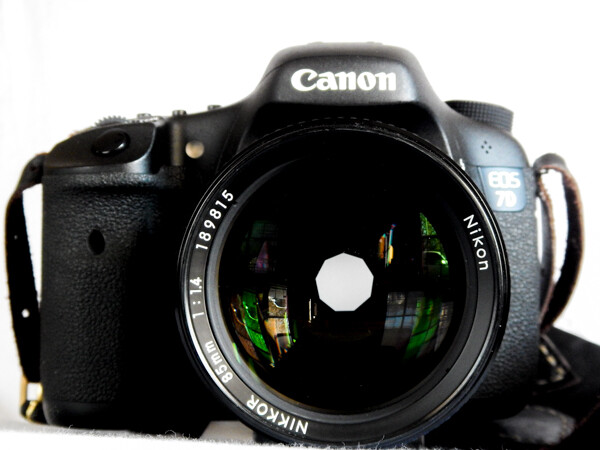
I have an old analog Nikon F3 that was given to me by my father along with a couple of lenses: a Nikkor 85mm f/1.4 and a Nikkor 50mm f/1.8.

50mm and 85mm

The entire kit remained mostly forgotten in a camera bag, and in storage for years. One day I stumbled across some information about how a few photographers were using old M42 Zeiss screw-mount lenses with their DSLR’s using adapter rings and producing outstanding photographs. That got me thinking – if it were possible to find adapters for these old M42 lenses, could there also be manufacturers who produced similar adapters for other lens types? Almost instantly the old Nikon leaped from some distant corner of my memory. My main shooting body is a Canon 7D MkI. Could I possibly use those thirty year old Nikkor film lenses on my 7D Canon? Shockingly, the answer was yes! All I needed were these unassuming aluminium adapter rings which I sourced on eBay for about $ 12 USD each.

One side of the ring matches the Nikkor mount.

Adapter Nikon Side

The other mates with the Canon body.

Adapter Canon Side

The entire process is very simple; the adapter simply snaps onto the lens.

Nikkor Without
Without the adapter.

Nikkor With
With the Canon adapter.

Then it’s business as usual attaching the adapted lens to the camera. Just line up the indicator dot with the mounting dot on your camera body.

Mount Point

You’re done.

Body Fit

The adapters are also removable if you choose to do so later by depressing a small spring catch (most brands have these).

As I said earlier, these are completely manual lenses. Meaning that you adjust your aperture by hand as well as focusing the lens.

50mm

Personally, I enjoy the deliberateness this action forces. You have to think about your composition so much more, and you get to experience the effects of aperture adjustment literally first hand.

Aperture Blades 85mm
The impressive aperture blades on this beautiful Nikkor 85mm.

Don’t worry if this manual operation doesn’t appeal to you. The exception concerning the adapter rings I spoke of is that some are now being made with focus indicator chips built into the adapter. While this chip doesn’t enable you to use autofocus, it does allow the lens to communicate to the camera when the selected point of focus has been obtained. This is complete personal preference. I opted for the non-autofocus indication adapters because I wasn’t comfortable using aftermarket electronics of that type with my camera. Again, this is a completely subjective.

Please Note: Neither the author nor Digital Photography School are responsible for any damages to your camera or lens as a result of using aftermarket devices. Please be an informed photographer prior to attempting any modifications to your precious gear!

Now, here are some images produced through a little Frankensteinish innovation.

Bee

Color Traffic

Bw Traffic

Grass

Leaves

Nothing Free

Rain on Glass

googletag.cmd.push(function() {
tablet_slots.push( googletag.defineSlot( “/1005424/_dPSv4_tab-all-article-bottom_(300×250)”, [300, 250], “pb-ad-78623” ).addService( googletag.pubads() ) ); } );

googletag.cmd.push(function() {
mobile_slots.push( googletag.defineSlot( “/1005424/_dPSv4_mob-all-article-bottom_(300×250)”, [300, 250], “pb-ad-78158” ).addService( googletag.pubads() ) ); } );

The post Old Glass: How to Use Old Film Lenses with New DSLR Cameras by Adam Welch appeared first on Digital Photography School.

Digital Photography School

 
Comments Off on Old Glass: How to Use Old Film Lenses with New DSLR Cameras

Posted in Photography