RSS
 

Posts Tagged ‘Dramatic’

4 Tips for More Dramatic Beach Photos

13 Feb

For some of us, the beach is a way of life. Whether it’s barefoot strolls at sunset, surfing in the big waves, or simply relaxing in the sun, the beach can be a magical place that is food for the soul.

Capturing it in a photograph though, can be a completely different story!

Suddenly you notice things that weren’t so apparent before you took your camera out: super bright harsh light, and photos that look boring and that don’t convey the feelings you experienced when you were at the beach.

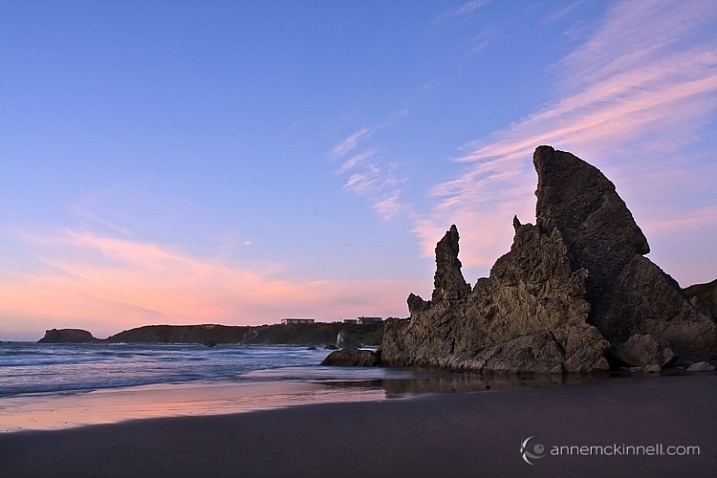
Bandon Beach, Oregon by Anne McKinnell

These tips will help you make the most of your time photographing at the beach, and ensure you come home with photos that are just as dramatic and memorable as your fun day in the sun.

1. Photograph during the Golden Hour

The middle of the afternoon, when the sun is high in the sky and the light is bright, is a great time for swimming and sunbathing, but not such a great time for photography. Just like other types of landscape photography, beach photography is all about the quality of the light.

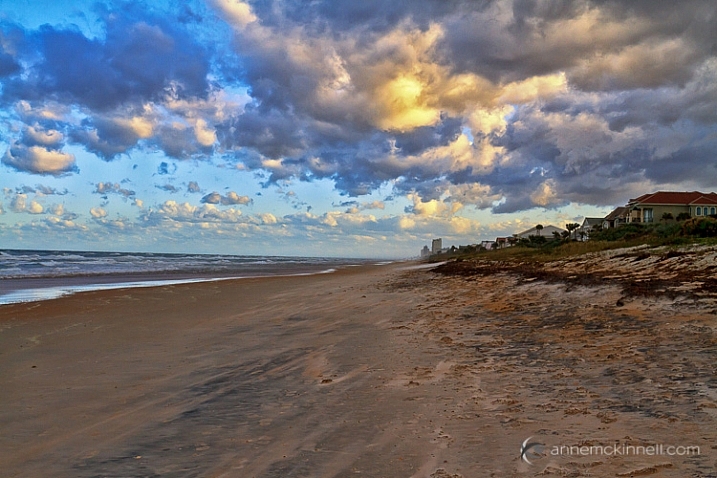
At the edges of day, when the sun is low in the sky, you’ll find more gentle golden light that will make your photos glow. Sometimes you can photograph during the day too, but only when there are big puffy clouds in the sky that diffuse the light and create drama. If you have a big bright blue sky, it’s better to enjoy the afternoon swimming and visiting with friends, and save the photography for later.

Ormond Beach, Florida by Anne McKinnell

2. Use a Graduated Neutral Density Filter

Even at the edges of the day, the sky is usually quite a bit brighter than the sand or rocks in the foreground of frame, which makes it difficult for your camera to get a good exposure, without blowing out the highlights and creating dark shadows.

Try to even out the exposure by using a graduated neutral density filter which is kind of like sunglasses for your camera. It’s a piece of plastic or glass that is dark on the top, and light on the bottom, and you use it to darken the just the sky portion of your image.

3. Use foreground elements to create an interesting composition

The beach always looks inviting when we’re just about to step onto the soft sand with our bare feet. But when you photograph it just as you see it, it can end up looking boring.

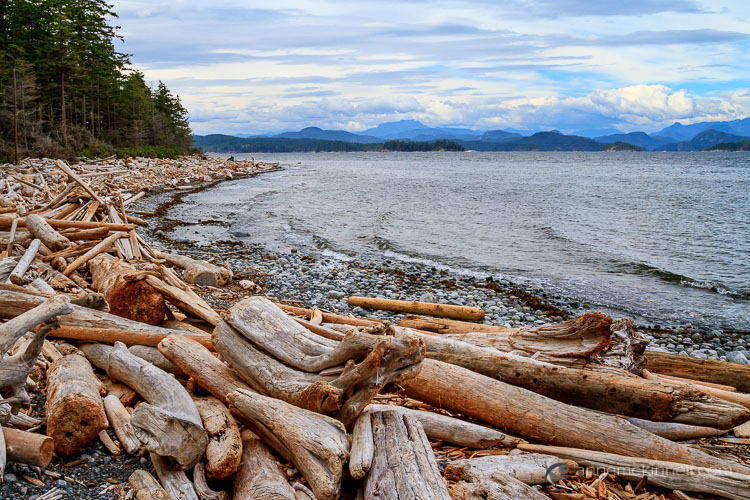
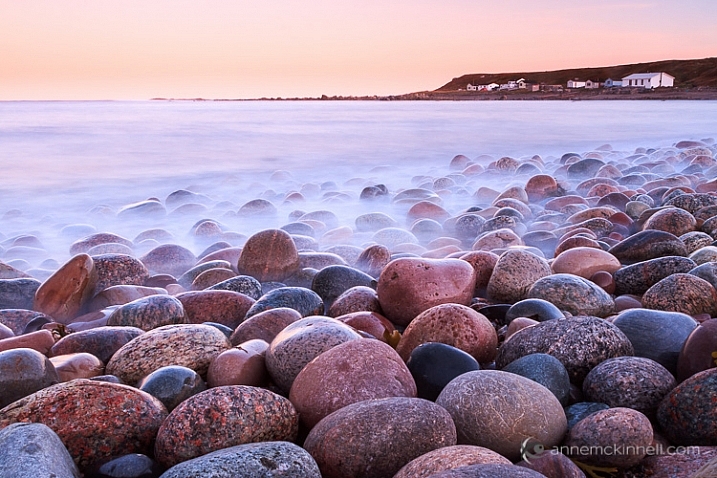
Try using a foreground element in your composition to add interest to the scene. Is there something unique about your particular beach? Perhaps it has colourful rocks, big boulders, driftwood, or seashells. Try incorporating the unique element into the foreground of your image, to make your photograph more interesting.

Rebecca Spit, British Columbia by Anne McKinnell

You can also use a low angle and get really close to your unique element to emphasize it. If you have big colourful rocks, getting down low, and angling your camera upwards, will make them seem even larger. Whereas if you photograph them from eye level they may not look nearly as dramatic as you remember them being.

Gros Morne National Park, Newfoundland by Anne McKinnell

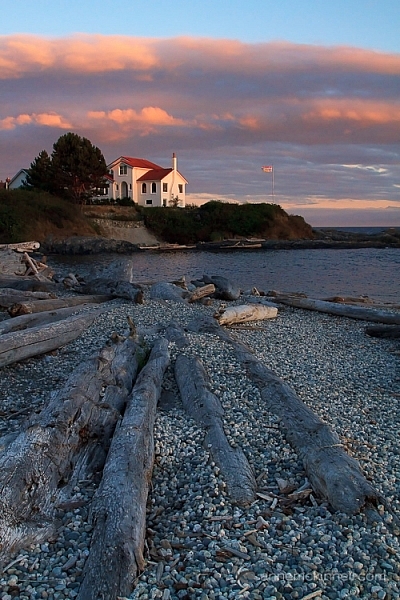
Look around and see what you can use for leading lines that will guide the eye out to the sunset, or towards an important feature in the frame, like sea stacks, or a house in the distance.

Ross Bay, British Columbia by Anne McKinnell

4. Sunbursts and silhouettes

Try some new techniques to create dramatic images. If you are looking towards the sun, you can create a sunburst by including the sun in your frame and using a small aperture like f/22. It also helps if you can partially hide the sun behind an object.

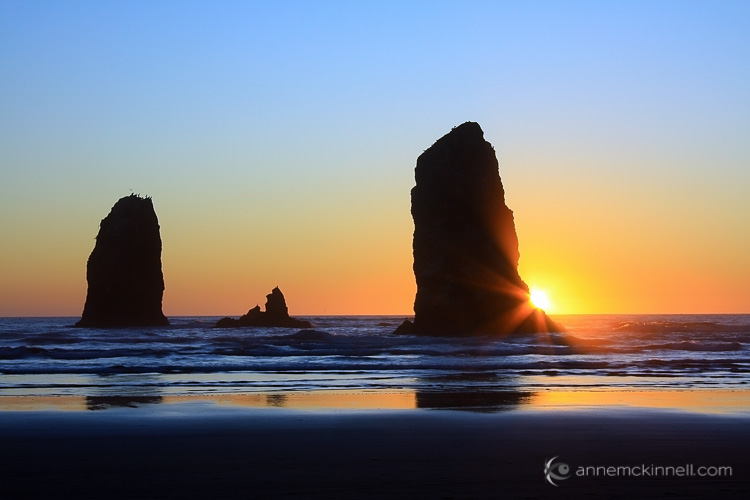
If you have an interesting foreground element with a strong shape, use it to create a silhouette. To do this, use spot metering and expose for the sky, allowing your foreground element to go completely black.

You can even do the silhouette and sunburst together for even more drama!

Canon Beach, Oregon by Anne McKinnell

Next time you go to the beach remember these tips to help you come home with photos that are just as much fun as you had playing in the surf.

Do you have any other beach photography tips, or some favorite beach photos? Please share in the comments below.

googletag.cmd.push(function() {
tablet_slots.push( googletag.defineSlot( “/1005424/_dPSv4_tab-all-article-bottom_(300×250)”, [300, 250], “pb-ad-78623” ).addService( googletag.pubads() ) ); } );

googletag.cmd.push(function() {
mobile_slots.push( googletag.defineSlot( “/1005424/_dPSv4_mob-all-article-bottom_(300×250)”, [300, 250], “pb-ad-78158” ).addService( googletag.pubads() ) ); } );

The post 4 Tips for More Dramatic Beach Photos by Anne McKinnell appeared first on Digital Photography School.


Digital Photography School

 
Comments Off on 4 Tips for More Dramatic Beach Photos

Posted in Photography


How to Use Shadow and Contrast to Create Dramatic Images

24 Dec

shadow and contrast

You can use shadow and contrast to create dramatic images. The key is to forget about shadow detail. You don’t need it. Shadows are meant to be dark and mysterious. This is good – it leaves something to the viewer’s imagination.

Utilize the dynamic range of your sensor. Expose for the highlights, and let the shadows fall where they will. If the light is strong enough, the shadows will contain very little detail.

Harsh light can make dramatic images

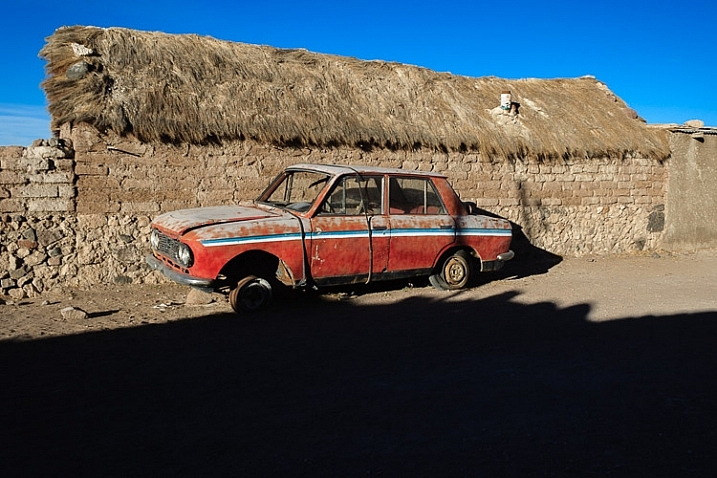
I took the following photo in Bolivia. The sun was sinking behind me, casting a strong shadow that had started to touch the underneath of the old car. The shadow fills the bottom third of the image. We don’t need detail in the shadow, although a little doesn’t hurt. Shoot in Raw format, and in most cases you’ll be able to pull some shadow detail out in post-processing, giving you a choice.

shadow and contrast

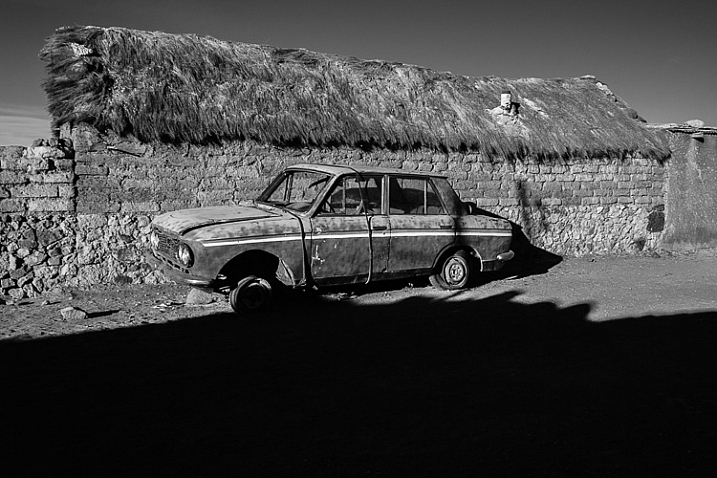
When I see a dramatic image like this, with strong shadows, my immediate instinct is to convert it to black and white. High contrast scenes look great in monochrome. There’s something about removing colour that emphasizes the depth of the shadows, and the drama of the composition. You can add impact by increasing contrast in Lightroom and emphasizing texture using the Clarity slider. Here’s my black and white conversion of the photo above.

shadow and contrast

Look for naturally contrasty scenes

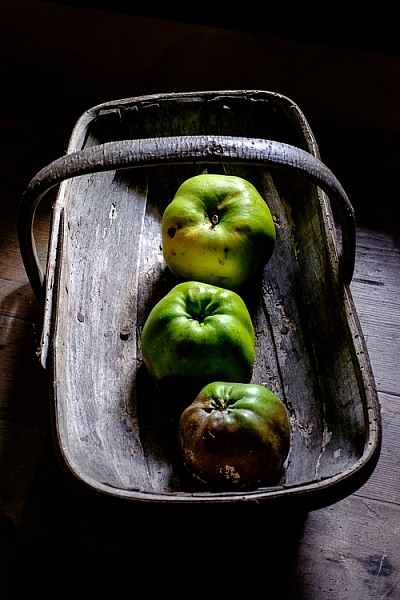
I took the next photo indoors, in an old manor house that had been converted to a museum. The apples were lit by light coming through a window. The windows were small, so the interior of the room was naturally dark, which is why there is so little detail in the background. It’s a high contrast scene – the area lit by window light ,is much brighter than the rest of the scene.

shadow and contrast

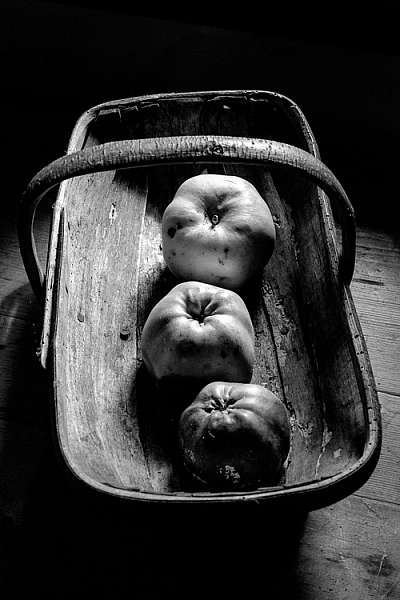
Here’s the same image converted to black and white. Without colour, the emphasis is on the textures and shadows.

shadow and contrast

Silhouettes

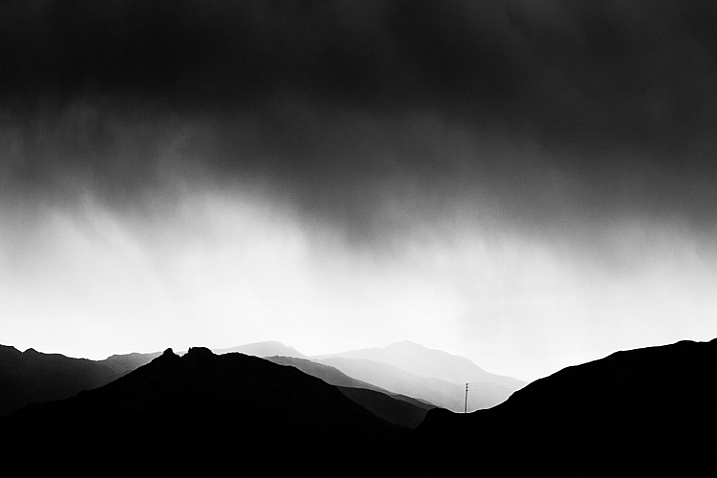
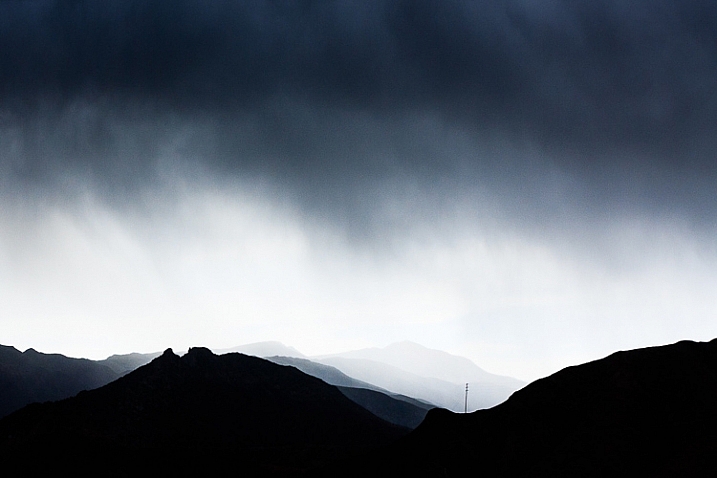
The following photo of an approaching storm uses also uses shadow and contrast. The mountains are backlit and silhouetted. The approaching storm clouds are dark and ominous. A brightly lit strip of sky fills the gap between the two dark areas. A silhouetted telegraph pole forms a natural focal point. The drama of the light has created a dramatic image.

shadow and contrast

The image is naturally monochromatic, and converts well to black and white.

shadow and contrast

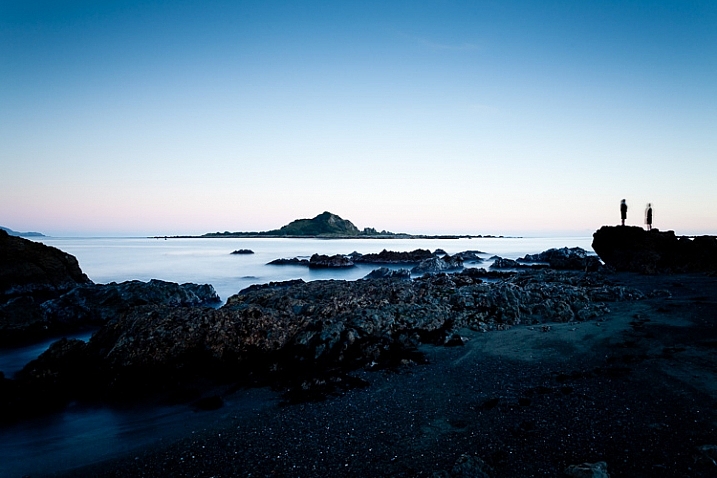
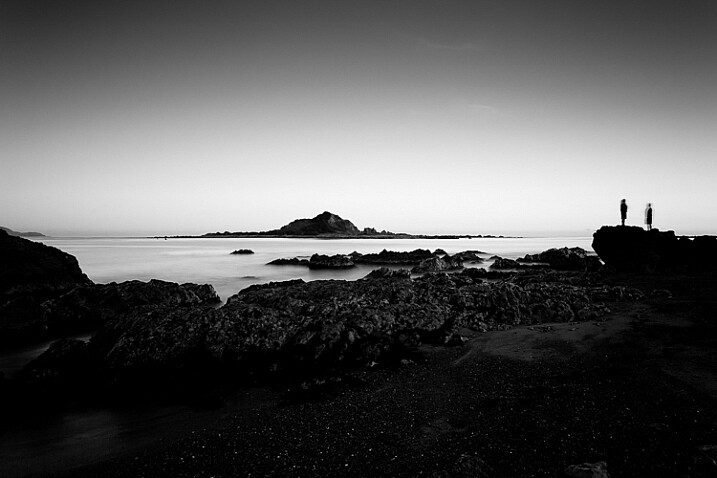
There are lots of shadows in this seascape. But the ones that caught my eye were the silhouetted figures on the right. After I had set up the shot, two children walked across the beach, and climbed up on the rock. I used a long shutter speed (30 seconds) to blur the water, which also blurred the silhouetted children. I was fortunate because the figures add human interest and scale to the scene. They are a natural focal point that pulls the eye across the photo.

shadow and contrast

shadow and contrast

It also converted well to black and white.

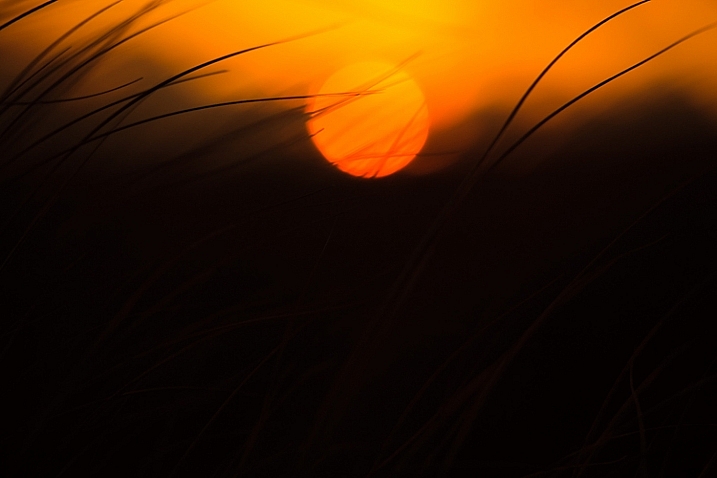
The final image is also one that uses shadow to create mystery and drama. I focused on the grass on the foreground, set a wide aperture, and let the sun go out of focus. I adjusted the white balance in Lightroom to emphasize the warmth of the setting sun. This image is different from the others in that the colour is an important part of the composition and it doesn’t work as well in black and white.

shadow and contrast

Conclusion

One of my aims with this article is to dispel the idea that it is essential to capture lots of shadow detail, and that if you fail to do so, it is some kind of technical shortcoming. Not so – let’s celebrate the fact that camera sensors don’t capture the full range of brightness that our eyes are capable of seeing. Let’s use the interplay of light and shadow to create interesting and dynamic compositions. Let’s create some mystery and leave gaps for the viewer’s imagination to fill in.

Do you use shadows in your images? Please share your images with lots of shadow and contrast in the comments below.


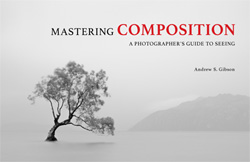
Mastering Composition ebookMastering Composition

My new ebook Mastering Composition will help you learn to see and compose photos better. It takes you on a journey beyond the rule of thirds, exploring the principles of composition you need to understand in order to make beautiful images.


googletag.cmd.push(function() {
tablet_slots.push( googletag.defineSlot( “/1005424/_dPSv4_tab-all-article-bottom_(300×250)”, [300, 250], “pb-ad-78623” ).addService( googletag.pubads() ) ); } );

googletag.cmd.push(function() {
mobile_slots.push( googletag.defineSlot( “/1005424/_dPSv4_mob-all-article-bottom_(300×250)”, [300, 250], “pb-ad-78158” ).addService( googletag.pubads() ) ); } );

The post How to Use Shadow and Contrast to Create Dramatic Images by Andrew S. Gibson appeared first on Digital Photography School.


Digital Photography School

 
Comments Off on How to Use Shadow and Contrast to Create Dramatic Images

Posted in Photography


6 Tips for Capturing Dramatic Skies in your Landscape Photography

17 Dec

Don’t let the land in landscape photography fool you–a great landscape photo relies just as much on the sky. Boring gray skies make for boring landscape photos. But capturing a dramatic sky in camera is trickier than it seems. With the sky lighter than the land, the camera will typically overexpose the sky, turning a brilliant blue into a vague and unexciting gray.

But, with a little fine tuning, it is possible to capture a sky that is the cherry-on-top of a great scene on land. Here are six tips for capturing more dramatic skies in your landscape photography.
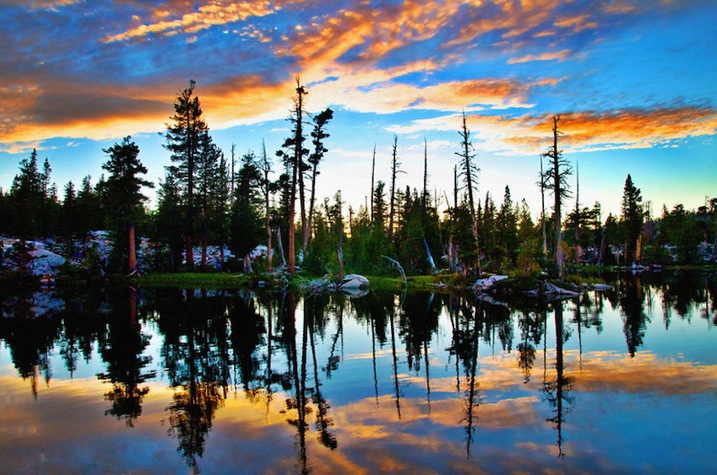
Desolation Wildernes Sunset Jkatzphoto

Photo Courtesy Justin Katz Photography.

1 – Time it right

Landscape photography may not require the split second timing that’s necessary for capturing a toddler’s smile, or a wide receiver’s catch, but timing is still a big part of the picture. The sky that’s gray one day, could be bright blue the next. When planning out a landscape photo, consider how the timing will impact the sky.

Watch for weather patterns that add could add interest to a shot, like a storm brewing just on the horizon. Weather plays a big role in the overall mood of the image–if you’re hoping to capture a dark and gloomy shot, head out when the sky is stormy. On the opposite end, if you’re hoping to capture a more relaxed or happy feeling, look for blue skies dotted with clouds.
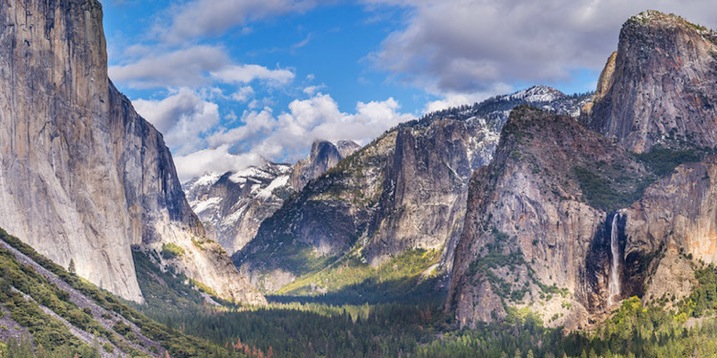
Yosemite Tunnel View Jkatzphoto

Photo Courtesy Justin Katz Photography.

The time of day matters too. While the middle of the day will produce the most shadows on the land, the sky tends to be the bluest then. Just after sunset and just before sunrise is often a good time to capture wispy clouds and a warmer tint of light. Of course, sunrise and sunset makes for a dramatic sky as well.

2 – Try the wrong white balance

Photography rules are sometimes meant to be broken–sometimes, using the wrong white balance setting creates a more dramatic sky. This is especially true when shooting towards the beginning or end of the day–using a different preset will adjust the color in the sky. Auto, cloudy and shade presets will get you an orange-ish sunset with a light blue sky, with a slight variation between the settings. A florescent setting, on the other hand, will typically turn an orange sunset purple, with a brilliant blue sky. Tungsten offers a similar effect, but with even deeper colors.
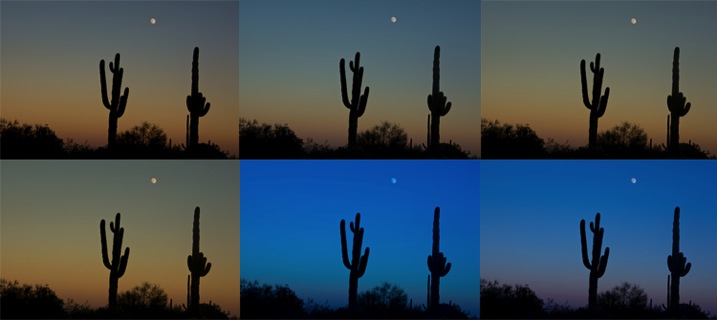
Whitebalancepresets

Using Kelvin temperatures to adjust your white balance results in an even greater control over the colors in the sky. Around 5500K will usually capture a sunny sky with an accurate white balance–that is, where things that are white are still white in the picture, or neutral tones. A higher temperature, for example 6500K, will give the land an orange glow but also enhance the colors in a sunset. A cooler temperature, on the other hand (say 3000), will play up the blues and purples. By using the Kelvin scale, you have more options for picking a white balance setting that best captures those colors.
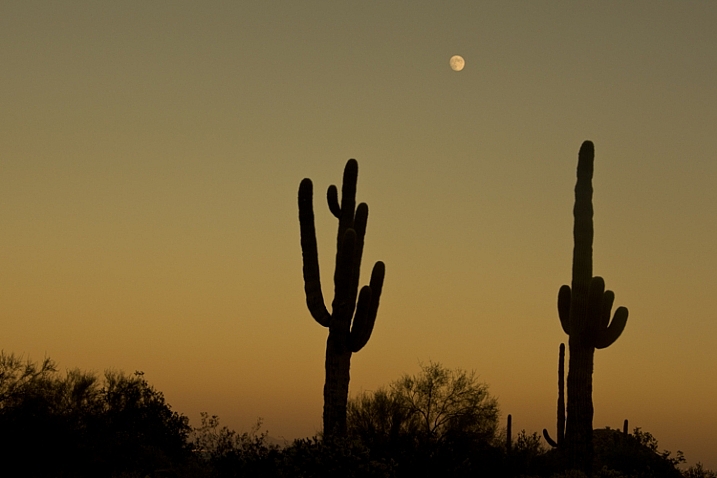
White Balance 16,000 K

Photo © Hillary Grigonis – White Balance edited to 160,000 K in post-processing to add orange

While it’s always best to get the shot right in camera, shooting in RAW allows you even more flexibility when it comes to adjusting the colors in the sky (and the rest of the image, for that matter). If you perhaps overdid it by making the shot too warm or too cool, you can easily adjust it to find the color temperature that fits the image the best. If you have a landscape photo that you already shot in RAW, open it and try different white balance presets, or the temperature slider, to see first hand how shooting with a different white balance would have impacted the shot.

3 – Compose for the sky

When the sky is more dramatic than the land, why not use that when determining your composition? Pay attention to where you place the horizon when you are composing your shot. Using the rule of thirds to imagine the image is dived into threes, place the horizon on one of those horizontal lines. If you are shooting a photo with an average looking sky, try placing the horizon on the upper third of the image, so more of the land is included in the photo. But if the sky is really dramatic, take advantage of that and include more of it in the frame by placing the horizon on the lower third.
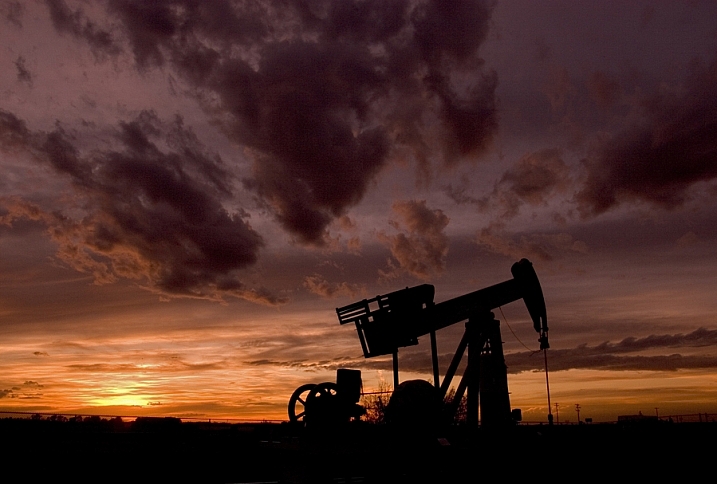
Darlene Hildebrandt

By Darlene Hildebrandt – The sky is dramatic so the image was composed to show less ground and more sky by placing the horizon toward the bottom.
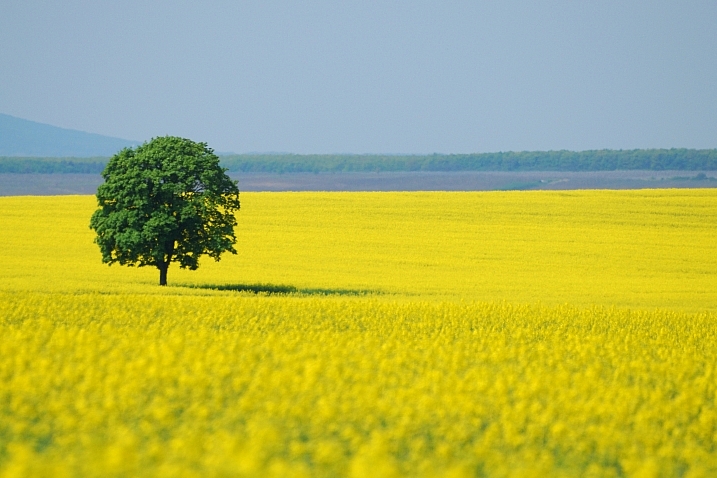
Ádám Tomkó

By Ádám Tomkó – as the sky is less dramatic, the horizon placed higher helps minimize the sky.


4 – Use a filter

There are two filters every landscape photographer should have in their camera bag in order to capture more dramatic skies. The first is a graduated neutral density filter. A regular neutral density filter is like putting sunglasses over your lens–it limits the light coming in for bright scenes or long exposures. But a graduated neutral density filter places that darkening effect only on a portion of the image. By placing the dark portion of the filter over the sky, you can properly expose the entire scene. Without the filter, the sky will either be overexposed and bland, or the land will be underexposed and dark. With the filter, you can achieve an exposure that works for both in one shot. The only downside is that graduated neutral density filters don’t work as well with an uneven horizon, like shooting a cityscape. Graduated neutral density filters come in both circular and square formats, but the square is often preferred because you can then place the horizon anywhere in the frame.

A graduated neutral density filter doesn’t work in every scenario–like a very uneven horizon, for example. A polarizing filter doesn’t have as much of an effect on the sky, but it can still be used with uneven horizons. Polarizing filters work by adjusting the reflected light rays coming through your camera lens. Since the sky is blue because of these reflecting rays, turning the front of the polarizing filter will adjust the intensity of the blues in the sky. Since it just affects reflected light rays, it can still be used when mountains or buildings make the horizon uneven. Polarizing filters are also great for enhancing reflections off water or other shiny surfaces too.
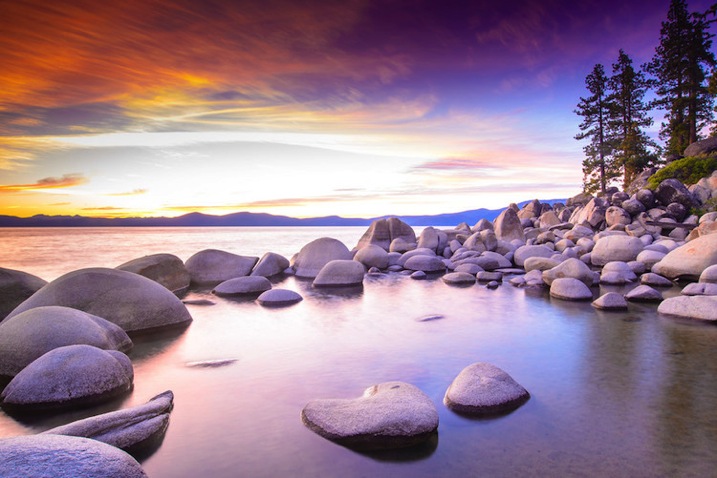
Lake Tahoe Sunset Nevada Jkatzphoto

Photo Courtesy Justin Katz Photography.

Experiment with motion blur and long exposures

Long exposures aren’t just for photographing waterfalls. If you use a long enough shutter speed, the clouds will blur too, creating a sky of wispy clouds and a slight feeling of motion. To capture motion blur in the clouds, you’ll need to use a long shutter speed. The best settings will depend a bit on the weather and how much motion blur you’d like, but you can try starting with a two minute exposure and adjust up or down from there.
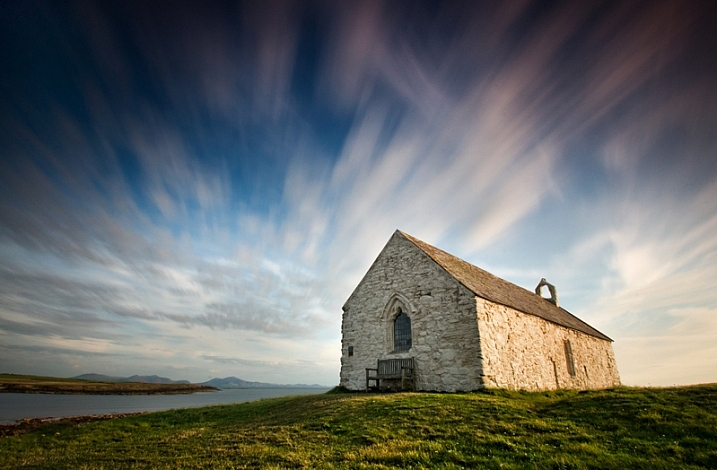
Kris Williams

By Kris Williams (Exposure info: ISO 200, f/22 for 75 seconds)

If you are shooting during the day, you may not be able to balance out a two minute exposure with a narrow enough aperture or low enough ISO, ending up with a photo that’s way too bright. So how do photographers capture motion blur in the clouds when the photo obviously wasn’t taken at dusk or dawn? A neutral density filter helps block out some of that light so you can use a long exposure during the day (that’s the same thing as the graduated neutral density filter from the last tip, only the entire filter is dark instead of just half).
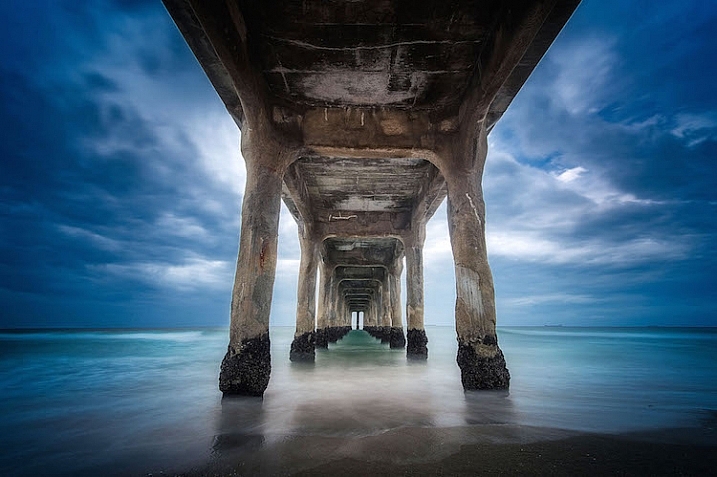
Image used with permission of Matt Kloskowski

Image used with permission of Matt Kloskowski (10 second exposure)


Use the Camera RAW graduated filter tool

While it’s always best to get the shot right in-camera, there are a few editing tools that can improve the sky in your landscape photos. One of those tools is the graduated filter inside Adobe Camera RAW (works the same in Photoshop and Lightroom). Using the tool, you can click over the sky on the image. Like an actual graduated filter, the effect will only cover that portion of the image and gradually fade away, making it possible to create natural looking edits.

The graduated filter tool can be used to adjust the exposure, creating an effect much like using the actual filter. But, the Camera RAW tool can also adjust brightness, contrast, saturation, clarity, sharpness and color. That opens up a lot of possibilities for applying edits just to the sky for more drama that sometimes can’t be done in-camera.
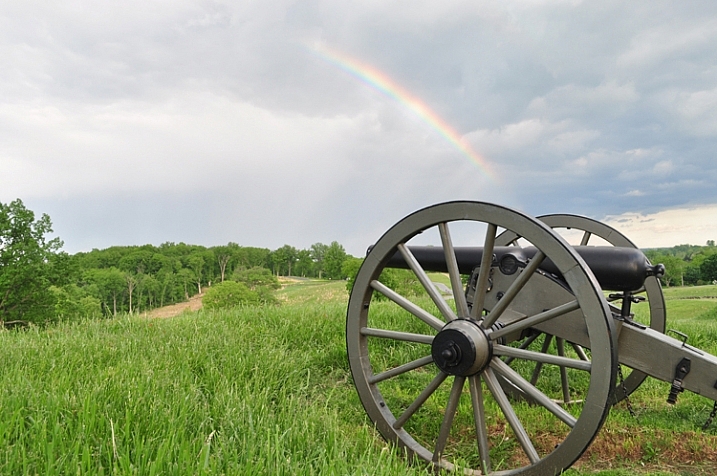
Original imag

Original image

Graduated filter added in post-processing stage

Graduated filter added in post-processing stage

The sky can make or break a landscape photo. From timing and composition to filters, when you consider the sky as you shoot, you’ll end up with more dramatic, frame-worthy shots.

Do you have any other tips for creating dramatic skies in landscape photography?

googletag.cmd.push(function() {
tablet_slots.push( googletag.defineSlot( “/1005424/_dPSv4_tab-all-article-bottom_(300×250)”, [300, 250], “pb-ad-78623” ).addService( googletag.pubads() ) ); } );

googletag.cmd.push(function() {
mobile_slots.push( googletag.defineSlot( “/1005424/_dPSv4_mob-all-article-bottom_(300×250)”, [300, 250], “pb-ad-78158” ).addService( googletag.pubads() ) ); } );

The post 6 Tips for Capturing Dramatic Skies in your Landscape Photography by Hillary Grigonis appeared first on Digital Photography School.


Digital Photography School
 
Comments Off on 6 Tips for Capturing Dramatic Skies in your Landscape Photography

Posted in Photography


Low-Key Lighting for Dramatic Portraits

19 Nov
Becky-in-witch-outfit

Young girl dressed up for Halloween. Low-key portrait using one speedlight, against a typical black background.

I dare say that nothing is quite like the effect of low-key lighting to show drama in an image. So what does low-key lighting mean in terms of photography? A good definition is found here.

Low-key lighting often uses only one key light, optionally controlled with a fill light or a simple reflector.

The term “low-key” is used in cinematography to refer to any scene with a high lighting ratio, especially if there is a predominance of shadowy areas. It tends to heighten the sense of alienation felt by the viewer, hence is commonly used in film noir and horror genres.

To simplify the term further, low-key lighting focuses on the shadows by using usually one light source. Therefore, shadows are now the primary element of the composition.

What you should know about low-key lighting

The nice thing about low-key lighting is that it’s quite experimental. There are no hard and fast rules that you need to adhere to. You can vary the position, and the distance, of the one light source more to the front or side of the subject, depending on how much contrast you want your model to have. Or ask the subject to turn more into light source or away from it. Here are a few more guidelines:

  • A black seamless background is the classic low-key look.
  • As this type of lighting is quite strong and contrasty, it’s probably suited for the very young, who in general have flawless skin and subjects (seniors 65+) where the emphasis is on the character of the person. For people who don’t have great skin, this type of lighting won’t be the most flattering.
  • You can move the light more to the front and use a reflector to control the light and act as a fill.
  • Creates drama and mystery to your portraits.
  • This type of lighting is probably not best to do wedding portraits!
  • Keep ISO low to 100/200 so that ambient light doesn’t reach the sensor. This will keep the quality of images high by reducing noise.
  • Set your flash to manual and start on a low setting of 1/8th power.
  • Use a small aperture setting of f/8 and upwards (f/11 and smaller).
  • Keep the shutter speed at 1/125 second or higher (not to exceed the native sync-speed of your camera).
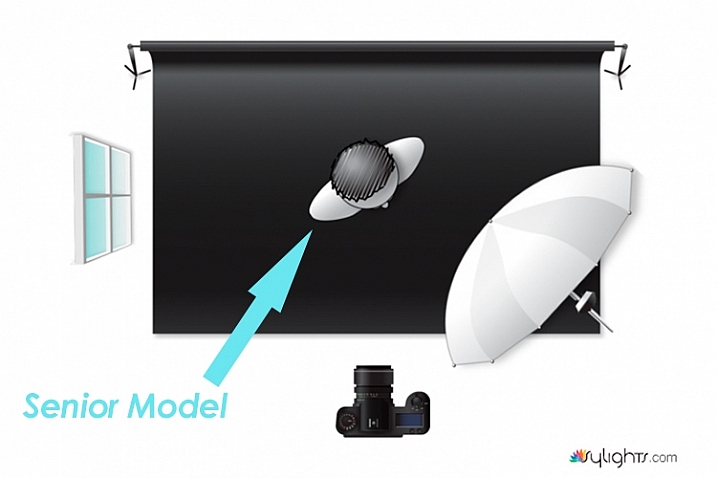
senior model low key lighting

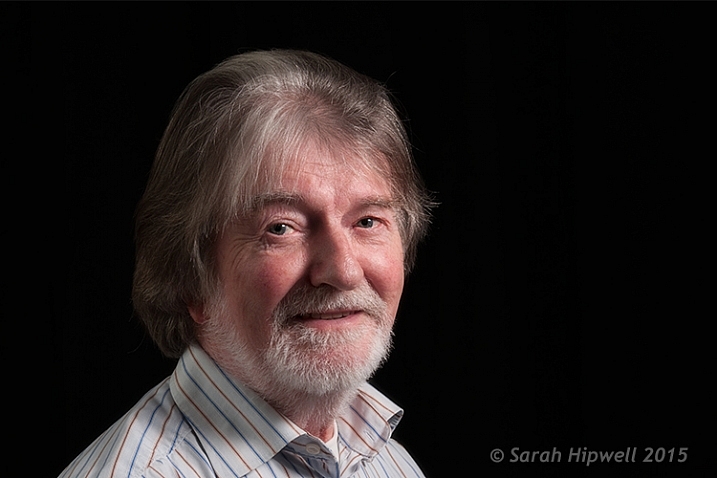
A senior model poses with his body turned more towards the light source to provide less extreme shadows while emphasizing the model’s facial character.

Senior-model

Lighting diagram to show the position of the model in relation to the light source.

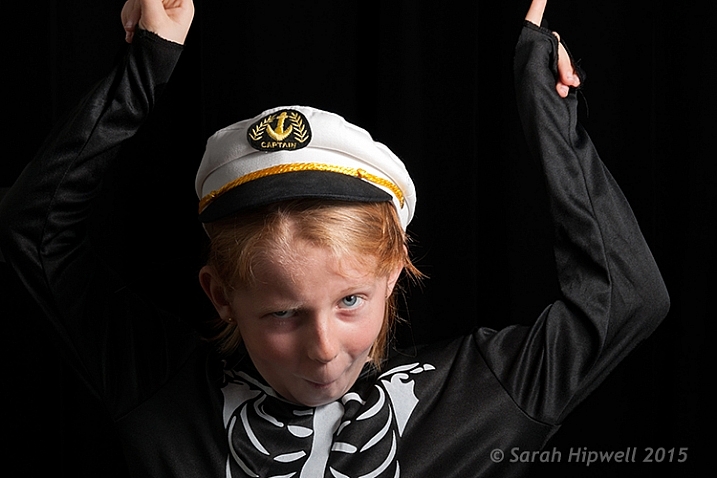
Young girl low key photography in Halloween costume

In this particular shot, I wanted more shadow on the model’s right side to give more drama to the shot.

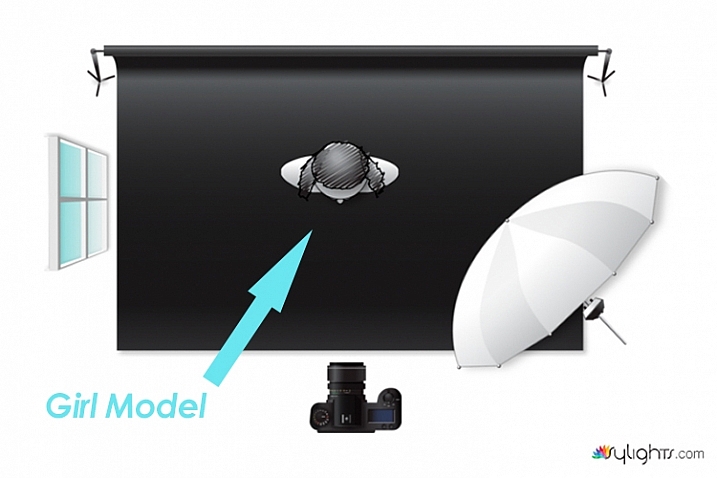
Lighting diagram low key photography

Keeping the light source in the same position, I got the model to look directly at the camera.

What’s involved in a low-key setup?

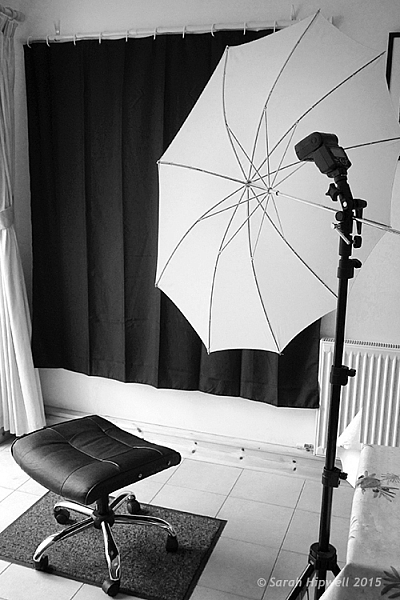
You may be surprised, but this type of setup doesn’t require a proper studio. You can do a low-key portrait in a relatively small area, or anywhere in fact. This setup requires the minimal of gear:

  • A camera and lens (whatever lens is your choice for portraits)
  • One speedlight
  • One lightstand
  • One light modifier (a shoot through umbrella is a great and inexpensive modifier that acts like a softbox)
  • A subject or model, or willing participant
  • Preferably a black background. See my DIY solution below.

Low-key low cost

I am a great believer in practicing what I preach. So I came up with a DIY solution for shooting a low-key setup, using a black shower curtain, in your own home. It is inexpensive, and doesn’t require a lot of time to implement.

First item was the black background

  • I sourced a black shower curtain for less than $ 10USD. Size L180, W180cm. It also comes with plastic rings. Don’t worry that the curtain doesn’t reach the floor. Remember, this is for portraits only. I already had a telescopic white shower rail.
  • 1 ½inch in diameter x 10ft. length of white PVC tubing will do equally well. It works out at $ 2.10 from Home Depot. I would cut this down to 8ft.
  • One pair of White Command Cord Clips that cost from $ 3 to $ 5. These clips have a self-adhesive backing and can stick to most surfaces. So they are easy to put up, and are also removable. They can hold up to 900g or 2 lbs.

So that is your background sorted. The shower curtain, when taken out of the packaging, has obvious pleats. Don’t worry about these. This is easily sorted in post-production.

As I really enjoyed using this DIY method. I have left the Cord Clips up on the wall in my kitchen. They are relatively discreet. I intend to use this setup again. It is so simple and a perfect solution if you can’t get to your studio, or if you don’t have one!

Black-shower-curtain-setup

A DIY low-key solution that you can set up at home.

Post-production to get rid of pleats or wrinkles

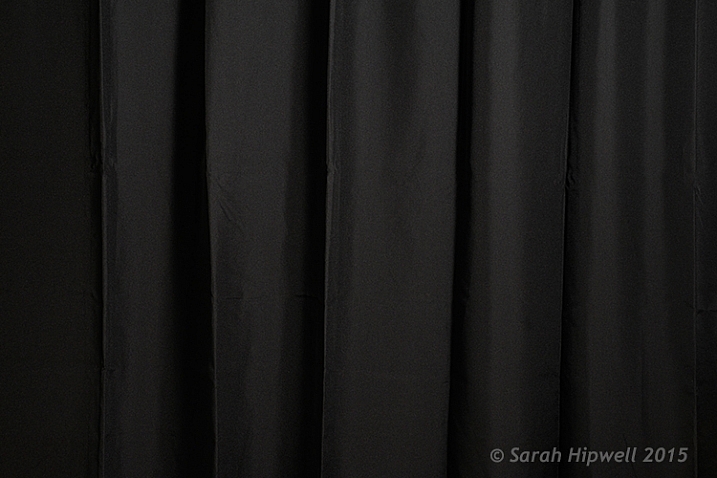
You don’t want any light to hit the black background, this is called contamination. Plus you want the black background to be texture, and wrinkle free. In some of my shots, the pleats were a little obvious in the background.

black-shower-curtain

Black shower curtain with pleats visible.

Getting rid of them was relatively easy. In Adobe Camera Raw (ACR), I adjusted the Shadows and Blacks sliders,
until I had a wrinkle free black background. However, as this is a global adjustment, you may need to an Add Adjustment Brush to areas on the subject to bring back some detail.

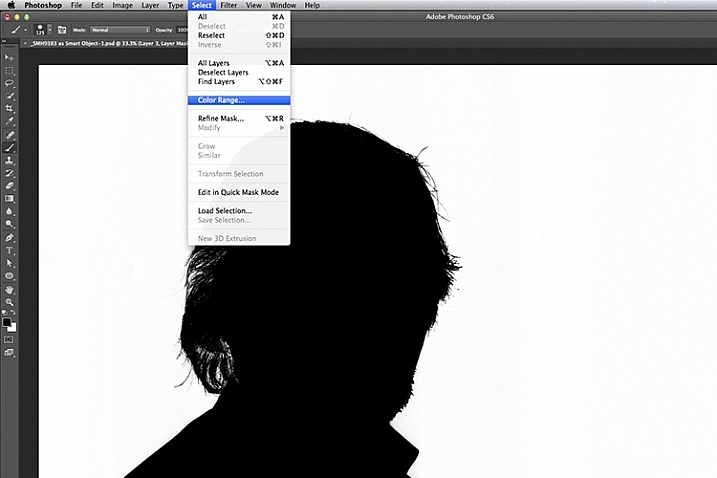
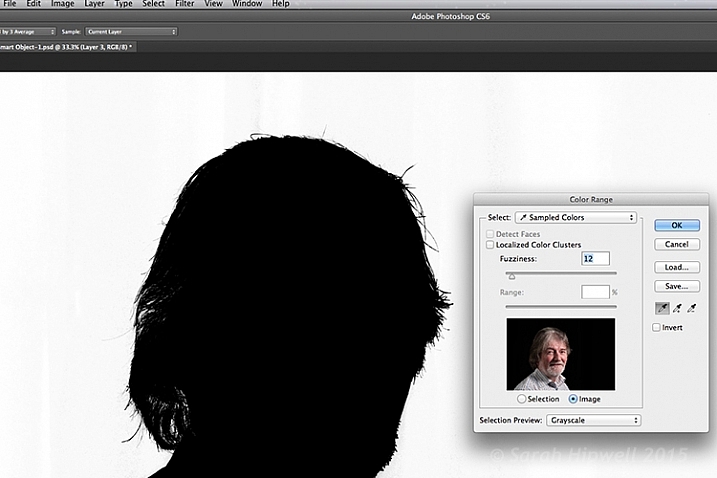
Another alternative in Photoshop, is to apply a mask to isolate the subject. For the image of the senior man, I used Select>Color Range rather than using the Quick Selection tool or the Refine Mask tool. The Color Range is a color-based selection tool which was ideal in this case, as my subject was much lighter than the background making selection relatively easy. A few clicks on the background and I had a near perfect mask, except where the two eyes were. I applied the mask and filled in areas that were needed in black with the brush tool.

color-range

Choosing the Color Range under Select in Photoshop to create a mask.

I then applied a Levels Adjustment layer, and moved the black slider ever so slightly to the right, until the background was completely black.

color-range-dialog-box

The Color Range dialog box.

Of course shooting lo-key isn’t restricted to indoors, nor do you need a black background. You can achieve similar effects outside. Check out this great video on the topic of creating an invisible black background to portraits using the same techniques.

Caution: You may possibly experience lots of fun shooting low-key! So let’s see your examples in the comments below.

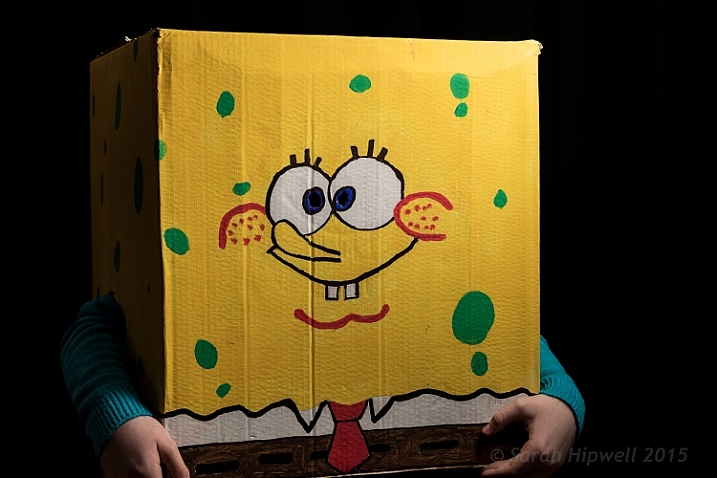
Sponge-Bob-costume

My daughter’s friend dressed for Halloween as Sponge Bob.

googletag.cmd.push(function() {
tablet_slots.push( googletag.defineSlot( “/1005424/_dPSv4_tab-all-article-bottom_(300×250)”, [300, 250], “pb-ad-78623” ).addService( googletag.pubads() ) ); } );

googletag.cmd.push(function() {
mobile_slots.push( googletag.defineSlot( “/1005424/_dPSv4_mob-all-article-bottom_(300×250)”, [300, 250], “pb-ad-78158” ).addService( googletag.pubads() ) ); } );

The post Low-Key Lighting for Dramatic Portraits by Sarah Hipwell appeared first on Digital Photography School.


Digital Photography School
 
Comments Off on Low-Key Lighting for Dramatic Portraits

Posted in Photography


24 Dynamic and Dramatic Backlit Images

12 Sep

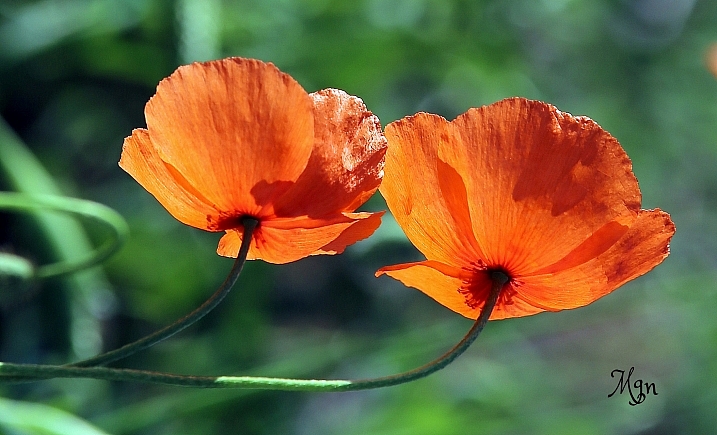
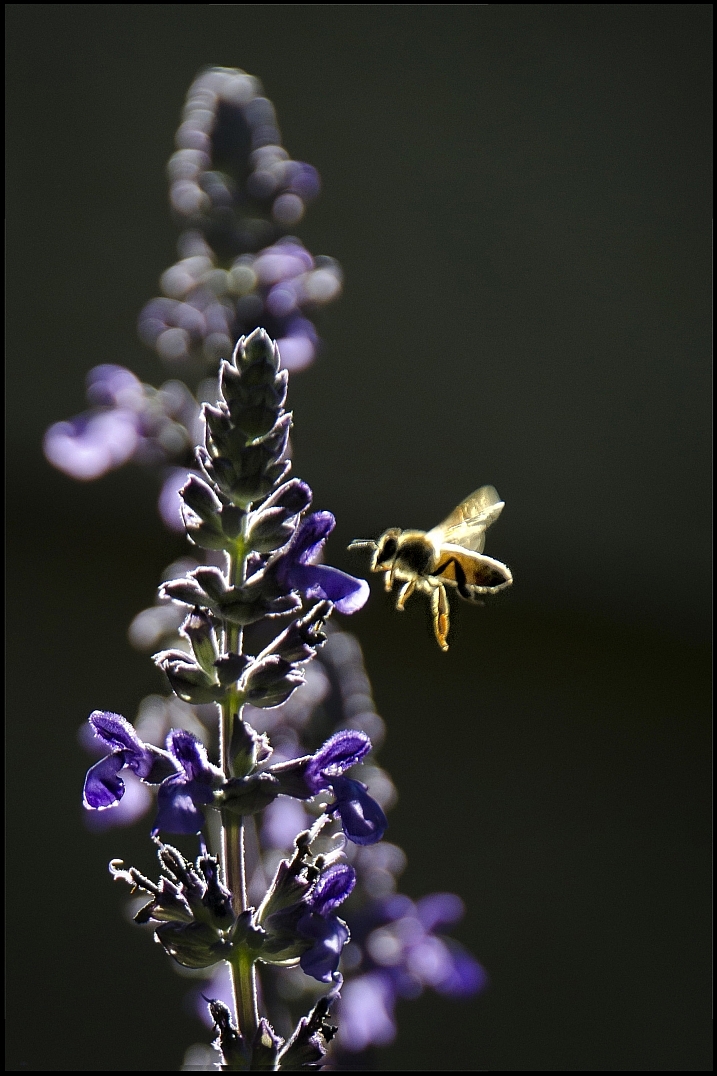
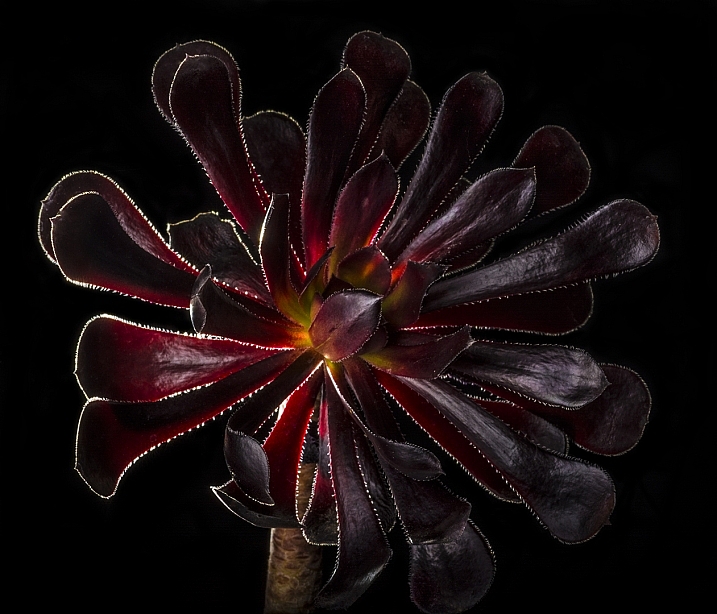
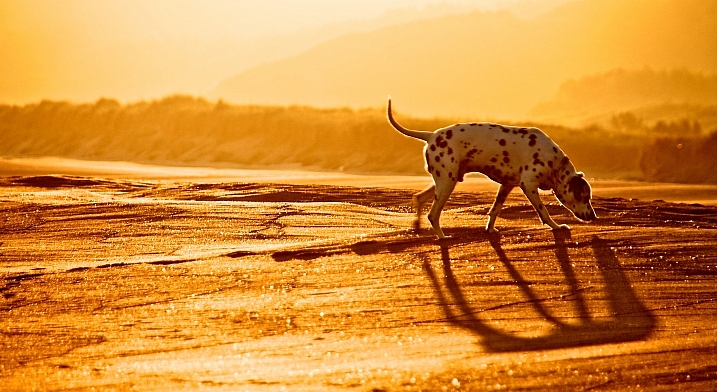
Light is key in photography and the direction of light an important factor in creating dramatic photos. When the subject is backlit, or the light is coming from behind it towards the camera, it can make for very dynamic and interesting images.

Like these:

Jason

By jason

Rylee Isitt

By Rylee Isitt

Randy Robertson

By Randy Robertson

Daniel Oines

By Daniel Oines

Matteo

By Matteo

Ignacio Abé

By Ignacio Abé

Kohei314

By Kohei314

Jørgen Schyberg

By Jørgen Schyberg

Brynn Tweeddale

By Brynn Tweeddale

Stavros Markopoulos

By Stavros Markopoulos

Dave Gough

By Dave Gough

Victor Camilo

By Victor Camilo

Markus Spiske

By markus spiske

Myles Tan

By Myles Tan

Keith Davenport

By Keith Davenport

M.G.N. - Marcel

By M.G.N. – Marcel

Steve Corey

By Steve Corey

Bill Gracey

By Bill Gracey

Oiluj Samall Zeid

By Oiluj Samall Zeid

Tambako The Jaguar

By Tambako The Jaguar

Natalie Barletta

By Natalie Barletta

Jorge Dalmau

By Jorge Dalmau

Jim Staley

By Jim Staley

Anne Worner

By Anne Worner

googletag.cmd.push(function() {
tablet_slots.push( googletag.defineSlot( “/1005424/_dPSv4_tab-all-article-bottom_(300×250)”, [300, 250], “pb-ad-78623” ).addService( googletag.pubads() ) ); } );

googletag.cmd.push(function() {
mobile_slots.push( googletag.defineSlot( “/1005424/_dPSv4_mob-all-article-bottom_(300×250)”, [300, 250], “pb-ad-78158” ).addService( googletag.pubads() ) ); } );

The post 24 Dynamic and Dramatic Backlit Images by Darlene Hildebrandt appeared first on Digital Photography School.


Digital Photography School
 
Comments Off on 24 Dynamic and Dramatic Backlit Images

Posted in Photography


Cliff Diving: Dramatic Concrete Home & Pool Cut into Precipice

07 Jul

[ By Steph in Architecture & Houses & Residential. ]

casa brutale main

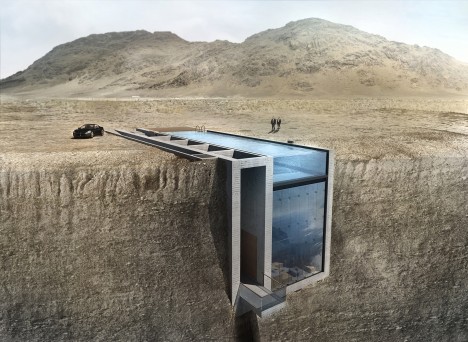
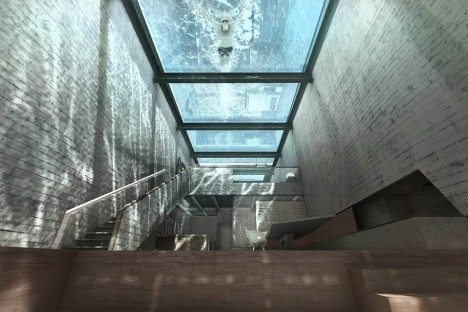
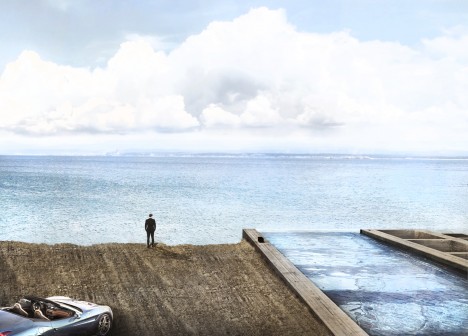
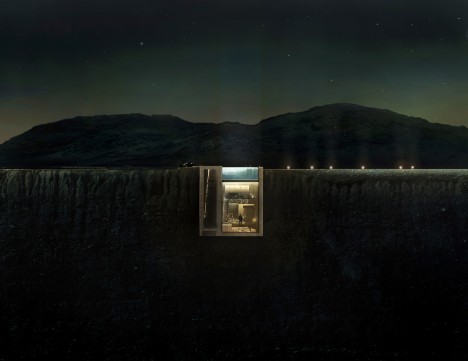
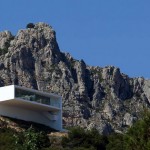
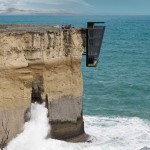
File this dramatic cliff-hanging, swimming-pool-topped home called Casa Brutale under ‘fit for a villain in every possible way.’ Practically begging to be used as a base for unsavory characters in a film, this concrete residence set into the craggy hills overlooking the Aegean Sea is surprisingly modest and spare, free of flashy luxuries.

cas brutale 6

casa brutale 2

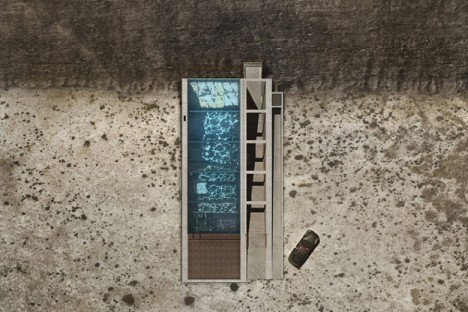
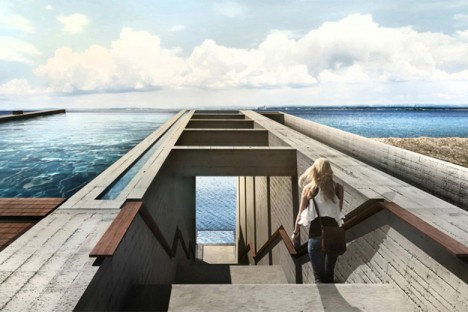
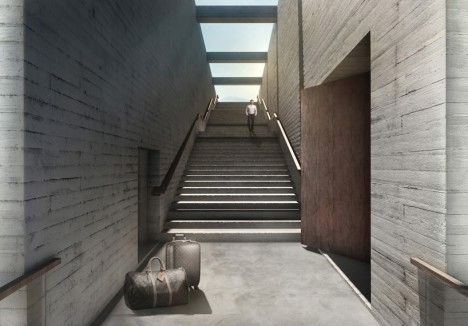
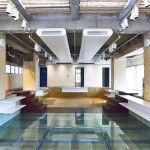
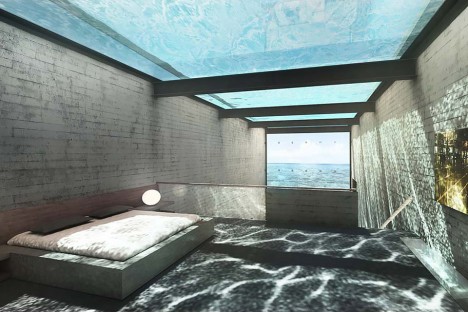
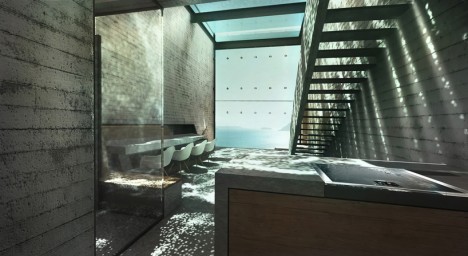
It doesn’t need to show off, really, when its very existence in this location packs such a powerful visual impact. You enter the home from a stairway on the ground level, descending into an interior that’s shielded from the sky only by the glass-bottomed swimming pool.

casa brutale 3

casa brutale 4

casa brutal 10

Anyone who swims in the pool is instantly turned into entertainment for the people watching from below, and the watery reflections cast over every surface are the main defining characteristic of the simple, open interior spaces. The entire cliff-facing facade is also made of glass further opens the home to the shimmer of water, this time from the sea.

casa brutale 9

casa brutale 7

OPA (Open Platform for Architecture) clearly heard the cries of ‘James Bond villain lair’ when their initial drawings were released, so they’ve worked a nod or two into the new renderings, including a requisite Ferrari.

casa brutale 5

“Case Brutale is a geometrical translation of the landscape,” say the architects. “It is an unclad statement on the simplicity and harmony of contemporary architecture. It is a chameleonic living space, created to serve its owner and respect the environment… in literal groundbreaking integration, Casa Brutal penetrates the landscape.”

Share on Facebook


[ By Steph in Architecture & Houses & Residential. ]

[ WebUrbanist | Archives | Galleries | Privacy | TOS ]


WebUrbanist

 
Comments Off on Cliff Diving: Dramatic Concrete Home & Pool Cut into Precipice

Posted in Creativity


5 Ways to Create Dramatic Landscape Photos at Midday

03 Jul

Outdoor photographers are repeatedly taught to plan their scenic photography excursions early in the morning or late in the day. These magic hours we’re told, is the only light worth shooting in. Yet, what about those situations when being on location at sunrise or sunset isn’t possible? You can pack up your bags and go home with an empty memory card, or make the most out of every opportunity. Allow me to let you in on a little secret not found in most photo magazines. Some of the best landscape opportunities can be found at midday when the sun is high over head.

Here are five tips to help you create dramatic landscape photos at midday:

1) Work with the sun

Rather than avoiding the sun, use it to add visual interest in your composition. This technique is not overly complicated but does take a bit of trial and error to master. Start by setting a very small aperture opening such as f/22. Then, while looking through the viewfinder, position yourself so an object partially blocks the sun. It should not be entirely obscured, so you may have to rock back and forth ever so slightly to find the optimal point. When you see the beams of light spilling through the obstruction, take the shot. The results can be quite dramatic and potentially aided by subtle hints of colorful flare.

2) Give your wide angle lens a rest

The contrast found midday makes it difficult to hold the detail in the sky while properly exposing a foreground. Rather than resorting to an HDR shot, use the occasion to simplify your composition. Does that bright sky really add to the overall scene? If not, give your wide angle lens a break and switch to a medium telephoto lens.

Before pressing the shutter, check all four corners of the frame for any unwanted bright areas. The human eye tends to focus on these areas first. As you eliminate these distractions, the design of the photo will become more evident. Just remember, if you are hand holding the camera with a telephoto lens, opt for a slightly faster shutter speed to prevent camera shake. At these greater magnifications, even the slightest imperfections become more noticeable.

3) Find more people

Sunny days can also be useful for creating salable prints and stock photos. Images of people enjoying the outdoors are popular with a wide variety of clients; from those looking for home decor, or pharmaceutical companies, clothing lines, the parks department, etc. In the afternoon, you’ll find infinitely more people than you would at sunrise or sunset. This is a good thing, as it opens the door to a whole new series of photographic possibility. By including a human element, the image will have greater reach as viewers can relate to it personally.

4) Slow the shutter speed down with black glass

Believe it or not, you can shoot long exposures even on a bright sunny day. The trick is add a round neutral density filter to your bag. Sometimes dubbed “black glass”, these dark screw-on options block a great deal of light from entering the lens.

For example, if the proper exposure gave you 1/125, f/22, ISO 100, the water motion (below) would be largely frozen. By adding a nine stop ND filter, you can keep the aperture and ISO the same, but drop the shutter speed all the way down to four seconds. This will create that dreamy effect previously limited to low light situations.

5) Go easy on the polarizer

If you have a short layover in a distant location, you can use the opportunity to capture some of the sites mid-afternoon. Perhaps the most important tool will be the circular polarizer. Some may disagree here, but it does not need to be a multi-coated, super high-end filter. A basic model from Hoya or Tiffen will be just as effective. With it, you can take a pale blue sky and make it pop. This is especially true when the sky is dappled with clouds.

Be warned however, the technique is so powerful it’s easy to go overboard. As a tip, I’d recommend that you find the maximum strength of the filter, and then cut the intensity slightly. This will provide you with more natural results.

Do you have any additional tips for shooting at midday? Please share in the comments below.

googletag.cmd.push(function() {
tablet_slots.push( googletag.defineSlot( “/1005424/_dPSv4_tab-all-article-bottom_(300×250)”, [300, 250], “pb-ad-78623” ).addService( googletag.pubads() ) ); } );

googletag.cmd.push(function() {
mobile_slots.push( googletag.defineSlot( “/1005424/_dPSv4_mob-all-article-bottom_(300×250)”, [300, 250], “pb-ad-78158” ).addService( googletag.pubads() ) ); } );

The post 5 Ways to Create Dramatic Landscape Photos at Midday by Chris Corradino appeared first on Digital Photography School.


Digital Photography School
 
Comments Off on 5 Ways to Create Dramatic Landscape Photos at Midday

Posted in Photography


How to Use Foreground for Dramatic Portraits

06 Feb

I remember a long time ago, I took a close up shot that I absolutely loved of a little kid on a slide for an article on a local park that had won a national award. I proudly brought it to my magazine editor, who said, “That’s great , but where’s the rest of the shot?” She couldn’t tell if Continue Reading

The post How to Use Foreground for Dramatic Portraits appeared first on Photodoto.


Photodoto

 
Comments Off on How to Use Foreground for Dramatic Portraits

Posted in Photography


How to Use Hard Lighting to Create a Dramatic Portrait

15 Dec

When was the last time you did not primarily light your scene using a large soft source, such as a soft box or umbrella? Large soft sources easily create a beautiful, wrap-around quality of light. Just pop one up and you have instant “good” light.

before-after-lightroom-adjustments-01.jpg

Final image: before and after in Lightroom

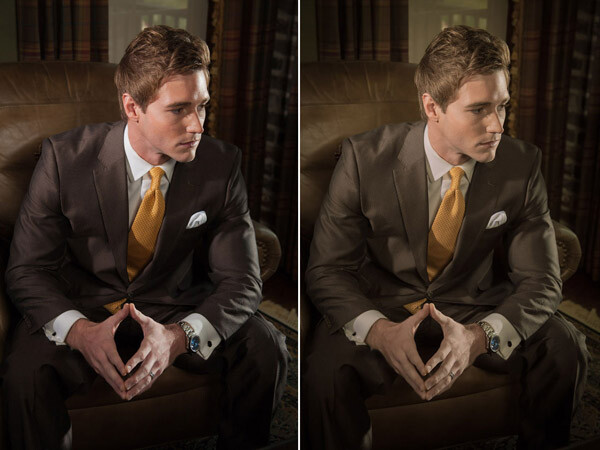
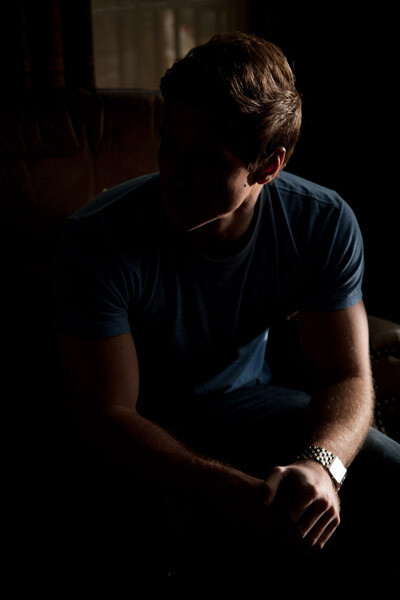
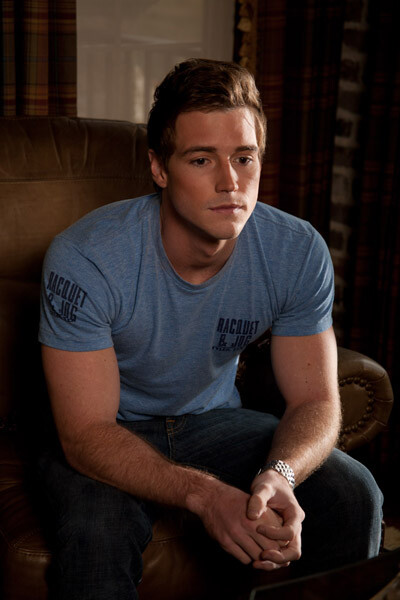
Though soft light is beautiful and has its place, it represents only one part of the artist’s palette. In this article we are going to dissect the lighting setup for a men’s fashion shoot, and look at how using hard light can add dramatic impact to your photographs.

I think two-time Academy Award-winning cinematographer Haskell Wexler said it best when it came to using hard light:

“Everybody should still work in hard light as well. Not to do it and to say that it has to be all soft light is like throwing away part of the artist’s palette. I think the more variety you can have, the better it will look. To be able to light well in hard light makes the soft lighting a piece of cake, because soft light is very forgiving. Soft light, uncontrolled, is still acceptable photographically. It is really hard for soft light to look bad, but it is really not hard for hard light to look bad.”

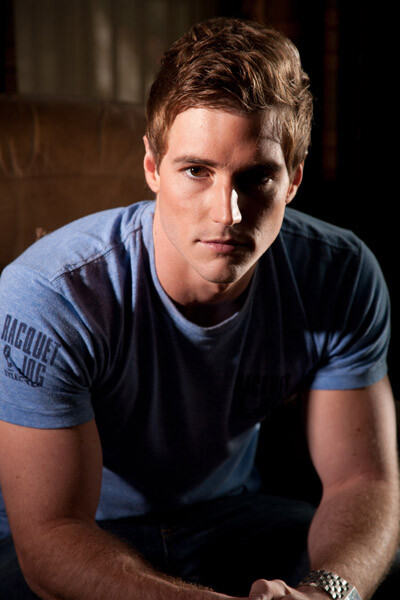
The feel the magazine wanted was a dramatic, high-contrast look. One of the problems with soft light is that it can be hard to control and can easily kill the contrast of your scene – especially in small spaces. The location for our shoot just so happened to be one of those small spaces, so I decided that reflectors and honeycomb grids were the best tools for the job.

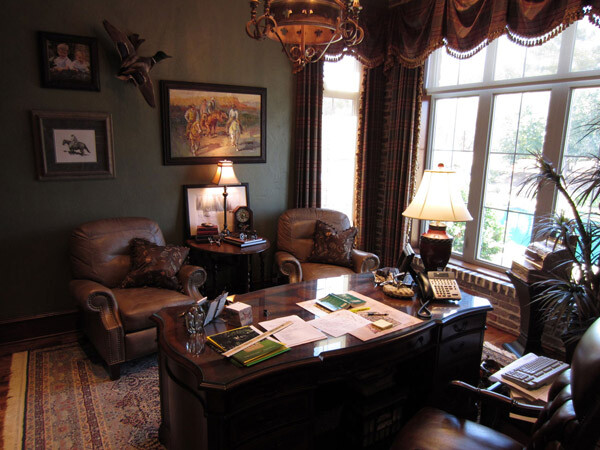
Location picture

The shoot was held at a local area builder’s office. The office provided the perfect backdrop for the shoot, but did not offer a lot of room for equipment.

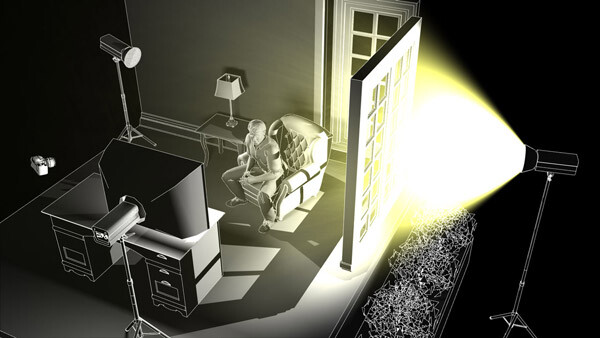
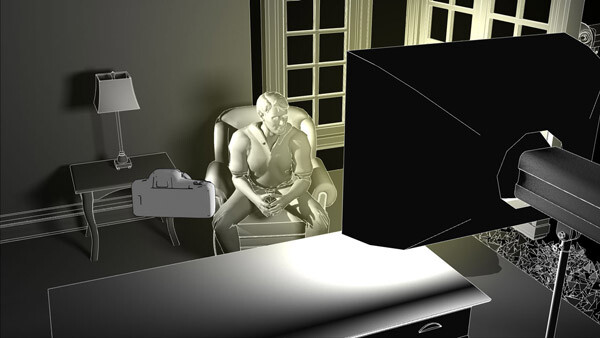
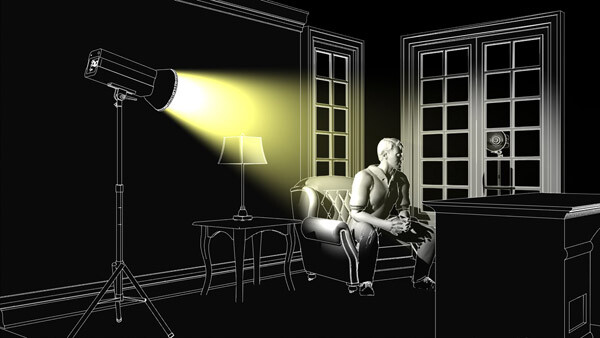
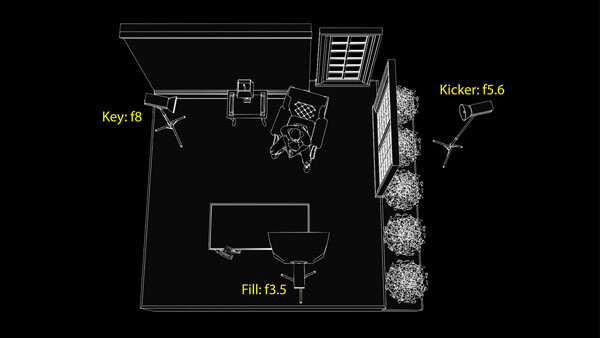
In the pre-planning phase, I chose to use a simple three light setup which included a key light, a fill light and kicker. I had room on camera left to place the main key light, but did not have much room for a kicker opposite camera right; however, there was a window.

As luck had it, the office window overlooked a back patio that had electrical outlets, so I did not have to rely on a battery pack or generator. The only problem was that the patio was a lower in elevation than the office window, so I had to extend my 13′ light stand up to its near maximum height.

To secure the stand, I fastened several 10 pound ankle weights to the legs. Ankle weights are a great and inexpensive alternative to sandbags. The set I use cost about $ 20 at Walmart, and came with Velcro straps for easy attachment to light stands or boom arms.

Since the strobe was outside the window and placed a distance from the model, I attached a radio slave and set it to full power. (The strobe was rated at 600ws)

Back in the office, I took a meter reading using a light meter with the dome retracted and pointed towards the light. The meter gave me a reading of f/5.6 at ISO 100. I decided the reading would be a good base to build my lighting ratios, so I set my camera to f/5.6 at ISO 100. As far as the shutter speed, I set my camera to 1/160th of a second because I did not want to capture a lot of ambient light. When using strobes, the shutter speed only controls the brightness of the ambient light.

This first light would act as the kicker light, in the scene.

Kicker light placement

Position of the kicker light

Kicker test shot

Test shot of the model with just the kicker light

When lighting with hard lights, you will often find the need to bring up the shadows, since they can easily go black. A large soft light source, placed close to the camera, is great for filling in shadow areas, because it resembles directionless ambient light.

The fill light in our scene was fitted with a medium soft box and placed behind and slightly to the right of the camera.

Fill light placement

Position of the fill light

Since most of the elements in the scene were dark brown, including the suit the model was going to wear, I could not set my fill light much lower than my base exposure of f/5.6. If I had set it lower the elements in the shadow areas would quickly go black. I set the fill light to 1 1/3 stop lower than my base exposure, which read f/3.5 on my light meter.

Kicker and fill test shot

Test shot of the model with both the fill and kicker lights.

The last light I set up was the key (main) light. I placed this light in an open doorway, towards camera left and slightly above the model. I wanted to keep the light on the model and off the walls, so I fitted the light with a 20 degree grid to control the spill.

Key light placement

Position of the key light.

Since most of the scene was dark brown, I decided to have the key light one stop over my camera’s base exposure of f/5.6. I adjusted the light until it read f/8 on my light meter.

Kicker and key test shot

Test shot of model with the key light and kicker, no fill. Notice how the shadows go completely black without the fill light.

You may have noticed that the key light on the left side of the model’s face does not appear as bright as the window kicker light on the right side of his face, despite it being one stop brighter (left: f/8 vs right: f/5.6) This is because the kicker is placed more behind the subject, while the key light is placed more towards the side. You might have heard the photography term “the angle of reflection equals the angle of incidence”? This is basically that principle in action. Since the kicker light is slightly behind the model, the angle at which the light is being reflected off the skin is causing the highlight to appear brighter.

Key fill kicker diagram

Positions and settings for key, fill and kicker lights. Notice the camera positioning at the bottom left of the desk.

Before after lightroom adjustments 01

Shot with all three lights set and in place. Before and after adjustments in Lightroom.

Once the lighting was in place, the model was dressed and the shoot began.

A nice benefit of the positioning of the key and kicker lights was that they pulled double-duty, switching roles whenever the model turned his head. A nice short lighting pattern was created, whichever direction he faced. You can see this in the variations above and below.

Before after lightroom adjustments 02

Shot with all three lights set and in place. Before and after adjustments in Lightroom.

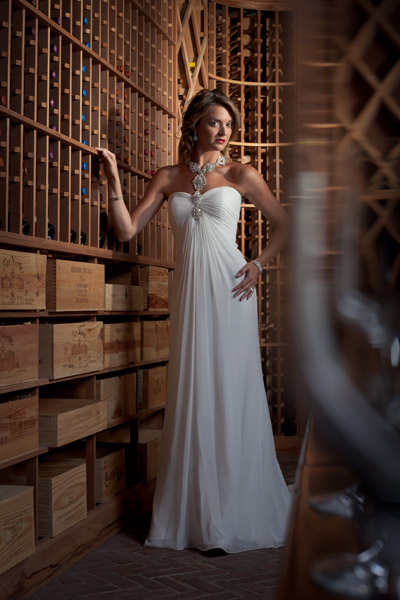
In closing, I would encourage you to think of creative ways to use and experiment with hard lighting in your photographs. Hard lighting is not just limited to men. The photo below was lit in the same fashion as the photo of the male model. A word of caution, though. Hard light is unforgiving when it comes to wrinkles and blemishes, so you will have to be very careful with your light positioning when your are lighting women.

Hollywood glam 7056 Edit

googletag.cmd.push(function() {
tablet_slots.push( googletag.defineSlot( “/1005424/_dPSv4_tab-all-article-bottom_(300×250)”, [300, 250], “pb-ad-78623” ).addService( googletag.pubads() ) ); } );

googletag.cmd.push(function() {
mobile_slots.push( googletag.defineSlot( “/1005424/_dPSv4_mob-all-article-bottom_(300×250)”, [300, 250], “pb-ad-78158” ).addService( googletag.pubads() ) ); } );

The post How to Use Hard Lighting to Create a Dramatic Portrait by Joel Dryer appeared first on Digital Photography School.


Digital Photography School
 
Comments Off on How to Use Hard Lighting to Create a Dramatic Portrait

Posted in Photography


How to Create Dramatic Portraits in Your Garage

08 Dec

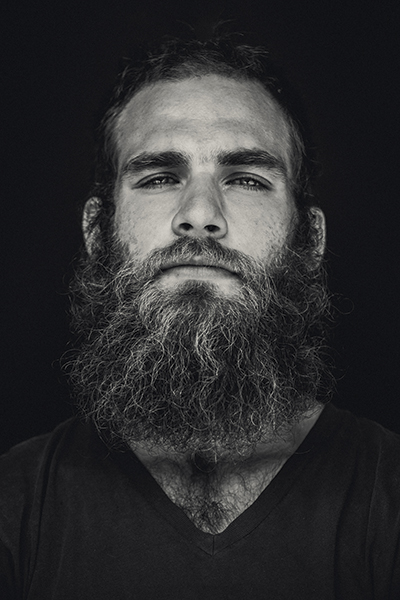
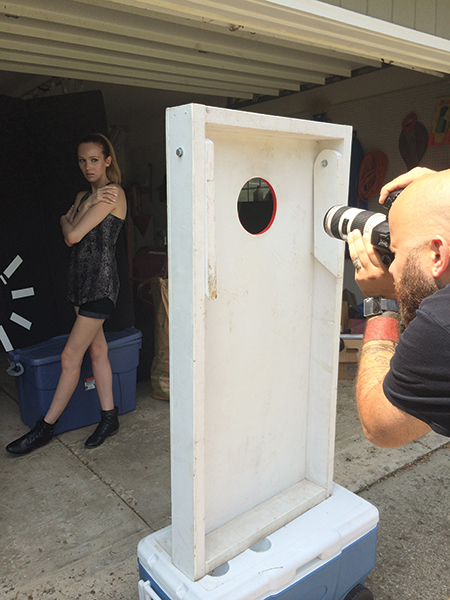
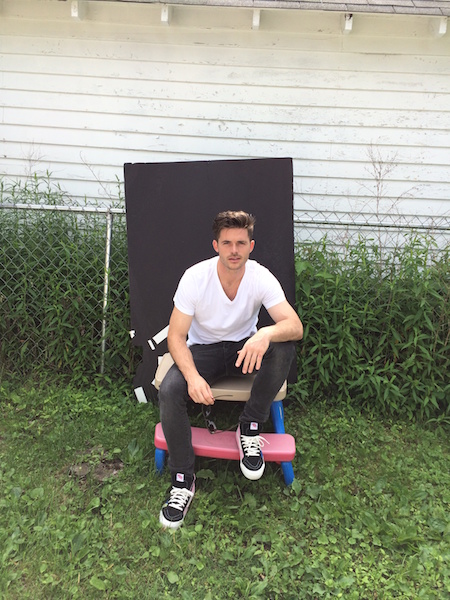
The setup

1

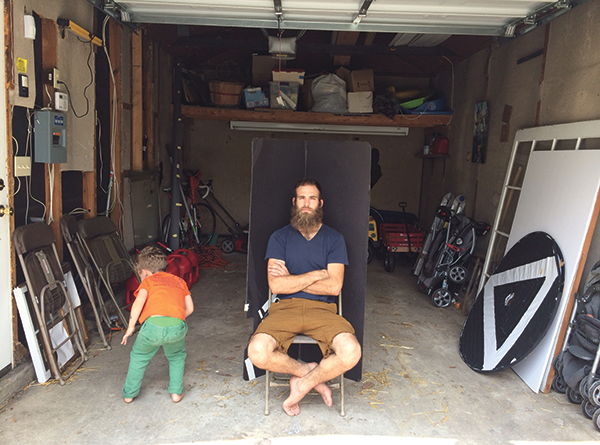
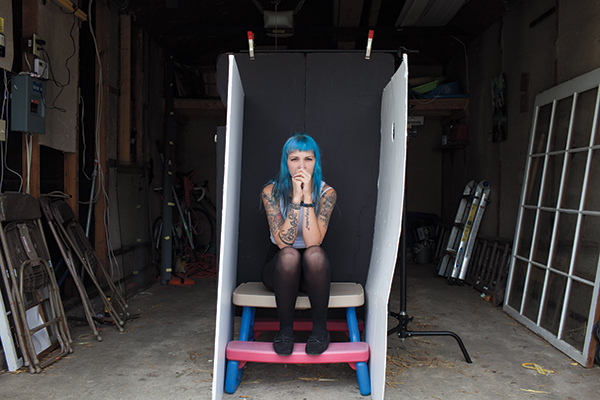
If I want to take dramatic portraits on a black backdrop (without even needing a single light), a garage is your new go to spot. This is the simplest (and most makeshift looking) setup that I use. As you can see in the image above, all I am using is a piece of black foam core, folded into a “v,” set inside a garage on a sunny day.

While you can accomplish this setup on overcast days, having a sunny day helps to increase the brightness of everything outside the garage, thus increasing the catch light in the model’s eyes. The sunny daylight scene outside the garage essentially acts as a giant reflector, which hold under the subject’s chin to soften shadows.

2 copy

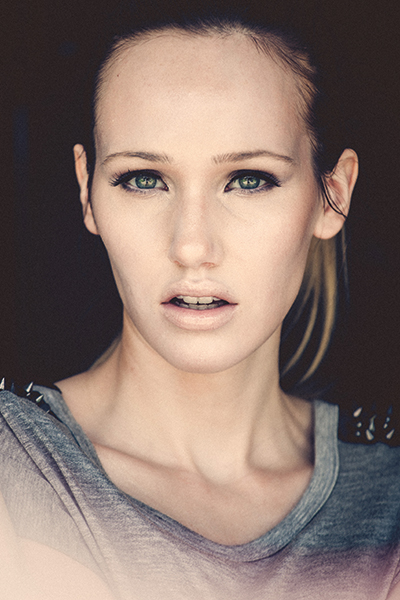
The reason why a garage is great for this kind of setup is that it allows you to place your subject closer or further away from the bright, outdoor light, depending on how much light you want in your subject’s eyes or how even you want the light to appear. For example, if the subject is right at the edge of the garage, just out of the sun, the exposure will be very bright, requiring a very fast shutter speed and/or a small aperture, but they will have large catchlights in their eyes. Note that the smaller aperture will cause the image to be sharper from the front to the back. Also, the closer the subject is to the bright outside, the darker the background will be once you’ve adjusted your exposure for their skin tone.

Alternately, if the subject is placed deeper into the garage, it allows you to use a wider aperture or slower shutter speed, which can create a flattering, softer, depth of field, though the catch light and overall light quality will change.

3 copy

Shooting in a garage is the equivalent to a one-light studio portrait since the only light source is the open garage door. This increases the appearance of the image being a studio portrait, as it mimics a large softbox or octabank (though an open garage door is larger and less expensive). If you want to have more light, such as hair light and rim light to create separation between a subject and the background, there is another option available to you. Simply place your subject on the shaded side of the garage, allowing the sun to light just the edges of your subjects hair and shoulders, as seen below.

3

The one downside to having a huge wall of soft light in front of your subject is that it can flatten out the subject, which can make the lighting appear flat or boring. One remedy for this is flagging off portions of the light, as seen in the image below. Note that any object you place in front of the model to flag the light will also change the shape of the catch lights in their eyes.

4 copy

For portraits like this, you will want to use a focal length of at least 50mm or longer. Anything wider angle will lead to distortion of the subject’s features. Since you are shooting outdoors, you have unlimited space to back away from the subject. So I like to use my 70-200mm lens for these type of head shots.

5 copy

The other perks that come with shooting outside or in a garage is that you have a free hair fan and plenty of ventilation, which comes in handy when you’re shooting smoke.

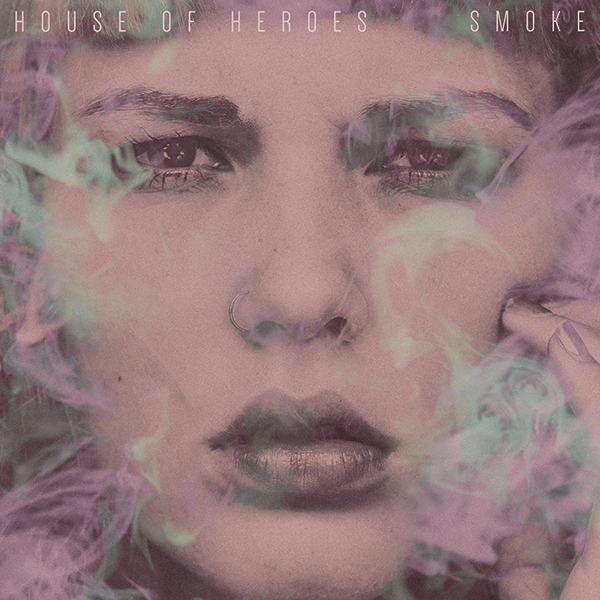
My buddy Colin is a drummer in the band House of Heroes. He approached me to shoot the cover of their latest EP, Smoke. He wanted a dramatic, close-up of a girl’s face with smoke all around. I knew that my garage would be the perfect spot to conduct the shoot (open air with bright light). I placed white boards on either side of Courtney, which helped to not only fill in any shadows under her jaw but also add catch lights to her eyes. In addition to the images of Courtney, I also shot several frames of smoke, being exhaled by Colin (try doing that inside a studio), isolated on the black backdrop, which was later overlaid on the final image of the model in post-production.

6 copy

Have you tried doing portraits in your garage or other makeshift location? Have any additional tips? Please share in the comments.

googletag.cmd.push(function() {
mobile_slots.push( googletag.defineSlot( “/1005424/_dPSv4_mob-all-article-bottom_(300×250)”, [300, 250], “pb-ad-78158” ).addService( googletag.pubads() ) );
} );

The post How to Create Dramatic Portraits in Your Garage by Nick Fancher appeared first on Digital Photography School.


Digital Photography School
 
Comments Off on How to Create Dramatic Portraits in Your Garage
Posted in Photography