RSS
 

Posts Tagged ‘Digital’

creativeLIVE’s John Greengo gives 5-day course on digital photography

25 Jan

Greengo_WEB_640x360.jpg

creativeLIVE is hosting a five-day course on the fundamentals of digital photography presented by John Greengo. The course is free to watch live, and runs through tomorrow, Jan 24th. Some of you may remember John as one of the expert photographers that contributed to our Cyber Monday ‘DPReview Live’ broadcast. Click through for a link to the course at creativeLIVE.

News: Digital Photography Review (dpreview.com)

 
Comments Off on creativeLIVE’s John Greengo gives 5-day course on digital photography

Posted in Uncategorized


Holding Your Digital Camera Properly Like It’s Your Baby

10 Jan

When you own a digital camera, you’ve got to treat it right, almost as if it were your very own baby. Wait…just a second there! It IS your very own baby, so you had better hold it gently and carefully. If that’s not convincing enough for you, then maybe a practical reason will affect you better: To avoid buying a Continue Reading

The post Holding Your Digital Camera Properly Like It’s Your Baby appeared first on Photodoto.


Photodoto

 
Comments Off on Holding Your Digital Camera Properly Like It’s Your Baby

Posted in Photography


CES 2014: What we experienced at Pepcom Digital Experience

08 Jan

allisonlion.jpg

CES 2014: Every year at the Consumer Electronics Show in Las Vegas, Pepcom holds a ‘Digital Experience’ showcase event before the main show opens, to showcase the best of the technology that is being exhibited. It’s also a good opportunity for informal meetings, networking and general gawking at cool new things before the noise and fury of the main event in Las Vegas Convention Center. And did we mention it’s also really strange? This year’s theme was the Wizard of Oz. Our intrepid editorial team were there. 

News: Digital Photography Review (dpreview.com)

 
Comments Off on CES 2014: What we experienced at Pepcom Digital Experience

Posted in Uncategorized


Review Canon Powershot S120 Digital Camera
16 Dec

Review Canon Powershot S120 Digital Camera

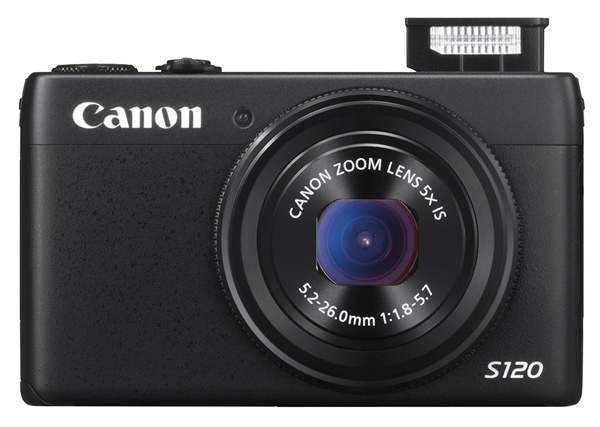
Canon S120 review Blk front 2

You could wonder at my bravado in reviewing this tiddler when all it seems to offer is a digicam with moderate specs and little else. Aah! But look further!

Features and Specs

Its story begins with Canon’s well-tried DIGIC 6 processor, along with a relatively large CMOS sensor. The maximum aperture is a generous, optically stabilized f/1.8, which does, quickly fall to f4 once you start zooming. However, it is the first S-series model to feature an f/1.8 lens and the 24mm wide end is extremely useful for tight interiors.

But the S120′s specs are well worth comparing to the highly regarded SX50 HS, which I reviewed a year ago, equipped with a powerful 50x optical zoom.
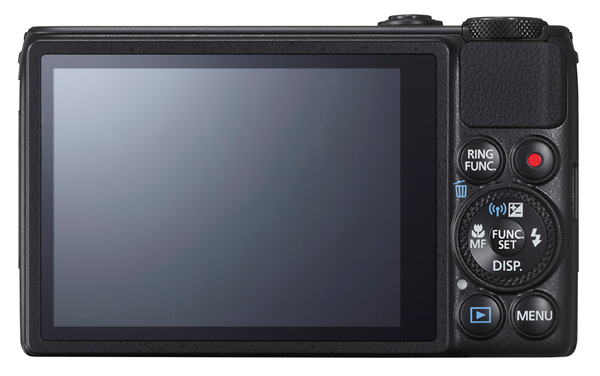
Canon S120 review Black Back

This one is a much less powerful beast optically, with a moderate 5x optical zoom, but it also has a larger CMOS sensor and a continuous shooting speed of up to 12fps. It’s also considerably smaller, more easily pocketable and easier to use.

Much like almost every camera offered in 2013, the S120 has inbuilt WiFi connectivity, so it can hook up directly to smart devices and social networks. Settings can be adjusted in a number of ways: through the dedicated control buttons, via the 7.5 cm touch screen or with the lens control ring. The camera also supports GPS tagging via a mobile, allowing location data to be added to shots using Canon’s dedicated app for smart phones/tablets.

Maximum image size is 4000×3000 pixels, leading to a final print size of 34x25cm print (13.4×9.8″) at 300 dpi.

Video can be shot in 1920×1080 Full HD quality MPEG4. If you shoot stills during a video record the latter stops.

A look around – physical features and controls

The camera is, as I have said, very pocketable and viewable, thanks to the 7.5cm LCD screen which does not, unfortunately, tilt. Oh well!

Top deck, at left is the tiny pop up flash; to the right is the power button and the shutter button that encircles the zoom lever; at the extreme right is the mode dial with positions for auto and hybrid auto shooting, P,A,S,M, custom settings, movie, camera effects (high dynamic range, fish eye, background defocus, mono etc) and scene effects (portraits, snow, starry skies, fireworks, time lapse etc).

You can adjust shutter speed or aperture — and manual — value by rolling the control dial to that setting (Tv, Av or M), then twirl a ring at the base of the lens. Simple! Just like a real camera!

There are plenty of people out there who will enjoy the easy access to the camera and scene effects offered by the camera and I wouldn’t mind betting there are plenty of newbie DSLR owners who still have no idea how to set the camera to handle these off-beat beat subjects.

The only flaw I found in the top deck layout was the difficulty of tapping the recessed power button. For the life of me, I can’t suggest an alternative arrangement!
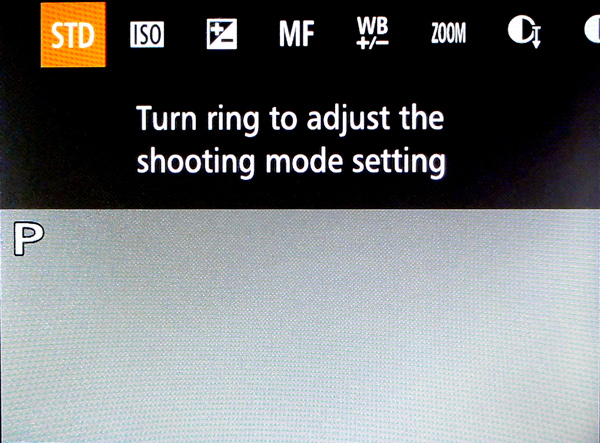
Canon s120 review Ring Function

Rear: at top right is the familiar red video record button and, to its left, is a button titled Ring Function which gives direct access to such things as ISO, exposure compensation, manual focus, white balance correction, dynamic range and shadow correction. The latter takes the S120 into a totally different area, with access to high control of your picture making. Worth some study. Lower, we find the control dial with settings for exposure correction, macro shooting, flash and display options.
Canon S120 reiew Menu

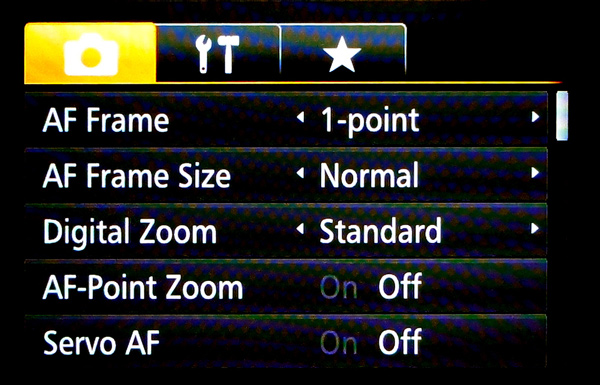
Beneath the dial are found the replay and menu buttons, with the latter offering a fairly extensive extensive list of options. Noteworthy also is the on screen level indicator, and that’s about it.

Sample images from the Canon S120

Canon s120 review Centre screen 1

Canon S120 review Decorations 2

Canon S120 review Flowers 2

Canon S120 review Parking 2

Startup time

It took two seconds from power on the first shot, then about a second between shots.

Distortion

There was a small amount of barrel distortion at the wide end of the zoom but no problems at the telephoto end.

ISO Tests

Canon PowerShot S120 ISO 100

Canon PowerShot S120 ISO 400

Canon PowerShot S120 ISO 800

Canon PowerShot S120 ISO 1600

Canon PowerShot S120 ISO 3200

Canon PowerShot S120 ISO 6400

Canon PowerShot S120 ISO 12800

Noise begins to creep in at ISO 3200. By ISO 6400 noise is up a little more but what is really noticeable is the fall off in definition, both of which factors make shooting at ISO 12,800 a none event, compounded by some ugly pixel clumping at that setting.

Overall comments

  • Quality: average
  • Why you’d buy the camera: small; a surprisingly generous list of picture control options; nice wide 24mm wide end of the zoom
  • Why you wouldn’t: zoom is not long enough for sports photography
  • It’s not a big deal, but the S120 is one of the few digicams that let you replay your images by tapping that button — and not needing to fire up the power button first

If you’re still using a simple digicam but have higher ambitions, shoot-wise, this would make an ideal bridge camera to sharpen your camera skills before you leap into the fast running waters that encircle a DSLR!

Good gear!

Specs

  • Image Sensor: 12.1 million effective pixels
  • Sensor: 15mm CMOS
  • Metering: Evaluative, centre-weighted, spot
  • Lens: f1.8-5.7/5.2-26mm (24-120mm as 35 SLR equivalent)
  • Exposure Modes: Auto, Program AE, shutter and aperture priority, manual
  • Shutter Speed: 15″-1/2000 second
  • Memory: SD/SDHC/SDXC (UHS Speed Class 1 compatible)
  • Image Sizes (pixels): Stills: 4000×3000 to 640×480
  • Movies: 1920×1080, 1280×720, 640×480
  • Continuous Shooting: 9fps
  • Viewfinder: 7.5cm LCD screen (922,000)
  • File Formats: RAW, JPEG, MPEG4
  • Colour Space: sRGB
  • ISO Sensitivity: Auto, 80 to 12,800
  • Interface: USB 2.0, HDMI mini, AV, WiFi, DC input
  • Power: Rechargeable lithium ion battery
  • Dimensions: 100x59x29 WHDmm
  • Weight: 217 g (inc. battery, card)
  • Price: Approximately $ 400 see Amazon
  • Web: Canon.com

DPS Rating: 3

The post Review Canon Powershot S120 Digital Camera by Barrie Smith appeared first on Digital Photography School.


Digital Photography School

 
Comments Off on Review Canon Powershot S120 Digital Camera

Posted in Photography


Film vs. Digital in Large-format Photography: Which Is Better?

09 Dec

French photographer Marc Riboud said, “Taking pictures is savouring life intensely, every hundredth of a second.” Although astounding, the human ability to capture and store moments in image rich memory is limited. Visual encoding start with perception follows through to the moment when it is committed to memory and then reaches the period after in which the memory is retained. Continue Reading

The post Film vs. Digital in Large-format Photography: Which Is Better? appeared first on Photodoto.


Photodoto

 
Comments Off on Film vs. Digital in Large-format Photography: Which Is Better?

Posted in Photography


Mastering the 6 Absolute Basics of Digital Photography

04 Dec

They say that you should walk before you run, and before that, you should crawl before you can even walk. So, too, with digital photography: You have to understand the very bare essentials of the craft before you can even hope to become anything close to a seasoned pro. The biggest mistake that most photographers commit is they think they’re Continue Reading

The post Mastering the 6 Absolute Basics of Digital Photography appeared first on Photodoto.


Photodoto

 
Comments Off on Mastering the 6 Absolute Basics of Digital Photography

Posted in Photography


Edit Like a Boss on Photoshop With ATNX Digital

04 Dec

Photoshop actions are the best thing in the world if you use Photoshop a lot. Not only do they save you time and trouble, but they also empower you to improve your pictures any way you want. We don’t generally spotlight that many young companies, but one that we just thought you absolutely had to know about is ATNX Digital. Continue Reading

The post Edit Like a Boss on Photoshop With ATNX Digital appeared first on Photodoto.


Photodoto

 
Comments Off on Edit Like a Boss on Photoshop With ATNX Digital

Posted in Photography


Fantastic Digital Cameras Made for College Students

26 Nov

Most university students will have lots of new adventures to record while in college; but let’s face it, these days, young people want to take excellent photos of their dorm room parties and campus life and appear cool while they’re doing it. A contemporary camera in hand not only helps folks save their college memories, but it also can make Continue Reading

The post Fantastic Digital Cameras Made for College Students appeared first on Photodoto.


Photodoto

 
Comments Off on Fantastic Digital Cameras Made for College Students

Posted in Photography


Fujifilm launches free digital magazine for X series owners

20 Nov

shared:fujifilm_logo.png

Fujifilm has launched a digital magazine for owners of its X series cameras. Available in six languages (English, French, German, Spanish, Russian and Italian), it’s available from the Apple Newsstand or Google Play store, or alternatively can be viewed using a web browser. Click through for full details.

News: Digital Photography Review (dpreview.com)

 
Comments Off on Fujifilm launches free digital magazine for X series owners

Posted in Uncategorized


Digital Exposure Handbook: Book Review

11 Nov

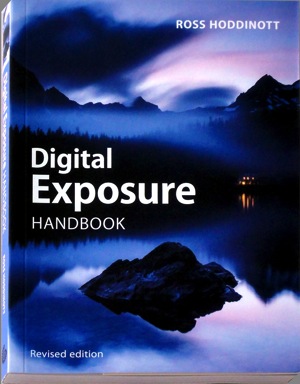
Digital Exposure HandbookThis revised edition of ‘Digital Exposure Handbook’ could well be the only book you’ll ever need in your digital photography adventures.

It begins as a guide to understanding camera settings and the basics of exposure, then moves on to putting this info into practice in a variety of situations. It teaches you how to cope with the quality, quantity and contrast of natural and artificial light, how to effectively use on-camera and external flash illumination, how to apply polarising and ND digital filters and concludes by teaching you how to enhance exposures in the digital darkroom.

Many enthusiasts buy advanced digital cameras, such as DSLRs, with little more knowhow than they had with their earlier cameras, most likely of the compact point-and-shoot variety. And the first thing that brings them unstuck is the matter of how to set the appropriate and/or correct exposure. This book will put you on the straight and narrow.

Author Hoddinott describes exposure as ‘the heartbeat of photography.’ He adds that ‘Understanding and being able to control exposure us critical to successful photography.’

Basically, exposure to a digital camera’s sensor is a combination of the length of time and the level of illumination impinging on the camera’s sensor. This depends on three settings: shutter speed, lens aperture and ISO setting.

While today’s digicams make the task of correctly exposing a shot a simple task, leaving the camera to do all the work removes you as the creator of the final image and result in your image making efforts becoming little more than ‘pleasing snapshots.’

Subjects covered: the book begins by explaining exposure basics; metering reflected and incident light with the camera’s own TTL system or a separate handheld meter and the differences between centre-weighted, spot and partial metering; image sensor types — from CCD to CMOS to Foveon and sensor size; dynamic range and its control; understanding histograms and how to manipulate them. At this point the book offers the little known fact that images saved in RAW format tend to have a greater latitude than the histogram indicates …

There are many tricks of the trade in the book’s pages: one is that by saving in RAW and exposing to the right of the histogram will lead to the image containing the majority of tonal values. The downloaded image will look too bright and washed out but final processing will leave the image looking correct.

High and low key images are discussed and the advice given that these types of images are best served by adjustment of the original exposure and not leaving the final rendering to software tweaking.

Also discussed: ISO sensitivity; understanding f stops; depth of field; hyperfocal distance; the use of shutter speeds when rendering motion; avoiding camera shake, how to blurr and how to freeze action; second guessing metering systems and how to adjust exposure compensation.

Many will get help from advice on understanding exposure mode programs such as auto, shutter and aperture priority as well as manual settings. Hoddinott claims that using manual exposure is the most flexible exposure mode but also ‘the one that relies most heavily on the photographer’s knowledge and input.’

I reached about a third of the book’s length and slowly became aware that it was far more than a basic guide to exposure and more a general primer to the ins and outs of digital photography, with chapters on viewfinders, file formats, composition, dealing with landscapes, architecture, wildlife, people, still life, abstracts and patterns, close ups,.

Then there follows detailed help in shooting subjects in ambient light, silhouettes, white balance, using reflectors, flash, filters, calibrating monitors, printing and the overall role of the digital darkroom.

While it is obvious from the latter two paragraphs that the book wanders off topic, it also results in it becoming more than just a primer on exposure.

As I’ve said, it could also be the only book you’ll ever need for digital photography!

Plenty of useful pictures. Perhaps some may find the 7 point type a little small!

Author: R Hoddinott.
Publisher: Ammonite Press.
Size: 15x21x1cm.
Length: 192 pages.
ISBN 978 1 90770 895 4.
Price: Get a price on the Digital Exposure Handbook at Amazon (currently 29% off).

Post originally from: Digital Photography Tips.

Check out our more Photography Tips at Photography Tips for Beginners, Portrait Photography Tips and Wedding Photography Tips.

Digital Exposure Handbook: Book Review

The post Digital Exposure Handbook: Book Review by Darren Rowse appeared first on Digital Photography School.


Digital Photography School

 
Comments Off on Digital Exposure Handbook: Book Review

Posted in Photography