It’s hard to believe that PIX 2015 is a few days away! Take a peek behind the scenes before the curtain rises on our photography expo. Show attendees will have plenty of opportunities for hands-on photo experiences, as well as a chance to take a look at how far digital photography has come. The DPReview Experience booth will host a digital photography timeline featuring iconic digital cameras and media storage devices – see a few of them highlighted here. Read more
Tag: Digital
-
Ricoh offers limited edition GR II kit to mark 10 years of digital GR cameras
The forthcoming Ricoh GR II is set to also be available in a special limited edition ‘Premium’ kit that has been announced by the company to mark the 10th birthday of the first digital version of the famous GR film bodies. The kit will come in an aluminum case and will include the GV-1 external viewfinder as well as the GW-3 wide angle converter that uses a 0.75x magnification to turn the camera’s 28mm lens into what seems like a 21mm super wide. Read more
-
SmugMug Films: Renee Robyn’s digital domain
The latest of SmugMug’s series of feature videos profiles photographer and digital artist Renee Robyn. While recovering from a serious motorcycle accident, she fell in love with an art form that was within her physical capabilities at the time – making digital composite images. Read more
-
Polaroid Snap instant digital camera prints 2×3″ photos
This year’s IFA show in Berlin saw the introduction of the Polaroid Snap instant digital camera. It features a 10 megapixel sensor and integrated ZINK Zero Ink printer that produces 2 x 3 inch adhesive-backed color photos using heat-activated dye crystals and a polymer overcoat rather than ink. Read more
-
Room to Read in a Digital World: 14 Modern Library Designs
[ By Steph in Architecture & Public & Institutional. ]

Shifting from paper to digital media hasn’t diminished the role of libraries in our communities, with many modern designs expanding to serve as cultural hubs with cafes, soundproof video rooms and even lookout points with panoramic views of the surrounding city. These 14 designs combine older traditions with new materials, programs and functions, juxtaposing thousands of years of collected knowledge with dazzling structures made of steel, timber and glass.
Revamped Medieval Tower Library


The crumbling medieval Torre del Borgo in northern Italy gets a new life thanks to a stabilizing renovation that added a stacked timber volume for addition space and outfitted the inside with a ribbon-like black staircase. Architect Gianluca Gemini strengthened the existing walls, added more windows and created a means of getting to each of the four levels that also functions as a sculptural centerpiece.
Historic Chapel Turned Modern Library in Italy


A sleek perforated aluminum tower contrasts with the traditional architecture of a former chapel in Lonate Ceppino, Italy, transforming it into the ‘Elsa Morante’ public library. DAP studio contrasts old and new, airy and solid, connecting the modern volume to the pre-existing structure with glazed passageways.
Monterrey Library by Anagrama


Built-in wooden bookshelves curve up and connect to form a cocoon-like architectural feature at the Monterrey library by Mexico City-based studio Anagrama. Set within a staircase, this unusual space doubles as a reading room, with padded bench seats on either side of the steps.
Barn-Like Timber Dainville Library


Formerly a farm building, the squat brick section of the original Danville Library gets a beautiful and functional barn-like addition to bring it into the modern era, with timber slats adding architectural interest and screening the interior from direct sunlight. The new gabled areas by BplusB architects give the interior a cathedral-like feel.
New Library for Baghdad by AMBS Architects


The first new library for Baghdad since the 1970s, this unusual structure by AMBS architects takes its shape from the arabic Kufic word for ‘read.’ Stretching out into a lake, the building will feature the world’s largest reading room as well as a massive double-curved glass roof to flood the interiors with natural light.
Next Page – Click Below to Read More:
Room To Read In A Digital World 14 Modern Library Designs
Want More? Click for Great Related Content on WebUrbanist:

Secular Conversion: Historic Chapel Turned Modern Library
A beautiful old chapel in the Italian town of Lonate Ceppino has been transformed into a modern library with a perforated aluminum tower that adds to the …
Click Here to Read More »»

Book Mountain: MVRDV Designs Glass Pyramid Library
A new public library in the Netherlands by MVRDV flouts the conventional wisdom of keeping books in the dark, placing them under a glass pyramid-shaped …
Click Here to Read More »»

Reading Revolution: 14 Marvelous Modern Urban Libraries
More than just buildings filled with books, these 14 beautiful modern libraries are cultural landmarks and places to explore new media of all kinds.
Click Here to Read More »»


[ By Steph in Architecture & Public & Institutional. ]
[ WebUrbanist | Archives | Galleries | Privacy | TOS ]
-
Holga Digital camera project launched on Kickstarter
The Holga camera – a 120 film camera from the 1980s which has recently seen a resurgence among low-fi photo fans – is going digital, thanks to a project seeking funding on Kickstarter. The Holga Digital camera features original optics that are known for their dark corners and vivid colors. Read more
-
Samsung NX1 firmware 1.40 adds digital video IS and AF while zooming
Samsung has released another firmware update for the NX1 mirrorless camera, taking the model from firmware version 1.32 to 1.40. The newest software improves existing features such as the audio quality from external microphones, and adds new features including video digital image stabilization. Read more
-
Apple Digital Camera Raw update extends compatibility to Sony RX100 IV, Leica Q
Apple’s latest Digital Camera Raw update for its Mac OS X extends support to a handful of new and notable cameras, including the Sony Cyber-shot DSC-RX100 IV, a7R II and Leica Q. Read more
-
How to Avoid Loss of Your Digital Photos
By Mariam S
Nowadays almost all photos are taken using various digital devices. In the era of paper photos, the main photo destructors were natural disasters like fires, and also such a phenomenon as discolouration. Modern digital photos face mainly the same dangers – fires, floods, and so on. Surprisingly, digital photos also have some equivalent to discoloration – degradation of a photo storage device over time. However, apart from these dangers inherited from paper predecessors, digital photos are subject to new specific dangers, for example: loss of photos due to a storage device failure. Let’s discuss in more detail what dangers digital photos might face and how you can avoid many of them.
Generally speaking, there are three bottlenecks where you can lose photos – when taking photos, when transferring them, and in storage.
#1 Loss of photos in camera
Immediately after you have taken a photo there is only a single copy of it. If this copy is lost, you can in no way get it back. In all fairness, such cases are relatively rare. Even if data recovery software doesn’t help, as a last resort you can send a memory card to a repair lab in the hope that the hardware specialists can help. However, if it fails, all you have left to do is to say “goodbye” to the photos because there was only a single copy of them.
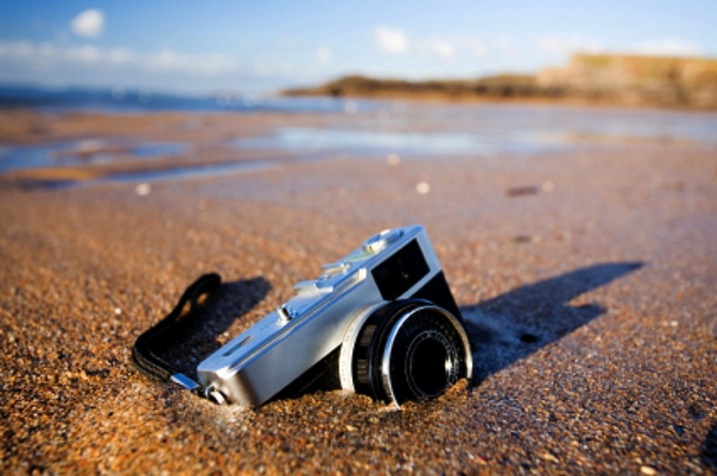
For example, you shoot a football match and then on the way home lightning hits your camera and all that was left was a pile of ashes. This is what contracts call “force majeure” and therefore nothing can be done. However, history has some funny stories. A man had dropped a camera into the sea; a year later some divers raised it and surprisingly the photos were readable. Divers were even able to identify a camera owner by the photos and then returned him his “property” (read the full story here).
Tips
Here, there is little advice for you because surely you know better how not to drop the ball, say due to a camera failure or something like that, when shooting a unique event.
There are some tips on memory card health that will help though:
- How to Spring Clean Your Memory Cards
- The Best Way to Delete Photos From Your Memory Card
Also remember to turn off your camera before removing or changing your memory card or battery. Not doing so can result in a card crash and lost images.
#2 Transferring photos
The process of transferring digital photos from your camera to computer is akin to producing paper photos from the negative. In both cases you duplicate photos from a single copy you have, whether it would be a negative from an old camera, or a flash card in a modern digital device.
In the film days, the process of transferring photos to new data storage was laborious, took a lot of time, and required certain skills and equipment; with digital photos the process becomes radically simplified. However, strange as it may be, nowadays the chance of losing photos during transfer is still significant.
Earlier, when developing film you had to stick to certain rules. Ignoring these rules inevitably resulted in destruction of photos. For example, one such rule says that all actions with negatives must be performed in a darkroom. In case of digital photos there are also some rules, however, people tend not to follow them because ignoring them doesn’t always lead to loss of photos. Those “less fortunate” people who neglected the rules and lost their photos, then have to bother with photo recovery.
Let’s look at the rules:
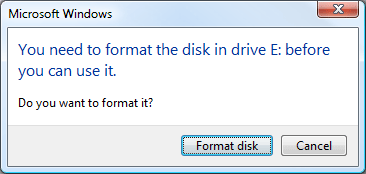
- Always use the “safely remove hardware” option when ejecting a memory card or any other removable device from a computer. Otherwise, the operating system may not have time to handle data on the removable device properly. That sometimes can lead to the RAW file system issue, the typical symptom of which is when Windows shows you the message like this:
- Don’t eject a memory card from a working camera, for the same reasons as in the previous case.
- Always monitor the battery charge. If battery runs low at the wrong time, it may result in a file-system failure on the memory card. Generally, it is better to use a card reader device for transfers since it has no such problems.
- Transfer photos regularly. By doing so, in the worst-case scenario would be that you lose only you’re latest photos, rather than an archive for the entire year.
However, it should be noted that all listed above typically don’t destroy photos themselves. It just leads to a file-system failure which is pretty well cured by data recovery software, given that you have not formatted a card.
#3 Storage
In general, loss of data in storage is bad form. Immediately after taking pictures you have just one chance to copy them, and you still can write data loss off to an “irresistible force of nature”, for example. Once you have enough time to create a copy of the photos, however, data loss is less excusable.

By Charles Wiriawan
Do not trust only one storage technology
Do not rely upon only one storage technology, even if you think it is very reliable. No data storage technology, be it a fault-tolerant RAID or modern Storage Spaces from Microsoft, can replace a good old backup. More than that, a proper backup procedure requires an off-site copy, maintained in some physically separate location. This is to prevent simultaneous loss of both original,
and backup copies to a fire or theft.Tips
- Off-the-shelf NAS devices like Synology and QNAP have several indicators that can be green, yellow, and red. These indicators significantly simplify monitoring of the device “health” – just remember what typical indications are, then glance at the NAS at least once a day. Extinguished or red lights are a reason for concern.
- If you store photos on a Windows PC, use special software to monitor your disk state. S.M.A.R.T. is a technology used in hard drive self-diagnostics. Fairly often, it can predict hard drive failure ahead of time. A monitoring tool requests S.M.A.R.T. status of the device periodically and if S.M.A.R.T. data deviates from the normal values, the tool will alarm you so that you can back up the data.
- Check the S.M.A.R.T. state of your hard drives at least once a month.
Photo recovery tips
If you have lost some photos and are looking for a way to recover them, there is no need to panic because photo recovery from a camera memory card is one of the easiest, and well-established data recovery tasks. All you need is to download and install any data recovery software – there exist both paid and free options – select a memory card from the device list, and see what it brings up.
If you are not satisfied with the quality of the recovery, it makes sense to try several tools since recovery algorithms used in various software may differ in some way. Note that data recovery tools, for the most part, are read-only so they will not destroy anything on your card. Windows CHKDSK is the significant exception to this rule – it sometimes does make matters worse.
Below are some tips on how to achieve the best result when recovering photos from a memory card:
- Stop using a card once you see that something is wrong. If the camera’s behaviour is unusual, stop taking any new photos until you clear up the situation with the existing photos.

- If possible, use a card reader device when recovering data. It is stable and provides better performance than a cord and direct connection to the camera.

By Matthew
- Do not take new photos once you realize that you need to recover data. Usually, with each new photo you lose a capability to recover one previously deleted photo.
- Ascertain in advance what your camera actually does when you format a card. If the camera uses a “complete” (also called low-level) format by default, change it to a “quick” format. Thereby, if you format a card accidentally you still can recover photos from it; after a complete format, all the data will be overwritten and not recoverable.
Bonus – discolouration
In early days, when archives were stored on magnetic tape, it was critical that the tapes must be rewound regularly. Otherwise, the data became unreadable because magnetic fields mixed between adjacent layers of tape (what was then known as crosstalk effect).
Some place the photos on CDs and then do not check them for years. In five years one can easily find that at best only half of the CDs are readable. CDs are not suitable for long-term storage and should only be considered as one of the backup options for a short period of time.
Those who keep their photos on old hard disks, in ten years will not be able to find a proper connector anywhere else except in a museum. If you are going to store photos for a long time you should use the most modern devices to increase the chances of find a compatible setup in the future. This is sometimes called “future-proofing”. However, you should not bet on the ultramodern technologies since it may happen that the technology does not stick and therefore, say in five years, you will not be able to find compatible components (think beta versus VHS).

By Sophia Maria
Generally speaking, digital discolouration differs from analog (paper) discolouration, only in that you can discern at least something on a discoloured paper photo, while a digital picture is destroyed immediately and completely.

So some care and planning on your part can help you avoid losing your images, or in the worst-case scenario, quickly able to recover them. What’s your disaster avoidance plan?
googletag.cmd.push(function() {
tablet_slots.push( googletag.defineSlot( “/1005424/_dPSv4_tab-all-article-bottom_(300×250)”, [300, 250], “pb-ad-78623” ).addService( googletag.pubads() ) ); } );googletag.cmd.push(function() {
mobile_slots.push( googletag.defineSlot( “/1005424/_dPSv4_mob-all-article-bottom_(300×250)”, [300, 250], “pb-ad-78158” ).addService( googletag.pubads() ) ); } );The post How to Avoid Loss of Your Digital Photos by Alexey Gubin appeared first on Digital Photography School.
-
High-Tech Hobos: Train-Hopping Vagabonds of the Digital Age
[ By WebUrbanist in Culture & History & Travel. ]

Traveling light takes on new meaning when jumping trains, as does the limited battery life of mobile devices – just like the rest of us, hitchhikers and train hoppers these days increasingly see the web as as invaluable resource. The underlying story of nomadic life on the rails is surprisingly consistent in some ways: people, generally young, using the nation’s railways to travel the country. The details are, however, revealingly different – analog hobo codes have given way to digital hobo coders.

Like many 30-somethings, Huck has experienced life with and without a pervasive internet that answers all questions. This transitional generation knows to rely on conventional knowledge and hard research as much as spoon-fed answers. In the extended interview below, this reddit user (/u/huckstah) and long-time /r/vagabond participant shares stories from his nomadic lifestyle. Images here by Molly Steele illustrate some of the everyday wonders of illicit train travel as well. Per Hobos of Instagram , these travelers are trading their flip phones for iPhones, starting Instagram accounts … and bringing an age-old tradition of trainhopping and tramping into the Information Age.”
Online resources provide help in all kinds of ways, including some websites dedicated to helping the (often intentionally) homeless and misfit travelers as they hitchhike or dumpster dive. At the same time, there are many ways to also turn ordinary resources toward new ends, like using Google Maps to scout the layouts of train yards for security gaps and best access points.
Beyond transit, maps are also helpful for finding public restrooms, camp grounds, power outlets, showers and other essentials. Kindles (or other devices using less power than phones) are critical to stretching battery life, too. Ultimately, the information flows both ways: travelers turn around and share their adventures on Instagram, Vine, Facebook and other social media sites.

Those on the road more often than not find themselves looking for remote digital work or seasonal employment, again aided in part by websites like Craigslist and otherwise. YouTube videos help guide people through various processes of actually getting on and off trains, as well as finding the best boxcars on (or in) which to travel. Of course, none of these reduce the real, physical-world risks and dangers associated with train hopping, including but not limited to injury and arrest. Some naturally worry that the spread of this form of transit to the internet will increasingly lure people who are not equipped for the lifestyle to try things better off watched on Vimeo or read on reddit.
Want More? Click for Great Related Content on WebUrbanist:

QR Hobo Codes: Secret-Symbol Stencils for Digital Nomads
A new twist on the centuries-old tradition of the mobile and homeless communicating via shorthand markers, left to denote different risks and advantages to …
Click Here to Read More »»

Subway Parasite: Stealth Projector Lights Up Train Tunnels
Here to lighten the mood a bit during the duller parts of your nighttime or subterranean transit is a quirky little projector that suctions to vehicular shells.
Click Here to Read More »»

High-Speed Art: Murals Spray-Painted for Train Passengers
Made to been seen at high speeds, these colorful patterns intentionally form a sequential whole when experienced by commuters in adjacent railway cars. …
Click Here to Read More »»
[ By WebUrbanist in Culture & History & Travel. ]
[ WebUrbanist | Archives | Galleries | Privacy | TOS ]