RSS
 

Posts Tagged ‘Different’

How to Use 1 Natural Light Setup to Create 3 Different Portrait Looks

22 Sep

As a portrait photographer, the majority of my work is shot on location. This can be outdoors or in my clients’ homes or places of business. I mostly shoot using natural light and have become adept at finding the best light source in any location as well as creating backgrounds that won’t interfere with the subjects. In this tutorial, I want to show you an easy, natural light portrait setup you can recreate in your own home. Simply by repositioning yourself and your model, you can create three distinctly different portraits from this one setup.
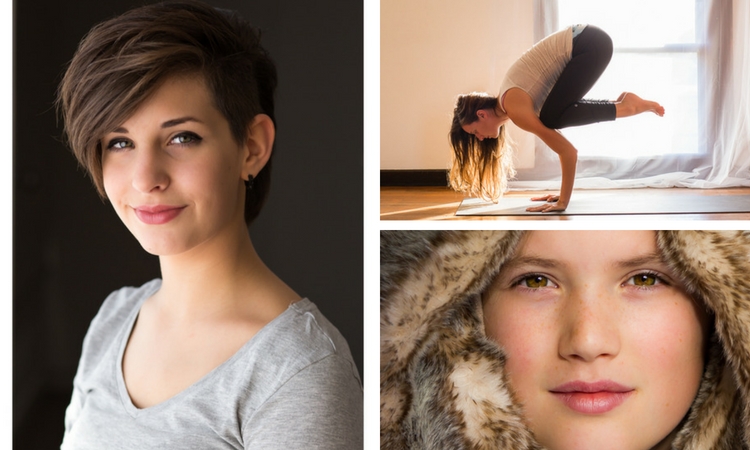
one natural light setup - 3 looks

No special lighting or fancy equipment is needed, and the techniques are straightforward and easy to master. Experiment to create different looks using various backdrops such as plain walls or sheets, or different outfits for your subject. You can also get different effects by changing your lens, distance to the subject, and experimenting with different apertures.

Equipment

Below is a list of the items I have used for this setup and suggested substitutes:

  • SHEER CURTAIN or FABRIC: You can buy a sheer curtain or length of fabric from any fabric or haberdashery store. I picked this one up from the clearance table at my local Spotlight store (Australia) for under $ 20.
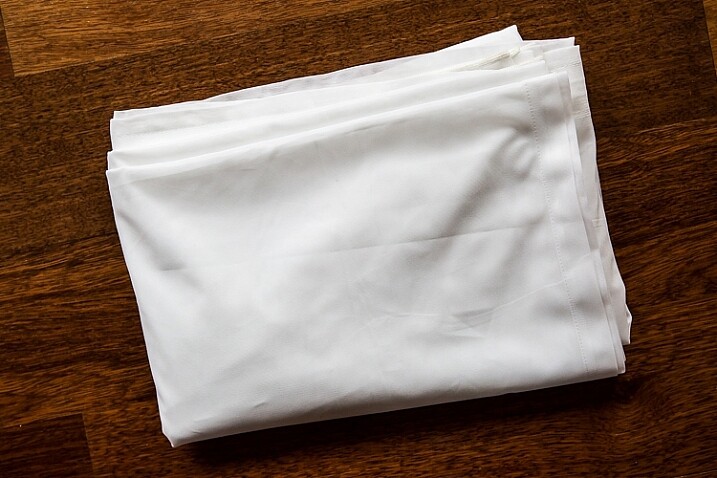
Image showing basic natural light portrait setup using a white cloth

A white sheer curtain or large sheet of sheer fabric will filter the window light.

  • REFLECTOR: I have a circular, five-way reflector that follows me everywhere. Each side has a different colour; white, silver, gold, and black, plus a diffuser. It folds into a neat little disc, is lightweight, and can be thrown into the back of my car. You will get endless use out of a portable reflector, and at around $ 30 from Amazon, it’s a worthwhile investment. However, if you don’t want to rush out and buy a reflector (or wait for your order to arrive before you start shooting) a large piece of white card, polystyrene, or foam board, will work equally well.
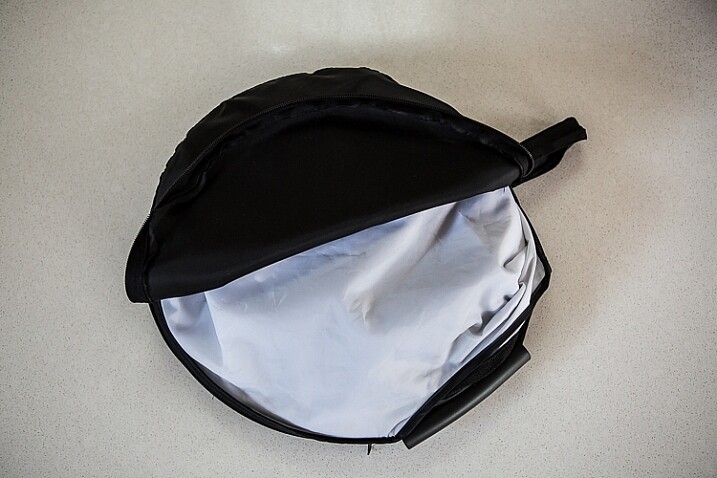
Image showing basic natural light portrait set-up with a reflector

This reflector was a great investment at around $ 30. It is lightweight and folds up compact to the size of a dinner plate.

  • BACKDROP CLAMPS: another Ebay or Amazon purchase, my backdrop clamps come in packs of 12 for under $ 20. These are infinitely useful for creating makeshift studios. In this instance, I used them to attach the sheer curtain to the rolled-up window blind. You can also use masking tape to stick the curtain directly onto the window, or use heavy-duty stationery clips.
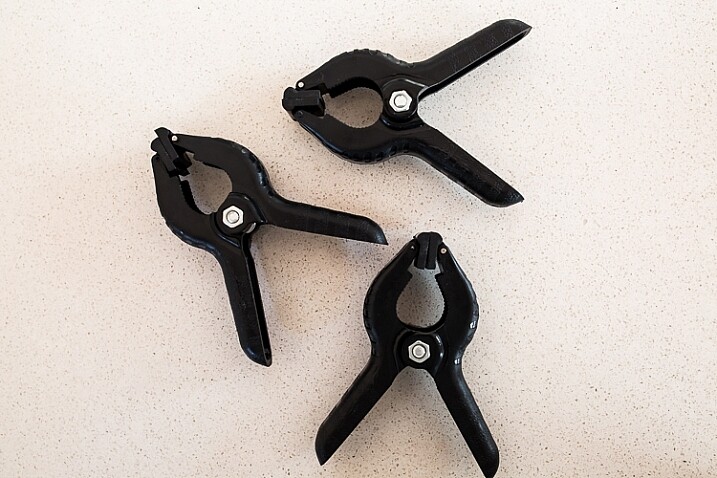
clamps can be helpful for a natural light portrait setup

Backdrop clamps can be purchased inexpensively from Ebay or Amazon and similar.

Lens

My favourite portraiture lens is the Canon EF 85mm f/1.8, but you can use a 50mm, a 100mm – whatever works in the space you have. A tighter space will require a shorter focal length.

Basic portrait setup

Look for a window or glass door with a good strong light source coming through, so that you can shoot at the lowest possible ISO. If the window has a sheer curtain, pull it across to filter the light. If there is no curtain, you can attach a piece of sheer fabric to the window using the backdrop clamps or masking tape.

As you can see, the setup couldn’t be simpler. This is the corner of my living room, with sliding glass doors to the left of the shot. The strong afternoon light is filtered with a sheer curtain clipped to the bottom of the roller blinds. I have closed the curtains in the adjoining room to create a dark background for my subject. If your room layout doesn’t allow this, you can hang a sheet or large piece of coloured fabric behind your subject, or just use a plain wall.
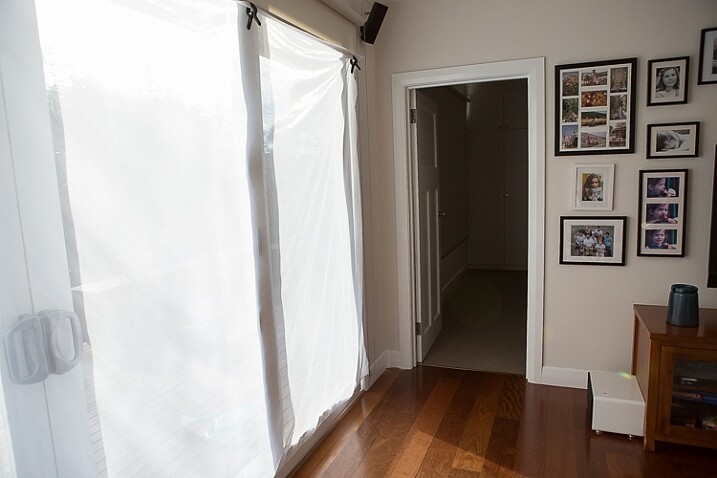
natural light portrait setup background

The setup couldn’t be simpler.

As you can see in the setup below, I brought my model forward (away from the open door behind her). This is to ensure she has good light on her face, and that there is sufficient distance between her and the room behind her to make sure it is completely out of focus. In this pull-back shot, you can see some detail in the room behind her. However, in the first pair of portraits, further along, you can see no background detail. The room behind looks like a studio backdrop.

Add a reflector

If you are going to use a reflector, you’ll need someone to hold it for you. If there is no-one to help, try propping it on a chair. Let your creative photographer’s brain get to work and figure out a creative solution.
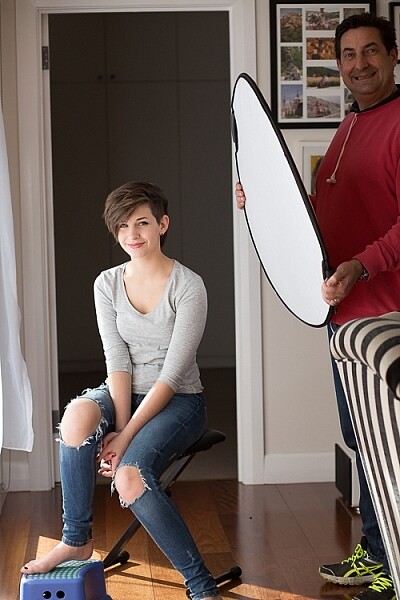
natural light portrait setup reflector and assistant

You’ll need an extra person to hold the reflector – in this case, my husband!

Portrait #1: side lighting and a reflector

This is my most-used natural light setup. Side lighting contours and shapes the face, and is flattering for most subjects. If your subject is male, or if you want to create a moodier portrait, you can try moving the reflector further away from your model or removing it altogether. This creates more contrast by increasing shadow on one side of the face.

Your model can sit, stand, or even lie on the floor if the window is low enough. How you position your model’s face and body is up to you. To recreate the look below, your model’s face needs to be at a 90° angle to the main light source (the window). Her body turns 45º away from you. The door behind my model is opened and I darkened the background room to minimize distracting elements. Position the reflector on the shadowed side of her face, to bounce the light back and fill in the shadows

In the photos below, the image on the left is shot without a reflector. The one on the right is shot with a reflector. The effect in this example is subtle because the light in this room is already balanced somewhat by small, high windows on the opposite wall to the main window. In the photo on the right, you can see how the reflector brightens the face and fills in the shadows, particularly the under-eye shadow of her left eye. It also brings out more detail and highlights in her hair and improves separation from the background.
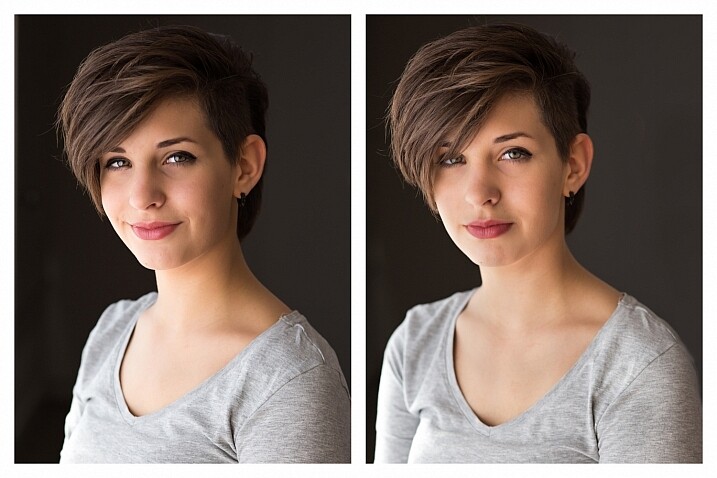
natural light portrait setup with and without reflector

Left (no reflector): ISO 320, f/4, 1/200th. Right (with reflector): ISO 320, f/4, 1/320th.

Portrait #2: shooting into the backlight

I love this technique for photographing women and girls. It creates soft, non-directional  lighting on the face, so is flattering to every age group. And the backlighting creates a gorgeous halo around the hair. This works especially well if the model wears her hair out, or wears a dress with some sheer elements – think darling little girls in fairy costumes and tutus!

Technique for backlighting

Using the same window setup as before, your model sits or stands with her back to the window. Position the reflector in front of her, bouncing the light back into her face. Your light meter will try to read the light coming from the window, and will underexpose your model’s face. You can obtain the correct exposure by getting in close to her face to set your exposure. You might also bracket your exposures and check the back of the camera until you’re happy with the result (review the histogram but note that the background area may show clipping – that’s okay). To get the exposure right on the face, you will lose detail in the background, which is the idea!

natural light portrait setup backlighting

ISO 320, f/4, 1/160th

The photo below is a yoga instructor posing in front of a window on the floor of her studio. The backlighting is beautiful through her hair, and the warm tones of the timber floor reflect back on her skin to give her a golden hue. The lighting technique is identical to the previous photo. But in this photo, I have allowed the curtain and window to be visible as I think it adds something to the scene.
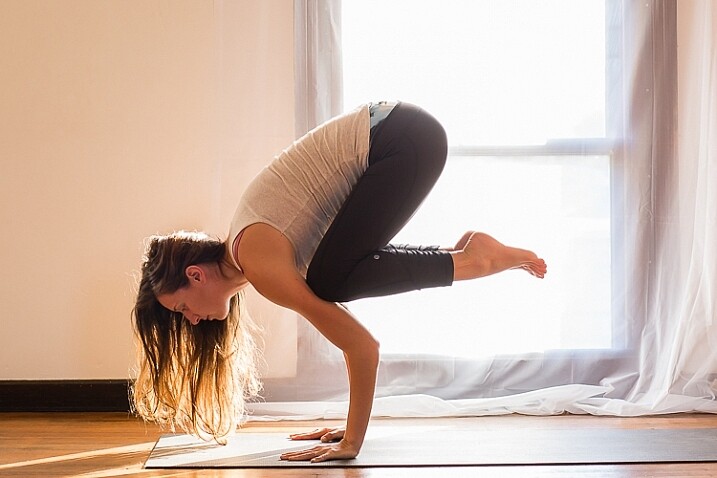
natural light portrait setup backlighting

ISO 500, f/5, 1/80th.

Portrait #3: shooting with front-on light

For this set-up, the sheer curtain remains in place. Your model faces the window, and you position yourself between your model and the window. If you are taking a wider shot than the example below, you may be able to bounce light into the back of her hair with a reflector.

Frontal lighting removes virtually every shadow on the face. It brings out detail and colour in the eyes, and can be quite striking with the right subject. However, this technique is not for everyone. It can give the face a flat, two-dimensional appearance, and if the light source is too strong, your subject will squint. This lighting tends to highlight every imperfection, which is fine if your subject happens to be young and gorgeous. But, it can be too harsh for a mature model, or someone with a lot of blemishes.

Examples of front lighting

The photo below of a young girl snuggled into a faux-fur hood has been enduringly popular on my social media sites. It was shot using this lighting technique in warm, late-afternoon light.
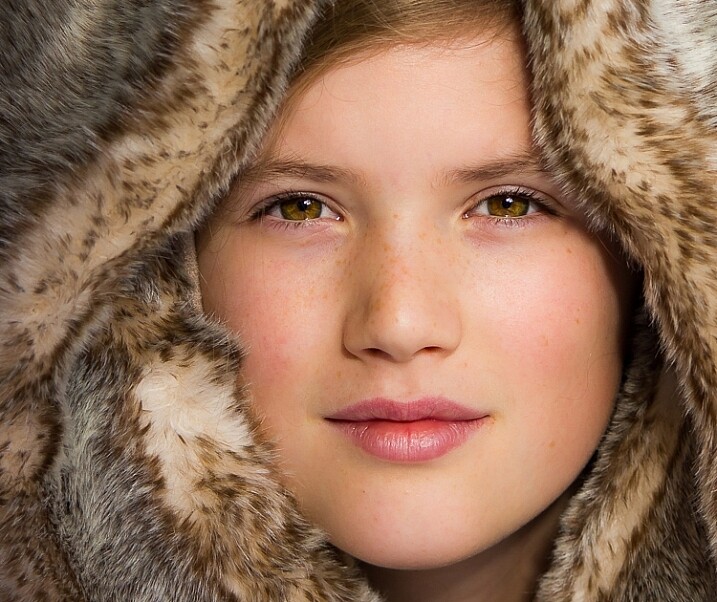
natural light portrait setup front lighting

ISO 400, f/4.5, 1/200th.

The photo below of my daughter, sun-kissed after a day at the beach, was photographed with front-on lighting. As we were  on vacation and I didn’t have my usual bag of tricks at hand, I didn’t use a sheer curtain to filter the light. As you can see, the highlights are more pronounced than those in the first photo, but the effect is similar.
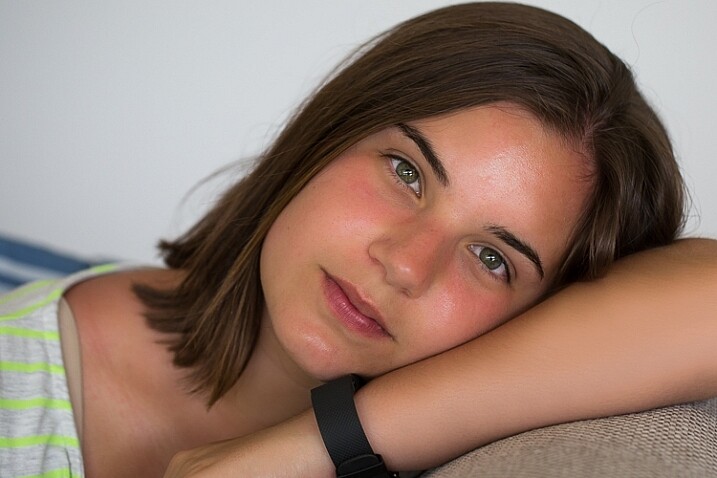
natural light portrait setup front lighting

ISO 250, f/3.5, 1/125th.

Now it’s your turn

I’d love to hear how you get on trying this setup at home. Please post any questions, comments or examples of your portraits in the comments section below.

Don’t forget, there is also our dPS Facebook Group, which you can join to share your photos and get a critique from other dPS readers.

googletag.cmd.push(function() {
tablet_slots.push( googletag.defineSlot( “/1005424/_dPSv4_tab-all-article-bottom_(300×250)”, [300, 250], “pb-ad-78623” ).addService( googletag.pubads() ) ); } );

googletag.cmd.push(function() {
mobile_slots.push( googletag.defineSlot( “/1005424/_dPSv4_mob-all-article-bottom_(300×250)”, [300, 250], “pb-ad-78158” ).addService( googletag.pubads() ) ); } );

The post How to Use 1 Natural Light Setup to Create 3 Different Portrait Looks by Karen Quist appeared first on Digital Photography School.
Digital Photography School

 
Comments Off on How to Use 1 Natural Light Setup to Create 3 Different Portrait Looks

Posted in Photography


How to Be Different and Make Your Photography More Unique

12 Aug

When starting on the path of learning photography, it is common for some to already have an idea about what their work is supposed to look like. They admire and look at the work of photographers and want to be able to do similar work themselves. While this is an important part of the learning process, the best photographers all eventually go off in their own direction, and creatively it’s very important to think in this way. You want your work to ultimately be different. Here are some steps to help you figure out how to go against the grain and make your photography more unique.

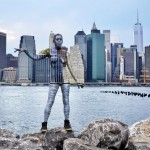
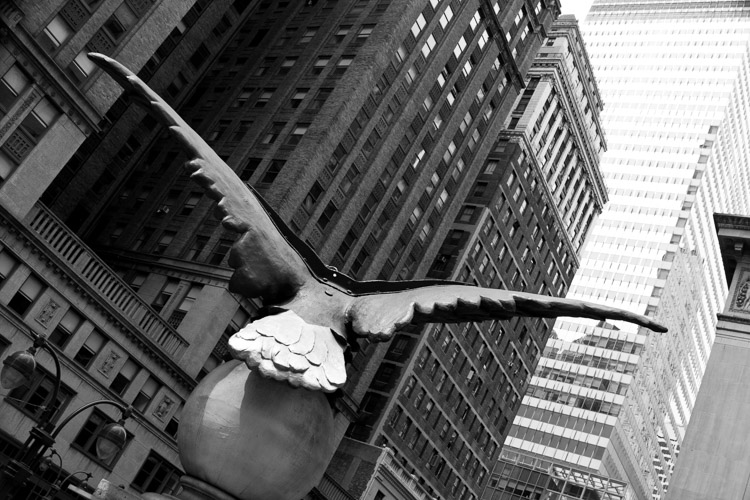
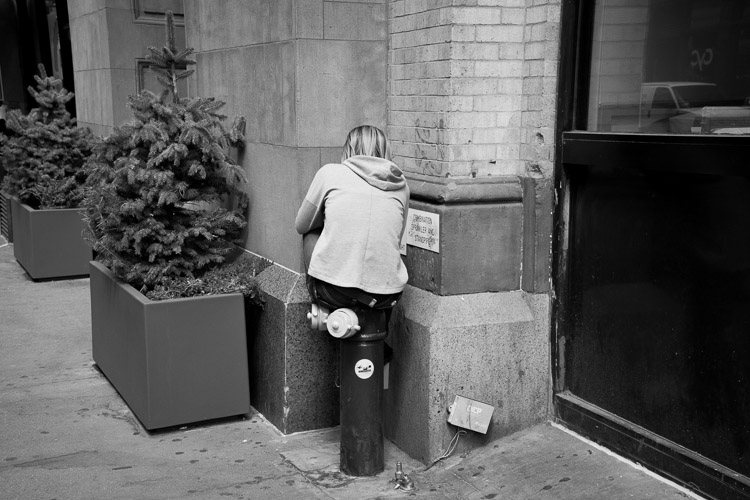
Soaring, 42nd Street, NYC

Soaring, 42nd Street, NYC.

1. Put your own spin on things you’ve learned

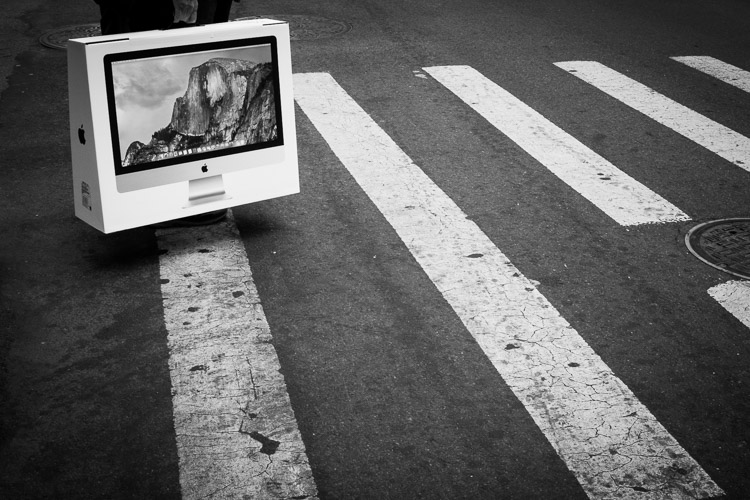
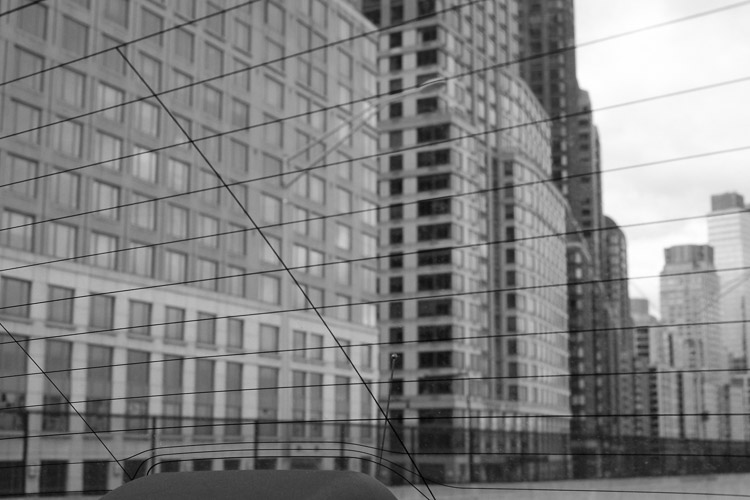
Yosemite, Broadway, New York.

Yosemite, Broadway, New York.

You cannot go against the grain if you don’t first understand the traditional techniques of photography. Take all of the photographers that you admire and teach yourself how to do what they did. Take the best aspects from all of them, whether it be content matter, lighting, exposure, overall look, or other technical skills, and integrate them into your own work. Become a hybrid of them all.

These photographers came before you for a reason, and it’s a luxury to be able to learn from them. You can still go in your own direction, however, you first need to create the foundation to be able to do that in the right way.

2. Don’t be afraid of people not liking your work

It is normal to feel like you need to cater to everyone’s interests. Obviously, you want to create work that a group of people enjoy, but try not to think about that at the beginning. No matter what you do, someone is not going to like your work, and probably more than a few people.

New York.

New York.

The problem with chasing likes, is that you end up playing the game of popularity. You look at what photography succeeds the most on social media websites, at what gains the most wows, and it’s easy to think that it is the best photography, and that is what you need to do as well. However, what you are really doing is conforming to work that has already been done before many times. You end up creating work so common that it is a dime a dozen. The most popular looks right now are the ones that are the easiest to achieve, with a medium amount of technical proficiency. You can do better.

There is no need to photograph for the purpose of getting likes. Seek out critiques and understand how people feel about your work, but your first aim should be to create work that means something to you. If you take everything else out of the equation, which of your images do you like the best? What has the most meaning behind it for you? This is often not a logical feeling. Rationally, you might think that a certain image is your best, but your gut may give a hint at something else.

Follow your gut. Follow your instincts. Search through your archive, and find work that you’re afraid of showing. That is usually the best stuff. Put it front and center, and develop the ideas of that work further.

3. Take some technical risks

Trump Towers, New York.

Trump Towers, New York.

Try out as many alternatives to the traditional way of doing things as you can. Shoot in bad light, experiment with blurry photos, or create weird and off-kilter compositions. Make bright or dark images. Embrace imperfection and ambiguity. Not everything has to be beautiful.

Shoot in a more spontaneous way and follow your gut. Go to places that you normally wouldn’t explore, and take images. Shoot during your daily life. Force yourself to go to the most mundane place you can think of, and figure out how to create an interesting photograph there.

4. Think about, and create, exactly what you like

Intimate work is what makes great art. Think about ideas and subjects that you are passionate about, and explore them. Create nuanced work, and don’t be afraid if people don’t understand it right away. They probably won’t at first. Particularly if you are showing your work on the Internet, people scan so quickly, and they usually respond to what pops out at them in the most obvious way. Nuanced, thoughtful, and intimate work might not catch their eye right away. Experiment with this type of work and forget about how people might react to it.

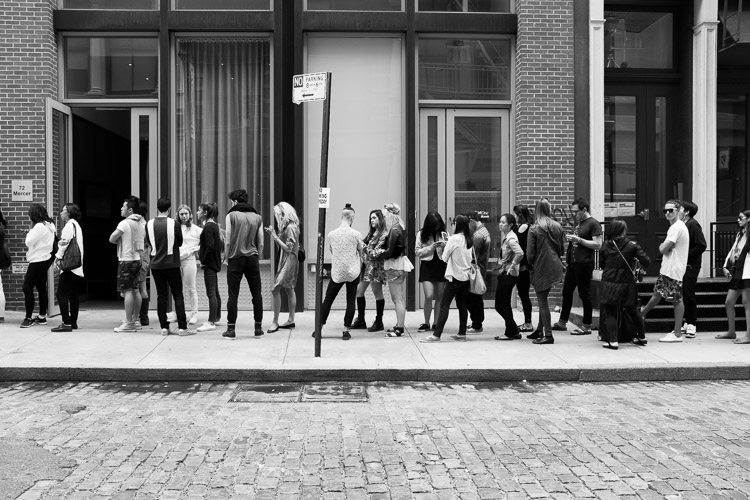
Sample Sale, SoHo, New York.

Sample Sale, SoHo, New York.

What are you interested in? Maybe it is nature, sports, politics, identity, community, Pokemon, or a particular place nearby. Create a story. It literally could be anything. Think about what you are most interested in, no matter how ridiculous it may seem, and see if you can figure out a way to combine that with photography.

Next, create a series based on your idea. This type of work displays extremely well in a series format, because you can cover more ground, tell more of a story, and people will take the time to go through it. It will be easier for them to understand the idea more as they explore, whereas their brain will often glaze over or miss the idea in a single image.

5. Educate people

There is a common misconception that you need to let art speak for itself. This is very true on one level, because great art will allow people to ponder, and to interpret it in different ways, without anything pushing that. However, people will often need to be grounded at some level, to let them start to understand the work and delve deeper into it in the first place. Then they can more effectively explore, and get lost in the work and their thoughts about it.

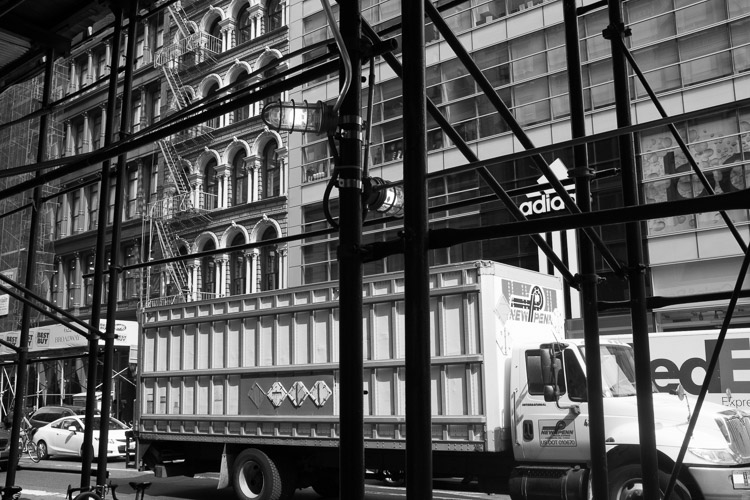
Broadway, New York.

Broadway, New York.

Writing about your work is important, because a good introduction will set people on the path to gaining pleasure from the work, without you having to say too much about it. Hold some information back of course. No need to over-share.

The bottom line

Going against the grain means you can do your photography in any way that you please, and you don’t even have to take the advice here. This is just to get you started thinking uniquely and experimenting, and as the photography quote goes, “If everyone is looking one way, look the other way.”

googletag.cmd.push(function() {
tablet_slots.push( googletag.defineSlot( “/1005424/_dPSv4_tab-all-article-bottom_(300×250)”, [300, 250], “pb-ad-78623” ).addService( googletag.pubads() ) ); } );

googletag.cmd.push(function() {
mobile_slots.push( googletag.defineSlot( “/1005424/_dPSv4_mob-all-article-bottom_(300×250)”, [300, 250], “pb-ad-78158” ).addService( googletag.pubads() ) ); } );

The post How to Be Different and Make Your Photography More Unique by James Maher appeared first on Digital Photography School.

Digital Photography School

 
Comments Off on How to Be Different and Make Your Photography More Unique

Posted in Photography


How to Use Bracketing to get Your Best Shot – 3 Different Methods

29 Jun

One of the most difficult and frustrating parts about shooting with film, back before the days of digital photography, was the limited amount of attempts you had to get the photo you wanted. I remember carrying around spare rolls of film in a fanny (waist) pack on a trip to Walt Disney World years ago, and carefully considering each photo, lest I get one setting wrong and blow the entire shot.

How to use bracketing3 Different methods(1)

Back then you had to wait days, or even weeks, to get your pictures back from a processing lab, and if a picture was too dark, grainy, or out of focus there was nothing you could do about it at that point. Fortunately, digital cameras are far more forgiving than their film-based counterparts, and have many systems in place to make sure you do get the shot you want. But even then, sometimes things still don’t quite work out.

Thanks to a technique called bracketing, you can use the power of your camera, combined with the space available on most memory cards, to make sure you always end up with just the right photo every time.

What is Bracketing?

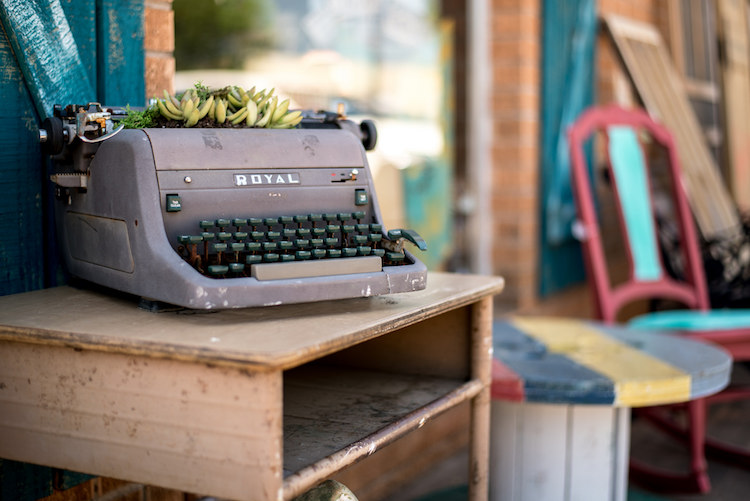
bracketing-typewriter

There’s a classic children’s tale called Goldilocks and the Three Bears, in which a young girl enters the home of the bears and helps herself to their food, furniture, and futons. With each set of items there are three options: two that don’t quite work out and one that is, as the story goes, just right. While the story could be seen as a cautionary tale about the dangers of sneaking into the home of wild animals, and sleeping in their beds uninvited, its lessons can also be applied to photography.

Essentially, Goldilocks demonstrates the concept of bracketing, by giving herself many options so she can make sure to have at least one that is precisely what she is looking for. In photography there are various types of bracketing, but all involve taking multiple photos, so as to ensure you have at least one good picture. Bracketing can also be used to combine different elements of various photos together to get the best of all versions. The three most common versions of bracketing involve exposure, focus, and white balance.

If you have ever struggled to get just the right shot, or want to learn a new technique to improve your photography, this might be just the thing you’ve been looking for.

Exposure Bracketing

Modern digital cameras are pretty good when it comes to evaluating a scene, and giving you just the right exposure. You can even use different metering modes where your camera looks at either the whole scene, just the center, or even a specific part of the photo like the highlights or some faces. If you know precisely how to control your camera to get the shot you want, you can use these various metering modes, in tandem with your camera’s built-in light meter, to get just the right exposure.

However sometimes it pays to take a few extra pictures to make sure you, like Goldilocks, get an image that is just right. This is where exposure bracketing comes in handy since you can take several additional photos, some underexposed and some overexposed, to make sure you go home with the perfect picture.

bracketing-exposure-tree

There are several ways to go about using the bracketing technique, and one of the most simple is to put your camera in Program Mode and use your camera’s exposure compensation function.

First, take a picture that appears to be properly exposed. Then use the exposure compensation option to intentionally underexpose your image by one or two stops (-1 or -2). More than two stops is generally unnecessary. You are of course free to do so, but it’s quite rare that your camera’s meter would be off so much as to require more than two stops of exposure compensation to get the picture you want.

Then use exposure compensation to intentionally overexpose your image by one or two stops (+1 or +2), and in the end you will have at least three photos from which to choose: one that your camera thinks is properly exposed, one that is underexposed, and one that is overexposed. This may seem kind of redundant, but it’s a nice insurance policy to make sure you get just the right photo you want. It works especially well if you are shooting landscapes, or other outdoor scenery, as the bright sunlight coming from overhead can sometimes cause your camera to meter a scene improperly, even if you think you have everything set up just right.

Bracketing for HDR

Another benefit of using exposure bracketing, is that it lets you create stunning works of art using a technique known as HDR, or High Dynamic Range. This requires the use of exposure bracketing, a tripod, and often some special software like Photoshop, Lightroom, or Aurora HDR Pro, to combine several photos into one.

To get started with HDR you need at least three images, bracketed in full stops of exposure. Take one image properly exposed, then underexpose by one or two stops, and then overexpose by one or two stops. Some cameras do this bracketing automatically with a built-in bracketing function (AEB) but I often find that I like to control the exposures manually with exposure compensation, or by using manual mode. You can use more than that, but if you are just starting out three bracketed photos should be sufficient.

Once you have your bracketed photos, load them into the software of your choice, and you can instruct it to combine them into a single photo that takes the best parts of all the images and creates a single frame-worthy masterpiece. To see this in action, first look at the following image, which despite having a fairly even exposure overall, still suffers in a few areas.

This is an un-retouched JPEG image straight from my camera. The overall exposure is good but the sky is bright white and the hallway is a bit too dark.

This is an un-retouched JPEG image straight from my camera. The overall exposure is good, but the sky is bright white and the hallway is a bit too dark.

I used exposure compensation to overexpose the image by two stops, which lost almost everything in the sky, but brought out much more detail and color in the darker areas of the hallway.

The same image, over-exposed by two stops.

The same scene, overexposed by two stops.

Then I took a third image, this time underexposing by two stops, which made the dark parts really dark, but brought out much more color in the sky.

This image was intentionally under-exposed by two stops.

This image was intentionally underexposed by two stops.

Finally, I used Aurora HDR Pro to combine all three bracketed JPEG images into one that contains the best of all worlds. This shows how useful bracketing can be, and might give you some ideas for how to use it in your own photography.

This final image was made using Aurora HDR Pro to combine all three bracketed shots into one, and final edits in LR including correcting the tilting building.

This final image was made using Aurora HDR Pro to combine all three bracketed shots into one, and final edits in LR including correcting the tilting building.

In recent years the image sensors on many cameras have gotten so good, that the use of exposure bracketing is not as critical as it was in days gone by. If you shoot in RAW instead of JPG, a single image will often contain so much information in the highlights and shadows, which you can recover using Lightroom or Photoshop, that you simply don’t need to take separate images and combine them later. One major disadvantage of this is the file sizes, which on some RAW formats can be anywhere from two to 10 times as large as a JPG file. At the end of the day though, exposure bracketing is still a valuable technique that many photographers rely on to get just the right result, and you might enjoy trying it out to see if it works for you.

Focus Bracketing

Another way to apply the bracketing technique is to take several images that are focused at various distances, which is especially critical when doing close-up photos or taking macro shots. On most cameras the autofocus generally works great to make sure things are crystal clear and tack sharp. But, when using very shallow depth of field, or focusing on objects that are extremely close, it’s not always going to produce the most reliable results.

Often when doing this type of photography you will end up with pictures that are just slightly out of focus in one direction or another, either in front of the subject or behind it, and there is no way to fix that in Photoshop, or any other image editor.

I made this image by slowly adjusting the focus on my lens while I took several shots. Only one had the single strand sharp and in focus, but that one picture was all I needed.

I made this image by slowly adjusting the focus on my lens while I took several shots. Only one had the single strand sharp and in focus, but that one picture was all I needed.

The solution to this problem is to take not one picture, but several, and use manual focus instead of automatic. I start by intentionally focusing not on the subject but slightly behind it, then I slowly turn the focusing ring on my lens as I take several images in a row. I know it can be a bit intimidating to shoot using manual focus, but once you try using this technique, you will probably start to see how useful it can be.

When you have your set of images loaded in Lightroom, or another image editor, you can then pick out the exact one you want, instead of hoping you got one in focus while relying on your camera’s built-in autofocusing algorithm. If you want to get into an even more advanced technique with focus bracketing, you can actually combine all your photos into one super-sharp image using a technique called focus stacking. But if that seems like a bit much for you, it’s still worth your time to try regular focus bracketing, just to make sure your close-up subjects are tack sharp.

Nailing focus on the water drop was almost impossible, so I took several images while focusing manually to make absolutely sure I got at least one good image.

Nailing focus on the water drop was almost impossible. So I took several images while focusing manually, to make absolutely sure I got at least one good image.

White Balance Bracketing

The final technique I want to discuss here is similar to the other two types of bracketing in that it also involves taking several photos of the same scene, while adjusting a single parameter. In this case it’s the white balance, instead of the exposure or focus. Most casual photographers use the Automatic White Balance setting on their cameras, which does a pretty good job most of the time. But every now and then it can leave an image with an ugly green or red tint, or all pale and washed out, because of improper white balance.

The lighting conditions here wreaked havoc with my camera's Auto white balance, so I took five separate exposures and manually adjusted the white balance each time in order to make sure I got one good shot.

The lighting conditions here wreaked havoc with my camera’s Auto white balance. So, I took five separate exposures, and manually adjusted the white balance each time, in order to make sure I got one good shot.

White balance bracketing can be very useful if you shoot JPG, because your camera’s Auto white balance setting is not always as reliable as you want it to be. However, if you shoot RAW you have complete freedom to alter white balance as much as you want using a program like Lightroom, Photoshop, or almost any other image editor. Because the RAW format does not discard any photo data like JPG does, white balance bracketing is not needed when you are shooting. That gives you far more flexibility for fine-tuning things like white balance, as long as you are willing to take the time to do it.

Do you find bracketing to be useful in your own photography? When have any of these techniques been especially useful to you? Share your thoughts, and any pictures as well, in the comments below.

googletag.cmd.push(function() {
tablet_slots.push( googletag.defineSlot( “/1005424/_dPSv4_tab-all-article-bottom_(300×250)”, [300, 250], “pb-ad-78623” ).addService( googletag.pubads() ) ); } );

googletag.cmd.push(function() {
mobile_slots.push( googletag.defineSlot( “/1005424/_dPSv4_mob-all-article-bottom_(300×250)”, [300, 250], “pb-ad-78158” ).addService( googletag.pubads() ) ); } );

The post How to Use Bracketing to get Your Best Shot – 3 Different Methods by Simon Ringsmuth appeared first on Digital Photography School.

Digital Photography School

 
Comments Off on How to Use Bracketing to get Your Best Shot – 3 Different Methods

Posted in Photography


Tips for Different Approaches to Architecture Photography

17 Jun

Architecture is all around us, it is an integral part of our lives. We live in it, we work in it, we eat out in it, and in most towns a lot of money has been spent on it so they stand out to say something. We all know what those buildings are, and have maybe even taken photos of them, but they are often just snaps. There is nothing wrong with getting those, but it could be nice to try and get a lot more with the image, such as the essence of the building, what it says about its placement and where it stands.

So here are some tips for how to photography architecture to help you get started:

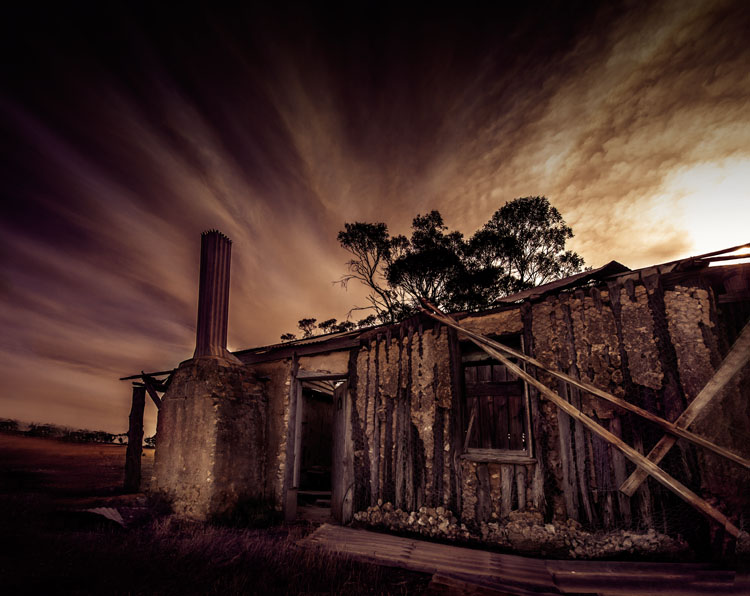
LeanneCole-architecture-006

An old home that no one has lived in for a long time. The clouds in the sky look like a long exposure, though they were just like that.

Architectural photography is not a prominent genre, yet so many people take photos of buildings, so why is it a subject that is not discussed a lot? Think about how often there is a building in your images.

Common types of architectural photography

Most people, if you ask them what architectural photography is, are likely to say real estate. It is probably the most common type and you do see it everywhere, but there are many other ways of taking photos of structures.

URBEX Photography

With the rise of URBEX (Urban Exploring) architecture is being photographed in a new way. Photographers are getting into abandoned structures to take photos. The decay and destruction that happens to a building after it has been abandoned, gives a new story to it. This is even more true with the items that are left inside the buildings, and these items help to give us a hint as to what was there before.

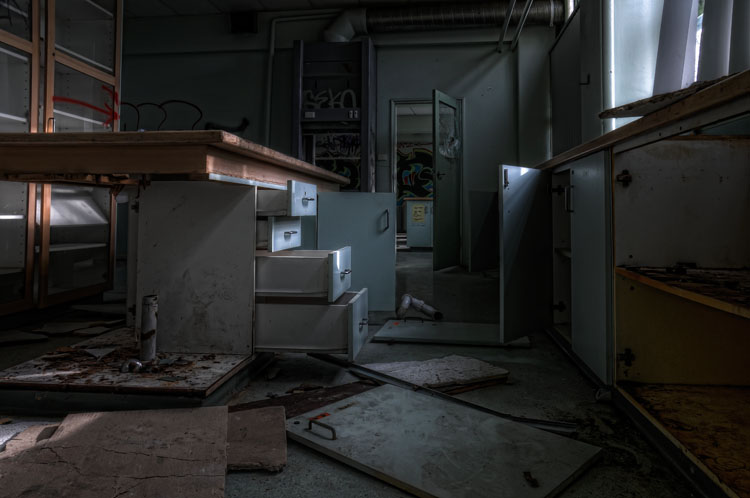
LeanneCole-architecture-008

URBEX exploring, an old school that was closed down and vandals have been into.

Long Exposure Photography

Long exposure photography is also very popular now. Neutral density filters (ND Filters) are used to give subjects a timeless feel, and using them on architecture has been as common, pointing the camera straight up to a building and photographing it as the clouds move behind it. Read: Using a 10 Stop Neutral Density Filter to add Drama to the Sky

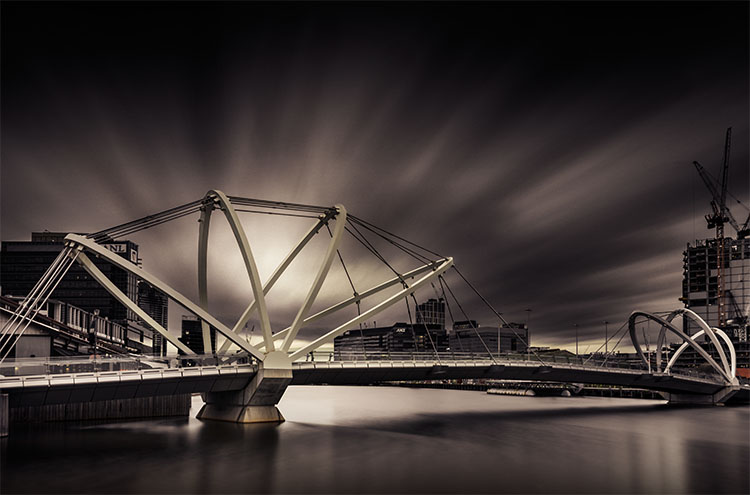
LeanneCole-architecture-009

The long exposure helps give the image a sense of drama and a better look at the architecture of the bridge.

Alternatively

Those are the most common sorts of architectural photography, but you can do other types as well. You can make the building the subject, and create your image around it. You can do fine art images using the buildings, and create moods or stories around them.

Architecture around you

As stated earlier, architecture is all around, and you don’t have to go far to find buildings to photograph. It isn’t necessary that the building be architecturally important, more that you find it interesting, as that will help you to engage with it. It can be about what the building is or was, and how much it meant to the area it is in.

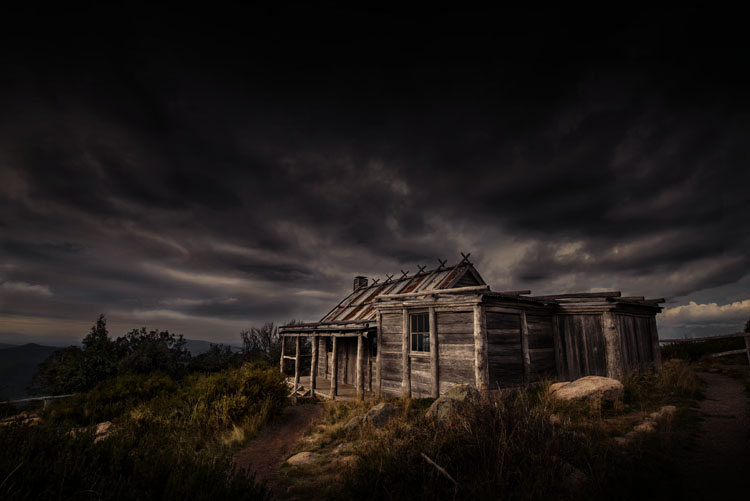
LeanneCole-architecture-005

An old hut on top of a mountain. Photographing it with the surrounds helps to place it, and the sky helps make it moody.

Different ways of photographing architecture

Most people seem to photograph buildings more as a record rather than as a work of art. Architecture can offer so much more, and you can get some amazing portrait style images.

There is the potential to tell stories. Whether that story is about what the building was used for, or what its function is now, you can use that to help take your images and process it afterwards. Maybe there is a certain part of it that you are very attracted to.

Photograph aspects of it

You don’t have to photograph the whole building. Think about parts of it that might make interesting images. It is so easy to forget that the light fittings are really interesting, or the doors might have wonderful carvings. If you find a building you like, tell the whole story of it and then select the parts that you like – photograph details. You can take more than one image.

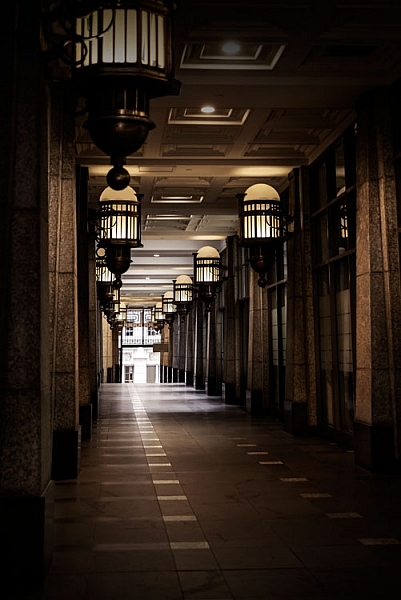
I really like corridors, more so if no one is in them, the idea of it going somewhere, or nowhere. It’s interesting to see what mood you can create with the hallway. Use the image to create a story that is there, or not.

LeanneCole-architecture-001

A walkway beside a building with interesting lights.

Look at the surroundings and how they can help tell the story

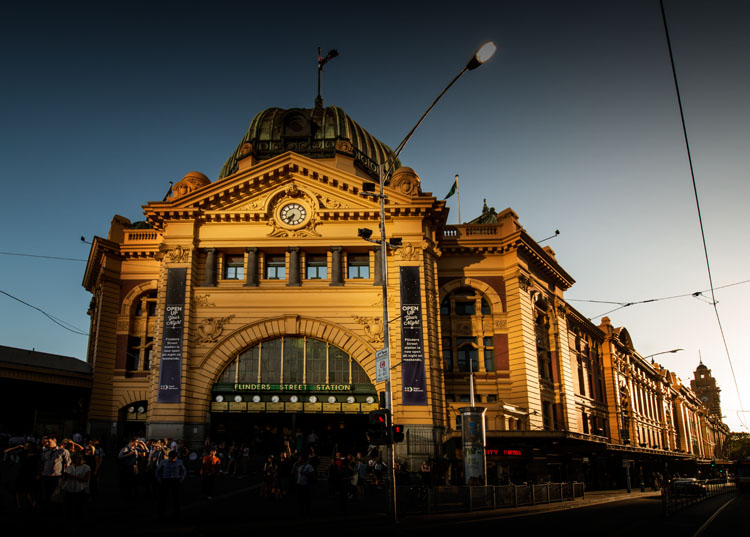
There can be more to what you see than just the building. Look at where the building is situated, and if other buildings or subjects around it can help place it. For example, a modern tower that is surrounded by buildings from the Victorian Era, or the other way around, provide an interesting context. An elaborate theatre that is in the midst of many shops that have closed down. They all help to provide a sense of place.

LeanneCole-architecture-004

The sun hitting the building, then light being reflected on the front from somewhere else gives the station a great look.

Colour or black and white

It is easy to think that everything should be in black and white. It is the artsy way of thinking, but it really shouldn’t be the only way. It should be a personal choice and what you want with your image.

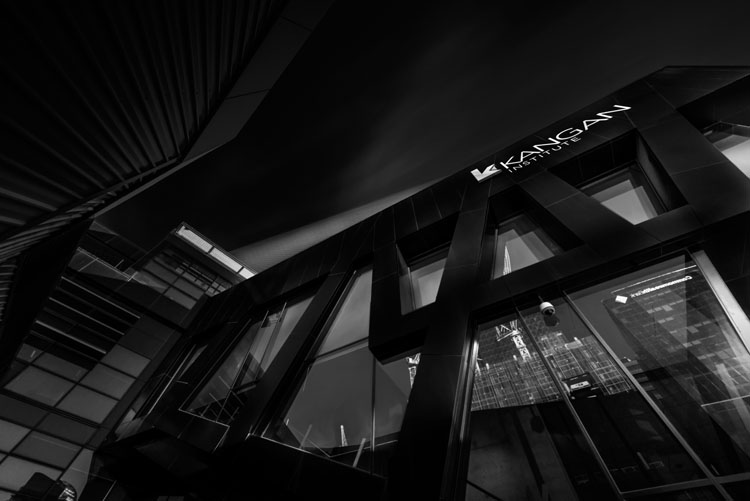
Maybe ask yourself some questions first. Does removing the colour add to the drama of the image? If you leave the colour in it will it distract from the story you are trying to tell? What time frame do you want to express? Is shape and form more important than what is there? If the answers to those questions are yes, then perhaps black and white is more suitable for that image.

LeanneCole-architecture-003

Looking straight up at a building is very popular, especially in black and white.

You get the idea, don’t just do black and white because you think that is what is expected for architecture. Make it a conscious choice, for a reason.

Processing

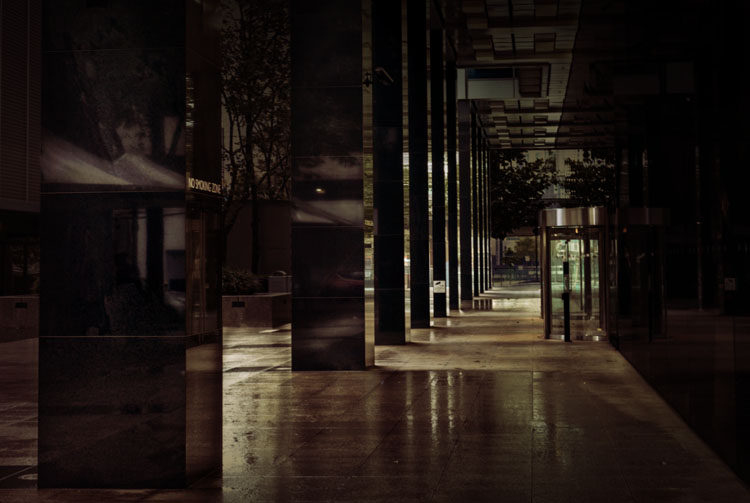
When it comes to how you process your images, it’s going to depend on the intention you have for the image. If it is to show the structure as it is, then you need to make sure that you only do basic processing.

LeanneCole-architecture-002

The wet ground was good for showing the reflections and making the most of an abstract view.

If you were commissioned to photograph a building, then you need to consider the goal, and how your client wants the final image. Do they want it to look like images that you already do, or perhaps with a different look? Remember your client is in charge of the final image and you need to be mindful of what they want.

On the other hand, if you have just taken the photo for yourself, then you don’t need to care about what other people want or like. You can process it anyway you like.

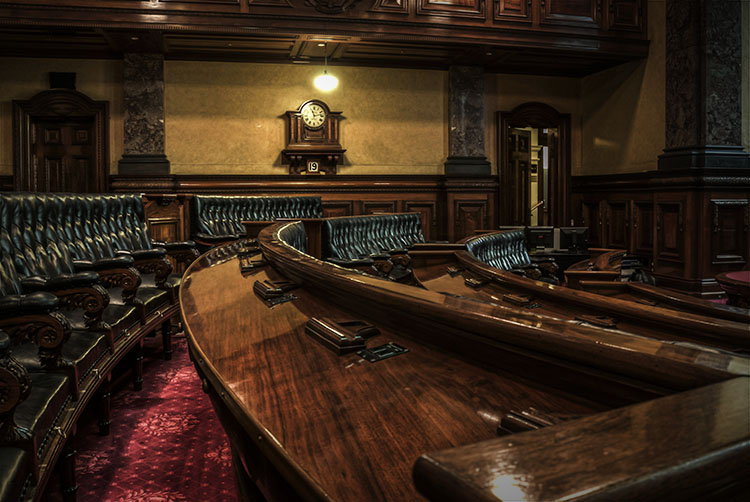
LeanneCole-architecture-007

Using the lines in the council chambers to take your eye to the clock.

This is where you get to show your individual style and experiment with your processing. Work out what you like, what you don’t, and create images of architecture that are uniquely yours. In many ways you have a lot more freedom to do what you like to it than other types of photography, like nature for instance.

In the End

With so many different types architecture, it is up to you to find what you like doing. Develop your style and make it yours. There is nothing better than people recognizing your work before they see your name.

Do you have any other ideas or tips for photographing architecture? Please share your thoughts and images in the comments below.

googletag.cmd.push(function() {
tablet_slots.push( googletag.defineSlot( “/1005424/_dPSv4_tab-all-article-bottom_(300×250)”, [300, 250], “pb-ad-78623” ).addService( googletag.pubads() ) ); } );

googletag.cmd.push(function() {
mobile_slots.push( googletag.defineSlot( “/1005424/_dPSv4_mob-all-article-bottom_(300×250)”, [300, 250], “pb-ad-78158” ).addService( googletag.pubads() ) ); } );

The post Tips for Different Approaches to Architecture Photography by Leanne Cole appeared first on Digital Photography School.

Digital Photography School

 
Comments Off on Tips for Different Approaches to Architecture Photography

Posted in Photography


Cows Of A Different Color: The Moooving Art Project

06 Jun

[ By Steve in Art & Installation & Sound. ]

moooving-art-1a
The Moooving Art project in Shepparton, Australia, promotes the region’s dairy industry via dozens of fiberglass cows creatively painted by local artists.

moooving-art-1e

moooving-art-2b

moooving-art-2a

The Moooving Art Project was established in 2002, inspired in part by the very successful “Merry Moos” campaign featured at the Shepparton agricultural show. So what’s the deal with Shepparton and cows, you might ask?

moooving-art-1d

moooving-art-1b

In a nutshell, Shepparton is the largest town in the Goulburn River valley, located just over 100 miles (175 km) north-northeast of Melbourne in Victoria, Australia. The region is Australia’s largest producer of dairy products and the aim of the project is to celebrate the positive impact the cow-driven industry has made on the local economy. Flickr user rotheche snapped some of these “outstanding in their field” designs in April of 2009.

moooving-art-10a

Though most of the models sport the standard bovine pose, a few feature out-of-the-ordinary modifications. Fancy some relaxing on the above “Cowch” whilst enjoying a sunny summer’s day down under?

Next Page – Click Below to Read More:
Cows Of A Different Color The Moooving Art Project

Share on Facebook


[ By Steve in Art & Installation & Sound. ]

[ WebUrbanist | Archives | Galleries | Privacy | TOS ]


WebUrbanist

 
Comments Off on Cows Of A Different Color: The Moooving Art Project

Posted in Creativity


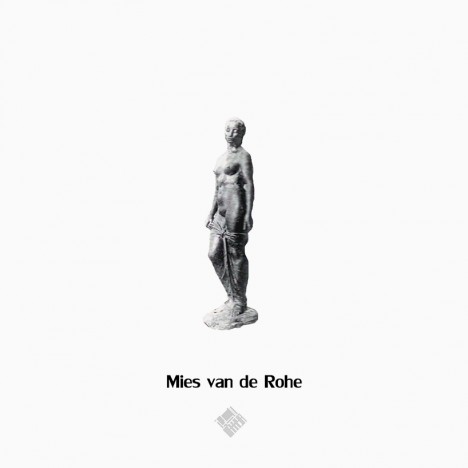
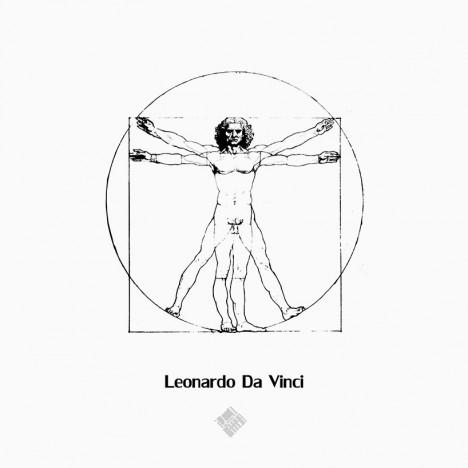
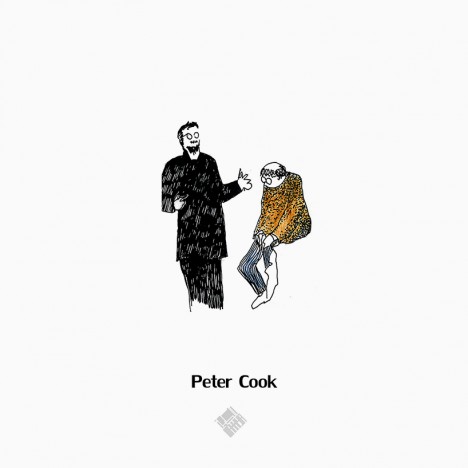
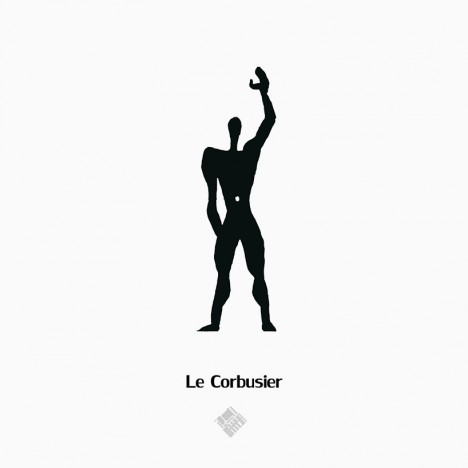
Famous Figures: How 21 Different Architects Draw Scale Humans

30 Mar

[ By WebUrbanist in Art & Drawing & Digital. ]

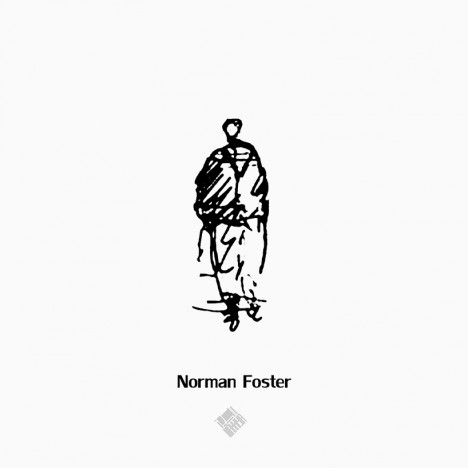
norman foster figure

Many contemporary architects cut and paste scale figures into their renderings to show depth and dimension, but in cases where they draw their own, aspects of their style and personality become apparent in the radical differences between their approaches.

frank gehry figure

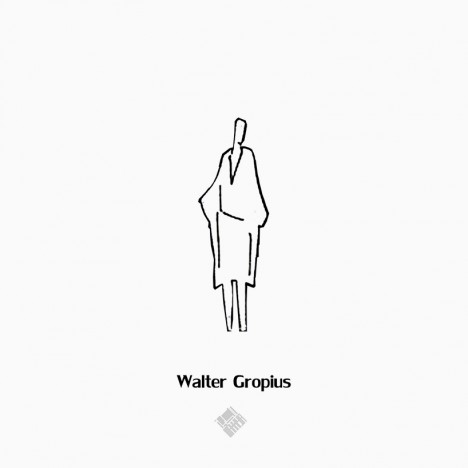
walter gropius figure

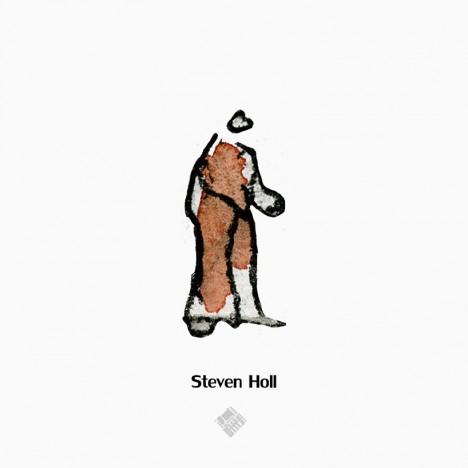
steven holl figure

Frank Gehry’s figure, perhaps predictably, is a mess of forms and shapes. Walter Gropius’ betrays a Bauhaus bent, all angles and boxes. Steven Holl, of course, is a lovely little watercolor, expressive and reflective of his well-known habit for creating daily water-colored sketches.

renzo piano figure

alvaro siza figure

New York architectural designer Noor Makkiya has collected twenty-one such examples for a series dubbed simply Figures, isolating them on neutral backgrounds to allow for easy side-by-side comparisons.

sanaa figure

mies van der rohe figure

The variations are dramatic, between highly-stylized forms to simplified human figures or completely abstract sets of shapes forming nearly-illegible avatars, all showing something about the architect behind them and how they choose to represent their work.

santiago calatrava figure

lenoardo de vinci figur

From the collector: “Human figures are typically used in an architecture rendering to provide a clear scale for the common eye. Thanks to new technologies like Photoshop we have lost our “ontological dimension”, and the copy paste method we use makes it easier for us to fill architecture renderings with a desultory crowd of figures.”

peter cook figure

oscar neymeier figure

le corbusier figure

“True architects since the early centuries used human figures not only to describe the quantity and the quality of the environment but also for deeper purposes of study and expression. Some used it as means of architecture inspiration, demonstrating the divine power of the human order. Other architects use human figures to emphasize on the activity within the space, sometimes it is important to depict the spatial properties of a design. Architects project themselves into the human figure. So if we compare drawings from different architects, we frequently find differences in body shape and body activity, for practicing architects often represent their own ideologies as a reference for understanding the human physical condition.”

Share on Facebook


[ By WebUrbanist in Art & Drawing & Digital. ]

[ WebUrbanist | Archives | Galleries | Privacy | TOS ]


WebUrbanist

 
Comments Off on Famous Figures: How 21 Different Architects Draw Scale Humans

Posted in Creativity


How to Create 5 Different Looks Using Lightroom

24 Nov

Most often you may strive to capture photos which most closely reflect the scene the way it looks to your eye.
On the other hand, with having powerful editing software at your fingertips and an insatiable creative streak, sometimes you may find yourself experimenting with altering your images to create different “looks”.

setting moods in lightroom

Lightroom gives you ample opportunity to experiment with creative effects.

Some photographers find the idea of strong post-processing edits to be an unfair alteration of reality, but let’s face it, it can be loads of fun to play around with photos in Lightroom (LR) or Photoshop (PS) and the results can be stunning – even if they don’t accurately reflect the shooting conditions.

It’s important to keep in mind that edits don’t have to be super-strong or over the top, and just a few fairly minor changes can work wonders to create a mood that fits the photo. Naturally, what works and what doesn’t is subjective. That being said, it’s likely you wouldn’t want to use a soft, bright effect on a portrait of prison inmate, or a dark gritty effect on photos of a newborn.

The extent to which you are able to apply these effects will be largely influenced by the original file type. If you are working with JPEG, you are going to run into problems with color rendition, saturation, noise and other issues. If you plan on processing your photos with editing software, I recommend shooting RAW files 100 percent of the time.

#1 Add Warmth

setting a warm mood in lightroom

The warming effect works best to boost an already warm photo, but can also be created.

When trying to create a certain mood in a photo, it makes it easier if some of the characteristics of that mood are already present, and you can just accentuate them. This is especially true if you want to create a warm feeling in a photo.

The first slider you’re going to want to visit for this is color temperature. Increasing the color temperature is going to give the entire image a warmer tint, which can be exaggerated by increasing vibrancy.

Another way to boost the warmth is in the HSL/Color/B&W panel. HSL stands for hue, saturation and luminance which can be adjusted for eight different colors. You will work with the first three – Red, Orange and Yellow. I prefer to start with the Luminance tab, and find that decreasing luminance, and then sometimes increasing saturation slightly, works pretty well with many images.

Although you don’t have access to the HSL panel, don’t forget the power of the graduated filter to increase the warming effect in skies – particularly in sunset photos.

#2 Dark and Gritty

dark and gritty mood

The dark and gritty mood adds a brooding look and highlights detail, while taking the focus off of colors.

To achieve various levels of this effect, I work with various combinations of the following:

  • Increasing Clarity, sometimes more than 100 per cent by using graduated filters or the adjustment brush
  • Increasing Contrast, and decreasing Highlights and Whites
  • Further tweaking contrast with the Tone Curve sliders
  • Decreasing Saturation and Vibrance, or converting to black and white
  • Adding grain in the Effects panel

#3 Light and Airy

light and airy look

Light and airy is a good look for soft portraits, where super sharpness isn’t desired.

For this look, the idea is to make the image soft without any harsh shadows. Here are some steps to take that will start to produce this mood:

  • Lower Contrast
  • Increase Highlights and Whites sliders
  • Decrease Shadows and Clarity

Also note that a light hand with the sharpening slider should be used here to maintain the softness. If you add sharpening, try using a high value for masking to lessen the global affect.

#4 Silhouette

silhouette look

Silhouettes help to simplify your photo.

You certainly can’t create this effect in just any photo – nor should you. Look for elements in the image that would be enhanced by a reduction in detail. Do the areas of the image that are going to be reduced to black contain details that are important to telling the story?

Here are some adjustments that will get you moving in the right direction:

  • Increase Contrast
  • Decrease Shadows and Blacks sliders
  • You can decrease the darks and shadows sliders in the Tone Curve panel if needed

Depending on your image, you likely want to avoid the clarity slider as this will bring back shadow details that you’re trying to get rid of.

#5 Bright and Clear

bright and clear look

The bright and clear look makes your photos pop with lots of detail.

Along similar lines to the light and airy effect, you are looking to boost lightness while maintaining contrast and retaining detail and color. Here are some of the edits I start with while aiming for this look:

  • Boost Contrast
  • Increase Shadows
  • Increase Whites – you usually have to decrease highlights a bit as well to avoid clipping
  • Visit the Tone Curves panel if you need to work on the contrast more

The trick here is that after making these adjustments, the colors can get a bit washed out. A visit to the HSL panel, some tweaking of the luminance and saturation of the dominant colors in your image, will help you dial it in.

Conclusion

In case this hasn’t crossed your mind already, creating presets of these settings can save you oodles of time later on. Of course, all of the adjustments I’ve outlined above may not work on your original image (depending on exposure, contrast, saturation, subject matter, etc.), and the same goes for any presets which typically only serve as a starting point.

What tricks do you have up your sleeve for creating different moods in post-processing?

googletag.cmd.push(function() {
tablet_slots.push( googletag.defineSlot( “/1005424/_dPSv4_tab-all-article-bottom_(300×250)”, [300, 250], “pb-ad-78623” ).addService( googletag.pubads() ) ); } );

googletag.cmd.push(function() {
mobile_slots.push( googletag.defineSlot( “/1005424/_dPSv4_mob-all-article-bottom_(300×250)”, [300, 250], “pb-ad-78158” ).addService( googletag.pubads() ) ); } );

The post How to Create 5 Different Looks Using Lightroom by Jeremie Schatz appeared first on Digital Photography School.


Digital Photography School

 
Comments Off on How to Create 5 Different Looks Using Lightroom

Posted in Photography


Samsung Galaxy S6 units found to be using different image sensors

07 May

When the Galaxy S6 and S6 Edge were launched earlier this year there was no talk of the ISOCELL technology previously used by the Galaxy S5’s and Note 4’s in-house image sensors, so it was believed the 16MP 1/2.6 CMOS chip in the S6 was provided by Sony. However, rumors have emerged that in some units Samsung sensors are used instead of the Sony variant, and a company spokesperson has confirmed that different sensors are used. Read more

Articles: Digital Photography Review (dpreview.com)

 
Comments Off on Samsung Galaxy S6 units found to be using different image sensors

Posted in Uncategorized


And Now For Something Different: Voigtländer 40mm f/2.8 Heliar samples and impressions

06 May

Voigtländer is one of the oldest names in photography, with a long history of making cameras and lenses. Recently, the company has turned its focus from affordable M-mount lenses to lenses with digital cameras in mind. We recently got our hands on the 40mm VM f/2.8 Heliar, made specifically for full-frame and APS-C Sony E-mount cameras. Read more

Articles: Digital Photography Review (dpreview.com)

 
Comments Off on And Now For Something Different: Voigtländer 40mm f/2.8 Heliar samples and impressions

Posted in Uncategorized


38 Images of Different Ways to Bring in the New Year

02 Jan

What does a starting a new year mean for you? Is it about parties and drinking cocktails? Or maybe fireworks and celebration in a loud way (like here in Nicaragua)?  Perhaps you sit at home and watch it all on TV as the apple drops in NYC over Times Square.

Or maybe you take some time to reflect and meditate on what you achieved over the last year and think about your goals, dreams and plans for the next 12 months? Does it slip past midnight quietly with you tucked snugly into your bed?

Holiday time and new year can mean many different things to different people, including how it is celebrated. So I rounded up a set of images that represent some of the different options. How did you celebrate or spent you New Year’s eve?

One door (2014) closes and another opens (2015).

How will you get started in 2015?

Photograph Balloons pink and white background by Jesper  Hilding Klausen on 500px

Balloons pink and white background by Jesper Hilding Klausen on 500px

Photograph Champagne glass by Vadim Kolobanov on 500px
Champagne glass by Vadim Kolobanov on 500px

Photograph Sydney NYE Fireworks by Night Raven on 500px

Sydney NYE Fireworks by Night Raven on 500px

Photograph Happy New Year by Ahmad Jasem on 500px
Happy New Year by Ahmad Jasem on 500px

Photograph The Wish by La Mo on 500px

The Wish by La Mo on 500px

Photograph "No Light Painting...no party!" by Paolo Lombardi on 500px
“No Light Painting…no party!” by Paolo Lombardi on 500px

Photograph Champagne and Strawberry by Emily  Soto on 500px

Champagne and Strawberry by Emily Soto on 500px

Photograph AVIVA (Platinum - Pink Gold - Gold) by David Vega on 500px
AVIVA (Platinum – Pink Gold – Gold) by David Vega on 500px

Photograph Greetings by Gynt S on 500px

Greetings by Gynt S on 500px

Photograph Celebrate with champagne by Paulo Gonçalves on 500px
Celebrate with champagne by Paulo Gonçalves on 500px

Photograph Bubbling Champagne in a Glass by Brent Hofacker on 500px

Bubbling Champagne in a Glass by Brent Hofacker on 500px

Photograph Champagne by Leanid Grushetsky on 500px
Champagne by Leanid Grushetsky on 500px

Photograph Inception by Sarah Karjalainen on 500px

Inception by Sarah Karjalainen on 500px

Photograph Watching Television by Chris Frear on 500px
Watching Television by Chris Frear on 500px

Photograph H'mong inside by Arnaud Foucard on 500px

H’mong inside by Arnaud Foucard on 500px

Photograph Man watching TV by Nemanja Bodroza on 500px
Man watching TV by Nemanja Bodroza on 500px

Photograph Woman in bed with popcorn by Rob Byron on 500px

Woman in bed with popcorn by Rob Byron on 500px

Photograph Woman at gym. by Ron Chapple on 500px
Woman at gym. by Ron Chapple on 500px

Photograph Meditation by Nasser Al-Ghanim on 500px

Meditation by Nasser Al-Ghanim on 500px

Photograph Urban Serenity by Nadav Jonas on 500px
Urban Serenity by Nadav Jonas on 500px

Photograph Meditation by Alex Z on 500px

Meditation by Alex Z on 500px

Photograph Bear Introduction by Jeff Lewis on 500px
Bear Introduction by Jeff Lewis on 500px

Photograph Let the Game Begin by Arthur Schroeder on 500px

Let the Game Begin by Arthur Schroeder on 500px

Photograph Seahawks x Saints by Jordan Gerdes on 500px
Seahawks x Saints by Jordan Gerdes on 500px

Photograph Epic Incomplete Pass by Ryan Sims on 500px

Epic Incomplete Pass by Ryan Sims on 500px

Photograph Gloomy Sunday - San Francisco, CA by Kyu Kim on 500px
Gloomy Sunday – San Francisco, CA by Kyu Kim on 500px

Photograph Seahawks Russell Wilson scambles by Matt McDonald on 500px

Seahawks Russell Wilson scambles by Matt McDonald on 500px

Photograph Times Square by night by Fabio Nodari on 500px
Times Square by night by Fabio Nodari on 500px

Photograph Soul by Tatyana Nevmerzhytska on 500px

Soul by Tatyana Nevmerzhytska on 500px

Photograph Vintage Dreams III by Sarah Van Dyck - Moore on 500px
Vintage Dreams III by Sarah Van Dyck – Moore on 500px

Photograph Future 500 pixer by Kevin Cook on 500px

Future 500 pixer by Kevin Cook on 500px

Photograph Best Buddy by Mike Wölfle on 500px
Best Buddy by Mike Wölfle on 500px

Photograph Erin by Berit Alits on 500px

Erin by Berit Alits on 500px

Photograph Thinking Gears by Cade Martin on 500px
Thinking Gears by Cade Martin on 500px

Photograph Meanwhile in Finland by Miska Lehto on 500px

Meanwhile in Finland by Miska Lehto on 500px

Photograph believe it or not by Sebastian Freitag on 500px
believe it or not by Sebastian Freitag on 500px

Photograph doors ... by Paladyan Konstantin on 500px

doors … by Paladyan Konstantin on 500px

Photograph Reflections in the street by Edgar Monzón on 500px
Reflections in the street by Edgar Monzón on 500px

googletag.cmd.push(function() {
tablet_slots.push( googletag.defineSlot( “/1005424/_dPSv4_tab-all-article-bottom_(300×250)”, [300, 250], “pb-ad-78623” ).addService( googletag.pubads() ) ); } );

googletag.cmd.push(function() {
mobile_slots.push( googletag.defineSlot( “/1005424/_dPSv4_mob-all-article-bottom_(300×250)”, [300, 250], “pb-ad-78158” ).addService( googletag.pubads() ) ); } );

The post 38 Images of Different Ways to Bring in the New Year by Darlene Hildebrandt appeared first on Digital Photography School.

Digital Photography School

 
Comments Off on 38 Images of Different Ways to Bring in the New Year

Posted in Photography