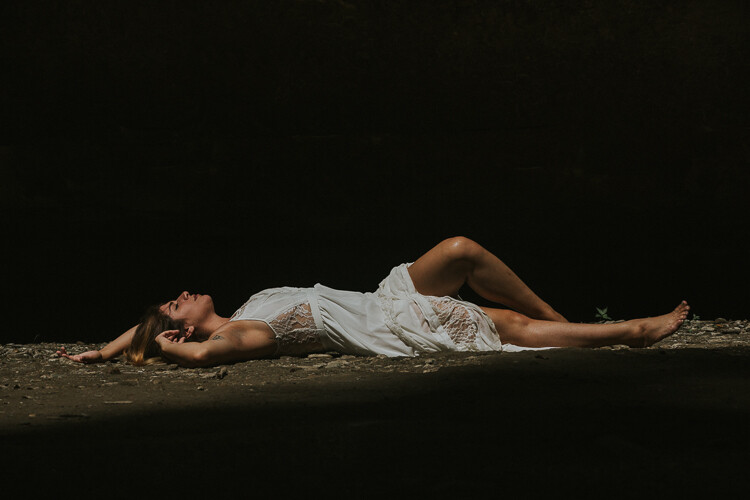
RSS
 

Posts Tagged ‘Different’

Focus on Photographing a Different Color Each Day to Practice the Art of Seeing

22 Mar

Color is all around us. As beautiful as black and white can be, color gives us variety and sometimes, unpredictability. But funnily enough, it’s also easy to take it for granted.

Over time, I’ve come up with a few exercises to keep color at the forefront of my mind. One of these exercises is to focus on photographing a different color each day. It’s great for keeping your photography fresh and training your eyes to look out for new photographic opportunities.

Getting started

Color may make up the majority of our world, but photographing it might not be as easy as you think. Sometimes the abundance of color can be overwhelming, and sometimes it’s hard to find the color you’re looking for at all! Before taking up the challenge, grab a pen and paper. Write down a heading for each color and list as many different things you can think of under each. Sometimes it’s even worth Googling specific color schemes, just to give you some ideas of what to look for.

Next, designate a day for each color you would like to photograph. And it doesn’t have to be the generic gamut of colors either. Why not try looking out for a more pastel pallet? Soft pinks, greys, and blues make wonderful, atmospheric photographs. More earthy colors like oranges, browns and dark greens are great colors to keep a look out for in Autumn.

Look for bold colors…

Humans have evolved to seek out bold coloration. Deep, saturated colors catch the eye and pull the viewer in for a closer look. A bold color scheme emphasizes texture and shape, especially within a limited color pallete.

Focus on Photographing a Different Color Each Day to Practice the Art of Seeing

Deep, saturated colors catch the eye and pull the viewer in for a closer look.

And a softer color pallete…

Color photography doesn’t always have to be about a bold color scheme. Subtle or almost monochrome color schemes emphasize detail and lend a softer atmosphere to a photograph.

Pastel photographs are best taken during cloudy or low-light days to minimize shadows for a more even-toned image.

Focus on Photographing a Different Color Each Day to Practice the Art of Seeing

Softer pastels like pink and purple can add color without overpowering the image.

Why not both?

Focus on Photographing a Different Color Each Day to Practice the Art of Seeing

The foreground of this image is made up of bold, contrasting colors while the background is predominantly made up of a soft pink pallet. The bold and soft colors emphasize each other and create a more dynamic image. The negative space around the top half of the image is important too, it maintains balance, making sure the full extent of the color palette isn’t too overwhelming.

The opportunity to combine both soft and bold colors doesn’t happen frequently, but you’ll know when it does. Combining the two color schemes creates a dynamic image where bolder and softer colors reinforce each other and bring the image together.

Using movement

Color can accentuate camera movement, and movement can accentuate color. It’s a well-loved dichotomy that is great for abstracted imagery.

Try taking photographs out a moving car window or bus. A slow shutter speed in the late afternoon will allow enough light to create a softness of color.

This image was taken with a slow shutter speed while traveling through the outback. The afternoon light mingles with the light of traveling cars to make a soft, atmospheric abstracted photograph.

Detail

Colour has the power to illuminate detail, adding to the depth of a photograph overall. In a good image, color is the cherry on top – the final pop of color to resolve your photograph.

Focus on Photographing a Different Color Each Day to Practice the Art of Seeing

The subtle yellow road sign and red symbols add detail to an image and invite the viewer in for a closer look.

Look for color in unusual spots

Like I mentioned before, finding your selected color of the day may prove surprisingly tricky. Focusing on red one day will take you on a completely different journey than if you were looking for blue subjects.

Try looking in less frequented locations for unusual colors and patterns. Or take a drive and explore a new location altogether. Changing your perspective or focusing on compositional techniques like leading lines and texture can help get those creative juices flowing.

Focus on Photographing a Different Color Each Day to Practice the Art of Seeing

A red pallete for Monday. Trying to look for unusual perspectives often yields unexpected results, revealing your color of the day in new and interesting ways.

Focus on Photographing a Different Color Each Day to Practice the Art of Seeing

Wednesday’s color pallete, green and blue tiles adorn an urban walkway.

Conclusion

While color is all around us, it’s easy to take for granted. Simple exercises like focusing on photographing a particular color each day help keep your practice fresh and unique.

Keep your eyes peeled and don’t be afraid to explore, color often reveals itself in unexpected and fascinating ways!

The post Focus on Photographing a Different Color Each Day to Practice the Art of Seeing by Megan Kennedy appeared first on Digital Photography School.


Digital Photography School

 
Comments Off on Focus on Photographing a Different Color Each Day to Practice the Art of Seeing

Posted in Photography


Working with Different Focal Lengths for Macro Photography

07 Mar

At some point in your photography journey you may be fascinated by pictures capturing living creatures in great detail, flowers close-up, and in general intimate vistas, which may go unnoticed in our daily viewing habits. Such shots are commonly described as macro photography.

Working with Different Focal Lengths for Macro Photography - red flower

The purpose of this article is to provide you with theoretical and practical insight, to help you select lenses for macro photography with focal lengths suitable for your style.

What is macro photography?

The Collins English Dictionary defines macrophotography as: extremely close-up photography in which the image on the film is as large as, or larger than, the object. Extending this definition into the world of digital, the word “film” can be replaced by “sensor”.

The terms magnification and reproduction ratio (RR) are two ways of quantifying this definition. They describe how big the capture on the sensor is as compared with the subject you are photographing.

  • “As large as” means that whatever object is captured it is the same size om the sensor as it is in real life (magnification of 1x or x1 and RR of 1:1).
  • “Larger than” means if the image on the sensor is N times the actual life size of the subject, the magnification is then Nx and the RR is N:1.

An important distinction has to be made between the image on the sensor and the printed image. 1cm of object captured on 1cm of sensor may appear on a typical 10x15cm print as much bigger than 1cm.

It is important to note that not all lenses are capable of reaching 1x (1:1) magnification, even if they contain macro in their name. So it is important during your gear selection to know what is a true macro versus a marketed as a “macro” lens. This does not mean that you cannot and will not make breathtaking close-up pictures with that lens, it just means that you will only able to reach lower magnifications and RRs (e.g. a 0.25x magnification = RR of 1:4)

Now that we have established the realm of macro photography, there are a couple of other terms that are essential in this article.

Other definitions

Minimum focusing distance (MFD). This is a lens’s construction characteristic. According to Nikon, MFD is the shortest distance at which a lens can focus. In the case of DSLR Cameras, the focus distance to the subject is measured from the focal plane mark on the camera body, not from the front of the lens. MFD is important because 1:1 or life size RR only happens at the MFD of any true macro lens.

2 focal plane mark - Working with Different Focal Lengths for Macro Photography

The focal plane mark on a D750 is shown below to the left of the strap handle.

Minimum working distance (MWD). This is the distance from the subject to the front of the lens barrel (excluding the lens cap if used), while the lens is set to its maximum magnification (i.e its MFD).

On the web, there are various tools to help calculate MWD. This is a lens and camera combination characteristic, as different cameras contribute differently to the MWD (even if minimally so). A simple graph illustrating MFD and MWD is shown below.

MFD MWD - Working with Different Focal Lengths for Macro Photography

The purpose of this article is to practically demonstrate the difference in Minimum Working Distance between two lenses of different focal lengths, as well as some implications that arise from this difference.

Gear and settings

For the examples used in this article, two macro lenses, the Tokina 35mm f2.8 and the Sigma 150mm f2.8 were mounted on a Nikon D750. This will demonstrate the MWD difference between two considerably different focal lengths (short versus long).

4 Tokina 35 Sigma150

5 D750 - Working with Different Focal Lengths for Macro Photography

The supporting platform (all-important for macro photography) consisted of a SIRUI T-025X carbon-fiber tripod, a Manfrotto 410 Junior Geared Tripod Head and a Velbon Super Magnesium Slider Macro Rail. A Nikon ML-L3 remote was used to trigger the shutter to avoid adding additional vibrations.

6 Platform tripod - Working with Different Focal Lengths for Macro Photography

Quick comparison

Let’s start with a 1:1 macro shot of an everyday item like a coin. In the photographs below the coin was shot 1:1 with both the 35mm and 150mm lenses. Rulers were placed to show the sensor size of 35.9 x 24.0 mm. The difference of a few mm is probably ruler set-up error on my part.

35mm lens

Ruler in cm and mm showing the size of the image on the sensor. This is 1:1 which would be 24x36mm.


The distance needed to shoot the coin at 1:1 with the 35mm lens.

150mm lens

1:1 shot showing the images size on the sensor, 36mm which is fully 100% for a full frame sensor 24x36mm.


The distance needed to shoot the coin at 1:1 with the 150mm lens.

I measured an MWD of 19.5cm for the 150mm and only 1.8cm for the 35mm!

To see how this big difference affects a real-world shooting scenario, the owner of a close by flower shop allowed me to use his grounds and beautiful flowers. Continue reading for more info on this.

Doing macro photography of flowers with different focal lengths

To obtain the 1:1 photo shown below, the 35mm lens needs to actually be on top of the bulb as shown in the second shot.

10 150 bulb

A similar shot was done using the 150mm lens.

9 35 MWD

35mm lens in close to get a 1:1 shot.

11 150 MWD

While getting a similar photo with the 150mm lens is much more comfortable.

12 screen

The settings for both flower macro shots were as seen here.

Focal length matters even more in macro photography

Macro photography is exciting. In the words of Roman Vishniac, “In nature every bit of life is lovely. And the more magnification we use, the more details are brought out, perfectly formed, like endless sets of boxes within boxes.”

However, in my experience, macro has more gear and technical considerations than other popular subjects (e.g., portrait or landscape), especially as magnification goes up. One primary point of concern is the Minimum Working Distance of the lens used (true macro or not). This will determine significantly, in my view, the ease of use of the lens and the subsequent willingness you may (or may not) show towards doing macro photography.

Working distance issues

Apart from static subjects, where you may be okay to handle a short MWD. But if at some point you want to shoot bees or other living critters, then most probably you will want a longer MWD. This will help you to not scare away your subject and also to avoid being bitten/stung by it.

Additionally and importantly, a longer working distance will allow access to more light (natural or flash). You can imagine the limitations trying to introduce extra light to the 35mm setup shown above. Things will get even more cramped if you introduce closeup lenses or do lens reversal to reach even higher magnifications.

A rough proposed working classification of focal lengths in macro photography could be as follows:

  • Focal lengths up to 60mm – Useful in product photography (e.g. jewelry) and small objects that can be approached and lit in a controlled environment.
  • 60-150mm – Usable with caution for insects, flowers, and small objects from a greater distance.
  • Above 150mm – Ideal for critters where additional working distance and additional lighting options are preferred.

Finally, there are other considerations, such as perspective differences due to varying focal lengths. These are more aesthetic than technical and not in the scope of this article.

The post Working with Different Focal Lengths for Macro Photography by Konstantinos Skourtis appeared first on Digital Photography School.


Digital Photography School

 
Comments Off on Working with Different Focal Lengths for Macro Photography

Posted in Photography


How to Make 5 Different Looks using Aurora HDR 2018

31 Jan

Aurora HDR 2018 has plenty of tricks up its sleeve, and one of those is versatility. It’s not a one-trick pony when it comes to creating your HDR look. The range of different tools really allows you to create a huge variety of looks really easily. Part of that is knowing what your available tools do. The other part is just playing around and exploring your own creative side!

In this article, you’ll see five different looks in HDR and how you can recreate them – but on top of that, you’ll also get them in preset form to use yourself. You’ll also get to see some of the new Lens and Transform options inside Aurora HDR 2018.

Plug it in

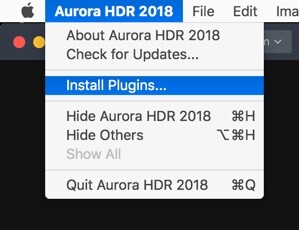
Aurora HDR 2018 doesn’t have a way to manage files, but can easily be used from other applications including Lightroom. In fact, you’ll even be able to process the files using Aurora’s built-in HDR processor, so you’re not trying to combine three already rendered files. To run Aurora HDR 2018 from inside Lightroom, you’ll need to run the standalone version first. From the Edit menu on PC or the Aurora HDR Menu on Mac, choose the Install Plugins.. menu item.
How to Make 5 Different Looks using Aurora HDR 2018

From the dialog that appears, choose the host applications that you want to use.

How to Make 5 Different Looks using Aurora HDR 2018

Back in Lightroom, once you’ve selected the bracketed exposures you want to edit, go to the File menu and from the Plug-In Extras menu, choose Transfer to Aurora HDR 2018.

How to Make 5 Different Looks using Aurora HDR 2018

Getting Started in Aurora

Aurora HDR 2018 will load up with your selected bracketed sequence. I’ve chosen these photos specifically because they have lens distortion and a crooked horizon, which you’ll see how to correct shortly.

Once the files have loaded, you can set about working with alignment and ghosting settings. You’ll see the sequence and the bracketing interval in the photos. To align the photos if you’re not on a tripod, click Alignment. To access the other settings, click the cog you see on the bottom left (see below).

How to Make 5 Different Looks using Aurora HDR 2018

If you’ve got photos with moving objects in them, such as waves, trees in the wind or moving people, turn Ghost Reduction on. Choose your preferred reference image, and how strong you want the reduction to be. Color Denoise helps remove noise but increases the time your HDR takes to render. Finally, turn on Chromatic Aberration Removal to automatically get rid of color fringing on your photo.

How to Make 5 Different Looks using Aurora HDR 2018

How to Make 5 Different Looks using Aurora HDR 2018

Lens and Perspective Corrections

In the Filters header, you’ll see two icons. The first is for Perspective corrections or Transform (including rotation) and the second for Lens corrections.

The little odd looking shape is for Perspective and the round one is Lens Corrections.

You can fix rotation here (or using Crop as well) by clicking the Perspective icon. Rotation of 24 and Scale of 50 correct this image nicely.

How to Make 5 Different Looks using Aurora HDR 2018

Transform sliders correcting perspective.

Your penultimate step before going to the individual HDR looks is to fix the bow in the horizon caused by the wide-angle lens. A setting of 18 looks good for this photo. It also reveals that 24 was too much in the previous step, which you can always fix by going back to Perspective correction. 19 looked better zoomed in.

Lens Correction fixing distortion caused by wide lenses.

As the photo is a little underexposed, boosting the Exposure before going to create your looks is probably a good idea. While you may need to change this for each look, an additional stop is a good start here.

How to Make 5 Different Looks using Aurora HDR 2018

#1 Photo-Realistic

For your first look, something photo-realistic is the best approach. You’re not trying to get anything gritty, or super desaturated, or over saturated here. We’ll get to that later.

For this look, use HDR Basic, Color, and HDR Denoise. In HDR Basic, smooth out the dynamic range by reducing Highlights and increasing Shadows. Smart Tone of 44 also helps it along. HDR Enhance (formerly Clarity) brings up some nice detail, 50 is looking well here. Your aim is to get the best looking photo you can before tweaking the look – this will be true of all looks.

How to Make 5 Different Looks using Aurora HDR 2018

The color is a little flat so in the Color panel, you can boost both Saturation and Vibrance to +20. Color contrast, which controls the contrast between the primary and secondary colors looks good around 20 as well. You’re not aiming for extremes here, just to get a good looking photo.

How to Make 5 Different Looks using Aurora HDR 2018

You’ve probably noticed the noise in the clouds at this point. This is where HDR Noise comes in. Setting this to around 25 softens up the noise.

How to Make 5 Different Looks using Aurora HDR 2018

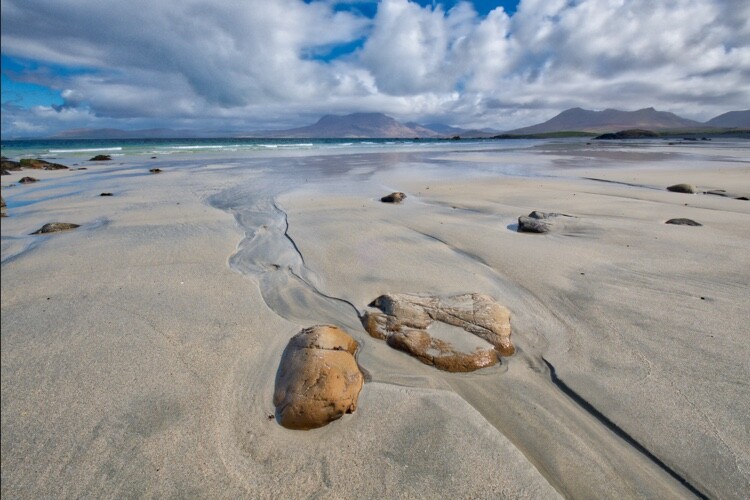
And that makes your first look, a photorealistic HDR photo.
How to Make 5 Different Looks using Aurora HDR 2018

#2 Gritty HDR

With the basic look out of the way, it’s time for the more surrealistic to take over.

Start by using the History Panel to reset everything to your original starting point AFTER increasing the Exposure +1 and applying your Perspective and Lens Corrections. The History Panel records every action you take in Aurora HDR in chronological order, so simply select the last action after the ones you’d like to save, then begin the next edits. The History Panel will begin recording any edits from there leading to your Gritty HDR look!

Now it’s pretty flat and bleak, so you’re going to take it even further in that direction.

How to Make 5 Different Looks using Aurora HDR 2018

Set your HDR Enhance to +100 to get the bleak and gritty ball rolling. Smart Tone of -50 darkens the photo as well, and a hint of Vibrance (+15) gives color to the sky, while leaving the rest of the photo muted.

How to Make 5 Different Looks using Aurora HDR 2018

To complete your gritty look, go to the HDR Structure panel. In the top section, set Amount to 25 to begin to increase detail in the photo. Increasing Softness (+80) makes the detail more realistic, while Boost accentuates it (+75). The latter two sliders might seem at odds, but a quick play shows they complement each other rather than compete.

HDR Microstructure boosts micro contrast, while Softness makes it more realistic. By increasing Amount to 71 and Softness to 28, you’ll get even more detail. You may even like the noise that this processing adds to the photo. I think it’s a big part of the look.

How to Make 5 Different Looks using Aurora HDR 2018 - gritty HDR look

And now you have your classic gritty HDR look!

How to Make 5 Different Looks using Aurora HDR 2018

#3 Warm Ethereal

At the opposite end of the spectrum is a soft and ethereal look. There are two different variations you can have on this, and they depend on using Image Radiance or Glow (and combinations of each). So with a reset to your basic corrected photo, let’s begin again!

A good beginning would be for a warmer look, so set your Temperature in HDR Basic to 10. While Image Radiance does have a Warmth slider, Temperature is much more effective. This look is all about Image Radiance. Set your Amount to 75 to really give the image a glow. Smoothness affects the softness of the image, and in this case, you’ll probably agree, it’s a little too soft, so set it to -50.

Overall at this point, the photo is too bright, so a reduction in Brightness to -76 helps. Darkening Shadows also helps. Finally, for Image Radiance, an addition of +61 Vividness to boost the saturation, while Warmth just adds another hint of yellow tones in a more controllable way than with Temperature.

How to Make 5 Different Looks using Aurora HDR 2018

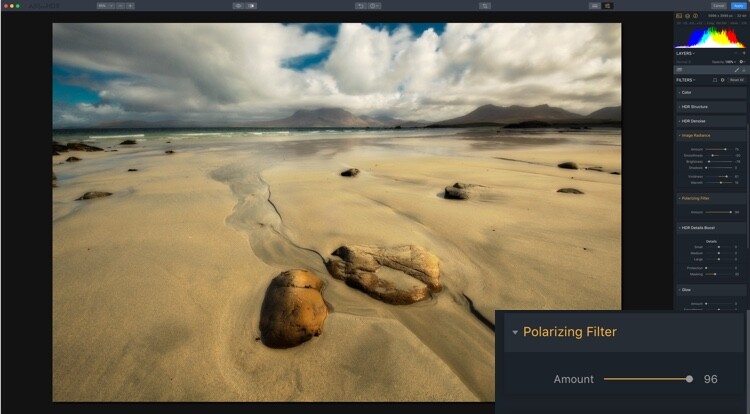
There’s a lot of warmth in the photo (in a good way), but you may want to add a little contrast of color into it. By using the Polarizing Filter, you can add more blue to sky, emulating a real circular polarizer.
How to Make 5 Different Looks using Aurora HDR 2018

The final thing for this look is for you to introduce a little global detail using HDR Detail Boost. As you can guess Small affects the fine detail, Large affects the global contours of the photo, while Medium controls the details between Small and Large.

To sharpen the global edges, you can push Large. This firms up the edges while retaining the softness that Image Radiance has created. Protection protects fine detail while Masking controls where the effect is applied with 30-70 being optimal.

How to Make 5 Different Looks using Aurora HDR 2018

So that’s your first ethereal look.

How to Make 5 Different Looks using Aurora HDR 2018

Warm Ethereal

#4 Soft Glow

Your second ethereal look uses Glow. Reset your photo again to the settings at the start of the looks. Because Glow works on the Highlights, it’s probably a good idea to reduce your Exposure down to 0.60. Now, go to Glow and set the Amount to 50. A fog settles over the photo. This would work better on a dark evening scene that a sunny day, but you get what it does.

Now that you know what Glow looks like, it’s time to get a little wacky. Start by setting your Smart Tone to -100, and HDR Enhance to 56. This reduces some of the Glow, so set that Amount to 94. You probably want to go a bit wilder with Color, so set Saturation at 50 and Vibrance much higher, at 70. A hint of Color Contrast gives even more of a boost at 30.

How to Make 5 Different Looks using Aurora HDR 2018

For the final part of this look, add +30 Amount from Image Radiance to enhance the glow.

And that’s look #4.

How to Make 5 Different Looks using Aurora HDR 2018

Soft Glow

#5 Nitty Gritty Black & White

And now for something completely different – a nice gritty Black & White. Again, begin with a reset. Now, in Color, turn the Saturation down to -100.

Before going for grit, you’ll need to get contrast right. A few tweaks will get it to a workable point. It’s not set in stone at this point though.

How to Make 5 Different Looks using Aurora HDR 2018

And now you get to go for grit! You can use all the tools from previous looks that gave more detail, so HDR Enhance, HDR Structure, and HDR Details Boost apply. Go wild. This is definitely one for your own taste. The settings used here were HDR Enhance 40, HDR Structure Amount 40, Softness 20 and Boost 50. HDR Microstructure is Amount 47 and Softness 50. HDR Details Boost has Small 31 and Large 50.

How to Make 5 Different Looks using Aurora HDR 2018

Here’s the final look.

How to Make 5 Different Looks using Aurora HDR 2018

Nitty Gritty Black & White

Presets

And here are the five presets for you to use:  HDR-5-Looks-Presets. Download the file and unzip it, then save it on your hard drive.

To install the Presets, open the standalone version of Aurora HDR 2018. From the File menu select Show Presets Folder. Drag the new presets folder (you must unzip it first) into that one. Restart the program to have the presets show up in Aurora HDR 2018 (look under User Presets).

Go out there and have a bit of fun with your HDR images, and post your results in the comments below.

Disclaimer: Macphun, soon to be Skylum, is a dPS advertising partner.

The post How to Make 5 Different Looks using Aurora HDR 2018 by Sean McCormack appeared first on Digital Photography School.


Digital Photography School

 
Comments Off on How to Make 5 Different Looks using Aurora HDR 2018

Posted in Photography


Polaroid unveils flexible LED panel you can bend into different shapes

29 Sep

Polaroid has been on a lighting spree of late, and the brand continued that trend this week by launching a lightweight, flexible LED light panel that can be bent into various positions and shapes.

The 12×12-inch (30.5 x 30.5cm) panel offers flicker-free 5600K color temperature light at a thickness of just 16mm / 0.6in. Inside are embedded 256 total LEDs that output 4500 lumens of light, which Polaroid says makes it nearly as bright as direct sunlight; however, the panel does include a diffusion filter to produce a softer “dreamy glow.”

According to the product’s Amazon page, Polaroid’s new panel includes a remote control for toggling the light’s channels and settings, it is dimmable, and it’s being described as durable, though Polaroid doesn’t detail the exact materials it used to make the product.

The Polaroid flexible LED panel is available now for $ 125 USD.

Press Release

Polaroid Announces the Polaroid Flexible LED Lighting Panel; Brings Bendable, Controlled Lighting to Photographers and Videographers

Super-bright, featherweight LED light that folds and bends into the perfect shape for every shot

Edison, NJ – September 26, 2017 – Polaroid today announced the Polaroid flexible LED lighting panel, an incredibly lightweight, bendable light source that is a must-have accessory for any photographer or videographer. Mold the light to the desired form and position, as the pliable flat-mat material can be reshaped to give focused control over the light’s direction and fall-off. Anyone from professional photographers to casual enthusiasts can use the simple wireless remote control to quickly dim the daylight balanced light source, making it perfect as a main light or as a versatile fill light in larger set-ups.

The Versatile Light That Fits Any Situation

Perfect for both indoor and outdoor use, the 5600K color temperature light source delivers flicker-free brilliant light wherever you take it. Bright and flexible enough to be part of a larger professional shoot, the Polaroid flexible LED lighting panel is also light enough for use at solo outings, weddings and location shoots. The compact design and bendable material make this the perfect accessory for the photographer on-the-go.

Perfect Lighting for Portraits, Products or Macro Photography

Measuring at 12×12” and just 16mm wide, the super slim Polaroid flexible LED panel mat weighs a mere one pound, making it easy to arrange and mold the light into your ideal position. Even at this ultra-portable size, the Polaroid flexible LED lighting panel delivers superb color reproduction similar in comparison to a natural light source; with 256 LEDs it can produce up to 4500 Lumens – nearly the brightness of direct sunlight. For those looking to achieve a softer look, the included special diffusion filter turns the brilliant LED light into a dreamy glow – perfect for portraits and product shots!

Photographers and videographers can purchase the Polaroid flexible LED lighting panel from Amazon for 124.99 USD.

Articles: Digital Photography Review (dpreview.com)

 
Comments Off on Polaroid unveils flexible LED panel you can bend into different shapes

Posted in Uncategorized


Video: Photographer shoots one model with three different vintage lenses

27 Sep

Photographer and filmmaker Mathieu Stern is good to his word. He said he would start a series of videos highlighting vintage lenses, and he has. In his second installment of “three vintage lenses, one model” he shoots the same model (obviously) using the Konica Hexanon 28mm f/3.5, Minolta MD 100mm f/2.5, and Industar 50-2 50mm f/3.5.

You might remember his previous test where he compared the Canon FD 50mm f/1.4 S.S.C., the Soligor 21mm f/3.8, and the Helios 103 53mm f/1.8 (which he had modified for tilt focusing).

This comparison is shot exactly the same way: no overbearing voiceover, just a quick introduction to the lenses before he goes out and shows all three in action at three different locations. Results are shown on-screen so you’ll want to watch this full screen at the highest resolution your internet connection can handle.

Let us know in the comments which of the three lenses is your favorite, and if you like this comparison check out Mathieu’s YouTube channel for a lot more vintage gear goodness.

Articles: Digital Photography Review (dpreview.com)

 
Comments Off on Video: Photographer shoots one model with three different vintage lenses

Posted in Uncategorized


The iPhone camera may soon use ‘SmartCam’ AI to adjust to different scenes on the fly

04 Aug

Apple’s Photos app and other gallery solutions have used AI (artificial intelligence) technology for years now to identify objects and scenes for image sorting, searching and categorization. But according to information that was found in the source code of the Apple HomePod firmware the same technology might soon be implemented in the iPhone Camera app, and be used in real time (instead of post-capture) to optimize camera settings such as exposure, white balance and HDR for specific scenes.

The new feature is called “SmartCam,” and takes the widely used face detection technology to a new level. The code—which was discovered as part of a firmware leak for Apple’s HomePod—identifies several different types of scenes that could be identified, including: baby photos, pets, the sky, snow, sports, sunset, fireworks, foliage, documents and more. This sounds pretty much like a list of conventional camera scene modes, but without the need to select and set them manually in the camera menu—Apple will simply recognize them and shift accordingly.

The so-called “SmartCam” feature was not announced by Apple at its Worldwide Developers Conference, which likely means it won’t be made available to older iPhones with an update to iOS 11. It’s possible Apple wants to retain the feature as a unique selling proposition for the next generation iPhone models, which are expected to be announced in September.

Articles: Digital Photography Review (dpreview.com)

 
Comments Off on The iPhone camera may soon use ‘SmartCam’ AI to adjust to different scenes on the fly

Posted in Uncategorized


7 Different Ways to Approach Macro Photography

19 Jul

Macro photography is one a genre that many people love. But the expense of buying a top lens to take close up photos can make it restrictive or impossible to do. However, there are many ways of approaching this kind of photography, and not all of them have to break the bank.

Here are seven different approaches to macro photography. We’ll start with what most people think of, and cover other ways to help you do macro photography when you don’t have a big budget to do what you love.

7 Different Ways to Approach Macro Photography - orange flower

105mm Macro lens with auto-focus. I have used the same flower for all the photos. They were taken as close to the flower as the lens would allow for focusing. A full frame camera was used to take the images, except for the last one.

#1 – Dedicated Macro Lens

Getting yourself a macro lens is one if the best ways of doing close-up photography. These lenses are specifically designed to allow you to focus very close to your subject. With most macro lenses, you can get as close as about four inches or 10 centimeters (compared to “regular” lenses which close focusing distance is usually around 12 inches or more). That is with autofocus on, but if you turn it off you will be able to focus even closer.

Manual focusing seems to be the preferred way of doing macro photography. If do some reading, you will find a lot of photographers prefer to use their macro lenses this way. It allows them to get even closer. This, then, might be where you ask the question, “Why should I bother buying a macro lens that has autofocus?”

Many of the top lenses manufacturers make options for macro photography. They are high-end, and the quality is as you would expect those brands to produce. However, they are also very expensive and you can expect to pay quite a bit for a dedicated macro lens.

Many other companies are now also making macro lenses. Some don’t have autofocus, but if you are happy using manual then they may be a better (or less expensive) alternative for you. They are often around half the price of the big brands, so if you can’t afford one of the top models, then this could be a much better fit for you.

7 Different Ways to Approach Macro Photography

Shot with a 105mm Macro lens using manual focus.

#2 – Zoom Lenses

When many people start doing macro photography they often start with a zoom lens and do their best to get as close as possible. Depending on the focal length of your lens you can get pretty close to your subject. You may not get tiny bugs on your flowers from the garden, but you will get whole flowers.

There are some zoom lenses that also have a macro ability which makes it easier for you to get great photos and it allows you to focus in closer. Often zoom lenses will only focus if you are a few feet away from your subject. If you have one with the ability to get closer, then you will be able to get fairly good “almost macro” images.

7 Different Ways to Approach Macro Photography

Image taken with a zoom lens and the focal length was 300mm.

#3 – Lensbaby Velvet 56

The Velvet 56 by Lensbaby is a special lens that can be used for taking normal photos, but what a lot of people use it for is macro photography. It looks like a normal prime lens, but it has a very short depth of field, which makes it ideal for macro photography. You can change the aperture to give you very little in focus or a lot.

A lot of macro photographers who start using the Velvet 56 fall in love with it and find it difficult to use other lenses again.

7 Different Ways to Approach Macro Photography

This image was taken with the Lensbaby Velvet 56.

#4 – Lensbaby Composer Pro and Optics

This is a unique system where the first part, the Lensbaby Composer Pro, fits onto your camera like a lens. It is made up of two parts which are connected by a ball-like socket so you can move the outer part around to put your focus point and plane where you want. Into this, you put an optic that will give you the desired effect you want. There are many different types of optics, however, the Sweet 35 and Sweet 50 are the most popular ones for macro photography.

The Composure Pro and optics gives you a lot of opportunities to get some interesting and different effects. You can change the point of focus to anywhere you want in the image. You can also decide what depth of field you want to get. Macro images that are very different to what you can achieve with other types of macro lenses are possible with this system.

Read my overview of the Lensbaby system here: Overview of the Lensbaby System – Is it for you?

7 Different Ways to Approach Macro Photography

This image was achieved by using the Lensbaby Composer Pro with a Sweet 50 optic.

#5 – Extension Tubes

You can also get extension tubes that will fit in between your camera and your lens. These will make your lenses get closer to your subjects (and shift the focusing distance). Your 50mm lens with extension tubes, and you can start taking photos that are very close to those from a macro lens. It should be noted that there are differences though, and a dedicated lens for close ups is easier to use.

Extension tubes are usually bought in a group of three, you get a 12mm, 20mm and a 36mm. You can use them individually, or combine together. You can get one that will not allow the lens to communicate with your camera, they are usually much cheaper. So look for what they call automatic rings, with Autofocus. I use Kenko Automatic Extension Tubes.

You have to be careful with the rings as they are not very heavy and if you put a big hefty lens on your camera and don’t give it enough support, then you risk damaging the connection between the lens and camera.

7 Different ways of approaching macro photography

Shot with a 50mm lens on its own.

7 Different Ways to Approach Macro Photography

Shot with a 50mm lens and a 36mm extension tube.

#6 – Close-Up Filters

There are many filters available for your lenses and you can also get ones that help you get really close to subjects. They are called close-up filters and are like magnifying glasses. You are quite limited in what you can do with them, and they can be hard to use.

When you go looking for close-up filters you will find different levels of magnification. It would be tempting to get lots of them, but you really only need a couple. The one I have is a +5 from B+W.

I also use the close-up filters on my macro lens as it allows me to get even closer to the flowers I’m trying to photograph. Sometimes you have to use everything you have to get as close as possible.

7 Different Ways to Approach Macro Photography

105mm macro lens with a +5 close-up filter.

#7 – Phone

Most cell or mobile phones have quite good cameras now and you can get some really good images with them, including macro photography. You can find the option for macro photos in your settings. Though my Samsung Galaxy S7 Edge doesn’t have a specific macro one, there are some that will help you get better photos.

With the phone, you can get just as close to your subject as you can with most macro lenses. That makes it great, however, it can be much harder to get a good image. It is very hard to hold the phone steady enough to get good photos. It takes a lot of practice to get good images.

Many companies now produce lenses that you can use with your phone including a macro lens which can be a great way for doing this kind of photography.

7 Different Ways to Approach Macro Photography

This macro image was taken with the Samsung Galaxy S7 Edge Phone.

In the end

There are so many different approaches, and while seven have been mentioned here, there may be a lot more. Whichever way you choose to go, you have to find the method fits within with your budget and the amount of time you want to spend photographing subjects at a macro level.

What do you use to do macro photography? Do you have a different approach you can share with us?

The post 7 Different Ways to Approach Macro Photography by Leanne Cole appeared first on Digital Photography School.


Digital Photography School

 
Comments Off on 7 Different Ways to Approach Macro Photography

Posted in Photography


The same but different: Canon EOS 6D Mark II shooting experience

29 Jun
Spot the difference: on the outside, the Canon EOS 6D Mark II looks a lot like its predecessor, but it’s a considerably more powerful camera.

The Canon EOS 6D is something of an oddity in digital camera terms, having been in continuous production for almost five years. But finally, the time has come for an update to one of Canon’s most popular models, and it has arrived in the shape of the EOS 6D Mark II.

Unusually for a new Canon product, we had the chance earlier this month to use a late pre-production EOS 6D Mark II ahead of its official announcement. What follows is a first take on how the camera performs, based on a two-day shooting excursion, organized by Canon, to the Yellowstone National Park in Wyoming.

Detail is rendered well by the 6D Mark II’s new 26MP sensor, and Raw files sharpen up nicely.

EF 24-70mm F2.8 II | 1/400 sec | F8 | ISO 100

The first thing that struck me about the EOS 6D Mark II is how similar it feels to the original 6D. Ergonomically, Canon really hasn’t changed the basic recipe much. When the two cameras are compared side by side, it’s pretty hard to tell them apart from a moderate distance and even in use, there are more similarities between the models than there are differences.

Key specifications:

  • 26.2MP full-frame Dual Pixel CMOS sensor
  • 45-point PDAF autofocus system (all cross-type)
  • Dual Pixel live view / movie AF (80% coverage vertical / horizontal)
  • 7560-pixel RGB+IR metering sensor
  • ISO 100-40,000 (expandable between ISO 50-102,400)
  • 6.5fps continuous shooting
  • 1.04 million dot, 3″ fully-articulating touchscreen
  • 1080/60p video
  • Built in Wifi + NFC and GPS

The major operational difference is also the most obvious. The 6D Mark II’s rear LCD is fully articulating, and touch-sensitive, in line with recent Canon DSLRs like the EOS 80D. In fact, the 6D Mark II handles a lot like a slightly up-sized 80D in general. It also shares a lot of the same technology, in particular the same 45-point PDAF system and Dual Pixel autofocus in live view and movie modes.

The 6D Mark II handles a lot like a slightly up-sized EOS 80D

As such, for 80D users looking to make the jump into full-frame, the 6D Mark II would be a very sensible upgrade – aside from the lack of a built-in flash on the 6D, there’s virtually no learning curve.

From behind, you can see that the 6D Mark II offers almost exactly the same control layout as the original 6D. There’s no dedicated AF joystick, but the rear 8-way controller can be configured for direct control over AF point positioning via a custom function.

The 6D Mark II incorporates a latest-generation Digic 7 processor, which enables an impressively fast continuous shooting rate of 6.5 fps. I haven’t had a chance to shoot any action with the 6D II yet, but even during extended shooting of bracketed Raw images it didn’t keep me waiting. Canon claims a burst depth of 25 Raw + JPEG Fine shots at 6.5fps with a fast UHS-I card and this seems accurate, based on my experience.

The downside of adopting the 80D’s PDAF autofocus system is obvious when you put your eye to the viewfinder

The 6D Mark II’s viewfinder experience is pleasant, thanks to a magnification of 0.71x and 98% coverage vertically and laterally. Sub-100% viewfinder coverage is just one of several differentiators that Canon uses to distinguish its non-professional models (a single card slot being another) but the loss of that 2% is unlikely to cause any problems in normal photography.

Autofocus response in one-shot mode is fast and positive, but the downside of adopting the 80D’s PDAF autofocus system is obvious when you put your eye to the viewfinder. Because it is inherited from a cropped-sensor camera, the AF array occupies a comparatively small, central area of the 6D II’s frame. The relative lack of lateral AF coverage means that the 6D Mark II won’t be particularly versatile when it comes to off-center compositions or tracking, but to be quite honest, I suspect that most potential buyers won’t care.

If you really need super-accurate AF tracking from a Canon DSLR, you’ll need to save up for an EOS-1D X Mark II. But based on our experience of the closely-related 80D, the 6D II’s 45-point cross-type AF system, coupled with the 7560-pixel RGB+IR metering sensor is likely to be more than adequate for everyday shooting of mostly static subjects.

A handheld shot at the long end of Canon’s latest 100-400mm telezoom, straight out of the camera. At ISO 1250, some noise is visible, but it’s not problematic.

EF 100-400mm F4.5-5.6 II | 1/320 sec | F5.6 | ISO 1250

By contrast (no pun intended), autofocus in live view and movie modes is peerless, thanks to Canon’s Dual Pixel AF system. With 80% vertical and lateral coverage, and the option to set focus point by touch, the 6D II arguably offers better autofocus with the mirror locked up than it does in conventional viewfinder shooting mode.

Video: No 4K, and nothing flashy.

I didn’t shoot much video in Yellowstone (certainly nothing good enough to include in this article) but the 6D Mark II’s video mode is essentially the same as other recent non-professional Canon DSLRs. That means 1080/60p with a familiar, standard feature set. No 4K, and nothing flashy. Sorry, videographers – the 6D Mark II isn’t the low-cost 4K B-camera you might have been hoping for.

Some people will be largely ambivalent about this. After all, this isn’t 2009 anymore and following the arrival of Sony’s a7-series there are plenty of other options out there for enthusiast videographers that want to shoot 4K video with Canon EF lenses. It’s a shame though, because an affordable 4K-capable camera with Dual Pixel AF really would be a wonderful thing. Maybe one day…

At any rate, I have no doubt that several video-dedicated sites are typing furious blog posts about it even as we speak.

Despite the unexciting video specification, Dual Pixel AF does makes the 6D Mark II a very simple, relatively versatile movie-shooting camera, and certainly an enjoyable one, especially for casual hand-held shooting.

A big difference compared to the original 6D is the Mark II’s articulating screen. This is great for tripod-mounted shooting, and for grabbing low-angle stills. It’s useful in video mode, too, where setting focus by touch is especially handy. The 6D Mark II’s Dual Pixel AF system in live view and video is excellent.

Even for stills, the articulating touch-sensitive LCD is extremely handy. The majority of my dawn and dusk shooting in Yellowstone was conducted with the 6D Mark II on a tripod, in live view mode with exposure simulation turned on. Compared to a fixed screen, the 6D II’s articulating LCD is a lot more useful, as well as being a lot more comfortable to use from waist height. And while some people will always make the case for tilting, as opposed to side-articulating displays, I came to really appreciate the ability to pop the screen out for vertical compositions, too.

A tripod-mounted shot, taken at as long an exposure as I could manage without an ND filter. This image was composed vertically, in live view mode. Although the 6D Mark II doesn’t offer focus peaking, the magnification feature in live view mode provides a detailed enough on-screen image for accurate manual focus.

EF 24-70mm F2.8 II | 0.3 sec | F14 | ISO 100

Canon’s live view implementation is pretty mature at this point, and features like a real-time histogram, and powerful magnification for accurate manual focus are very useful. I wish the electronic horizon could be overlaid on the live view display, but it’s not hard to work around. I also wish the 6D Mark II offered focus peaking, but in practice the 10X magnified live view display offered enough contrast for accurate focus, even in pre-dawn light. And of course Dual Pixel AF is so good that there’s less need for manual focus anyway.

I don’t know what this insect is (perhaps a reader could tell me?)* but I think it enjoyed the 6D Mark II’s flip-out screen as much as I did.

The 1.04 million dot LCD features an anti-smudge coating, but not an anti-reflective coating. As such, dirt and fingerprints clean off the screen very easily, but I did find myself increasing screen brightness for live view work in bright conditions.

* UPDATE: A reader tells me that this is a Salmon Fly (Pteronarcys dorsata). That was quick!

While I wasn’t able to perform any controlled testing, the 6D Mark II’s newly developed 26MP sensor appears to deliver excellent results across its native ISO sensitivity span. In good light, at low / medium ISO sensitivities, images look exactly as I’d expect from a modern Canon DSLR. I don’t really care for Canon’s default JPEG rendition, which tends towards rather mushy detail at a pixel level, but the colors are great and there’s a lot of detail in Raw files.

Because of the current lack of 3rd-party Raw support (and to honor a request from Canon) my workflow up to now has been to perform a basic tonal conversion in Canon’s bundled DPP software, before outputting files as 16-bit TIFFs to Photoshop for sharpening. While I’d probably never find myself shooting in the ‘Landscape’ Picture Style except by accident, I did find that applying (and then modifying) this profile in DPP gave pleasantly bright, vibrant images of the Yellowstone springs.

The 6D Mark II is dust and weather-sealed (but only with a lens attached). This view shows the remote control port, to the lower right of the lens mount, covered with a rubber cap.

You’ll find plenty of images in our samples gallery, but I’m reserving judgement on exactly how well the files from the 6D Mark II compare to competitive cameras until we’ve received robust ACR support. According to Canon representatives, the 6D Mark II should outperform the original 6D (which it very evidently does) but may not offer the same kind of dynamic range and absolute resolution of the EOS 5D Mark IV.

When shadow areas are lifted by a couple of stops, there’s no obvious banding, but noise becomes prominent

I had the opportunity to accidentally run a kind of halfway test on the 6D Mark II’s shadow dynamic range when shooting bracketed images of a dawn eruption from Old Faithful, heavily backlit by the rising sun. When shadow areas are lifted by a couple of stops, there’s no obvious banding, but noise becomes prominent, suggesting that the 6D Mark II’s sensor probably isn’t ISO-invariant. This isn’t a surprise, but watch this space for confirmation from our lab testing once we receive a shipping sample.

This shot was deliberately exposed for the highlighted vapor cloud of Old Faithful’s eruption, lit from behind by the rising sun. I adjusted the exposure in Canon’s DPP software to recover midtones and shadows.

EF 24-70mm F2.8 II | 1/400 sec | F11 | ISO 100

Something that prospective 6D upgraders should be aware of is that the increase in resolution from 20MP to 26MP will show up flaws in cheaper lenses. I was mostly shooting with Canon’s excellent 16-35mm F4L and 24-70mm F2.8L II on the trip, both of which deliver very good edge-to-edge sharpness, but images from the cheaper 24-105mm F4L II don’t look great towards the edges. That said, I am probably more inclined towards pixel-peeping than the average 6D II buyer will be (certainly more than they should be) and at normal viewing distances, even a stickler like me wouldn’t know the difference.

In summary

Every new generation of cameras brings performance improvements, and after almost five years, it’s no surprise that the 6D Mark II is a considerably more powerful camera than its predecessor. It’s fast, very responsive, impressively easy to use, and offers a good balance of user-friendly ergonomics and customization options (28 in all), which should appeal to its intended user base.

Another tripod-mounted shot, taken at sunset. Although I rarely shoot in anything other than default JPEG Picture Style, I found that applying the Landscape style to Raw files in DPP and then modifying the tones gave a good starting point for sunrise and sunset shots.

EF 16-35mm F4 | 1/5 sec | F16 | ISO 100

Like the original 6D, the 6D Mark II is a solid, predictable, easy to use camera that appears to be capable of excellent image quality. It’s pretty compact, but impressively well built, too, including some degree of weather-sealing. As usual, we don’t know exactly what that means, but I can tell you that during the Yellowstone trip, my 6D II shrugged off a fairly good soaking in an unexpected downpour without any ill-effects.

The 6D Mark II makes an excellent lower-cost alternative for someone considering an EOS 5D Mark IV

The 6D II is unlikely to to be able to rival competitors like the venerable Nikon D750 when it comes to autofocus performance and Raw dynamic range, and I wish there was a dedicated AF positioning joystick, but for a lot of photographers these will count as minor complaints.

On the face of it then, the 6D Mark II makes an excellent lower-cost alternative for someone considering an EOS 5D Mark IV, and a sensible upgrade for 80D users looking to move up to full-frame.

Canon EOS 6D Mark II Samples (pre-production)

$ (document).ready(function() { SampleGalleryV2({“containerId”:”embeddedSampleGallery_1238315273″,”galleryId”:”1238315273″,”isEmbeddedWidget”:true,”standalone”:false,”selectedImageIndex”:0,”startInCommentsView”:false,”isMobile”:false}) });

Please note that the samples in this gallery were shot with a pre-production camera. As such, image quality may not be representative of final shipping cameras (although it is likely to be extremely close), and at Canon’s request, Raw files are not available for download.

Articles: Digital Photography Review (dpreview.com)

 
Comments Off on The same but different: Canon EOS 6D Mark II shooting experience

Posted in Uncategorized


Samsung Galaxy S8 comes with two different camera sensors

01 Apr

It appears that as with previous Samsung flagship smartphones, the brand new Galaxy S8 and S8+ will, depending on region, come with different camera sensors. Since the launch users have spotted versions with Sony IMX333 and S5K2L2 ISOCELL image sensors. The latter is made by System LSI, which is a subsidiary of Samsung.

The situation is the same for the front camera. One version features a Sony IMX320 imager, the other comes with an ISOCELL S5K3H1 sensor. That said, there is no difference between the two versions in terms of camera specifications. In both main cameras the sensor is a 1/2.55″ 12.2MP variant with Dual-Pixel AF. With an F1.7 aperture and optical image stabilization the lens specification is identical as well. Sensor size in the front camera is not known at this point but all models come with an F1.7 aperture and face-detection AF.

Considering camera specifications are identical on all models and presumably so will be image processing, we should not expect any noticeable differences between the two versions, but if we get the chance, we’ll try and find out if there is any variation in image quality.

Articles: Digital Photography Review (dpreview.com)

 
Comments Off on Samsung Galaxy S8 comes with two different camera sensors

Posted in Uncategorized


How to Experiment with Different Editing Styles to Find Your Own

02 Nov

Photography is an art form and like every art form, it goes through its fair share of evolution. Hence, it is only fair that as photographers (artists of this trade), we too go through an evolution process of defining and redefining our artistic flair. This redefinition can take place in many different ways. It can be technical (going from digital to film or vice-versa) or it can be business (changing genres of what you photograph). Another way you can evolve as a photographer is with your editing style. And it is perfectly okay and acceptable to make one or all of these changes in your personal photographic journey.

memorable-jaunts-experimenting-with-editing-styles-article-for-digital-photography-school-1

For a photographer, his or her images are the art form. Experimenting with the images is creatively satisfying.

There comes a point in one’s career when you really take a hard look at what your journey has been. What you have been through to get here and where you are headed. While you may call this a mid-life crisis of some sort, I call it reassessing your strengths, talents, and goals.

A few years ago, while I was searching for what style of photography appealed to me, I was instantly drawn to bright and airy images with lots of light and emotion. This kind of images really inspire me and make me happy. But of late, I have been drawn to more moody contrasty images that are still full of emotion. I don’t consider this a flaw or a failure of my part but instead, choose to look at it as a natural evolution in my journey as an artist.

memorable-jaunts-experimenting-with-editing-styles-article-for-digital-photography-school-1-4

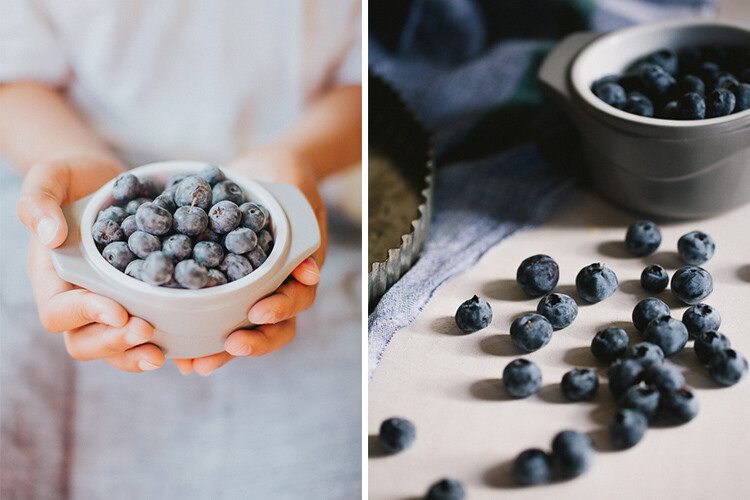
The same subject shot two different ways. I love them both equally and feel like both represent the message/story I wanted to convey about summer’s favorite produce – blueberries!

If you are at such crossroads, I encourage you to fully explore each of these paths and find a way to integrate it with your existing work. I have found that, if done correctly, your clients (or fans) will also value this evolution process as a sign of internal growth of your talent.

There are a few ways to go about this discovery.

1 – Identify your personal editing style

What style of images are you most drawn to? In other words, when you seek inspiration what sort of images do you gravitate towards? For me, images that are full of emotion and personality really call out my name! That is my first requirement; what story is the photographer trying to communicate.

Then I look for processing – is it dark and moody, or full of light and crisp? I like airy, light images just slightly more than dark and moody ones but they both appeal to me. My personal opinion – I am not inspired by sepia or warmer toned black and white, it’s just my personal preference. If that is what moves and motivates you, you own it and rock that style!

memorable-jaunts-experimenting-with-editing-styles-article-for-digital-photography-school-1-5

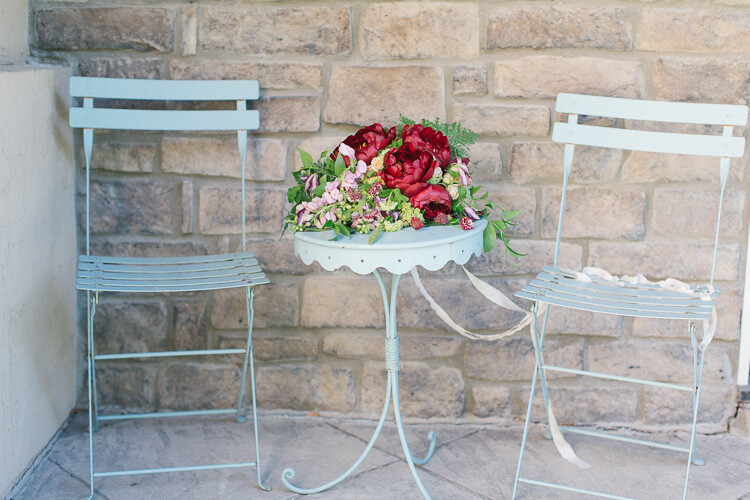
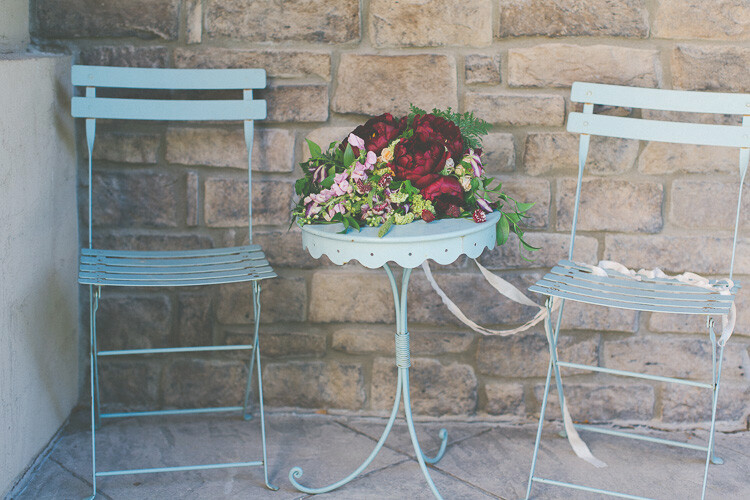
A clean, crisp, bright edit brings out the freshness of the florals against the blue backdrop of the chairs.

2 – Research all other styles that inspire you

There are a few common editing styles that seems to surface over time. This is by no means a comprehensive list, just some that I noticed as I browsed through the internet and Pinterest for inspiration.

Matte Finish

Those images that appear as if a slight hazy filter has been placed consistently over the image.

Matt style typically has black which is not sure 100% as it it were printed on matt paper.

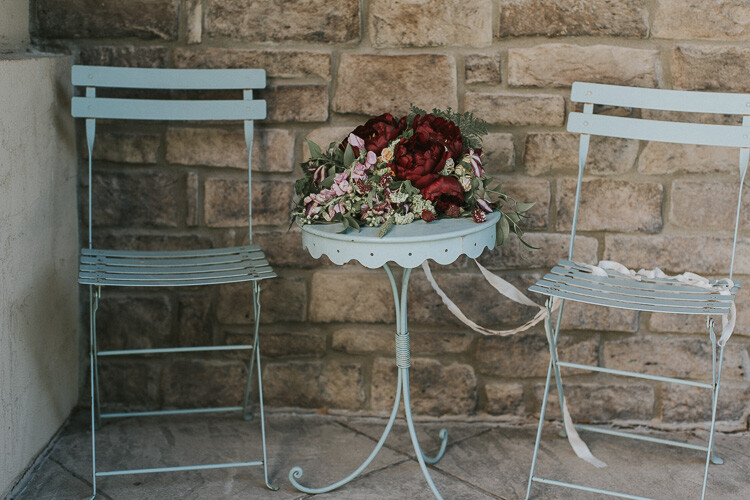
Matte style typically has blacks which are not sure 100% as if the image was printed on matte paper. (see original image below)

Original image

Original image

matte-style2

A slight haze like finish that is predominately seen over the florals (especially comparing to the earlier image).

Desaturated Look

Images where all the colors are very muted. This style seems to be quite popular lately, especially images where the greenery (i.e. trees and brushes) are toned down in the saturation of green tones.

memorable-jaunts-experimenting-with-editing-styles-article-for-digital-photography-school-6

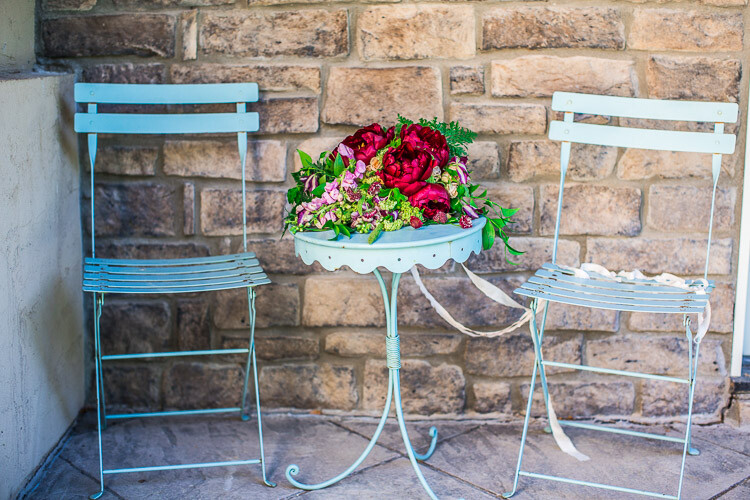
A desaturated look where all the colors are muted from the original vibrancy seen in the first image of this series. The reds are toned down, the greens and blues are also muted (reduced in intensity).

HDR

As Per Wikipedia, HDR or High Dynamic Range is the effect to reproduce a greater dynamic range of luminosity than what is typical of standard digital imagery. I have seen this typically with urban night shots but in theory, this effect can be applied to any image.

memorable-jaunts-experimenting-with-editing-styles-article-for-digital-photography-school-7

HDR here almost has the opposite effect of desaturated colors…the greens, reds, and pinks seem to pop in this image.

Monochrome

This quite simply means single color and is most commonly used in black and white images.

memorable-jaunts-experimenting-with-editing-styles-article-for-digital-photography-school-8

3 – Identify artists that do these things well and follow them

There are many artists that excel at one or more of these types of editing styles. Once you have identified the ones you want to experiment with, find those artists and follow their work. You will begin to see a pattern in their shooting and editing style that may provide you with the right amount of motivation to try and achieve a certain look for your own portfolio and images.

4 – Shoot for a particular style and close to your vision

This ties in with the above two points. Once you have identified the type of look you want to achieve, take the time and effort to set up all the parameters needed to achieve it. For example, if I am aiming for a dark and moody look to my image I will look for lighting, textures, and tones that will support that type of imagery. I will not set up the shoot in the brightest part of my house where sunlight fills the room.

memorable-jaunts-experimenting-with-editing-styles-article-for-digital-photography-school-1-2

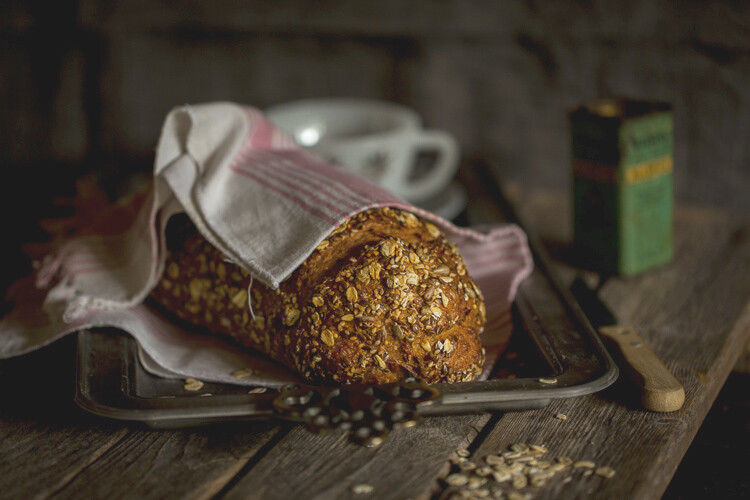
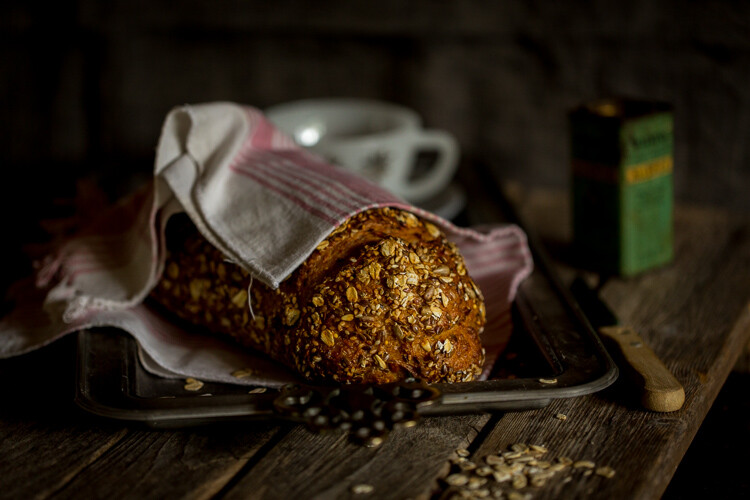
This food editorial shot was set up in my basement studio on a dark cloudy day to minimize the amount of light hitting the overall scene. Additionally the dark tones of the bread and the wood board compliment the look, feel, and tone of this image.

5 – Invest in LR presets or PS actions or experiment

There are numerous editing aids out there for almost every style of photography. Just google the kind of look you want to achieve and chances are someone has created a template/preset/action for that effect. Some editing aids are free while others cost money. Depending on your personal preference, you can choose to use these aids or not. My primary editing software is Lightroom and sometimes I will use a free preset just to see if I like that style of editing before I go down the path of additional research and experimentation with my own shooting style.

Conclusion

At the end of the day, there are many different ways to look at your creativity and your photography style. There will always be those of us who go through life with the mindset of – Don’t fix what isn’t broken – while others follow the logic of – Change it up, mix it up, rock that boat…fall in the water and you will learn to swim! No matter what camp you belong to, the message I want to leave with you is that do that what makes photography fun, interesting and creatively challenging for you!

googletag.cmd.push(function() {
tablet_slots.push( googletag.defineSlot( “/1005424/_dPSv4_tab-all-article-bottom_(300×250)”, [300, 250], “pb-ad-78623” ).addService( googletag.pubads() ) ); } );

googletag.cmd.push(function() {
mobile_slots.push( googletag.defineSlot( “/1005424/_dPSv4_mob-all-article-bottom_(300×250)”, [300, 250], “pb-ad-78158” ).addService( googletag.pubads() ) ); } );

The post How to Experiment with Different Editing Styles to Find Your Own by Karthika Gupta appeared first on Digital Photography School.


Digital Photography School

 
Comments Off on How to Experiment with Different Editing Styles to Find Your Own

Posted in Photography