RSS
 

Posts Tagged ‘Data’

Density Sensor: Real-Time Data Shows Which Places are Packed

10 Aug

[ By WebUrbanist in Gadgets & Geekery & Technology. ]

density location sensor

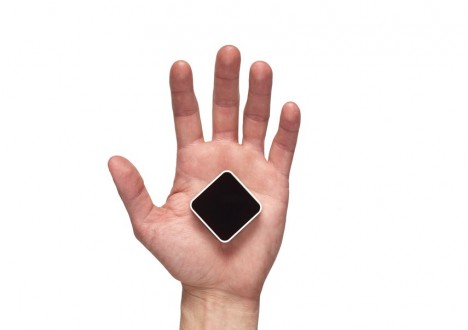
Online reviews indicate how popular your favorite place is in general, but cannot tell you whether now is a good time to drop by or if you may be stuck in a crowd or waiting in line – this is where the Density Sensor comes into play.

density sensor tracking

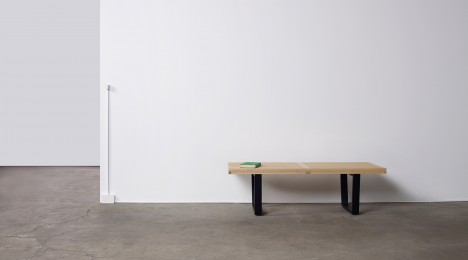
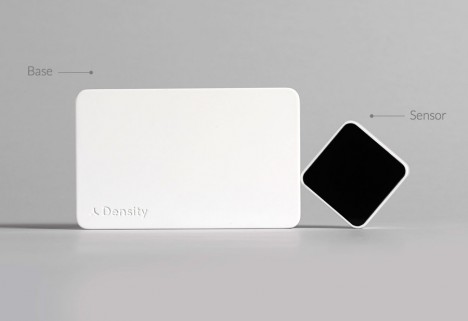
No need to resort to complex spatial mapping or real-time video sensors with this gadget, a people-counting device that simply tracks passages through doors (attached to the frame). Some more obvious applications include specific bars, restaurants, coffee shops and other businesses that have time-of-day and day-of-week cycles to contend with, but the same data can also help you pick the DMV or grocery store with the shortest line.

density incoming outgoing people

In turn, businesses can choose what data to share with customers and what to keep for optimization purposes, offering discounts during less busy times or adjusting when to open and close. Compared to non-networked break-beam technology or real-time surveillance cameras, there is no need to wait for data or face privacy concerns.

density sensor box

Of course, up-to-the-minute incoming and outgoing traffic are just a starting point – architecture firms, for instance, could use extended datasets to anonymously track customer or employee flows through a building and use that data to optimize going forward, shaping extensions or remodels. Ultimately, one could imagine this system being replaced by more detailed heat-mapped trackers keeping tabs on entire spaces, but for now this is a cheap solution to a long-standing problem.

Share on Facebook


[ By WebUrbanist in Gadgets & Geekery & Technology. ]

[ WebUrbanist | Archives | Galleries | Privacy | TOS ]


WebUrbanist

 
Comments Off on Density Sensor: Real-Time Data Shows Which Places are Packed

Posted in Creativity


Kenko updates Teleplus tele-converters to record EXIF data for Canon EOS bodies

16 Jul

Kenko has introduced updated versions of its Teleplus teleconverters for lenses in the Canon EOS EF and EF-S fits with new circuitry that allows EXIF data from the lens in use to be recorded by the body. The Teleplus 2.0x HD DGX and 1.4x HD DGX converters use Hoya glass and offer full autofocusing facilities when matched with lenses with a wide enough maximum aperture. Read more


Articles: Digital Photography Review (dpreview.com)

 
Comments Off on Kenko updates Teleplus tele-converters to record EXIF data for Canon EOS bodies

Posted in Uncategorized


Interview: Kimio Maki of Sony – ‘the customer’s voice is the most important data for me’

22 Jun

Sony shook up the camera industry recently with the launch of three new cameras – the Alpha a7R II, Cyber-shot RX100 IV and RX10 II. At the launch event we sat down with Kimio Maki, Sr. General Manager of Sony’s Digital Imaging Business Group to speak about the process of designing the a7R II, and what he has learned from customers invested in the a7-series. Click through to read our interview

Articles: Digital Photography Review (dpreview.com)

 
Comments Off on Interview: Kimio Maki of Sony – ‘the customer’s voice is the most important data for me’

Posted in Uncategorized


Mesmerizing Motion Capture: Dance as Point Cloud Data

14 Apr

[ By Steph in Art & Photography & Video. ]

motion capture 1

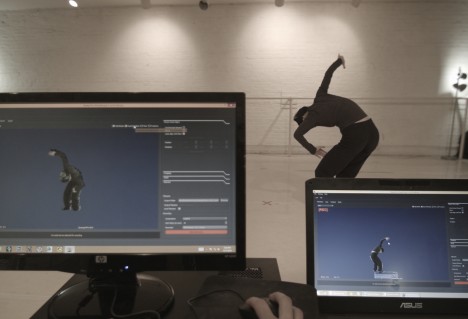
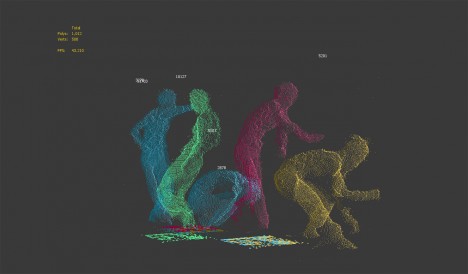
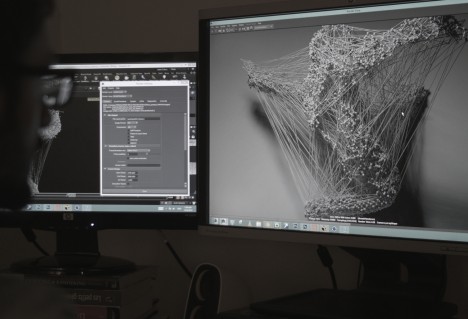
The graceful movements of a professional dancer are rendered as a cloud of flickering metallic dots using inexpensive Xbox Kinect sensors and 3D tools. Constantly shifting and changing even as the dancer stands still, the data points create a ghostly impression against a black backdrop, seeming to embody motion itself.

motion capture 8

motion capture 6

motion capture 4

Asphyxia is a collaborative experimental film project by Maria Takeuchi and Federico Phillips, performed by Shiho Tanaka, combining various technologies to stress “the desire to be expressive without limits.” The sensors scanned data points on Tanaka’s body, which were then combined and used as the basis for the creative development of the film.

motion capture 3

motion capture 5

motion capture 2

The filmmakers rendered the data into this hauntingly abstract form, placing it in a photorealistic environment to add to the eerie quality of the finished product. Check out the behind-the-scenes process above to learn more about how it was made.

Share on Facebook


[ By Steph in Art & Photography & Video. ]

[ WebUrbanist | Archives | Galleries | Privacy | TOS ]


WebUrbanist

 
Comments Off on Mesmerizing Motion Capture: Dance as Point Cloud Data

Posted in Creativity


Intangible Data in Physical Form: 12 Scientific Sculptures

11 Nov

[ By Steph in Art & Sculpture & Craft. ]

scientific sculpture cosmos 1

Mathematical theorems, the physics of an object moving through space, and intangible scientific data are visualized three-dimensionally and made into works of art in these 12 sculptures and installations.

Kinetic Sculptures Based on Mechanical Waves

margolin 1

rgolin 2

scientific sculpture margolin 1

scientific sculptures margolin 2

“Inspired in equal parts by math and nature,” Reuben Margolin’s kinetic sculptures use pulleys and motors to recreate the complex movements seen in nature. These mechanical installations capture the crawl of a caterpillar, the movement of waves and other physical phenomena in a way that’s entirely unexpected and beautiful to take in.

‘Cosmos’ Sphere Made of Scientific Data

scientific sculpture cosmos 2

If you were to happen upon this sphere while walking in the forest, you couldn’t be blamed for wondering whether you’d discovered an alien spaceship of some sort. But the reality of ‘Cosmos’ is just as interesting: it’s scientific data in three-dimensional form, a record of a year’s worth of carbon dioxide patterns and measurements from the trees of Alice Holt forest in Surrey, England. The grooves on the exterior of the sculpture contain the data, which was collected from a nearby tower.

Interactive Sound Tapestries

scientific sculptures interactive sound 1

scientific sculptures interactive sound 2

A series of capacitive sensors were applied to suspended fabric using conductive paint for ‘Contours,’ an interactive tapestry installation by creative laboratory Bare Conductive and designers Fabio Antinori and Alicja Pytlewska. As people pass nearby, the sensors gather data about their movements and translate it into ambient sounds, making reference to the relationship between science and the body.

Cell-Inspired Sculpture Made of 1200 Mirrors

scientific sculpture mirrors 1

scientific sculpture mirrors 2

An egg-like sculpture made of 1,200 mirrors hovered in a tree in the city center of Nantes, France, visually representing the creators’ research into cells. French studio Collectif Timée based the sculpture on the Voronoi Diagram in which a mathematical formula creates cells from halfway lines around random space points. As the cells converge, a kaleidoscopic effect is produced.

Next Page – Click Below to Read More:
Intangible Data In Physical Form 12 Scientific Sculptures

Share on Facebook


[ By Steph in Art & Sculpture & Craft. ]

[ WebUrbanist | Archives | Galleries | Privacy | TOS ]


WebUrbanist

 
Comments Off on Intangible Data in Physical Form: 12 Scientific Sculptures

Posted in Creativity


How to Recover Photos After a Data Loss

05 Oct
Frank Grießhammer

By Frank Grießhammer

One of the worst things that can happen to you as a photographer is data loss, but there are ways to resolve it. This guide will talk you through how to recovery those all-important photos easily and quickly.

Whether it’s a quick snap of your pet or a scenic landscape shot, chances are most of the photos you take are precious and important to you. Photos capture memories and moments; losing these would be disastrous. Sadly, photo loss is not an uncommon event. In fact, either it’s already happened to you in the past or it likely will in the future.

Losing your photos can occur for a variety of reasons, one of the most common being simply human error. It could be something simple like accidentally deleting the wrong file or pressing the wrong button. However, as wonderful as technology is, it too is prone to failure. There are many stories of people unloading their memory cards from their cameras, putting it on their computer and then finding their files can’t be opened or are missing altogether.

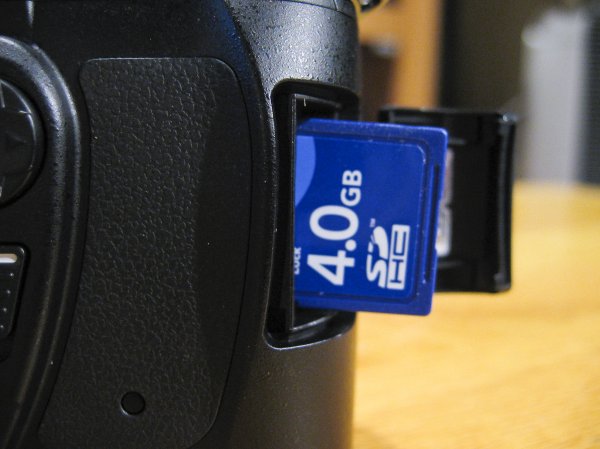
If you’ve discovered that you’re a victim of data loss then one of the most important steps to take is to stop using the card immediately, and remove it from your camera, just to make sure that no activity takes place on it. It’s crucial that no further data is written to the card.
Jorge Quinteros

By Jorge Quinteros

When a photo is deleted, the data on the card isn’t immediately purged. There are two main types of data on an SD card: information about the files on the card and the data for the files themselves. When you delete a file, it’s that information about the files that is removed. The data for the files remains on the card until the space is needed for another file. As such, a new photo on the card could be assigned to the place where a deleted photo once was, wiping it out permanently.

It’s now time to try and get your data back, so mount your SD card to your computer. Depending on the condition of the card (e.g. if it is corrupted or uses an unrecognizable file system), your system may automatically detect that there’s a fault with it. You might perhaps be suggested to use the manufacturer’s software to try and resolve the problem. Alternatively, a pop-up box could encourage you to format the card. Do not do any of this.

Bridget AMES

By Bridget AMES

Formatting the card is especially dangerous and will lower your chances of successful data recovery to sinking level. It’s a last resort tactic. Your computer means well by suggesting a card format. It’s essentially saying “Hey, I can’t seem to locate any data, shall we wipe everything and start afresh?” However, just because your operating system can’t find the data it doesn’t mean it isn’t there, lurking under the surface.

DO: stop using the card literally the moment you realize there’s a problem; remember to breathe and stay calm!

DONT’T: browse the photos on your camera, take ‘just one more’ snap, or format the card.

The next stage is to download a program that’s going to help you get your data back. For the purposes of this tutorial we’ll be using R-Undelete. There are other programs available, but this one is entirely free for home users and works really well. The only limitation is that it only works for FAT formatted SD cards—fortunately, practically all camera SD cards are FAT formatted. There are also some professional data recovery companies who will charge you to recover data, but frankly, in this circumstance, using something like R-Undelete will do the same job for none of the cost.

Step One

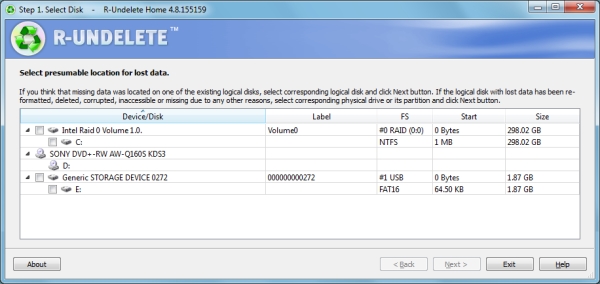
The first screen you’ll be presented with a list of all the drives mounted to your computer. All you need to do is place a tick in the checkbox next to your SD card and click ‘Next’.
Step1JPG

As you can see, the example image above shows an internal drive, a DVD drive and an SD card. The SD card being used is called ‘Generic Storage Device’, but yours might have a more unique name. Refer to this or match up the size of your card to the ones listed (1.87 GB in the example).

Step Two

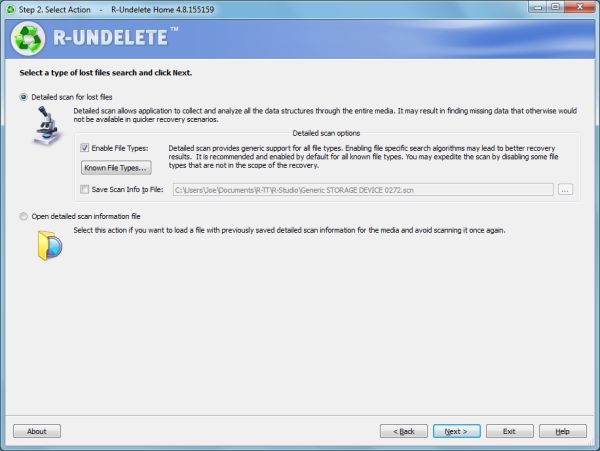
This step is a simple one. The program will automatically select a detailed scan for lost files, which is precisely what you want. You can ask for the program to only search for specific types of files (like videos or pictures) by clicking ‘Known File Types…’, but it’s better to leave it on the default setting to scan everything.
Step2JPG

The scan information is going to be saved to Documents by default, but feel free to change that file path to whatever you wish by checking the box alongside. Remember that you must not save anything to the card that you’re recovering from, so it’s easiest to keep things on your internal drive.

When you’re ready, click ‘Next’ and the scan will begin.

Step Three
Step3JPG

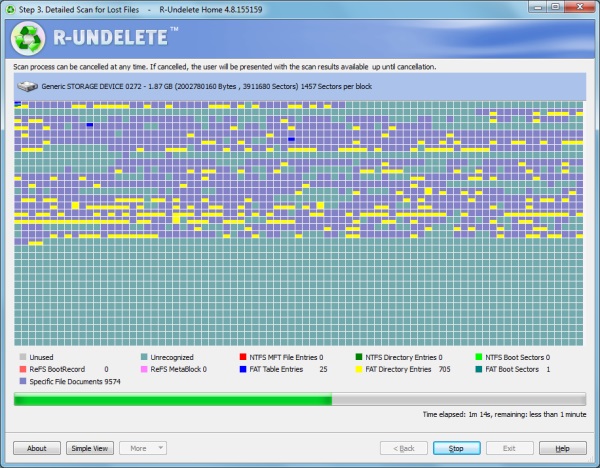
The scan will then begin. This screen might look a bit scary at first, but there’s no need to worry. It’s just a visual representation of the type of data that is being scanned. Just wait for the scan to finish (it’ll be quick, but will vary depending on the size of your card) and click ‘Next’ when that option is available.

Step Four

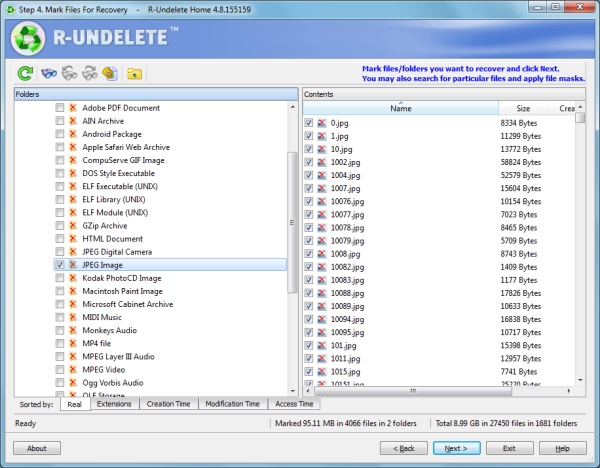
You’ll be presented with a list of all the data that the program has found on the card. On the left are the folders, which show the contents on the right when they are clicked.
Step4JPG

The great thing is that you can sort the results by filters such as the file extension, the time the data was created, or when it was accessed. If you’re trying to hunt down specific files, then there’s also an advanced search tool where you can input variables to search for, like the size of the file or when it was last modified.

One symptom of data loss is that the original file name is often lost, so don’t worry if you don’t recognize any of the file names. If you’re not sure where the data you seek is, go ahead and recover everything the program has found – you can recover as much or as little data as you want without issue.

Once you’ve got the data you want to be recovered selected, click ‘Next’.

Step Five

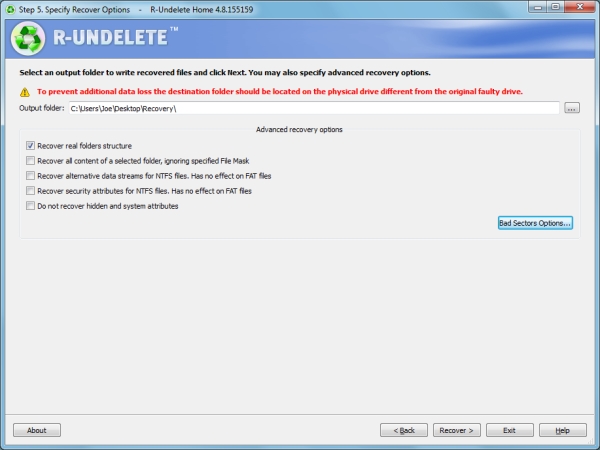
Nearly there! First, select the folder where you want all your recovered data to go. Handily, the program reminds you not to choose anywhere on your SD card – but of course you know that by now!
Step5JPG

There are also some advanced options available. The example above asks the program to try and recover the original folder structures, bear in mind however, this isn’t always possible. Providing you selected all the required files in step four, this should be the only option you might want to select.

Are you ready to get your pictures back? Click ‘Recover’ and the program will begin to work its magic. The time it takes will depend on how much data you’ve asked to be recovered, but the process is relatively quick.

Success!

R-Undelete successfully recovered every image that I asked it to and hopefully it performed the same way for you.

Try and remain calm throughout the whole process. Understandably, that’s probably easier said than done, but data recovery is entirely possible and if you follow the advice given then it should hopefully be pretty effective.

You may aware of how important it is to back up your files, but don’t actually practice it. If possible, ensure your photos are being consistently backed up to another location. Whether you’re just transferring them to your computer at the end of the day, or sending them to cloud storage services like Dropbox or OneDrive, having multiple copies of your photos will mean that it’s less of a problem if data loss does occur.

Best of luck and enjoy those recovered files!

Editor’s note: please be aware the software mentioned only works on a PC. Just do a google search for: photo recovery Mac free and you’ll find a whole bunch that work similarly to the one mentioned in this article.

The post How to Recover Photos After a Data Loss by Joe Keeley appeared first on Digital Photography School.


Digital Photography School
 
Comments Off on How to Recover Photos After a Data Loss

Posted in Photography


Urban Observatory: TED Co-Founder’s New Civic Data Platform

01 Aug

[ By WebUrbanist in Gaming & Computing & Technology. ]

urban observatory splash page

This new project brings a whole world’s worth of metropolitan data to your fingertips via both an online application and an upcoming installation at the Smithsonian Museum, courtesy of TED founder Richard Saul Wurman. A rich virtual resource, it represents the work of over 15,000 contributing cartographers and designers from 200 countries.

urban observatory monitor picture

Collecting and data big and small, static and live, the multi-media Urban Observatory allows (and encourages) comprehensible and comprehensive visual comparisons between cities on various fascinating fronts.

urban observatory touch screens

While it continues to solicit data sets to expand its offerings, already people can look into housing and population density of young and old urban residents, transit patterns for cars, trains and planes, open spaces and much more.

urban observatory chart detail

Want to learn about how traffic patterns differ between a spread-out city like Los Angeles versus central London, or see how home prices differ between New York and Tokyo in an intuitively interactive way? Now you can do all of these in one place and using a straightforward and user-friendly interface. From its creators: “The Urban Observatory is an interactive exhibit that gives you the chance to compare and contrast data from cities around the world–all from one location. It aims to make the world’s data both understandable and useful. Brought to life by Richard Saul Wurman, Radical Media, and Esri, it is the first exhibit of its kind.”

urban observatory demonstration installation

The spatial installation component is coming to the Smithsonian Institute in Washington, DC, in 2015. More from VentureBeat: “It was a massive undertaking. Cartographers and computer scientists used big data sets, helped by 3D graphics and Landsat, NASA’s satellite program that captures incredibly detailed images of the earth’s surface, to look back at the last 40 years of city development. It provided scientists insight into how the planet is developing – and how to help save it.”

Share on Facebook


[ By WebUrbanist in Gaming & Computing & Technology. ]

[ WebUrbanist | Archives | Galleries | Privacy | TOS ]


WebUrbanist

 
Comments Off on Urban Observatory: TED Co-Founder’s New Civic Data Platform

Posted in Creativity


Crowdsourced Data Reveals Most Beautiful Urban Walking Routes

14 Jul

[ By WebUrbanist in Destinations & Sights & Travel. ]

best walking routes study

Using a mapping algorithm coupled with citizen reviews of sights and scenery, a team of researchers has developed a way to choose paths through cities based on beauty, quiet and happiness rather than simply the shortest distance between two points.

shortest or beautiful route

The project employed Google Street View and Geograph as well as Flickr images and their metadata to build out an initial estimation of probable best paths, then solicited human feedback (to check and enhance the results) from a group of participants on the website UrbanGems (shown above).

london main sites map

The study, published by Cornell University’s arXiv, came up with a number of route suggestions in Boston and London and contains a number of interesting findings. For starters, the ‘beautiful’ routes were only slightly longer than the shortest routes, and significantly shorter than typical tourist-oriented directions and guided-tour paths. As the algorithm improves, it is increasingly able to generate paths through new cities via metadata alone, reducing reliance on input from people.

beauty and shortest boston

boston main sights map

The project’s creators included Daniele Quercia and Luca Maria Aiello of Yahoo Labs in Barcelona and Rossano Schifanella of the University of Torino, Italy. From their abstract: “When providing directions to a place, web and mobile mapping services are all able to suggest the shortest route. The goal of this work is to automatically suggest routes that are not only short but also emotionally pleasant.

beauty walking route london

shortest walking route london

The assessments are not simply qualitative value judgments, but a hybrid of human and machine input: “Based on a quantitative validation, we find that, compared to the shortest routes, the recommended ones add just a few extra walking minutes and are indeed perceived to be more beautiful, quiet, and happy.”

happy walking path london

quiet walking route london

From UrbanGems: “Buildings and neighbourhoods speak. They speak of egalitarianism or elitism, beauty or ugliness, acceptance or arrogance. The aim of UrbanGems is to identify the visual cues that are generally associated with concepts difficult to define such beauty, happiness, quietness, or even deprivation. The difficult task of deciding what makes a building beautiful, or what is sought after in a quiet location is outsourced to the users of this site using comparisons of pictures. With a comprehensive list of aesthetic virtues at hand, we would be more likely to systematically understand and re-create the environments we intuitively love.”

Share on Facebook


[ By WebUrbanist in Destinations & Sights & Travel. ]

[ WebUrbanist | Archives | Galleries | Privacy | TOS ]


WebUrbanist

 
Comments Off on Crowdsourced Data Reveals Most Beautiful Urban Walking Routes

Posted in Creativity


Ditch Your Car: Get From A to B Using Real-Time Transit Data

03 May

[ By WebUrbanist in Technology & Vehicles & Mods. ]

transit screen sidewalk projection

What if we could make alternative transportation ultimately faster, cheaper and more convenient than personally-owned cars, the dominant transport devices of the 20th Century? The sharing economy has opened new possibilities for commuters and travelers, but integrating this dizzying array of options together with public transport is an essential next step in this ongoing paradigm shift.

transit car bike bus

OMGTransit is a Minneapolis-based startup that provides free, fast and simple sets of options for getting from your location to your destination without a personal car, be it by bus, shared bike (NiceRide in the case of the Twin Cities), shared car systems like Car2Go or ZipCar or private rides from Uber or Lyft. Available as an iPhone or Android application, OMG also offers a web app version – all with no cost to the user.

omgtransit example page design

Boasting a beautifully-designed interface with attention to usability, color and detail, their free-for-all approach is aimed at helping them grow faster than the competition. Their team, headed by entrepreneur and technologist Matt Decuir, has its sights set first on major cities around the US and then the world (perhaps space thereafter).

transit screen directions wayfinding

More focused on next-step options than A-to-B directions, TransitScreen started out displaying realtime  transit data in residential, commercial and institutional building lobbies. Their boards show people up-to-the-minute information on subways, commuter trains, buses, bike share, ride shares in cities around the United States.

transit screen sidewalk projection

Now, with SmartWalk, this same company has taken to the streets (or rather: sidewalks and walls) outside of offices, apartments and universities, projecting this data onto public surfaces for the benefit of anyone passing by. The data includes color-coded transit option types and times but also wayfinding cues regarding directions and distance.

realtime transit designs

Other players in this space include Roadify and RideScout, though not all offer options for all devices or for every type of regional transport. Some, like Google Maps in its current form, have broader reach but focus more on public transportation schedules (their acquisition of Waze is a step toward realtime data, albeit for personal cars). Whatever system(s) triumph, the goal is a worthy one: reducing friction in the use of alternative transit options to the point where taking, for instance, a bus to a bike to a shared car is easy, fast and cheap enough to obviate the need for a fully-owned automobile.

Share on Facebook


[ By WebUrbanist in Technology & Vehicles & Mods. ]

[ WebUrbanist | Archives | Galleries | Privacy | TOS ]


WebUrbanist

 
Comments Off on Ditch Your Car: Get From A to B Using Real-Time Transit Data

Posted in Creativity


[MODIFIED] Google Chrome – Clear Browsing Data including Cookies, Flash Cookies, Cache, History, and Saved Passwords

07 Apr

For privacy, clear the data Google Chrome stores regarding your browsing history.

Even though Google Chrome supports “Incognito” browsing where history information is not kept and cookies are removed after browsing (press CTRL + SHIFT + N to open an “Incognito” window), you might accidentally forget to use this mode. You might also wish to remember cookies for a few hours while checking e-mail, chatting on social networking, or accessing your bank account online, then later decide to clear your tracks for privacy.

Google Chrome supports a feature where without the use of any extensions, you can clear browsing and download histories, the cache, cookies, Flash cookies, saved passwords, saved form data, and/or other details….

Read more at MalekTips.
New Computer and Technology Help and Tips – MalekTips.Com

 
Comments Off on [MODIFIED] Google Chrome – Clear Browsing Data including Cookies, Flash Cookies, Cache, History, and Saved Passwords

Posted in Technology