RSS
 

Posts Tagged ‘Creative’

Say Goodbye To Adobe Creative Suite (Adobe Moves To The Cloud)

09 May

Screen Shot 2013-05-06 at 1.56.03 PM

Unless you haven’t been on your computer at all in the last 24-48 hours, you have probably heard by now that Adobe announced an end to their Creative Suite of products and will now be moving to a subscription only based service. This news was not received well in the photography community on Monday as photographers flocked to social media sites to bash Adobe and voice their opinions. Here are some facts about Adobe’s new move…

  • First, like I mentioned above, Creative Suite will be no more. Gone are the days of walking into a brick and mortar store and purchasing a copy of Photoshop that you can call your own. While you will still be able to buy licensed copies of Adobe Photoshop Elements, any pro-grade version software like Photoshop, Dreamweaver, Illustrator, etc will only be cloud based.
  • As of right now, Adobe Lightroom will still be ‘cloud-free’ and available for purchase as a licensed product. Although I doubt this will last very long as Adobe CEO reported that, “Adobe has no immediate subscription-based plans for Lightroom, but the migration to digital copies is the wave of the future.”

New Pricing Options

Adobe Photoshop CS6 Extended used to cost $ 999. On average, Adobe seemed to be on an 18 (some odd) month product cycle between CS updates. This means that if you divide $ 999 by 18 months you come out with $ 55.50 per month.

Going forward (and this has been an option ever since the Creative Cloud became available) you’ll have the option of buying an annual subscription to Photoshop alone for $ 19.99/month or you can have access to the entire lineup of Adobe products (formerly known as the Creative Suite) for $ 49.99/month. And as a bonus, if you are a CS3/CS4/CS5/CS6 customer, you’ll get the entire suite of products for $ 29.99/month for the first year. Adobe used to have an option for if you just wanted to pay month to month without an ‘annual agreement’ but that seems to be gone now. I believe that was $ 29.99 a month. Now you have to make an annual agreement but it’s unclear at this point what that entails.

Let’s Do The Math

So let’s see if this is more expensive, less expensive or a wash. Well, as you’ve already read above, if you used to be a customer who upgraded with each update (ie: always upgraded from CS4 to CS5 to CS6) then you will save money now. You won’t have to shell out a fat stack of Benjamin’s any longer at your local software store. If you pay just the $ 19.99 a month on an annual agreement plan, you will pay $ 359.82 every 18 months. That’s a savings of $ 640.17 according to my calculator. Am I missing something? That’s a savings of 64%…

The entire creative suite (Photoshop, Dreamweaver, Illustrator, InDesign, After Effects, Premier Pro, Muse and more) used to cost $ 2599.99. Divide that by 18 months (again, 18 months is the average amount of time between previous versions of CS) and you get $ 144.44 a month. Compare that to the new $ 49.99 a month and you have a $ 94.45/month savings or (again) about 65% less.

Now, I was never much of a math wiz in school but I’m pretty sure I didn’t screw any of that up.

Did Adobe just decrease their pricing by 65%? It sure seems that way to me. At least if you’re going off an average 18-month product cycle. You do have to take into account that there will be no more Creative Suite. That means Adobe will no longer come out with NEW versions of Photoshop. There won’t be a CS7. They will only add features to Photoshop that will become available the next time you open up Photoshop.

What About Those Who Didn’t Buy Every New Version?

That’s a great point. At $ 19.99 a month, it would take 50 months to come out to $ 999.99 (the cost of the old Photoshop CS6 Extended version). That’s just over 4 years. That’s just under 3 18-month product cycles. Call it two. That means that for those who are still using Photoshop CS4 and haven’t updated to CS6; they are still paying the same amount in the long run but are now getting the advantage of having the latest version of the software, with effortless updates as well as access to Adobe’s new Behance community.

So What’s The Problem!?

I’ll admit…when I heard about all this on Monday I was pissed. I even blogged about it. I’m the kind of guy who likes to save up for things I want and pay cash for them, rather than throw it on a credit card and make payments. I don’t have a car payment. I would never lease a car. So the idea of basically leasing Photoshop on a month-to-month basis doesn’t make me particularly happy. The issue for a lot of people is that the consumer, the customer, no longer has a choice. There are some people out there who just want to buy a product and not worry about their bank account getting drafted every month. It’s one thing to plan for automatic drafts like your gas or electricity, your cable or your car payment. It’s another when you start adding stuff like software programs. It’s just one more thing that could go through at just the wrong time and cause someone to overdraft their account. People like having a choice. With the new system you are giving up your right to actually OWN a product.

Some people are also worried that since Adobe will have reliable/consistent income now with subscriptions that they will lose their competitive edge. They used to have to wow us all with each CS update. New features, new tools, new interface. They had to make us WANT it so we would flock to their website and stores to buy the new programs. If they get us all to sign up for these plans where they already have us, will they stop trying so hard to impress us? Who knows? Will that open the door to some relevant competitors? Who knows? Time will tell.

My Suggestion To Adobe

To be perfectly honest, I’m completely on board with getting rid of the physical copies of Photoshop and all the other Adobe products. When I buy a program like onOne Software’s Perfect Photo Suite, I don’t get anything shipped to my house. I get a license code emailed to me that I plug in once the software is downloaded. Easy peasy. What I think Adobe should do is just make an option available to us where we can rent the software for a full year or even multiple years at a time. And give us a discount for paying in advance. That way it’s pretty much just like it was before. Those of us who prefer this method won’t feel like we are renting a software program. It will be the same as owning it except we won’t have a disk sitting in the bottom of our junk drawer. This, at least to me, sounds very reasonable.

Chime In!

So what do you all think? This has been a very hot topic for the past day or so and everybody has different views. Let me know in the comments below and be sure to follow me on Twitter where you can get in touch as well.


Post originally from: Digital Photography Tips.

Check out our more Photography Tips at Photography Tips for Beginners, Portrait Photography Tips and Wedding Photography Tips.

Say Goodbye To Adobe Creative Suite (Adobe Moves To The Cloud)


Digital Photography School

 
Comments Off on Say Goodbye To Adobe Creative Suite (Adobe Moves To The Cloud)

Posted in Photography


Adobe moves to subscription-only future for Photoshop and other creative tools

07 May

shared:AdobeLogo.png

Adobe has said it will no longer be developing its Creative Suite range of software, leaving its subscription and cloud-based Creative Cloud as the only way of accessing the latest version of Photoshop. Adobe has been trying to encourage users away from the traditional one-off payment licenses and on to a monthly payment model, with features such as online storage and syncing between devices. This latest move ups the ante by making it the only option for future versions of the software.

News: Digital Photography Review (dpreview.com)
 
Comments Off on Adobe moves to subscription-only future for Photoshop and other creative tools

Posted in Uncategorized


Kids’ Rooms Rule: 32 Creative & Fun Bedrooms for Children

06 May

[ By Steph in Design & Furniture & Decor. ]

Kids Bedrooms MAIN
When the rest of the house is carefully furnished and decorated to be both practical and a visual representation of the adult residents’ style, why should kids’ rooms be a primary-colored afterthought? These 32 bold, modern bedrooms for children by 8 interior designers and furniture manufacturers around the world offer smart solutions for little ones’ needs, often with compact modular all-in-one sets.

8 Compact Colorful Bedrooms by GAB

Kids Bedrooms GAB 1

Kids Bedrooms GAB 2

Kids Bedrooms GAB 3

Some modern furniture retailers offer incredibly compact, function-packed bedroom sets for kids and teens that make use of every inch of space. Italian company GAB is among them, with colorful bunk beds and trundle beds that provide sleeping space for more than one child while maintaining organization and privacy. The sets are visually cohesive, with desks, storage, wardrobes and other components on wheels so they can slide around as needed.

5 Fancy Bedrooms by AltaModa

Kids Bedrooms AltaModa 1

Kids Bedrooms AltaModa 2

Kids Bedrooms AltaModa 3

Kids Bedrooms AltaModa 4

Kids Bedrooms AltaModa 5

For parents who want their children’s bedrooms to match the rest of their traditionally decorated homes, AltaModa offers a range of furniture and decor concepts that are like adult rooms in miniature, but with a dash of whimsy. The same attention to detail that would be seen in the master bedroom is applied here, with themes like horses, poodles, nautical, baseball and aviation.

Sophisticated Puzzle Panel Bedroom by Geometrix Design

Kids Bedrooms Geometrix 1

Kids Bedrooms Geometrix 3
The adults in the house might get jealous of this cool, sophisticated kids bedroom idea by Geometrix Design. A soothing palette of silver, gunmetal and gold is carried from the eye-catching puzzle-piece wall to a built-in closet, entertainment center and storage area on one side of the room.

Next Page:
Kids Rooms Rule 32 Creative Fun Bedrooms For Children

Share on Facebook


[ By Steph in Design & Furniture & Decor. ]

[ WebUrbanist | Archives | Galleries | Privacy | TOS ]


WebUrbanist

 
Comments Off on Kids’ Rooms Rule: 32 Creative & Fun Bedrooms for Children

Posted in Creativity


Adobe announces Creative Cloud update with new Photoshop tools

06 May

shared:AdobeLogo.png

Adobe has updated its suite of Creative Cloud software, with the latest versions rebranded with the appendage ‘CC’. Adobe Photoshop CC highlights include the Camera Shake Reduction tool that Adobe demoed earlier this year, and the ability to apply Camera Raw as a filter to any raster, vector or video layer. Creative Cloud members can now sync their Photoshop preferences across multiple devices. Click to read about these and other Photoshop CC features.

News: Digital Photography Review (dpreview.com)

 
Comments Off on Adobe announces Creative Cloud update with new Photoshop tools

Posted in Uncategorized


Good Stuff, Free: Joey L. on Creative Live, Now

29 Apr

Just a quick heads-up: for three full days, photographer Joey L. is teaching all day live on Creative Live. And it’s free.

So far, it looks like really good stuff, and definitely worth your time.

:: CreativeLive.com ::

-30-


Strobist

 
Comments Off on Good Stuff, Free: Joey L. on Creative Live, Now

Posted in Photography


Color: A Powerful Creative Ally or an Afterthought?

19 Mar

A Guest post by Mitchell Kanashkevich who is the author behind dPS eBook – Captivating Color.

Color is one facet of photography which we often tend to overlook and take for granted. It is frequently only considered after the photograph has already been taken.

Approaching color this way however is a big mistake and a lot of us make this mistake because we simply don’t know why color is important, we don’t understand what role it can play in our photography.

The fact is, color is as much a part of visual communication as composition and light. If you are not fully aware of this fact while framing/composing color images and later when post processing them, you’re quite simply not in full control of what your photographs communicate. A knowledgeable, intentional approach however, turns color into a powerful ally that helps us convey stories, emotions, sensations and moods from within the photographic frame.

In this post I have included some of my photographs along with brief explanations of just what role color plays in every one of them. The aim here is to raise awareness of color’s potential power, particularly among those of you for whom it (color) has been more of an afterthought than a creative ally.

image_01.jpg

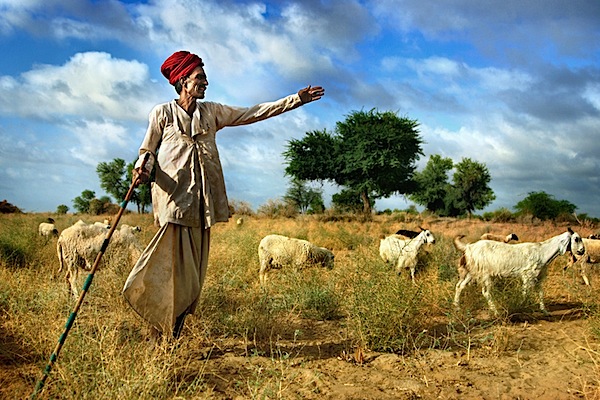
The above photograph is in large part about that attention-grabbing red. It helps me to immediately bring attention to what I considered to be the most important element to the story in this image, the turban. This turban is representative of the cultural background of the shepherd, it says that he is a man of tradition and this is something that I wanted to really highlight.

The red also leads the way in communicating how this scene felt while I was shooting it -dynamic, exciting. This is also in large part due to the overall palette, which in addition to the red is made up of other bright, vivid colors that are usually considered dynamic, lively, exciting.

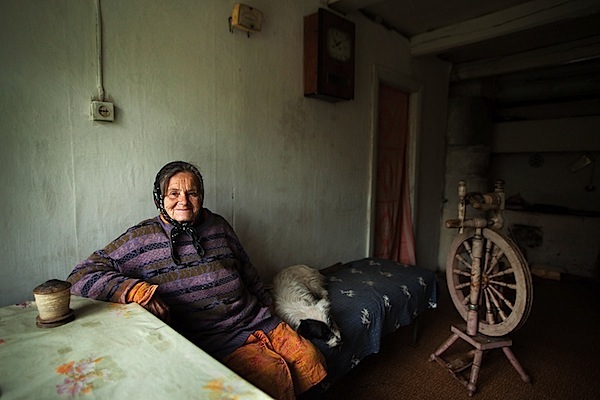
The dominant color palette in this image is fairly subdued and neutral. The mood that it creates leans towards being melancholic, but the rather subtle “splashes” of brighter colors inject a little life and excitement into the scene (without completely shifting the feel of it). I think that this is fitting, as the mood in that room was a little melancholic and somewhat lively at once.

Against the mostly subdued, neutral palette that dominates the frame those “splashes” of color inevitably demand our attention. It is as if the photograph is saying quietly, but clearly “Look here and now look there, these details are also important to the story”. Color (along with composition) helps our eye progress from the brightest, most vivid element, the central character – the woman, to all the other, less noticeable elements that add a certain level depth to the story.

image_03.jpg

Here we’ve got bright, fairly vivid colors. Again there’s a sense of excitement, energy, perhaps an association with happy times, due to the blue sky and the brightness of everything, especially when you connect the color to the subject matter – parent and child.

The dark flesh tones really stand out against that bright blue sky, hence the presence of the father and the son is strongly felt. It’s clear that they are the central characters of the story. At the same time, the surroundings, which are also important components of the story are not completely overshadowed either, because they are so bright and vivid, their presence is strongly felt too.

image_04.jpg

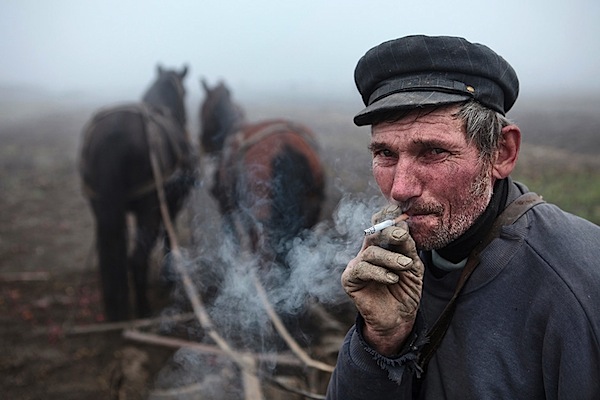
Here the colors are equally important to the mood and to the story. The subdued, earthy palette dominated by shades of grey creates a mood which is fairly sombre and that’s exactly how the scene felt. The palette is also reflective of this man’s story, his tough job of ploughing the land during a grey, foggy autumn (fall) day.

It should be noted that the absence of certain colors can be just as important to creating a mood and telling a story as their presence, and here, the absence of bright, vivid colors ensures that the somberness is communicated strongly and that the story of hard-living is clear as can be.

image_06.jpg

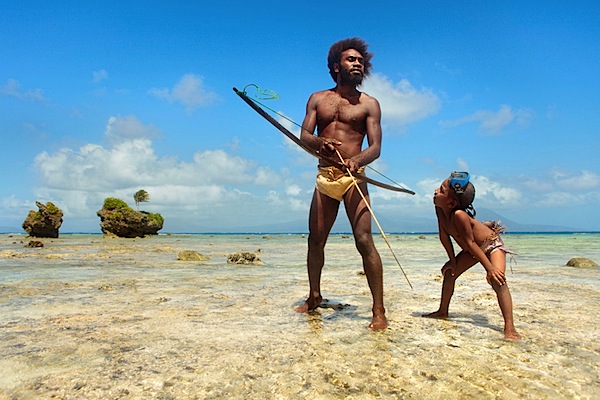
This image is essentially duo-tone. The simple minimal palette allowed me to emphasize the “gestures”, which are where the story is, the hand with the spear-gun pointing towards the palm leaves underwater (that’s what those things are), the legs in swimming motion. Less colors has equalled in no distractions from what’s important.

One could argue that this image would work just as well in black and white, but I feel that the blue of the water plays a strong role in speaking to the senses, it helps communicate what it’s like to be in the sea, the coolness, the powerful presence of it. Towards the bottom part of the frame, as the water becomes dark blue, things get a little mysterious, darkness (dark colors) is often associated with the unknown. This sense of mystery is what you feel in the deeper part of the sea and it’s something that I really wanted to convey through the photograph too.

image_05.jpg

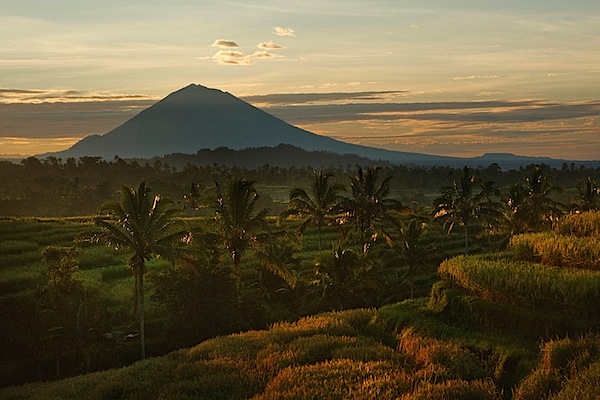
Vibrant shades of green and the warm, yellow-orange tinge created by the morning sun dominate this image. This palette is inevitably evocative of vitality and generally positive emotions.

The story in this photograph is quite simple, it’s about the beauty of the landscape, the energy and excitement of the morning and it is only through the palette dominated by those vibrant, warm colors that it can be communicated effectively.

image_07.jpg

Sometimes the color of a particular scene we see captures our imagination, gets us excited and compels us to make the photograph. Even if we aren’t aware of it, it speaks to our senses. The above image is one such example. Color lends it a somewhat surreal and mystical quality, it creates a very distinct feel. In such photographs, color and the sensory response it evokes are so important that any kind of story can in a sense become secondary. Color is what makes (or breaks) these kinds of images and without it they (the images) simply do not work.

Well, that’s all for this post. I hope that by taking a closer look at these examples of what role color can play in photography you are now a little more aware of its importance and potential. I urge those of you who make color photographs to begin taking advantage of color during your next shoot. Start thinking how you can use color to tell your own stories and to communicate the emotions, sensations or moods that you want the viewers of your photographs to feel.

About the Author: Mitchell Kanashkevich is a travel/documentary photographer who’s passionate about color. His photographs have appeared on TV, billboards, on book covers, travel and inflight publications as well as in most of the world’s top photography magazines. Prints of his work hang in private photo collections around the world.

Mitchell is also the author of DPS’s “Transcending Travel: A guide to captivating travel photography” and is the author of a brand new dPS eBook Captivating Color – a Guide to Dramatic Color Photography. Follow Mitchell on Facebook.

Post originally from: Digital Photography Tips.

Check out our more Photography Tips at Photography Tips for Beginners, Portrait Photography Tips and Wedding Photography Tips.

Color: A Powerful Creative Ally or an Afterthought?


Digital Photography School

 
Comments Off on Color: A Powerful Creative Ally or an Afterthought?

Posted in Photography


How to be Creative with White Balance

08 Mar

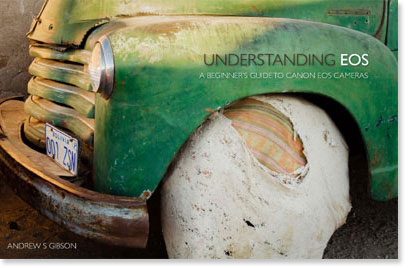
This is the fourth in a series of articles by Andrew S Gibson, the author of Understanding EOS: A Beginner’s Guide to Canon EOS cameras.

01

My approach to photography is to keep things as simple as possible from a technical point of view. That helps me concentrate on emphasising with my subject, finding beautiful light and getting the best possible composition. These concepts are harder to pin down but they are the ones that are really important when it comes to creating beautiful images. Of course, the technical settings are important too, because they help you capture and make the most of the vision that you have in your mind. But keeping the technical side as simple as possible gives you time to concentrate on the other stuff.

02

White balance

Now, you’re probably wondering what this has to do with white balance. Here’s the answer:

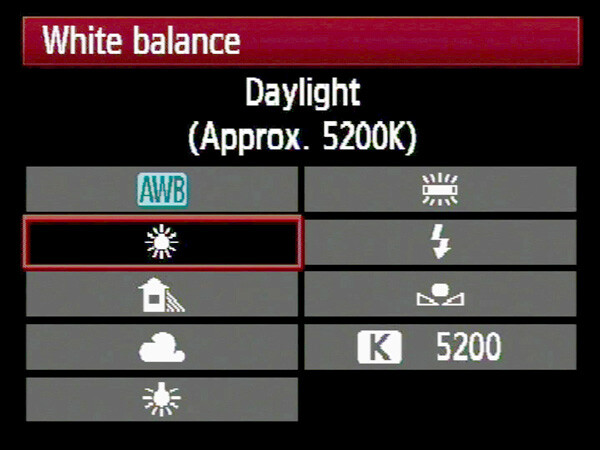
The simplest way to deal with white balance is to set your camera’s white balance setting to daylight and then forget about it.

If that statement puzzles you don’t worry, I’ll come back to it in a bit.

First, let’s take a brief look at what the white balance function does.

Colour temperature

If this is the first time you’ve come across an explanation of white balance you may be surprised to learn that the colour of ambient light can vary. Our eyes adjust to it automatically, so we often don’t realise until it is pointed out. This phenomena is called colour temperature.
03

If you take photos by the light of the setting sun, then anything illuminated by the sun’s light turns orange. That’s because the light from the sun, at this time of day, has a strong warm cast (that’s why it’s called the ‘golden hour’).

Similarly, if you take a photo of something lit by the light of a tungsten bulb (ie at night or indoors) then the light has a strong orange colour and your subject will also come out orange.

04

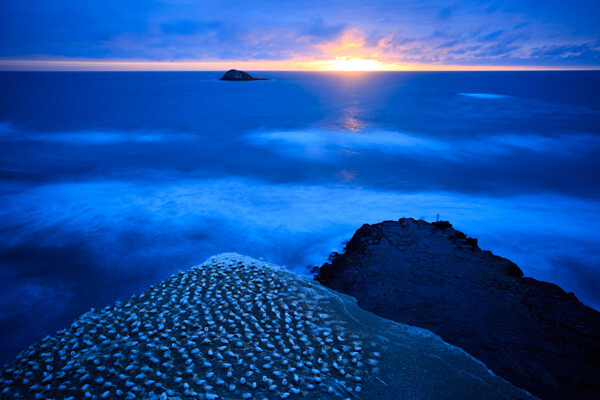
If you take a photo after the sun has set, but while there is still a little light in the sky, then the light has a strong blue colour. I mentioned the golden hour earlier, this period is called the ‘blue hour’ by landscape photographers.

If you take a photo on a cloudy day, the light also has a blue colour, although it is not so noticeable.

If you take a photo of something in the shade on a sunny day, the light also has a surprisingly strong blue colour.

If you take a photo lit by the sun at around midday it will have neutral colour. That’s because the white balance setting on your camera is calibrated to give photos with a neutral colour cast at this time of day. The exact colour of the light at this time of day depends on your geographic location and the season, so it does vary, but generally holds true.

Candescent light

What do all these scenarios have in common? The light in each is created by a candescent light source. That means that the light is generated by a burning object. In the case of daylight, that’s the sun (a burning ball of flammable gases). In the case of tungsten light, it’s the filament inside the bulb that is burning. There are no flames because there is a vacuum inside the bulb.

Light produced by candescent light sources behaves predictably and is easy for your camera to cope with. It is either neutral in colour (ie sunlight at midday) or it has a warm colour cast or it has a cool colour cast.

Daylight white balance setting

So, why do I use the daylight white balance setting on my camera? The reason is that I always use the Raw format. That lets me make the final decision regarding white balance when I process the images in Lightroom 4 (the software I use to process all my Raw files). I can warm up or cool down the white balance as required. I also use a calibrated monitor so I know the colours I see on-screen are accurate.

There are two benefits to setting colour temperature in post. One is that you can see the result of your adjustment right away on the monitor. The other is that you can also set the white balance on an individual basis per photo if you need to.

If you use the JPEG format life gets a little more complicated. While there is a lot you can do to a JPEG file in post, it’s not as flexible as a Raw file. You need to get the white balance setting as accurate as possible when you take the photo. That takes more work. It can distract your attention from making the most of the light and the subject at the time of shooting, so I avoid it.

There’s another reason I use the daylight setting, and it’s a personal one. I started in photography before the digital age, and I used daylight balanced slide film for most of my colour work. It taught me to appreciate the way that the colour of light changes throughout the day. With slide film, there is no post-processing, so you had to think about the colour temperature of the light and use filters to warm it up or cool it down if necessary. Now, I appreciate that my digital cameras make dealing with colour temperature much easier. That’s why I set it and forget it.

Using white balance

There are three ways to use the white balance function:

1. To create a photo with a neutral colour cast. This is important if you’re taking say, a product photo for a catalogue company, or you want a ‘clean’ look to your photos.

2. To emphasise the natural colour of the light. This is a creative way to use white balance. For example, if you are taking a photo of something lit by the setting sun, you may choose a white balance setting that emphasises the warmth of the light instead of trying to neutralise it.

3. To warm up photos that benefit from warm colours. A good example is portraits. Warm light is generally the best for creating a flattering portrait. There are exceptions, but warm is generally best.

There are some examples of photos with creative light balance at the end of the article.

Incandescent light sources

We’ve already looked at candescent light sources (light sources that burn). But light can also come from incandescent sources. These are light sources that produce light by a method other than burning something. The most common types you will see are fluorescent light, neon light and sodium lights (used in street lighting).

The light from these sources is more difficult for your camera to deal with as they don’t fit neatly on the cool to warm scale of candescent light sources. They are often mixed with daylight which makes your job even more difficult. You may be able to adjust the white balance to produce a neutral coloured image in daylight, you might also be able to do it with the artificial light, but (fancy post-processing techniques aside) you can’t get the white balance right for both light sources at the same time.

The lesson? Avoid fluorescent, neon and sodium lights as much as you can when you take photos. For example, if you are taking a photo in a building indoors lit by fluorescent light (and daylight coming through the windows) turn off the fluorescent lights (if you can) and just use daylight. Or turn off the lights and use flash instead (that’s how real estate photographers get such great results). The results will be better.

However, there are times when you can use these light sources creatively. A good example is if you take a photo of street scene at night or at dusk. The light from different light sources may add to the atmosphere.

Creative white balance examples

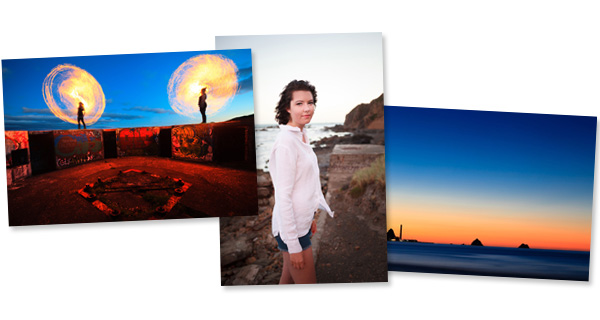
Here are some photos where I have used white balance creatively:

05

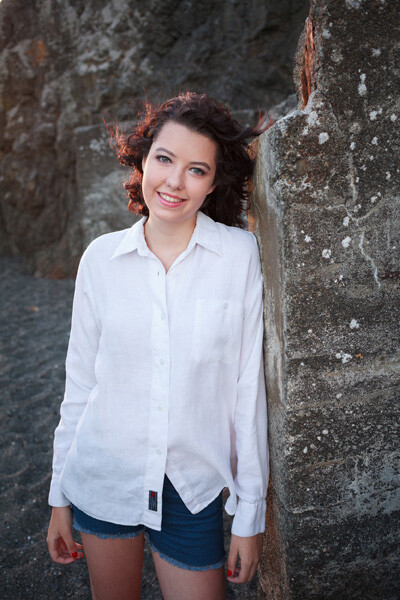
Here’s a portrait taken in shade. The quality of light in the shade is soft and beautiful – perfect for portraits. But the colour of the light is blue. I warmed up the image in Lightroom 4.

06
Here’s another portrait taken in the shade. The difference is that the girl’s hair is lit by the last rays of the setting sun. That’s what has produced that lovely warm colour on her hair.

07
A neon light against the evening sky. The light from the neon sign is red, and the ambient light illuminating the rest of the scene is blue. The colour contrast between the two is what makes the photo.

08

Steel wool spinning. Again, the colour of the ambient light at this late hour is blue. The light of the from the buildings in the distance and the burning sparks from the steel wool spinning is orange. There is a strong colour contrast between the two.

Previous articles

This is the fourth in a series of four articles. You can read the previous articles here:

Introducing the Creative Triangle

Finding Your Way Around the Mode Dial

Understanding Colour on Your Digital Camera

Understanding EOS

09

Andrew S Gibson is the author of Understanding EOS: A Beginner’s Guide to Canon EOS cameras. The use of white balance is one of many topics explored within the ebook.

Post originally from: Digital Photography Tips.

Check out our more Photography Tips at Photography Tips for Beginners, Portrait Photography Tips and Wedding Photography Tips.

How to be Creative with White Balance


Digital Photography School

 
Comments Off on How to be Creative with White Balance

Posted in Photography


Introducing the Creative Triangle

05 Feb

This is the first in a series of articles by Andrew S Gibson, the author of Understanding EOS: A Beginner’s Guide to Canon EOS cameras.

Creative triangle 01

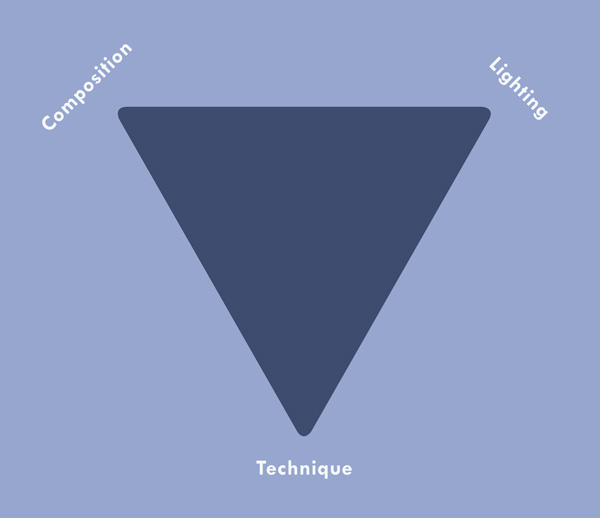
The ‘creative triangle’ is my term for the idea that great photos are made from a combination of good composition, an understanding of beautiful lighting and the technical ability to control your camera.

You could even think of this as another version of the rule-of-thirds. A good photo is comprised of one-third the composition, one-third the lighting and one-third the technical ability of the photographer.

Creative triangle 02

It’s not enough to learn what the various buttons, modes and functions on your camera do, important though that is. You also need to cultivate your eye for a good photo and an appreciation of the beauty of great lighting.

How can you do this? One way is to look at the work of your favourite photographers with a critical eye. It’s not enough just to say that you like particular photo. Go deeper. Why do you like it? What are the elements of composition and light that help make the photo? Why has the photographer chosen to use the camera settings that he has? What lens did he use? How can you apply these ideas to your own photos?

To help you out I’m going to take a deeper look at three of my own images:

Creative triangle 03

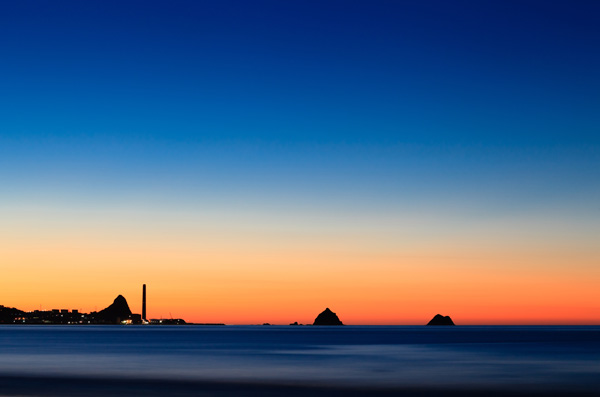
Image #1: New Plymouth Sunset

Camera: EOS 5D Mark II
Lens: Canon EF 85mm f1.8
Exposure: 219 seconds @ f11, ISO 200

Focal length. I was drawn to this scene by the silhouettes of the rock stacks and the chimney. I needed to use an 85mm lens to ensure that they were large enough to have impact. A wider focal length would have made the rocks and chimney too small.

Shutter speed. I used a shutter speed of 219 seconds. Mainly due to necessity – it was taken some time after sunset so light levels were low. I stopped down to f11 to ensure good depth-of-field and used a relatively low ISO for good image quality. The sea has recorded as a misty blur. This adds mood.

Light. I took the photo after the sun had set. If you try to take the photo with the sun above the horizon, the contrast is too high. It’s much easier to take photos after the sun has disappeared. The colours are often better and as the sky gets darker you may see some stars.

Colour contrast. The light from the sunset has split the image into three bands of colour. Blue and orange are contrasting colours and they give the photo impact. Colour temperature comes into play here. Blue light is cool, orange light is warm and the contrast between the two creates atmosphere.

Creative triangle 04

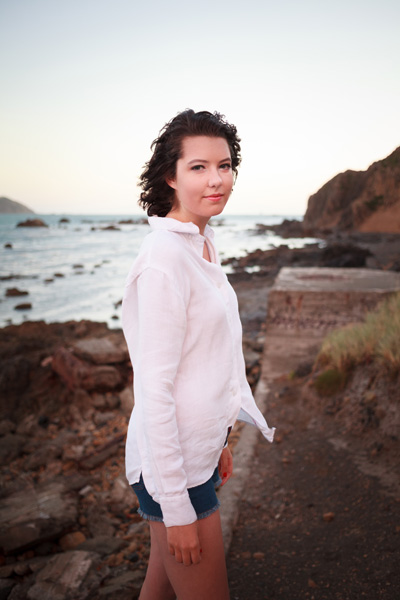
Image #2: Evening Portrait

Camera: EOS 5D Mark II
Lens: Canon EF 40mm f2.8
Exposure: 1/180 second @ f2.8, ISO 800

Focal length. I took this photo with my 40mm pancake lens. This lens is a moderate wide-angle on a full-frame camera. I like to use it for portraits, as the perspective is wide enough to include the background without too much distortion.

Aperture. I set the aperture to f2.8 (the widest on this lens) to throw the background out of focus. This helps concentrate attention on the model. A sharp background competes with the model, which may be useful if you are trying to tell a story in the way that photojournalists do, but can be a distraction with photos like this.

Light. This photo was taken late in the evening. The shoot was delayed so were were out later than I had intended, but I was rewarded with beautiful light. The sun had disappeared beneath the horizon, but the light still had a red glow and a beautiful, soft quality ideal for portraits.

Creative triangle 05

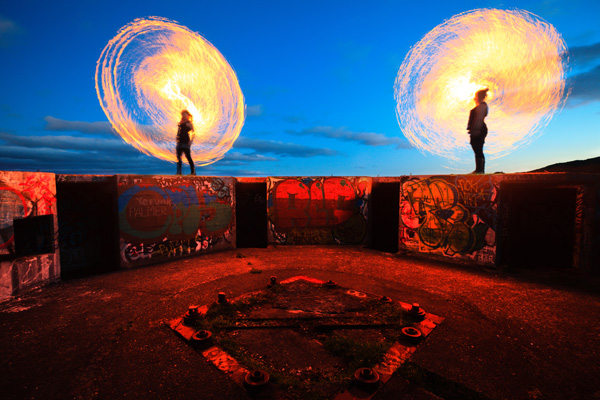
Image #3: Fire Spinning

Camera: EOS 5D Mark II
Lens: Canon EF 17-40mm f4L lens @ 17mm
Exposure: 6 seconds @ f5.6, ISO 400

Focal length. This photo is different from the other two because it is taken with an ultra wide-angle focal length of 17mm (equivalent to around 11mm on an APS-C camera). There is a real sense of distance between the metal bars set into the concrete in the foreground and the performers standing on the wall.

Unusual subject: The two women in the photo are fire performers. They are spinning kevlar whips dipped in flammable fuel and set alight.

By the way, don’t try this at home. These women are trained fire performers and know how to handle these whips safely. If you want to try something similar, find someone who knows what they are doing to spin the whips.

Shutter speed: I used a slow shutter speed of six seconds so that the spinning whips created circles of fire.

Composition: I opted for a symmetrical composition. I like the way there are two circles of fire, one on either side of the frame. I could have moved closer to take the photo, but I preferred to stay back and include more of the setting.

Light. I shot this photo at dusk. Partly from necessity – it’s easier to see the flames when it’s dark. I also wanted some colour in the sky. I didn’t want it to be completely black.

Colour contrast. The cool colour of the blue sky contrasts with the orange flames and the red glow in the foreground. This is colour temperature in action again. The sky is lit by the fading daylight, which has a deep blue colour. The light from the flames is orange, like the light from a tungsten bulb.

Conclusion

When it comes to evaluating photos, camera settings (aperture, shutter speed, Picture Style, white balance etc) are only part of the story. A camera is just a lightproof box that records light. It has no heart or soul. That comes from the photographer and their understanding of light and composition. Hopefully the way that I’ve analysed my own images in this article will help you understand how deconstructing photos taken by other photographers can help you take better photos.

This article is the first in a series. The next one will take a close-up look at your camera’s Mode Dial. Why are there so many exposure modes and do we need them all? I don’t think so – and I’ll tell you why.

Creative triangle 06

Understanding EOS

Andrew S Gibson is the author of Understanding EOS: A Beginner’s Guide to Canon EOS cameras. The creative triangle is one of many concepts discussed in the ebook.

Post originally from: Digital Photography Tips.

Check out our more Photography Tips at Photography Tips for Beginners, Portrait Photography Tips and Wedding Photography Tips.

Introducing the Creative Triangle


Digital Photography School

 
Comments Off on Introducing the Creative Triangle

Posted in Photography


Trailer: Nikon School: A Hands-On Guide to Creative Lighting

04 Feb

Professional photographers Bob Krist and Joe McNally are featured in what is far-and-away the best resource to date on Nikon’s speedlight system and how to use CLS effectively. It starts with Krist in the studio teaching you the basics — and nuts-and-bolts control how-to’s — then goes out into the field. There, Bob takes on the roll as the color man to Joe’s lead as they work together to pull off a variety of sophisticated shots using Nikon speedlights. Congrats to Nikon for significantly dialing up the educational portion video as compared to the “Speed of Light” DVD of a few years ago. Yes, it is specific to the Nikon system and designed to help sell gear. But the educational content is there — they show everything you would need to know. (Uploaded with permission from Nikon.)
Video Rating: 4 / 5

[HD] Enjoy this release of some of our past and present clients of 2011! We have 1000’s of photos of our clients so we cant put them all in, but we will be releasing videos now and then showing some of our work, so you may be in the next one… stay tuned! BodyIllusions Tattoo Studio is the finest studio in the area with prices that cannot be challenged by any studio in the area… we don’t overprice our tattoos. Check out the others and their portfolios of their work, then come see us and you will see why more and more clients are coming in to get their next piece of eternal artwork on them with one of our experienced artists! We cover all types and styles of tattoos from blackwork, greywork, portraits to coverups and custom pieces. We will also tattoo your artwork and designs, just bring them in and talk to one of the artists at BodyIllusions Tattoo Studio 🙂 BodyIllusions Tattoo Studio also performs all types and styles of brandings, cuttings, scarification and of course every body piercing available with the most eperienced body piercer in the area with over 20+yrs of experience, so you can feel confident with our epert work and high success rate in healings. The cleanest studio around, check us out. Thanks to all the clients in the video, we appreciate the honor of you allowing us to create your piece of art. We look forward to seeing you again in 2012… Thanks for watching and subscribe if you want to be updated on our future video releases. Seasons Greetings
Video Rating: 4 / 5


Resetting Creative Wireless Modular Speakers

25 Jan

Applies to D5x, D3x and DSx
Video Rating: 3 / 5

My very first theme review 😀 I think, that like I said, too many Winterboard themes or widgets make it confusing. If you have 5 that are clearly labeled then that’s fine, but 20 themes are just bamboozling o.0 But everything else is themed nicely, the sidebar on the left and right for the SB and for Notes remind me a lot of Alienware and the other apps are extremely well done and complete. FINAL RATING: 8.5/10 Custom sounds, a CK theme and an SBSettings theme would make it a 9.5/10. The theme is superb and fantastic, but missing sounds, which make a huge part of a theme :/ But I still love the weather and calendar widgets and this is all available on Cydia for .99 thank you xpprem for letting me have the theme for free so I could do this review. -D3xus twitter.com d3x.us
Video Rating: 0 / 5