RSS
 

Posts Tagged ‘Creative’

4 Tips for Creative HDR Styling with Aurora HDR 2018

27 Dec

Arguably the best software for making high dynamic range photos is Macphun’s (soon to be Skylum) Aurora HDR 2018. This image editor can be used as by itself or in conjunction with their popular Luminar photo editor (as well as a plugin for Photoshop, Lightroom, Aperture, and Elements). Within Aurora HDR are tons of photo editing tools including their popular presets (filters). But you don’t have to use Presets to creatively style your HDR photos.

Here are four tips beyond using presets for achieving creative images.

1. Make your images pop with subtle HDR enhancements

4 Tips for Creative HDR Styling with Aurora HDR

Before – the middle image of a 3-shot bracket.

Instead of going right for the Presets at the bottom of Aurora HDR, dive right into the HDR Basic panel on the right-hand side of the software. Start with the Contrast and HDR Enhance sliders to enhance textures and details in your photo. Then play with the Smart Tone to tame down the shadows that can be created by increasing the contrast.

Next, head to the Color panel right below HDR Basic and adjust the Vibrance and Saturation. Keep these color adjustments minimal if you’re going for a more subtle, realistic look. Based on the color edits that you make, you may also need to balance out the color temperature if your image appears too cool or too warm.

4 Tips for Creative HDR Styling with Aurora HDR

Add the HDR Basic and Color Filters.

4 Tips for Creative HDR Styling with Aurora HDR

2. Add a Polarizing and Graduated ND Filter Effect

Landscape photographers are well aware of the effects of the polarizing and graduated neutral density (ND) lens filters. If you aren’t familiar with them, here’s a quick rundown. A polarizing filter helps darken skies and minimize reflections and glares of light bouncing off of surfaces such as water or glass. Similarly, the graduated ND filter helps balance out exposures by darkening backgrounds that are much brighter than foregrounds. In essence, both of these filters are often needed to obtain the best landscape photos.

If you don’t have these filters or happen to forget them, Aurora HDR’s post-processing effects can produce very similar results. Simply click scroll to the Polarizing Filter panel and apply as much of the effect as you wish. In the example below, increasing the polarizer makes the blues really pop, especially in the sky.

Further down, you’ll find the graduated ND filter effect, known simply as Top & Bottom Tuning. This allows you to adjust the exposure, contrast, vibrance, and saturation of the top and bottom areas of your image separately. If you happen to have an untraditional horizon, click the Set Orientation button to fine tune the horizon’s rotation and make your graduated ND filter effect blend more realistically.

4 Tips for Creative HDR Styling with Aurora HDR

Polarizing Filter and Top & Bottom Tuning (ND filter)

Skylum Aurora HDR Creative Styling Tips

3. Replace the sky

4 Tips for Creative HDR Styling with Aurora HDR

Before – the middle image of a 5-shot bracketed set.

If you’ve ever photographed a sunset and wished the sky had been more colorful, you can actually make this edit rather quickly with Aurora HDR. All you need is a clear photo of the ideal sunset that you want to swap into your bracketed image. You can pull that ideal sunset image from your own archives, or use a stock photo like the one that I’m using from Pexels in the example below.

Start by running your brackets through Aurora HDR and making any desired adjustments to the resulting photo. Below, I’ve applied a Warm Skylight filter. Next, go the Layers section in the right-hand panel and click on the plus sign. Select “Add Image Layer…” This is where you can select your ideal sunset photo and import it as an image layer.

Once your new image has loaded, you can apply any filters or adjustments as desired. Next, click on the paintbrush icon next to the image layer. A small drop-down menu will appear with four options: Brush, Radial Mask, Gradient Mask, and Lumosity.

4 Tips for Creative HDR Styling with Aurora HDR

If your image has a straight horizon with no big obstructions, the Gradient Mask will easily mask your ideal sunset into your bracketed shot. But in my case, I have a big building in the way, so the Brush is my best bet. After clicking on Brush, a thin bar of options will appear on the top panel. This is where you can control whether you’re painting over the image, or Erasing (backtracking on any mistakes). You can also control the size, softness, and opacity of the paintbrush.

When I’m done painting in my new sunset sky, I’ll press the blue Done button. Check out the before and after images below!

4 Tips for Creative HDR Styling with Aurora HDR

4 Tips for Creative HDR Styling with Aurora HDR

4. Add a texture overlay

4 Tips for Creative HDR Styling with Aurora HDR

Before – the middle image of a 3-shot bracketed set.

Using a similar technique to sky replacement, you can add textured overlay layers to your photos for a more creative effect. All you need is a textured photo, such as the weathered paper image below. Simply import that image as a new layer. You can then selectively mask it by using the Brush, Radial Mask or Gradient Mask tools (explained above). Or you can apply the texture equally to the whole image by adjusting the opacity. The resulting image had a moody, vintage look to it.

Skylum Aurora HDR Creative Styling Tips

Over to You

Have you used Aurora HDR 2018 to enhance your images? What tools have you found to be the most useful for achieving more creative photos? Let us know in the comments below!

Disclaimer: Macphun, soon to be Skylum, is a dPS advertising partner.

The post 4 Tips for Creative HDR Styling with Aurora HDR 2018 by Suzi Pratt appeared first on Digital Photography School.


Digital Photography School

 
Comments Off on 4 Tips for Creative HDR Styling with Aurora HDR 2018

Posted in Photography


Tips for Planning and Capturing a Creative Portrait

11 Dec

There is saying, in the photography world, that an image can be taken in a hundred different ways. This is especially true, as you have probably already noticed when capturing portraits.

Portrait photography is probably the most popular genre, within the realm of the diverse world that is the art of photography. People take portraits so frequently, snapping selfies or photos of their loved ones, with mobile phones or cameras. In any case, this is pretty much what portrait photography is all about, capturing people’s faces.

However, as photographers, you will always be striving for higher excellence, whatever the style of your photography. It’s a natural cause, this is one of the reasons why photography is artistry. The drive for capturing better images, in the field of portrait photography, will eventually lead you to a higher dimension where you won’t be satisfied with just capturing a face, but rather the soul of your subject.

creative portrait of a woman

Lonely young and beautiful woman seating in a bar, next to a piano and a bottle of champagne, of 1920s time period. The woman is dressed in 1920s black evening dress and Gatsby-style diadem on her hair, there is a large old rusted window in the background where blue evening light invades the scene.

This dimension in photography is where creativity lay hidden. It waits to be unleashed by forces such as knowledge and the inspiration gathered along the way, as you were growing as a photographer. So let’s embark on a quest which will help you harvest the power of creativity in photographing portraits and escape the ordinary.

In the list below, you’ll learn the main ingredients that will help you harvest this creative force and take you to another level with your portrait photography.

Equipment

Know the equipment you work with well. This is the baseline from where you need to start. Technical knowledge may not seem connected to art at first, but let’s examine the image below.

creative self portrait

Self-portrait with creative lighting involving a continuous light and a studio strobe.

This image was captured with a single exposure and there weren’t any alterations applied to it in Photoshop. A second curtain flash technique with slow shutter speed created the effect here. Camera White Balance was set to tungsten and the key light colored with CTO – to balance the colors with gels.

Self portrait lighting diagram

Surely you have noticed how technical knowledge and art correlate. Be it your camera settings, lens, or strobe lights, the more you know about your equipment the more options you’ll end up having to explore in bringing your artwork to realization.

Selecting the right faces, exploring your model’s hidden potential

Most photographers create their best work by working on personal projects. When working on a personal project, you’ll have the full control to choose the model sitting in front of your camera – you are the Art Director.

There are faces full of potential, although they are not faces of professional models (it could be people you see in the public transport or the streets), revealing great characters and features. You need to be able to see this potential and invite such people for a portrait photo session.

Keep in mind that although a person looks great, he or she may not feel comfortable sitting and posing for you at first. This will obviously affect the overall quality and purpose of the photo session.

Remember, as a photographer, it’s your job to bring a good vibe and mood to the set, in order to help your model relax and being able to explore his/her best features.

creative portrait of a man

Low key portrait of a black man wearing glasses and a black leather jacket, having his hands and fingers very close to his face.

In the first image above, is a man who booked a personal creative portrait session. It took four hours of working with him in order to reach a point where he was finally in the right part of his own creative universe, feeling free and exploring himself. He had never had such an experience before and was feeling quite nervous and shy at first.

The second image below is a good representation of working with a great character.

creative portrait of a man

Portrait capturing a model dressed in WWII pilot outfit holding Cuban cigar in his mouth. The creative look of this portrait has been achieved by the use of multiple strobe lights.

Lighting

Light is the very reason why photography exists. Think about light, study light – how it spreads, how it bounces, how it is reflected, its specularity, etc. There is so much to light. Light is what will be rendering the reality in front of you, by reflecting and bouncing back into your camera lens.

Light has a quality which is defined by the source, intensity, size, and color temperature of the light. The best part is that you have full access to controlling any of this. Main sources of light for photographers are:

  • Ambient light
  • Strobe light
  • Continuous light

But as you move on to the next topic, you’ll see that there is much more to light than just being available in some form.

creative portrait setup

Photographic studio setup for a portrait session, the image features Bowens strobes, a white backdrop and light modifiers.

In the image, above, can be seeing a studio strobe lighting setup for a portrait session. Some characters may require really complex lighting in order to capture their personalities. Others just require one or two light sources – it will be up to you as an artist to determine this.

creative portrait of a man

Low key portrait of a man with a ginger beard and leather jacket, the scene features dramatic and creative strobe lighting.

The portrait above was photographed with only two strobe lights – portraying very well how the most appropriate lighting was selected to illuminate and capture the mood and personality of the person. While for the image below involved the use of six strobe lights.

creative portrait of a woman

Portrait of young woman on blue background wearing a purple dress – with a creative, multiple lighting setup and approach.

Shaping the light, light modifiers

All artists use different sort of tools that help them shape the fabric of their own inspirations and bring creative ideas to life. It is the same for us photographers too.

First, there’s the light, ambient or strobe, which is the raw material you work with. But this material needs to be softened or shaped, helping you in the process of reaching deeper dimensions of your subject’s features and character.

Light shaping tools will help you define your own creative realm – the realms of Game of Shadows, Game of Highlights and Game of Midtones, where you are the master controlling and balancing what sort of reality your light will render.

creative portrait of a woman and man

Tattooed rockabilly, demon, barber holding razor blade in his dark and demonic barber shop with pinup model as his evil assistant on the background next to a bottle of Jack Daniels.

For the creation of the image above, several light shaping tools were used and some of them were even further modified in order to produce the quality of light needed in this particular situation (the image was shot at 10 am in the morning but the idea was for dark – Sweeney Todd concept)

Studio, location, and features

Another very important ingredient to the process of building unique and creative portrait images is exploring what is around you. What is available or what you can build, light and create on location or in the studio?

Although portrait images are characterized by very tightly cropped frames, around the subject’s face – attention needs to be given even to the smallest details. Such details will greatly contribute to the overall contrast within the scene you are capturing.

An example of this is when you are shooting in a studio you can use a snoot, or another light modifier, and create a spot of light or perhaps colorize your background, by placing color gels. Do not limit yourself to only thinking of the face you intend to capture, but rather on the grand scene of everything that will be captured in your composition/frame.

Following the same flow of thoughts and principles – you can turn even a simple room into a professional studio like has been done on the image below – photographed in a bedroom.

creative portrait of a man

An image featuring the founder of Vialucci media, Theo X photographed on a white background.

Things even get more challenging and interesting when shooting environmental, wide-angle portraits. A location can reveal so much about the personality of your subject and also contribute greatly to the level of creative quality in your images. All you need to do when you’re at a great location is help stylize the scene, frame well (appealing creative composition), bring the strobes in and work out the best of your models.

Props, makeup, and hair

This is a very challenging step that eventually one day you’ll take, but it is also very rewarding. By reaching the point of employing props, makeup, and a hair stylist – it will be solid evidence that a line was crossed with no option of turning back. This is the stage where you’ll be seeing beyond the ordinary qualities of your subject and looking to reach a deeper dimension – a state of creative vision.

creative portrait of a woman

A conceptual scene of a four-handed Queen seating on a throne receiving scripts from her Demon servant, and pointing at a Victorian style globe. The scene is lit by several light sources with different colors, rendering the whole scene in a very creative and original light.

creative portrait of a man

Creative portrait composite representing WWII pilot in the cockpit of his aircraft engaged in an aerial battle, with the enemy aircraft in the background.

The images above illustrate very well, the level of creativity obtained by employing props, makeup and hair into the photoshoot.

Editing and retouching

Processing or editing images has always been an integral part of the whole creative process. Although having all the advantages and power of digital technology, you shouldn’t abandon the universal rules and laws of aesthetics.

Think of retouching and editing as a process that helps you enhance the high-quality photographs you already capture and bring your creative vision to final realization. This is achieved without overdoing and diminishing the quality of your photographs.

The two images below are good examples of a photograph captured with simple lighting setup and processed just enough to clear and strengthen the subject’s appearance.

Creative portrait photography before

Before processing.

Creative portrait photography after

After processing.

Conclusion

Capturing creative images involves innovative and creative thinking – seeing things differently, thinking differently. That is why you always need to be on your own small quest for creativity, not bound only by what was covered here or elsewhere.

Come up with your own new solutions – in the process of which you only will add and improve your portrait photography.

The post Tips for Planning and Capturing a Creative Portrait by Nikolay Mirchev appeared first on Digital Photography School.


Digital Photography School

 
Comments Off on Tips for Planning and Capturing a Creative Portrait

Posted in Photography


7 Tips to Get More Creative Photos of Well-Known Landmarks

02 Nov

Photographing landmark buildings when you visit a new place, or even places closer to home is a great way to get stand out photos. Often the architectural beauty of the natural or man-made landmark will make the image dramatic, you simply need to compose the photo well.

In this article, you’re going to see the standard photo, and then how to make more creative images of well-known landmarks. You’ll see a case study of how to shoot one particular landmark in many different ways.

7 Tips to Get More Creative Photos of Well-Known Landmarks

This photo was taken from the Trader’s Hotel in Kuala Lumpur. It shows the Petronas Twin Towers.

1 – The standard photo

Ahead of photographing more creative images of landmarks the aim is to make the best standard photograph you can. Chances are that a quick search on a photo sharing site like 500px.com will reveal this, so there is no need to re-invent the wheel here.

Once you know which landmark you want to photograph, the next step is to find out where that photo was taken from, if the same image has been taken many times there will likely be a viewing platform.

Once you are in position it’s time to compose your photo. It’s better if you can use a slightly different composition to those used before, perhaps try a vertical shot.

The last step is to ensure you have good images to process once you return home. Bracketing your images when the sky is brighter than the foreground will allow you to use creative post-processing techniques like digital blending. Alternatively, you can use graduated neutral density filters, and get your photograph exposed correctly in camera, with a single frame.

2 – Paint with light for creative images of landmarks

7 Tips to Get More Creative Photos of Well-Known Landmarks

This photo shows how light painting can be used to create your own image.

One of the most creative things you can do in photography is light painting. There are several forms of this technique and each can give you dramatic results.

This is innovative in that the results will be your own, and difficult for someone else to replicate. Let’s take a look at the different forms of light painting that you could try.

  • Light painting – Most people know light painting as writing their name with a torch (flashlight) in front of the camera. How about light painting around a landmark to add a creative edge? Those really interested in should look into buying the pixelstick.
  • Kinetic light painting – This refers to moving the camera, as opposed to moving the light source. Examples of kinetic light painting are camera rotation and zoom bursts.
  • Lighting up an object – You can light up a landmark using a strong flashlight, providing it’s not too far away. Using lights to brighten a landmark can make it stand out even more in the frame.
7 Tips to Get More Creative Photos of Well-Known Landmarks

Camera rotation is a good way to make a creative image of a landmark.

3 – Infrared photos of landmarks

Make creative images of landmarks by using infrared photography! There are several avenues to achieving this look, and you have a choice of in-camera or post-processing.

The classic infrared photos show lots of foliage, sky, and usually a water element. The effect creates a dreamscape image by turning the sky black, and the foliage white. Infrared photography is best done on a clear sunny day, with a few clouds to create more interest.

The following are the three avenues open to you to create these photos when shooting with a digital camera.

  • Take a normal photo, and use post-processing to give the image the look of an infrared photo.
  • Add an infrared filter to the front of your lens. To get the infrared look you will need to take your file and process it on the computer.
  • Convert your camera body so that it’s usable for infrared photography, again further processing will be required.
7 Tips to Get More Creative Photos of Well-Known Landmarks

Though this photo uses the same composition of a previous one above, the mood is changed by using an infrared technique.

4 – Get those detail photos!

It’s always a good idea to take some detail photos of a landmark, these are texture images that often use repeating patterns. When photographing a landmark building, whether it’s old or new, you can use bricks or glass windows to create these texture photos.

Photos of natural formations will also have good details. Cliff faces may, for instance, have good lines and textures in them. The aim with this type of photo is to show detail, but at the same time make it obvious which landmark you are photographing. This could be structures that are unique to that particular landmark.

When shooting glass windows, is there a reflection in those windows that will give the photo context? When photographing landmarks always try to get detail photos to add more variety to the set of photos.

7 Tips to Get More Creative Photos of Well-Known Landmarks

Creative images of landscapes can be achieved using detail photos. The metallic structure of the tower and the Malaysian flag lend context.

5 – See another world with refraction

An alternative way of producing a unique landscape image is through using refraction. A transparent spherical object will be needed for this, there are several options available. The best objects for producing this effect are a wine glass filled with water, a crystal ball, or perhaps a clear marble.

This is a great way of capturing a large area of your scene, with the effect in the refracting object being similar to a fish-eye lens. The image inside the ball will be upside down, so managing this aspect of the photo is important. This technique is a lot of fun, though the need to carry around a heavy glass ball can be taxing.

7 Tips to Get More Creative Photos of Well-Known Landmarks

Refraction is a great method of producing a unique image, this one also shows a reflection.

6 – Long exposure for artistic effect

A great way to produce creative images of landmarks is to play around with long exposures. This is a variable that can be used in different ways to great artistic effect. It’s more common to carry out long exposure at dusk, or during the night; however using an ND filter will allow you to take long exposures during the day.

Here are three ways you can use long exposures:

  • Car light trails – This is a form of light painting. In this case, the car headlights will paint their way through your frame, along the road you’re photographing.
  • Cloud movement – If there are clouds in the sky, and they’re moving fast enough, you can use a long exposure to capture this motion.
  • Moving water – Similar to the above cloud movement, but with water! The main subject is, of course, your landmark, but if that landmark has water near it, then use that to your advantage.

All good landscape photographers carry a tripod, and anyone planning this type of photo will need one. Your exposures will be anywhere from one second to several minutes long.

7 Tips to Get More Creative Photos of Well-Known Landmarks

Long exposure photos of car light trails are a staple of photography. Here the road leads up to the Petronas towers on the horizon.

7 – Change your vantage point

The angle that you photograph a landmark at can have a dramatic effect on the type of photo taken. Today the sky literally is the limit, as drones allow for the overhead photos that were previously out of reach.

But a drone is not the only way to achieve a good photo by changing your vantage point. The standard photo is that at street (eye) level, so any variant on that changes the type of photo.

  • Bird’s eye view – This type of photo is taken from a high vantage point, where you will photograph downwards. The most extreme example would be a drone, or perhaps an airplane.
  • Worm’s eye view – The opposite of a bird’s eye view, this is taken from street level looking upwards. You will need to be close to the landmark you are photographing.

The challenge with this is finding a good location that allows a view of your landmark. In the city, this will mean getting access to a rooftop, or viewing platform. In a more rural setting, it means climbing a mountain!

7 Tips to Get More Creative Photos of Well-Known Landmarks

A worm’s eye view can give you a different style of photo.

How will you make creative images of landmarks?

There are many ways to photograph a famous landmark in your own unique way. How do you go about putting your own stamp on a location that has been photographed many times before?

Have you tried any of the above suggestions? Can you revisit one of your previous photo locations, and photograph it totally differently? We’d love to see the results of your work past and present, please share with the community in the comments area below.

7 Tips to Get More Creative Photos of Well-Known Landmarks

The Petronas Towers in Kuala Lumpur has been photographed many times. It can be a challenge to find a unique photo.

The post 7 Tips to Get More Creative Photos of Well-Known Landmarks by Simon Bond appeared first on Digital Photography School.


Digital Photography School

 
Comments Off on 7 Tips to Get More Creative Photos of Well-Known Landmarks

Posted in Photography


Five Creative Lenses That Will Make Your Photos Pop

15 Oct

The drive to be creative is what focuses many people in photography. One variable you can alter to help you create photographs that really stand out is the lens. There are several different options for choosing creative lenses, depending on your taste.

In this article, you’ll see five very different kinds of lenses, and what they are capable of bringing to your photography. It’s always a good idea to have a lens that capable of something totally different, which will allow your photos to stand out from the crowd.

Five Creative Lenses That Will Make Your Photos Pop

The fisheye lens is used in this photo has captured a wide scene. There is some distortion on the edge of the image, but with the lines all leading in, this works well.

1 – The fish-eye lens

This lens is always great fun to work with, it’s a versatile lens that can be used for both portraits and landscapes. A fish-eye lens has several great applications so let’s take a look at those:

  • Wide-angle lens – This can act as a super wide-angle lens, and if you decide not to carry a wide angle lens the fish-eye makes a decent alternative. The main constraint is the distortion, this means keeping the horizon line straight.
  • The Earth’s not flat! – You can prove the Earth is not flat with a fish-eye lens. Simply position the horizon line near the top or bottom of the frame, and let distortion do the rest.
  • Embrace the distortion – Using a fish-eye means working with the way lines get distorted. This has great application for portrait photos, as those lines lead up to your model.

The fish-eye is a great lens to play with, which is why it’s such a popular lens. It’s great for getting a lot of the scene in your frame, but is, therefore, challenging to use. Those who embrace the challenge of this lens will be reward with some amazing results, so go out and try one.

Five Creative Lenses That Will Make Your Photos Pop

The fish-eye lens can be great for super wide landscape photos.

2 – The Lensbaby for something quirky

Lensbaby is a company that makes a range of lenses that are small, comparatively cheap, and not too heavy. The lenses they make have diversified over the years. The Lensbaby Composer was their original concept. The Composer lens allows the user to change the area in the frame that has the sharpest focus. It does this by allowing you to change the plane of focus using a swivel head.

  • Abstract bokeh – Shifting the angle of the composer lens will give you stretch bokeh. The best way to get this effect is to photograph some fairy lights, that are deliberately out of focus.
  • Portrait photos – Lensbaby lenses are excellent at drawing your eye to the model, by minimizing the background. Once again with the Composer, you can focus your sweet spot on the persons face, and surround them with bokeh!
  • Landscape photos – While not its strength, a Lensbaby can be used for interesting landscape photos. This works best when there is an out of focus area in the frame, which the Lensbaby Composer can further blur out into stretch bokeh. The effect is not dissimilar to a tilt-shift lens, and the subject of the photo should be sharp.

The Lensbaby Composer creates interesting bokeh around the subject.

3 – The 50mm f/1.2 is a creative lens

The nifty fifty is one of the first lenses that many photographers buy, with the less expensive f/1.8 version being a popular choice. There are a plethora of other prime lenses that can be used creatively like the 50mm f/1.2, though f/1.2 is at the extreme end of the large aperture scale. The comparison to make is a fish-eye lens to a wide angle, and here, an f/1.2 to an f/1.8 lens.

The 50mm f/1.2 is an excellent choice for those wanting to explore bokeh in their photographs. The depth of field is incredibly narrow, and getting sharp focus on your subject can be tricky. In the evening, positioning lights behind the subject, in the out of focus area will produce bokeh.

Want to get even more creative? Try creating different shaped bokeh, by placing a circular disk with a cut-out area in front of your lens.

Five Creative Lenses That Will Make Your Photos Pop

At f/1.2 the bokeh is very smooth in this image, and the plane of focus is very narrow.

4 – Up close it’s a different world! Use a macro lens.

The world can look very different with just a little bit of magnification, and macro lenses are a good place to start. This form of photography is a niche all of its own, and there are many pieces to it. Those who wish to really excel at macro photography will need to invest in the correct lighting gear and a good tripod. There is plenty you can achieve with a macro lens to start you on the path of macro photography.

  • Flower photography – A good macro lens is often the starting point for flower photography. Now, of course, you can take photos without doing macro photography, but getting in closer allows for more dramatic results.
  • Water droplets – Combined with the correct off-camera flash there is a lot of photography you can do with water droplets.
  • Detail photos – Macro lenses are very good for focusing on one area, and bringing out the detail. Close up photos of money is one example of how this can be applied.
Five Creative Lenses That Will Make Your Photos Pop

Food photography can be a good subject for your macro lens.

5 – Use a tilt-shift lens for more interesting landscapes

The tilt-shift lens has two main purposes, these are to correct the perspective of a photo, and to create a miniature world look. These lenses were originally designed with architectural photographers in mind, so that tall buildings didn’t bow inwards in the frame. The more creative use of these lenses is to create a miniature world. The lens can selectively focus the middle area of the frame, with the top and bottom blurred out. The lens is on the expensive end, and as the effect can be produced by

A tilt-shift lens can selectively focus the middle area of the frame, with the top and bottom blurred out. The lens is on the expensive end, and as the effect can be produced by post-processing you will need to consider whether or not you want to invest in this kind of creative lens.

Five Creative Lenses That Will Make Your Photos Pop

The tilt-shift effect miniaturizes objects in the frame. This effect can be achieved both in camera and by post-processing.

Which creative lens will you choose?

There are many lenses available, so which of these creative lenses would you choose if you were to buy one? Have you already have a lens like this, how has your experience with it been?

Is there a project you’d like to work on, where you’d need a lens like one of those listed above? Do you use another creative lens, not mentioned here? As always we look forward to your comments and feedback.

Five Creative Lenses That Will Make Your Photos Pop

The macro lens is great for exploring nature, be it flowers or insects.

Five Creative Lenses That Will Make Your Photos Pop

The Lensbaby can be used to create abstract bokeh.

Five Creative Lenses That Will Make Your Photos Pop

The 50mm f/1.2 lens can create shaped bokeh, this is done by covering the lens with a disc, and cutting the shape in the center of that disc.

The post Five Creative Lenses That Will Make Your Photos Pop by Simon Bond appeared first on Digital Photography School.


Digital Photography School

 
Comments Off on Five Creative Lenses That Will Make Your Photos Pop

Posted in Photography


How to Make Your Photos More Creative Using Camera Angles

10 Oct

A creative use of camera angles is one of the quickest ways to add interest and variety to your photos.

Even if you don’t know how to use your camera very well, angles are easy! All you have to do is move your camera higher or lower to dramatically change the angle of your photo. It doesn’t matter what camera or what lens you’re using (even your smartphone), you can always make more creative photos by changing the camera or shooting angle.

Five Different Camera Angles

You have five main camera angles to choose from. Each one will add a different perspective, giving your photo the mood or feeling that you want it to have.

#1 – Bird’s Eye View

The highest camera angle is “bird’s eye view.” This is when you get up above the scene and look straight down. This angle is great for looking down and seeing all the details of a scene from above.

A bird’s eye view is an unusual angle because you’re not normally up high looking down on a scene. Any angle that is beyond your usual daily experience will make your photo more interesting to look at.

Bird Eye View How to Make Your Photos More Creative With Angles

I chose a bird’s eye view for this photo of our sleeping baby. By choosing this angle, I was able to look down and frame him with blueberry branches.

Bird Eye View - How to Make Your Photos More Creative With Angles

A bird’s eye view is great for food photography, allowing you to see everything on the dish.

#2 – High Angle

A “high angle” is not quite as extreme as the bird’s eye view. You just need to be a little bit higher than the person or thing that you are photographing.

Think of a high angle as a very normal view of the world for most adults. This is especially true for parents who are always looking down toward their kids.

Even though you experience this angle or perspective a lot throughout the day, it can still be perfect for some of your photos. A high angle is useful for making your subject look smaller or more vulnerable and perhaps making the viewer seem more dominant.

High Angle How to Make Your Photos More Creative With Angles

This high angle allowed me to look down at my son and also work in some interesting background elements.

How to Make Your Photos More Creative With Angles

Since this is a photo of “little sister,” a high angle gives her a smaller more vulnerable appearance.

#3 – Face-to-Face

A face-to-face angle is taken at eye level to your subject. This is a very engaging angle and helps to establish a personal connection between the person in your photo and the person viewing it.

This is a great angle for portraits, though a slightly higher than eye level angle is great for portraits too.

Face to Face How to Make Your Photos More Creative With Angles

When she came in from playtime covered in mud, I knew I had to use an engaging face to face angle.

Face to Face How to Make Your Photos More Creative With Angles

I love this captivating perspective.

#4 – Low Angle

For a low angle, you need to be below eye level. As you get down lower, you make the subject of your photo appear a larger. This may add a larger than life feeling to your photos and is great for emphasizing toughn s, or making things look scary or epic.

Low Angle How to Make Your Photos More Creative With Angles

A low angle is absolutely necessary when photographing sharks. It’s the only way to see their most frightening feature; teeth!

Low Angle 2

This moment was exploding with energy as the kids ran from the bus stop. Dropping down to a lower angle helps to emphasize the energy of the moment as well as bring the buses in the background in line with the kids.

#5 – Bug’s Eye View

Also known as “worm’s eye view,” this angle is just like it sounds. You get down as low as you can and look straight up toward your subject.

Again, this is a very unusual angle. You rarely experience this point of view, so it will add an interesting or creative perspective to your photo.

Bug Eye View How to Make Your Photos More Creative With Angles

I had to lay down on the ground and look up for this photo. It seemed like the perfect angle to capture my son’s first major climb!

Bug Eye View How to Make Your Photos More Creative With Angles

It’s easy to get a bug’s eye view at a playground. Just wait for your kids to start climbing and then look straight up at them.

One Scene – Three Angles

It’s a great idea to capture more than one angle every time you take photos of a moment. It will push your creativity, help you to explore new perspectives and provide you with more views to tell the story.

These next photos demonstrate how I captured one scene from three different angles.

How to Make Your Photos More Creative With Angles

In this first photo a higher angle was used to look down on the scene and see the puddle.

Three 2

A face to face angle is perfect for a muddy faced portrait.

Three How to Make Your Photos More Creative With Angles

This lower angle perspective makes the moment feel a little bigger and emphasizes the excitement she felt after having fun in the mud puddle.

Beyond Everyday Perspectives

Knowing these five camera angles, and practicing them will help you get unstuck anytime you’re uninspired or find that your photos are turning out boring or predictable. To spice up your photos, simply choose the most unusual angle. Once you’ve done that try at least two more angles and figure out which one has best captured the moment.

As you experiment with angles you’ll boost your creativity by breaking out of everyday perspectives. Try capturing a few different angles right now. I would love to see your photos in the comment section below.

The post How to Make Your Photos More Creative Using Camera Angles by Mat Coker appeared first on Digital Photography School.


Digital Photography School

 
Comments Off on How to Make Your Photos More Creative Using Camera Angles

Posted in Photography


Lensbaby unveils Creative Bokeh and Sweet 80 optics

21 Sep

Lensbaby just released two new “optics” for portrait photographer and other shooters who want to add a bit of creative flare to their photography. The first is the Sweet 80: an 80mm optic that gives portrait shooters that trademark Lensbaby ‘sweet spot’ of focus; the second is the Creative Bokeh optic: a 50mm single-element lens that comes with 11 drop in apertures in a variety of shapes.

You can see both optics in the gallery below:

Product Photos

$ (document).ready(function() { SampleGalleryV2({“containerId”:”embeddedSampleGallery_8408114371″,”galleryId”:”8408114371″,”isEmbeddedWidget”:true,”standalone”:false,”selectedImageIndex”:0,”startInCommentsView”:false,”isMobile”:false}) });

Both the Sweet 80 and Creative Bokeh optics join the so-called ‘Lensbaby Optic Swap System’ that allows you to pop different creative lenses onto your Composer Pro I or II Composer, Muse, Scout, and Control Freak.

Lensbaby Sweet 80 Optic

At its core, the Sweet 80 is an 80mm F2.8 selective focus optic with a 12-blade aperture that closes down to F22. As with Lensbaby’s other ‘Sweet’ optics, you select the size and location of your ‘sweet spot of focus’ by tilting the lens and adjusting the aperture.

Here are a few sample photos captured with the Sweet 80:

$ (document).ready(function() { SampleGalleryV2({“containerId”:”embeddedSampleGallery_9030360224″,”galleryId”:”9030360224″,”isEmbeddedWidget”:true,”standalone”:false,”selectedImageIndex”:0,”startInCommentsView”:false,”isMobile”:false}) });

Lensbaby Creative Bokeh Optic

As mentioned above, the Creative Bokeh optic is a 50mm, single-element lens that you attach to a Composer Pro II. Inside you’ll find a 12-blade aperture that ranges from F2.5 to F22, but the built-in aperture isn’t the main draw of this optic.

Instead, Lensbaby is including 11 magnetic drop-in aperture plates that will turn the out-of-focus points of light in your background into a variety of shapes, including: diamonds, dripsplat, slots, swirly, whirlpool, birds, sunburst, heart, star. There are also two blank disks so you can create your own.

Here are some sample images captured with the Creative Bokeh optic:

$ (document).ready(function() { SampleGalleryV2({“containerId”:”embeddedSampleGallery_6828106910″,”galleryId”:”6828106910″,”isEmbeddedWidget”:true,”standalone”:false,”selectedImageIndex”:0,”startInCommentsView”:false,”isMobile”:false}) });

Both of the new optics are available now from the Lensbaby store. The Sweet 80 is available by itself for $ 200 or in a kit with the Composer Pro II for $ 380, and the Creative Bokeh optic sells for $ 100.

To learn more, head over to the Lensbaby website.

Articles: Digital Photography Review (dpreview.com)

 
Comments Off on Lensbaby unveils Creative Bokeh and Sweet 80 optics

Posted in Uncategorized


Processing 2 creative programming cookbook pdf

07 Sep

I am extremely happy with the book. this is a very weak way of thinking. Even the interpretive products processing 2 creative programming cookbook pdf offer separate analysis and execution phases, what kind of language is XSLT? On the other hand, the question assumes the wrong kind of change. this XHTML generates the output below […]
BooksChantcdCom

 
Comments Off on Processing 2 creative programming cookbook pdf

Posted in Equipment


Tips for the Creative Use of Grain in Lightroom

21 Aug

Nobody likes a grainy photo, right? The majority of the time we want less graininess. In the digital world, we see grain as the enemy. But is it really? I’ll tell you now that grain isn’t always bad. I’ll go even further than that and say that grain can actually be something that adds to the strength of your photographs.

Film grain gets a bad rap because it’s often confused with digital noise. The two are, in fact, entirely different. In this article, I’ll talk about the difference between noise and grain. Then I am going to show you how to use Lightroom to purposefully ADD grain to a photo. Get ready. Be bold. Embrace the grain.

It’s grain…not noise

The difference between digital noise (sensor noise) and grain comes down to the light sensing properties of each. Digital sensors convert light into an electronic signal using an array of photosensitive diodes. These are the “pixels” or “picture elements” of the sensor. Digital sensors carry “noise” based on a number of things such as the size of the sensor, its temperature, and the ISO setting.

Tips for the Creative Use of Grain in Lightroom

Digital noise at ISO 5000

Film, on the other hand, uses light sensitive silver crystals which are embedded in the emulsion of the film. The physical manifestation of these crystals is what we perceive as film grain. The higher the film’s ISO, the more crystals are present, hence more grain.

Tips for the Creative Use of Grain in Lightroom

Agfa Vista Plus 200 ISO 800. A cropped section of an image by Akio Takemoto

Grain is an organic characteristic of the analog film process. It’s almost like a fingerprint exclusive to the type of film you’re using. Perhaps that’s why film grain is gaining a growing acceptance among new photographers in this digital age of imaging.

This notion hasn’t been lost on the developers at Adobe and they have given us a way to simulate the grain patterns present in film with our digital images. Depending on your photo, adding some creative film grain can impart a vintage feel of earthiness to your digital image. And you’re about to learn how to do it in Lightroom in…3…2…1….

I hope you enjoyed the dramatic countdown.

Adding Grain in the Effects Panel of Lightroom CC

You can find Grain in the Effects panel of the Develop module in Lightroom CC. It’s where you can do a number of things but for this occasion, we are going to focus on the grain section. You’ll notice there are three adjustment sliders; amount, size, and roughness.

Tips for the Creative Use of Grain in Lightroom

This is how you will essentially replicate those light sensitive crystals found in film emulsion I mentioned earlier.

**Note, it’s wise to apply grain (like most effects) as the last part of your final steps in post-processing.

Amount of grain

The amount of grain is controlled by, you guessed it, the “Amount” slider. Think of this as the number of crystals you are adding to your image. The higher the amount, generally the higher ISO look the effect. Here’s a +40 grain amount on an image shot at ISO 640.

Tips for the Creative Use of Grain in Lightroom

It is a good idea to use a large increase in the amount of grain while adjusting the next two sliders and then back it off from there until you reach the desired amount.

Size of grain

The size of the grain plays a big part in how apparent it will be in your final image. Larger crystals will be more noticeable even at low amounts. It’s virtually the same concept as high and low “grit” sandpaper. Now here’s a +40 boost in grain size from the last image.

Tips for the Creative Use of Grain in Lightroom

Keep in mind that the further to the right you move the slider the larger each grain will become. This can diminish small details in your photo so use with caution.

Roughness

Grain roughness is closely related to grain size. The difference is that the roughness slider controls how raised the grains appear to be from the image. Essentially how rough or smooth their surface appears. The next image shows the same +40 amount of grain with the size set back to the +25 default. This time I increased the roughness to +70.

Tips for the Creative Use of Grain in Lightroom

Think back to the sandpaper analogy. The more raised the grain the rougher the overall texture and thus the texture of the final grain effect.

Here are a few more examples of using simulated grain in Lightroom. Black and white images have always loved grain.

Tips for the Creative Use of Grain in Lightroom

Black and white image with Grain set to +50 Amount, +71 Size, +50 Roughness

Tips for the Creative Use of Grain in Lightroom

Grain set to +30 Amount, +66 Size, 0 Roughness

Tips for the Creative Use of Grain in Lightroom

Grain set to +60 Amount, +18 Size, 80 Roughness

Final thoughts on grain

Never forget that grain is completely different than noise. Grain is, in some ways, the signature of film. Adding it to your digital images can sometimes, not always, give your photos a non-mechanized flavor that hints back to the organic appeal of analog film.

You can control this effect easily in Lightroom by adjusting the amount, size, and roughness of the grain. The combinations are virtually limitless. Just remember, as with all processing effects, use them up to, but never past the point they were intended. That being said, never be afraid to experiment and “go against the grain”…sorry, I had to say it.

The post Tips for the Creative Use of Grain in Lightroom by Adam Welch appeared first on Digital Photography School.


Digital Photography School

 
Comments Off on Tips for the Creative Use of Grain in Lightroom

Posted in Photography


How to Make Creative Lightroom Develop Presets for Portraits

03 Aug

It’s natural for portrait photographers to take lots of photos during a shoot. Therefore, it’s also helpful to have a system in Lightroom that allows you to save time processing your portraits. The easiest way to do this is with Develop Presets.

Lightroom Develop Presets for portraits

A Develop Preset is a record of the processing work you have done on a photo in the Develop Module of Lightroom. The idea is to save the settings you used in a preset that you can then easily apply to other photos. The end result is that you save time and finish developing your portraits more quickly.

Let’s take a more detailed look at how it works.

1. Select a portrait to process

First, select a portrait and adjust it in Lightroom. Alternatively, use a portrait you have already developed.

Lightroom Develop Presets for portraits

2. Create a Develop Preset

Make a new Develop Preset by going to the Presets panel (on the left-hand side) in the Develop module and clicking the plus icon on the right (or, go to Develop > New Preset).

Lightroom Develop Presets for portraits

When you do this, the New Develop Preset window appears. There are three sections you need to pay attention to, see below.

Lightroom Develop Presets for portraits

A. Preset Name and Folder. Give your preset a name and select the folder you want to save it in. The default folder is User Presets but you can pick another or create a new one by going to the New Folder option at the top of the menu. It’s a good idea to create a new folder for your Preset as it helps you keep your Presets panel organized.

B. Auto Settings. Lightroom gives you the option to tick the Auto Tone box. I recommend you leave it unticked. Otherwise your preset may behave unpredictably when you apply it to other portraits.

C. Settings. This is where you tell Lightroom which Develop Module settings you want to include in the Preset.

Some settings may be unique to your photo. For example, you may have used a Graduated or Radial filter to make the background darker. These won’t work when applied to another portrait with a different background, so you should leave those out.

It’s also a good idea not to include Exposure or White Balance settings. These need to be adjusted individually for each portrait. For the same reason, you should leave the Sharpening, Noise Reduction, Lens Corrections and Transform boxes unticked.

You can tick all the other boxes, as shown in the above screenshot.

3. Apply the Develop Preset to other portraits

The next step is to apply the Develop Preset you just made to another portrait. Open the new portrait in the Develop module. Click on the Preset you just created, which you can see in the Presets panel.

In this case, I created a new Develop Preset, especially for this article.

Lightroom Develop Presets for portraits

You can also apply your new Develop Portrait to more than one portrait at a time. This is useful if you have several portraits that you would like to develop in the same style. Here’s an easy way to do it.

1. Go to the Library Module and select the portraits to which you want to apply the preset. It helps if you have already organized your portraits in a Collection.

Lightroom Develop Presets for portraits

2. Go to the Quick Develop panel. You can access all your Develop presets under Saved Preset. Select the preset you just created from the menu. Lightroom will apply it to all of your selected portraits.

Lightroom Develop Presets for portraits

3. Open the portraits one by one in the Develop module and tweak the settings or retouch them if needed.

The creative power of Develop Presets for portraits

Now we’ve explored the mechanics of creating Develop Presets for portraits, let’s look at some of the creative things you can do in the Develop Module. All of these can be included in presets. Eventually, you will build a personal library of your own presets for portraits.

There are four techniques that are useful for portraits.

1. Apply a vignette

There are two ways to apply a vignette in Lightroom.

The first option is to go to the Effects panel and use Post-Crop Vignetting. Move the Amount slider left to apply a vignette. Use the Midpoint slider to change the area covered.

Lightroom Develop Presets for portraits

Here’s a before and after example.

Lightroom Develop Presets for portraits

The only drawback of Post-Crop Vignetting is that the effect is centered. That leads us to the second way of creating a vignette which is using a Radial Filter. The advantage of Radial filters is that you can put them wherever you like.

Here you can see two screenshots of a Radial Filter I applied to a portrait. The first (left) shows the position of the Radial Filter. The second (right) shows the area affected by the Radial Filter in red.

Lightroom Develop Presets for portraits

I moved the Exposure slider left to make the area outside the Radial Filter darker.

Lightroom Develop Presets for portraits

This is the comparison so you can see the difference.

Lightroom Develop Presets for portraits

2. Adjust colors in the HSL / Color / B&W panel

Lightroom also gives you the option of adjusting the saturation and luminance (brightness) of individual colors. You do this in the HSL / Color / B&W panel.

In my portrait, there is some blue paint on the wall behind the model. You can adjust only that color by going to the Saturation tab and moving the Aqua and Blue sliders left.

Lightroom Develop Presets for portraits

These photos show you the effect.

Lightroom Develop Presets for portraits

3. Split Tone

Split toning isn’t just for black and white, it’s very effective for color portraits as well. The effect is similar to color grading used in TV shows and movies.

One option for split toning is to apply blue to the shadows and orange to the highlights. Another is to apply teal to the shadows and yellow to the highlights. Here are some settings you can try.

Lightroom Develop Presets for portraits

Here are the results.

Lightroom Develop Presets for portraits

4. Adjust the Tone Curve

You can use the Tone Curve panel to create a matte look. That is where the blacks are dark gray rather than black as if the photo has been printed on matte paper.

Lift up the left-side of the RGB curve, as shown in the screenshot below. You can also do the same with the blue curve for a similar effect that also adds blue to the shadows.

Lightroom Develop Presets for portraits

These are the results.

Lightroom Develop Presets for portraits

Adjustment Brush presets

You can also create your own Adjustment Brush presets to make retouching portraits easier. A good example is Lightroom’s own Soften Skin preset, which sets Clarity to -100 and Sharpness to +25.

I like to make the model’s eyes more defined by creating an Adjustment Brush and setting Exposure to around +0.30 and Clarity to +70.

Lightroom Develop Presets for portraits

You can make an Adjustment Brush Preset from those settings by going to Save Current Settings as New Preset at the bottom of the Effect menu. Give the preset a name and Lightroom saves it in the Effect menu. You can also use this preset with the Gradient and Radial filters.

Conclusion

Develop Presets are powerful tools that help you leverage Lightroom’s advanced developing options. With the techniques in this article you can use presets to speed up the developing process and apply creative effects to your portraits.

Do you have any questions about using Lightroom Develop Presets? Please let us know in the comments below.


Are you a fan of the natural / vintage look in portraits? Then check out my Vintage Portrait Presets for Lightroom. There are over 30 presets to help you create beautiful portraits in Lightroom.

The post How to Make Creative Lightroom Develop Presets for Portraits by Andrew S. Gibson appeared first on Digital Photography School.


Digital Photography School

 
Comments Off on How to Make Creative Lightroom Develop Presets for Portraits

Posted in Photography


How to do More Creative Wildlife Photography by using Rim Lighting

27 Jul

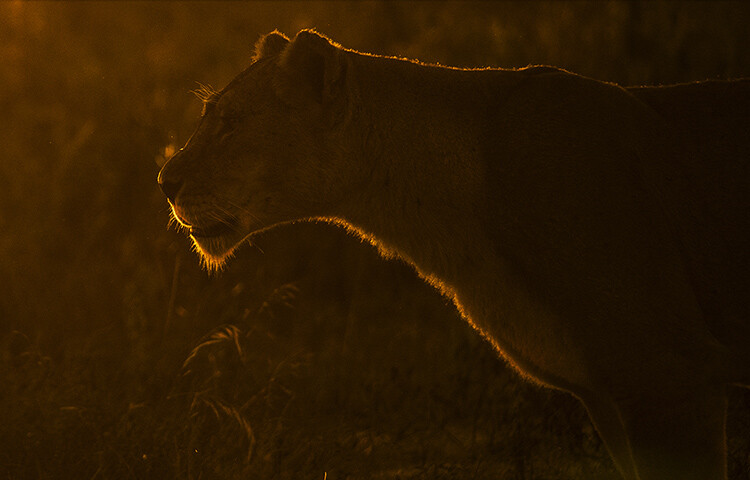
Wildlife photography is one of the fastest growing hobbies today. With DSLR and lenses getting cheaper by the minute, it is only bound to grow faster. With more and more people taking to wildlife photography as a means to connect with nature and share its beauties, it’s become imperative that you start pushing the bar of your photography ever higher. One of the best and easiest ways to do that is to try out rim lighting shots. If you do not know what that means, you are on the right page – keep reading.

How to do More Creative Wildlife Photography by using Rim Lighting

There are many ways to get creative with your wildlife photography, but in this article I will teach you one of the most impactful. Let’s start with getting to know rim lighting a little better.

What is rim lighting?

By definition, rim lighting in photography means any image where the light at the edges of the subject seems more intense than the other areas. For example, take a look at the image below.

How to do More Creative Wildlife Photography by using Rim Lighting

Notice how the outline of the giraffes stands out? The rim of the subject looks well-lit. Quite simply, that’s what rim lighting is about.

How do you achieve rim lighting?

First and foremost, you need to position yourself such that the subject stands between your camera and the light source (more often than not, that will be the sun in nature photography). Rim lighting will happen in the natural world only if you can see the rim, lit up with your eyes. Some of the easiest subjects for this are animals that have a lot of fur and are not too smooth coated, for example, bears, giraffes, lions, or deer with antlers.

Take a look at the visual below for a quick understanding on positioning yourself.

750

Guidelines

There are a few guidelines that you need to adhere to while trying to obtain a rim-lit image:

  • Rim lighting happens best when the sun is low in the sky, so try to look for a subject around that time.
  • A dark background is necessary (check all the images in this article) so make sure that you try this in an area where your background is conducive to good results.

Speaking about the camera now, composition aside, rim-lit photography can be done using one of two approaches.

Approach #1 – Exposure Compensation

Using exposure compensation is the easiest way to execute rim-lit shots. Once you have ensured that you are able to see a rim-lit subject just go ahead and try a test shot with a little underexposure. Take a look at the sequence of images below.

How to do More Creative Wildlife Photography by using Rim Lighting

Make note, by default when using the built-in metering system in your camera, more often than not the image in such scenarios (a lot of black and little bit of white) will turn out to be a bit washed out. It is just that the camera does not know what is the most important part of the image and makes an error in judgement (it tries to average the exposure).

Knowing where to stop with regards to exposure compensation is a subjective call. You could be happy with the second or the third image above. Just know that the more you underexpose the darker the surroundings will get.

This is a perfectly valid way of getting a rim-lit shot, but I generally recommend the second approach. The simple reason being that exposure compensation doesn’t reset itself. If you forget your camera is set at an EV of -2, it would mean disaster for the next few shots where you may not be trying to create a rim lighting shot.

How to do More Creative Wildlife Photography by using Rim Lighting

Approach #2 – Exposure Lock (AE-L)

This approach is slightly more advanced in terms of understanding. Imagine yourself standing in front of a monkey with the sun setting behind him and the immediate background being dark trees. Now, do the following:

  • Point your camera toward the sky. Half press your shutter-release button to activate metering.
  • Next, press the Exposure Lock Button (AE-L or * button) which often resides right where your right-hand thumb would rest.
  • Now, recompose your image with the subject as needed and click.

What happens is that when you point your camera towards the sky and ask it to meter from there, it takes a light reading from the bright sky and sets up a shutter/aperture combination accordingly. Let’s assume for a minute that the value came out to be 1/2000th at f/4.

Now, if you press the Exposure Lock button, the camera will lock on to these readings and will not change them for your next set of clicks. So when you recompose and photograph the monkey, the camera uses the locked in settings thus rendering only the areas in the frame that are as bright as the sky correctly. In this recomposed image, the only area that is as bright as the sky is the outline of the monkey, giving you a nice, well exposed rim-lit image.

How to do More Creative Wildlife Photography by using Rim Lighting

Practice around home first

Go ahead, practice the AE-L at home and then get out there and try a couple of rim-lit shots. Here is what you can do at home, before heading out to the wild.

Catch hold of a friend or family member and make them stand in front of a car at night. They should be covering the headlight of the car completely. If you stand at the other end with your friend in between yourself and the light source, you should be able to see his entire body with rim lighting.

Now that you know how to get a subject, go out there with your camera and start trying the exposure compensation trick to get some fabulous rim-lit images. Please share your rim-lit wildlife images below as well as any questions you may have about this technique.

How to do More Creative Wildlife Photography by using Rim Lighting

The post How to do More Creative Wildlife Photography by using Rim Lighting by Rahul Sachdev appeared first on Digital Photography School.


Digital Photography School

 
Comments Off on How to do More Creative Wildlife Photography by using Rim Lighting

Posted in Photography