RSS
 

Posts Tagged ‘Create’

Create your own DSLR external battery pack

02 May

Screen_Shot_2014-04-30_at_12.07.51_PM.png

Anyone shooting HD video on a DSLR knows how quickly the battery can drain. You can get AC power adapters for some cameras, but where there’s video, there’s not always an outlet. In this tutorial on DIYPhotography.com, camera hacker Chris Winter shows you how to make an external battery pack system with about nine times the runtime using a $ 40 battery pack, DC coupler, hot-shoe plate and some Velcro. Learn more

News: Digital Photography Review (dpreview.com)

 
Comments Off on Create your own DSLR external battery pack

Posted in Uncategorized


Invisible Barn: Mirrored Surfaces Create Camouflaged Folly

23 Apr

[ By WebUrbanist in Art & Installation & Sound. ]


invisible structure windows reflections

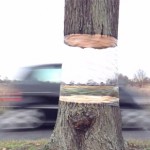
Like a mirage on the horizon, the structure seems to shimmer into and out of existence, playing tricks on the eye with a combination of see-through portals and reflective surfaces.

invisible barn at night

Designed for the 2014 Folly Competition held by The Architecture League, the idea was to slip something into an existing park context that would draw attention and generate interaction.

invisible architecture mylar plywood

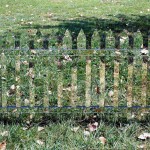
Deceptively, the building itself is nearly two-dimensional, adding another element of camouflage depending on the angle of view or direction of approach. Unlike its more solid cousin the invisible cabin, the result in this case could really catch you by surprise, but is still probably less dangerous to walk into by accident than a mirrored fence.

invisible mirrored architectural concept

One of the self-imposed problems its designers sought to solve revolved around the question of year-round engagement – how to make something that changed and was worth revisiting from one season to the next.

invisible building site plan

From the design brief: This mirror-finished folly is placed in the middle of the grove and reflects its surrounding environment: different species of trees and plants, sky, ground and the seasonal changes of the site. The reflection of the folly within its enclosed grove allows the structure to smoothly assimilate into the nature.”

invisible design concept drawing

“The incisions that penetrate through the folly allow visitors to maneuver in, out, and around the structure. Invisible Barn is a folly that loses its man-made architectural presence in nature but adds novel experience and interaction to the users.””

Share on Facebook


[ By WebUrbanist in Art & Installation & Sound. ]

[ WebUrbanist | Archives | Galleries | Privacy | TOS ]


WebUrbanist

 
Comments Off on Invisible Barn: Mirrored Surfaces Create Camouflaged Folly

Posted in Creativity


How to Create a Family Photo Essay

26 Mar

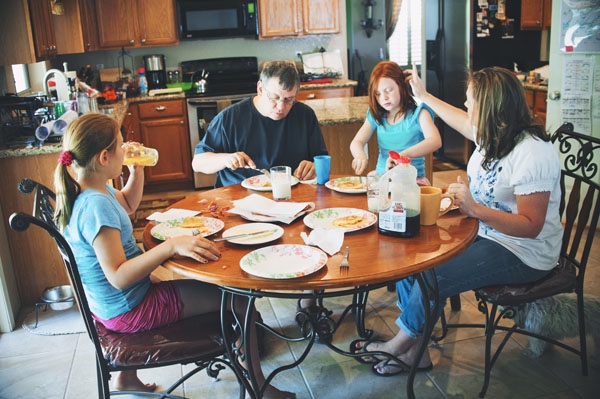
Family Photo Essay 1

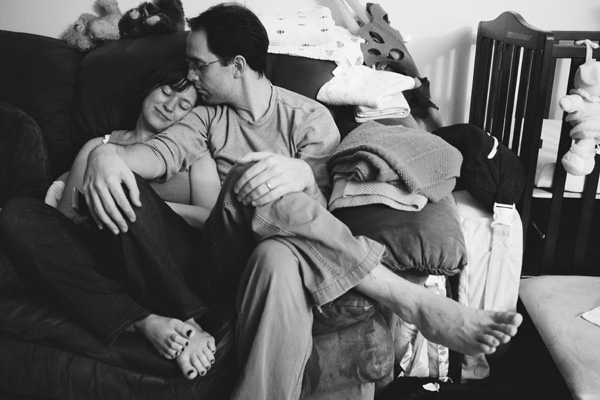
The way your son wraps his little arms around your leg to hug you. The way your daughter leaves little notes for you around the house. How it feels to snuggle, dance, and play. His crooked smile. Her knobby knees. Eyelashes. Elbows. Ankles sticking out from socks.

As parents, these are the little moments that we live for, the ones that make our hearts swell, the ones that reflect the spirit of the people we hold most dear.

And yet, as photographers, these are the very moments that we tend to gloss over in their familiarity.

We’re drawn to that moment that makes us feel something. It’s often what leads us to pursue photography in the first place. Reminding ourselves why we love this art form so much, how it connects us to the world around us and brings our experiences to life, places it into a larger context.

Enter the family photo essay!

The family photo essay puts your technical know-how to work in service of telling an emotional and meaningful story.

You see articles on family life in parenting magazines, but in them everything and everyone looks so perfect and polished. And yet, you know that real life looks nothing like that. Your kids go to school with un-brushed hair, mismatched socks, and cream cheese on their faces. Your floors need sweeping, your dishes need washing, and your laundry needs folding.

And that’s ok. That’s real. That’s true. That’s you. You don’t need to vacuum the carpet in order to find beauty in your everyday life. In many ways, the most important story is the perfectly imperfect one you live every day.

Turning your lens toward home to create a photo essay of your family allows you to capture not only what you look like, but also what it feels like to be you, belonging to your family, at this moment in time. And in this way, you can literally show your loved ones just how much they mean to you.

There are three stages to creating an effective photo essay: photography, selection, and structure. Here’s what to focus on in each stage of the process.

Phase one – photography

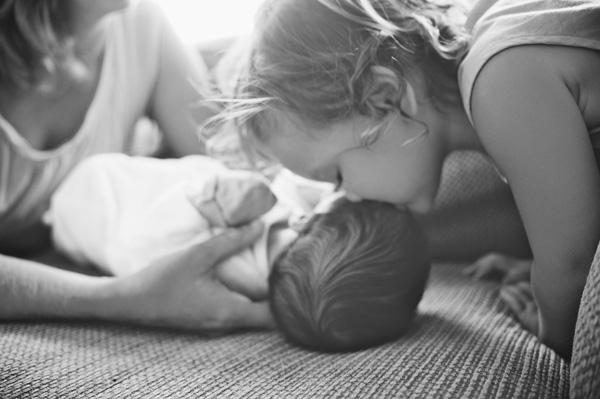
Family Photo Essay 2

This is the time to ignore the old saw about “picture takers” and “picture makers” and give yourself permission to shoot A LOT. Yes, be intentional, be careful, be thoughtful. But also let yourself experiment. Let yourself play. Take a different angle than you do in your other styles of work.

Create a diverse body of work from which to draw: close ups, details, wide angle. The more variety in your images, the more complete your story will be.

Life moves quickly. Life is messy. Kids don’t sit still. It’s ok to let go of the pressure to create the “perfect” shot in the service of capturing real life. What to look for:

1) The moment

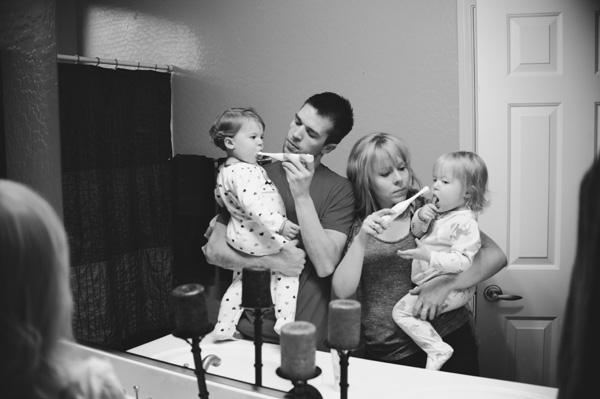
Family Photo Essay 3

“Photographers deal in things which are continually vanishing and when they have vanished there is no contrivance on earth which can make them come back again. We cannot develop and print a memory.” ~ Henri Cartier-Bresson

As you move through your day with your family, pay close attention to your rituals and routines, the things you do every day with each other. Take a step back from habit and mine these moments for your story. When people are actively engaged in something that matters to them their essence shines through.

The messes, the tears, the comforts and the struggles—these are the things that make our real lives so beautiful. These are the moments that matter. These are the moments that we look back on and wonder, “Where did the time go?”.

Let yourself slow down. Pay attention. When the moment arises, keep shooting all the way through it. Your attention is an act of love, and as you let the love well up inside you, you’ll find that the moment becomes clear.

2) Shape

Family Photo Essay 4

Shape is often the thing that helps bring the moment into focus in a beautiful way. Often, when discussing photography the discussion centers around the general term “composition”, but when I think about it as “shape,” it helps me really see what I’m looking for.

That moment when her head tilts ever so slightly. The moment when he jumps in the air and his feet lift off the ground.

Shape and moment are almost inextricably intertwined. Shape is what gives the moment form, interest, impact.

As you look through the viewfinder, look for shapes between people, shapes between kids and their environment, the shape of their body as they lay on the floor reading. Diagonals, s-curves, c-curves, triangles–shape is what gives an image it’s life.

3) Simplicity

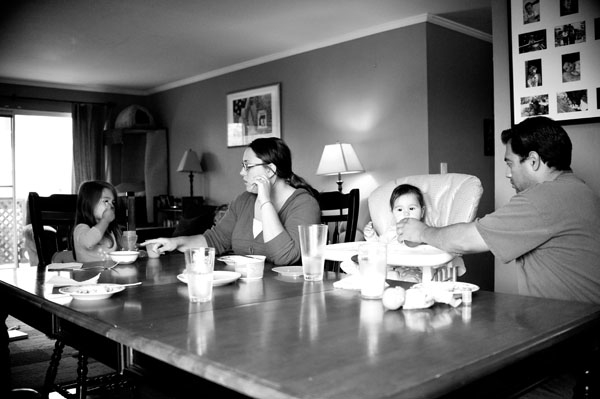
Family Photo Essay 5

“There’s a lot of beauty in ordinary things. Isn’t that kinda the point?” ~ Pam, from the final episode of The Office

One of the struggles of documentary photography is how to get your subject to stand out from all the other stuff around you. Remember that the camera is only a tool; it can only see what you tell it to see.

As you compose your image, look for simplicity and harmony between subject and environment. Can you frame your images in such a way that the background and surroundings add to the story you’re telling? Don’t be afraid to move your feet.

Notice how the environment also impacts the meaning of your image. Your home, even on its messiest days, holds so much love. The way your kids interact with their surroundings says so much about who they are as people (not to mention gives you a reminder of just how big, or small, they are at this moment in time).

As the photographer, you get to choose what to focus on. You get to show us what’s important to you. You get to show us how you see the world, your unique view on your unique life.

NOTE: For those of you whose kids are old enough, I highly recommend getting them involved in this project. Get them access to a camera and let them show you what they see. And that way, images of you will be included in the essay as well.

Phase two – selecting images

Family Photo Essay 6

After you finish gathering your images, sift through them and see what stands out to you. What do you notice? Are there moments that feel like they “sing”? Moments, themes, or attitudes that recur throughout your collection? You’ll begin to see what matters, what you value.

Look for patterns and through lines in your images. Look for moments that take your breath away or that “just feel right.” The images to include in your essay are the images that tell a story, reveal a truth, capture an essence, or evoke an emotion. Who is this person? What is their essence? What matters to them?

For each image you select ask yourself why it’s important. What story does it tell? And then ask again, why is that story important? You may also enjoy writing these stories down and adding them to your final product.

Phase three – deciding on structure

Family Photo Essay 7

Once you’ve created and selected your images, it’s time to give them structure. There are several ways to go about this depending on the story you’re trying to tell:

  • A day in the life
  • The same event over time
  • A theme that emerged that represents what matters to you
  • A focus on each member of your family and the things that make them special

How you choose to structure your images may change from project to project, but the most important thing is to make a tangible copy. Print it, bind it, collage it, but make it a living document you share with your family and not just something that sits on your hard drive.

A family photo essay will grow to be a cherished part of your family’s legacy, giving your children a sense of belonging. Your story does indeed matter. It’s time to reclaim the art of the family snapshot.

Family Photo Essay 8

Please share any other tips or comments you have below, as well as your family photo essay images. Have you done a project like this? Tell us about it.

The post How to Create a Family Photo Essay by Miki DeVivo appeared first on Digital Photography School.


Digital Photography School

 
Comments Off on How to Create a Family Photo Essay

Posted in Photography


HDR Vertorama Photography – How to Create Mind-bending Images

26 Mar

If you are anything like me, then you are always looking for ways to create something original in your photography – images that have not been taken and presented a thousand times before. But being truly original and creating photos that have real impact is the hardest thing of all. It seems there is nothing that hasn’t been done yet. Or is there?

In this article, I am going to show you a technique for creating interior photos that you will certainly not find in every other portfolio – photos that will turn heads for sure. The technique that I am referring to is called HDR Vertorama Photography.
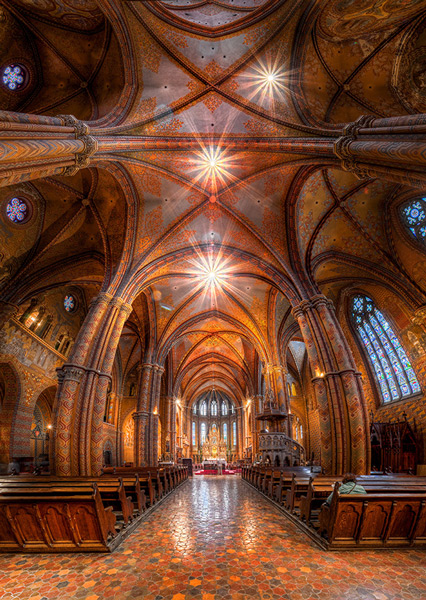
Matthias Church Budapest Hungary HDR Vertorama

What is a Vertorama?

Panorama photography is a well-established photographic discipline: you take a series of photos while you pan your camera in a horizontal direction between each pair of shots, ensuring that adjacent photos have enough overlap. Such a series of photos can then be combined into a single image with a much wider angle of view, a process that is called stitching.

But what happens if you turn panorama photography sideways? Turning an idea on its head can sometimes produce ingenious and unexpected results, and doing this literally with panorama photography falls into this category.

To answer the question: what you get is a Vertorama – a panorama in vertical direction. This may sound trivial, but when applied to interiors, this technique can present scenes in unseen ways. A room photographed as a Vertorama, seems to be opening towards the viewer. It depicts an interior in a way that you can only experience if you scan the actual scene with your own eyes, and it puts your audience inside the scene rather than in the spectator’s seat.

Why Does This Require HDR?

Photographing such a wide angle of view presents some challenges. One of them is the unusually high dynamic range encountered in such scenes. When you scan an interior (like a church, for example) from bottom to top, you will see very dark areas as well as extremely bright parts (e.g., the windows). In order to capture the scene realistically, combining the Vertorama technique with HDR (High Dynamic Range) photography is a natural choice. HDR will allow you to depict the details in the highlights and shadows in such a scene, despite the unusually high dynamic range. The resulting photographic discipline is called HDR Vertorama Photography.

The Anatomy of an HDR Vertorama

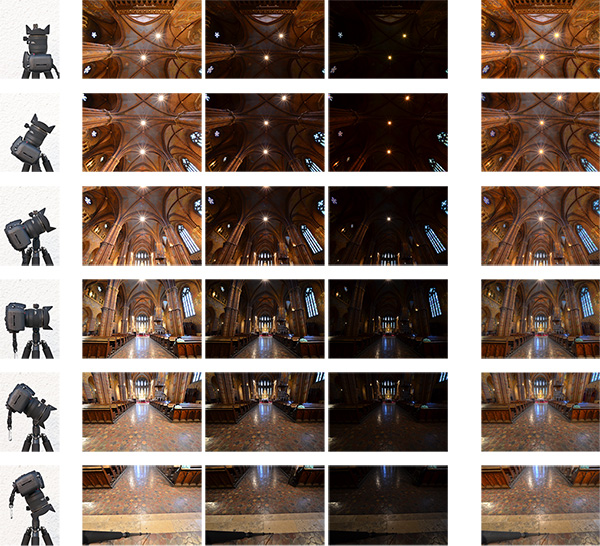
Vertorama and HDR photography are combined in such a way that each section of the final image consists of an exposure series, taken with a different tilt angle. Each of these exposure series is merged into an HDR image and tone mapped into a section HDR image.
Hdr vertorama anatomy 01

Camera positions (left), exposure series (middle) and tone mapped section HDR images (right)

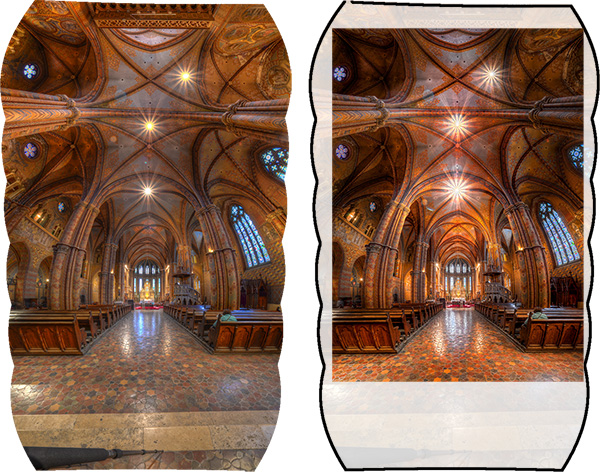
The section HDR images are stitched to produce a Vertorama, and finally, the Vertorama image is cropped and post-processed.
Hdr vertorama anatomy 02

Stitched HDR Vertorama (left) and final cropped image (right)

All the source photos for a single HDR Vertorama are called a set, and depending on actual scene, you may end up with 12 to 30 photos in a set.

The Camera

As long as you are shooting from a tripod, the range of cameras that can be used for this technique is wide. Any DSLR and mirrorless camera will be just fine. Having a camera that lets you change lenses is an advantage because in order to get the most out of your HDR Vertorama shoots, you should be using an ultra wide-angle lens with a shorter focal length then you will find on most fixed-lens cameras.

The Lens

You should use a rectilinear lens with a short focal length – the sorter, the better. With an ultra wide-angle lenses, you get a very wide angle of view, enabling you to capture more of an interior scene. If you own a DSLR with an APS-C-sized sensor, for example, the Nikon 10-24mm f/3.5-4.5G ED AF-S DX Nikkor, Canon EF-S 10-22mm f/3.5-4.5 USM SLR or Sigma 10-20mm f/4-5.6 EX DC HSM may be good choices, depending on which camera you are using and what budget you have available.

In contrast to a fisheye lens, a rectilinear lens has little or no barrel distortion. This means that straight lines in the scene are also (almost) straight in the image, and this creates the characteristic look of these images.

The Nodal Point Adapter

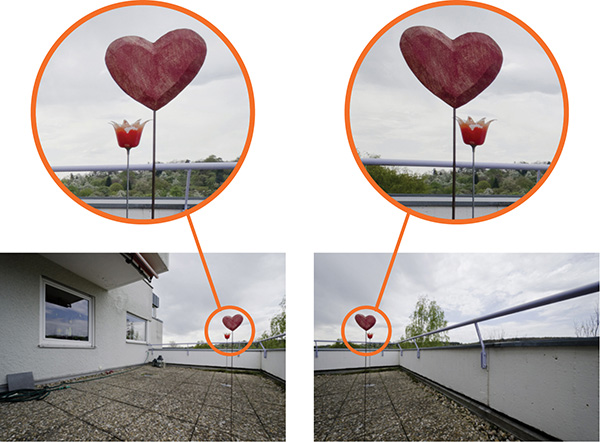
A nodal point adapter is a device that you screw on top of your tripod and that allows you to rotate your camera/lens combination around the nodal point of the lens. This avoids so-called parallax errors where objects at different distances from your camera move relative to each other in the overlapping areas of two consecutive source photos. If you are using a well-adjusted adapter, the overlap regions of the different sections of your Vertorama will perfectly match which is important for the stitching.
Hdr vertorama parallax error

Example of a parallax error

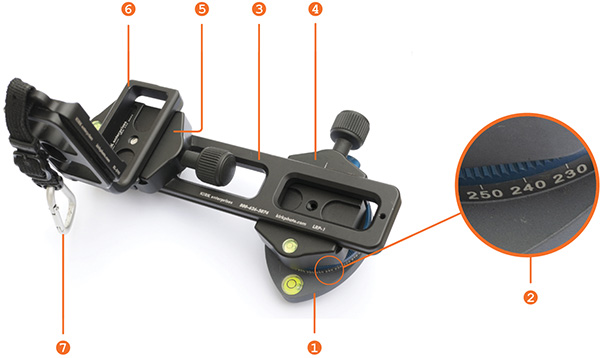
You can buy off-the-shelf nodal point adapters that are usually quite bulky and expensive, or you can assemble your own as shown in the example below: This do-it-yourself nodal point adapter consists of:

  • a panorama plate (1 diagram below)
  • with a scale that helps you control the rotation (2)
  • a macro rail (3) that enables you to move the camera back and forth for finding the nodal point
  • two quick release clamps for mounting the camera on the rail (5) and the rail on the panorama plate (4)
  • an L-bracket (6) for conveniently mounting the camera in landscape and portrait orientation
  • a snap hook (7) connects the L-bracket (and the camera that is permanently mounted to it) to the camera strap when the camera is not mounted to this adapter
Hdr vertorama nodal point adapter


Before you can produce usable source photos with an adapter like this one, you need to adjust it such that your camera is really rotated around the nodal point.

Setting up Your Camera

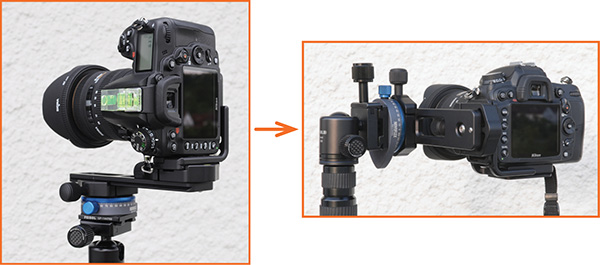
To prepare for the actual shoot, mount your camera onto the nodal point adapter and the adapter onto the tripod. Set up the nodal point adapter and tripod such that your camera can rotate around the horizontal axis.
Hdr vertorama camera orientation

To set up your camera, do the following:

  • Aperture – put your camera in aperture priority mode (“A” for Nikon, “Av” for Canon) and dial in an aperture that puts more or less the entire scene into focus – f/8 usually works pretty well
  • Focus – focus your camera and then put it into manual focus mode to avoid focus changes between the exposures
  • White balance (optional) – set the white balance to a fixed value depending on the type of light at the location. If you are shooting in Raw format, you can also skip this step
  • Mirror lock-up (optional, DSLRs only) – turn on mirror lock-up to reduce camera shake caused by the slapping mirror
  • Cable release – attach a cable release (remote trigger) to release the shutter without touching the camera
  • Cover the viewfinder (for long shutter speeds) – cover your viewfinder to prevent light from entering and falling on the camera’s sensor during the exposure

Finding the Right Exposure

There are many ways of finding the right exposure values for your source exposures. Here, I will show you a quick and simple one that uses the auto exposure bracketing (AEB) function of your camera to shoot the exposure series for your HDR process. Your goal is to set up the camera for an exposure series that remains the same for every section of the Vertorama.

To do this, put your camera in aperture priority mode, set the correct aperture, and scan the scene from the bottom to the top by rotating your camera. While you do this, your camera will adjust the shutter speed to get a correct exposure of the part of the scene it currently sees. Take note of the range of shutter speeds you see in the viewfinder (highest and lowest).

To set the correct exposure, put your camera in manual mode, dial in the respective aperture again and set the shutter speed to a value that is in the middle between the highest and lowest speed you saw during the scan. Now, set up your AEB function such that it goes above and below that shutter speed as much as possible.

For example, if your camera measures between 1/20s and 1/640s, the right shutter speed would be around 1/125s (roughly the middle between 1/20s and 1/640s). If your camera can do 3 shots with +-2 EV, set your AEB function to that setting. This gives you an exposure series of 1/30s, 1/125s and 1/500s for each section, and this produces a result that is close enough to what we need in this situation.

Taking the Shots

Your camera is now ready to take the photos. You should try to take the photos as quickly and fluently as possible as follows:

  1. Rotate your camera down: Your first section should be the floor right at your feet. This section will contain your tripod and possibly your feet. These things are not meant to be in the final image, but this gives you some room to maneuver in post-production.
  2. Wait for the right moment: Check the conditions before you start to shoot the series. When there are no people around and the lighting conditions are stable, you can start shooting.
  3. Action! When the conditions are right, start photographing the first section. When the section is done, rotate the camera to the next section such that the overlap with the previous section is about 30% and shoot, and so on. Do this until your camera points at the ceiling for the last section. It is important that you take the photos quickly to avoid that movement and changes in lighting interfere with your shoot.

Post-processing

The post-processing stage involves a number of steps. If you shot your source photos in RAW mode, you need to develop them in some RAW converter. Depending on the ISO setting you used to capture the photos, you may want to apply some noise reduction already at this early stage to keep the noise at bay over the remaining workflow.
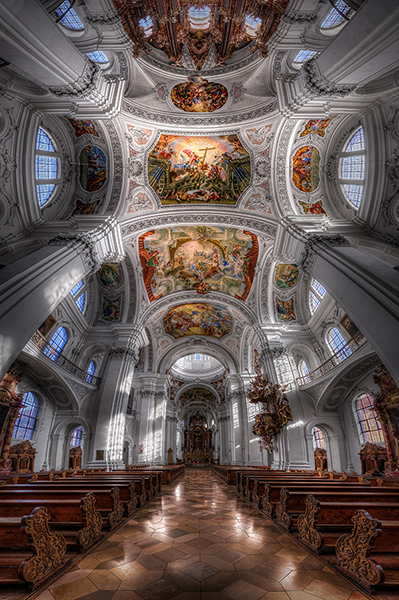
Basilica St Martin Weingarten Germany HDR Vertorama

Vertorama Creation

When the preparation of the source photos is finished, it’s time for the merging and the stitching. Remember that the source photos have to be combined in two different ways:

  • The exposure series for each section needs to be merged into an HDR image
  • all the resulting HDR images for all sections need to be stitched to generate the final HDR Vertorama

Depending on the software you use, the order of these two steps can vary. We will do the HDR merging first and then the stitching. This is generally easier.

For creating the HDRs, you need to load each exposure series into your HDR software (e.g., Photomatix), and merge them, one by one. This is straightforward and there are not a lot of decisions to be made. The result will be one 32-bit HDR image for each section (we call these the section HDR images in the following). Then you need to tone map each section HDR image, using the same settings for each one of them:

  1. Load one of the section HDRs into your HDR software and find the right tone mapping parameters. How you set the parameters is completely depending on your personal taste and style. There is no right or wrong here.
  2. Once you have found pleasing settings, apply these settings to all section HDRs and tone map them.
  3. Save each of the tone mapped images as an 8 or 16-bit image. Saving 16-bit images will give you a better quality but produces larger files.

After this step, you have a tone mapped image for each of the sections, and these images need to be stitched. There are many software products that can stitch photos. I prefer to use Photoshop for this task as it has a very simple but yet powerful stitching module called Photomerge.

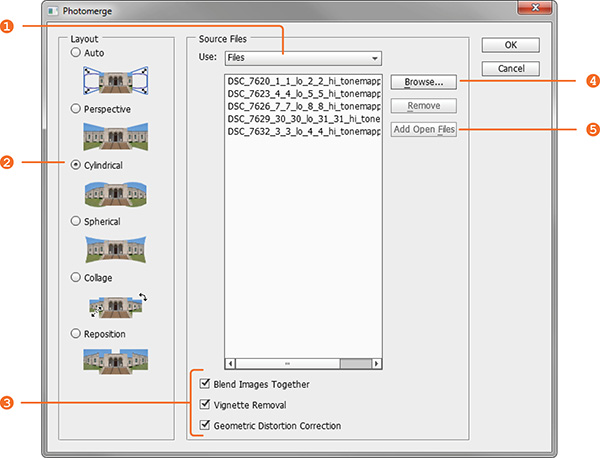
Stitching your tone mapped images in Photomerge (File > Automate > Photomerge) is simple: the Use drop-down menu (1) lets you work with individual files or whole Folders of images. Browse your disk (4) to select the files or add all files that are currently opened in Photoshop (5). Choose Cylindrical (2) as your Layout and check the three check boxes at the bottom (3) to let Photomerge apply a number of corrections to your images. When you press Ok, your images are stitched fully automatically.
Hdr vertorama photomerge

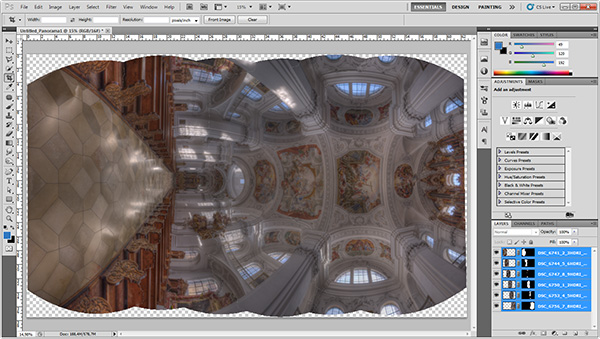
When the stitching is complete, Photoshop presents you with the result. The edges are a bit wonky and it is laying on the side because Photoshop thinks it is a panorama. Merge all the layers into one (Layer > Merge Layers) and rotate the image accordingly (Image > Image Rotation).
Hdr vertorama after stitching

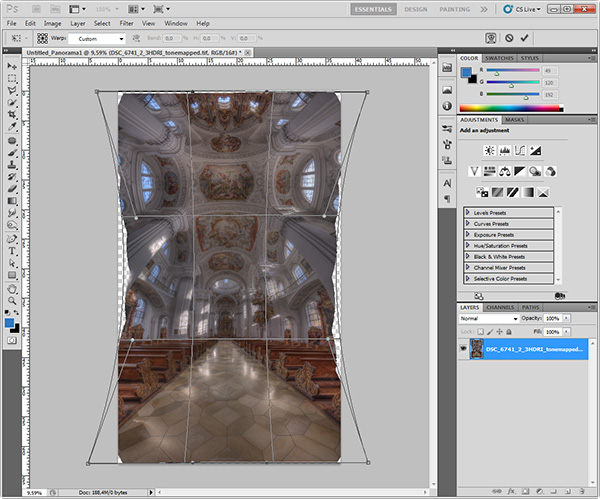
Use the Warp tool (Edit > Transform > Warp) to correct the typical distortion of an interior Vertorama image that makes it wide in the middle and narrow at the top and at the bottom. You can do this by dragging the corner handles of the Warp box to the outside and the right and left edge handles to the inside.
Hdr vertorama distortion correction

Apply the warp distortion and crop the image such that the uneven edges are removed and the composition is symmetrical.
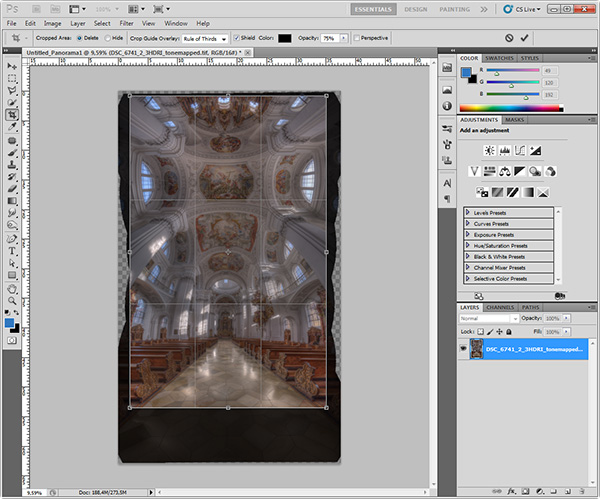
Hdr vertorama cropping

This completes the actual HDR Vertorama creation. You now have a stitched image that covers the entire tonal range of the scene (due to using HDR). The remaining post-processing steps are not specific to the HDR Vertorama technique. As with any other photo, you will at least want to correct the colors and increase the contrast. But you can also apply arbitrarily complex adjustments to the image and process different parts of it selectively.

In this particular case, I applied selective adjustments to the white interior to desaturate it slightly, to the floor to enhance the reflections, and the paintings on the ceiling to balance the colors and make them stand out. I added more saturation to the windows and more contrast to some of the ornaments. Finally, I added a vignette to the edges and a spot light effect to the paintings in the ceiling to guide the viewers’ eyes.

Conclusions

HDR Vertorama Photography is a technique that lets you depict interiors in a unique way. If you are willing to invest the effort and time it takes to master this multi-exposure technique, you will be rewarded with images that will stand out in your portfolio.
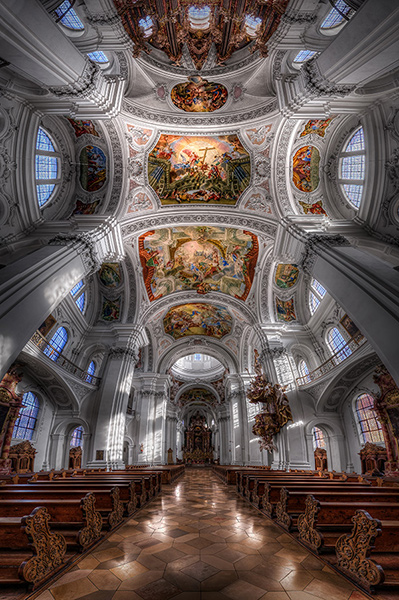
Basilica St Martin Weingarten Germany HDR Vertorama

Please share your comments, suggestions and tips below.

For more articles on HDR check out these:

  • Five Minutes to Realistic HDR using Lightroom and a 32-Bit Plugin
  • 5 Tips for Successful HDR Photos
  • How to Create Realistic Looking HDR Photographs
  • Tips for Great HDR Sunsets

The post HDR Vertorama Photography – How to Create Mind-bending Images by Klaus Herrmann appeared first on Digital Photography School.


Digital Photography School

 
Comments Off on HDR Vertorama Photography – How to Create Mind-bending Images

Posted in Photography


HDR Vertorama Photography – How to Create Mind-bending Images

25 Mar

If you are anything like me, then you are always looking for ways to create something original in your photography – images that have not been taken and presented a thousand times before. But being truly original and creating photos that have real impact is the hardest thing of all. It seems there is nothing that hasn’t been done yet. Or is there?

In this article, I am going to show you a technique for creating interior photos that you will certainly not find in every other portfolio – photos that will turn heads for sure. The technique that I am referring to is called HDR Vertorama Photography.

Matthias Church Budapest Hungary HDR Vertorama

What is a Vertorama?

Panorama photography is a well-established photographic discipline: you take a series of photos while you pan your camera in a horizontal direction between each pair of shots, ensuring that adjacent photos have enough overlap. Such a series of photos can then be combined into a single image with a much wider angle of view, a process that is called stitching.

But what happens if you turn panorama photography sideways? Turning an idea on its head can sometimes produce ingenious and unexpected results, and doing this literally with panorama photography falls into this category.

To answer the question: what you get is a Vertorama – a panorama in vertical direction. This may sound trivial, but when applied to interiors, this technique can present scenes in unseen ways. A room photographed as a Vertorama, seems to be opening towards the viewer. It depicts an interior in a way that you can only experience if you scan the actual scene with your own eyes, and it puts your audience inside the scene rather than in the spectator’s seat.

Why Does This Require HDR?

Photographing such a wide angle of view presents some challenges. One of them is the unusually high dynamic range encountered in such scenes. When you scan an interior (like a church, for example) from bottom to top, you will see very dark areas as well as extremely bright parts (e.g., the windows). In order to capture the scene realistically, combining the Vertorama technique with HDR (High Dynamic Range) photography is a natural choice. HDR will allow you to depict the details in the highlights and shadows in such a scene, despite the unusually high dynamic range. The resulting photographic discipline is called HDR Vertorama Photography.

The Anatomy of an HDR Vertorama

Vertorama and HDR photography are combined in such a way that each section of the final image consists of an exposure series, taken with a different tilt angle. Each of these exposure series is merged into an HDR image and tone mapped into a section HDR image.

Hdr vertorama anatomy 01

Camera positions (left), exposure series (middle) and tone mapped section HDR images (right)

The section HDR images are stitched to produce a Vertorama, and finally, the Vertorama image is cropped and post-processed.

Hdr vertorama anatomy 02

Stitched HDR Vertorama (left) and final cropped image (right)

All the source photos for a single HDR Vertorama are called a set, and depending on actual scene, you may end up with 12 to 30 photos in a set.

The Camera

As long as you are shooting from a tripod, the range of cameras that can be used for this technique is wide. Any DSLR and mirrorless camera will be just fine. Having a camera that lets you change lenses is an advantage because in order to get the most out of your HDR Vertorama shoots, you should be using an ultra wide-angle lens with a shorter focal length then you will find on most fixed-lens cameras.

The Lens

You should use a rectilinear lens with a short focal length – the sorter, the better. With an ultra wide-angle lenses, you get a very wide angle of view, enabling you to capture more of an interior scene. If you own a DSLR with an APS-C-sized sensor, for example, the Nikon 10-24mm f/3.5-4.5G ED AF-S DX Nikkor, Canon EF-S 10-22mm f/3.5-4.5 USM SLR or Sigma 10-20mm f/4-5.6 EX DC HSM may be good choices, depending on which camera you are using and what budget you have available.

In contrast to a fisheye lens, a rectilinear lens has little or no barrel distortion. This means that straight lines in the scene are also (almost) straight in the image, and this creates the characteristic look of these images.

The Nodal Point Adapter

A nodal point adapter is a device that you screw on top of your tripod and that allows you to rotate your camera/lens combination around the nodal point of the lens. This avoids so-called parallax errors where objects at different distances from your camera move relative to each other in the overlapping areas of two consecutive source photos. If you are using a well-adjusted adapter, the overlap regions of the different sections of your Vertorama will perfectly match which is important for the stitching.

Hdr vertorama parallax error

Example of a parallax error

You can buy off-the-shelf nodal point adapters that are usually quite bulky and expensive, or you can assemble your own as shown in the example below: This do-it-yourself nodal point adapter consists of:

  • a panorama plate (1 diagram below)
  • with a scale that helps you control the rotation (2)
  • a macro rail (3) that enables you to move the camera back and forth for finding the nodal point
  • two quick release clamps for mounting the camera on the rail (5) and the rail on the panorama plate (4)
  • an L-bracket (6) for conveniently mounting the camera in landscape and portrait orientation
  • a snap hook (7) connects the L-bracket (and the camera that is permanently mounted to it) to the camera strap when the camera is not mounted to this adapter

Hdr vertorama nodal point adapter


Before you can produce usable source photos with an adapter like this one, you need to adjust it such that your camera is really rotated around the nodal point.

Setting up Your Camera

To prepare for the actual shoot, mount your camera onto the nodal point adapter and the adapter onto the tripod. Set up the nodal point adapter and tripod such that your camera can rotate around the horizontal axis.

Hdr vertorama camera orientation

To set up your camera, do the following:

  • Aperture – put your camera in aperture priority mode (“A” for Nikon, “Av” for Canon) and dial in an aperture that puts more or less the entire scene into focus – f/8 usually works pretty well
  • Focus – focus your camera and then put it into manual focus mode to avoid focus changes between the exposures
  • White balance (optional) – set the white balance to a fixed value depending on the type of light at the location. If you are shooting in Raw format, you can also skip this step
  • Mirror lock-up (optional, DSLRs only) – turn on mirror lock-up to reduce camera shake caused by the slapping mirror
  • Cable release – attach a cable release (remote trigger) to release the shutter without touching the camera
  • Cover the viewfinder (for long shutter speeds) – cover your viewfinder to prevent light from entering and falling on the camera’s sensor during the exposure

Finding the Right Exposure

There are many ways of finding the right exposure values for your source exposures. Here, I will show you a quick and simple one that uses the auto exposure bracketing (AEB) function of your camera to shoot the exposure series for your HDR process. Your goal is to set up the camera for an exposure series that remains the same for every section of the Vertorama.

To do this, put your camera in aperture priority mode, set the correct aperture, and scan the scene from the bottom to the top by rotating your camera. While you do this, your camera will adjust the shutter speed to get a correct exposure of the part of the scene it currently sees. Take note of the range of shutter speeds you see in the viewfinder (highest and lowest).

To set the correct exposure, put your camera in manual mode, dial in the respective aperture again and set the shutter speed to a value that is in the middle between the highest and lowest speed you saw during the scan. Now, set up your AEB function such that it goes above and below that shutter speed as much as possible.

For example, if your camera measures between 1/20s and 1/640s, the right shutter speed would be around 1/125s (roughly the middle between 1/20s and 1/640s). If your camera can do 3 shots with +-2 EV, set your AEB function to that setting. This gives you an exposure series of 1/30s, 1/125s and 1/500s for each section, and this produces a result that is close enough to what we need in this situation.

Taking the Shots

Your camera is now ready to take the photos. You should try to take the photos as quickly and fluently as possible as follows:

  1. Rotate your camera down: Your first section should be the floor right at your feet. This section will contain your tripod and possibly your feet. These things are not meant to be in the final image, but this gives you some room to maneuver in post-production.
  2. Wait for the right moment: Check the conditions before you start to shoot the series. When there are no people around and the lighting conditions are stable, you can start shooting.
  3. Action! When the conditions are right, start photographing the first section. When the section is done, rotate the camera to the next section such that the overlap with the previous section is about 30% and shoot, and so on. Do this until your camera points at the ceiling for the last section. It is important that you take the photos quickly to avoid that movement and changes in lighting interfere with your shoot.

Post-processing

The post-processing stage involves a number of steps. If you shot your source photos in RAW mode, you need to develop them in some RAW converter. Depending on the ISO setting you used to capture the photos, you may want to apply some noise reduction already at this early stage to keep the noise at bay over the remaining workflow.

Basilica St Martin Weingarten Germany HDR Vertorama

Vertorama Creation

When the preparation of the source photos is finished, it’s time for the merging and the stitching. Remember that the source photos have to be combined in two different ways:

  • The exposure series for each section needs to be merged into an HDR image
  • all the resulting HDR images for all sections need to be stitched to generate the final HDR Vertorama

Depending on the software you use, the order of these two steps can vary. We will do the HDR merging first and then the stitching. This is generally easier.

For creating the HDRs, you need to load each exposure series into your HDR software (e.g., Photomatix), and merge them, one by one. This is straightforward and there are not a lot of decisions to be made. The result will be one 32-bit HDR image for each section (we call these the section HDR images in the following). Then you need to tone map each section HDR image, using the same settings for each one of them:

  1. Load one of the section HDRs into your HDR software and find the right tone mapping parameters. How you set the parameters is completely depending on your personal taste and style. There is no right or wrong here.
  2. Once you have found pleasing settings, apply these settings to all section HDRs and tone map them.
  3. Save each of the tone mapped images as an 8 or 16-bit image. Saving 16-bit images will give you a better quality but produces larger files.

After this step, you have a tone mapped image for each of the sections, and these images need to be stitched. There are many software products that can stitch photos. I prefer to use Photoshop for this task as it has a very simple but yet powerful stitching module called Photomerge.

Stitching your tone mapped images in Photomerge (File > Automate > Photomerge) is simple: the Use drop-down menu (1) lets you work with individual files or whole Folders of images. Browse your disk (4) to select the files or add all files that are currently opened in Photoshop (5). Choose Cylindrical (2) as your Layout and check the three check boxes at the bottom (3) to let Photomerge apply a number of corrections to your images. When you press Ok, your images are stitched fully automatically.

Hdr vertorama photomerge

When the stitching is complete, Photoshop presents you with the result. The edges are a bit wonky and it is laying on the side because Photoshop thinks it is a panorama. Merge all the layers into one (Layer > Merge Layers) and rotate the image accordingly (Image > Image Rotation).

Hdr vertorama after stitching

Use the Warp tool (Edit > Transform > Warp) to correct the typical distortion of an interior Vertorama image that makes it wide in the middle and narrow at the top and at the bottom. You can do this by dragging the corner handles of the Warp box to the outside and the right and left edge handles to the inside.

Hdr vertorama distortion correction

Apply the warp distortion and crop the image such that the uneven edges are removed and the composition is symmetrical.

Hdr vertorama cropping

This completes the actual HDR Vertorama creation. You now have a stitched image that covers the entire tonal range of the scene (due to using HDR). The remaining post-processing steps are not specific to the HDR Vertorama technique. As with any other photo, you will at least want to correct the colors and increase the contrast. But you can also apply arbitrarily complex adjustments to the image and process different parts of it selectively.

In this particular case, I applied selective adjustments to the white interior to desaturate it slightly, to the floor to enhance the reflections, and the paintings on the ceiling to balance the colors and make them stand out. I added more saturation to the windows and more contrast to some of the ornaments. Finally, I added a vignette to the edges and a spot light effect to the paintings in the ceiling to guide the viewers’ eyes.

Conclusions

HDR Vertorama Photography is a technique that lets you depict interiors in a unique way. If you are willing to invest the effort and time it takes to master this multi-exposure technique, you will be rewarded with images that will stand out in your portfolio.

Basilica St Martin Weingarten Germany HDR Vertorama

Please share your comments, suggestions and tips below.

For more articles on HDR check out these:

  • Five Minutes to Realistic HDR using Lightroom and a 32-Bit Plugin
  • 5 Tips for Successful HDR Photos
  • How to Create Realistic Looking HDR Photographs
  • Tips for Great HDR Sunsets

The post HDR Vertorama Photography – How to Create Mind-bending Images by Klaus Herrmann appeared first on Digital Photography School.


Digital Photography School

 
Comments Off on HDR Vertorama Photography – How to Create Mind-bending Images

Posted in Photography


How to Create a Family Photo Essay

25 Mar

Family Photo Essay 1

The way your son wraps his little arms around your leg to hug you. The way your daughter leaves little notes for you around the house. How it feels to snuggle, dance, and play. His crooked smile. Her knobby knees. Eyelashes. Elbows. Ankles sticking out from socks.

As parents, these are the little moments that we live for, the ones that make our hearts swell, the ones that reflect the spirit of the people we hold most dear.

And yet, as photographers, these are the very moments that we tend to gloss over in their familiarity.

We’re drawn to that moment that makes us feel something. It’s often what leads us to pursue photography in the first place. Reminding ourselves why we love this art form so much, how it connects us to the world around us and brings our experiences to life, places it into a larger context.

Enter the family photo essay!

The family photo essay puts your technical know-how to work in service of telling an emotional and meaningful story.

You see articles on family life in parenting magazines, but in them everything and everyone looks so perfect and polished. And yet, you know that real life looks nothing like that. Your kids go to school with un-brushed hair, mismatched socks, and cream cheese on their faces. Your floors need sweeping, your dishes need washing, and your laundry needs folding.

And that’s ok. That’s real. That’s true. That’s you. You don’t need to vacuum the carpet in order to find beauty in your everyday life. In many ways, the most important story is the perfectly imperfect one you live every day.

Turning your lens toward home to create a photo essay of your family allows you to capture not only what you look like, but also what it feels like to be you, belonging to your family, at this moment in time. And in this way, you can literally show your loved ones just how much they mean to you.

There are three stages to creating an effective photo essay: photography, selection, and structure. Here’s what to focus on in each stage of the process.

Phase one – photography

Family Photo Essay 2

This is the time to ignore the old saw about “picture takers” and “picture makers” and give yourself permission to shoot A LOT. Yes, be intentional, be careful, be thoughtful. But also let yourself experiment. Let yourself play. Take a different angle than you do in your other styles of work.

Create a diverse body of work from which to draw: close ups, details, wide angle. The more variety in your images, the more complete your story will be.

Life moves quickly. Life is messy. Kids don’t sit still. It’s ok to let go of the pressure to create the “perfect” shot in the service of capturing real life. What to look for:

1) The moment

Family Photo Essay 3

“Photographers deal in things which are continually vanishing and when they have vanished there is no contrivance on earth which can make them come back again. We cannot develop and print a memory.” ~ Henri Cartier-Bresson

As you move through your day with your family, pay close attention to your rituals and routines, the things you do every day with each other. Take a step back from habit and mine these moments for your story. When people are actively engaged in something that matters to them their essence shines through.

The messes, the tears, the comforts and the struggles—these are the things that make our real lives so beautiful. These are the moments that matter. These are the moments that we look back on and wonder, “Where did the time go?”.

Let yourself slow down. Pay attention. When the moment arises, keep shooting all the way through it. Your attention is an act of love, and as you let the love well up inside you, you’ll find that the moment becomes clear.

2) Shape

Family Photo Essay 4

Shape is often the thing that helps bring the moment into focus in a beautiful way. Often, when discussing photography the discussion centers around the general term “composition”, but when I think about it as “shape,” it helps me really see what I’m looking for.

That moment when her head tilts ever so slightly. The moment when he jumps in the air and his feet lift off the ground.

Shape and moment are almost inextricably intertwined. Shape is what gives the moment form, interest, impact.

As you look through the viewfinder, look for shapes between people, shapes between kids and their environment, the shape of their body as they lay on the floor reading. Diagonals, s-curves, c-curves, triangles–shape is what gives an image it’s life.

3) Simplicity

Family Photo Essay 5

“There’s a lot of beauty in ordinary things. Isn’t that kinda the point?” ~ Pam, from the final episode of The Office

One of the struggles of documentary photography is how to get your subject to stand out from all the other stuff around you. Remember that the camera is only a tool; it can only see what you tell it to see.

As you compose your image, look for simplicity and harmony between subject and environment. Can you frame your images in such a way that the background and surroundings add to the story you’re telling? Don’t be afraid to move your feet.

Notice how the environment also impacts the meaning of your image. Your home, even on its messiest days, holds so much love. The way your kids interact with their surroundings says so much about who they are as people (not to mention gives you a reminder of just how big, or small, they are at this moment in time).

As the photographer, you get to choose what to focus on. You get to show us what’s important to you. You get to show us how you see the world, your unique view on your unique life.

NOTE: For those of you whose kids are old enough, I highly recommend getting them involved in this project. Get them access to a camera and let them show you what they see. And that way, images of you will be included in the essay as well.

Phase two – selecting images

Family Photo Essay 6

After you finish gathering your images, sift through them and see what stands out to you. What do you notice? Are there moments that feel like they “sing”? Moments, themes, or attitudes that recur throughout your collection? You’ll begin to see what matters, what you value.

Look for patterns and through lines in your images. Look for moments that take your breath away or that “just feel right.” The images to include in your essay are the images that tell a story, reveal a truth, capture an essence, or evoke an emotion. Who is this person? What is their essence? What matters to them?

For each image you select ask yourself why it’s important. What story does it tell? And then ask again, why is that story important? You may also enjoy writing these stories down and adding them to your final product.

Phase three – deciding on structure

Family Photo Essay 7

Once you’ve created and selected your images, it’s time to give them structure. There are several ways to go about this depending on the story you’re trying to tell:

  • A day in the life
  • The same event over time
  • A theme that emerged that represents what matters to you
  • A focus on each member of your family and the things that make them special

How you choose to structure your images may change from project to project, but the most important thing is to make a tangible copy. Print it, bind it, collage it, but make it a living document you share with your family and not just something that sits on your hard drive.

A family photo essay will grow to be a cherished part of your family’s legacy, giving your children a sense of belonging. Your story does indeed matter. It’s time to reclaim the art of the family snapshot.

Family Photo Essay 8

Please share any other tips or comments you have below, as well as your family photo essay images. Have you done a project like this? Tell us about it.

The post How to Create a Family Photo Essay by Miki DeVivo appeared first on Digital Photography School.


Digital Photography School

 
Comments Off on How to Create a Family Photo Essay

Posted in Photography


How to Create Great Photos without Leaving Home

17 Feb

Photos home easy 01

So you want to take pictures; or do you want to be a photographer? I deal with a strikingly similar question every time I swing a golf club; I want to be a golfer, but with life events and time constraints the reality is I merely play golf. Fortunately, making a great photo doesn’t consume the amount of time 18 holes does and since you’re here reading this, it’s safe to say you want to be a photographer.

WHAT TO PHOTOGRAPH?

Portraits, landscapes, sports, oh my! As a new photographer it is incredibly tempting to photograph everything, and that’s a good thing as it will help you understand where your true passion lies. However, I am a firm believer that early success leads to more success.

Let me say that again – early success leads to more success.

As a new photographer there is no better feeling than capturing a truly excellent photo; and if you’re anything like me, time is very limited. Luckily with a simple understanding of light, your home is a great place to create stunning photos.

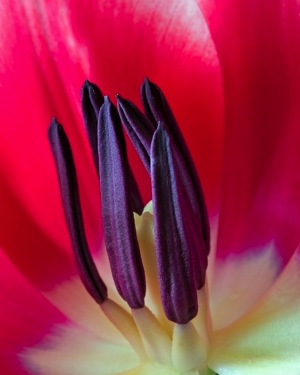
All of the photos in this article were shot in my home. I do not have a home studio, and as I mentioned earlier, I also have little spare time; but that’s ok because you don’t need either to make great photos. The photos of the tulip and baseball were shot with a cheap piece of white poster board and available light from a window.

USING WINDOW LIGHT

While there are no “essentials” to creating great photos with available light from a widow, I always use a tripod and would highly recommend one. However, if you do not have a tripod, you’ll need to raise the ISO to increase your shutter speed if you plan to hand-hold your camera. A generic rule of thumb is you’ll need a shutter speed of 1 divided by the focal length of your lens. For example, I used a 100mm lens for the tulip, and shot it at f/16 and an 8 second exposure. If I did not have a tripod, I would have had to increase the ISO (and realistically open the aperture as well) until I had a shutter speed of 1/100 (because I was using a 100mm lens) to keep the image sharp; but since I was making use of a tripod, an 8 second exposure was no problem.

There are endless opportunities for photography with available window light. Again, you could certainly hold your camera if you raised the ISO, but I would suggest the following as rough guidelines for photographing next to a window:

Photos home easy 02

  • Use a tripod, or raise your ISO until the shutter speed is 1 / the focal length of your lens
  • If using a tripod, set your ISO as low as possible
  • Set your camera to manual mode and the aperture to around f/11, then adjust the exposure via shutter speed from there

For a clean seamless background, such as the baseball photo here, grab a cheap piece or poster board from the school or office supply aisle at your favourite box store.

What do you do once you’re bored shooting next to the window, or want to learn something more? Stay at home of course!

WHAT’S NEXT? LEARN ABOUT LIGHT

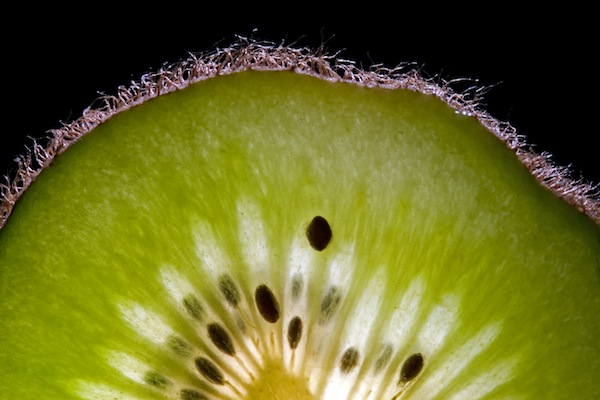
There’s plenty of room to grow with your photography in the house. After all, what’s the underlying foundation of photography? Light! Even if you don’t have a flash you can still learn about lighting at home. Don’t have an off camera flash? No problem, I bet you have a flashlight! I created the photo of the kiwi fruit in a bathroom with the lights off and a flashlight lighting the fruit from behind.

Photos home easy 03

I would take a photo, look at it on the camera’s LCD, and then adjust the angle of light from there. So what if I spent an abnormal amount of time in a dark bathroom by myself, and got strange looks from my wife. I learned a lot about how the position of the light effects the look of the photo, and made a cool photo!

Bottom line, you don’t need a flash to learn lighting and take a great photo, all you need is a dark room (very dark, as in no light at all) and a flashlight.

Photos home easy 04

USING FLASH

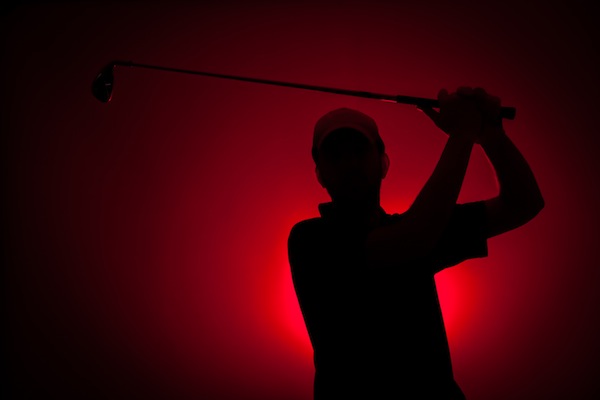
So what about flash? I think using flash in photos is the key to creating photos that stand out from the rest. If you have a speedlite or other hot shoe flash, the best thing you can do to take your photography to the next level is learn to use it. After that, the next best thing you can do is take it off the camera when you use it. The photo of the little yellow guy smiling and the red silhouette of the golfer were both shot using off camera flash, and aside from a few tweaks in post processing, they look very close to what was produced in the camera with help from the flash. Once you understand about positioning and light fall off, you’ll be able to manipulate the light in such a way that creates great photos right in the camera.

Photos home easy 05

The point being here, and something you’ll learn either in due time, or right now as I tell you, all great photos have one thing in common: great light. Whether you use light from a window, a flash, or light from something as simple as a flashlight – there are numerous ways you can get great light right in the comfort of your own home.

To recap, here’s what I used in the photos:

  • Flower and baseball- window light, white poster board, and a tripod
  • Kiwi fruit- tripod and a flashlight
  • Golfer – single off camera speedlite with a red gel fired into a seamless paper
  • Little yellow smiling guy – white seamless paper, and a single off camera flash handheld above and to the left of the camera

Once you create one photo with great light at home, I guarantee you will be hooked! Best of luck to you, now go shoot!

The post How to Create Great Photos without Leaving Home by Brian Barthel appeared first on Digital Photography School.


Digital Photography School

 
Comments Off on How to Create Great Photos without Leaving Home

Posted in Photography


Room with a View: How to Create this Window with Blinds Portrait Anywhere

13 Feb

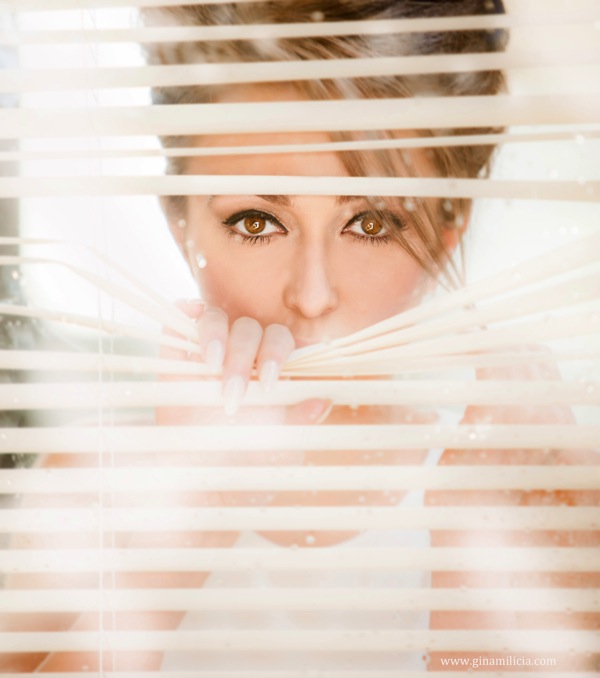
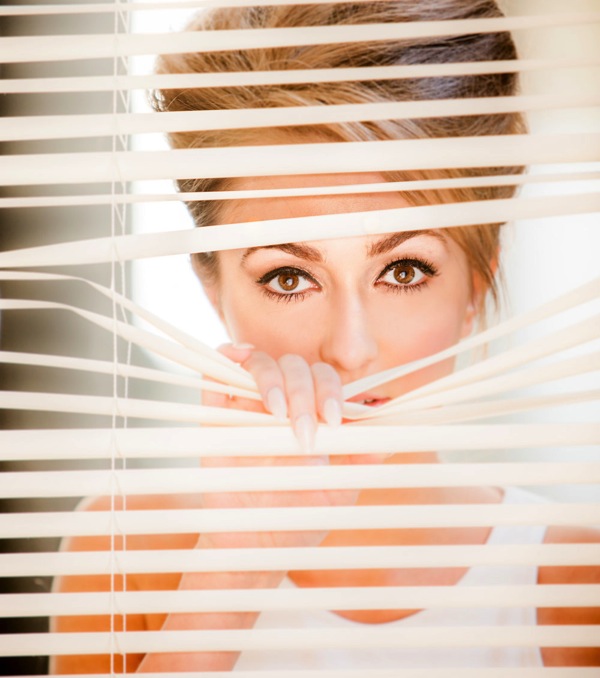
In this post Gina Milicia – author of our brand new Posing eBook – walks us through the taking of one of her portraits of Christy Vandenberg.

Final

I’m constantly on the look out for new and interesting ways to pose my models. This shoot only took me 20 minutes from start to finish and is really basic to set up and photograph.

The following tutorial is a step by step of how I pose and light my window portrait.

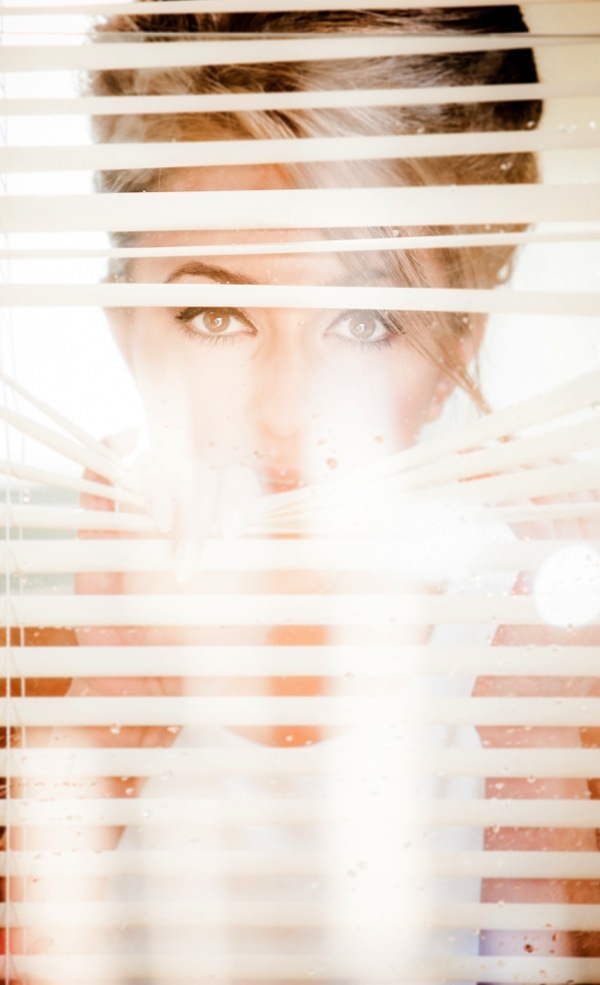
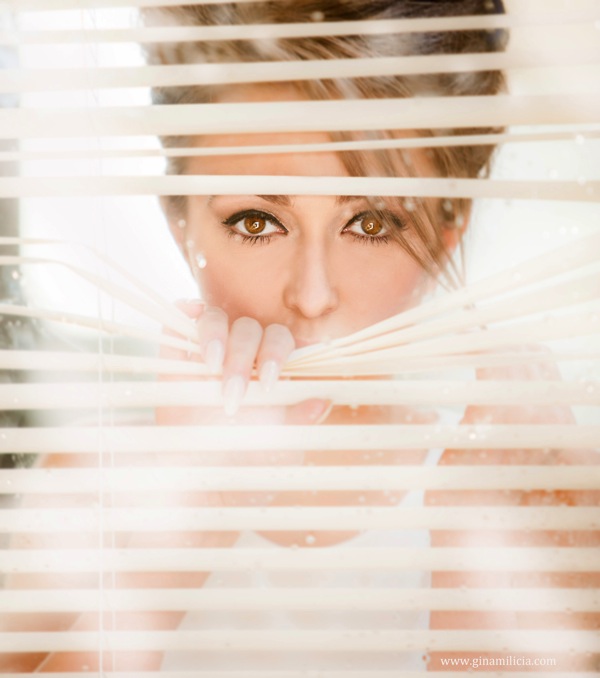
This set up is great way to add mood to a portrait. The reflections caused by the glass that partly obscure my model add a sense of mystery and romance to the shot.

This image was taken in my studio using daylight and can be recreated almost anywhere.

The example I’ve given is of a full-face shot but this also works with ¾ shots and profile shots and with or without venetian blinds.

Gear Checklist

  • Canon 5D Mark II
  • Canon EF 70-200mm f/2.8L IS lens*

I’ve used a focal length of 200mm but a focal length of anywhere between 70-200mm will work. If you have a cropped frame sensor a 50mm will also give a similar result.

  • Manfrotto 475B Pro

I shoot most of my headshots using a tripod because having my camera fixed gives me the freedom to focus on expression and pose rather than having to worry about whether my vertical and horizontal angles are straight.

The other reason I love shooting on tripod is it allows me to shoot portraits at very slow shutter speeds of 1/15th or 1/8th of a second, which I could never get using hand held.

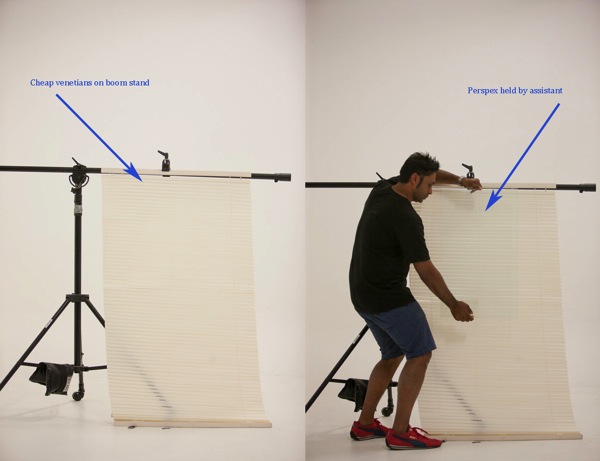
  • 1 x cheap Venetian blind + boom c stand or clothes rack to hold up venetians
  • 1 x sheet of clear Perspex* approx. 3ft x 3ft ( held by assistant)

* Perspex is lighter and cheaper than glass and easier to transport.

Camera Settings

  • ISO 400
  • 200mm
  • f/2.8 at 1/80th second
  • Daylight

I’ve used a long focal length of 200mm and short depth of field of f/2.8 because I wanted my models eyes to be in focus and the background to be out of focus.

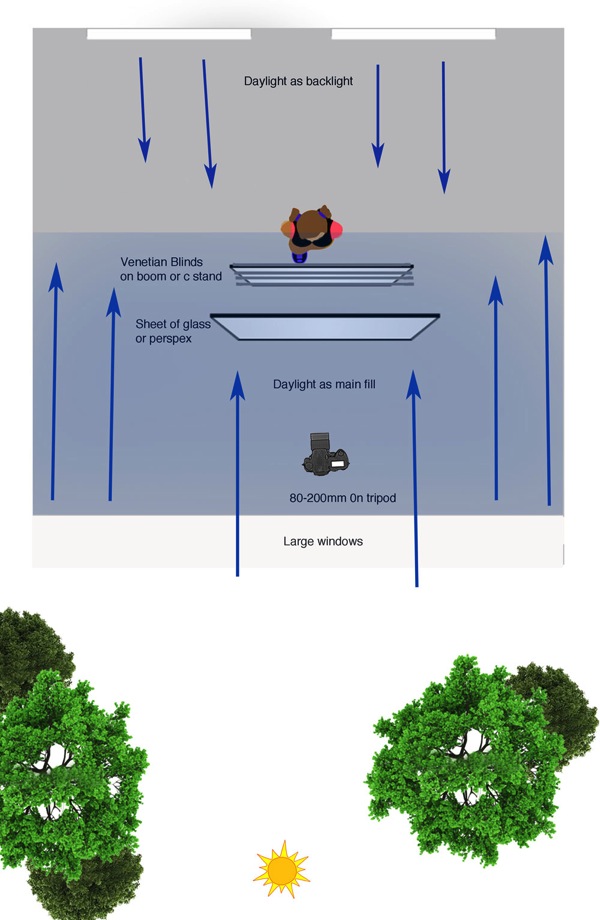
The lighting in this shot is very simple daylight coming in from a large window directly behind me.

The model is also backlit by two large windows directly behind her.

Window Diagram

Lighting diagram

Attach venetian blinds to your stand

Venetians 50

I positioned my model behind the venetians and then took a test shot to make sure my exposure was correct.

Venetian no glass 7

The Perspex is then held in front of the Venetian and tilted forward slightly to minimize reflections.

Flare 50

The style and type of reflections will vary depending on the location you shoot in.
I experimented by having the Perspex tilted at various angles. The example above has a slightly more mysterious vibe because the face is obscured by reflections.

Finally I introduced texture to the image by spraying water on the Perspex.

Final

The post Room with a View: How to Create this Window with Blinds Portrait Anywhere by Gina Milicia appeared first on Digital Photography School.


Digital Photography School

 
Comments Off on Room with a View: How to Create this Window with Blinds Portrait Anywhere

Posted in Photography


Create a Cast of Light in Your Image using Photoshop or Elements

06 Feb

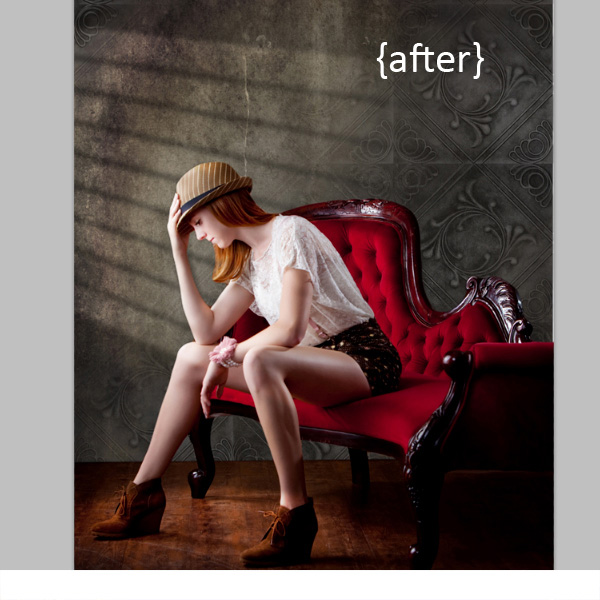
Light sources add depth and interest to your images immediately. By simply adding some window light to this image we added depth and warmth. If you have an image that you love, but it’s falling a little flat, consider adding some light! With just a few simple steps you can add beautiful light to your images.

Follow these steps to create a cast of light – works in Photoshop and Elements

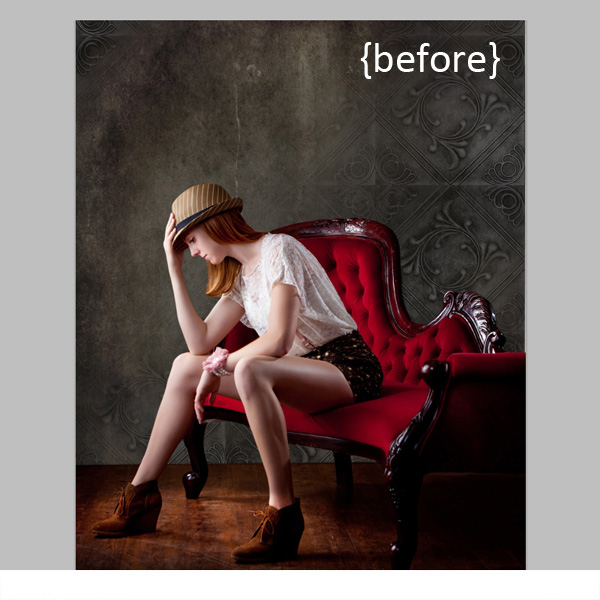
Window Light Cast Before

Window Light Cast After

One thing you’ll want to pay special attention to is pre-existing lighting in your image. Make sure the light source you add works with and compliments your image. You can adjust the angles and direction of your added lights to make them work together so your image is both believable and beautiful.

Let’s get started. Follow these simple steps to make your compositions shine!

Step 1: Start with a light source

This can be an image you’ve taken, something you’ve designed or something you’ve purchased. We are using a light element from our Window Cast Light Set. Choose a light source and shape that you want to bring into your composition.

NOTE: if you want to follow along and try this on one of your images we’re happy to provide our set of Light Casts to you for free. Go here to download them – use the code: FREEBIE when you checkout to get them at no charge.

Step 2: Add the light source to your image

If you have your image and the light source both open in Photoshop, you can use your selection tool to drag the light source to your image. Alternatively, you can also copy (Control + C) the window shape layer in Photoshop (or PSE). Open your image and paste (Control + V) the window shape layer into your image.

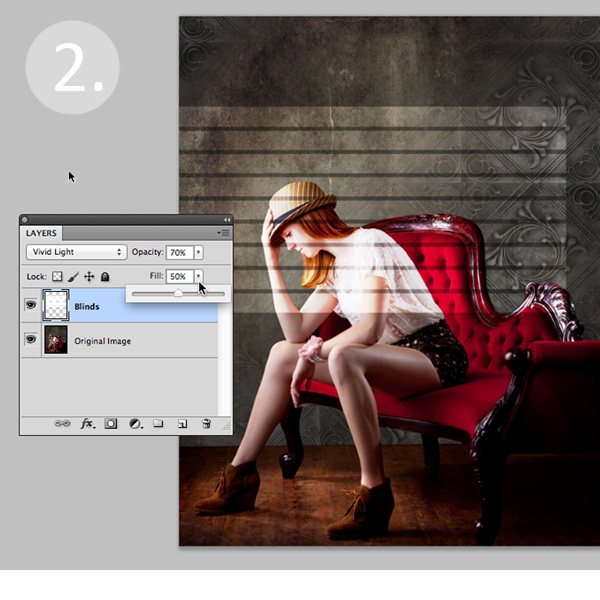
In this case, we placed the light source over our image. Next we adjusted our Layer Blending Mode by setting it to “vivid light” and then adjusted our opacity and fill on the light source until we achieved the desired look. You’ll want to play around with these settings to get the right look for your image.

Window Light Cast La ED2363

Step 3: Adjust the shape of your light

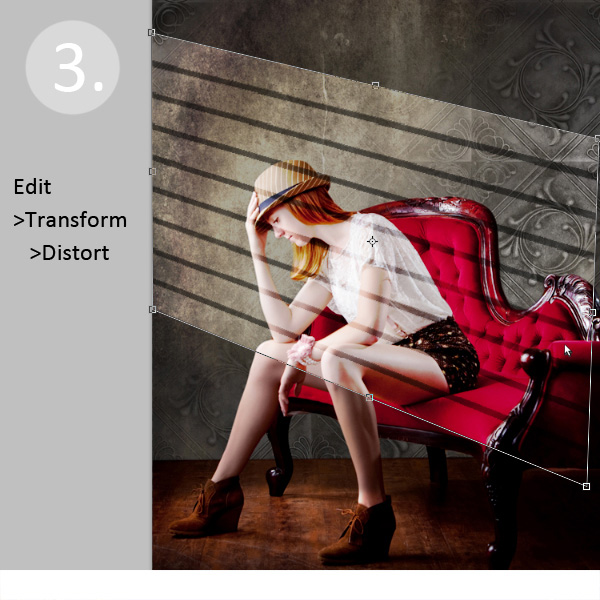
Next, you’ll transform the window shape to your liking. Go to Edit>Transform>Distort and then move the corners to create the
shape that works best with your image.

Window Light Cast Transform

Step 4: Soften your light

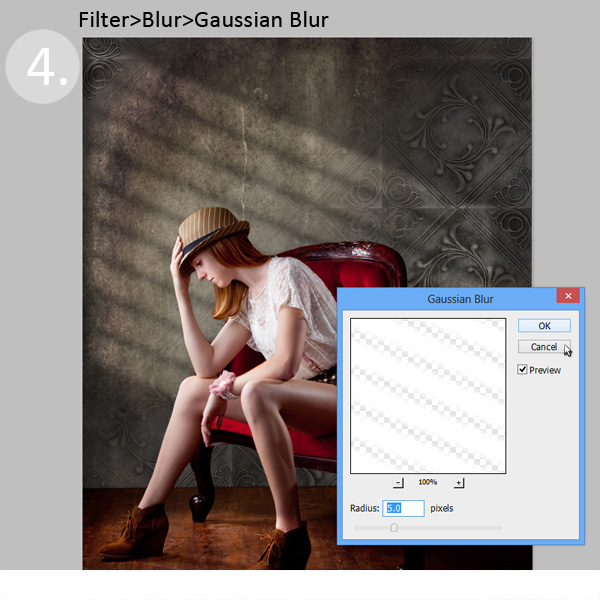
Now you want to soften the edges of your light so that it is not so harsh. Use the Gaussian Blur filter (Edit>Blur>Gaussian Blur) to soften the edges to your taste. In this case, we set the blur amount to 5. Adjust the amount of blur up and down to see how it softens the light in your image.

Window Light Cast Blur

Step 5: Fade your light source for a more natural look

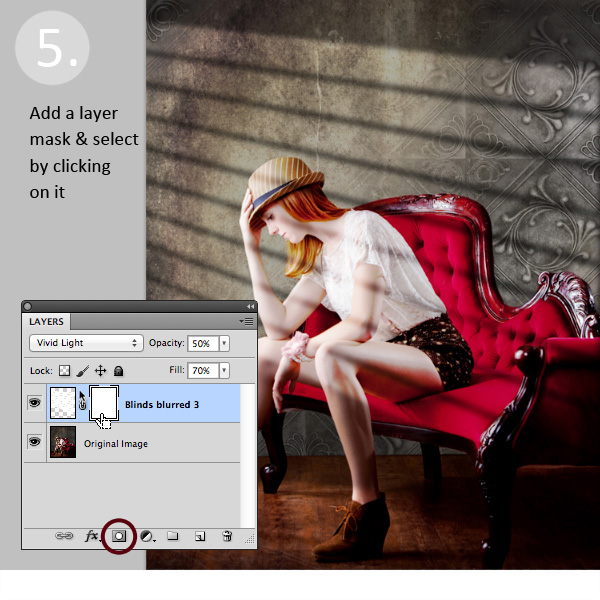
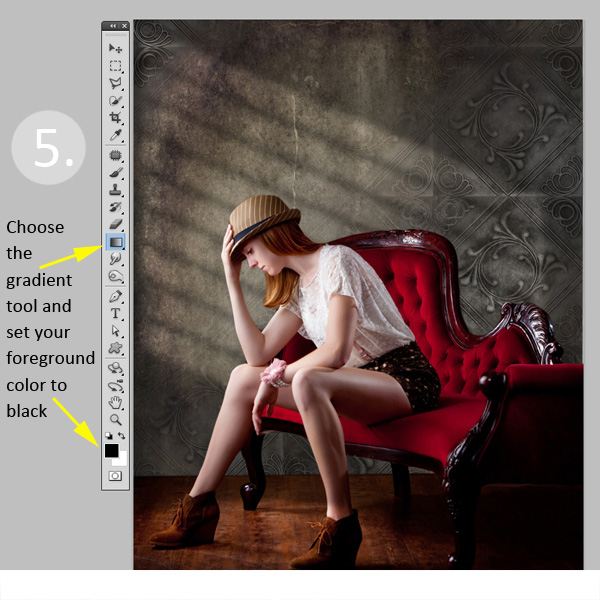
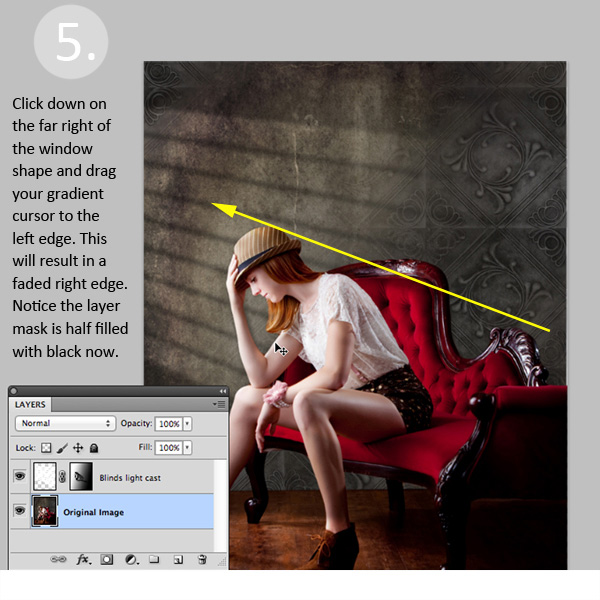
Now you’ll add a Layer Mask to your window shape layer. First, select your layer, and then click the Add Layer Mask Button at the bottom of your Layers Palette. Click on the new Layer Mask in the layer to make sure it’s selected. (VERY IMPORTANT STEP!)

Window Light Cast La ED283A

After adding a layer mask to the light cast layer, set your color palette to black and white, with black in the foreground color. Then use the gradient tool set to “foreground to transparent” to fade the light off.

Window Light Cast Gradient

Simply click into your layer mask and drag your cursor from one end (this will be 0% opacity) to where you’d like to see the light at 100% opacity. If you don’t like your results, fill the mask with white and start over.

Window Light Cast Gr ED2331

Step 6: Position the window shape to your liking.

Use your Selection Tool to adjust the position of your light layer to the desired location in your image. You can also use a soft black brush set to 30% opacity to subtly brush away the window light in the layer mask. We did this to remove extra light from her face.

Congratulations! You’ve successfully added a beautiful, warm light effect to your image to create more depth and interest in your image.

Window Light Cast Before

Window Light Cast After

Your turn!

If you’ve tried out this technique please share your images in the comments below, and please ask if you have questions!

The post Create a Cast of Light in Your Image using Photoshop or Elements by Christina Roth appeared first on Digital Photography School.


Digital Photography School

 
Comments Off on Create a Cast of Light in Your Image using Photoshop or Elements

Posted in Photography


Create Powerful Silhouettes by Telling a Story

06 Feb

Create Powerful Silhouettes by Telling a Story

Telling the Story

Silhouettes remove all the distractions and clutter in the scene and distill the image down to its most basic, this is why the story is so important. Just using shapes you must make a photo that is recognizable, and that the viewer can relate to. While this sounds easy in practice, it can be difficult to achieve. You must have the right elements. The light needs to be in the right location, the subject needs to be facing the right way, and they need to be in a pose that makes their action recognizable.

Silhouette 1

Movement by the subject helps tell a strong story in your silhouettes

Tips for creating good silhouettes that tell a story

Clean outlines

If you have multiple objects that are back-lit you want to make sure there is separation between the objects so that each one is distinct and recognizable.

Profiles or straight on shots work well

For people, profiles or straight on shots work best. For profiles you should be able to clearly make out the shape of the nose and chin on their face. For straight on shots the subject’s arms should be away from their body, and their legs parted so you can see both legs and not just a single blob. Recognizable shapes – this is important for every silhouette.

Capturing action

Movement in your subject can create strong lines and positions that are instantly recognized by the viewer and help convey the story of what the subject is doing.

Props

Silhouette 2

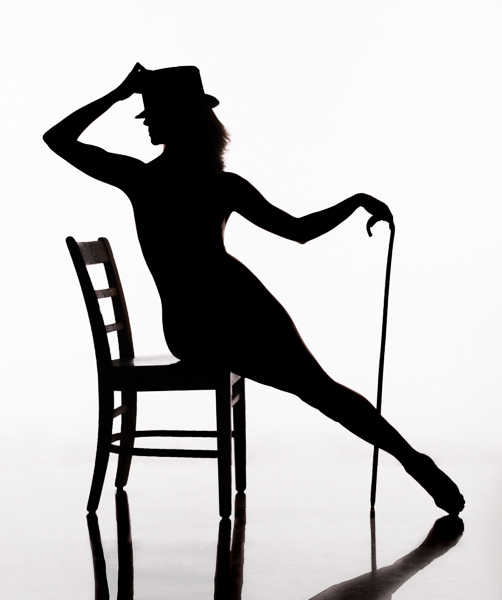
The added hat and cane help enhance the story in this image

Props can help tell the story, an outline of a flower, a tip of a hat can add meaning to the image.

Interaction between subjects

Having multiple subjects can be challenging because you want to minimize overlap of their shapes so they each maintain their own identity. There is a balance between telling the story and having the subjects interact in a minimal way. For example holding hands or kissing often work well, but a hug results in silhouette that is just a big black blob.

Silhouette 3

Separation between subjects is important. This image would be stronger if the man’s leg did not merge with the camera and tripod

Lighting for Silhouettes

To light a silhouette you need to light the subject from behind. The type of light is not important; it can be natural or artificial and can be direct or indirect. The important thing is that the lighting is behind the subject, and the subject is not lit. Technically silhouetting occurs when you have a lighting ratio of 16:1 or greater (4 stops), however I will describe how you can create a silhouette in post-production using lower lighting ratios.

Natural Silhouette Lighting

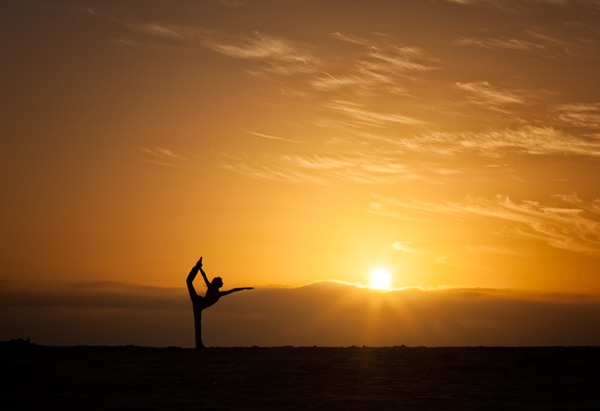
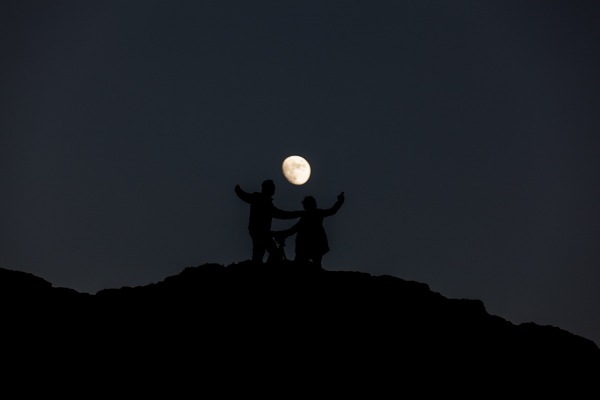
One of the most common types of silhouettes using natural lighting is to place the subject between the camera and the setting sun or moon. Your camera exposure should be set for the background lighting, either the sunset or moon, and this will cause the subject to appear black against the light background. Another common technique is to use the light reflected off of a wall or the side of a building.

Silhouette 4

This lighted wall in Las Vegas provides great back-lighting for silhouettes

Studio Silhouette Lighting

There are two common techniques for creating silhouettes using studio strobes. The first is to use a white background and bounce the strobes off the background. The second is to point the strobes towards the camera and place the subject between the strobes and the camera. This second technique can also produce a light flare in the image which can give an interesting effect.

Post-processing techniques

Silhouette 5

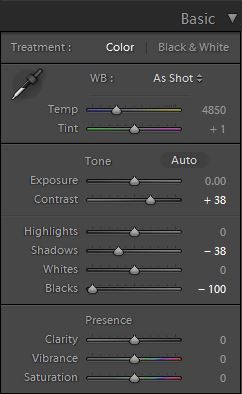
If you have a backlit subject, but can still see some detail in the subject you can often make it a pure silhouette in Lightroom, or Camera RAW. Use the develop module in Lightroom and adjust the Contrast, Highlights, Shadows, and Blacks sliders. Use different combinations to darken the subject. Typically you will need to increase Contrast and decrease one, or all of the other three sliders. Either the Shadow or Blacks slider should be set to -100, try both to see which produces the desired effect. Decreasing Highlights is typically only necessary if the edges of the subject are lit and you wish to make them darker.

Conclusion

Silhouettes are a fun and easy to do and by concentrating on the story being told you can create an image that has impact.

Want more silhouettes?

  • 5 tips for photography silhouettes (non-human subjects)
  • How to photograph silhouettes in 8 easy steps
  • 12 stunning silhouettes
  • Great B/W silhouette images

The post Create Powerful Silhouettes by Telling a Story by Craig Colvin appeared first on Digital Photography School.


Digital Photography School

 
Comments Off on Create Powerful Silhouettes by Telling a Story
Posted in Photography