RSS
 

Posts Tagged ‘Create’

How to Create Dramatic Portraits in Your Garage

08 Dec

The setup

1

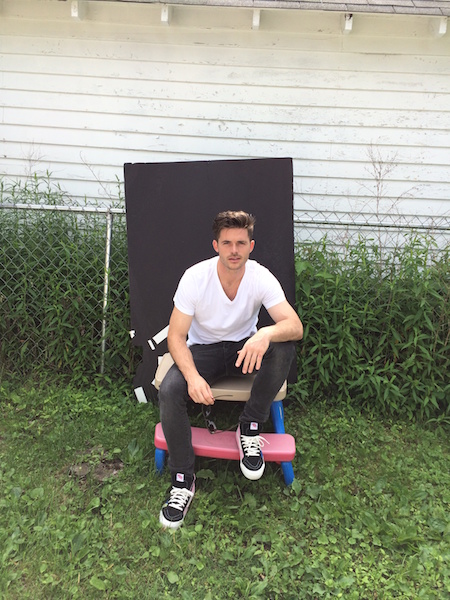
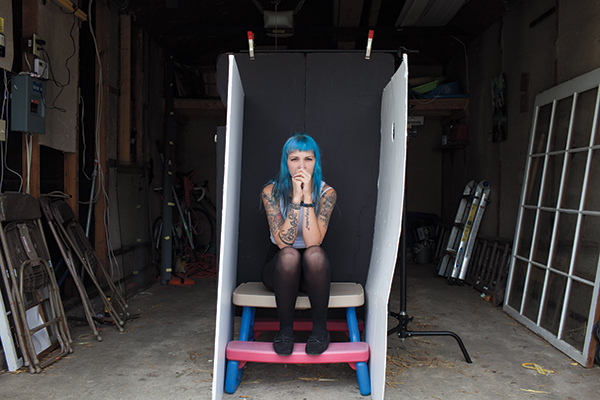
If I want to take dramatic portraits on a black backdrop (without even needing a single light), a garage is your new go to spot. This is the simplest (and most makeshift looking) setup that I use. As you can see in the image above, all I am using is a piece of black foam core, folded into a “v,” set inside a garage on a sunny day.

While you can accomplish this setup on overcast days, having a sunny day helps to increase the brightness of everything outside the garage, thus increasing the catch light in the model’s eyes. The sunny daylight scene outside the garage essentially acts as a giant reflector, which hold under the subject’s chin to soften shadows.

2 copy

The reason why a garage is great for this kind of setup is that it allows you to place your subject closer or further away from the bright, outdoor light, depending on how much light you want in your subject’s eyes or how even you want the light to appear. For example, if the subject is right at the edge of the garage, just out of the sun, the exposure will be very bright, requiring a very fast shutter speed and/or a small aperture, but they will have large catchlights in their eyes. Note that the smaller aperture will cause the image to be sharper from the front to the back. Also, the closer the subject is to the bright outside, the darker the background will be once you’ve adjusted your exposure for their skin tone.

Alternately, if the subject is placed deeper into the garage, it allows you to use a wider aperture or slower shutter speed, which can create a flattering, softer, depth of field, though the catch light and overall light quality will change.

3 copy

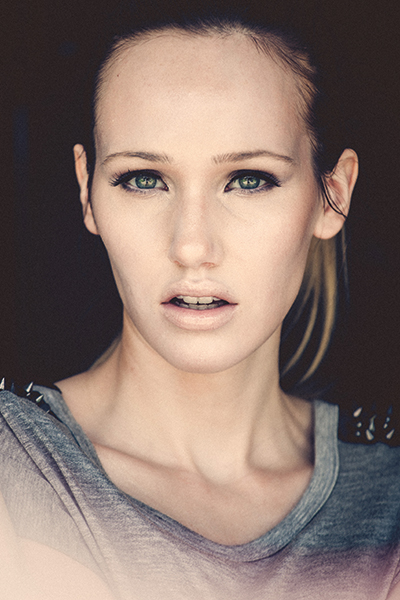
Shooting in a garage is the equivalent to a one-light studio portrait since the only light source is the open garage door. This increases the appearance of the image being a studio portrait, as it mimics a large softbox or octabank (though an open garage door is larger and less expensive). If you want to have more light, such as hair light and rim light to create separation between a subject and the background, there is another option available to you. Simply place your subject on the shaded side of the garage, allowing the sun to light just the edges of your subjects hair and shoulders, as seen below.

3

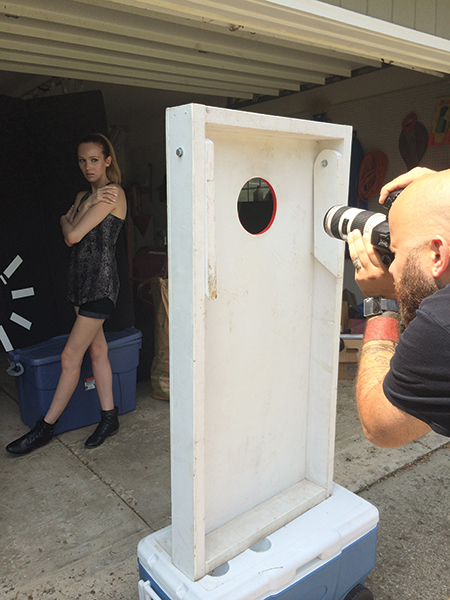
The one downside to having a huge wall of soft light in front of your subject is that it can flatten out the subject, which can make the lighting appear flat or boring. One remedy for this is flagging off portions of the light, as seen in the image below. Note that any object you place in front of the model to flag the light will also change the shape of the catch lights in their eyes.

4 copy

For portraits like this, you will want to use a focal length of at least 50mm or longer. Anything wider angle will lead to distortion of the subject’s features. Since you are shooting outdoors, you have unlimited space to back away from the subject. So I like to use my 70-200mm lens for these type of head shots.

5 copy

The other perks that come with shooting outside or in a garage is that you have a free hair fan and plenty of ventilation, which comes in handy when you’re shooting smoke.

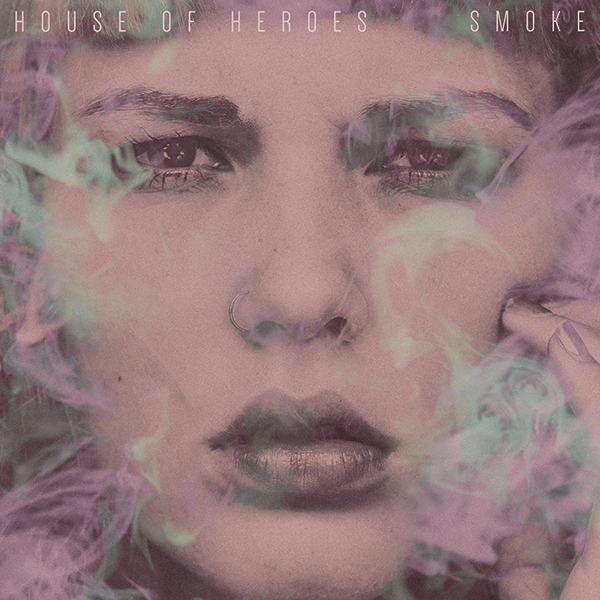
My buddy Colin is a drummer in the band House of Heroes. He approached me to shoot the cover of their latest EP, Smoke. He wanted a dramatic, close-up of a girl’s face with smoke all around. I knew that my garage would be the perfect spot to conduct the shoot (open air with bright light). I placed white boards on either side of Courtney, which helped to not only fill in any shadows under her jaw but also add catch lights to her eyes. In addition to the images of Courtney, I also shot several frames of smoke, being exhaled by Colin (try doing that inside a studio), isolated on the black backdrop, which was later overlaid on the final image of the model in post-production.

6 copy

Have you tried doing portraits in your garage or other makeshift location? Have any additional tips? Please share in the comments.

googletag.cmd.push(function() {
mobile_slots.push( googletag.defineSlot( “/1005424/_dPSv4_mob-all-article-bottom_(300×250)”, [300, 250], “pb-ad-78158” ).addService( googletag.pubads() ) );
} );

The post How to Create Dramatic Portraits in Your Garage by Nick Fancher appeared first on Digital Photography School.


Digital Photography School

 
Comments Off on How to Create Dramatic Portraits in Your Garage

Posted in Photography


Create a Festive Christmas e-Card Using Your Photo

04 Dec

A short tutorial for those who don’t have a graphic design degree, but wish to create a simple clean Christmas e-card from their images within the familiar surroundings of Photoshop. Don’t miss our our great collection of Christmas gift ideas for photographers! Before

The post Create a Festive Christmas e-Card Using Your Photo appeared first on Photodoto.


Photodoto

 
Comments Off on Create a Festive Christmas e-Card Using Your Photo

Posted in Photography


Create a Festive Christmas e-Card Using Your Photo

03 Dec

A short tutorial for those who don’t have a graphic design degree, but wish to create a simple clean Christmas e-card from their images within the familiar surroundings of Photoshop. Don’t miss our our great collection of Christmas gift ideas for photographers! Before

The post Create a Festive Christmas e-Card Using Your Photo appeared first on Photodoto.


Photodoto

 
Comments Off on Create a Festive Christmas e-Card Using Your Photo

Posted in Photography


How to Create a Unique Bokeh Portrait for Under $10

28 Nov
1

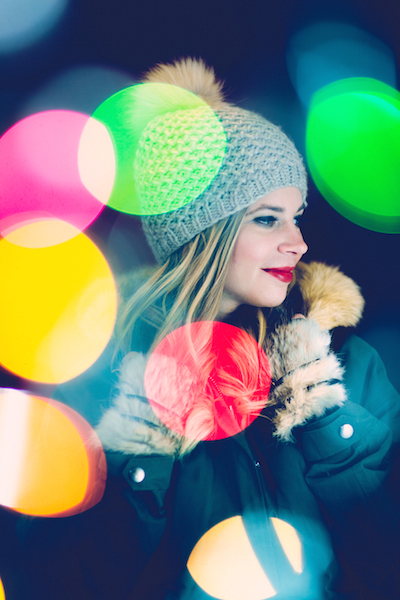
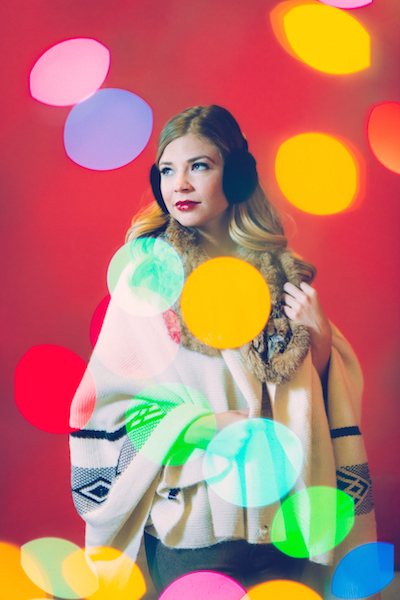
This shot was lit with one light on the subject along with the Christmas lights.

You can have a luxurious bokeh in any of your images for the low cost of $ 4.99. Yes, you heard me right, just $ 4.99. How, you ask? I’ll tell you, but you won’t believe me – Christmas lights.

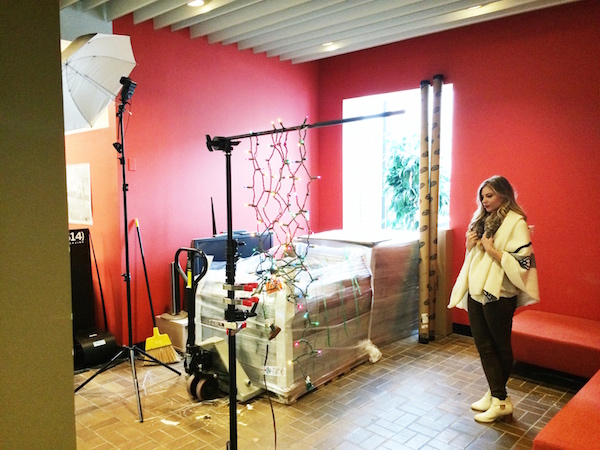
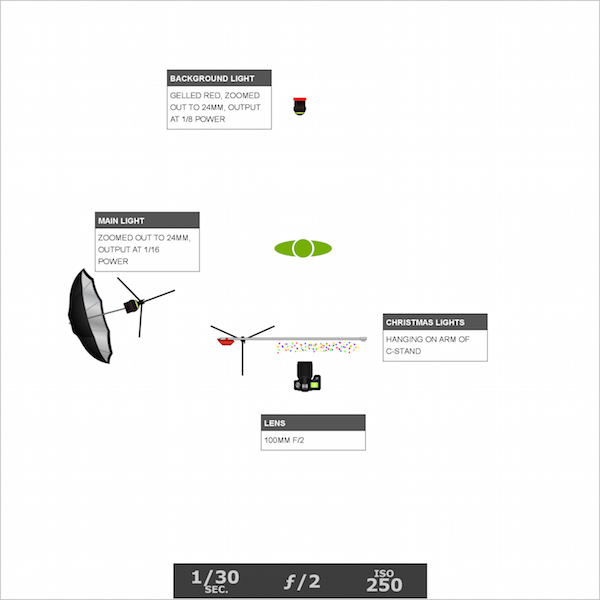
Just a single strand of Christmas lights and a couple of flash units are all you need to immerse your subject in full-blown bokeh bliss. This isn’t a double exposure or a Photoshop trick. It can all be done in camera in a single exposure. I bought a strand of cheap Christmas lights from the store, draped them over a C-stand arm so that the lights were layered and overlapping. I used a Canon 100mm f/2 lens that I had borrowed from my buddy for the shoot.

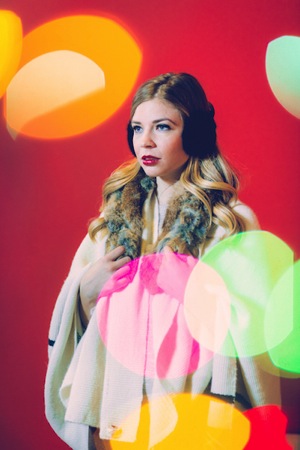
I also had two flashes. The background light was set to 1/8 power (in manual mode) and gelled red, aimed at the red wall behind the subject. The second light was set to 1/16 power and shot into a silver umbrella about seven feet away from the subject.

2

Note that the output on both speedlights was set rather low so that I could shoot with a wide open aperture. The large aperture, combined with a slower shutter speed of 1/30th, helped me attain a proper exposure when shooting the low watt Christmas lights. In order to properly pull off this technique, the room you are shooting in can’t be too bright, whether it be overhead lights or window light – the ambient light can’t overpower the Christmas lights or this won’t work.

3

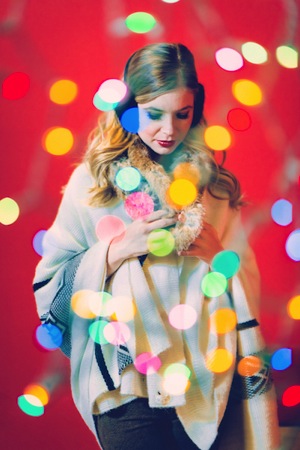
Once I was ready to start shooting, I made sure that I was standing within two to three feet of the lights and the subject was five feet beyond the lights. Depending on how close I was standing to the Christmas lights, the size of the bokeh would change. When I was closer to the lights, the bokeh spots were larger and, accordingly smaller when I was further away from them.

Focus issues

One issue that you may encounter when shooting through an object is that the lens will try to focus on anything in the foreground. This is a problem, since what you want to focus on is behind the Christmas lights. There are a few ways to get past this. The first is switching to manual focus. But I don’t trust my eyes enough for this option.

The second option is the enabling back button focus on your camera. This is the option that I use. Enabling this feature is a bit different for each camera, so you’ll have to look up how exactly to do it on your specific camera body. Basically what it does is allows you to shoot without the interruption of autofocus, and when you want to re-focus, you simply press the assigned button on the back of your camera and resume clicking.

The third option is only available if you have a zoom lens that allows you to set your focal distance. For example, I have a Canon 70-200 f/4L IS which has a switch that, when flipped one way says 1.2m to infinity, and the other way says 3m to infinity. That means that if I don’t want to focus on the object in the foreground, I would select the 3m to infinity option so the lens doesn’t look for anything closer than 3 meters, which saves the lens and battery some focusing time.

4

This shot was lit with one light on the subject and one light gelled red on a red background.

Now you’re ready to shoot. Play around with your camera’s placement in relation to the Christmas lights. As you move around, pay attention to where the colored bokeh is falling in the frame. Is it on the subject’s face? Maybe move an inch to the left so their face isn’t green. Or maybe you want it to be green. Take a shot and then move a bit and take another. Play around with size and placement of the bokeh and have fun!

5

Standing further away from the Christmas lights makes the bokeh smaller.

6

Standing closer to the Christmas lights makes the bokeh larger.

The post How to Create a Unique Bokeh Portrait for Under $ 10 by Nick Fancher appeared first on Digital Photography School.


Digital Photography School

 
Comments Off on How to Create a Unique Bokeh Portrait for Under $10

Posted in Photography


Modular Minimalism: 5-Part Kit to Create Infinite Furniture

02 Nov

[ By WebUrbanist in Design & Furniture & Decor. ]

modular living room set

Beds, tables, shelves, chairs, couches and loveseats can be created in effectively any configuration using this series of essential elements in all sorts of stacks and arrays.

modular stacked furniture design

Created by Austrian designer Matthias Dornhofer, the FREI_RAUM (or: free room/space) system is primarily composed of cushions, wooden legs and plywood platforms as well as a single mobile light.

modular used as seating

modular bedroom configuration layout

Aligned in a row, cushioned platforms can create various seating arrangements or even a single-person bed with headboard and footboard. Placed vertically, the same platform elements become a shelving system.

modular playful furniture arrangements

modular infinite variety furniture

Given the ease of transforming the system, part of the fun is presumably being able to change a room on a whim without much thought, experimenting with various layouts or shifting things around for guests.

modular minimalist furniture system

modular furniture system complete

The pass-through pegs are set halfway into surfaces above (and/or below) provide additional stability and to obviate the need for connectors, at least in theory – in practice one has to wonder if there is some structural risk in the horizontal direction at these points of connection.

Share on Facebook


[ By WebUrbanist in Design & Furniture & Decor. ]

[ WebUrbanist | Archives | Galleries | Privacy | TOS ]


WebUrbanist

 
Comments Off on Modular Minimalism: 5-Part Kit to Create Infinite Furniture

Posted in Creativity


Create Your Own Font Using Tools and Tips

25 Oct

Here are a list of online font tools to use:

PaintFont
FontStruct
FontForge
BitfontMaker
Type light
gbdfed Bitmap Font Editor
Font Constructor
Raster Font Editor

Here are some tips for creating fonts:

Steps to creating a font by FontForge
My First Font – How to make your own font
Create Your Own Font – Wired How-To Wiki

Back to Top

BlogPhoto

 
Comments Off on Create Your Own Font Using Tools and Tips

Posted in Equipment


Dodging and Burning to Create More Effective Black and White Images

16 Oct

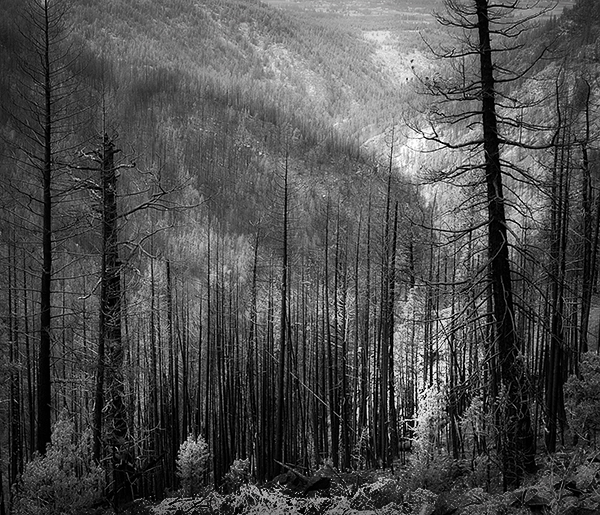
With the huge assortment of software and plugins you have at your disposal these days, the photo processing technique of burning and dodging is practically ancient. It was (and still is) one of the most common ways of enhancing film images in the darkroom, and everyone from Ansel Adams to Imogen Cunningham used it.

myra2

They used it because it is powerful and simple and still is to this day. With all the complicated plugins and post-processing procedures you have at your disposal, you won’t get any better bang for the buck than creative dodging and burning.

This tutorial with show you  how I do dodging and burning in Photoshop, for black and white images. I’ll save another article for you about using the technique for your color images. First, though, let’s make sure we all know what dodging and burning is.

WHAT IS DODGING AND BURNING?

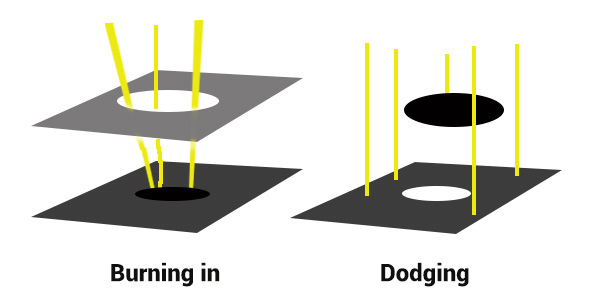
Originally, dodging and burning was used in the traditional darkroom, to retouch film to enhance highlights, and deepen shadows on photographic prints. Photographers used simple darkroom tools to either allow more light from the developer machine to reach certain parts of the light sensitive photographic paper. This was known as “burning in” which made these parts of the photo darker. The photographer could also dodge the light – hold it back from the paper – allowing that part of the photo to remain less developed or lighter than the non-dodged area.

Using this method, photographers or retouch artists could control with great accuracy the developing process to ensure that their prints displayed the full range of tonal values needed to make the photograph pop.

Darkroom Burning and Dodging digram

Darkroom burning and dodging: allowing more light to pass, or holding light back.

WHY YOU SHOULD DODGE AND BURN YOUR DIGITAL PHOTOS

So what has an ancient darkroom technique got to do with your photography? Plenty! Dodging and burning can add a whole new level of depth to your images. With Photoshop it’s simple.

Here are some compelling reasons to incorporate dodging and burning into your digital photography post-processing workflow:

  • To create more dimensionality, make things pop out at your viewers, and make others recede into the shadows.
  • To draw your viewer into your image. Our eyes are programmed to follow the light, and the lightest, brightest parts of your photo are where you want to direct viewers. Some creative dodging and burning will help get their eyes where you want them to go.
  • To isolate the subject.
  • To minimize distracting backgrounds.
  • To turn the lights on, in a photo – if you need some creative lighting after your shot, dodging and burning can help.
  • To make things more dramatic and moody – enhance the shadows to darken things down.
  • Add a vignette to keep the viewer’s eye in the image.
Dodging & Burning adds dimension.

Dodging and burning add dimension.

The three dimensionality of the circle on the right was created purely by dodging and burning a copy of the one on the left. As well, it is super easy with the technique you’re about to learn. As with most things in Photoshop there are many ways to accomplish the same goal, and each have their advantages and drawbacks. I prefer this way because it gives you a huge amount of control and flexibility. It’s drop dead simple, and non-destructive.

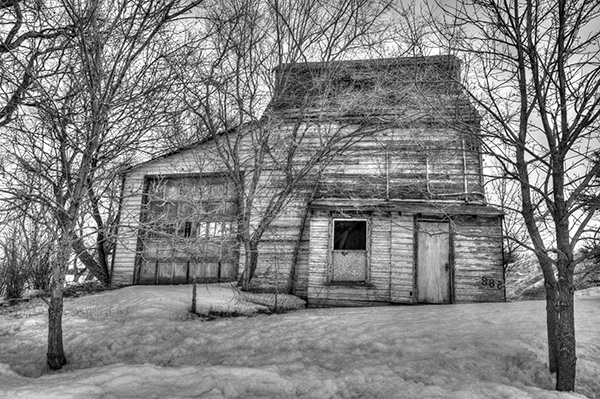
Let’s look at  before and after shots so you can see  the difference between nothing, and selective dodging and burning.

Before Dodging and Burning

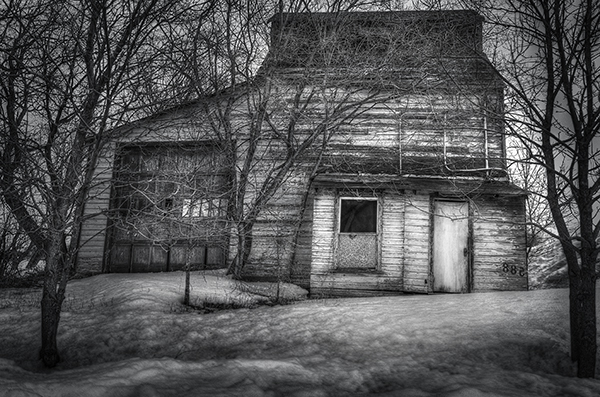
Before dodging and burning, the image is flat and has no center of interest.

Final Image, with Burning and Dodging applied - exaggerated for effect.

Final image, with dodging and burning applied – we are drawn by light to the door.

The second image has more drama, more of a moody feel. The snow has texture and dimension, and the small door and window are the clear center of interest. Nothing was changed in this photo other than adding tonality by dodging and burning. The look has been exaggerated so you can see the changes, normally dodging and burning is more subtle than this example. Although you can get quite dramatic results if that’s the mood you’re going for.

USE THE BEST TOOLS FOR THE JOB

toolsYou may have noticed in Photoshop’s Toolbar, a couple of tools called Dodge and Burn. Forget about them. I don’t use  these for my dodging and burning. I like to have more control when I work on my images. So instead of the pre-made tools I create my own using layers and the brush tool. It becomes artistic like creating a painting, and you have more freedom to be flexible.

Using layers give you the flexibility to change opacity, and to group your different layers into folders. You can then selectively turn on layers to see how your work is progressing.

HOW TO DO DODGING AND BURNING

Dodging – adding more light:

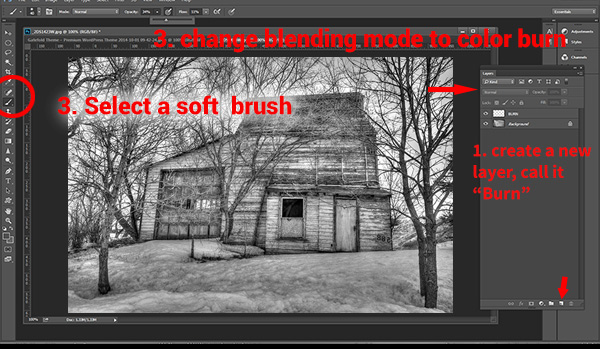
  • Create a new layer. Switch the blending mode to Color Dodge, and rename this layer Dodge. You may end up having many dodge layers, so name it something more descriptive, door dodge or tree dodge.
  • Select a pale gray color from the toolbox palette, initially this color will be light, for example #bcbcbc, or 188,188,188 on the RGB scale. This color determines the main intensity of the dodge, or how bright it will be.
  • Select a soft brush at a size suitable for the area you want to bring out or emphasize.
  • Initially set the Opacity and Flow of the brush to about 20% each.
  • Brush on the new layer and instantly see the light colors start to POP. If there’s too much, you can either reduce the opacity of the layer, or reduce the opacity and flow of the brush itself.

step1

Once you have an intensity you like, brush dodge segments of the image – the door for example. If you move to another part of the image use a new layer for that area or element. You do this because you may want to adjust the intensity by changing the opacity of the layer, or the brush, or even change the color to a lighter or darker shade of gray.

Finally create a Layer Group – click the little folder icon in your layers palette. Move all your Dodge layers into one Group. Name the group Dodge. This allows you to instantly turn off all the “lights” to see before and after. Did you go overboard too much, should you do more, or is it just right? Being able to turn all the dodging off with one click will help you decide.

Where and what to dodge:

You want the lightest parts of your image to lead the viewer’s eye to your subject. Can you create a pathway of sorts with a dodged or brighter leading line, a bright path that the eye can easily follow? Alternately you can also make leading lines darker by burning. Leading lines don’t always have to be bright.

Dodge (and burn) places with texture, to add that three dimensionality, to make the texture really stand out. Try dodging the subject a bit, just a subtle brushing with a gentle opacity to add some brighter tones relative to the rest of the image. Does it pop out a little more now?

You’ve finished dodging for now, next let’s go over to the dark side!

Burning – creating darkness:

Next you’ll do the exact same process for burning. I suggest starting with the exact same color and opacity settings too. Simply create a new layer and set the blending mode of Color Burn, and name the layer Burn.

Once again, if you need more drama, you can change the color of the brush, or change the opacity and flow of the brush or the layer. You can add more layers if needed, duplicate a layer to instantly double the amount of darkness.

This method is quick and intuitive, and if I feel that you’ve gone too far, you can turn off a few layers to hide their visibility in the image. I suggest you make a Layer group for the Burn layers as well.

You can even create another Layer group called D&B (for dodge and burn) and put the the other groups inside. Just ctrl+click to select them and drag them over top of the D&B layer. Now you’ll be able to see the total before and after view with one click. Off and on – good or not? More work needed or done?

SEEING THE BIG PICTURE

Once you’ve brushed in the areas that you want and think you have all the burning and dodging done, you can burn a vignette around the edges of your image to keep the viewer’s eye from leaving. It’s like framing your photo with a bit of darkness, so the eye stays on the brightness.

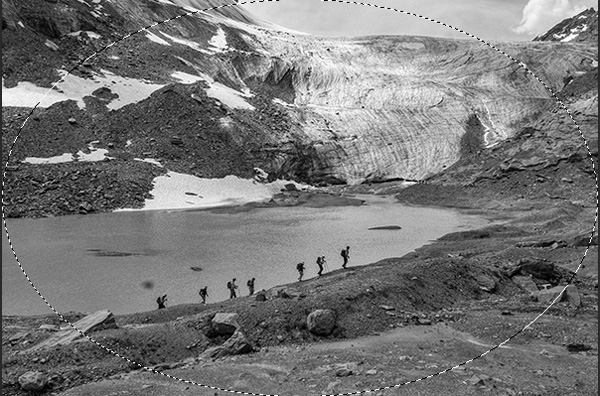
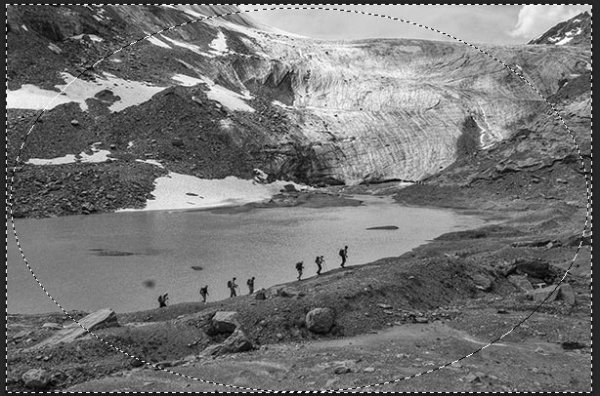
All  you need to do here is create (yes) another layer and use the elliptical marquee tool, with a feathering setting of at least 50 pixels. On the new layer drag out the circle so it touches the edge of your frame. To add darkening to just the edge of the image to create the vignette, go to the top menu in Photoshop and click on Select>Inverse. This will now let you fill the area OUTSIDE the selection.

In the Tools Box, select the same grey color you used for the initial burning of your image as your foreground color, then hit Alt>Backspace on your keyboard to fill that selection with color.  Set the layer blending mode to Color Burn. You may have to decrease the opacity of this layer a bit depending on the tones in your image.  This vignette should be pretty subtle, it’s not meant to be a frame, just a very slight darkening to keep your centre of interest a few tones brighter, to keep the viewers’ eye in your frame.

marquee

Initial selection

Selection inverted

Selection inverted

Vignette added

Vignette added

_2DS2932VV

FInal image

I’ve made a short screen capture video showing my technique for dodging and burning you can watch below if you prefer to follow along:

Once you give this method a try, you’ll see how easy it it and how you can achieve dramatic effects with a few quick steps. You have full control of the look and style of your image, and you can revert your steps at anytime to adjust if needed.

If you have alternate methods for dodging and burning let me know why you like them, and also what challenges they create for you. If you’d have any dodged and burned images you’d like to share, please do post them here. Inspire us!

The post Dodging and Burning to Create More Effective Black and White Images by Alex Morrison appeared first on Digital Photography School.


Digital Photography School

 
Comments Off on Dodging and Burning to Create More Effective Black and White Images

Posted in Photography


3 Simple Ways to Create Stunning Eyes in Your Portrait Photography

03 Oct

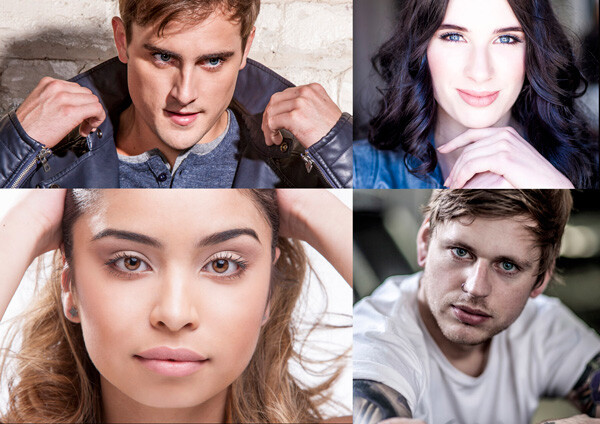
EYE MONTAGE

Image model credits, clockwise from top left: Chris Milligan/Fremantle Media, Rachael Lever, Danny Spannerz/East Brunswick Tattoos, Tiffany Diaz

“Here’s looking at you, kid.”

Reclusive Hollywood legend Marlon Brando would always close his eyes when paparazzi tried to take his photo. He knew that without his eyes open an image wasn’t worth publishing.

The eyes are the single most important feature of any portrait. Beautiful eyes can make even the dullest portrait mesmerizing. Poorly lit, out of focus eyes, or eyes that lack connection, will weaken the impact of a portrait.

Here are my three favorite techniques to make eyes really stand out in your portraits.

#1 – Light

Light makes photography. Embrace light. Admire it. Love it. But above all, know light. Know it for all you are worth, and you will know the key to photography.” – George Eastman

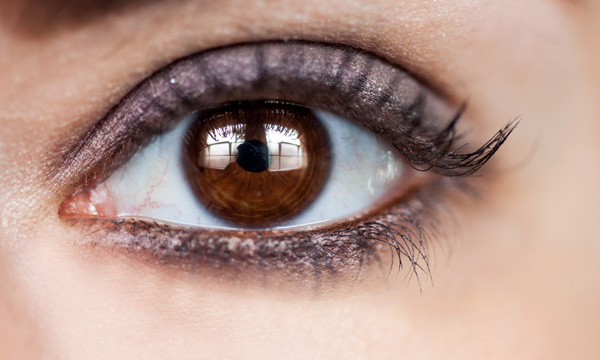
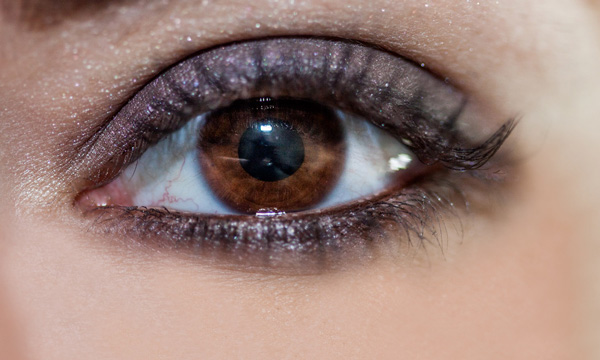
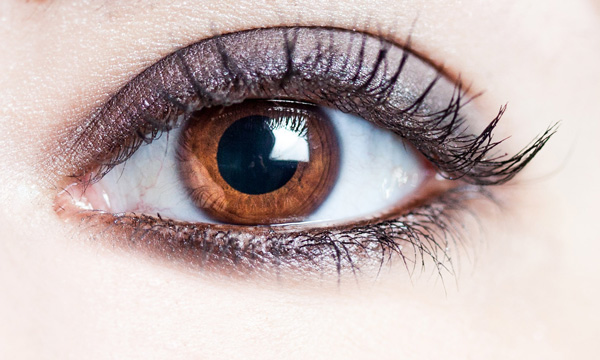
Eyes look best when they are lit well, with beautiful catch light. Catch lights are the reflection of a light source in the eyes. The size, shape, and brightness of your catch lights depend on the light source you use.

WindowLight

Two large, frosted windows from my studio create beautiful catch lights. Model: Bryana Karanikos

Naked Flash on camera

Diffused flash on-camera creates a slightly softer, rectangular catch light.

Med Soft off camera

Medium softbox, off-camera, positioned at 2 o’clock gives a soft, natural catch light.

ChasingLight 2250

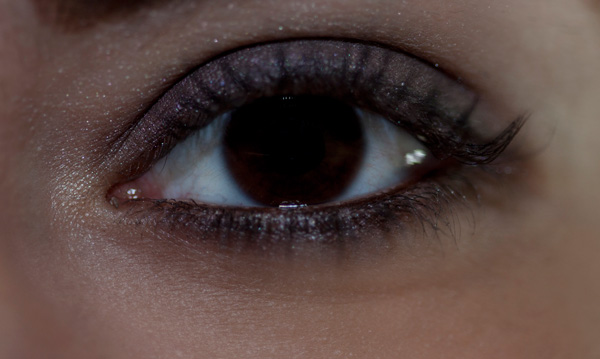
Poorly lit eyes without catch lights look cold, and a bit creepy.

#2 – Expression

You are what you think. All that you are arises from your thoughts. With your thoughts you make your world.” – Anon.

EyesBA

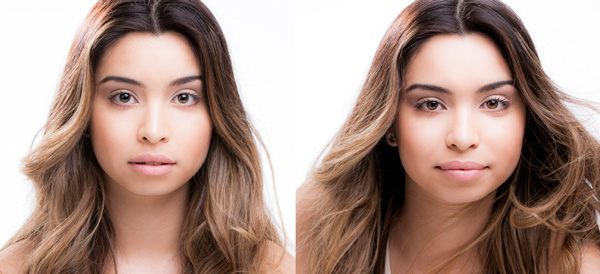
In the image on the left (above), Tiffany’s eyes are cold, and she looks nervous. After I gave Tiffany a visualization exercise, her eyes appear warm, confident, and connected (right image above) Model: Tiffany Dias

How you communicate, connect, and direct your model is key to capturing a great expression in the eyes. If your model’s smile isn’t genuine, his or her eyes will appear cold and dull-looking. If your model is nervous or distracted, this too will be reflected in his or her eyes.

One technique I use to create a great expression is visualization. I ask my model, If you could be anywhere doing anything right now, where would that be? Tell me about that moment. Who is there? What does it feel like? Once they are in the moment of their visualization, their entire body language and expression changes.

#3 – Post-production

Be willing to give that extra effort that separates the winner from the one in second place.” — H. Jackson Brown Jr.

Post-production can lift your images from good to great, when it’s done well. The key to great post-production is not overdoing it. It’s easy to get excited with all the tricks and enhancements that post-production software offers. It’s addictive and much like opening a jar of Nutella – very difficult to control yourself once you’ve begun.

I try and use the overnight rule when it comes to retouching. Once I’ve worked on an image, I won’t look at it again for at least a day. I find my eyes constantly adjust to the modifications I’m making, so it’s more difficult to see when I’ve gone too far (much the same way I dressed in the ’80s).

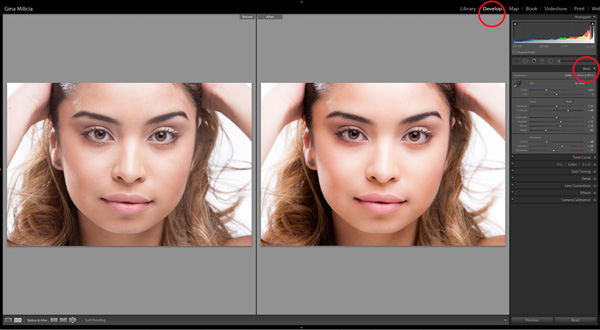
Here’s a step-by-step technique to enhance eyes using Adobe Lightroom:

EYESBP 10

Before and after: I’ve used Lightroom to make the eyes sharper and brighter and enhanced their color.

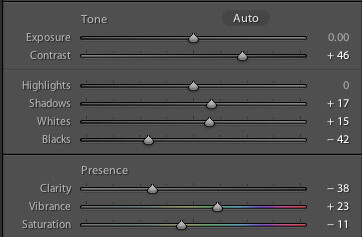
a) Import your image into Lightroom and use the basic development panel to develop the shot. In this case, I’ve used one of my own beauty presets.

EyesBP 2

EyesBP 2B

Here are the basic adjustments I’ve made for this image.

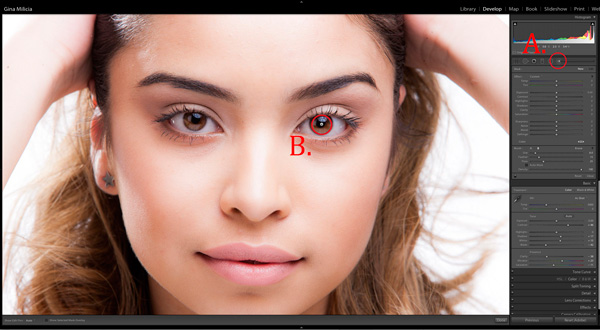
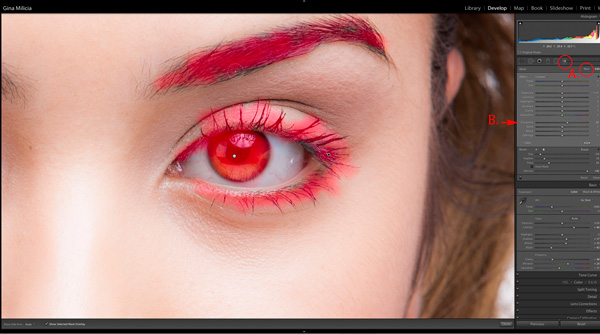
b) Zoom in to the eyes (B.) and select the adjustment brush tool (A.) You can also select the brush using keyboard shortcut K. See image above.

EyesBP 4

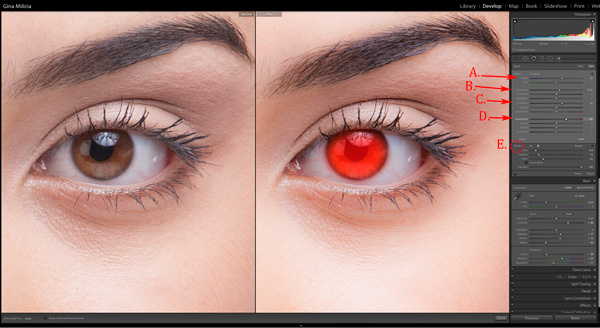
c) The next step is adjusting the eye color:

EyesBP 5

  • Increase the temperature slider (A.) to make the eyes appear warmer in tone.
  • Increase the exposure slider (B.) to brighten the iris.
  • Increase the shadow slider to bring more detail into the shadow area (C.)
  • Increase the sharpness slider to make the eyes appear more detailed.

Adjusted only the colored part (the iris) of her eye (highlighted in red) and set the brush to have a slight feather and low flow so you can build up your adjustments slowly.

d) Next, select a new adjustment brush (A.), increase the sharpness slider (B.) by +22 and paint over the colored part of the eyes, eyelashes, and eyebrows. This will really make the eyes stand out.

EyesBP 6

e) Finally, select a new adjustment brush. Set the exposure slider to -29 and increase the clarity to +10. Paint around the edge of the iris. This will darken the area slightly and give the eye more definition.

f) The final image has been imported into Adobe® Photoshop®, where I have done a basic skin retouching to remove a few small blemishes.

EyesFINAL

I’d love to hear about your techniques for enhancing eyes and see some examples.

Gina has a new dPS ebook just released – Portraits: After the Shot – check out out here!

The post 3 Simple Ways to Create Stunning Eyes in Your Portrait Photography by Gina Milicia appeared first on Digital Photography School.


Digital Photography School

 
Comments Off on 3 Simple Ways to Create Stunning Eyes in Your Portrait Photography

Posted in Photography


IKEA Flips Condo Sideways to Create Furniture Climbing Wall

01 Oct

[ By WebUrbanist in Design & Guerilla Ads & Marketing. ]

ikea sofa winging chairs

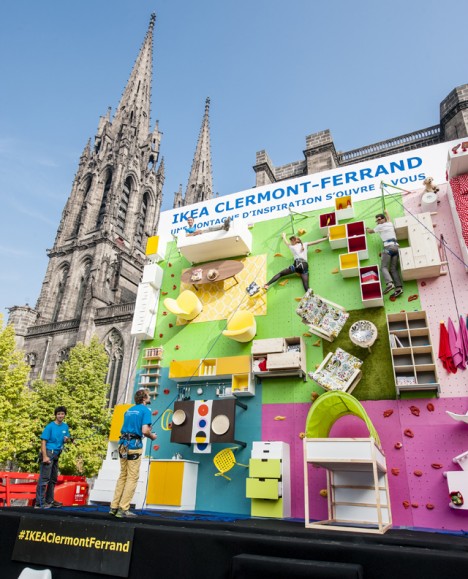
Furnishings become footholds, supports and resting spots as you scale the flipped-over floor of this fanciful apartment, opened to the public as a method to market a new IKEA store location.

ikea clever climb

ikea guerrilla marketing campaign

Set up in front of an historic church in Clermont-Ferrand, France, locals were invited to scale various routes (four paths in total) of different difficulties made for both children and adults, created in collaboration with Ubi Bene, a local communications agency.

ikea climbing wall

vertical climbing wall apartment

The mock apartment features beds, bookcases, chairs, tables and other fixtures set against prints, carpets, tiles and textiles, all actually on sale in the store being advertised.

ikea climb wall experience

ikea marketing clermont ferrand

Professional climbers were on hand at the opening to help people get outfitted and learn to climb – probably not something that would have been an easy sell in a country like the United States with its safety restrictions.

ikea climb

vertical climb ikea living

Spanning roughly 30 feet vertically and horizontally, the area is effectively that of (close to) a 1000-square-foot living space.

Share on Facebook


[ By WebUrbanist in Design & Guerilla Ads & Marketing. ]

[ WebUrbanist | Archives | Galleries | Privacy | TOS ]


WebUrbanist

 
Comments Off on IKEA Flips Condo Sideways to Create Furniture Climbing Wall

Posted in Creativity


7 Tips for Interacting with People to Create Better Portraits

30 Sep

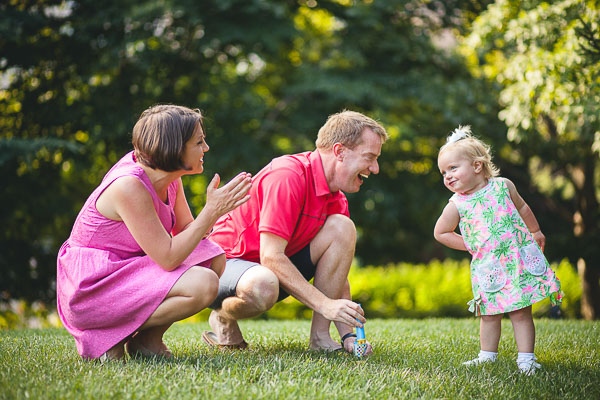
Sassy kid

Interaction is the basis of a portrait session, in every single way. In the most obvious ways, for example, you must interact with the client to set up the session, during the session, and when the images are done.

The portrait session is also an interaction with self, both for you the photographer and for your subject. You the photographer, who is creating with integrity, must meet with yourself inside to bring about bold creativity. The subject, likewise, is faced with many insecurities that they may have very little experience with in their day to day lives. They are in a vulnerable position. The portrait session brings about all kinds of internal interactions.

The photos themselves are a form of interaction with the future. The way a portrait portrays someone goes a long way to communicating who they are – or, at least, who they’d like to be seen as, which is important in its own right.

It’s for this reason that developing habits for skillful human interactions is so important. They make everyone more comfortable, but, more so, it means capturing images of someone who is comfortable at the moment the image was taken.

The way someone responds to you is the way they will look in their images. The difference may be imperceptible to a stranger, or when simply viewed at a glance; but a strained smile, or nervous eyebrow might be clear as day to the people who care about them. You as a photographer are not a plumber who can still fix the pipes, even if your subject is having a bad time. Among the most important tools you have is the one that elicits an honest and flattering response from the subject:

The way you interact with people is key
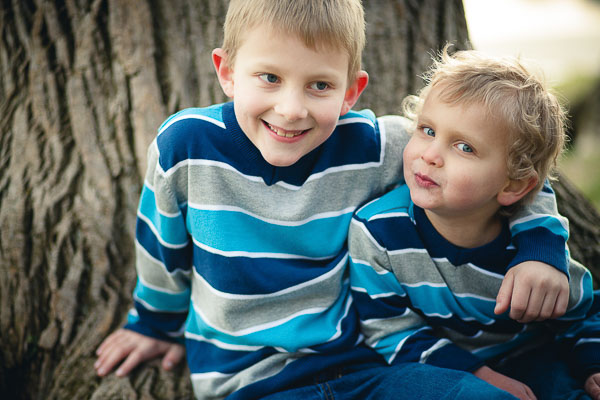
Casual kids

Everyone is a Little Kid

If you who wish to bring about a truth and transparency in your subjects, you can take a clue from the rules of photographing little kids; don’t slow the child down for your shot – you keep up with the kid!

Your goal is to keep your subject engaged and having a good time during their session, so what is true of working with children is also true for adults. It’s important to move at their pace. Adults get bored when you move too slowly and then you have pictures of bored adults trying really hard not to look bored. When you’re moving too fast, adults get anxious. They start having trouble understanding and interpreting your instructions. Then, you have photos of anxious adults trying really hard not to look anxious.

Getting a sense of your subject’s natural pace is all about how you interact with them. You can’t simply bark orders at your subject. You can’t withdraw into a technical and creative cocoon, sticking your lens out just far enough to take their picture. You have to actually engage with them personally. Allow time in between arrangements and locations to chat. Be open with your subject; make yourself vulnerable to them. Remember, that is the challenging posture a portrait session puts the subject in: vulnerability.

Pay attention to the things your client is saying, and the jokes they are making. If they say something like “I’m sorry, I must be terrible to work with” pay attention! They are blaming themselves, but it is likely because you are moving too fast and failing to communicate. The client is likely to blame themselves since they have seen all of your amazing photos and assume that all those people must have been able to keep up. Take this as a personal critique to communicate more openly and slow down.
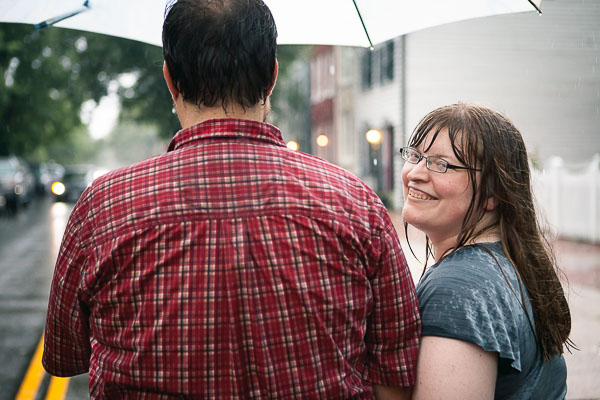
Unexpected circumstances

Learn to Speak in Positive Terms and Say Positive Things

As you are open and communicating with your subject, remain positive as much as possible. When you have to be honest about something challenging or difficult, do so in positive terms. This takes practice, but it’s beneficial to your own well being as well.

I’m not advocating lies, or even twisting the truth. I’m talking about finding a legitimate perspective in whatever you’re saying, so that some form of positivity is also in view.

For example, say you’re shooting in a local park and the shot you’re working on just isn’t working the way you want. When you know the shot that you wanted is dead, there’s no reason to keep wasting time; you should just move on. If you say “Ugh, this spot just isn’t working out, let’s look somewhere else”, you would be telling the truth, but in a negative way, with the focus on what isn’t working right. That’s not the important part. Instead, if you say “Hmm, this spot isn’t turning out how I’d hoped, I think there might be something even better over in that direction” it sounds more hopeful, positive, and encouraging.

Both of those statements are essentially the same. But in the first, the emphasis is on a problem right then and there. In the second statement the problem is acknowledged, but the emphasis is on something positive “over in that direction”.

Keeping an attitude like this helps your subject remain optimistic about the result, which is important. As your subject’s optimism goes down, they will have to work harder to appear comfortable and relaxed. So even if you’re struggling in the beginning, and your subject might have objectively good reason to become more pessimistic, if you allow that to happen, you’ll be damaging your chances of recovering later.

Stay positive!
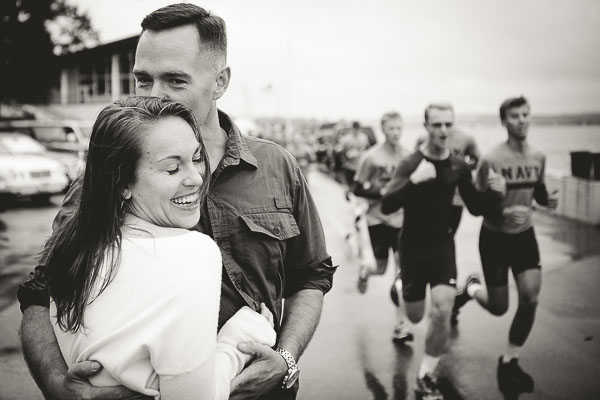
Naval Academy Runners Romance

Use Humor as a Diffuser

The situation your subject is stepping into is a vulnerable one. It’s your job to scrutinize how they look in order to present them in their most flattering light. Most of us feel uncomfortable being under the microscope like, especially concerning the way we look. People don’t like their looks being judged poorly and they spend a great deal of time, energy and money to avoid it. In fact, hiring you might itself, be a part of that desire.

So part of your job is to diffuse that feeling. You need to keep your subject comfortable, which typically means obscuring the overt need to scrutinize them and the way they look. An excellent method for this, without having to resort to being deceitful, is to place yourself under their microscope.

If you make a mistake, be open about it and laugh it off. By presenting your own momentary shortcomings, you make yourself vulnerable, and by contrast make them feel less vulnerable. You’re not lying, or manipulating them. You’re just levelling the playing field.

Likewise, if your subject has said or done something embarrassing, you can use humor to turn the embarrassment on yourself. For example, if my subject accidentally steps in a puddle of water and seems embarrassed, I might use the opportunity to tell them about the time I fell in the water during a portrait session. It’s humanizing.

By positively applying humor to your own shortcomings, you’re able to change the tone of the session from one where the subject feels that they must perform for you, into one where they must engage with you.
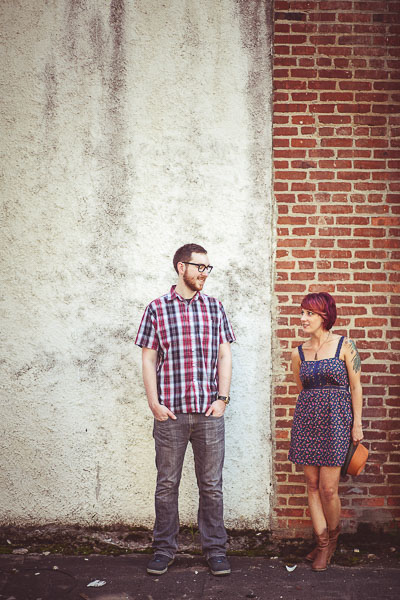
Engaged couple two tones

Speak in Terms Relative to Your Subject

In many cases, unless your subject has been trained as a model, they’re going to spend a fair amount of their mental energy trying to interpret what you’re telling them to do.

If you say, “tilt your head”, that means a lot more to your subject than that specific thing you want them to do, so for them, it has almost no meaning at all. Instead, you could say “tilt your forehead toward your toes”, or “bring your left ear closer to your left shoulder”. The same goes for the direction they’re facing and movements you need them to make. If you tell them to “step forward” they will often move in whichever direction their feet are facing, or they’ll feel confused about what you want them to do, and shuffle around awkwardly. Instead, you could say, “take a step toward me”.

These are specific instructions which are relative to your subject, rather than your vision. Giving subject-relative instructions also sounds a bit funny to many people at first so it acts as an excellent ice breaker too.

If you master no other subject-relative language, master your subject’s left and right. Instead of saying “step to the left”, say “step to your left”. By giving your subject terms that they do not have to interpret, they can devote more mental energy to the intangible elements of the shoot – like having a good time, or interacting with you.
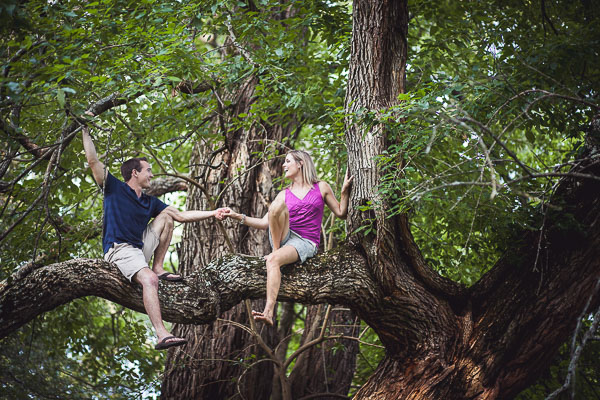
Engaged couple in a tree

Demonstrate Posing

This is an extension of speaking in subject-relative language, except it takes it one step further. Taking a moment to demonstrate how you’d like your client to pose can have multiple benefits.

First, demonstrating a pose can often act as an icebreaker, since the motions you will ask your subjects to carry out sometimes feel a little silly, even though they look great in a photo! When you demonstrate the pose, the subject has a chance to see you feeling a little silly, or not feeling silly and also not minding.

Second, as with speaking in terms relative to them, demonstrating a pose helps remove a big chunk of the subject’s need to interpret what you want them to do. They can more easily just go for it and try, rather than timidly wondering if they’re “doing it right”.
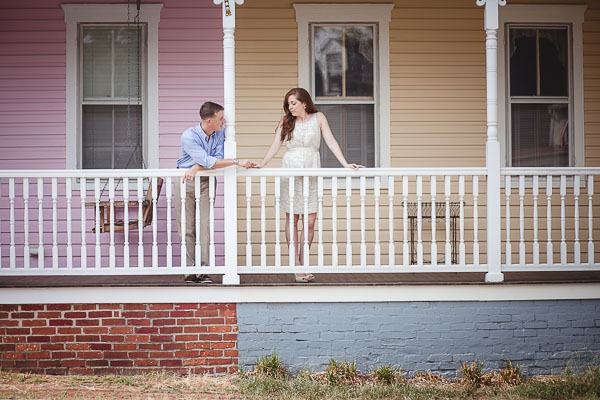
Relaxed romance

When I demonstrate a pose for a subject, I tell them what I’d like them to do, as I do it.

So, I may sit down in the spot I’d like my client in and say, “Okay, I’d like you to sit right about here”. Then I’ll sit down and say, “You can cross your legs like this, or something like this, if it feels more natural for you” as I demonstrate a couple of different acceptable positions for their legs. Then I might point over to where I’m planning on shooting from and say “I will be shooting from right over there, so you’ll want to look in that direction”.

By the time the client sits down, they have a kind of template for what to do and can act more confidently in giving it a try. This also has the added benefit of allowing you to help your subject find their way into a pose that is more natural for them, rather than putting them in a position you’d never see them use in real life.

For more on posing check out this dPS eBook – Portraits: Striking the Pose

Be a Constant Stream of Affirmation for Your Subject
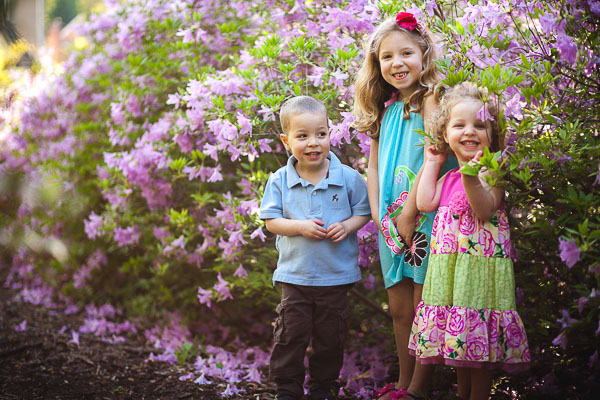
Hide and seek

I’ll say it again; remember what a vulnerable situation your subject is in when they’re in front of your camera. One of the simplest ways to offset that feeling for your subject is to be a constant stream of affirmation.

  • Thank you!
  • You’re doing a great job
  • Yes! That’s perfect, hold onto that!
  • You’re looking great!

Of course, you’re walking a line here, because what if your client isn’t doing a “great job” and they are in fact making your job a lot more challenging. Well, get over it. It’s your job as a photographer to work with who your customer is; some people are easier going with pictures, others need more attention, but the images will be yours and so the responsibility is too.
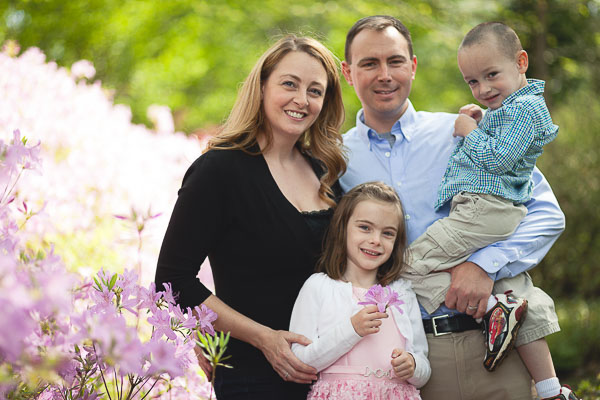
Friendly family

I wouldn’t advise lying if you’re struggling to get something you like while working with your subject. But affirmation is still important. Perhaps even more so. The thing about affirmation in this context is that it doesn’t necessarily have to be affirming anything the subject themselves is doing. Of course, that certainly works best to mitigate the feelings of a subject who is insecure about their appearance, or feels bad at photos. But simply affirming that the shoot is going well and you are excited is often enough to let the subject relax. Keep them coming – seriously, about every 15-20 seconds while you’re behind the camera.

  • Wow, this shot is coming out even better than I expected!
  • I love this background!
  • You and I are like a dream team!
  • The textures in this foreground are so interesting and juxtapose just right with your dress!

Easing a subject’s sense of vulnerability by making positive exclamations about the shoot makes sense logically too. By helping the subject to realize that they are only a part of what you’re paying attention to will relieve the pressure, and let them relax.
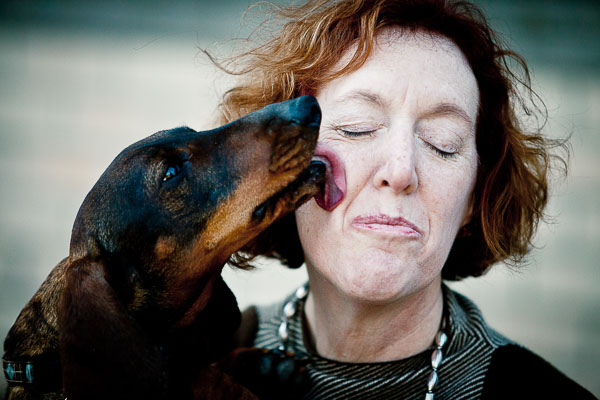
Dog kisses

Don’t Laugh at Anything that Shows up on the Viewfinder

Here’s what I want to leave you with. This advice, I believe, carries with it the heart of everything I’ve said here.

Never laugh at something that shows up on your camera’s screen.

I’m sure you can understand why – your subject’s vulnerability, of course. How might they interpret your laughter? It’s possible that you’ve cultivated an atmosphere of humor. Maybe you have consistently made yourself the butt of many jokes, and your subject might have joined in the fun and so maybe at this point it’s okay to laugh a little, as long as you’re laughing together. But let’s be honest, the average subject is pretty insecure. They’ll probably think you’re laughing at them and they’ll clam up.

But all of that is quite obvious. People don’t like to be laughed at. That’s not what is so important about this though. It’s not that you’re laughing, it’s not even why you’re laughing. It’s why your subject thinks you’re laughing. Truth is not important, your subject is going to respond to what they think, regardless of whether that is true or not.

It’s not that laughing is a problem. It’s that the subject thinks you’re laughing at them in some way. And it’s not just about laughing.

Let’s say you’re having some annoying problem with your camera for some reason. As you’re trying to work it out, you become visibly frustrated. Your subject probably doesn’t know what camera problems look like and their sense of vulnerability is causing them to take on a lot of blame. It’s not that you’re frustrated, it’s that you’re subject thinks you’re frustrated because of them.

Subjects place themselves in a position of vulnerability with photographers to a degree few other professions have access. Doctors and lawyers are a good example example. Doctors need access to the skin and the stuff underneath. Patients have to reveal their bodies to doctors – a vulnerable feeling indeed. Defence lawyers need access to the minute and truthful details of a defendant’s life. You as a photographer need access to their spirit – people must be who they really are with you.

You must take great care not to trample the spirit of your subjects. You must do mental, emotional, and creative gymnastics to avoid crushing the delicate structure of trust and assured respect. That allows their spirit to be reveal itself in honest smiles, cracked jokes, and a temperament of self-confidence standing in front of the camera.

Without your subject’s spirit, there is little reason for the photo.

Do you have any other tips for working with people and taking better portraits? Please share them and any stories you have in the comments below.

The post 7 Tips for Interacting with People to Create Better Portraits by William Petruzzo appeared first on Digital Photography School.


Digital Photography School
 
Comments Off on 7 Tips for Interacting with People to Create Better Portraits

Posted in Photography