Thanks to a beta firmware version, Promote Control adds support for the Pentax 645Z. The remote shutter control connects to compatible cameras via USB and offers a variety of shooting features including HDR bracketing of up to 45 images, timelapse and long exposure shooting. Read more
Tag: Control
-
More manual control on iOS with Manual Cam
With the release of Apple’s latest mobile OS version, developers have been scrambling to take advantage of newly unlocked camera controls. In the wake of this development new apps have emerged, including Manual Cam, one of the best implementations of manual control on the iPhone we’ve seen so far. Read more
-
Review of The Promote Control for Time Lapse and Focus Stacking
Want to take super sharp “focus stacked” photographs that boast corner to corner sharpness with perfect focus? Want to shoot spectacular ‘holy grail’ time lapse sequences that capture the change from day to night? How about advanced bracketing for HDR shooting? Do you fancy getting shots like this?

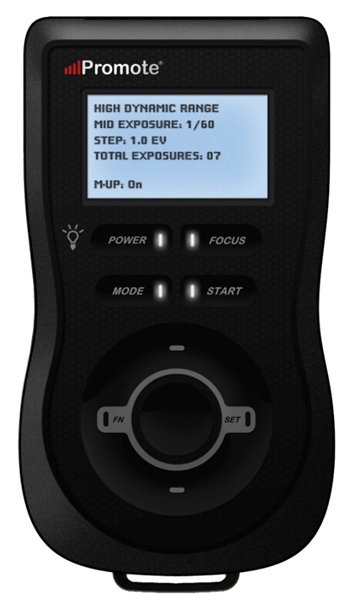
The Promote Control from Promote Systems delivers very precise control over DSLR cameras to open up new creative possibilities. Here’s a list of things that the Promote Control can do:
 Hyperfocal Distance Calculator
- Remote Shutter (One Shot)
- Time Lapse Intervalometer
- HDR Bracketing
- BulB HDR Bracketing
- Bulb Ramping for Time Lapse
- Focus Stacking
- Video Control
- Manual Shutter for long Bulb Exposures
This device is like a Swiss Army Knife for photographers who want to get the most out of their DSLR cameras. Currently priced at $ 299, it’s an accessory that will appeal to the more hardcore shooters, but for those photographers that regularly need advanced HDR bracketing, focus stacking or bulb ramping, the Promote Control is worth every penny.
Rather than go into every single function of the Promote Control, I’m going to highlight its three most powerful features, which I believe merit the asking price themselves.
Focus Stacking
As a landscape shooter, I mostly want corner to corner sharpness in my images and sometimes I’ll use focus stacking to achieve maximum sharpness throughout the frame. This really only works when your static subjects are perfectly still, with little to no breeze. If you’ve ever tried focus stacking the manual way, you’ll know that there is some margin for error and it can take practice to do it well. The Promote Control takes all the guess work out of focus stacking by incrementally adjusting your focus from start and end points that you specify.
Once you’ve done this a couple of times you’ll never be able to go back to doing it manually. When you see the results of your focus stacked image and the lack of weird looking artifacts that can sometimes result from inaccurate focus adjustments done manually, you’ll be hooked.
Macro and small product photographers will love this feature.
Here’s an example of a focus stacked shot with corner to corner focus using a mid range aperture.

Here’s a video demonstrating how this works with the Promote Control.
Bulb Ramping for day to night Time Lapse
If you’ve ever tried to shoot a time lapse sequence of the setting sun, you’ll know that there are only two ways to capture the correct exposures as the light changes. You either adjust the shutter speed manually while shooting (which introduces terrible flicker) or you use a bulb ramping device that can gradually and smoothly alter your shutter speed over time.
This technique is known as Bulb Ramping, and there really aren’t that many devices out there that do a good job. The Promote Control has become something of a “go to” bulb ramping solution for quite some time now, because it simply does such an excellent job of adjusting your DSLR camera’s shutter speed in tiny increments, over a set period of time. You tell the Promote Control how long you’d like to shoot, and when you’d like it to begin increasing or decreasing the exposure time.
Of course, it can’t know exactly when the changes in light occur, you have to know in advance by casing your location the night before, and making a note of the sunset time. The Promote Control simply does what you tell it to do, and it does it well. Here’s a video of Joel Schat explaining how to achieve bulb ramping with the Promote Control.
HDR Bracketing
If three or five bracketed exposures simply aren’t enough to capture the dynamic range of your scene, how does 45 exposures sound? Simply tell the Promote Control what shutter speed to use for the middle (or correct) exposure, then tell it how many EV steps to use and the number of total exposures. The Promote Control will do the grunt work while you look around for the next shot.
A jack of all trades
Everything that the Promote Control does, it does well. I expect that most users will only use two to three of this device’s powerful features but at $ 299 it’s worth every penny.
Build quality
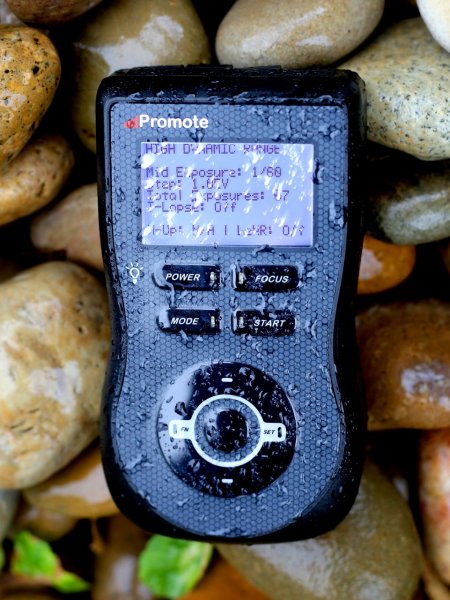
The Promote Control is very well built. It’s a solid little unit that’s about the same size as a Smartphone, but is just under an inch thick. The backlit LCD screen is easy to read and there are only eight buttons on the entire unit. It’s small enough to pack into any mid-sized camera bag, and comes with a tidy little carry case. It even comes with a lifetime warranty for manufacturing and workmanship defects. How often do you see that?
The device is powered by two AA batteries which last a long time. You can also power the Promote Control with an external DC power jack for taking super long exposures, or lengthy time lapse shoots.
What I’d like to see in the next update
To me, there is one glaringly obvious function that is missing from this device. HDR Focus Stacking. Why not combine the advanced HDR bracketing feature and the focus stacking feature? When I focus stack manually, I often have to bracket in order to capture the dynamic range. I can’t imagine why this feature is not available with this device.
My only two complaints
The Promote Control is such a simple little device that there’s not much to complain about, it either works or it doesn’t. My only gripe isn’t with the unit itself, but with the hotshoe attachment, required for bulb ramping when shooting time lapse sequences. I found that the cable fell out of the hotshoe attachment at the slightest nudge, not something I would trust out in the field when shooting a lengthy time lapse.
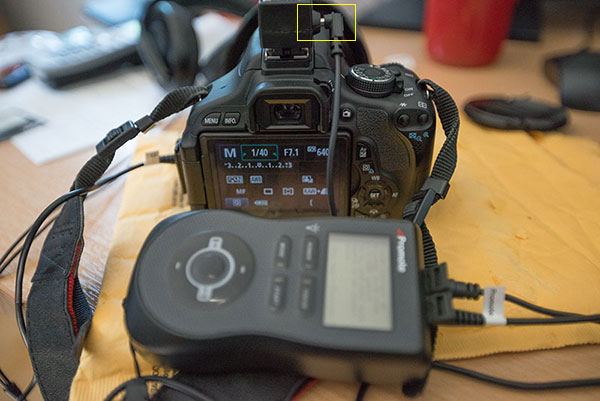
I had problems with the cable that attaches to the hotshoe accessory.
My other complaint is that the Promote Control is not compatible with mirrorless cameras like my Sony A7R. Full compatibility only extends to Nikon and Canon, with limited compatibility for Sony and Sigma cameras. This is the only reason I decided not to buy the Promote Control. But if Promote Systems manages to catch up with the mirrorless movement, I’ll be unleashing the credit card.
I asked Promote Systems about it and this was their response:
We get a lot of requests for compatibility with the A7/A7R and we would love to support the cameras, but unfortunately Sony doesn’t make that possible. They implemented a tethering protocol on A7 cameras, but just as with earlier cameras, it refuses to save images on the card – you MUST pick them up and save them elsewhere, or all subsequent USB image acquisition commands will fail. Until Sony resolves the issues with not saving images on to the in-camera card when tethered, we can’t do much about it, unfortunately.
Why can’t my camera do all this?
When you look at what the Promote Control does and the results that it achieves, there’s obviously a demand for this level of functionality. There’s no reason why digital cameras can’t have all of this functionality built in, and with cameras like the Sony A7R able to run Apps that users install, it’s only a matter of time until all of this can be done in camera. Until then, Promote Systems are filling a gap in the market and they are doing it very well. I’m going to award the Promote Control 4 stars.
Would you buy this clever little device?
The post Review of The Promote Control for Time Lapse and Focus Stacking by Gavin Hardcastle appeared first on Digital Photography School.
-
CityHome: Control This Smart House with a Wave of Your Hand
[ By Steph in Design & Fixtures & Interiors. ]

Two hundred square feet may sound absurdly small, even by New York standards, but what if you could make it feel three times larger with hidden furniture and other amenities that roll out and unfold at a wave of your hand? A team at MIT’s architectural program has come up with a smart solution for micro apartments that makes it quick and easy to reconfigure the entire space with virtually zero effort.


CityHome consists of a transformable wall system that condenses all the main functions of a bedroom, living room, dining room, kitchen and bathroom into a tiny space without sacrificing most of what you’d have in a larger apartment. You can still cook for and seat a group of six for dinner, sleep in a comfortable full-sized bed and enjoy a movie in a spacious living room.

You tell the room what you need through a combination of hand gestures, voice control and touch elements, with internal motors silently launching the furniture you require at your command. One gesture draws the bed out of the wall, while another calls forth a work desk that doubles as a dining table.

Wave your hand to adjust the ambiance of the room via lighting and window blinds, and move the entire unit against a wall or into the middle of the room at the touch of a button depending on whether you want to divide up the space or gain use of the entire room.

For now, CityHome is just a concept, but MIT envisions turning it into an actual product, possibly through crowdfunding.
Want More? Click for Great Related Content on WebUrbanist:
Trapdoor Secrets: Furniture Hidden Inside Floors & Ceilings
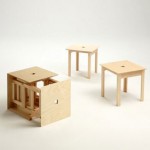
This remarkable remodel is full of fun and functional surprises ranging from ceiling-suspended swing sets, hammocks, bookshelves, tables and benches to …
Click Here to Read More »»
Disappearing Bed for Tiny Flat Rolls Under Kitchen Floor
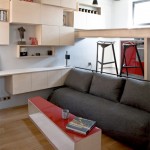
When you’re trying to pack an entire apartment worth of furniture into just 130 square feet, where do you find the room for a full-sized bed? The answer, …
Click Here to Read More »»
8 Awesome Modern Dining Room Furniture Designs & Ideas
Dedicated dining rooms have only been part of a common floor plan feature since the mid-19th century. Dining rooms have too long been ignored when it comes to …
Click Here to Read More »»


[ By Steph in Design & Fixtures & Interiors. ]
[ WebUrbanist | Archives | Galleries | Privacy | TOS ]
-
Major update to Instragram brings control over filter adjustments

Instagram is one of the most popular image filter and sharing apps for mobile devices but its feature set has remained almost unchanged since it was introduced, with a relatively small number of effects, and little control over them. The latest version 6 update to the Android and iOS versions of Instagram now offers control over filter strength and a range of new editing options, including brightness, contrast, warmth, saturation, highlights, shadows and vignette. Click through to read more at connect.dpreview.com
-
Pixels.com licensing service promises full control of images

Pixels.com is a new image licensing marketplace that aims to give photographers more control than competing services. Users can set their own prices for images and manage the type of licenses they want to offer. There is even an option to create custom licenses with your own terms and conditions. Learn more
-
SmugMug Films: Capturing what you can’t control

The latest video from SmugMug Films’ ongoing behind-the-lens series is a look at water photographer Sarah Lee. She uses the unpredictability of nature and creates art that captures the interplay of people, water and light. SmugMug’s videos aim to show people who follow their passions in photography. They plan to release a new clip every two weeks. See video
-
Apple patents remote control for iPhone camera

A patent for a wireless accessory that allows users to remotely control the camera of an iPhone – including image preview, capture and review – has been granted to Apple by the U.S. Patent and Trademark Office. Of course we don’t know at this point if the patent will ever result in an actual product but there is no doubt that, at the right price, it could be a useful accessory. Learn more
-
Wireless K-3 control: Pentax FluCard review

The Pentax O-FC1 FluCard offers quite a bit more than just Wi-Fi image sharing and transfers, but not quite as much as some wired tethering applications. This makes it a mixed bag as a general camera tool, but one that has been entirely out of reach for Pentax for quite some time.. In light of this, is it worth the $ 99 price tag? Find out in our review