RSS
 

Posts Tagged ‘Capture’

The Samsung 360 Round camera can capture 360° 4K 3D video at 30fps

20 Oct

Samsung has just unveiled an interesting new gadget at their annual Samsung Developer Conference. Meet the Samsung 360 Round: a 3D VR camera.

The new device uses 17 total lenses—eight horizontally positioned stereo pairs and one upwards pointing single lens—to capture and livestream 4K 3D panoramic video at 30 frames per second. Each camera module features a 1/2.8’’ 2MP sensor and F1.8 aperture. All of this is housed in a compact and rugged (IP65 water and dust resistance) uni-body that Samsung claims can handle all weather conditions.

PC software for controlling the camera and stitching is included, and the camera features a range of interfaces for connecting external microphones, storage devices and more.

“The Samsung 360 Round is a testament to our leadership in the VR market. We have developed a product that contains innovative VR features, allowing video producers and broadcast professionals to easily produce high quality 3D content,” said Suk-Jea Hahn, Executive Vice President of Samsung Electronics’ Global Mobile B2B Team. “The combination of livestreaming capabilities, IP65 water and dust resistance and 17 lenses makes this camera ideal for a broad range of use cases our customers want—from livestreaming major events to filming at training facilities across various industries.”

The Samsung 360 Round will be available in October in the United States, and should be introduced to other markets over time. Samsung says the camera is aimed at VR professionals and enthusiasts, and will be ‘reasonably priced’… although the company hasn’t yet specified exactly what that ‘reasonable’ price will be. For more information, visit the Samsung website.

Articles: Digital Photography Review (dpreview.com)

 
Comments Off on The Samsung 360 Round camera can capture 360° 4K 3D video at 30fps

Posted in Uncategorized


Wiral LITE cable system lets you capture cinematic shots almost anywhere

20 Oct

A simple cable cam system called Wiral LITE has launched on Kickstarter, where the campaign has already blown away its funding goal, raising nearly a quarter-million dollars in just a few days’ time. The system is comprised of a motorized, remotely-controlled device that rolls across a cable fixed to two poles or similar structures. A camera can be attached to the bottom of Wiral LITE, which itself rolls across the cable while the camera records cinematic motion shots.

The cable cam system is being presented as an alternative to portable motorized slider devices, offering the ability to record motion shots over much larger distances than the average portable slider.

Wiral LITE features a standard camera mount on the bottom and can handle camera/lens weights up to 3.3lbs / 1.5kg. The system includes a ball joint, a GoPro mount, cable, quick reel for retracting the cable, a tightening strap, end stop clips, batteries, and a battery charger.

The cable system offers multiple modes, including a time lapse mode that moves with a minimum speed of 0.006MPH, but the device’s top speed is 28mph / 45kmh.

The team behind the device explains that the Wiral system takes 3 minutes to setup, which involves attaching both ends of the reel to a pair of objects, tightening the cable between the two, and then mounting the Wiral LITE onto the cable. In other words, setup is a breeze:

And once you’re set up, you can capture long-range panning shots like this with ease:

Wiral LITE is being sold to backers for a pledge of $ 200. Bundles are also available for those who want to pledge a bit more, such as an ‘Ultimate Kit’ for pledges of $ 250 or an ‘Extreme Kit’ for $ 1,700.

To learn more or put a pledge in yourself, head over to the Kickstarter page.

Articles: Digital Photography Review (dpreview.com)

 
Comments Off on Wiral LITE cable system lets you capture cinematic shots almost anywhere

Posted in Uncategorized


DJI launches Zenmuse X7 Super 35mm camera module with Raw video capture

12 Oct

$ (document).ready(function() { SampleGalleryV2({“containerId”:”embeddedSampleGallery_8541344997″,”galleryId”:”8541344997″,”isEmbeddedWidget”:true,”standalone”:false,”selectedImageIndex”:0,”startInCommentsView”:false,”isMobile”:false}) });

DJI has launched the Zenmuse X7, a Raw video capable Super 35 camera module. The camera/gimbal system which mounts to the company’s drones features a new, proprietary lens mount.

The camera can shoot 6K CinemaDNG Raw or 5.2K Apple ProRes footage at up to 30p or 3.9K CinemaDNG and 2.7K ProRes at up to 59.94p. The company claims 14 stops of dynamic range but, like all video manufacturers, doesn’t specify how this is assessed.

It uses the new “DJI Cinema Color System” based around a D-Log Curve and D-Gamut RGB color space.

The camera includes two exposure modes, one that varies amplification gain and an “EI” mode that always uses minimal amplification (~base ISO) with metadata tags to denote the intended final brightness, to preserve DR. This is increasingly common practice in the video sphere but has yet to make its way across to stills photography.

The previous model (the Zenmuse X5) was based around a Micro Four Thirds mount and came with a distinctly Panasonic-like 15mm F1.7 lens. Instead the Zenmuse X7 is based around the company’s own ‘DL’ mount.

Alongside the camera, the company is releasing 16mm, 24mm, 35mm and 50mm F2.8 lenses, the longest three of which will include mechanical shutters. The carbon fiber bodied lenses will cost $ 1,299 each, with the exception of the 50mm, which is $ 100 cheaper, though a camera bundled with all four lenses will cost just $ 4,299.

The camera on its own will cost around $ 2699 and will be available from November.

Press Release:

DJI Reveals Zenmuse X7, The World’s First Super 35 Digital Film Camera Optimized for Professional Aerial Cinematography

October 11, 2017 – DJI, the world’s leader in civilian drones and aerial imaging technology, today introduced the Zenmuse X7, the world’s first Super 35 digital film camera optimized for professional aerial cinematography. Designed to work seamlessly with the DJI Inspire 2 drone, the Zenmuse X7 delivers superior image quality, interchangeable lenses, and a new DJI Cinema Color System for post-production to give film and video professionals more creative freedom.

“The Zenmuse X7 offers everything professional content creators need to make their aerial footage as stunning and vivid as they demand,” said Paul Pan, Senior Product Manager at DJI. “From the large Super 35 sensor to a new mount, lenses, and color system, the Zenmuse X7 gives cinematographers and professional photographers an unmatched set of tools that work seamlessly with the DJI Inspire 2 drone to capture high-quality footage that is easily integrated into projects shot with industry-leading handheld cameras.”

Greater Expressive Freedom

The Zenmuse X7 is equipped with a Super 35 video sensor featuring 14 stops of dynamic range for more detail in low-light conditions. Its low-noise image capture enhances grading flexibility by preserving details in both highlight and dark areas while enabling a shallow cinematic depth of field.

To meet the rigorous requirements of filmmakers and television production professionals, the Zenmuse X7 captures the highest image resolutions ever for an integrated drone camera. It is capable of shooting 6K CinemaDNG RAW or 5.2K Apple ProRes at up to 30 FPS, as well as 3.9K CinemaDNG RAW or 2.7K ProRes at up to 59.94 FPS to integrate seamlessly into industry-standard post-production workflows.

Enhanced Imaging Potential

The Zenmuse X7 uses a dedicated aerial mount system, the DJI DL-Mount, featuring an ultra-short flange focal distance to carry prime lenses optimally. Available with focal lengths of 16 mm, 24 mm, 35 mm, and 50 mm, each lens has a maximum aperture of F/2.8 and is crafted out of carbon fiber, making them durable and lightweight for high-performance aerial cinematography with the DJI Inspire 2 drone.

To allow for advanced setting adjustment and fine-tuning, the 16mm lens is equipped with a built-in ND 4 filter, and the 24 mm, 35 mm, and 50 mm lenses feature a mechanical shutter.

Higher Flexibility in Post-Production

DJI has also introduced a new DJI Cinema Color System (DCCS) making the Zenmuse X7 an asset on every film set for movies, TV series, commercials, documentaries, and more.

“For the Zenmuse X7, we took our color science to the next level,” continued Pan. “We consulted the world leading authorities in color science, Technicolor. With their guidance, our engineers developed an optimized gamma curve for the X7 allowing more latitude without sacrificing image quality.”

DCCS features a new D-Log Curve and D-Gamut RGB color space to give more flexibility and color options during the post-production process. The D-Log further extends the dynamic range, while the D-Gamut RGB color space preserves more color information to support the most demanding filmmaking scenarios, providing accurate color for quick and easy post-processing.

The new EI Mode mimics the way a film camera works to help cinematographers capture as much information as possible in every scene while balancing the dynamic range and noise with different log curves for more flexibility during the post-production process.

The Zenmuse X7 gimbal system weighs just 631 grams with the 16 mm lens. The DJI Inspire 2 has a flight time of up to 23 minutes with the Zenmuse X7. For more info about the Zenmuse X7, visit www.dji.com/zenmuse-x7.

Price and Availability

The Zenmuse X7 camera is priced at $ 2,699 USD. The 16 mm, 24 mm and 35 mm lenses will be available for $ 1,299 each, and the 50 mm for $ 1,199. Customers can purchase the Zenmuse X7 prime lens combo including all 4 lenses for $ 4,299. The Zenmuse X7 will start shipping in early November 2017 from store.dji.com, in DJI Flagship Stores and through DJI Authorized Dealers worldwide.

DJI Care Refresh will be available for the Zenmuse X7 camera gimbal system as well as for the Inspire 2 drone. For more info, visit www.dji.com/service/djicare-refresh.

Articles: Digital Photography Review (dpreview.com)

 
Comments Off on DJI launches Zenmuse X7 Super 35mm camera module with Raw video capture

Posted in Uncategorized


Raw bit depth is about dynamic range, not the number of colors you get to capture

03 Sep
Shooting this image in 14-bit helped retain the full dynamic range captured by the sensor. Most of the time, with most cameras, 12-bit is enough.

Raw bit depth is often discussed as if it improves image quality and that more is better, but that’s not really the case. In fact, if your camera doesn’t need greater bit depth then you’ll just end up using hard drive space to record noise.

In fairness, it does sound as if bit depth is about the subtlety of color you can capture. After all, a 12-bit Raw file can record each pixel brightness with 4096 steps of subtlety, whereas a 14-bit one can capture tonal information with 16,384 levels of precision. But, as it turns out, that’s not really what ends up mattering. Instead, bit depth is primarily about how much of your camera’s captured dynamic range can be retained.

Much of this comes down to one factor: unlike our perception of brightness, Raw files are linear, not logarithmic. Let me explain why this matters.

Half the values in your Raw file are devoted to the brightest stop of light you captured

The human visual system (which includes the brain’s processing of the signals it gets from the eyes), interprets light in a non-linear manner: double the brightness of a light source by, say, turning on a second, identical light, and the perceptual difference isn’t that things have got twice as bright. Similarly, we’re much better as distinguishing between subtle differences in midtones than we are vast differences in bright ones. This is part of the way we’re able to cope with the high dynamic ranges in the scenes we encounter.

Digital sensors are different in this respect: double the light and you’ll get double the number of electrons released by the sensor, which results in double the value generated by the analogue-to-digital conversion process.

This diagram shows how the linear response of a digital sensor maps to the number of EV you can potentially capture. Note how the brightest stop of light takes up 1/2 of the available values of your Raw file.

Why does this matter? Because it means that half the values in your Raw file (the values between 2048 and 4096 in a 12-bit Raw file) are devoted to the brightest stop of light you captured. Which, with most typical tone curves, ends up translating to a series of near-indistinguishably bright tones in the final image. The next stop of light takes up the next 1024 values, and the third stop is recorded with the next 512, taking half of the remaining values each time.

In a typical out-of-camera JPEG rendering, the first ~3.5EV are captured above middle grey, and the first three of these stops of highlights have used up 7/8th of your available Raw values. The remaining Raw values are used to capture tones from just above middle grey all the way down to black.

Using the D750’s default JPEG tone curve as an example, you can see that around 3.5EV of the camera’s dynamic range is used for tones above middle grey. 1/2 the Raw values are used to capture the tones that end up being JPEG values of roughly 240 upwards, and more than 7/8ths of the available values on tones about middle grey.

Follow this logic onwards and you’ll see that the difference between 12 and 14-bit Raw has less to do with subtle transitions (after all, even in the example I describe, the tones around middle brightness would be encoded using 256 levels: the same number of steps used for the entire dynamic range of the image if saved as a JPEG or viewed on most, 8-bit monitors). Instead it has much more to do with having enough Raw values left to encode shadow detail.

By the time you’ve created a JPEG, the brightest stop of your image is likely to be made up from the tones in this image. Half of your Raw file was used for storing just these near-white tones.

Since every additional ‘bit’ of data doubles the number of available Raw values, but the brightest stop of light takes up half of your Raw values, you can see that all of those additional values increase the capacity of your Raw file by 1EV. Which, assuming neither you nor your camera’s exposure calibration are completely mad, ends up meaning an extra stop in the shadows.*

A 14-bit Raw file won’t generally give extra highlight capture, it’ll mean having sufficient Raw numbers left to be able to capture detail in the shadows. And if your camera is swamped by noise before you get to 14EV (most are), all this extra data will effectively be used to record shadow noise.

In other words, 12-bits provides enough room to encode roughly 12 stops of dynamic range, while 14 bits gives the extra space to capture up to around 14EV. Or to look at it from the opposite perspective: if your camera is overwhelmed by noise before you get to 12 stops of DR, you don’t benefit from more bit depth: all you’d be doing is capturing the shadow noise in your image in greater detail.

Bit depth in video

It’s a similar story in video. Because video capture is so data intensive, it’s not usually practical to try to save all the captured data, which usually means crushing everything down to just 8 or 10 bits.

Log gamma is a way of taking the linear data captured by the sensor and reformatting it so that each stop of captured light is given the same amount of values in the smaller file. This makes more sensible use of the file space and retains as much processing flexibility as possible.

And, even if you own, say, a Sony a7S (one of the few cameras we’ve encountered that has sufficiently large/clean pixels that it doesn’t have enough bit depth to capture its full dynamic range at base ISO), you need to remember that you only get the camera’s full DR at base ISO. As soon as you increase the ISO setting, you’ll amplify the brightest stop of captured data beyond clipping, such that you very quickly get to the stage where you’re losing 1EV of DR for every 1EV increase in ISO.

If your camera doesn’t capture more than 12 stops of DR, you probably shouldn’t clamor for 14-bit Raw

So, even though you started with a camera whose DR outstrips its bit depth, that stops being true as soon as you hike up the ISO: instead you just go back to encoding shadow noise with tremendous precision.

Consequently, if your camera doesn’t capture more than 12 stops of DR, you probably shouldn’t clamor for 14-bit Raw: it’s not going to increase the subtlety of gradation in your final images (especially not if you’re viewing them as 8-bit). All those extra bits would do is increase the amount of storage you’re using by around 16% with all of that space being devoted to an archive of noise.


Articles: Digital Photography Review (dpreview.com)

 
Comments Off on Raw bit depth is about dynamic range, not the number of colors you get to capture

Posted in Uncategorized


NASA will chase the August eclipse in jets to capture ‘clearest images of the corona to date’

03 Aug

It doesn’t matter where you’ll be during the August 21st solar eclipse, NASA plans to one-up you and capture a better photo—or at least a unique one. The space agency is actually going to chase the eclipse’s totality in two highly modified 1950s-vintage WB-57F jets, in order to capture the ‘clearest image of the sun’s […] corona to date,’ and the first-ever thermal images of Mercury.

The whole plan is detailed in the short video above, although we have to warn you, it might make you feel a little bit of gear envy—”if only I’d bought that Air Force surplus reconnaissance plane…”

Joking aside, the August 21st eclipse is a brilliant research opportunity, and NASA doesn’t plan to let it slip by unused. The two WB-57F jets have each been retrofitted with twin telescopes mounted on their noses. Using these telescopes, Amir Caspi of the Southwest Research Institute in Boulder, Colorado plans to capture “the clearest images of the Sun’s outer atmosphere — the corona — to date and the first-ever thermal images of Mercury.”

One of the WB-57F jets is readied for a test run at NASA’s Johnson Space Center in Houston. The instruments are mounted under the silver casing on the nose of the plane. Photo: NASA’s Johnson Space Center/Norah Moran

According to NASA, the jets will capture high-definition pictures at 30fps during the entire eclipse totality—which will last three times longer as the jets speed along, staying inside the moon’s shadow—from the stratosphere, avoiding interference from most of the Earths atmosphere. These photos will then be analyzed to determine why the sun’s atmosphere is so hot (millions of degrees), when the visible surface of the sun is significantly cooler (a few thousand degrees).

Before and after these observations, the scientists will also use the jets to try and capture the first-ever thermal images of Mercury—”the first attempt to map the variation of temperature across the surface of the planet.”

To find out more about this fascinating scientific (and photographic) mission, check out the video at the top or head over to the NASA website for a more detailed breakdown of what they’re looking to capture and why.

Articles: Digital Photography Review (dpreview.com)

 
Comments Off on NASA will chase the August eclipse in jets to capture ‘clearest images of the corona to date’

Posted in Uncategorized


Phase One introduces ‘Styles Packs’ for Capture One

08 Jun

Phase One will begin offering image adjustment presets for its Capture One Pro editing software. Presets will be sold in Styles Packs, each with 15 to 18 individual Styles. Each Style applies automatic adjustments to an image without touching parameters like white balance and exposure – Phase One emphasizes there’s plenty of latitude for the user to adjust an image to taste before and after a Style is applied.

Phase One is offering a bundle of five styles free of charge if you’d like to try before you buy. The full list of Style bundles are listed in the press release below; head to phaseone.com/styles for more information.

Press release

Phase One Releases Capture One Styles Packs

Designed to accelerate the creative process

COPENHAGEN, June 8, 2017 — Phase One today announced Capture One Styles Packs. Applying a specific Capture One Style to a selected image transforms its ‘look and feel’ by implementing multiple image adjustments, without affecting key capture parameters such as exposure, white balance or levels. Each Style offers users plenty of scope – both before and after applying it – to further edit the image. One click offers Capture One Style users the opportunity to accelerate their creativity and improve their image editing process.

A Capture One Styles Pack contains up to 18 different Styles focused on a specific theme. This flexible offering builds on recent enhancements in Capture One Pro 10.1, such as an easier preview of large style collections and nested style collections. It is designed to deliver greater speed and efficiency when editing multiple images.

Ease of use has been a central design consideration for Capture One Styles Packs, which make them suitable for all photographers – from experienced users to those who are just beginning to work with Capture One.

Capture One Styles Packs released today include:

  • Cinematic – 18 unique Styles
  • B&W – 15 unique Styles
  • Matte – 16 unique Styles
  • Seasonal – 15 unique Styles
  • Essentials – 16 Styles compiled from the above Styles Packs
  • 5 Styles are available for download as a free sample package

For Styles examples and usage guidelines, please see: phaseone.com/styles

Pricing and Availability
Styles Packs for Capture One Pro 10.1 are available now at the Phase One e-store: phaseone.com/styles-store

Each Styles Pack, containing 15-20 styles, for Windows and Mac operating systems is priced at 69 USD. A basic Styles Pack containing 5 Styles is available as a free trial.

Capture One version 10.1 or newer is recommended for the best user experience. Version 10.1.2 is necessary for Capture One Express (for Sony) users. The packs are simply installed with a double-click, importing via the new and improved Styles and Presets tool, or by dragging-and-dropping the Pack to the Capture One menu icon.

Articles: Digital Photography Review (dpreview.com)

 
Comments Off on Phase One introduces ‘Styles Packs’ for Capture One

Posted in Uncategorized


Panasonic AU-EVA1 offers EF-mount Super 35 5.7K capture to SD with Raw promised

03 Jun

$ (document).ready(function() { SampleGalleryV2({“containerId”:”embeddedSampleGallery_3267204641″,”galleryId”:”3267204641″,”isEmbeddedWidget”:true,”standalone”:false,”selectedImageIndex”:0,”startInCommentsView”:false,”isMobile”:false}) });

Panasonic has announced a 5.7K Super 35 format cinema camera that sits between the GH5 and the VariCam LT 4K. The camera is built around a Canon EF mount and can capture 4K video at up to 10-bit 4:2:2 quality to SD cards.

Panasonic hasn’t discussed revealed detailed specs yet but says the camera will have ‘dual native ISOs,’ which is usually videographer speak for sensors with a dual gain design.

The camera has XLR audio inputs and both HDMI and SDI video outputs. Initially it will output 4K over these connectors but Panasonic promises 5.7K Raw output to external recorders with a firmware update. The camera will ship in ‘the autumn’ at a cost of around €8000.

Press Release:

Panasonic has previewed the AU-EVA1, at Cine Gear Expo 2017 in Los Angeles, USA, a new 5.7K cinema camera positioned between the Panasonic Lumix GH5 4K mirrorless camera and the VariCam LT 4K cinema camera. Compact and lightweight, the AU-EVA1 is tailor-made for handheld shooting, but also well suited for documentaries, commercials, and music videos.

“For cinema-style acquisition, we realised there was a space between the GH5 and the VariCam LT,” said EMEA Marketing Manager Nela Pertl. “With its compact size and new 5.7K sensor, the EVA1 fills that gap for a variety of filmmaking applications.”

The EVA1 contains a newly designed 5.7K Super 35mm-sized sensor for capturing true cinematic images. By starting at a higher native resolution, the 5.7K sensor yields a higher resolving image when down sampled to 4K, UHD, 2K, and even 720p. The increased colour information results in a finer, more accurate finished image.

One of the key features of the VariCam 35, VariCam LT, and VariCam Pure is dual native ISO. Utilising a process that allows the sensor to be read in a fundamentally different way, dual native ISO extracts more information from the sensor without degrading the image. This results in a camera that can switch from a standard sensitivity to a high sensitivity without an increase in noise, or other artifacts.

“On the VariCams, dual native ISO has allowed cinematographers to use less light on set, saving time and money, as well as allowing for a great variety of artistic choices. The EVA1 will include dual native ISO, but the camera is currently being tested to determine final ISO specifications,” added Nela Pertl.

The ability to capture accurate colours and rich skin tones is a must for any filmmaker. Like the VariCam lineup of cinema cameras, the EVA1 contains V-Log/V-Gamut capture to deliver high dynamic range and broad colours. V-Log has log curve characteristics that are somewhat reminiscent of negative film and V-Gamut delivers a colour space even larger than film. The EVA1 will also import the celebrated colourimetry of the VariCam line.

Weighing only 1.2Kg (body-only) with a compact form factor (17cm x 13.5cm x 13.3cm) and a removable handgrip, EVA1 can be used for efficient handheld shooting applications and can also be mounted on a drone, gimbal rig, or jib arm for complex yet smooth camera moves. There will also be numerous mounting points and Panasonic is currently working with top accessory makers to allow further customisation with the EVA1.

Ideal for indie filmmakers, the EVA1 records to readily-available, lower-cost SD cards. The camera can record in several formats and compression rates, and offers up to 10-bit 422, even in 4K. A complete breakdown of recording formats will be available at the time of the EVA1’s release.

The camera utilises a native EF-mount, giving shooters access to the broad EF lens ecosystem, including dozens of cinema-style prime and zoom lenses from numerous manufacturers. Electronic Image Stabilisation (EIS) is employed to compensate for camera shake and blurring, which will help smooth out handheld or shoulder-mount shots on documentary or run-and-gun projects. Behind the lens mount, an integrated ND filter wheel in 2, 4, and 6 stops allows for precise exposure control. The EVA1 also allows the IR Cut filter to be swung out of the path to the sensor at the push of a button. Unique photographic effects and night vision imagery are possible with this control over infrared.

As a professional video production tool, the EVA1 offers dual balanced XLR audio inputs and 4K-capable video outputs in both HDMI and SDI. In a future firmware upgrade, EVA1 will offer 5.7K RAW output to 3rd party recorders.

The EVA1 will ship this autumn for under €8,000 (body only).

For more information on Panasonic Broadcast & ProAV, please visit http://business.panasonic.eu/broadcast-and-proav

Articles: Digital Photography Review (dpreview.com)

 
Comments Off on Panasonic AU-EVA1 offers EF-mount Super 35 5.7K capture to SD with Raw promised

Posted in Uncategorized


Six Ways to Capture Character in Portraits

31 Mar

Broadly speaking there are two types of portraits. The first is where you try to make the model look as beautiful as possible. You may need a make-up artist or stylist to do it properly. Most commercial photographers are paid to make their models look beautiful, and there are many links with the world of fashion photography.

Six Ways to Create Character Portraits

The other is where you try and capture somebody’s essence, create character portraits. One interesting thing about this style of portraiture is that it opens up your range of models beyond people that are considered conventionally beautiful. It’s less complex because you don’t necessarily need make-up artists, stylists, or complex lighting.

Capturing character is a more simplistic, honest approach to making portraits. The techniques and principles behind it are simple but may take a lifetime to master.

1. Focus on the eyes

This applies to all types of portraiture but even more so when trying to capture their character. This idea goes beyond focusing your lens on your model’s eyes and making sure they are well lit and have a catchlight.

Six Ways to Capture Character Portraits

I made this character portrait of an elderly lady in Bolivia. Her eyes and the wrinkles around them convey so much about her life.

Eyes should be a focus conceptually as well as literally. They tell you a lot about a person. Eyes convey emotion, vitality, and life. The saying, “The eyes are the windows of the soul” has a lot of truth to it. Older people have wrinkles around their eyes that speak of experiences lived and wisdom gained.

2. Ask the model to wear their own clothes

Choice of clothing can say a lot about an individual, particularly if they have a quirky fashion sense. This is the opposite approach to fashion, where the model often wears clothes that don’t belong to them. When capturing character ask the model to bring along clothes that are meaningful to them.

Character portraits

The model in these portraits is a circus performer, she wore the costume she uses while performing. The close-up portrait draws more attention to her dreadlocks and tattoo, the other to her costume.

3. Shoot the model in their environment

A common component of the type of portrait photography where you try to make somebody look beautiful is to place the model in an unusual or striking environment.

When capturing character you should try and do the opposite. Look for links between your model and the environment. If your model is the outdoorsy type, look for a place to take the portrait that reflects that. Or maybe their home or garden are decorated in a way that reflects their character. Or perhaps they have an interesting hobby or profession.

Think about how you can use these elements to create a portrait that tells a story about the model’s character.

Character portraits

The man in these portraits makes wooden flutes, so I photographed him in his workshop. Hands often reveal character so I took a close-up photo of his hands at work.

4. Use prime lenses

Prime lenses are the secret weapon of the portrait photographer. Part of that is because of the practical advantages. We all know you can select a wide aperture to blur the background and create compositions with bokeh. But you can also set the aperture to f/2.8 or f/4 knowing the results will be sharp (compared to the softer performance expected from zoom lenses at those apertures).

Being restricted to a single focal length means you have to get creative with your compositions. You can create variety by changing the distance between you and your model, and by utilizing different points of view.

But most of all, the minimal approach to gear enforced by prime lenses lends itself to a more honest approach to portraiture. I often take just one camera, one short telephoto lens, and no lights to a portrait shoot. I prefer to rely on natural light (and reflectors). Eliminating distractions helps me concentrate on the next step – making a genuine and meaningful connection with the model.

Character portraits

I used an 85mm prime lens set to f/2.5 to create this portrait. The wide aperture blurred the background, making the model the center of attention.

5. Build rapport

The success of the shoot depends on the relationship you create with your model. You might only have a short time to do this. I’ve turned up for shoots with people who I’ve never met before, having communicated only by email or text message. It helps that I’m a naturally curious person and enjoy learning about other people and their lives.

Part of building rapport is getting the model genuinely interested in the photo shoot. If it is part of an ongoing project (and it should be, because projects are the best way to help you develop creatively as a photographer) let the model know about it so they can take pride in being part of your project.

Use conversation during the shoot to provoke animated expressions. Read the story about Yousuf Karsh photographing Winston Churchill for an extreme example of this!

Character portraits

I made this portrait as part of a project photographing musicians. The violinist enjoyed being part of the project.

6. Post-process appropriately

Think about your style of post-processing. For example, a portrait that expresses character probably needs far less retouching than a portrait that is trying to make the model look as physically beautiful as possible. A light touch is often best, when working in color.

You should also consider converting your best portraits to black and white. There is something timeless and special about a good black and white portrait. It’s ideal for expressing character and emotion.

Character portraits

The strong eye contact and black and white conversion turn this portrait into one that expresses the character of the model.

Conclusion

Capturing character, rather than (but not necessarily instead of) beauty poses a challenge to the creative photographer, but the results are often more satisfying.

I find that an interest in capturing character rather than beauty marks an evolution in a photographer’s thinking, a shift from photographing the superficial to looking for deeper themes and human connections. But what do you think? What techniques do you use to capture character? Let us know in the comments below.


If you enjoyed this article and would like to learn more about portrait photography then please check out my ebook The Candid Portrait.

The post Six Ways to Capture Character in Portraits by Andrew S. Gibson appeared first on Digital Photography School.


Digital Photography School

 
Comments Off on Six Ways to Capture Character in Portraits

Posted in Photography


Autonomous Trap: Artist Uses Ritual Magic to Capture Driverless Cars

28 Mar

[ By WebUrbanist in Art & Installation & Sound. ]

car trap

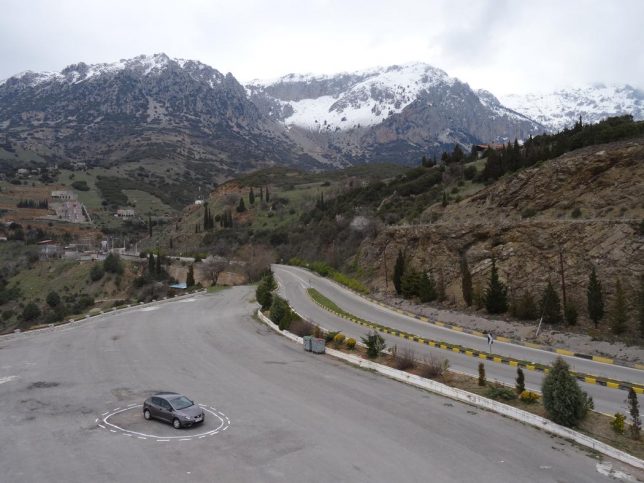
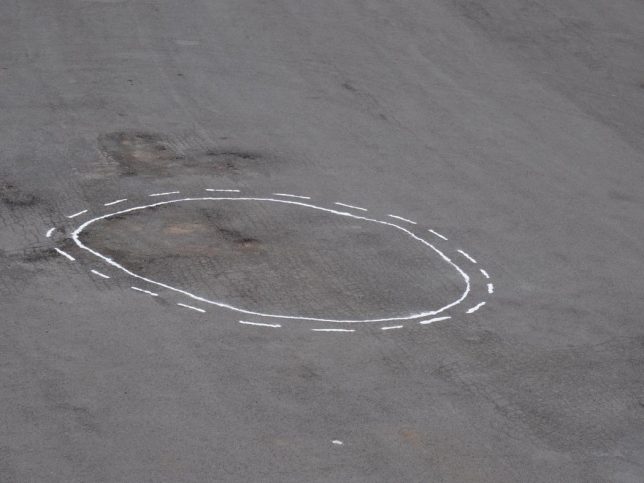
Somewhere between pagan magic, modern science and quirky satire, this installation project uses salt circles but also the logic of traffic lines to lure in and ensnare unsuspecting autonomous vehicles.

salt trap car

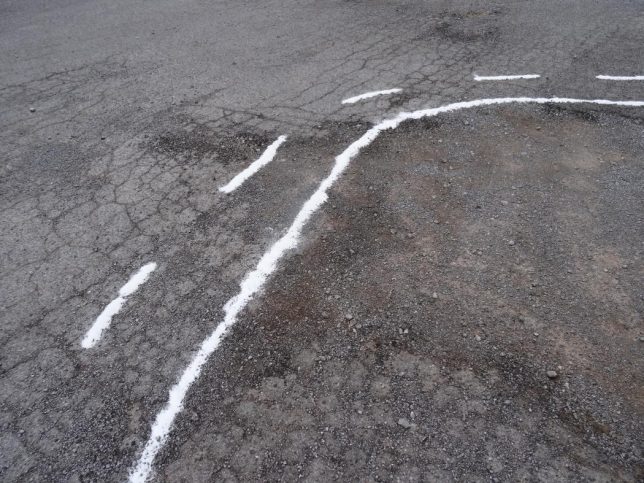
James Bridle‘s Autonomous Trap 001 employs familiar street markings found on divided highways – per the rules of the road, cars can cross over the dotted line but not back over the solid line. It sounds a bit absurd, but consider: driverless cars with various degrees of autonomy are already hitting the streets, and these do rely on external signals to determine their course. As these technologies gain traction, it is entirely likely that serious attempts will be made to spoof and deceive their machine vision algorithms.

“What you’re looking at is a salt circle, a traditional form of protection—from within or without—in magical practice,” explains Bridle. “In this case it’s being used to arrest an autonomous vehicle—a self-driving car, which relies on machine vision and processing to guide it. By quickly deploying the expected form of road markings—in this case, a No Entry glyph—we can confuse the car’s vision system into believing it’s surrounded by no entry points, and entrap it.”

autonomous vehicle trap magic

“The scene evokes a world of narratives involving the much-hyped technology of self-driving cars,” writes Beckett Mufson of Vice. “It could be mischievous hackers disrupting a friend’s self-driving ride home; the police seizing a dissident’s getaway vehicle; highway robbers trapping their prey; witches exorcizing a demon from their hatchback.” It has elements of cultural commentary that stem from acute awareness of real conditions, bordering on the absurd but also quite sobering.

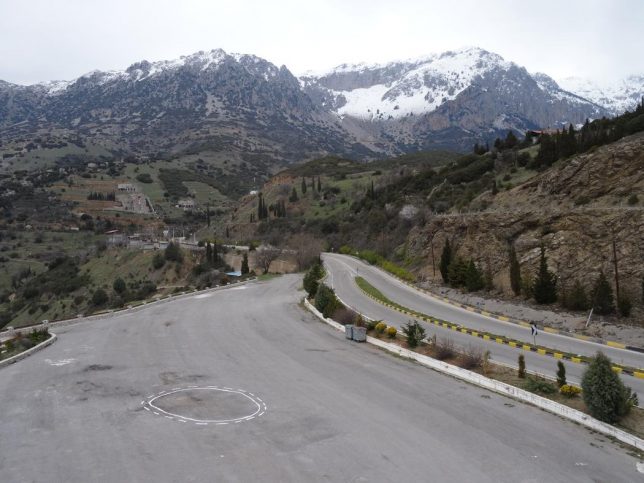
mountain pass

In fact, Bridle made his trap while training his own DIY self-driving car software near Mount Parnassus in Central Greece. “Parnassus feels like an appropriate location,” he says, because “as well as [having] quite spectacular scenery and [being] wonderful to drive and hike around, it’s the home of the Muses in mythology, as well as the site of the Delphic Oracle. The ascent of Mount Parnassus is, in esoteric terms, the journey towards knowledge and art.” Meanwhile, Bridle continues to work on other pieces related to contemporary technology, tackling subjects from machine vision and artificial intelligence to militarized tech and big data.

Share on Facebook


[ By WebUrbanist in Art & Installation & Sound. ]

[ WebUrbanist | Archives | Galleries | Privacy | TOS ]


WebUrbanist

 
Comments Off on Autonomous Trap: Artist Uses Ritual Magic to Capture Driverless Cars

Posted in Creativity


Lightroom Mobile update brings Raw HDR capture mode

07 Mar

Adobe today released an update for its Lightroom Mobile app for both iOS and Android that comes with an HDR feature that makes use of the Raw capture capability of the latest mobile devices. The new HDR mode first scans the scene to determine the correct exposure range and then captures three DNG files. After capture the files are automatically aligned, merged, de-ghosted, and tone-mapped. The end result is a 16-bit DNG that combines the benefits of the Raw file format and HDR, and can be processed in the same way as the HDR technology in Adobe Camera Raw and Lightroom.

Compared to existing smartphone HDR modes, this method offers better dynamic range, according to Adobe. Members of Adobe’s Creative Cloud service get the additional benefit of automatically syncing files and edits with their desktop.

The algorithms of new HDR mode do require powerful hardware and are therefore limited to a relatively small number of devices, though. On iOS it works with all devices that are capable of capturing DNG files, such as iPhone 6s, 6s Plus, 7, 7 Plus, iPhone SE, or the iPad Pro 9.7. On Android at this point only the Samsung Galaxy S7, Galaxy S7 Edge and the Google Pixel models are supported. However, Adobe says it is working on getting the software to run on a wider range of devices.

If you have a compatible device and would like to try Adobe’s new Raw HDR mode, there is a tutorial available on the Adobe Lightroom Youtube channel.

Articles: Digital Photography Review (dpreview.com)

 
Comments Off on Lightroom Mobile update brings Raw HDR capture mode

Posted in Uncategorized