RSS
 

Posts Tagged ‘Canon’

A quick look at the Canon PowerShot G1 X Mark II

12 Feb

g1x-ii.png

One of the most exciting cameras released today is Canon’s PowerShot G1 X Mark II, which retains the 1.5-inch-type sensor from its predecessor and adds a faster processor, longer and brighter lens, tilting LCD, dual control rings, and much more. We’ve put together a short article that covers the most interesting new features on the G1 X II. Have a look.

News: Digital Photography Review (dpreview.com)

 
Comments Off on A quick look at the Canon PowerShot G1 X Mark II

Posted in Uncategorized


Canon PowerShot G1 X Mark II adds faster lens and AF to big-sensor body

12 Feb

HR_G1X_MARKII_BLACK_3Q_CL.png

Canon has announced the long-awaited follow-up to its PowerShot G1 X large-sensor compact: the G1 X Mark II. The G1 X II improves upon its predecessor in many ways. It’s smaller, features a faster 24-120mm equivalent F2.0-3.9 lens (with closer focusing distances), a 31-point AF system, dual lens rings, a touchscreen LCD that can tilt upward by 180°, and Wi-Fi with NFC. One added trick is that the G1 X II can shoot at 3:2 or 4:3 with the same field-of-view. The catch? No more optical viewfinder (though an EVF is optional). It will be available in April for $ 799.

News: Digital Photography Review (dpreview.com)

 
Comments Off on Canon PowerShot G1 X Mark II adds faster lens and AF to big-sensor body

Posted in Uncategorized


A quick look at the Canon PowerShot G1 X Mark II

12 Feb

g1x-ii.png

One of the most exciting cameras released today is Canon’s PowerShot G1 X Mark II, which retains the 1.5-inch-type sensor from its predecessor and adds a faster processor, longer and brighter lens, tilting LCD, dual control rings, and much more. We’ve put together a short article that covers the most interesting new features on the G1 X II. Have a look.

News: Digital Photography Review (dpreview.com)

 
Comments Off on A quick look at the Canon PowerShot G1 X Mark II

Posted in Uncategorized


Review: Comparison Canon 5D MarkIII vs the Canon 6D

25 Jan

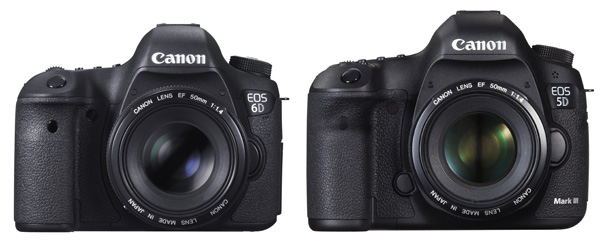
EOS 5D Mark III and EOS 6D

Now that Canon has two semi-professional full-frame cameras, the EOS 5D Mark III and EOS 6D, naturally photographers wonder which is the best model for them. As a former Technical Editor of EOS Magazine (the best magazine Canon owners could possible buy) I would like to share my insights.

But first, if you’re in the market for a full-frame EOS camera, let’s not forget the top of the range EOS 1D-X. This is a high-end, professional camera with a price tag to match. It’s big and heavy and built for the demands of a professional photographer’s life. Most photographers don’t need this much camera, but it’s interesting to look at because its size and price put Canon’s other full-frame cameras into perspective. Here’s a photo:

EOS 1D-X

EOS 1D-X

Big, right? The body alone weighs 1340 grams (nearly three pounds) and will set you back nearly $ 6800 USD+tax if you buy it from B&H Photo Video. The weight and price alone mean this camera isn’t suitable for most non-professional photographers, leaving Canon’s other full-frame models, the EOS 5D Mark III and EOS 6D, as the available choices.

Let’s compare – Canon 5D MarkIII vs the Canon 6D

Key differences

Let’s start by looking at what could be the deciding factor for some people – price. The EOS 5D Mark III costs around $ 3299. The EOS 6D is $ 1500 less expensive at $ 1799 (body only prices). That’s a huge difference, so why would anyone choose the 5D Mark III over the 6D? Let’s take a look.

Size and weight

  • The 5D Mark III weighs around 950g/2.1 lb.
  • The EOS 6D is Canon’s smallest and lightest full-frame digital SLR. It weighs 755g/1.6lb (body only, but including memory card and battery). It is also slightly smaller.

I own an EOS 5D Mark II and I can tell you that it gets heavy when I carry it around all day. If you’re planning to carry a camera on a strap over your shoulder for hours at a time, then it makes sense to buy the lighter model, and use light lenses (such as the EF 50mm f1.4 lens in the photo below).
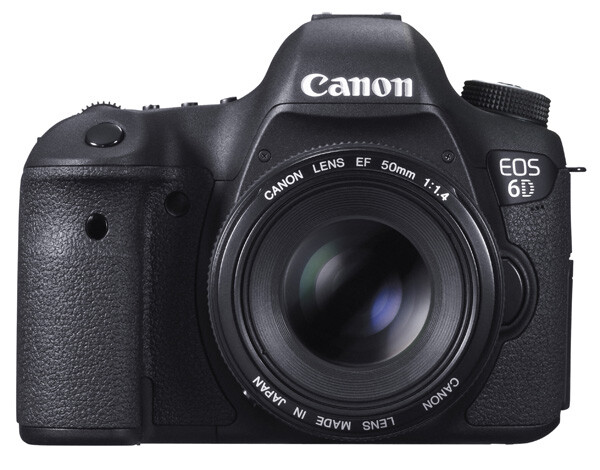
EOS 6D

EOS 6D with EF 50mm f1.4 lens

On the other hand, if you are a landscape photographer, keep the camera mainly in the studio, or just take it with you on location and use it for a couple of hours then pack it away again, the weight probably makes no difference.

Bottom line: If size and weight are critical, then go for the EOS 6D. But not before considering autofocus performance!

Autofocus

Autofocus performance is the major difference between the two cameras. It is a big factor if you are into photographing sports, action, portraits or any moving subject.

  • The EOS 5D Mark III has a 61 point AF array with up to 41 cross-type AF sensors (depending on the maximum aperture of the lens mounted on the camera). Along with the EOS 1D-X, it has Canon’s most advanced autofocus system.
  • The EOS 6D has an eleven point autofocus (AF) array with one cross-type AF sensor in the centre.

Cross-type AF points are more sensitive, and therefore focus more accurately, than other AF sensors. This is especially important if you work at wide apertures (i.e. between f1.0 and f2.8) as depth-of-field is so narrow at these settings.

As an example, let’s look at how it works with portrait photography. Imagine that you’re taking a portrait of someone with an 85mm lens set to f1.8. Accurate focus is critical as depth-of-field is very narrow at this setting – you may have less than an inch of sharpness to play with. The normal way to focus in this situation is to use the AF point closest to the model’s eye. The photo below shows how this works by overlaying a diagram of the EOS 6D’s AF array over a portrait. The single cross-type AF point in the centre is shown in green, and the AF point the photographer would have to use is in red:

EOS 6D autofocus array

You can see the problem right away. As the only cross-type AF point is in the centre, you can’t use it to focus unless the model’s eye is also in the centre of the frame. You have to use one of the less sensitive, and therefore less accurate, AF points at the edge of the array.

With the EOS 5D Mark III the story changes. With up 41 cross-type AF points available (shown in red), it is far more likely you will find one to cover the model’s eye. The end result is that you will get more in-focus photos.

EOS 5D Mark III autofocus array

You can learn more about the autofocus of the EOS 5D Mark III in my article Understanding EOS Autofocus: The EOS 5D Mark III and EOS 1D-X

Bottom line: If autofocus performance is critical, then (budget allowing) go for the EOS 5D Mark III.

Wi-fi and GPS

This is another major difference between the two cameras. However this time, and somewhat counter-intuitively, it is the EOS 6D that has the features and the 5D Mark III that does not.

  • The EOS 6D’s built-in GPS lets you geotag your photos with the camera’s location as you take them. You can then use that to see where they were taken on a map, help organize or search your images in Lightroom, or as extra information if you sell your photos to a stock library. If you want to do the same with an EOS 5D Mark III, you have to buy a GPS unit separately.
  • The EOS 6D’s built-in wireless lets you upload your photos via a local wi-fi connection to a computer as you take them (useful in a studio or even on location if you have a laptop with you), upload photos to Facebook, or remotely control your camera using a Smartphone app. Again, you have to buy a separate wireless unit, which comes built-in to a portrait grip, to do the same with an EOS 5D Mark III.

Bottom line: If you need GPS or Wi-fi, then buying the EOS 6D will save you a lot of money.
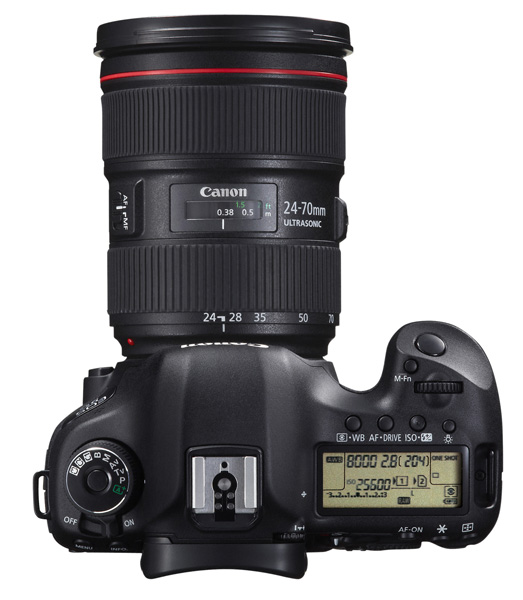
EOS 5D Mark III

EOS 5D Mark III with EF 24-70mm f4 lens

Dual card slots

  • The EOS 6D has a single card slot for an SD type memory card (it also accepts SDHC and SDXC cards)
  • The EOS 5D Mark III has two card slots. One takes CF cards, and the other SD (plus SDHC/SDXC cards)

One benefit of dual card slots is speed. CF cards are faster, which helps give higher burst speeds and assists with recording movies.

Another is security. You can set the EOS 5D Mark III to save photos to both the CF card and SD card slots at the same time, giving you a back-up in case one fails. Bear in mind it will slow the camera down as it takes longer to write a file to two cards, but it may give you peace of mind on important shoots. I imagine wedding photographers will greatly appreciate this feature.

Having said that, if you look after your memory cards, and buy a reputable brand, they are highly unlikely to fail. Most memory card failures are the result of corruption caused by user error, such as removing a card from a reader while the computer is writing to it.

Bottom line: If dual card slots matter to you, then you need the EOS 5D Mark III.
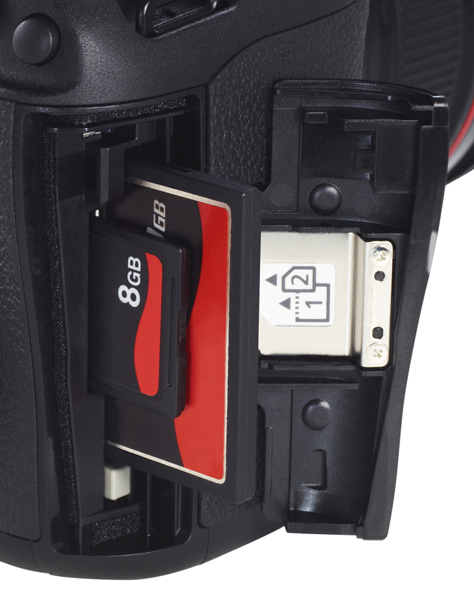
EOS 5D Mark III dual card slots

The dual card slots of the EOS 5D Mark III.

Minor differences

There are lots of minor differences between the two cameras, so I’ve provided some links to in-depth reviews so that you can get more information before making a purchasing decision. You’ll also see some photos taken with both models. In the meantime, if you own or have used either of these cameras, why not tell us what you think in the comments. Why did you choose one or the other, and do you think you made the best choice?

EOS 5D Mark III reviews

  • DP Review
  • Photography blog
  • Photography Life

EOS 6D reviews

  • DP Review
  • Photography blog
  • The Phoblographer
  • Graham Clark Photography

Understanding EOS
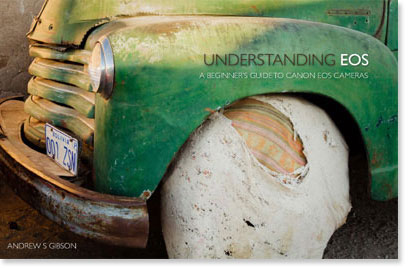
Understanding EOS ebook cover

My ebook Understanding EOS is written for photographers who want to learn to get the best from their EOS cameras. Click the link to learn more.

The post Review: Comparison Canon 5D MarkIII vs the Canon 6D by Andrew S. Gibson appeared first on Digital Photography School.


Digital Photography School

 
Comments Off on Review: Comparison Canon 5D MarkIII vs the Canon 6D

Posted in Photography


Canon updates firmware for EOS-1D X

10 Jan

canon_eos1dx.png

Canon has released firmware version 2.0.3 for its flagship EOS-1D X full-frame DSLR. The update improves accuracy and versatility to AF and exposure systems, as well as adding significant customization options. Some of the new features include: AF point switching according to camera orientation, improved low-light performance, and expanded minimum shutter speed in auto ISO. Get the update

News: Digital Photography Review (dpreview.com)

 
Comments Off on Canon updates firmware for EOS-1D X

Posted in Uncategorized


CES 2014: Canon Stand Report

10 Jan

DSC_0185.jpg

CES 2014: We already snagged a little quality time earlier in the week with Canon’s latest PowerShots at Digital Experience, but a visit to the booth was still in order. If nothing else, we wanted to see some really nice lenses chopped in half. Take a look at what Canon has in store for CES attendees this year.

News: Digital Photography Review (dpreview.com)

 
Comments Off on CES 2014: Canon Stand Report

Posted in Uncategorized


Canon shows off new PowerShot N100 ‘Story Camera’

06 Jan

PowerShot_N100_White_06.png

CES 2014: Canon has announced the PowerShot N100, which it’s calling a ‘Story Camera’. The feature that gives it this moniker is its rear-facing camera, which captures an image of the photographer at the moment the shutter is released (this works for stills and video). The photo or video from the rear camera is then put into one of the corners of the image that was taken. Photo quality should be a strong point, as the N100 uses the same lens and sensor as the PowerShot S120. Other features include a 3-inch LCD that tilts upward by 180 degrees, 1080/60p video recording, and Wi-Fi with NFC.

News: Digital Photography Review (dpreview.com)

 
Comments Off on Canon shows off new PowerShot N100 ‘Story Camera’

Posted in Uncategorized


Nikon D4 and Canon EOS 6D added to test scene comparison tool

18 Dec

shared:TestScene2.jpg

As we’re racing to complete our full review of the Nikon Df, we’ve added the Nikon D4 and Canon EOS 6D to our studio comparison tool. The studio test scene shows image quality for both JPEG and Raw files. It offers downloadable Raw samples and is designed to simulate real-world daylight and low-light shooting. As always, you can compare the D4 and EOS 6D to a number of other cameras, including the Df. See test scene

News: Digital Photography Review (dpreview.com)

 
Comments Off on Nikon D4 and Canon EOS 6D added to test scene comparison tool

Posted in Uncategorized


Review Canon Powershot S120 Digital Camera

16 Dec

Review Canon Powershot S120 Digital Camera

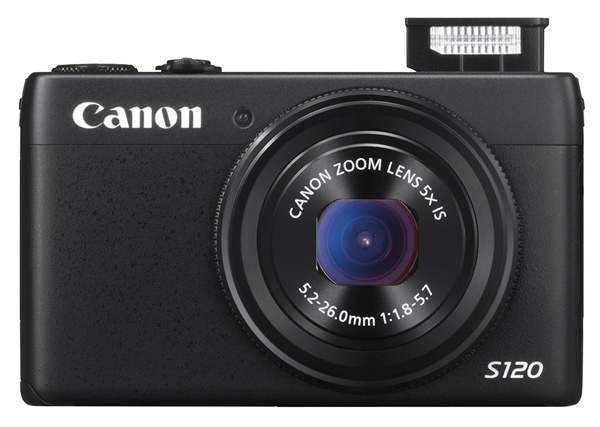
Canon S120 review Blk front 2

You could wonder at my bravado in reviewing this tiddler when all it seems to offer is a digicam with moderate specs and little else. Aah! But look further!

Features and Specs

Its story begins with Canon’s well-tried DIGIC 6 processor, along with a relatively large CMOS sensor. The maximum aperture is a generous, optically stabilized f/1.8, which does, quickly fall to f4 once you start zooming. However, it is the first S-series model to feature an f/1.8 lens and the 24mm wide end is extremely useful for tight interiors.

But the S120′s specs are well worth comparing to the highly regarded SX50 HS, which I reviewed a year ago, equipped with a powerful 50x optical zoom.

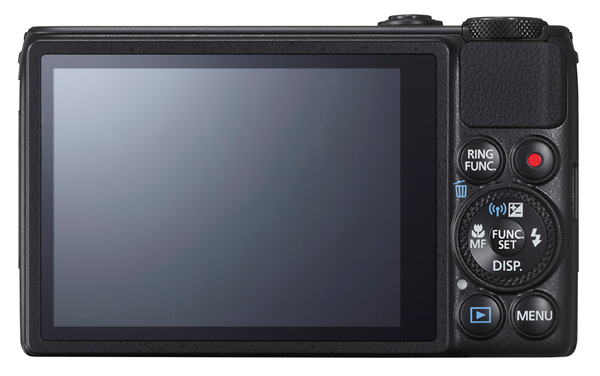
Canon S120 review Black Back

This one is a much less powerful beast optically, with a moderate 5x optical zoom, but it also has a larger CMOS sensor and a continuous shooting speed of up to 12fps. It’s also considerably smaller, more easily pocketable and easier to use.

Much like almost every camera offered in 2013, the S120 has inbuilt WiFi connectivity, so it can hook up directly to smart devices and social networks. Settings can be adjusted in a number of ways: through the dedicated control buttons, via the 7.5 cm touch screen or with the lens control ring. The camera also supports GPS tagging via a mobile, allowing location data to be added to shots using Canon’s dedicated app for smart phones/tablets.

Maximum image size is 4000×3000 pixels, leading to a final print size of 34x25cm print (13.4×9.8″) at 300 dpi.

Video can be shot in 1920×1080 Full HD quality MPEG4. If you shoot stills during a video record the latter stops.

A look around – physical features and controls

The camera is, as I have said, very pocketable and viewable, thanks to the 7.5cm LCD screen which does not, unfortunately, tilt. Oh well!

Top deck, at left is the tiny pop up flash; to the right is the power button and the shutter button that encircles the zoom lever; at the extreme right is the mode dial with positions for auto and hybrid auto shooting, P,A,S,M, custom settings, movie, camera effects (high dynamic range, fish eye, background defocus, mono etc) and scene effects (portraits, snow, starry skies, fireworks, time lapse etc).

You can adjust shutter speed or aperture — and manual — value by rolling the control dial to that setting (Tv, Av or M), then twirl a ring at the base of the lens. Simple! Just like a real camera!

There are plenty of people out there who will enjoy the easy access to the camera and scene effects offered by the camera and I wouldn’t mind betting there are plenty of newbie DSLR owners who still have no idea how to set the camera to handle these off-beat beat subjects.

The only flaw I found in the top deck layout was the difficulty of tapping the recessed power button. For the life of me, I can’t suggest an alternative arrangement!

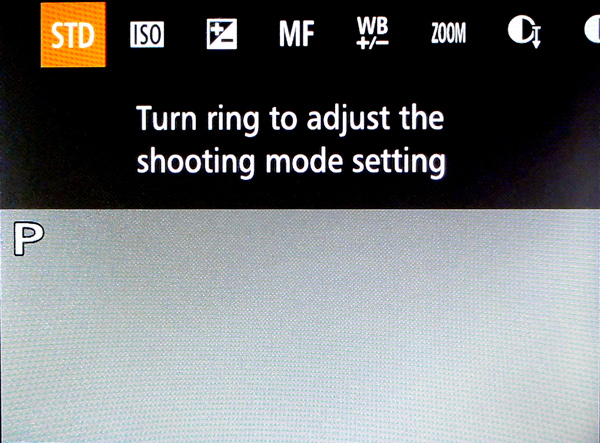
Canon s120 review Ring Function

Rear: at top right is the familiar red video record button and, to its left, is a button titled Ring Function which gives direct access to such things as ISO, exposure compensation, manual focus, white balance correction, dynamic range and shadow correction. The latter takes the S120 into a totally different area, with access to high control of your picture making. Worth some study. Lower, we find the control dial with settings for exposure correction, macro shooting, flash and display options.

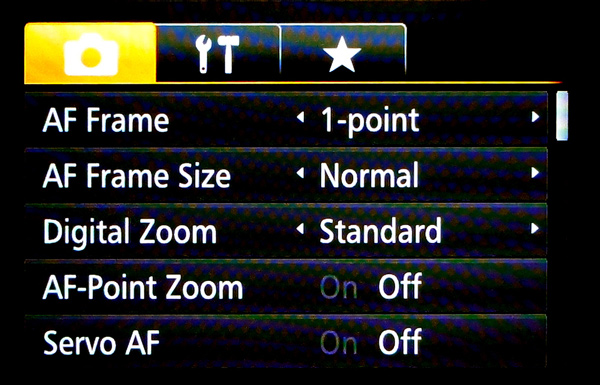
Canon S120 reiew Menu

Beneath the dial are found the replay and menu buttons, with the latter offering a fairly extensive extensive list of options. Noteworthy also is the on screen level indicator, and that’s about it.

Sample images from the Canon S120

Canon s120 review Centre screen 1

Canon S120 review Decorations 2

Canon S120 review Flowers 2

Canon S120 review Parking 2

Startup time

It took two seconds from power on the first shot, then about a second between shots.

Distortion

There was a small amount of barrel distortion at the wide end of the zoom but no problems at the telephoto end.

ISO Tests

Canon PowerShot S120 ISO 100

Canon PowerShot S120 ISO 400

Canon PowerShot S120 ISO 800

Canon PowerShot S120 ISO 1600

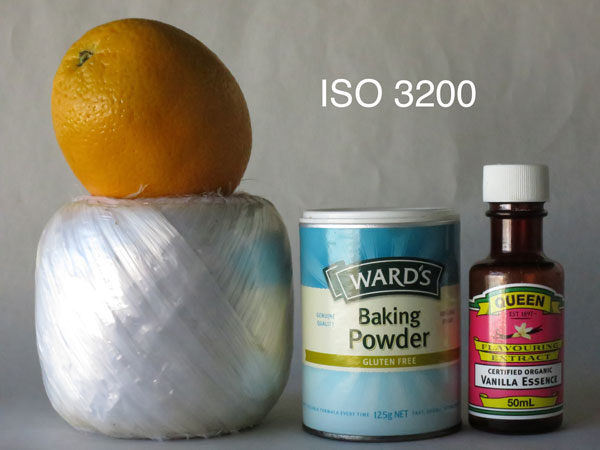
Canon PowerShot S120 ISO 3200

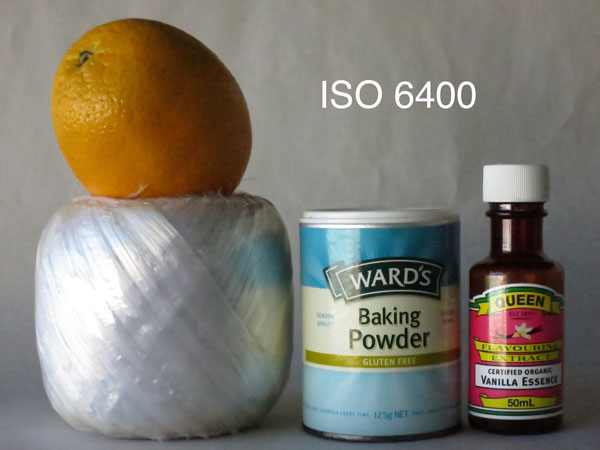
Canon PowerShot S120 ISO 6400

Canon PowerShot S120 ISO 12800

Noise begins to creep in at ISO 3200. By ISO 6400 noise is up a little more but what is really noticeable is the fall off in definition, both of which factors make shooting at ISO 12,800 a none event, compounded by some ugly pixel clumping at that setting.

Overall comments

  • Quality: average
  • Why you’d buy the camera: small; a surprisingly generous list of picture control options; nice wide 24mm wide end of the zoom
  • Why you wouldn’t: zoom is not long enough for sports photography
  • It’s not a big deal, but the S120 is one of the few digicams that let you replay your images by tapping that button — and not needing to fire up the power button first

If you’re still using a simple digicam but have higher ambitions, shoot-wise, this would make an ideal bridge camera to sharpen your camera skills before you leap into the fast running waters that encircle a DSLR!

Good gear!

Specs

  • Image Sensor: 12.1 million effective pixels
  • Sensor: 15mm CMOS
  • Metering: Evaluative, centre-weighted, spot
  • Lens: f1.8-5.7/5.2-26mm (24-120mm as 35 SLR equivalent)
  • Exposure Modes: Auto, Program AE, shutter and aperture priority, manual
  • Shutter Speed: 15″-1/2000 second
  • Memory: SD/SDHC/SDXC (UHS Speed Class 1 compatible)
  • Image Sizes (pixels): Stills: 4000×3000 to 640×480
  • Movies: 1920×1080, 1280×720, 640×480
  • Continuous Shooting: 9fps
  • Viewfinder: 7.5cm LCD screen (922,000)
  • File Formats: RAW, JPEG, MPEG4
  • Colour Space: sRGB
  • ISO Sensitivity: Auto, 80 to 12,800
  • Interface: USB 2.0, HDMI mini, AV, WiFi, DC input
  • Power: Rechargeable lithium ion battery
  • Dimensions: 100x59x29 WHDmm
  • Weight: 217 g (inc. battery, card)
  • Price: Approximately $ 400 see Amazon
  • Web: Canon.com

DPS Rating: 3

The post Review Canon Powershot S120 Digital Camera by Barrie Smith appeared first on Digital Photography School.


Digital Photography School

 
Comments Off on Review Canon Powershot S120 Digital Camera

Posted in Photography


DPReview Gear of the Year Part 5: Canon Rebel SL1/100D

11 Dec

goty-SL1-50mm.jpg

A lot of equipment passes through our Seattle and London offices, everything from high-end cameras to inexpensive accessories. A lot of it gets reviewed, but we can’t cover everything. In this series of short articles, DPReview staff will be highlighting their personal standout products of the year. In part 5, Shawn Barnett talks about his personal favorite – the Canon Rebel SL1/100D.

News: Digital Photography Review (dpreview.com)

 
Comments Off on DPReview Gear of the Year Part 5: Canon Rebel SL1/100D

Posted in Uncategorized