RSS
 

Posts Tagged ‘Canon’

Canon announces EOS M2 in Japan

03 Dec

eos-m2.png

Canon has announced the EOS M2 in Japan. An updated version of its EOS M mirrorless camera, the new model promises faster autofocus due to the use of a Hybrid CMOS II sensor, as seen in the EOS 100D / SL1. It also has built-in Wi-Fi and a slightly revised body design. It will be sold either body-only or in kits with one, two, or all three EF-M lenses, and be available in either black or white.

News: Digital Photography Review (dpreview.com)

 
Comments Off on Canon announces EOS M2 in Japan

Posted in Uncategorized


Canon Korea teases new camera, EOS M2 or SL1/100D?

09 Nov

white100d-1.jpg

Canon Korea has put up a page teasing about a new camera release. Showing a camera covered in a white sheet, the teaser text reads, “November 2013, Canon will start from the white world. Coming soon,” according to a Google translation of the site dicahub.com. Rumors seem to expect an EOS M2 or a pro camera, but applying a few Photoshop tweaks, as dicahub did, reveals a few details that make the camera look an awful lot like a more familiar digital SLR with a new white finish. Click through for more.

News: Digital Photography Review (dpreview.com)

 
Comments Off on Canon Korea teases new camera, EOS M2 or SL1/100D?

Posted in Uncategorized


Canon offers Dual Pixel AF upgrade for Cinema EOS C100 camera

06 Nov

eos-c100.png

Canon is offering owners of its Cinema EOS C100 the chance to add Dual Pixel AF to this video-centric camera. This will enable continuous autofocus during recording with all Canon EF lenses, and double one-shot AF speed with 104 fully-supported lenses. Interestingly the upgrade doesn’t involve a change of sensor, but instead enables a hitherto-unused hardware capability. However it will require the camera to be sent to a Canon service centre, and in the US will cost $ 500. 

News: Digital Photography Review (dpreview.com)

 
Comments Off on Canon offers Dual Pixel AF upgrade for Cinema EOS C100 camera

Posted in Uncategorized


Canon EOS 70D review: The cutting-edge stalwart

31 Oct

newsimage2.jpg

We’ve just completed our review of Canon’s EOS 70D. With its Dual Pixel AF system and built-in Wi-Fi, it’s an unusually radical departure for a series that’s tended to progress fairly conservatively between generations. So how well does it work? Are these high-tech additions enough to fend of the competition from Nikon’s very capable D7100 or Olympus’s rather impressive E-M1? Read our review to find out.

News: Digital Photography Review (dpreview.com)

 
Comments Off on Canon EOS 70D review: The cutting-edge stalwart

Posted in Uncategorized


Canon updates firmware for EOS 5D Mark III

31 Oct

HR_5D_MARKIII_EF24-70_3Q_CL.png

Canon has released firmware version 1.2.3 for the EOS 5D Mark III, which fixes four bugs (including one in which the flash may not fire when the shutter is pressed) and adds the ability to adjust LCD brightness when an HDMI cable is connected. For the full list of fixes – and a link to the update – follow the link.

News: Digital Photography Review (dpreview.com)

 
Comments Off on Canon updates firmware for EOS 5D Mark III

Posted in Uncategorized


Canon EOS 70D Review

31 Oct

Canon EOS 70D Review.jpg

It seems such a long time since this camera’s predecessor — Canon EOS 60D — was launched. And it was. About this time, three years ago and lots has happened in the interval. MILCs are here for one thing but there are still plenty of DSLR-coholics craving for an optical view of the world.

I have to admit I am prone to slaver a little when I look through an optical viewfinder. Just like the old days!

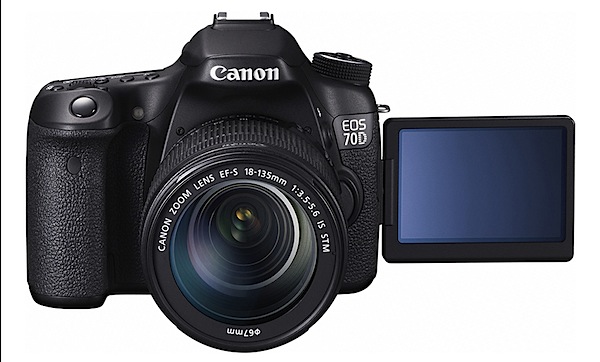
The camera was reviewed with the Canon EF-S f3.5/18-35mm IS STM lens. The camera, in Canon’s lineup, is located above the EOS 700D.
Canon EOS 70D Review top.jpg

Canon EOS 70D Review back.jpg

Canon EOS 70D Features

  • This is the first DSLR camera to have all-new Dual Pixel CMOS AF technology. Two photodiodes are mounted within each pixel, both of which can be read independently to achieve autofocus or together for image capture.
  • The AF system for stills has 19 cross-type AF points spread across the frame.
  • Effective pixel count is 20.2 megapixels on the APS-C sized CMOS sensor.
  • A 14-bit DIGIC 5+ processor is used.
  • The 70D captures full res images at up to 7 fps for a continuous burst of up to 65 JPEG or 16 RAW images.
  • HDR from three images.
  • Creative filters (grainy, soft focus, fish eye effect etc).
  • ISO range is 100-12800 (expandable to 25600).
  • The 7.7cm LCD touch screen has a 1,040,000 dot resolution.
  • With Wi-Fi connectivity, users can connect to the EOS Remote app as well as remotely use Live View mode.
  • External mic input.
  • The camera captures a maximum image size of 5472×3648 pixels or 46x31cm as a print.

Movies can be shot in MPEG4 up to Full HD at 1920×1080 pixels resolution.

Yes, you can shoot stills in the middle of a video recording but the video is briefly interrupted.

A neat feature is video snapshot: each short clip can be set to last two, four or eight seconds; you can add each clip to the tally as you shoot so you end up with a bunch of short videos, neatly edited together. To be honest, I haven’t found a place for the feature in my style of video making … but give it time!

Handling

The camera gains (or loses!) from the small sensor in that the whole package is less daunting in size and weight than a full frame DSLR.

The speed grip at right is substantial so your right fingers can grasp it securely. Left hand holds left of the body and you could maybe fire away with a single (right) handed grasp — but you’d need practice.

Controls

Tucked away, behind the lens, is the button which kicks up the flash cell; external wireless flash can also be hooked up.

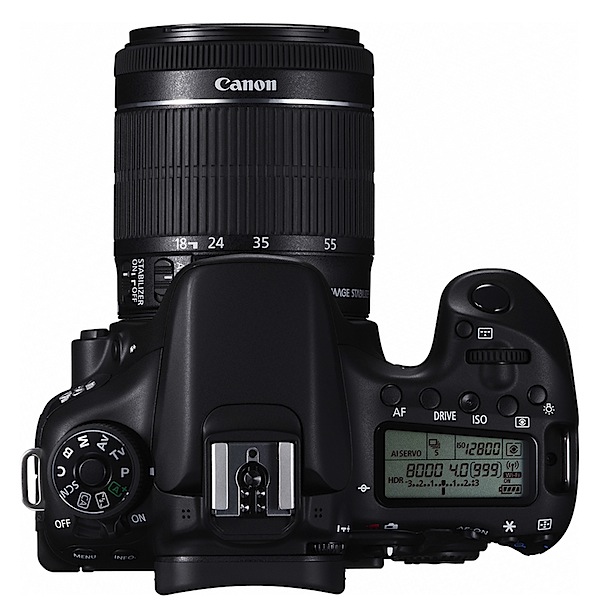
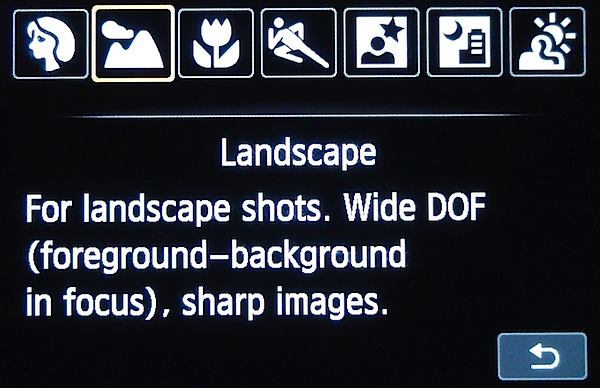
Top: against the usual approach, the power lever is sited to the extreme left, right next to the ten position mode dial. This has a useful locking button so your setting won’t shift.
Canon EOS 70D Review Scene Filters.jpg

On it are positions for auto, PASM plus Bulb, flash off, special scenes (portrait, landscape etc), creative auto (aperture control, single/continuous shooting and flash options) and a custom setting.

Just beneath this dial are the menu and info buttons.

Top, off to the right: dioptric control for the optical finder, status screen (plus its light button) topped by buttons for AF, single/continuous shooting, ISO and metering mode. A little forward is the command dial, aperture/shutter speed button … and of course, the shutter button.

If you’re looking for some way to preview depth of field, then head to the lens barrel and a tiny button in its base.

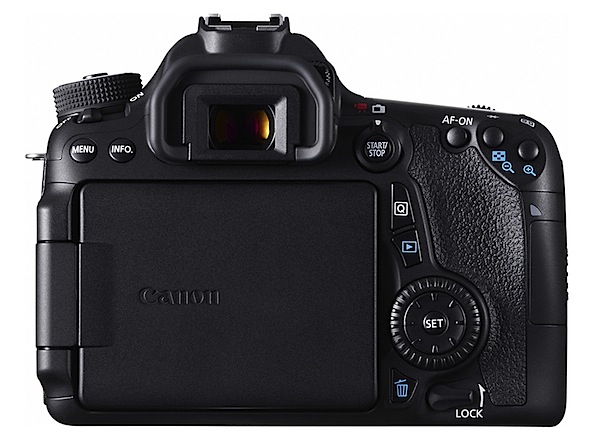
Rear: off to the right you’ll find a button and lever which takes you from the optical finder view to the Live one, then gives you the option of shooting stills or video. Quite a good arrangement.

Further right is an AF start/stop button, one for auto exposure lock and another for selection of the AF point or zone.

Lower down is the Quick control button that takes you rapidly into such areas as single/continuous shooting, metering modes, image size etc.

If you think the 70D provides multiple access points to camera controls … you’re right!
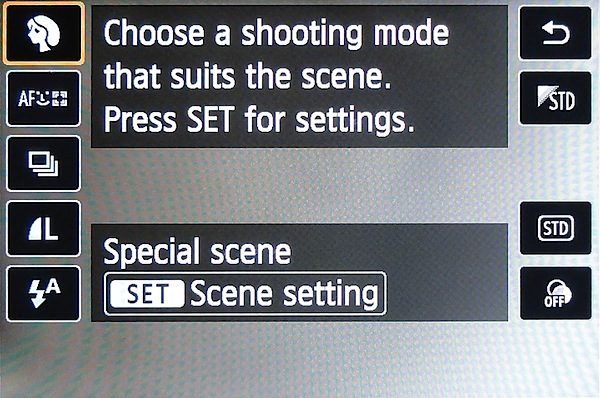
Canon EOS 70D Review Q button.jpg

Beneath the Q button is replay, trash and the multi controller (plus SET button). Lower still is the lock button which can prevent the main dial, Quick control dial and multi controller from shifting and an accidental alteration of a setting.

If you’re in the habit of passing your camera around to others for a shoot, this will lock in your carefully chosen settings!

Canon EOS 70D Review Tree.JPG

Canon EOS 70D Review Wedding girls 1.JPG

Jacaranda and house 1.JPG

Canon EOS 70D Review Chile tapestry 1.JPG

Get Going

Possibly a measure of this control layout is how easy the camera is to pick up and get going. Or not!

On test sessions my first chore is to shoot the ISO tests. Dealing with the camera’s controls fresh out of the box is usually a good indicator of camera user friendliness.

OK. Go to the mode dial. Set it to aperture priority. Next, select a small, focus friendly aperture. Move to the front command dial; there is no rear dial, so Canon calls this one the ‘main dial’. Wind it down to f16. Cool.

Next, I want to set the ISO number. Move to the tiny button on top, marked ‘ISO’.

I want to use manual focus, so I next headed for the lens barrel and switch it from AF to MF. Nearby also is the stabiliser on/off switch.

Easy peasy. And I was up and away!

The menu arrangement is comprehensive and easy to follow — but it is extensive! I suggest you become familiar with it as there are many options and you could easily find yourself bamboozled.

Canon EOS 70D ISO Tests

Canon ESO 70D ISO 100.JPG

Canon ESO 70D ISO 400.JPG

Canon ESO 70D ISO 800.JPG

Canon ESO 70D ISO 1600.JPG

Canon ESO 70D ISO 3200.JPG

Canon ESO 70D ISO 6400.JPG

Canon ESO 70D ISO 12800.JPG

Noise only became noticeable at ISO 6400. Useable.

There was a substantial increase in noise at ISO 12800. A little dodgy.

Canon EOS 70D Review Verdict

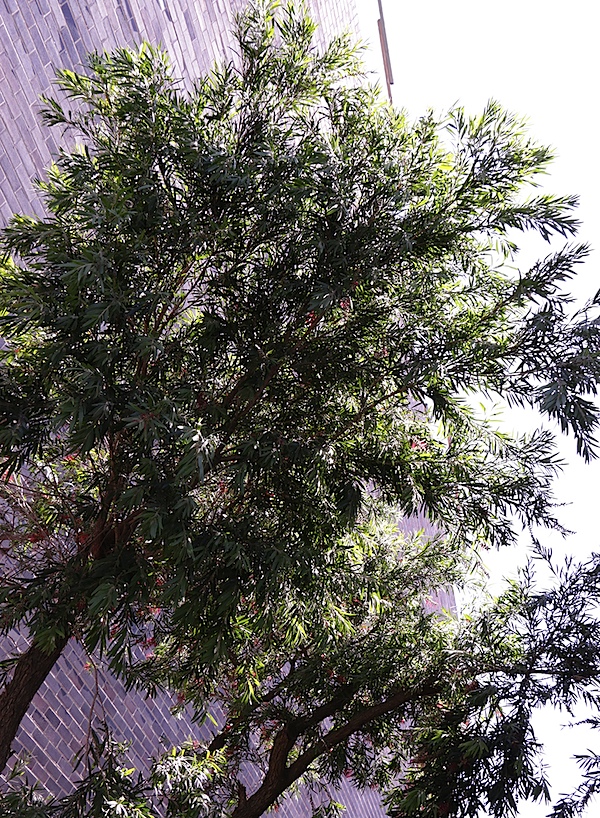
Quality: I was quite blown away by the quality of this camera’s images; not only were they super sharp but the coloration was dead accurate.

The focus was super fast and super accurate. The stabiliser works well, esp in video shooting. Note: three handheld scenes in the video clip were shot without the stabiliser in action.

So I reshot one more video shot (the wall and gate) with the stabiliser in play. Much better!

Why you’d buy the Canon EOS 70D: a DSLR that won’t break your bank or bend your shoulders.

Why you wouldn’t buy the Canon EOS 70D: check your expertise level!

One of the best new models I have seen for a while.

Canon EOS 70D Specifications

Image Sensor: 20.2 million effective pixels.
Metering: 63 zone, centre-weighted, spot, partial.
Lens Mount: Canon EF/EF-S.
Exposure Modes: Program AE, shutter and aperture priority, manual.
Effective Sensor Size: APS-C 22.3x15mm CMOS.
35 SLR Lens Factor: 1.6x.
Shutter Speed (stills): 30 to 1/8000 second and Bulb; X-sync at 1/250 sec.
Continuous Shooting: 7 fps.
Memory: SD/SDHC/SDXC cards.
Image Sizes (pixels): Stills: 5472×3648 to 480×480.
Movies: 1920×1080 (30p/25p/24p), 1280×720 (60p/50p), 640×480 (30p/25p).
Viewfinder: Optical plus 7.7cm LCD screen (1,040,000 pixels).
File Formats: JPEG, 14-bit RAW, JPEG+RAW, MPEG4.
Colour Space: sRGB, Adobe RGB.
ISO Sensitivity: Auto, 100 to 12800, 25,600 (expanded).
Interface: USB 2.0, HDMI mini, WiFi, mic, remote.
Power: Rechargeable lithium ion battery, DC input.
Dimensions: 139x104x79 WHDmm.
Weight: 855 g (inc battery).
Price: Get a price on the Canon EOS 70D (body only) or Canon EOS 70D with EF-S 18-135mm F3.5-5.6 IS STM lens.

Post originally from: Digital Photography Tips.

Check out our more Photography Tips at Photography Tips for Beginners, Portrait Photography Tips and Wedding Photography Tips.

Canon EOS 70D Review

The post Canon EOS 70D Review by Barrie Smith appeared first on Digital Photography School.


Digital Photography School

 
Comments Off on Canon EOS 70D Review

Posted in Photography


Canon PowerShot G16 updated with test scene samples

29 Oct

shared:TestScene2.jpg

We just updated our first impressions review of the Canon PowerShot G16 with our studio test scene showing image quality in both JPEG and Raw capture modes. It includes downloadable Raw files of both the daylight and low light scenes. As usual this allows you to compare the G16 with other cameras. 

News: Digital Photography Review (dpreview.com)

 
Comments Off on Canon PowerShot G16 updated with test scene samples

Posted in Uncategorized


Canon updates firmware for EOS-1D X and EOS-1D C

22 Oct

shared:download-button.png

Canon has announced upcoming firmware updates for its top-of-the-range SLRs, the EOS-1D X and video-optimised EOS-1D C. Version 2 for the EOS-1D X adds a range of additional autofocus settings, along with substantially improved Auto ISO options. It’ll be available to download in January 2014. Meanwhile the EOS-1D C gains improved audio recording, and support for aberration corrections with cinema EOS lenses. The update will be available from November, and requires the camera to be sent to an authorized Canon Factory Service Center.

News: Digital Photography Review (dpreview.com)

 
Comments Off on Canon updates firmware for EOS-1D X and EOS-1D C

Posted in Uncategorized


Canon announces Japan-only special-edition PowerShot S120 and G16

15 Oct

s120-premium.png

Canon has announced special edition versions of its PowerShot G16 and S120 digital compact cameras. The ‘premium’ versions appear to be intended for the Japanese domestic market, and will be available in different color finishes, with a custom engraving option. Color customization appears to comprise the option of red, gold, silver and black finished on select components and both cameras are supplied with unique accessories – a cowhide leather pouch for the S120 and a leather hard case for the G16. Click through for pictures.

News: Digital Photography Review (dpreview.com)

 
Comments Off on Canon announces Japan-only special-edition PowerShot S120 and G16

Posted in Uncategorized


Canon EOS 70D Dual Pixel AF: for better or for worse?

11 Oct

70Dnews1.jpg

Canon’s latest enthusiast digital SLR sports a radical new sensor-based autofocus system, where nearly every pixel is dedicated to phase-detect autofocus. As we come close to completing our review of the Canon 70D, we’ve run the new AF system through a battery of tests to see what, if anything, it means for the enthusiast shooter. Click through for the whole nine yards, as well as new information about the camera’s movie autofocus and Wi-Fi functions.

News: Digital Photography Review (dpreview.com)

 
Comments Off on Canon EOS 70D Dual Pixel AF: for better or for worse?

Posted in Uncategorized