RSS
 

Posts Tagged ‘Canon’

How to Use the Canon Camera Connect App

22 Dec

Cameras with built-in Wi-Fi connectivity are all the rage today, but not necessarily the most intuitive feature to unlock. Luckily, Canon seems to have listened to 6D owners, and increased the ease of use of their Wi-Fi platform by switching up the free mobile phone app that comes with the 6D. Previous versions of the app where called EOS Remote and Canon CameraWindow, but earlier this year, a new improved app called Canon Camera Connect, became the main app endorsed by Canon.

This is a visual tutorial on how the new app works. Please note that the tutorial is written assuming you already know how to enable Wi-Fi shooting on your particular device.
Canon Wi-Fi App

Step 1: Check for compatibility and download the app

Currently, Canon Camera Connect is a free app available for download on Android and iOS devices. The app is compatible with a limited range of Canon digital cameras, including select PowerShot point and shoot cameras, the EOS M2, and the EOS 70D and 6D. You can check full compatibility specs here. This tutorial was created using the Canon 6D camera, and a Moto X Android phone.

Step 2: Enable the Wi-Fi function on your camera

This step will likely vary depending on your model of camera. For the Canon 6D, this is a somewhat complicated process that merits its own tutorial, but the methodology can be summarized as such: you are effectively turning your Canon 6D into a Wi-Fi hotspot, that your phone must connect to as a means of communicating with your camera, for either remote shooting or downloading images. Thus, you must first activate the Wi-Fi hotspot on the 6D (or one of the compatible models), then connect to it via your phone’s Wi-Fi networks. Be aware that this WILL temporarily disable your phone’s functionality until you disable the connection with your camera.

Step 3: Explore the interface of the Canon Camera Connect App

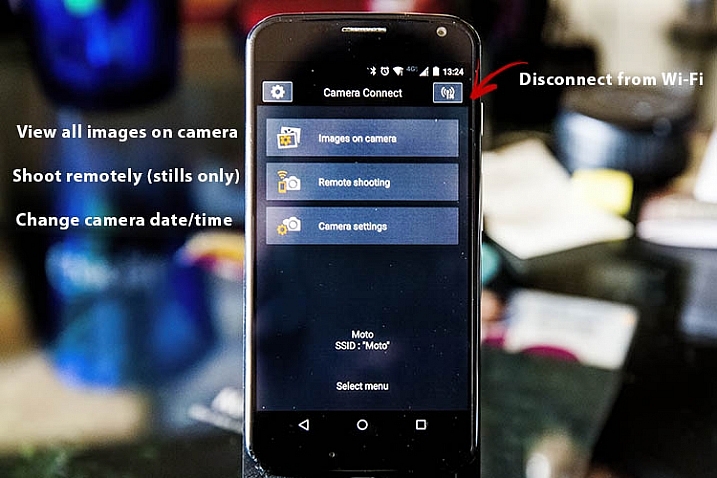
After you have successfully connected your phone to your camera, the app should launch, and show you the opening screen, as seen below. The app’s menu is minimal, and pretty straightforward. You will most likely stick to the top two options, which are described in more detail below.
Canon Wi-Fi App

Images on camera

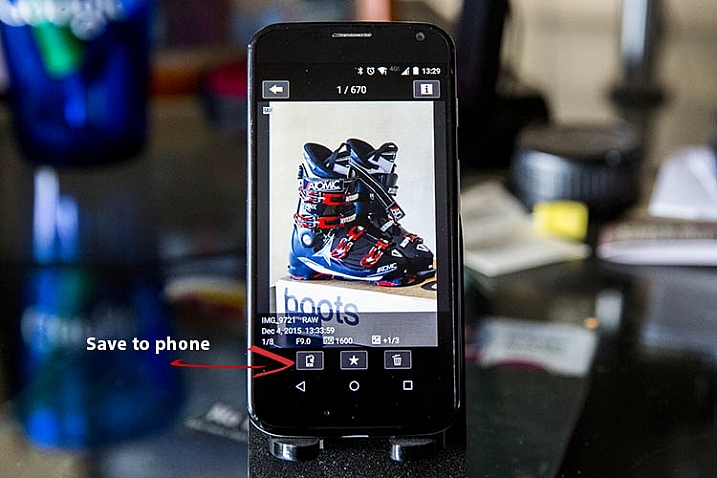
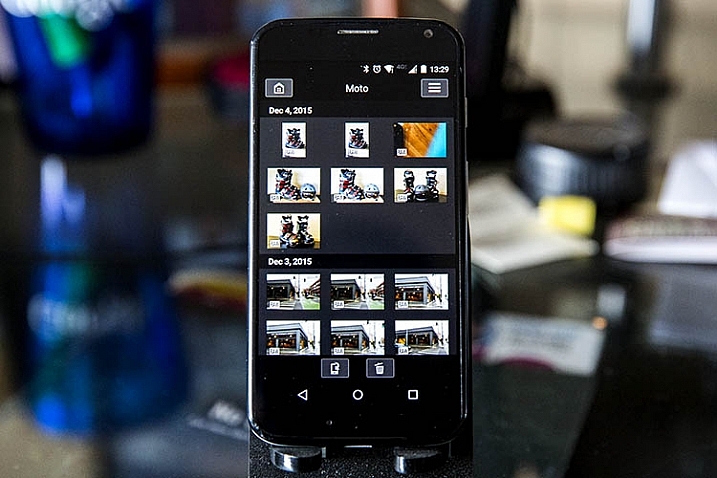
Pressing this will show you a gallery of all of the images on your connected camera, sorted by the date they were taken. To zoom in to any image, simply tap it with your finger. Three options will then appear at the bottom of the image: Save to phone, favorite (star), or trash. If you wish to share an image via email or social media, remember that you can’t do so without first disconnecting your phone from your camera. To work around this, choose the Save to camera option to store the photo on your phone, and then upload it when your phone has internet connectivity again.
Canon Wi-Fi App

Canon Wi-Fi App

Remote shooting

Selecting this option enables live view on your connected camera, and lets you control most of the settings from your phone. Controllable settings include: changing the shutter speed, aperture, ISO, exposure compensation, drive mode, focus mode, and of course the activating the shutter button to take a photo. All the controls can be adjusted and activated using touch screen control. There are a few shortcomings to the remote control settings as listed below, but off the bat the app provides quite a few options for remote shooting.
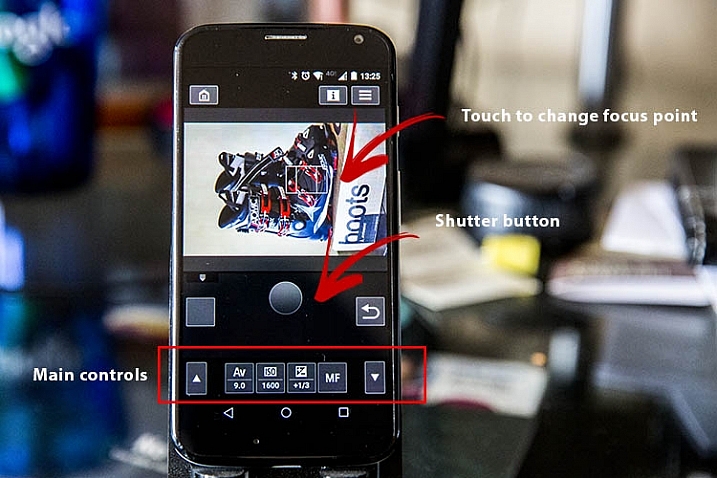
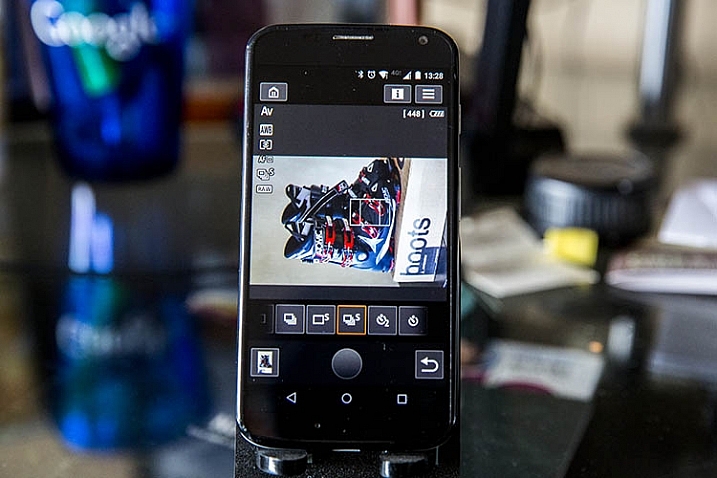
Canon Wi-Fi App

Canon Wi-Fi App

Camera settings

The third and final main menu option in Canon Camera Connect app is probably the most useless: it allows you to set the date, time, and time zone of your camera. This is a feature you probably won’t use often unless you take your camera traveling a lot.
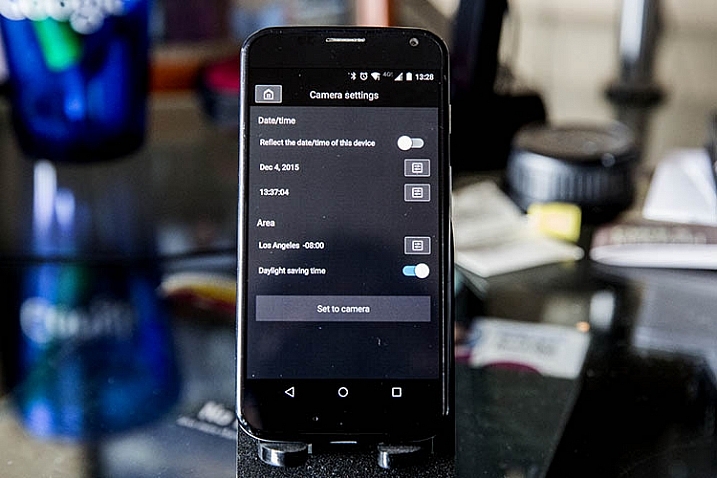
Canon Wi-Fi App

What the app does

Shoots in JPG or RAW

The app is very quick and responsive, even when shooting in large RAW files. Also, it easily resizes RAW files to JPGs when you save images to your phone.

Will read JPG files taken from any camera

If you have JPG files taken from any other devices, the Canon Camera Connect will likely be able to read, and transfer them to your phone or tablet. I’ve done this using photos shot from an Olympus Tough TG-2 point and shoot, Fujifilm x100s mirrorless camera, and Canon 5D Mark III, so I would assume it would also hold true for other camera models.

What the app does not do

These are shortcomings, specific to using the app with the Canon 6D; some of these issues may not be points of contention when using the app with other compatible camera models.

Adjust to portrait mode while remote shooting

If the app does allow this, the user interface needs to be adjusted to make this feature more obvious. As is probably obvious from some demo shots above, I haven’t figured out how to enable it.

Remote shoot video

Whenever the Wi-Fi function on your Canon 6D is enabled, you cannot simultaneously activate video recording, so unfortunately remote video shooting cannot be achieved.

Time lapse

While you can set your camera to shoot in continuous or self timer mode with the app, there is not the option to shoot time lapses. This is a feature that Canon will hopefully implement in future iterations of the app.

Hopefully this overview will help you see if this app is useful for you. If you have one of the compatible cameras listed, give it a try and let me know what you think. Do you have any other uses for remote apps I haven’t thought of or mentioned?

googletag.cmd.push(function() {
tablet_slots.push( googletag.defineSlot( “/1005424/_dPSv4_tab-all-article-bottom_(300×250)”, [300, 250], “pb-ad-78623” ).addService( googletag.pubads() ) ); } );

googletag.cmd.push(function() {
mobile_slots.push( googletag.defineSlot( “/1005424/_dPSv4_mob-all-article-bottom_(300×250)”, [300, 250], “pb-ad-78158” ).addService( googletag.pubads() ) ); } );

The post How to Use the Canon Camera Connect App by Suzi Pratt appeared first on Digital Photography School.
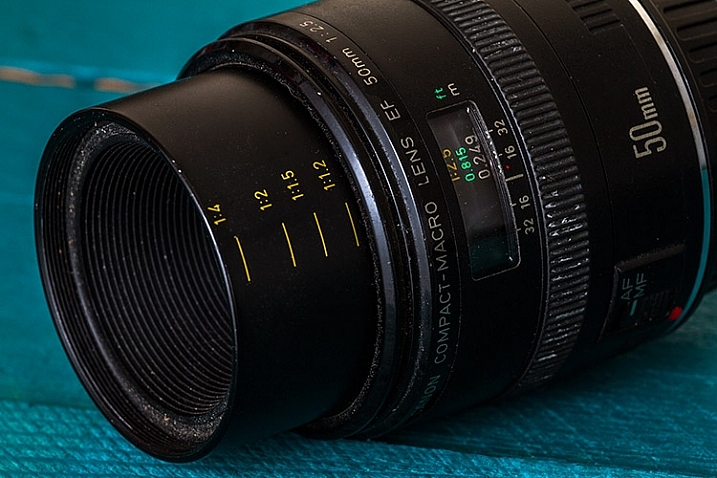

Digital Photography School

 
Comments Off on How to Use the Canon Camera Connect App

Posted in Photography


Writer’s Favorite Lens – Canon 50mm f/2.5 Compact Macro

20 Dec

Canon 50mm f/2.5 Compact Macro

Sometimes, picking a favorite is hard. If you ask me to choose a favorite song or movie, it just can’t be done. Lenses; however, are different beasts. Ask most photographers what their favorite lens is, and you’ll probably get little hesitation before they start gushing and waxing lyrical.

At least that’s how I am, and when it comes to picking my favorite, all you have to do is ask which lens is probably on my camera body right now. That is almost always the Canon 50mm f/2.5 Compact Macro.

This lens is a gem that offers great quality in terms of sharpness, ease of use, durability and versatility, and even though I’ve acquired some fairly serious glass since I bought it 12 years ago, it’s still my go-to lens.

Making the choice

Regarding lens choice, one of the most common things new photographers are told is to start with a 50mm f/1.8, often referred to as “thrifty fifties”. The logic here is more or less irrefutable. These lenses are cheap, reliable, versatile, and their large aperture makes them much faster than anything else in that price range. Their versatility makes them perfect for portraits and most other subjects outside of the extremes such as landscapes, which favor wide-angle lenses, and sports, which favor telephoto lenses.

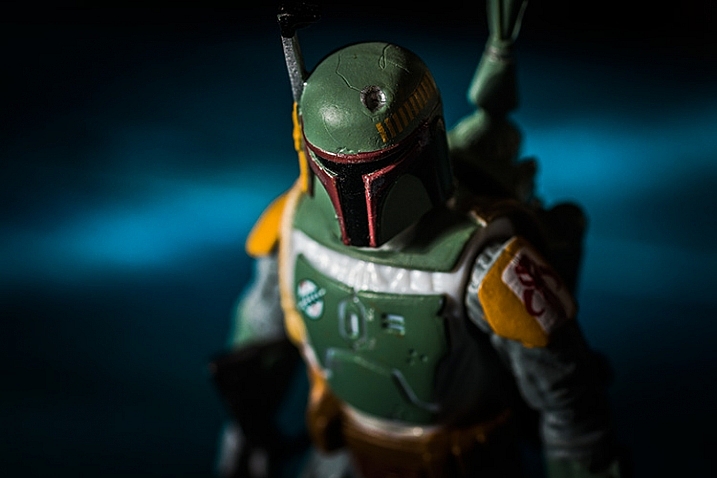
Boba

When I was starting out, I spent a lot of time photographing things like food, flowers, toys, and other small things with fine details. I had little interest in other types of photography, and no interest in portraiture.
As such, the biggest limitation I got from my kit lenses was the focusing distance. I was forever trying to get closer to my subjects using the long end of kit lenses, and falling short every time.

When it was time to consider upgrading that first lens, research made it clear that neither the thrifty fifty nor the 85mm f/1.8 would do much good towards those aims. On the other hand, a dedicated 100mm macro lens was far out of my price range. Because of all this, I put off upgrading my kit lenses for a long time.

It was only by chance that I eventually found the 50mm Compact Macro while browsing through Canon lenses on a retailer’s site. To be honest, there wasn’t a lot of research involved. I saw the lens, the price, and the focusing distance of nine inches, and I bought it within the week.

Pros and cons

The Canon 50mm Compact Macro is the workhorse of my camera bag and it’s certainly been put through its paces over the past decade. For my purposes, there are no flaws; however, it does have a few qualities that may make it unsuitable for some photographers.

Pro – Build quality

It can’t be helped that the first thing you notice about this lens is the build quality. This is particularly true if your previous experiences are with kit lenses. The solid metal casing makes it feel sturdy and the extra weight feels great in your hand.

It may be worth mentioning that when I did get to use a 50mm f/1.8 a few years ago, I thought that I was being handed a Holga lens. This isn’t in any way an attempt the demean the 50mm f/1.8, but rather as an illustration of how far apart these lenses are in terms of build quality.

Pro – Durability

favourite-lens-canon-50mm-macro-2081

Durability may fall under build quality, but experience makes me feel it’s worth mentioning separately.

This lens has been dropped on concrete, cobble stone, and Tarmac, and it has been in the ocean. It has been in ash storms, torrential rain, hail storms, and there was one terrifying incident where it was left to stew in a half litre puddle of shower gel for a few hours. Despite all of this, this lens has not once shown any performance issues.

Pro – Sharpness

As should be expected from a lens created for the purpose of macro photography, the Canon 50mm f/2.5 Compact Macro cannot be faulted in terms of sharpness. While I’m unable to compare it to the other 50mm offerings from Canon, I can compare it with the excellent 85mm f/1.8 and 70-200 f/4 L IS USM. The differences are almost indistinguishable.

Pro – Large aperture

The compact Macro may have a smaller aperture than Canon’s other 50mm lenses, but it is still a fast lens and works well in all but the dimmest of settings.

In terms of background blur, if you take into account that depth of field is also affected by the distance of the camera from the subject (the closer you are, the shallower the depth of field) you can see that you will achieve a comparable amount of blur to the faster lenses.

Pro – Focusing

Whether it’s in auto focus or manual focus, it’s really hard to find fault with this lens. In normal situations, the auto-focus is fast and accurate. The large aperture of f/2.5 allows for a bright image in the viewfinder, making manual focus easy and quick.

Pro – Focus distance

Uke

With a focusing distance of just nine inches (23cm), you can get extremely close to your subjects. Yes, this may be the sole reason for this lens’ existence, but the versatility this adds is wonderful. For example, you are able to take a close-up of someone’s eye, then move a few steps back and take a normal 50mm portrait seconds later.

Cons

As mentioned, it wasn’t easy to come up with any negative aspects of this lens. There are; however, a few considerations that could mean this may not fit your specific photographic needs.

Con – Weight

At 9.88 ounces (280 grams), the Compact Macro weighs more than twice as much as Canon’s 50mm f/1.8 lens (4.6 ounces/ 130g). If you’re trying to keep your kit bag as light as possible, and the macro functionality isn’t that important, then you may want to consider the alternatives.

Con – Price

While I will attest that this lens offers tremendous value for the money, at $ 299 it is a big jump in price from the 50mm f/1.8 at $ 125. If you’re just starting out, and do not yet know what subjects you’re interested in, or whether or not you will stick with photography for long, it may be worth considering a more wallet friendly option.

Editor’s note: at the time of this article the 50mm f/2.5 Compact Macro lens is listed on Canon’s site as Out of Stock. You may be able to find it used on Amazon.com or go for the even higher priced 60mm f/2.8 Macro at $ 419 USD.

Con – Light

There is a slight downside to the lens’ closest focusing distance. When you’re standing that close to your subject, you and the camera effectively block any light coming from the front. Often, this is easily countered with side lighting techniques, or by using a dedicated macro ring flash, but it can be tricky to overcome at other times.

Con – Magnification

What may be considered as a deal breaker for a lot of photographers is that the 50mm f/2.5 Compact Macro is not a true macro lens. With a magnification ratio of 1:2, it only creates images at half life-size. This can be rectified with a converter that allows for 1:1 magnification.

favourite-lens-canon-50mm-macro-5347

In the end

I know I’ve been gushing quite a bit, but my experiences with this lens have been outstanding, despite the heavy use and torture I put it through. If you’re in a position where you’re deciding to buy a 50mm, and you like the idea of getting really close your subjects, do consider the Canon 50mm f/2.5 Compact Macro. It really is a treat.

googletag.cmd.push(function() {
tablet_slots.push( googletag.defineSlot( “/1005424/_dPSv4_tab-all-article-bottom_(300×250)”, [300, 250], “pb-ad-78623” ).addService( googletag.pubads() ) ); } );

googletag.cmd.push(function() {
mobile_slots.push( googletag.defineSlot( “/1005424/_dPSv4_mob-all-article-bottom_(300×250)”, [300, 250], “pb-ad-78158” ).addService( googletag.pubads() ) ); } );

The post Writer’s Favorite Lens – Canon 50mm f/2.5 Compact Macro by John McIntire appeared first on Digital Photography School.


Digital Photography School

 
Comments Off on Writer’s Favorite Lens – Canon 50mm f/2.5 Compact Macro

Posted in Photography


In Fine Detail: Canon EOS 5DS / 5DS R In-Depth Review

18 Dec

Preview based on pre-production Canon EOS 5D S & SR

Canon has added to its EOS 5D range with the launch of two 50MP cameras, the 5DS and the 5DS R. Both cameras are high resolution full frame models, primarily aimed at stills photographers. The only difference between the models is that the ‘S’ has an optical low-pass filter, while the ‘S R’ has a self-cancelling filter (the same relationship as Nikon’s D800 and D800E models shared).

The two cameras will exist alongside the EOD 5D Mark III, acting as dedicated high resolution cameras primarily intended for studio, landscape and wedding shoots, rather than the all-round capability offered by the existing model. The Mark III still trumps the S and S R in terms of maximum ISO and continuous shooting speed.

Canon EOS 5DS / 5DS R key features

  • 50MP CMOS sensor
  • 5 fps continuous shooting
  • ISO 100-6400 (Extends to 12,800)
  • 61-point AF module with input from 150k pixel metering sensor
  • Dual Digic 6 processors
  • 3.0″ 1.04M-dot LCD
  • CF & SD slots (UHS-I compatible)
  • 1080/30p video
  • M-Raw and S-Raw downsampled formats
  • 30MP APS-H crop and 19.6MP APS-C crop modes
  • USB 3.0 interface

Most of the big new features on the high-res 5Ds are about ensuring you’re able to get the best of the cameras’ extra resolution. Our experiences with the Nikon D8X0 series cameras has shown us that simply having a high resolution sensor isn’t enough: to take full advantage of it you need to really obsess about stability.

To this end, Canon has reinforced the tripod socket and surrounding area to allow stable engagement with a tripod. It has also used a more controllable, motorized mirror mechanism, like the one in the EOS 7D II, that allows a deceleration step before the mirror hits its upper position – reducing mirror slap.

The third change is a revised mirror lock-up mode that allows you to specify an automatic delay between the mirror being raised and the shutter opening to start the exposure. It allows the user to choose the shortest possible delay that has allowed mirror vibration to subside: maximizing sharpness while minimizing the loss of responsiveness.

Although the S and the SR can both shoot movies with the same choice of frame rates and compression as the 5D III, they don’t offer clean HDMI output or headphone sockets. The message is pretty clear – if video is a major concern, these aren’t the cameras for you.

 
Canon EOS 5DS
Canon EOS 5DS R
Canon EOS 5D
Mark III
Pixel count 50.2MP 50.2MP 22.1MP
Processor Digic 6 Digic 6 Digic 5+
Maximum ISO ISO 6400
(12,800 ext)
ISO 6400
(12,800 ext)
ISO 25,600
(102,400 ext)
Maximum ISO ISO 6400
(12,800 ext)
ISO 6400
(12,800 ext)
ISO 25,600
(102,400 ext)
Maximum frame rate 5 fps 5 fps 6 fps
Autofocus 61 point, of which 41 are cross type and 5 are double-cross type 61 point, of which 41 are cross type and 5 are double-cross type 61 point, of which 41 are cross type and 5 are double-cross type
Metering sensor 150k pixels (RGB+IR) 150k pixels (RGB+IR) 63-segment (RG/GB)
Optical low-pass (anti-aliasing) filter? Yes Self-cancelling Yes
Uncompressed HDMI output No No Yes
Headphone jack? No No Yes
USB connection USB 3.0 USB 3.0 USB 2.0

A series of features in the EOS 5DS and S R are ones we first saw in the EOS 7D Mark II. This includes the flicker detection function that warns you of lighting flicker and can synchronize the camera’s continuous shooting so that it only fires at the brightest moments to ensure consistent exposure (rather than the constant variation you can otherwise get in such situations).

Two other 7D II features to make an appearance in a 5D camera for the first time are the built-in intervalometer function that can be used to shoot time lapse sequences. And, as a first for Canon, these can then be combined in-camera to create a 1080/24p time-lapse movie.

Canon EOS 5DS / SR overview video

If you're new to digital photography you may wish to read the Digital Photography Glossary before diving into this article (it may help you understand some of the terms used).

Conclusion / Recommendation / Ratings are based on the opinion of the reviewer, you should read the ENTIRE review before coming to your own conclusions.

We recommend to make the most of this review you should be able to see the difference (at least) between X, Y, and Z and ideally A, B, and C.

This article is Copyright 1998 – 2015 and may NOT in part or in whole be reproduced in any electronic or printed medium without prior permission from the author.

Articles: Digital Photography Review (dpreview.com)

 
Comments Off on In Fine Detail: Canon EOS 5DS / 5DS R In-Depth Review

Posted in Uncategorized


Inching forward? Canon PowerShot G5 X review posted

14 Dec

Canon PowerShot G5 X Review

Key Features

  • 20.2MP 1″-type BSI CMOS sensor
  • DIGIC 6 processor
  • F1.8-2.8, 24-100mm equiv. lens
  • Optical image stabilization
  • Built-in ND filter
  • 3″ fully articulating touchscreen LCD
  • 2.36M-dot electronic viewfinder
  • 1080/60p video
  • Wi-Fi with NFC

The PowerShot G5 X is one of the latest members of Canon’s 1″-type sensor family, which began with the G7 X in 2014. It takes what made that camera appealing – namely its sensor, lens, and direct controls, and puts them into a body that adds an electronic viewfinder, fully articulating touchscreen LCD, hot shoe, and additional control dial – all without a large increase in size.

The G5 X’s 20.2MP 1″-type BSI CMOS sensor – designed by Sony and first used in its RX100 II and III – performs very well and, given that the image pipeline on the G5 X is the same as its predecessor’s, should continue to do so. The 24-100mm F1.8-2.8 optically stabilized lens is also the same as on the G7 X, so there shouldn’t be any surprises there, either.

From a feature standpoint, the G5 X is essentially the same as the G7 X. You’ve got your manual exposure controls, customizable buttons and dials, built-in neutral density filter, Raw support, 6 fps continuous shooting (JPEG only), a fun star trail mode, 1080/60p video recording and Wi-Fi with NFC. 

Sadly, two of the G7 X’s most disappointing traits have carried over to the G5 X, namely sluggish Raw shooting performance and lackluster battery life. 

Meet the Family

From left to right: the PowerShot G1 X Mark II, G3 X, G5 X, G7 X, and G9 X

There are now five members in Canon’s premium compact’ family: the G1 X Mark II, G3 X, G5 X, G7 X and G9 X. The G1 X Mark II is the flagship model, using a considerably larger 1.5″-type sensor instead of the 1″-types used by the rest of the group. 

The G7 X is Canon’s original 1″-type sensor camera, and the models that have followed are a variation on the same theme. The G3 X is the long zoom model, the G5 X is for the EVF crowd, and the G9 X is an ultra-compact model with a shorter, slower lens. 

Here’s a quick table to help you sort out the differences between the five models:

  G1 X Mark II G3 X G5 X G7 X G9 X
MSRP $ 799 $ 999 $ 799 $ 699 $ 529
Sensor 12.8MP 1.5″-type CMOS 20.2MP 1″-type BSI CMOS
Lens (equiv.) 24-120mm
F2.0-3.9
24-600mm
F2.8-5.6
24-100mm F1.8-2.8 28-84mm
F2.0-4.9
LCD size/type 3″ tilting touch 3.2″ tilting touch 3″ rotating touch 3″ tilting touch 3″ fixed touch
EVF Optional Yes No
Hot shoe Yes No
JPEG burst 5.2 fps 5.9 fps 6.5 fps 6.0 fps
Video 1080/30p 1080/60p
Audio in/out No Yes No
Battery life (CIPA) 240 shots 300 shots 210 shots 210 shots 220 shots
Dimensions 116 x 74 x 66mm 123 x 77 x 105mm 112 x 76 x 44mm 103 x 60 x 40mm 98 x 58 x 31mm
Weight 553g 733g 377g 304g 185g

That’ll do it for comparisons – let’s dive into the world of the PowerShot G5 X now.

Articles: Digital Photography Review (dpreview.com)

 
Comments Off on Inching forward? Canon PowerShot G5 X review posted

Posted in Uncategorized


‘Built like a tank where it counts’ – LensRentals tears down Canon EF 35mm F1.4 L II

10 Dec

‘Built like a tank where it counts’ – LensRentals Canon EF 35mm F1.4 L II teardown

Roger Cicala at LensRentals has a great job – he gets to take things apart whenever he wants, and get paid to do it. And even better, he gets to pay himself to do it. Roger just got his hands on Canon’s new EF 35mm F1.4 L II, and just like us, he’s been very impressed. But, it must be said, for very different reasons. Click through this slideshow for a quick look at what he found behind the red ring, and if this whets your appetite, read Roger’s full tear-down at lensrentals.com.

‘Built like a tank where it counts’ – LensRentals Canon EF 35mm F1.4 L II teardown

This is the plastic ring which sits at the front of the all of the elements of the 35mm, underneath the cosmetic nameplate.

According to Roger, ‘In most lenses rings like this hold the front element in place, but in this case, it seems the entire purpose of this ring is to improve weather resistance […] It fits tightly around the glass and into the front barrel of the lens, and it has a rubber gasket for further sealing internally.’

‘Built like a tank where it counts’ – LensRentals Canon EF 35mm F1.4 L II teardown

Where most lenses use only three lightweight screws to attach the filter barrel, the Canon EF 35mm F1.4 L II uses six ‘long, strong and deeply threaded’ ones. 

Behind the screws, Roger’s team found that ‘each hole contained a brass reinforcing spacer with a spring around it. So basically each of the 6 screws passes through the brass spacer and screws into the front barrel, with a spring maintaining tension. This is an expensive way to do things and obviously serves a purpose.’

‘Built like a tank where it counts’ – LensRentals Canon EF 35mm F1.4 L II teardown

With the rear barrel removed, two more layers of rubber felt sealing gaskets were revealed and a ‘a very, very robust eccentric collar set […] used to optically adjust the rear group.’ (that’s the notched, circular thing towards the top of the rear group in this image, surrounded by red gunk to lock it in place).

In Roger’s words. ‘we consider thick nylon collars robust, brass collars very robust, but these massive heavy collars with a center locking screw are beyond anything we’ve seen outside of super telephoto lenses and the 70-200 f/2.8 IS II’.

‘Built like a tank where it counts’ – LensRentals Canon EF 35mm F1.4 L II teardown

Unusually, even for weather-resistant lenses, the EF 35mm F1.4 L II features tough, moisture-resistant tape underneath the rubber focusing ring, to prevent water getting underneath and into the main body of the lens (the tape has been removed in this image).

‘Built like a tank where it counts’ – LensRentals Canon EF 35mm F1.4 L II teardown

‘With the focus ring off, we can see another set of robust optical adjustment collars that adjust group 2. (Later experimentation hinted that these were primarily centering collars, with the rear collars primarily adjusting tilt.)’

‘Built like a tank where it counts’ – LensRentals Canon EF 35mm F1.4 L II teardown

As the disassembly progresses, the EF 35mm F1.4 L II seems to get more and more robust – ‘With the USM motor and barrel off we can see the focusing helicoids and the heavy metal rollers that move the focusing elements within the helicoid. In almost every lens, these would be small nylon washers over a screw, not the relatively huge metal rollers we see in this lens.’

‘Built like a tank where it counts’ – LensRentals Canon EF 35mm F1.4 L II teardown

Roger’s team took a closer look at those helicoid rollers.

‘When you look close up you see these aren’t just sliding posts, there are actually tiny ball bearings inside them. There’s also a spring tensioning system around one of the rollers. […] By this point I was really rather awestruck by the amount of careful over-engineering that went into making this lens. Nobody, and I do mean nobody, else is engineering lens mechanics like the newer Canon lenses.’

Roger’s final analysis: 

‘[The EF 35mm F1.4 L II is] designed thoughtfully and logically. Things that will inevitably get damaged on any lens, like the front element and filter ring, are designed to be replaced easily. There are some things inside, particularly with the tensioning screws and springs, that I’m not certain I understand the purpose of, but I am certain there is a purpose. If I had to summarize the mechanical design of this lens, I would say simply that no expense was spared, no corner was cut.’

Articles: Digital Photography Review (dpreview.com)

 
Comments Off on ‘Built like a tank where it counts’ – LensRentals tears down Canon EF 35mm F1.4 L II

Posted in Uncategorized


My Favorite and ONLY Lens: The Canon EF 50mm f/1.2 L USM

09 Dec

I operate my photography business on a shoe string budget. This started out of necessity, but continued because it became abundantly clear to me early on, that I would rather spend the money I earn from photography towards black t-shirts, home décor, five dollar lattes, and bills. Mainly bills, but no sense in pretending the other indulgences don’t factor into my take-home pay.

lynseymattingly2

I started my portrait business with a Canon Rebel, kit glass, and a prayer. As my business grew I invested in a 30D, and later a 5D. One particularly good tax refund, and a little generosity from my mother around my birthday, found me the proud new owner of a Canon 50mm L-series lens. I didn’t even know what the L stood for (to be honest, I still don’t), I just knew that all the photography blogs I read at the time called it the end-all, be-all lens. The It Lens. The Portrait Lens. I also had a seasoned pro tell me that I should spend as much money as possible on good glass, and it doesn’t get any better than this one.

It’s also important to mention that I was at a place with both photography, and my confidence, that I would listen to just about anyone who even pretended they knew what they were talking about. Had she told me that my pictures would be better if I carried a frog in my pocket, I would have carried two, and a lizard in my shoe just in case.

lynseymattingly7

I am going to tell you all a secret. I am going to answer the question I always get asked when I pull out my big, fancy lens that is mounted to my camera body, which to be clear is the Canon 5D model from 4 models ago: does that snazzy lens make photos better? Brace yourselves because, yes. Yes, it does. So much so in fact that I don’t even own another lens.

I had a fixed 24mm lens for a few years, but it did nothing more than take up space in my bag. Space that I prefer to give to gum and bug spray. So I sold it to increase my coffee and black yoga pants budget. Zoom lenses have never been my favorite, so that narrows down my choices considerably, and a 50mm just feels like the right length for me—I’m close to my subjects but not breathing in their face, even if my breath is minty fresh from my bulk gum purchases.

lynseymattingly4

Can you live without a lens that costs three times what my first car did? You bet. But I’ll tell you another thing—you can live without an entire bag of lenses just as easily. A back-up body and lens is nice—some may even say essential (particularly if you are a wedding photographer), and I suppose if you do certain types of photography, you may need a few different lenses. But I am here to tell you that I have operated a very successful portrait and wedding photography business with my one, albeit super fancy, lens and done just fine, thank you very much. I can count on one hand the times I’ve needed a different lens, and each time it was easy to either borrow or rent, and much more cost effective.

lynseymattingly1

I know my 50. I named my 50, if we are being honest (its name is Seth—it work well with Nancy my MacBook, and Monte my iMac). At this point it just feels like an extension of my arm, or eyeball. I know what I will see in the viewfinder by the time I get my camera to my face. Since my feet are the zoom, I know exactly where I need to stand to get the frame I want.

Prime lenses are fast and sharp. If this means I have to walk around a bit more, then I can call it my exercise for the day (okay, fine: week) as well. The bulk of my business is photographing kids, so no matter what, I am going to be on the move. I’d just rather know that upfront, than mess with a zoom and continuously risk less than tack-sharp focus. This isn’t even counting the fact that by not spending a great deal on equipment I am able to be well caffeinated on expensive coffee during shoots, and sit at a very pretty desk while I edit.

lynseymattingly3

The other plus of counting on one great lens for everything? I invest my money back into my business in other places, beyond expensive equipment. Places that I feel reach farther than a bag full of stuff. I have a bold website and eye-catching business cards. My clients get their images in top-of-the-line professional packaging. I have a ShootSac and buy lollipops in bulk. I wear the most expensive contact lenses on the market, and you should see my hair tie-back selection.

I can only afford these things because I’m not up to my expensive contact lens-wearing eyeballs in debt over fancy equipment. Additionally, my fees are not so outrageous that my client base is only a select few. My overhead being lower than average, allows me to continue photographing the families that supported my business when I was just starting. Families that otherwise may not be able to afford my services if I was dealing with extraordinary costs.

lynseymattingly6

My mom taught me to buy quality; to save my money and buy a good pair of jeans, instead of the cheapest pair that fit. Sadly this lesson didn’t stick and at this very moment I am dressed head to toe in Target. However, it’s true here; buy the nicest lens you can afford and make it work for you. It’s your paintbrush, your potters wheel, your knives (I’ve heard big-time chefs bring their own knives to everything); make it the best possible one and make it the only one you need.

lynseymattingly5

Have you invested in top quality lenses or “glass”? What is your go-to lens and why?

googletag.cmd.push(function() {
tablet_slots.push( googletag.defineSlot( “/1005424/_dPSv4_tab-all-article-bottom_(300×250)”, [300, 250], “pb-ad-78623” ).addService( googletag.pubads() ) ); } );

googletag.cmd.push(function() {
mobile_slots.push( googletag.defineSlot( “/1005424/_dPSv4_mob-all-article-bottom_(300×250)”, [300, 250], “pb-ad-78158” ).addService( googletag.pubads() ) ); } );

The post My Favorite and ONLY Lens: The Canon EF 50mm f/1.2 L USM by Lynsey Mattingly appeared first on Digital Photography School.


Digital Photography School

 
Comments Off on My Favorite and ONLY Lens: The Canon EF 50mm f/1.2 L USM

Posted in Photography


Field Test: Kiliii Fish and the Canon EOS Rebel T6i in Alaska

08 Dec

Field Test: Kiliii Fish and the Canon EOS Rebel T6i in Alaska

In this field test we follow photographer Kiliii Fish to the Arctic – specifically, the tiny fishing village of Barrow, Alaska. Using the Canon EOS Rebel T6i – Canon’s 24MP entry-level DSLR – Kiliii has come to Barrow to document how the indigenous population is adapting to the changing environment up here in the far North.

Articles: Digital Photography Review (dpreview.com)

 
Comments Off on Field Test: Kiliii Fish and the Canon EOS Rebel T6i in Alaska

Posted in Uncategorized


Canon 35mm F1.4L II: a photojournalist’s perspective

07 Dec

By Jordan Stead

I prefer prime lenses to zooms because I can already see the frame before I raise the camera to my eye. After you’ve shot with a lens for a long time you get used to it. After looking through a 35mm lens for so long, I can visualize the field of view instinctively. And 35mm suits the way that I shoot. It’s challenging, and at the same time, a very versatile focal length. 

The original Canon EF 35mm F1.4L USM, wide open at F1.4. (Photo: Jordan Stead, seattlepi.com)

A tendency when I’m using zooms is to shoot at the widest end most of the time. I always try to put myself as close to something as I possibly can, and so I end up zooming out as much as I possibly can. By being fixed at 35mm, it’s not super wide, it’s not tight, but it can be both simply by stepping back or stepping forward. It forces me to think about composition, it makes me work harder, and it makes me think more about layering.

The author with a typical camera and lens outfit for a two-photographer team shooting professional sports. More specifically, Super Bowl 49. Several camera bodies, several long sports lenses, and at least one 35mm F2 prime.

Photo: Josh Trujillo, seattlepi.com

I remember buying my original Canon EF 35mm F1.4L from a strange man in a California parking lot during an internship years ago. I can safely say that shooting with it as extensively as I did enabled me to build my personal vision as a photographer. It’s been a staple in many photographers’ bags since the 1990’s, and it’s by no means a bad lens following the release of the Mark II.

The original Mark I offers good sharpness, robust build quality, and despite the fact that it isn’t technically weather resistant, I can guarantee you it actually is very weather resistant in normal use. Even bodily fluid resistant. And somewhat drop resistant. The durability of that era of L-series lens is impressive.

Using a 35mm and want a 50mm or 85mm field of view? Step in and think layering instead of zooming. Shot on the original Canon EF 35mm F1.4L USM at F4.5. (Photo: Jordan Stead, seattlepi.com)

There are a couple of downsides to the original EF 35mm F1.4, but only if you’re pixel peeping. Corner sharpness isn’t outstanding: It tends to have kind of a smear to it, which I don’t actually mind too much. I’ve always enjoyed a little natural vignetting, because it tends to draw your eye more to the center of the frame, but there are times when the chromatic aberration can be pretty bad. If you’re shooting something like a lot of backlit trees, or a portrait of somebody with blond hair, backlit, your photograph will contain some wild Christmas colors. 

Shot on the original Canon EF 35mm F1.4L USM at F4. (Photo: Jordan Stead, seattlepi.com)

After years and years of heavy use, my original 35L was repaired three or four different times, due to being abused in just about every possible way. It had been dropped many times, slammed against something while dangling off my shoulder while running, soaked through with snow, rain and probably a fair amount of beer, too. At the end of its life, it would only work when shot wide open at F1.4. I do recall the autofocus switch assembly popping completely out of the lens body at one point with a long trail of electronics dangling out after. I pushed the guts back into the body, gaffer taped it over, and kept on shooting.

Canon EF 35mm F1.4L II USM

Price: $ 1,799 USD

Aperture range: F1.4-F22

Nine rounded aperture blades

Two Aspherical Elements, One UD Element

Blue Spectrum Refractive Optics

Weather-sealed design

Once my original 35L turned to dust, I found myself unwilling to spend $ 1,300 to replace it. Canon’s non L-series EF 35mm F2 IS was getting outstanding reviews across the board and it was much smaller and lighter than the F1.4 version. The 35mm F2 doesn’t have a big red ring on it, so it’s a little subtler (and cheaper), and comes with image stabilization. I’ve discovered now, having shot with the 35mm F2 for over a year, that IS on short glass can be truly amazing – especially when panning or shooting in low light and keeping ISO low.

Can you tell the difference between F1.4 and F2? If you can’t – or don’t care – opt for the cheaper, lighter, IS-equipped Canon EF 35mm F2 IS USM, used here at F2. (Photo: Jordan Stead, seattlepi.com)

With IS, you can get away with a 0.5 second exposure if you are super, super still. That’s something you’d be hard pressed to be able to get away with on a non-IS lens, including the old 35mm F1.4. Then there’s the price. For so much less than the F1.4, you’re still getting solid build quality, with stabilization, and all you’re really losing in return is a stop of light. But you definitely don’t get that particular, dreamy F1.4 look, unless you’re close enough to a subject to throw their background significantly out of focus.

Having now shot a lot with the new EF 35mm F1.4L II, the first thing that stood out to me was the size; nearly the same as the Canon 24-70 F2.8 Mark II! Then again, compare it against the Sigma 35mm Art F1.4 and it’s around the same bulk.

It’s almost not worth talking about the image quality. I figured if the Sigma Art was as good as everyone says it is (and it is), then for $ 1,800, Canon had to have at least matched if not exceeded it. I was confident that the quality was going to be outstanding, and it is. The 35mm F1.4L II is eye-searingly sharp. Colors are amazing, bokeh is beautiful and the lack of CA is unmatched. I’ve never worried about CA a whole lot, but it was apparent when shooting the 35L II in a challenging environment (such as a backlit, daylight scene), it definitely holds its own better than both its predecessor and cheaper F2 sibling.

Canon EF 35mm F1.4L II USM: if sharp is what you want, sharp is what you’ll get. Taken at F1.6. (Photo: Jordan Stead, Red Box Pictures)

What I’ve come to really enjoy about the Mark II is the focus accuracy and speed. The Mark I is great, I’ve had tons and tons of good luck with it, but the Mark II is just so fast and so accurate, especially when paired with a body like the EOS-1D X. Considering when you first get a prime and all you want to do is shoot it wide open for a month, you judge it harshly on whether the focus is landing correctly, especially when you know your technique is up to snuff. It was great to go into my edit and see I was having a much better hit rate at F1.4. And it’s not just because of the relatively low 18MP resolution of the EOS-1D X, I’ve had similar results with the EOS 5DS R and 5D Mark III.

The fear is that I’ll probably buy a Mark II version for myself now. The 35mm F2 is just so convenient, and I really do appreciate the weight, but it can’t quite beat the image quality and autofocus performance of the 35L II. 

“F1.4 and be there?” Not the best advice (nor how the saying goes), but the Canon EF 35mm F1.4L II USM sure makes shooting wide open more fun – and rewarding. Taken at F1.4. (Photo: Jordan Stead, Red Box Pictures)

Putting this new lens on my camera has made me enjoy shooting at F1.4 more and, in turn, worry less about CA. Compared to the original 35mm F1.4 there are many advantages across the board. I really have nothing bad to say about the Mark II besides its hefty size, but that’s just the standard at this point for 35mm F1.4s, anyway.

With the inevitability of more high-megapixel bodies on the way, it is important to consider that you’re not necessarily buying a lens like the Mark II just for right now: you’re buying it for the future. With cameras like the 5DS R, older lenses – even L-series lenses – can mostly still deliver decent results, but the 35mm F1.4L II is a step up in terms of sharpness, color and CA control. If a high-megapixel body is something you’re considering in the future, you’re going to want to pick up this lens.

Articles: Digital Photography Review (dpreview.com)

 
Comments Off on Canon 35mm F1.4L II: a photojournalist’s perspective

Posted in Uncategorized


Got Game? Canon EF 35mm F1.4L II USM gallery updated

03 Dec

Fall in Seattle means two things – the return of cold drizzle and University of Washington Husky football. Veteran sports shooter and DPR staffer Jordan Stead recently took advantage of a sunny afternoon game to do a little more testing of the Canon 35mm F1.4L II USM. We’ve updated our initial sample gallery with a few more images that capture the unique energy of Husky Stadium as two rivals collided in the Apple Cup.

Articles: Digital Photography Review (dpreview.com)

 
Comments Off on Got Game? Canon EF 35mm F1.4L II USM gallery updated

Posted in Uncategorized


Canon EF 35mm F1.4L II USM real-world sample gallery

25 Nov

Canon’s new EF 35mm F1.4L USM II lens has some pretty big shoes to fill. Its older brother, now on the market for 17 years, has become both a benchmark and a staple of many a pro Canon shooter’s kit. We’ve had the Mark II version for a few days, and we’ve spent that time shooting some environmental portraits, landscapes and lots more in between. Read more

Articles: Digital Photography Review (dpreview.com)

 
Comments Off on Canon EF 35mm F1.4L II USM real-world sample gallery

Posted in Uncategorized