RSS
 

Posts Tagged ‘Camera’

Vertu Signature Touch comes with Hasselblad-certified camera

04 Jun

vertu1.jpg

If you’ve always wanted a Hasselblad camera, but found the real thing too bulky and the rebadged Sony cameras too ridiculous, smartphone manufacturer Vertu has just given you another option. Vertu’s latest model, the Signature Touch, comes with a “Hasselblad-certified” camera. Despite a vague statement that Vertu has worked with Hasselblad to “perfect the image tuning of the camera onboard Signature Touch,” it’s almost certainly using a standard 1/3-inch CMOS sensor. Read more

News: Digital Photography Review (dpreview.com)

 
Comments Off on Vertu Signature Touch comes with Hasselblad-certified camera

Posted in Uncategorized


Rhino Slider PRO 4ft Review – Camera Rail System for Time Lapse and Video

02 Jun

If you’re into Videography or time lapse photography, chances are you’ve either already got yourself a slider or are considering making that purchase. Smooth camera movement can really add major production value to your footage and the key word here is ‘smooth’. Having your camera glide through space like it’s floating on air gives a huge boost to any kind of footage.

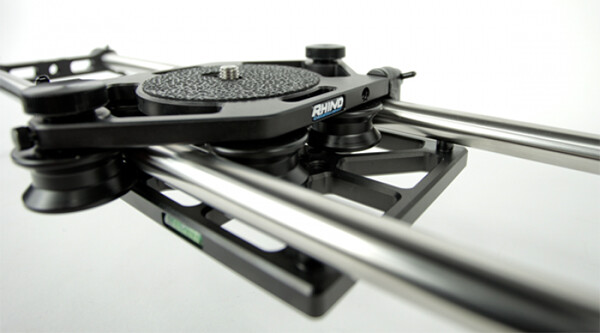
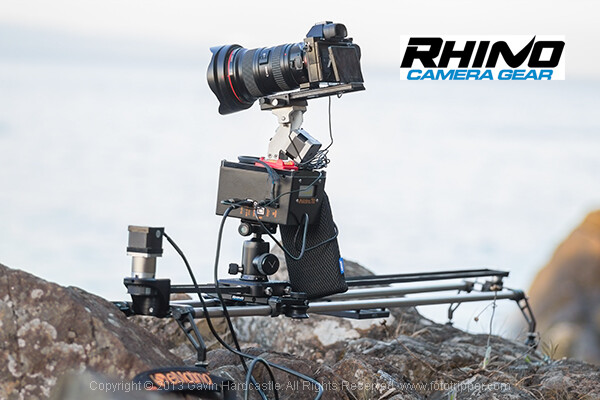
Enter the Rhino Slider Pro 4ft from Rhino Camera Gear, currently priced at $ 550. As the name suggests, this is a four foot wide slider, onto which you can attach your camera or take things a step further and add a robotic tripod head for a three axis solution of motion control awesomeness.

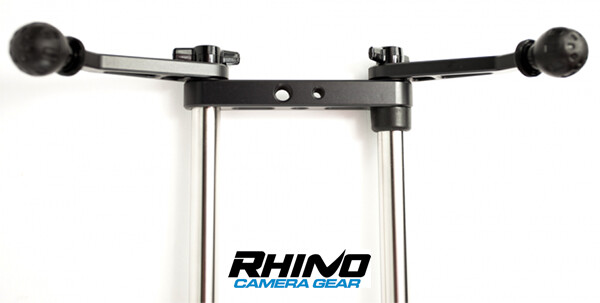
Rhino Slider PRO 4ft

How Smooth is the Slide?

The most important thing to consider when thinking about buying a slider is the smoothness of the sliding action. This is where the Rhino slider excels. The sliding motion of the carriage on to which you place your camera is as smooth as silk. Once you’ve set the tension on the outer wheels of the carriage, you’re good to go and you can rely on a super smooth slide every time.

Rhino Slider Pro Review

Build Quality

There is a huge difference between the build quality of a sub $ 300 slider and what you’re getting with the Rhino. This is a sturdy, well built unit, that performs well in all kinds of conditions. Sliders are a bit like tripods, if you buy a really cheap one –  it’ll probably end up in the trash. Spend a little more and you’ll get a unit that delivers the goods and lasts a long time. All of the Rhino slider parts are well machined and have that solid, reliable feel to them.

Rhino Slider Review PRO 4ft - Gavin Hardcastle

Heavy is Good Right?

Of course, all of that stability comes at a cost of added weight. The product page on the Rhino Camera Gear web site says that the Rhino Pro 4FT Slider weighs around 10 pounds (4.54 kg). That might not sound like much but by the time you’ve strapped on your camera bag, tripods and any other gear, you’ll be carrying the Rhino slider in its case and holding it in your hand. Talk about a forearm workout. Turns out you can’t have your cake and eat it.

For those concerned about the weight, you might want to consider the carbon fibre rails or two foot rails to keep things more portable on long bush hikes.

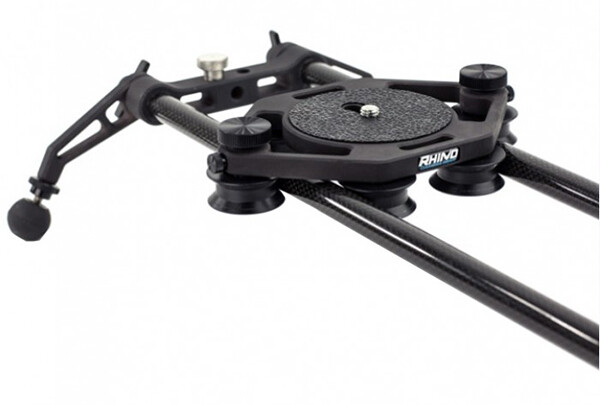
Rhino Slider Carbon Legs

Rhino Slider Pro shown with Carbon fibre rails which weigh much less than the stainless steel ones.

The Rhino Gear Carry Case

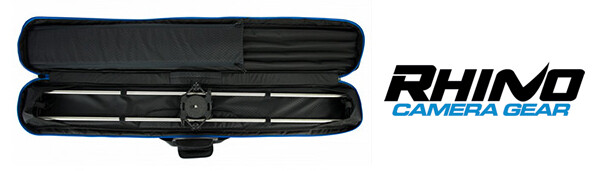
The test unit I received from Rhino Camera Gear came with the Rhino Armor – Slider Carrying Case 4ft, which is an additional $ 100. Let’s be honest, you’re not very likely to be dragging a 4ft slider into the bush without the carry case so you might as well consider it a foregone conclusion that your total cost will be $ 650. On the plus side, the carry case has space for extra rails so that you can extend the length of your slide. Having more rails means more weight, so I’d definitely opt for the carbon rails.

I found the case to be just a little too short. It was difficult and fiddly to fit the slider back in the case due to the four legs on the ends of the slider. If the case had been an inch longer I reckon this would have been much easier. I’m guessing they make it super tight so that the slider doesn’t shift in the case during transport but there’s tight, and then there’s this.

Rhino Armor Carry Case

Pros for the Rhino Slider PRO 4ft

  • Super smooth sliding action
  • Build quality
  • Value for money
  • Ease of use

Cons against the Rhino Slide PRO 4ft

  • Carry Case could be an inch longer to make it easier to pack the slider
  • Stainless steel rails are heavy – consider buying carbon rails if you are going on long hikes
  • End plates could have been taller. I found that the carriage hit my tripod plates long before it hit the rubber brakes.

Rhino Slider PRO Review

Would I Recommend It?

Having looked at the prices of similar sliders that boast the same build quality, the Rhino slider is looking like a bargain at $ 550 (+ $ 100 for the carry case). Before shelling out the dollars though I’d like to test out the carbon fibre rails to see if they perform as well. If the whole rig could be made lighter, that would eliminate my worst grumble and make this a near perfect product. If you’re not too bothered about the weight of those stainless steel rails, I think you’ll be extremely satisfied with the build quality and smooth sliding action of the Rhino Slider Pro 4ft from Rhino Camera Gear.

The post Rhino Slider PRO 4ft Review – Camera Rail System for Time Lapse and Video by Gavin Hardcastle appeared first on Digital Photography School.


Digital Photography School

 
Comments Off on Rhino Slider PRO 4ft Review – Camera Rail System for Time Lapse and Video

Posted in Photography


Google Camera update brings back self-timer and 16:9 crop

30 May

fisheye.jpg

Google again updates its Camera App, this time with self-timer, 16:9 aspect ratio and two more panorama modes. This addresses a point of criticism raised by users when an update in April removed the self-timer function. Other features that come with the new version of the app include wide angle and fisheye panorama options that are based on the Photo Sphere technology. 

News: Digital Photography Review (dpreview.com)

 
Comments Off on Google Camera update brings back self-timer and 16:9 crop

Posted in Uncategorized


Fujifilm X-T1 Mirrorless Camera Review

28 May
Supplied by Fujifilm

The weather resistant Fujifilm X-T1 Mirrorless Camera

I was thrilled when Fujifilm Canada sent me their brand new X-T1 to play with just over a month ago. Along with the camera body itself they sent me three lenses including the XF 55-200mm F3.5-4.8 R LM OIS, the XF 35mm F1.4R and the XF 60mm F2.4 R macro lenses. Upon removing these items from the box I was immediately impressed with the professional fit and finish of the camera body, lenses and lens hoods. Larger companies like Canon could learn a thing about lens hood design from Fujifilm. While the camera body is weather resistant, none of the lenses currently available at the time of this review shard that characteristic.

Electronic viewfinder

Mirrorless cameras seem to be all the rage these days and for good reason. Leaving the mirror out of the light path allows for smaller, lighter, less mechanically complex cameras to be built. But, without a mirror to reflect light into the viewfinder, mirrorless cameras are dependent on providing a viewfinder image via an electronic viewfinder (think of a tiny monitor). Past attempts at electronic viewfinders by Fujifilm and other manufacturers has generally resulted in sub-standard results due to laggy (slow to respond) electronic viewfinders with hard to view results.
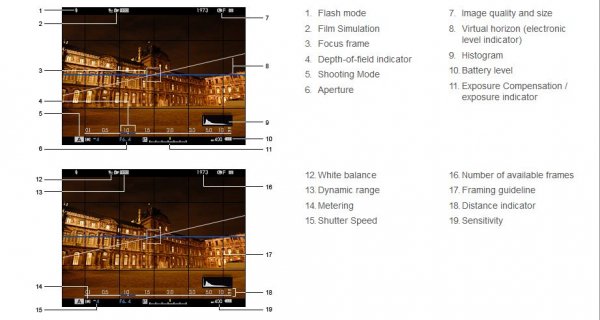
Supplied by Fujifilm Canada

Fujifilm Viewfinder Layout

The X-T1’s viewfinder suffers from none of these problems. The viewfinder is large, bright and very responsive. I normally shoot with one of Canon’s pro cameras and the X-T1’s viewfinder was, surprisingly, a tiny bit larger. An advantage of the electronic viewfinder is that extra information can be superimposed over the image, allowing photographers to make real-time adjustments to exposures before the image is made by glancing at a histogram, instead of having to wait until after the photo is made as is the case on a standard digital SLR camera.

Autofocus

Another issue plaguing many mirrorless cameras has been their autofocus performance. Fujifilm has tackled this head-on by providing 49 focus points spread out across the entire image and those focus points are adjustable in size so that you can customize them based on the type of subject you are photographing. Where most mirrorless cameras rely on a type of autofocus system detecting contrast to determine whether the image is in focus or not, the central nine focus points on the X-T1 use the faster, more accurate phase modulation focus system for superior results.

Image quality

I found the images produced by the sensor of the X-T1 to be especially nice; low in noise and more resolution than I was expecting from a 16 megapixel APS-C sized sensor. That could be due to the fact that the X-Trans CMOS II sensor in the X-T1 uses a unique arrangement of colour filters which supposedly eliminate the need for an optical low-pass filter thereby resulting in increased resolution and perceived sharpness.
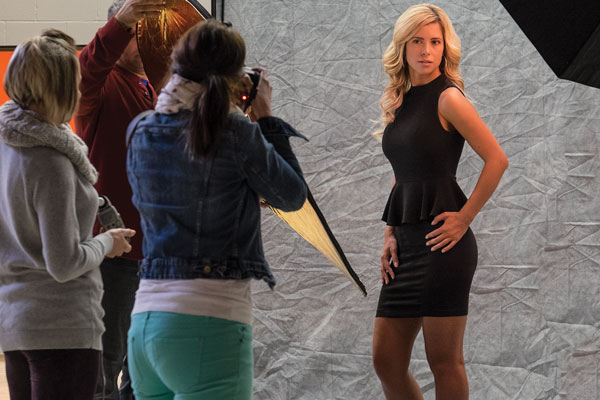
© Paul Burwell Photography

Students photographing model – ISO 3200 – XF55-200mm F3.5-4.8 R LM OIS Lens
1/25 at F6.4, ISO 3200, 95mm

WiFi

The X-T1 also has built in WiFi capabilities that allow you to download a free app for your smart device. This app allows you to remotely control your camera from a distance. A nifty application that requires additional hardware on most other current cameras to achieve similar results.
Supplied by Fujifilm

Controls on top of the camera

Camera controls

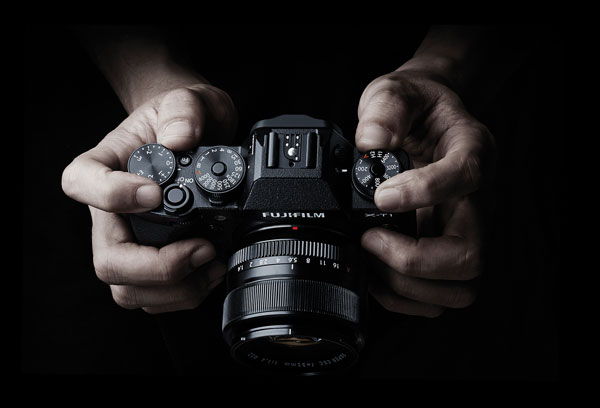
What I became especially fond of while working with the X-T1 is the controls for aperture, shutter speed, ISO and exposure compensation. Aperture is controlled by rotating a ring on the lens, just next to the body. ISO, shutter speed and exposure compensation are all controlled via dials on the top of the camera. Reminded me of some of my old-school SLR cameras, but it took me virtually no time to adapt from the Canon cameras I’ve used for the last 20 years or so.

Size and weight

The camera body itself is extremely light-weight but fit comfortably in my somewhat gigantor hands. I suspect adding the optional battery grip and/or hand grip would make it even better and of course battery grips always help with the making of vertical photographs. That said, most of the controls were easily accessible and with the body itself weighing in at just 440g (15.4 ounces), it is a camera that I could easily carry and shoot with for extended periods of time with little or no hand/shoulder/arm fatigue setting in. Even with the 55-200mm lens attached, the weight was just 1020g (36 ounces).

Customization

Another pro-camera feature I was thrilled to find on the X-T1 was a total of six different completely configurable multi-function buttons. This allowed me to fine-tune access to features like selecting focus points, depth-of-field preview, macro mode, autofocus mode and white balance so that I could program the buttons most convenient for me to the functions I use most.

© Paul Burwell Photography

Studio Tulips – XF60mm F2.4 R Macro Lens
5.3 Seconds at F8.0, ISO 200, 60mm

Dislikes

If you’re wondering if there is anything I didn’t like about the camera, there is. I strongly dislike the four-way controller on the back of the camera. Where the other buttons on the camera offer tactile feedback when pressed, that feedback is absent on the four-way controller. Since I needed to use the four-way controller to select different focus points, I was constantly using (or trying to) the four-way controller. I found it virtually impossible to use without glancing towards it (thus removing my eye from the viewfinder and missing a chance at retiring via a photo of a brief appearance by Sasquatch if that circumstance had occurred) and continually frustrated by it. Living where I live in Canada and therefore in cooler temperatures, it is absolutely impossible to use with any sort of gloves in conjunction with the four-way controller, and on a mostly professional-feel camera like this, it was a bad design or manufacturing decision.

Another quality issue on the camera body is the door that slides opens to allow for the removal of the SD memory card. It feels ridiculously flimsy and I felt lucky to be able to send the camera back to Fujifilm with the door intact because it always felt like it was about to break off.

© Paul Burwell Photography

Red-breasted Nuthatch – XF55-200mm F3.5-4.8 R LM OIS Lens
1/800 at f4.8, ISO 800, 200mm

Overall

Overall though, this camera is a gigantic win for Fujifilm in my opinion. I’m a wildlife photographer by nature and for the most part, that’s the type of shooting I did with the camera. I was suitably impressed with the autofocus, and was thrilled with the quality of the lenses and sort of images that the sensor produced. Regardless of the situation (high or low ISO), the images were always impressive and the camera did a great job at judging the white balance although I always shot in RAW mode just to give me that extra flexibility in case the camera got in terribly wrong.

Need for longer lenses

For a wildlife photographer though, Fujifilm’s biggest weakness is the lack of larger lenses. The biggest lens I could get my hands on was the 55-200mm (84-305mm equivalent on a full-frame camera). While that’s okay for casual wildlife photography, it stops well short of “real” telephoto focal lengths. For instance, just a couple of days ago I was out at my favourite marsh with my camera, 500mm lens with two teleconverters attached (2.0x and 1.4x) for a grand total of 1400mm of image magnification. However, Fujifilm representatives tell me they have plans for bigger glass in the future and if that comes to be, I know that it would make a tempting package for me to have in my kit.

Snowshoe Hare - XF55-200mm F3.5-4.8 R LM OIS Lens 1/200 at f 4.8, ISO 400, 200mm

Snowshoe Hare – XF55-200mm F3.5-4.8 R LM OIS Lens
1/200 at f 4.8, ISO 400, 200mm

Room for improvement in some areas

Another area that still needs some work is the autofocus system. While the X-T1 is a great improvement over other mirrorless systems I’ve tried, it still suffers from performance issues with moving subjects rapidly changing distances between shots. Theoretically, the X-T1 can shoot 8 frames-per-second in continuous drive and focus modes. However, if the subject you’re focused on is rapidly moving towards you, the camera’s processing slows down and I was lucky to get 2 or 3 frames per second.

An additional improvement I’d like to see is an expansion in the number of phase-detect autofocus points. Nine out of forty-nine isn’t a bad ratio, but more would be better. I love the control over the size of focus points, but having more of the high-performance phase-detect points would help a lot too for composition on moving subjects.

For accurate exposures, I love having a live histogram overlaid on my image in the viewfinder. However, it was frustrating to have that histogram disappear when I half-pressed the shutter button to focus on my subject. While in continuous focus mode, having the histogram remain visible would help me make better exposures overall.

© Paul Burwell Photography

Red-breasted Nuthatch – XF55-200mm F3.5-4.8 R LM OIS Lens
1/800 at f5.6, ISO 400, 200mm

Final word

Overall, I highly recommend this camera. I teach hundreds of photography students each year the basics of operating their interchangeable lens cameras. I can confidently state that a student with this camera system would probably find learning the basics a bit easier than with a standard digital SLR camera system if for no other reason than the live histogram available in the electronic viewfinder and the easy to access, logically laid out controls. Further, for the seasoned user, the X-T1 body and lenses make a great combination for producing high-quality professional results.

The post Fujifilm X-T1 Mirrorless Camera Review by Paul Burwell appeared first on Digital Photography School.


Digital Photography School

 
Comments Off on Fujifilm X-T1 Mirrorless Camera Review

Posted in Photography


HTC One M8 camera review

28 May

HTCONEM8.jpg

The HTC One M8 is HTC’s latest flagship smartphone and competes with the Samsung Galaxy S5, Sony Xperia Z2, Nokia Lumia 930, LG G2 and Apple’ iPhone 5s. While HTC has stuck with the design language of the original One, the new model is slightly larger and comes with a faster processor, more RAM, bigger screen and new software functions. Images are captured on a 1/3-inch 4MP CMOS sensor but with the assistance of a secondary chip that records depth information. Read our review to find out how it performs

News: Digital Photography Review (dpreview.com)

 
Comments Off on HTC One M8 camera review

Posted in Uncategorized


Lomography seeks crowdfunding for Lomo’Instant Camera

28 May

lomo_instant.jpg

Lomography has announced a new Kickstarter campaign, looking to fund the production of the Lomo’Instant camera. This is the company’s first fully instant camera, featuring a 27mm equivalent lens with 0.4m close focusing distance, a built-in flash, tripod mount, fisheye and portrait lens attachments and included color gels. It accepts Fujifilm Instax Mini film, and is estimated to become available in late 2014. Learn more

News: Digital Photography Review (dpreview.com)

 
Comments Off on Lomography seeks crowdfunding for Lomo’Instant Camera

Posted in Uncategorized


25 May, 2014 – The Ultimate Mirrorless Camera Strap?

26 May

The passion of photography for many soon turns into an addiction as we look for the latest and greatest gear.  This includes camera bags and now camera straps.  Kevin Raber today reviews The DSPTCH Camera Strap System.  It’s a modular camera strap that works well with the small format cameras mirrorless cameras.  It’s definitely a strap to have but beware it will lead to a new addiction.  

Have you checked out the Kimberley Workshop next April.  This is definitely one that should be on your bucket list.


The Luminous Landscape – What’s New

 
Comments Off on 25 May, 2014 – The Ultimate Mirrorless Camera Strap?

Posted in News


Case Logic SLRC 205 Sling Camera Bag Review

22 May

Case Logic SLRC 205 Sling Camera Bag Review

If you’ve ever bought a case for a tablet or a hard drive then you’re probably familiar with Case Logic products. The ubiquitous logo is hard to miss in the accessories section of computer and electronics stores.

Case Logic SLRC 205 Sling Camera Bag Review

What you may not know is that Case Logic also make some very good camera bags, up there in quality and design with established brands such as Lowepro, Crumpler, Kata and Think Tank.

So when David from Love Cases got in touch asking if I’d like to review a camera bag sold in his store, I selected the Case Logic SLRC 205 sling style backpack to test out.

Why a sling bag?

The type of camera bag I use depends on the nature of the shoot and the amount of equipment I need. For example, I like to use my ThinkTank Retrospective 20 on portrait shoots. It’s a shoulder bag into which I can easily fit everything I need. But, it’s a heavy bag and all the weight is on one shoulder. After a while it hurts, and becomes uncomfortable to walk with – that limits its use to shoots where I don’t have to walk very far.

Sling bags are ideal when I need to walk some distance to arrive at the location of the shoot. I can put my gear in the bag, then take out what I need when I arrive.

I like to use a Black Rapid RS-Sport camera strap, which leaves my camera hanging down by my right side ready to use. If I have a sling bag I can keep it on my back while I shoot, held in place by the straps so it doesn’t move around. I don’t have to worry about where it is, or someone stealing it if I put it down.

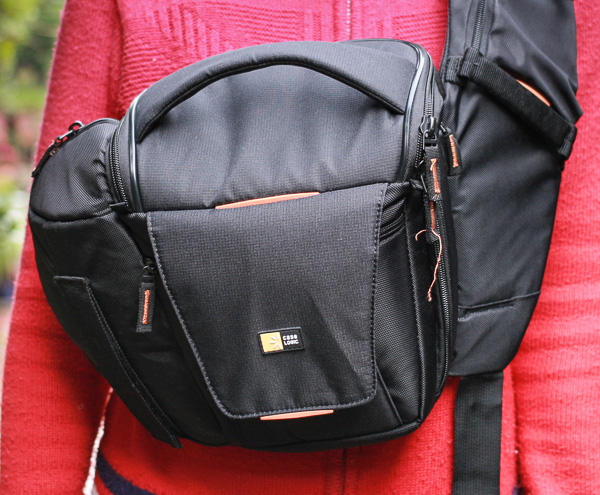
However, I don’t use sling bags in one way they are intended. I never bring them around to the front to remove gear, as I find they are so high on my body that it’s an uncomfortable process. Not everybody feels this way, I’m sure. This photo shows where the camera bag lies when you swing it around to the front.

Case Logic SLRC 205 Sling Camera Bag Review

The Case Logic SLRC 205 bag

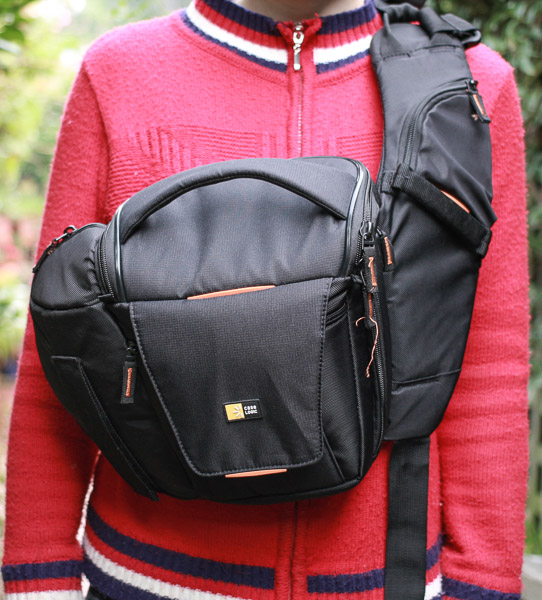
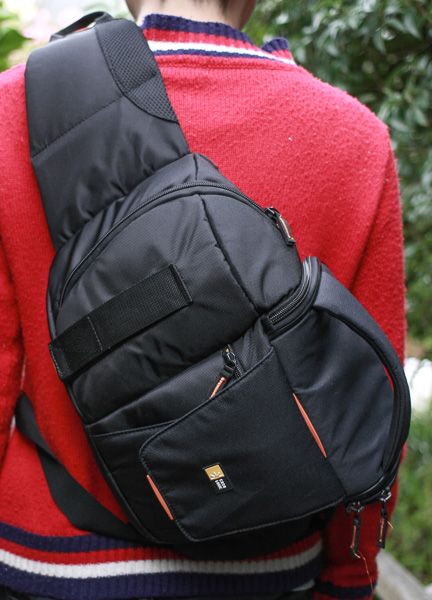
I’ve used this Case Logic sling bag on several shoots and I’m very pleased with it. It would suit me better if the main camera compartment was a little bigger, and it would be nice if it had a waterproof cover. But apart from that I’m delighted with it.

Case Logic SLRC 205 Sling Camera Bag Review

The Case Logic SLRC 205 from the back.

Case Logic SLRC 205 Sling Camera Bag Review

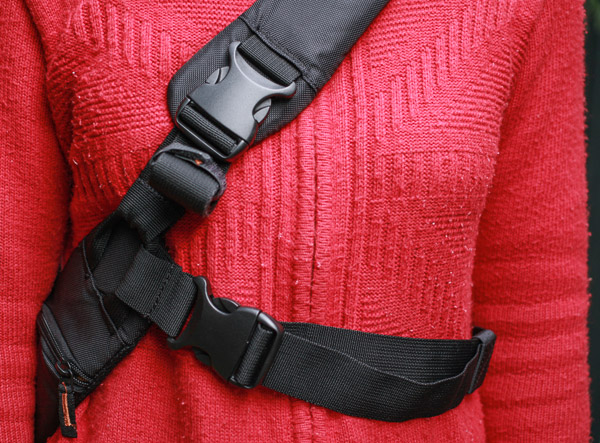
The bag straps from the front. The waist strap (bottom right) provides extra support and prevents the bag from sliding around on your back.

Features

I really like the design of this camera bag. It has a number of well thought out features that make it easy to use.

Main camera compartment

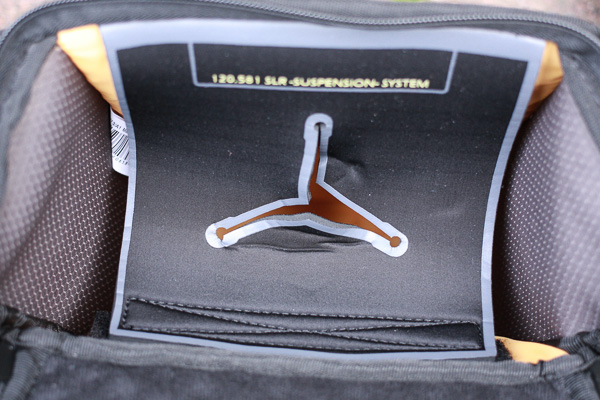
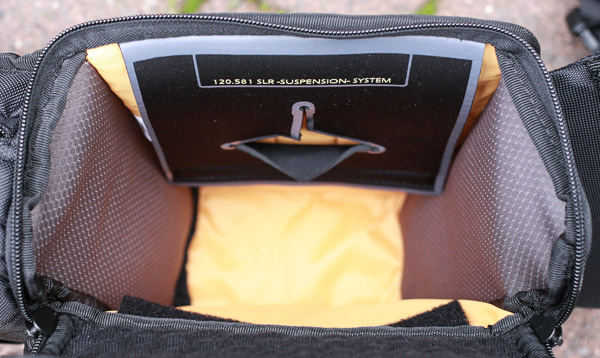
This is for your camera and lens. Case Logic use a hammock system to support your camera. There is a flap with a hole in it at the top of the compartment, and you can place the lens through the hole and rest your camera on top. It keeps your camera ready to hand and provides extra protection if you drop the bag.

Case Logic SLRC 205 Sling Camera Bag Review

It’s a great idea, but the only drawback for me is that the compartment is too small for my camera, (an EOS 5D Mark II), when the hammock is in position. In terms of size, this bag is best suited for small digital SLRs or mirrorless cameras.

However, if I fold the hammock down (it is supported by velcro) I can fit my camera inside. The camera rests on the lens in this position, so I attach the lens hood to prevent the lens cap being dislodged by rubbing against the side.

Case Logic SLRC 205 Sling Camera Bag Review

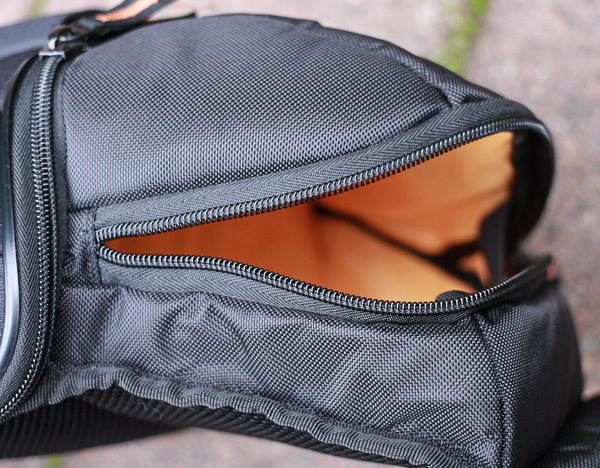
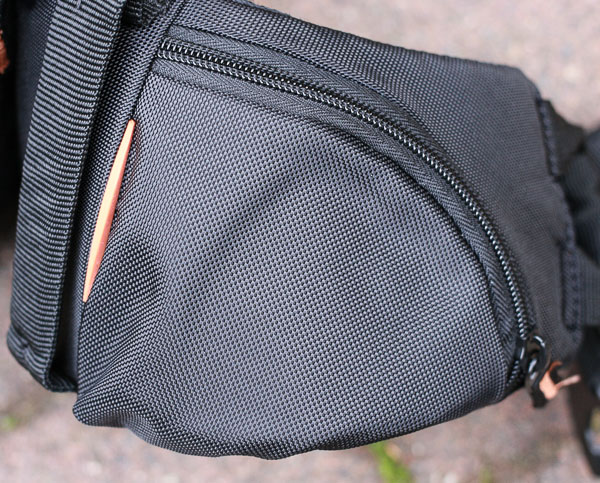
Small side compartment

This is big enough to store another lens or accessories. I use it for my Black Rapid camera strap and a small prime lens. It’s not designed for another body, so if you want to take two cameras on a shoot then you’ll need another bag.

Case Logic SLRC 205 Sling Camera Bag Review

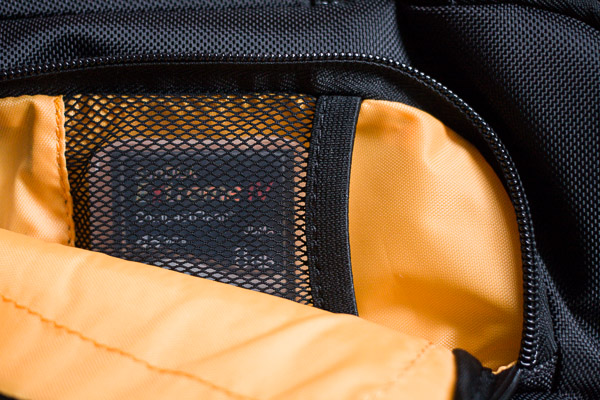
Memory card storage

On the other side is a zipped compartment that opens to reveal memory card space storage.

Case Logic SLRC 205 Sling Camera Bag Review

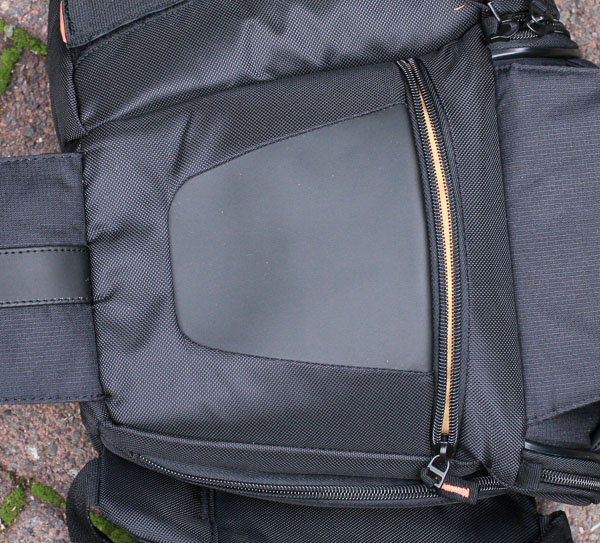
Wallet compartment

You can put anything that fits in here, but it’s ideal for a wallet. It’s hidden behind the velcro flaps used to support a tripod, making it virtually impossible for someone to steal the contents unnoticed.

Case Logic SLRC 205 Sling Camera Bag Review

Mobile phone compartment

One of the straps has a small flap ideal for storing a small mobile phone. My iPhone 3Gs fits inside, just. If you have a larger phone than this you’ll need to find somewhere else to keep it.

Case Logic SLRC 205 Sling Camera Bag Review

Tripod support

There’s a hook-n-loop strap to support a tripod. It’s a nice idea, best suited to small, lightweight carbon fibre tripods rather than heavier models.

Case Logic SLRC 205 Sling Camera Bag Review

Bag quality

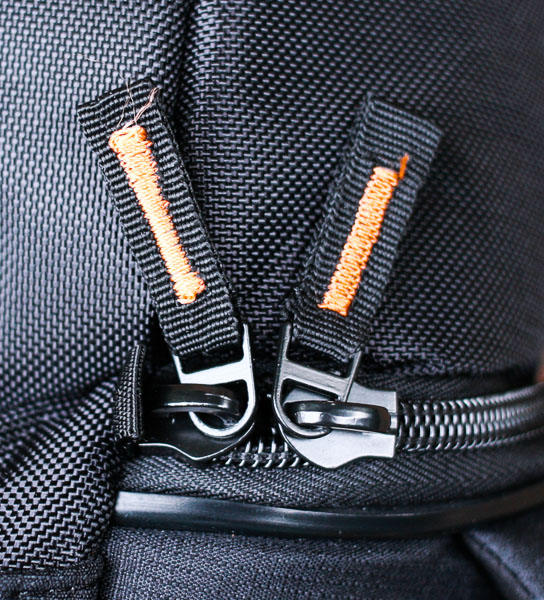
The quality of this bag is excellent. The outside of the bag is made from hard-wearing nylon. The zips are strong and durable and have tags marked with orange thread, making it easy for you to see them.

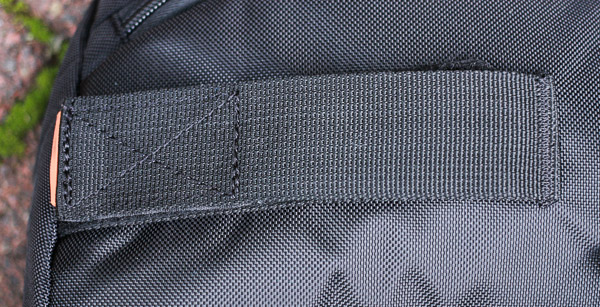
There are three strong, conveniently placed, handles that make the bag easy to pick up. The shoulder strap is well padded and nice and wide to spread the weight. The interior is bright yellow, so it is easy to see your black accessories such as lens caps. The support straps come with velcro tabs so any unused straps don’t dangle down.

Case Logic SLRC 205 Sling Camera Bag Review

Conclusion

This is a high quality camera bag ideal for anybody who takes a minimal amount of equipment on a shoot. It is most suited for photographers who use small SLR or mirrorless cameras. It is comfortable and easy to use. The only drawbacks are the size (if you have a large camera body) and lack of a waterproof cover.

Thanks to David from Love Cases for supplying the bag for review. Love Cases is a UK based company with international delivery. You can also buy the Case Logic SLRC 205 from Amazon.

Mastering Photography – additional learning

Mastering Photography ebook

My ebook Mastering Photography: A Beginner’s Guide to Using Digital Cameras introduces you to photography and helps you make the most out of your digital cameras. It covers concepts such as lighting and composition as well as all the camera settings you need to take beautiful photos like the professionals.

The post Case Logic SLRC 205 Sling Camera Bag Review by Andrew S. Gibson appeared first on Digital Photography School.


Digital Photography School
 
Comments Off on Case Logic SLRC 205 Sling Camera Bag Review

Posted in Photography


A Clip-on Camera: Capture Your Day in a Unique Way

20 May

Extra photos for bloggers: 1, 2, 3

Your day is full of fun and random moments that are, in our opinion, reality tv gold. So, where’s your film crew?

Meet the Narrative, a tiny clip-on camera to document your every day life in a much less obtrusive way.

It automatically snaps a pic every 30 seconds throughout your day and stores photos online to reminisce over later.

That cute puppy you saw in the park? Got it. That shop with the dinosaur print dress? Click. Your BFF who just spilled her iced coffee on an unsuspecting stranger? Oops.

Spend your time looking at cute things or trying to help clean up a coffee disaster and the Narrative will photograph the whole thing for you to laugh (or cringe) over later.

Capture the Moment With the Narrative
$ 229 at the Photojojo Shop


© Britta for Photojojo, 2014. |
Permalink |
No comment |
Add to
del.icio.us

Post tags:


Photojojo

 
Comments Off on A Clip-on Camera: Capture Your Day in a Unique Way

Posted in Equipment


Nokia releases update to its Camera Beta app

15 May

395c7c4d-9019-4274-9e44-1bb980151986.jpg

Nokia’s Camera Beta for Windows Phone is arguably one of the best camera apps for enthusiast users. It combines comprehensive manual control with an excellent user interface. Now Nokia has released an update that makes the app even better. It now supports continuous autofocus and surround sound capture. Learn more

News: Digital Photography Review (dpreview.com)

 
Comments Off on Nokia releases update to its Camera Beta app

Posted in Uncategorized