RSS
 

Posts Tagged ‘Camera’

Nikon launches S2 1-System mirrorless camera

14 May

S2_10_30_PD_RD_frt34l.png

Nikon has launched its latest 1-System compact mirrorless camera with the inexpensive S2. It features a 14MP CMOS sensor, hybrid autofocus system, continuous shooting at 20 fps and 1080/60p video recording. The S2 is also compatible with the optional WU-1a wireless mobile adapter for Wi-Fi connectivity and uses microSD memory cards. Learn more

News: Digital Photography Review (dpreview.com)

 
Comments Off on Nikon launches S2 1-System mirrorless camera

Posted in Uncategorized


Parrot launches drone with 14MP camera and 180-degree fisheye lens

13 May

bebop_drone1.jpg

Parrot, the maker of the popular AR Drone 2.0, has launched a new model, the AR Drone 3.0. It also flies under the name Bebop. The Bebop is essentially a flying camera with four rotors. The camera comes with an F2.2 fisheye lens with a 180-degree field of view and a 14MP sensor. Learn more

News: Digital Photography Review (dpreview.com)

 
Comments Off on Parrot launches drone with 14MP camera and 180-degree fisheye lens

Posted in Uncategorized


Software update speeds up Samsung Galaxy S5 camera

13 May

samsunga53.jpg

Samsung has released a software update for the international version of its Galaxy S5 flagship smartphone. The new software is promising speedier camera and gallery app startup, plus more responsive fingerprint recognition. Apart from the faster camera startup, the update also brings improved general performance and better RAM management. Learn more

News: Digital Photography Review (dpreview.com)

 
Comments Off on Software update speeds up Samsung Galaxy S5 camera

Posted in Uncategorized


Samsung announces NX3000 mirrorless camera

08 May

NX3000_015_Front-Filp-Up_Black.png

The NX3000 is Samsung’s latest addition to its NX mirrorless camera line. Along with the 3″ flip-up display for self-portraits, it has a 20MP APS-C CMOS sensor and can shoot at 5fps. The NX3000 also comes with Wi-Fi and NFC ‘Tag & Go’ connectivity options. The NX3000 will ship with Samsung’s new compact 16-50mm F3.5-5.6 power zoom ED OIS lens. The camera will be available in black, white or brown. Learn more

News: Digital Photography Review (dpreview.com)

 
Comments Off on Samsung announces NX3000 mirrorless camera

Posted in Uncategorized


Huawei launches ultra slim Ascend P7 with 8MP front camera

07 May

huaweiascendp7.jpg

The Chinese technology company Huawei has launched its latest flagship Android smartphone, the Ascend P7. At 6.4mm the new model is just a touch thicker than its predecessor, the Ascend P6, but it’s still one of the thinnest devices on the market. The Ascend P7 doesn’t come with 4K video recording but the front camera offers unusually high resolution at 8MP. Learn more

News: Digital Photography Review (dpreview.com)

 
Comments Off on Huawei launches ultra slim Ascend P7 with 8MP front camera

Posted in Uncategorized


10 Accessories To Make Your Camera Bag Super-Interesting

07 May

Once you get into photography, many of the things you want to buy are very expensive, and all of the sudden those 15 lenses on your wish list seem to compete with your children’s college fund. For some reason, you start feeling like you “need” stuff to be a better photographer. Truth be told, you don’t need much, but it’s Continue Reading

The post 10 Accessories To Make Your Camera Bag Super-Interesting appeared first on Photodoto.


Photodoto

 
Comments Off on 10 Accessories To Make Your Camera Bag Super-Interesting

Posted in Photography


Review of the Olympus TG-850 ‘Tough’ Waterproof Camera

06 May

I’ve discovered a flexible companion for all weather action, adventure, and family fun.

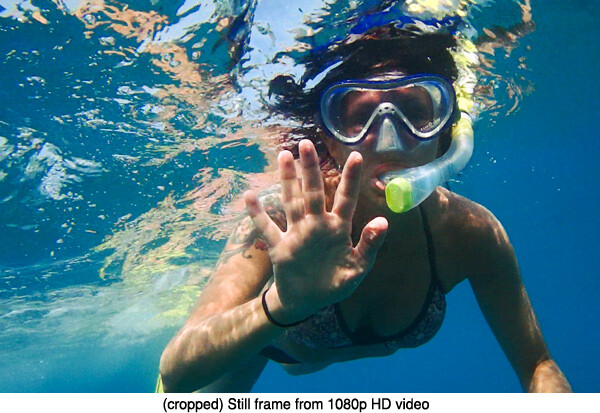
JillSnorkeling-TG-850-HD-video-frame

I’d been researching the ideal pocket-sized, waterproof, and shock-resistant camera to take to Hawaii for one of my Land and Sea Photography workshops. I’d compared every “tough” camera available online, but not one jumped out and said “Buy Me!”

Besides the full DSLR kit that I’d haul to the islands, I wanted to test and demonstrate a well-featured compact for capturing outdoor sports and vacation adventures. Almost every small durable camera available had been on the market for at least a year. Surely something ideal had been unveiled at the recent 2014 CES show in Vegas, but nothing was to be released in time for my imminent sailing.

My wish list of desirable features was brief:

  • Pocket-sized
  • Light weight, solid build
  • Comfortable, intuitive controls
  • Button-triggered Movie mode
  • Real wide-angle zoom below 28mm
  • Articulating LCD screen
  • Good LCD visibility in bright daylight and underwater
  • Fast power-up to shoot time
  • Fast to focus
  • Intelligent Auto ISO and low minimum ISO
  • One-button navigation to common shooting options
  • Exposure compensation
  • Underwater shooting modes
  • LED illumination for extra lighting
  • HD 1080p video
  • Hi-Speed 60fps or faster video for Slow-Motion fun
  • Sequential timer for action capture effects
  • Fast frame rate for recording bursts of action
  • Eye-Fi SD card compatible to shoot and upload images and video
  • Under $ 300 USD
  • Oh, and it must be crushproof, droppable and waterproof to at least 25 feet depth

I held out patiently, but my departure date was nearing and I was reluctant to purchase last year’s technology. Then I learned of the new Olympus ‘Tough’ TG-850, loved what I read on the Olympus Website. I made contact and a pre-release sample was sent overnight to my hotel just in time.

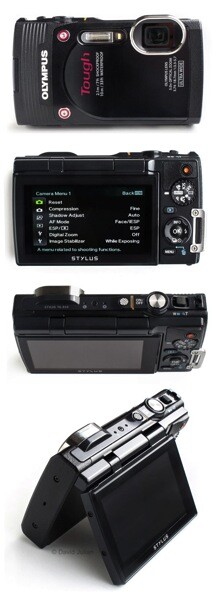
Olympus TG 850 camera 4VIEWS sm

I charged it up with the supplied direct-connect USB–>MiniUSB cable and secured a fast SD card into the waterproof double-locking connection, memory and battery compartment. My test camera had arrived in a generic box without instructions, yet I was delighted to find that the camera’s menus are the most intuitive I’ve seen, and feature a brief description for each selected menu option.

Once I’d configured some favorite user options, I tethered the camera’s supplied strap to my wristband for some body surfing to see how the TG-850 handled pounding surf breaks. The TG responds well to capturing spontaneous action and the lens clears of water drops easily. Power-on to shoot time feels very responsive at about 1.3 seconds. Weighing under 8oz (226g), it’s easy to use for hours without fatigue.

Features and User Experience

LCD screen

The TG-850′s hinged 3″ diagonal 460k-dot LCD screen is a unique feature in today’s compact waterproof camera market. The sturdy LCD screen can be flipped upwards to 180º, and is also one of my favorite features. It allows the convenience of shooting at low and high angles, or when snorkeling along at the surface or wanting an ant’s eye view of nature. Flip the LCD all the way facing forward and it’s great for solo selfies and group portraits.

Wide lens

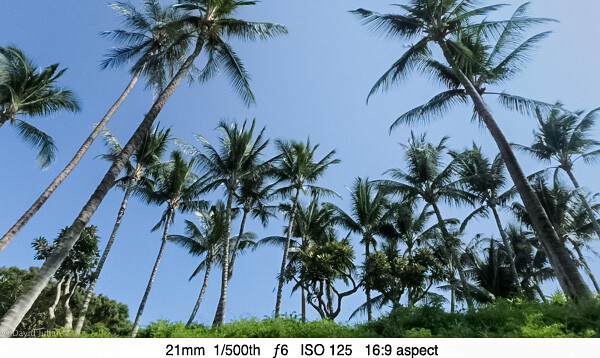
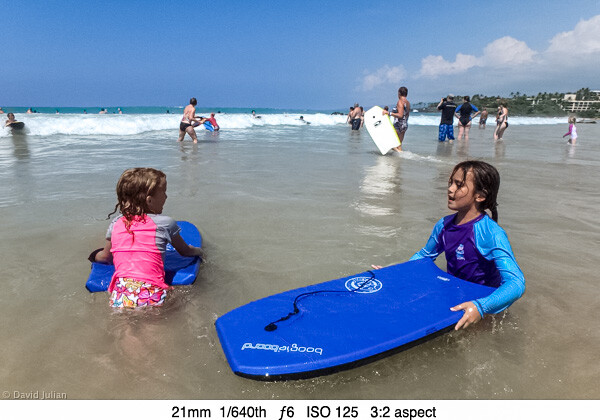
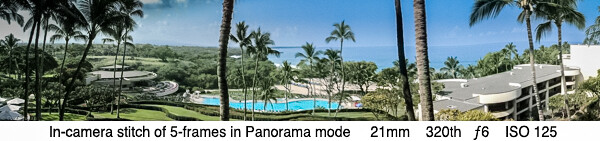
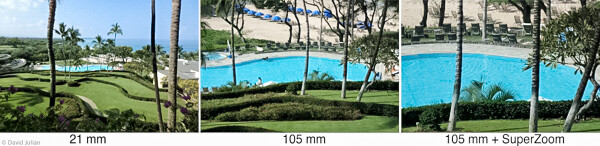
The very wide 21mm lens is my favorite feature of this camera. At review time, it’s the only waterproof pocket compact lens that is that wide without needing any extra attachments. Such a wide view allows more dramatic landscape compositions, in-the-action sports captures and easier group portraits. A digital zoom feature add extra reach, but as can be expected, there is some loss of quality. The on-off, zoom, Shutter, Movie, Mode and Playback controls are placed well for my single-handed operation. The TG-850 contains Olympus’s latest 16mp back-side illuminated CMOS ½.3 sensor coupled the powerful TruePic VII processor, for faster frame rates, video processing and other options.

DJulian Palm Trees 21mm

DJulian Kona kids boogieboards

Exposure settings

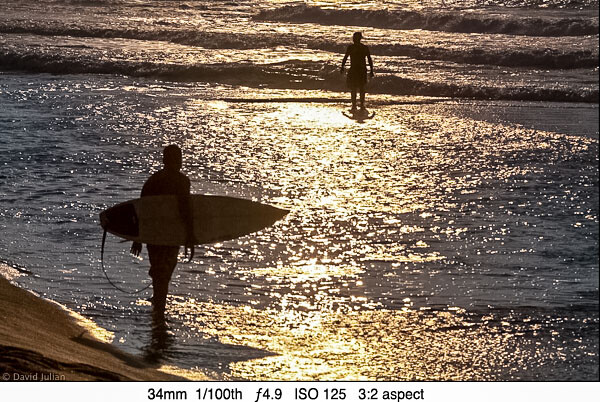
The sensor’s light sensitivity (ISO) can be set from 125 to 6400, HIGH or AUTO. My test of ISO settings revealed better quality than expected at settings from 200-1600, and after that it’s noisy as expected under magnification. With shutter speeds from 4 seconds to 1/2000th, there is plenty of room for creativity under many conditions. Set to Sports mode, my photos revealed very crisp water droplets shaken from a wet pooch. The onboard flash helps fill in harsh shadows or in backlit portraits. Metering can be switched from ESP Auto to Spot Center for more accuracy when needed. High contrast backlit scenes are easily balanced using the Exposure Compensation.

DJulian Backlit surfers Kona

File format and image quality

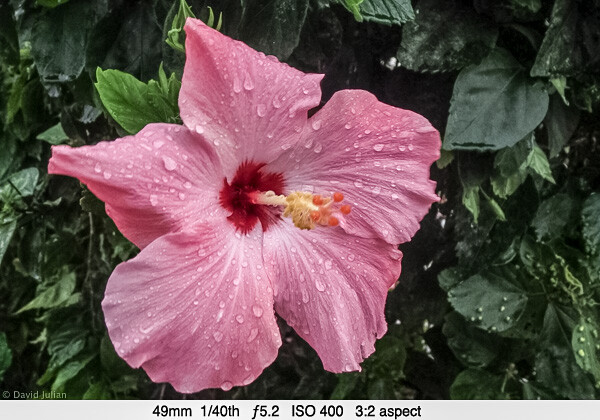
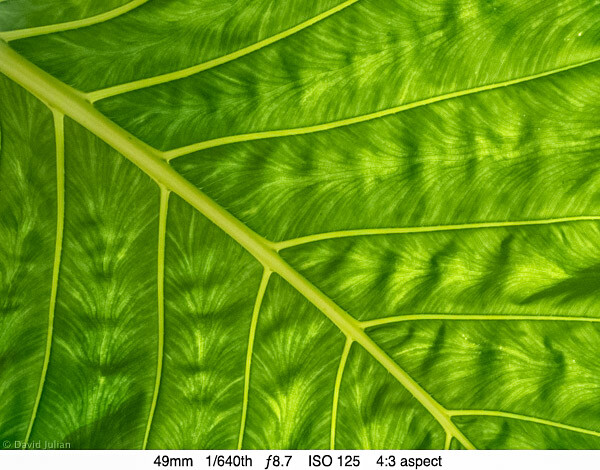
This camera does not shoot RAW format. No waterproof compacts do at this time, and I’m not expecting RAW anytime soon. Apparently the manufacturers uniformly conclude that this market segment isn’t after RAW processing. The good news is that the full-resolution 16mp JPGs I shot under varying conditions appear quite sharp when viewed in Lightroom at 1:3 magnification. At full-screen and 1:1 viewing, one can see the typical effects of compact sensor JPG processing that results in a rather painterly appearance. Photos shot at ISO 125-200 revealed the best shots of the trip.

DJulian Pink Hibiscus

DJulian Molokai Leaf Detail

Video

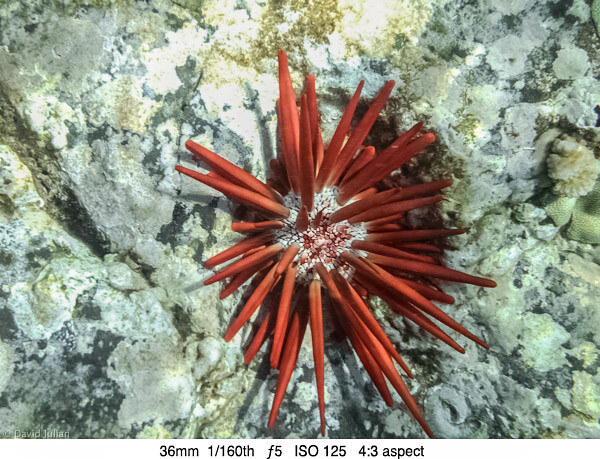
The TG-850 can shoot video at 1080 60p, 1080p, 720, VGA, high-speed 120fps at 640×480 and even 240fps at 432×324 video captures. Dual-mode lens-shift stabilization reduces normal handheld camera shake, and Hybrid mode reduces rhythmic shake during video shooting. I was ready to take the camera snorkelling off Lanai. Truly crisp contrasty underwater photography is a challenge for compact cameras, but the TG-850 produced very acceptable video for my online posts. Water depth plays a big part in color temperature and contrast, and three Underwater scene options help warm up the underwater blues.

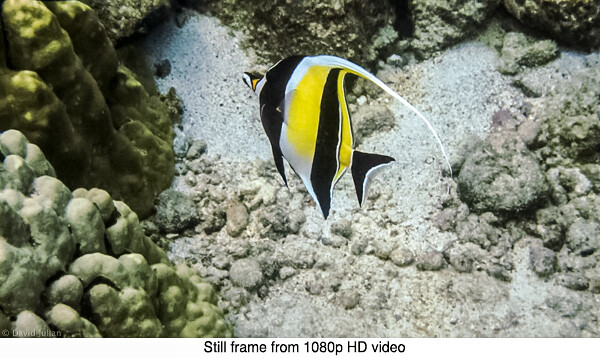
I am impressed with the sharp stills I clipped right from the 1080p video using a menu option. My use of the 120fps High Speed video produced fairly smooth slow-motion playback, though not quite as smooth as a Hero3 camera. The TG-850 videos are not distorted at the corners and edges as those I made with the Hero3. I found auto-exposure struggling when panning in uneven light conditions, but worked well enough for pleasing videos.

DJulian-Hawaii-Red-Urchin.jpg

DJulian Moorish Idol HD still

DJulian Sea Turtle Makena Maui Video Still

Here is a couple samples video done with the TG-850, the second one is done using 120fps high speed shooting mode.

Another feature that’s a lot of fun is the sequential shooting modes that allow fast frame bursts. Options include four different sequence settings including the ability to record a 60-frame burst in one second, a 60-frame burst at 20 fps for 3 seconds, or a 200-frame burst at 2.5fps for 80 seconds. A built in interval timer is also completely configurable for start delay time, interval time and sequences up to 99 frames. To replay the shot sequence you select the image ‘stack’ and the images show automatically in sequential order. Smart, easy and intuitive. For those who want to upload their images to a smartphone for social media, the TG-850 even has a menu setting to enable Eye-Fi SD card wireless transfers. I look forward to testing this soon.

DJulian Kona pool 21mm PANO TG 850 iso125

DJulian Kona pool TG850 ZOOM illo 3

DJulian Jill pool twirling frame sequence TG850

The 5-way control pad’s center button gives instant access many common shooting options:

  • 18 Picture styles including: Natural, Interval, Night Scene, Miniature, Backlight HDR, three underwater modes and some artsy effects you will at least try once
  • Flash control and LED assist lamp on/off – helps add light for closeups, macro and even video in low light
  • Exposure Compensation, +/- up to 2 stops helps compensate for difficult lighting
  • White Balance, including two custom WB settings
  • ISO including a very smart AUTO ISO mode
  • Timer and Multi-Frame speed modes
  • Image Size settings from 16mp to 3mp and VGA, which is great for emailing and social media
  • Aspect Ratios of 4:3, 16:9, 3:2, and 1:1 (square)

Other creative features accessible in the camera menus include:

  • AF Face/ESP detection – locks focus onto faces for quick grabs at gatherings
  • AF Spot – tracks the center of the frame. Works well when the subject is in a busy environment
  • AF Tracking – when a subject is moving across the frame or towards you
  • Spot or ESP pattern metering
  • Four sequential frame modes
  • The eighteen scene modes include the common standards as well as three underwater modes
  • Custom self-timing mode
  • Regular and Hybrid Stabilization for smoother video
  • Super Macro mode

Conclusions

The TG-850 is an excellent value for the features provided. It’s ease of use will appeal to families, and creative features will win over active enthusiasts. I cannot wait to take it back out into the wilds and have more fun.

Pros:

  • Well designed, fully-featured and very durable compact camera for outdoor and family adventures
  • Sturdy tilting LCD encourages experimentation
  • 16mp images and HD video quality are just right for most web and print publishing needs
  • 400-1600 ISO photos are better than other cameras we tested
  • Solid build and double-locked battery/card/cable door has a strong yet easily replaceable gasket
  • Little motor noise recorded when zooming video
  • Excellent creative options for shooting action
  • Face-detection ESP AF is rapid and helpful
  • Fast power-up to shoot time
  • Intuitive menu navigation and quick-button access to shooting options
  • Eye-Fi card ready for WiFi transfers
  • Recessed lens is well protected and clears easily when wet

Cons:

  • No RAW format
  • High quality JPGs seem overly processed when viewed full screen
  • The TG-850 has forgone the 720p high-speed video of its predecessor, the TG-830. Even my iPhone 5s can shoot 120fps High-speed in HD
  • Ridged plastic grip could be a durable rubber for wet hands
  • Slight jumpiness and motor noise at times when zooming during video
  • HD Video crops slightly into wide angle, appearing more like 24mm
  • Zoom switch could be sturdier, with smoother video zoom

Advice

  • Buy a floaty strap if you plan to use the camera around deep water. At the time of this review, Olympus is offering a free one with each camera purchase.
  • Try attaching a mini tripod or telescoping monopod such as the ones from iStabilizer for even more active shooting fun.
  • You will want at least one spare battery. I found a set of two Halcyon 1500 mAh batteries and a matching AC+Auto charger from Amazon for under $ 20. The Halcyon batteries are higher capacity than the originals, though I have not compared their actual hard-use longevity. (Note from the Editor: please note that using off market batteries can cause a void in your warrantee if anything should go wrong – be cautious and proceed at your own risk)
  • Check the battery/card door gasket for tiny particles of sand before every use in water. Any residual particles can admit water if under pressure.

The post Review of the Olympus TG-850 ‘Tough’ Waterproof Camera by David Julian appeared first on Digital Photography School.


Digital Photography School

 
Comments Off on Review of the Olympus TG-850 ‘Tough’ Waterproof Camera

Posted in Photography


DIY: Camera Brooch

01 May
Extra photos for bloggers: 1, 2, 3

Boring Blazer? Tiresome Trench? Stupid Suit?

No need to rush out for a full-on makeover. Give your stale clothes a splash of character with a DIY Camera Brooch.

All it takes are a few supplies and your kindergarden coloring skills.

You’re just twenty minutes away from adding fashionable flair to your wearisome wardrobe.

Learn How to Make a Camera Brooch

(…)
Read the rest of DIY: Camera Brooch (418 words)


© laurel for Photojojo, 2014. |
Permalink |
No comment |
Add to
del.icio.us

Post tags:


Photojojo

 
Comments Off on DIY: Camera Brooch

Posted in Equipment


Some Samsung Galaxy S5 units shipped with defective camera

30 Apr

samsunga53.jpg

The S5’s camera module keeps causing trouble. First there were concerns about problems in the manufacturing process of the S5’s new 6-element lens, now Samsung has confirmed that an unspecified number of the flagship phones have shipped with defective cameras. Learn more

News: Digital Photography Review (dpreview.com)

 
Comments Off on Some Samsung Galaxy S5 units shipped with defective camera

Posted in Uncategorized


Off Camera Flash for Your Travel Photography

29 Apr

The creative use of artificial light in travel photography is a powerful tool that can take your images to the next level. While there’s a myriad of information available on getting started with off camera flash, the tutorial here is tailored for you. It will give you a start using these techniques with relatively cheap and portable equipment while on the road. The tutorial will cover the basics of gear you will need, along with real world examples of different techniques you can use to make your images pop.
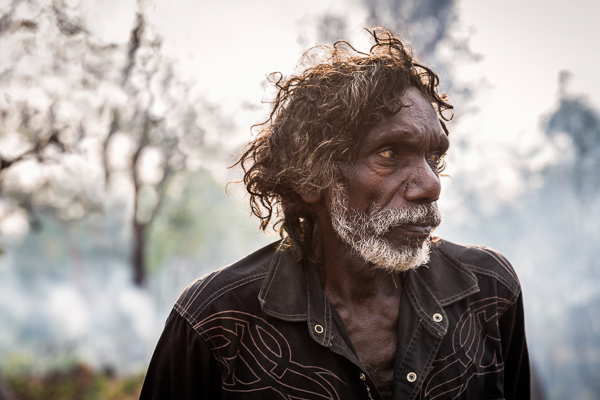
Image 4 Tom Arnhem Land

It is assumed here that you have a full understanding of how to use your camera in manual mode, and some experience with the basics of flash photography. The techniques covered here are not overly difficult, and with some practice at home you will be able to approach your next trip with a new set of options to inspire your photography.

You may know, that images shot with on camera flash do not usually produce flattering results for your subjects. Moving your flash off camera often means an investment in more gear, though it doesn’t have to be super expensive or add too much bulk to your travel kit. The resulting images you get from this investment will be well worthwhile.

For this tutorial I’ll be covering some different options for putting together a basic one light setup that can be fired off camera remotely and modified through a small softbox or umbrella. This sort of setup is a practical way to travel, especially if you are on the road for an extended period, and don’t have help lugging around more elaborate studio style setups.

There are potentially many elements to your setup, each with wide ranging options in price, bulk and results. These bits of gear can be added to virtually any DSLR with manual functions and used with any lens that suits the type of images you want to produce.

Gear for Off Camera Flash Travel Photography

1. Flash gun or speedlight

There has never been a wider amount of choice when it comes to speedlites, or flash guns on the market. From the top of the range Canon and Nikon speedlights that cost upwards of $ 500.00, to excellent third party options, it can be a difficult choice to make.

Using off camera flash is best practiced via manual control of both the flash and camera, so higher end options like TTL (Through the Lens) flash metering are not essential, though this is increasingly an option with even cheaper third party flashes.

For a long time I’ve used a Canon 430 EX II, the mid-range option in the Canon Flash line-up, and a relatively affordable bit of gear. When starting out almost any flash will do, as even the cheapest can be fired off camera, and be modified to give you great quality light.

2. Flash Triggers

Once you have decided on which flash or speedlight fits your budget, then comes the maddeningly wide array of choices available to fire your flash remotely.

Radio triggers, which can be set to fire the flash from a small unit that slides into your camera’s hot shoe, and another attached to the flash itself, are amongst the easiest and cheapest way to get started.

You might hear many professionals touting the ownership of expensive ‘Pocket Wizards’ as something of an exclusive way into the mysterious world of off camera flash. They are great products but the market has changed. Cheaper options from Yongnuo or Photix cost a fraction of the price, and will work just as well.

I’m currently using a set of Yongnuo YN-622C Triggers, which have worked perfectly through some very tough travel. These also have the option on my Canon 5D3 of adjusting the flash power through the camera menu, which is really useful, though not essential.

3. Modifier

While bare flash can produce interesting results, this ‘hard light’ is not always desirable for the type of portraits most people will be looking to produce in their travel photography.

A ‘soft light’, produced by using a flash modifier, is the more common way to shoot, as it produces more flattering results for your subjects. Again, there is an endless array of options here. A small softbox or umbrella are the easiest and most versatile ways to get shooting.

A plain white shoot through umbrella is a cheap and compact option, and throws a fairly wide soft light that can be used for a range of portrait shots. The limitation with these umbrellas is that, as a travel photographer, you will more often than not be shooting outdoors. Any kind of wind while shooting with these might have you uttering expletives at the sight of your gear tipping over or the umbrella folding itself inside out.

A more easily managed item is a small softbox. While not as compact to transport or as simple to set up, these stay sturdy and produce a great, soft light that is useful in most portrait situations. I currently use the small Photoflex Light Dome XS, which has lasted a few years now without any damage. There are many similar options, and even DIY projects that you can find online.

4. Light Stand

This is an optional piece of gear that has the potential to be a lifesaver, or just a heavy metal rod in your bag. In most situations you will be able to get somebody to hold the flash or softbox, and roping in friends and family of your subjects to help can be a great way to help people relax.

If you do decide to bring a stand with you, it’s worth spending more over the cheap generic Ebay numbers, which from experience don’t last much past being taken out of the box. The Avenger range of stands are compact and sturdy.

5. Flash Gels

CTO (Colour Temperature Orange) gels are simply bits of plastic that you can place over your flash to vary the color temperature of light that reaches your subject. Use of these, or not, is according to personal taste. Strips of this plastic are cheap and easy to purchase online, with the sample packs offered by many companies a great way to experiment. Attaching a bit of velcro to the sides of the plastic and the flash to keep the gel in place is one way to keep things simple.

6. ND filter

Another optional piece of gear. The use of ND (Neutral Density) filters with off camera flash adds another tool to your creative arsenal. Using ND filters makes it possible to add more drama to your images with underexposed backgrounds and/or shallower depths of field during the day.

I use a range of ND filters, with the Lee 3 stop Solid ND filter, mounted with the Cokin Z Pro Holder the most common choice. Again, this is not an essential part of a flash setup, and something that can be added once you are more comfortable with the basics.

Shooting Off Camera Flash Travel Photography

Once you have your setup sorted it’s worthwhile practicing to get it all working in the quickest time possible. Without treating it like a frantic pit stop, it’s really handy to be able to get everything in order as fast as you can. On the road you don’t want to monopolize somebody’s precious time more than necessary. Being confident with your gear and shooting style, helps put your subjects at ease as well.

The following examples from recent shoots are broken into two rough styles of shooting with off camera flash. The first is the technique of balancing flash with ambient (available light), producing images where the light from your flash is subtle, and blends with the background of your subject. The second is the technique of underexposing the ambient or background light, and using shallow depth of field to add more drama to your images.

The golden rule to remember with flash photography is that your aperture setting, combined with your flash power, controls the amount of artificial or flash in your photos. Your shutter speed will control the ambient, or background, light.

Technique #1 – balancing flash with ambient

Image 1 Natarajan India

Natarajan, Little Andaman Island, India

I had met this elderly gentleman a few days prior to the shot taken here. At the time of our meeting he was the oldest living man in a remote part of the Andaman Islands Chain which was devastated by the 2004 Tsunami. I wanted to take his picture for a magazine feature I was putting together. By the time I got to his place to take a few shots one evening, it was right on dark, with only dim ambient light left to work with. This was a great time to break out the flash for a simple portrait.

After setting up a small softbox and attaching the radio flash triggers to fire the flash, I first exposed for the ambient light, setting my shutter speed and ISO to ensure a sharp image. I then chose an aperture of f/4, which combined with a telephoto lens, helped throw the background out of focus.

At these settings, without the use of flash, Natarajan’s features were dark and flat. Adding in the flash, fired remotely, allowed for a better portrait by emphasizing his strong features and throwing pleasing catch lights into his eyes (the reflection of the flash in your subjects pupils).

Image 1 Natarajan

I asked my friend Stephan to hold the flash at a downwards 45 degree angle camera left, just out of frame, aimed at the left side of Natarajan’s face (see lighting diagram above). I usually start with the flash in manual mode, set to 1/16 power and work from there. If the flash is too strong you can power down or vice versa.

In this simple portrait, the flash light lends some shape to the subjects face without its use being so obvious.

Image 2 Laura Dance Festival

Laura Dance Festival, Cape York, Queensland, Australia

The picture above was taken of a young boy from the Injanoo tribal group from the far north coast of Queensland, Australia. At the bi-annual Laura Dance Festival, tribal groups gather to dance and celebrate their ancient culture with outsiders.

After shooting the dance action for a few hours I wandered off to find some kids practicing their routines, with light from the setting sun filtering through the eucalyptus trees around the camp lighting up their moves.

With a small army of enthusiastic helpers I broke out the softbox and triggers, working quickly to keep the setting sun as an element to the shot. For this image a fairly heavy CTO gel was used over the flash to give the light the look of the setting sun. It’s not exact but lends a nice warmth to the light that would have otherwise looked more out of place at this time of evening.

I asked the boy to stand with the setting sun positioned behind his head, and then exposed for the background, ambient light. I chose to shoot from a low angle, as this usually works to emphasize strength in your subjects.

The flash was again set to manual and 1/16 power, which was close to the right flash exposure for the subject. This time the flash was held by another young dancer, just over my shoulder camera right (see lighting diagram below).

Image 2 Laura

In the final image the highlights needed some recovery in post, and a slight vignette was added.

Backlighting your subjects this way (with the sun behind the subject) adds some dramatic effect, with the flash exposing a subject that would otherwise have been in near darkness without it.

Technique 2 – Underexposing with ND Filters for Dramatic Effect

Image 3 Adrian Marrinyama Mob

Adrian, The Marrinyama Mob

The image above is from a shoot in a remote part of Queensland, Australia. For part of the year the guys live a traditional lifestyle, hunting, dancing and performing tough initiations on younger boys. It was the height of summer, and I was working alone with searing desert temperatures and strong winds whipping up dust from the red earth around the camps which the group called home.

In these situations being comfortable with your gear, and confident with what you are trying to achieve is really important. A flimsy umbrella or larger modifier for the flash shots would have been difficult to manage on my own. I chose to use my ever reliable little softbox setup, mounted on a decent light stand, and worked towards creating images that I had envisaged before the shoot.

For this shot of Adrian, a slightly more advanced setup was used. I wanted a shallow depth of field and for the portrait to look dramatic. This was achieved with the help of a 3 Stop ND filter to underexpose the background while keeping a shallow depth of field a f/2.8.

Image 3 Adrian

The flash was set to full power camera left, set just out of the frame (see diagram above). The result is that the flash is more noticeable than usual, with the background underexposed and blurred nicely for effect.

The video below is from a recent shoot in remote Arnhem Land, Northern Australia. The softbox – flash – trigger setup mentioned throughout the article is shown towards the end of the footage. Again, the flash setup was used to help out during less than ideal lighting situations on this trip.

The sun filtering through the smoke of a slow burning bush fire behind Tom helped to add some drama to the image, with the flash providing the correct exposure for his face. The flash was held close to Tom, camera right, and fired at 1/16 power.

Hopefully this tutorial has given you a starting point to work from with off camera flash for your travel photography. There’s many tutorials available for every aspect of what has been mentioned here. Happy shooting.

Image 4 Tom Arnhem Land

The post Off Camera Flash for Your Travel Photography by Brook Mitchell appeared first on Digital Photography School.


Digital Photography School

 
Comments Off on Off Camera Flash for Your Travel Photography

Posted in Photography