RSS
 

Posts Tagged ‘Camera’

10 Reasons Why a Pro is Using a Mirrorless Camera for Personal and Paid Jobs

19 Jun

Image01

Everyone can take a picture, but as photographers (professional or aspiring), we have the skill set and the tools to create great images in any situation. We have the ability to turn the ordinary into extraordinary through photography. As the saying goes, the shoemaker’s kids have no shoes, and similarly, we often don’t put the same emphasis on images for ourselves and our family as we do for others and their families.

Personally I’ve always struggled with feeling like the “photographer” during personal affairs; I don’t feel right bringing a big DSLR, lens and flash to a family function, vacation or personal outing. Often this means that I either trust others to take pictures, or I take my own quick snaps with a point-and-shoot or with my iPhone.

My wife and I welcomed our first daughter Ava last March, and as a photographer, I know the importance of documenting those young, tender moments, and how impactful it can be to tell the story of childhood through photography. At the same time, I didn’t want to be “that Dad” who is always lugging around a camera bag. Quick aside: if that’s you, that’s perfectly fine, it just doesn’t work for me personally. I wanted to get great pictures of Ava on vacation, I wanted to be in the pictures myself, I wanted to capture happy moments around the house and I wanted to document her first Christmas. All the while, I wanted to leave the “big guns” in the studio.

Image02

With my mirrorless camera (I use the Fuji X-T1, X-E2 and the X100S), I can still take those great images while not standing out as a photographer. In fact, all of the images in this blog post are taken with my Fuji mirrorless cameras, and you probably didn’t know the difference

Creative Loop Versus Business Loop

Let’s back-up to 9 years ago. My story of discovering photography is not all that different from most photographers. I got into it because I loved the creative side of photography: the art, the composition, the lighting and the medium’s storytelling ability. We all start out in a “Creative Loop” that is a cycle of being creatively inspired, practicing, educating ourselves, learning and then gathering feedback.

Once you start out in business as a photographer, though, priorities often shift. As an entrepreneur, we have so many other aspects to think about outside of the creative process, such as marketing, pricing, branding, clients, workflow, customer service, and so on. We enter into the “Business Loop” that pulls our energy and attention away from the creative side.

For me, after a few years of being a professional photographer, I was becoming recognized, awarded, and known for my skills as a photographer. I became comfortable with my creative abilities and therefore much of my focus shifted to the business side of being a photographer.

Mirrorless Love

In October 2013, I attended a workshop with world-renowned photographer David Beckstead where he taught his approach to light, shadows and composition. What inspired me the most though was David’s shooting style with his Fuji X-E1, and how it forced him to be purposeful, be intentional and slow down. From the moment I looked through the electronic viewfinder (EVF) and saw the ability to shoot in Black and White and see in terms of tone and mood. I was hooked.

Fast forward to today and I am now shooting 60% of my professional work with my Fuji mirrorless camera, and 100% of my personal work with it. Here are the 10 reasons that I love shooting with a mirrorless camera.

Mirrorless Photography Love #1: Intentional and purposeful photography

I photograph mostly with my Fuji camera set to B&W mode and my Nikon full-frame camera set to colour, so when I am photographing, I am intentionally choosing to create an image in colour or B&W as I shoot. It is almost as if I am post-processing my images as I shoot. What I love most about this process is that it makes me think about these things before I press the button and it makes me photograph with greater purpose.
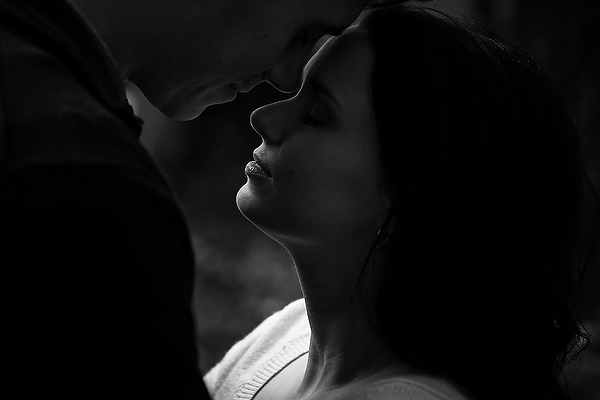
Image03

Mirrorless Photography Love #2: More thoughtful photography

Admittedly, the processing and usage of most mirrorless cameras aren’t as “snappy” and quick as the high-end DSLRs, but I actually like that. My Fuji mirrorless cameras makes me more thoughtful and forces me to slow down and be more methodical about my compositions and timing. This has made me a better photographer with more intentional images and less “spray and pray” sequences.

Mirrorless Photography Love #3: Seeing light, tone and mood

The electronic viewfinder (EVF) in my mirrorless cameras opens up a whole new world of possibilities. You’re looking at a processed image as it’s happening, it’s “what-you-see-is-what-you-get”. This has several benefits:

  • You can see the image as you are capturing it, which means you don’t have to review and look at the screen (chimp) afterwards.
  • You can see the exposure as you’re creating it, so you can more accurately fine-tune your exposure and get it right in the camera with more accuracy.
  • In my case, where I shoot in B&W mode, it allows me to see that monochrome image as I’m making it so I am free from distraction of colour. It allows me to focus more on the light, tone and mood.
  • When I’m shooting in colour mode, I can see the image in its “enhanced” state – with saturation, contrast, tone and sharpening adjustments applied. Sometimes I’m seeing an image better than what it looks like in real life!

Mirrorless Photography Love #4: Saves time

It’s obvious to see how shooting with a mirrorless camera, and an EVF specifically, will save you a ton of time on the back-end of your workflow. Shooting with greater purpose, while seeing mood and light more effectively and making exposure adjustments as you shoot, will result in more refined images right out of the camera, which eliminates a lot of post-processing work.

Mirrorless Photography Love #5: Low-profile presence

The physical appearance of a mirrorless camera is closer to that of a point-and-shoot instead of a DSLR. This is a good thing if you’re a photographer, like me, who wants to “blend in” with a crowd and not stand out.

Image04

Mirrorless Photography Love #6: Lighter and smaller

The smaller physical size also takes significant weight off of my shoulders and back, which I appreciate during a 12-hour wedding day. It also means that I can have a smaller camera bag. For the travelling photographer, you’ll appreciate the compactness as well.

Mirrorless Photography Love #7: Being a part of the picture-making process

This is highly subjective, but for me, the physical form factor of my mirrorless camera has a certain “feel” to it that makes me feel as though I am a part of the picture-making process. The raw, hard, mechanical and manual feel to my Fuji camera is so much more inviting and intimate. This inspires me to shoot differently and puts me in a different place creatively.

Image05

Mirrorless Photography Love #8: Improved autofocus

The benefit of not having a mirror involved in the picture-making process means that there is less to go wrong in terms of autofocus. The accuracy of autofocus in mirrorless cameras is significantly better than DSLRs because of this. Secondly, because the mirrorless camera doesn’t have to rely on a separate phase-detection AF chip to focus, the focus points aren’t limited to the center of the frame. This means that your autofocus points have great coverage and more flexibility.

Mirrorless Photography Love #9: Easier AF refinement

The EVF in mirrorless cameras means a whole new world of possibilities with regards to manual-focus. Specifically, split-image and focus-peaking are huge benefits that make manual focus and AF focus refinement much easier with a mirrorless camera.

Mirrorless Photography Love #10: More intimate subject engagement

The LCD screen on a mirrorless camera is the same as the EVF, and therefore you can use them both interchangeably without limitation. Being able to use the LCD screen has a huge benefit in that it allows me to engage and have eye-contact with my subject when it’s needed.

Image06

The Future of Photography

What does the future of photography look like? Is mirrorless a part of it? I believe so. There are three main reasons why I feel that mirrorless cameras and the mirrorless market will shape the future of photography:

Technology

The technological gap between the mirrorless line-up and the DSLR line-up is narrowing. Already there are so many reasons that mirrorless cameras are better for many photographers, as I’ve outlined above. The remaining areas where DSLRs have the leg-up on the competition are diminishing. My estimate is that within the next two to three years, the mirrorless technology will have caught up, and in six to eight years, the only real option on the market will be mirrorless cameras.

Innovation

The attention that mirrorless cameras have been getting has done wonders for the photography industry. What I love most about it is that it’s no longer a monopoly, and competition ultimately fuels innovation. Every camera manufacturer needs to be thinking forward, and this will push the industry and the technology in a positive direction.

Why Not?

Lastly I ask – why not? Why shouldn’t mirrorless technology be a part of the future? Maybe I should ask this a different way – why do we need the mirror in cameras today? It’s an old technology that is clunky, outdated and unnecessary. If we can use the same sensors, have the same kind of processing power, have the same autofocus, and ultimately achieve the same kinds of images without the mirror, wouldn’t you just say that it’s one more thing to break or to worry about?
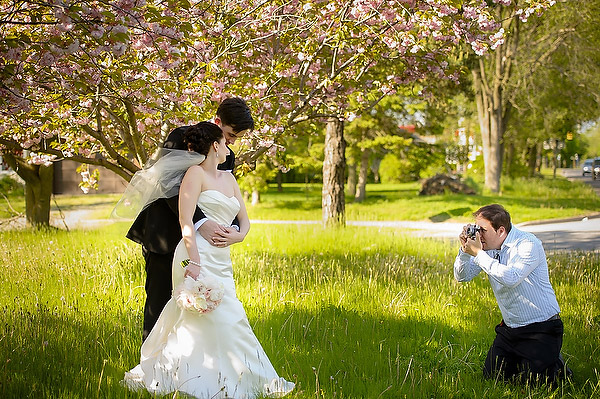
Image07

Further Discussion

If the topic of mirrorless photography intrigues you and you’d like to further the discussion, I would love to talk! Please post your comment in the section below.

The post 10 Reasons Why a Pro is Using a Mirrorless Camera for Personal and Paid Jobs by Bryan Caporicci appeared first on Digital Photography School.
Digital Photography School

 
Comments Off on 10 Reasons Why a Pro is Using a Mirrorless Camera for Personal and Paid Jobs

Posted in Photography


How to do Surreal Digital Infrared Photography Without Expensive Gear or Camera Conversions

17 Jun

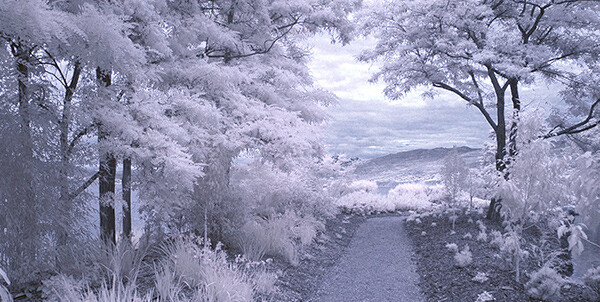
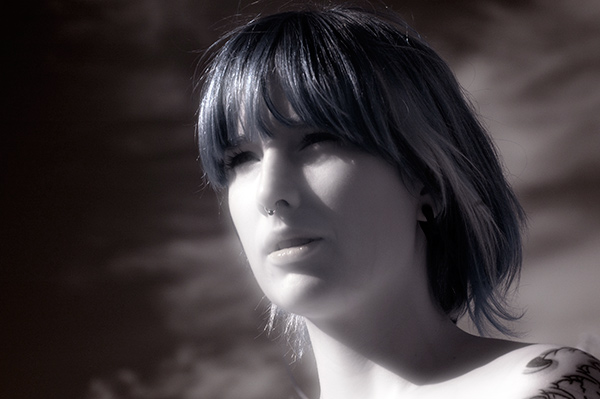
Photos made with invisible infrared light, rather than visible light, yield wildly strange and eerie photographs that always have the “WOW Factor.”  For landscapes or scenic imagery, infrared (IR) photography is highly regarded as fine art. But back in the days of film photography, shooting infrared was complicated, expensive and the results were often not great. For those with determination though, that one image that did ‘work” was always worth the trouble.

But now the complexity of capturing infrared photos has changed – digital cameras have made the technique almost foolproof, inexpensive, and a lot of fun! All you’ll need is a tripod, a special infrared filter, and any camera that is sensitive to infrared light. With a few easy steps you’ll be shooting infrared photos in no time at all.

But before I get into the process, it’s not my intention in this article to delve into the physics of infrared light, and all the scientific mumbo jumbo that goes along with understanding WHY infrared light creates amazing images, but rather to give you some simple steps to get you started in this super creative technique.

_DSC1747W

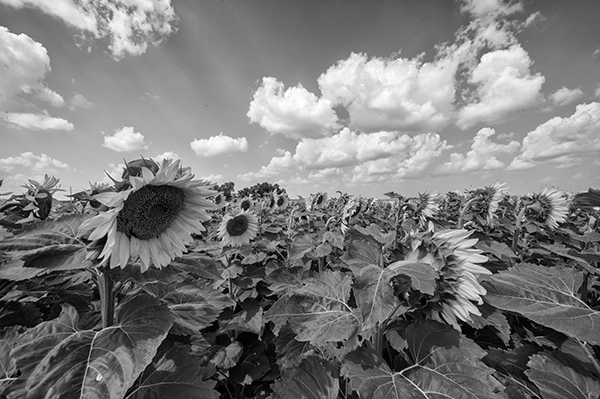
Visible Light Black and White Image

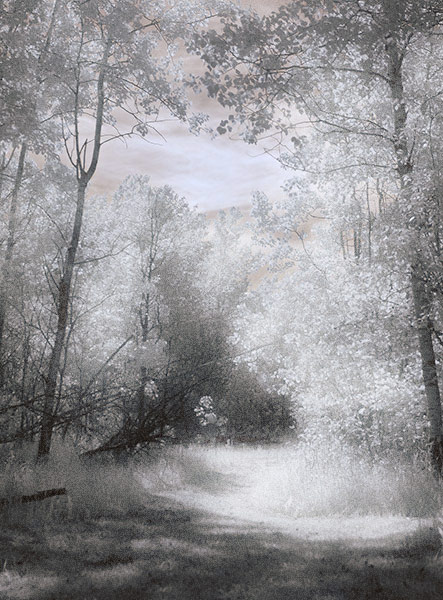
Just know that anything that is alive will reflect a greater amount of infrared light than inanimate objects. Leaves, foliage, and grass, along with skin, reflect the greatest amounts of infrared light, and so will be the whitest objects in your image. Stones, concrete, mountains, water and sky tend to absorb infrared light and so appear as darker objects in your images.  The tonality is very different from that of visible light black and white photography though. Notice how the tones of the leaves, seeds and sky are quite different in the infrared image below.

Digital Infrared Image

Digital Infrared Image

Okay, are you ready to give this a try? Here are the simple steps you need to follow so your images will turn out into hauntingly beautiful, surreal infrared photographs. The first steps deal with equipment and settings, and the last steps are all about how to best capture beautiful infrared light.

Step 1: Test your Camera

Before you go out and buy an infrared filter test your camera to make sure it’s sensitive to infrared light.  Not all digital camera sensors are able to “see” infrared light. In fact the newer the camera, the less sensitive to infrared light it may be. Try this simple test to see if your camera will give you good results.

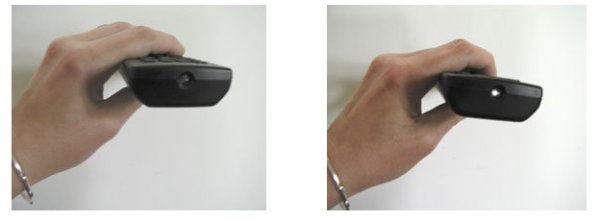
Testing your camera for infrared sensitivity.

Testing your camera for infrared sensitivity.

Hunt down a TV, VCR or DVD player remote control. Look at the end that points to the TV (or VCR etc), and you’ll see a little bulb or flat back plastic window. This is the transmitter that sends the signal from the remote to your device. That signal usually uses infrared light. You can see that it is invisible light – i.e. when you look at the remote with your eye, you can’t see anything when you press the buttons. But just wait until you do this looking through your camera! You’ll be able to see invisible light – the infrared spectrum that makes such cool photos.

If you have a point & shoot camera look through your LCD viewer while pressing any button on the remote. If you see the bulb light up, your camera can see infrared light.  If you have a DSLR you’ll have to take a photo to see the results, or if you camera has a live view feature, you will be able to see the the results on your LCD as well.

The whiter and brighter the light you see from the remote, the more sensitive your camera is to infrared. If the light is more purple or red your camera may not be a good candidate for shooting infrared photos.

Step 2: Equipment

If your camera passed the sensitivity test, you’ll need two more pieces of equipment before you can shoot infrared photos, a tripod and an infrared filter. The tripod will help you take a sharp shot, as your exposure times will be quite long. The filter will  block most of the visible light from reaching your camera sensor, but will allow the beautiful infrared light to pass through.

When I first started shooting infrared images, I used  a Hoya R72 screw-on infrared filter. B+W, Tiffen and other manufacturers also have equivalent infrared filters.  If you are using a slide in filter system, such as Cokin or Lee, they also make infrared filters to work with their holders. If this is the filter you’ll be using, make sure to slide it into the slot closest to the camera to prevent unwanted visible light from sneaking in. The R72 refers to the amount and type of infrared light that passes through to your sensor and I recommend using this to start. It allows some visible light to pass to the sensor so it will allow you do to all sorts of creative post processing with your images.

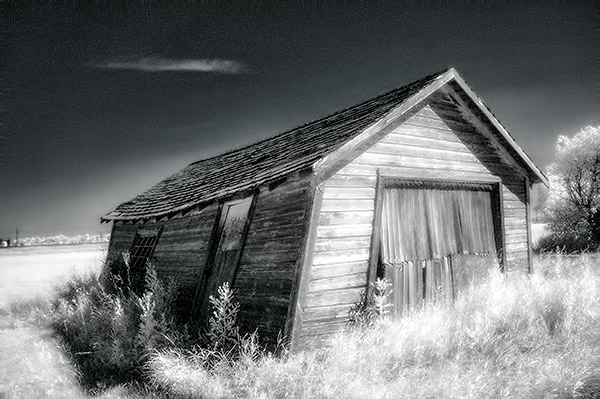
Infrared Image with creative post processing.

Infrared Image with creative post-processing

Step 3: Camera settings

Because the infrared filter blocks out most of the visible light, your exposures will be quite long. You’ll have to adjust your camera settings to ensure you get a good exposure, while keeping noise to a minimum.  Set up your camera on your tripod and make these adjustments:

  1. Set your ISO between 200 and 400, keep it as low as you can
  2. Set your Long Exposure noise reduction to ON
  3. Set your camera to shoot in RAW mode
  4. Set your camera to Aperture Priority (Av mode on a Canon), and your aperture to around f/8 for maximum sharpness
  5. If your camera does auto bracketing (refer to your owner’s manual), set your bracketing to +/-1 EV.  Your series should be -1 EV, 0 EV, good exposure, and + 1 EV. You can also bracket manually.

Shooting in RAW will give you a bit more latitude for processing and adjusting.  Bracketing will help you find the sweet spot for exposure at your preferred aperture and ISO.

I’m not going to go deep into the White Balance setting, as this could be an entire article on its own. But for now set your White Balance to the Sunny or Daylight preset.

Step 4: Composition

Just as in regular light photography, composition is a critical component of infrared photography. However there are a few additional considerations to keep foremost in your mind when planning your infrared composition.

A variety of textures make the image more dynamic.

A variety of textures make the image more dynamic.

Infrared photography is similar to black and white photography, in that you are dealing with a limited number of tones. To add more dynamism and energy to your infrared shots, add contrasting elements. By this I mean using dark and light objects in close proximity to each other. But also use smooth and textured objects together. You can mix and match for artistic composition and design.

 COLUMN 1  COLUMN 2
  • light
  • white
  • smooth
  • large patterns
  • light with fine textures
  • light with large textures
  • dark
  • black
  • textured
  • small patterns
  • dark with fine textures
  • dark with large textures

In every infrared shot you make, include at least one element from Column 1 with the corresponding one from Column 2. You can add as many elements as you want, but it’s best to keep your composition simple. You can use light and small patterns, with dark and large patterns and so on. Foliage and clouds will always be a light element in your image; the sky, stones, bark, water  and concrete will be darker. Leaves from a distance are a rough texture, with many small elements appearing rough and textured; while human skin is very smooth.  This should give you a great starting point for infrared compositional considerations.

Step 5: Shooting Infrared

There is only one critical thing to remember when shooting infrared – you must shoot when there is lots of sunshine, and in the summer when there is lots of deciduous foliage. Overcast days won’t give you great results, and because living things reflect the most infrared light, snowy winter days are usually devoid of anything that reflects infrared.  If there are clouds in the sky these can add an element of interest, but don’t make your capture until the sun is out, and shining on your subject.

Find a great place to shoot and adjust the settings on your camera. I like graveyards, parks, and old abandoned buildings. The contrast between the stones, the pathways, the old wood and leaves and grass provides outstanding tonality for infrared images. If you can get a few wisps of cloud in your sky all the better.

Put your camera on your tripod, and compose your image. Place the infrared filter on your camera, and use your autofocus as usual. Yes, it works just fine for infrared photos! Your light meter will work too but be sure to bracket on either end to make sure you have at least one usable exposure. Then click the shutter.  You’ve just made an infrared photograph.

Skin looks like alabaster when shot using infrared light.

Skin looks like alabaster when shot using infrared light

For techniques and ideas for post-processing our infrared images, watch for my article on post processing infrared photos coming soon!

The post How to do Surreal Digital Infrared Photography Without Expensive Gear or Camera Conversions by Alex Morrison appeared first on Digital Photography School.

Digital Photography School

 
Comments Off on How to do Surreal Digital Infrared Photography Without Expensive Gear or Camera Conversions

Posted in Photography


Two Videos on How to Take Care of Your Camera Gear

16 Jun

This week I found two different videos on how to take good care of your camera gear from two different perspectives (serious and more tongue in cheek). It’s important to take care of your equipment to make sure it keeps functioning properly and takes nice clean images with no dust spots.

The first video by photographer Gregory Cazillo is the serious one. He goes through a list of a few things you can do to protect, clean and maintain your gear in good condition.

He recommends jotting down all your serial numbers so when you are are travelling out of the country you don’t have any issues with customs coming back home. I suggest taking it one step further and actually register your gear with customs before you leave. Most airports have a customs area, just take your equipment in there and get a customs registration card from them. Make sure to arrive early to have time to do that.

The second video is from DigitalRevTV (The most subscribed and viewed photography show on the interweb, presented by an asian dude with British accent – as they describe on their YouTube channel) and guest host Ultrasonic Dragon 88 (aka Ian Wong). Obviously this one is a little “cheeky” and is meant to be humorous. Take it with a grain of salt and have a little fun.

Here are some links to other articles here on dPS about taking care of, and protecting your camera equipment:

  • Do you Clean your Own Sensor?
  • Tips to Protect your Gear in Harsh Weather Conditions
  • How to Protect your Camera in Extreme Conditions
  • Embrace the Weather with Your Photography
  • So You Want to Keep your Camera Safe? Here’s How
  • Readers: Lens Filters: To Use or Not To Use? Your 2 cents, if you please!

The post Two Videos on How to Take Care of Your Camera Gear by Darlene Hildebrandt appeared first on Digital Photography School.

Digital Photography School

 
Comments Off on Two Videos on How to Take Care of Your Camera Gear

Posted in Photography


Creative Reasons to use Intentional Camera Movement

14 Jun

One of the earliest lessons you likely learned as a photographer was the importance of keeping your camera steady and stable. You wanted tack-sharp focus, so you learned to tuck in your elbows and support your camera properly. But why limit yourself when there are so many creative reasons to move your camera?

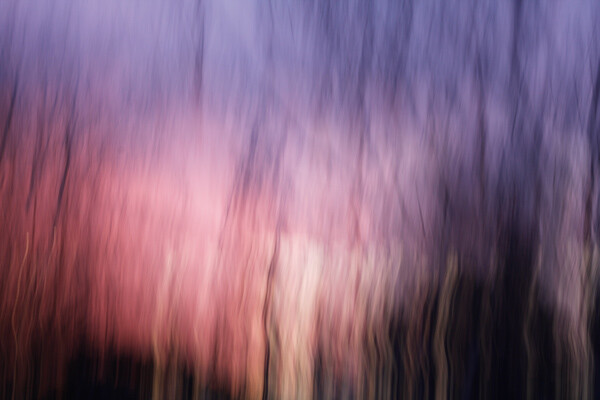
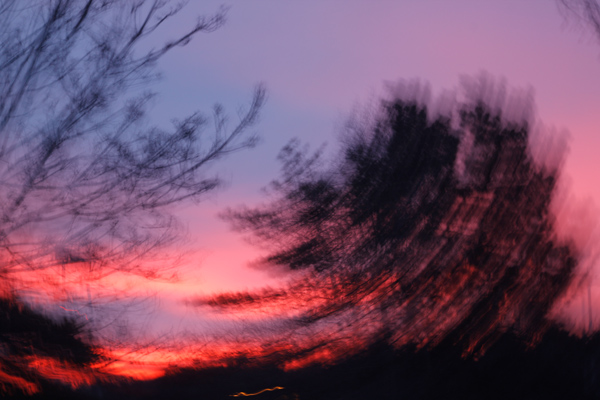
intentional camera movement, ICM, blur, motion blur, how to, sunrise

Try Intentional Camera Movement or ICM

ICM is the abbreviation for Intentional Camera Movement, a term that covers a wide range of photography situations. What brings these different situations together is the fact that rather than remaining still, the camera itself is moving while the photograph is being taken. This creates a wide-range of creative effects and abstract images, like the sunrise image above.

In order to capture recognizable blur, you need to shoot at a slow enough shutter speed to capture significant motion. A quarter to a half-second or longer is a good place to start. Shooting in Shutter Priority mode allows you to set a longer shutter speed, and your camera will choose an appropriate aperture. If the picture is too light or too dark, you may want to consider dialing in all of the settings in Manual mode. You can also achieve ICM style shots with a point-and-shoot camera in darker situations, where your camera will select for a longer shutter speed. (Both of the panning shots, below, were taken with a point-and-shoot camera in Program mode.)

Try Panning

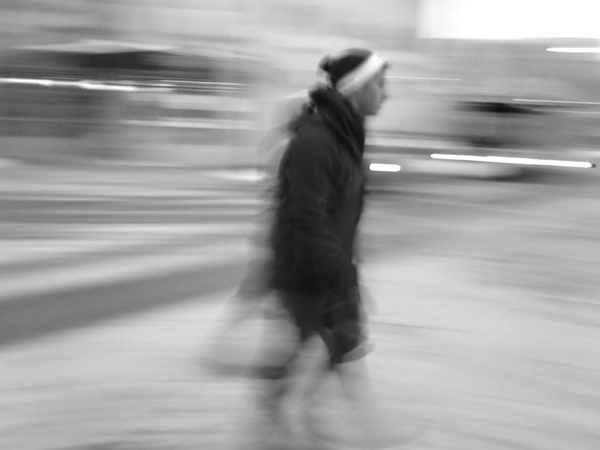
Panning is one specific type of intentional camera movement. Rather than being random movement when panning, the movement of the camera mimics the relative movement of the subject. This results in an unusual composition where a moving subject appears frozen and the background of the image becomes blurred and conveys the sense of motion.

intentional camera movement, ICM, panning, people, motion, blur, blackandwhite

Panned at 1/4 of a second – if you want less blur use a slightly faster shutter speed like 1/30th

The tricks behind panning are in the focus and the follow-through. A moving subject and a moving camera can confuse your camera’s autofocus, so you will get better results if you use back-button focus or pre-focus the camera to the right distance and then switch it into manual focus mode. Either technique will keep the camera focused at the right distance, and you will not waste time waiting for your autofocus to lock on to your subject.

The second trick for panning is in the follow-through: both before and after you take the shot. Just like in golf or baseball, the smoothness of the swing comes from continuing the motion before and after the point of contact (hitting the ball or hitting the shutter). If you want smooth motion blur in your panning image, you need to be moving and following your subject both before and after hitting the shutter.

intentional camera movement, ICM, panning, motion, blur, car, vehicle

Panned at 1/8th of a second

The best way to get a feel for the mechanics of panning is to practice the movement without actually hitting the shutter and taking a photograph. Practice keeping your subject in approximately the same place within your viewfinder as it moves past you. For example, if you are trying to capture a panning shot of a car, begin by locating the car in your viewfinder when it is a short distance away from you. Swing the camera to follow the motion of the car as it approaches, passes, and zooms away from you. Once you have been able to successfully track a few cars and keep them in the frame, try repeating the same process but press the shutter button midway through the motion. Continue to follow the car with the camera as the shutter closes, and you will find you have a much smoother feel and flow to the final image.

Shooting a few successive frames using High Speed or Burst mode can help get a successful panning image also.

Try a Zoom Burst

A zoom burst is another specific type of intentional camera movement. Rather than moving the entire camera, during a zoom burst shot you move the lens and zoom it in or out while the photograph is being taken. The more focal lengths covered by your camera lens, the greater the zoom effect will appear to be.

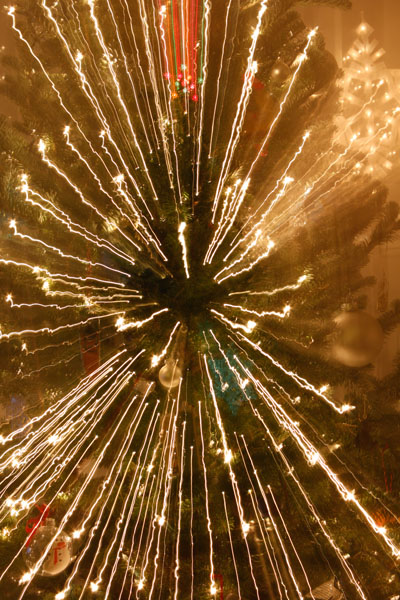
intentional camera movement, ICM, zoomburst, zoom, motion, blur, christmas lights, abstract

18-270mm lens, 4 seconds at f/13, ISO 100 on a tripod

The bright points of light on a Christmas tree provide an excellent subject for a zoom burst shot, as each individual light renders as a bright streak across the image, making for a feeling of achieving warp speed and rocketing forward into the photograph. This shot had a shutter speed of four seconds and was taken hand-held, with one hand holding the camera and the other rotating the zoom lens during the shot. The slight bumps and jumps in the lights are a result of the movement of the camera body due to camera shake and the added motion from zooming the lens.

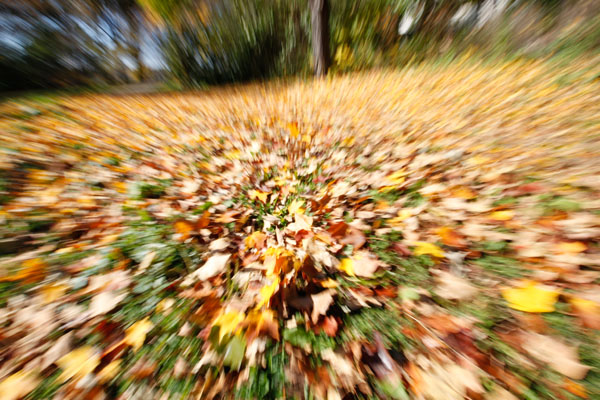
intentional camera movement, ICM, zoomburst, zoom, autumn, leaves, abstract, motion, blur

10-24mm zoom lens, ISO 100, 1/25th at f/22

Zoom burst shots can be of any subject, not just bright points of light. Here, the variations in color of the fallen leaves provide a colorful backdrop for the motion and lines of the zoom burst effect. This shot also demonstrates that you can achieve a zoom burst effect with a smaller range, as this image was shot hand-held using a 10-24mm lens.

Conclusion: try Intentional Camera Movement

There are many, many ways to use Intentional Camera Movement to capture creative and unusual shots, and these different techniques are just the tip of the iceberg. Don’t let yourself be locked in to only stable, tack-sharp photographs.

intentional camera movement, ICM, blur, motion, abstract, sunrise

ISO 100, 0.6 seconds at f/11 done hand-held by rotating the whole camera when shooting (took several tries to get that smooth)

Experiment with intentional camera movement, and you might surprise yourself! Share your results in the comments below.

The post Creative Reasons to use Intentional Camera Movement by Katie McEnaney appeared first on Digital Photography School.

Digital Photography School

 
Comments Off on Creative Reasons to use Intentional Camera Movement

Posted in Photography


On Traveling With Your Camera

14 Jun

In January Strobist was restructured from a standard, 2x/week blog into a core knowledge archive. Rather than publishing all of the time, we made the 2,000-post archive more organized and accessible. Now, Strobist only updates when there is something meaningful to say.

I did this to flip the signal to noise ratio (seriously, who needs to read that many photoblog posts every day) and to create some time for two significant projects. The first of which, The Traveling Photographer, has just dropped.

Read more »
Strobist

 
Comments Off on On Traveling With Your Camera

Posted in Photography


Video: Canon REALLY wants you to look after your camera gear

14 Jun

Screen_Shot_2014-06-13_at_11.15.50_AM.png

Canon USA has released a video explaining how to take care of your camera gear. In the video, hosted by Holly Groder of Canon’s call center, Canon gives a series of recommendations for things to avoid, and things to get into the habit of doing, to keep your gear clean and fully functional. If you mentally delete the word ‘Canon’ from every other sentence there’s plenty of sensible advice for caring for your gear – whatever the manufacturer. Click through to see the video.

News: Digital Photography Review (dpreview.com)

 
Comments Off on Video: Canon REALLY wants you to look after your camera gear

Posted in Uncategorized


Camera Basics 101 The Exposure Triangle

08 Jun

One of the first things you will want to get your head around in photography is understanding exposure. To do that you will need to learn some camera basics and master:

The Exposure Triangle

If this term has of yet eluded you, or you’re not quite ready to claim full mastery here are 3 video tutorials to help you understand the basics of the exposure triangle including:

  • ISO
  • Aperture
  • Shutter speed

In this first video the host Mark Wallace (with Adorama TV) goes through all three of these elements and explains each briefly, and how they work together:

Mark also mentions this book in the video as a good starting point for learning more about exposure.

Next up is Shoot in Manual Mode Pt. 1 – Aperture, Shutter Speed and ISO – by photographer Sean von Tagen

Lastly is this video by a host whose name I couldn’t find. If you can get past his really monotone voice, the information is really good and should be easy to understand and follow.

If you want more reading, try these:

  • Exposure Triangle – Not just about more/less light
  • Understand Exposure in Under 10 Minutes
  • Getting off Auto – Manual, Aperture and Shutter Priority modes explained
  • Photo Nuts and Bolts – Know your camera and take better photos – a dPS eBook

The post Camera Basics 101 The Exposure Triangle by Darlene Hildebrandt appeared first on Digital Photography School.

Digital Photography School

 
Comments Off on Camera Basics 101 The Exposure Triangle

Posted in Photography


HTC launches One E8 smartphone with 13MP camera

05 Jun

htconee8_4.jpg

If you like most things about HTC’s current flagship smartphone, the One M8, but are, like ourselves, a little disappointed with its 4MP camera, HTC might just have launched the right phone for you. The HTC One E8 takes most of the M8’s components, wraps them up in a polycarbonate unibody frame instead of the M8’s brushed metal hull and provides a more conventional camera module. The E8 replaces the flagship’s Duo Cam with a 13 megapixel, 1/3-inch BSI CMOS sensor and F2.2 maximum aperture lens. Read more

News: Digital Photography Review (dpreview.com)

 
Comments Off on HTC launches One E8 smartphone with 13MP camera

Posted in Uncategorized


Adobe Camera Raw 8.5 and DNG Converter 8.5 release candidates available

04 Jun

shared:AdobeLogo.png

Adobe has made Camera Raw and DNG Converter 8.5 release candidates available for download. A short list of cameras are added for ACR support including the Canon Powershot G1 X Mark II, Olympus OM-D E-M10 and the Panasonic GH4 (with preliminary support). Camera Raw 8 users with Photoshop CS6 will get new camera support, lens profiles and bug fixes, but a few new features are added for Photoshop CC subscribers. Read more

News: Digital Photography Review (dpreview.com)

 
Comments Off on Adobe Camera Raw 8.5 and DNG Converter 8.5 release candidates available

Posted in Uncategorized


New camera app features in Apple’s iOS 8

04 Jun

appleios8.jpg

We wrote Monday about some of the imaging related changes that Apple announced with the latest version of its mobile operating system, iOS 8, at its annual developers event WWDC. Now that users have had a day or so to play with the beta version of iOS 8, a few more photo features have been discovered that were not mentioned in the keynote. Here’s a quick summary. Read more

News: Digital Photography Review (dpreview.com)

 
Comments Off on New camera app features in Apple’s iOS 8

Posted in Uncategorized