RSS
 

Posts Tagged ‘Camera’

Phase One XF medium format camera system offers new AF system and touchscreen interface

02 Jun

Phase One has announced its new modular medium format XF camera system. The body features a new ‘Honeybee’ autofocus platform (created ‘in-house’), touchscreen interface, and your choice of optical viewfinders. It supports the company’s IQ1 and new IQ3 digital backs, with the latter supporting resolutions of up to 80MP. Also announced today are a pair of Schneider lenses and an updated version of Capture One software. Read more

Articles: Digital Photography Review (dpreview.com)

 
Comments Off on Phase One XF medium format camera system offers new AF system and touchscreen interface

Posted in Uncategorized


The Cheap Camera Challenge – It’s Not All About the Camera

31 May

In my own classes, workshops and tours I tell my students that it is not the camera that makes good photos it’s the photographer. This video series by DigitalRev TV takes that statement to the next level with their Pro Photographer, Cheap Camera Challenge.

In this instalment street photographer Gary Tyson is given a cheap camera in a wristwatch. See how he uses it to make some pretty decent photos, interacts with people and uses it to his advantage rather than it being a disadvantage.

What can you learn from that video? What is the lesson there?

Sure maybe the photos are high resolution and won’t stand up to anything other than being on the internet. But take those same techniques and apply them using whatever camera you do have.

Are you up to taking the cheap camera challenge? I might give it a go myself!

googletag.cmd.push(function() {
tablet_slots.push( googletag.defineSlot( “/1005424/_dPSv4_tab-all-article-bottom_(300×250)”, [300, 250], “pb-ad-78623” ).addService( googletag.pubads() ) ); } );

googletag.cmd.push(function() {
mobile_slots.push( googletag.defineSlot( “/1005424/_dPSv4_mob-all-article-bottom_(300×250)”, [300, 250], “pb-ad-78158” ).addService( googletag.pubads() ) ); } );

The post The Cheap Camera Challenge – It’s Not All About the Camera by Darlene Hildebrandt appeared first on Digital Photography School.


Digital Photography School

 
Comments Off on The Cheap Camera Challenge – It’s Not All About the Camera

Posted in Photography


Samsung working on slimmer RWB camera sensors

29 May

Photos from a Samsung presentation have emerged online, providing some insight about the company’s upcoming image sensors for mobile devices. It appears Samsung is working on chips that use a RWB (red, white, blue) color filter instead of the conventional RGB pattern. This allegedly improves color fidelity and light sensitivity, allowing for smaller pixels. In turn, this could mean smaller camera modules in future smartphones. Read more

Articles: Digital Photography Review (dpreview.com)

 
Comments Off on Samsung working on slimmer RWB camera sensors

Posted in Uncategorized


Seeing is believing: Panasonic Lumix DMC-CM1 camera review

27 May

Panasonic’s Lumix DMC-CM1 smartphone goes above and beyond the typical mobile device camera specs with a 20MP 1″-type sensor, F2.8 lens and 4K video capture. With its impressive camera specification and unusual design it’s the closest thing to a true hybrid device we’ve seen yet in the current marketplace. Read on to find out how it performs in our full review. Read more

Articles: Digital Photography Review (dpreview.com)

 
Comments Off on Seeing is believing: Panasonic Lumix DMC-CM1 camera review

Posted in Uncategorized


Sony launches Z3+ with 20MP camera

27 May

When Sony launched its new Xperia Z4 flagship a few weeks back it was a Japan-only release. Today the Japanese manufacturer has announced the Xperia Z3+, which is essentially identical to the Z4 but will be available globally. It includes a 1/2.3-inch 20.7MP Sony Exmor sensor coupled with an F2.0 lens offering an equivalent focal length of 25mm. Read more

Articles: Digital Photography Review (dpreview.com)

 
Comments Off on Sony launches Z3+ with 20MP camera

Posted in Uncategorized


Mirrorless, DSLR or Point and Shoot: Which Camera is Best for Macro Photography?

23 May

Editor’s Note: This is part a series on macro photography this week. Look for a new one each day. The next newsletter will have them all if you miss any!
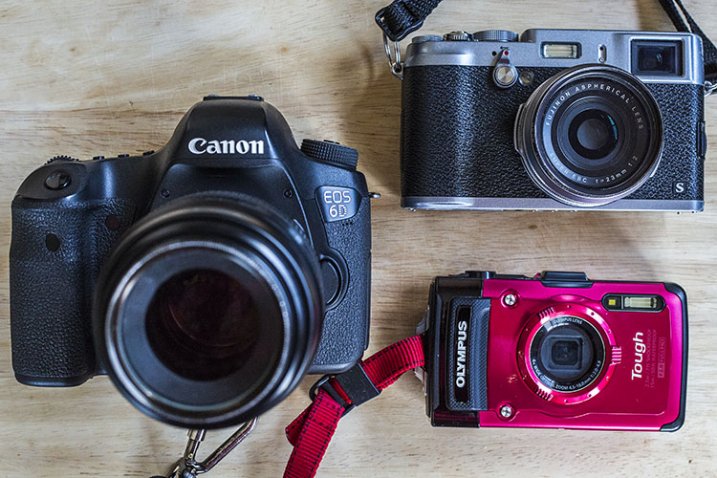
Cameras

Macro photographers have a plethora of choices when it comes to selecting a camera with this feature. From DSLRs to even cell phones, the macro function is becoming a standard add-on to most forms of digital photography. But, when put to the test, which type of camera will give you the best macro photography results? This article compares the macro photography functions of a DSLR, mirrorless, and point-and-shoot camera to evaluate the pros and cons of using each to shoot extreme close-ups.

To start, can you tell which of the below images were shot with either a DSLR (Canon 6D with 100mm f/2.8 macro lens), mirrorless (Fujifilm x100s), or point-and-shoot (Olympus Stylus TG-2 Tough)? The answers, listed in sequential order below the image, may surprise you.

Fuj Oly Can

1) Fujifilm x100s

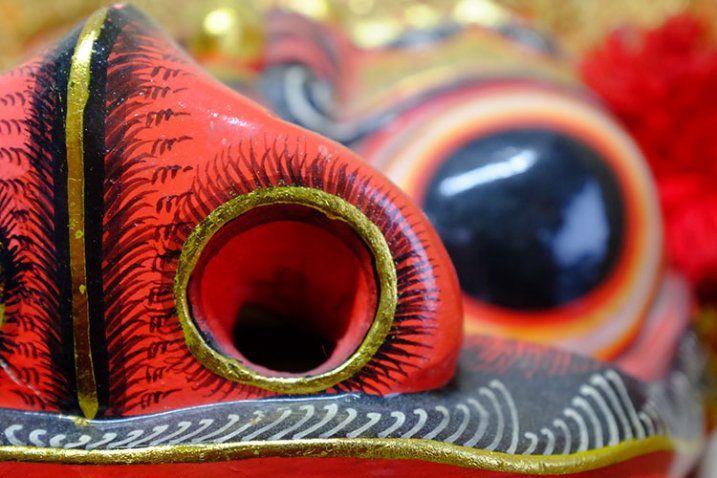
The image on the far left in the above montage was shot using the macro function of the Fujifilm x100s mirrorless camera. The x100s has a macro mode and can shoot images as close-up as 3.9 inches (10 cm). Accessing the macro mode is simple, requiring just a quick dial turn; the results can be seen below.
Fuj Dragon

Pros:

Besides being an attractive camera with its retro body, the x100s has become popular among both professional and amateur photographers, thanks to its high quality features and ability to produce stunning images with its fixed Fujinon 23mm f/2.0 lens. At 15.7oz (445g), this camera is significantly smaller and lighter than a DSLR, yet it is relatively more affordable costing around $ 900. It also offers a unique hybrid viewfinder, meaning shots can be taken using the built-in optical viewfinder, or an electronic one.

Fuj Flowers

Cons:

The fixed lens might bug some photographers since it can’t be swapped out, and the 23mm focal range means you have to get really close to your photo subject. This could produce shadows or block natural lighting, which can’t be overridden without purchasing the optional external flash unit. An additional possible grievance is the 3.9 inch maximum focusing distance. Some of the other cameras mentioned below allow you to get much closer.

These shots were taken at an aperture of f/2.8 using natural lighting, in JPG format (RAW shooting is also available) with no post-processing.

2) Olympus Stylus TG-2 Tough

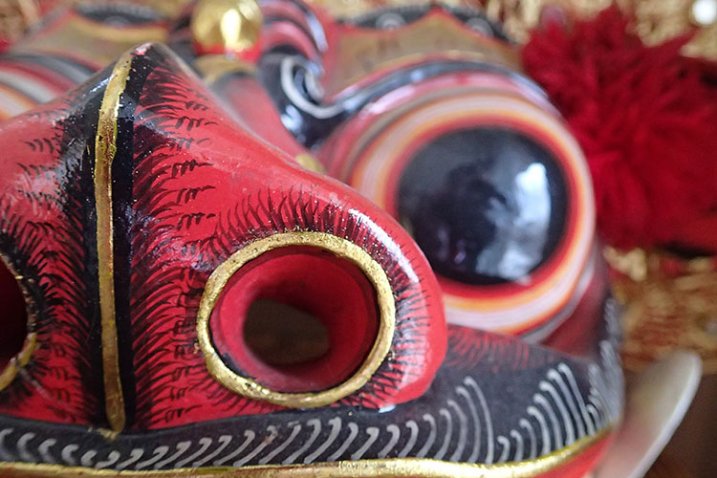
This little camera shot the middle image in the above photo montage. One of the most sophisticated, prettiest, and most durable point-and-shoots on the market today is the Olympus Tough line. It is your best friend for taking high quality photos while engaging in extreme outdoor adventures, and it has a superb macro mode.
Oly Dragon

Pros:

Waterproof, freeze-proof, crushproof, and shockproof, the TG-2 also has a 12 megapixel BSI CMOS sensor and a high-speed f/2.0 lens. It is pocket-sized, although a little bulkier than most other point-and-shoots, and it only costs around $ 350 (TG-4 is the current model). This camera also has many shooting modes including two macro options: Super Macro and Underwater Macro. Both allow you to get as close as 1 cm to the photo subject, and additional magnification of up to 7x with the optical zoom, and 14x with Super Resolution zoom, which is closer than either the x100s or Canon 100mm f/2.8 macro lens offer. Its unique 5:1 magnification really makes macro photography a joy on this little camera.

Oly Flowers

Cons:

This is the only camera of the bunch that doesn’t offer RAW shooting or an optical viewfinder, but it is the only one that has a built-in flash. While the flash produces a balanced output in most situations, it isn’t helpful when shooting in macro mode since it tends to blow out the image due to being too close to the photo subject. Along those lines, shooting in macro mode on the TG-2 does require the camera to be very physically close to the subject, again making it easy to obstruct lighting.

3) Canon 100mm f/2.8 Macro Lens

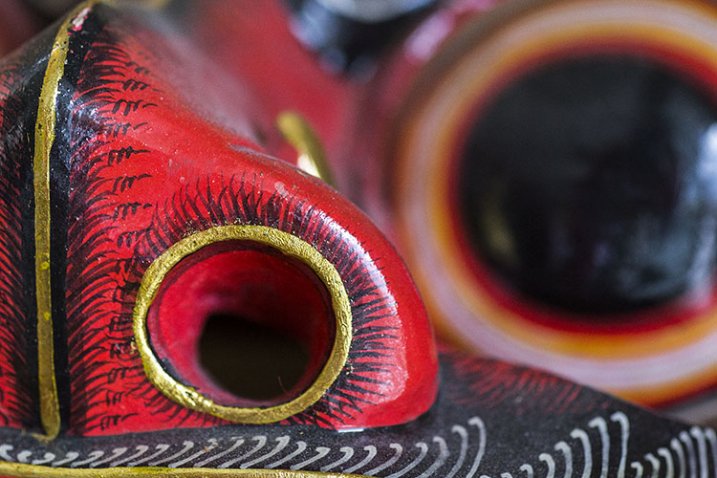
The final image on the far right of the montage above was snapped with the Canon 100mm macro lens. A newer version of this lens recently debuted featuring Image Stabilization and extra goodies, but the older model still boasts spectacular, sharp optics at a relatively lower price ($ 549 versus $ 899).
Can Dragon

Pros:

Canon has a small but mighty line of macro lenses, and the 100mm is arguably the best choice. Its longer focal length causes images to be rendered at 1:1 magnification, giving you more working distance so you don’t scare away your living photo subjects, or cast shadows. Since this lens is paired with a DSLR, image resolution can be up to an astounding 50.6 megapixels if it is used with the Canon 5DS. That’s a huge number compared to the 16.3 megapixels on the Fujifilm or 12 megapixels on the Olympus.

Can Flowers

Cons:

At 20.6 oz (584.2 g), the 100mm macro lens is by far the bigger, heavier, option of the three. With a cost of $ 550-899, and the requirement of using it with a Canon DSLR, this is also the most expensive macro photography tool.

Conclusion

So which camera option is the best for macro photography? It truly depends on how you define “best.” In moments when you need a compact option, the Fujifilm x100s or Olympus Tough point and shoot are the better options, the latter being the better deal for budget or extreme sports shooters. However, if high-quality, professional imagery is your goal, a DSLR with a macro lens is your best bet.

macro-coverWant to learn more about macro photography? Check out Ed Versosky’s Introduction to Close-Up & Macro Photography ebook – just $ 10 (over 30% off) this week with coupon code: DPS. You will need to enter the code to apply the discount.

googletag.cmd.push(function() {
tablet_slots.push( googletag.defineSlot( “/1005424/_dPSv4_tab-all-article-bottom_(300×250)”, [300, 250], “pb-ad-78623” ).addService( googletag.pubads() ) ); } );

googletag.cmd.push(function() {
mobile_slots.push( googletag.defineSlot( “/1005424/_dPSv4_mob-all-article-bottom_(300×250)”, [300, 250], “pb-ad-78158” ).addService( googletag.pubads() ) ); } );

The post Mirrorless, DSLR or Point and Shoot: Which Camera is Best for Macro Photography? by Suzi Pratt appeared first on Digital Photography School.


Digital Photography School

 
Comments Off on Mirrorless, DSLR or Point and Shoot: Which Camera is Best for Macro Photography?

Posted in Photography


Sigma announces price and release date for its 21mm dp0 Quattro compact camera

20 May

Sigma UK has said that the company’s latest compact camera from the Quattro line will cost £899.99 and will be available from the end of June. First announced at the CP+ show in February this year, the dp0 Quattro is the fourth of the unusually designed Quattro range and features a 14mm F4 lens. With the 23.5×15.7mm Foveon image sensor this focal length delivers a similar angle of view as a 21mm lens would on a full frame system. Read more

Articles: Digital Photography Review (dpreview.com)

 
Comments Off on Sigma announces price and release date for its 21mm dp0 Quattro compact camera

Posted in Uncategorized


How to Protect Your Camera in Extreme Weather

17 May

If you love to photograph nature, you surely know how unpredictable, and often hostile the elements can be. While we may get a sniffle or a chill from bad weather, the electronics inside our cameras are much more sensitive.

A little water, some sand, or extreme temperatures can cause your camera to temporarily malfunction or even suffer permanent damage. When the storm clouds roll in, it’s important to know how to take good care of, and protect your camera gear.

Foggy trees by Anne McKinnell

Moisture

Whether it’s full-on rain or just intense humidity, moist conditions are your camera’s number one enemy. Not only can the wetness seep into the electronic elements of cameras, flashes, lenses, and other accessories and short them out, but it can get trapped inside the casing, causing condensation and eventually mold.

To prevent this, consider purchasing a protective rain cover for your camera. You can find these in both disposable and reusable versions. In a pinch, a non-biodegradable plastic shopping bag will do the trick. Make sure all the rubber doors covering your camera’s inputs are sealed, and keep a clean, dry cloth handy to wipe away any water that condenses on the outside of the camera.

Rain drops on flowers by Anne McKinnell

In the event that your camera does get wet inside, remove the lens and set all the affected pieces next to a warm (not too hot) radiator. Remove the battery and memory card, open all the doors and gaskets, and place the camera face up and the lens face down to allow water to evaporate through the openings. Less sensitive accessories can be placed in a bag of dry rice, which will absorb the excess moisture.

Tip: Throw some silica gel (the little packages in shoe boxes, etc., that read “DO NOT EAT”) in your camera bag to protect against humidification in storage.

Intense Heat or Cold

Most cameras are rated to work between -10 and +40 degrees Celsius (14-104 degrees Fahrenheit). This is generally not because of the camera itself, but because of the batteries – the chemicals inside of them cease to work properly when they get too cold, or too hot.

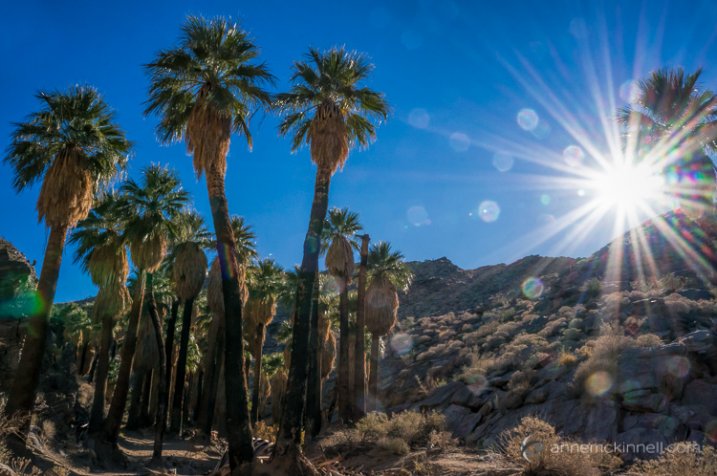
Palm Canyon Sunburst by Anne McKinnell

To avoid this problem, keep an extra battery in a temperature-controlled place. If you’re shooting in the cold, keep one in your pocket to be warmed by your body heat. In the heat, your camera bag should provide adequate shade to keep a battery cool enough to function.

Never place your camera face up in direct sunlight. The lens works both ways, and can act like a magnifying glass to focus the rays into your camera and burn a hole in your shutter, and eventually, your image sensor. Remember that even magnesium-alloy cameras contain plastic components, so if you shoot in really extreme places such as near volcanoes or among raging fires, use common sense and keep your camera well clear of the flames.

Frozen Fountain by Anne McKinnell

Sand

Other than moisture, this is probably the most common cause of equipment malfunction. Everyone wants to take their camera to the beach (or maybe to the desert), but as anyone who has ever tried to picnic in the surf knows, sand gets anywhere, and everywhere. At best, it can become stuck inside the lens and cause spotty pictures. At worst, it will get inside the gears and severely damage moving parts such as the shutter or auto focus motor, or scratch the lens or image sensor.

Ormond Beach by Anne McKinnell

This applies to compact cameras too – sand in the lens will cause it to grind and prevent it from extending, turning your little point-and-shoot into an expensive paper weight. Even tripods aren’t safe from this effect. Grains of sand inside the fastening screws can destroy the threading and keep them from tightening properly.

Again, make sure the rubber gaskets on your camera are tightly sealed and always tuck your equipment away inside a sealed camera bag when not in use. A protective rain cover can also help keep your camera clear of debris. If sand does get on or in your gear, don’t wipe it with a cloth which can embed it deeper, or worse, scratch the glass elements. Instead, get a hand-pumped air blower to puff the grains away. Avoid compressed air canisters, which are too strong and contain chemicals that can cause damage. If you have no other option you can use your lungs, but be very careful not to project little spit particles into your camera’s insides.

Mesquite Sand Dunes by Anne McKinnell

Wind

A stiff breeze won’t hurt much on its own, but it can easily blow over a tripod and send your camera crashing to the ground, causing untold damage. On a windy day, anchor your gear using sandbags, or simply hang your camera bag from the tripod’s centre column to weigh it down (a sack full of rocks will also work). Keep in mind that wind combined with sand creates a natural sandblaster which can scratch up your lens quite badly if you aren’t careful.

Stormy Day at Organ Pipe Cactus National Monument by Anne McKinnell

Bad weather can often make for good photographs, so get out there and make the most of it. Just make sure you are taking care of your equipment at the same time.

googletag.cmd.push(function() {
tablet_slots.push( googletag.defineSlot( “/1005424/_dPSv4_tab-all-article-bottom_(300×250)”, [300, 250], “pb-ad-78623” ).addService( googletag.pubads() ) ); } );

googletag.cmd.push(function() {
mobile_slots.push( googletag.defineSlot( “/1005424/_dPSv4_mob-all-article-bottom_(300×250)”, [300, 250], “pb-ad-78158” ).addService( googletag.pubads() ) ); } );

The post How to Protect Your Camera in Extreme Weather by Anne McKinnell appeared first on Digital Photography School.


Digital Photography School

 
Comments Off on How to Protect Your Camera in Extreme Weather

Posted in Photography


Town 30 Emissary camera bag features lens cap mount and customizable pockets

14 May

Toronto-based Town 30 has launched the Emissary Series camera bag on Kickstarter, where it is seeking funding for production of the photography-centric bags. The Emissary is geared specifically to photographers’ needs with attachable pockets, a removable laptop compartment, a locking mechanism inspired by film-advance levers and a lens cap mount. Read more

Articles: Digital Photography Review (dpreview.com)

 
Comments Off on Town 30 Emissary camera bag features lens cap mount and customizable pockets

Posted in Uncategorized


Lily Camera flies itself and follows its owner

14 May

Lily Robotics has unveiled Lily Camera, a self-flying drone designed to autonomously track and record its owner. Once it’s thrown into the air it begins automatically following its target, which is anyone in possession of the accompanying GPS tracking device. Its camera captures 1080/60p HD video and 12MP stills, and the device itself is waterproof to 1 meter underwater. Read more

Articles: Digital Photography Review (dpreview.com)

 
Comments Off on Lily Camera flies itself and follows its owner

Posted in Uncategorized