RSS
 

Posts Tagged ‘Camera’

Designing the Perfect Camera – What Features are on Your Wish List?

18 Feb

The perfect camera doesn’t exist, but if I were a camera designer, I know exactly what sort of camera I would make for myself, and how I’d improve on the one that I’ve already got. I’m not asking for the impossible either – all these ideas could be implemented using current technology. Really, what I would do is take the camera I already own – the Fujifilm X-T1 – and add the best bits from other cameras, to make a kind of super-camera, or at least one that is better tailored to my own needs.

1 – Sensor size

Let’s start with the sensor. The X-T1’s sensor uses the same 3:2 aspect ratio as other APS-C and medium format cameras. This often works well when taking photos in the landscape orientation. But it doesn’t work nearly so well when taking photos in the portrait orientation (with the camera turned on its side).
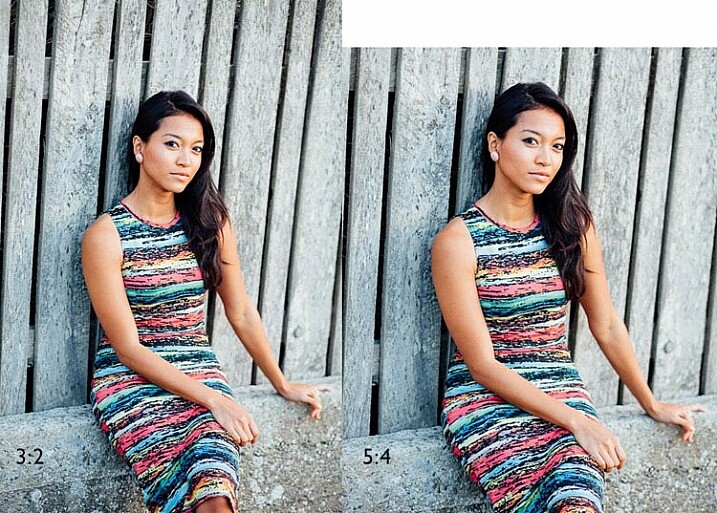
Aspect ratio

The portrait on the left has an aspect ratio of 2:3 (width always comes first), the same as the sensor on the X-T1. The portrait on the right shows how it would look if the sensor had a 4:5 aspect ratio. The area is the same, but the width and height are different.

It’s surprisingly hard to create a good composition that utilizes all the space in the frame well, especially for landscapes and portraits. It’s much easier with a shorter rectangle, such as those found in large format cameras (aspect ratio 5:4), some medium format film cameras (7:6) and Micro four-thirds cameras (4:3).

For example, check out the landscapes of Joe Cornish. He uses a large format camera for a lot of his work, and he uses the portrait orientation a lot. It works really well with the short rectangle.


My proposal is this. Ditch the 3:2 aspect ratio sensor and place it with one that uses the 5:4 aspect ratio. But keep the area of the sensor – don’t make it bigger or smaller. This would give you several benefits:

  • It’s easy to compose images within the 5:4 aspect ratio.
  • If you crop to a square (as I often do because I love the square format) you use more of the sensor than when you crop the current APS-C sensor.
  • You get a slight improvement in image quality, especially at wide apertures, because you are using the centre part of the lens to create the image.
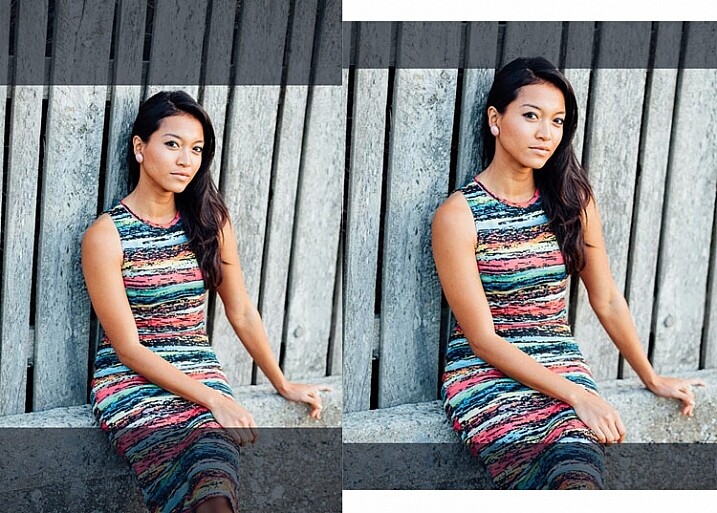
Aspect ratio

The above two photos, cropped to a square. The dark grey area shows the unused part of the sensor. You lose less information captured from the 5:4 sensor than you do from the 3:2 one.

What I don’t want to see, is a full-frame camera introduced into the Fujifilm range. The problem with having two sensor sizes in the same range, is that it greatly complicates the process of making, and buying lenses. It’s far better, as Fujifilm has done so far, to use a single sensor size throughout the range (in my opinion).

2 – In-Camera Image Stabilization

I think this is a fantastic idea, and I’d like to see it in Fujifilm cameras. The advantage of having Image Stabilization in the camera is that you can use it with any lens. That includes wide-angles, which you can then potentially hand-hold at shutter speeds like 1/4 or 1/8 second, giving all sorts of interesting creative possibilities when it comes to recording movement. Sony and Olympus have got this one right.

Fast shutter speed

I took this photo with a 35mm lens at 1/180 second to freeze movement. This lens doesn’t have Image Stabilization, but if it were built into my camera, I could try taking the photo at a shutter speed as slow as 1/15 or 1/8 second. The man would be a blur, creating a different image entirely. Image Stabilization lets you try this with a hand-held camera, so you don’t have to use a tripod.

3 – Quick control dial

Mid-range and high-end Canon cameras have a quick control dial – a thumbwheel on the back of the camera, that you can move while looking through the viewfinder. The big advantage of the quick control dial is that you can adjust exposure compensation without removing your eye from the viewfinder.
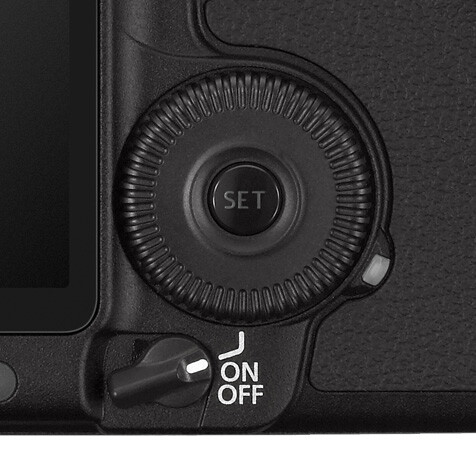
Quick control dial

The quick control dial on the EOS 5D Mark II. Its position means that it’s easy to move with your thumb, while looking through the viewfinder.

The X-T1 can already display a histogram in the viewfinder. With a quick control dial you can adjust exposure compensation (when in an automatic mode like aperture priority, shutter priority or program) as you go, to get the histogram where you want it. All guesswork regarding exposure is gone. The current exposure compensation dial is too hard to move while looking through the viewfinder, and reduces the usability of the camera.

The joystick added to the X-Pro 2 for quick movement through the autofocus points would also be a welcome addition.

4 – Dual card slots

Probably coming in the XT-2, but essential for backing up photos. Good quality memory cards are virtually indestructible. If your camera saves a copy of each photo on two different cards this makes backing up photos much easier, especially while travelling.

So Fujifilm, if you’re listening, I know I’m only one user among many, but I’d love it if you could give some consideration to these ideas. Especially the one about sensor size, which I think could revolutionize the way we use cameras.

Your turn

If I could add just one feature to my X-T1 it would be the 5:4 aspect ratio sensor. So here’s a question for you – if you could add just one feature to your camera, which would it be and why? I’m looking forward to reading your answers, this should be interesting.


Mastering Lenses photography ebookMastering Lenses

My new ebook Mastering Lenses: A Photographer’s Guide to Creating Beautiful Photos With Any Lens shows you how to get the best from the lenses you own already. A comprehensive guide to exploring the creative potential potential of wide-angle, normal and telephoto lenses, it’s also the ultimate buying guide for readers thinking about purchasing a new lens for their camera. Please click the link to learn more or buy.


googletag.cmd.push(function() {
tablet_slots.push( googletag.defineSlot( “/1005424/_dPSv4_tab-all-article-bottom_(300×250)”, [300, 250], “pb-ad-78623” ).addService( googletag.pubads() ) ); } );

googletag.cmd.push(function() {
mobile_slots.push( googletag.defineSlot( “/1005424/_dPSv4_mob-all-article-bottom_(300×250)”, [300, 250], “pb-ad-78158” ).addService( googletag.pubads() ) ); } );

The post Designing the Perfect Camera – What Features are on Your Wish List? by Andrew S. Gibson appeared first on Digital Photography School.



Digital Photography School

 
Comments Off on Designing the Perfect Camera – What Features are on Your Wish List?

Posted in Photography


Sphericam 2 professional fully spherical camera records 4K/60 fps videos

13 Feb

$ (document).ready(function() { SampleGalleryV2({“containerId”:”embeddedSampleGallery_7236055564″,”galleryId”:”7236055564″,”isEmbeddedWidget”:true,”standalone”:false,”selectedImageIndex”:0,”startInCommentsView”:false,”isMobile”:false}) });

The folks at Sphericam are back with a second generation model of their unique angular camera. The Sphericam 2 is, according to the company, the first fully spherical pro-grade 360-degree camera that records 4K footage at 60 fps. The resulting videos can be used in VR applications, as well as on platforms that support 360-degree content like YouTube and Spinnable.

Unlike other spherical cameras, Sphericam features angular sides comprising a geometric design made from anodized aluminum. These ‘faces’ allow the camera to be placed flat on a surface, and also house things like lenses, mounting points, and buttons. Sphericam 2 has six cameras, each using a sensor with global shutter and synchronized to fire within 50 microseconds of each other.

Footage is available as 60 fps raw/unstitched and as 30 fps stitched panoramic videos. Capturing in 30 fps allows the video to be stitched in real time; a live streaming function is currently in development. Content, meanwhile, is recorded at up to 1.2 Gbps to an internal microSD card. The camera supports use of up to six MicroSD cards at once by way of a removable module adding up to a total maximum storage capacity of 768GB, or about 85 minute of footage.

The camera has two power options: a non-removable rechargeable battery for up to 90 minutes of operation, and a USB-C port for continuous operation when plugged in. Finally, Sphericam features a total of 8 mounting points, each a standard threaded 1/4-20 offering, for use with various third-party mounting accessories. 

Sphericam 2 is available for preorder from Sphericam for $ 2499; shipping is estimated to start 10 to 12 weeks after ordering.

Via: Sphericam

Articles: Digital Photography Review (dpreview.com)

 
Comments Off on Sphericam 2 professional fully spherical camera records 4K/60 fps videos

Posted in Uncategorized


Cambo introduces Canon EOS lens plate with aperture control for Actus view camera system

12 Feb

$ (document).ready(function() { SampleGalleryV2({“containerId”:”embeddedSampleGallery_4644059846″,”galleryId”:”4644059846″,”isEmbeddedWidget”:true,”standalone”:false,”selectedImageIndex”:0,”startInCommentsView”:false,”isMobile”:false}) });

Cambo has devised a new Canon EF/EF-S lens plate for its Actus view camera system that allows users to control aperture settings on Canon EOS lenses. The Cambo Actus system is designed to deliver a view camera style of shooting to some mirrorless camera bodies, consisting of a lens plate and a body plate with bellows and a monorail in between.

As EOS lenses have no manual aperture control, a plain mounting plate will only allow the lenses to be used at their widest aperture setting. The new ACB-CA plate however has electronic contacts that allow it to communicate with the lens, and a finger wheel so the photographer can dial in required aperture settings. An OLED display shows aperture values as well as the focal length in use, even when a zoom is mounted. 

The ACB-CA adapter will provide tilt, shift, swing, rise and fall movements between the front and rear standards with an EOS lens and a mirrorless camera mounted, though other lens systems allow movements with Nikon and Canon DSLR bodies. The Actus-DB system allows digital backs to be used.

The new ACB-CA plate for Canon EOS lenses costs £950 / $ 1299, while the Actus body costs £1400 / $ 1900. For more information visit the Cambo website.


Press release: 

NEW Cambo Actus Canon Auto Lens Mount

Cambo has released the NEW ACB-CA adapter for Canon EF lenses for use on the ACTUS mini view camera. The adapter has built-in electronic controls for setting and operating the aperture of Canon EF lenses.

Normally when a Canon auto iris lens is removed from the camera body the lens aperture is wide open. The ACB-CA communicates with the lens and enables the user to adjust the aperture, giving you full control.

This adapter has an internal battery for continuous use and features an OLED display which shows the preset or set aperture together with the focal length of the lens. The communication is accurate, such that the display will also show the focal length of zoom lenses.

The adapter accepts lenses fitted with Canon EOS bayonet, in combination with the ACTUS view camera. The ACB-CA adapter is finished in black to match the ACTUS-B camera version.

This ACB-CA lens adapter is designed to work with mirrorless* camera bodies, such as the Sony A7 series, Fujifilm X series and Canon M series. When mounted on the Actus the adapter will tilt and swing within the lens image circle that is being used. The rear rise/fall and left/right shift will operate as normal, again within the lens’s image circle.

*Mirrorless camera bodies have the imaging sensor further forward enabling the lens to focus at infinity or closer.

Check via the Cambo Configurator the compatibility between cameras, lenses and adapter when using the Cambo Actus.

The ACB-CA adapter is available now from stock £790.00 excluding VAT and shipment. For further information contact CamboUK on 07863 116150 or cambouk@gmail.com .

Articles: Digital Photography Review (dpreview.com)

 
Comments Off on Cambo introduces Canon EOS lens plate with aperture control for Actus view camera system

Posted in Uncategorized


How to Take Care of Your Camera in Cold Weather

11 Feb

Mid-day, mid-winter, Alaska light. It just doesn't get any better.

Where I live, it gets cold. Not your “Brrr, I need to put on a sweater” kind of cold, but genuine, bone-chilling, spit-freezes-before-it hits-the-ground, kind of cold. Here in Fairbanks, Alaska, winter temperatures regularly drop far into the negatives, and yearly we suffer through snaps that send the mercury plummeting to -40F (-40C).

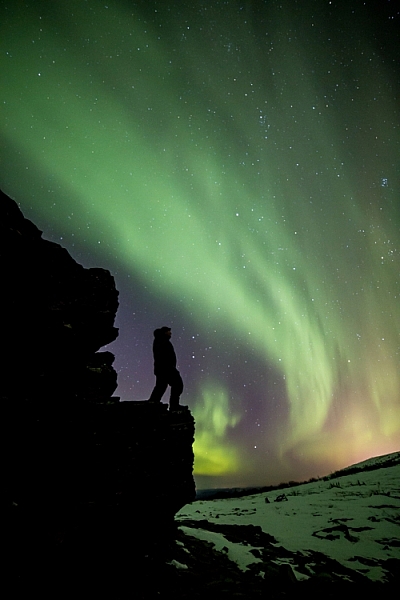
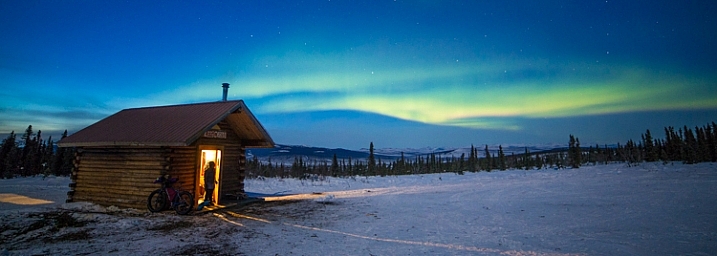
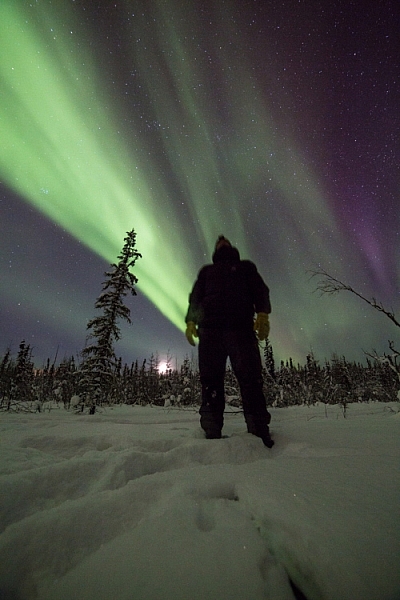
You’d think that in such conditions I wouldn’t want to step outside, let alone take photos, but you’d be wrong. Winter light, what few hours there is of it, is absolutely beautiful. That sweet, crisp glow can pull me from the deepest funk, and lure me out with a camera in hand. During many long winter nights, the aurora borealis dances overhead, and that too can draw me from my cozy cabin, into the snowy forest to make images. On the days I made the two images below, it was seriously cold, but that light, yep, that light will get me outside.

Low winter sun, and frosted birches near Fairbanks, Alaska. AK-FAI-Winter-sun-112172-17

To venture out in those temperatures, you’ve got to be prepared. You need the right clothes to stay warm, and you’ve got to make sure your camera equipment is ready too.

Forget about fashion

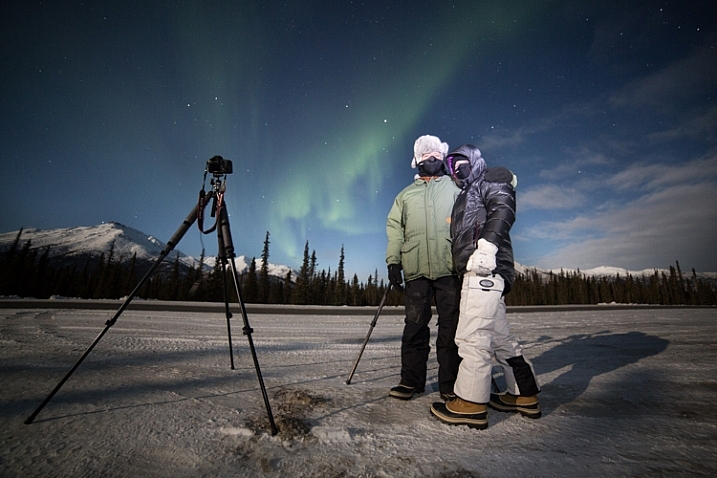
To shot the aurora during mid-winter in Alaska you need to dress warm!

To shot the aurora during mid-winter in Alaska, you need to dress warm!

You’ve got to dress right. It doesn’t matter what the light is doing, if you get frost-bite on your fingers, and can’t operate the camera. When dressed in my winter-photo clothing, I feel a bit like an onion, wrapped in layer upon layer. From inside to outside my system goes like this: long underwear, fleece or wool sweater and pants, down or synthetic vest, 800 fill down jacket with hood, windproof Thinsulate pants, two pairs of thick wool socks topped by expedition quality winter boots, a musher’s style hat complete with ear flaps, a balaclava or face mask, and thin nimble gloves with a pair of expedition overmitts dangling from wrist straps. Last, I’ll often throw a couple of chemical hand-warmers into my jacket pockets. When temperatures drop to -40F, it’s best not to mess around.

Two of my clients on an aurora photography tour, dressed for the weather.

Two of my clients on an aurora photography tour, properly dressed for the weather.

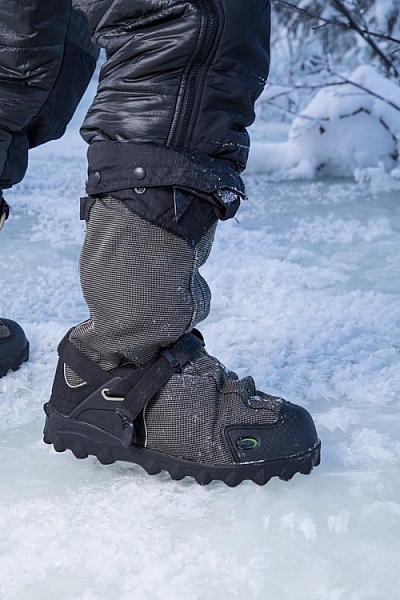
The author's well-worn NEOS overboots.

The author’s well-worn NEOS insulated overboots.

Stay Charged

The fluctuations of electricity mean that a cold battery cannot kick out the same amount of electricity as a warm battery. This means that on a brutally cold day, your camera or flash batteries will last only a small fraction of the time they normally would at room temperature. It’s a problem easily solved by carrying a spare battery or two.

A backup battery will let you swap out the cold, dead one in your camera, but there is a hitch: the spares should not be kept in your camera bag, but in an inside jacket pocket. That way they are warm when they go into the camera. When the dead battery warms back up in your pocket (with the help of the aforementioned chemical hand warmers) it will be ready to use for a while again. I find I can shoot at extremely cold temperatures for the better part of day by cycling two batteries back and forth from my pocket to my camera. Though this will vary a lot, depending on how power-hungry your camera is.

AK-FAI-Aurora-111154-35.jpg

Avoiding Bad Breath

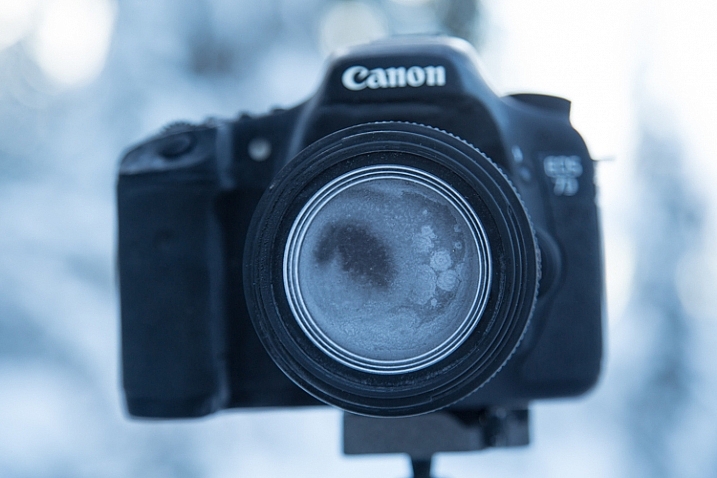
The cold comes with other risks, one in particular, can ruin your day of photography, and that is – watch your breath. I mean it. A mistimed, warm, humid, breath will condense on your lens, resulting in a layer of milky frost on the glass. It doesn’t matter how much money you spend on your lenses, no amount of sharpness will make up for that kind of damage. Wiping at it, usually just smudges it more, and defrosting it inside (see below), can take hours. Watch where you breathe, if you turn your camera around to check lens settings, don’t exhale. I also usually wear a neck gaiter or balaclava that I pull up over my mouth and nose. So with your mouth covered, your breath is directed up, where it frosts on your eyelashes instead of your camera.

This is what happens if you accidentally breathe on your lens during a cold weather shoot.

This is what happens if you accidentally breathe on your lens during a cold weather shoot.

Lens Caps Exist for a Reason

Breath is the usual culprit of fogged lenses, but when shooting at night, there is always the chance that natural frost will form. To avoid this, use your lens cap when you aren’t shooting. If you are walking from one location to another, taking a break, or searching for a new composition, put the cap back on your lens. When I’m out shooting the aurora at night, my cap is on my lens, even if I’m just walking a short distance to a new shooting location.

AK-Interior-Whites-103193-8

Back Indoors

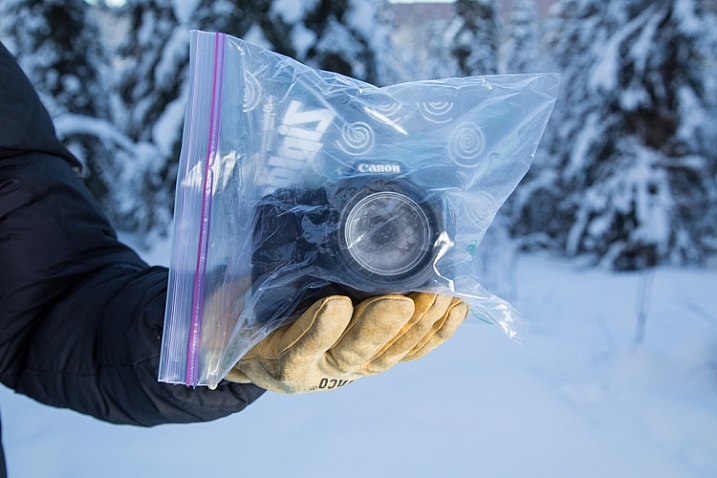
Last, and perhaps most importantly, is the return indoors. You know how on a hot day, your cold beer glass gathers condensation? Ever watched how those drips can form and run down the bottle, pooling in a messy ring on the hard-wood table? Imagine that happening to your camera gear. It can, and it will. When you step back indoors to take a break, warm up, or finish up for the day, place your camera and lenses into an airtight bag.

A properly bagged and sealed camera, ready to be taken back indoors after a cold outdoor shoot.

A properly bagged and sealed camera, ready to be taken back indoors after a cold outdoor shoot.

Ziplocks are good, but I favor light-weight roll-top dry bags like those used by boaters to keep their gear dry. These are tough, reusable, and work like a charm. Once sealed up tight in a ziplock or dry bag, condensation can’t form on your gear. Just let your camera warm up to room temperature before you pull it out.

AK-NoatakPreserve-KellyRiver-1083-491

The cold scares a lot of photographers, and make no mistake, a frigid, mid-winter Alaskan night is nothing to mess around with. But with a few precautions – warm clothes, spare batteries, avoiding frost, and protecting against condensation – you can take advantage of the stellar beauty of crisp, clear, days and nights like this one.

googletag.cmd.push(function() {
tablet_slots.push( googletag.defineSlot( “/1005424/_dPSv4_tab-all-article-bottom_(300×250)”, [300, 250], “pb-ad-78623” ).addService( googletag.pubads() ) ); } );

googletag.cmd.push(function() {
mobile_slots.push( googletag.defineSlot( “/1005424/_dPSv4_mob-all-article-bottom_(300×250)”, [300, 250], “pb-ad-78158” ).addService( googletag.pubads() ) ); } );

The post How to Take Care of Your Camera in Cold Weather by David Shaw appeared first on Digital Photography School.

Digital Photography School

 
Comments Off on How to Take Care of Your Camera in Cold Weather

Posted in Photography


Sony Xperia Z5 camera review

09 Feb

The Sony Xperia Z5 currently shares the top spot in DxoMark’s mobile rankings with the Samsung Galaxy S6 Edge Plus. With a 23MP BSI CMOS sensor, F2.0 lens and hybrid AF system it’s easy to understand how it might have ended up at the top of the rankings. Our full review digs into image quality as well as our experience using the Z5 for photography. Read more

Articles: Digital Photography Review (dpreview.com)

 
Comments Off on Sony Xperia Z5 camera review

Posted in Uncategorized


10 Ways That Understanding Your Camera Leads to Better Images

02 Feb

Perhaps you’ve heard this one before, or said even it yourself: I could take great pictures too, if I had your camera. But saying pictures are great because of the camera is like saying Michael Jordan was great because of his shoes. Sure, the camera determines an image’s resolution, but give a $ 7,000 camera to a toddler and you’ll have Continue Reading

The post 10 Ways That Understanding Your Camera Leads to Better Images appeared first on Photodoto.


Photodoto

 
Comments Off on 10 Ways That Understanding Your Camera Leads to Better Images

Posted in Photography


YoCam is world’s smallest waterproof ‘life’ camera

30 Jan

A new pocket-sized camera called YoCam, claiming to be the world’s smallest waterproof wearable camera, has been successfully funded through crowdfunding site Indiegogo. Available for pre-order now, Molify’s YoCam features a versatile design suitable for a variety of situations, including underwater recording.

YoCam is indeed small at 85 x 30 x 21mm / 3.3 x 1.2 x 0.8in and 55g / 1.9oz, and is compatible with mounts like clips and lanyards as well as being waterproof to a max depth of 6m / 20ft. The camera has a maximum video resolution of 2.7K / 30fps with an F2.0 aperture, 140-degree wide-angle lens. Features include P2P remote connections for live video feed monitoring, image and video stabilization, HDR, a life-logging mode for continuous capture and a looping video option.

Molify also has a line of accessories for YoCam, including a Bluetooth remote control, an adapter compatible with ‘almost every action camera accessory on the market,’ a 3-in-1 magnetic stand, clip and clamp mount, ‘AnyBar’ bar mount, a suction cup mount, wrist strap, dog harness mount and lanyard.

Pre-orders can be placed on the YoCam Indiegogo page for $ 169, while the retail price is $ 199. Shipping to backers and those who pre-order is estimated to start this April.

Articles: Digital Photography Review (dpreview.com)

 
Comments Off on YoCam is world’s smallest waterproof ‘life’ camera

Posted in Uncategorized


Sony camera and sensor business units report drop in sales in 2015

30 Jan

Sony Corp. released its third quarter 2015 earnings report [PDF], in which the company disclosed notable drops in both camera and image sensor sales. It has also lowered the forecast for both business units, though both are still expected to make a profit in the current fiscal year.

Note the drop in camera sales but increase in operating income due to the shift to higher-end models.

Sales in the Imaging Products unit dropped by 5%, due to decreases in unit sales of digital still and video cameras, reflecting ‘a contraction of the market, partially offset by an improvement in the product mix of digital cameras reflecting a shift to high value-added models.’ In other words, they’re selling fewer cheap compacts and more RX and a7-series cameras. Operating income went up by over 20%, however, due the aforementioned shift to higher-end digital cameras.

Image sensor and battery sales are way down in Q3 2015 vs Q3 2014, and the forecast for FY2015 has been lowered considerably.

The image sensor business took an even bigger hit. Sales in the Devices unit decreased by over 12% year-on-year due primary to a drop in sales of image sensors as well as batteries. Operating income dropped ¥65.5bn ($ 540m) to –¥11.7bn ($ 97m), due in large part to a write-down in assets related to batteries. While not specific to digital cameras, the company’s statement mentioned a 7.5% drop in sales to external partners.

Sales in Q1 and Q2 2015 were down more than 500k units each year-on-year and the company’s forecast shows the gap widening in Q3 2015.

Sony also revised its October forecasts downward for both business units. The Imaging unit’s estimated sales has been reduced by 1.4% and now stands at ¥710bn (compared to ¥724bn in FY2014), while the forecast for the Devices business has been brought down by 11.3% to ¥940bn (compared to ¥927bn in FY2014). Both units are still expected to make a operating profit in FY2015, however.

On other item of note from the company’s earnings call mentions the Oita manufacturing facility it recently bought from Toshiba. Sony says that they are considering using a portion of the factory for producing ‘logic’ (processors) rather than photodiodes (sensors) in order to reduce the cost of its sensors. While the company is considering this change to ‘mitigate the downsized rate in [the sensor] business’, it is ‘confident in the long-term prospects of image sensors.’

Articles: Digital Photography Review (dpreview.com)

 
Comments Off on Sony camera and sensor business units report drop in sales in 2015

Posted in Uncategorized


Apple patent describes use of curved image sensor to design small camera module

29 Jan

A patent was recently granted to Apple describing how a spherical image sensor can be used to design a very compact camera module. The sensor is spherically curved and eliminates the need to correct for curvature of field, meaning a simpler, brighter and ultimately smaller lens design can be used. Read more

Articles: Digital Photography Review (dpreview.com)

 
Comments Off on Apple patent describes use of curved image sensor to design small camera module

Posted in Uncategorized


Tamrac launches Hoodoo series with two camera bags

23 Jan

Tamrac has introduced two camera bags as part of its new Hoodoo product lineup. The Hoodoo 18 and Hoodoo 20 packs are described as being ‘minimal and lightweight’ with features including a water-resistant waxed canvas exterior, PU coated ripstop fabrics, and selective padding for comfort.

These two new Tamrac bags are designed for use in the great outdoors, and come in two different sizes, with the Hoodoo 18 bag being the smaller of the two. The Hoodoo 18 bag can carry a mirrorless camera or DSLR as well as one or two lenses and a 13-inch laptop. The camera compartment is separate from the bag’s main compartment.

The Hoodoo 20, meanwhile, is described as ‘three packs in one,’ able to serve as a camera shoulder bag, day pack, or protective camera backpack, depending on the need. Customizable interior dividers can be adjusted to accommodate a mirrorless system or DSLR, while the upper portion includes space for personal gear and a 15-inch laptop.

Both bags are available now in ‘ocean,’ ‘kiwi,’ and ‘pumpkin’ colors. The Hoodoo 18 is priced at $ 89.95 USD, and the Hoodoo 20 at $ 129.95 USD.

Articles: Digital Photography Review (dpreview.com)

 
Comments Off on Tamrac launches Hoodoo series with two camera bags

Posted in Uncategorized