RSS
 

Posts Tagged ‘Camera’

Leica announces price and availability of 90-280mm F2.8-4 zoom for SL camera

17 Mar

Leica has announced the price of its second lens for the new SL system and says it will go on sale within the next couple of weeks. The Leica APO-Vario-Elmarit-SL 90-280mm F2.8-4 is set to cost £4650/$ 6395, and will join the existing Leica Vario-Elmarit-SL 24-90mm F2.8-4 ASPH standard zoom lens that was released with the SL body.

The 90-280mm F2.8-4 was announced at the same time the SL camera was launched, as was a Leica Summilux-SL 1:1, 4/50mm ASPH which is due for release at the end of this year – possibly around the time of the Photokina show in Germany.

This latest lens is claimed to offer very fast AF, as well as 3.5-stops of optical image stabilization. Sealed against the weather and dust, the lens features a closest focusing range of 0.6-1.4m and can manage a maximum reproduction ratio of 1:4.8, so Leica says it is suitable for close-up work as well as for shooting at normal distances.

Sales of the Leica APO-Vario-Elmarit-SL 90-280mm F2.8-4 will begin on 24th March. For more information see the Leica website.


Press release:

New telephoto zoom lens for the Leica SL-System:
LEICA APO-VARIO-ELMARIT-SL 90-280mm f/2.8-4 versatile zoom lens designed for a wide range of situations, from close-ups to travel to sports photography 

Leica Camera has today announced the latest addition to the Leica SL-System lens portfolio: the Leica APO-Vario-Elmarit-SL 90–280 mm f/2.8-4.
 
Available from 24 March 2016, this fast telephoto zoom lens offers a range of focal lengths that follows on directly from the Leica Vario-Elmarit-SL 24–90 mm f/2.8–4 ASPH., which launched with the SL camera at the end of last year. Together, these two lenses cover focal lengths spanning 24 to 280mm, providing the versatility to shoot a multitude of subjects and situations – from close-ups to travel and sports photography.
 
The Leica APO-Vario-Elmarit-SL 90–280 mm f/2.8-4 is characterised by its incredibly high speed and offers outstanding optical and mechanical precision. Its integrated optical image stabilisation (OIS) enables exposure times to be increased by up to 3.5 stops, and guarantees shake-free hand-held photography even at telephoto settings.
 
Furthermore, this exceptional zoom lens features an entirely new design, with dual internal focusing that ensures extremely fast and quiet autofocus, and delivers consistently impressive imaging performance at distances from infinity to its close focusing limit.
 
With a close focusing distance of 0.6 metres at 90mm and 1.4 metres at 280mm, and a reproduction ratio of 1:4.8 to 1:5, this versatile lens is particularly useful for close-up photography.
 
As with all Leica lenses, the Leica APO-Vario-Elmarit-SL 90–280 mm f/2.8-4 was designed and developed by Leica’s optical specialists in Wetzlar, Germany, combining outstanding optical expertise, cutting-edge technology and premium materials – guaranteeing the consistently high quality that Leica photographers have come to expect. The design of the Leica APO-Vario-Elmarit-SL 90–280 mm f/2.8-4 comprises 23 elements (in seven moving groups), seven of which are made from glass with anomalous partial dispersion, ensuring minimal chromatic aberration. The movement of the two focusing elements is provided by newly developed drive technology with linear positioning of the lenses by stepping motors.
 
This means the overall length of the lens does not change when either focusing or zooming. In addition, the lens hood supplied with the lens suppresses undesirable reflections and stray light, and prevents the risk of flare.
 
Furthermore, the Leica APO-Vario-Elmarit-SL 90–280 mm f/2.8-4 is sealed against dust and splash-proof, to protect it from the elements.
 
The Leica APO-Vario-Elmarit-SL 90–280 mm f/2.8-4 features a detachable tripod plate to connect the lens to a tripod for easier handling. Its ergonomic design makes the lens easier to carry by hand and also allows the attachment of a lens belt. A lockable rotating tripod collar ensures the lens can be fixed at any angle, and features detents every 90 degrees for rapid switching from landscape to portrait format.
 
The current Leica SL-System portfolio will be extended later this year with the addition of the Leica Summilux-SL 50 mm f/1.4 ASPH. prime lens (available in Q4 2016). Furthermore, the extensive compatibility of the Leica SL-System gives photographers access to the majority of Leica lenses ever produced. For example, all Leica T lenses can be mounted on the Leica SL without an adapter, while the M-Adapter T enables the use of almost all Leica M-Lenses constructed since 1954. In addition, Leica S-Lenses can be mounted with the S-Adapter L (available in May 2016), and the forthcoming R-Adapter (available Q3 2016) will allow Leica R-System lenses to be used with the SL camera.
 
Availability and pricing
 
The APO-Vario-Elmarit-SL 90–280 mm f/2.8-4 is scheduled to be available in the UK from authorised Leica stockists from 24 March 2016, at a suggested retail price of £4,650 including VAT.

Articles: Digital Photography Review (dpreview.com)

 
Comments Off on Leica announces price and availability of 90-280mm F2.8-4 zoom for SL camera

Posted in Uncategorized


DxO extends camera support with OpticsPro, FilmPack and ViewPoint updates

17 Mar

DxO has introduced updates for its OpticsPro, FilmPack and ViewPoint software that adds support for six new cameras, as well as 50 additional camera/lens modules to the DxO Optics Module library.

The updates add support for the following cameras:

  • Canon Powershot G5 X
  • Canon Powershot G9 X
  • Leica Q (typ 116)
  • Sony DSC-RX1R II
  • Canon EOS M10
  • Leica SL

DxO OpticsPro v10.5.4, DxO FilmPack v5.5.4 and DxO ViewPoint v2.5.13 are available for download now from DxO. Through March 31, new users can purchase DxO’s applications at a discount:

  • DxO OpticsPro 10 ESSENTIAL Edition: $ 64/£49 (instead of $ 129/£99)
  • DxO OpticsPro 10 ELITE Edition: $ 99/£79 (instead of $ 199/£159)
  • DxO FilmPack 5 ESSENTIAL Edition: $ 39/£29 (instead of $ 79/£59)
  • DxO FilmPack 5 ELITE Edition: $ 64/£49 (instead of $ 129/£99)
  • DxO ViewPoint 2: $ 39/£29 (instead of $ 79/£59)

Articles: Digital Photography Review (dpreview.com)

 
Comments Off on DxO extends camera support with OpticsPro, FilmPack and ViewPoint updates

Posted in Uncategorized


Adobe Lightroom CC 2015.5 / 6.5 update brings bug fixes, new camera support

17 Mar

Adobe has launched Lightroom CC 2015.5 and Lightroom 6.5, bringing numerous bug fixes alongside new camera support and dozens of new lens profiles. The update fixes a few issues with the Panorama Merge feature, including bugs affecting Boundary Warp, as well as ‘a ton of sync errors’ and a couple missing features.

The new version of Lightroom takes care of dust spots in a smart way – remove spots from the first image, and the rest will be removed automatically as other images are merged. Additionally, bugs have been fixed that affected Boundary Warp, a tool that helps straighten curved edges of stitched panoramas.

Bug fixes unrelated to Panorama Merge include numerous unspecified syncing errors. Adobe also claims that syncing with the Android and iOS Lightroom apps is now faster. Mouse scrolling has been restored in Loupe view, and it has also reinstated scroll bars in the Book module for faster browsing. Finally, slideshows once again display images in high-resolution, whereas before a bug caused them to display at a ‘much lower res than expected.’

The following camera models are now supported:

  • Canon EOS-1D X Mark II
  • Canon EOS 80D
  • Canon EOS 1300D (Rebel T6, Kiss X80)
  • Nikon D5
  • Nikon D500
  • Olympus PEN-F
  • Olympus SH-3
  • Panasonic DMC-CM10
  • Panasonic DMC-GF8
  • Panasonic DMC-ZS100 (DMC-ZS110, DMC-TZ100, DMC-TZ101, DMC-TZ110, DMC-TX1)
  • Samsung NX3300
  • Sony Alpha a6300 (ILCE-6300)
  • Yuneec CGO4

Lastly, more than 70 lens profiles have been added for lenses from Canon, Fujifilm, Olympus, Panasonic, Pentax, Samsung, SIGMA, and Sony, and there’s support for the lens used by the Huawei Nexus 6P and LG Nexus 5X smartphones. The full list of newly supported lens profile is available here.

Articles: Digital Photography Review (dpreview.com)

 
Comments Off on Adobe Lightroom CC 2015.5 / 6.5 update brings bug fixes, new camera support

Posted in Uncategorized


Exposure: Get it Right in Camera or Fix it Later?

16 Mar

Recently, I received a very interesting question from a dPS reader about exposure. The question was, “How much does it matter about getting the exposure right when the photo is taken, as opposed to fixing it later in Lightroom?” It is a really interesting question, and it became even more interesting to me the more I thought about it.

Toledo-Overlook

Options for achieving the best exposure

Let’s start off by looking at the possibilities here. There a few different ways you can approach this, and they each have their advantages:

#1 Get it right in camera:

The first way is to make absolutely sure you get it right in camera, without resorting to post-processing software, unless you absolutely have to. Historically, this is the way it was done, largely because changing exposure levels was much more difficult than it is today with digital photography. Any professional photographer worth their weight in salt, would tell you to get it right in camera.

Even today, however, there is still a lot to recommend this strategy. If you don’t use post-processing software, then obviously this is the only answer for you. Further, if you are someone that takes a lot of pictures, and do not want to spend all your time editing them, then this approach still has merit as well. There is just something that feels right about getting it correct in camera. It also avoids surprises later.

#2 Rely on Lightroom:

At the opposite end of the spectrum, is the idea that you should not worry about exposure so much while shooting, and instead get it right in Lightroom. When I say “not worry about it so much,” of course I do not mean you should just haphazardly twist dials to any exposure setting and blast away. Obviously, you need to get the exposure somewhat close to what you want. In addition, you cannot let your highlights get blown out, or your shadows turn pure black. But programs like Lightroom and Photoshop give you a lot of flexibility to deal with exposure settings later. As long as you get it close when you are shooting, you can take your time in front of a computer and get it exactly right.

#3 Do both:

Then, of course, there is a median way.  You can try very hard to get the exposure exactly right in camera, and then tweak it later in Lightroom, when you are in front of your computer. In this approach, basically you are just always trying to get it right. You are taking advantage of all your tools. You may get it right in camera, which avoids time in front of the computer later, and avoids any surprises. If not, you can take your time and tweak it later.

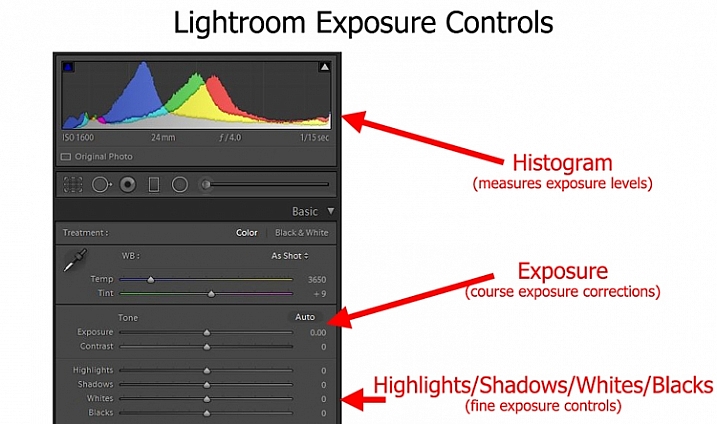
LR-controls-Graphic

To me, as I thought about it, the median way seemed like the right answer, I expect it did to you too. Except the more I thought about it, the more I realized I don’t really do that.

My approach to exposure

Instead, I tend more toward the “don’t worry about exposure so much” end of the spectrum. I tend to just get it close, knowing that I am going to fix it later in Lightroom. Am I just being lazy in the field? Maybe, but I don’t think so.

It is just that when I am out shooting, I am usually trying to focus all my attention on composition. I think that is ultimately what matters in creating great photos. For me at least, that topic requires virtually all my mental energy. You have everything from your choice of subject, to how you will be placing things within the frame, to the perspective you want to use, to making everything balance, etc. That’s not to mention shape, leading lines, and other compositional elements. There is just so much to think about. Therefore, the more I can eliminate distractions from anything but composition, the better. I try to keep exposure from intruding on that process too much when I am out shooting.

Further, this approach toward exposure just lends itself to my way of shooting. I’m not someone that sets up on a tripod and stays in one place for a long time. It seems like I’m always on the move, chasing the next shot. My time spent on each shot is pretty limited. Further, while I take a lot of pictures, I edit very few of them, so I don’t mind spending whatever time is necessary, tweaking exposures in Lightroom. I often bracket my pictures as well, which gives me a little leeway for my exposure settings, and means I won’t have an unpleasant surprise later.

Sometimes you are set up on a tripod facing a static scene with unchanging light - which means you can spend all the time you want making sure you have the exposure the way you want it.

Sometimes you are set up on a tripod facing a static scene with unchanging light – which means you can spend all the time you want making sure you have the exposure the way you want it.

Anyway, thinking about how my approach toward photography as a whole affected how I approach exposure, made me realize that your particular method or style of photography probably has a lot to do with your approach to exposure.

Which should you do?

So, how should you approach exposure – by getting it right in camera, or relying more on Lightroom? There is no right answer here, as far as I can tell. As mentioned above, I believe it depends a lot on how you approach photography.

For example, a street shooter who is always on the move, trying to capture fleeting emotions, might not have time to devote toward getting the exposure exactly right. On the other hand, someone who spends a lot of time in one place may have the time. There are a lot of other factors as well.

. . . and other times you have only a second to get a shot before conditions change or your subject walks away - in which case you might spend very little time thinking about exposure and just tweak it in Lightroom.

Other times you have only a second to get a shot before conditions change or your subject walks away – in which case you might spend very little time thinking about exposure and can tweak it in Lightroom later.

Therefore, I’ve started a little list of factors that would tend to put you in one camp or the other. Check it out and see which apply to you:

Factors that lean toward getting it right in camera:

  • You often stay in one place, and have sufficient time in the field to tweak exposure settings.
  • Your subject is fairly static.
  • You do not have post-processing software or just do not like to use it.
  • You shoot in high volume and the time needed to tweak exposure settings would be too much.

Factors that lean toward increased reliance on Lightroom

  • You are a consistent user of post-processing software to enhance your pictures.
  • You bracket your pictures.
  • Your subject is moving or the moment fleeting.
  • You do not edit large volumes of pictures.

Did I miss some factors? Do you have a different take? If so, let me know in the comments below, and tell me – which camp are you in?

googletag.cmd.push(function() {
tablet_slots.push( googletag.defineSlot( “/1005424/_dPSv4_tab-all-article-bottom_(300×250)”, [300, 250], “pb-ad-78623” ).addService( googletag.pubads() ) ); } );

googletag.cmd.push(function() {
mobile_slots.push( googletag.defineSlot( “/1005424/_dPSv4_mob-all-article-bottom_(300×250)”, [300, 250], “pb-ad-78158” ).addService( googletag.pubads() ) ); } );

The post Exposure: Get it Right in Camera or Fix it Later? by Jim Hamel appeared first on Digital Photography School.


Digital Photography School

 
Comments Off on Exposure: Get it Right in Camera or Fix it Later?

Posted in Photography


Why Asking What Camera Settings Were Used is Not as Helpful as You Think

10 Mar

When you view an image that you love, do you find yourself asking, “What camera settings did the photographer use?” This is a common question, that overlooks other important aspects which would have helped to create that image, such as the lighting conditions, and any post-processing techniques involved. As you become more experienced, and progress in your journey as a photographer, you may begin to realize that the things you originally obsessed over, may not be as important as you once thought.
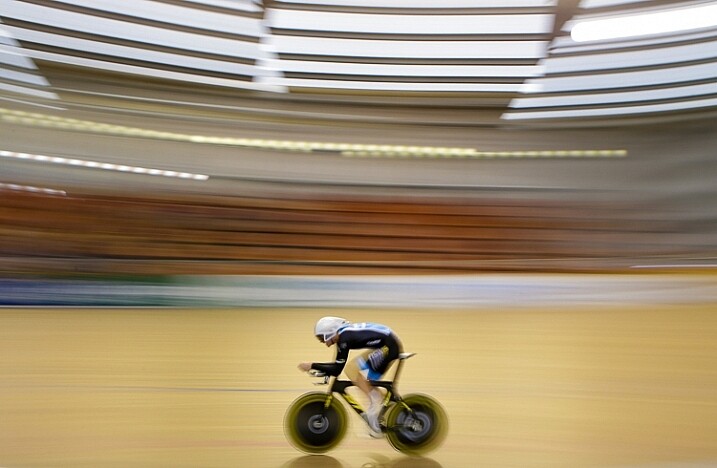
Fig 4

For this image I used a shutter speed of 1/5th, as this would blur out the background quite nicely, as I panned with the rider to make him pop out more. This meant I had to increase my aperture to f/10, and could also decrease my ISO to ISO 320, too. © Daniel Smith / Getty Images.

A topic that many photographers are caught up in, is knowing which camera settings were used; more specifically, aperture, shutter speed and ISO. Any photographer will tell you that these three elements of exposure are very important in creating the desired image. If you use the wrong combination of these in any given environment, you could very well end up with undesired results. Keeping that in mind, it is completely understandable why new photographers obsess over knowing exactly which camera settings were used.

In theory, this should help you to recreate that particular image, right? Unfortunately this may not be the case. Images are created from much more than just the correct combination of aperture, shutter speed and ISO. These three fundamentals do more than just control the exposure; they also give us a creative language to use in our images.
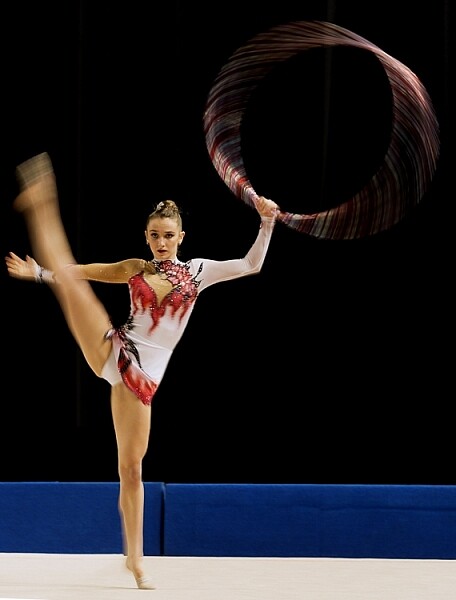
Fig 2

In this image, I wanted to show some motion in the gymnast’s movements, rather than taking another frozen frame. To do this I lowered my shutter speed from 1/1000th to 1/15th. This reduction meant I could also lower my ISO from ISO 3200 to ISO 500 and increase my aperture to f/7.1.

But before diving into this further, let’s explore the two different perspectives of this question; firstly from the point of view of a beginner, who would hope to replicate this imagine. They may assume that by knowing the exact camera settings, and dialling them into the camera, that they will somehow magically achieve the same result. Looking at this from an experienced photographer’s perspective, they may ask this question but with a different scope in mind. It may be when they are perplexed as to the techniques behind a particular image, or in relation to a very specific genre in photography, such as astrophotography, where knowing the settings may help provide a breakthrough.

So why is the question unhelpful?

This question will not always equip you with the knowledge you need, to recreate that image, or with your endeavours of becoming a more successful photographer. There is a lot more to creating an image than just the camera settings. By focussing on camera settings alone, you are missing out on a lot more information as to why those settings were used.

Settings are only a small part of what makes up that image. Lighting conditions, post-processing and the outcome the photographer wants to achieve, are just some of the factors that will dictate what settings the photographer uses. It’s akin to having the correct ingredients for a cake, but not knowing the method behind making it, or the reasons behind that method. Relying on camera settings alone does not tell you anything about the environment the image was taken in, nor does it give you an indication of what the lighting conditions were like.
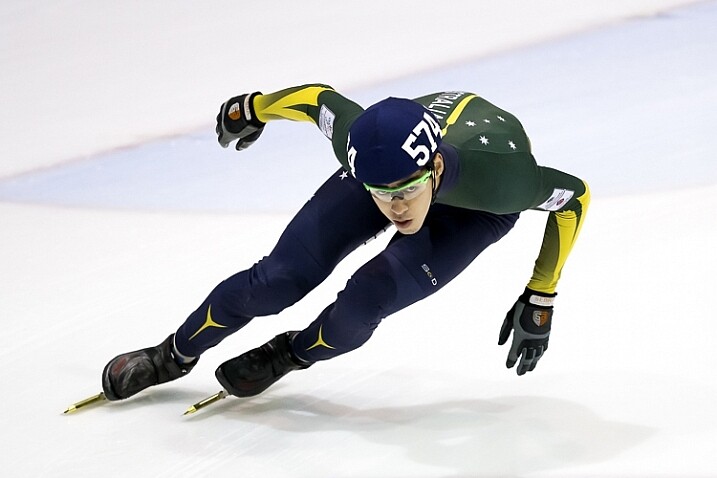
To freeze the action here I used a shutter speed of 1/1000sec. To keep my ISO as low as possible, but still have a little more depth of field than what /2.8 would offer, I used an aperture of f/3.5. I then set my ISO to ISO 3200 to give me the correct exposure. Being indoors, the ISO is a little higher. © Daniel Smith / Getty Images.

To freeze the action here I used a shutter speed of 1/1000th. To keep my ISO as low as possible, but still have a little more depth of field than what f/2.8 would offer, I used an aperture of f/3.5. I then set my ISO to 3200 to give me the correct exposure. Being indoors, with low light conditions, the ISO is a little higher. © Daniel Smith / Getty Images.

Deciding what camera settings to use is a result of knowing how you want the image to look. For the above image, if I told you that I used a shutter speed of 1/1000, aperture f/3.5 and ISO 3200, and you were to go out and dial in the same settings, it would be highly unlikely that you will get the same result. Why? Because the chances of the lighting in your environment, compared to where this image was taken, being the same is highly unlikely.

The reason I chose these particular settings was simple; I needed a fast shutter speed to freeze the action, so I used 1/1000th of a second. I also wanted to use a wider aperture that would allow me to isolate the subject more. A bi-product of this, is that it allows me to maintain a fast shutter speed, but also helps me use a lower ISO. I then use whatever ISO needed to create the correct exposure – in this case it was ISO 3200. The settings you that you require could be 1/2000th, f/4 and ISO 800. The exposure may come out the same, but the settings used are different, and tailored to the specific lighting conditions.
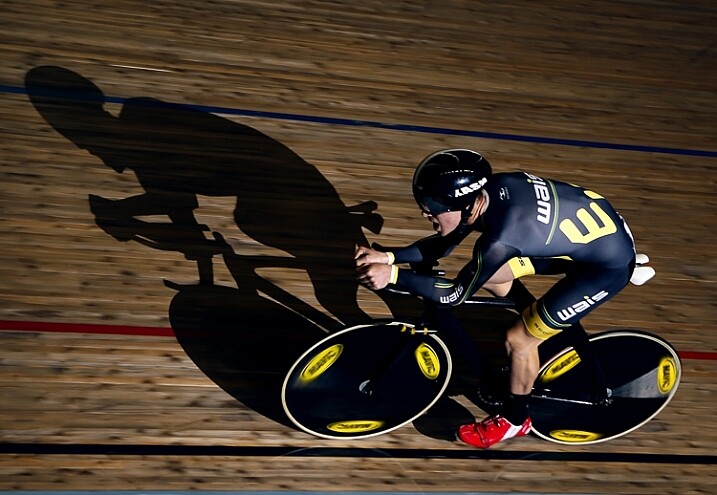
1/160, f/2.8 ISO 100 © Daniel Smith / Getty Images.

1/160th, f/2.8 ISO 100 © Daniel Smith / Getty Images.

Consider the image above. If you ask me what the camera settings for this image were, I will gladly tell you that this was shot at 1/160th, f/2.8 and ISO 100. But what this doesn’t tell you is that I had a speedlight on the ground, off to camera right, at full power. The majority of the light in this image is coming from the flash, with very little ambient (available light) influencing this image at all. Knowing just the settings will not help you to understand how this image was made. There is more to the image than just the camera settings.

The camera settings here are geared more toward the speedlight, as it is quite a distance from the rider. The slower shutter speed is just below sync-speed, which allows for more power of the flash to affect the image (high-speed sync decreases the flash output range) and it also adds a slight blur to the wheels, which gives a nice sense of speed to the image. I used f/2.8 again to aid in the power of the flash, because my ISO was low to reduce the amount of ambient light. The flash is also freezing the majority of the action here.

Knowing why those settings were used, is far more important than just knowing the settings by themselves. It’s knowing the why, that will help you in your journey as a photographer. As the saying goes, “Give a man a fish and you feed him for a day; teach a man to fish and you feed him for a lifetime.” The same principle is at work in photography. Even if I was with you, and told you the settings to use, what will you do when you are alone? You need to understand why those settings have been used.

Reading an image

When looking at an image, understanding what and why you like it, will be of great benefit to you. This is something that you will develop more and more, as you mature as a photographer. Just a hint, it’s not the camera settings that made an image great. It could be the location, the lighting (time of day is very important), composition, perspective, focal length, any editing techniques used, etc., that all worked together to make the final piece. Each one of these is no more or less important than the next, and they all need to be considered.

For me, moving from obsessing over camera settings, to these other factors that influence a photo, was somewhat of an epiphany for me, and made me realize that photography may not be as simple as I once thought it was!
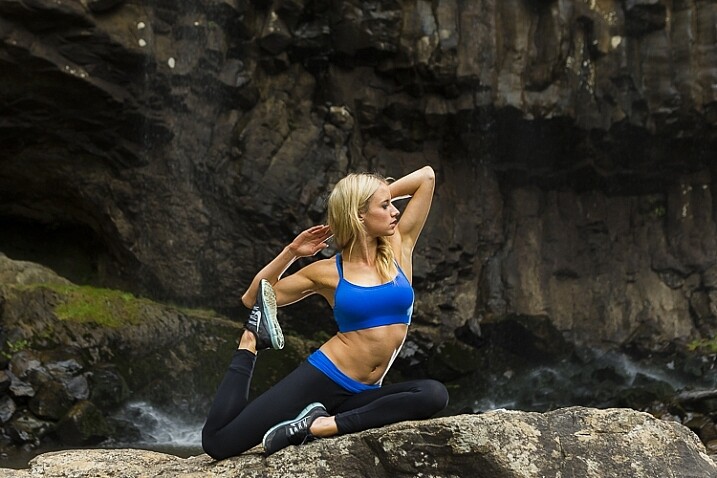
With this image, I used 1/160sec, f/4 and ISO 400. I also have two flashes fired remotely; one camera-right just behind the model giving the rim light on her front side and arms etc. I also have my key light placed at camera left and at ~ 45-degree angle facing the model. Both lights are un-modified (bare-head, or bare-bulb).

With this image, I used 1/160th, f/4 and ISO 400. I also have two flashes fired remotely; one camera-right just behind the model, creatng the rim light on her front side and arms. I also have my key light placed at camera left and at approximately a 45-degree angle, facing the model. Both lights are un-modified (bare-head, or bare-bulb).

As you advance in photography, you will slowly develop a skill that is often referred to as reading an image. This is were you look at an image, and begin to work out how it was created.

For instance you will be able to have a rough idea of the position of the camera, any lighting setups that were used, etc. This is something that you will build upon as you become more experienced. Unfortunately, this is where the magic of photography seems to end. At first, you are in awe of what you captured, when you didn’t quite know how you got it; it all seemed to work like magic. But as you begin to read images, and dissect how they were crafted, that magic can seemingly disappear.
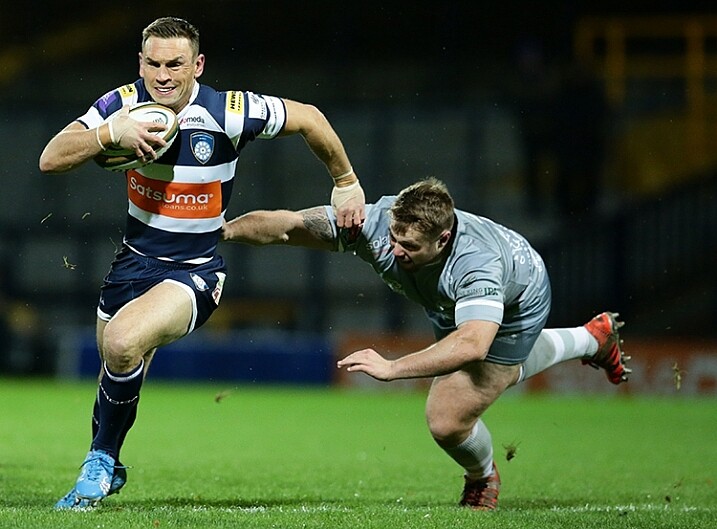
Here I used 1/1000sec to freeze the action, f/3.5 to give less depth of field and ISO 6400 to fill in the exposure gap. The ISO is quite high as this is at a night game. © Daniel Smith / Getty Images.

Here I used 1/1000th to freeze the action, f/3.5 to give less depth of field, and ISO 6400 to fill in the exposure gap. The ISO is quite high as this was a night game. © Daniel Smith / Getty Images.

But before you being to to read photos, you must first be very comfortable with not only the three exposure elements (aperture, shutter speed and ISO), but also how they visually affect images. Once you fully understand each element, you will be able to look at an image and say, “They’ve used a fast shutter speed for this” or, “The aperture used was very wide”.

You may not be able to determine the exact camera settings, but you will be able to put yourself in a much better starting point than when you first begun, when you had no idea where to begin! This illustration gives a very quick visual representation of how shutter speed, aperture and ISO affect the look of an image.
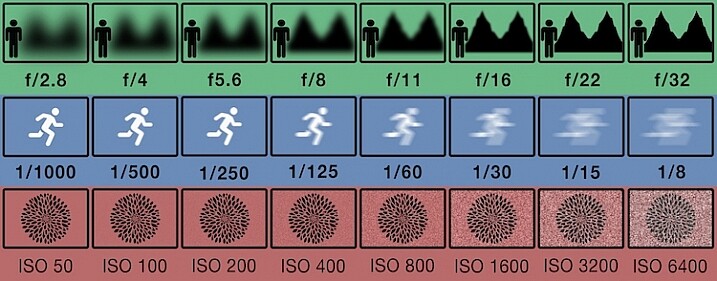
This illustration gives a visual guide to how aperture, shutter speed, and ISO affect an image. *this is just an illustration and does not necessarily give exact representation for each.

This illustration gives a visual guide to how aperture, shutter speed, and ISO affect an image. *Note: this is just an illustration and does not necessarily give exact representation for each.

Conclusion

So you now know why asking, “What camera setting did you use?” is not the most helpful. But rather than leave you there, let’s look at some alternative questions you can ask, while you develop your image reading skills, and get some education under your belt:

  • How did you create this image?
  • What post-processing methods did you use?
  • How did you achieve (whatever part you are most intrigued about)?
  • What camera/lens combination did you use?
  • Why did you use that specific camera/lens combination?
  • Why did you use those particular settings?
  • What was the lighting like?

Now you are armed with some alternative questions to ask that will give you a better insight to how it was made, when you see an image you like.

With this in mind, what questions would you ask about this image? Would you still ask for the camera settings, or how this image was created?
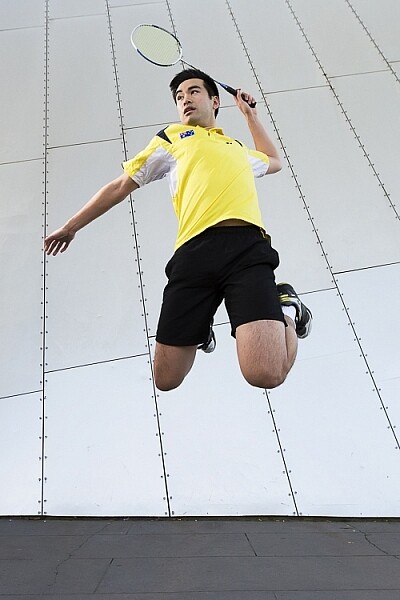
Fig 9

googletag.cmd.push(function() {
tablet_slots.push( googletag.defineSlot( “/1005424/_dPSv4_tab-all-article-bottom_(300×250)”, [300, 250], “pb-ad-78623” ).addService( googletag.pubads() ) ); } );

googletag.cmd.push(function() {
mobile_slots.push( googletag.defineSlot( “/1005424/_dPSv4_mob-all-article-bottom_(300×250)”, [300, 250], “pb-ad-78158” ).addService( googletag.pubads() ) ); } );

The post Why Asking What Camera Settings Were Used is Not as Helpful as You Think by Daniel appeared first on Digital Photography School.


Digital Photography School

 
Comments Off on Why Asking What Camera Settings Were Used is Not as Helpful as You Think

Posted in Photography


Corephotonics launches 5x zoom and low noise smartphone camera modules

04 Mar

Corephotonics, a provider of computational camera solutions based in Israel has launched a new dual-camera module for smartphones called Hawkeye. Hawkeye combines a standard 13MP camera module with a second 13MP module that uses proprietary folded optics. Read more

Articles: Digital Photography Review (dpreview.com)

 
Comments Off on Corephotonics launches 5x zoom and low noise smartphone camera modules

Posted in Uncategorized


DJI’s Phantom 4 boasts improved camera optics and obstacle avoidance

02 Mar

$ (document).ready(function() { SampleGalleryV2({“containerId”:”embeddedSampleGallery_8627299961″,”galleryId”:”8627299961″,”isEmbeddedWidget”:true,”standalone”:false,”selectedImageIndex”:0,”startInCommentsView”:false,”isMobile”:false}) });

DJI has updated its flagship drone lineup with the Phantom 4, which offers automatic obstacle avoidance and ‘dramatically’ improved camera optics. With a 12MP sensor and F2.8 lens the Phantom 4 is capable of Raw still shooting and 4K/UHD video at 30p as well as new machine vision technology adding subject tracking and object avoidance. Flight time has increased to 28 minutes – and the price has increased to $ 1399 compared to the Phantom 3 Professional’s original $ 1259 MSRP.

The DJI Phantom 4 is now available for pre-order through DJI.com and Apple.com. Orders are expected to ship March 15.


Press release:

DJI Launches New Era of Intelligent Flying Cameras

DJI, the world’s leading maker of unmanned aerial vehicles, on Tuesday launched the Phantom 4, the first consumer quadcopter camera (or “drone”) to use highly advanced computer vision and sensing technology to make professional aerial imaging easier for everyone.

The Phantom 4 expands on previous generations of DJI’s iconic Phantom line by adding new on-board intelligence that make piloting and shooting great shots simple through features like its Obstacle Sensing System, ActiveTrack and TapFly functionality.

“With the Phantom 4, we are entering an era where even beginners can fly with confidence,” said DJI CEO Frank Wang. “People have dreamed about one day having a drone collaborate creatively with them. That day has arrived.”

The Phantom 4’s Obstacle Sensing System features two forward-facing optical sensors that scan for obstacles and automatically direct the aircraft around the impediment when possible, reducing risk of collision, while ensuring flight direction remains constant. If the system determines the craft cannot go around the obstacle, it will slow to a stop and hover until the user redirects it. Obstacle avoidance also engages if the user triggers the drone’s “Return to Home” function to reduce the risk of collision when automatically flying back to its take off point.

With ActiveTrack, the Phantom 4 breaks new ground, allowing users running the DJI Go app on iOS and Android devices to follow and keep the camera centered on the subject as it moves simply by tapping the subject on their smartphone or tablet. Perfectly-framed shots of moving joggers or cyclists, for example, simply require activating the ActiveTrack mode in the app.

The Phantom 4 understands three-dimensional images and uses machine learning to keep the object in the shot, even when the subject changes its shape or turns while moving. Users have full control over camera movement while in ActiveTrack mode – and can even move the camera around the object while it is in motion as the Phantom 4 keeps the subject framed in the center of the shot autonomously. A “pause” button on the Phantom 4’s remote controller allows the user to halt an autonomous flight at any time, leaving the drone to hover.

By using the TapFly function in the DJI Go app, users can double-tap a destination for their Phantom 4 on the screen, and the Phantom 4 calculates an optimal flight route to reach the destination, while avoiding any obstructions in its path. Tap another spot and the Phantom 4 will smoothly transition towards that destination making even the beginner pilot look like a seasoned professional.

The Phantom 4’s camera, still the world’s best aerial-optimized 4K imaging device, has undergone an upgrade that includes improved optics for better corner sharpness and reduced chromatic aberration. The Phantom 4 also has DJI’s signature Lightbridge video transmission system onboard, allowing users to see what their camera sees in HD and in real-time on their smart devices at a distance up to five kilometers (3.1 miles).

The Phantom 4’s form factor, still the classic quadcopter style pioneered by DJI, has been redesigned and redefined to emphasize elegance and smoother, more-aerodynamic lines. Its frame incorporates a lightweight composite core to provide enhanced stability and more-agile flight. The core now features a redesigned gimbal that provides more stability and vibration dampening, and has been repositioned for a better center of gravity and to reduce the risk of propellers getting in the shot.

Refinements to motor efficiency, power management and a new intelligent battery have extended the Phantom 4’s flight time to 28 minutes, which means more time in the air to capture professional photos and video.

DJI crafted the Phantom 4 with reliability in mind, including redundant inertial measurement units (IMUs) and dual compasses onboard. It uses new push-and-lock propellers that are faster to install and more secure in flight.

In addition to intelligence and ease-of-use, the Phantom 4 is built for fun. Its new “Sport Mode” for advanced flyers gives a taste of what drone racing feels like. In “Sport Mode,” the Phantom 4 can fly 20 meters per second (45 miles per hour) and ascends and descends more rapidly than in other modes. The craft’s acceleration and top speed in “Sport Mode” also mean it can reach locations for shots faster and capture shots you couldn’t get before.

“Though the Phantom 4 is easy to use, let’s not forget it is a high-performance aircraft powered by unparalleled DJI technology,” said Senior Product Manager Paul Pan.

The Phantom 4’s U.S. retail price is $ 1,399.

Pre-orders for the Phantom 4 will start March 1 on DJI.com and Apple.com, and customers will begin receiving their units on March 15. The Phantom 4 will also be available in-store at DJI’s flagship stores and Apple stores around the world starting March 15. Phantom 4 pre-orders from DJI’s other sales partners will commence on March 23, with availability from April 1.

Articles: Digital Photography Review (dpreview.com)

 
Comments Off on DJI’s Phantom 4 boasts improved camera optics and obstacle avoidance

Posted in Uncategorized


Topaz Labs DeNoise 6 adds standalone option, batch processing, camera profiles

02 Mar

Topaz Labs has released DeNoise 6, the latest version of its noise-removal software. This latest installment can be used as a standalone application in addition to functioning as a plugin for host software like Adobe Lightroom and Photoshop; it also adds batch image processing as well as profile presets for dozens of camera models.

Topaz Labs announced the software update last week and is offering it to new customers at a discounted $ 49.99 rate until March 20, after which the regular $ 79.99 price tag will apply. Existing DeNoise customers can update to version 6 for free. DeNoise 6 is available for 64-bit Mac OS X and Windows systems.

Via: Topaz Labs Blog

Articles: Digital Photography Review (dpreview.com)

 
Comments Off on Topaz Labs DeNoise 6 adds standalone option, batch processing, camera profiles

Posted in Uncategorized


Using Bullet Holes in Beirut’s Brutalist ‘Egg’ as Camera Obscuras

26 Feb

[ By WebUrbanist in Art & Installation & Sound. ]

beirut eggs

An abandoned concrete building in the heart of Beirut, Lebanon (known as The Egg) has been everything from a movie theater to a bomb shelter to a water tank, but this intervention would fill the gaps in its bullet-ridden shell with a series of lenses, reflecting images of the city into its cavernous void.

egg camera obscura

egg exterior view

After a series of unsuccessful attempts to repurpose or restore the structure, photographer Anthony Saroufim came up with this idea to give it a powerful temporary purpose, in part to tell the harrowing history of this war-torn city.

egg lenses views

egg urban view

egg interior images

Scaffolding on the exterior would allow visitors to approach, walk up and around the egg, with circulation routes designed around gaps in the facade as well as civic features and landmarks to be reflected from outside.

beirut city center plan

The Egg was commissioned 1965 and designed by the Lebanese architect Joseph Philippe Karam, but was intended to be part of a larger downtown tower complex: the Beirut City Center. It was to be surrounded with a mixed-use program malls and office spaces, a small piece of a large puzzle. Indeed, now known variously as The Egg or The Dome, the structure was never officially given a proper name independent of the larger development.

abandoned egg

egg interior theater

When civil war broke out a decade later, the plans were put on hold and many of the structures in the complex outside The Egg were destroyed in the conflict, partially or entirely. In the decades that followed, the structure was reused in a variety of ways, but always remained a large and monolithic work, much grander in scale relative to its surroundings than it was ever meant to be.

egg obscura bullet holes

egg conversion project

The camera obscura project proposed by Saroufim would involve inserting custom lenses all around the structure in the voids left from wartime impacts. In turn, these would project city scenes from surrounding architecture into the giant empty interior volume.

egg project proposal

Local residents are conflicted about the role The Egg should play in the next phase of the areas urban development, debating the merits of destroying or restoring it, leaving it to loom large or letting taller structures grow up around it as was the original plan. For now, this project would give the Brutalist building some meaning in relationship to its historical context, bridging its storied past, unused present and uncertain future.

Share on Facebook


[ By WebUrbanist in Art & Installation & Sound. ]

[ WebUrbanist | Archives | Galleries | Privacy | TOS ]


WebUrbanist

 
Comments Off on Using Bullet Holes in Beirut’s Brutalist ‘Egg’ as Camera Obscuras

Posted in Creativity


Quick review: Nextbit Robin camera

21 Feb

The Nextbit Robin is a different kind of smartphone. It’s an Android device with a fresh modern design, but its most important feature is the one you never see – it’s fully integrated with the cloud, backing up and archiving your phone’s images, apps and files so you never run out of local storage. We got ahold of an early unit to test out its camera and unique interface. Read more

Articles: Digital Photography Review (dpreview.com)

 
Comments Off on Quick review: Nextbit Robin camera

Posted in Uncategorized