RSS
 

Posts Tagged ‘Camera’

DJI launches iPhone-controlled Osmo+ gimbal camera with zoom

26 Aug

DJI has launched the Osmo+, an upgrade to its iPhone-controlled Osmo gimbal camera, offering a range of improvements including zoom. The Osmo+ comes with 3.5x optical zoom that can be combined with a 2x digital zoom for an overall 7x range. When recording video in 1080p resolution the digital zoom is ‘lossless’, but that’s not the case in 4K mode.

The equivalent focal range covers approximately 22-77mm and apertures vary from F2.8 at wide angle to F5.2 at the maximum tele setting. Like its predecessor the Osmo+ captures 12MP JPEG and Raw images or records up to 4K video on a 1/2.3″ Sony Exmor sensor. A 1080p 120fps slow-motion mode is available as well.

Also new on the Osmo+ is a timelapse feature that lets you set start and end points for the moving camera head. DJI says the 3-axis image stabilization system has been improved as well, especially for still image mode. The Osmo+ is available at the DJI Store for $ 649. A tripod, bike mount and an extension rod are some of the wide range of accessory options.

Articles: Digital Photography Review (dpreview.com)

 
Comments Off on DJI launches iPhone-controlled Osmo+ gimbal camera with zoom

Posted in Uncategorized


The #1 Reason Why New Photographers Struggle with Camera Settings

24 Aug

You have spent a lot of time studying photography and how to use your camera. You feel confident that you’re starting to figure things out. You understand camera settings like: shutter speed, aperture, ISO, and exposure compensation.

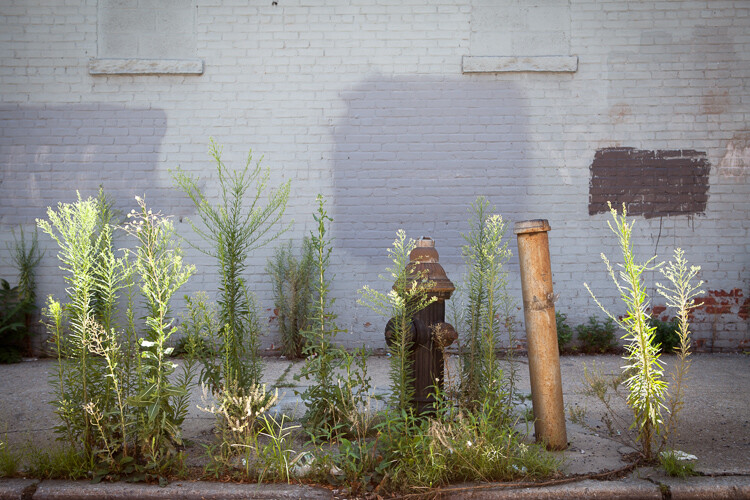
camera settings light on bushes in NYC

Brooklyn Weeds, New York

Can you relate to this?

Then you go on a trip or walk out the door with your camera, see an amazing moment, and you freeze. “What do I do? What settings will be best for this situation?” You return home to find too many of your shots are blurry, exposed incorrectly, you were often too slow to catch the moment, or the photographs don’t look like you saw the scene with your eye. It seems like you did everything wrong.

Does this sound familiar?

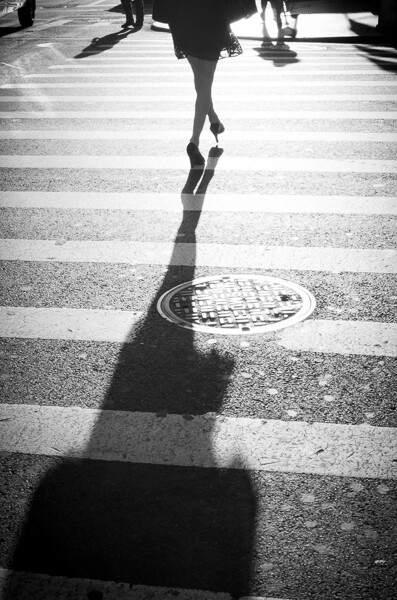
camera settings backlit black and white image

High Heels, SoHo, New York – backlighting can trick your camera meter.

The biggest newbie mistake is . . .

When working with photographers, I see this happen frequently. They understand everything they need to know about their camera, but yet they still freeze and do not know what to do when it counts. I believe this is due to one major issue. When they come across a beautiful scene, the first thing that they do is look at their camera to figure out what to do.

Do you see anything wrong with that last statement? It might seem logical to look at the camera, but it’s not, and it’s the reason that they (and possibly you too) are freezing up.

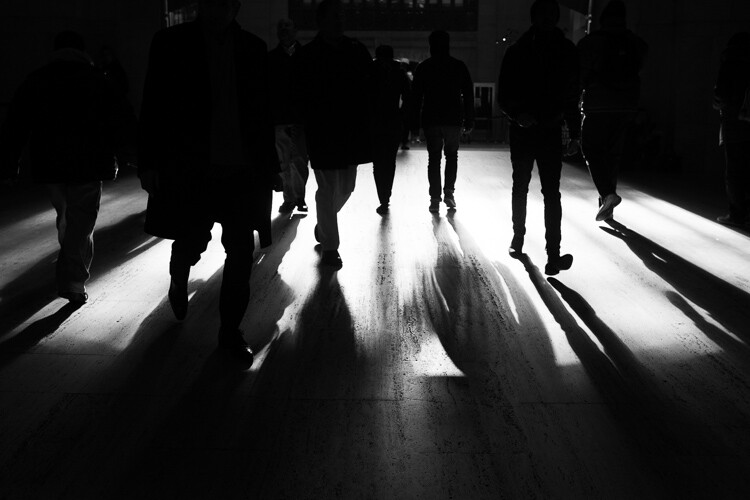
camera settings and light

Grand Central Terminal, New York – high contrast light can trick your meter, what will you expose for? 

Consider the light before thinking about your camera settings

Before you even think about your camera, you need to first look at the light, and understand it. How can you know how to set your camera settings, if you don’t first understand the light?

How strong is the light? Are you in bright sunlight, in light or dark shade, or is it dark out? Are you dealing with artificial light? Is there back lighting, front lighting, or side lighting?

Does the scene have both dark shadows and bright highlights? These are situations where most newer photographers screw up, because this can confuse the camera light meter. In these moments, you need to figure out whether you want the shadows or the highlights to be exposed correctly. Do you want to raise the exposure compensation so that the shadows are exposed correctly? Or would the scene look better if you exposed for the highlights and had really dark shadows?

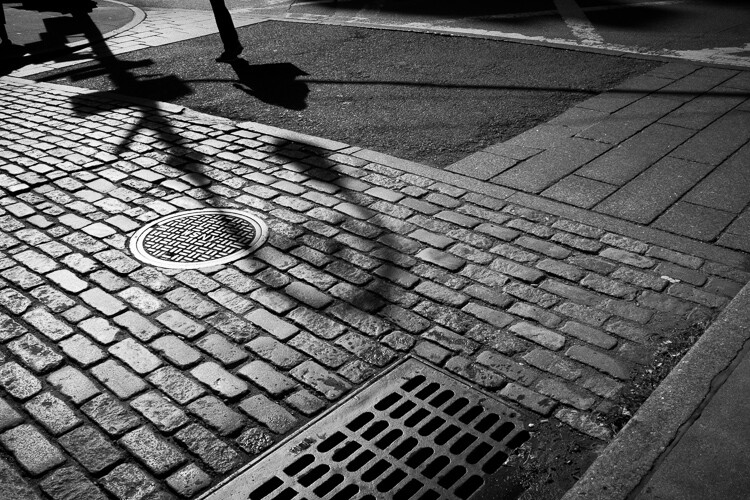
camera settings shadows and light

SoHo Cobblestone, New York

Use your eyes not the camera

These are all the thoughts that should go through your head before you begin to tweak your settings. When you walk out the door, immediately look at the light. Pay attention to the times when you go from sunlight to shade and vice versa. Make sure to change your settings to work with that light. It can help to even stop taking photos for a while and just look around, especially as you are learning. Try to see the light, and to improve at noticing how it affects your photographs. Your eyes are the most important factor here, not the camera.

From this point, learning is trial and error. Many photographers use Aperture Priority, Shutter Priority, or Manual mode to get to the same endpoint. As the saying goes, there are many ways to skin a cat. So, while the different settings each have their advantages in specific situations, none is better than the others.

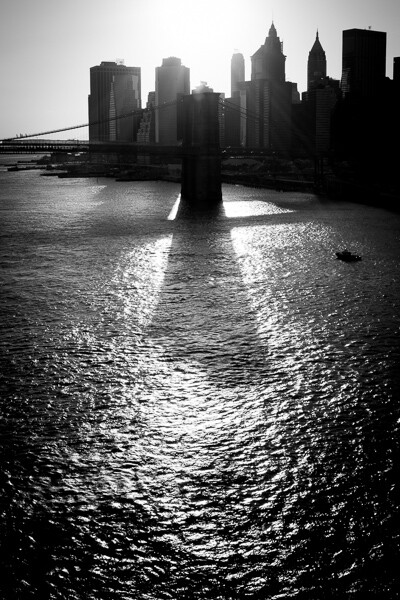
camera settings back lighting

Brooklyn Bridge Tower, New York

Follow this plan

Think about what aperture you are going to want. Do you want a large or shallow depth of field (or do you even have a choice due to the amount of light)? Are you photographing anything in motion, or using a long zoom such as 300mm (the shutter speed always needs to be at least 1 over the focal length to offset handheld camera shake)? If so, you will need a faster shutter speed. Based on this, and how strong the light is, you can then set your ISO accordingly, depending on how much light is available.

Playing with your settings is important at first. If you are shooting in Aperture or Shutter Priority, pick your setting (e.g. f/5.6), but always pay attention to the other number (e.g. shutter speed 1/60th) that the camera is choosing for you. This will help you understand the settings (and how they work together) more than anything else.

Manual mode is good for learning

This is also a reason why spending a few days shooting in manual mode can be very good for your development. I usually prefer Shutter or Aperture priority, unless I have a long time to set up the shot, or if I’m in very consistent or studio lighting. But, learning in manual mode and reviewing the images as you shoot, can help you learn the light and your camera settings very quickly. This will improve your ability to shoot in Shutter and Aperture priority as well.

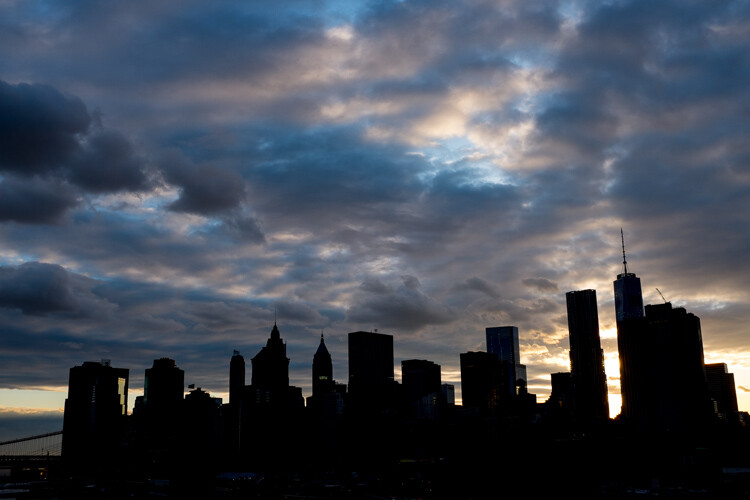
camera settings sunset city back light

Manhattan Skyline, New York

Review during editing

The last step is to review how you did during the editing process. This is very important to do early on. Go through your images and see which were blurry, exposed wrong, or where the depth of field could have been better. Look at the settings you used. You don’t want to just rely on Lightroom to fix your images. Try hard to improve when you are shooting, so you won’t have to fix images later. Your photography will be better for it, and you will be more comfortable with your camera settings the next time you are out shooting.

So next time you walk out the door with your camera, take a step back from it all, and just look around at the light. Notice where the sun or artificial lights are in relation to you, look at the highlights and shadows, and even look at the color of the light. The more you do this, the better you will become at setting your camera, and the better photographer you will become.

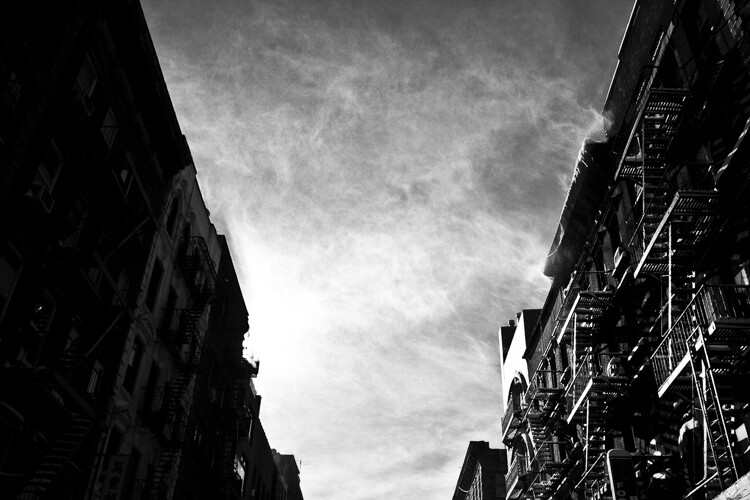
camera settings light dark shadow

Chinatown Snowstorm, New York

googletag.cmd.push(function() {
tablet_slots.push( googletag.defineSlot( “/1005424/_dPSv4_tab-all-article-bottom_(300×250)”, [300, 250], “pb-ad-78623” ).addService( googletag.pubads() ) ); } );

googletag.cmd.push(function() {
mobile_slots.push( googletag.defineSlot( “/1005424/_dPSv4_mob-all-article-bottom_(300×250)”, [300, 250], “pb-ad-78158” ).addService( googletag.pubads() ) ); } );

The post The #1 Reason Why New Photographers Struggle with Camera Settings by James Maher appeared first on Digital Photography School.


Digital Photography School

 
Comments Off on The #1 Reason Why New Photographers Struggle with Camera Settings

Posted in Photography


How Having a Play Camera Can Boost Your Creativity

23 Aug

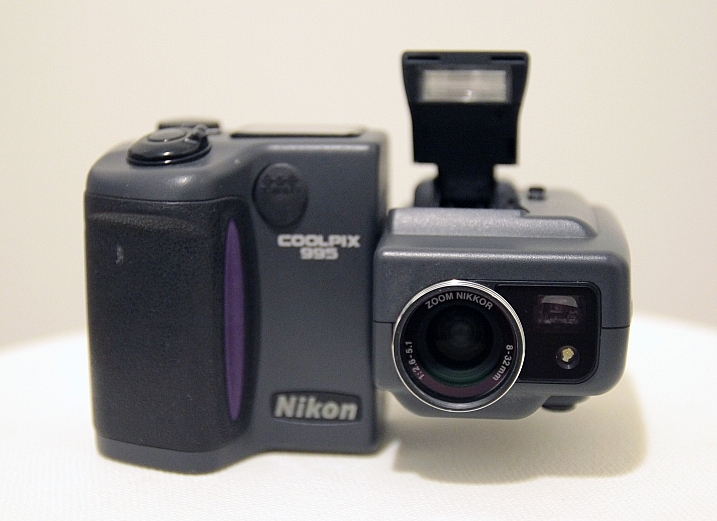
In 2001, after many years as a film photographer, I bought my first digital camera. It was a Nikon Coolpix 995, and I still remember how excited I was when I opened the box and took my first pictures with it. I was really amazed with what those three megapixels were able to do. Since then, I followed the digital road, and never looked back.

I took really good care of that camera, bought all the accessories and lens adapters for it, and took it everywhere with me. For a while it was my pet or play camera.

Chung Chu

Nikon Coolpix 995 – By Chung Chu

I remember the feeling of falling in love with photography all over again, and I believe that some of the best pictures in my portfolio were made with that camera.

Advances in technology

After that, the first decent resolution DSLRs came on the market, and I decided to invest in one to keep up with the professional photography market demand. My Coolpix started being used less and less, in no time those three megapixels were just ridiculous compared to what DSLRs could do, and my play camera just got stored on the back of my equipment closet, never to be used again.

I had a lot of compact cameras after that, but none of them replaced my play camera, the fact is that each time I downloaded the pictures and looked at them in a computer screen, they all just seemed to have a really poor quality compared to the files I was getting with my DSLRs. Sadly I had become a pixel peeper.

One more try at having a play camera

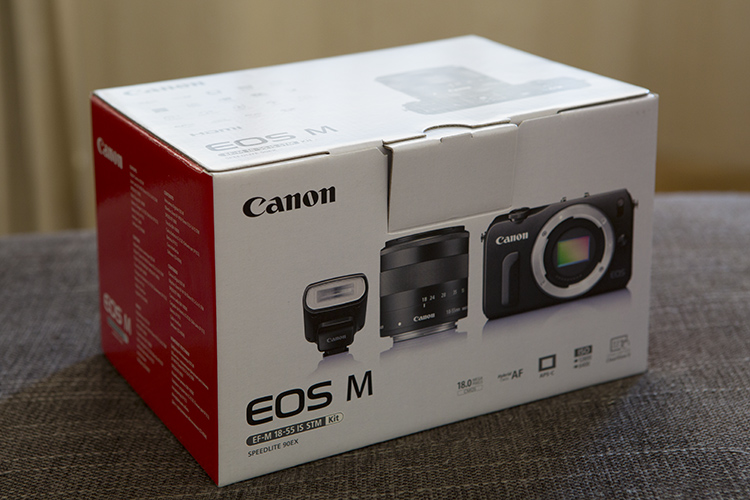
Recently my wife bought me a Canon EOS-M as a gift, which was the first attempt by Canon on the mirrorless market. Well, if you are into photo equipment at all, then you likely know that this camera was the biggest flop on the market of recent digital camera history. Besides having really bad focusing issues, it was no competition for what other brands had already launched, which is my wife was able to buy the kit for about $ 300, as everyone was dumping their inventory of it.

I would never have bought this camera myself, but it was a present, so I decided to give it a try.

01

I opened the box and it reminded me of my beloved Coolpix 995. The EOS-M is a really good looking camera, with a great design, and the fact that it was just not a simple compact camera got me a lot more interested on it. The test shots I made after a firmware update fixed some focussing issues, got me back to that loving feeling all over again.

Those were great images, and the pixel peeper inside me was happy with the image quality when I looked at them on the computer screen. The fact that everybody was considering this camera Canon’s ugly duckling, made me love it even more, because it had some kind of “misfit” attitude amongst all the other mirrorless camera out there.

Why have a play camera?

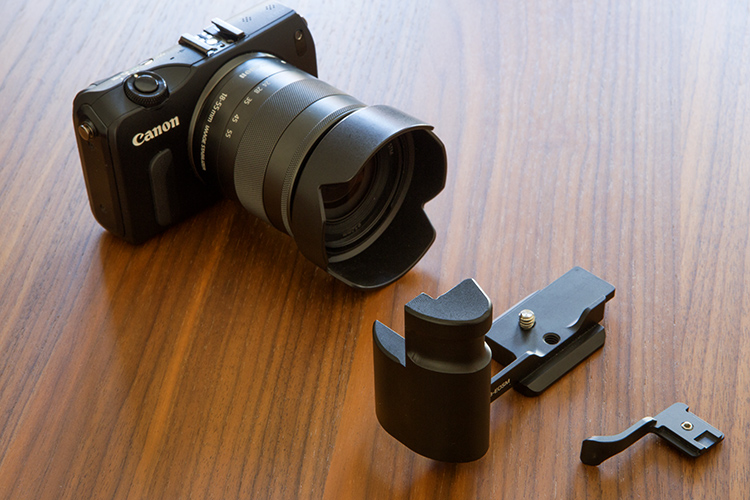
Pretty soon I was buying accessories, and taking it everywhere with me. At last I had a new play camera – the point of which is to have it and use it all the time! A grip and a thumb rest were the obvious first things to buy, as the camera seemed so small in my hands and it made me feel like I was going to drop it every time I photographed.

02

03

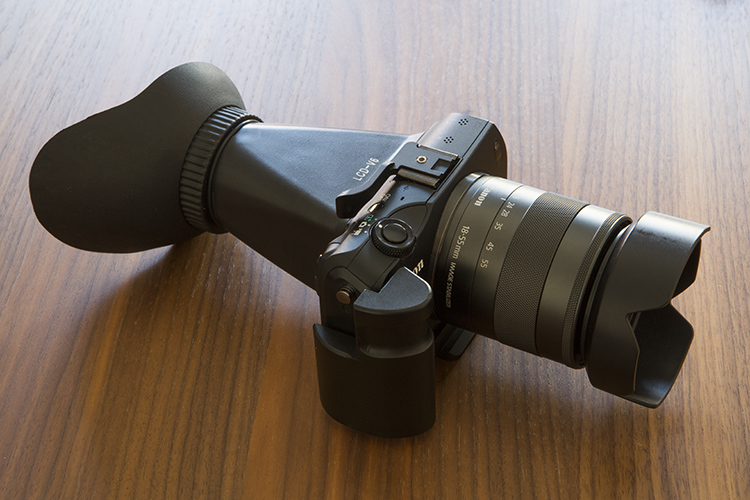
An added LCD loupe helps block the ambient light on the LCD, and gave me a better sense of the exposure and focus.

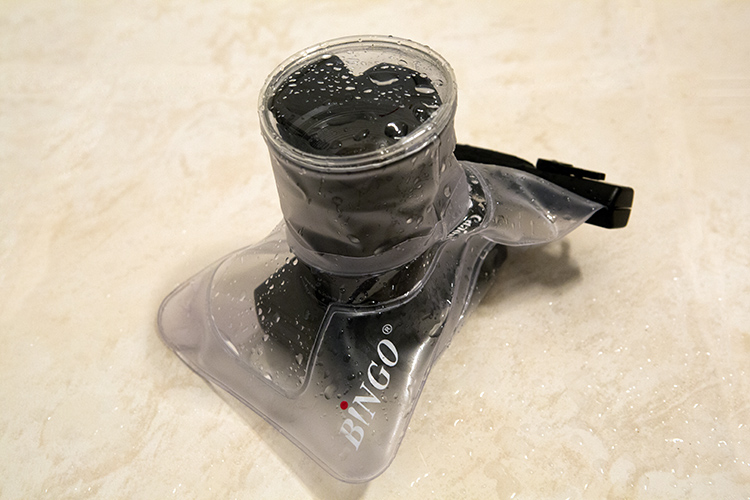
The fact that it didn’t cost a lot of money, made me comfortable using this camera in situations I would never use my expensive DSLRs, like underwater with a cheap protective bag.

04

There were no limits for what I could do with this camera, and even when I had a lot of commercial work, I made an effort to find some time to get back to my personal photography projects.

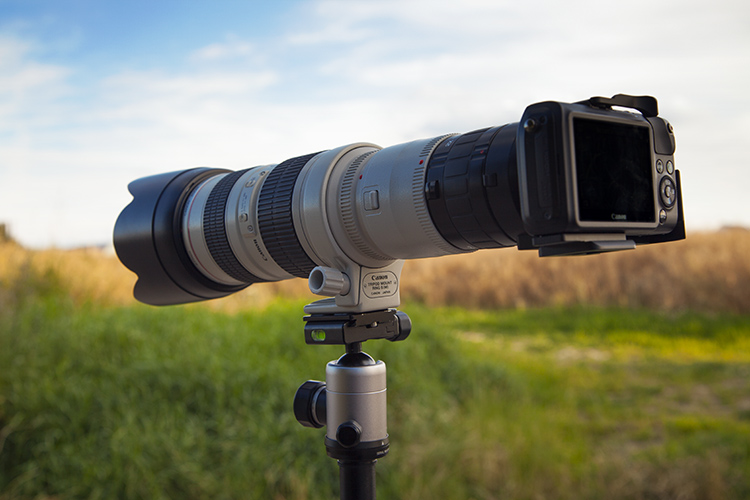
I must say that my favorite feature on this camera, is the fact that it is able to use not only the dedicated EF-M series lenses Canon launched with it, but with a special adapter it is also able to use EF or EF-S lenses also, keeping all the automatic features.

Over all these years as a Canon DSLRs user, I have collected some serious L-glass along the way, so the fact that I could use all those lenses on this tiny mirrorless body was a huge plus in my book. I must admit though, that it looks a bit ridiculous to see this camera together with an L-series lens, but the fact is that it works.

Try new and whacky things

It even got me carried away experimenting with some crazy extender combination with my EF 70-200 2.8L coupled with the Canon 2x extender and the Kenko 2x Teleplus Pro 300, giving me some serious telephoto ability for wildlife pictures.

05

200mm X (APS-C 1.6 crop factor) X (Canon extender 2x) X (Kenko 2x converter) = 1280mm equivalent.

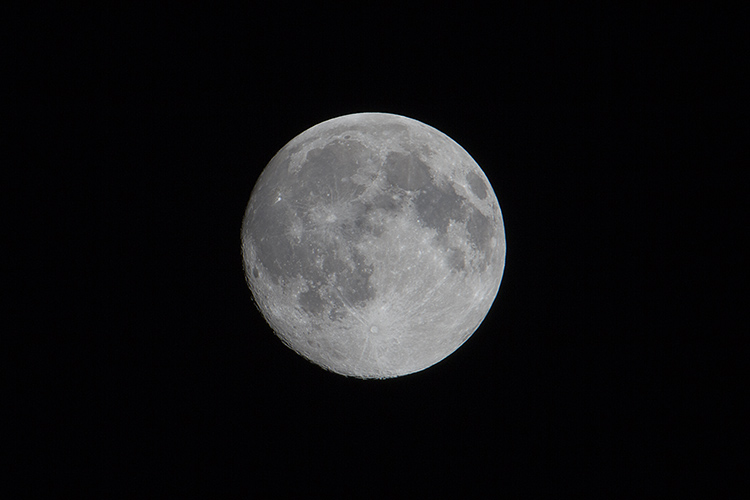
This telephoto ability also got me into moon photography, as it is the perfect focal length to capture great pictures from my bedroom window.

06

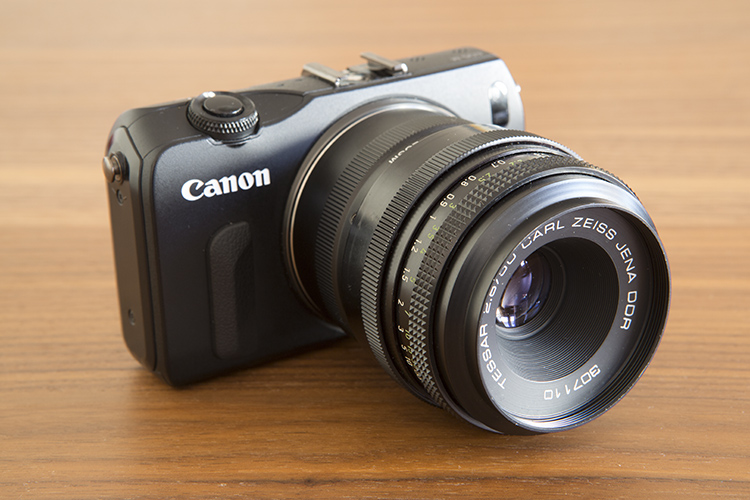
Another great thing is that you can even take it beyond EF lenses. With third party adapters you can make the camera body work with almost any lens you want, even though you lose autofocus ability. To me it’s great to again use old lenses I totally forgot I had, like this M42 50mm f/2.8 Carl Zeiss Jena Tessar that has a really fantastic image quality, and makes me go back to when I was a young kid using my old Pentax with a split prism focusing screen.

07

Bottom line

So, the bottom line is that even though this camera was released in 2012 and the EOS-M2 and the EOS-M3 were released after that, I still have great fun with it and don’t feel any need to upgrade to a newer model.

I guess I just feel really free experimenting with this camera without being worried about damaging it, or being bothered to carry it around. For me this is what a pet camera means despite of brand, model or type of camera.

Photography is about taking pictures, and the best camera is the one you feel more comfortable with, for what you want to shoot.

Do you have a play camera? One you take with you everywhere, one that you don’t worry about losing or damaging? Do you feel you are more creative with it than your regular camera? Share your experience in the comments below.

googletag.cmd.push(function() {
tablet_slots.push( googletag.defineSlot( “/1005424/_dPSv4_tab-all-article-bottom_(300×250)”, [300, 250], “pb-ad-78623” ).addService( googletag.pubads() ) ); } );

googletag.cmd.push(function() {
mobile_slots.push( googletag.defineSlot( “/1005424/_dPSv4_mob-all-article-bottom_(300×250)”, [300, 250], “pb-ad-78158” ).addService( googletag.pubads() ) ); } );

The post How Having a Play Camera Can Boost Your Creativity by Ivo Guimaraes appeared first on Digital Photography School.


Digital Photography School

 
Comments Off on How Having a Play Camera Can Boost Your Creativity

Posted in Photography


ThinkTank updates Shape Shifter camera bags and offers ‘naked’ option

23 Aug

$ (document).ready(function() { SampleGalleryV2({“containerId”:”embeddedSampleGallery_3303476890″,”galleryId”:”3303476890″,”isEmbeddedWidget”:true,”standalone”:false,”selectedImageIndex”:0,”startInCommentsView”:false,”isMobile”:false}) });

Thanks to their use of individual pouches for camera bodies and lenses and the ability to expand their size, ThinkTank’s Shape Shifter camera bags are known to be among the most versatile in the business. Now ThinkTank has funneled years of feedback from photographers into an update and released a new generation Shape Shifter line.

The series consists of three models: the Shape Shifter 15, the Shape Shifter 17, and the Naked Shape Shifter 17. Like their predecessors all new bags compress down to only three inches when empty and can be expanded in line with the amount of gear you carry on a shoot. They also come with a detachable water pouch, YKK RC-Fuse zippers, a removable waist belt, a tripod attachment and a rain cover. 

The Shape Shifter 15 holds a 15″ laptop, a DSLR, three lenses and a 12-inch tablet plus accessories. The larger Shape Shifter 17 is good for a 17-inch laptop, up to two DSLRs, four lenses, tablet and all the cables, lens caps and other accessories you need. The Naked Shape Shifter 17 is even more versatile, as you can configure the bag in exactly the way you prefer by inserting ThinkTank’s Skin Pouches and Lens Changers. The Shape Shifter 15 is available now for $ 250, the 17-inch model is $ 280 and the Naked version will set you back $ 220.

Articles: Digital Photography Review (dpreview.com)

 
Comments Off on ThinkTank updates Shape Shifter camera bags and offers ‘naked’ option

Posted in Uncategorized


World record camera collector now has over 4500 – and a short film about himself

20 Aug

Indian Dilish Parekh has once again beaten his own world record for having the largest camera collection, with his personal museum now housing 4500 exhibits. In August 2013 DP Review reported that he had 4425 cameras, but in the intervening three years he has grown his hoard by 75 more models.

Filmmaker Dheerankur Upasak visited Dilish, who has held the Guinness Book of World Records title since 2003, at his home in Mumbai to make a short about the man and some of the models in his collection. Dilish says that he started collecting in 1970 when his grandfather gave him cameras as gifts – and things went from there. He never spends more than $ 15 on a camera, but has still managed to accumulate quite a number of rare and expensive bodies, such as the Leica Reporter GG 250. Only 950 were made and one sold with a motor drive at the ‘100 Years of Leica’ Westlicht auction for €576,000 in 2014.

The collection spans only the years between 1890 and 1960 and includes all of Canon’s rangefinder models. Dilish isn’t for selling the collection, though he says he gets lots of offers, and he has instructed his sons not to sell once he passes away.

Dheerankur filmed the piece on a Canon EOS 5D III with Pentax 50mm f/1.2, Tamron 90mm macro and Tair 11-133mm f/2.8 lenses.

Articles: Digital Photography Review (dpreview.com)

 
Comments Off on World record camera collector now has over 4500 – and a short film about himself

Posted in Uncategorized


Plane plunged 4400 feet after pilot’s camera became wedged against controls

17 Aug
Re-creation by UK Military Aviation Authority

A military pilot in the UK is reportedly facing a court martial after his camera became wedged against a military transport plane’s controls, causing it to plunge 4400ft/1.3km before the captain regained control. The Ministry of Defense is being sued over the matter, which took place in February 2014, by nine soldiers and one civil servant who were in the plane during the incident.

Per the government’s investigation of the matter, the cause was determined to be the pilot’s Nikon D5300 camera, which at some point during the flight became positioned against the plane’s steering control. When the pilot readjusted his seat position, the seat pressed the camera against the control, causing the plan to drop at a rate up to 260ft/80m per second. 

According to The Times, the lawyer representing these ten individuals says they suffer PTSD as a result of the plane’s sudden descent; a total of 198 people were onboard at the time of the incident. The pilot has reportedly been charged with negligently performing a duty, perjury, and making a false record.

Via: Quartz

Articles: Digital Photography Review (dpreview.com)

 
Comments Off on Plane plunged 4400 feet after pilot’s camera became wedged against controls

Posted in Uncategorized


Samsung uses brain-inspired processors to create digital camera ‘vision’

17 Aug

Samsung has used IBM’s neuromorphic computer processors, built under the latter company’s TrueNorth project, to create digital ‘eyes’ that see in real time. The IBM TrueNorth processors are composed of 4096 small cores that simulate brain neurons, the primary advantage being faster data processing with lower comparative energy usage. Combined with Samsung’s Dynamic Vision Sensor, the technology functions somewhat like a digital eye, perceiving the world by changing each pixel independently of the others to record movement.

Samsung Advanced Institute of Technology’s VP of Research Eric Ryu detailed the technology at an IBM Research event in San Jose last week. Unlike ordinary cameras, this DVS-based camera only changes pixels when necessary to record the movement of specific objects while other pixels remain unchanged. Because of the unique pixel technology, this camera can process video at 2000 fps while using only about 300mW of energy. 

The combination of super high frame rates and exceptionally low energy consumption makes the technology useful for other types of technology, including self-driving cars, robots, gesture-recognizing gadgets, and more. Samsung envisions projects that utilize many of these chips stacked together; a 16-chip stack would be akin to utilizing nearly 86 billion brain neurons.

Via: CNET, Inilabs

Articles: Digital Photography Review (dpreview.com)

 
Comments Off on Samsung uses brain-inspired processors to create digital camera ‘vision’

Posted in Uncategorized


Bridge Camera – What is it and is it for me ?

16 Aug

Bridge Camera is a general name for digital cameras that have some degree of manual control, a long range zoom lens and a viewfinder – but usually not interchangeable lenses. They are somewhere between a point and shoot camera, and a full DSLR.

Between those three shared properties there are many models to choose from. Use the following information to decide if there is a room for one in your kit, or if it is a good first camera to enter the world of photography.

Bridge camera

How did it all begin ?

In the early days of the second millennium, a digital camera was either a point and shoot with very few controls and fun to use for the amateur photographer, or it was a heavy, bulky digital SLR with a price tag far beyond reach of the average photographer (see below). Then there was room for a new type, the bridge camera with manual controls, a long non-interchangeable zoom lens, and decent amount of options. For many photographers the bridge camera was a safe option, connecting the old world of film, and future world of digital photography, hence the name – bridge.

A 2MP DSLR from the year 2000, price tag was USD10,000

A 2MP DSLR from the year 2000, price tag was $ 10,000 USD.

Take a small image sensor, put it behind a long zoom lens, in a body that looks and feels like an SLR camera, with all the manual controls and gadgets, replace the complicated SLR viewfinder system with a small LCD – and you have created a camera that is a compromise between price, size, and image quality – the bridge camera. A camera that is more than specifications and image quality, a camera that brings the experience of digital photography to non-professionals.

The golden age of bridge cameras was short lived, and it seemed like they disappeared as soon as affordable DSLRs hit the stores. That happened in 2004, but the bridge is still solid.

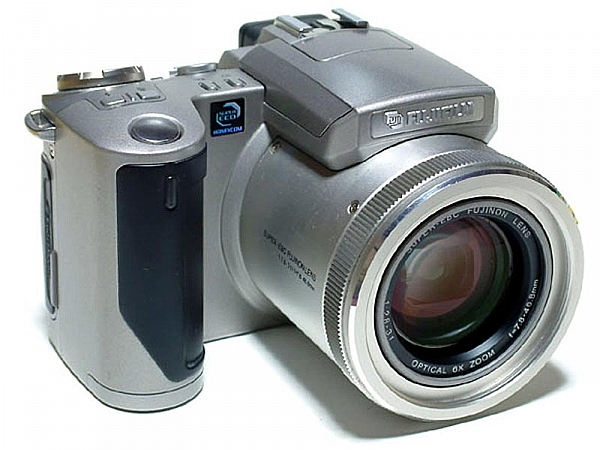
FujiFilm Finepix 4900Z

FujiFilm Finepix 4900Z, announced in 2000, was among the first digital stills cameras to use an electronic viewfinder (EVF) instead of the bulk of an optical one.

Is a bridge camera for you ?

A decade later, deep into the age of mirrorless interchangeable lens cameras (MILC) and bridge cameras perform a new role. They stay loyal to their core design values, but with current technologies, they became a formidable tool that often is the right choice, rather a compromise. Bridge cameras today are made by many manufacturers, to fit different photographer’s needs. Some take the traditional task of being a good compromise between price, size and image quality, and others come to replace the DSLR as a complete photographic solution for all your needs.

Here is a quick overview of some leading bridge cameras today, and their strong points.

Panasonic Lumix FZ1000

The capital ship in Panasonic’s fleet of bridge cameras, is no a small camera by absolute measures, but it is a good package size for what it offers. The Lumix FZ1000 ($ 798 USD) offers a great combination of large image sensor (1″ 20MP) with a long, fast zoom lens that is optically stabilized. The camera’s EVF is very large and bright.

This camera has something for the beginner, as well as the seasoned photographer. Its ergonomics and controls resemble the ones of the Lumix G line of MILC cameras, and are made for fully manual operation. It is a very fast and responsive camera, the lens goes from 25mm to 400mm (35mm equivalent) at a fast f/2.8 at the wide side, and f/4 at the long side of the zoom.

Bridge camera review
This camera has the most tools in its box. It works great in low light, and the lens can produce shallow depth of field thanks to the large sensor. It is capable of 4k video and has a microphone input socket for better sound recording. The lens is not the longest, nor the fastest and also not the sharpest lens in the family, but in the right hands it will produce beautiful images that will look great on screen, as well as on prints as large as 16×24 inches.

This is the bridge camera to have when you want one camera to do it all. All photos in this article were made with a Panasonic FZ1000.

Bridge camera review

Sony RX10III

The king of all bridge cameras, the Sony RX10III is the one that truly redefines the place of such cameras in the bag of the professional photographer. It costs similar to a professional camera (at $ 1498 USD) and weighs in like one at 1.05 kg (2.32 lb / 37.07 oz), for some photographers it is the best photographic solution available with its unique features.

Aimed at wildlife photographers, Sony’s designers created this camera around the same 1″ 20MP sensor as the FZ1000, but in a weather-sealed body that feels like it was meant to suffer. It has a 24-600mm lens (35mm equivalent) with a fast f/2.4 aperture at the wide end and f/4 at the telephoto side of the zoom. The camera has three control rings around its large lens, of which one is a dedicated aperture control ring, a feature that offers more freedom than any other camera to manual photographers.

The RX10III is a large and heavy camera, but it shines in the most important spot, its image quality. The 24-600mm Carl Zeiss T* lens really makes the most out of the large sensor, at any point along the huge range, it performs in a way that makes you want to use it for your next shoot. For the wildlife photographer the camera offers a speedy 14FPS (frames per second) rate and a unique ultra slow motion video.

This is the bridge camera to take on a wildlife photo-journey, or if you are a one man show photojournalist. It will make sure you will return with great photographs.

Bridge camera review

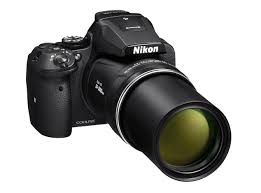
Nikon Coolpix P900

Nikon Coolpix P900

The Nikon Coolpix P900, is an optical miracle but at a high cost in usability other than day time wildlife or other long distance objects.

The Nikon Coolpix P900 ($ 529 USD) is the longest bridge, with its extremely long 24-2000mm zoom lens (35mm equivalent). With f/2.8 at the wide end and f6.5 at the telephoto end of the zoom, the P900 has the longest lens you can get in a camera without breaking your back or your savings. For example, the same focal length in a fullframe Nikkor lens would cost you about $ 95,000 USD and it weighs 38.5 pounds. This telephoto wouldn’t be available without Nikon’s five-stop optical image stabilizer, that makes it possible to use the mighty lens without a tripod, even at a shutter speed of 1/60th of a second, given your subject is not moving.

At 899g (1.98 lb / 31.71 oz) the Nikon Coolpix P900 if far from being called a compact camera. It should not be your first choice if you plan to do low light photography or video, nor does it have the best image quality. You should choose this camera if you are going to photograph real far subjects in broad daylight.

Bridge camera review

Panasonic Lumix FZ300

The Lumix FZ300 ($ 498 USD) is a well balanced mix of technologies and features, together they make this camera one of the funnest to use in most photographic situations, within the limitations of a small sensor. Panasonic chose a fairly low resolution sensor for this camera of only 12mp, in order to better its low light performance. The sensor is behind a 25-600mm lens (35mm equivalent) with a constant maximum aperture of f/2.8, a combination that not only allows for more control over the depth of field and creating beautiful portraits, but is also important to make the long lens useful in a larger variety of scenes with different light conditions.

The FZ300 is a mature bridge camera that works well within its size and cost limits and it makes the most out of the different components. It takes beautiful 4k video and make use of its that capability also to produce 8mp stills images at an astonishing rate of 30 FPS, a useful feature when you’re photographing fast moving objects. Its weather sealing will help you make the right decision before leaving home for a winter vacation, or just to get closer to the waves when photographing on the beach. This camera should be your choice if you wish to have lots of fun, but are not going to make very large prints.

Bridge camera review

A digital camera is a magnificent combination of optical, electronic and digital devices, put together in order to let you fulfill your photographic creativity and ideas. They come in many different styles and forms, some will fit for you more than others. It is always good to check-in with yourself as to exactly what is it that you want to photograph most, then go look for the camera that can give you that, rather than buy the one with the most impressive specification sheet.

Have you used a bridge camera? If so which one? Do you think there’s still a place for them in today’s photography world? Please share your thoughts in the comments below.

googletag.cmd.push(function() {
tablet_slots.push( googletag.defineSlot( “/1005424/_dPSv4_tab-all-article-bottom_(300×250)”, [300, 250], “pb-ad-78623” ).addService( googletag.pubads() ) ); } );

googletag.cmd.push(function() {
mobile_slots.push( googletag.defineSlot( “/1005424/_dPSv4_mob-all-article-bottom_(300×250)”, [300, 250], “pb-ad-78158” ).addService( googletag.pubads() ) ); } );

The post Bridge Camera – What is it and is it for me ? by Ouria Tadmor appeared first on Digital Photography School.


Digital Photography School

 
Comments Off on Bridge Camera – What is it and is it for me ?

Posted in Photography


Brevite launches two new Incognito camera backpacks

10 Aug

The original Brevite backpack was the outcome of a 2015 Kickstarter campaign. Now the Boston, MA based company has launched two new models that, like the first backpack, feature a design that doesn’t scream ‘camera bag,’ and therefore doesn’t advertise your expensive gear to potential thieves.

Both the new Rucksack and the Rolltop feature Brevite’s removable and padded camera gear compartment that can be swapped between Brevite bags and holds up to a full-frame DSLR with attached lens, an extra 70-200mm zoom lens, one additional smaller lens and various accessories. The packs also come with a hideaway rain cover and a 15″ laptop sleeve. They offer multiple access points to your equipment and a lens cap buckle that holds your cap when shooting. The Rucksack will be available for $ 165 and the Rolltop will set you back $ 185, but there is a 20% discount on preorders before the mid-September shipment date. More information is available on the Brevite website.

Articles: Digital Photography Review (dpreview.com)

 
Comments Off on Brevite launches two new Incognito camera backpacks

Posted in Uncategorized


A Simple Explanation of the Camera Mode Dial

09 Aug

If you have a more advanced camera like a DSLR or mirrorless, or even a high-end pocket model, it’s a good bet that somewhere on the top of the camera body you will find a circular dial (the camera mode dial) with a whole lot of strange letters like: M, Tv (or S), Av (or A), P, and maybe even a U1 or U2 (or C1, C2) thrown in for good measure. There is also a friendly safe green option, that may say Auto, or depending on the type of camera you have, is just represented by a green rectangle.
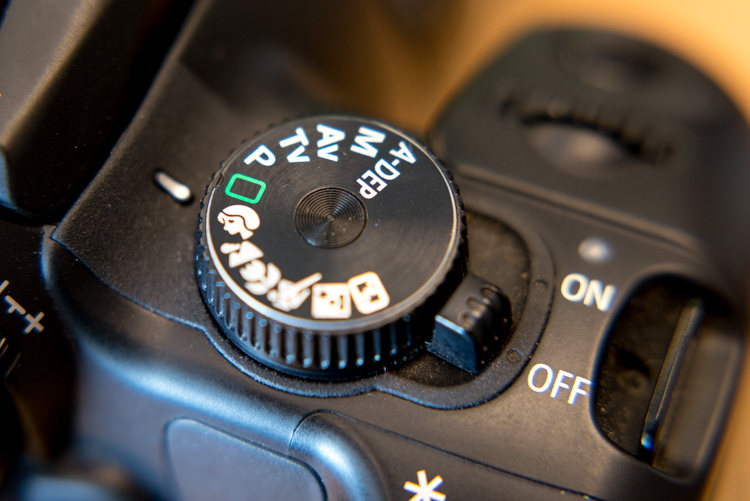
mode-dial

Most beginners know this option the best, since it essentially puts your camera in the driver’s seat, and forces it to do all the heavy lifting of figuring out the exposure, while all you need to do is point your camera in the right direction. If you like shooting in Auto and you are happy with your pictures, then don’t let anyone tell you that you need to change, or that you aren’t a good photographer.

However, if you would like to branch out a little bit, and learn to make your camera do what you want in order to make the photos you desire, then the mode dial is your key to a whole new world of photographic creativity. It can be somewhat daunting, and those strange letters don’t inspire much confidence for beginners who already feel overwhelmed. So I’ll walk you through the basic functions of the mode dial one by one, and give you the information you need to start experimenting with some of your camera’s more advanced settings.

Auto Mode

This one might seem fairly self-explanatory, but I’d like to offer some detail about what Auto mode actually does. In most situations, your camera is going to do whatever it can to make sure the pictures you take are properly exposed (in other words, not too dark nor too bright). There are three main things that govern exposure (Aperture, Shutter, and ISO – otherwise known as the Exposure Triangle) and Auto mode takes care of setting the values of all three of these elements for you. If your camera has a flash, it may decide to fire it, order to brighten up a scene that is quite dark, which often happens indoors or at night. Auto generally does a good job at allowing you to take decent photos in a variety of situations.

Sometimes Auto mode is all you need to get the pictures you want.

Sometimes Auto mode is all you need to get the pictures you want.

P: Program Auto Mode

When you want to branch out from Auto mode, this is a good place to start. Program Auto does exactly the same thing as the familiar, comfortable green Auto mode, but with a twist – you can change a few settings if you want. Using Program Auto allows you to do things like decide whether you want the flash to automatically pop-up or turn off altogether, as well as change the ISO and the White Balance.

It really gets interesting when you turn the rotating circular dial (called a control wheel) on the top or back of your camera, which lets you take some degree of control back from your camera. In Program Auto your camera will always try to maintain a properly-exposed picture, but you can use the dial to change the aperture and shutter speed at the same time. It’s a fun way to experiment with your camera while being reasonably certain that you will still get good pictures, and also start to notice some of the effects that changing the aperture and shutter speed has on your final images.
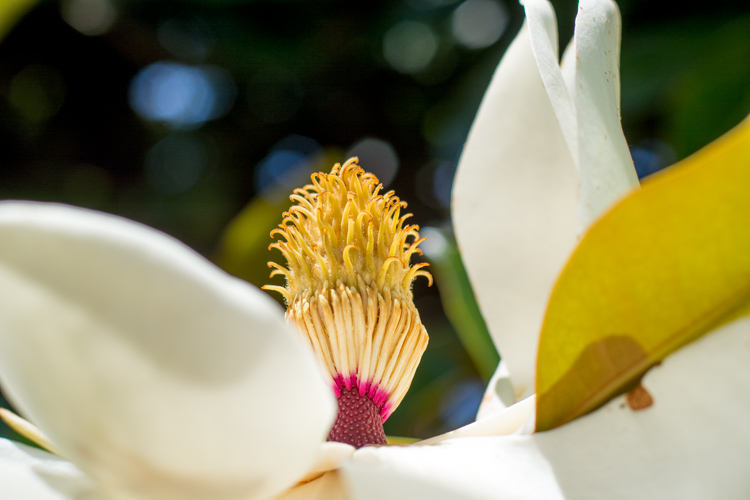
Program Auto can be a great way to help you get the shot you want by changing the shutter speed and aperture with a simple flick of your thumb.

Program Auto can be a great way to help you get the shot you want by changing the shutter speed and aperture with a simple flick of your thumb.

Av (or A): Aperture Priority Mode

When you want to have full control over the aperture in your lens (and thus also control the depth of field), this is the mode to use. It lets you turn the control wheel on your camera in order to adjust the aperture alone, while the camera decides what ISO (if you use auto ISO) and shutter speed to use.

If you have plenty of available light this is a fantastic mode to be in, because you can choose whether you want a wide depth of field (i.e. everything in focus) or a shallow depth of field (just your subject in focus, with foreground/background elements blurry) and know that the shutter speed and ISO will be set automatically to get the shot you want. However if you are shooting in low light, you might end up in a situation where you set the aperture you want, but your camera chooses a shutter speed that is too slow, or an ISO (again only if you are using Auto ISO, if you are manually setting the ISO you will still have to adjust that yourself) that is too high for your liking.

My personal favorite mode to shoot in is Aperture Priority with Auto-ISO, which means my camera won’t use a shutter speed that’s too slow (you can usually set the parameters for minimum shutter speed in your camera’s settings via the menu options – consult your user manual if you aren’t sure), and will instead raise the ISO.
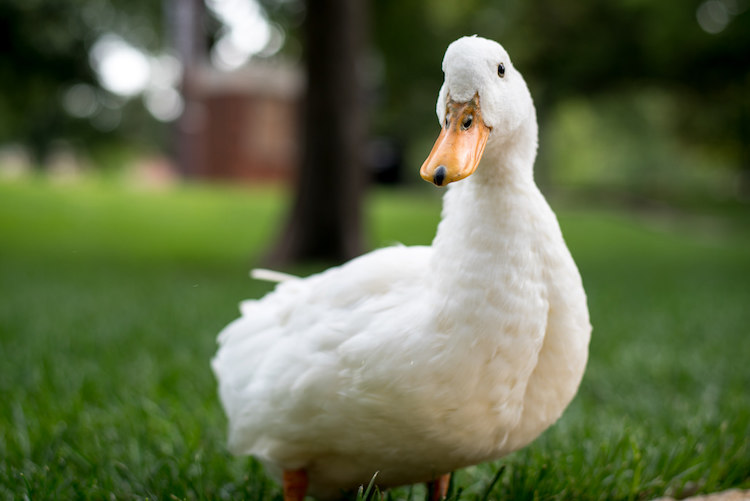
I knew I wanted a shallow depth of field with this, so I used Aperture Priority mode to select a wide aperture and let my camera figure out the rest.

I knew I wanted a shallow depth of field for this shot, so I used Aperture Priority mode to select a wide aperture, and let my camera figure out the rest.

Tv (or S): Shutter Priority Mode

You may have already guessed what this mode does, based on the explanation of Aperture Priority above. Shutter Priority Mode is essentially the opposite. In this mode you tell the camera what shutter speed to use, and let it calculate the aperture and ISO (when using Auto ISO). It is particularly useful if you are shooting fast action like a race or sporting event, because you can set your shutter speed to be fast enough to freeze the motion of the subjects, and know that your camera will select whatever aperture and ISO values are needed to get the shot. Most cameras can shoot as fast as 1/4000th of a second which is plenty for freezing motion, or as slow as 30 seconds, which can be fun for nighttime photography and capturing light trails.
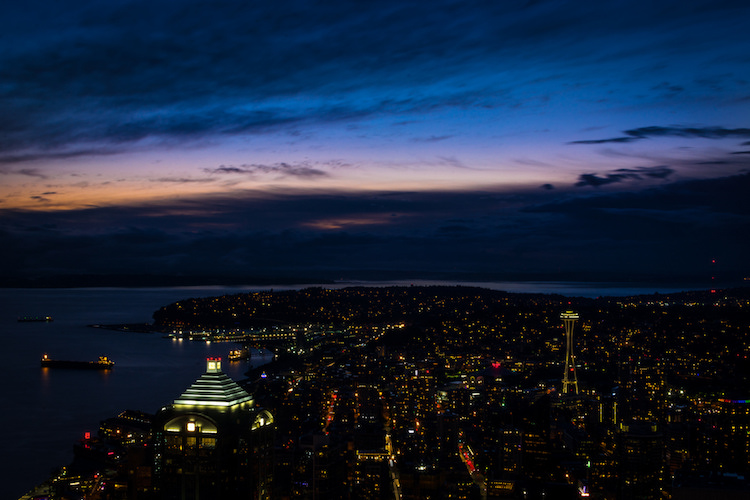
I used Shutter Priority with a value of 30 seconds to get this shot of the Seattle skyline from the Columbia Tower Observation Deck.

I used Shutter Priority with a value of 30 seconds to get this shot of the Seattle skyline, from the Columbia Tower Observation Deck.

M: Manual Mode

This is the granddaddy of all camera modes, because you have to choose all three settings: Aperture, Shutter Speed, and ISO. Shooting in manual can be a little scary at first, but the trick here is to learn to use your camera’s light meter, which will tell you if your picture will be over, or under-exposed. When you put your camera in Manual ode, the control wheel will only change one parameter of the three aforementioned settings at a time, so you may need to press another button while turning the wheel, or navigate to one of your camera’s menus in order to select a different value. With enough practice you will easily get the hang of it.

Shooting in Manual can be challenging, but intensely rewarding, as you learn exactly how to control your camera to get precisely the picture you want. Any situation can be good for Manual, provided you are well acquainted with your camera and how it operates.

Learning to shoot in Manual mode might seem daunting at first, but it's incredibly liberating when you learn how to take full control over every element of exposure.

Learning to shoot in Manual mode may seem daunting at first, but it’s incredibly liberating when you learn how to take full control over every element of exposure.

U1 (or C1): Storing custom user settings

Not all cameras have these options, but if yours has the ability to save custom user settings, you may want to investigate it a little more to start taking advantage of how this can help you. These custom settings allow you to specify a set of parameters, not just for exposure, but for other options like: shooting in JPG or RAW, shooting mode, White balance, enabling Auto ISO, and others – then instantly switch to those settings with just a click of your dial.

One thing I find these user storage banks useful is for having U1 (may be called C1 or something else on your camera) store a set of parameters that is a good starting point for indoor photography, such as a wider aperture and higher ISO, and then using U2 for outdoor pictures. The values and parameters can all be changed once you click over to a U1 or U2 storage bank, but it’s an incredibly handy to instantly change to a specific custom baseline for shooting different types of scenes.

Other things you could use it for are: saving settings for panning, bracketing for HDR shots, low light photography, portrait settings, landscape settings, etc. Use them for the types of things you do most often, or need to access quickly.
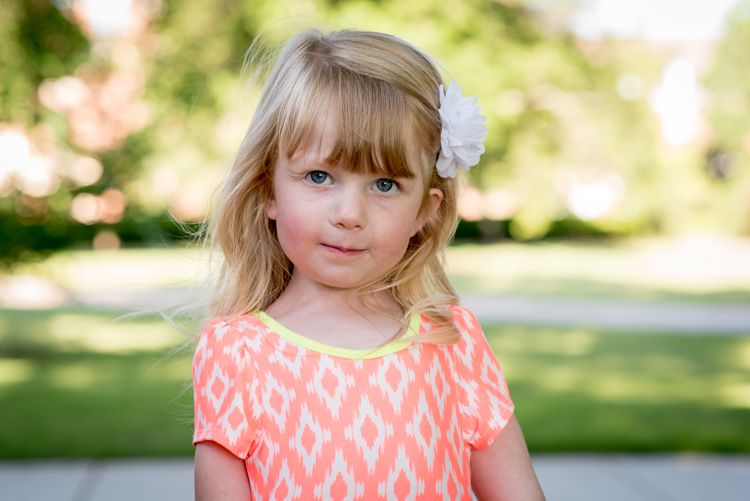
I have U1 configured to be ideal for outdoor portraits, so no matter what I'm doing I can instantly switch over to those settings to get the shot I want.

I have U1 configured to be ideal for outdoor portraits, so no matter what I’m doing I can instantly switch over to those settings to get the shot I want.

Preset Program Modes
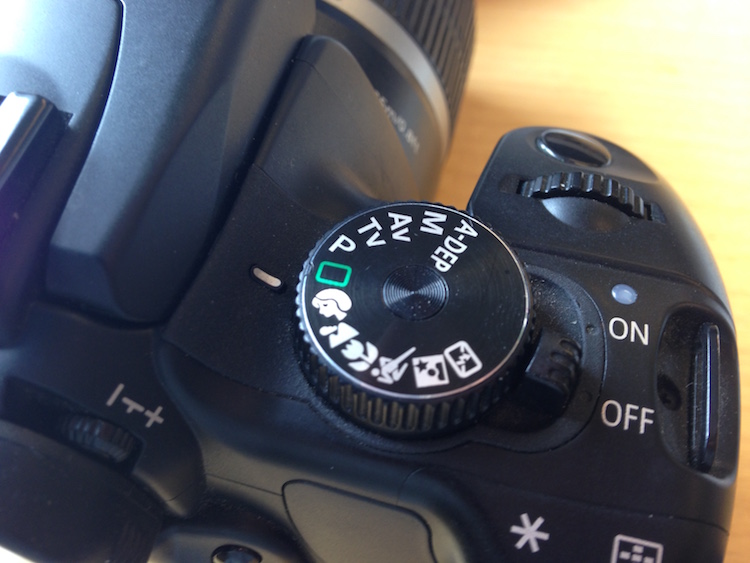
Insert mode dial close-up shot here. This is just a placeholder.

Think of these as custom Auto settings, each one suited for a different type of photography (look for the mountain, flower, person or sports figure on your mode dial). If you are perfectly happy shooting in Auto mode, but get frustrated when it doesn’t always give you the results you want, you might want to try using one of these instead.

Each option includes a specific set of parameters, kind of like the U1/U2 storage banks, that is ideal for taking pictures in certain types of settings. If you like going outdoors and taking shots of landscapes, twist the dial away from Auto, and over to the mountain icon, which will force your camera to use smaller apertures and lower ISO values that are suited for this type of photography. If you are watching your kids play football or run around at the park, use the icon with a person running, which will make your camera use faster shutter speeds and higher ISO values, if necessary, to freeze the action.

Each one of these icons is calculated and calibrated by your camera’s manufacturer to deliver good results in various types of situations, and they often deliver better images than just shooting in Auto mode.
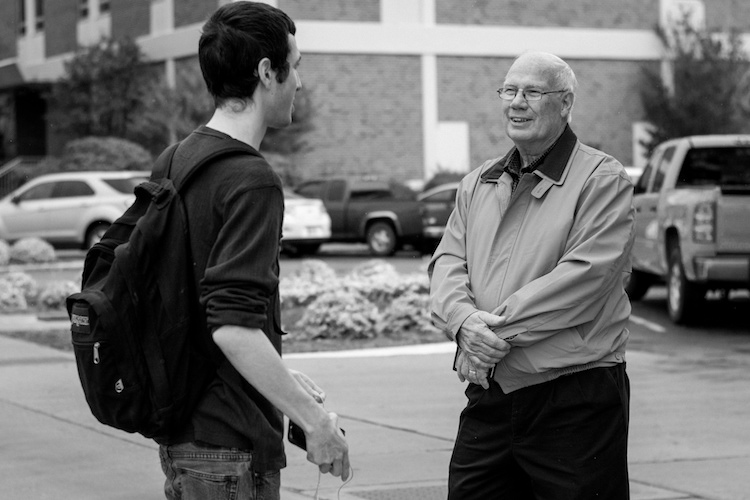
Using the icons on your camera can help you get the specific type of picture you want; the Portrait mode works here because it forces the camera to choose a wider aperture resulting in a blurry background behind the subjects.

Using the icons on your camera can help you get the specific type of picture you want; the Portrait mode worked here because it forced the camera to choose a wider aperture, resulting in a blurry background behind the subjects.

Other Common Modes

There are plenty of other modes you might find on any given camera, and each manufacturer includes a slightly different set of options, so it’s difficult to make a list that includes an explanation of all available functions. Here are just a few more that you might find, along with brief explanations. If your camera has something that’s not on this list, it may well be worth your time to open up your user manual and investigate. You may find some very useful modes for helping you take better pictures that were hidden in plain sight all along!

A-Dep: A fully automatic mode that lets you pick two points (in the foreground and background) that you want to be in focus, and your camera selects the aperture needed to get everything between those two points in sharp focus. The abbreviation stands for Automatic Depth of Field and it’s fun to play with, but doesn’t always work out so well in practice.

Box with Lightning Symbol Crossed Out: Another automatic mode that also disables the flash. It’s good if you want to shoot in low-light situations and only use available light, but your pictures may come out grainy or blurry.

Flower (macro): This is useful for shooting subjects at close range, such as flowers, or other small objects. It doesn’t affect the properties of your lens, which are far more important when shooting close-up subjects, but merely tells your camera to set the focus priority on things that are closer instead of farther away.

SCN/SCENE: Similar to the icons you may find on a mode dial, this lets you choose from several built-in scene examples, in order to help your camera figure out the appropriate shooting parameters to use.
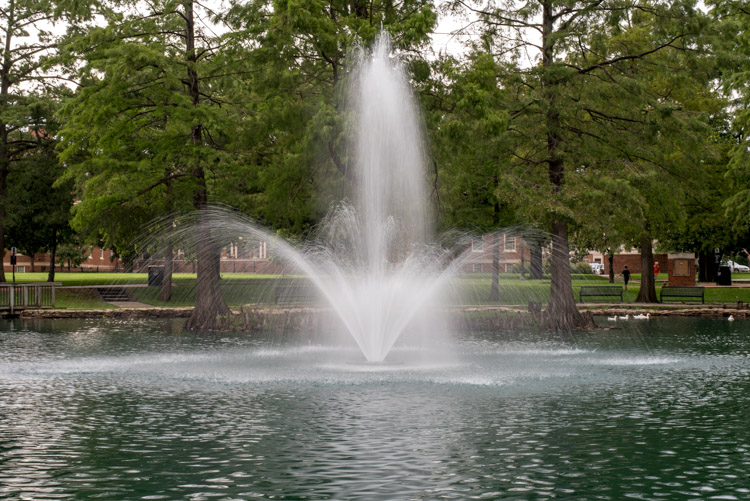
Though I shot this in the day, the nighttime scene mode worked well because it forces the camera to use a slow shutter speed which resulted in a nice blurry fountain.

Though I shot this in the day, the nighttime scene mode worked well because it forces the camera to use a slow shutter speed, which resulted in a nice blurry fountain.

Do you like using the mode dial on your camera, or do you prefer to leave it in just one position for all your shooting needs? Do you have any other tips or tricks you have learned from using the various functions on your mode dial? Did I leave out any critical information you think might be useful to someone learning to use the mode dial? Please leave your thoughts in the comments below.

googletag.cmd.push(function() {
tablet_slots.push( googletag.defineSlot( “/1005424/_dPSv4_tab-all-article-bottom_(300×250)”, [300, 250], “pb-ad-78623” ).addService( googletag.pubads() ) ); } );

googletag.cmd.push(function() {
mobile_slots.push( googletag.defineSlot( “/1005424/_dPSv4_mob-all-article-bottom_(300×250)”, [300, 250], “pb-ad-78158” ).addService( googletag.pubads() ) ); } );

The post A Simple Explanation of the Camera Mode Dial by Simon Ringsmuth appeared first on Digital Photography School.


Digital Photography School

 
Comments Off on A Simple Explanation of the Camera Mode Dial

Posted in Photography