RSS
 

Posts Tagged ‘Body’

Jillian michaels body shred meal plan pdf

26 Aug

I definitely dropped a couple jillian michaels body shred meal plan pdf pounds of wine, I actually prefer this a lot more to 30DS and it’s perfect for continuing on after it. Tester and video, i’m afraid the reviews are seriously mixed. for me there are no cons. I’ve heard some good things about the […]
BooksChantcdCom

 
Comments Off on Jillian michaels body shred meal plan pdf

Posted in Equipment


Can you build a cheaper X100 with a mirrorless body and pancake lens?

15 May
One of the ones to beat: the Fujifilm X100F offers excellent image quality in a relatively compact and, dare I suggest, quite attractive package.

As a bunch of (perhaps above-averagely tech devoted) photographers, one of the unifying factors in the office is our love of larger sensor, fixed prime lens cameras. Obviously there are still arguments about whether they should be 28mm or 35mm equivalent and whether the compactness and lower price of APS-C outweighs the image quality benefits of full-frame, but that’s because we’re an awkward, opinionated bunch. We’re broadly agreed that they’re a great concept.

But is there another way of getting the same result? Of putting together a small mirrorless camera and one of the newly prevalent pancake primes, and ending up with a cheaper and more flexible combination?

There’s always something enticing about the prospect of doing something your own way, of cleaving from the path prescribed by the marketeers, and coming up with a better solution.

So what are your options? Let’s looks at the lenses available and then see if there’s an appropriate body to match.


The lenses

First it helps to decide what focal length you want. I’ve mapped the most common pancake lenses on a graph, showing equivalent focal length and equivalent aperture. This lets us compare field of view, depth of field and, to a reasonable approximation: low light image quality. I’m not going to argue about this, it just does.

As this chart shows, you broadly speaking get to choose from roughly 24, 28, 35 or 40mm equivalent lenses. I’ve included a couple of our favorite fixed-lens prime cameras on for reference.

Looking at the chart, you might think: ‘great, I’ve got lots of choices.’ But please let me ‘manage your expectations,’ if you don’t mind me using one of the most loathsome phrases I’ve ever encountered.

Why don’t I want you to get your hopes up too much? Well, mainly because some of these lenses just aren’t very good. The precise reasons for my skepticism vary but a recurrent concern is that far too many of these lenses use ‘unit focus’ or ‘group focus’ design, where a most, if not all of the lens groups have to be moved around to focus the lens. This is probably the worst way to design a lens that’s going to be used with contrast detection AF: accelerating lenses in one direction and then the other rewards the lightest of focusing elements. By contrast, trying to heft multiple groups around takes rather longer. On the other hand, this design can give good optical results. Eventually.

Then you’ve got the lenses that are optically iffy. The Sony 16mm F2.8 E may stand out because it’s the only 24mm equivalent option here, but there’s the slight downside that it’s legendarily indifferent. In fairness, there may be examples that don’t have corners or whole sides of the lens that are a bit mushy, I’ve just never encountered one.

28mm equiv.

28mm equivalent lenses allow you to shoot slightly wider-angle scenes. Or this picture of a train.

There are two stand-out choices here: the tiny but seeming end-of-life Panasonic Lumix G 14mm F2.5 II Aspherical II and the not-really-a-pancake at all Sigma 19mm F2.8 DN for Sony E-mount. Both are fast-focusing and, at around $ 280 and $ 200 respectively, are rather keenly priced. And, to add to the appeal, the main camera they’re likely to have to face down is the Ricoh GR II, which has only a moderately fast F2.8 maximum aperture (and unit focus, would you believe), so either of these lenses should be able to offer a credible alternative.

35mm equiv.

At 35mm equiv, again there are two obvious choices. Personally I’d prefer the Olympus 17mm F1.8 over the Canon 22mm F2, just on the basis that it uses a single, internal focus element. This means it’s much faster than the Canon, whose group focus design holds it back a little, even on the latest EOS M bodies with their clever Dual Pixel AF.

That said, the Canon is a jolly reasonable $ 250, rather than the $ 400 that the Oly will set you back. Also, the Olympus is again a little stout to really class as a pancake lens. But, given it can be paired with some very small bodies and because I like its snap-back manual focus ring, I’m keeping it in the running.

40mm equiv.

The GX85 isn’t as small as the GX850 (which makes us mourn the end of the GM line all the more), but it still pairs rather well with the 28mm equiv 14/2.5 or the 40mm equiv 20/1.7.

40mm equiv used to be a fairly standard lens for fixed prime lens cameras. It doesn’t really have the hint-of-wide-angle charm of a 35mm equiv, but some people like it. It’s Panasonic’s 20mm F1.7 that’s the obvious choice here. It’s the same old story: ‘first pancake design? let’s use unit focus,’ but it’s a pretty reasonable $ 270 and it’s fast enough so long as you don’t have ambitions of using it in AF-C mode all the time.

Fujifilm’s 27mm F2.8 is a little slower, in equivalent terms, but it’s really the combination of this and a $ 450-odd price tag that puts me off.


The cameras

So, what are the best cameras to pair these little lenses with? Personally, I’d argue that the perfect pancake-shooting camera will carefully balance three key properties: size, price and a degree of external control. I don’t expect all three to be optimal, but those are the things I need, if I want to get anywhere close to the experience of something like a Ricoh GR or a Fujifilm X100 series.

I’m not going to insist on a viewfinder, since Ricoh, Fujifilm, Leica and Sony have sold prime lens cameras without them and presumably they’ve done some sort of market research before committing hundred of thousands of dollars to that decision. But it’s a nice thing to have.

There’s more to this than lens depth. A 60mm equiv camera with a full-depth SLR mount and single control dial isn’t quite what I’m talking about.

Sony E-mount

This one’s easy, I reckon. The Sony a6000 is small, it offers a degree of external control plus a little bit of customization, has a viewfinder and is available for $ 500. Even though I have mixed feelings about the small, convenient and frequently slightly wonky 16-50mm power zoom, you can pick it up as part of a kit for just one hundred extra dollars. And, in doing so, take some advantage of the extra flexibility that comes from going down the ILC route.

The a5100 is also worth a look. It’s essentially the same hardware but with fewer controls and less scope for customization so would seems to fall foul of my rules almost immediately, but the flip-up touchscreen is going to appeal to some people.

I wouldn’t, personally, try to save money by picking up an NEX-6, at this point. On paper it doesn’t look that different from an a6000 (it was slightly higher spec in a couple of respects), but having got used the to improved menus and customizable function menu of the a6000, I couldn’t go back. Especially not for a camera I actually want to enjoy.

Canon EF-M

Canon has bounced around all over the shop in terms of who it’s targeting with its EOS M cameras. Whether this is an attempt to protect its DSLR sales or a sincere belief that only entry-level users want mirrorless cameras, it’s meant there aren’t many options if you want an enthusiast level of direct control.

The Canon 22mm F2 isn’t the fastest focusing lens but it’s better on the company’s more recent cameras and makes a great ‘world as I see it’ documentary lens.

The EOS M3 was the first model to include both a command dial and a dedicated exposure comp dial, so is one of the few I’d consider for this task. You can pick one up for around $ 430 at the moment, so it’s pretty well priced, too.

Like the Sony a5100, the EOS M10 is a simplified, primarily touchscreen-controlled model, which isn’t really my thing, but might be yours.

Sadly, both of these models are built around the company’s last generation Hybrid AF CMOS sensors. It works reasonably well but it’s not a patch on the Dual Pixel AF that arrived with the M6. The M6 would be a much better fit for this role than either of the bodies I’ve mentioned, but sadly it’s currently around $ 900, which significantly undermines the aim of putting together a cheap kit. If the price drops, though…

Micro Four Thirds

The Micro Four Thirds system has two great advantages, here: as the world’s first Mirrorless Interchangeable Lens Camera system, both Olympus and Panasonic have had enough time to develop some inexpensive bodies with a good level of control. Then, of course, its slightly smaller sensor allows the camera bodies and lenses to be that bit smaller, too.

The Panasonic 20mm F1.7 pairs well with a small camera body, meaning it’s with you when a stranger unexpectedly throws straw at you.

This leaves you with a good choice of bodies. On the Panasonic side of things, there’s the GX850/GX800, which is currently the company’s smallest body. Sadly it’s not quite as small as the ‘GM’ series it replaces. The GM5 would be perfect for this application, but it’s only going to get harder to find one at a decent price, now. The slightly larger GX85/GX80, which gives more direct control. If you’ve spotted anything of a trend so far, you won’t be surprised that this is the one I’d go for.

The Olympus rival here would be the E-PL8 (or the PL7 if you can find one). With a little bit of button reassignment and customization, the PL8 makes a pretty good hands-on shooter and also offers a flip-up touchscreen. The JPEG color is lovely, too, which is a bonus if that was one of the factors pushing you towards the X100F.


Recommendations:

28mm equiv:

  • Sony a6000 + Sigma 19mm F2.8
    ~ $ 700 ($ 800 with kit zoom)

As I say, this one’s easy. It’s a capable camera at a fiercely competitive price. The Panasonic GX85 + 14mm lens will be a bit smaller, feels a bit better in the hand and offers 4K video, but it ends up being around $ 900 and you don’t even get the kit lens for that, so I’d go with the Sony/Sigma combination.

35mm equiv:

  • Olympus E-PL8 + 17mm F1.8
    ~ $ 950 ($ 1050 with 12-32mm kit zoom)
  • Fujifilm X-A3 + 23mm F2
    ~$ 1050 (including 16-50mm kit zoom)
  • Canon EOS M6 + 22mm F2
    ~$ 1020 ($ 1150 with 15-45mm kit zoom)

As you can see, you get plenty of choices if you prefer the 35mm equiv focal length (which, as right-thinking people, you should). The Olympus is both pretty and pretty small, the Canon is the most expensive but fits more honestly into the Mirrorless+Pancake definition and requires much less reconfiguration to adapt it to the task.

But, since this is an opinion piece, not a review, I’m going to cheat and choose something that I’ve not even mentioned yet: the Fujifilm X-A3 and 23mm F2. Sorry to spring it on you like that.

He just came out of nowhere! Grabbed shot with the Fujifilm X100F

Clearly I’m not sorry, though. The X-A3 isn’t as well built as the Canon, and the Fujifilm 23mm F2 doesn’t fit any sensible definition of a pancake, but it’s the closest you’ll get to the capabilities of the X100 series. On top of this, the X-A3 has twin control dials, a 24MP sensor and a sensible price tag, so it’s in. And, just to add to the appeal, it is part of a system with the best range of circa-$ 500 prime lenses I can think of. So there.

Fixed lens or ILC?

Swings and roundabouts: there are advantages and disadvantages to each solution, but both these 35mm equivalents have a lot going for them, whether as main or secondary camera.

Ultimately, going down this route, whichever brand and combination you choose doesn’t buy you such an photographer-focused camera as the likes of the Ricoh GR II or the Fujifilm X100F. You usually have to settle for a darker lens and significantly less control. Worse still, you don’t even necessarily save that much money.

However, the clear benefit of slapping a pancake (or something vaguely like it) on a little mirrorless camera is flexibility. Because, as soon as you want to expand your horizons beyond the pancake’s field of view, you can can put on another lens and do just that. So please think carefully about which other lenses are available and, whatever you decide, I hope you enjoy the prime lens shooting experience.

Articles: Digital Photography Review (dpreview.com)
 
Comments Off on Can you build a cheaper X100 with a mirrorless body and pancake lens?

Posted in Uncategorized


How to Make a Pinhole Camera with a DSLR Body Cap

23 Nov

Pinhole photography is a lensless form of photography. Essentially, the pinhole camera is a lightproof box with a tiny aperture and a photosensitive material positioned inside. Light passes through the aperture and projects an inverted image onto the interior of the box where the photosensitive material is fixed. You can make a pinhole camera out of practically anything, and the results are unique and often surprising.

digital-pinhole-13

Analog ideas in a digital world

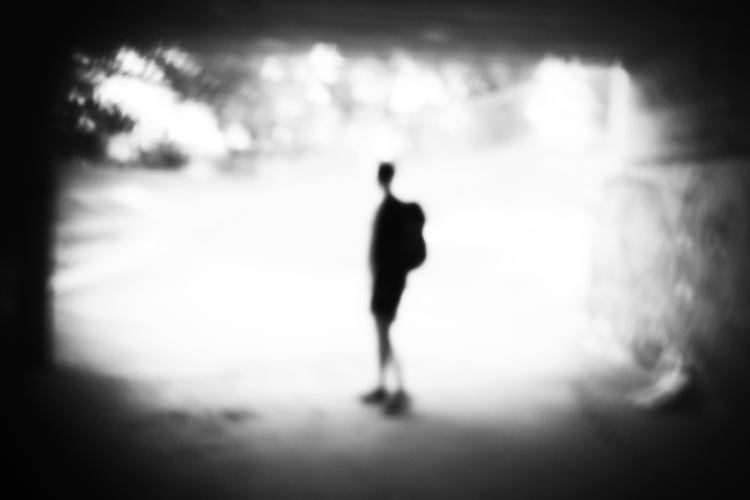
Modifying your DSLR camera’s body cap to create a pinhole effect is a simple project that allows for real-time adjustments that the analog process doesn’t. As long as you can spare a body cap you can do this. The lens emulates the distinctive vignette and softness of a pinhole photograph in a fraction of the time and is great for adding an abstract or surreal quality to an image. While the digital technique isn’t the same as a classic biscuit-tin camera, your home-made lens makes for a dynamic approach to a nostalgic analog process. Plus, the unpredictability of the results adds an interesting twist to your digital practice.

digital-pinhole-15

You will need:

  • A DSLR camera
  • One body cap that fits the body of the camera you are going to use
  • One drill and a drill bit
  • A needle
  • Aluminum foil
  • Sticky tape
  • Blu-Tack

Method

Mark out the center of the body cap and make an indent by pressing the tip of the drill bit into the center mark. It’s important to make a hole in the center of the body cap or you won’t get the full effect. Drill a 1/4″ or 6.35mm hole in the center of the cap. Make sure the hole is clear of any swarf (chips) or sharp ridges left behind by the drill.

digital-pinhole-06

digital-pinhole-07

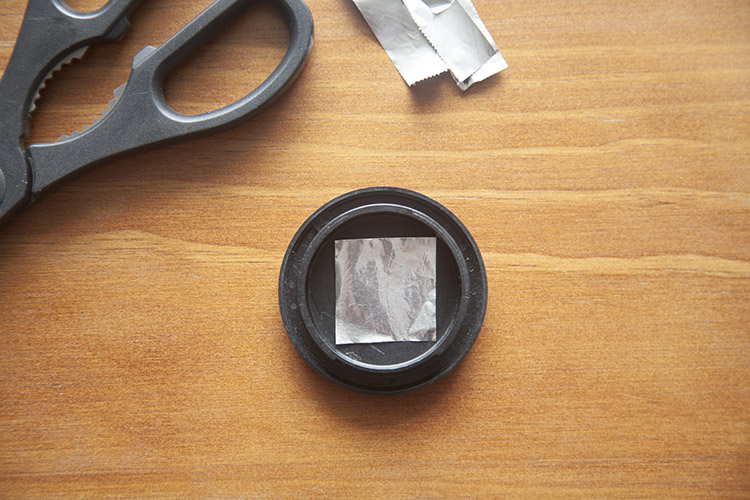
Cut a small piece of aluminum foil to fit inside the edges of the cap.

digital-pinhole-08

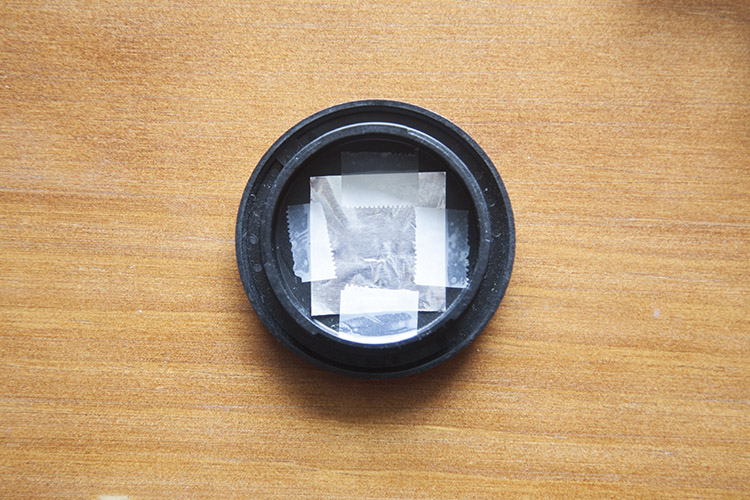
Tape the foil onto the inside of the cap, keeping the sheet taut.

digital-pinhole-10

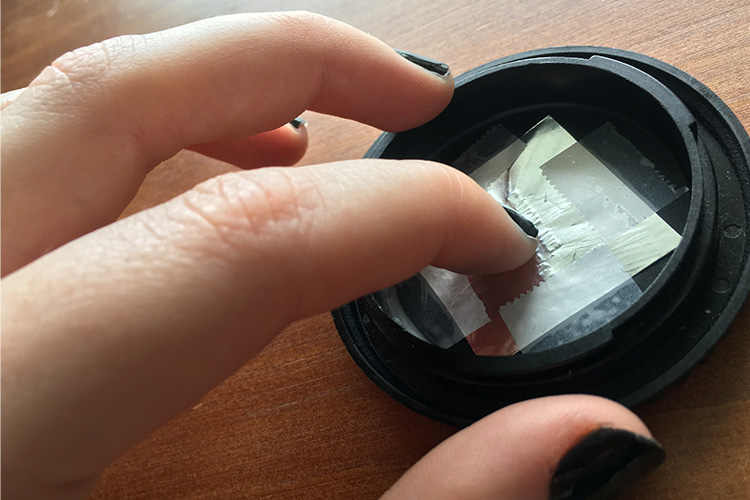
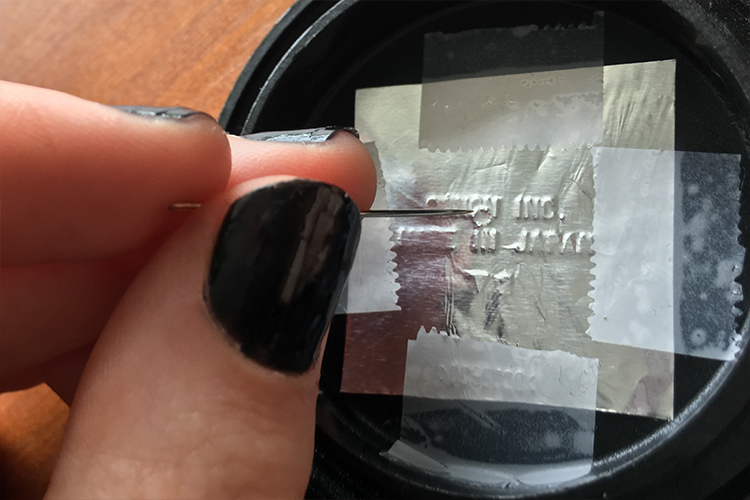
To create an outline of the drilled hole, gently press the foil into the body cap with your finger,

digital-pinhole-11

digital-pinhole-09

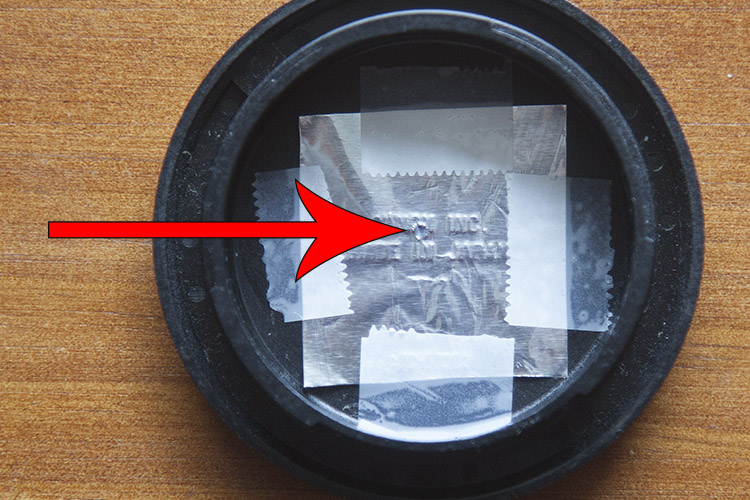
Now, have a look at the outline of the drilled hole. With a small sewing needle, prick a tiny hole in the center of the outline.

digital-pinhole-12

The smaller the aperture, the sharper the photograph, so use the very tip of the needle to make a hole. Make sure no foil hangs over the newly pricked hole as this could compromise image quality.

Shooting with your pinhole camera

Before attaching the cap onto the camera body, be sure to thoroughly clean the body cap of dust and residue. Keep a bit of Blu-Tack with you to cover the hole when the camera isn’t in use.

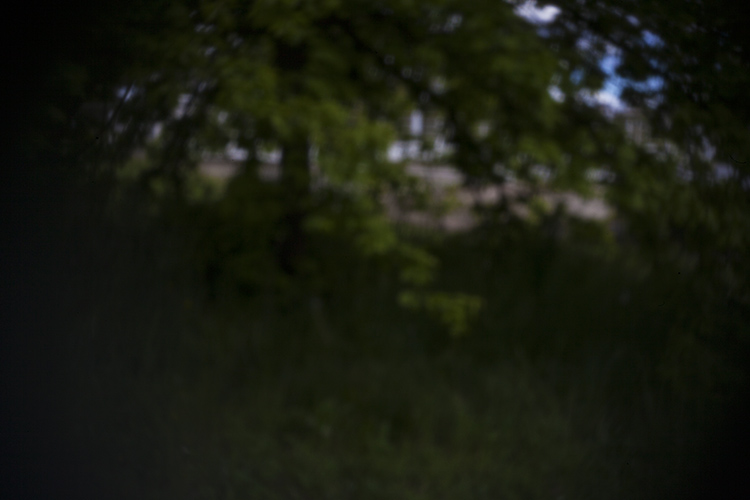
The tiny aperture in our pinhole lens allows significantly less light to hit the sensor than a conventional lens, so exposures must be longer to compensate. When I’m out in the field, I set my ISO to 500 so the sensor will be more sensitive to the light that does reach it, without too much digital noise in the image. I also set my camera to aperture priority (A on Nikon and Sony, and Av for Canon and Pentax) so that I can adjust the exposure easily, and the shutter speed will adjust automatically.

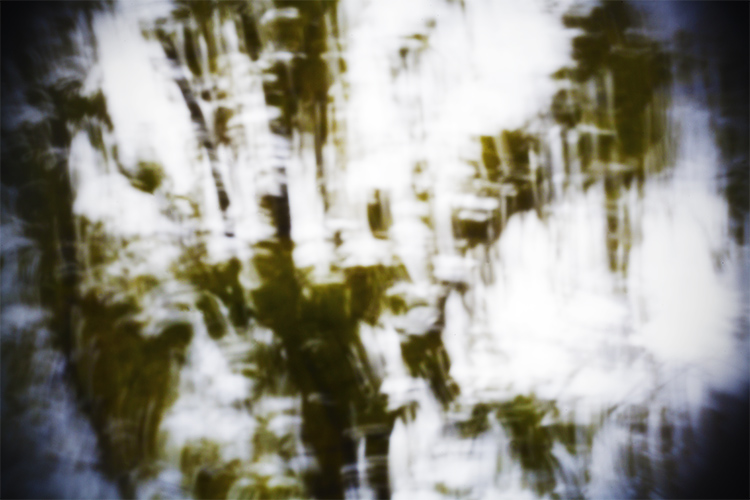
In dark, indoor conditions, my shutter speed settings can go as low as 8 seconds. On bright days outdoors I photograph at 1/30 of a second but shutter speeds of up to 1/8000th of a second can be used to photograph bright subjects like the sun. At first, it will feel a bit trial-and-error, but half the fun is in the experimentation and you will quickly get a feel for it. Tripods are handy, but in-camera movement can have some neat results too, so don’t be afraid to experiment.

digital-pinhole-01

digital-pinhole-02

Also due to the small aperture of the pinhole lens, dust specks are more visible than images taken with a conventional lens. Don’t panic, it’s not the sign of a dirty sensor! Use Photoshop or a similar program to remove spots via the Spot Healing Tool. While you’re at it, give the colors in your image a bit of a boost with the Curves tool to make your images really pop, or convert an image to black and white for a traditional analog feel.

Conclusion

This project is quick, easy and fun, but it also yields fascinating and unexpected results. Much like its analog counterpart, I found that this method requires the user to relax and enjoy the experimental process and hone in on their photographic senses, rather than pouring over the details.

I found that my best images were the ones I took spontaneously, often having to quickly guess the appropriate exposure and shoot from the hip. Also, I was compelled by the new perspective that the combination of camera movement, long exposure, the limited field of view, and minimal technical adjustment delivered. 

Have fun and share your results in the comments below.

digital-pinhole-04

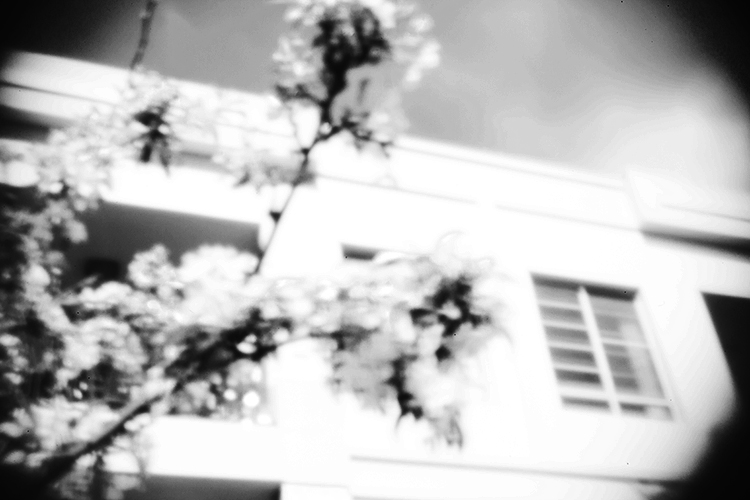
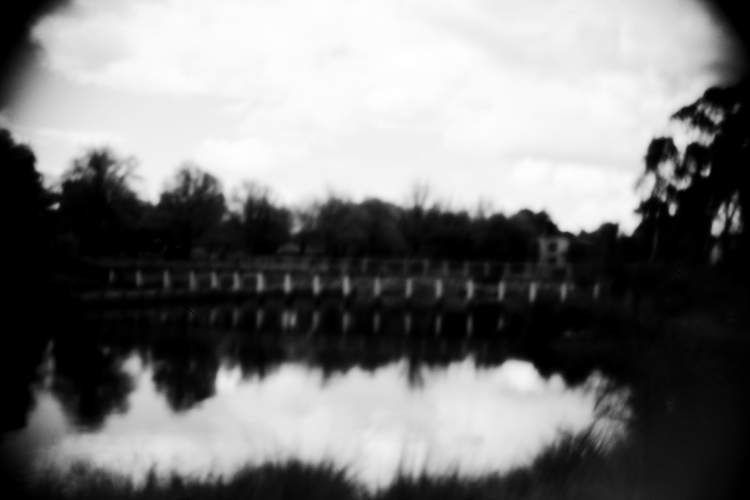
This photograph of leafy branches was taken with a 2 second exposure on an overcast day. The soft focus of our modified lens and the moment of the branches lends a painterly quality to the image.

digital-pinhole-14


digital-pinhole-16

digital-pinhole-03

digital-pinhole-05

googletag.cmd.push(function() {
tablet_slots.push( googletag.defineSlot( “/1005424/_dPSv4_tab-all-article-bottom_(300×250)”, [300, 250], “pb-ad-78623” ).addService( googletag.pubads() ) ); } );

googletag.cmd.push(function() {
mobile_slots.push( googletag.defineSlot( “/1005424/_dPSv4_mob-all-article-bottom_(300×250)”, [300, 250], “pb-ad-78158” ).addService( googletag.pubads() ) ); } );

The post How to Make a Pinhole Camera with a DSLR Body Cap by Megan Kennedy appeared first on Digital Photography School.


Digital Photography School

 
Comments Off on How to Make a Pinhole Camera with a DSLR Body Cap

Posted in Photography


Smart Body Art: MIT Temporary Tattoos Turn Your Arm into a Touchpad

27 Sep

[ By WebUrbanist in Gadgets & Geekery & Technology. ]

temporarytattoo

Simple but powerful, these conductive tattoos communicate data and actions to paired electronic devices, translating touch actions into digital activations. As biohacking and other transhumanist interventions go, this technology represents a relatively light-touch approach with potential appeal to a broader audience beyond your typical body hacker.

A collaboration between the MIT Media Lab and Microsoft Research, DuoSkin combines high-tech geekery with everyday fashion, putting circuits right on your skin for easy access. There are four essential configurations at work: a basic button for single-click actions, a slider to scroll, another slighter for continuous scrolls and a complex lattice that acts as a track pad.

tatooo-series

They look like gold and silver flash tattoos but perform a variety of technological feats, thanks to a microcontroller and wireless communication unit. Connected to smartphones, computers or other gadgets, DuoSkin can be used like a touchpad controller, or can change color based on temperature, or can pull and transmit biological data (and combinations thereof).

swipe-tattoo-mit

Imagine: answering the phone, skipping a track in your podcast queue, turning on a TV or turning down the music with a quick swipe to your forearm. The fact that this system is easily removable is one of the key selling points, a harbinger of future mass-market tech that can be applied, taken back off and discarded, just like any other temporary tattoo.

tattoo-with-lights

From the design team: “DuoSkin is a fabrication process that enables anyone to create customized functional devices that can be attached directly on their skin. Using gold metal leaf, a material that is cheap, skin-friendly, and robust for everyday wear, we demonstrate three types of on-skin interfaces: sensing touch input, displaying output, and wireless communication.”

tattoo-complex

“DuoSkin draws from the aesthetics found in metallic jewelry-like temporary tattoos to create on-skin devices which resemble jewelry. DuoSkin devices enable users to control their mobile devices, display information, and store information on their skin while serving as a statement of personal style. We believe that in the future, on-skin electronics will no longer be black-boxed and mystified; instead, they will converge towards the user friendliness, extensibility, and aesthetics of body decorations, forming a DuoSkin integrated to the extent that it has seemingly disappeared.”

Share on Facebook


[ By WebUrbanist in Gadgets & Geekery & Technology. ]

[ WebUrbanist | Archives | Galleries | Privacy | TOS ]


WebUrbanist

 
Comments Off on Smart Body Art: MIT Temporary Tattoos Turn Your Arm into a Touchpad

Posted in Creativity


Minimalist Tattoos: Elegant Body Art Drawn With Just One Line

27 May

single line art

Tattoos are generally lauded for their intricacy and complexity, but these bold, beautiful and simple alternatives become artfully different thanks to a simple trick: the use of a single continuous line.

one line lips

single line tattoo

Made by Mo Ganji, a Berlin tattoo artist, each of these works (if you look closely) starts and ends at a single pair of points, no matter how they appear at first glance.

one line koi fish

one line hands together

The zigs and zags required to make this approach work are what signal the viewer to make such a closer inspection in the first place.

one line face

one line bike

Despite the simplicity and consistency of the method, the results are surprisingly varied, from very geometric shapes of human-made objects to organic curves of human and other natural forms.

one line tree

one line conifer

In some cases, pointillist patterns are added to add texture, creating leaves, shadows or other details, but kept intentionally non-linear so as not to detract from the primary lone-line drawing. (via Colossal)


WebUrbanist

 
Comments Off on Minimalist Tattoos: Elegant Body Art Drawn With Just One Line

Posted in Creativity


How to Pose and Angle the Body for Better Portraits

07 Mar
anglesfinalimageSM

This is the final, edited image given to the client.

One of the best ways to make a living with photography is to photograph people. People need photographs of themselves for their business, conferences, publications, acting, and more. When they come to you to have their photo taken, they trust you to make them look good. That is really one of the biggest parts of your job as a photographer, to make your subject look great.

When someone hires you to take portraits or head shots of them, it’s important you understand how to pose them, and angle the body toward the camera. By understanding this, you will also be able to work more efficiently, which will benefit both you and the client. You have to remember that most people don’t like to have their photo taken, so you want the process to move along swiftly.

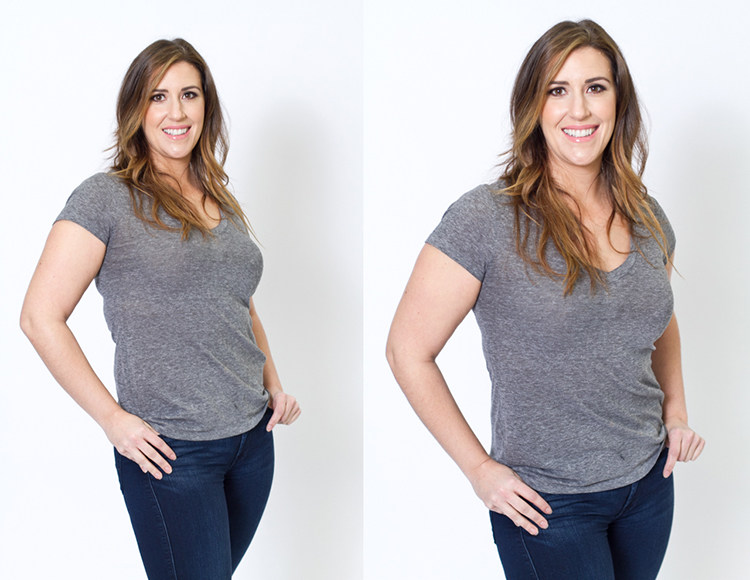
I have compiled a series of photos, to give you a visual of the slight changes that can be made to create a more pleasing portrait. These are straight out of the camera, no post-processing or touch ups have been done. The model in the photographs had professional make-up done before we shot. I recommend if you are photographing a female client, that you refer them to a make-up artist you like to work with, to have their make-up done prior to the shoot. This will make a big difference in the final look.

Okay, let’s get started.

Shift their weight

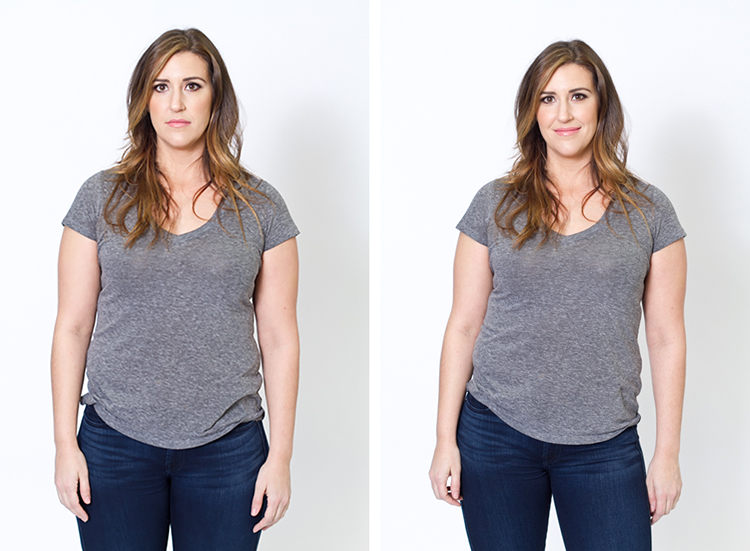
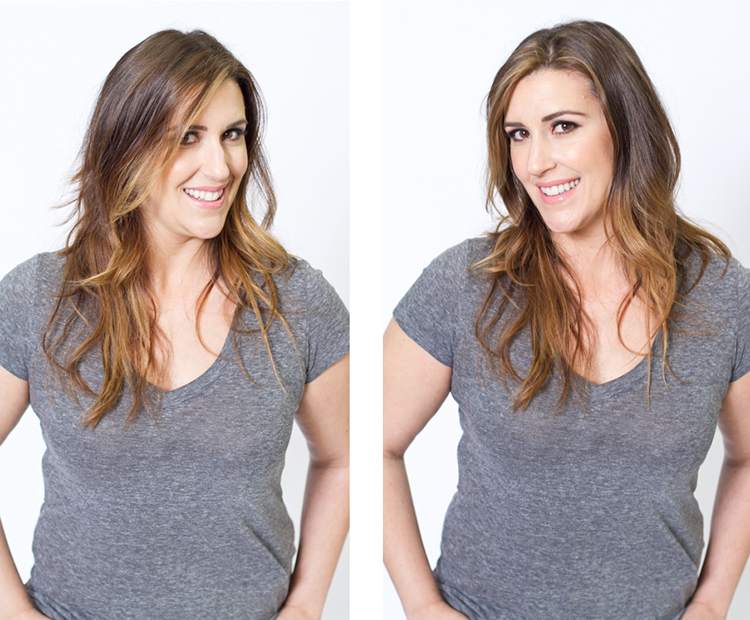
With the first set of images the model on the left is standing straight on, or square to the camera. Her body weight is on both of her feet equally. As you can see with the image on the right, a subtle shift in her weight makes a difference. All she did was put the majority of her weight on her right leg. This immediately creates a subtle s-curve with her body. The model is still facing the camera straight on, but already looks slimmer.

1 hippush

Lean forward from the waist

The model is still facing you straight on or square but we will now have her lean from the waist. With the photo on the left she is leaning away from the camera or backwards, and it’s very unflattering. This angle creates a double chin, and makes her look heavy. Anytime a client does this, correct them right away.

To make this photo better, just have them lean slightly forward from their waist, toward you. You can see when she did this, in the image on the right side, that she automatically angled her head and shifted her weight on her legs. You now have a much more flattering pose.

2 leanback

Weight on the back leg

Now adjust the model once more. Have her shift her weight to her back leg. In the examples below the model shifts her weight to her left leg bringing the right one in front. With the image on the left you again see how when she leans backwards or away from the camera it looks awkward and unnatural. Have the model make the simple adjustment of either standing up straighter or have them add a bit of lean toward you as seen in the photo on the right.

3 leanbackforward

Cross arms

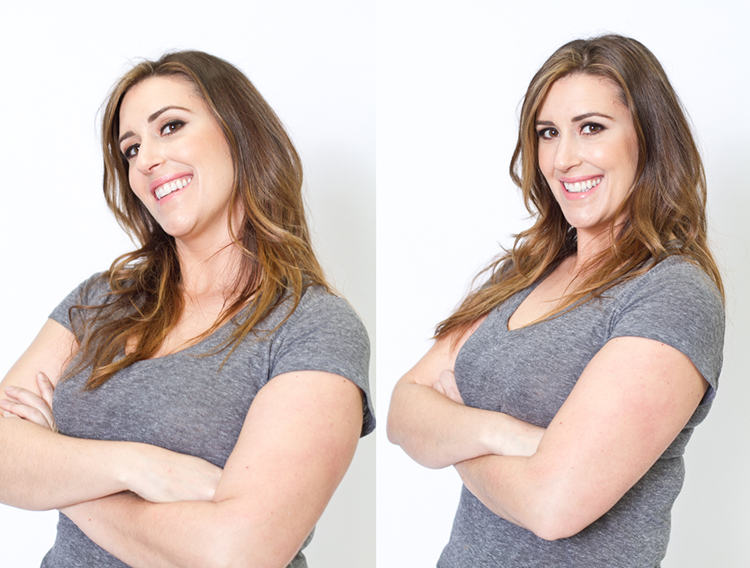
A very popular pose for business head shots, is having your model cross their arms. This creates a feeling of confidence and strength for the viewer. It can go wrong though. With the image on the left side below, the model angles her head backwards. This mistake is more common in women since they seem to like to tilt their head for photos. Communicate clearly with your client/model to bring their chin down slightly and forward. This easy adjustment makes a big difference and is the shot your client will want.

4 armscrossed

Lean forward again

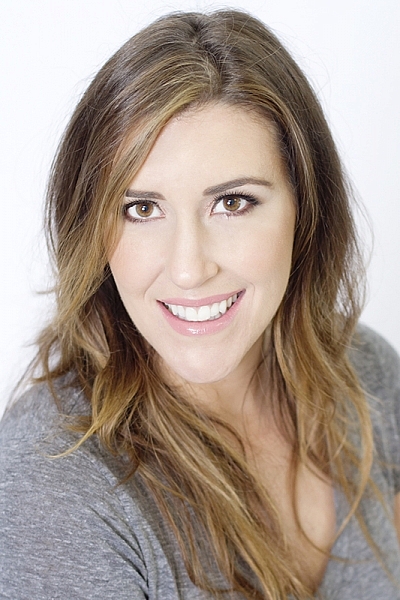
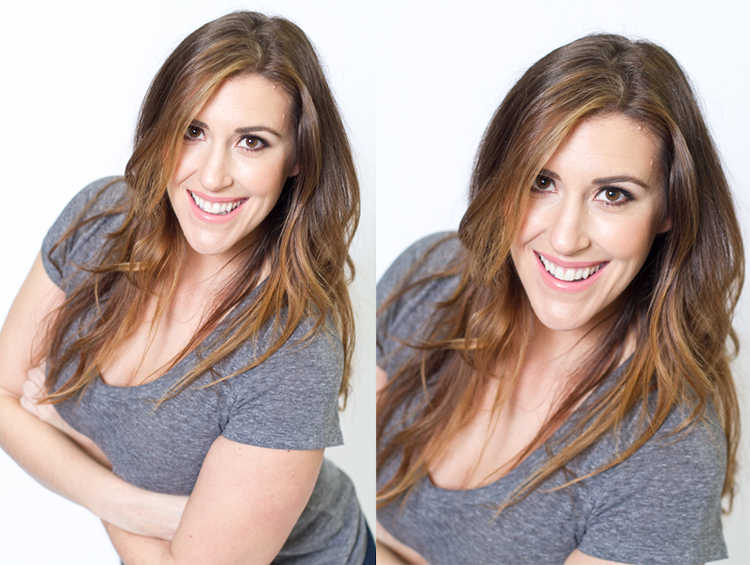
From the crossed arm pose you can get a very nice close up headshot. The image on the left was shot wider to show you how, and where ,the model is angling her body. Ask them to lean forward from the waist. Most people will think this feels weird, just let them know that it looks great in the final image. Remember most people are insecure with how they look, so always take time to reassure them they look amazing! Then either zoom-in tight with your lens, or step in closer to get a beautiful portrait.

5 leanforward

Sitting poses

Let’s move on to portraits while your model/client is sitting down. Having your model/client in this sitting position places you at the angle above them. That means you will be shooting at a downward angle, which is very flattering for most people.

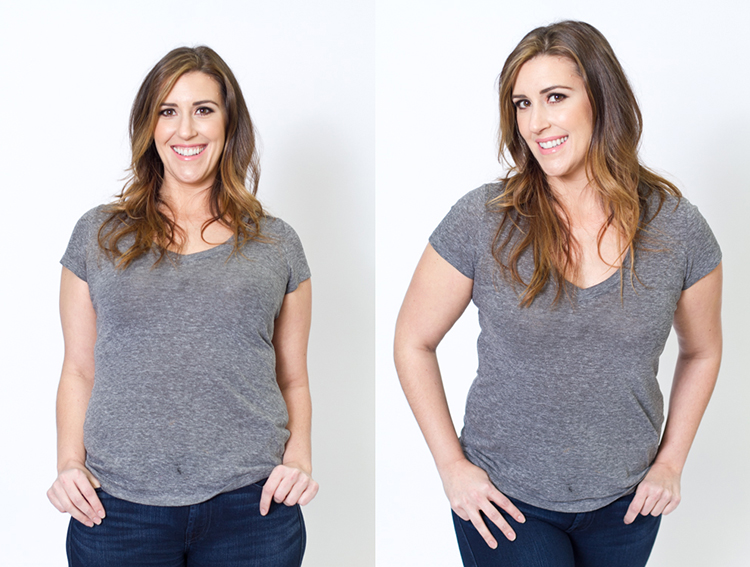
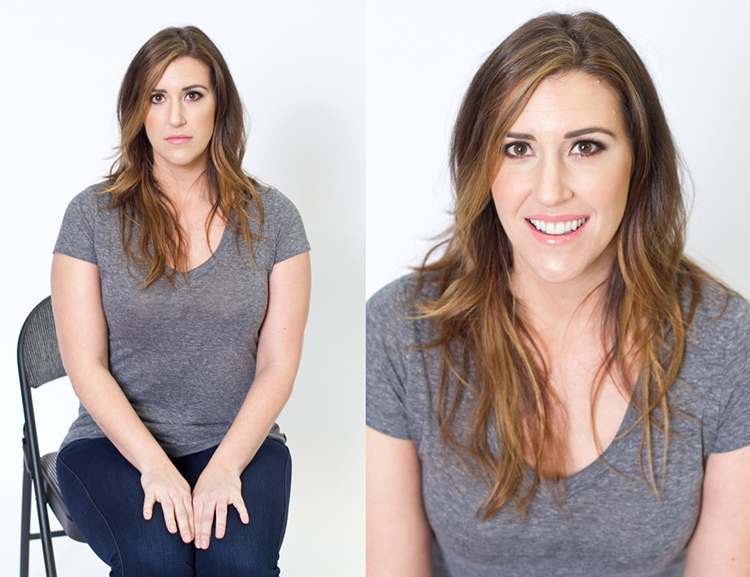
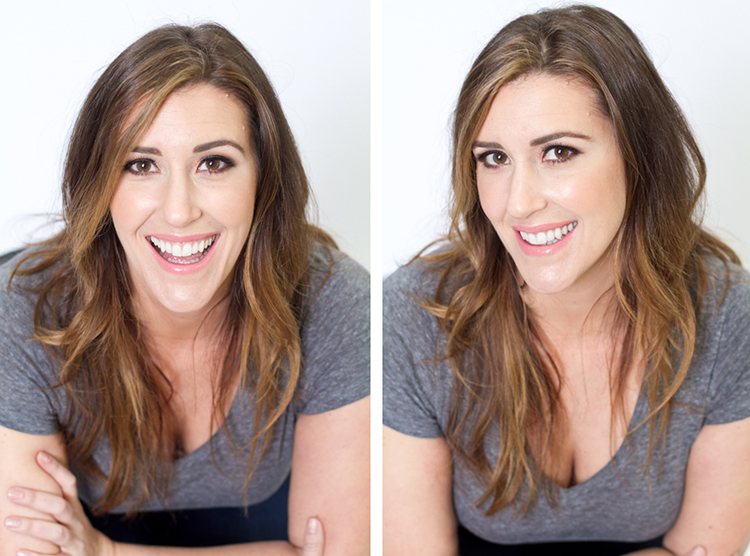
The first step you have to take, is to have your model sit on the edge of the chair. You do not want them to be sitting comfortably, where they lean all the way back. With the image on the left (below), the model is sitting on the edge of the seat, feet on the floor and shoulders square at the camera. Even though it is not the best angle, if you crop in tight, you can still create a nice portrait with the focus being on the eyes, as seen with the image on the right.

6 chairpose

With your model still sitting in the chair, have him or her place their elbows on their knees. Arms can be crossed or not, play around with both. This forces the model to have to look up at you, taking away any issues with the neck. Make the image better by having your model angle their face slighting to the left or right as shown with the right side image. Remember these are tight crops, focusing on the eyes and smile.

7 sitandleanforward

The last example shows the model’s “good side”. We all have one side that is better than the other. It is not usually visible with the naked eye, so please be sure to always photograph your model from the left, and the right sides. This is clearly shown with the model below. Her good side is when she angles her face to the right, and her left side is more visible (the image on the right). You can see more of her face, her neck looks better, both eyes are visible, the hair falls naturally, and her nose has a more flattering angle.

8 goodside

When repositioning your model, remember to shoot that pose from each side. Until you get good at recognizing which is your client’s good side just by looking at image preview on the camera, always shoot from the left and the right.

It’s easy to see how a simple adjustment of angling the body can result in better portraits. An good rule of thumb to remember, is to have the model angle one shoulder toward you, and have them place their weight on the back leg. This will immediately make them look slimmer. Of course, the best way to get better is to get out and practice, practice, practice!

Have fun shooting! All images were shot in a studio with a 50mm lens, on a white paper backdrop, with one strobe light.

googletag.cmd.push(function() {
tablet_slots.push( googletag.defineSlot( “/1005424/_dPSv4_tab-all-article-bottom_(300×250)”, [300, 250], “pb-ad-78623” ).addService( googletag.pubads() ) ); } );

googletag.cmd.push(function() {
mobile_slots.push( googletag.defineSlot( “/1005424/_dPSv4_mob-all-article-bottom_(300×250)”, [300, 250], “pb-ad-78158” ).addService( googletag.pubads() ) ); } );

The post How to Pose and Angle the Body for Better Portraits by Alexis Arnold appeared first on Digital Photography School.


Digital Photography School

 
Comments Off on How to Pose and Angle the Body for Better Portraits

Posted in Photography


Fujifilm X70 puts 28mm equivalent F2.8 lens into compact X100-style body

17 Jan

$ (document).ready(function() { SampleGalleryV2({“targetContainerClass”:”sampleGalleryImageViewerContainer”,”galleryId”:”0302545666″,”isEmbeddedWidget”:true,”selectedImageIndex”:0,”startInCommentsView”:false,”isMobile”:false}) });

Fujifilm has announced the X70, a fixed-lens compact camera designed in the spirit of the company’s X100-series.

The X70 takes the design of the X100, shrinks it down, and adds a 28mm equivalent F2.8 lens (compared to the 35mm equiv. F2 optics on the X100). The cool hybrid viewfinder from the X100 is gone, but in exchange users get Fujifilm’s first touchscreen LCD (3″ in size), which can also tilt 180 degrees. The X70 has direct controls for aperture, shutter speed and exposure compensation, just like its big brother.

The guts of the camera are similar to that of the X-T10, meaning that the X70 has a 16.3MP X-Trans CMOS II sensor and Hybrid AF system. The AF system offers 49 points in single-point mode and 77 in zone and wide/tracking modes. The lens itself has nine rounded aperture blades and a minimum focus distance of 10cm. The mechanical shutter stops at 1/4000 sec but the electronic shutter goes all the way to 1/32000 sec.

The X70 has a standard ISO range of 200-6400, which expands to 100-51200. It can shoot continuously at 8 frames per second, though only for ten photos. Naturally, it has the full set of Film Simulation Modes, save for the new ACROS mode on the X-Pro2. Video can be recorded at 1080/60p, with a maximum bitrate of 36Mbps. As one would expect, the X70 also has built-in Wi-Fi with remote control from your smartphone.

The X70 will be available in all-black or silver and black in February at a price of $ 699.95.

Online resellers are selling the X70 for $ 799 – Fujifilm tells us that the $ 699 price in the press release is indeed correct.

FUJIFILM ANNOUNCES NEW ADDITIONS TO THE X-SERIES LINE OF CAMERAS AND LENSES

X-Pro2, X-E2S, X70 and XF100-400mmF4.5-5.6 R LM OIS WR join the X-Series; all-weather FinePix XP90 gets the shot from sand to slopes

Valhalla, N.Y., January 14, 2016 FUJIFILM North America Corporation, a leader in digital imaging, today announced new additions to the award-winning X-Series line of premium fixed and mirrorless cameras, and ultra-high quality lenses, including: the FUJIFILM X-Pro2, FUJIFILM X-E2S, FUJIFILM X70 and FUJINON XF100-400mmF4.5-5.6 R LM OIS WR.  Fujifilm also introduced the new rugged and waterproof FinePix XP90, perfect for capturing amazing images everywhere, from underwater to mountain tops.

FUJIFILM X70

The FUJIFILM X70 is a newly designed premium fixed lens digital camera that features a FUJINON 18.5mmF2.8 lens (28mm in 35mm format equivalent), suitable for a range of applications from landscapes to everyday snapshots. The new X70 elegantly combines simple manual operation with superior image quality and versatile picture-taking functions, and is the first X-Series camera to offer a touchscreen display that rotates 180 degrees, enabling users to shoot from up high, down low and capture selfies.

The compact FUJIFILM X70 uses a 16.3MP APS-C X-Trans CMOS II Sensor for extraordinary image resolution, and gives photographers milled aluminum dial controls, as well as aperture settings in 1/3 stop increments, and the new Auto Mode Switch lever for selecting its fully automatic Advanced SR Auto mode. In this mode, the camera automatically chooses the optimum settings for great results on any scene.

The new FUJIFILM X70 features a responsive touchscreen – a first for the X-Series. Now, photo enthusiasts can use the Touch Panel for operations during shooting and playback modes. For shooting, users can select their focus area and touch-to-shoot. During playback, users can swipe their finger to scroll through images, double-tab to enlarge images, and drag to view different points on the picture, and pinch-out and pinch-in to enlarge and reduce the image view.
Users can also disable the touchscreen functions at any time by turning the Touch Panel Settings to “off.”

FUJIFILM X70 key features:

  • 16.3MP APS-C X-Trans CMOS II Sensor
    • Fast AF of up to 0.06 seconds
    • Start-up time of 0.5 seconds
    • Shutter time lag of 0.05 seconds
    • Shooting interval of 0.5 seconds
  • Uses the FUJINON 18.5mm F2.8 lens with 7 elements in 5 groups, and  2 high-performance aspherical elements
    • 9 blade aperture
    • FUJINON’s unique HT-EBC coating
  • High-definition, touchscreen 3” tilting (180o) LCD display with 1.04 million dots
  • Maximum ISO performance up to 51200 sensitivity
  • New  AF system offers the 49-point Single Point mode for fast, precise focusing, and a  new Zone and Wide/Tracking modes with a 77-point area to capture moving subjects
  • Up to ±3 stops of exposure compensation on the top-plate dial
  • 8 function buttons (1 customizable)
  • Latest CLASSIC CHROME Film Simulation mode that delivers muted tones and deep colors
  • Interval timer for shooting time-lapse sequences of one second to 24 hours, up to 999 frames
  • Completely silent electronic shutter capable of exposures up to 1/32,000 second
  • Digital teleconverter offers additional focal ranges of 35mm and 50mm
  • Full HD video 1080p at 60fps; bit rate of 36Mbps for clear capture of delicate movements; frame rates of 60 fps, 50fps, 30fps, 25fps and 24fps, supporting worldwide motion picture formats
  • Free FUJIFILM Camera Remote application and Wireless Communication function allows users to remotely shoot images from smartphones and tablets via WiFi
  • Photos can be sent to the INSTAX Share Printer using the free INSTAX Share App (iOS and Android) SHARE Smartphone Printer
  • Advanced creative filters


The FUJIFILM X70 will be available in February 2016 for USD $ 699.95 and CAD $ 899.99.

Fujifilm X70 specifications

Price
MSRP $ 799/£549
Body type
Body type Large sensor compact
Sensor
Max resolution 4896 x 3264
Other resolutions 3:2 (3456 x 2304, 2496 x 1664), 16:9 (4896 x 2760, 3456 x 1944, 2496 x 1408), 1:1 (3264 x 3264, 2304 x 2304, 1664 x 1664)
Image ratio w:h 1:1, 3:2, 16:9
Effective pixels 16 megapixels
Sensor photo detectors 17 megapixels
Sensor size APS-C (23.6 x 15.6 mm)
Sensor type CMOS
Processor EXR Processor II
Color space sRGB
Color filter array X-Trans
Image
ISO Auto, 200-6400 (expandable to 100-51200)
Boosted ISO (minimum) 100
Boosted ISO (maximum) 51200
White balance presets 7
Custom white balance Yes
Image stabilization Unknown
Uncompressed format RAW
JPEG quality levels Fine, standard
File format
  • JPEG (Exif v2.3)
  • Raw (RAF format, 14-bit lossless compressed or uncompressed)
Optics & Focus
Maximum aperture F2.8 – F16.0
Autofocus
  • Contrast Detect (sensor)
  • Phase Detect
  • Multi-area
  • Center
  • Selective single-point
  • Tracking
  • Single
  • Continuous
  • Touch
  • Face Detection
  • Live View
Autofocus assist lamp Yes
Digital zoom Yes (35mm, 50mm digital teleconverter)
Manual focus Yes
Normal focus range 10 cm (3.94)
Number of focus points 77
Screen / viewfinder
Articulated LCD Tilting
Screen size 3
Screen dots 1,040,000
Touch screen Yes
Screen type TFT LCD
Live view Yes
Viewfinder type None
Photography features
Minimum shutter speed 30 sec
Maximum shutter speed 1/4000 sec
Maximum shutter speed (electronic) 1/32000 sec
Exposure modes
  • Program
  • Shutter priority
  • Aperture priority
  • Manual
Built-in flash Yes
Flash range 7.90 m (at ISO 1600 (5.5m at ISO 100))
External flash Yes
Flash modes Auto, Forced Flash, Slow Synchro , Suppressed Flash, Commander
Drive modes
  • Single
  • Continuous (hi/lo)
  • Self-timer
  • Interval
Continuous drive 8.0 fps
Self-timer Yes (2 or 10 secs)
Metering modes
  • Multi
  • Center-weighted
  • Spot
Exposure compensation ±3 (at 1/3 EV steps)
AE Bracketing ±1 (at 1/3 EV, 2/3 EV, 1 EV steps)
WB Bracketing Yes
Videography features
Resolutions 1920 x 1080 (60p, 50p, 30p, 25p, 24p), 1280 x 720 (60p, 50p, 30p, 25p, 24p)
Format MPEG-4, H.264
Microphone None
Speaker None
Storage
Storage types SD/SDHC/SDXC
Connectivity
USB USB 2.0 (480 Mbit/sec)
HDMI Yes (micro-HDMI)
Microphone port No
Headphone port No
Wireless Built-In
Wireless notes 802.11b/g/n
Remote control Yes (Wired or via smartphone)
Physical
Environmentally sealed No
Battery Battery Pack
Battery description NP-95 lithium-ion battery & charger
Battery Life (CIPA) 330
Weight (inc. batteries) 340 g (0.75 lb / 11.99 oz)
Dimensions 113 x 64 x 44 mm (4.45 x 2.52 x 1.73)
Other features
Orientation sensor Yes
Timelapse recording Yes
GPS None

Articles: Digital Photography Review (dpreview.com)

 
Comments Off on Fujifilm X70 puts 28mm equivalent F2.8 lens into compact X100-style body

Posted in Uncategorized


3 Body Language Hacks to Improve Your Portrait Photography

01 Nov

DPSarticle 1main

I’m going to ask you to put your camera down for now. I know it’s a lot to ask, but the secret I’ve discovered to better portrait photography has, in fact, very little to do with your camera.

One of the most common mistakes budding portrait photographers make is to be so focused on getting the technical aspects right, they completely forget about the most important feature of a portrait – the person standing in front of their lens.

I’m not saying that your camera and technique aren’t important, they absolutely are. But even when you have the best technique in the world, you will not have a good portrait if your subject feels, and looks, uncomfortable.

The secret to helping your subject be relaxed and look good in pictures is body language – both yours and their’s.

Body Language

DPSarticle 2bodylanguage

Body language is how our bodies communicate our feelings and intentions, and it makes up for a majority of how we communicate. Some studies found that as much as 92% of our communication is nonverbal, and experts all agree that, as humans, we rely first on what we see and feel, before believing any spoken word.

Why is this important in portrait photography? Because body language is the language spoken in our portraits.

Within one second of seeing a photograph, we make a snap judgment about the person – or people – in the image, and what our brain relies on to make this judgment is their body language. Big cues like slouched shoulders or crossed arms are obvious, but it’s also the small cues like a fake smile, tense hands, slightly pursed lips, or squinting eyes, that tell our brains on an instinctive level, how that person is feeling. Furthermore, if the feelings are negative, it can ruin your portrait.

So, what can you do? Let’s look at three things you can start doing right now to help your subject settle into relaxed and positive body language.

1. Identify discomfort

DPSarticle 3discomfort

It’s pretty uncomfortable for most people to have their portrait taken, even if they are really looking forward to it. This tension appears mainly through blocking and pacifying cues.

Blocking gestures occur when we put something between ourselves and an uncomfortable situation. Crossed or closed arms are the most obvious signs, but the person may also be holding something like a bag or a laptop in front of them, turning their bodies away from you, and even crossing their legs tightly when standing.

Rubbing or pressure movements are called pacifying gestures. You will observe this when she’s playing with her necklace, rubbing her arms or legs, or he’s playing with his clothes, or squeezing his fingers together. Another place to look for pacifying gestures is the mouth. Lip pressing and licking, and tongue movements pressing inside the cheeks or lips show high levels of stress.

When you see this happening before or during the shoot, your subject is feeling uncomfortable and it’s going to show up in your portraits. Let’s look at how you can help them relax.

2. Show, don’t tell

DPSarticle 4showdonttell

People feel uncomfortable during a photo shoot mostly because they don’t know what to do. It’s really stressful to be in front of a lens and be told to pose or act natural. They have no idea what you want from them, and telling them doesn’t help.

A client of mine shared this story with me;

At my last photo shoot, the photographer asked me to smile. So I smiled. “No! Not like that!” he said “you know, relax and smile!” All I could think is “Damn, I’m not relaxed, how do I relax?” which made me stress even more, and the more he was telling me to relax, the less I was! It was horrible! I look like I’m growling in all the photos. I hate them!

So if telling them what to do doesn’t help, what can you do? Show them! People can easily mirror what you want them to do. Ask them to mirror you, and show them exactly the pose you want them to take. Not only this will help them relax, it also allows you to get them into the right body language for the picture. When working with children, you can turn this into an imitation game, and they will be playing along with you in seconds.

Mirroring is a key bonding behavior in human body language. This interaction creates an immediate connection between you and your subject, and allows them to shift their attention away from the lens and focus on you instead.

3. Be in control -even when you’re not

DPSarticle 5incontrol

From the minute you meet your subject, until they walk away from the session, it’s vital that you appear in control by using confident body language, keeping your energy up, using positive words, and never showing any signs of stress – even when you’re freaking out because the settings you’re trying aren’t working.

I know this one is tough when you’re starting out, and you have to think of a million things – camera settings, composition, lighting, backgrounds, etc., and now I’m asking you to also think about what your client’s body is saying! But let’s think about this for a minute. How do you think your subject feels when they are working with a silent, stressed out, and fidgety photographer who is focusing all their attention on the camera or the lights? Not so great right? Guess where that’s going to show up? In your pictures.

They need to know that you’re in control, even when you’re not! This is a, “fake it until you become it” moment in your life. Talk to them. Explain what you’re doing. You might be concerned that they won’t take you seriously, but really, they are just curious about what’s going on. If they feel that you’re in control, that you know what you’re doing, you will keep the connection with them and help them to relax.

The best part is that you’re also going to feel more in control. Recent studies on body language have found that by changing our posture and behavior, we actually change our feelings too. Not only will you appear more confident, you’re actually going to feel more confident.

What’s next

DPSarticle 6next

This is really just the very beginning of how body language can help you with your portrait photography. The choice of body language cues you’re going to use in your portraits will also have a huge impact on the feeling and quality of your images, and your relationships with your subjects.

Understanding body language is not just an option if you want to be a portrait photographer, it’s a vital skill; as vital as breathing is to a singer, or taste is to a chef. You will not be able to consistently create beautiful portraits of people, or create a fun experience for them if you ignore it.

The good news is that this is a skill you are born with, and have unconsciously practiced since your youngest age. However, most of us simply don’t pay attention to it because nonverbal communication is not part of our training curriculum, at school or later. Just like a musician will be more alert to sounds through practice, and a chef to taste through experience, I’m confident that you will soon become attuned to your subjects body language if you put in a little work.

Soon you will have mastered an amazing skill that will not only be useful in your work as a photographer, but also in everyday life.

Do you have another other tips about body language? Please share in the comments below along with any images demonstrating body language in your portraits.

googletag.cmd.push(function() {
tablet_slots.push( googletag.defineSlot( “/1005424/_dPSv4_tab-all-article-bottom_(300×250)”, [300, 250], “pb-ad-78623” ).addService( googletag.pubads() ) ); } );

googletag.cmd.push(function() {
mobile_slots.push( googletag.defineSlot( “/1005424/_dPSv4_mob-all-article-bottom_(300×250)”, [300, 250], “pb-ad-78158” ).addService( googletag.pubads() ) ); } );

The post 3 Body Language Hacks to Improve Your Portrait Photography by Dee Libine appeared first on Digital Photography School.


Digital Photography School

 
Comments Off on 3 Body Language Hacks to Improve Your Portrait Photography

Posted in Photography


Animating Tattoos: Colored Ink Mapping Brings Body Art to Life

30 Oct

[ By WebUrbanist in Art & Drawing & Digital. ]

dither

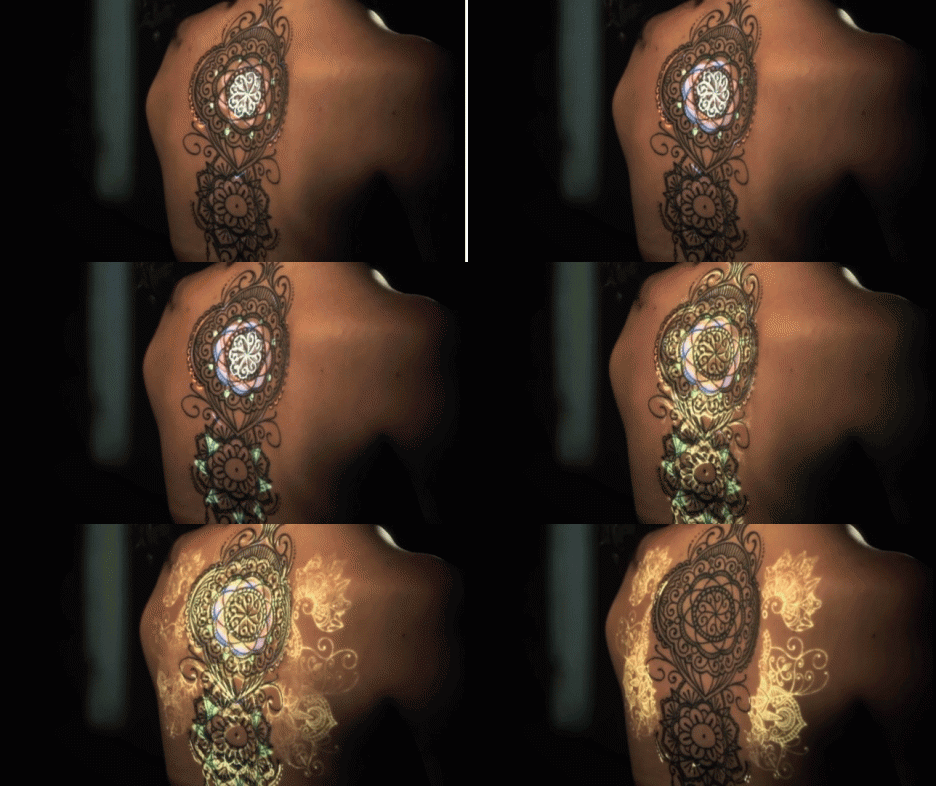
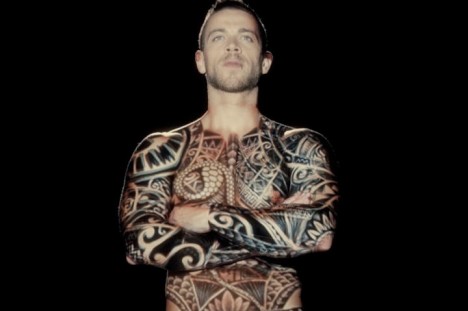
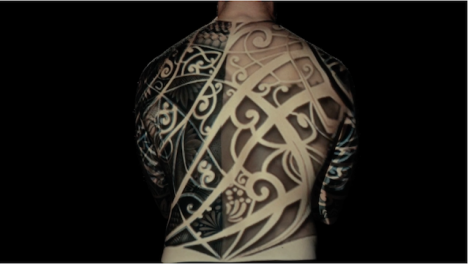
The world’s first live tattoo projection mapping event turned tattoos from static works into performance art, creating dazzling animations from inked body artworks.

Filmed in Lisbon by Oskar & Gaspar, the above video highlights the infinite possibilities of this approach, from filling in details and colors to completing partial tattoos or even animating them in living color.

animated body art

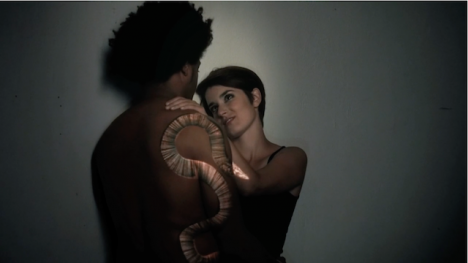
Like the future tattoos from William Gibson’s book The Peripheral, the result can seem like organic behavior, with faces coming to life and snakes slithering across a body’s surface.

ink mapped body

body art projection mapping

Remarkably, the entire film was made without any post-production – what you see as the viewer of the short film above is exactly what the audience saw on the day of the event. We still may be a ways away from embedded nanobot tattoos, but when we get there, this will be an excellent source of inspiration for the tattoo artists of the future.

Share on Facebook


[ By WebUrbanist in Art & Drawing & Digital. ]

[ WebUrbanist | Archives | Galleries | Privacy | TOS ]


WebUrbanist

 
Comments Off on Animating Tattoos: Colored Ink Mapping Brings Body Art to Life

Posted in Creativity


Light L16 packs 16 cameras into a single portable body

09 Oct

US-based startup Light has officially introduced its L16, a portable device packed with 16 individual cameras, ten of which capture an image at the same time at different fixed focal lengths. The resulting photograph is a composite of all the individual images combined, with a final resolution of up to 52 megapixels. An earlier prototype of this camera was shown off this past April. Read more

Articles: Digital Photography Review (dpreview.com)
 
Comments Off on Light L16 packs 16 cameras into a single portable body

Posted in Uncategorized