RSS
 

Posts Tagged ‘Black’

Not in Kansas: Black House Lands in Front of Oz Museum

08 Mar

[ By Steph in Art & Installation & Sound. ]

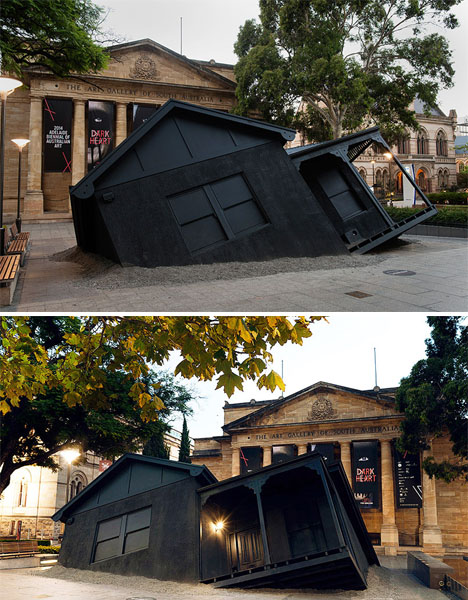
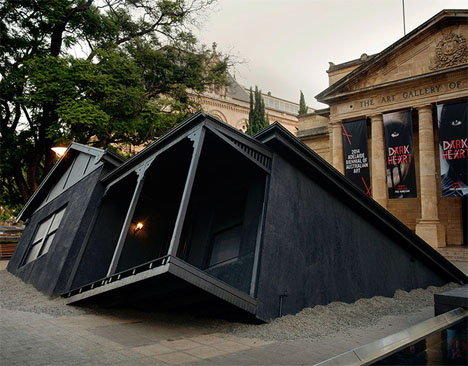
Landed Installation Ian Strange 1

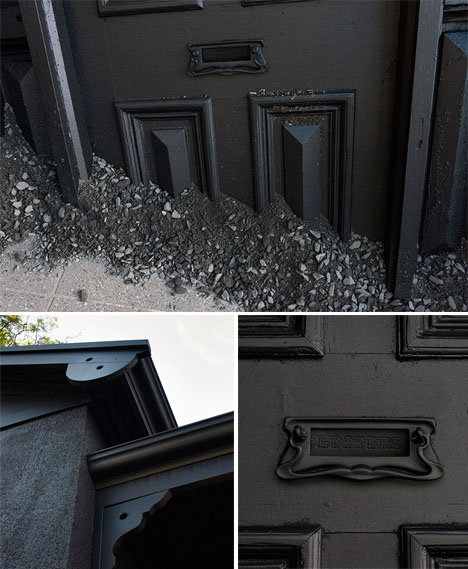
The childhood home of artist Ian Strange has literally landed right in front of the Art Gallery of South Australia as if it were picked up by a tornado and plunked there, Wizard of Oz style. The striking matte black structure is a detailed recreation of the 1920s suburban Australian home Strange grew up in, down to the scrolled ornamentation on the porch and a spigot clinging to one exterior wall.

Landed Installation Ian Strange 2

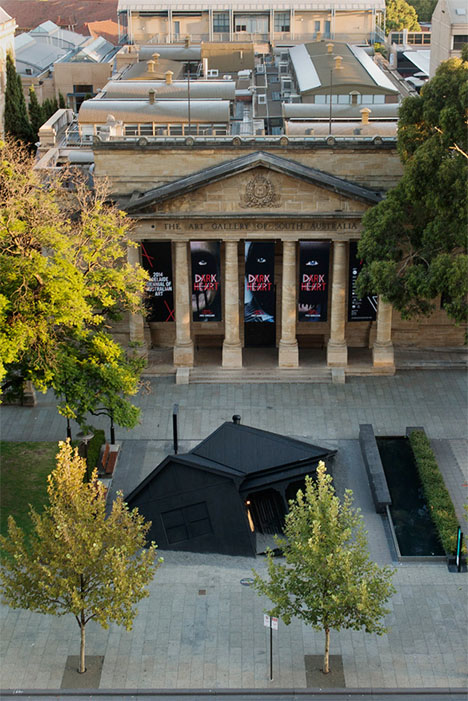
Installed for the 2014 Adelaide Biennial of Australian Art, the installation makes an intentional reference to Dorothy’s Kansas home and the jarring visual of it crashing in a place where it doesn’t belong.

Landed Installation Ian Strange 3

This visual is a nod to both the continued intrusion of Western pop culture into Australia, and the disconnected nature of suburbia, a recurring theme in Strange’s work.

Landed Installation Ian Strange 4

Strange previously explored the suburban house as a cultural icon in his series SUBURBAN, which involved drastically altering homes that were set for demolition and then burning the down, filming the entire process.

Share on Facebook


[ By Steph in Art & Installation & Sound. ]

[ WebUrbanist | Archives | Galleries | Privacy | TOS ]


WebUrbanist

 
Comments Off on Not in Kansas: Black House Lands in Front of Oz Museum

Posted in Creativity


Hands-on with the GoPro Hero 3+ Black Edition

20 Feb

Go-Pro-Hero-3_-1.jpg

GoPro’s latest fleet of little action bricks are fortified with several advanced features that cannot be found elsewhere in the market. The GoPro Hero 3+ Black Edition ($ 399.99) is the newest flagship model, replacing the GoPro Hero 3 by adding some key upgrades. Having owned the first HD Hero and Hero2, our writer Mike Perlman wanted to know if the Black Edition was worth the extra cash. Read our review

News: Digital Photography Review (dpreview.com)

 
Comments Off on Hands-on with the GoPro Hero 3+ Black Edition

Posted in Uncategorized


Fujifilm to release X100S in solid black

12 Jan

X100S_Black_Front_High_angle.png

CES 2014: Fujifilm has announced a black version of the X100S. It’s a more discreet-looking variant that’s in all other ways identical to the original X100S – including the price tag. It uses the same 16 megapixel APS-C X-Trans CMOS and fixed 23mm F2 lens that helped earn the X100S a dpreview gold award and recognition as one of our personal Gear of the Year favorites in 2013.

News: Digital Photography Review (dpreview.com)

 
Comments Off on Fujifilm to release X100S in solid black

Posted in Uncategorized


The Art of Black and White Photography: 75% Off Today Only

19 Dec

On the sixth day of Christmas dPS gave to me, a chance to master Black and White Photography.

You’ll save 75% on acclaimed Udemy course “The Art of Black and White Photography“.

To take advantage of todays deal head here.

NewImage

In this value packed 6 hour course you’ll learn how to create dramatic and compelling black and white images using a range of powerful Photoshop techniques.

What Students Are Saying About This Highly Rated Course

This course is rated as the #1 Photography course on Udemy. Here’s a snippet of what students are saying about this course.

“Extremely comprehensive, completely understandable and even enjoyable. Worth the money, probably double!” – Jeffrey Puritz

“This course showed me simple and effective ways to convert any picture good or bad and improve the life of the picture….. easy to follow steps and fantastic tips …. worth a look!!” – Jillian Martin.

There are many more great reviews just like these.

Discover the Secrets of Taking Beautiful Black and White Images Today

So if you are confused about which black and white conversion techniques to use, unsure about how to adjust the tonal range and balance of your black and white photos using curves and masks, want to make more of your black and white portraits, and you want to learn how to tone your black and white images, this course is for you.

You can enrol right now for just $ 24. Normally this would cost you $ 99 so it’s an absolute steal.

And whilst this deal won’t be gone in 60 seconds, it will be in 24 hours. Don’t miss out!

Grab this deal here.

The post The Art of Black and White Photography: 75% Off Today Only by Darren Rowse appeared first on Digital Photography School.


Digital Photography School

 
Comments Off on The Art of Black and White Photography: 75% Off Today Only

Posted in Photography


Why I Don’t Support “Black Day” at Flickr

08 Dec

Why I Don't Support Flickr Black Day

If you notice something different about photos on Flickr today, it might just be “black day.” Over the past week or so, hundreds (maybe thousands) of users who dislike an impending photo page change (and in many cases, redesign changes from earlier this year) have organized and are protesting by posting black protest images to their Flickr accounts today, December 8th.

Here is why I don’t support this protest.

Flickr users have protested quite literally *everything* that has ever been changed to the site. Every change over the past decade or so that Flickr has been around, has been meet by strong resistance. When Flickr added video, when Flickr required Yahoo accounts to sign in, and certainly design changes most of all, all of these and so many more have been met with various protest movements.

The “who moved my cheese” crowd is strong with Flickr.

At the same time, in order to improve and grow Flickr *MUST* change. Flickr must evolve. Flickr must improve.

Whether or not Flickr gets their design changes right or wrong, they simply must move forward and compete with other photo sharing sites today. Hopefully they get it more right than wrong, but I simply can’t support something that’s primary premise is based on not changing for the sake of, well, not changing. That is how things die. As good as Flickr is, it can always improve, and if the site is paralyzed by the “no change” crowd it cannot innovate and grow.

Competition in the photo sharing space is stronger than it ever has been. Flickr, Google+, Instagram, Twitter, Facebook, Pinterest, SmugMug, Behance, 500px and more are all competing for our photos and our attention. If Flickr is going to survive as a contender in this space, they must produce a more compelling experience than they have in the past.

Many of those currently protesting design changes on Flickr are loud, very loud — and some are some of the rudest, vulgar and offensive people I’ve ever come across online. They way they trashed Marissa Mayer and other Flickr employees’ *personal* photostreams after the last redesign was way over the line.

Even as a large protest group, however, this group most certainly does NOT represent the majority opinion on Flickr. Most (the silent majority) Flickr users couldn’t be bothered to get worked up about anything and quite simply don’t care enough about whatever happens at some photo sharing site to have much of an opinion one way or the other.

For this silent majority, the best tool Flickr has is data. The best thing that they can do is watch how the majority use the site and react to changes based on their online usage patterns and actions. I suspect that recent design changes on Flickr have contributed to more users, more views, and more engagement — despite what a small, but vocal, minority might want you to believe.

Only Flickr has access to this data, but I suspect that they are quite happy with usage results (even just going by my own anecdotal increase in activity that I’ve seen on the site as changes have been rolled out this year).

Now, as far as the new photo page redesign goes, mostly I like it. I say mostly, because even as I’ve used the page (it’s in an optional opt in or out beta form right now), I usually end up turning it off and going back to the old page. It simply is missing too much functionality that I rely on and need to use Flickr at present.

For example, I need to be able to click on the faves button and see who has faved my photo. That is important (and pretty basic) social information that I want access to. At present you cannot do this with the new photo page (but it is planned per Flickr’s feedback page). Assuming Flickr gets all of the basic functionality right in the final product though, I like the design better in general.

I also like the redesign changes that Flickr implemented earlier this year. I think that the justified layout combined with infinite scroll is the fastest, most efficient, way to consume photos on the internet today. Both Google and Facebook use infinite scroll. While some people have claimed that Flickr is slower for them, it is not for me. Images load very quickly on a modern laptop with a broadband internet connection. I also don’t have bandwidth caps on my primary internet connections.

Flickr has never been faster and I’ve been able to see more images on Flickr this year than any year previous due to these efficiency improvements.

I think Flickr needs to change even more in fact — mostly around social. There is still so much that could be improved on Flickr from a social standpoint.

The primary role of a social network should be as a social lubricant. Flickr should be obsessed with social, much more than it feels that they are. How can Flickr create even more social interaction? How can Flickr turn online social interaction into offline social interaction? How can Flickr make it easier and easier to favorite and comment on photos? How can Flickr show me more photos that I like (and will interact with socially) and less photos that I do not like?

These are the questions Flickr should be asking as they innovate and improve, and, yes, change.

Why does Explore still exist as it does? It’s so broken. Why are power users blacklisted from Explore? Shouldn’t Flickr care about their power users?

Explore is boring to me because it is not customized to me. Flickr has so much data about me. Why aren’t they analyzing my data to provide me a better photo exploration tool? Flickr knows whose photos I favorite. Flickr knows what tags on photos I favorite (and with image recognition analysis in the future, even more).

Flickr knows the geolocational location of photos that I favorite. Why is Flickr wasting valuable Explore real estate by showing me photos with watermarks when I hate watermarks? Why is Flickr showing me images of overcooked HDR? Explore has so much potential to truly provide a compelling image discovery system and yet it still falls flat.

I hope more change is coming to Flickr, not less. 2013 was the most innovative year of Flickr since Yahoo purchased them. Hopefully 2014 will be every bit as good.

More comments on this at the original Flickr photo here and on Facebook here.


Thomas Hawk Digital Connection
 
Comments Off on Why I Don’t Support “Black Day” at Flickr

Posted in Photography


It’s a Black Friday Sale-O-Rama!

29 Nov

Photojojo’s Black Friday Sale gonna make you jump, jump.

No seriously, go to Photojojo.com on a smartphone (or pad or pod) and then JUMP!

Each jump gets you closer to the sky, fun nirvana and also prizes!

If you’re looking for straight up deals, scroll on down to see the 20+ photo goodies we’ve marked down big time.

Nanoblock Camera

A digital toy camera covered in toys!

Was $ 70, Now $ 40!

? Take 50% Off TODAY!

Jelly Camera Phone Filters

Add fun effects to phonecam pix.

Was $ 15, Now $ 8!

? Take 50% Off TODAY!

Time-Lapse Camera

Set it up. Let it do it’s thang. Easy!

Was $ 199, Now $ 150!

? Take $ 50 Off TODAY!

Tilt-Shift Camera

Digi-cam w/ tilted lens for soft focus.

Was $ 149, Now $ 100!

? Take 50% Off TODAY!

Instax Mini 50s

An instant camera with mini prints.

Was $ 125, Now $ 115!

? Save Ten Bucks TODAY!

Cloak Camera Bag

Ready to shoot, in the bag.

Was $ 69, Now $ 40!

? Take $ 30 Off TODAY!

The Snapshot Dot

Stylish li’l photo stands.

Was $ 12, Now $ 8!

? Take 30% Off TODAY!

Snap On Prints

A great reminder and great décor.

Was $ 15, Now $ 10!

? Take 30% Off TODAY!

Fuzzy Wuzzy Camera Case

A snuggly home for your camera.

Was $ 15, Now $ 10!

? Take 30% Off TODAY!

Instabook + Prints

A DIY scrapbook + coupon for prints.

Was $ 25, Now $ 20!

? Take 20% Off TODAY!

The iFlash Drive

Extra memory for your phone.

Was $ 100, Now $ 80!

? Take 20% Off TODAY!

Camera Dial Laptop Decal

Show your camera ? on your lappy.

Was $ 18, Now $ 12!

? Take 30% Off TODAY!

Photoshop Fridge Magnets

Keep your favorite tools at the ready.

Was $ 25, Now $ 20!

? Take 20% Off TODAY!

The Pocket Pod

A portable tension stabilizer.

Was $ 25, Now $ 20!

? Take 20% Off TODAY!

Color Lens & Flash Filters

Add a pop of color to any scene.

Was $ 15, Now $ 10!

? Take 30% Off TODAY!

Magnetic Polaroid Frames

… and a dry-erase pen for captions.

Was $ 15, Now $ 12!

? Take 20% Off TODAY!

The Folding Tripod

Lightweight, portable and still full-sized.

Was $ 40, Now $ 35!

? Save Five Bucks TODAY!

Woodnetic Frames

Natural wood with magnetic backing.

Was $ 20, Now $ 15!

? Take 25% Off TODAY!

The Digital Holga Lens

A plastic Holga Lens for your DSLR.

Was $ 30, Now $ 25!

? Save Five Bucks TODAY!

Camera Table Dolly

For silky smooth panning video.

Was $ 90, Now $ 75!

? Take $ 15 Off TODAY!


iPhone Scuba Suit

$ 60

$ 40 ? BUY!

iPhone Lens Dial

$ 249

$ 175 ? BUY!

iPhone SLR Mount

$ 249

$ 175 ? BUY!

iPhone Wrist Strap

$ 35

$ 20 ? BUY!


The iPhone Swivl

$ 179

$ 150 ? BUY!


iPhone Panorama Lens

$ 49

$ 40 ? BUY!


© laurel for Photojojo, 2013. |
Permalink |
No comment |
Add to
del.icio.us

Post tags:


Photojojo

 
Comments Off on It’s a Black Friday Sale-O-Rama!

Posted in Equipment


Hello Good Buy: Black Friday Outside The Box

24 Nov

[ By Steve in Design & Guerilla Ads & Marketing. ]

Black Friday
Black Friday, the busiest shopping day of the year, marks the unofficial start of the annual Christmas shopping season in a big, bad, bargain-hunting way!

A History Of Hysteria

Black Friday history(images via: Carter BloodCare and Market Oracle)

Black Friday may be a very modern socioeconomic phenomenon but it has a long and convoluted history dating back to September 24th, 1869 when plunging gold prices triggered a stock market panic… hold on, that may not be the Black Friday we’re discussing here.

Black Friday infographic(image via: FatWallet.com)

Fast forward to 1966 when the Philadelphia Police Department, dreading the approach of yet another chaotic post-Thanksgiving shopping frenzy, dubbed the infamous event Black Friday. Within a decade the term was being applied to similar shop-a-paloozas busting out all over the USA, Canada, the UK and more!

Black Friday history(images via: The Truth About Cars and Brenternet)

By 1980, retailers began to use Black Friday as a convenient term for the point where red ink turned to black: losses to profits, in other words. It took a while for both sides of the economic equation to get in sync over Black Friday, however, but when they did some good things happened. In 2003, Black Friday officially grabbed top billing as the Busiest Shopping Day of the year and although it slipped to second place in 2004, Black Friday’s been King of the Hill ever since. No offense, Hank.

Lines & Tents & Buyers, Oh My!

Black Friday lineup(images via: Visit Minot and Now Public)

Unlike the more recent emergence of Cyber Monday, Black Friday makes itself apparent by the appearance and behavior of the people doing the actual shopping. Up close and personal, take no prisoners, in your face shopping the likes of which the world has never witnessed! Thanks to teh intarwebs, we all can witness these aspects vicariously beginning with the long (in length and in time) lineups snaking down the streets outside various big box stores.

Black Friday lineup Target(images via: Jabeta, Examiner and 999ThePoint)

Stoked by advertising on television, in newspaper flyers, on the radio and online, shoppers eager not to let those juicy bargains slip through their fingers stake out prime spots outside their targeted stores (possibly including Target).

Black Friday lineup(image via: Citizenside)

Whether in rows of tents or standing in single file, Black Friday shoppers are a remarkably orderly bunch for the most part. All that changes once the doors open, however, then it’s every man, woman, child and cat for themselves.

Rush OWWer

Black Friday opening rush stampede(images via: Jabeta, Business Insider, Goodlawd and Times Newspapers Limited)

Stampedes not seen since the great cattle drives of the 19th century or the great Hindu festivals of the 20th burst into fluid motion as each store’s official Black Friday opening hours strike, and if you were lucky enough to be among the first in line outside you’d better not be unlucky enough to trip and fall once the human avalanche gathers steam and begins its unstoppable roll. In such situations people easily lose their heads, not to mention their wigs.

Black Friday opening stampede Wal-Mart(images via: Mental Floss, Long Island Newsday and NY Daily News)

Shoppers aren’t alone in looking danger in the eyes once the doors swing open – store staff attempting to ensure safety for all by directing the flow often find themselves in the wrong place at the wrong time. The most well-known and certainly most tragic such incident took place at a Valley Stream, NY WalMart store on November 28th of 2008 just after 5:00AM.

Black Friday WalMart(image via: StarzLife)

As the store doors opened, hundreds of cold, impatient and uncaring shoppers busted the entrance door right off its hinges in their desperate search for bargains. One 34-year old Wal-Mart employee was unable to avoid the furious flood of shoppers and was trampled to death.

Next Page – Click Below to Read More:
Hello Good Buy Black Friday Outside The Box

Share on Facebook


[ By Steve in Design & Guerilla Ads & Marketing. ]

[ WebUrbanist | Archives | Galleries | Privacy | TOS ]


WebUrbanist

 
Comments Off on Hello Good Buy: Black Friday Outside The Box

Posted in Creativity


Creating a Black and White High Contrast Portrait Edit in Lightroom

17 Nov

Introduction

The Following is an excerpt from the SLR Lounge Lightroom Preset System v5 and accompanying workshop from the Lightroom Workshop Collection v5.  The Lightroom Preset System is designed to take you from Ordinary to Extraordinary photos in just a few seconds and clicks within Lightroom 4 and Lightroom 5.

Overview

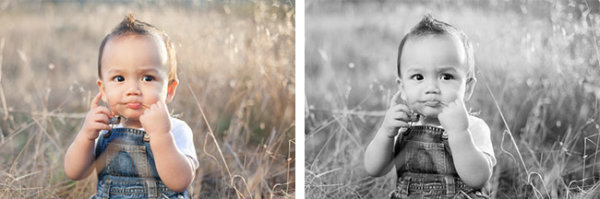
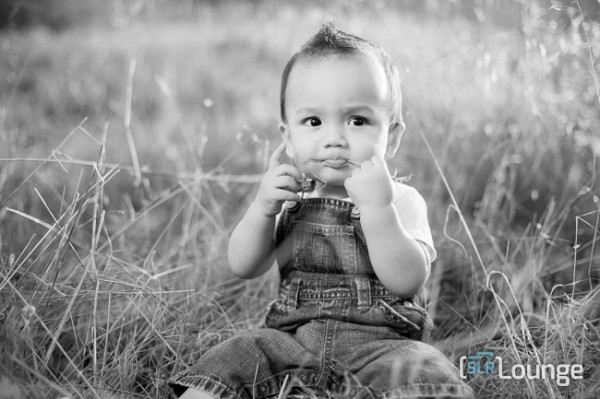
In this tutorial we’re going to go over how to turn a regular color portrait into a nice high contrast black and white image. For this tutorial we have a portrait of a baby out in a field. The overalls, details in the field, and overall background blur will be complimented by a high contrast black and white edit. The SLR Lounge Lightroom Preset System v5 has presets specifically for high contrast black and white portraits which we are going to apply to this photo. If you don’t have the preset system, we’ll list all of our Develop settings so you can achieve the same look.

Here’s what our photo will look like before and after we’re done with the edit.

beforeafter

Unedited Photo on Left | High Contrast Black and White on Right

Lightroom Preset System v5 Mixology

For those who have the Preset System, you can follow the Mixology Recipe below to get to the same results. If you don’t have the Preset System, please read the article or watch the video below to see exactly how this look was achieved.

Develop Mixology

  • 01-10 BASE – SOFT: 13b. Light Crush – B&W
  • 03-70 ADJUST – VIGNETTING: 71c. Neutral – Zeroed

Written Tutorial

Step 1: Checking The EXIF Data

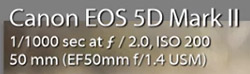
exifdata

We press “i” to pull up our EXIF data so we can see exactly how this image was shot. This image was shot with a 50mm lens at f/2. We want to keep in mind that the depth of field is shallow, and we may have to add sharpening to this image.

Step 2: Apply Preset

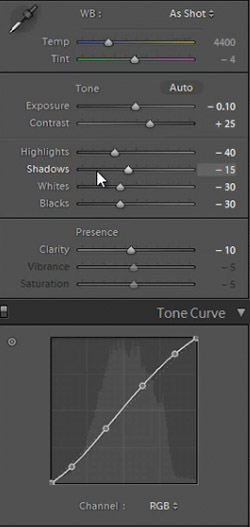
We’re starting with our “01-10 BASE – SOFT: 13b. Light Crush – B&W” preset, and after we lower the Exposure to -0.10 we have a nice high contrast black and white look. Then we apply a “03-70 ADJUST – VIGNETTING: 71c. Neutral – Zeroed” vignette preset so we can get a subtle edge darkening.

In the develop settings the Contrast was raised and the Shadows and Blacks have been dropped. This is giving our nice deep shadows and blacks, and adding to the high contrast look we’re editing for. The Highlights and Whites have also been dropped in order to bring the highlights in the skin closer to the mid tones.

developpanel1

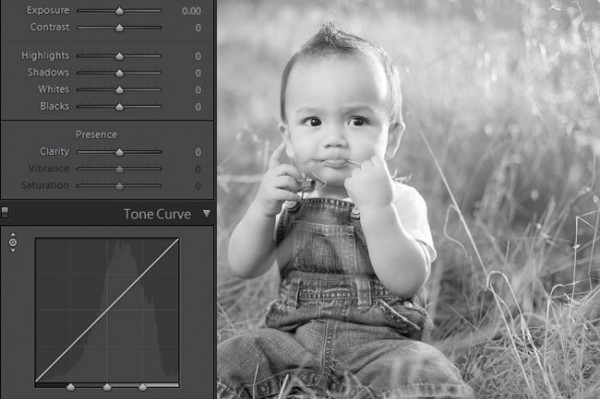
With Settings Zeroed Out

Here’s what our image looks like with a simple black and white conversion (convert by hitting “V”), without the adjustments in Contrast, Highlights, Shadows, Whites, Blacks, and Tone Curve.

Before High Contrast Settings

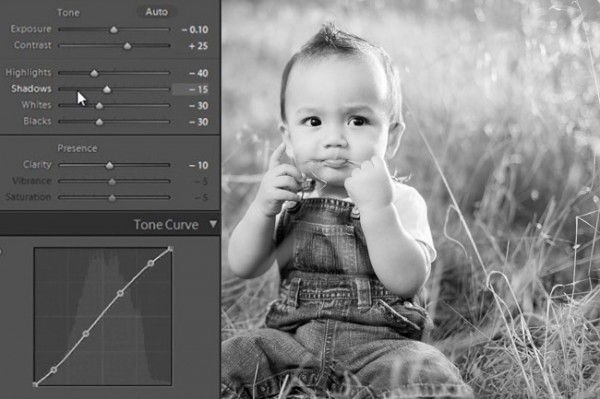
With High Contrast Settings

Here’s our image with Contrast, Highlights, Shadows, Whites, Blacks, and Tone Curve adjustments applied.

High Contrast Develop Settings

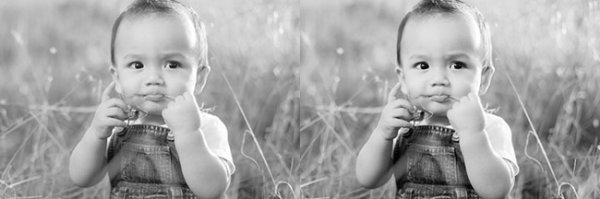
In the image below you can see a huge difference that the adjustments make. The eyes stand out, there’s more details in the hair and grass, and there’s more texture in the clothes.  All these subtle details combined add quality to an otherwise flat black and white image.

beforeandafter

All Settings Zeroed On Left. High Contrast Adjustments on Right


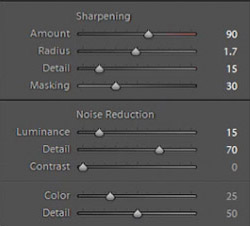
In our Sharpening settings our preset applied our standard amount, but the image is still a bit soft because of the shallow depth of field caused by shooting this image at f/2.0. To get a nice sharp portrait we raise the Amount, Radius, and Detail. The preset also adjusted our Noise Reduction settings, giving the subject in our portrait nice soft skin. All of the “SOFT” presets have this standard amount of Noise Reduction applied in order to soften and smooth out skin without going so far to kill fine details.

sharpening settings

Here’s what our image looks like before and after our presets are applied.

Before

lightroom-5-tutorial-high-contrast-b&w-newborn-0001

After

lightroom-5-tutorial-high-contrast-b&w-newborn-0002

Watch the Video Tutorial

If you would like to see exactly how all of the settings and adjustments were applied, please watch the video from the SLRLounge YouTube Channel.

Conclusion and Learn More

We hope you all enjoyed this tutorial. If you are interested in learning more or purchasing the SLR Lounge Lightroom Preset System v5 or the newly released Lightroom Workshop Collection v5, please click any of the links in this article.

Post originally from: Digital Photography Tips.

Check out our more Photography Tips at Photography Tips for Beginners, Portrait Photography Tips and Wedding Photography Tips.

Creating a Black and White High Contrast Portrait Edit in Lightroom

The post Creating a Black and White High Contrast Portrait Edit in Lightroom by Post Production Pye appeared first on Digital Photography School.


Digital Photography School

 
Comments Off on Creating a Black and White High Contrast Portrait Edit in Lightroom

Posted in Photography


The Power of Black & White

03 Nov

The power of black & white photography

If you read my articles about long exposure photography and intentional camera movement in the landscape you may have noticed a common theme amongst the photos illustrating the articles – most of them were in black and white.

I’ve been thinking about the reasons that black and white photography appeals to me. Regular readers of my articles will know that I’m a big fan of tonal contrast in both colour and monochrome work. I use it as the basis of many of my compositions and it helps me create atmosphere and mood.

But things became clearer today when I read an interview with Joel Tjintjelaar, a well-known fine art photographer who works exclusively in black and white. He is one of the leaders in the discipline of long exposure photography (I interviewed him myself as a case study in my book Slow).

The power of black & white photography

In the interview Joel talks about photos representing the vision, or the essence, of the artist rather than reality. Black and white, in addition to being a beautiful medium in its own right (he uses words like mysterious, nostalgic and dramatic to explain its appeal) is a step removed from reality. Add in changes in tonal values achieved in post-processing, the surreality of long exposure photography techniques and the manipulation of light (also in post-processing) and you finish with a photo (or a work of art, depending on your world view) that is an expression of the artist, rather than the original subject.

Make sense? There are many ways of expressing yourself creatively in photography, and black and white is just one of them, but it certainly is a powerful medium. Trends come and go. Whether it’s the fast film, high grain techniques popularised by Robert Farber and Sarah Moon in the seventies, or the Photoshop based techniques of modern times such as using texture layers or HDR, most of these are ephemeral. They won’t be remembered as anything more than dated trends in decades to come. But black and white will endure.

The power of black & white photography

Learn more about black & white photography

Now that I’ve piqued your interest you’ll no doubt want to learn more about black and white photography. I’ll write about that in the future, but first I think it’s a good idea to go have a look at the work of some of the best black and white photographers out there. I’ve picked out five of my favourite photographers from 500px – looking at their work will help you appreciate the true power of the monochrome image.

Have a think about the following points while you look through their portfolios:

  • Why do you think these photographers have chosen to work in black and white? How would their images look if they were in colour?
  • How important is tonal contrast in the composition of their images?
  • How important are other elements of composition, such as line, texture, form and shape? How does black and white emphasise these elements?
  • How important is light in these images?
  • How far removed from reality are the photos in these portfolios? How do they express the photographer’s vision?

Here are the links:

Hengki Koentjoro

Hengki is an Indonesian photographer who creates beautiful black and white landscapes (read my interview with him here).

Sabrina de Vries

Sabrina is a young Dutch photographer who creates black and white portraits. Some of her work is in colour, so it’s a good chance to compare the way she works in both mediums.

Andy Lee

Andy is a professional film maker and photographer who works in black and white. Tonal contrast is a strong element of his work.

Joel Tjintjelaar

You should definitely take a look at Joel’s work. One of the interesting things about the way that Joel works is his painstaking attention to detail – he may spend 40 hours working on a single image before he is happy with it. This approach is very unusual.

Michael Diblicek

Michael shoots both the landscape and architecture. He is another photographer who uses tonal contrast really well (read my interview with him here).

Mastering Photography

Mastering photography ebook

My ebook Mastering Photography: A Beginner’s Guide to Using Digital Cameras introduces you to photography and helps you make the most out of your digital cameras. It covers concepts such as lighting and composition as well as the camera settings you need to master black and white photography and take photos like the ones in this article.

Post originally from: Digital Photography Tips.

Check out our more Photography Tips at Photography Tips for Beginners, Portrait Photography Tips and Wedding Photography Tips.

The Power of Black & White

The post The Power of Black & White by Andrew Gibson appeared first on Digital Photography School.


Digital Photography School

 
Comments Off on The Power of Black & White

Posted in Photography


Newborn Photography Black and White Conversion in Lightroom

25 Oct

Introduction

The Following is an excerpt from the SLR Lounge Lightroom Preset System v5 and accompanying workshop.  The Lightroom Preset System is designed to take you from Ordinary to Extraordinary photos in just a few seconds and clicks. In this tutorial we’re going to be creating a nice soft black and white portrait for a newborn baby captured from the Newborn Photography Workshop where we teach photographers how to take beautiful newborn with any camera using simply natural window light and a reflector.

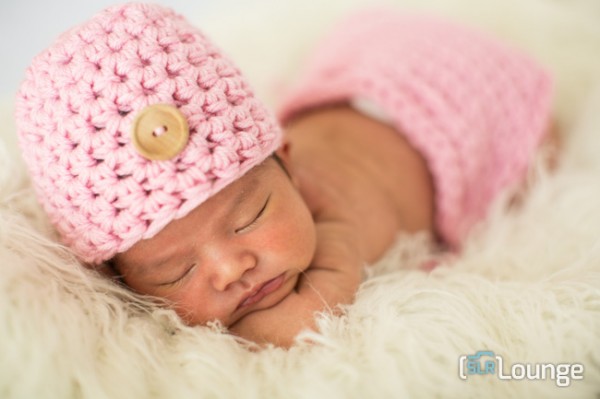
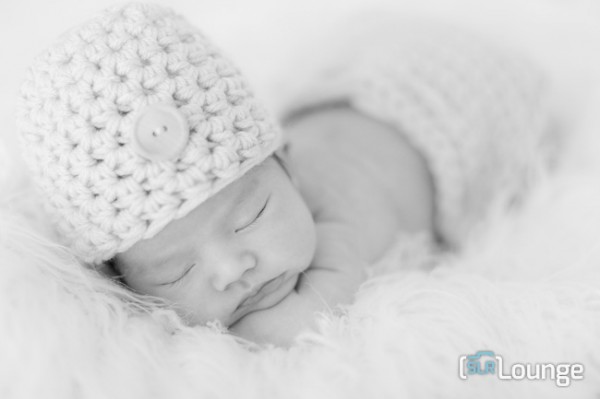
The complete written tutorial is below, and you can also watched the video tutorial at the end of this article. Here’s a sneak peak at what our image will look like before and after our edit.

newbeforeafter


Black and White Conversion for Newborns

The first thing we did to this image was adjust our Color Tempurature to taste, and in this case we used the Eye Dropper Tool (W) taking a reading from the fur that the newborn is sleeping on.

After our Color Temperature adjustment we used our “01-10 Base – Soft: 12b Super Soft – B&W” preset to edit our photo. This preset does all of our work for us and after this preset is applied our photo edit is pretty much finished. So let’s go over exactly what this preset did.

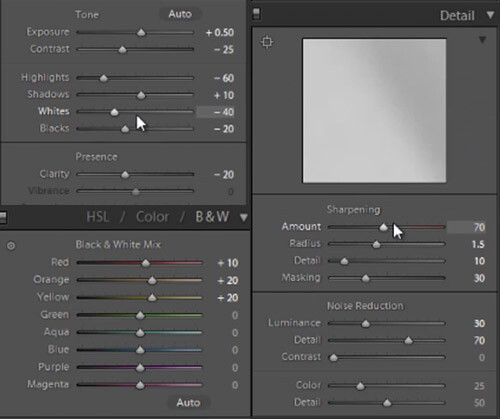
First, the Highlights and Whites have been taken down to -60 and -40. This is to smooth out highlights by bringing them closer to the mid-tones and shadows. This adjustment has the effect of softening highlights over skin tones giving us much more evenly lit skin.

Next, Clarity is being dropped to -20 in order to reduce mid-tone contrast. The reduction of mid-tone contrast again helps us achieve a softer and more flattering look. However, I would caution not to take the Clarity slider down too far as it can create an overly-soft looking image completely lacking in contrast and mid-tone detail.

In this black and white conversion the Reds, Oranges, and Yellows in the HSL are being raised, which again is primarily for skin tones. This brightens up the skin tones, further enhancing the soft flattering look.

We have our standard amount of Sharpening for portraits applied to this image which you can see below.

Also worth noting, the preset we selected dialed in a Noise Reduction Luminance setting of +30. Noise reduction was added to the preset in order to quickly reduce a little bit of the pore detail in the skin giving it a slightly smoother overall look. At an amount of +30, we will see a nice smoothing effect over skin, while retaining the majority of our fine detail in the hair, eyes and so forth.

Below is a snapshot of all of our final settings to achieve this look.

developsettings

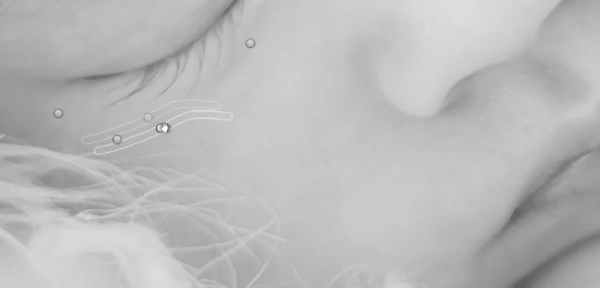
To clean up the skin a little we can use the Lightroom 5 Spot Removal Tool to remove some of the more obvious bits of dry skin and hair. Adobe has modified the Spot Removal Tool in Lightroom 5 to operate more like a brush making the tool much more powerful than in previous editions of Lightroom.

Just remember to keep your Spot Removal Tool size small and just large enough for the area you are working so that it doesn’t look unnatural.

Screen-Shot-2013-07-30-at-9.59.27-PM-650x313

Black and White Conversion for Newborns

Here’s  a look at the final before and after of our newborn black and white portrait.

Before

lightroom-5-tutorial-soft-black-and-white-newborn-0001

After

lightroom-5-tutorial-soft-black-and-white-newborn-0002

Watch the Video Tutorial

If you would like to see exactly how all of the settings and adjustments were applied, please watch the video below from the SLR Lounge YouTube Channel.

Conclusion and Learn More

We hope you all enjoyed this tutorial. If you are interested in learning more or purchasing the SLR Lounge Lightroom Preset System v5 or the newly released Lightroom Workshop Collection v5, please click any of the links in this article. If you are interested in Newborn Photography Workshop please also check out our Newborn Workshop Collection and Lightroom Presets now available via digital download.

Post originally from: Digital Photography Tips.

Check out our more Photography Tips at Photography Tips for Beginners, Portrait Photography Tips and Wedding Photography Tips.

Newborn Photography Black and White Conversion in Lightroom

The post Newborn Photography Black and White Conversion in Lightroom by Post Production Pye appeared first on Digital Photography School.


Digital Photography School

 
Comments Off on Newborn Photography Black and White Conversion in Lightroom

Posted in Photography