RSS
 

Posts Tagged ‘Better’

Better Landscape Photography Tips and Video Tutorials

30 Mar

This week I’m going to turn the focus to landscape photography. Your photography challenge this week being “Flora” it’s a good time to get out and there go find some great landscapes. So I’ve actually found not one, but three, short video tutorials with some really good landscape photography tips.

#1 Top 10 pro landscape shooting tips

As the title eludes to, this video shares 10 quick tips to help you get going. At just over four minutes you don’t have to waste any time before you get out shooting. The tips include: focal point, tripod, time of day, rule of thirds and more.

#2 Low Light Landscape Photography Tips

This one is by Stuart Low Photography and he goes over some tips for shooting when the light maybe isn’t so great like a gray gloomy day, and how to create interesting compositions. Besides, I just love his accent!

#3 The Australian Photography Show Ep1 – Landscapes

Last but not least is a really good video by Zulu Media. They go on a location photo shoot with landscape photographer Adam Monk at the famous Australian landmark, The Pinnacles. You don’t have to live in Australia to be able to use his tips though, you can apply these to any location and use them immediately. Some really good stuff in here as the two photographers show different ways of approaching the same subject matter and talk about lenses, camera settings and composition for impact.

I hope you enjoy these landscape photography tips. If you want more you can check out the Best landscape articles of 2013 here on dPS, or Living Landscapes, one of our most popular eBooks!

The post Better Landscape Photography Tips and Video Tutorials by Darlene Hildebrandt appeared first on Digital Photography School.


Digital Photography School

 
Comments Off on Better Landscape Photography Tips and Video Tutorials

Posted in Photography


5 Tips for Better Environmental Portraits

11 Mar

Environmental portraits typically show the subject in their natural environment. They are different from traditional portraits in that they tend to show more of the character of the subject, rather than just the subject in front of a neutral background. Most people, unless they are professional models or natural hams, tend to stiffen up in front of the camera. Because your subject is in his or her natural environment, they tend to be more relaxed, resulting in better facial expressions and body language.

Environmental portraits are my favorite way to photograph people. I love it when I get a shot that makes the subject’s friends and family say ‘Oh yeah, he’s got you down!” In this article I’ll discuss five things I always keep in mind when taking environmental portraits.

For this portrait, my client was very specific that she wanted to be captured in her apartment, just being who she is. It became quickly apparent that her dog was a very important part of that, so it was decided early that we would include him. EOS 5D Mark III with EF 24-70 f/2.8L IS II. 1/125 @ f/4, ISO 640.

For this portrait, my client was very specific that she wanted to be captured in her apartment, just being who she is. It became quickly apparent that her dog was a very important part of that, so it was decided early that we would include him. EOS 5D Mark III with EF 24-70 f/2.8L IS II. 1/125th at f/4, ISO 640

1. Do your homework

To properly photograph someone in their environment, you need to know your subject. You don’t have to be close friends, but generally speaking, when someone asks for an environmental portrait, you want to make sure you capture who they are. Ask what they have in mind. Ask what their hobbies are. If they want a portrait in their home, what’s their favorite spot in the house? What do they do in that spot? If it’s outside the home, where do they want to be photographed? Why? You need to become a bit of a reporter and sniff out the story. Then you need to illustrate it.

2. Get them talking

Now that you know a little about your subject, what they like to do, and where they like to do it, it’s time to point a camera at them.  This can be the “make-or-break” point of the shoot. If your subject is uncomfortable in front of the camera, this will come across in the images, unless you find a way to get them to relax. One of the easiest ways to get them to relax is to start a conversation. Make them forget that you are taking their photo by asking them about themselves. Have them talk about the spot they’ve chosen for the portrait, their hobbies, their families, their job – anything to get their mind off of the camera in front of them.

In the portrait below, my subject lives in the shadow of this bridge, and is most definitely a New Yorker. This was an impromptu session after a private tutoring session and she was reluctant to let me point the camera at her. She wanted to learn photography herself, so I wrapped a lesson into the banter and pretty soon she was just talking photography and forgetting I was snapping images.

My subject lives in the shadow of this bridge, and is most definitely a New Yorker.  This was an impromptu session after a private tutoring session and she was reluctant to let me point the camera at her. She wanted to learn photography herself, so I wrapped a lesson into the banter and pretty soon she was just talking photography and forgetting I was snapping images.  EOS 5D Mark II with EF 70-200 f/2.8L IS II. 1/200 @ f/4; ISO 100.

EOS 5D Mark II with EF 70-200 f/2.8L IS II – 1/200th at f/4,  ISO 100

3. Use Live View (if your camera has it)

This plays right along with item number two above.  Most people tense up when you raise the camera to your eye, waiting for the image to be taken. Some may even inadvertently shut their eyes, expecting a flash. If you can use Live View on your camera, you can get it away from your face. Your subject will be looking at you, and not at the camera, and will not necessarily anticipate you pressing the shutter button. This works especially well with cameras that feature articulating screens. It can be helpful to mount the camera on tripod as well, using a remote release to trigger the camera.

This is an image of my friend Chris (below), taken while he was supposed to be shooting me and my kids. We were discussing what shots we wanted next when I clicked this, using Live View to frame the shot and focus.

This is an image of my friend Chris, taken while he was supposed to be shooting me and my kids.  We were discussing what shots we wanted next when I clicked this, using Live View to frame the shot and focus. EOS-1D X with EF 24-70 f/2.8L II. 1/2500 @ f/2.8; ISO 100.

EOS-1D X with EF 24-70 f/2.8L II – 1/2500th at f/2.8, ISO 100

4. Modify the light

I try to go as minimal as possible with gear for environmental portraits, using the natural light at the location. However, there are always times where the light is less than optimal and you need to modify it in some way. This can be as simple as adding a reflector in a strategic location, or setting up a flash in a soft box or umbrella. It will all depend on what the available light is like and the look you are going for. One thing I always try to do is keep the light looking as natural as possible.

This was a business portrait, but my client wanted more than a simple headshot. It was taken late in the day, meaning I had to create my own light. She wanted her team in the background working, to show when you worked with her, she had a whole team backing her up. I used a Canon 430 EX II to light the background, aiming it off a white wall and the ceiling, out of the frame. I then used a Canon 580 EX II off camera in a Westcott Apollo 28″ soft box to light my client. I adjusted the intensity of the lighting so that the background light was at a 2:1 ratio with my main light.

This was a business portrait, but my client wanted more than a simple headshot.  It was taken late in the day meaning I had to create my own light. She wanted her team in the background working, to show when you worked with her, she had a whole team backing her up. I used a Canon 430 EX II to light the background, aiming it off a white wall and the ceiling, out of the frame. I then used a Canon 580 EX II off camera in a Westcott Apollo 28" soft box to light my client.  I ratio'd the lighting so that the background light was at a 2:1 ratio with my main light. EOS 5D Mark II with EF 24-105 f/4L IS. 1/100 @ f/4, ISO 400.

EOS 5D Mark II with EF 24-105 f/4L IS –  1/100th at f/4, ISO 400

5. Don’t be afraid to shoot tight

While it’s true than an environmental portrait normally means showing some of the area around your subject – the environment – you can get close and still show your subject’s character.  Take an element of your subject’s hobby, and show them participating in the hobby. If they’re a model builder, you could do a tight shot of them applying glue or assembling the pieces.  This is your chance to be creative, trying different angles, focusing on different aspects of  their personality and character.  Emphasize features that stand out, in a flattering way, if that’s the goal. Find out what makes the person in front of your camera special, and capture it!

Here's my subject from the shot in front of the bridge. She's a photographer as well now, but back then she was just a hobbyist who wanted to know more about her camera. I used the beautiful sunset light I was getting, and set up a reflector to camera right to bounce the light back into her face.  I wanted her peeking out from behind her camera, illustrating that she's into photography. EOS 5D Mark II with EF 24-105 f/4L IS. 1/250 @ f/4, ISO 100.

EOS 5D Mark II with EF 24-105 f/4L IS – 1/250th at f/4, ISO 100

This is the same girl as the shot in front of the bridge. She’s a photographer as well now, but back then she was just a hobbyist who wanted to know more about her camera. I used the beautiful sunset light I was getting, and set up a reflector to camera right to bounce the light back into her face. I wanted her peeking out from behind her camera, illustrating that she’s into photography.

Do you have any additional tips you’d add to this list? Please share in the comments below.

For more portrait photography tips check out these articles:

  • How to Create Great Environmental Portraits
  • 10 Techniques for Amazing Portraits
  • How to Choose the Perfect Portrait Lens
  • Portraits: Striking The Pose – a dPS ebook
  • Portraits Lighting The Shot – another dPS ebook

The post 5 Tips for Better Environmental Portraits by Rick Berk appeared first on Digital Photography School.


Digital Photography School

 
Comments Off on 5 Tips for Better Environmental Portraits

Posted in Photography


5 Steps to Help you Take Better Landscape Photos

10 Mar

When photographing landscapes, it can sometimes be difficult to produce a an image that is focused in its content, that leads the viewer’s eye exactly where you as the artist want it to go.   Sometimes, even though you may be presented with a beautiful vista, an image may not present itself and you have to work to find it.  Here are five basic steps to help you take better landscape photos. I follow these any time I’m looking to create a landscape image.

#1 Find your subject

Sometimes it’s easy. You choose a building, or a rock formation, or a tree, and it all just comes together.  Other times, it becomes more difficult.   Sometimes nothing in particular stands out.  Look around the scene, find something that draws your eye. Look through your viewfinder, and see how things frame up through your camera’s eye.  Once you have found your subject, you have more decisions to make.
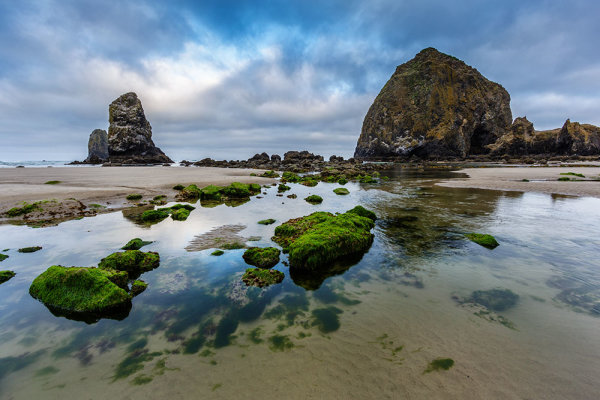
Haystack Rock is a fairly obvious subject. But there are myriad options when it comes to photographing it.  For this image, I decided to use a tidal pool and some rocks in the foreground, but also wanted to include plenty of sky since there was so much interest in the clouds.

Haystack Rock is a fairly obvious subject. But there are a myriad options when it comes to photographing it. For this image, I decided to use a tidal pool and some rocks in the foreground, but also wanted to include plenty of sky since there was so much interest in the clouds.  The rocks and water create some nice lines leading right to Haystack Rock.  EOS 5D Mark III with EF 14mm f/2.8L II, at f/16, ISO 100.

#2 Where is your subject in the composition?
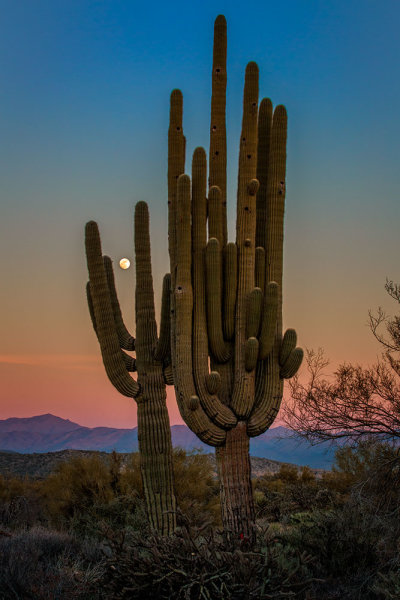
There was no real foreground to speak of here. Just a lot of sand and some uninteresting brush.  What I did see was the way the moon was rising between the arms of the saguaro, and the soft gradation from orange to blue as the sun set behind me.  Taken with EOS 5D Mark III, EF 70-200 f/2.8L IS II, 1/20 @ f/22, ISO 1000.

There was no real foreground to speak of here. Just a lot of sand and some uninteresting brush. What I did see was the way the moon was rising between the arms of the saguaro (cacti), and the soft gradation from orange to blue as the sun set behind me. Taken with EOS 5D Mark III, EF 70-200 f/2.8L IS II, 1/20 @ f/22, ISO 1000.

This will partly be dictated by its location in relation to you, but also by what else is in your scene. Look for interest in relation to what you’ve chosen as the subject. Is there an interesting object or pattern in the foreground, which could lead the viewer’s eye to the subject? Is there something in the foreground that frames your subject or otherwise adds interest without being distracting?  I will often use water or rocks in the foreground if I can.  If it’s water, can you get a reflection of your subject in it?  Sometimes it’s leaves, sometimes trees or a fence.

If there is nothing in the foreground, try minimizing it by putting the subject as the foreground, and looking for background interest.  Interesting clouds or sky, buildings, or trees, can all create a backdrop for the landscape. Sometimes, you’re lucky enough to get both an interesting background AND foreground. These are the times to play with your composition and vary the amounts of foreground and background to see what works best, or what doesn’t work at all.   Generally speaking, if the sky is flat and lacks interest, I will place it in the top third of the frame, using the rule of thirds.  If the foreground lacks interest, I place that in the bottom third.

#3 Tie it together

Once you decide where your subject goes in the frame, what’s in the foreground and what your background will be, it’s time to find a way to tie it all together. Are there leading lines that will lead your viewer from foreground to background?  Leading lines are an easy way to tie your composition together.  Framing is another way, which I included in my discussion of choosing your foreground.  Without tying your composition together, it can often seem like you have two separate images in one.  Creating a composition that pulls the viewer through it and leads them where you want them to look is the best way to create an effective landscape image.

For this image of Kaaterskill Creek, I knew the small cascade was my main subject.  There were some rocks to create interest in the foreground, and the water creates a nice leading line back to the cascade in the middle ground, and then to the foliage in the background.  EOS 5D Mark III with EF 16-35mm f/2.8L II. I was zoomed into 35mm on this one. Exposure was 1.6" at f/20, ISO 100.

EOS 5D Mark III with EF 16-35mm f/2.8L II. I was zoomed into 35mm on this one. Exposure was 1.6″ at f/20, ISO 100.

For this image of Kaaterskill Creek (above), I knew the small cascade was my main subject. There were some rocks to create interest in the foreground, and the water creates a nice leading line back to the cascade in the middle ground, and then to the foliage in the background.

#4 Read the light

Are you at your location at an optimal time? Some locations are better in the early morning, some in late afternoon.  Some are good no matter what time you are there. The difference in the light at these times can mean the difference between a dramatic landscape image, or a snapshot of a pretty place. To find out where the sun will be in a given location at a given time, use an app such as The Photographer’s Ephemerus, or Sunseeker Pro, which will show you the sun’s exact location.  This will enable you to plan when to be a location for optimal light.

Side lighting will create dramatic shadows and show off textures. Backlighting will help create silhouettes, which can be very effective for dramatic images with prominent features breaking the horizon. Front lighting will reveal detail everywhere. Often, I will photograph the same location at different times, as different light will create a variety of images from the same location.

Montauk Point is a great location with lots of photo opportunities, but it's a much better location at sunrise than later in the afternoon or at sunset, due to the shadows created by high cliffs. At sunrise, it can be magical. EOS 5D Mark II, EF 17-40 f/4L. Exposure was 15 seconds, f/11, ISO 800.

EOS 5D Mark II, EF 17-40 f/4L. Exposure was 15 seconds, f/11, ISO 800.

Montauk Point (above) is a great location with lots of photo opportunities, but it’s a much better location at sunrise, than later in the afternoon or at sunset, due to the shadows created by high cliffs. At sunrise, it can be magical.

#5 Choose your shutter speed

Finally, think about what your shutter speed will do to the image.  If you’re shooting water, shutter speed has a lot to do with the water’s appearance in your image. If there are trees, and it’s a breezy day, a faster shutter speed will be necessary to freeze the leaves and avoid motion blur. These are things to be aware of when composing your image.  Learning to visualize these effects in your mind before pressing the shutter button will go a long way toward making you a better photographer.
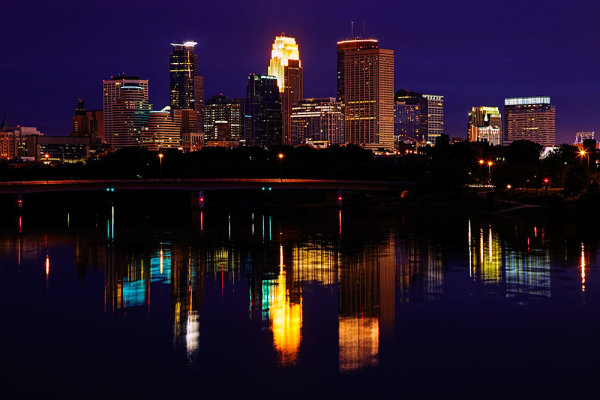
The Minneapolis skyline was an obvious choice for subject here. But the sky was flat for a background, so I pushed the skyline to the top of the frame.  Thankfully, I caught the Mississippi River on an uncharacteristically calm day and was able to get a nice reflection for foreground interest.  EOS 5D Mark II with EF 24-105 f/4L IS. Exposure was 10 seconds at f/11, ISO 400.

EOS 5D Mark II with EF 24-105 f/4L IS. Exposure was 10 seconds at f/11, ISO 400.

The Minneapolis skyline was an obvious choice for subject here. But the sky was flat for a background, so I pushed the skyline to the top of the frame. Thankfully, I caught the Mississippi River on an uncharacteristically calm day and was able to get a nice reflection for foreground interest. I used a slow shutter speed  (or long exposure) to smooth the waters even more.

Do you have some great landscape tips you’d add to this list? Please share in the comments below.

The post 5 Steps to Help you Take Better Landscape Photos by Rick Berk appeared first on Digital Photography School.


Digital Photography School

 
Comments Off on 5 Steps to Help you Take Better Landscape Photos

Posted in Photography


7 Tips for Taking Better Photographs of Cars

04 Mar

Taking photos of cars is such an interesting thing on its own. It’s like science. Every time I shoot a car I learn something from it! I would like to share some basic guidelines to get you started and help you understand this interesting niche in the photography world.

7 Tips for Taking Better Photographs of Cars

1. Shoot at the right time of day

This is by far the most common mistake people make when shooting cars. The best time to shoot will be a few minutes after sunset (or a few minutes before sunrise). Use a tripod and get that perfect soft light on the paint! This photo was taken for TopGear a few minutes before sunrise.

Car photography BMW M135i

2. Be on the lookout for reflections

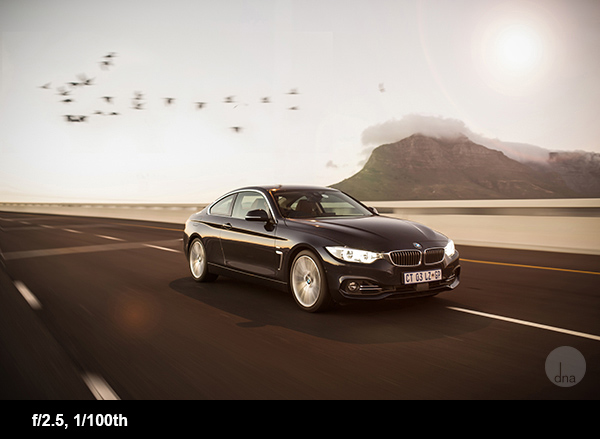
You must be very careful of what reflects in the car. Have a look around you and look closely at the car and see what reflects on its surface. A car (especially a new shiny one) is like a mirror. Try and have an open space behind you like a field. Try and avoid shooting with buildings or trees behind you. One of the most important things you want to show in your car pictures are the design lines of the car, or as I like to call it, ‘her curves’. Reflections can spoil these curves.

Also be very careful not to have your own reflection in the photo. If you can’t avoid your own reflection its best to put the camera on a tripod, set the timer and move out of the shot. Just look at this photo I took of a dark shiny BMW 428i, behind me was nothing except the horizon. You can clearly see the horizon reflecting in the car.

Car photography tips BMW428i

3. Driving shots

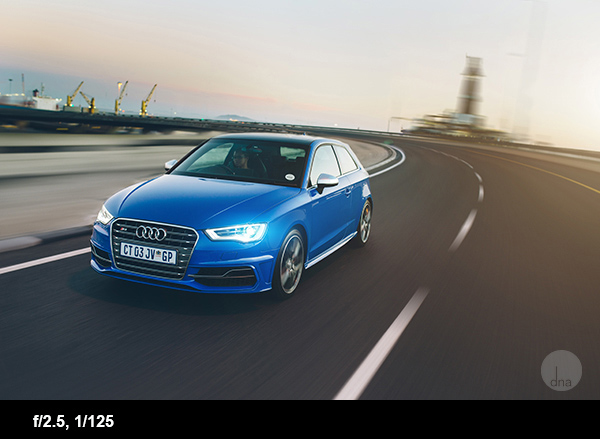
One very easy way to get a cool image, is to shoot the car out of another moving car. (Please be super careful when doing this!) Shoot the car out of your window while driving at 60 km/h (40 miles/h) with a shutter speed of 1/100th of a second.

By doing this you will get some nice movement on the road and on the wheels. You can even decrease the shutter speed some more, but this will increase your chances to sit with unsharp photos afterwards. This Audi S3 was shot before sunset, driving at 70 km/h with a shutter speed of 1/80th of a second.

Car photography tips S3 driving shot

4. Color of the car

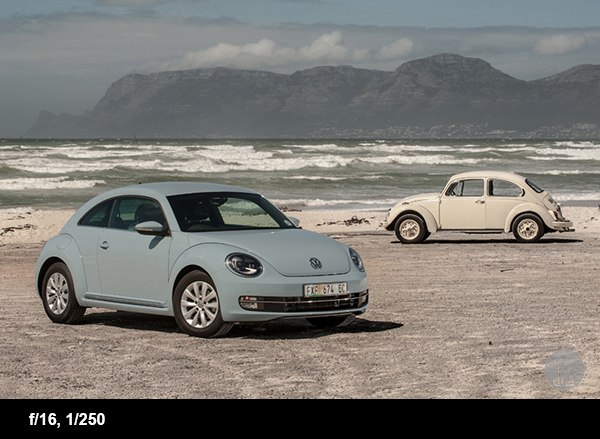
All types of paint react differently at different times of the day, with different light. Most colors hate direct sunlight, but some color works really well in direct sunlight. Just look at this baby blue beetle shot in the middle of the day.

Car photography tips beetle

5. Background

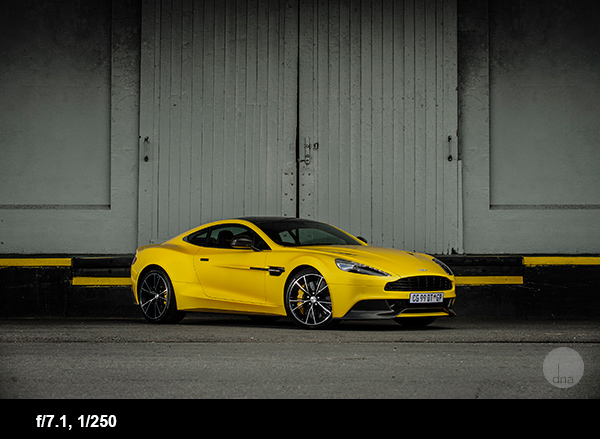
Make sure your background suits the car and the theme. Avoid having things in the background that will distract the eye. Things like dustbins, power lines and other cars can kill a picture. For this Aston Martin, I used a simple background . The yellow paint matches the car’s color.

Car photography aston martin

6. Panning for motion blur

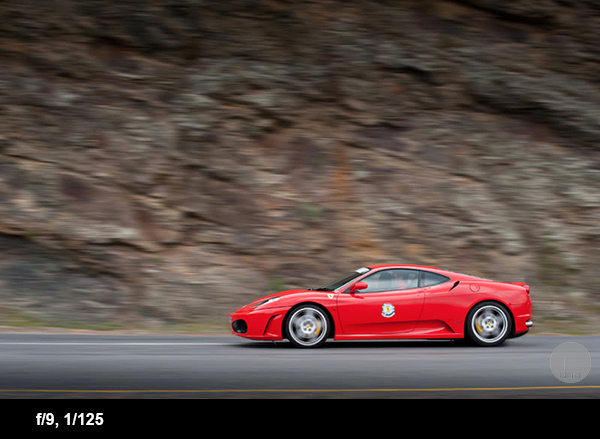
A cool way to get some motion in your picture is to stand next to the road and let the car drive past you. Follow the car with your lens in one smooth action and set the shutter speed to 125th of a second. You will be amazed how easy this is! This Ferrari was shot at 125th of a second at 200mm. The car was driving roughly 60 km/h (40 miles/hr)

Car photography tips ferrari

7. Let the car interact with nature

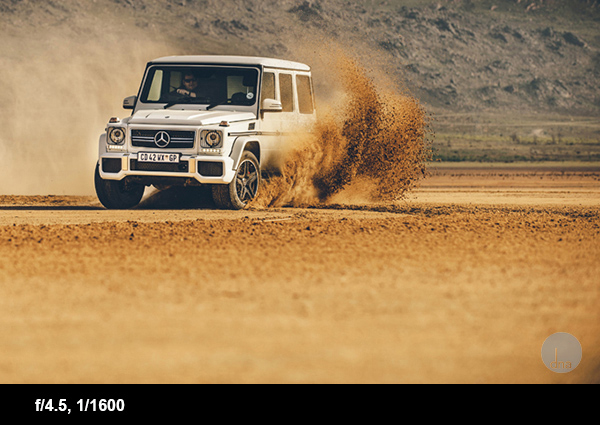
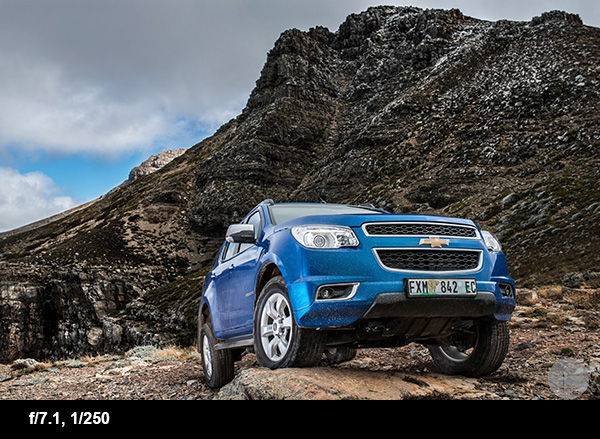
Another way to make the photo speak to you is to make the car interact with its surroundings. Examples of this could be the car making dust, a 4×4 climbing over an obstacle. Look at this Chevrolet Trailblazer climbing over a rock or this G-Class AMG drifting on loose sand!

Car photography tips G AMG

Car photography tips trailblazer

8. Shooting at night

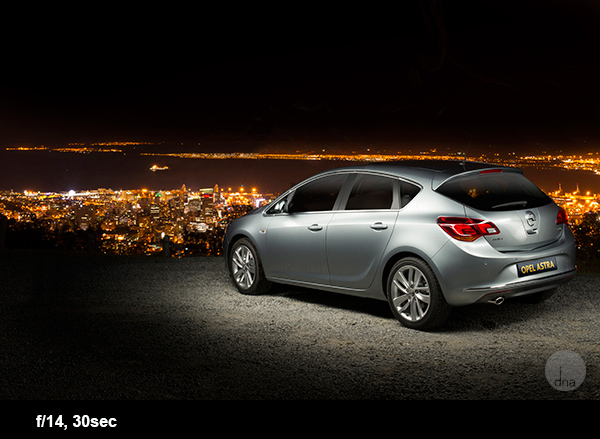
This might sound daunting but you will be amazed how easy and awesome this is! The biggest secret here is to find a spot where it’s completely dark, any streetlights or even a full moon could make life tricky.

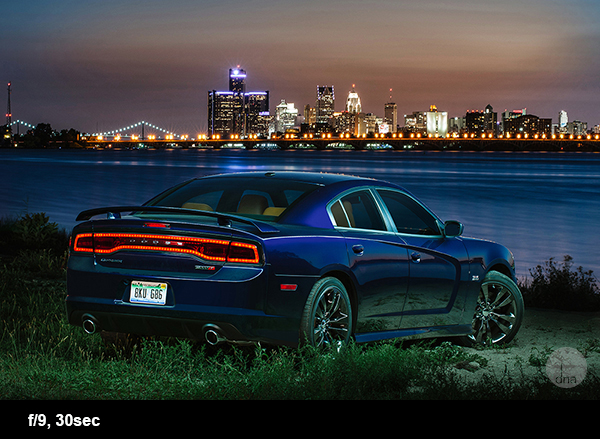
When you have found this spot, set the camera up on a tripod. Set your ISO to 100, the shutter speed on 30 seconds and the aperture to f/9.
When the shutter opens take a strong constant light source and walk around the car ‘painting’ the car with your light. A normal household torch (flashlight) works for this.

There are no rules here, paint the car in different ways to get different effects; you will be blown away with the results! Here are some examples of this technique:

Car photography tips Opel Astra

This is an Opel Astra shot next to Table Mountain with Cape Town in the background.

Dodge Charger with the skyline of Detroit City

This is a Dodge Charger with the skyline of Detroit City in the back. This photo took me no longer than 5 minutes to set up and take.

Do you have any other car tips or favourite images you’ve taken of cars? Please share in the comments below.

For more related tips try these:

  • Light Painting Part One – the Photography
  • Showing Speed: Using Panning When Shooting Action
  • 3 Tips for Creating Dramatic Images using Motion
  • Do you pack up and leave after sunset and miss the fun of night photography?

The post 7 Tips for Taking Better Photographs of Cars by Desmond Louw appeared first on Digital Photography School.


Digital Photography School

 
Comments Off on 7 Tips for Taking Better Photographs of Cars

Posted in Photography


Top 5 Shortcuts for Better Photos

05 Feb

Having taught photography for several years I’ve noticed most students find the following 5 tips provide the biggest ‘aha!’ moments. These are the quickest and easiest techniques for improving your photography.

Top five shortcuts for better photos

1. Switch to aperture priority

Aperture priority

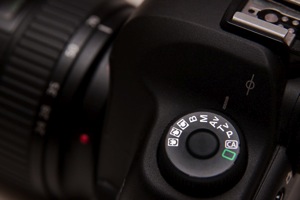
The main dial on top of your camera will have an option called ‘Av’ or ‘A’, depending on the make of your camera. It’s known as ‘aperture priority’. This mode gives you the perfect combination of a decent exposure (in most situations) and creative control. The only time this setting doesn’t give the right exposure is when a scene is particularly bright (like a snow scene), or dark (like a black Labrador).

Exposure compensation

If you’re not happy with the exposure you can use your camera’s exposure compensation setting to make it brighter or darker. This is usually controlled using a +/- button or a large rotary wheel, but check your manual for instructions on how to do this for your make and model of camera. Cameras tend to make very bright scenes too dark and dark scenes too bright.

A large part of the creativity in photography is adjusting the aperture to ensure more or less of the photo is in focus. The beauty of aperture priority is that you can select the aperture you want, and the camera will select the appropriate shutter speed to get the right exposure. Even if the light changes while you’re composing the photo the aperture won’t change, only the shutter speed will. This means your creative vision won’t change either.

All you need to remember is the lower the aperture number (f/4 for example), the less of the image that will be in focus. Cameras can be overwhelming and even have different ways of doing the same thing. When you’re starting out in photography it’s important to keep things simple. This means understanding what you don’t need to worry about yet. Sticking with aperture priority means you have one less knob to worry about, which always comes as a huge relief to my students.

2. How to avoid blurred photos

One of the most common problems suffered by new photographers is blurry photos caused by having a slow shutter speed. There’s a simple rule to help.

Your shutter speed needs to be faster than the focal length of your lens. So, if you’re using a 17-70mm lens and you set your lens to 70mm, then you need a shutter speed of at least 1/70th second. If you zoom out to 17mm then you’d need a shutter speed of 1/17th second. Note that this is the absolute slowest shutter speed you could use and the rule assumes that you and your subject are both still.

Blurred photos

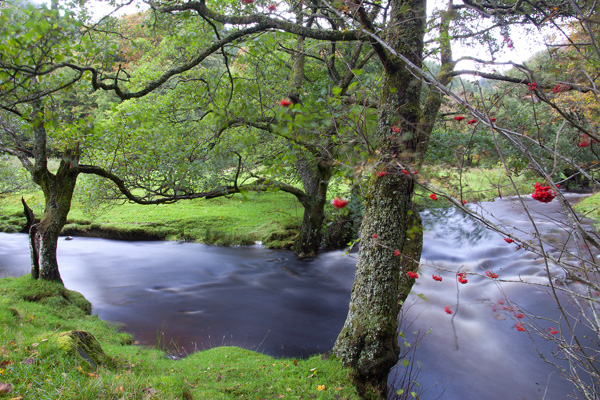
Obviously your shutter speed can be as long as you like if you use a tripod, unless your subject is moving. You can create lovely effects by using a tripod for landscape photos where part of the landscape is moving. For example: flowing water, trees in the wind, car headlights, clouds etc.

If your shutter speed is too slow then you can make the aperture larger to let more light into the camera. Select a smaller ‘f number’ (f/4 instead of f/8 for example). If you’re already on the smallest f number you can get, or you don’t want to lower it because less of your photo will be in focus, then you have another option. Choose a higher ISO number and keep the same aperture as before. Again, aperture priority will ensure the exposure remains correct unless the scene is overall very dark or very bright.

3. Get closer and remove clutter

Almost every photographer starts out photographing things from too far away. They’ll create portraits where the person has a big area of nothingness around them. Maybe this is because most people are uncomfortable being photographed, and most new photographers are nervous about standing near them to take their picture. A longer lens can really help. 100mm or more allows you to stand outside someone’s personal space and still get a tightly composed image.

Just before you press the shutter button remember to check for unwanted items and consider whether your main subject is nice and bold in the frame. Our brain often deceives us because when it’s excited by something, it makes it seem bigger than it really is. Look at the background and consider whether it could be less cluttered. If you’re unable to move yourself or your subject to create a cleaner background then use a lower F stop (f/5 or lower, for example) to blur it out.

Uncluttered

4. Look for geometric shapes

If you look at your favourite photos you’ll notice the composition is often made up of quite defined shapes. Triangles, diamonds, circles, squares, parallelograms and trapezoids all slot together to create a pleasing jigsaw. Our brains like things to be ordered. Think about the calming effect of a nicely appointed hotel room. It’s made up of uncluttered geometric shapes, from the neatly stacked towels to the folded triangle of toilet paper and the round mint on the fold of your bed sheet.

Geometric shapes 2

5. Get in touch with your feelings

Whenever you have the urge to create a photo, think about why you’re picking your camera up in the first place. What was it that inspired you to grab your camera in this instant? If you’re photographing a person, then what are their physical and personality traits that you’d like your photo to convey?

Feelings

Imagine looking over a rocky coastal bay as the sun sets to your right. There’s a lighthouse straight ahead on the far side of the cove and storm clouds are rolling in behind it. Frothy waves are pummelling the rocks below. Most people would get out their wide angle lens and try and capture the whole scene in one go. The trouble is, the sunset would be distant, and the waves, rocks and lighthouse would be almost imperceptible.

Feelings 2

In this situation I’d recommend you create more than one photo. First you could walk to the rocky shore and get down low so the spray of the waves would be majestically backlit against the sunset. Then you could create a stark, bold silhouette of the lighthouse against the inky storm clouds. By creating two photos your message is much clearer.

So, before you press that shutter button consider if you’ve composed your photo in a way that makes your message clear.

Do you disagree with any of these tips, or have some better ones? Leave a comment below so we can see who has the best ninja photography techniques.

The post Top 5 Shortcuts for Better Photos by Dan Waters appeared first on Digital Photography School.


Digital Photography School
 
Comments Off on Top 5 Shortcuts for Better Photos

Posted in Photography


5 Tips to Take Better Images in a Zoo

14 Jan

5 Tips to Take Better Images in a Zoo

Many photographers think that taking a great animal photo requires extreme patience, sitting and waiting for hours in the wild. Yes, this is how a great wildlife shot is captured. However, if you just want to get some practise, you can still capture great animal photos in a zoo. Taking pictures of animals in a zoo is easier than shooting in the wild. Yet, it is not too easy.
Many people think that taking a picture in a zoo is not challenging, but I don’t agree. It is not as simple as you think to take a good picture in the zoo. Here are some tips that will help you to capture a better photo next time.

#1 Be Aware of Both Foreground and Background

At the zoo, animals usually live in cages. If you are able to shoot inside the cage, beware you do not capture the cage as a background. On the other hand, for those animals you can observe through a thick glass wall, what you can do is to shoot as close to the glass as possible and open up the aperture as wide as you can so as to minimize flare and dirt on the glass.

Crocodile

For example, I shot this crocodile outside a glass wall. I used a 200mm lens at f/2.8 because I wanted to blur out all the dirt on the glass. When I was shooting, I removed the hood and stuck the lens to the glass so that no flare would affect my image. You can also use this same technique to blur out the cage if you can only shoot outside a cage.

#2 Learn About the Animal’s Behaviour

Although you do not need to wait for your target animal to appear when you photograph in a zoo, you still need to understand their behaviour so as to capture a good image. Most animals feel hot and find shelter at noon. They tend not to move around and just sit still or sleep instead.

Firefox

You may not able to get a good pose because they are not going to keep the same pose for hours. One of the solutions is to find out when the feeding times are. When the zoo keeper takes the food into the cage, or glass house, you are going to have the best chance to get the best angle.

Stilt

#3 Use a Wider Aperture and Higher ISO

Do not be afraid of noise. Noise is so much better than a blurry image. When you shoot with a 300mm lens hand held, you have to get at least 1/300 shutter speed in order to achieve a sharp image. Boost up your ISO. I normally use automatic ISO selection so I can focus on composition and catching the target’s movement. You can set a minimum shutter speed and a maximum ISO with most camera models. You will need this because when the target is moving, it will move between both brighter and more shaded areas. You are not going to have enough time to change the ISO if you shoot with Aperture priority or Manual mode.

Parrot

On the other hand, open up to the widest aperture unless you are shooting in good sunshine. A larger aperture can give you a faster shutter speed which can reduce the chances of handshake. It can also help to blur out the foreground and background.

#4 Try a Different Angle

Unlike shooting in the wild, shooting in a zoo is limited by many restrictions. You cannot step into the cage, or even get as close as you want. Therefore, you need to look for the best angle. You can shoot behind a rock with a telephoto lens.

Monkey

This will provide you with a blurry rock as foreground and the photo will have more depth. You may also get a nice perspective by shooting from an extremely low angle.

Practice, Practice and More Practice

A zoo is the best place for practicing animal shoots in my experience. You can take more time to think about your images.

Panda

You are extremely safe when shooting. Hence, you can get more practice with both your camera and lens. Get the feel for how fast your 300mm focuses. Practice and develop better hand held skills so you may use 1/40 sec for a 300mm lens. (I still cannot do this. Learn how to press the shutter just as an egret is beginning to hunt. When you have enough practice, you can try going ‘wild’.

The post 5 Tips to Take Better Images in a Zoo by Kevin Choi appeared first on Digital Photography School.


Digital Photography School

 
Comments Off on 5 Tips to Take Better Images in a Zoo

Posted in Photography


5 Tips for Better Long Exposure Landscape Photography

03 Jan

David’s Long Exposure and DoF eBook Long Exposure and Shooting Shallow DoF eBook Bundle (Long Exposure comes with Lightroom Presets) is currently 43% OFF at SnapnDeals – grab it now! (only until January 16th AUS time)

Even if you are an experienced landscape photographer you will know there is lots to consider when approaching the area of long exposure, landscape photography.

The following five tips are just some of the things I have learned, (often the hard way) on my own journey with landscape photography and I hope you are able to take advantage of them and apply them in your own work.

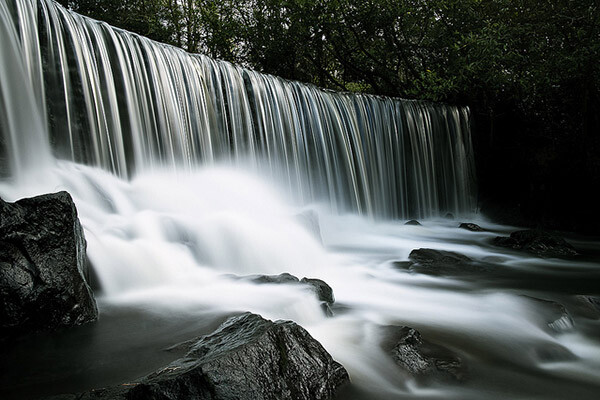
Long exposure landscape photography 05

5 Tips for Better Long Exposure Landscape Photography

1 – Consider the scene without the camera

When arriving at a location you may find yourself rushing to your camera bag in haste to set up your gear. With long exposure photography your mind can often be busy doing the math, calculating exposure times, juggling tripods and fiddling with filters.

Take your time and behold the scene, forget you are capturing a long exposure image and get the framing right. I use the Lee filter system on my Fuji X cameras, which is easy to attach and remove the Neutral Density (ND) filter to the camera between shots. I often remove the filter and capture shorter exposure images to review on the LCD screen. If these images don’t look good there is little chance of the long exposure version looking look.

Don’t be fixated on getting the water looking smooth; instead fixate on framing the water in the photograph to create contrast and make the scene visually interesting.

Long exposure landscape photography 04

2 – Maximize your images with morning or evening light

If you are using an ND10 filter you will know how brilliant they are at stopping light from reaching the camera sensor. Although, theoretically it is possible to capture long exposure images even during the sunniest part of the day, it generally isn’t the best time to shoot.

Prioritize the late evening or early morning for capturing long exposure images so you don’t rely on the ND filter doing all the work. You will find you have much more creative control and will capture more atmospheric images by shooting at the extremes of the day.

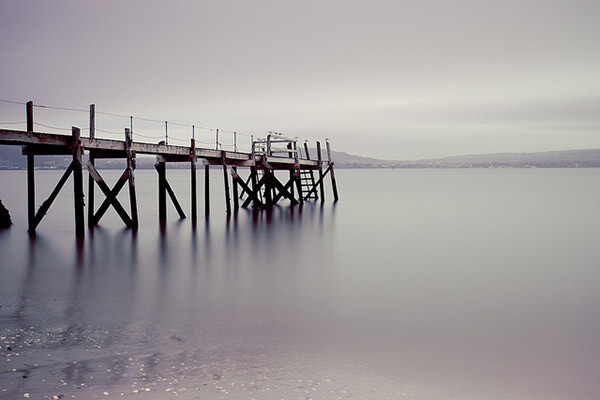
Long exposure landscape photography 02

If you are shooting the ocean, then the second part of this tip is to research tide times. I’ve ventured out on more than one occasion to shoot a jetty to find it would be hours before the tide was in. There are various services online that will tell you high and low tide times for your specific area.

3 – Use the rule of thirds

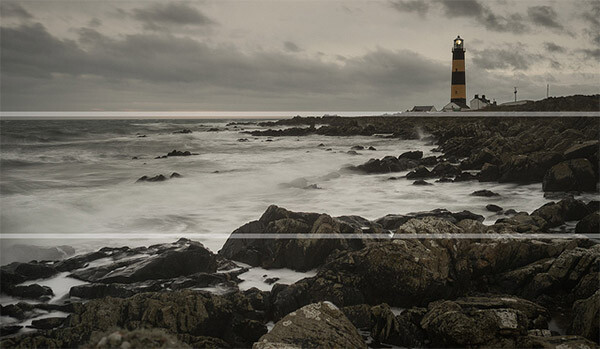
As with the first tip I really recommend that you spend time studying your location. Imagine your image as three separate layers. The top and bottom layers need to contain something of visual interest with the middle layer tending to be the smoothed out water. Sandwiching of the smooth water between foreground and background detail can add a real sense of drama to a long exposure scene.

Long exposure landscape photography 06

4 – Keep your gear clean

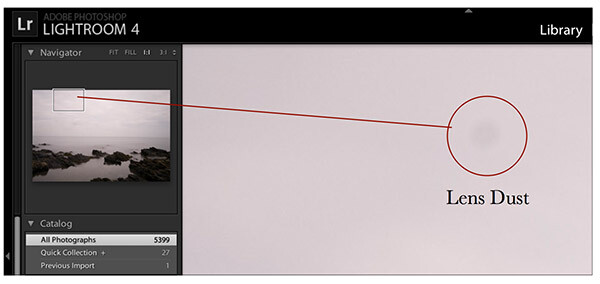
Having the camera shutter open for long durations means any dust or dirt on your lens or filter has a greater opportunity to impact on your image. Your post-production software (such as Adobe Lightroom) will go some way to automatically clean up dust but quite often larger spots are visible in long exposure images that wouldn’t be obvious in normal conditions. Having a lens cloth handy and cleaning the filter (both sides) in-between shots can result in less post-production work later on.

5 – Enhance in post-production

When it comes to postproduction processing for long exposure photography I recommend focusing on three areas. Initially you should correct any colour cast created by the ND filter. This is a relatively simple process; in Lightroom use the ‘temperature’ slider to warm the image to a more natural hue.

You should then zoom in and check for any dust spots, these are generally more obvious in the highlights, such as the skyline. Use the Spot Removal tool (Shortcut Q) to remove these blemishes easily.

Long exposure landscape photography 01

Finally my top tip is to use the graduated filter tool in Lightroom 5 (shortcut M) to soften the water. You can do this by clicking on the horizon and dragging to the base of the water. Once you have created the filter you can then soften the smooth water by reducing the level of ‘Clarity’. You can also do the opposite of this technique to increase the ‘clarity’ of your skyline.

Long exposure landscape photography 03

Summary

These five tips, I hope will go some way to improve how you approach long exposure photography, but the most important thing to remember is to relax. There is something ultimately therapeutic about the experience of capturing long exposure images of landscapes, moving water or the night sky, isn’t that what the creative process is all about?


long-exposure-bookcover-250David’s Long Exposure and DoF eBook Long Exposure and Shooting Shallow DoF eBook Bundle (Long Exposure comes with Lightroom Presets) is currently 43% OFF at SnapnDeals – grab it now! (only until January 16th AUS time) 

The post 5 Tips for Better Long Exposure Landscape Photography by David Cleland appeared first on Digital Photography School.


Digital Photography School
 
Comments Off on 5 Tips for Better Long Exposure Landscape Photography

Posted in Photography


23 December, 2013 – Building a Better Profile – It’s All In the Receipe

23 Dec

A number of years ago I (Kevin Raber) was drivng through the Iceland countryside with Mark Dubovoy.  Our discission was on printing.  Mark was sharing how he makes profiles and how important it is to be precise.  No surprises there if you know Mark.  I told him I didn’t do any of that because I had been using ImagePrint Software for years and the profiles included with ImagePrint were so good I couldn’t come close in my experience making such a good profile,  Bottom line Mark tried Imageprint out and low and behold he switched.  He even reviewed Imageprint on this site.  

Today we hear right from John Pannozzo who is the man behind ImagePrint with an article Building A Better Profile – It’s All in The Recipe


It wouldn’t be the holiday season without a sale, now would it? So we’re having a 25% Off Sale on everything in our online store.

The sale runs from right now through the end of New Year’s Day. To obtain your 25% off on any purchase just enter

HappyNewYear-25pc


in the Coupon Code box when you check-out.


New Travel Video Online for Subscribers

Video Subscribers will find that there is a new travel video online as of today. It is titled The Palouse: A Washington State Photo Trip. You’ll find it in your Video Library of your device, or it can be viewed online in your browser. The video is also available for purchase and may be streamed or downloaded. Check under Subject / Travel & Locations.

You can win an all-expenses paid photographic expedition to Antarctica, along with air fare from anywhere in the world. The value of this prize is $ 15,000.

The Luminous Landscape wants you to try any of our more than 60 training or travel videos and our new free video player. Each purchase is an entry, and an annual subscription that includes all previous as well as new videos counts as six entries. The winner of a free lifetime subscription is also chosen from each month’s entries.


FIND OUT MORE 


The Luminous Landscape – What’s New

 
Comments Off on 23 December, 2013 – Building a Better Profile – It’s All In the Receipe

Posted in News


Film vs. Digital in Large-format Photography: Which Is Better?

09 Dec

French photographer Marc Riboud said, “Taking pictures is savouring life intensely, every hundredth of a second.” Although astounding, the human ability to capture and store moments in image rich memory is limited. Visual encoding start with perception follows through to the moment when it is committed to memory and then reaches the period after in which the memory is retained. Continue Reading

The post Film vs. Digital in Large-format Photography: Which Is Better? appeared first on Photodoto.


Photodoto

 
Comments Off on Film vs. Digital in Large-format Photography: Which Is Better?

Posted in Photography


Resources for Better Landscape Photography

09 Dec

Just a quick post to give you a few places to look for tips on doing better landscape photography.  Links to a few recent articles, and a couple of ebooks for you to check out..

Ebooks

On sale now 50% off (expires December 15th, 2013)

Landscape Photography – The Entire eBook Collection

This eBook collection has been a really strong seller over at our sister site – SnapnDeals. It’s six landscape eBooks at a great price.

1385693865783537786

Also don’t forget to check out our own best selling Landscapes eBook – Living Landscapes – which launched earlier this year.

Living Landscapes – a Guide to Stunning Landscape Photography

Some recent articles about landscape photography:

  • The Intimate Landscape – 5 Tips for Better Landscape Photography
  • Wide Angle Lenses and the Landscape
  • A Day at the Beach – Seaside Landscapes
  • How to Shoot Landscapes at Sunset 
  • Composing Dynamic Landscape Images
  • 4 Essential Ingredients for Great Landscape Photographs

Do you have some other good sources? Share in the comments below – or share your landscape images!

Post originally from: Digital Photography Tips.

Check out our more Photography Tips at Photography Tips for Beginners, Portrait Photography Tips and Wedding Photography Tips.

Resources for Better Landscape Photography

The post Resources for Better Landscape Photography by Darlene Hildebrandt appeared first on Digital Photography School.


Digital Photography School

 
Comments Off on Resources for Better Landscape Photography

Posted in Photography