RSS
 

Posts Tagged ‘Better’

4 Tips for Taking Better Photographs of Trees

20 Jun

Can’t see the wood for the trees? I’ve often struggled with the challenge of photographing trees in a way that captures the imagination and takes the viewer on a journey. I’ve learned that for me, there are two very effective ways to consider and photograph trees. Try asking yourself these two questions:

  • Which tree is the leading actor?
  • Which tree/trees are the supporting actors?

I have to thank my mother for this interesting perspective. As a boy I was dragged to many a theatrical play and so I tend to look at my images as a stage on which there are certain characters that play out a scene. There’s always a lead character, some supporting roles and some cool props. Understanding the hierarchy of your characters will really help to improve your compositions in general.

How to Photograph Trees

1 – When a single tree grabs your attention

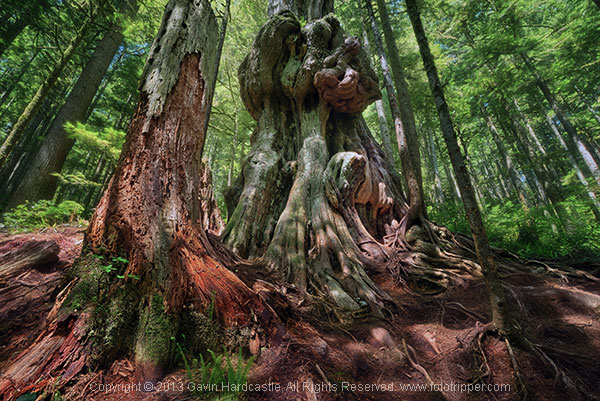
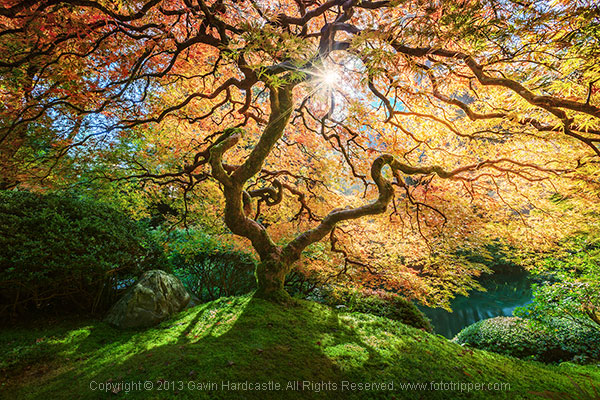
Decide who is the lead and make that your most important subject. With the image above, it’s pretty obvious who the lead character is in this scene. That huge knotted cedar tree is my leading actor, so I place him centre stage and place all other trees around him.

Using an aperture of f/22 means that my entire image (stage if you will) is in focus and the only reason I can get away with this is because my central character is so obvious that I don’t need to accentuate his presence with shallow depth of field.

Here’s another example of a very obvious leading actor in my scene. It’s pretty much ALL one tree with the supporting actors being a sun flare, the shadows on the foreground and the Koi Carp gliding through the pond in the background. Again, I used a very narrow aperture of f/16 to ensure maximum focus throughout the image.

How to Photograph Trees - Gavin Hardcastle

2 – When trees play supporting roles

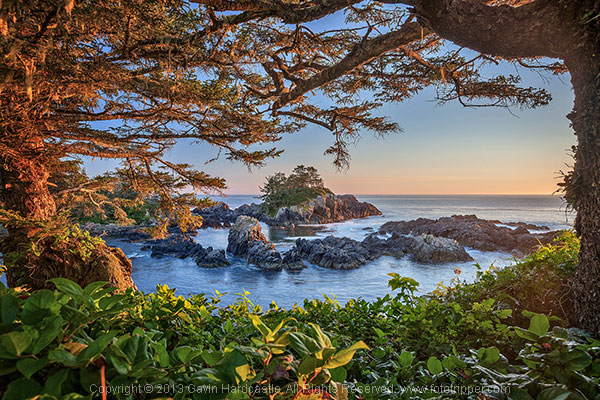
Let’s face it, not all trees are A-list actors, but they don’t need to be. You can use trees to frame another, more interesting character, in your image. When you’ve found an interesting subject such as a waterfall, lake reflection or sea stack, take a look around and see if there are any trees that would make a nice frame or leading line that directs the eye towards your main subject. If there are, place them in your foreground.

In the image below, I used the trees and shrubs to create a frame for my sea stack. I used an aperture of f/8 to create a subtle bokeh effect in the foreground shrubs because I wanted to draw the viewer’s eye towards the central sea stack.

How to photograph trees

Here’s another example of where the tree was used as a supporting actor in my scene. Once again the tree creates a frame, and although we don’t see the entire tree, the image would be nothing without it.

Tree Photography

3 – When NOT to include people for scale

How to photograph trees in landscape photgraphy

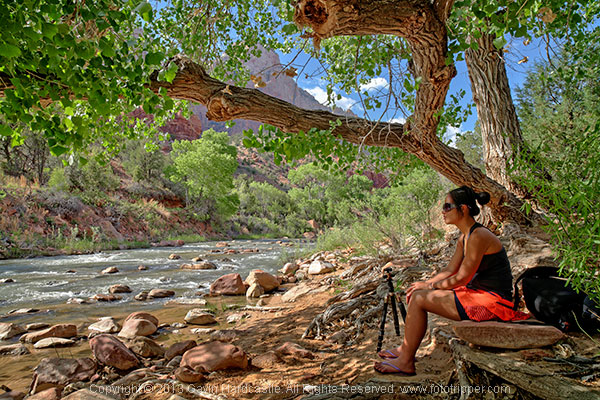
How big do you think that tree above is? Well, let’s just say that only a toddler would be able to stand under the canopy.

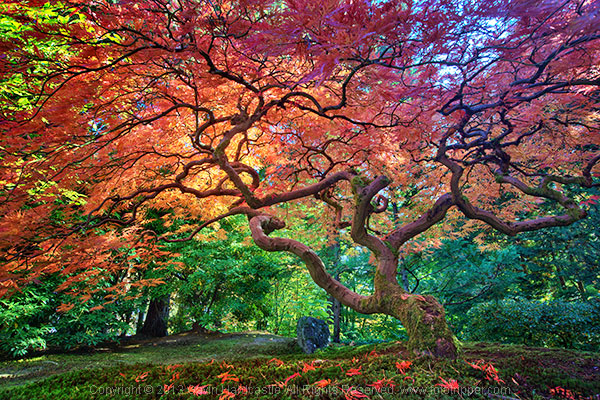
There’s often a temptation for photographers to get a person to stand in their tree photograph for scale. That’s a great idea if your tree is massive, it really emphasizes the immense size of your subject. For smaller trees such as the maple shown above, it would have been a disaster to include a person for scale because that tree is tiny. In fact, it’s so small that I was laying prone on the ground in order to get the shot.

4 – When to use shallow depth of field

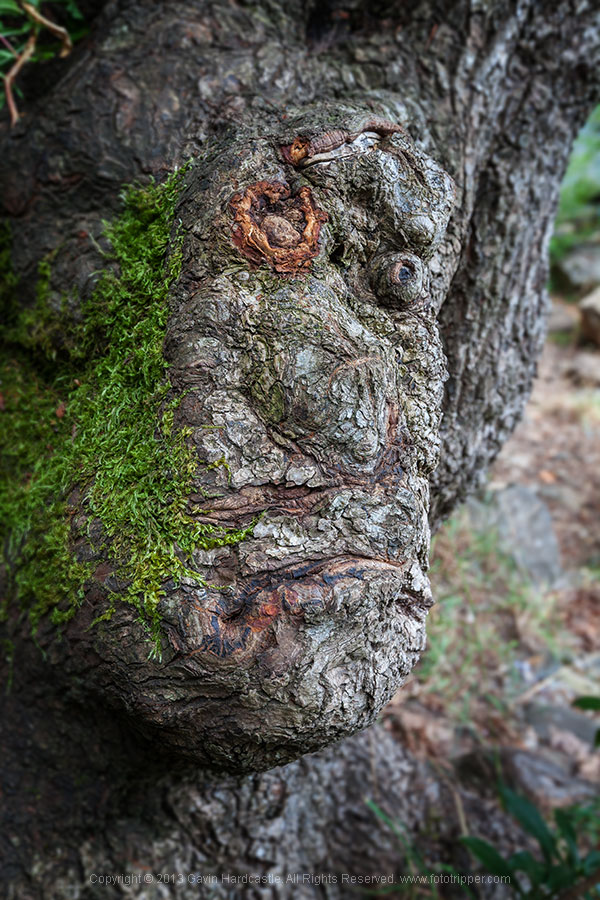
Sometimes it’ll be really obvious that in order to accentuate and bring attention to a certain tree or feature of a tree, you can use a wide open aperture like f/2.8 to create shallow depth of field. This is a creative decision, there’s no right or wrong, only what works for your vision. I rarely use shallow depth of field in my landscape photography, but occasionally I’ll want to bring attention to a certain feature of a tree like this guy below.

Photography tips for shooting trees

Whether you shoot huge landscapes or intimate nature scenes, using these four tips should improve that way that you photograph trees. Try them out and capture your own beautiful tree photographs.

The post 4 Tips for Taking Better Photographs of Trees by Gavin Hardcastle appeared first on Digital Photography School.


Digital Photography School

 
Comments Off on 4 Tips for Taking Better Photographs of Trees

Posted in Photography


Sony’s Curved Sensors May Allow for Simpler Lenses and Better Images

18 Jun

sony-curved-sensor.jpg

The sensors inside digital cameras are – generally – flat. But curved sensors promise greater sensitivity, better image quality, and provide scope for simpler lenses. Recently, Sony showed off some examples of curved image sensors, including (tantalizingly) a full-frame chip. Device manager Kazuichiro Itonaga claims: “The team has made somewhere in the vicinity of 100 full-size sensors with their bending machine. We are ready.” Read on to learn more about this exciting new tech, how it imitates the human eye, and how it may find it’s way into consumer products.

News: Digital Photography Review (dpreview.com)

 
Comments Off on Sony’s Curved Sensors May Allow for Simpler Lenses and Better Images

Posted in Uncategorized


8 Tips to Get You to Take Better Smartphone Pictures

05 Jun

Sometimes the best camera is the one you have with you, and most of the time, this will be your phone camera.  This doesn’t mean your photos have to be terrible; it just means you must work on your picture-taking process a little more, as smartphones have limited capabilities. Besides accessibility, one of the main advantage smartphones have is that Continue Reading

The post 8 Tips to Get You to Take Better Smartphone Pictures appeared first on Photodoto.


Photodoto

 
Comments Off on 8 Tips to Get You to Take Better Smartphone Pictures

Posted in Photography


Tips for Shooting and Processing Better Black and White Photographs

01 Jun

Photography, as you know, is fundamentally the capturing of light; you are not taking pictures of objects as much as you are recording the light that is bouncing off of them. In the early days of photography, the only medium available to capture this light was monochromatic film, commonly known as black and white. In the 1930s, the invention of Kodachrome, the first successfully mass-produced color film, ushered in an age of color to the art form.

Bw article3 NEW

Instead of fading away, however, black and white photography remained throughout the birth of color, and even increased in popularity in the following decades, due to its simplicity and ability to display tones more dramatically than color usually can.

What makes black and white photography retain its timelessness? A compelling picture is always based on the same fundamentals; lighting, tonal range, shapes, patterns and textures. A black and white photo breaks these fundamentals down to their basics, and is not hindered by the distraction and complexity that color can sometimes contribute. It is truly an art form. The reality of a scene depicted in color is transformed into an artistic interpretation when shown in shades of grey.

So what do you need to understand in order to produce a great monochrome photo?

Visualize in Black and White

One of the most helpful things you can do is something that takes place before you even click the shutter button. Training yourself to envision a scene in black and white will help determine if it will work in that state, or if it would be better left to color. Since you won’t have color in the final shot, you’ll need to visualize the core of the scene instead:

  • How is the light behaving on the objects in the scene?
  • What forms are involved?
  • Are there lights, darks, and shades in between, giving you a good tonal range?

Scenes that contain contrast and texture will usually provide a good end result when converted to black and white. Fortunately, you can apply monochrome to almost any type of photography, including landscape, portrait, and street photography. The resulting feel of the image depends on the subject; landscape shots of the ocean will have more highlighted textures of the waves, and street portraits done in black and white can have a grittier, more dramatic feel.

031814 siestaguarshack2 sized

Taking the Shot

Many of the basic principles of photography apply when shooting for black and white as well. You’ll need to compose the scene properly, utilizing the rule of thirds where applicable, and properly expose the shot. As always, you’ll want to shoot in RAW, so that any necessary adjustments can be made such as exposure and levels before you begin post-processing.

When composing, pay special attention to the lines and shapes in the image. These components are even more important when the photo is desaturated.

Finally, you may benefit from using a polarizing filter. This lens attachment will reduce, or remove, reflections that may be apparent in water or other shiny surfaces. Since these reflections could take away focus from your subject matter, it’s best to do this during the shooting process rather than post-production.

040613 siesta feet sized

Post-production

The most important step in this process is actually converting the shot into black and white. While almost all DSLRs have the ability to shoot in black and white initially, you’re losing an important advantage; the photo will permanently be monochrome. Photographers sometimes think that a poor image can somehow be “saved” by being converted into black and white; this is not always the case. If you shoot in JPG format and the black and white (monochrome) setting on your camera, you’ll be producing a black and white JPG image, and lose the ability to convert to color or take advantage of RAW adjustments. BUT if you shoot in RAW in this mode you will still have all the colour data but have the advantage of seeing a black and white preview on the camera screen.

Black and white conversions in an image editor such as Photoshop can usually be categorized in two ways; destructive, and non-destructive. Obviously, destructive methods actually modify pixels and cannot be easily adjusted. Converting directly to greyscale is a long-used example of this method. Preferably, you want to use a non-destructive method that will allow you to make continued adjustments to the image until you have the tone and shading desired.

The easiest method (and the one that I prefer) is to use the Hue/Saturation/Luminosity tab in the RAW importer in Photoshop (the HSL panel in Lightroom also does the same thing). Alternatively, you can accomplish the same thing (albeit with a bit less control) by using a Channel Mixer adjustment layer after you’ve imported the RAW file into Photoshop.

Converting to Black and White with the RAW HSL Controls

Not only does this method offer more control than simply desaturating the image, it keeps the color profile loaded into the RAW (.CR2) file, allowing you to reopen and adjust it as you see fit. To convert using this method follow these steps:

  • Select the RAW file you wish to convert and open it. The file will open within Adobe’s RAW import dialog.

Bw article ps1 FINAL

  • Click the HSL/Greyscale tab on the right side of the dialog box (this should be the 4th tab).

Bw article ps2 FINAL

  • Tick the “Convert to Greyscale” box.

Bw article ps3 FINAL

  • You will be presented with eight color sliders. Adjust these sliders individually (ensure the “Preview” checkbox is ticked near the top) to see real-time changes in those color channels, and how those changes impact your desaturated image. With a color image, moving the “yellow” slider would modify the yellow in your image, but here, it will make the portions of the image that were yellow change in shading, either lighter or darker depending on which direction the slider is moved.

Bw article ps4 FINAL2

That’s it, you’re all done. Few accomplishments in photography are as satisfying as producing a well-done black and white image. You have discarded color, and envisioned your story instead with shapes, lines, shadows, and textures. You’ve opened up a new world of imagery to yourself, and exponentially expanded your repertoire.

Now…what will you do with it? Share in the comments below if you have anything to add or would like to show us your new black and white images.

The post Tips for Shooting and Processing Better Black and White Photographs by Tim Gilbreath appeared first on Digital Photography School.


Digital Photography School

 
Comments Off on Tips for Shooting and Processing Better Black and White Photographs

Posted in Photography


5 Tips to Help You Slow Down and Take Better Photos

18 May

When you go out to take photos it can be tempting to start shooting right away with the goal of getting the ideal image or capturing the perfect picture. But before you get your camera out, it might be good to take the opposite approach and slow down. Way down. Let’s take a minute to consider some lessons you can learn from the age-old tale of the tortoise and the hare. Ironically, one of the most important things you can do when inspiration strikes is to move slowly like the tortoise, rather than rush along like the hare. The tortoise might not have been the quickest animal in the meadow, but he stuck it out and made it to the finish line while the hare had long since grown weary of the race and gave up altogether. As a photographer, it’s tempting to be a hare and race to photographic perfection, but if you look to the tortoise you see a much better example to follow.

image-001-mockingbird

Here are five tips to help you slow down and take better photos:

1. Study your surroundings

One of the most important elements of a good photograph is that of framing; how is your subject positioned relative to the environment? You might have already considered the subject of your photo (your child, your vehicle, a statue, a flower, etc.) but before you start racking up those pictures on your SD card, take a few minutes or more to consider where the subject is with respect to everything else in the area. Are there buildings, houses, or man-made structures that you could use to help make your subject stand out? Are there natural elements, like trees, shrubs, or rock formations that you could use to highlight features or colors of your subject? By pausing to consider everything else aside from your subject, you will be able to make better decisions about how to get the moments you are really striving to capture.

image-002-saint-francis

When I took this picture of Saint Francis on an overcast morning I had to consider not just the bust itself, but what else might help frame the photo. The quickest and most convenient option would have been to point my camera down and snap a picture, but by slowing down and taking time to consider everything else besides the statue it resulted in a much more pleasing image. I ended up crouching down low to the ground, and using the background elements to give the viewer a sense of space and context. By considering the environment and using that to inform my choice about how to take the photo, I was able to get a much better picture than I would have otherwise.

2. Wait for the light

You might not have a giant flash, or studio-style strobes and softboxes, but you can still get amazing pictures by using the best source of light anywhere – the sun. The downside is, you have to be patient if you really want to use it to its full potential. It might not be easy, but one of the best techniques you can utilize to take advantage of natural light is be patient and wait until it suits the needs of your photograph. Bright daylight is often not the best time to be outside and shooting, as the sun’s direct rays can be too harsh and create too much contrast especially if there are trees, building, or other elements casting big shadows.

image-003-bronze-man


Instead, take the tortoise approach and wait until the sun is lower on the horizon. An hour or so before sunset is one of the best times to be out taking pictures, as the low angle of the sun creates a much more pleasing source of light than when it’s directly overhead. Another good time to be shooting in nature is right after sunrise, as you still get the low angle and warm colors. I had to get up early to take this picture of a bronze pedestrian whom someone had bedecked with a bit of garland. But by waiting for the sunlight to be what I needed, rather than what happened to be available, I was able to get a much better photo.  It might not have been the quickest option, but it certainly yielded a much better image.

3. Be part of nature

Taking photos of wildlife does not always require a telephoto lens, but it does require patience. If you want to get good pictures of the animals around you, whether it’s in your backyard or on a hike up the mountains, it’s often best to be patient and let nature come to you. Animals will hear you coming and quickly scamper off, but if you stake out a good spot to wait for them you can be rewarded with some compelling photographic opportunities. A few weeks ago I wanted to get a picture of a squirrel, so I started chasing this one around while he looked for nuts and acorns. I soon realized this was an exercise in futility, as he kept running away from me! So instead I picked out one spot and just waited. After a while he crept back and started poking around near me, and I was able to get a decent picture.

Image003 squirrel

Nature can be a fickle mistress, and will often refuse to comply with what might seem like quite reasonable requests (“Hold still, little birdie! No, don’t fly away!”). But if you take time to be part of nature, and even let nature come to you, you will often be rewarded with much better photos than you could get by rushing into things.

image-005-snake

4. Let kids be kids

Trying to get a good picture of children can take all the fun out of a birthday party or an afternoon at the park. For many of us, our instinct is to be in control: “Look here everyone! Now say cheese!” Inevitably one kid will be smiling, one will be blinking, one will be staring off to the side, and one might even be crying. It might seem like getting a good picture of kids is almost impossible! Thankfully, there is hope. Instead of rushing like the hare to construct a greeting-card-worthy photograph, try taking the opposite approach and just let the kids play. Keep your camera ready, and use it to capture the kids just being themselves. The catch is, you could be waiting quite a while, but you (and the kids) will have much more fun in the process.

Image004 girl

I took this photo of my friend’s daughter while she and my son were playing around in the dirt, and even though it took a while and I got myself rather muddy in the process, I ended up with a picture that was far more interesting than all the posed ones we took earlier. Another advantage of this approach comes months later when you are looking through your pictures. Posed photos of children smiling at the camera might seem like a good idea at the time, but afterwards you will often find that these are not nearly as interesting as the ones where the kids are just playing around and acting natural. But if you are not willing to be patient and wait for these moments to happen, they will often slip by and be lost forever without you ever even noticing.

image-007-kids2

No fancy studio, no special camera gear- just sunlight and patience

5. Learn one new camera function, and learn it well

Cameras today have so many options, buttons, and dials it’s no wonder so many people shoot in Auto mode, and I can hardly blame them for doing so! Learning to operate your camera can be a daunting task, and if Auto takes pictures that are generally good enough, why bother with all the menus and knobs? I have seen so many people try to learn how to operate their cameras to take better pictures, but give up in frustration because it’s so overwhelming. The trick is to pick one thing and learn it thoroughly, and in doing so the various elements of exposure and photography will slowly start to come together.

For example if you shoot in Auto, try choosing the Aperture Priority mode (Av or A on your camera) and learn how to control the aperture of your lens to get better shots. Don’t worry about shutter speed, ISO, white balance, AE-L, or anything else just yet. All that is important, but it can wait. Once you spend a few days, weeks, or even longer getting the hang of adjusting the aperture, then move on to something else like the Shutter Priority mode (S or Tv on your camera) where you control the shutter speed and let the camera figure out the rest. You will soon start to see how the various elements of exposure (Aperture, Shutter, and ISO) affect one another, and how to control them to produce the amazing shots that have somehow always eluded your grasp.

By sticking with just one new camera function at a time you might not learn everything about your camera as quick as you would prefer, but you will likely avoid the frustration and burnout that often comes with trying to learn too many new concepts at once. After all, the hare might have gotten off to a quick start but we all know how that turned out. In photography, it pays to be more like the tortoise: slowing down might not seem ideal at first, but it will help you produce brilliant results in the end.

The post 5 Tips to Help You Slow Down and Take Better Photos by Simon Ringsmuth appeared first on Digital Photography School.


Digital Photography School

 
Comments Off on 5 Tips to Help You Slow Down and Take Better Photos

Posted in Photography


Bounce Flash Secrets – Bouncing Your Way to Better Photography

08 May

If you have ever seen a professional photographer using flashgun on top of their camera, and wondering why the flash is not pointing directly at the subject, that’s because they are bouncing the flash. In this article I will reveal to you the secrets of bounce flash, which I have learned over the years working as a professional wedding photographer. I will unveil my killer techniques that will allow you to bounce your way to better photography.

If you are new to photography you may be apprehensive about using flash. I understand. A lot of it has to do with when you first buy a point-and-shoot camera the flash on it just creates a horrible direct flash look and that is what you associate with flash photography. Once you master the art of bouncing however, I promise you will never look back.
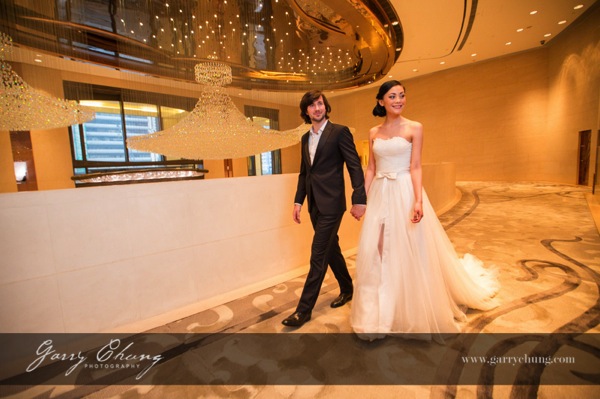
Garry Chung Photography 100

The image above is lit by bouncing flash off the wall on the right side, just out of frame. Notice how it doesn’t look obviously flashed.

What is bounce flash?

Bounce flash is when, rather than firing your flashgun pointing directly at your subject, you point it elsewhere typically up or at an angle, bouncing off a wall or ceiling. The objective is to “bounce” light to soften it before it hits your subject.

Why bounce it and not point directly at my subject?

Because generally speaking direct bare flash, pointing at your subject, is terrible for two reasons:

  1. The light is “hard” and can cash horrible shadows on your subject. It just generally is not very nice light for portraits. The definition of hard and soft light if you are confused is simply the transition the light makes between shadow and highlights. A gradual transition is called soft light and a sudden transition where you have a strong shadow edge is called hard light. Portrait photographers talk a lot about nice soft quality light and that is why they use light modifiers such as soft boxes and umbrellas.
  2. Direct flash produces “flat lighting” which gives that deer in the headlights look and also does not give a 3-dimensional quality to the photo

It is probably easier to show you in pictures so here are a few images of my friend Theresa, that I took just to illustrate the point. Just to set the scene, below is the area where I took these photos. This is a shopping center in Hong Kong and I have chosen the area because of the white walls.

Bounce flash 100

This was shot with the flash pointed directly at the subject. Because there were a lot of white walls surrounding Theresa, there was a lot of wrapping light and it didn’t turn out too bad. But, there is a hard shadow in the neck area and the lighting is flat.

Bounce flash 101

Manual Mode, 50mm lens, f/4, 1/80th, ISO 800, flash in ETTL Mode

This was shot with the flash tilted upwards towards ceiling. The light is much softer and you can see that the shadow on her neck is softened. It’s OK but could be better.

Bounce flash 102

Manual Mode, 50mm lens, f/4, 1/80th, ISO 800, flash in ETTL Mode

This is the way I would light this portrait. The flash is tilted, in this case aimed to bounce off the wall to the left, and bounce back. The result is a nice soft light, and also notice the eyes have better catch lights.

Bounce flash 103

Manual Mode, 50mm lens, f/4, 1/80th, ISO 800, flash in ETTL Mode

But wait, I think I can do one better. I want a more dramatic and contrasty image so I cut out the ambient light by setting a faster shutter speed and stopping down to f/8. Still with the flash pointed to the left I now have my nice professional high key headshot, one flash on camera, no light modifier shot in a shopping mall.

Bounce flash 104

Manual Mode, 50mm lens, f/4, 1/200th, ISO 800, flash in ETTL Mode

When do I bounce my flash?

Indoors when there is ceiling or wall, preferably a white wall so there is no colour cast in the light, or outdoors if there is a surface nearby to bounce off. I see so many “professional photographers” have their flash pointing upwards when shooting outdoors when there is nothing to bounce off and I assure that does nothing other than sap power from you flash as it requires more power to light your subject.

How do I bounce my flash?

Firstly you will need a hotshoe flashgun (speedlight) that allows you to both tilt and swivel the head such as a Canon 600EX-RT, Phottix Mitros+ or if you are a Nikon user a SB900. Some flashes allow only tilt such as the Canon 430EX. This is not ideal as I like to bounce the flash in all directions.
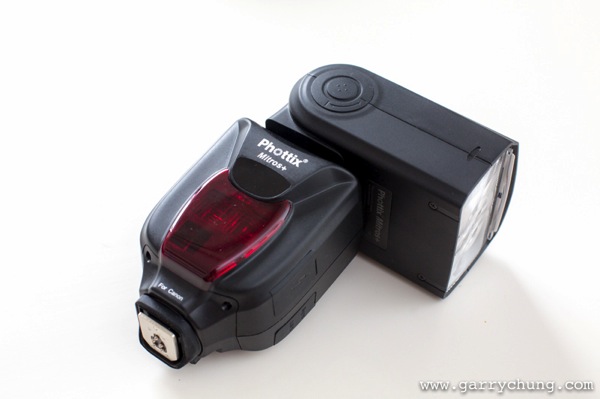
Bounce flash 105

Phottix Mitros+ with swivel head

Which direction to bounce the flash?

Most people just point the flash upwards, which is fine, but I actually seldom do this because I always want to light a portrait using directional light if possible. So most of the time I am pointing the flash to the side, or tilted behind me to one side to give that nice slimming shadow on the face.

There is a simple formula to achieve this look that I learned from Jerry Ghionis – just point your flash head in the same direction as the nose of the subject so you are bouncing. So you are normally pointing the flash away from your subject, to one side. This is of course assuming that you have something to bounce off within a reasonable distance. The other way is to think of your walls as the light source itself, position your subject, frame your shot and then adjust your flash to target the walls.

Remember if you ware shooting events and weddings to readjust your flash direction when shooting from portrait to landscape. For me I am always looking at ways to bounce my flash. One final tip is to crop out the wall or ceiling that you are photographing, that way you don’t end up with a distracting bright wall in your photo.

Camera settings

In terms of camera settings I rely heavily on the Auto TTL system which works for me, so all I do is set the camera in manual mode so something like 1/60th of a second, ISO 1000 and let TTL do the rest. If you have a light subject and dark background, you can bring in more ambient light by:

  • Increasing ISO
  • Have wider aperture, lower F number
  • Slowing down the shutter speed

The more ambient light you drag in, the less “obvious” the flash effect. When it is a really dark scene, and most of the light is actually coming from your flash, I will drag the shutter down to 1/20th which sounds crazy because you could never handhold a shot at 1/20th in daylight. But, as you know the flash helps freeze the frame and hence helps get rid of camera shake. You want to be dragging in as much ambient light as possible if you don’t want your subject to be lit and the background very dark.

One method I use to see what Manual settings to dial into camera is to just take a picture with no flash and if it is totally black then I will increase ISO or switch to a faster lens. One I have the camera dialed-in with my Manual settings for the scene, I will use the flash exposure compensation to properly expose my subject.

You can see from the below image taken of the best man at a wedding reception, there is no obvious harsh shadow behind him, there is nice light falloff and modelling on his face which adds to 3 dimensional quality of the picture, and the surrounding area is properly exposed. I was kneeling down at the time shooting at 1/30th, 1600 ISO, f/4, 50mm lens with the flash pointed camera left tilted upward behind me about 45 degrees.
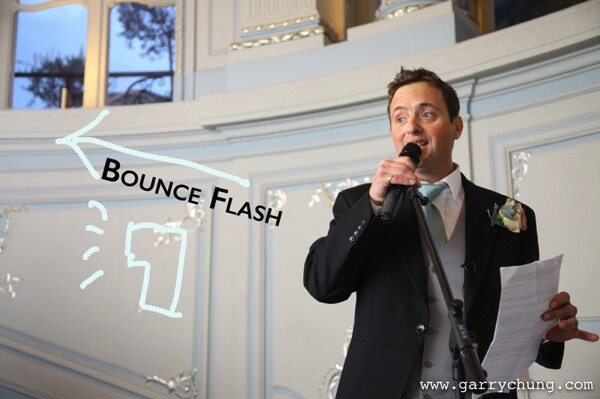
Bounce flash 106

Some people put a plastic diffuser on top of their flash what is that for?

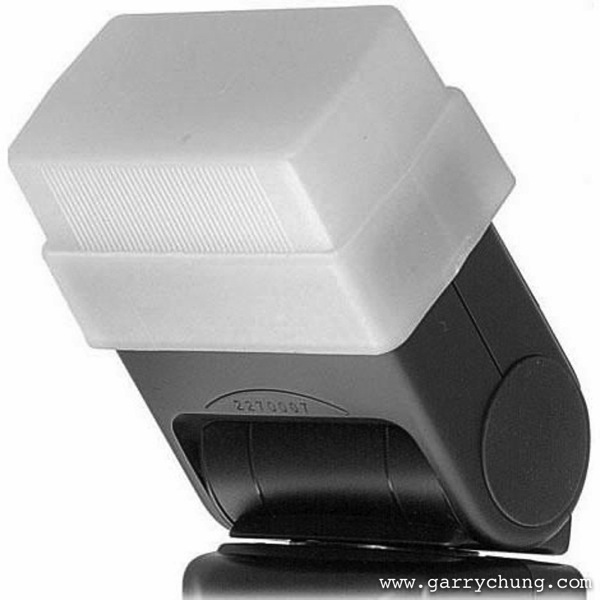
I should mention this, many photographers use diffusers on top of their flash to spread the light out in all directions, below are the two most popular products on the market, the Gary Fong Lightsphere and the Stofen Onmi Bounce. There are many more cheaper products, and copies, that essentially do the same thing.
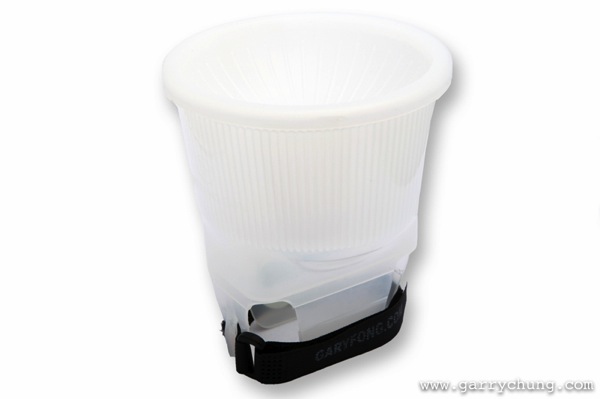
Bounce flash 2

Gary Fong Lightsphere

Bounce flash 3

Stofen Onmi Bounce

I have actually owned, and tried, most of the diffuser products and I have nothing against them but I don’t use any of these any more. I prefer more bare bulb bouncing for more directional light and what the diffusers do is the opposite because they spread light in all directions.

Conclusion

Practice makes perfect and I have photographed many wedding receptions in the UK in the winter where it can be pitch black by 5 p.m. Mastering bounce flash technique really improved the quality of my work. Now when I know that there is not enough light and I have to use flash the first thing I do is look for surfaces to bounce off. Remember you have to be adjusting the direction of the bounce dependent on each frame if you are recomposing. So go ahead get a flashgun if you haven’t already and start experimenting with bouncing flash.

The post Bounce Flash Secrets – Bouncing Your Way to Better Photography by Garry Chung appeared first on Digital Photography School.


Digital Photography School
 
Comments Off on Bounce Flash Secrets – Bouncing Your Way to Better Photography

Posted in Photography


Smaller, faster … better? Canon G1 X Mark II review

08 May

gx1_ii.jpg

The Canon PowerShot G1 X Mark II is an ambitious product that addresses some of the shortcomings of its predecessor by adding a 24-120mm F2.0-3.9 lens, faster AF system, tilting LCD, and 5.2 fps continuous shooting. Its 1.5″-type CMOS sensor also allows for image quality that should rival consumer or midrange interchangeable lens cameras. But do these improvements make the G1 X Mark II the large-sensor compact for enthusiasts? Read full review

News: Digital Photography Review (dpreview.com)

 
Comments Off on Smaller, faster … better? Canon G1 X Mark II review

Posted in Uncategorized


How Self-Portraiture Makes You a Better Photographer

06 May

As long as art has existed, so too has the self-portrait. Van Gogh famously painted more than 30 self-portraits, using the available subject-of-self as both an outlet for his artistic talents, and as a method for perfecting his craft. Rembrandt, as perhaps the most prolific master of the self-portrait, painted, etched and drew more than 100 images of himself throughout his lifetime. One can even imagine the cavemen as having injected some degree of self into the prehistoric images painted on their cave walls.

Nebulous-1

Self-portraiture is NOT the same as a Selfie

But as rich in history as the self-portrait is, its categorization as a photographic ‘art’ is vulnerable due to the endless arms-length phone snaps, or ‘selfies’, now littering the internet. Lately, there has been a blurring of lines between the selfie and the self-portrait. As someone who has focused his own artistic energy toward self-portrait photography, I feel obligated to promote this art form, as self-portraiture provides value in terms of both the photos it produces, and the education if offers you as a new photographer.

The most patient model ever – you!

For me, self-portraiture began as a way to develop my own portrait photography skills, without the need for a model. As you probably know, learning the principles of photography, and the strategies for creating and controlling light, is a time-consuming process. It involves a great deal of trial and error, and asking a model to pose patiently while you make mistake after mistake isn’t always ideal. But you, yourself, are an infinitely more willing subject. Hours pass, memory cards fill with lackluster images, yet you don’t complain. Alone, you’re able to relax and focus on the task at hand: learning to become a better photographer.

Experimenting with artificial light (orange-gelled strobe imitating fire)

Use self-portraiture as a creative outlet

When enough solitary time passes, you’ll find that you begin to produce decent results. Soon, what began as a learning device morphs into a creative outlet. Self-portraiture is no longer an exercise to be performed in preparation for real photography; self-portraiture has become the real photography. Unlike selfies, your self-portraits are well conceived. The location, framing, lighting, depth of field and posing associated with the images are carefully planned. You work both sides of the camera with increasing efficiency, and the quality of your photography reflects the education received.

Self-portraiture offered a unique photo opportunity during this extended flight delay in Shanghai

From that point forward, you don’t hesitate to jump into frame should the inclusion of a person improve your photograph. When you want to test a new piece of gear, fine-tune a new technique, or kill a boring Sunday afternoon by setting up your camera, you do so with absolute independence. When photographing other subjects, you borrow from the lessons learned through self-portraiture, and the result is stronger photography, all-around.

‘Producing’ self-portraits offers both artistic challenges and skill-building opportunities

For those considering an attempt at self-portrait photography, here are a few tips to get you started:

Technique – focus

While taking self-portraits, one of the more difficult aspects to nail down is focus. You don’t have the luxury of pinpoint-focusing on the subject’s face, for example, when you, yourself are the subject. To get around this challenge, it is important to have a stand-in object on which you can focus the camera. I personally use my light stand, as it’s usually with me, and is tall enough to mirror my own height.

First, I determine where, in the frame, I will position myself and I place a ‘mark’ on that spot to ensure I’m continually in the right position. Small rocks, a line of chalk or a crack in the sidewalk have all worked well as my mark. Next I focus my camera on the light stand. Once my focus is perfect, I switch my DSLR to manual focus mode. From that point forward, unless I make manual focus adjustments, the focus will remain unchanged. As long as I stand on my mark, I’ll be in focus. This is particularly important when using shallow depth of field, where a single step forward or backward will cause you to be out of focus, ruining the shot.

Proper focus was critical to the success of this image, taken at a razor-thin f/1.4

Gear:

  • Tripod – when you’re in front of the camera, you can’t also hold the camera. Therefore, a tripod is an absolute must for serious self-portrait photographers. This is an obvious recommendation, I know. My real tripod tip is this: invest in a quality tripod that’s robust, yet light, so you won’t mind carrying it. Also make sure it offers flexibility with regard to the positions it can assume. If the legs act independently, and if the tripod can effectively hold your camera at heights from ground level to eye-level, it’ll come in handy.
  • Wireless remote trigger – while not essential, a wireless shutter release for your camera is a definite plus. The timer setting built into most cameras can get the job done, but for those serious about self-portrait photography, an inexpensive wireless remote is a no-brainer, and will save you from having to walk back to the camera after each frame.

My flexible tripod, offering a low perspective, and the remote in my pocket, allowed me to work quickly

Planning:

  • Self-portrait photography is a production. The act of selecting the location, framing, camera settings and your own placement within the frame is a slow and deliberate process. Taking self-portraits forces you to consider all of the individual components that combine to make a good photograph, and successfully intertwining these ingredients into a successful end result requires planning. So, plan, and learn to enjoy the process of planning your next photograph. The mental thought process will help your self-portrait photography as well as any other type of photography you choose to tackle.
  • Create and maintain a ‘shot list,’ which includes the theme, location, lighting information, prop information and any other specifics related to your upcoming shots. A shot list will help your photography in a few different ways. First, it will help you plan your upcoming shots, by forcing you to think through all of the photograph’s elements. Keeping a shot list will also cause you to view the world through your own photographic lens. You’ll find yourself on the lookout for new ideas, and will regularly pull out your phone (where my shot list is saved) to add new photo ideas. Finally, and most importantly, keeping a shot list will motivate you to get out and photograph more. It’s like a ‘honey-do’ list for yourself, and a shot that lingers for too long on the list will begin to bother you.

This image was on my ‘shot list’ for more than 3 weeks while I waited for the perfect rainy night

If you are eager to learn the art of photography, getting in front of the camera can provide a boost in your educational journey, and just may evolve into an enjoyable creative outlet.

Have you done any self-portraits? Please share in the comments below.

For more tips on doing self-portraits pick up the dPS ebook The Art of Self-Portraiture or read the 5 Benefits of a self-portrait project.

The-Other-Side-Tracks-1

The post How Self-Portraiture Makes You a Better Photographer by Ryan Pendleton appeared first on Digital Photography School.


Digital Photography School
 
Comments Off on How Self-Portraiture Makes You a Better Photographer

Posted in Photography


[MODIFIED] Mozilla Firefox – Misc – Organize Downloads Better by Saving Them Where You Want

07 Apr

Force Mozilla Firefox to save downloaded files to a folder of your choosing.

Many people are fine with Mozilla Firefox downloading files to the standard Downloads folder. However, if you grab many different types of files it may make things easier to save files in different places. Store downloaded DRM-free music in one folder, game demos in another, backups of work documents from Google Docs in yet another location, etc. Making this Firefox configuration change is easy.

1. Access the Firefox Options dialog box. You can either click the Firefox logo button and choose “Options” – “Options”, but I prefer just pressing ALT + T, then the letter O….

Read more at MalekTips.
New Computer and Technology Help and Tips – MalekTips.Com

 
Comments Off on [MODIFIED] Mozilla Firefox – Misc – Organize Downloads Better by Saving Them Where You Want

Posted in Technology


10 Ways Photography Makes You a Better Parent

01 Apr

When I began my journey down the wonderful path of becoming a photographer, I never realized how this camera of mine would totally transform my world.

Better parent photographer 02

I picked up a camera before becoming a mom, not because of burning passion, but because I knew how important it was to document our life. I felt like taking pictures was an essential part of remembering all of the details of growing our family.

What I’ve realized over the years though, is that photography isn’t simply about the technical details of achieving the perfect white balance, using the best gear and accessories, or researching perfect posing and staging techniques. It’s about the surprising and hidden benefits you’ll receive from the camera in rediscovering yourself and igniting a new passion; helping you become a better person in the process.

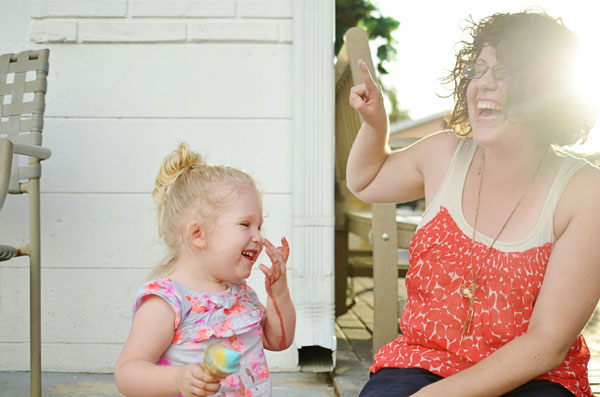
Below are 10 ways I’ve found photography has made me a better mom. The points I make are quite ‘mom focused’, but I’m sure these would apply to dads, grandparents, aunts, uncles, or anyone else who has a love of capturing their family as well.

10 Ways Photography Makes You a Better Parent

1) Keeps your adult brain working

Photography is way to keep the ‘adult’ side of your brain actively learning and growing, as you conquer the technical side of what makes the camera work.

When I became a mom, I quickly became overwhelmed with all the ‘kid stuff’ in my life. Cartoons, arts and crafts, Play Doh ©, Legos ©, dolls, action figures, books. As a lifetime lover of school and learning, I needed something that would allow my brain to continue stretching and growing alongside my child’s.

Better parent photographer 01

2) Allows you to practice self-care

Photography is a creative outlet that that allows you to be an active participant in self-care while raising kids.

Getting out for even a quick 10 minute walk and capturing your surroundings is sometimes all you need as a mental reset on particularly long or hectic days.

3) Connect with other like-minded parents

It’s is a hobby that allows moms to connect with other moms who are passionate about memory making. It can be so hard meeting other moms who have similar interests once you become one yourself. Photography provides a place to start finding common ground as you search for new friends.

Better parent photographer 05

4) More family activities to new places

You’ll be excited to plan more activities as a family because you’ll want to document fun adventures together.

Never one to enjoy taking photos in the same place twice, I’m always on the hunt for new places to go see, and explore with our family to make the experience of documenting new and exciting every time. We’ve been to the zoo, the park, apple picking, the local alpaca farm, the pool, the playground, etc.

5) You document important childhood details

Better parent photographer 07

Photography allows you to become more mindful about documenting childhood details that are too easily forgotten.

You may think you’ll always remember how tiny they are, the first time they smile, or how cute they looked in that amazing outfit from grandma. But, unfortunately if there isn’t photographic evidence those memories can quickly fade away. A photography project can help you sharpen your skills and preserve these memories.

6) Provides you a way to relax after bedtimes

Looking through photos is a way to rest and unwind at the end of a long tiring day. After the kids are in bed it’s such a confidence booster to look over your work, pick the best shots, edit a few to really make them pop, or order a few prints to frame and hang in your home.

7) Helps you ‘play’ with the kids more

Taking pictures can be accomplished in small chunks of time without a whole lot of resources or equipment required.

Settling into creative play with my kiddo doesn’t always flow naturally for me. In order to make play time activities more fun for us all, I’ll often participate for a little while, and then have the camera nearby so I can switch away from participating and snap a few photos when I start getting antsy.

Better parent photographer 06

8) You are creating a family legacy that will be treasured

You are giving your children a precious gift of memories that they’ll cherish for a lifetime. Every time I snap a ‘keeper’ I always think about how much our daughter will appreciate that shot when we’re all older.

Better parent photographer 03

9) Looking over family photos creates great bonding time

Sitting down and looking at old photos is the perfect way to earn some extra snuggle time with the kids. Looking through photo albums is a favorite activity for our family and is also one of the only times we get some snuggly bonding time with our preschooler which is always a treat.

10) It helps you be a better role model

Better parent photographer 04

Kids will see an empowered and confident role model as their mom (or dad) embraces a hobby she loves. Children are sponges and will mimic parents’ actions. By showing your children that you are willing to make time for your own fulfillment by embracing hobbies and passions you love, you’re granting them permission to do the same in their own life.

How many of these can you relate to? Has photography always been a passion for you? Or has parenthood taken your love of photography to an entirely new and more passionate realm as it has done for me? I’d love to hear about your photography story in the comments.

The post 10 Ways Photography Makes You a Better Parent by Beryl Young appeared first on Digital Photography School.


Digital Photography School
 
Comments Off on 10 Ways Photography Makes You a Better Parent

Posted in Photography