RSS
 

Posts Tagged ‘Better’

How to Pose and Angle the Body for Better Portraits

07 Mar
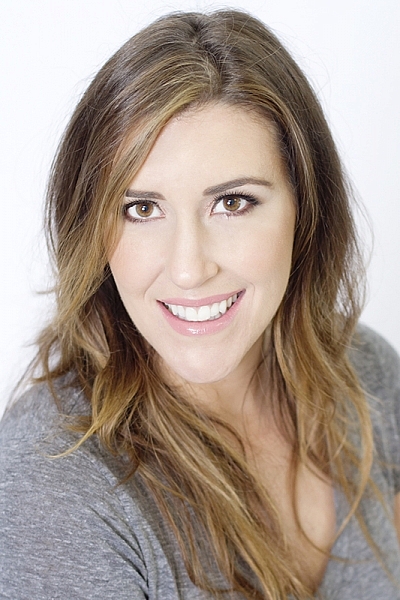
anglesfinalimageSM

This is the final, edited image given to the client.

One of the best ways to make a living with photography is to photograph people. People need photographs of themselves for their business, conferences, publications, acting, and more. When they come to you to have their photo taken, they trust you to make them look good. That is really one of the biggest parts of your job as a photographer, to make your subject look great.

When someone hires you to take portraits or head shots of them, it’s important you understand how to pose them, and angle the body toward the camera. By understanding this, you will also be able to work more efficiently, which will benefit both you and the client. You have to remember that most people don’t like to have their photo taken, so you want the process to move along swiftly.

I have compiled a series of photos, to give you a visual of the slight changes that can be made to create a more pleasing portrait. These are straight out of the camera, no post-processing or touch ups have been done. The model in the photographs had professional make-up done before we shot. I recommend if you are photographing a female client, that you refer them to a make-up artist you like to work with, to have their make-up done prior to the shoot. This will make a big difference in the final look.

Okay, let’s get started.

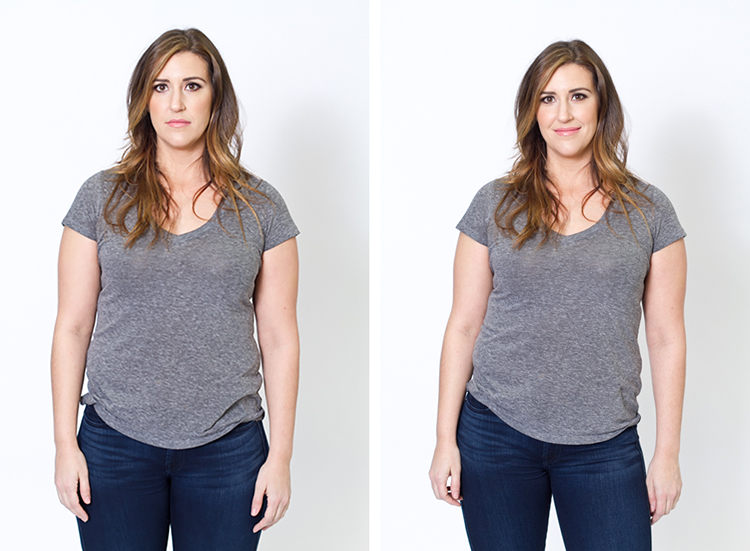
Shift their weight

With the first set of images the model on the left is standing straight on, or square to the camera. Her body weight is on both of her feet equally. As you can see with the image on the right, a subtle shift in her weight makes a difference. All she did was put the majority of her weight on her right leg. This immediately creates a subtle s-curve with her body. The model is still facing the camera straight on, but already looks slimmer.
1 hippush

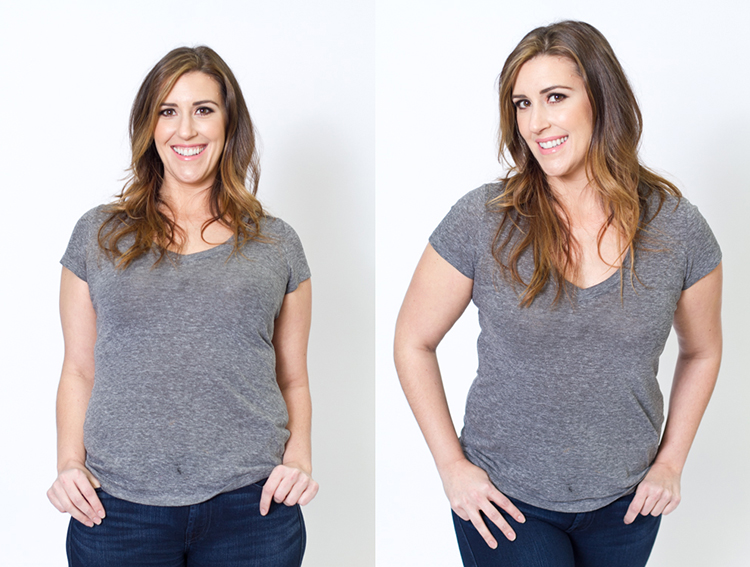
Lean forward from the waist

The model is still facing you straight on or square but we will now have her lean from the waist. With the photo on the left she is leaning away from the camera or backwards, and it’s very unflattering. This angle creates a double chin, and makes her look heavy. Anytime a client does this, correct them right away.

To make this photo better, just have them lean slightly forward from their waist, toward you. You can see when she did this, in the image on the right side, that she automatically angled her head and shifted her weight on her legs. You now have a much more flattering pose.
2 leanback

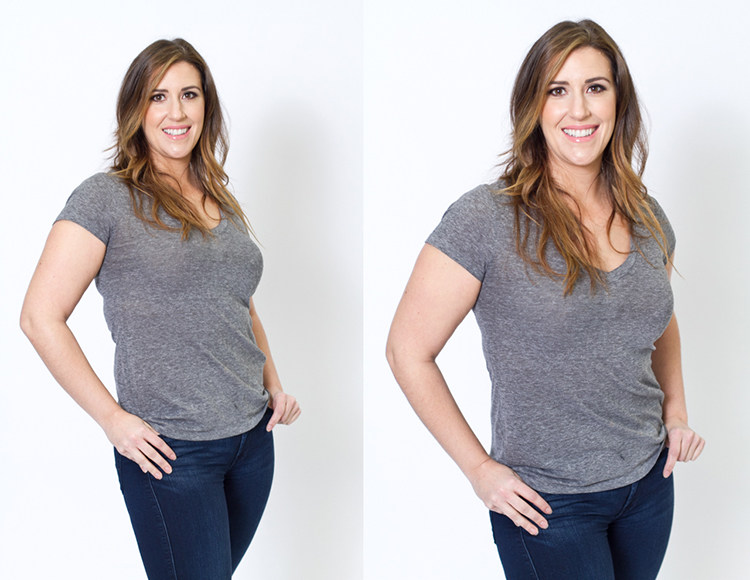
Weight on the back leg

Now adjust the model once more. Have her shift her weight to her back leg. In the examples below the model shifts her weight to her left leg bringing the right one in front. With the image on the left you again see how when she leans backwards or away from the camera it looks awkward and unnatural. Have the model make the simple adjustment of either standing up straighter or have them add a bit of lean toward you as seen in the photo on the right.
3 leanbackforward

Cross arms

A very popular pose for business head shots, is having your model cross their arms. This creates a feeling of confidence and strength for the viewer. It can go wrong though. With the image on the left side below, the model angles her head backwards. This mistake is more common in women since they seem to like to tilt their head for photos. Communicate clearly with your client/model to bring their chin down slightly and forward. This easy adjustment makes a big difference and is the shot your client will want.
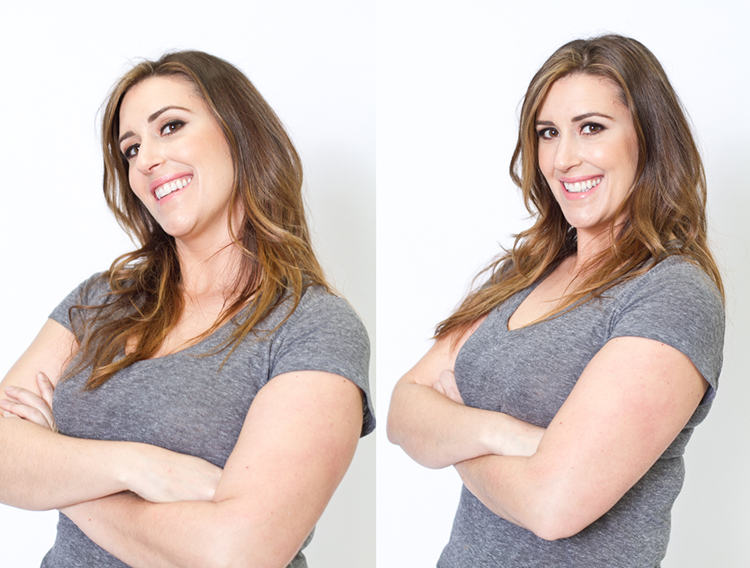
4 armscrossed

Lean forward again

From the crossed arm pose you can get a very nice close up headshot. The image on the left was shot wider to show you how, and where ,the model is angling her body. Ask them to lean forward from the waist. Most people will think this feels weird, just let them know that it looks great in the final image. Remember most people are insecure with how they look, so always take time to reassure them they look amazing! Then either zoom-in tight with your lens, or step in closer to get a beautiful portrait.
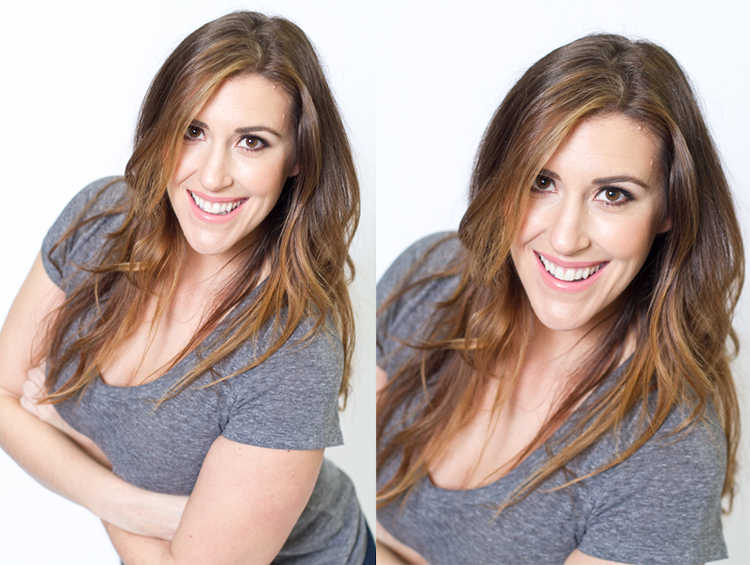
5 leanforward

Sitting poses

Let’s move on to portraits while your model/client is sitting down. Having your model/client in this sitting position places you at the angle above them. That means you will be shooting at a downward angle, which is very flattering for most people.

The first step you have to take, is to have your model sit on the edge of the chair. You do not want them to be sitting comfortably, where they lean all the way back. With the image on the left (below), the model is sitting on the edge of the seat, feet on the floor and shoulders square at the camera. Even though it is not the best angle, if you crop in tight, you can still create a nice portrait with the focus being on the eyes, as seen with the image on the right.
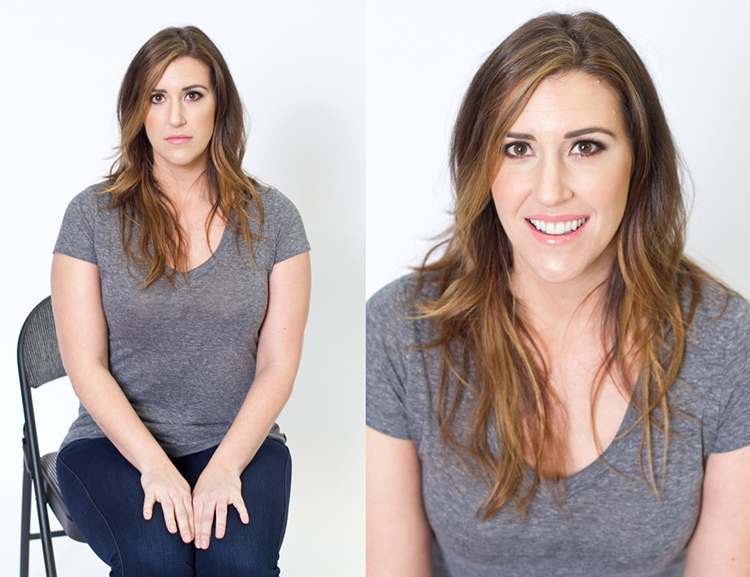
6 chairpose

With your model still sitting in the chair, have him or her place their elbows on their knees. Arms can be crossed or not, play around with both. This forces the model to have to look up at you, taking away any issues with the neck. Make the image better by having your model angle their face slighting to the left or right as shown with the right side image. Remember these are tight crops, focusing on the eyes and smile.
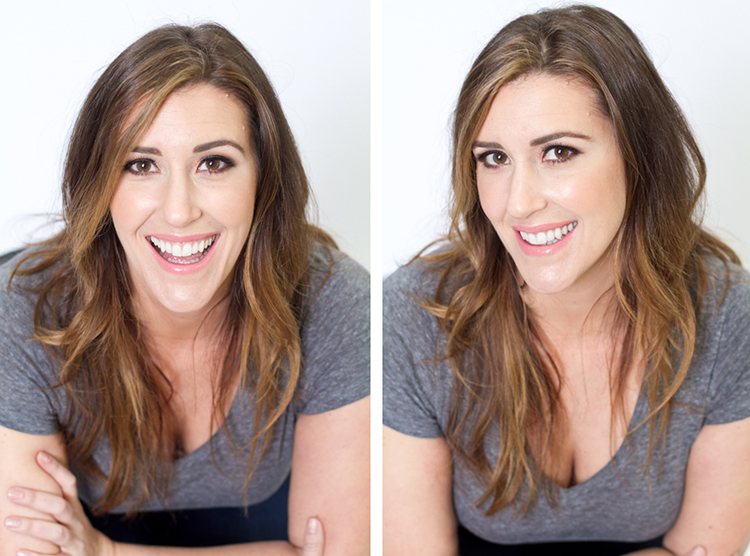
7 sitandleanforward

The last example shows the model’s “good side”. We all have one side that is better than the other. It is not usually visible with the naked eye, so please be sure to always photograph your model from the left, and the right sides. This is clearly shown with the model below. Her good side is when she angles her face to the right, and her left side is more visible (the image on the right). You can see more of her face, her neck looks better, both eyes are visible, the hair falls naturally, and her nose has a more flattering angle.
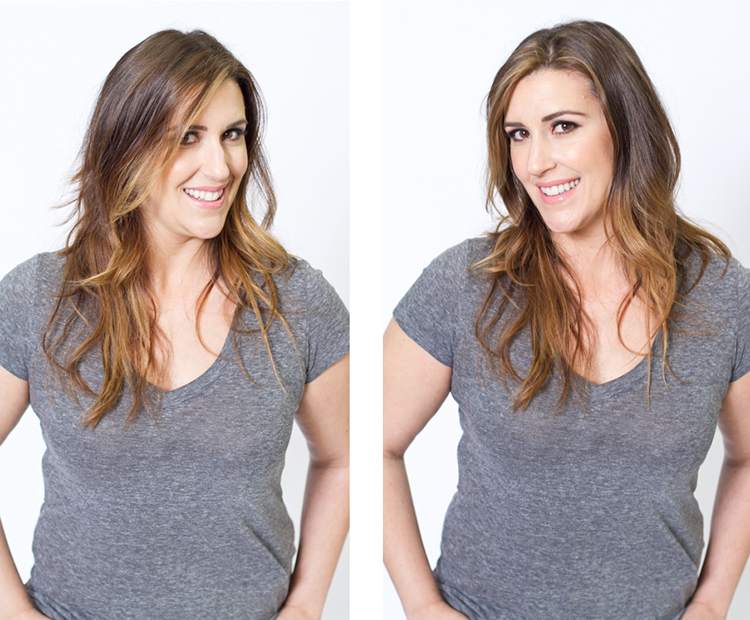
8 goodside

When repositioning your model, remember to shoot that pose from each side. Until you get good at recognizing which is your client’s good side just by looking at image preview on the camera, always shoot from the left and the right.

It’s easy to see how a simple adjustment of angling the body can result in better portraits. An good rule of thumb to remember, is to have the model angle one shoulder toward you, and have them place their weight on the back leg. This will immediately make them look slimmer. Of course, the best way to get better is to get out and practice, practice, practice!

Have fun shooting! All images were shot in a studio with a 50mm lens, on a white paper backdrop, with one strobe light.

googletag.cmd.push(function() {
tablet_slots.push( googletag.defineSlot( “/1005424/_dPSv4_tab-all-article-bottom_(300×250)”, [300, 250], “pb-ad-78623” ).addService( googletag.pubads() ) ); } );

googletag.cmd.push(function() {
mobile_slots.push( googletag.defineSlot( “/1005424/_dPSv4_mob-all-article-bottom_(300×250)”, [300, 250], “pb-ad-78158” ).addService( googletag.pubads() ) ); } );

The post How to Pose and Angle the Body for Better Portraits by Alexis Arnold appeared first on Digital Photography School.
Digital Photography School

 
Comments Off on How to Pose and Angle the Body for Better Portraits

Posted in Photography


7 Tips for Better Adventure Photography

28 Feb

Adventure photography has continuously become more and more popular for outdoor photographers, thanks to new technology in cameras, and the outlets of social media platforms like Instagram, that are very photography-friendly. You may have seen some posts that are routinely labeled as “epic” and want to know how to create the same awe-inspiring feeling in your own photographs.

The good news is you can! But, just like in other fields of photography, composition is extremely important when you want to start dabbling in epic scenes. Let’s look at some tips to help you start shooting better adventure photography.

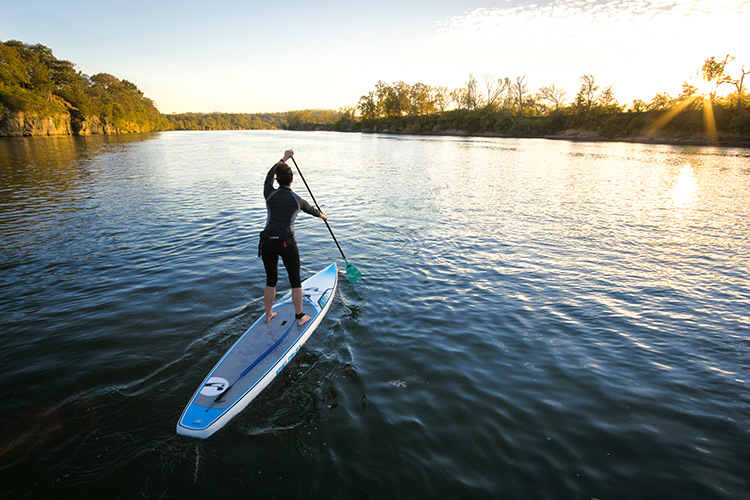
1- Always have your camera on

PHOTO 1

Like a lot of photographers, you may suffer from battery anxiety, the fear that your battery is going to die and you’ll miss that one shot you’ve been waiting for your entire life. Well, when you constantly have your camera turned off, you’re probably going to miss more amazing split second shots, than if your battery died. That’s why you should always leave your camera on when you’re out shooting adventure photography.

Are you out hiking with your friends? Leave the camera on. What about spelunking in some caves? Leave the camera on. What if you’re zip-lining through a jungle canopy? First, leave your camera on, and then hold on to your camera tightly.

You won’t have to worry about battery anxiety if you properly pack, including extra batteries to take with you. Simply leave your camera on, never put your lens cap on, use a lens hood to protect the lens, and take a micro-fibre cloth to clean the lens. Your fear of the battery going dead should never stand between you, and freezing an adventurous moment in time.

2 – Put yourself in the frame

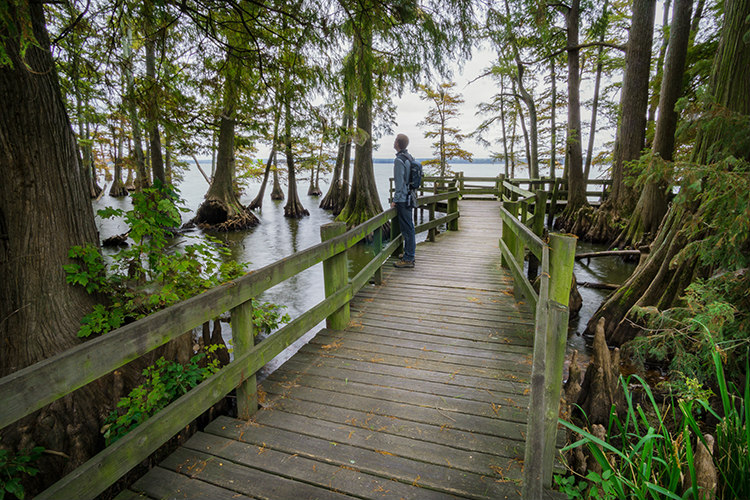
Adventure photography features people living their lives to the fullest, by placing them in amazing landscape scenes. But, what if you aren’t in nature with anyone else? I’m sure you’ve faced that dilemma before. Well, instead of feeling like all is lost, think outside the box and put yourself into the frame.

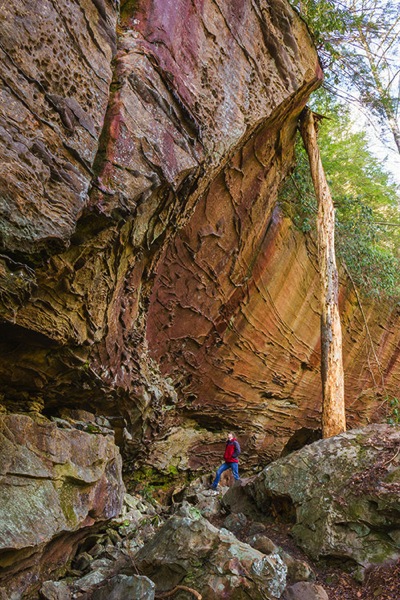
PHOTO 2

It may feel a bit strange at first to feature yourself in a photograph, but sometimes you have to do what you have to do,in order to get the shot! If you’ve never done this before, all you have to do is mount your camera on a tripod, and set it to the 10-second delayed timer. Once you press the shutter and the timer starts, get into position, and wait for the camera to do its thing.

You might want to also set your camera to take a series of shots once the ten second timer is complete, to be sure you get a suitable photograph. Many cameras have the option to use the timer, or one with continuous shots. Sometimes you might not get in place fast enough, but using a multiple shot sequence will allow you to have a couple more frames to get into position.

3 – Subject placement in adventure photography

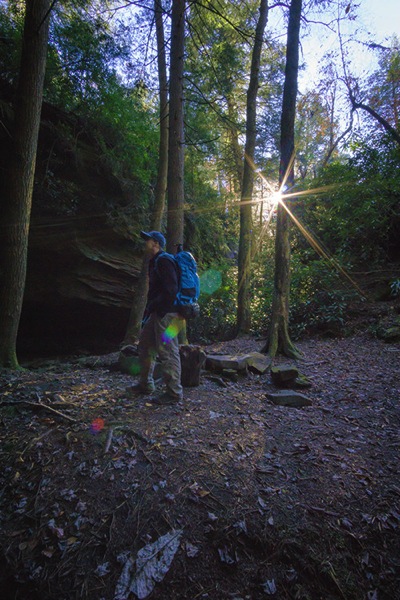
Subject placement is extremely important in adventure photography. You want to feature your subject (the person out adventuring) in the landscape, without any distractions or limitations. Anyone viewing your adventure photograph should never be confused about where the subject is, or what they are doing.

It doesn’t matter whether your subject is close to the camera, or way off in the distance. What matters is their placement in space. So, when you’re inspecting a landscape, and trying to decide where to place your subject, always look for a solid color or a negative space to place them.

PHOTO 3

The people in the landscape will stand out against a solid color and negative space, to allow your audience to locate the subject immediately. The last thing you want when you show a photo, is someone trying to find your subject because they are right on the horizon line, or lost in a pattern of shadows.

Not only will placing your subject in negative space clearly reveal where and what your subject is, but it will also eliminate any boring spaces in the photograph’s composition.

4 – Choose a better perspective

Perspective, or point of view, in photography ia always important when you’re trying to show a scene more creatively. Think about it; everyone walks around all day seeing everything at eye level. So, if you want to show something differently, shoot a perspective that isn’t at eye level.

Getting lower to the ground gives your subject in adventure photography a larger than life feel. This is usually shot with a wide angle lens, to fit a low perspective foreground, and the landscape into one photograph. Low perspectives show the importance of a person or activity, more than the landscape surrounding them.

PHOTO 4

Higher perspectives feature the landscape more than the subject, making the natural elements of the frame seem larger than they actually are in reality. These points of view are usually used to look down on your subject, while allowing you to show more of a landscape as well.

5 – Show scale

Do you remember doing science projects in school where you’d have to collect photo evidence of your specimen, by placing a pencil or coin next to it to show its size? Well, that’s called scale. You use an object of a well-known size next to your find, to give your audience an idea of the actual size of the specimen shown.

You can actually do the exact same thing in adventure photography. Everyone knows the average size of a human. However, when you show a photograph of just a cliff, it’s difficult for someone to get a really good idea of how large the cliff actually is.

The solution is to incorporate a well-known average size (in adventure photography that would be a person) into the frame, so your audience is able to get a much better idea of how large and grand the landscape actually is. This is a tremendous composition technique to use whenever you feel absolutely dwarfed in nature.

PHOTO 5

6 – Think about using silhouettes

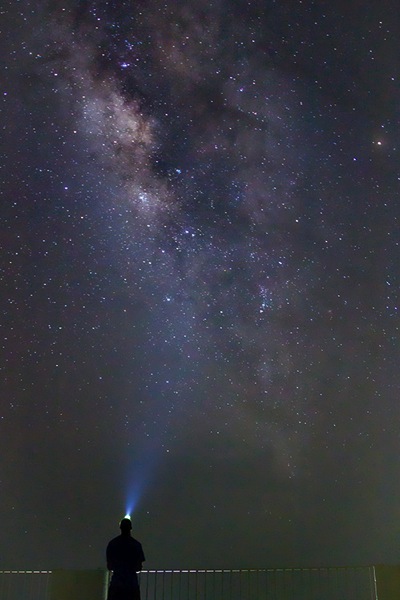
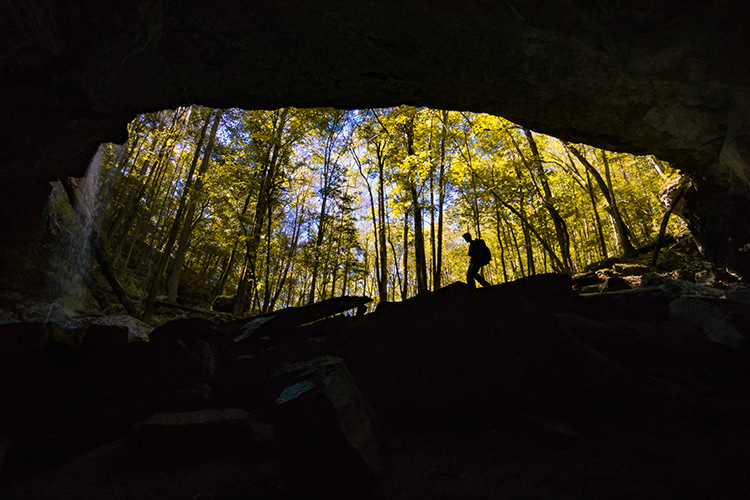
Silhouettes are another great technique that you can use in adventure photography. Whenever you’re stuck in a bad lighting situation, one that has too much dynamic range to be able to capture both your subject and the landscape in good light, go directly for the silhouette shot.

To use silhouettes effectively in adventure photography, place your subject on a solid line within the scene. This could be either a horizontal or a vertical line. For example, you could place your subject on a hiking trail, or on a vertical wall, while rock climbing. Next, compliment your subject by placing an interesting background behind them, such as a forest or sunset.

The key to an effective complementary background is to create a composition that features your subject first. This goes back to what you learned on subject placement in adventure photography. Never overpower the subject of the photograph by hiding them in a complementary background.

PHOTO 6

7 – Make your audience jealous

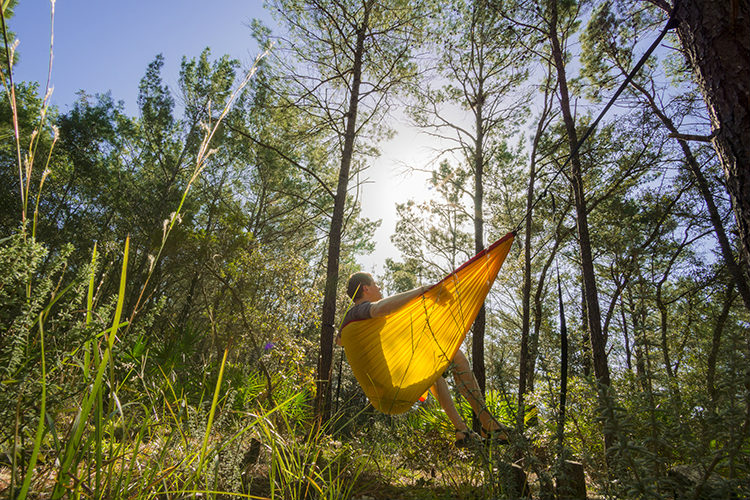
Lastly, make your audience jealous with your adventure photography. Compose an adventure photograph in a way that makes people want to go where you went, and do what you did. The overall goal of adventure photography is to get people outside, exploring new places.

Let your audience live vicariously through your photography. When you’re able to do that, you’ve definitely stepped up your adventure photography game.

PHOTO 7

So, by all means, get out and document your adventures!

Do you have any other adventure photography tips to share? Or perhaps some of your favorite adventure photography images? Please do so in the comments below.

googletag.cmd.push(function() {
tablet_slots.push( googletag.defineSlot( “/1005424/_dPSv4_tab-all-article-bottom_(300×250)”, [300, 250], “pb-ad-78623” ).addService( googletag.pubads() ) ); } );

googletag.cmd.push(function() {
mobile_slots.push( googletag.defineSlot( “/1005424/_dPSv4_mob-all-article-bottom_(300×250)”, [300, 250], “pb-ad-78158” ).addService( googletag.pubads() ) ); } );

The post 7 Tips for Better Adventure Photography by David Johnston appeared first on Digital Photography School.

Digital Photography School

 
Comments Off on 7 Tips for Better Adventure Photography

Posted in Photography


Travel Photography Simplified: 4 Changes that Made me a Better Photographer

19 Feb

Get Viktor’s Lightroom Rapid Editing System for Travel Photography Course 50% off now at SnapnDeals for a limited time only – February 9th-23rd, 2016.

When I look back and analyze how my photography has changed over time, I see that the last couple of years were the most eventful in regards to the evolution of my photography. I see that rapid advances in technology, in combination with my attempts to simplify various aspects of my photography, gradually changed my entire workflow.

Images Travel Photography Simplified 01

If I had to identify the key moments that triggered the rest of the changes, my switch from DSLR to a mirrorless system would be at the very top of the list.

1. Mirrorless Setup

Depending on the type of photography, the switch to a mirrorless system affects photographers differently. As a travel photographer, the effect of the change was huge for me, and even though the learning curve was steep, it was liberating from the very beginning.

The compactness of mirrorless systems was the most obvious factor for the switch. Here is the breakdown of my camera, plus lenses setup:

  • Sony A6000 (344g, 12oz)
  • Sony 10-18mm (220g, 8oz)
  • Sony 16-70mm (308g, 11oz)
  • Total: 874g (31oz)

It’s hard to believe that a high-quality, wide angle zoom lens (10-18mm) can weigh only 220g (8oz). The full set, including the camera and two lenses that cover 90-95% of my needs, weighs less than 900g (32oz). I call it freedom.

Images Travel Photography Simplified 02

From a practical standpoint, it actually means that I can pack the entire setup into a carry-on when traveling by plane. It also means that I do not have to think about what equipment to bring when packing for a demanding hike. Instead, I bring everything with me.

The other two factors of my switch that impacted my photography were the amazing dynamic range of the Sony sensor and its EVF (Electronic Viewfinder). The extended dynamic range of the sensor allows me to reduce the number of brackets I have to take, to cover the entire dynamic range of the scene. Also, it saves me time editing, since I do not have to use HDR, and Image Blending techniques, as often as before.

The Electronic Viewfinder also allows me to more accurately assess the scene before taking the shot and, as a result, reduces the number of unsuccessful shots.

Images Travel Photography Simplified 03

2. Changing Travel Routine

I did not expect that one small change to my travel routine would impact my photography so much. So what was the change? I simply stopped editing photos while traveling. Instead, I began concentrating all my efforts on finding interesting locations and capturing them – nothing else. This new focus makes my trips more enjoyable, reduces stress, and improves my photography in general.

Before, I always loaded all of the new photos at the end of the day to Lightroom using my laptop. While checking the day’s results, I would often start culling and editing.

Now, when I want to check if a shot is successful, I can do it while shooting, simply by wirelessly connecting my camera with my tablet. And, if it is absolutely necessary to post a couple of new photos to social media, I can edit them in seconds using Snapseed on my tablet, then easily post them online.

Images Travel Photography Simplified 04

3. Simplified Backup System

Keeping photos safe while traveling is a big issue for any photographer. Up until recently, there was no reliable enough solution for a photographer, like myself, to go on an extended photography trip without bringing a laptop. For years, a laptop was the center of my backup strategy while traveling, which only added unnecessary bulk to my setup.

Finally, I think this is starting to change. For the last few months I’ve been testing a laptop-less travel approach, and I am confident that a new setup this year will completely replace my outdated backup system.

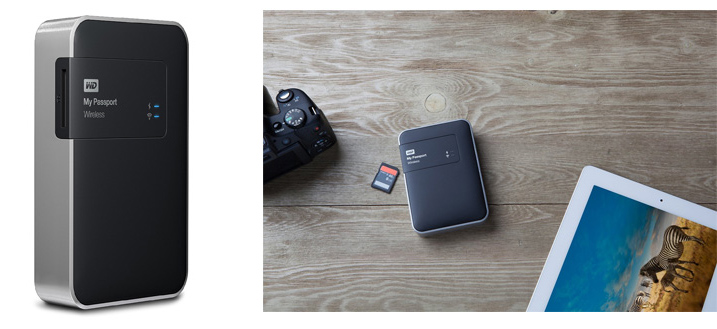
This new workflow is possible because of a device that was recently released: WD My Passport Wireless. The device has a variety of interesting features, but the most important one, from a photography standpoint, is the SD Memory Card Reader. When you insert a memory card into the reader, it automatically backs up all the contents of the card to the drive. Plus, it supports incremental backups, which means that it backs up only new files rather than those previously transferred.

Images Travel Photography Simplified 05

Photo courtesy Western Digital

This device makes it possible to travel without a computer. Also, it minimizes the risk of losing images due to memory card failure. Now, I incrementally backup my new images multiple times throughout the day, and by the end of the day back at the hotel, I already have all of my new images on two devices.

Another feature of the WD My Drive Wireless that excites me as a photographer, is its ability to connect to the drive with a mobile app and grab any photos (JPEGs only) for editing.

Images Travel Photography Simplified 06

4. Rapid Editing

Lightroom is my primary photography editing tool. At some point, I realized that 80% of my editing steps were identical for every photo. This meant that only 20% of my efforts were spent on what really mattered: making every photo unique. I also recognized that if I could automate the 80%, then I could drastically reduce the time I spend in front of the computer.

The obvious choice for editing automation was Lightroom’s preset functionality. The presets allow users to record their editing steps in Lightroom for later use.

The main obstacle in developing and implementing a new system was Lightroom’s presets limitations. You have probably already noticed that it is rare when you apply one of the presets to a photo that are happy with the final results. You still have to dive deeper into the Lightroom editing tools to compensate for the level of exposure, lighting conditions, shadows, and the dynamic range of the scene.

I solved this problem by introducing a two-level editing system which I call Lightroom Rapid Editing. I separated my Lightroom presets into two categories:

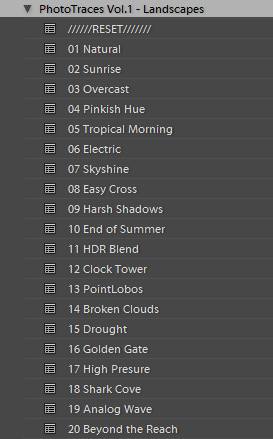
Style Presets: The presets that establish the artistic style and reflect our creative vision. For example, a dreamy, warm look or an aggressive and contrasted style, soft black & white or a vibrant cross processed treatment.

Images Travel Photography Simplified 07

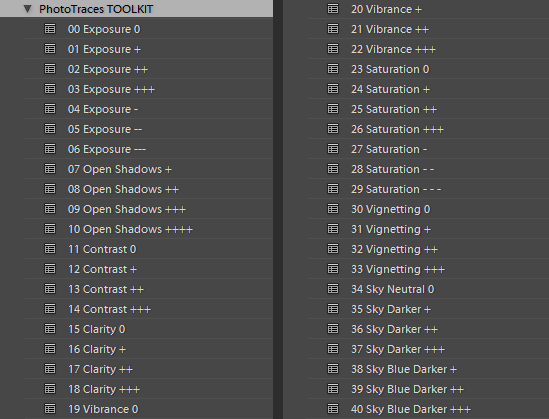
Adjustment Presets: The presets that do affect the style of the photograph but help us to fine-tune the following parameters: exposure, shadow recovery, contrast, clarity, vignetting. I called the collection of the adjustment presets the TOOLKIT.

Images Travel Photography Simplified 08

This is how my workflow looked after I implemented the two level preset system:

First, I applied one of the Style Presets. Then, I used the Adjustment Presets from the TOOLKIT to fine tune the image. Simple, effective, and automated. The Lightroom Rapid Editing System reduced my editing time by more than half and made my photography more consistent.

Here is a quick demonstration:

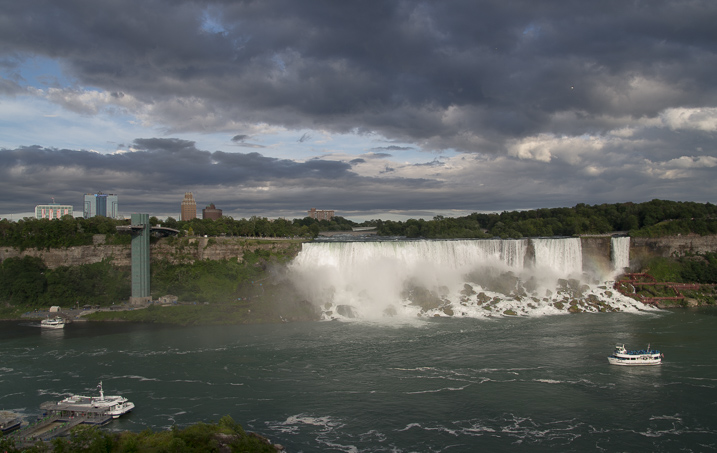
For the demonstration, I selected a photo of Niagara Falls (American and Bridal Veil Falls). The scene was somewhat challenging as the water of the falls, was much brighter than the rest of the scene. I intentionally set exposure for the brightest areas, making sure I preserved enough details in the water. It resulted in an underexposed capture, making it more challenging to edit.

Images Travel Photography Simplified 09

First, I applied one of my favorite presets from the Landscape Collection – Natural. Second, I used the following TOOLKIT adjustments (Adjustment Presets):

  • 01 Exposure +
  • 08 Open Shadows ++
  • 17 Clarity ++
  • 31 Vignetting +

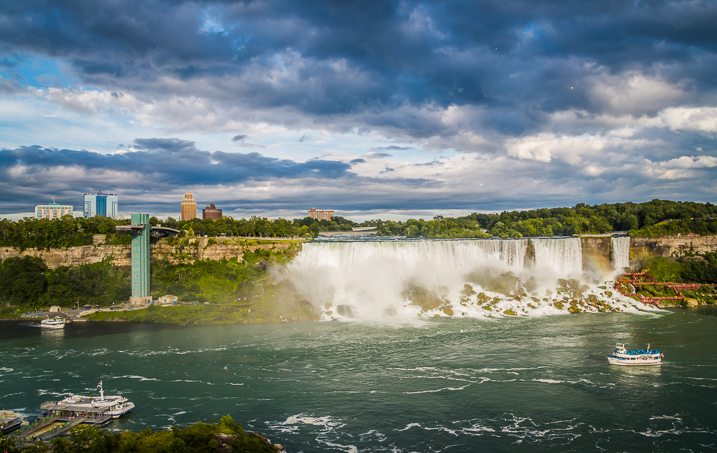
Here is the result. It took me five clicks, and no more than two minutes to complete the editing. To record my editing steps for future reference and easy sharing, I used Lightroom Rapid Editing Formula: Natural (02, 08, 17, 31).

Images Travel Photography Simplified 10

Read a more detailed explanation of my travel photography workflow here: Photo Editing Workflow for Travel Photography

Conclusion

I believe that simplification is the key factor in mastering any complex process. If you reject unnecessary complexity by drastically simplifying it, you can invest more time and effort into what really matters. The changes I listed above did not happen overnight but they were always driven by the desire to simplify my photography.

How have you simplified your photography? Share with us in the comments below.


If you found this helpful, get Viktor’s Lightroom Rapid Editing System for Travel Photography Course 50% off now at SnapnDeals for a limited time only – February 9th-23rd, 2016.

googletag.cmd.push(function() {
tablet_slots.push( googletag.defineSlot( “/1005424/_dPSv4_tab-all-article-bottom_(300×250)”, [300, 250], “pb-ad-78623” ).addService( googletag.pubads() ) ); } );

googletag.cmd.push(function() {
mobile_slots.push( googletag.defineSlot( “/1005424/_dPSv4_mob-all-article-bottom_(300×250)”, [300, 250], “pb-ad-78158” ).addService( googletag.pubads() ) ); } );

The post Travel Photography Simplified: 4 Changes that Made me a Better Photographer by Viktor Elizarov appeared first on Digital Photography School.

Digital Photography School

 
Comments Off on Travel Photography Simplified: 4 Changes that Made me a Better Photographer

Posted in Photography


ZY Optics launches improved Speedmaster F0.95 35mm lens, claiming 30% better resolution

17 Feb
The new model (right) is smaller and lighter than the original version of the lens (left)

The Shenyang Zhongyi Optical & Electronic Company Limited has introduced an updated version of its super-fast 35mm lens for APS-C-sensor cameras that it claims has better resolution and reduced chromatic aberrations. The manual focus Mitakon Speedmaster 35mm F0.95 II is also smaller and lighter than the original model, with a length of 60mm instead of 82mm, a filter thread of 55mm instead of 58mm and a weight of 460g/1.06lb compared to 680g/1.5lb.

The latest version uses a new optical design that features 11 elements in 8 groups, and includes a single extra-low dispersion element, two extra-high refractive index elements, and three elements made in high-refractive glass. The company says the new design produces 30% more resolution via better overall sharpness and reduced chromatic aberrations. Performance wide open is also greatly improved, ZY Optics says.

A click-less aperture ring makes the lens suitable for video recording, so it is a shame the Micro Four Thirds system isn’t supported in the initial offering. Fuji X, Sony E and EOS-M camera system owners will be provided for though.

The lens costs $ 599, and you can learn more on the ZY Optics website.

Press release:

ZY Optics releases the improved Zhongyi Mitakon Speedmaster 35mm f/0.95 Mark II for Sony E / Fuji X / EOS-M cameras

Shenyang China, Feb 14, 2016 – Zhongyi Optics (ZY Optics) has released an improved version of their first f/0.95 lens, Zhongyi Mitakon Speedmaster 35mm f/0.95 Mark II. The mark II verison features a drastic improvement of sharpness, better control of chromatic abberations and much compact size. The new version comes with a Fuji X / Sony E / EOS-M mount and is able to cover the image circle of APS-C sized sensors.

Zhongyi Mitakon Speedmaster 35mm f/0.95 Mark II is a ultra-fast prime lens which provides a 35mm-equivalent focal length of around 53mm in APS-C cameras. A maximum aperture of f/0.95 makes it extremely convenient to shoot at a low light conditions without flash. The new optical design incorporates a 11 elements in 8 groups structure, including 1pc of Extralow disperson elements, 2 pcs of Extra-high Refractive Index elements and 3pcs of High Refractive Index elements. This structure effectively improved the image resolution by 30% compared to the previous version from corners to corners. This also controls the chromatic abberations very well and deliver excellent image sharpness even at f/0.95.

The new Speedmaster 35mm f/0.95 is light and compact. The total weight is reduced from 680g to 460g, making it an ideal companion for the compact mirrorless cameras. Manual focus design and a click-less, silent aperture ring promote smooth handling and are especially well-suited to video applications. The lens is built in metallic enclosure with additional protective process and finest finishing, which gives extra durability and aesthetic.

Pricing & Availability
Mitakon Speedmaster 35mm f/0.95 is now available to purchase at ZY Optics authorized resellers and at our official website (http://www.zyoptics.net/). The Recommended Retail price is USD 599.

Articles: Digital Photography Review (dpreview.com)

 
Comments Off on ZY Optics launches improved Speedmaster F0.95 35mm lens, claiming 30% better resolution

Posted in Uncategorized


10 Ways That Understanding Your Camera Leads to Better Images

02 Feb

Perhaps you’ve heard this one before, or said even it yourself: I could take great pictures too, if I had your camera. But saying pictures are great because of the camera is like saying Michael Jordan was great because of his shoes. Sure, the camera determines an image’s resolution, but give a $ 7,000 camera to a toddler and you’ll have Continue Reading

The post 10 Ways That Understanding Your Camera Leads to Better Images appeared first on Photodoto.


Photodoto

 
Comments Off on 10 Ways That Understanding Your Camera Leads to Better Images

Posted in Photography


Better together: A photographer’s trip to Southeast Asia with a limbless man

31 Jan

$ (document).ready(function() { SampleGalleryV2({“containerId”:”embeddedSampleGallery_8749851343″,”galleryId”:”8749851343″,”isEmbeddedWidget”:true,”selectedImageIndex”:0,”startInCommentsView”:false,”isMobile”:false}) });

‘If I Can…’ is the motto Chris Koch lives by. Born without arms and legs, the Canadian travels as a motivational speaker, challenging his audiences to live their lives to their greatest potential and push beyond difficulties. Portrait and wedding photographer Anna Tenne happened to meet Chris before he gave a presentation in her town of Coonabarabran, Australia. When Chris mentioned to her it was a lifelong goal to visit Southeast Asia, a spark ignited and eventually inspired the two fast friends to pack their bags and head for Thailand.

Tenne’s aim was to help Chris spread his message while she photographed the journey. But what she didn’t expect, as she tells Resource Travel, was how much the trip would teach and inspire her. Chris’ contagious smile is evident in her photos, and the positive impact he has on the people he meets is plain to see. Take a look at some of her photos here and head to Resource Travel to read the full story.

Articles: Digital Photography Review (dpreview.com)

 
Comments Off on Better together: A photographer’s trip to Southeast Asia with a limbless man

Posted in Uncategorized


Should you Study Photography at College or are There Better Options Now?

30 Jan

If someone were to ask me whether it’s worth going to college or university to study for a degree in photography I would find that a difficult question to answer. I don’t think there is much value in studying photography at college, yet I don’t want to destroy anyone’s dreams (the good news is that there are plenty of other less expensive paths to a photography career).

If you are thinking about studying photography at tertiary level, these are the two most important questions to ask:

  1. What will you learn during your course?
  2. How much will it cost you?
photography education

You can learn a lot about photography by going to Amazon and spending a few hundred dollars on photography books, or purchase ebooks like on offer here on dPS. I’ve learned far more from books than I ever did from my photography degree.

What will you learn?

The first is important because, incredible as it may seem, you may not actually learn much while taking a photography degree. I know this is true because I studied photography at what was supposedly the UK’s top photography college, only to find that the level of teaching was so low, that I made my way through the three year degree learning next to nothing.

Let me give you an example. In our third year, the tutor gave a single one hour class per week. After a few weeks he gave up on doing that because only five or six students (out of a total of around 30) were turning up. The reason for the low turnout? Most of the others were so worried about writing the required thesis that they couldn’t concentrate on photography. And the reason they were so worried? The same tutor had spent weeks explaining how the thesis would be one of the most difficult things they had ever done, without giving any practical support or solutions to us.

Another example (bear in mind that I took my course between 1996 and 1999). We had one computer between 90 students, with an out of date version of Photoshop installed on it. The college had identified digital photography as an important trend – yet didn’t support the students enough to learn it.

GotCredit

By GotCredit

The truth is that degree courses are a tremendously inefficient way to learn. Whereas a typical working week is filled with 40 odd hours of work, a typical week in our course only had a few hours work. The rest of the time was wasted.

Plus, you may have the additional living costs of moving to another part of the country to study, and the loss of income from not being able to work a full time job while you are at college.

My theory is that our course was caught in bit of a time warp – the tutors probably came from an era when it was normal for arts courses to take a relaxed approach to education. University education was free in the UK at that time, and there was little concept of students paying for an education and expecting to receive value for money in return. Whether that has changed since then I have no way of knowing – I hope so.

The world of education has changed tremendously since I was at college. You can go online and learn by reading the blogs of some of the top names in the business. You can buy books, ebooks and video courses for just about any aspect of photography you care to learn about. Computers are much cheaper, and almost every student would have one.

You can also learn by taking workshops with some of the best photographers in your field. They may seem expensive, but it is a pittance in relation to the cost of obtaining a degree.

photography education

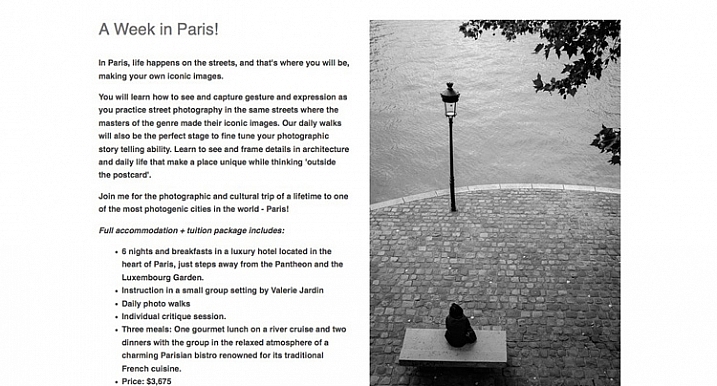
dPS writer Valerie Jardin runs photography workshops in the United States, Australia and Europe.

If you were going to study a photography degree today, the main question you have to ask is, what value does it give you over and above what you can learn from books, online resources, and workshops? Here are some ideas.

Interaction with other photography students: If you struggle to find like-minded people to talk about photography with, then this may be an attraction.

Industry experience: Does your course give you actual experience working in the area of photography that you want to get into?

Industry contacts: Very important, as these contacts will help you when you leave college to embark on your career.

Solid business training: Most photographers are self-employed, so it is essential to know the basics of self-employment and running a business. If your chosen course doesn’t teach these, then don’t even consider it. You won’t be prepared for the practical side of a career in photography.

An understanding of the newer ways of earning money from photography: Do the tutors on your course understand the emerging world of the business of workshops, and creating ebooks and video courses to sell online? This is important because these are all ways you can bring income into your business. One day there may be more money to be made from teaching photography, than from doing commercial photography assignments, and you need to be ready for that possibility.

The quality of your tutor:. Is there a highly regarded tutor at your college who can help you get started on your journey as a professional?

Another important factor is that drive and determination, combined with some innate creative talent, good business sense, and a willingness to learn are the primary characteristics you need for a successful career in photography. How many of these are taught at college?

photography education

Digital Photography School has a fine selection of photography ebooks for you to learn from.

How much will your course cost?

How much will your photography course cost you to study? The answer varies widely because it depends on where you live, and where you’d like to study. Bear in mind that graduating from college with lots of debt is a financial handicap that may hold you back for many years to come. Don’t forget to factor in living costs, and loss of income, as well as the cost of the course itself.

A good exercise is to calculate how much your course is going to cost you each week. Then, once you know how much you will learn during each week, you get a true idea of value.

In my opinion, the only reason that you should get into debt for an education is if you are studying something such as medicine, engineering or law which holds the promise of a lucrative career path at the end of it.

GotCredit

By GotCredit

Photography doesn’t have that lucrative career path. Some photographers make lots of money, some don’t. Lots of photography students (including some from my course) end up in careers other than photography. There are no guarantees in this business, and you need to be aware of that.

In the book The Millionaire Next Door the authors take in-depth look at the characteristics of the typical American millionaire. Most of them leave school early, start a successful business, and build it up. Very few millionaires have a college education. Why? The years spent studying (and therefore not working or building up a business) and the debt built up during that time prevents most people, regardless of qualifications or earning potential, from building up enough income or assets to become millionaires.

The solution

If you have a burning desire to make a living from photography, then look at these learning opportunities first.

  • Books and ebooks
  • Video courses provided by photographers and organizations like Lynda.com

    photography education

    DPS has two video courses for photographers. There are countless others available online.

  • Workshops (half-day and full-day)
  • Longer workshops (two days to a fortnight)
  • Part-time courses provided by local schools and colleges
  • Online courses provided by organizations like the New York Institute of Photography (I have no experience of these courses and no idea whether they are any good, so do your research).

All of these will be significantly less expensive than a photography degree, and can be carried out in your spare time while you have a full-time job.

Another approach is to look for a job in the industry. While you might not immediately be able to get a position that you really want (such as an assistant for a prestigious advertising photographer) you may be able to work in a related position.

For example, you might get a job working for a picture agency, a job as a receptionist in a portrait studio, a position working for a photography magazine, a job as a picture editor somewhere – you get the idea. There are lots of possibilities, and working as closely as you can to the area you want to end up will give you the opportunity to learn from established professionals and make the contacts you need to develop your career.

Given my experiences I would never advise anyone to study photography at college or university. However, I appreciate that there must be courses that are far better than the one I took. If you had a positive experience studying photography at college I’d love to hear about it, please post your comments below and let’s discuss it.


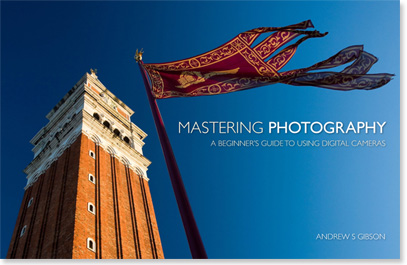
Mastering Photography

Mastering Photography ebook by Andrew S Gibson

My ebook Mastering Photography: A Beginner’s Guide to Using Digital Cameras introduces you to photography and helps you make the most out of your digital camera. It’s aimed at beginners and will teach you how to take your camera off automatic and start creating the photos you see in your mind’s eye. Click the link to learn more or buy.

googletag.cmd.push(function() {
tablet_slots.push( googletag.defineSlot( “/1005424/_dPSv4_tab-all-article-bottom_(300×250)”, [300, 250], “pb-ad-78623” ).addService( googletag.pubads() ) ); } );

googletag.cmd.push(function() {
mobile_slots.push( googletag.defineSlot( “/1005424/_dPSv4_mob-all-article-bottom_(300×250)”, [300, 250], “pb-ad-78158” ).addService( googletag.pubads() ) ); } );

The post Should you Study Photography at College or are There Better Options Now? by Andrew S. Gibson appeared first on Digital Photography School.

Digital Photography School

 
Comments Off on Should you Study Photography at College or are There Better Options Now?

Posted in Photography


Why Taking Pictures of Your Pets Will Help Make You a Better Photographer

27 Jan

If you have a pet, it may stand to reason that you already point your camera at it a fair amount. Why not? Pets, whether they are cats, dogs, or even chinchillas, tend to be photogenic. Beyond that, as a photographer, your pet is a subject you already share a strong emotional bond with, so it’s only natural to take a few snapshots along the way.

pet-photography-to-improve-camera-skills-9914

As a photographic genre, pet photography can go well beyond that of the simple snapshot. If you start to dissect the various disciplines it requires, you may notice that it involves a broader spectrum of skill sets than many other kinds of photography. From lighting, to camera control, to managing a difficult subject, photographing your pets can help you learn, and reinforce a great deal of camera craft that can be transferred across many other genres.

The important factor here is that your subject, your pet, is generally far more accessible to practice with than other subjects, such as people.

Even if you think pet photography isn’t something you’re ultimately interested in, this article is intended to demonstrate the skills and disciplines you can hone on pets, and then transfer effortlessly to other genres.

Camera craft

pet-photography-to-improve-camera-skills-8431

If you’re new to photography, this is the most important point. Things like aperture, shutter speed, and ISO all need relentless practice and reinforcement when you’re learning your way around the camera. Sure, you could just use an apple on a table, but having a moving subject will force you to act quicker, and make decisions on the fly. This kind of mastery over your camera will allow you to react faster to any changes in your subject, and will allow you to catch many images you may otherwise have missed while fiddling with the dials.

Camera on hand

One of the most given pieces of advice to photographers is to always have your camera with you. It’s good advice, but it’s not easy to implement. By dedicating yourself to photographing your pets, you’ll already be taking a step in the right direction. This is especially true if you have a dog that you walk regularly. Just make sure the camera goes with you on your walks, and you’ll be ready for any opportunity that presents itself, including ones that don’t involve your pet.

As a bonus, dog walking is an excellent excuse to be out during golden hour every day.

Patience

pet-photography-to-improve-camera-skills-9944

Photographing pets is hard. This difficulty has nothing at all to do with any technical skills with the camera. Animals tend to be impatient, disinterested, distractible, and sometimes skittish. With the exception of reasonably well-trained dogs, you will probably have a hard time getting most other animals to do what you need. Just imagine trying to give an iguana commands.

The key here is patience. Often you will have to wait frustratingly long periods of time before a shot presents itself. By understanding this, you can focus your energy on the shot when it does appear, rather than the time leading up to it. It is also usually better to wait for something natural to happen, than to force something artificial.

This kind of patience can take a while to develop, but it is a high value skill that transfers well across the photographic disciplines. Your wildlife photography, portraits (especially child portraits), street photography, and sports photography would all benefit from this trait.

Unpredictability

pet-photography-to-improve-camera-skills-0113

Animals are unpredictable. This is great news if you’re trying to hone your skills. Leveraging that unpredictability as a learning tool will allow you to react to different situations much faster. This could be as simple as pumping up the ISO without thinking about it, or even swapping lenses in seconds without a thought.

The best part is that it’s this unpredictability that often leads to the most interesting photos, or at least the funniest.

Lighting

Whether it’s natural or artificial, lighting is probably the most complex and multifaceted of the photographic skill sets. While not difficult, there is a lot to it, and it takes a significant amount of time to learn, and then master.

With a pet, you have constant access to a test subject for any new lighting technique you want to try. If something isn’t right, you can take your time and alter things as you need, without having to worry about taking up someone else’s time.

pet-photography-to-improve-camera-skills-0795

Individual lighting techniques tend to work as well with animals as they do with people. Once you have a setup the way you want it, often all you will need to do to switch to a human subject, is raise the lights up. If you’re using natural light, you wouldn’t even need to do that.

In the end

There is a lot of contention out there about whether or not photographers should share photos of their pets. That’s up to you, nobody else. Share them or not, as long as you’re putting the hours in and getting the experience, that’s all that matters.

Hopefully you can see how dedicating time to photographing your pets can help you to improve a broad set of skills simultaneously. By removing accessibility issues and keeping costs minimal (a bag of treats is a cost, right?) you can ramp up the time you spend practicing, and reach the top of the learning curve in no time.

If nothing else, can spending some extra time with your pet be a bad thing?

googletag.cmd.push(function() {
tablet_slots.push( googletag.defineSlot( “/1005424/_dPSv4_tab-all-article-bottom_(300×250)”, [300, 250], “pb-ad-78623” ).addService( googletag.pubads() ) ); } );

googletag.cmd.push(function() {
mobile_slots.push( googletag.defineSlot( “/1005424/_dPSv4_mob-all-article-bottom_(300×250)”, [300, 250], “pb-ad-78158” ).addService( googletag.pubads() ) ); } );

The post Why Taking Pictures of Your Pets Will Help Make You a Better Photographer by John McIntire appeared first on Digital Photography School.

Digital Photography School

 
Comments Off on Why Taking Pictures of Your Pets Will Help Make You a Better Photographer

Posted in Photography


8 Tips for Better Pet Photography

20 Jan

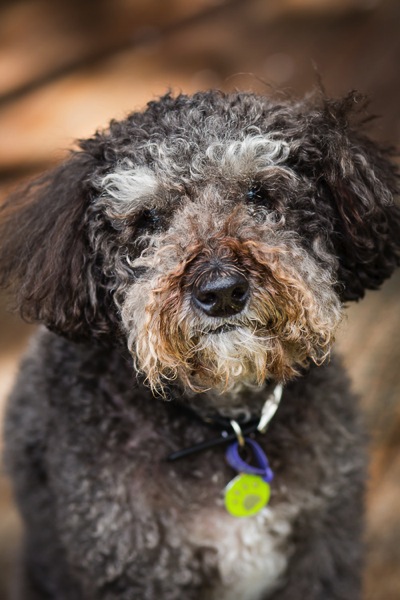
Pets have always been a big part of my life, and are important members of many of the families I photograph. I encourage my clients to include pets in their photo sessions wherever possible. Animals bring a whole new dynamic to a family photo shoot, providing a focus for the children, and a great icebreaker for all parties.

My interest in pet photography widened when a colleague invited me to join a group called Photographers for Animal Rescue. It is a group of professional photographers who, outside of their paid work, provide pro bono photographs to animal shelters. The theory behind it is that a good photograph greatly improves an animal’s chance of being re-homed, but few shelters have the budget for professional photography.

Image A

During my time with this group, I have been lucky enough to photograph dogs, cats, rabbits, and even pet rats. All of these animals have different characteristics and behaviour, and each needs to be approached differently by the photographer.

Tip #1: A word on safety

All pets, no matter how docile, have the capacity to bite or scratch. This is especially true of rescue pets, who may have experienced abuse by humans in the past, and can be mistrusting and unpredictable.

When photographing an animal for the first time, spend time getting to know each other. Allow the animal to sniff you, your clothing, and the camera. Offer treats, and gentle petting if the animal will allow you. Sudden movements or loud noises may startle a timid animal and cause it to retreat or attack.

Image ETip #2: Dogs

Humankind’s best friend is the most cooperative of all pets. Generally, dogs respond to verbal commands and treats, and can be physically positioned to take advantage of lighting and optimal shooting angles.

There is an entire article here on dPS devoted to photographing running dogs, so here I will share some tips for capturing other endearing expressions and moments.

Tip #3: My best friend

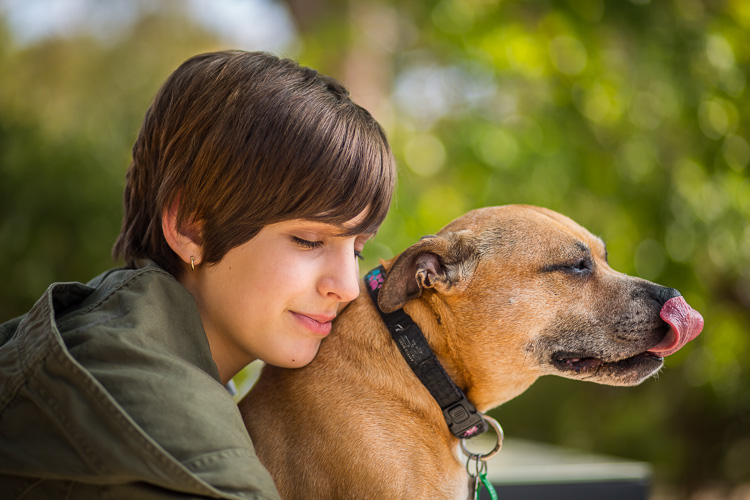
Dogs are very much part of the human families to which they belong. The most treasured photographs are often the ones in which dogs are interacting with family members. Consider when those moments of connection might occur, so that you can be ready to capture them. It may be in the moments when your child arrives home from school to a joyful canine greeting, or when your mother sits in her favourite chair with her dog on her lap.

Image B

As with human portraits, setting and lighting help to convey mood and emotion. The photo above, shot with an 85mm lens, illustrates the bond between my youngest daughter and a family dog. Light reflected off the pavement below them, and shallow depth-of-field achieved with an aperture of f/1.8, creates a soft dreamy image that evokes quiet trust and friendship.

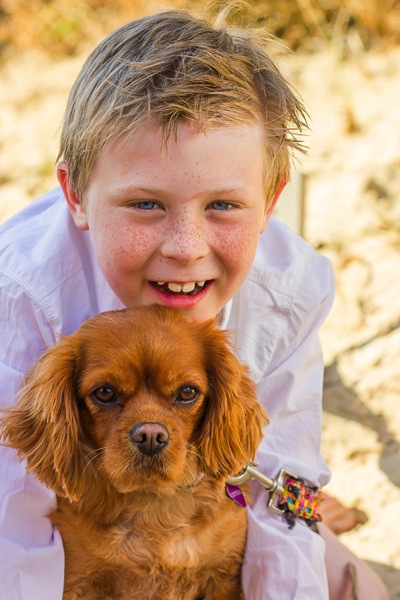
This photo of a boy and his dog was part of a family photo shoot for a client, who lives by the beach. I wanted to capture the beach environment, but the afternoon sun was too harsh to shoot. I found shade behind a beach bathing-box, and positioned my subjects to use light reflected off the surrounding sand. Boy and dog are on different focal planes, so I selected an aperture of f/5.0, which allowed me to keep both in focus while softening the background.

Image C

Tip #4: The doggy smile

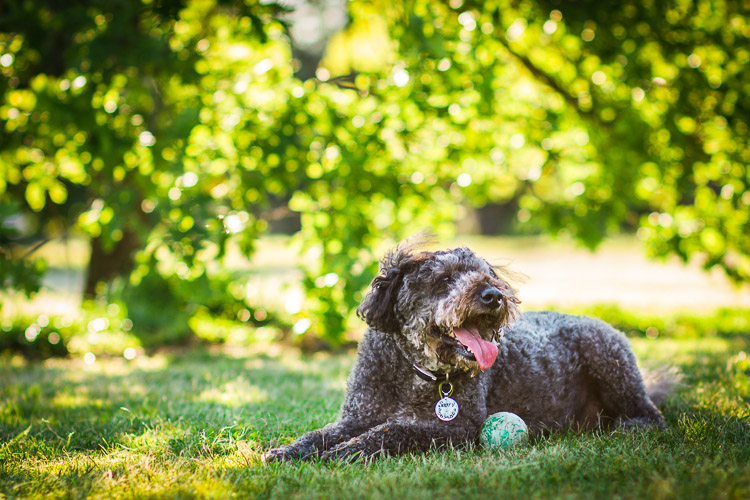
Dogs often smile during, or after, vigorous exercise. If you don’t want to photograph the dog in motion, you can throw a ball, or run around with him for a few minutes, before coaxing him into position. The image below shows our dog smiling as he cools off in the shade, following a manic ball-throwing session. The shade provides even lighting on the dog, and f/2.2 turns the leafy background into lovely bokeh.

Image D

Tip #5: The tilted head

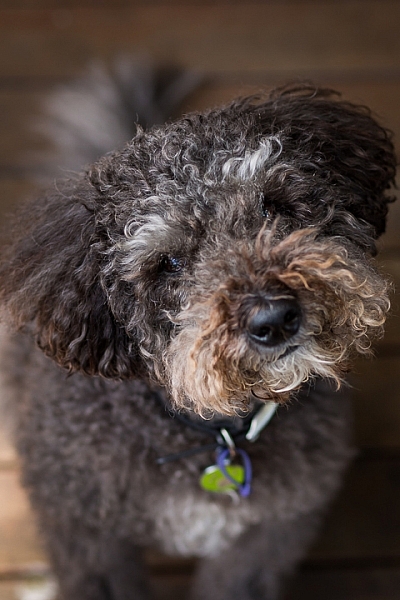
Have the dog sitting on the ground, so that you are shooting at a slight downward angle. Make whining sounds or cat noises – any sound that will pique the dog’s curiosity. Most dogs will cock their head to one side and look at you.

Image E head tilt

Tip #6: Cats

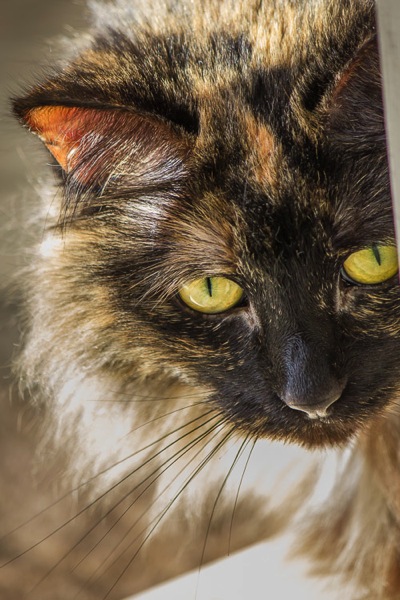
Cats, with their striking eyes and long whiskers, make rewarding photographic subjects. Unlike dogs, they won’t sit where they’re told, and will only favour you with eye contact when it suits them. Photographing cats requires patience and stealth!

Cats are natural predators, and even adults usually respond to a pom-pom, or toy dangled from a thread. Play peek-a-boo with the toy around corners, or furniture, to coax the cat into the position you want. If possible, confine the cat to a room where you can close the door.

Use your fingernails to make scratching sounds on carpet, walls, or even your camera body, and the cat will look in the direction of the sound.

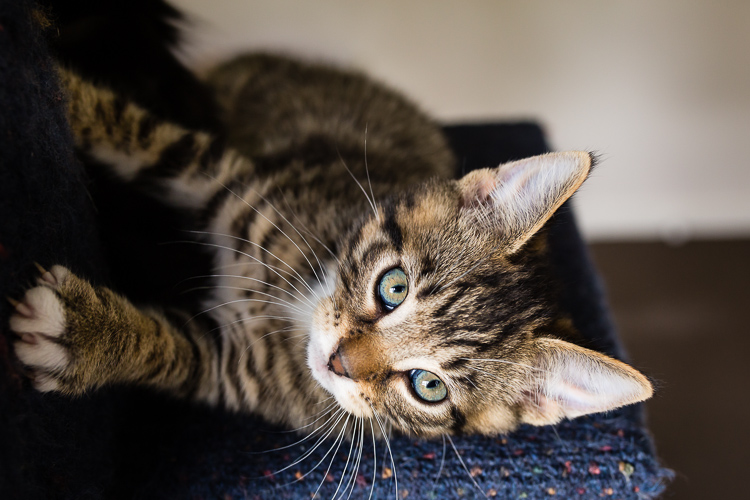
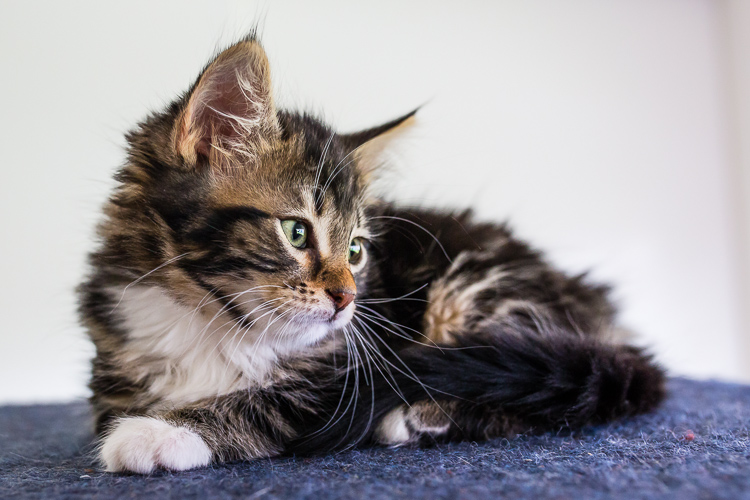
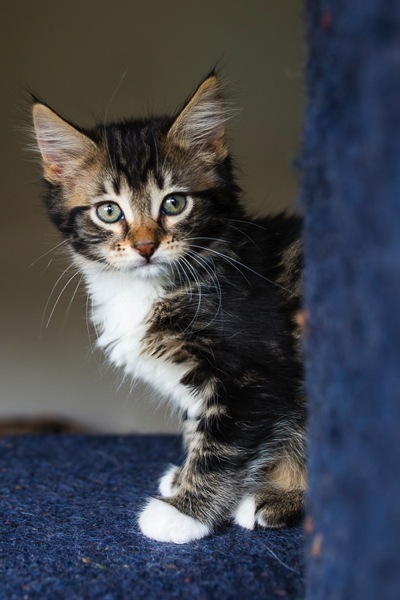
The photos of the kittens below were shot in a small room, with one window. The cats were on a multi-level climbing post, which I pulled close to the window. I stood between the window and the climbing post, and coaxed the cats to look towards the window so that I could get catch-lights in their eyes. These images were shot using ISO 2000, at f/4.0 with a 35mm lens – my go-to lens when working in tight spaces.

Image G

Image I

Image F

Image H

Backlighting can also be effective in highlighting fur, which creates a halo effect and frames the cat’s face.

Image J

Tip #7: Rabbits

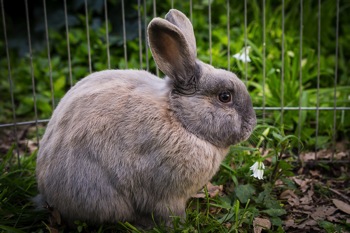
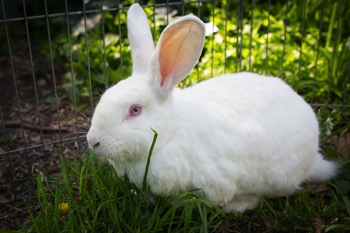
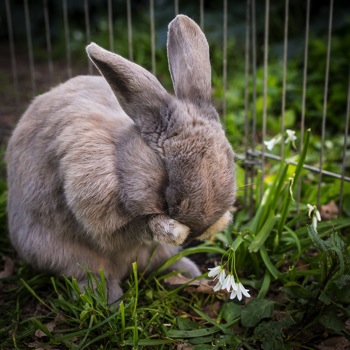
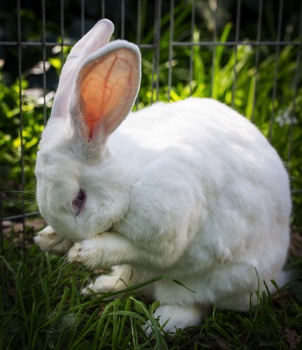
There are few things cuter than a rabbit washing its face. Rabbits love to be clean, and if you wait long enough, most will wash themselves without prompting. You can speed up this process by holding and petting the rabbit. When you put it down, it will usually be in a hurry to wash away the people smells you have left behind, so get down low and have your camera ready.

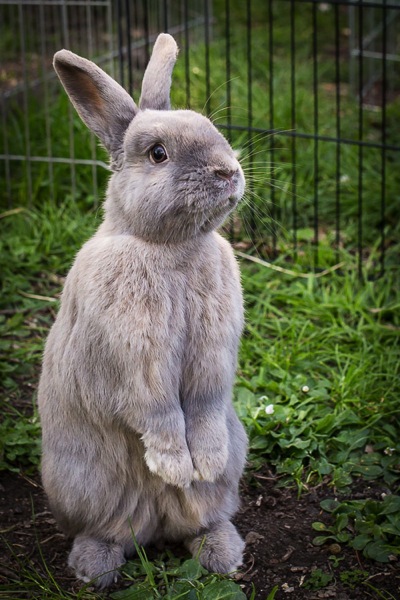
The photos below show Latte and Zeus, two rescue rabbits, photographed first in their default sitting position, and then washing their faces. Both are shot at f/4.0 using a 35mm lens.

Image K Image M
Image L Image N

Often when placed in a new environment (e.g. taken from inside the house, to an outside enclosure) rabbits will stand on their hind legs and check out their new surroundings. Be ready to start shooting as soon as you place the rabbit in the new area. In the photo below, Latte looks like he is begging to be taken home.

Image O

Tip #8: Small critters: mice, rats and hamsters

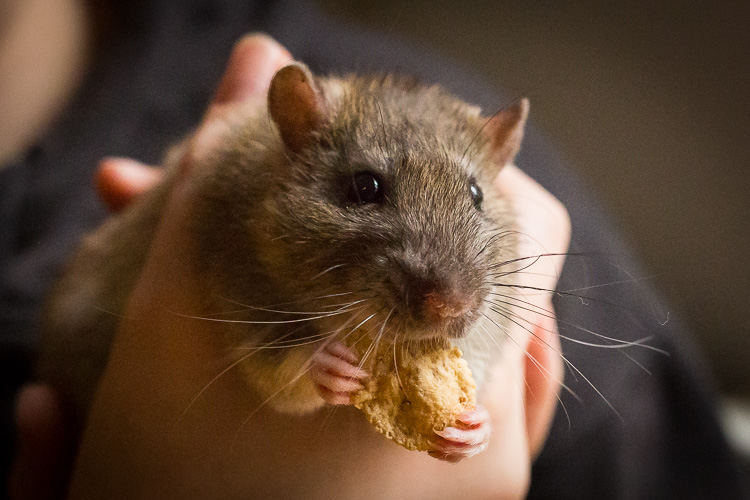
Even some of the most dedicated animal-lovers are squeamish about rodents. I love them! Most appealing are their long whiskers, and the way they hold food in their paws while they’re eating.

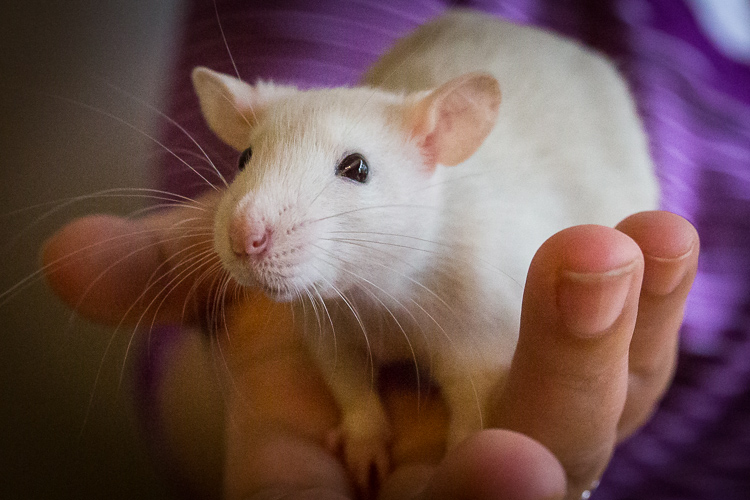
Small creatures move fast. The easiest way photograph these animals is to have someone hold them. Not only does a human hand keep the animal in place, it also conveys scale. Use a macro lens if you have one.

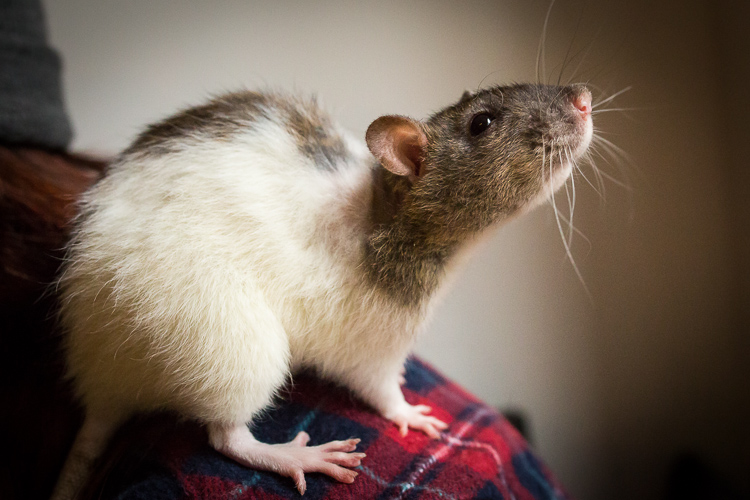
The photographs below show off the rat’s beautiful long whiskers. They also show how small and vulnerable they are, and that they are comfortable being handled.

Image P

Like the kitten photos, these photos of pet rats were shot using only window light. It was a dull day and the light was poor, so we brought the rats as close as possible to the window, and used a very high ISO of 8000 to 10,000. Since the images were only going to be used online, the graininess (noise) was not a problem in this instance.

Image Q

Give the animal a treat, and she will sit still as she holds it in her paws to nibble.

Image R

I hope these tips have given you some ideas for photographing the pets in your life. Please share any other tips and your pet photos in the comments below.

googletag.cmd.push(function() {
tablet_slots.push( googletag.defineSlot( “/1005424/_dPSv4_tab-all-article-bottom_(300×250)”, [300, 250], “pb-ad-78623” ).addService( googletag.pubads() ) ); } );

googletag.cmd.push(function() {
mobile_slots.push( googletag.defineSlot( “/1005424/_dPSv4_mob-all-article-bottom_(300×250)”, [300, 250], “pb-ad-78158” ).addService( googletag.pubads() ) ); } );

The post 8 Tips for Better Pet Photography by Karen Quist appeared first on Digital Photography School.

Digital Photography School

 
Comments Off on 8 Tips for Better Pet Photography

Posted in Photography


How to be a Better Photographer: Camera User Manual University

11 Jan

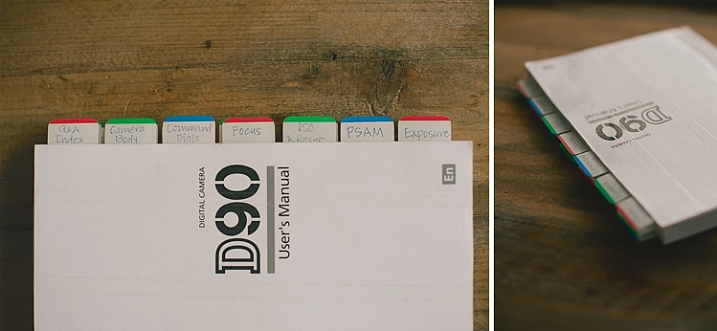
dPSmanual

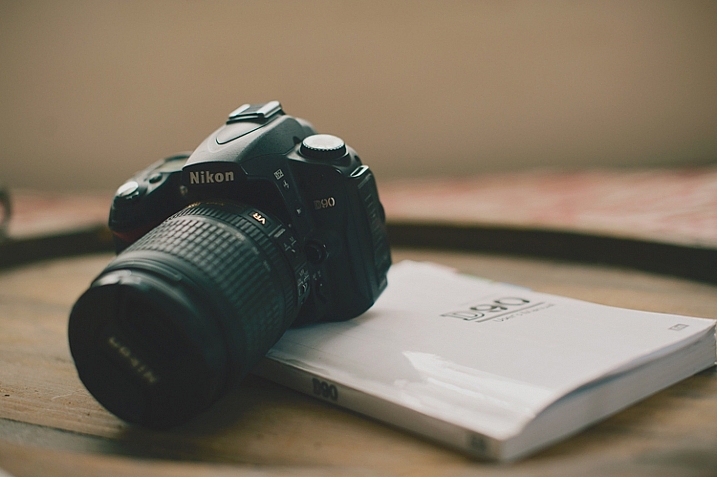
Let me guess; you got a brand new camera, you don’t know how to use it, and you have no idea where to start – about right? Let me introduce you to one of the best ways to get to know your camera inside and out, backward and forward. It’s included with your camera, so there is no extra cost! It’s at your fingertips 24 hours a day. It’s patient, and never gets frustrated if you ask it the same questions over and over again. Welcome to:

Camera User Manual University!

dPScamera

For many of us, getting a brand new camera is beyond exciting. We start trying to use it right away, throwing the manual back in the box, forgotten forever. The problem is, we soon run into frustrations and questions, and end up just putting the camera aside, or searching and asking for the answers one at a time, learning slowly and with difficulty. Or maybe we have even had our camera for ages, and just barely discovered something amazing that it can do.

If I can convince you to actually USE that camera manual, you will start out with much more knowledge than the average camera owner, and you will discover lots of cool stuff that your camera can do, that your seasoned photographer friends may not even know!

I am going to share my first camera manual and how I made it useful for me. These tips might help you transform your boring manual, into something that can actually help you become a better photographer.

Protect Your Manual

dPSprotect

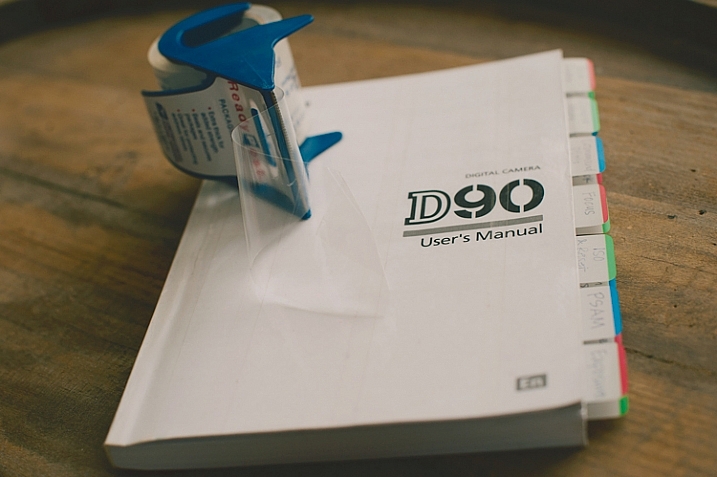
The covers on camera manuals are usually very flimsy, and easily torn or bent. The first thing to do is laminate your cover, so it’s more durable and stays nicer. I did this by simply covering the front and back covers with packaging tape. I made the pieces of tape slightly bigger than the book, and folded them under so the edges were protected also. Take your time with this, and make sure you use a clean surface to avoid bubbles and dirt stuck underneath the tape.

Add Divider Tabs

dPStabs

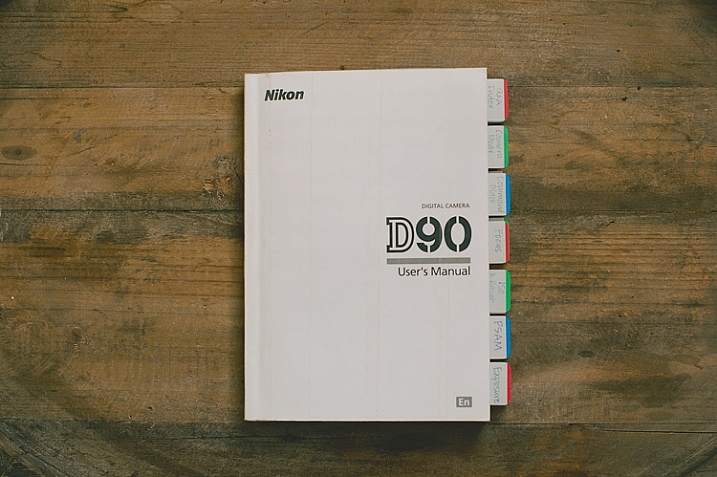
I went through the book and labeled and divided each section, so I could find them at a glance. Not only does this make finding things easier later on, but labelling the tabs and sticking them in each section, gets you familiar with the manual even before you start digging in deeper. You will know what your manual has to offer, and what kind of things you are going to be learning very soon.

I used removable tabs that I bought from an office supply store. They have a slight plastic feel to them, and are very sturdy. I like using removable ones, because you can move them later if you don’t need one of the labels in there.

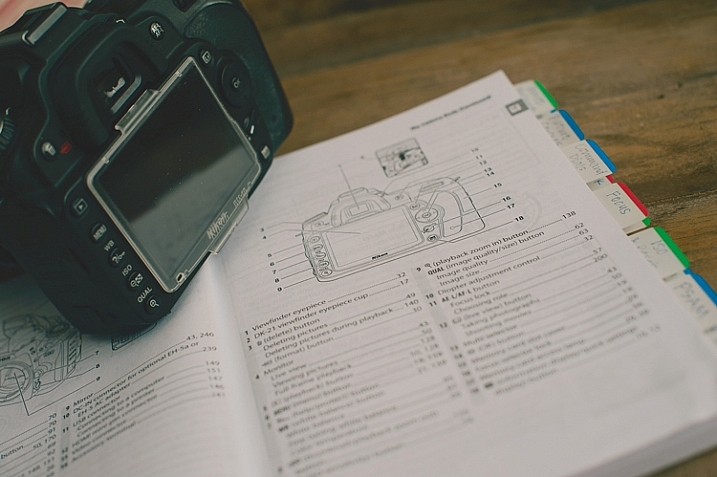
Start at the Beginning

dPSpages

With your camera in your hands, go through the manual from the very beginning. Look at the diagrams, and find each item on your camera body. Even if you don’t understand what something is yet, find it on your camera. Later, as you read more detail, everything will start to come together. Read every page, even if it doesn’t make sense at first. Getting a nice camera is a big investment, so wouldn’t you want to know what it can do?

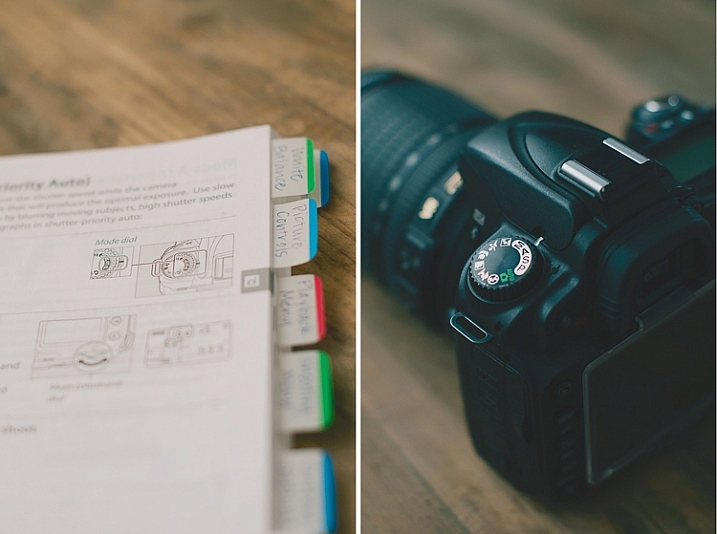
Camera manuals usually have very basic instructions near the beginning of the manual to get you shooting, almost right out of the box. Feel free to read that part, and begin using your camera right away, but don’t stop there! As you work your way through the manual, you will discover the reason you wanted a DSLR in the first place.

Try Everything

dPSdial

As you read and find each dial, button, and menu item on your own camera, give everything a try. If the manual is talking about different shooting modes, dial your camera in to each one, follow the instructions, and try a few test shots. Reading about things is good, but reading and then getting hands-on experience is infinitely better. You will understand what the manual is talking about with more clarity if you try things out for yourself.

Keep in mind that not everything will make sense the first time through, that’s okay. After you’ve practiced awhile, try going back through the manual page by page again. You’ll find that much of what confused you initially, has now become clear.

Once you’ve tried something, you may realize that it isn’t a feature that you will ever use. If that’s the case, just move on, and know that you at least tried it. You may end up wanting to use that feature in the future, and now you know that it exists.

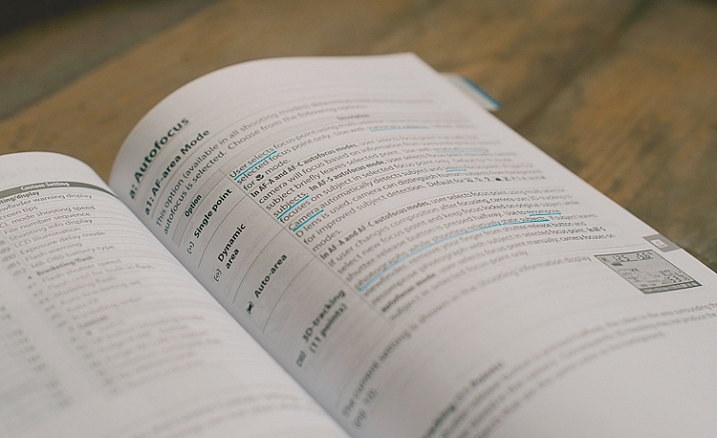
Underline the Key Words

dPSmark

As you are reading through and learning, have a pen handy. Underline (or highlight if that’s your thing) key words that will help you focus on what is most important. Sometimes manuals can be wordy, and hard to understand. If you can zone in on the most important words, it will become more clear. Later, when you are trying to find something, those underlined words will pop out and make it easier to find.

Take notes in the margins if you try something, love it, and know that you will want to remember that in the future. Add an extra tab or sticky note there, or put a star next to it. It’s hard to remember everything you read after one read-through, but if you can quickly go back to your starred items and practice those often, you’ll be well on your way to mastering your camera.

dPSmanual

All of this might seem a little obsessive, and maybe it is for some. However, I have taught many photography classes, and had many one-on-one mentoring sessions with new photographers, and almost every question they ask me about their camera can be found in the manual. Some people learn better from a live teacher, but the great thing about the manual is that you can refer back to it as many times as you need to, and you don’t have to pay anything extra to learn.

Have you attended Camera Manual University? Do you have any tips for making your camera user manual easier to use? I’d love to hear them in the comments.

googletag.cmd.push(function() {
tablet_slots.push( googletag.defineSlot( “/1005424/_dPSv4_tab-all-article-bottom_(300×250)”, [300, 250], “pb-ad-78623” ).addService( googletag.pubads() ) ); } );

googletag.cmd.push(function() {
mobile_slots.push( googletag.defineSlot( “/1005424/_dPSv4_mob-all-article-bottom_(300×250)”, [300, 250], “pb-ad-78158” ).addService( googletag.pubads() ) ); } );

The post How to be a Better Photographer: Camera User Manual University by Melinda Smith appeared first on Digital Photography School.

Digital Photography School

 
Comments Off on How to be a Better Photographer: Camera User Manual University

Posted in Photography