RSS
 

Posts Tagged ‘Better’

Discuss: Better Equipment Versus Knowledge – Which Will Help You Improve Your Photography More?

22 Apr

As a photographer, you always have the urge to buy new equipment thinking it will bring you better results. This might be true, but only up to a certain point, because if you don’t have the knowledge you can’t make the most out of your equipment. I started with a Nikon D3200 and I use it to this day because, in my opinion, it’s not the equipment that is going to help me take better photos.

If you’re asking yourself, “What can I do with my entry-level camera?” then this is the article that’s going to prove that you can achieve great things and be a great photographer with your own camera. There are many photographers that took some amazing pictures with film cameras, photographers like; Andreas Feininger, Henri Cartier-Bresson, Eve Arnold, etc.

What keeps you from taking better photos, your EQUIPMENT or your KNOWLEDGE? - portait in a field

We cannot deny that their cameras were the best of their time. But my point is that even today they could compete with any owner of a fancy camera because having the latest camera is not going to guarantee a better vision.

I’m going to give you some tips and tricks on how to take better photos and overcome the obstacle of not having the latest equipment.

1. Read

The most important thing you can do is to read. Many people skip this step and think that only by practicing will they improve. It is true that you have to practice, but unless you study the theory first there is no way of practicing in an efficient way.

For example, if you read an article about shutter speed and aperture it’s easier the understand the mechanism and then apply it, than trying to figure it out all by yourself.

Start here to get to many great dPS articles and find the topics that interest you the most.

girl reading in the grass - What keeps you from taking better photos, your EQUIPMENT or your KNOWLEDGE?

2. Know your equipment

You just bought your first camera and you are stuck with your kit lens. But before buying a new lens you have to learn the basics. You can use your kit lens for numerous types of photos, from landscapes to portrait photography.

I took more than 5,000 images with my kit lens before buying my second one, and I learned a lot of helpful things. If you’re shooting portraits, 35mm focal length can get a nice bokeh having an aperture of f/4.5. This focal length is perfect because it’s not wide so you’re not going to distort the face and you can have more light than shooting the same lens at 55mm, f/5.6.

3. Know what to buy

Buying equipment can be difficult when you can’t afford expensive things and you have to spend your money right. I am speaking from the perspective of a portrait photographer. My first portrait lens was (and still is my main lens) a 35mm f/1.8. If you want nice bokeh for a cheap price this is the right choice. I’m still exploring with this lens and I always find new perspectives.

Knowledge Over Equipment

Next, I’m going to present some arguments on why better equipment doesn’t necessarily make you a better photographer and on why knowledge can help you overcome your equipment struggles.

Buying new equipment is always tempting, but you have to learn how to make the best of what you already have. The best thing you can do as an amateur is buying an entry-level camera and a prime lens. Stick with it and see if you can come up with a new vision every time you go out to take photos.

At first, I didn’t know how to use manual mode. But do you think buying a better camera is going to help with that? No is the answer, you have to read and understand how the relationship between ISO, shutter speed and aperture affect everything in a photo.

After learning that no picture is the same and the settings are going to change every time, you have to do a lot of trial and error. If you practice enough you can achieve great things. After learning how to use your equipment you have to learn how to process your pictures because it makes a big difference as well.
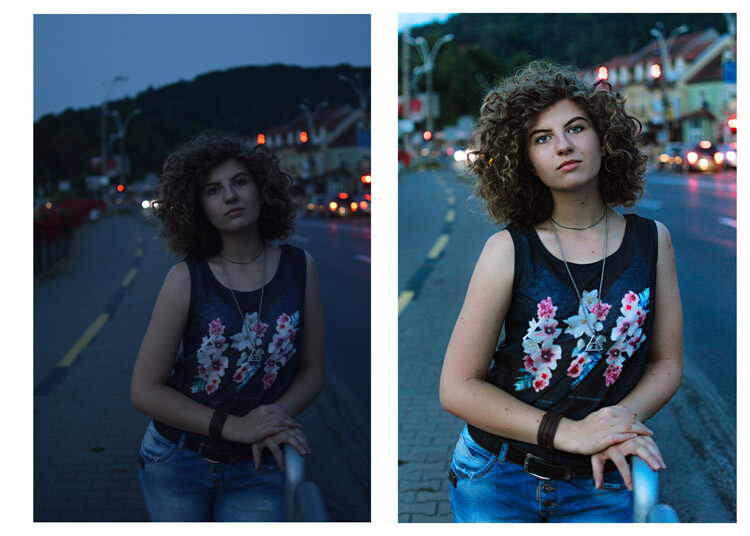
What keeps you from taking better photos, your EQUIPMENT or your KNOWLEDGE? - before and after processing

What keeps you from taking better photos, your EQUIPMENT or your KNOWLEDGE?

The next thing you have to know is that light makes the difference in every picture, you have to learn how to manipulate and control the light. Once you know how light works you are going to love your equipment.

lady and umbrella snowing - What keeps you from taking better photos, your EQUIPMENT or your KNOWLEDGE?

lady in leaves - What keeps you from taking better photos, your EQUIPMENT or your KNOWLEDGE?

When do you need better gear?

There are a few situations where better equipment can be helpful. I’ll give you a few examples and some tips to overcome the difficulties.

1. Shooting in low light conditions

Having expensive equipment can help you here, you can have a higher ISO without a lot of digital noise. With my entry-level camera, I can raise the ISO to 400 and it already looks really noisy. With a full frame camera or even an expensive DX sensor you can raise the ISO to 1600, or 3200 and your image is still going to look fine.

girl walking in the woods in winter - What keeps you from taking better photos, your EQUIPMENT or your KNOWLEDGE?

2. Sports photography

This is another hard thing to do with an amateur camera, you can still achieve great things. Your autofocus is going to play some tricks on you, so you have to work on your timing. Knowing where and when to press the trigger will help your autofocus a lot. Another thing you can do is to learn the panning technique.

Conclusion

So in summary, equipment is just a tool. It doesn’t help you to shape your vision and buying the latest gear as a beginner is not the best choice you can make. When you find that you have difficulty expressing your vision with your current equipment, then you can start thinking about upgrading.

The post Discuss: Better Equipment Versus Knowledge – Which Will Help You Improve Your Photography More? appeared first on Digital Photography School.


Digital Photography School

 
Comments Off on Discuss: Better Equipment Versus Knowledge – Which Will Help You Improve Your Photography More?

Posted in Photography


4 Ways To Make Better Street Portraits While Traveling

19 Apr

One of my favorite things about travel photography is the opportunities it provides to meet interesting people in the street and make portraits of them. Here are some of the things that I have learned that you can put into practice when you are traveling and make street portraits.

Street portraits and travel photography

1. Ask people for permission

It’s surprising how you often get the best results when you ask people for permission to make their portrait. This doesn’t apply all the time – you might see somebody interesting who doesn’t notice that you are there and you get the opportunity to make a great candid portrait.

But more often than not you can get a better result by approaching people and asking permission. The good thing about this approach is that it gives you a great excuse to go up to somebody and ask if you can make their portrait. A good way to phrase it is to explain that you are undertaking a project asking interesting people to pose for you.

Problems can arise with this approach if you don’t speak the local language. But that doesn’t stop you communicating with good body language and a smile. You can point to your camera to indicate you are asking for permission to make a portrait.

It’s worth overcoming the challenges

An alternative approach is to work with a local person who can translate for you. This may be a local photographer who you have made contact with and who is interested in helping you out. Or it may be a fixer who you pay to help you communicate with local people and find photo opportunities that you are unlikely to come across by yourself.

Once you have somebody’s permission you have an immediate advantage that you can spend some time with them to work on creating a good street portrait. For example, let’s say you see an interesting person who is standing in the sun and as a result, the light is too harsh to make a good portrait. If you approach them to ask for permission you can then ask them to stand in the shade so you get the best light.

Street portraits and travel photography

That’s the approach I took with the portrait above, created in a mosque in Delhi. The man approached us in the mosque and explained a few things to us about what we were seeing. When we met him he was standing in the sun. After a few minutes of conversation, we asked if we could make a portrait of him and he said yes. It was easy to find a shady place for him to stand.

2. Photograph character, not beauty

It may be tempting to look for beautiful or handsome people to photograph. And who could blame you? But you’ll create more interesting street portraits full of character if you find interesting people. This means people of both genders and all ages (except children, see next point).

For example, I made the portrait below in the town of San Antonio de Areco in Argentina. This town is famous for its atmospheric bars and gauchos. While taking photos in one of the bars somebody told me there was an elderly couple down the road who loved talking to people and having their photo taken. We went to check out the situation and found the couple sitting out on the street. We had an interesting conversation and I made this portrait.

Street portraits and travel photography

This also shows how you should be open to opportunity. If people are friendly and make suggestions like this, go with the flow and see where it takes you. Interesting things often happen this way.

3. Don’t take too many photos of children

A few years ago I traveled to the town of Tupiza in southern Bolivia. We were walking through the town’s main square and noticed there was a lot of children. It turned out that it was a national sports day and as part of that event, local school children were in the square to participate in sporting activities.

Eventually one of the children noticed that I had a camera and started jumping up and down in front of me, asking me to take his photo. Of course, then other children joined in and soon I had a mob of kids in front of me who all wanted their photos taken. Which I did, and I have a nice memory because of it.

Street portraits and travel photography

Luckily a teacher came along and shooed the kids away. The point of this story is that kids are often easy to photograph, especially in places where they get excited whenever they see a foreigner. But they are not likely to feature in your most interesting or memorable photos.

As a subject, they are too easy. Plus, you have to consider that in some countries local people may view strangers photographing children as suspicious. You’ll get better results by avoiding kids and finding interesting adults.

4. Look for interesting backgrounds

My final tip is to look for interesting backgrounds or places and wait with your camera to see what happens. Have you noticed how some photographers walk rapidly from one place to another, taking photos of anything that catches their eye? The aim of this exercise is to get you to slow down and become attuned to the rhythm of the place you’re in.

If the background is interesting enough, you can wait for somebody to pass by and add an element of human interest. People will usually think that you’re photographing whatever’s in the background and probably won’t even realize they are in the photo.

Here’s an example of that. I found this beautiful scene in Guatemala and waited to see what would happen. Eventually, a man cycled by and I was able to make this photo.

Street portraits and travel photography

Conclusion

When you are traveling with the intention of creating street portraits it takes some work to get the best results. Following the tips in this article, and getting used to approaching people to ask if you can make their portrait will help you a lot with the process.


The Candid Portrait

If you’d like to learn more about street and travel photography then please check out my popular ebook popular ebook The Creative Portrait. Use the code DPS20 for a 20% discount on your first order.

The post 4 Ways To Make Better Street Portraits While Traveling appeared first on Digital Photography School.


Digital Photography School

 
Comments Off on 4 Ways To Make Better Street Portraits While Traveling

Posted in Photography


Tips for Learning How to See the Light and Take Better Photos

13 Apr

Your camera can’t see the light and tones as well as you can. Cameras have not yet been developed to a stage where they can record a tonal range in a single, unmanipulated image as broad as you can see with your eyes.

Portrait of a senior woman being made by a photographer - Tips for Learning How to See the Light and Take Better Photos

Our brains are constantly evaluating the light and making adjustments dynamically so you get to see far more detail in the brightest and darkest areas of whatever you are looking at, as well as in the mid-tones. Understanding this difference between what you see and what your camera records will help you to become a more creative photographer, (and save you time post-processing your photos.)

Different Types of Light

Basically light can be hard or soft, direct or diffused. Direct light, usually from a relatively small light source, creates a hard-edged shadow, like on a sunny day. Light that is diffused, like you experience when the sun is behind a cloud, makes soft shadows or virtually no shadows at all.

Woman selling fresh fruit at a market in Chiang Mai - Tips for Learning How to See the Light and Take Better Photos

Hard light – characterized by high contrast, hard edges, and lots of texture and detail.

Unloading produce at a market in Chiang Mai, Tips for Learning How to See the Light and Take Better Photos

Soft light is characterized by gentle or no shadows, lower contrast, and less texture and detail.

Light will have various other qualities as well depending on the time of day, season, atmospheric conditions, and geographic location. Light can be warm and have a golden tone, mostly in the mornings and evenings. It can also be cold and have a bluish tone, often in city streets where buildings block the sun or on heavily overcast days.

Different Tonal Ranges

Typically with soft light, you have a narrower tonal range (lower contrast). In conditions with soft light, your camera will be more capable of producing images with detail in the shadows and also the highlights, if you expose your photos well.

Tricycle Taxi Rider in Chiang Mai, Tips for Learning How to See the Light and Take Better Photos

Soft Light

With hard light, the tonal range between the brightest and darkest parts of an image can be far more extreme. Your camera may not be capable of recording detail in the highlights and in the darkest parts of your image, in a single frame (I am not concerned with HDR or other manipulations here).

Street scene in Thailand with tricycle taxis and traffic - Tips for Learning How to See the Light and Take Better Photos

Hard Light

As you learn to see light and understand the type of light in which you are photographing, you will get a feel for it and become more creative and more precise technically with your photography.

Using Light to Fit the Mood

If you want to create a gentle portrait with soft, relaxing tones you will not just need your subject to be in the right mood, but you will need the lighting to fit with the mood as well. A soft, diffused light will help you reach your goal whereas trying to create this style of portrait outdoors in the middle of a bright sunny day will be far more difficult.

Portrait of a young Kayan girl - Tips for Learning How to See the Light and Take Better Photos

Soft light here allows for detail in all areas of the image and for a flattering portrait of the girl.

Sometimes working with soft light can be challenging if it is just too flat and dull and offers very little tonal range in your subject. In these situations, I will look to add some alternative light source from a flash or reflector to add a more dynamic look to my photos.

Hard light can make for more dramatic pictures. Using the contrast range so parts of your composition are isolated, either because they are too bright or too dark for your camera to record, is often an effective method towards producing more creative photographs.

Close up of a Hmong woman hand sewing - Tips for Learning How to See the Light and Take Better Photos

The hard light here highlights the hands making the background completely black.

Carefully Control Your Exposures

Taking control of your exposure so you are only rendering the detail in the highlights and allowing the shadow areas to show little or no detail, is a great technique to learn. Alternatively, in hard light situations, you can set your exposure for the dark areas of your composition and you will lose detail in the highlights.

Photographers who are more technically oriented and believe you must have an evenly exposed image with no loss of detail may struggle with this concept.

Buddhist monks walking in the morning, Tips for Learning How to See the Light and Take Better Photos

When you have a concept for a photograph (or series of photographs) you want to make, creating the photos in the best lighting will have a significant impact on your results. Choosing the optimum lighting to create the feeling you want to capture in your photo brings a greater depth to your pictures and more feeling of connection with those who view them.

Concerning yourself primarily with technical details will not have the same effect in many cases.

Getting Creative With Light

Lighting can be a bit of a dilemma if it does not fit the mood or scenario you are wanting to photograph. Pushing yourself to create interesting, captivating images even when you are faced with adverse lighting conditions is a great challenge to embrace and will help you grow as a photographer.

Street festival in Mae Hong Son - Tips for Learning How to See the Light and Take Better Photos

I used some off-camera flash here because the ambient light was very flat.

Pay attention to the light wherever you are, even if you don’t have a camera with you, just see light. Think about it. Consider the qualities of light and how they will affect the photos you take.

Will the light help you or hinder you in creating the style of photographs you want to make?

Buddhist monk lighting a candle taken during a Chiang Mai Photo Workshop

Learn to See Light

If the light is not right for what you want to achieve in your photos you will need to make changes by adding light, from a flash or reflector or another additional light source. Sometimes even just changing your point of view in relation to your subject will have a significant influence on the mood and look of the lighting. For example, using backlighting instead of front or side lighting.

The more you can learn to see the light and understand how it will affect your images, the more creative you can become with your camera. There are some additional tips in the video below to help you see the light.

The post Tips for Learning How to See the Light and Take Better Photos appeared first on Digital Photography School.


Digital Photography School

 
Comments Off on Tips for Learning How to See the Light and Take Better Photos

Posted in Photography


10 Amazing Camera Hacks for Better Dog Photography

13 Mar

In this article, you will learn 10 camera tricks and hacks that could help you take far more interesting dog photography — or photos of any pet, for that matter.

If you love taking pictures of your pooch but don’t feel that you are getting any spectacular results that are worth framing, then perhaps some of the following tips will help inspire you to take your pet and dog photography to the next level.

Let’s see if these 10 dog photography hacks will inspire you to try something new today.

1. Use window light

Use window light - 10 Amazing Camera Hacks for Dog Photography

This might not seem like much of a hack, but it is your job as a photographer to look for the best light. Many photographers say that window light is their favorite light because it’s a soft light that creates beautiful shadows across your subject.

If you are looking for the quickest and easiest way to create a more professional look for your pictures, moving them closer to a soft light source such as a window would be my first tip.

With without window light - 10 Amazing Camera Hacks for Dog Photography

In the image above, you can see the difference between having the dog by the window and not. Not only is the light more dynamic, because your camera will detect more light, but it will use a lower ISO, which all means a cleaner, less “noisy” image.

Photo with window light - 10 Amazing Camera Hacks for Dog Photography

2. Use your phone light

Phone lighting

We probably all know the saying, “Never work with children or animals”. The reason is that they are unpredictable and quite often do not do what you want them to do when you want them to do it. There may be times when your dog is doing something cute, and it is simply not possible to move them to a window to get that perfect lighting.

These days, however, you have access to light right in your pocket. Next time your dog is doing something cute in lousy lighting conditions, rather than pushing that ISO up and just dealing with the bad light, why not introduce some of your own light using the phone in your pocket? It takes seconds to set up and can instantly give your pictures a far more dynamic feel.

Photography camera light - 10 Amazing Camera Hacks for Dog Photography

3. Tin foil

Tin foil - 10 Amazing Camera Hacks for Dog Photography

Now that we have covered the basics of good lighting, we can move on to some of the fun stuff. If you are a fan of beautiful round bokeh (blurred background), then tin foil could be your new best friend. By putting some scrunched up foil behind your subject and shining a light on it, you will instantly get a “starry” bokeh effect.

This technique requires a bit of practice, but my top tips are to use a lower aperture and move your dog far enough in front of the foil that the camera focuses on the dog, causing the background to blur.

Tin foil bokeh

My second bit of advice is to use a short telephoto or zoom lens, preferably above 50mm to 85mm. This is because a wider lens takes in more of the background so you will need more foil. If you use a telephoto lens, less of the background will be in the shot, which means you will need less foil to create the effect.

4. The upside down reflection shot

Reflection shot - 10 Amazing Camera Hacks for Dog Photography

This tip is as simple as it sounds! The next time you are near some still water, such as a puddle or a pond, try holding your camera upside down and shooting your dog’s reflection in the water. When you look at the image the correct way, you will create a fantastic illusion. When people see your dog’s feet at the bottom of the picture, they will realize that they are looking at a reflection.

Dog reflected puddle - 10 Amazing Camera Hacks for Dog Photography

This tip works well with dogs as they are so low to the ground.

5. Use a mirror to create white space

White space mirror - 10 Amazing Camera Hacks for Dog Photography

It is your job as a photographer to lead the viewer’s eye to the subject that you want them to look at. This is part of the beauty of these fast lenses with really blurry backgrounds; you can leave your subject in focus and blur the background, so it is clear what you want our viewer to look at.

Another way to do this is the use of white space. By shooting in a mirror, you can purposely introduce a significant portion of the wall behind the mirror and put your subject off to the corner of the image. This creates a massive amount of white space, producing a far more interesting picture.

White space dog - 10 Amazing Camera Hacks for Dog Photography

6. Fairy lights

Fairy lights

Fairy lights are great as they introduce three elements that photographers love:

  1. Added detail.
  2. Possibility for nice round bokeh.
  3. Additional light.

Why not get your dog to sit on some fairy lights when you are taking his picture next? You can also add your phone light as well to add that lovely dynamic shadow at the same time.

Dog on fairy lights - 10 Amazing Camera Hacks for Dog Photography

7. Phone or Perspex reflections

Phone reflection - 10 Amazing Camera Hacks for Dog Photography

Symmetry will become your best friend when taking pictures. There is something about reflections and balance that are very pleasing to the human eye.

If you find yourself without a reflective surface to shoot into, why not make your own? I carry a small bit of perspex with me wherever I go. However, many photographers use their mobile phones.

All you need to do is hold it next to your lens to create a reflection of your pet.

Dog reflection hack - 10 Amazing Camera Hacks for Dog Photography

7. Prisms

Prism dslr hack

Prisms mix two elements that we have already discussed; they can create white space, almost blurring out a significant portion of your photographs, and you can get some exciting reflections out of them.

However, the reason why I love using prisms is that they can add some fantastic color to an image that might otherwise be a little dull.

Camera hack prism

9. Phone flare

Phone flare technique

Flare is a real sought-after look. We have all spent time pointing our lenses almost directly at the sun trying to get that beautiful lens flare look.

Well, the next time you want instant lens flare, just get your trusty phone out of your pocket again and try shining that light into the camera to get a very similar effect.

Phone flare hack

10. Change your perspective

Dslr perspective

Finally, why not just change your perspective? The number one thing that will make your pictures look more professional is capturing things in a different way from others.

Most of the time, this just comes down to shooting something from a different angle. People are used to looking down at their dogs, so they will typically take images of their dogs from above. Why not take your pictures from floor level to get pictures of your pet you may not have seen before?

Also, try mixing my technique of using white space in combination with this tip. Purposely shoot more of the floor and put your dog in the corner of the image to help lead the viewer’s eye.

Dog photography

11. One final bonus tip for good luck

One of the best tips I have ever received for my photography comes in particularly handy photographing dogs.

Always focus on the eye that is nearest you.

Your viewers will always focus on the subject’s eyes. If they are sharp, then people do not worry so much about the rest of the image.

If you look back at some of the pictures above, you will notice that sometimes the nose is slightly out of focus due to the use of a shallow aperture. However, you may not have noticed that when you first looked at the images because the eyes are in focus. I do this with all the pictures I take.

Conclusion

I hope the video and these tips have inspired you to go try and take new images that you may not have thought of before. Even if you don’t use these exact tips, perhaps some of them might help you think more about using reflections, lighting, and white space, which will help your pictures stand out from the crowd.

Please share some of your tricks and tips in the comments below.

The post 10 Amazing Camera Hacks for Better Dog Photography by Phil Harris appeared first on Digital Photography School.


Digital Photography School

 
Comments Off on 10 Amazing Camera Hacks for Better Dog Photography

Posted in Photography


Major ON1 Photo RAW update adds tethered shooting, better noise reduction and more

10 Mar

ON1 just released a major update to its photo editing software ON1 Photo RAW. The update, version 2018.1, brings with it a host of feature upgrades, including: better auto-alignment for the HDR mode, improved high ISO noise reduction, and more detailed image sharpening. The update also includes a new tethered shooting function for certain Nikon and Canon DSLRs, as well as a new import utility that allows metadata to be added as images are sucked in from the camera.

Video files can now be seen in the browser, and new sort features allows user to browse imported images in a number of ways, such as by file type, date, file name or rating. Users can also batch rename groups of images, and a date-and-time editing function lets you adjust the recorded moment an image was shot.

Finally, the company has also made some changes to the way images are debayered to improve the amount of micro detail preserved in the final render.

ON1 says its priorities are image quality and processing/handling performance:

“Version 2018.1 isn’t just about the new features, although there are many powerful new additions,” says ON1 Director of Product Dan Harlacher. “Image quality and performance are the top priorities in every update, and we are very excited for our customers to experience these improvements for themselves in this update.”

New users can take advantage of a free trial, or purchase the software in its entirely (usually $ 120) for a special limited-time price of $ 80. If you’re already using Photo Raw 2018, the new version is free.

For more information, visit the ON1 website.

Press Release

ON1 Photo RAW 2018.1 – New Update Available

Portland, OR – March 1, 2018 – ON1, Inc. is pleased to announce the immediate availability of the new ON1 Photo RAW 2018.1, the first major free update to Photo RAW 2018. Version 2018.1 includes image quality enhancements, performance improvements, and key features to optimize the photographer’s workflow.

“Version 2018.1 isn’t just about the new features, although there are many powerful new additions. We’ve been very focused on image quality and the results customers get from using ON1 Photo RAW. Image quality and performance are the top priorities in every update, and we are very excited for our customers to experience these improvements for themselves in this update,” says Dan Harlacher, Director of Product at ON1.

New Improvements

  • Debayering – The algorithms have been improved to increase the amount of micro detail while reducing aliasing, yielding photos that are noticeably crisper with less color artifacts.
  • HDR – HDR alignment and deghosting have improved, yielding sharper results with less ghosting, noise, and color fringe. Users now have the ability to select which frame is used for deghosting and can also adjust the amount of motion visible in water and clouds.
  • Faster Cataloging – The thumbnail and preview generation of images is now faster. Searching photos has also been improved.
  • Noise Reduction – Improvements to reduce large noise from very high ISOs. Automatic hot-pixel removal has been added, and green and purple color aberration reduction has improved.
  • Sharpening – The sharpening algorithms have been improved to enhance micro details and provide sharper initial results.
  • Panorama – The panorama merge dialog now does a better job with vertical panoramas as well as really large ones. It can now stitch together up to 25 photos at a time. Blending of photos to compensate for differences in exposure and white balance have been improved.
  • Preview Quality – The preview window has been improved to more accurately reflect the details and sharpness in photos at different zoom levels.

New Features

  • Import – Get photos from your camera to your computer, choose where you want the photos to go, assign metadata, and more.
  • Tethered Shooting – Get your photos to your computer instantly and apply import settings. Currently supports Canon and Nikon.
  • Soft Proofing – Simulate what your photo will look like when it’s printed.
  • Metadata Templates – Add metadata to a group of photos using presets. This allows you to choose and save only the information you want applied to your photos.
  • Video Browsing & Organizing – Now supports viewing video files so you can organize those as well. Copy, move, name, add metadata, and more.
  • Custom Sorting – This option in Browse allows you to put your photos in any order you choose.
  • Batch Rename – Rename all of your photos in a batch to add unique information to filenames.
  • Edit Capture Date – Adjust date and time on your photos so they match the actual date and time they were taken.
  • Auto Advance – Automatically switch to the next photo during the culling process when rating or tagging photos.
  • Additional Camera & Lens Support — Added support for several new cameras and many new lenses. See the full list here.

About ON1 Photo RAW

ON1 Photo RAW 2018.1 is the only photo editor designed by photographers for photographers. ON1’s unique community-driven development approach via The Photo RAW Project gives customers a voice in how it’s designed, allowing users to submit ideas and vote on new features. With fast photo management, hundreds of customizable photo effects, powerful masking tools, HDR, panos, layers, and other Lightroom and Photoshop-like features, Photo RAW 2018.1 is the ultimate all-in-one photo editor and raw processor with no subscription.

Craig Keudell, CEO of ON1 says “Our vision for Photo RAW has always been that it would the fastest, most flexible, and easiest-to-use raw processor and photo editor on the market. A single photography centric photo editor with powerful Lightroom® and Photoshop®-like features photographers can own and enjoy for many years. Photo RAW has come a long way in a short time and we are both excited and very busy building new exciting technologies for our next update.”

ON1 Photo RAW 2018.1 isn’t just for raw files. Supported file formats include JPEG, TIF, PSD, PSB, PNG, and DNG are supported and benefit from the speed, performance, and abundance of editing tools in the app. Photo RAW 2018.1 continues to work seamlessly within current photography workflows. The app integrates as a plug-in for Adobe® Lightroom® Classic CC and Photoshop® CC and further builds its case as a complete standalone photo editor or alternative to the Adobe Photography Plan. Version 2018.1 also integrates with the major cloud services to allow for uploading, managing, and editing photos across multiple computers. This allows users to sync photos and their edits across multiple computers or in a studio setting.

Price and Availability

ON1 Photo RAW 2018.1 is available now for an introductory price of $ 79.99 for a limited time (Reg: $ 119.99). A free and fully functional 30-day trial is also available on the ON1 website. A single purchase of ON1 Photo RAW 2018.1 will include both Mac and Windows installers and activation for up to five computers. It comes with a 30-day money-back guarantee, world-class customer support, hundreds of free video tutorials, and free ON1 Loyalty Rewards every month.

For More Information

* ON1 Photo RAW 2018.1 Introductory Special
* Free 30-Day Trial
* The Photo RAW Project
* About ON1

Articles: Digital Photography Review (dpreview.com)

 
Comments Off on Major ON1 Photo RAW update adds tethered shooting, better noise reduction and more

Posted in Uncategorized


How to Shoot and Process Better Waterfall Photos

05 Mar

Everybody loves a good waterfall image with a long exposure, but in this article, I’ll show you how to capture more detail and motion in that fascinating tumble of whitewater. Water is the most powerful force of nature on our planet and there’s a simple technique you can use when photographing waterfalls that more effectively harnesses the fury and chaos of mother nature.

Tip 1 – Use a faster shutter speed

How to Shoot Better Waterfall Images - Comparison

While many photographers would consider 1/3″ (one-third of a second) a slow shutter speed, it’s typically a lot faster than many would use for shooting waterfalls. I’ll sometimes even use 1/6″ (like in the left image above) depending on the volume of water in my composition.

Shooting waterfalls using a 1/6″ to 1/3″ shutter speed captures far more detail and texture in the moving water. It’s still long enough to create motion blur but fast enough to capture the motion of individual water droplets as they blast through your scene.

I feel that these faster shutter speeds tell the story much better than a totally silky smooth white out because the added detail shows the true power of water as it carves through the landscape.

Tip 2 – Use a wider (faster) aperture if required

As a landscape photographer, I usually prefer to stop down to apertures like f/11 or even f/16 so that I can capture the maximum depth of field and sharpness. This is the ideal scenario if you’ve got enough light to work with, but what if there isn’t much available light and using faster shutter speeds just ends up giving you an image that’s way too dark?

There are two things you can do to deal with this problem. Firstly, I’ll open up the aperture to let more light into the camera. For the above images, I was shooting with the Zeiss Batis 18mm and was able to open up to f/2.8. This often gets me closer to the 1/6″ shutter speed while capturing an image that is still bright enough, even in low light conditions.

Tip 3 – Increase ISO as a last resort

Increase ISO as a last resort - waterfall tips

When it starts to get dark I can increase my ISO which makes my sensor much more sensitive to light and enables me to get away with faster shutter speeds in low light situations. Bumping up the ISO is the last resort as it introduces noise and degrades image quality drastically.

Tip 4 – Shoot an overexposed frame at f/11 with a low ISO

Overexposed waterfall photography

This overexposed shot captures bright shadow detail in the mossy rocks. I don’t care about the blown out white water. I’ll be erasing that later in processing.

My first three steps explain how I capture all of that lovely motion and detail by using faster shutter speeds. But I’ll also capture a super bright image with maximum depth of field at low ISO which I can use for the rest of the scene. This gives me great image quality for everything in the frame that doesn’t include white water.

I usually stop down my aperture to around f/11 (I used f/8 because my lens performs well at that aperture.) Then I watch my Live View display while increasing the shutter speed and overexposing the image until I can clearly see all of the shadow detail on my display. For this to work, I must have Exposure Simulation enabled on my camera (check the settings for yours).

When you try this you may find that the water is a completely blown out mass of pure white. That’s okay because you’ll be using the water from your darker, faster exposures when you blend these images together.

All we care about with this shot is capturing an image that clearly shows the surrounding area. In my shot, it’s the mossy rocks and cliffs around the waterfall that are the priority.

Putting it all together

There are a few options for blending multiple exposure images like this:

  1. HDR – Fastest, easiest but less realistic and not the best image quality.
  2. Luminosity Masks in Photoshop – Steeper learning curve but often results in the best image quality. Read more on that topic here.
  3. Manual Blending in Photoshop – Easier than learning Luminosity Masks and almost the same image quality.

Photoshop users have more options here and I’m going to assume that if you already know how to use Luminosity Masks you probably don’t need me to show you how to blend these exposures. With that in mind, I’m going to show you an easy way to blend these exposures very simply in Photoshop. Lightroom users might prefer to use the built-in HDR tool of Lightroom to blend exposures.

Waterfall Image Processing

Shooting an Over Exposed Waterfall Image for Shadow Detail

First of all, let’s look at the RAW files and talk about the camera settings I decided to use. This first exposure was shot with an aperture of f/8 for great depth of field and sharpness. I used a long exposure time of 13″ so this is obviously the overexposed frame I talked about earlier.

My next frame was shot at 2.5″ which was the shutter speed recommended by my camera’s light meter. Even though the light meter was telling me that 2.5″ was ideal, it’s still not fast enough for me to capture water detail because as you can see below, the water is just a mushy white blur. So I decided to shoot a couple faster frames even though I knew they’d be underexposed.

How to Shoot Better Waterfalls - Still too long of an exposure

ISO 50, f/8, 2.5 seconds. The exposure was still too long to capture detail.

The next frame was shot at 1/4″ which I achieved by opening the aperture to f/2.8. I would have much preferred to have stayed at f/8, but it was getting dark and I needed as much light as I could get. Even though it’s clearly underexposed and quite dark you can see it captured much more detail in the water.

Finally, for the next frame, I went for an even faster shutter speed of 1/6″ and this is the one I’ll use to blend with the first overexposed frame.

The ideal amount of motion blur for waterfall photography

1/6th of a second was the magic number to get detail in the water.

Step 1 – Process the overexposed image

Even though the water in this image is completely smoothed out, all I really want from here is everything BUT the water. I might choose to keep a few parts of the silky water movement but for the thicker sections of water, I’ll be getting rid of that mushy white stuff.

Processing Overexposed Waterfall Image in ACR

I’ll open this in Adobe Camera RAW and bring down the exposure slightly, brighten shadows by +18 and then brighten the blacks to +8. I’ll also punch the color vibrancy up to +8 and then hit Open Image to bring it into Photoshop.

Step 2 – Process the underexposed image

Processing of Underexposed Waterfall Image

The first thing I need to do here is to increase the exposure to +1.50. This brightens the image up but also kills some of the detail in the brighter sections of the white water. I’ll fix that by pulling the highlights down to -27 and the whites down to -17 then hit Open Image to bring it into Photoshop.

Step 3 – Stack and align the layers

I can easily stack the overexposed image on top of the darker one by clicking in the layers panel and simply dragging it to the tab for the underexposed image. Photoshop will drop a copy of that layer on top of the original.

Align the layers just in case there was any camera movement between shots by making sure both layers are unlocked. Hold down shift and click on each layer so that both layers are selected. Then go to Edit > Auto-Align Layers. I go with the default Auto and hit OK. In this case, nothing happened because there was no misalignment.

Step 4 – Selectively erase the overexposed water

The Photoshop Eraser Tool

This is the fun part where a bit of skill and judgment comes in handy. With practice, you’ll get better at choosing which parts to erase on your own waterfall images. My goal here is to get rid of any boring bits of overly silky water to reveal the more interesting motion blur of the layer underneath. Take your time and use a bigger brush than you think you might need. If you use a brush that’s too small you’ll be able to see the halo edges of your brushwork.

You don’t have to erase ALL of the white water, just the parts you find lacking in action and drama. Some areas may look better from the overexposed shot and others may look better from the underexposed shot. Finding the perfect balance is down to your artistic judgment.

Try switching the top layer on and off by clicking the eye icon next to the layer. This helps you to see if the changes you’ve made work towards creating a better image.

You can also change the opacity of the eraser brush so that the effect is less intense. For the top part of the falls, I’ll use an opacity of 50% so the effect is more subtle. If you prefer non-destructive editing and are already familiar with Layer Masks you could perform the exact same process. I just prefer the fast simplicity of this method and wanted to show you the easiest way to get a quick and effective result.

Step 5 – Fine-tuning the blending

To make the two layers blend more seamlessly I’m going to make the overexposed layer slightly darker. I choose Image> Adjustments > Brightness/Contrast and set the brightness to about -38. I can also brighten up the darker exposure slightly so that it gets closer to the brightness of the overexposed layer by going to Image > Adjustments > Shadows/Highlights and setting the Shadow Amount to 3%.

Shadows / Highlights - processing waterfall images

This result is a nice, flat looking image that has a great dynamic range with lots of texture, detail, and motion in the water. From this point, you can do whatever you like to the image, such as add contrast, play with colors, or dodge and burn – whatever it is you like to do with your nature images normally.

The benefit of using this method is that your water motion will be much more interesting and engaging to your viewers than just a silky smooth white out.

If you prefer, you can watch the whole thing on video, see below:

Final thoughts

How to Take Better Waterfall Photos

I just want to state that all of this is subjective. If you prefer waterfall photos that contain little to no detail in the motion of the water, good for you. By using the techniques I’ve outlined in this article you can get the best of both worlds and decide which combination of options works best for your image in post-production.

It’s always better to have more than you need than to regret not taking a variety of shots. I encourage you to play with different shutter speeds to decide which look is best for you. I hope this helps to improve your waterfall photography and please feel free to post any questions in the comments section below.

The post How to Shoot and Process Better Waterfall Photos by Gavin Hardcastle appeared first on Digital Photography School.


Digital Photography School

 
Comments Off on How to Shoot and Process Better Waterfall Photos

Posted in Photography


Lensrentals tears down the Sony a7R III in search of better weather sealing

21 Feb

$ (document).ready(function() { SampleGalleryV2({“containerId”:”embeddedSampleGallery_8395811675″,”galleryId”:”8395811675″,”isEmbeddedWidget”:true,”selectedImageIndex”:0,”isMobile”:false}) });

Our good friend Roger Cicala over at Lensrentals finally got around to tearing down the Sony a7R III, to see if Sony was being honest when it claimed the newest a7R was much better weather sealed than its predecessor. The results? Well, it’s a “good news, bad news” situation. Yes, Sony was being truthful… but it screwed up in one major place.

You can see the full teardown over on the Lensrentals blog—Roger tears the thing all the way down, even giving us a great look a the IBIS system and how far the sensor can travel—but the TL;DR version goes something like this:

Sony weather sealed most of this camera very well, much better than its predecessor. BUT, for some reason, Sony left the bottom of this camera extremely vulnerable to water. You can see just how vulnerable in the gallery above. Or, if you prefer words, here’s Roger’s conclusion:

Sony spoke truly. Except for the bottom this camera has thorough and extensive weather sealing, as good as any camera I’ve seen. (Before you Pentax guys start, I have not taken apart a Pentax so it may be completely sealed in a super glue matrix for all I know.)

That being said, the bottom of the camera is not protected worth a damn. If you’re out in a sprinkle or shower, this probably doesn’t matter; water hits the top first. But if you’re in severe weather, near surf, or might set your camera down where someone might spill something, you need to be aware of that.

To read the full conclusion, scroll through the entire teardown, and see just how many rubber gaskets and foam pieces Sony added to the a7RIII to keep it safe from inclement weather, head over to the Lensrentals blog.

Articles: Digital Photography Review (dpreview.com)

 
Comments Off on Lensrentals tears down the Sony a7R III in search of better weather sealing

Posted in Uncategorized


This strange gadget literally shocks you into taking ‘better’ photos

21 Feb

A new project called Prosthetic Photographer involves a very real gadget designed to zap humans into taking better images. The system was created by artist and designer Peter Buczkowski, and it works with both DSLR and mirrorless cameras. Using artificial intelligence, the device constantly scans for ‘ideal’ scenes and uses mild electric shocks to force/train the photographer to capture them.

“The Prosthetic Photographer enables anybody to unwillingly take beautiful pictures,” Buczkowski explains on the project’s website. The gadget is a way for an AI to train a human, though the AI itself was first trained using a dataset containing 17,000 images, and those images were captured and rated by humans.

Using what it learned about quality photos, the Prosthetic Photographer AI identifies scenes worth capturing and trains the human behind the camera to recognize them. To do this, the AI triggers a small electric shock delivered through electrodes on the handgrip, which forces the photographer’s finger to press a button and capture said ideal scene.

As demonstrated in the video at the top of this post, users can adjust the shock strength using knobs on the back of the device. “This system is part of a new aesthetic, based on computer-generated decisions that were taught by previous human skill,” Buczkowski explains on his site. “The conscious skill of photography becomes obsolete this way.”

The resulting images feature the AI’s own aesthetic tastes, which are based on the images used to train the system. Of course, some of the scenes captured by the human who is being ‘trained’ are often… less than striking.

Articles: Digital Photography Review (dpreview.com)

 
Comments Off on This strange gadget literally shocks you into taking ‘better’ photos

Posted in Uncategorized


Tips for Better Smartphone Photography

03 Feb

Everyone has a camera nowadays. If you have a smartphone, you have a camera. Many of them take great photos, full of color and clarity. But what can you do to take your smartphone photography to the next level? Here are 3 videos with some tips to help you out.

7 Smartphone Photography Tips & Tricks

In this video from Serge Ramelli, you get some practical and easy to apply tips to help you elevate your smartphone photography.

??

The 101 of Smartphone Photography from COOPH

Here are a few more ideas from the crew over at COOPH who consisting have great video tips.

?

9 Smartphone photography tips from B&H Photo Video

Finally, here are 9 more tips from Larry Becker and B&H Photo Video.

?

If you still haven’t gotten enough tips for better smartphone photography here are some dPS articles to help:

  • 9 of the Best Apps to Help You Do Awesome Mobile Phone Photography
  • 9 More Great Apps You Need for Your Smartphone
  • How to Get Stunning Macro Photos with Your Mobile Phone
  • Lightroom Mobile – The Secret to Shooting and Editing on Your Smartphone
  • Review: Struman Lenses for Mobile Phones

The post Tips for Better Smartphone Photography by Darlene Hildebrandt appeared first on Digital Photography School.


Digital Photography School

 
Comments Off on Tips for Better Smartphone Photography

Posted in Photography


Tips for Using Your Wide-Angle Lens Better

26 Jan

One thing I see beginners make mistakes doing when they first get into photography is using a wide-angle lens. Many think it’s just for getting more stuff to fit into your image, but there’s a lot more to it than that.

Here are three videos to help you understand wide-angle lenses and use them better so you can create more dynamic and effective images.

#1 – 5 Reasons you need a wide-angle lens

First up is this video from DigitalRev TV. It’s a few years old now but the information is still good, and the tips are solid.

Kai can be a bit unorthodox, but the tips here are good. Here’s a quick summary:

  1. Get closer
  2. Push things away and pull other things near
  3. Cool lines
  4. Expand spaces
  5. Reality distortion field (as he calls it)

#2 – How to use a wide-angle lens

In this video from Tom Greenwood, learn how using a wide-angle lens can help you tell a story and create a powerful connection between the subject and the viewer. Plus get tips on shooting wide angle portraits, action shots, and landscapes.

#3 – Three tips for using a wide-angle lens

Finally, three more tips for using a wide-angle lens from Matt Wallace in this video from Adorama TV. The one he emphasizes the most is to get close to the subject – that a wide-angle lens is for close-up photography. I personally could not agree more!

  1. Make sure you have an obvious and predominant subject in your frame
  2. Get closer to the subject
  3. Use leading lines

If your pictures aren’t good enough, you aren’t close enough.– Robert Capa

Need more help?

If you still need more help and tips for using your wide-angle lens try these dPS articles:

  • How to Use a Wide-angle Lens with Wildlife for a New Perspective
  • 10 Tips for Photographing Wide-Angle Landscapes
  • How to Create Compelling Wide-Angle Portraits Using One Off-Camera Flash
  • 7 Ways to Get More Out of a Wide-angle Lens

The post Tips for Using Your Wide-Angle Lens Better by Darlene Hildebrandt appeared first on Digital Photography School.


Digital Photography School

 
Comments Off on Tips for Using Your Wide-Angle Lens Better

Posted in Photography