RSS
 

Posts Tagged ‘Better’

Loupedeck announces Loupedeck+ with support for Capture One, better controls

20 Jun

Loupedeck – a popular editing console for Adobe Lightroom users – has received a significant update to both its physical characteristics and its overall compatibility with the launch of the Loupedeck+.

In addition to Adobe Lightroom (and Lightroom CC) Loupedeck+ is now compatible with Aurora HDR and Capture One (the later will be beta support at launch, with full compatibility to be offered soon). There are already a few editing consoles on the market that work with Lightroom as well as Capture One, and it’s encouraging to see Loupedeck get in on the Capture One fun as more photographers do.

Physical improvements include better build quality with more responsive mechanical buttons and a greater degree of customization. The Loupedeck+ can be yours for $ 239 – current Loupedeck owners can upgrade for $ 50 off.

Press Release:

Introducing Loupedeck+, the Next Evolution of Custom Photo Editing Console, Loupedeck

Next Generation Includes Skylum Aurora HDR Compatibility, Upgraded Build and More Customization Options, All Based on the Photography Community’s Feedback

HELSINKI, Finland – June 20, 2018 – Loupedeck, the custom photo editing console built with an intuitive design that makes editing faster and more creative, has announced the next evolution, Loupedeck+. While the Loupedeck was the only device on the market custom-built to improve the Adobe Lightroom experience, the Loupedeck+ is now also compatible with popular photo editing software Skylum Aurora HDR(in addition to Adobe Lightroom Classic CC), and is designed with more functionalities, control and increased customization options. Following a year of overwhelming success and customer feedback, the Loupedeck+ was designed in Loupedeck’s headquarters in Finland, with all updates solely based on feedback from the invested photography community.

Specifically, upgrades to the Loupedeck+ include:

  • Mechanical keys with a more precise and sturdy feel
  • Improved build quality
  • Two dedicated customizable dials and seventeen buttons
  • “Custom Mode” that allows full user control of all dials
  • Configuration software built from scratch for an even better, faster and more stable photo editing experience

“We know how dedicated both the professional and amateur photography communities are in their work, and we’re committed to making their lives easier and more productive,” said Mikko Kesti, Founder and CEO of Loupedeck. “There’s no better way to create the next evolution of our flagship product than by going straight to the source and taking their feedback to heart. By adding even more control, efficiency and customization options to the editing process, we’re able to help photographers be more successful by increasing their output and artistry, and look forward to continue supporting them in their work.”

Following Loupedeck’s new partnership with Skylum, the Loupedeck+ will include future integrations with Skylum’s other professional photo editing products, including Skylum Luminar. It is also currently in beta integration with Capture One, with full integration on the way, as well as additional software integrations to follow later this year. These options will provide photographers with a more diverse, intuitive experience, helping to expedite the editing process and maximize the photo editing experience.

“Skylum and Loupedeck share the same vision. We want to help photographers create great photos, differently,” said Alex Tsepko, CEO of Sklyum. “When I discovered that the new version of Loupedeck keyboard is coming out, I knew Skylum software should be the first to support it. This is the kind of innovation modern photographers really need.”

The Loupedeck+ is available for purchase in the Loupedeck Online Store, B&H Photo and Amazon.com for $ 239. Loupedeck is also offering a cashback opportunity of $ 50 for current Loupedeck owners.

For more information visit www.loupedeck.com.

About Loupedeck

Loupedeck, the company behind the Loupedeck+, is the only photo editing console custom-built to improve the Adobe Lightroom and Skylum Aurora HDR experience, with an intuitive design that makes editing faster and more creative. It allows both professional and amateur photographers to improve the ergonomics of editing, comfortably increasing output. Loupedeck’s hands-on and highly intuitive console minimizes the use the mouse and keyboard, and it works seamlessly with Apple and PC operating systems.

Headquartered in Helsinki, Finland, Loupedeck was founded in 2016 with a highly successful Indiegogo crowdfunding campaign that exceeded its original target by 488 percent. For more information, visit www.loupedeck.com.

About Skylum Software

Skylum Software (formerly Macphun) is a Washington-based photo software developer with the mission to make complex photo editing simple and user-friendly. Thanks to its innovative approach and high-end proprietary technologies, Skylum products have won dozens of various awards, including “Best of the Year” awards by Apple for six straight years. Luminar was honored with the “Best Imaging Software 2017” award by TIPA and “Best Software Plugin” in October 2017 by the Lucie Technical Awards. Aurora HDR was selected as the “Best Mac App of 2017” by Apple.

To learn more about Skylum, please visit http://skylum.com/.

Articles: Digital Photography Review (dpreview.com)

 
Comments Off on Loupedeck announces Loupedeck+ with support for Capture One, better controls

Posted in Uncategorized


21 Tips to Help You Create Better Panoramas

18 Jun

Panoramas are a great way to approach photographing landscapes. By allowing you to capture a larger amount of the scene in front of you, it is easier to portray what you actually saw with your eyes in your photographs. Software has made it stupidly easy to stitch your photos into panoramas; however, there are still some considerations you can take to get the most out of your landscapes and make better panoramas.

panorama of mountains and a lake - 21 Tips to Help You Create Better Panoramas

This article presumes you already know how the basics of capturing a sequence of images and to how to stitch them together as panoramas in Lightroom or another dedicated software package.

Part 1 – Gear

Such a specialized technique may seem like it requires a lot of specialist gear to get right, but that’s not the case. Of the three items listed below, only two are absolutely necessary and as someone interested in landscapes, you probably already have the most important one.

1) Tripod

21 Tips to Help You Create Better Panoramas - camera on a tripod

A tripod is an absolute necessity if you want to create better panoramas.

This first one is probably obvious, but it’s the most important when it comes to creating better panoramas. All of the images in your sequence need to line up perfectly and the only way to ensure that is with a good, sturdy tripod. The tiniest of movements between your photographs can cause Lightroom to fail when stitching your photos together.

failed panorama - 21 Tips to Help You Create Better Panoramas

You never know when an image might not get through the stitching software. Do your best to get it absolutely right in camera to avoid situations like this one (notice the disconnected railing).

Disheartened may be the feeling you get when you see the words “Unable to merge the photos. Please cancel and review the selection.” So, please, for your own sanity, use a tripod when shooting panoramas.

2) Panoramic tripod head

21 Tips to Help You Create Better Panoramas - tripod head detail

If you have a tripod head that can turn in measured increments like this one, attach your lens to the tripod if you can (using a tripod collar), rather than your camera body.

This is an optional piece of kit, but I promise you, if you plan on doing panoramas often, make sure you have a panoramic head on your tripod. These heads rotate on the center axis of your camera and help minimize distortion in your final image.

Panoramic heads are also marked with numbers from 0 to 360 degrees so you can make your camera movements with absolute accuracy. There are a lot of good panoramic tripod heads available and you will be able to find one in the same price range as other styles of heads.

Now, to be absolutely clear, I’m talking about the cheap kind that you can find in a normal price range. There are panoramic heads with motorized components made for the explicit purpose of stitching together photos. I’m not talking about those. If you can afford one, by all means, go for it, but unless you specialize in panoramas, it’s unlikely that you would ever need to even consider one.

3) Spirit level

spirit level - 21 Tips to Help You Create Better Panoramas

Spirit levels will help you guarantee that all of your shots line up in the stitching software.

While you can still achieve good results without one, using a spirit level will help you make sure that your panoramic sequence stitches together with a minimal amount of distortion. This is important when you have compositional elements at the edges of your frame. If those elements get distorted too much, they will wind up (either partially or fully) outside of your crop.

You may already have one or more built into your tripod, but if not, you can buy one that fits your cameras hotshoe for a reasonable price.

Part 2 – Capture

Camera craft is easily the most important aspect of capturing better panoramic images. From getting a correctly aligned sequence of images, to focus and exposure, there are a lot of elements that you need to get right in camera to ensure that your images come out well.

4) Practice your movements

To be fast, you should be able to operate your camera and your tripod without thinking about them. In fact, these movements should be ingrained as muscle memory. How do you do this? Practice, lots of practice.

21 Tips to Help You Create Better Panoramas - panorama of a scene outside

Practice your camera and tripod movements when it doesn’t count. For example, I had an hour of down time in a hotel, so I took a few sequences through the window.

One of the best ways to go about getting that practice is to make some time to set up in a low-value environment. So when your practice images are (inevitably) bad, you won’t have missed any images that were worth taking. It can be as simple as going into your backyard and setting up there for an hour.

Once you’re set up, go through the motions of taking a panorama in slow, deliberate steps. Make sure that every action from focussing through to the actual camera movements is perfectly executed. Go through the motions a few times and when you are sure that you have it down, speed up a little. Again, repeat this until you’re satisfied that you have it down. Then speed up again.

Keep practicing like this until you’re performing all the actions without even thinking about them. Doing this for just an hour will reduce your chances of a mistake when you are standing at the edge of a lake in that once in a lifetime perfect light.

If you really want to hammer it down, don’t just practice like this once. If you have some downtime, try using that time to reinforce these skills instead of, say, scrolling through your phone.

5) Take notes

21 Tips to Help You Create Better Panoramas - notes on paper

Notes don’t have to be complicated, they just need to be clear enough that you understand them without much effort.

Taking notes will ensure that you are an organizational genius. It doesn’t matter how you take your notes, whether it be on a notepad, your phone, or in voice recording app such as Evernote. As long as you can annotate the file numbers where each of your panoramas starts and stops, you’re on to a winner.

Editor’s tip: You can also take a shot of your hand in front of the lens before and after your pano shots so you can mark the beginning and end of the series that way as well. 

6) Longer lenses

Instead of using your wide-angle lenses, use longer focal lengths when making panoramas. 35mm, 50mm and 85mm are all good choices depending on the scene in front of you. The longer focal lengths allow a different perspective by bringing everything forward in the frame, unlike wide-angle lenses that push everything back.

Because you are both shooting in portrait orientation and stitching together multiple images, you will still get a wide view of your scene with the sky and foreground intact.

Create Better Panoramas - using a longer focal length

Long lenses are great for panormas. The images for this panorama were shot at 200mm. However, 50mm, 85mm and any focal length above that, will help to bring your subject forward in the frame.

7) Manual exposure

For the best results, set your camera to Manual mode for the duration of your sequence. If your exposures don’t match from frame to frame, then the software may not be able to merge your panorama.

If your scene is simple and has relatively few elements in it, you may get away with Aperture Priority mode. However, if one half of your image has a mountain or a building and the other half a clear sky, the difference in exposures will result in unusable images for the panorama merge.

8) Small aperture to help with stitching

Another way to make sure the stitching software performs well is to use a small aperture to keep everything in the frame as sharp as possible. Using apertures like f/11 and f/16 will go a long way in helping you to get sharp panoramas.

You can use larger apertures if you’d prefer, but just be aware that it might result in the software being unable to merge your panorama.

9) Focus somewhere inside your frame

Create Better Panoramas - wide shot of a path in the forest

In this image, I focused two-thirds of the way down the path, set the lens to manual focus, and then reframed the camera to start at the left.

When focusing, it seems easy enough to set your focus somewhere in the first frame of your sequence. If you’re focusing to infinity, that’s fine, but if you’re focusing on a point closer to you, your focal point may not wind up in your final crop.

It takes longer and requires you to be careful not to jar the camera, but consider setting the focus on your main focal point of the image. Then switch to manual focus and recompose the camera to your starting position.

This does create an extra chance for things to go wrong. However, you have to ask yourself whether it’s better to have an out of focus image because of a mistake or an out of focus image because you didn’t bother to take the necessary steps in the first place?

10) Portrait orientation

camera on a tripod shooting vertically - Create Better Panoramas

When shooting panoramas, you have access to all the information in the horizontal aspects of a scene. Maximize your information in the verticals by shooting in portrait orientation.

Because you will be creating one big image out of many smaller images, it’s a good idea to maximize the amount of real estate you have to create the final photo. Instead of keeping your camera in landscape (horizontal) orientation, put it into portrait (vertical) orientation so that you get as much information as possible on the vertical axis of your scene.

As far as the horizontal, you can always take more photos at either end of the sequence to make sure you get the most information, but this isn’t the case with the vertical.

11) Excessive overlap

example of image overlap - Create Better Panoramas

In this sequence of three images, you can see just how much overlap there is. With the left and right images lined up, the middle image is barely visible. Overkill? Maybe, but it’s worth it for peace of mind.

When you are taking the images that you will stitch together, be overly generous with the amount you leave as overlap from one image to the next. Yes, this will result in you needing more frames for a complete sequence and it will require more processing power as well. But it also gives you more leeway in the stitching process and it will result in better final images.

12) Overshoot

Create Better Panoramas - panoramic scene

Taking more images than you need for your final panoramas will provide you with a wealth of options for composition once you’re back at the computer.

When creating panoramas, there’s only one hard and fast rule (apart from the tripod) that I adhere to. That is to take more images in a sequence than I think I need. For example, if you’re trying to create an image of a church and you get all the images you think you need in five frames, shoot five more.

If you allow yourself excess on either edge frame, you will have far more compositional choices later. On top of that, you will also negate any potential distortion that may cause your focal point to be cropped during merging. Trust me, the wiggle room this provides is well worth the tiny bit of extra time and space on your memory card.

13) Be fast

Because you are taking multiple images for each panorama, there is a chance that elements in your scene may be moving. Water and clouds can prove to be a huge headache in the stitching process. You can alleviate this to a degree by being fast. Once your first shot is created, your hands should be already moving to change the camera to its next position.

14) Bracket for HDR

HDR pano shot - Create Better Panoramas

Merging to HDR and stitching panoramas in Lightroom works really well. Merge each individual frame to HDR first, then stitch them together as a panorama.

Should you find yourself in a high contrast scenario, feel free to bracket your exposures for HDR blending. I have had good results in Lightroom with blending each frame (from a bracketed set of exposures) into HDR individually and then merging them all together as a panorama.

If you try this, make sure you don’t use the Auto Tone function in Lightroom’s Merge to HDR dialogue box. It will treat each image as an individual and will make it next to impossible to stitch your images together as a panorama. Instead, wait until your panorama is merged and then make your adjustments manually.

15) Use your GND filters

Create Better Panoramas - pano of a mountain scene

When creating panoramas, use your GND filters to your heart’s content.

Likewise, you can use graduated neutral density filters to your heart’s content. If you have a tricky horizon line, such as a mountain range, just move your filter into the appropriate place between taking the images. As long as you are careful to not move your camera, this will work just fine.

Part three – Post processing

Because you are stitching together your images in software, the post-production stage of creating panoramas cannot be ignored.

16) Create a system to differentiate sequences in Lightroom

After a heavy session of shooting images for panoramas, you may find yourself inside Lightroom utterly confused. Triple that confusion if you were shooting HDRs and panoramas together. With so many similar images, it can difficult to figure out what starts and stops where.

An easy way to deal with this at the time of shooting is to devise a way for you to know when a sequence starts and when it ends.

All I do is wave my hand in front of the lens for the first image, then I take the first frame again having removed my hand. At the end, if I’m starting another panoramic sequence, I do it again. Inside Lightroom, all you have to do is look for the images that fall between the shots of your hands.

thumbnails of pano shots in Lightroom - Create Better Panoramas

It doesn’t matter how you differentiate your sequences, but you definitely need to do something. It will save you hours of frustration and confusion.

I also use the color label system in Lightroom. After identifying a panoramic sequence, I select them all and right click and select “Set Color Label > Blue” from the menu.

Other options include taking a photo with the lens cap on or holding a piece of paper in front of the lens. You could do anything for this as long as it helps you figure out where things begin and end.

If you combine this with taking notes, then you should never find yourself in a state of confusion.

17) Do Lens Corrections and Chromatic Aberration removal first

Create Better Panoramas - lens correction panel in LR

An important step to take before you start the stitching process is to apply any Lens Corrections and removal of Chromatic Aberrations before you stitch the images together. Any vignetting or distortion caused by your lens can have drastic effects on your panoramas and it’s best to deal with them before they have a chance to become a problem.

18) Use boundary warp

merge to panorama in LR - Create Better Panoramas

Using boundary warp in LR Merge to Panorama can help ensure that you get everything you intended in your frame.

The Auto Crop function often works well to get rid of the white space around a stitched panorama, but sometimes elements in your scene (foreground elements most of the time) can wind up cropped out of the composition. You can use the boundary warp slider in the Merge to Panorama dialogue box to adjust how your image is cropped.

It doesn’t always work, but if you are unhappy with how things appear, remember to try the boundary slider as it may fix your problem.

19) Crop

If you’re at all like me, then cropping is a bit of a dirty word. You know, get it right in camera and don’t sacrifice the resolution and all that jazz. In terms of panoramas, throw that out of the window. Not only should you crop to your heart’s content, but you should revel in it.

If you have overshot a scene, you probably have a really wide image. The thing is, those really wide panoramas often aren’t very pleasing. Go in with the crop tool, and find a strong composition inside of your stitched frame.

Try to think about it like this – your image, straight out of the stitching software is what you saw at the scene. Instead of composing your image while behind your camera, you’re now composing it with the crop tool. Because you (hopefully) took more images than you needed and you have far too much information to best present your subject. Just get rid of the excess and leave only what needs to be there.

20) Consider standard crop ratios

Create Better Panoramas - ultra wide panorama shot

Here is the original panorama straight out of the stitching software. While cool, the format is a bit wide for most uses.

As mentioned, ultra-wide panoramas are a hard sell. They are cool from a technical standpoint, but in terms of composition, they tend to fall short. Instead, consider using crop ratios already associated with panoramic images. These include 16:9, 16:10, 1:3, 6:17, 1:2.

The first two of these are already crop presets in Lightroom. The last three are all aspect ratios native to dedicated panoramic cameras. In order, they are the Hasselblad Xpan, the Fuji GX617, and the Lomography BelAir.

16:9 Ratio

16:10 Ratio

1:3 Ratio

6:17 Ratio

1:2 Ratio

As you can see, there are plenty of options for established crop ratios.

Bonus round

21) Shoot panoramas of normal scenes for bigger files

Not every scene needs to be shot as a panorama. In fact, there is more than enough for you to accomplish as a photographer if you never so much as touch the technique.

However, panoramic stitching offers you another tool that may not be as obvious.

Create Better Panoramas

Shot normally, the resulting PSD file is about 35mb.

If you approach a normal scene (let’s say in a 2:3 ratio) and shoot it in a panoramic sequence, the extra information you capture in the vertical means that your final image size will be quite a bit larger than just a straight shot from your camera.

If, for example, you suspect that you will want to make a huge print of a particular image, this technique will give you some extra resolution to work with.

Cropping in from the panoramic sequence gave me a PSD file of 55mb, nearly twice the size of the original.

Conclusion

That’s a long list, but it’s not exhaustive. If you’ve stuck with me this long, you’re probably pretty serious about getting the most out of your panoramas.

If you’re just starting out with this technique, remember not to be too hard on yourself if you forget to use every one of these tips. Take it slow and before you know it, you’ll find that all of this becomes second nature with only a little bit of effort and practice.

The post 21 Tips to Help You Create Better Panoramas appeared first on Digital Photography School.


Digital Photography School

 
Comments Off on 21 Tips to Help You Create Better Panoramas

Posted in Photography


Really Right Stuff updates its entire tripod line-up with new features, better ergonomics

12 Jun

Tripod manufacturer Really Right Stuff has released updates to its entire product line. The company, which recently moved its operations from California to Utah, has revamped all 17 of its tripods, with improved components and features from top to bottom.

Like all of its previous tripods, each Really Right Stuff tripod is hand-assembled in the United States. The ‘Mark 2’ versions include both ergonomic and feature changes compared to the original versions.

One of the most notable changes is the addition of multiple 1/4″-20 sockets around the base of the tripod. These additional sockets provide more options for attaching accessories, such as Really Right Stuff’s phone mount and optional carry strap.

Speaking of attaching stuff to the tripod, Really Right Stuff has also added a weight hook to the underside of all 17 tripods. This not only gives you a convenient place to store your bag, but also acts as a ballast to keep your frames steady in windy environments.

The legs of the tripods now have sealed twist locks for extending and retracting the legs during use. Really right Stuff says ‘the new sealed twist lock minimizes the amount of contaminants, such as sand and grit, that gets caught inside the twist locks.’

Computer rendering showing the internal structure of Really Right Stuff’s new sealed twist lock.

Also, opening and closing of the legs should take less effort due to an added vented clevis. Really Right Stuff notes that the added air vents ‘prevent pressure gradients from building up, allowing smoother leg extraction and collapse.’ To show just how much thought went into what seems like such a small detail, Really Right Stuff explains how the ‘inward-facing vents also ensure air flow is directed towards the center of the tripod and away from mounted lens elements.’

The new tripods are also designed with interchangeable feet, which can be swapped out to one of the three options Really Right Stuff offers.

Lastly, the Mark 2 version of the tripods now feature an updated Sure Grip that uses the same hex screws as Really Right Stuff’s L-plates. So, if you’re shooting with a lot of Really Right Stuff gear, you’ll now only need to carry around a single tool.

To view more information on the second-generation tripods, head on over to Really Right Stuff’s announcement page. B&H is now taking pre-orders for the Mark 2 tripods, which start at $ 500.

Articles: Digital Photography Review (dpreview.com)

 
Comments Off on Really Right Stuff updates its entire tripod line-up with new features, better ergonomics

Posted in Uncategorized


5 Framing Tricks to Help You Capture Better Landscape Photos

05 Jun

Landscape photography is one of the most popular genres of photography and for good reason. A great landscape photo has the power to wow the viewer and captures the beauty of the incredible planet that we live on. But landscape photography is also difficult to master as not only are you often at the mercy of the elements, but you are also fighting against the limitations of digital cameras versus the human eye.

As advanced as digital cameras are, they are still no match for your eyes and that sometimes means you feel let down when you look at photos you’ve taken. A big part of this could be as simple as framing your shot correctly. So here are 5 framing tricks to help you capture better landscape photos.

sunset over a valley - 5 Framing Tricks to Help You Capture Better Landscape Photos

1. Add a Sense of Scale

Think about that feeling you get when you first see an amazing landscape in front of you. It’s often the sense of feeling really small compared to those towering mountains or that deep valley. But capturing that feeling in a photo isn’t as straightforward as just taking a shot of the scene. To be able to convey that sense of scale you need to help the viewer by showing them a comparison with something they can relate to.

For example, photograph a large boulder and it will be difficult for someone looking at the photo to know how big it is in reality. But put a person next to the boulder and suddenly there is an instant sense of scale. This is a great way to really make your landscape photos jump off the page and captivate the viewer.

mountain scene - 5 Framing Tricks to Help You Capture Better Landscape Photos

2. Point of Interest

A good landscape photo should lead the viewer’s eyes around the image. Sometimes to achieve this you need to add a point of interest to your image. This is especially true if you are photographing a scene where there is a vast empty area where nothing is happening.

Without a clear point of interest, the viewer’s eyes will get lost in the photo and it won’t work. For example, the photograph below would be pretty uninteresting without the people in it. But by including people not only does it add that point of interest but it also tells a much more intriguing story.

A point of interest could be anything. It can be a rock, person, animal, a tree, or a building. So next time you are evaluating a scene, think if it will benefit from having a point of interest. If so, try to frame your photo using the rule of thirds to capture this in the composition.

2 small people on large sand dunes - 5 Framing Tricks to Help You Capture Better Landscape Photos

3. Zoom In

In landscape photography, it’s really easy to try and capture everything in front of you. After all, that amazing vista is what usually wows people. But sometimes a wide-angle shot of a scene just doesn’t work because there is too much for the viewer to process. On those occasions, you need to zoom into your scene and try to capture a small section rather than the whole thing.

Think about the small section in the same way as if it was a wide-angle shot and frame up your image with the same thought process. The key is to not be afraid to forego the “big wide-angle shot” for the smaller zoomed in section. Remember that you can always try a few different crops and then decide on the best one later in post-production.

But don’t make the mistake of just capturing wide-angle shots and relying on cropping in post-production as the more you crop an image, the more pixelated it will become if you want to print it at really large sizes. Try to actually capture some photos zoomed it with your camera instead.

green landscape scene - 5 Framing Tricks to Help You Capture Better Landscape Photos

4. Sky or Land?

One of the best ways to ensure that your landscape photos look dramatic and stunning is by focusing as much of the photo on the part that is going to give you impact. That means really considering where to put the horizon line. If you have a dramatic sky with lots of clouds, beautiful dramatic sunsets or even moody stormy weather, then place your horizon line in the lower third of the image, so you are showing more of the sky.

If on the other hand, your foreground is interesting with a good point of interest, then place your horizon in the top third of the image. Thus maximizing the area showing the foreground in the image. Just try to avoid placing your horizon line in the middle of the image where possible as it can make your photo seem uninteresting.

So always remember, sky or land? Whichever it most important to your image, show more of that part of the scene.

beach sunset - 5 Framing Tricks to Help You Capture Better Landscape Photos

5. Extreme Angles

Most people see landscapes from one particular view only – eye level view. The great thing about photography is that it allows you to capture a photo at a completely different point of view to what most people see. You don’t need to dangle yourself off a cliff to capture unique views, sometimes just being slightly lower or more elevated can have incredibly dramatic results.

For example, set your camera really low (almost on the ground) and you will capture a unique angle from a worm’s eye viewpoint. Put your camera on a tall tripod and lift it up so that it’s higher than normal eye level and again you’ll capture a unique shot.

There’s also the option of using drones these days which can give you even more stunning photos of landscapes. But make sure you always check local laws regarding drone usage. As with any type of photography, the key is to experiment.

seascape and castle on a hill - 5 Framing Tricks to Help You Capture Better Landscape Photos

Conclusion

Capturing the perfect landscape takes time, effort and usually some luck a well.

You need so many factors to be working together to capture stunning photos and even then you still need to think about how to frame all of those elements into a photograph that will do the scene justice. But once you have a great location, an interesting subject, and the perfect light, follow these framing tricks and you may well capture some stunning landscape photos.

The post 5 Framing Tricks to Help You Capture Better Landscape Photos appeared first on Digital Photography School.


Digital Photography School

 
Comments Off on 5 Framing Tricks to Help You Capture Better Landscape Photos

Posted in Photography


7 Quick Tips To Help You Capture Better Portraits

24 May

Taking great portraits is a great genre of photography to master. Some of the most famous photographs in the world and even paintings are simple head and shoulder portraits. They can tell us so much about the person being photographed. Think of arguably the most famous painting of all time and most people would probably say the Mona Lisa. But taking portraits also seems to be a difficult thing for newbie photographers to do. Fear not, here are 7 quick tips to help you capture better portraits.

7 Quick Tips To Help You Capture better Portraits - portrait of a chef

1. Start with a conversation

It might seem daunting taking someone’s portrait, even in a studio. But it will get so much easier if you build a rapport with the person first. Whether it’s in the studio or in the street, start the shoot with a conversation and get to know who they are. Find out what they do, what they like, and even what their personality is like.

If you can, make them laugh with a joke. Not only will all of this help build a picture of who they are which can influence the photo, but it will also mean that they are much more comfortable working with you.

This, in turn, will mean that they will be more relaxed and also more be accommodating to you taking their photo. Clearly, sometimes that will be difficult in travel photography, for example, when you might not speak the same language. But even then it’s amazing what a few hand gestures, a few local phrases, and a smile can achieve.

portrait of a lady smiling - 7 Quick Tips To Help You Capture better Portraits

2. Frame carefully

While it might seem obvious, it’s amazing how often I’ve seen a portrait taken where it hasn’t been framed properly. When you are taking an environmental portrait, you need to capture some of the person’s surroundings to be able to tell a story. But when you’re doing a normal head and shoulders portrait, the sole focus should be the person standing in front of you. Their face is where the focus should be, so if there are distracting elements near them or in the background try to crop those out.

Often the reason that photographers end up with too many distractions in the photo is that they are too far away from their subject. So, if you find that you are not able to focus primarily on the subject’s face when taking a portrait, get closer.

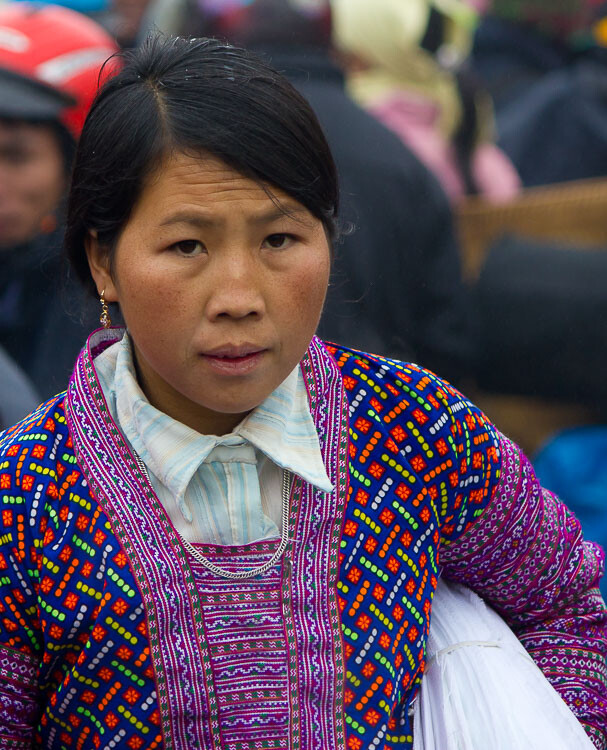
portrait of an Asia lady - 7 Quick Tips To Help You Capture better Portraits

3. Think about the background

Another key element of framing your portrait properly is to ensure that the background isn’t too overpowering. Ideally, a muted or plain surface such as a wall works best as the viewer isn’t distracted by anything else. They can focus solely on the person’s face. If you find that your subject is standing somewhere that doesn’t work best for the portrait, ask them if you can move them and position them somewhere better. Even if you don’t speak their language, usually pointing to where you want them to go does the trick.

If you find that you have to take the photo with too much stuff happening in the background, set a wide aperture so that you will get the background blurred. This will help make your subject stand out from the busy background and not get lost in the photo.

portrait of a person in costume in Italy - 7 Quick Tips To Help You Capture better Portraits

4. Experiment

Most of the time the advice that you are given is to try and light your portrait using natural light, photograph your model from the front, and get close enough to eliminate any distractions. Sound familiar? For example, being outside on an overcast day is ideal for taking portraits as the soft even light means you don’t get harsh shadows on the person’s face.

But while these are great bits of advice that you should follow, it is also worth sometimes pushing the boundaries. So experiment with harsh lighting or even a more creative shots such as in the example below. I took a step back to let people pass and was immediately struck with the dynamism that having someone walk across the image brought to it. It’s still a portrait, but it’s a little more interesting than if there was no one else in the shot.

The key is to not be afraid to go against convention and try something different, you might be surprised by the results.

7 Quick Tips To Help You Capture better Portraits - portrait of person in costume in Venice

The passer-by added a sense of mystery to this portrait.

5. Keep the eyes sharp

If there is just one rule that you need to follow when it comes to taking better portraits, it is to ensure that the subject’s eyes are sharp and in focus. If the eyes are not in sharp focus, the whole image looks soft and unappealing. So, take extra care that you are focusing correctly and that you are keeping the eyes sharp.

When taking portraits outside, the majority of the time you can get away with using a fairly wide aperture. So as long as there is decent light your shutter speed should remain fast enough to avoid camera shake. If you are unable to keep a fast enough shutter speed, raise your ISO accordingly.

portrait of a young Asian child crying - 7 Quick Tips To Help You Capture better Portraits

6. Take multiple shots

You often have a relatively short window when taking portraits as your subject will usually want to get on with their day. But that should still give you plenty of time to take multiple photos. Try taking photos in burst mode so that you can capture the exact moment when your model has their eyes open or has an expression on their face that works for the photo.

You can also try a few different compositions and even angles to give your photos variety. The great thing about digital photography is that it won’t cost you anything to take multiple photos as long as you have enough memory space.

man taking a photo in Venice -7 Quick Tips To Help You Capture better portraits

7. Just relax

Sometimes the real key to taking any great photo is just relaxing and letting it happen naturally. So rather than rushing around and clicking away frantically, just slow down and take your time.

Start talking to people without the burden of knowing that you want to photograph them and if the situation lends itself to a photo just enjoy the process and have fun. Show the person the photos you’ve taken, keep everything casual and you will find that your photos become much better and more intimate.

young girl's portrait - 7 Quick Tips To Help You Capture Fantastic Portraits

Taking a great portrait takes great skill, but when done well it can have incredible results. You will find that not only will you have amazing photos that will look great anywhere, but also memories that you will cherish. Just follow these 7 quick tips to help you capture better portraits and you’ll be on your way to capturing great photos of people.

Please show us your portraits and share your tips advice below.

The post 7 Quick Tips To Help You Capture Better Portraits appeared first on Digital Photography School.


Digital Photography School

 
Comments Off on 7 Quick Tips To Help You Capture Better Portraits

Posted in Photography


6 Ways to Improve Your Images and Take Better Vacation Photos

17 May

Have you ever been on a vacation only to return home disappointed with your images? Many people take pictures while on holiday but find they are unsatisfied with their results. You can improve your chances of capturing better vacation photos by learning the basics and applying a few simple techniques.

better vacation photos - trees in Namibia

1. Choose the right equipment

Firstly, you don’t need expensive equipment to achieve photos from your travels that are satisfying. If you’re looking to buy a camera, choose one that suits your needs and budget. Digital cameras now range from professional DSLRs to great compacts that can produce quality images. Even mobile phones can give you stunning results.

Generally, a camera with more megapixels will provide a better picture resolution and higher quality images when printed. Whichever camera you decide to use, choose a compact with a good quality lens and broad optical zoom or a digital SLR with a zoom or telephoto lens depending on the subjects and angle of view you want to capture.

For example, a wide zoom would help to photograph a wide sweeping landscape and a telephoto can be used to capture wildlife. Also consider the size and weight of your equipment and make sure you can carry your camera kit comfortably.

Lion's roar Ngorongoro Crater Tanzania - better vacation photos

2. Make mistakes

A common mistake people tend to make is to pick up a camera and shoot a scene without giving any thought to what they are actually photographing.

You can dramatically improve your images by learning from your mistakes and analyzing why an image may not look as good as the view that you saw when you took the image.

Appraise your work and think about how you could improve your images next time. It’s good to recognize your mistakes, such as poor camera technique and poor composition and improve on those things next time around.

Zhangjiajie China scene - better vacation photos

3. Improve your camera technique

A great photograph is rarely achieved without some initial technical knowledge and photographic skills. Learn the basics about your camera and how it works. Study your camera manual and read up on other technical areas such as depth of field.

Know the limits of your equipment and how to use it effectively to create the style of images you want to capture.

Handling your camera in advance of your trip can help familiarize yourself with the buttons and you will be more comfortable with how it works when you’re away. Time spent understanding your camera will help take your photography to the next level and make for a more enjoyable experience when on vacation.

town with mountains and a lake - Take Better Vacation Photos

4. Improve your composition

A thoughtless composition can let your image down. Too many different subjects can complicate a scene. Look for features, shapes and patterns that may work in harmony to strengthen your images. Take time to manufacture your shot, trust your instinct and aim for a composition that you like.

The image of trees and the towering sand dunes shows an example where the different subjects of the composition can work well together and strengthen an image.

Camel thorn trees Deadvlei Namibia - Take Better Vacation Photos

5. Focus on details

You can choose to photograph specific and interesting subjects to improve your holiday pictures. Focusing on details allows you to reduce the number of variables in the frame and concentrate on the different shapes and forms that can be found within your subject.

By shooting only a portion of a famous building or scene of nature, you can isolate an image to concentrate on the aspects that appeal to you. Try zooming in or moving closer to your subject to narrow your point of interest and make it stand out.

scenice view of a town with church steeple - Take Better Vacation Photos

6. Consider the time of day

The quality of light varies throughout the day and can have a huge impact on your final image. Most holiday snappers go on vacation for a break, rest in the mornings and go out and shoot during the middle of the day. However, bright sunlight at noon provides harsh shadows and flat lighting.

Try and shoot outside this time for better vacation photos and more dramatic light. Instead of sleeping in, set the alarm clock and get out early at least once when on vacation, or stay out late to capture the beautiful tones from the sun.

The light at this time of day can make a pleasing difference to your images. Be aware of the effects light can create and use it to capture better images. For example, look for shadows and highlights that may improve your images by providing contrasting shapes.

The Grand Canyon USA - better vacation photos

Conclusion

Taking photographs during a vacation is a wonderful way to improve your photography. By applying the tips above you can achieve better images while capturing lasting memories of the places you have visited that can give you immense pleasure for years to come.

Do you have any other vacation photography tips and photos? Please share them in the comments area below.

The post 6 Ways to Improve Your Images and Take Better Vacation Photos appeared first on Digital Photography School.


Digital Photography School

 
Comments Off on 6 Ways to Improve Your Images and Take Better Vacation Photos

Posted in Photography


8 Beginner Tips for Images with a Better Background

16 May

Are you taking too many photos where the background is distracting from your main subject? It’s a common mistake for beginner photographers to pay attention only to their main subject and not what’s in the background. You also need to carefully look at what’s behind your subject when you are composing your photos, and a better background is part of better overall images.

Here are 8 tips to help new photographers achieve photos with a better background.

1. Choose Plain Backgrounds

statue against the blue sky - better background

By getting down low and looking up at your subject, the sky can make a great plain background.

Look for plain backgrounds and avoid strong patterns or clutter behind your subject. A single subject against a plain background will stand out better and make a stronger image. If what’s behind your subject is visually imposing it will distract attention from your subject.

By taking your photo from a low angle the sky will make a good plain background, especially on a cloudless day or at night. Get up higher, above your subject, and a nice lawn or large paved area can work well. A long fence or the side of a building with no windows will provide you with an effective plain background as well.

2. Give your Subject Some Distance

Two people throwing water during Thai new year - better background

Having some distance between subject and background you can blur the background so it’s not distracting.

Don’t place your subjects too close to the background. If your subject is too close to the background you will have too much in focus and your subject will not stand out. By putting some distance between your subject and what’s behind it, your subject will be sharp and what’s behind can be blurred out, (if you use a wide enough aperture setting.)

But you don’t always need to completely blur the background. Sometimes it’s good to still be able to see what’s going on behind your subject by having it only somewhat out of focus. This can work particularly well with environmental portraits where you want the background recognizable, but not be imposing.

3. Crop in Tight

Chilies at the street market - better background

Cropping tight to this pile of chilies has eliminated the distracting background.

Move close or zoom into your subject to avoid seeing most or all of the background. This will mean attention is given totally to your subject because there is nothing else in the photo.

Coming in super close might mean not including the whole of your subject in the photo. This is okay. Cutting off part of your subject could be better than including the whole subject and some distracting background.

4. Create a Balance

vegetable vendors at a street market - better background

Using the person and objects in the background, a balance has been created in this composition.

When you find yourself in situations where you have no control over the background or how close it is to your subject you need to get creative in other ways to make the most of what’s there.

Looking at the objects, shapes, and lighting in the background you might find you can use part or all of these things to help balance your composition and complement your main subject.

5. Change Your Point of View

Market vendor selling cooked sausages - better background

The bright background here is unattractive and adds no meaning to the photo. It is just distracting from the subject and draws the eye away from the vendor.

Market vendor selling cooked sausages taken during a Chiang Mai Photo Workshop

By moving my camera position, now the background is darker and adds meaning to the photo because you can now see it’s in a street market.

Sometimes to achieve a better background you will need to move your camera position.

If you are setting up to compose a photo and are seeing distractions in the background, try moving your camera to the left or right, or get up higher or down lower. As you do, watch what happens to the background in relation to the subject. You may see that as the relationship between objects changes you create a balance in your composition.

You might be able to hide distracting objects behind your subject or something else in your frame just by moving a little. Coming in closer can also help.

6. Use a Longer Lens

Street parade girl in costume - better background

Here, using a long lens allowed me to only see the girl’s costume and nothing else in the background.

Using a longer lens and moving back from your subject (rather than using a wide lens and being close) will greatly affect what you see in the background.

A lens with a wider field of view will naturally take in more of what’s in the background. Changing lenses or zooming in can eliminate much more of the background. It will also help blur your background if that’s what you want.

7. Frame Your Subject

Young woman - better background

The out of focus entrance behind my subject frames her nicely.

Find some element of a background that can enhance your photo by framing your subject.

If you want to use a natural frame for your subject it does not need to be in front, it can be quite effective if it’s behind them as well. Be careful though, if it is too strong it may visually overpower your main subject.

8.Use Contrast

market porter Thailand - better background

Using the large indoor space as a background for this market porter standing in the street has created a good dark background.

Look for backgrounds which are brighter or darker than your subjects. With careful exposure, you will be able to isolate your subject just because of the difference in lighting. This is one of my favorite techniques to really draw attention to my subjects, especially when I am photographing people.

Whether I am working with a studio setup or making portraits on the fly, I love to work with a dark background. Be careful to make an exposure reading from a person’s face, if the background has significantly less light falling on it then it will be underexposed and darker than your subject. If the background is a dark color this will help also as it will reflect less light than your subject. This is more difficult to achieve with people who have dark complexions.

Karin hill tribe woman taken during a Chiang Mai Photo Workshop

Using my outdoor studio I am able to easily have a plain, dark background.

Conclusion

Next time you are out and about with your camera, remember to pay attention to what’s happening behind your subject as well. The background can make or break a picture. It can support a subject or be a total distraction. Practice using these tips to create better backgrounds and I am sure you will begin to see an improvement in your photos.

The post 8 Beginner Tips for Images with a Better Background appeared first on Digital Photography School.


Digital Photography School

 
Comments Off on 8 Beginner Tips for Images with a Better Background

Posted in Photography


4 Reasons Why Putting Your Camera Down Can Help You Take Better Photos

15 May

We’ve all been there; in a new country, a new city or just a new part of your local town. Camera in hand, you shoot and shoot and shoot as your memory card never seems to fill up. It’s thrilling and you don’t want to waste a moment because there is so much to capture. But what if putting your camera down, even just for 20 minutes, can help you take better photos?

I don’t mean leave it unattended. But I do mean put it away or leave it behind as you go for a walk in your new environment.

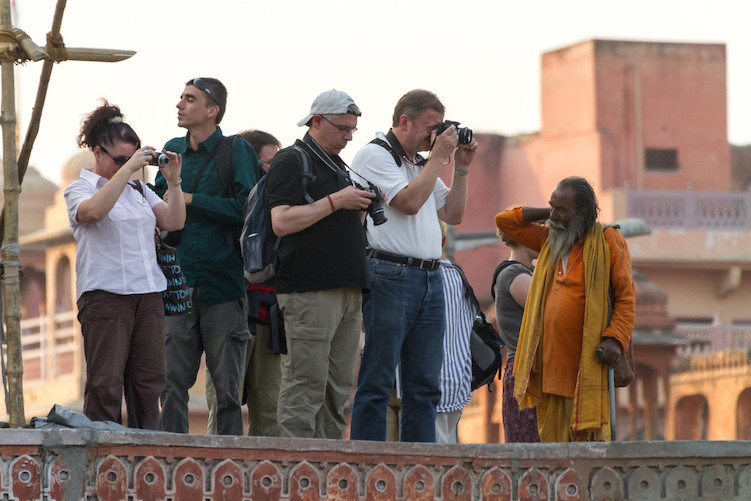
group of photographers shooting - What Happens When You Put Your Camera Down

I know some of you are getting the shakes at the mere thought of being without your camera in a new area, but indulge me for a moment. In this article, I will bring to light a few thoughts on why putting away your camera might actually help your photography.

1 – Greater Awareness

How can you truly capture the essence of a location without first experiencing it? There are always bright and colorful things to shoot. But if you go around grabbing each little scene like a bird grabbing nectar from a cherry blossom, you risk miss seeing the whole tree.

Jordan ruins at night in candlelight - 4 Reasons Why Putting Your Camera Down Can Help You Take Better Photos

I had time to visualize the shot above while watching an evening program at the Treasury in Petra, Jordan. While the program played, I was seated and limited in my movements, so I looked around at the space and tried to imagine photos from each location. At the end of the program, I was only allowed 10 minutes to get my shot (which took one minute to set up and 30 seconds to take), so my time spent gaining a greater awareness for my surroundings helped me greatly to take better photos in the time allotted.

Being aware of your surroundings is also important for safety. We all know the feeling of looking through our viewfinder, or camera screen, and losing all sense of what’s going on around us. It’s the feeling of “flow” when everything else melts away and there is just the joy of photography. That lack of awareness can work against you when in unfamiliar locations.

Beyond safety, having an awareness of your surroundings will also alert you if the clouds are about to cover the sun or if your scene is becoming more or less active. Watching others around you for clues on what to shoot is the next step.

2 – Observe Others

I love people watching in new environments. Even at home, if I go shopping with my wife I will typically end up on a bench just taking in the plethora of different shoppers passing by. Even we introverts can enjoy watching how people interact.

Look for clues about relationships and friendships while observing others. Do most people seem aloof or is there a lot of interaction? Watch how transactions are negotiated in markets. Is there a lot of haggling over price before money changes hands? These clues will help you anticipate when you can get those key shots when you return with your camera.

hat selling in Peru - take better photos

Because I took some time to people watch when the previous train came through town in the Urubamba Valley of Peru, I knew this colorful hat-seller would work the crowd when the next train arrived. So I waited and watched and was able to capture this image.

Is there a flow to the traffic of people around you? If so, look for a good location to set up and get some candid street photos. While crowds always draw attention, look for those standing back from the bustle if you want to capture a variety of everyday life.

Now is also a good time to realize who around you might not want their picture taken. Or who is charging photographers to pose for photos?

4 Reasons Why Putting Your Camera Down Can Help You Take Better Photos - officers in Jordan

In this shot of officers in Jordan, I hung around for a few moments with my camera down, said “Hi” and let the men get back to their conversations before taking the shot. I had noticed that they all looked intently at anyone new coming through the door and that wasn’t the shot I wanted. This more relaxed version was my goal.

3 – Observe Patterns

With patterns, I don’t mean just the cool shapes made by architecture or found in nature. I also mean the patterns humans create as they go about their day. Observing patterns will help you return with your camera (or simply get it out of your bag) and better anticipate the moment for shutter release and ultimately you will take better photos.

4 Reasons Why Putting Your Camera Down Can Help You Take Better Photos

For instance, watching a worker at the leather tannery in Fez, Morocco or a gentleman unloading chickens in Kathmandu, Nepal, with my camera down for a minute or two, helped me to visualize the action I wanted to capture and better time my shots.

4 – Interact Differently

Imagine someone came up to you on the street and instantly lifted a camera to snap a photo of your face. How would you feel?

Empathy for strangers and how they will react to my camera pointed in their direction is why I will typically recommend you ask permission first before taking a shot. Or better yet, with your camera down or put away, interact with your subject first. See what they are doing and ask questions if you can. Something about them made you want to take their photo, so take it one step further and interact before snapping away.

Peruvian kids - 4 Reasons Why Putting Your Camera Down Can Help You Take Better Photos

I played with these kids in Peru for a bit before having them ham it up for the lens. I don’t speak Quechuan and only poor Spanish, but I can recognize kids playing “shop” with weeds and flowers when I see it. I could tell who was in charge and I played along for a few minutes, trying in vain to get a good deal on my ugly weeds, before snapping this photo.

People will interact differently with you if you approach them first with your camera down or put away. Sometimes there is a fleeting moment that most feel needs to be caught candidly. But far more often a richer image can be created when you make human-to-human contact first. Rather than human-to-camera-to-human contact.

Conclusion

If you’ve never left your camera behind for even 10 minutes, I suggest giving it a try. It’s unnerving, I know! But it can lead to seeing your new environment in a way not possible with a camera constantly popping up to your eye.

Now you tell me; do you think you can take a walk and experience a new location without your camera? Do you think it might change the way you see the world before photographing it? Will it lead to helping you take better photos?

The post 4 Reasons Why Putting Your Camera Down Can Help You Take Better Photos appeared first on Digital Photography School.


Digital Photography School

 
Comments Off on 4 Reasons Why Putting Your Camera Down Can Help You Take Better Photos

Posted in Photography


Shooting Greenland in Winter: Part 2 – The Better Part of Winter

13 May

In the previous article, I wrote about reaching Uummannaq and the relatively difficult conditions I found in the beginning. Luckily, the days after the gale had passed were much more comfortable, so I began scouting around and shooting, and continued to do so throughout my stay.

The little guesthouse I stayed at was very well located—right next to the harbor. This was advantageous since, firstly, I didn’t have to walk too far to get to the sea ice (Uummannaq’s streets are steep and slippery in winter, not the best setting for a hike), and secondly, I had a very good point of view to judge the light and weather outside without having to dress up and walk out, which was quite a project.

Sunrise at the harbor right next to my guesthouse

Throughout my stay in Uummannaq, my guide Paaluk and I walked and snowmobiled all around the Fjord and took shots of beautiful icebergs in various conditions, from overcast to pink sunrise light. It was astounding to be able to walk right up to these gigantic icebergs and shoot them without the need for a boat.

Note that the icebergs are mostly under the surface and since currents shift them, getting too close is dangerous and shouldn’t be done without a local expert. Paaluk was very experienced in checking the ice with his spear and deciding what distance was safe for me to stand, and I trusted his calls.

$ (document).ready(function() { SampleGalleryV2({“containerId”:”embeddedSampleGallery_1948292092″,”galleryId”:”1948292092″,”isEmbeddedWidget”:true,”selectedImageIndex”:0,”isMobile”:false}) });

Once I was several kilometers away from town, I also used my drone to get aerials of the icebergs and of Uummannaq Island. There is something so incredibly iconic about Mount Uummannaq, it’s hard to look away. The scale can be very confusing—this mountain is 1,170 meters tall, and the island 7 km long!

The cold conditions can be quite problematic for drone photography. Yours truly has previously lost a drone to cold weather and was determined not to do so again. To keep the batteries warm, I kept them next to the heater in the room, put them into the sort-of-insulating polystyrene box and went on the shoot. I then usually put a battery in my armpit for 10 minutes, after which it was warm enough to operate safely… if a bit stinky.

Once the drone is up in the air the battery is kept warm on its own.

$ (document).ready(function() { SampleGalleryV2({“containerId”:”embeddedSampleGallery_2120222170″,”galleryId”:”2120222170″,”isEmbeddedWidget”:true,”selectedImageIndex”:0,”isMobile”:false}) });

One of the definite highlights of this visit was shooting Mount Uummannaq in golden afternoon light, reflecting in the frozen lake Tasersuaq (Greenlandic for “big lake”).

Paaluk drove me to the starting point of the hike and it wasn’t long before we were walking on scaringly-clear black ice with a million patterns, cracks and even Canadian-style methane bubbles! Walking on that lake was a surreal experience, since at some points you could see all the way down through the ice. Rest assured, it was so thick it could hold a semi-trailer, so there was no risk whatsoever.

After shooting last light above the cracked lake Tasersuaq, I went back to the guesthouse and got updated with the Aurora situation. It appeared that a minor solar storm had happened, and that we were going to get some lights. The sky was totally clear and scheduled to remain so. The only question was when it would happen.

I returned to the lake with Paaluk and took a few moonlight shots, before the sky began turning green. It was looking pretty good, so I quickly decided to hike back to the icebergs embedded in the sea ice. Paaluk had to switch back to the snowmobile, and by the time he found me I was shooting very strong Aurora above the icebergs.

The lights gained more and more strength, and soon enough they were shining all around the sky, even to the north—quite a rare occurrence in Uummannaq, whose 70-degree latitude is too far north to be in the center of the party, figuratively speaking.

$ (document).ready(function() { SampleGalleryV2({“containerId”:”embeddedSampleGallery_9343439540″,”galleryId”:”9343439540″,”isEmbeddedWidget”:true,”selectedImageIndex”:0,”isMobile”:false}) });

I shot the lights for several hours, and even took a few shots of Mount Uummannaq with Aurora above it. Even though the moon was a bit brighter than optimal, this had turned out to be the very best day of the trip.

In the next part of the series, I will tell you about my visit to Ilulissat.


Erez Marom is a professional nature photographer, photography guide and traveler based in Israel. You can follow Erez’s work on Instagram and Facebook, and subscribe to his mailing list for updates.

If you’d like to experience and shoot some of the most fascinating landscapes on earth with Erez as your guide, take a look at his unique photography workshops in Southern Iceland, Northern Iceland, The Lofoten Islands, Patagonia, Greenland in summer, Greenland in winter, Namibia and the Faroe Islands.

Erez offers video tutorials discussing his images and explaining how he achieved them.

More in this Series:

Part 1: Uummannaq Whiteout

Selected Articles by Erez Marom:

  • Parallelism in Landscape Photography
  • Winds of Change: Shooting changing landscapes
  • Behind the Shot: Dark Matter
  • On the Importance of Naming Images
  • On Causality in Landscape Photography
  • Behind the Shot: Lost in Space
  • The Art of the Unforeground
  • Whatever it Doesn’t Take

Articles: Digital Photography Review (dpreview.com)

 
Comments Off on Shooting Greenland in Winter: Part 2 – The Better Part of Winter

Posted in Uncategorized


Tips for Doing Better Indoor Sports Photography

11 May

Fast-paced movement across the court or rink, cheering crowds, the thrill of the win (or agony of defeat). These are the myriad of elements waiting to be captured by your camera when you photograph a sports event.

Whether you’re taking pictures at the home arena of your favorite pro team or snapping away in the gym at a high school game, shooting indoors requires you make certain preparations. You must get a handle on your surroundings to ensure sharp, compelling photos that will make viewers feel like they are part of the action.

Select the appropriate lens

Typically for indoor sports, you’ll want to have lenses that open to an aperture of f/2.8 to let in the maximum amount of light. A versatile lens to start with would be a 70-200mm f/2.8. From there, it depends on whether you’re shooting hockey, basketball, or another indoor sport.

For basketball, for instance, a 24-70mm lens is ideal so you can capture the athlete’s full body as he or she jumps up for the basket. For other indoor sports, a 300mm f/2.8 lens will serve you well so can zoom in on the puck or ball.

Because most pro arenas are now using higher-intensity LED lights, a lens with a 100-400mm or 150-600mm focal-length range, even with a maximum f-stop of f/6.3, is also a viable option.

Tips for Doing Better Indoor Sports Photography - hockey shot
Prepare for the big game

To get the lay of the land, you’ll want to do your homework on the arena or venue in which you’ll be shooting. If you can, find out what kind of lighting the location has and its intensity, either by visiting the venue yourself or asking other photographers who’ve shot there. This will help you better prepare what lens assortment you will need to bring.

Pack your gear bag early, perhaps a day in advance if possible, then unpack it and look at it again on the day of the event to make sure you’re not missing anything. There’s nothing worse than getting to an event and realizing that you left a lens behind (to save a little weight) that you would’ve been better off having with you.

Also, scope out what the conditions will be like beforehand. Although you won’t have to worry about certain elements as you would outdoors (e.g., it won’t be raining inside), you still need to be vigilant.

Case in point: At the Winter Olympics in Pyeongchang this year, they kept the main arena at 53 degrees (11.7 c) so the ice would stay in perfect condition. That’s a lot colder than what photographers are used to inside most National Hockey League arenas. It’s key to know those logistics in advance so you can make the necessary preparations to keep your body warm, as well as to keep your equipment in tip-top shape by protecting it where applicable.

goalie - Tips for Doing Better Indoor Sports Photography

Scout out the best vantage point

Photographing indoor sports is all about focusing on the athletes’ eyes, so being at floor level is usually ideal. If it’s hockey, you’ll want to be at ice level in what’s called the “deep corner position,” which is just south of where the goalie’s line intersects the boards. From that angle, you’ll have the ability to shoot the entire ice.

For basketball, being on the floor halfway between the side of the court and the basket works best. That offers you the opportunity to not only see the entire playing surface but also to capture players jumping up toward the hoop or coming in for the goal.

Tips for Doing Better Indoor Sports Photography

Compensate for various lighting setups

As mentioned earlier, most modern indoor arenas today have switched to LED lighting. So using regular auto white balance (AWB) is usually sufficient to get you close to the proper color. If you’re using the Kelvin temperature setting, it can range from 4100-5400K, depending on how they’ve set up the LED lights.

In some hockey arenas, if AWB isn’t cutting it, use a custom white balance and take a reading off of a neutral surface in the arena. In other arenas, it is actually best to do a custom white balance by shooting towards the arena lights themselves. With hockey, for instance, the ice works well because you’ve got such a large white surface to use as your neutral tone.

In smaller venues, like high school or college gyms, the problem isn’t just that these places are poorly lit. They’re also illuminated with an assortment of different kinds of lights, whether they’re different-colored fluorescents, sodium vapor lamps, or older-style carbon arc lights. If that’s the case, you may find that as a player is dribbling down the court, the sequence of frames you get of that player will each be a bit different in color.

On Canon cameras, you can use the anti-flicker option to cut down on the pulsing from certain lights. That helps balance the color of the light, but in situations where it varies greatly, you can shoot in auto white balance and then tweak the image when you bring it into Photoshop.

One other thing to be aware of is shooting through glass. You’ll not only have to worry about reflections, but also the color cast that’s given off by some of the glass sheets used in arenas. Keep an eye out for that so you can adjust accordingly.

goalie in a mask - Tips for Doing Better Indoor Sports Photography

Nail down your camera settings

Exposure is going to depend on each venue’s lighting conditions, but one of the keys to this type of photography is that you need to freeze the action. Shooting at 1/1000th of a second or 1/1250th of a second will freeze most of the action you’ll find at indoor sporting venues.

In terms of ISO, it wouldn’t be unusual to be shooting at 4000 or 5000. Inside a pro arena, that could give you an f-stop of f/5.6 or f/6.3; in the worst-lit arenas, you could be down to f/2.8 or f/3.5.

Hone your focusing skills

You’ll want to use autofocus 99% of the time for indoor sports, although you can certainly override that in situations where the need arises. You may want to shoot in continuous autofocus mode, called AI Servo or Continuous/AF-C, depending on what camera you’re using. This allows you to photograph moving subjects while the camera keeps adjusting focus with the shutter button pressed halfway.

Or you may want to keep the shutter button separate from focusing and assign another button on the back of the camera to focus, a technique called back-button focusing. It all comes down to personal preference, which you’ll discover the more you shoot.

Either way, what’s critical for shooting indoor sports is that you select one point of focus. It’s infinitely faster than using the variable dots that manufacturers have built into the cameras, in which the camera decides which one of 61 different places to focus. Get a handle on the sport — and on individual players — so you’ll know when to press the shutter button.

Experience helps, but so does knowledge of the sport you’re photographing. That includes getting to know not only the ins and outs of the game but also individual players and their particular propensities, such as what side they tend to move toward or when they tend to shoot.

Practice this by selecting an individual player as he or she flies up the ice or runs up the court and concentrating on that, instead of simply following the puck or ball around. Eventually, you develop almost a sixth sense.

Shoot high, low, and 360 degrees around

If you want your photography to stand out, don’t settle for one shooting position. That can be achieved using more advanced techniques, such as using remote cameras. Or you can simply get up and move around the venue so that you’re able to place different backgrounds in your images.

You want to fill the frame, and it’s not always advisable to do so using Photoshop. It’s better to fill the frame in your camera.

Keep an eye on the horizon

They call it that for a reason – it’s horizontal. Double-check your background, such as the boards of an ice hockey rink, to make sure everything is straight, not crooked.

Tips for Doing Better Indoor Sports Photography

Watch your cropping

Don’t cut a player off at the joints, like at an athlete’s ankles or knees. It’s best to stick with waist-up or full length.

Focus on facial expressions and emotion

The best sports images show both jubilation and dejection in the same frame. Always be on the lookout for the sort of image where you can witness both teams participating and showing the full range of emotions in a game. That’s not to say the action shots aren’t important; it’s just that it adds so much more to show the players engaged in what they’re doing.

These kinds of photos are called “rounding out the take”. You don’t want to come away from an indoor sporting event with just 20 action images — a well-rounded photo narrative will include an action shot, a celebration, a dejection, some individual shots of stars that are playing, or rookie players, and then some ancillary images. Those could include, for example, photos of the officials, fans celebrating, or images of both of the goalies if you’re shooting hockey (just in case one of the goalies ends up being the big story of the game).

If you’re thinking of selling your images, you should also think more generically when it comes to indoor sports photos. In other words, you’ll want to photograph details that tell the story of the sport without pinpointing an individual player or team. That could entail, for instance, a close-up of a puck or a ball, a hand on a ball, or a stick on a puck. Close-ups of skates churning ice and creating ice spray can also tell an interesting story.

Tips for Doing Better Indoor Sports Photography

Arrive early and stay late

There’s nothing worse than rushing to an event and not having time to think out what you’re going to shoot. Some of your best images will come from those early arrivals and from sticking around after the final buzzer, whether it’s players heading into an arena and prepping for a game or images of the players leaving an event.

If you build in that bit of extra time, you could end up capturing shots that other photographers miss.

Disclaimer: Tamron is a paid partner of dPS.

The post Tips for Doing Better Indoor Sports Photography appeared first on Digital Photography School.


Digital Photography School

 
Comments Off on Tips for Doing Better Indoor Sports Photography

Posted in Photography