RSS
 

Posts Tagged ‘Best’

Best Fujifilm X-Series Kit for Urban Portraits

05 Nov

The post Best Fujifilm X-Series Kit for Urban Portraits appeared first on Digital Photography School. It was authored by Matt Murray.

best-fujifilm-x-series-kits-urban-portraits

With a range of feature-packed cameras that are fun to use, and a line of stunning lenses, a Fujifilm X-Series kit is the ideal companion for urban portrait shoots.

I have been shooting with the X-Series for four years and love the system and the results I get from it. However, with so many good options available, one problem you may have is choosing a lens or kit to shoot with!

In this guide, I discuss what you need to consider when choosing a lens for a shoot, and a list of my favorite Fujifilm lenses for shooting urban portraits.

Advantages of using a Fujifilm X-Series Kit

There are a few key advantages that the Fujifilm X-Series has for urban portrait shoots. Being a mirrorless system, it’s generally smaller and lighter than DSLR kits. In practice, though, my camera bag probably isn’t much lighter because I usually fill it with more of the excellent Fujinon lenses.

Image: Fujifilm’s X-Series is ideal for urban portrait shoots for so many reasons.

Fujifilm’s X-Series is ideal for urban portrait shoots for so many reasons.

Excellent ergonomics and usability is a hallmark of the system. I love that I can change aperture on the lens instead of via a menu – in fact, I could never move back to a system where I have to change aperture via a menu now. The camera bodies feature shutter speed and ISO dials on top of the camera, so you have all the elements of the exposure triangle at your fingertips without a menu in sight.

Live view is another feature I couldn’t live without – it’s amazing seeing what your exposure will look like before pressing the shutter button. This is particularly useful in low light situations that you often encounter in urban shoots. Another dial on top of the camera is exposure compensation – you can easily adjust the exposure as you look through the viewfinder, which is perfect for the way I shoot.

best-fujifilm-x-series-kits-urban-portraits

Using live view on my Fujifilm X-T3, I could see exactly what adding extra exposure compensation would do when photographing Anne.

Another big advantage of Fujifilm cameras is their stunning color rendition – the best of any digital camera manufacturer. Fujifilm has used their decades of knowledge to produce JPG simulations that bear the names of class film emulsions: Provia, Astia, and Velvia, to name three.

The images in this article are JPGs (Provia simulation) with only small edits made in Adobe Lightroom. You can, of course, shoot in RAW alongside JPG and add your own looks or presets in post-production.

Camera bodies

I prefer to take two camera bodies with me on my shoots: the Fujifilm X-T3 and X-T2.

You can pretty much substitute any of the excellent X-Series lineups into your urban portrait kit, from the X-T series I use to the X-Pro line and the X-E line. I’ve even shot urban portraits with the X100 line of fixed-lens compact cameras.

If you only have one camera body, that is workable – you just need to be careful if you plan on changing lenses in urban environments to minimize the possibility of dust ending up on your sensor. The last thing you want on your mind during a shoot is the feeling of dread that you just let a whole lot of dust bunnies inside your camera.

Image: Choosing a lens for an urban portrait shoot is a balancing act between a focal length that fl...

Choosing a lens for an urban portrait shoot is a balancing act between a focal length that flatters your subject, but still allows you to be close. This image of Bailey was taken with a Fujinon 23mm f1.4 lens.

Lenses for urban portraits

The Fujifilm X-Series boasts a stunning range of superb lenses, with more being added every year. Fujifilm regularly updates a lens road map to let photographers know what new additions are coming. Portrait shooters have many fast primes available to them, as well as weather-resistant primes and a fantastic range of zoom lenses.

When choosing a lens for a shoot, I consider the following things:

Focal length

How flattering is this focal length for portrait photography? The images should flatter your client or model and make them look amazing.

Working distance

What’s the practical working distance of your lens? Ideally, for urban portraits, it’s good to have a lens choice that flatters your client for portraits, but without you being too far away. For me, this rules out some options such as the Fujinon XF 90mm F2 R LM WR lens.

best-fujifilm-x-series-kits-urban-portraits

In low light, I often find myself shooting at, or close to, the maximum aperture of the lens (the smallest number). In this image of Natasha, I was using the Fujinon 56mm f1.2 lens at f1.6.

Maximum aperture

The maximum aperture of the lens determines how wide it can open. The smaller the number, the ‘faster’ the lens is, allowing you to take images at high shutter speeds in lower light. ‘Slower’ lenses will not be able to shoot at the same shutter speeds unless you crank up the ISO, which can affect image quality.

During the middle of the day, this may not be important, but with less light after the sun goes down, fast lenses are important for sharp images and to keep the ISO lower. The X-series lineup has a range of very fast prime lenses with many maximum apertures at F1.4 and even F1.2.

Weather resistance

If planning a shoot in the rain or snow, a weather-resistant lens and body are a must. This is generally something I don’t need to think about – if it does start raining during a shoot, I usually move to an undercover location. Usually, clients don’t want their hair, makeup, and outfits ruined by a downpour.

Listed below are my choices for urban portrait lenses.

Fujinon XF 35mm F1.4 R

best-fujifilm-x-series-kits-urban-portraits

I love this lens – there is real magic to it. It’s my number one choice for urban portraits. The XF 35mm F1.4 is the closest Fujifilm has to the full-frame equivalent angle of view of 50mm – a classic focal length used by photographers for decades.

One of the three original lenses in the X-Series lineup, it has a fast maximum aperture of F1.4, making it perfect for images with a shallow depth of field and night shooting.

Featuring stunning optics and pleasing bokeh, this lens gives you a relatively short working distance for portraits. Best of all, it’s a lot cheaper than most of the other lenses in this guide.

best-fujifilm-x-series-kits-urban-portraits

I love this shot – so much fun! Alyssa in a phone booth, Brisbane, Australia.

best-fujifilm-x-series-kits-urban-portraits

The 35mm F1.4 lens has a magic quality. I love that the lens is flattering for clients, yet it allows you to get quite close to them while shooting.

Fujinon XF 16mm F1.4 R WR

best-fujifilm-x-series-kits-urban-portraits

The next choice on my list is arguably one of the best lenses Fujifilm has ever produced – the stunning Fujinon XF 16mm F1.4 lens.

With a full-frame equivalent of 24mm, you may think this is an odd choice for a portrait session, but it’s a perfect lens for wide-angle environmental shots. With a minimum focus distance of just 15cm, this lens is the perfect option when working in confined spaces.

The excellent build quality of the lens is also matched by its stunning optics. Although any distortion is corrected in-body by the camera, you still need to be careful when shooting with it. Place your model or client towards the center of the frame for the best results.

Image: Sasha sitting on beer kegs in a Brisbane laneway. There wasn’t much room in the laneway...

Sasha sitting on beer kegs in a Brisbane laneway. There wasn’t much room in the laneway, so the 16mm F1.4 was a perfect choice for this shot.

Image: The short working distance and wide angle-of-view enabled me to take this image of Natasha in...

The short working distance and wide angle-of-view enabled me to take this image of Natasha in front of some metal shutters.


Fujinon XF 56mm F1.2 R

best-fujifilm-x-series-kits-urban-portraits

The XF 56mm F1.2 R lens is perhaps the jewel in the crown of the X-Series lineup. Stunning image quality and beautiful bokeh make it a winner in anyone’s book.

This is the lens that all Fujifilm portrait photographers either have in their kit or on their wishlist. With a full-frame equivalent of around 85mm, it is substantially lighter than full-frame equivalent lenses for DSLRs. It boasts a super-fast F1.2 maximum aperture, is tack sharp, and has the most pleasing bokeh in the X-Series lineup.

For portrait work, this lens is fantastic. Just bear in mind that in urban environments, it’s not always a suitable choice, as you need a greater working distance when using this lens.

best-fujifilm-x-series-kits-urban-portraits

Sasha in Brisbane, Australia. I love how sharp she looks in this frame, and how the out-of-focus lights have rendered in the background.

Image: Natasha in a laneway, Brisbane. With a bit more working distance, full-length portraits are a...

Natasha in a laneway, Brisbane. With a bit more working distance, full-length portraits are also possible with this lens.


Fujinon XF 60mm F2.4 R Macro

Best Fujifilm X-Series Kit for Urban Portraits

Perhaps the most underrated lens in the entire Fujifilm line up, the XF 60mm F2.4 R Macro, was another of the original three lenses released for the system. It had a reputation for being slow to focus, but improvements to the firmware for this lens have made a big difference. I have no hesitation in using it on shoots.

Although it has the word macro in its name, the lens can only shoot at a 1:2 magnification ratio. (Generally, a 1:1 magnification ratio is regarded as true macro.) With a maximum aperture of F2.4, it’s not as fast as other lenses in this article, but the lens still provides excellent image quality and has a very good bang for your buck.

Image: Alyssa at dusk, Brisbane. The XF 60mm F2.4 is an excellent option if the XF56mm F1.2 is out o...

Alyssa at dusk, Brisbane. The XF 60mm F2.4 is an excellent option if the XF56mm F1.2 is out of your budget.


best-fujifilm-x-series-kits-urban-portraits

Alyssa in Brisbane. The XF 60mm F2.4 is stunningly sharp.


Fujinon XF 23mm F1.4 R

Best Fujifilm X-Series Kit for Urban Portraits

The Fujinon XF 23mm F1.4 R is another lens often mentioned as the best in the X-Series lineup. With the 1.5 crop factor, it’s Fujifilm’s closest lens to the traditional full-frame 35mm angle of view. This angle of view makes it perhaps the most versatile lens in the lineup for any given range of shooting scenarios – a big plus.

Another fast lens with a maximum aperture of F1.4, the lens is optically stunning and produces sharp images and beautiful bokeh.

Although I love this lens, I often leave it at home and take along the XF 16mm 1.4 and the XF 35mm 1.4 instead. However, it still deserves a place in this guide as it’s an excellent choice for urban portrait shoots.

Image: Bailey, Cleveland, Australia. The XF 23mm F1.4 lens is super-sharp and produces beautiful bok...

Bailey, Cleveland, Australia. The XF 23mm F1.4 lens is super-sharp and produces beautiful bokeh.

best-fujifilm-x-series-kits-urban-portraits

Bailey, Raby Bay Harbour, Australia. It was quite dark when I took this shot, but with a higher ISO and some exposure compensation, Bailey looks fantastic – as do the pretty lights in the background.


Conclusion

The Fujifilm X-Series lineup is ideal for shooting urban portraits. The range features a range of compact, feature-packed camera bodies, along with optically stunning fast prime lenses.

Although you could invest some serious money in this system, there are many excellent value-for-money options, including the X-E line of camera bodies, as well as the X-T30 and the X-T20. In terms of lens choices, two of the original X-Series lineup – the XF 35mm F1.4 and XF 60mm F2.4 lenses – represent excellent value for money, blowing the competitor’s budget lenses out of the water in terms of quality.

If you have a bigger budget, also consider the X-T3, the new X-Pro 3, and the excellent XF 16mm F1.4, XF 23 1.4, and XF 56mm 1.2 lenses.

I’ve been using the system for four years and love the images the system produces straight out of the camera, thanks to the magic of Fujifilm’s JPG film simulations. The beautiful rendering of colors makes post-processing work a breeze.

What Fujifilm X-Series camera bodies and lenses do you use for urban portrait shoots? Let us know in the comments below.


The post Best Fujifilm X-Series Kit for Urban Portraits appeared first on Digital Photography School. It was authored by Matt Murray.


Digital Photography School

 
Comments Off on Best Fujifilm X-Series Kit for Urban Portraits

Posted in Photography


Photoshop Layers for Beginners – What, When and How to Use them Best

03 Nov

The post Photoshop Layers for Beginners – What, When and How to Use them Best appeared first on Digital Photography School. It was authored by Nisha Ramroop.

photoshop-layers-for-beginners

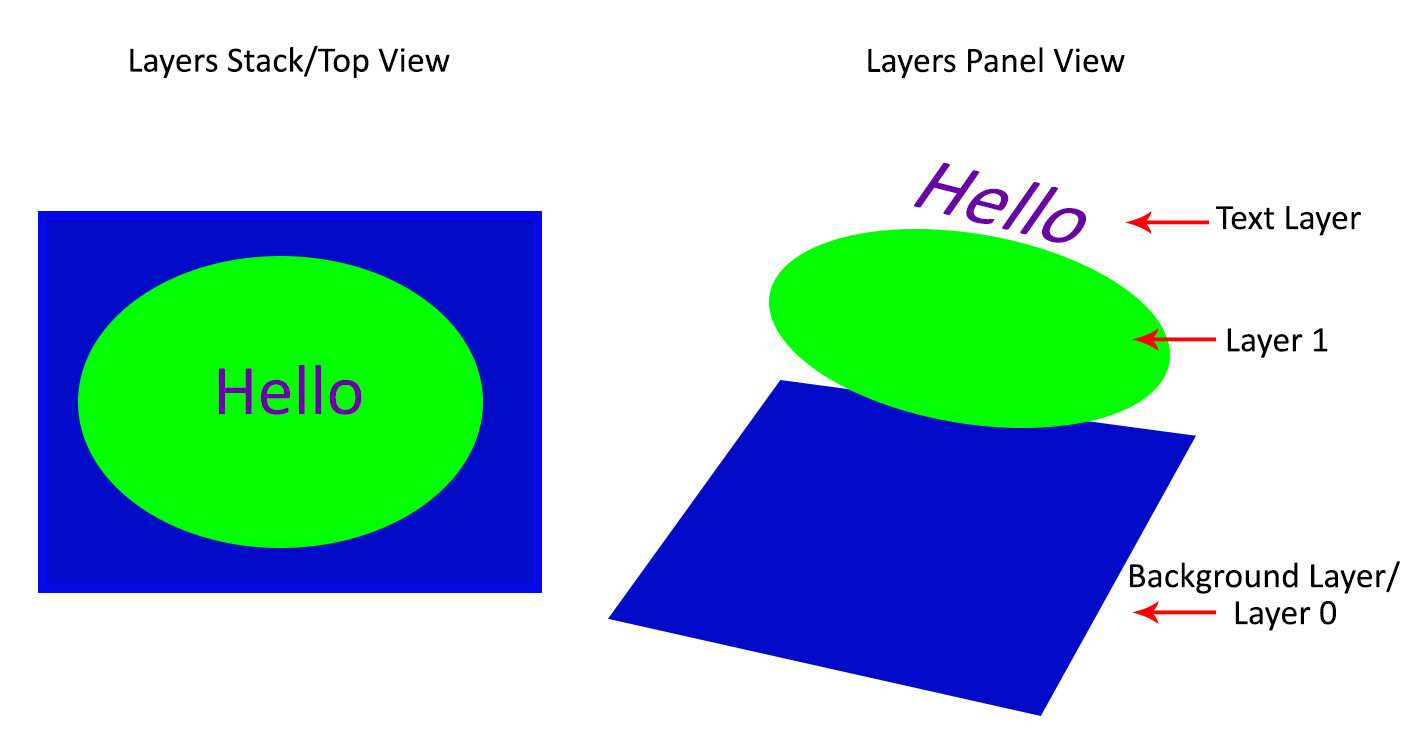
This introduction to Photoshop Layers for beginners will help you learn a great editing habit. So, what exactly is a Photoshop layer? Quite simply put, if you imagine a stack of transparent paper, each sheet is equivalent to a Photoshop layer. When you add/change/remove any of the layers, what you see at the top of the stack forms your entire image.

The first time you open Photoshop, by default, the layers panel is on the right side of your screen and your image opens as a layer named “Background”. Keep this in mind as you read on.

Photoshop Layers for Beginners – What, When and How to Use them Best

Why use Photoshop Layers?

Now that you have an idea of what a layer is, here is why you should use them:

1. It is a way to work non-destructively

Destructive editing occurs when you move and change the pixels directly in your original image. This happens if you edit your original image/background layer when working in Photoshop. While you can undo your changes, if you exceed the number of “undos” you can apply, those changes commit. Also, you may like some changes, but not others, and there is no way to go back to just that change without undoing other changes you have made too.

Alternatively, when you edit your image on separate layers, both the edited image and the original save (they are saved to a .psd file and this maintains all your layers). This allows you to go back to your original image at any time, simply by hiding layers, or deleting them entirely.  This is a form of non-destructive editing.

One thing to remember, however, is that if you resize your entire document (via menu->image->image resize) at any point, that is a form of destructive editing, and you will lose image quality if you try to resize it back to the original size later.

As your editing style evolves, you will appreciate the option of going back to original images at a later date.

Image: Easily add text without affecting your original image

Easily add text without affecting your original image

2. It allows organized and flexible editing

Photoshop is usually a great option when you want more control over your editing process. While you start off with a certain end result in mind, you may change your mind, during (or even at the completion of) your process. Surely there are better ways than undoing multiple changes or starting over from scratch right?

Enter, layers.

Image: Since your original image is unaffected, you can change the text at a later date

Since your original image is unaffected, you can change the text at a later date

Layers allow you to work with your vision without affecting/destroying the original. Since you can work on each layer separately, you have major flexibility. With layers, you can also combine several images into one (composite), These include (but is not limited to), swapping out elements from your image, changing color, tones, and lighting, adding text and resizing, replacing or rotating an object independent of everything else in your image.

Image: You can use layers to replace a plain sky

You can use layers to replace a plain sky

This non-destructive editing style allows you to undo a change at any point in time, and you have control over each individual layer. This means you can work with different objects and elements of your image without affecting anything else.

How to use Photoshop Layers

If you do not see the Layers Panel on the right-hand of your screen, you need to turn it on. To do so, go to Menu->Window->Layers.

As mentioned before, when you open an image in Photoshop, it opens as a background layer. You will notice that there is a small lock icon on the right side of the background layer. This lock is intended to prevent inadvertent changes.

The first step is usually to duplicate this layer. That way, the background layer remains untouched (original).

Photoshop Layers for Beginners – What, When and How to Use them Best

To start, duplicate your background layer:

  1. Open an image in Photoshop
  2. Right-click on the thumbnail image in your layers panel named “Background,” and choose the duplicate layer option
  3. Click OK. A new layer will appear above your original layer with the default name “Background Copy” – you can rename it to anything you want. I suggest renaming it to something that relates to the changes you are making. This makes it easier to find later if you have many layers.

photoshop-layers-for-beginners

As you become comfortable working with layers, you will find yourself making new layers for each change you want to make e.g. if you are retouching an image or replacing a sky. This comes with the knowledge that, later on, you can adjust the intensity of any of those changes independently.

Image: I used Layers for Sky Replacement, with a Layer Mask to recover the top branches

I used Layers for Sky Replacement, with a Layer Mask to recover the top branches

Adjustment Layers

Photoshop also has another layer type called Adjustment Layers. These layers are not a duplicate of other layers; instead, they adjust the information of the layer directly beneath it. Thus you can simply use an Adjustment Layer to effect change on the image without changing the original layer image. For example, you can increase/decrease the contrast or brightness of your layer.

photoshop-layers-for-beginners

Notice how adjustment layers look different from other layer types. These adjust the layer below them.

Adjustment layers do not actually contain any pixels but instead are a series of instructions for Photoshop on what changes you ask it to make. You can access the Adjustments Layer menu at the bottom of the Layers panel or choose Windows and check the Adjustments option.

Layer Masks

A Layer mask is another non-destructive editing technique in Photoshop, used to control the transparency of the layer you apply it to. An even simpler definition is that a layer mask can make a layer visible or invisible. This is done by painting either white (to make it visible) or black (to make it invisible).

photoshop-layers-for-beginners

Blending Modes

At the upper left corner of the Layers panel is the blend modes drop-down menu. These “modes” are set to Normal by default and control how pixels on the different layers interact with each other. An easy way to understand what the different blending modes do is to duplicate your image (as described above) and cycle through them.

photoshop-layers-for-beginners

An example of how different blend modes change the look and feel of your image: 1. Normal 2. Multiply 3. Soft Light 4. Vivid Light 5. Hue 6. Luminosity

Important layering notes for beginners

When there are several layers, your changes only affect the layer that is active or selected. This is why it is a good practice to name your layer (Step 3 above) based on what you are using the layer for.

You can save the edits as a Photoshop (PSD) file, close it and open it at a later date to find all your layers (and changes) as you left it. Of note, saving it this way increases the size of your file. If you are finished with your edits and don’t need a large PSD file, you can merge all the layers (or flatten the file) and save it to a smaller, more compressed file type, such as a jpeg. Of course, in doing so, you will no longer have the ability to access those individual layers later.

Layers work in order. This means that the layer on top “covers” everything below it. You can, however, reorder your layers by moving them up or down by simply dragging them. Keep in mind that the layer on the top will be most visible.

photoshop-layers-for-beginners

Conclusion

The key thing to remember as a beginner is that Photoshop layers are a recommended non-destructive way to work. It is flexible, which allows you to organize your work, effect change in selected areas, and undo changes easily.

When you do not merge your layers, you can open your Photoshop file years later and make changes, all without affecting your original image.

I hope you can utilize these Photoshop Layers for Beginners tips, and if you have any tips on this topic, please share in the comments below.

The post Photoshop Layers for Beginners – What, When and How to Use them Best appeared first on Digital Photography School. It was authored by Nisha Ramroop.


Digital Photography School

 
Comments Off on Photoshop Layers for Beginners – What, When and How to Use them Best

Posted in Photography


Slideshow: Agora presents The World’s Best Photos of #Water2019

30 Oct

The World’s Best Photos of #Water2019

Agora, a free-to-use social photo app consists of a global community with over 3.5 million users from 193 countries. Every week, its users participate in an international photography contest that revolves around one of 52 annual hashtags representing universal themes. The #Water2019 contest drew almost 17,000 entries and was narrowed down to 49 finalists. From there, users, along with guest judge Victor de Valles (@victordevalles), voted on the overall winning image.

‘Tides,’ captured by British photographer Lee Mumford (@leemumford8) was selected as the winner and received a $ 1,000 cash prize. ‘Truth be told, this was such a hard decision as the quality of the Top 50 was so much higher than expected, but there can only be one winner! I have chosen @leemumford8’s shot…because of its super original composition which I just love, its use of the water as its principal element and its perfect balance and mixture of colors that make it so aesthetic,’ said de Valles.

When using Agora, you start out with a few credits. Each photo uploaded counts for one credit. Users can gain a credit every 8 hours by watching a sponsored ad and receive 10 more for referring new users. Credits can be purchased through the app store as well. Every week, users can enter competitions for a chance to win cash prizes ranging from $ 1,000 to $ 25,000, photo gear, and other life-changing experiences.

Tides

WINNING PHOTO: Tides by Lee Mumford (United Kingdom)

About the photo: Lee Mumford has been living and working in Hong Kong for the past couple of years. His journey into photography started at a young age, where he learnt how to develop his own rolls of film and print his own images in the darkroom. His passion grew after he fulfilled his dream to become an airline pilot, enabling him to travel the world with his camera.

‘Tides’ was captured in Mona Vale, Sydney one of the many rock pools on the eastern coast of Australia, with a Mavic 2 Pro drone.

Drinking Water

Finalist: ‘Drinking water’ by Hla Moe Naing (Myanmar)

Drywater

Finalist: ‘Drywater’ by Phyo Moe (Myanmar)

A Big Drop

Finalist: ‘A Big Drop’ by Theo Widharto (Indonesia)

Inception

Finalist: ‘Inception’ by Cuno de Bruin (Netherlands)

Rainbow childhood

Finalist: ‘Rainbow childhood’ by Sujit Saha (India)

Rainy Day

Finalist: Rainy Day by Hendy mp

Rainy

Finalist: Rainy by Andy Darmawan (Indonesia)

Sardine world

Finalist: Sardine world by Carles Alonso (Spain)

Stunning blue color from the Mediterranean sea in Greece

Finalist: Stunning blue color from the Mediterranean sea in Greece by Henry Do (USA)

Travelers

Finalist: Travelers by Pedro Luis Ajuriaguerra Saiz (Spain)

Water is Life

Finalist: Water is life by Debasish Chakrabarty (India)

Boat Cruising Past Old Harry Rocks, Dorset

Finalist: Boat cruising past Old Harry Rocks, Dorset by Joe Shelly (UK)

Articles: Digital Photography Review (dpreview.com)

 
Comments Off on Slideshow: Agora presents The World’s Best Photos of #Water2019

Posted in Uncategorized


The 5 Best Low Light DSLRs You Can Buy in 2019

24 Oct

The post The 5 Best Low Light DSLRs You Can Buy in 2019 appeared first on Digital Photography School. It was authored by Jaymes Dempsey.

best-low-light-dslrs-you-can-buy-in-2019

The 5 Best Low Light DSLRs You Can Buy in 2019

Do you want a camera that will capture amazing shots in low light?

As camera technology advances, DSLRs get better and better at handling the low light demands of photographers. Ten years ago, you would feel uncomfortable pushing ISOs past triple digits; now, ISO 3200 and ISO 6400 are common settings. And low-light autofocus lets you do some much more compared to 2010.

Of course, if you want these low light capabilities, there is one caveat:

You have to have the right camera. Because while some cameras perform admirably in low light conditions, others are still less than impressive.

In this article, I break it all down. I’ll share with you the five best low light DSLRs you can buy.

You’ll come away knowing which DSLR you need to grab – if you want the best low light capabilities out there.

Let’s dive right in.

The 5 Best Low Light DSLRs You Can Buy in 2019

1. Overall winner: the Canon 5D Mark IV

best-low-light-dslrs-you-can-buy-in-2019

The Canon 5D Mark IV is an all-round great camera. And its low light performance is, well, amazing.

First, the Canon 5D Mark IV features strong low-light autofocus. The camera is rated down to -3 EV, and the autofocus does well when acquiring focus in the dark.

But where the Canon 5D Mark IV really shines is in its high ISO performance. The 5D Mark IV’s sensor easily outperforms the 5D Mark III, the 6D Mark II, and every Canon crop-sensor DSLR ever produced.

Images are great up through ISO 1600, and still usable at ISO 3200, 6400, and even 12800. This makes the Canon 5D Mark IV perfect for those who need to carry on shooting, even in ultra-dark conditions, such as wedding photographers and astrophotographers.

Plus, the Canon 5D Mark IV is just great across the board, packing a 30.4-megapixel sensor, dual card slots, 61 AF points with 41 cross-type points, and 7 frames-per-second continuous shooting.

Note that the Canon 1D X Mark II (Canon’s $ 5000+ flagship camera) does give better photos than the Canon 5D Mark IV, especially at ISO 6400 and 12800. But the unspeakably high price makes it a non-starter for pretty much every enthusiast and even semi-professional photographer, so I opted to leave both it and its Nikon equivalent, the D5, off the list.

2. Incredible alternative: the Nikon D850

best-low-light-dslrs-you-can-buy-in-2019

First things first:

The Nikon D850 is one of Nikon’s top DSLRs and an amazing low light shooter in its own right.

In fact, the Nikon D850 edges out the Canon 5D Mark IV when it comes to low-light focusing. The Nikon D850 can lock focus in almost complete darkness, and it’s rated by Nikon down to an AF sensitivity of EV -4. In other words, the D850 is a strong option for event photographers, as well as anyone else looking to shoot moving subjects in low light.

Where the Nikon D850 falls short is in terms of ISO performance – though “falling short” is a bit of a misnomer in this case, because the D850 features amazing high ISO capabilities.

(It’s a credit to the Canon 5D Mark IV’s outstanding low light performance that it comes in ahead of the Nikon.)

The D850 offers beautiful photos up to ISO 1600. Images are still usable at ISO 3200. After this, color casts begin to distort the D850’s photos, though noise performance is still impressive.

If you’re comparing the D850 versus the 5D Mark IV, it’s worth noting the higher resolution of the D850 (45.7 megapixels) with the same frame-per-second rate (7 fps). Add to that 4K video capabilities, and you’ve got yourself a tremendous competitor.

3. Good budget option: the Nikon D750

The 5 Best Low Light DSLRs You Can Buy in 2019

The Nikon D750 is a few years old now (it was released in 2014), but that doesn’t stop it from offering up impressive low light performance, five years later.

The biggest benefit the D750 offers in terms of low-light capabilities is its autofocus; while it can’t go down to the -4 EV AF sensitivity featured on the D850, it offers autofocusing at a respectable -3 EV and does extremely well (better than the D810) at acquiring focus in low light.

The D750 packs impressive high-ISO capabilities, as well. You should be able to shoot comfortably up through ISO 1600. At ISO 3200, some noise will be present, increasing at ISO 6400, but remaining usable.

Other features include a 6.5 fps continuous shooting speed, a full-frame, 24.3-megapixel sensor, and an adjustable LCD screen. Where the D750 shows its years is in terms of its accessories: there’s no touchscreen, and no 4K video.

But it’s easy to find used D750s on sale for under 1000 dollars. So if you’re looking for a stellar low-light camera on a budget, the D750 may be the way to go.

4. Canon 6D Mark II

The 5 Best Low Light DSLRs You Can Buy in 2019

The Canon 6D was considered an exciting full-frame option for enthusiasts. Unfortunately, its successor, the Canon 6D Mark II, debuted to less critical acclaim.

That said, the Canon 6D Mark II does have a few features worth noting, including its low light ISO performance, which is outranked only by the 5D Mark IV among Canon’s semiprofessional and APS-C DSLRs.

On the 6D Mark II, you can push your ISO to 1600 without worrying about intense noise. Even ISO 3200 gives useable, though somewhat noisy, images.

Low light focusing is good, with the 6D Mark II acquiring focus down to an EV of -3, and featuring a strong AF center point (as part of a 45 AF point spread).

All in all, the Canon 6D Mark II is a solid low light option, especially for those not willing to shell out the money for a Canon 5D Mark IV (or its Nikon competitors).

5. Best APS-C low light option: the Nikon D7500 (and the Canon 80D)

best-low-light-dslrs-you-can-buy-in-2019Full-frame cameras are better low light shooters, hands down. The larger pixel size gives better noise performance, and top brands channel their best features into semi-professional and professional full-frame bodies.

That said, there are some great low-light crop-sensor options out there.

In particular, the Nikon D7500 offers some impressive low-light capabilities at a very reasonable price (and is just an all-around solid option).

First, the ISO range is outstanding: ISO 100 to ISO 51,200, with an extension to the whopping ISO 1,638,400 (not that you should ever use it).

ISO 1600 shows noise, but nothing serious. Images at ISO 3200 are surprisingly good for an APS-C camera, and even ISO 6400 is usable with some noise reduction for smaller print sizes.

On the Canon side of things, the 80D doesn’t quite match the low-light performance of the Nikon D7500 but is still worth a look. Images become noisy around ISO 1600, increasing with ISO 3200 and beyond. I’d also recommend checking out the new Canon 90D; while the noise performance will no doubt be scrutinized over the coming months, initial tests indicate that the 90D is close to equivalent with the 80D at high ISOs.

best-low-light-dslrs-you-can-buy-in-2019

Here’s the bottom line:

For entry-level shooters looking to grab a strong low-light performer, the Nikon D7500 or the Canon 80D might be the way to go.

The 5 best low light DSLRs you can buy: conclusion

You should now have a good sense of the best low-light DSLRs out there – and the right one for your needs.

If you’re looking to do some serious shooting and you have the cash to spare, the Canon 5D Mark IV or the Nikon D850 is the way to go.

But the Canon 6D Mark II and the Nikon D750 are solid backups.

And for the entry-level photographer, the Nikon D7500 and the Canon 80D both feature good high-ISO performance, even if they are APS-C bodies.

Do you agree with these low light shooters? Are there any other low-light DSLRs you’d recommend? Share with us in the comments!

best-low-light-dslrs-you-can-buy-in-2019

The post The 5 Best Low Light DSLRs You Can Buy in 2019 appeared first on Digital Photography School. It was authored by Jaymes Dempsey.


Digital Photography School

 
Comments Off on The 5 Best Low Light DSLRs You Can Buy in 2019

Posted in Photography


Which has the best lens? Sony RX100 VII vs Canon G5 X II vs Canon G7 X III

19 Oct

Now that we’re pushing through our full review of Canon’s G7 X Mark III and have published our full reviews of the G5 X Mark II and Sony’s RX100 VII, we wanted to take a look at how all three of their lenses stack up against each other.

Of course, there are some differences here in terms of zoom length and aperture range, but since these represent the latest pocketable zoom compacts on the market, we were curious as to how those differences impact the outright image quality each camera is capable of. So, let’s take a look.

$ (document).ready(function() { ImageComparisonWidget({“containerId”:”reviewImageComparisonWidget-33239397″,”widgetId”:712,”initialStateId”:null}) })

The first thing you’ll notice is that the Sony is much clearer in the central portion of the frame, at each camera’s widest focal length and aperture. Stopping down the Canon$ (document).ready(function() { $ (“#icl-4831-1065318710”).click(function() { ImageComparisonWidgetLink(4831); }); }) cameras to match the wide-open aperture of the Sony improves things somewhat, especially on the G7 X III. As we move out to the corners$ (document).ready(function() { $ (“#icl-4832–2128444560”).click(function() { ImageComparisonWidgetLink(4832); }); }), the Sony shows a clearer advantage$ (document).ready(function() { $ (“#icl-4833–1286349705”).click(function() { ImageComparisonWidgetLink(4833); }); }) over the Canon’s$ (document).ready(function() { $ (“#icl-4834–1324939535”).click(function() { ImageComparisonWidgetLink(4834); }); }).

As we move into the middle of the zoom range$ (document).ready(function() { $ (“#icl-4835-900509721”).click(function() { ImageComparisonWidgetLink(4835); }); }), all three cameras perform very similarly in the center of the frame, which is to say, quite good. Stopping down the Canon’s to match the Sony’s lens at F4$ (document).ready(function() { $ (“#icl-4836–1208563060”).click(function() { ImageComparisonWidgetLink(4836); }); }) does look to give the PowerShots a bit more contrast. The corners$ (document).ready(function() { $ (“#icl-4837–2128444560”).click(function() { ImageComparisonWidgetLink(4837); }); }) likewise look pretty good here, and again, stopping down the Canon cameras to match the Sony’s maximum aperture gives them a bit of a sharpness boost.

Next, at the G7 X Mark III’s maximum zoom length of 100mm$ (document).ready(function() { $ (“#icl-4838-1814621327”).click(function() { ImageComparisonWidgetLink(4838); }); }) equivalent, the Sony shows a bit less fringing right off the bat, but all look pretty decent in the center. It’s in the corners$ (document).ready(function() { $ (“#icl-4839–2128444560”).click(function() { ImageComparisonWidgetLink(4839); }); }) where it looks like G5 X II is really starting to fall apart, unfortunately. Once you reach its maximum zoom of 120mm equivalent, the G5 X II starts to look a little hazy$ (document).ready(function() { $ (“#icl-4840–1392152557”).click(function() { ImageComparisonWidgetLink(4840); }); }) next to the Sony across the frame$ (document).ready(function() { $ (“#icl-4841-1368515039”).click(function() { ImageComparisonWidgetLink(4841); }); }).

So from what we can tell from these copies, the Sony will give you more consistently sharp results regardless of where you find yourself in the zoom range, or across the image frame. But, and this is a big but, you’re giving up an awful lot of aperture (as well as zoom, to be fair) to get that sharpness. If you find yourself wanting to shoot in more dim conditions, the Canons may be a tad bit softer, but their faster lenses will keep your ISO values lower, and therefore noise levels lower. It’s up to you to decide which suits you best.

But poke around the rest of the scene and the other settings we’ve provided, and let us know what you think in the comments.

Articles: Digital Photography Review (dpreview.com)

 
Comments Off on Which has the best lens? Sony RX100 VII vs Canon G5 X II vs Canon G7 X III

Posted in Uncategorized


Best easy-to-use cameras of 2019

13 Oct

If you want a camera that you can pick up and use without having to page through the manual first, then this guide is for you. Some of the cameras in this guide have robust auto modes that let you ‘set it and forget it’, while others have clever interfaces to translate more complex subjects into easily comprehensible language, often with visual guides.

We’ve included cameras in various classes (and thus prices) in this guide, from compacts costing a few hundred dollars to a full-frame model that will produce much higher quality images but sells for around $ 1300. Read on to see what we think is the most user-friendly camera on the market.


Our pick: Canon EOS Rebel SL3 (EOS 250D)

The Canon SL3 works perfectly well in its Auto (A+) mode, where it will select the correct settings for the detected scene, such as a sunset. It also gives you the opportunity to tinker with exposure and color settings using a clever interface known as Creative Assist. There, you can adjust things like background blur (AKA aperture), brightness and color saturation (helpfully illustrated with tulips).

When you switch into ‘regular’ exposure modes (like Program), the camera still provides visual aids showing the effect of changing things like aperture and shutter speed, but this time you actually see the values (such as the F-number) you’re adjusting. And this interface shows you how to operate the camera if you ever opt to remove the ‘training wheels.’

As a camera, the SL3 takes very good photos, uses Canon’s excellent Dual Pixel AF system for video and live view, and is as close to ‘pocketable’ as you’ll get on a DSLR.


While the Canon EOS Rebel SL3 (250D) was our winner, there are several other easy-to-use cameras that are also worth consideration. We’ve listed them all out below with detailed breakdowns of their features and performance:

  • Our pick: Canon EOS Rebel SL3 (EOS 250D)

Also available:

  • Canon EOS M200*
  • Canon EOS RP
  • Fujifilm X-A7*
  • Nikon D3500*
  • Olympus OM-D E-M10 III
  • Sony a5100

* This camera has not yet been fully reviewed and is thus not eligible for an award.

Articles: Digital Photography Review (dpreview.com)

 
Comments Off on Best easy-to-use cameras of 2019

Posted in Uncategorized


Updated with new winners: Best cameras for travel buying guide

27 Sep

The Sony RX100 VII takes the place of its predecessor as our top recommendation for travel, with the Canon G5 X Mark II earning an honorable mention as a solid option for low-light photography.

Articles: Digital Photography Review (dpreview.com)

 
Comments Off on Updated with new winners: Best cameras for travel buying guide

Posted in Uncategorized


These are the best new photo features you’ll find in iOS and iPadOS 13.1

26 Sep

Following the launch of its new iPhone 11 models and updated iPad, Apple has released iOS 13 and iPadOS 13, its latest mobile operating systems. Although iOS 13 was released last week, iOS 13.1 was only released yesterday and due to it being a substantial upgrade in terms of features and stability, we held off until now to post this overview.

Summarized below are the new tools, features and functionality iOS 13 and iPadOS 13 bring to a lengthy list of iOS devices that support the latest operating systems.

Update Photos app

One of the first things you’ll notice with iPad and iOS 13 is the updated Photos app. Now, there’s a dedicated ‘Photos’ tab at the bottom of the app that splits your images up into ‘Years,’ ‘Months,’ ‘Days’ and ‘All Photos.’ You can tap on the individual timeframes or pinch in/out to expand and compress accordingly.

It’s not a massive change, but it should simplify the process of finding older images if you know the rough timeframe they were captured.

New photo editing tools

Along with the new organization within the Photos app is an improved user interface and new editing tools.

First and foremost, the interface for editing images has improved dramatically. Rather than the multiple layers of dials that were vaguely worded and unusually categorized, the editing interface now uses dedicated sections, each of which has individual adjustments displayed as circular tiles that can easily be swiped through and individually adjusted. Below is a list, in order, of the editing tools at hand:

  • Auto
  • Exposure
  • Brilliance
  • Highlights
  • Shadows
  • Contrast
  • Brightness
  • Black Point
  • Saturation
  • Vibrance
  • Warmth
  • tint
  • Sharpness
  • Definition
  • Noise Reduction
  • Vignette

Portrait Mode photos have also had a bit of an update. You can now control the intensity of the light on Portrait Mode photos and with newer devices, there’s a Portrait Mode option called High-Key Light Mono.

Video editing in Photos

Another major improvement in iOS 13 is the ability to edit video. You can now crop, make image adjustments and even add filters to videos directly within the Photos app. Previously, video edits required third-party apps, which was anything but intuitive.

New Shortcuts/Automations

Apple has also added new functionality to its Shortcuts app called Automations. These are individual macros of sorts that can be used to trigger certain behaviors on your phone. The uses are seemingly endless, but a few notable examples include the ability to ‘change’ the default camera app, trigger the camera to open when you get a certain location or even upload your latest photos and videos to a backup location of your choice when you connect to your home Wi-Fi.

Shortcuts and Automations are more directed towards power users who want the most from their phones, but Federico Viticci of MacStories has a wonderful rundown as part of his annual iOS and iPadOS 13 review to will help to get you started if it’s something you want to dive into.

Desktop-class browsing

As Apple demonstrated during its keynote, the iPad will now appear to websites as a standard computer rather than a mobile device. While this is overarching across the entire web, one area this could greatly benefit photographers is in regards to an online portfolio and photo blogging. Now, in iPadOS 13 you can use sites such as Squarespace, WordPress and other portfolio and blogging platforms as you would with a desktop computer.

Previously, it was possible to visit the likes of Squarespace and WordPress, but a lot of functionality was greatly limited or downright unattainable due to websites only recognizing the iPad, even the ‘Pro’ models, as mobile devices. Rene Ritchie of iMore has a great rundown on what the new functionality means.

External storage

As we addressed back with iPadOS 13 was first announced at WWDC in May 2019, one of the most significant additions is the ability to use external hard drives natively within the iPadOS 13 Files app. It’s now possible to import, export and transfer images and other content from USB thumb drives, external SSDs and other storage means.

It’ll be up to the developers of third-party applications to make the most of it (we’re looking at you, Adobe), but having the option at all is a much-welcomed addition.

Supported devices

Below is a list of iPhone and iPod Touch models that support iOS 13:

  • iPhone 11 Pro Max
  • iPhone 11 Pro
  • iPhone 11
  • iPhone XS Max
  • iPhone XS
  • iPhone XR
  • iPhone X
  • iPhone 8 Plus
  • iPhone 8
  • iPhone 7 Plus
  • iPhone 7
  • iPhone 6s Plus
  • iPhone 6s
  • iPhone SE
  • iPod touch 7th generation

Below is a list of iPad models that support iPadOS 13:

  • 12.9-inch iPad Pro 3rd generation
  • 12.9-inch iPad Pro 2nd generation
  • 12.9-inch iPad Pro 1st generation
  • 11-inch iPad Pro
  • 10.5-inch iPad Pro
  • 9.7-inch iPad Pro
  • iPad 6th generation
  • iPad 5th generation
  • iPad Air 3
  • iPad Air 2
  • iPad mini 5
  • iPad mini 4

Wrapping up

In conclusion, iOS 13 is well worth downloading if your device is supported. Even if you have iOS 13 installed, make sure you update to iOS 13.1 which should be available now as an over-the-air update, as it irons out a lot of issues found in the first public version of iOS 13.

If you have an extended period of time on your hands and want to see nearly every new feature Apple has added to iOS 13, Jeff Benjamin of 9to5Mac has created this comprehensive video below:

Likewise for iPadOS 13:

If there’s a tip or trick you find that’s not mentioned in this list, let us know and we might add it. We would also love to see what Shortcuts and Automations you come up with for your photo workflow.

Articles: Digital Photography Review (dpreview.com)

 
Comments Off on These are the best new photo features you’ll find in iOS and iPadOS 13.1

Posted in Uncategorized


Updated: Best cameras over $2000 Buying Guide

20 Sep

Our guide to the best cameras over $ 2000 has been updated to include overviews of some of the latest contenders.

Articles: Digital Photography Review (dpreview.com)

 
Comments Off on Updated: Best cameras over $2000 Buying Guide

Posted in Uncategorized


Top Tips for Photographing the Best a City has to Offer in 48-hours

12 Sep

The post Top Tips for Photographing the Best a City has to Offer in 48-hours appeared first on Digital Photography School. It was authored by Matt Murray.

photographing a city-matt-murray

Always be on the lookout for interesting scenes in cities. I saw this view in Taipei from a metro train and went back at dusk.

You have two days and two nights to photograph a city you’ve never been to before. How will you make the most of this opportunity and come away with amazing photos?

You could just turn up without much advance thought and deliver a stunning set of images that fits the brief perfectly. Leaving things to chance is not always the best plan, though. You will be better prepared and more confident if you research and plan your trip in advance.

Whether you’re working for a client, an editor, or taking photos for your own portfolio, these tips will help you make the most of your trip. Here is a guide to photographing a city and the best it has to offer in 48 hours.

photographing a city-matt-murray

Find what is unique about your destination and capture it.

What’s unique about the city?

The first question you need to ask is what makes the city unique? Does it have stunning architecture? An incredible food scene? Unique modes of transport? Vibrant markets? Make sure you keep this in mind as you plan your trip.

What types and styles of images are you being asked to deliver?

What type of shots are you, your client, or your editor expecting? Find out what their expectations are in as much detail as possible. Is there a particular style or theme you need to shoot for? Will your images be used to accompany a story on a particular subject, for advertising, or as a standalone photo essay?

Think of the final use of your photos. Will you need to capture landscape or portrait orientation photos? Do you need to shoot images with negative space to allow for text to be overlaid?

Image style is an important consideration. Is your client looking for bright, colorful photos? Images showing well-known landmarks? Hidden gems? Photos with a shallow depth of field? Moody black and white images? Photos of people experiencing the city? It’s important to get agreement on this too.

Create a mood board

Visualizing your shots before you go can help the planning process. One way you can achieve this is by creating a mood board for the trip, showing the types and the style of photos you will aim to produce. The good news is, it’s easy to do with a tool such as Pinterest.

A mood board can also be handy if you don’t have a formal brief. If you create one for yourself or your client showing the type and style of images you propose to take, this can stimulate further discussion. It might be exactly what they’re after, or it could prompt them to get involved in the process and suggest changes.

photographing a city-matt-murray

On my list of shots for Taronga Zoo was an iconic view of the Sydney with animals – thankfully, this giraffe helped me out!

Weather and climate

The next thing to research is the expected weather and climate at your destination. Bear in mind, some destinations, such as London and Melbourne, are notorious for variable conditions all year round. Getting a sense of what to expect will help with your daily planning and can guide your choices for clothing and equipment.

For example, if you’re heading to Asia during the wet season, you’ll need to think about taking clothing and camera gear that is water-resistant, whereas if you’re on a trip to somewhere hot and dry, such as Dubai or Death Valley, you may need to consider a hat and sunscreen.

Next, look at the sunrise and sunset times for the city when you will be there and plan your day accordingly. Make a note of them and think of the most important shots you need to capture at those times. These times will also indicate the number of daylight hours you have on location.

photographing a city-matt-murray

Autumn in Sydney was a good opportunity to capture golden leaves.

Online planning resources

Two resources that can help you are the Photographers Ephemeris and PhotoPills. These handy guides for photographers also give you information like how long the blue hour and golden hour last for, the direction of the sun at sunrise and sunset, and much more. This can be very helpful, though, remember, in built-up environments, you’ll never truly know how the light falls on your scene until you’re there.

Background city research

Researching your destination is one of the most important things to do before you leave. Learn as much as you can. Potential sources of information include travel magazines, travel blogs, official tourism websites, and YouTube videos. It’s also worthwhile downloading guidebooks from companies such as Lonely Planet, or if you’re on a tight budget, you could borrow them from a friend or your local library.

As you’re doing this research, make a note of previous coverage the destination has had in published articles or photo essays. If you plan to use the same or similar angle, aim to capture the destination in a unique or better way.

photographing a city-matt-murray

Image research

Pay close attention to the types of images used to illustrate and promote this city. What style are they? Do they fall into a particular genre? What kind of lenses do you think the photographer used? This is all useful information.

Then turn to more visual references. What kind of images show up for your destination using a Google image search? Is there a famous view of the city you’d like to capture? Next, search on Instagram. Look at images used by the official city or country accounts, popular hashtags for your destination and even geolocation image searches.

Take a look at recent Instagram posts, carefully reading the description. Was the image taken in the last few days? If it was, this might help you understand the weather or lighting conditions at your destination. If there is no context to when the image was taken, it could’ve been from last month or last year.

Another key place for researching your destination is stock photography sites. What images are the best sellers for the city? Keep these in mind when you’re shooting. As well as your main client, think of other markets where you could sell your images such as stock libraries.

photographing a city-matt-murray

Always look for detail shots at your destination that show the way of life.

Create your shot list

I love travel photography as it includes so many other genres. On a single assignment, you can include landscapes, cityscapes, street scenes, portraits, food shots, detail shots, architecture, and documentary-style images. Remember this as you create your shot list.

First, lock in the locations you need to be for sunrise and sunset and have a rough plan for the rest of the day. Plot these locations on a map and make sure you’re leaving yourself enough time to look around and photograph unexpected sights. Sometimes the best shots at a destination are not the things you expect to see, but things you didn’t expect to see.

Then list the next most important shots for you or your client. Make these a priority.

Try to capture well-known landmarks in a new or interesting way. This could be through the frame of a doorway or window, a reflection, or a completely different angle or viewpoint not used before.

Jot down a reminder to get a good variety of images at each location you visit – landscape orientation, portrait orientation, images with negative space, and images that crop well for Instagram. Also, think back to why this city is unique or exotic and make a note to get images of the food, people, clothing – anything that’s different.

photographing a city-matt-murray

Booking your hotel

Now you’ve created your shot list, look at the key locations on your map, and book a hotel nearby. It can be tempting to save money by staying at a hotel further away, but being close to your proposed photography locations is a huge advantage. Not only will it cut down on travel time, but you will also have the advantage of popping back to your room whenever you like throughout the day.

Quite often when I’m photographing a city, I head back to my hotel for a break. You can have a quick rest, grab a hot or cold drink, back up your images, and review the progress you’ve made ready for the next round of photos. You may even need time to warm up or cool down depending on the weather.

With your hotel search, always be on the lookout for historic or beautiful hotels that could provide additional photographic opportunities for you. Also, remember to choose a hotel where you feel like your gear will be safe when you’re not there.

photographing a city-matt-murray

Carry a travel tripod so you can capture scenes with a slow shutter speed.

Packing your kit

Versatility is the key when packing your kit. Fast zoom lenses are generally the travel photographer’s best friend. Also, look at the notes you made during your research. What type of lenses do you think the photographers used? Does your client expect any images with a very shallow depth of field? Do they want images taken with long telephoto lenses or ultra-wide angle lenses?

Plan your kit, taking into account these considerations along with the expected weather conditions. For a two-day trip, I would typically take the following:

  • Two camera bodies that use the same batteries and lenses, at least one of which is weather resistant.
  • Two zooms covering a wide focal range, at least one of which is weather resistant.
  • One or two small fast prime lenses – these are very handy for low light conditions and shallow depth of field shots.
  • As many reliable high-quality SD cards as you have. Make sure you format them before your trip.
  • As many batteries as you have for your camera system.
  • A small travel tripod and some neutral density filters.

You can see more about the travel kit I take in my article, The Best Fujifilm X-Series Kits for Travel Photography

photographing a city-matt-murray

Sydney Opera House sails with the Sydney Harbour Bridge in the background.

Traveling to your destination

As your trip approaches, keep an eye on the weather and current events for the city you’re heading to. Will this present any issues or challenges? Is there other gear you may need to bring? As I write this, I am preparing for a few days in Hong Kong, where there are currently protests taking place. I don’t think these protests will affect my trip or what I plan to photograph, but it’s good to always good to stay up-to-date with what’s going on.

Before I arrive at my destination, I always sort out some way to use my iPhone when I get there. This can mean either having a SIM card for the country I’m visiting or setting up international roaming before I go.

On the way from the airport or train station to my hotel, I look for interesting things to photograph. I have my phone at the ready with maps loaded up tracking the journey I’m taking. If I see something interesting, I screenshot the map, so I have the exact location on my phone for future reference.

photographing a city-matt-murray

Children playing in the Faroe Islands photographed on a telephoto lens.

Once you’ve arrived

You’ve arrived at your hotel, dumped your bag and are now ready to hit the streets and tick off that shot list. Before you go, make sure you have everything you need and leave anything you won’t need at the hotel. Remember to go easy on the air conditioning or heating – extreme temperature changes can fog up your camera lenses.

Take a few minutes to double-check your camera (especially your ISO and image quality settings), make sure you have fully-charged batteries and formatted memory cards. Then synchronize the clocks on your cameras at local time.

Regardless of the time I arrive, I always try to hit the streets as soon as I can to get a feel for the place. In tropical locations, shooting conditions are not always ideal during the middle of the day when it’s very bright with the sun overhead. It’s still possible, however, to look for opportunities to keep shooting. On a recent trip to Indonesia, I found the most beautiful light in a semi-covered market place in Borobudur. I took some of my favorite shots of the trip at that market.

photographing a city-matt-murray

Borobudur Market.

After the sun is well and truly below the horizon, you may think it’s time to head back to the hotel, but always see if there are opportunities to photograph food vendors or night markets. You’ll need either a fast prime or zoom lens in conjunction with using a higher ISO to capture handheld shots or a tripod for longer exposures.

Backups

When you’re finished shooting for the day, it’s time to head back to your hotel and backup your images.

For each trip, I create a new Lightroom catalog on my laptop. I then import the images into Lightroom, specifying that the images should be copied from my SD cards to an SSD hard drive plugged into my MacBook.

After the import, I copy these folders and the Lightroom catalog to a second SSD drive. I always keep these SSD hard drives in separate locations – one with me in my camera bag, and one in my luggage. As I review my shots in Lightroom, if there are any that I think are perfect for my needs or my client, I make another backup of those select images to DropBox. When I get home, I transfer the folders and Lightroom catalog from my laptop straight to my desktop computer.

photographing a city-matt-murray

Final thoughts

I hope these tips will help you think about what you need to plan and research when you’re in a city for the first time on assignment.

Always remember, though, despite the amount of research and planning you do, things are often out of your hands. If you can’t get that iconic shot due to weather conditions, street closures, scaffolding or who knows what else, don’t beat yourself up too much about it. Instead, concentrate on other opportunities that you can capture while you’re there to make the most of your time.

Do you have any other tips you’d like to share on photographing a city in 48 hours? Share with us in the comments!


photographing a city in 48 hours

The post Top Tips for Photographing the Best a City has to Offer in 48-hours appeared first on Digital Photography School. It was authored by Matt Murray.


Digital Photography School

 
Comments Off on Top Tips for Photographing the Best a City has to Offer in 48-hours

Posted in Photography