High-key lighting is a classic look for portraits or product photography that minimizes shadows and produces a bright, vibrant look. Although typically shot in the studio with lots of high-powered lights, it’s possible to produce a similar look at home using some fairly basic kit. In this article we’ll talk you through a simple backyard setup and some easy post-processing that will serve as a great introduction to high-key portraiture. Learn more
Tag: Beginners
-
How to Master Your DLSR in One Afternoon a Beginner’s Guide
As the Editor-in-Chief of CLARITY, I believe that photography is one of the most unique forms of visual art. As a photographer, you must possess an ability to express yourself visually and also be technically proficient with the tools of your craft.
Thankfully, the technology is relatively simple to understand. Given a small amount of time, anyone can master the mechanics of their DSLR very quickly. I’m referring to the technical side of photography, or more specifically, how to use your camera.
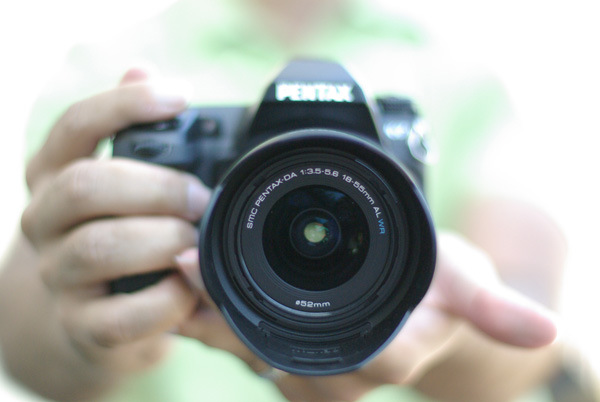
I’m sure you’ll agree, digital SLR cameras are pretty appealing contraptions. They constantly evolve with new bells and whistles, and shiny attractive buttons and dials, but at their very essence, a camera is quite simply a box that captures and records light through a small opening. Light enters the camera and hits a sensor for a certain period of time, and that’s it. Too much light and the photo will be over-exposed (too bright). Not enough light and the photo will be under-exposed (too dark). By the end of this article, if feel stuck in Automatic Mode you will be able to break free and let your true creativity reign!
So how do you know when you have the optimal amount of light? Thankfully, when you are shooting in Manual mode, your camera has a built-in light meter to show you if your exposure is going to be too dark, too bright, or just right. You simply need to know how to control the amount of light that enters your camera, and for how long the sensor is exposed to that light.
Start Right Here – learn how to master your DSLR
There are three ways to control the amount of light that enters your camera, and all three are used to make your photograph either brighter or darker.
The Exposure Triangle
The first is the size of the opening through which light enters, called the aperture of your lens. The next is the duration of time that your camera sensor is exposed to the light, referred to as the shutter speed. The final option controls how sensitive the camera is to light, known as the ISO. These three controls all interact with one another in a give-and-take relationship, and the following “Exposure Triangle” is a great tool to help you understand the dynamics of these relationships.
Now, the trick is to balance these three options to achieve a perfect exposure. Typically, you will choose two ways of controlling how light enters the camera, and then compromise on the third. The two choices you make are solely dictated by the aesthetic you would like to achieve. Aperture size, shutter-speed, and ISO all have individual benefits, but they also produce side-effect consequences that lend an aesthetic component of their own. Let’s explore how they work in more detail.
Part One – Aperture
The size of the “hole” through which light enters your camera is called the aperture. Mechanically, the aperture is a little diaphragm inside the lens that you can widen or narrow by telling your camera what f-stop you would like to use. The f-number is a funny measurement because a small f-number (like f/2.0) equates to a wide opening, whereas a large f-number (like f/22) equates to a small opening. As you would imagine, a large opening allows more light to enter the camera resulting in a brighter photograph, and a small opening lets in less light resulting in a darker photograph. Pretty straightforward stuff so far right?
Side Effect of Aperture
The aesthetic effect of varying the aperture is that light entering a wide aperture translates into less focus between the foreground and the background in the photograph. This is how photographers blur out the backgrounds in their photos. When you want to isolate a subject by blurring out the background, you would use a wide aperture.
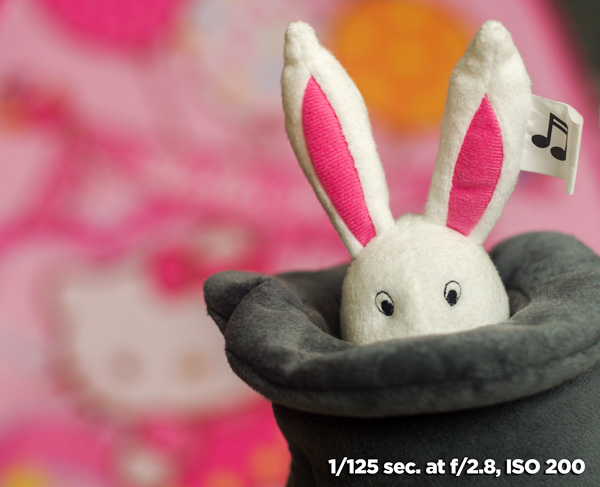
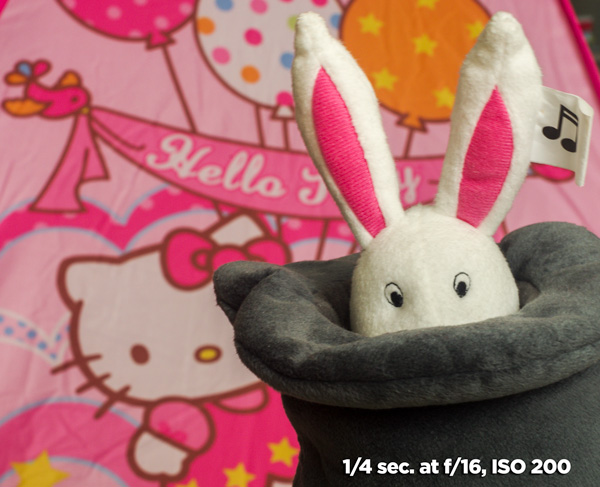
Light that enters through a smaller, tighter, aperture is more focused than light entering a wide aperture, and light that is more focused translates into sharper focus through the foreground-to-background depth in a photograph. So if you want everything as sharp as possible through the depth of your scene, you would want to use a narrow aperture.
Part Two – Shutter Speed
The shutter is basically a little curtain that opens and closes behind the aperture. It can be open for a long amount of time (like seconds, minutes, or even longer), or a short amount of time (like quick fractions of a second). As the shutter stays open longer, more light is captured by the sensor resulting in a brighter image. The shorter the shutter speed, the less light is captured resulting in a darker image.
Side Effect of Shutter Speed
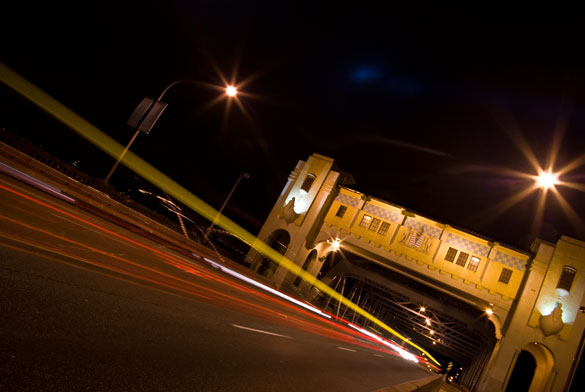
The aesthetic effect here is that a fast shutter speed allows you “freeze” any motion in the scene, whereas a slower shutter speed blurs any motion. Imagine taking a photograph of a falling water droplet. If your shutter speed was set to 1/1000th of a second, the shutter is open for such a brief fraction of time that the drop would appear frozen in mid-air when photographed.
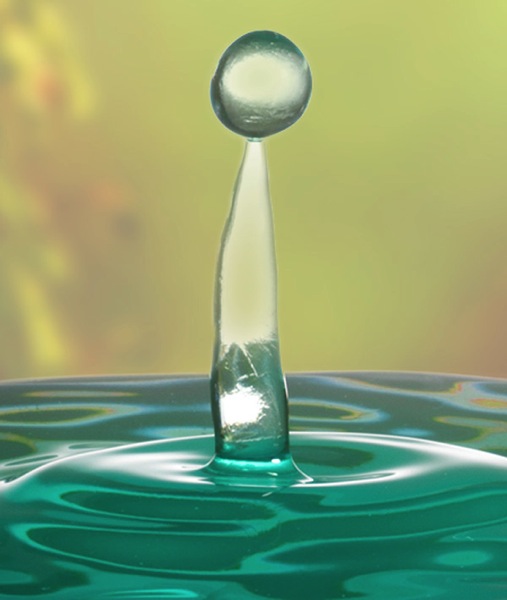
Alternatively, if you set a much slower shutter-speed such as half a second, then the movement of the falling drop would be captured as a blur.
Give-and-Take
Typically, fast shutter speeds require a larger aperture for the sensor to capture enough light to produce a well-exposed photograph. Conversely, slow shutter speeds tend to require a smaller aperture to limit the amount of light coming in over the longer duration. You can see how these factors are all starting to work together.
Part Three – ISO
The third way of adjusting the overall brightness of your photograph is the ISO, which controls how sensitive the camera sensor is to light. A low ISO (like 100) results in a darker photograph, while a high ISO (like 6400) results in a brighter photograph.
Side Effect of ISO
Of course, there is a trade-off here too. The aesthetic compromise of using a higher ISO means that while you will produce a brighter image, a higher ISO also introduces more grain (or “noise”) into a digital photograph.
Usually, you will first decide upon your aperture and shutter speed based on the combination of their aesthetic effects to your vision for the final image, while aiming to keep your ISO as low as possible. If you know that you need a certain shutter speed along with a certain aperture and the resulting image is still too dark, that’s when you increase the ISO.
Generally speaking, when you’re shooting in an environment that is dark or dimly lit, you’ll want to raise the ISO to make the sensor more sensitive to light. When the lighting conditions are bright, you can keep the ISO low.
It’s all about finding a balance between these settings to achieve the best exposure. Once you decide upon one or two of these settings, the camera will require some compensation on the other.
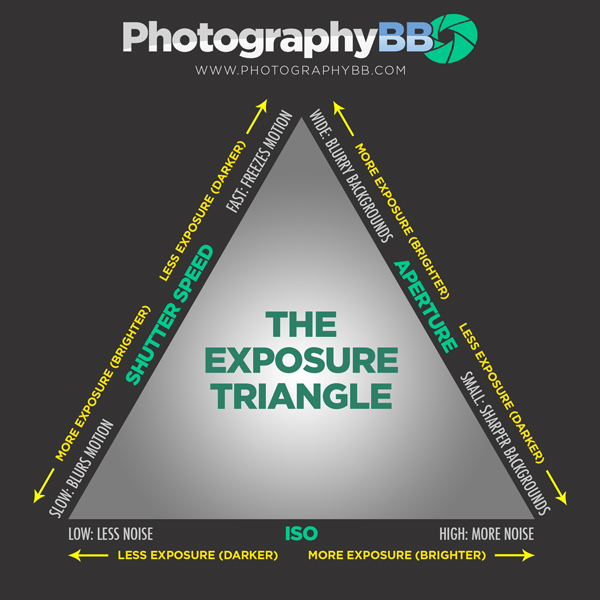
The Exposure Triangle is a great reference to demonstrate how increasing or decreasing any one of these three settings affects the exposure of the image. This stuff can be learned quite quickly, but it’s best to experiment with these settings to see how they operate in the real world. This will help you gain a technical understanding of how to use your camera, but there’s still a long way to go with regards to making photographs that communicate. Remember, photography is a visual language. Once you learn how to use the camera, you can then learn to translate your vision into captivating photographs.
Both the technical and artistic aspects play important roles in the making of a beautiful photograph. At CLARITY, we show our readers how to quickly learn the technical side, but we go even further to teach the importance of developing your creativity. We’ll show you step-by-step techniques to making stronger photographic compositions, and what to do when you feel like your vision and results don’t line up. Join other DPS readers, and we’ll give you everything you need to know to make great photographs with ease, in any situation. Get a subscription to CLARITY on sale now at SnapnDeals.com.

The post How to Master Your DLSR in One Afternoon a Beginner’s Guide by Dave Seeram appeared first on Digital Photography School.
-
Bird Photography Tips for Beginners
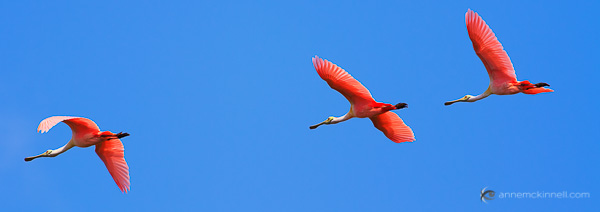
The colour and texture of birds’ plumage makes them fascinating subjects for photography, made all the more exciting by their fleeting and elusive nature. With a lot of patience and practice, and the help of these tips, you’ll soon be on your way to making memorable photographs of our feathered friends.
Equipment
To capture the best bird photography, the most important thing you’ll need is a lens with a very long focal length. How long, exactly? Generally, the longer the better for maximum magnification. But keep in mind that lenses get remarkably heavy – if you’re hiking up a mountain, it might not be practical to carry an extreme telephoto lens, which can weigh in at over ten pounds.
A 70-300mm zoom lens is one of my favourites because it is very versatile and some of them are fairly lightweight. But you’ll get a sharper image with a fixed focal length lens. I recommend trying out a 300mm or 400mm prime lens.
The extra weight of a long lens will increase the likelihood of hand shake blur, which will then be magnified by the distance between you and your subject. If you’re working with a heavy lens, a tripod or monopod will be a great benefit for taking the weight of the lens.
If you want the increased flexibility you’ll get by not using a tripod or monopod, be sure to use a very fast shutter speed to compensate for the hand shake blur.
Camera Settings
Exposure
When photographing birds, using shutter priority mode and a fast shutter speed will ensure you are ready for any action that might happen, even if the bird is standing still at the moment. You never know when it will take flight and you want to be ready when that happens.
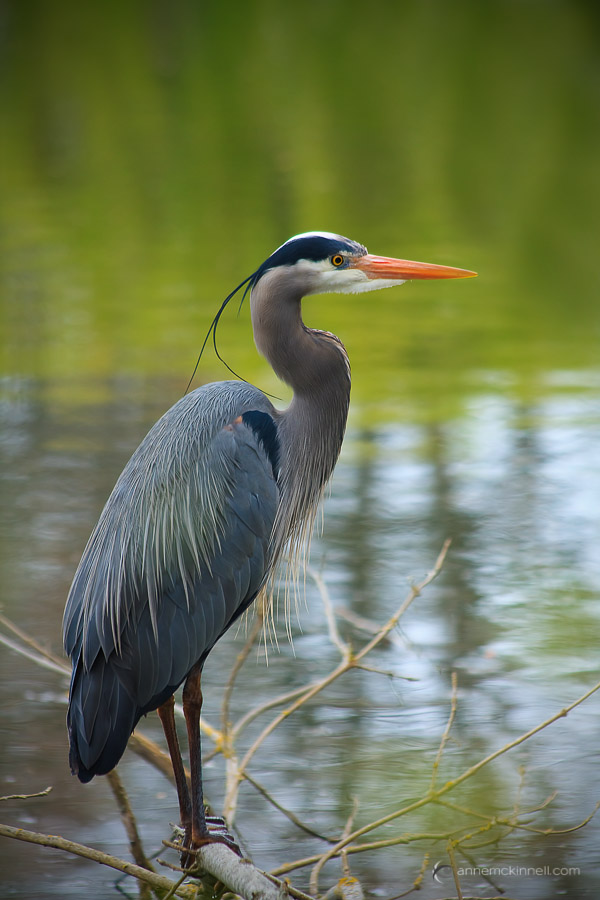
Using a wide aperture like f/2.8 or f/4 will give you a shallow depth of field, which helps to isolate the bird from its background and direct attention to its shape and colour.
When you want to have total control over the shutter speed and aperture, use manual mode and set the ISO to auto. That way, the camera will decide which ISO is the best to balance the exposure.
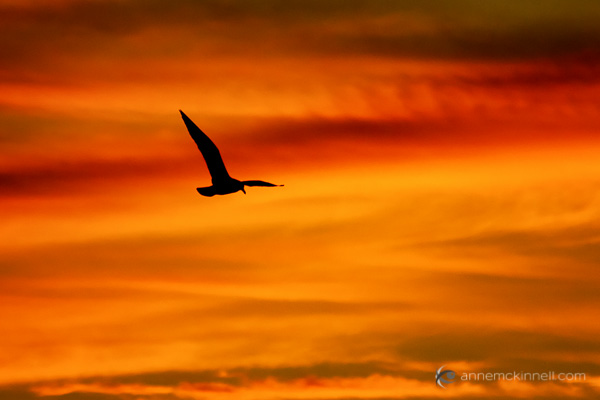
If you have a colourful sky, one option to try is to expose for the sky and allow the bird or birds to become silhouettes.
Focus
How you focus on your subjects will depend on which approach you’re taking, as well as what equipment you have. Some lenses and some camera bodies auto focus faster, and much more accurately than others, so some experimentation is needed to get a sense of how quickly your auto focus motor moves.
Birds are moving subjects, so if you do use auto focus, change it to the “continuous focus” mode (usually called AF-C or AI Servo) which tracks motion. However, you might find that you get better results by learning to focus manually.
There should be an AF/MF switch on your camera and/or lens. If you switch it to MF (manual focus), you can turn the focus ring on your lens to adjust it by hand. This is fairly easy when your subject is still, but it takes a lot of practice to be able to do this quickly enough to lock in on a moving subject.

One method is to set up a perch (such as a bird feeder), with your camera on a tripod, and pre-frame and pre-focus your shot where the bird will be. When it lands, you just have to hit the shutter. There will be no focusing delay, so you can get the exact moment you have been waiting for.
Getting the Shot
Timing and Location
Birds are very active in the spring – the ground softens, plants and seeds starting coming out, and bugs are everywhere. They finally get the feast they’ve been struggling to find all winter. Similarly, in autumn they are avidly gathering food before the frost sets in. Both of these seasons are the best for finding birds near the ground – and whatever the time of year, early mornings and sunny days will draw the most action.
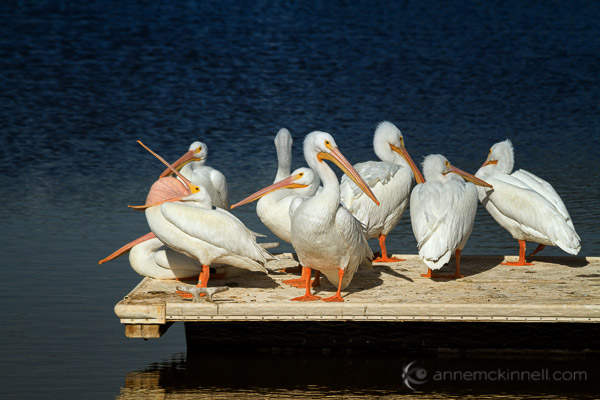
You might get lucky walking along a forest path, making photos of birds as you see them, but because birds see us as predators they will usually flee at the sound of our footsteps.
Instead, you may have better luck by finding a location birds enjoy, hiding yourself, and waiting. This is where the patience comes in to play! The better you hide yourself, the safer they will feel coming near you. Tuck yourself in next to a tree or bush, or hide behind a blind to camouflage yourself, and try to stay as still and quiet as possible.
One of the best places to start photographing birds might be your own backyard. Keep your camera handy with the right lens and camera settings for bird photography so that when one lands in your yard, you’re ready.
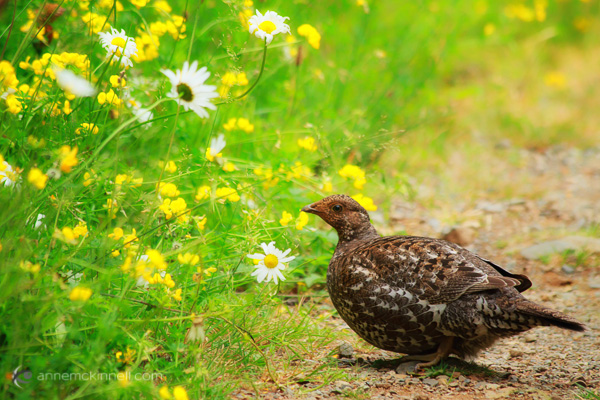
You can also seek them out in their natural habitats such as local forests, waterways, and beaches. You can find exotic and interesting species by visiting zoos, bird sanctuaries, and humane societies, or you can take a trip to a nearby national park or nature preserve. Birds that live in areas with more frequent human visitors will likely be less skittish and camera-shy.
Composition
Take care not to neglect your background. It should be clean and simple. Too much clutter will distract attention from the subject itself. Use your perspective and point of view to remove unwanted background objects from the frame, and choose a large aperture to blur them out.
Tips for the Field
- The better your camouflage, the more likely the birds will come near you. Cover your camera with a green or brown sweater to mask its strange appearance.
- Wear neutral clothing and avoid bright colours.
- Make sure to remove or cover all reflective objects on and around you, including your equipment, camera bag, cell phone, and any jewelry you might be wearing.
- If you do find yourself needing to get closer to a bird, keep a low profile. Don’t approach them directly, but rather move toward them in a zig-zag pattern. Keep very quiet and avoid making quick movements and startling them.
- Birds often choose favourite perches. Even if it flutters off before you can get your shot, if you wait silently for a few minutes, it may come back.
- Birds are easily startled, so a beeping camera can frighten them away. Turn off any beeps your camera might make.
The same goes for flash – turn it off or your bird will be startled by your first shot and quickly leave.
Do you have any other bird photography tips you’d like to add to this list? Please share in the comments below.
The post Bird Photography Tips for Beginners by Anne McKinnell appeared first on Digital Photography School.
-
Beginners Tips for Night Sky and Star Photography
Star Photography
My favorite type of personal photography is taking night shots of the stars (long exposure pictures). I am often busy shooting pictures of people at weddings, or apartments, or models, and it’s important for me to make sure I take pictures for fun regularly. Taking pictures for no one other than myself is highly rewarding, soul filling, and fun! I also love taking travel photos and HDR photos, in this article we will take a close look at exactly how you can take your own epic star photographs.
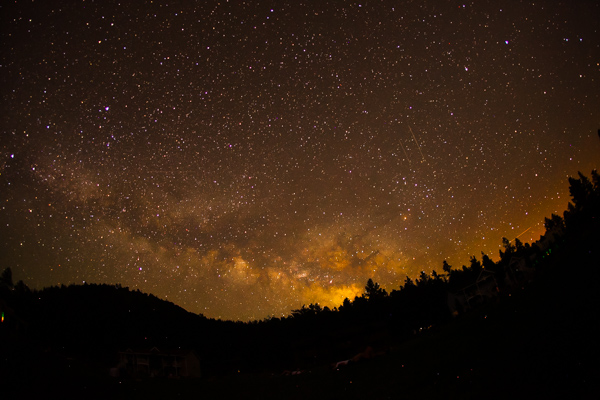
30 seconds at f/2.8, ISO 1250
What you need to take jaw-dropping pictures of stars
To take your star pictures, you only need three things:
- a full-frame camera (for better ISO capabilities)
- a fisheye lens (for the widest view of the sky)
- a tripod (for stability during 15 second photos)
(Note: You can do this with a cropped sensor camera, without a tripod, and without a fisheye lens. It will just be a little harder and slightly less jaw-dropping)

25 seconds at f/2.8, ISO 1600
Camera settings
You can nail this shot almost every time with these settings: 25 second exposure, f/2.8, ISO 1600
If your lens doesn’t open up to f/2.8 you can try 30 seconds at f/4 with ISO 1600.
Note: this kind of photography won’t work if there is a full moon out (or even a half moon). Don’t compete with large light sources, the stars will be over powered. The best location for star photography is way out in nature, away from city lights that cause “light pollution.”
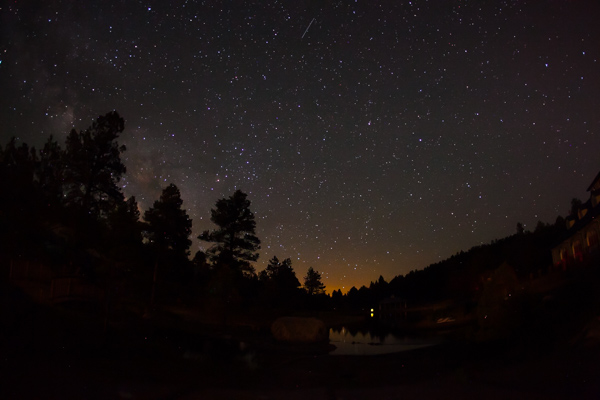
13.0 seconds at f/2.8, ISO 1600
Why to use these settings
The most important component of these settings is the 25 second exposure. An exposure longer than about 25 seconds will start to show star trails. Photographing star trails is a legitimate type of photographyon its own, but not the type of photography you are trying to do here. Since you are limited to about 15-25 seconds max shutter speed, you still need to let in more light. The largest aperture you can find on a fisheye lens is f/2.8, and still your picture might not be quite bright enough to look stunning. So this is where the ISO comes into play. On a full-frame camera like the 5D Mark III or the Nikon D800 you can bump the ISO up to around 2000 without seeing much noise. You’ll learn how to reduce noise in Lightroom in the next section for a super clean photo.

Editing in Lightroom
I do extensive retouching in Lightroom after I take my photos. I’ll usually boost the exposure up by a stop or more and I’ll use Noise Reduction under the Detail section to reduce any unwanted “noise” (those pesky extra white, red or blue pixels that show up when you push the ISO too high). Here is a standard star photo of mine and the Lightroom settings I used to create it:

25 seconds at f/2.8, ISO 1600
Here are the Lightroom settings I used to edit the above photo:

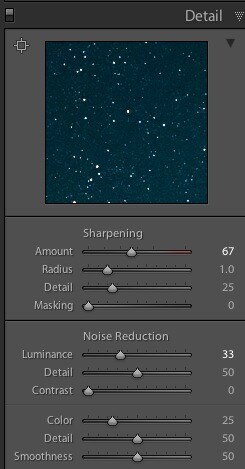
1) You can see in the first panel that I bumped the whites up to +46 and brought the blacks down to -52. I really wanted to emphasize the stars against the dark sky and this is a good way to do that. Pushing the clarity up to +55 also helps define the stars against the sky, making them nice and crispy. I boosted the saturation to bring out any colors that are in the sky.
2) In the second panel you can see that I sharpened up the image a bit, also to emphasize the stars. At the same time, I brought up the noise reduction to 33 to smooth out some of the noise that might show up, and I brought up the color to 25 for the same reasons.
Pro tips

Here is where you can have fun with the editing. Play around with the split toning sliders to make the colors in your sky appear magical. In the photo above you can see a little bit of turquoise in the lower part of the sky, and that comes from boosting that color in the Shadows of the Split Toning slider here:

You can also affect the color of the sky by playing around with the temperature and hue sliders to get some pretty magnificent looking star photos. Take a look at this one photo rendered three different ways:
Another pro tip that you may have noticed in all of the photo examples I gave here is this – shoot your stars in context. It really tells a great story to see a silhouette of a pine tree or a house in the background, and it shows the magnitude of the scene when you have an object in the foreground to compare to the stars.
Lastly, make sure you know which direction the Milky Way is. You can use an app like Sky Map to see exactly what stars are in the sky above you.
Have fun shooting, and please share your pictures below!

The post Beginners Tips for Night Sky and Star Photography by Phillip VanNostrand appeared first on Digital Photography School.
-
A Beginners Introduction to Using Layers
Using layers in your photo editing software is one of the most important things you can do to create great images. Layers are so powerful, even the most basic understanding of them can improve your photography tremendously. The good news is that using layers is extremely easy, and very quick. If you follow along with this tutorial and incorporate the techniques, you’ll see a huge difference in the quality of your images.
While there are countless things you can do with layers, it’s convenient to group them into three main categories:
- Exposure blending
- Local adjustments to specific parts of an image
- Special techniques
We’ll go through all three categories in this tutorial. Please keep in mind this guide is meant to demonstrate the power of layers and why you want to use them. It’s not a software-specific guide and the exact mouse-clicks and menu items may vary slightly among the different photo editing packages available. That said, the use of layers is very similar in all software.
EXPOSURE BLENDING
Exposure blending is one of the best techniques you can use to improve your photos. It’s critical to understand and use this skill. It’s also super-easy!
First, let’s understand why you need to blend exposures. We know that a camera has limited “dynamic range”. That means the camera has a hard time capturing very bright parts of a scene and very dark parts in a single photo. As a photographer, you would generally choose to prioritize one over the other. This is a sacrifice photographers have been dealing with for decades.
Exposure blending solves this problem.You simply take two or more photos of the scene at various exposures and blend the best parts of each exposure to produce a single image where all areas are exposed correctly. Wait you say, isn’t that HDR? In a way it sort of is. The difference between automated HDR software and this technique is that HDR software uses a computer algorithm to choose the areas of your photo to blend, while using layers gives you complete control over the final image. It can also be a much quicker process than using dedicated HDR software. Both processes can be considered “High Dynamic Range” photography, and both have their place.
So how do we do it? It’s very simple, you layer the photos with different exposures on top of each other and then manually blend them. Before we blend exposures, let’s take a quick look at how layers work.
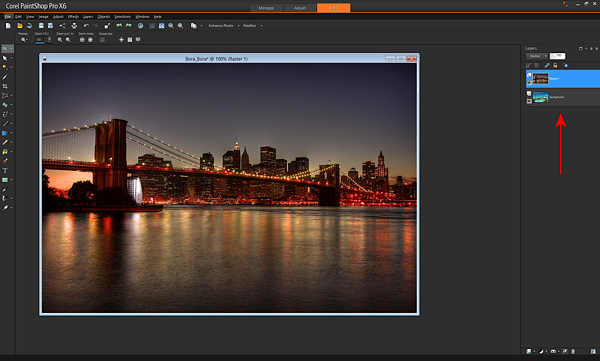
Here we see two photos, one of the Brooklyn Bridge and one from Bora Bora.
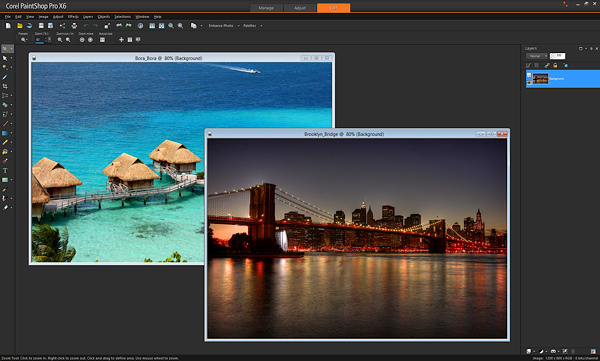
To layer them, I’ll copy-and-paste one photo on top of the other in my editing software. (There are a variety of ways to layer photos depending on the software you use. I use copy-and-paste). After I paste the Brooklyn Bridge photo on top of the Bora Bora photo, you can now see on the right of the screen, where the red arrow points, that the photos are now layered in one document (see image below).
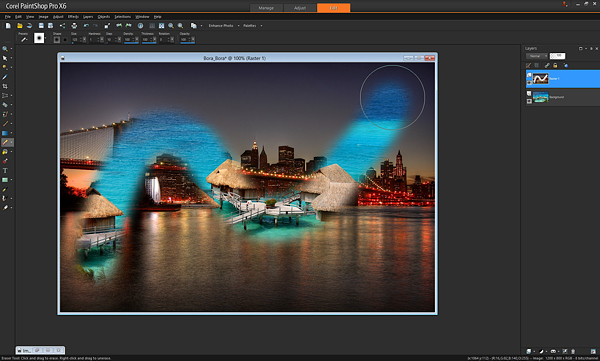
If I were to take an eraser brush and swipe it across the top layer, I will erase that top photo and “reveal” the photo below it. Here’s an example after I’ve taken a swipe with the eraser brush.
That’s all there is to understanding the very basics of how layers work. With just that little piece of knowledge, your photography can be completely transformed.
In the example above, I used the eraser brush to reveal the layer below. That’s one way of doing it, and I showed you that first because it’s an easy way to demonstrate layers. However, most people use what’s called a “layer mask” instead of the eraser brush. Don’t worry, it’s not complicated.
A layer mask is just another way of revealing the photo below. Instead of using the eraser brush to reveal the bottom photo, you create a middle layer between the two photos called a “mask layer” and you draw on it with a paintbrush – wherever you paint, the top photo is “erased” revealing the bottom photo.
To create a layer mask, just layer two photos on top of each other like I did above, then from the menu click “Create Layer Mask –> Reveal All”. Then you use the paintbrush on the mask to reveal the bottom photo. Painting with the color black reveals the layer below, and if you switch the color to white, it will “undo” wherever you’ve painted black so you can clean up any strokes you didn’t want to make (black reveals, white hides the layer below). Here is the same example below with a layer mask – you’ll see the effect is identical. Notice the new mask layer by the red arrow.
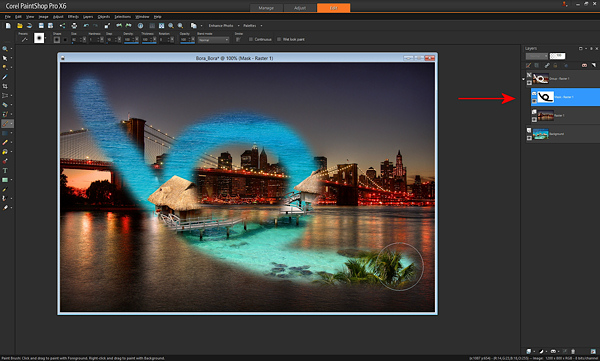
The great part about layer masks is that you can save the entire set of multiple exposures along with the masks in a single file, which you can edit later. The original exposures are left completely untouched. That’s the difference between using a mask and using the “eraser brush” directly on your photo. With a mask, you can always go back at any time and paint with the white paintbrush to undo anything you need to.
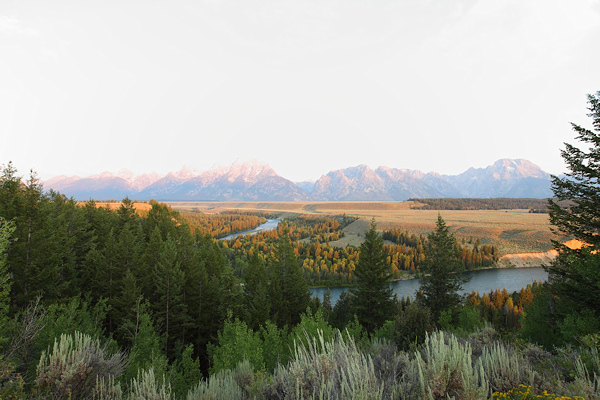
Now that you know how to use layers, exposure blending is very easy. Here’s a photo I took in Grand Teton National Park. Notice that the mountains and sky look properly exposed, but the foreground foliage is way too dark.
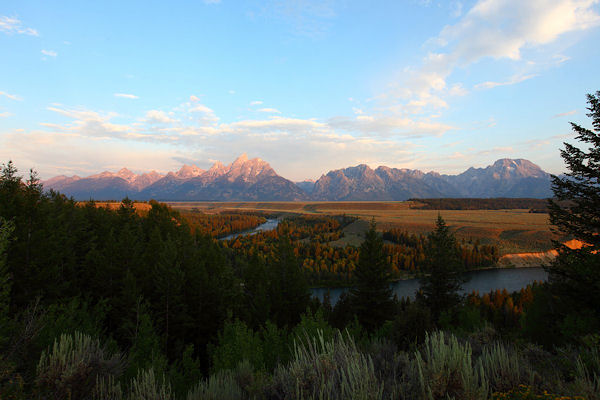
Without exposure blending, the photo above is the best I could do. However, while I was at the location, I also took another photo with the foreground exposed properly. Notice though how the sky is completely blown out and the mountains are overexposed now.
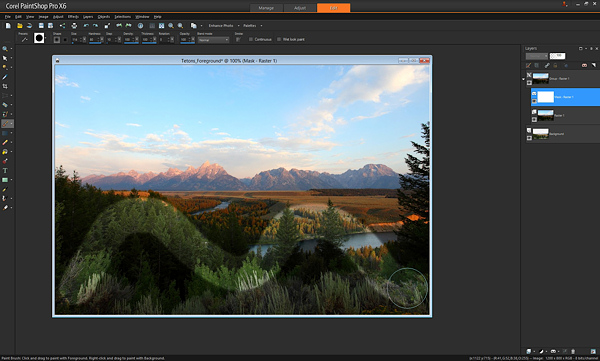
With layers, I can easily blend these two images to create the perfect combination, and it only takes a few seconds. I just take the photo with the good exposure for the mountains and paste it on top of the photo with the good exposure for the foreground. With the properly exposed foreground on the bottom, I use the brush to reveal that bottom photo wherever the leaves are too dark. Here it is after one swipe with the brush. You’ll see the better exposure is revealed below.
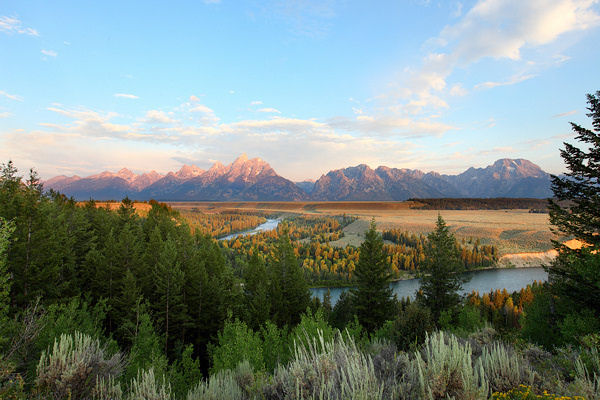
That’s it. After some practice, you’ll be able to do this very quickly, with the final photo looking like this.
Of course there is one key thing to remember: You must take multiple exposures at varying brightnesses when you’re at the scene!
If you forget, you can sometimes fudge it and brighten dark areas in your editing software, but you can never darken the overly bright parts if you forget to take a photo with those areas properly exposed. Always make sure at least one photo has the bright areas exposed properly (nothing clipped or overexposed).
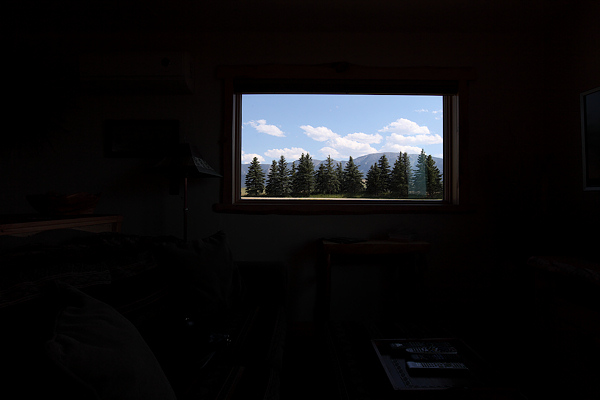
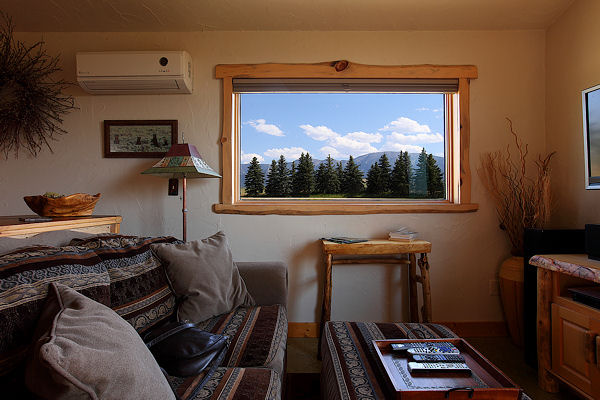
Here’s an additional example of exposure blending below. How many of us have taken this shot? Sure would be nice to see what’s outside that window.
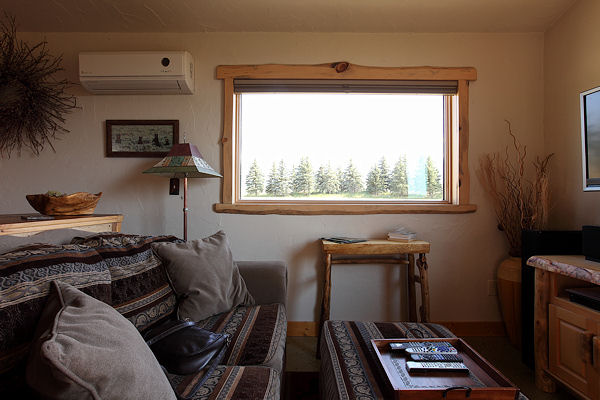
If you took another exposure with the outside properly exposed, it’s simply matter of layering the two photos on top of each other and revealing the bottom photo with the properly exposed window. Here’s the photo for just the outside.
…and the final blend looks like this.
Let’s talk about the opacity and color you can use with the brush when painting on a mask layer. We know that a black paintbrush erases the top photo revealing the photo below, and that a white paintbrush is like an “undo” that puts the top photo back where needed. In addition to just the white and black paintbrush, you can also use any shade of grey. Using a grey paintbrush blends the two photos together, making the top photo slightly transparent so you see both the top and bottom photo at the same time. The darker the grey the more the top photo is erased. The lighter the grey, the more the top photo is visible. This allows for very subtle and realistic blending of the two photos. You may also see it as “opacity” in your software. When the brush opacity is 100%, the brush is at “full strength”. When you swipe the brush, it erases 100% of the top layer fully revealing the layer below. If you set it for 50%, a swipe of the brush works at half-strength.
Here’s an example of a swipe of the brush at 50% opacity or medium grey.
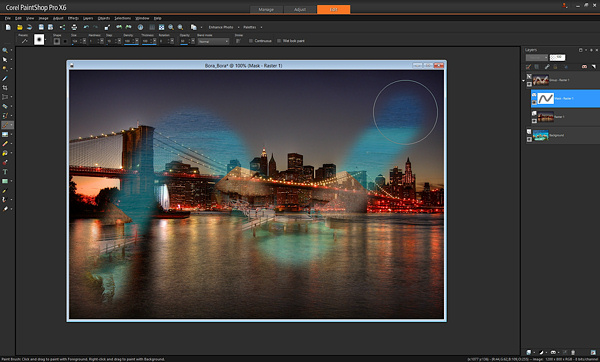
Notice how you can see both the Brooklyn Bridge and Bora Bora at the same time. Adjusting the opacity or grey-level lets you apply the effects more subtly and with more control as needed. For example, with the Grand Teton photo in the earlier example, where the foreground leaves meet the background mountains, I might use the brush with 50% opacity so it’s a nice seamless blend, that’s unnoticeable. Another way to create a seamless blend is to use a brush with a low “hardness” — that is, the center of the brush is 100% opacity while the outer edges are less strong, creating a smooth effect.
LOCAL ADJUSTMENTS
After exposure blending, one of the most important techniques you can do with layers is to make local adjustments. That just means tweaking certain parts of the photo while leaving the rest of the photo as is.
Below is a great example of using layers for a quick local adjustment. Have you ever taken a photo where different parts of the photo have mixed lighting and different white balances? In the photo below, you can see that the camera’s flash has cast an unflattering blueish tint onto the people’s faces, contradicting the warm glow of the Eiffel Tower in the background.
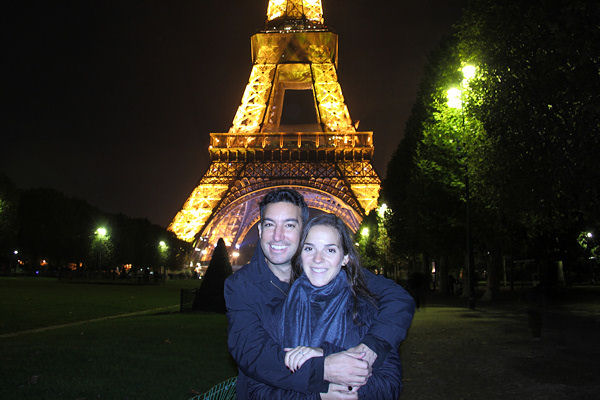
With layers, you can easily solve this problem. Here is the corrected photo.
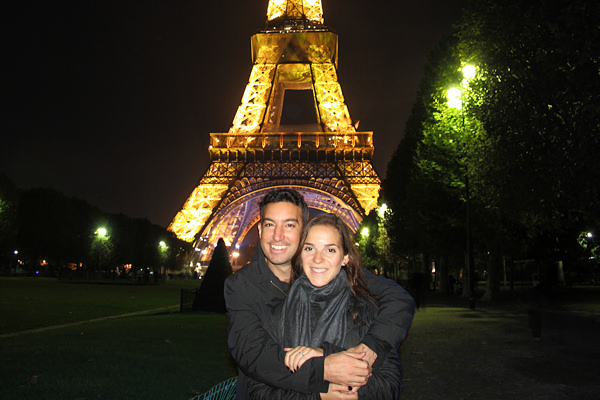
To do this requires just three quick steps:
- Create a copy of the original photo and set it aside
- Adjust the original photo paying attention only to the area that needs to be fixed (in this case adjust the White Balance of the image paying attention to the faces and ignoring everything else)
- Paste the untouched copy that you put aside on top of the adjusted photo, and “erase away” the top photo revealing the adjusted layer below, just where you want to see the adjustment.
In this example, you can see exactly where I “erased away” the bad white balance revealing the better white balance below.
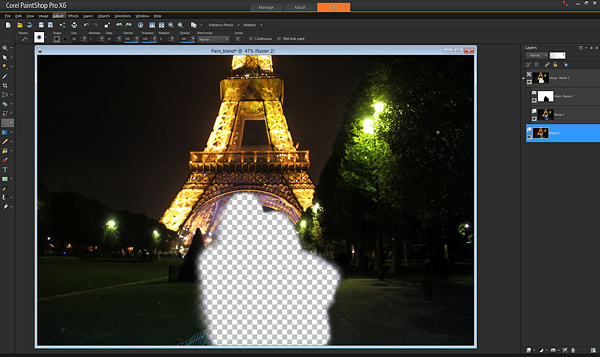
If you shoot in RAW format, you can create the two versions of the photo with the two appropriate white balances in your RAW converter. If you don’t shoot raw, just create a second copy of the original photo, change the color balance in your editing software, and layer as described above.
Using layers you can selectively apply saturation adjustments, brightness/contrast, sharpening, etc. This allows for an incredible amount of control over the final image. Just create a version of the photo with the adjustments, put it as the bottom layer, and reveal it with the brush just in the spots you choose.
For example, in this photo of the Rockefeller Center Christmas Tree in NYC, just the lights on the tree needed a levels and sharpness adjustment. You can see the difference that local adjustment makes to the entire photo in this before and after.
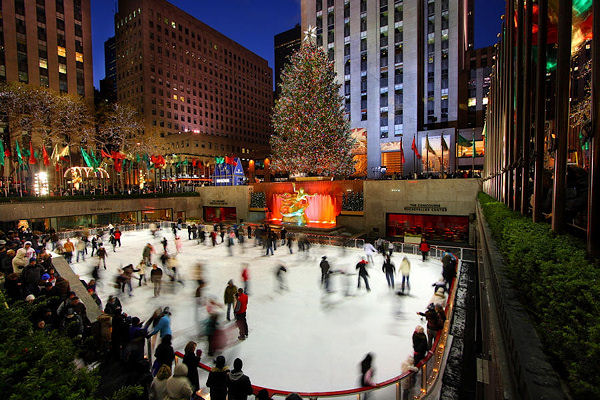
Before
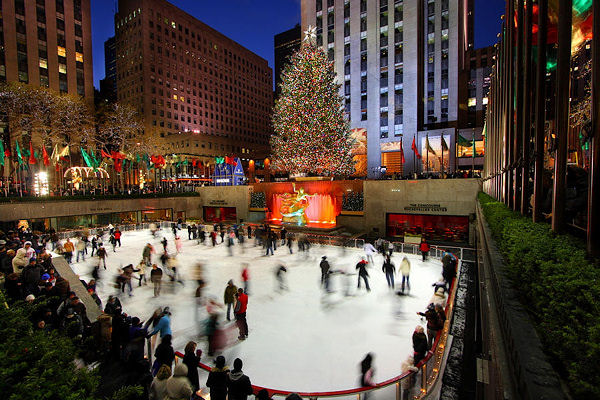
After
SPECIAL TECHNIQUES
In addition to using layers for exposure blending and applying local adjustments, you can use layers for a wide variety of additional purposes. I’ve listed some really cool techniques below.
Blinking in group portraits: Have you ever taken a group shot and there’s always one person blinking or making an odd face? Next time, mount the camera on a tripod and use your camera’s continuous shooting (i.e. rapid-fire) mode to take a few photos in quick succession. If one person is blinking in the photo you like best, just put that photo as the top layer and put another photo without him blinking underneath, and “erase” the top photo with the blink to reveal the bottom photo below with his eyes open.
For cool sports effects, use a tripod and take rapid-fire photos of the action, layer the photos, and “erase” away the top photo to reveal the person moving in the subsequent shots.
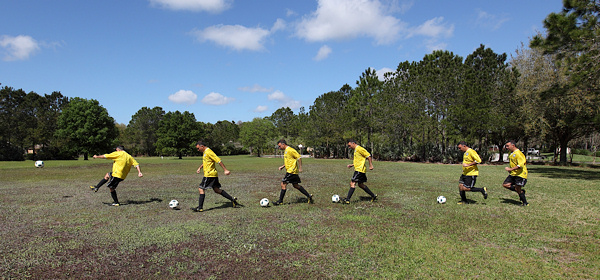
You can get really creative with this effect – here’s six of me playing a soccer game.
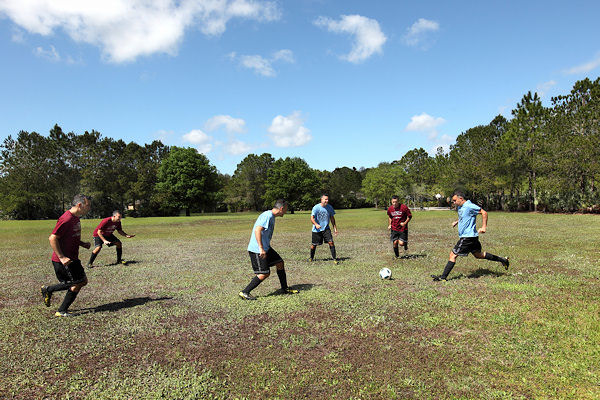
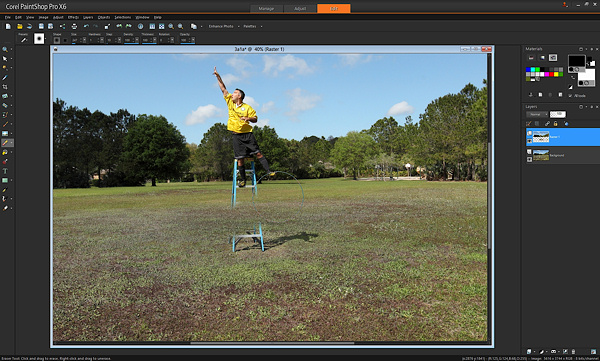
For special “flying” effects, take two photos from a tripod, one with a person on a ladder, one with the just the background (ladder and person removed). Then layer the photos and “erase” the ladder.
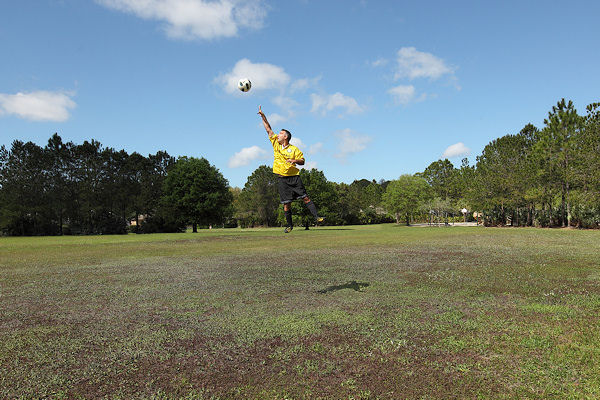
Here’s what it looked like with one swipe of the brush “erasing” the ladder and revealing the background.
Many people find that automated HDR software can produce unnatural effects. If you’ve used HDR software to create an HDR image that you like, but there are certain parts that appear unnatural (for example, the sky), blend a little bit of the original non-HDR photo using layers to make it more natural.
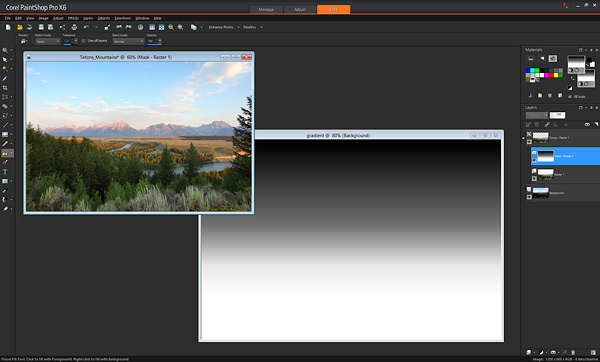
You already learned that painting with a black brush reveals the layer below. Wherever there is black, the top layer is “erased”. What if we didn’t use a brush at all, and instead used another way to paint black? This opens up a whole new set of possibilities. For example, this is a simple gradient, a pattern that goes from white to black gradually.
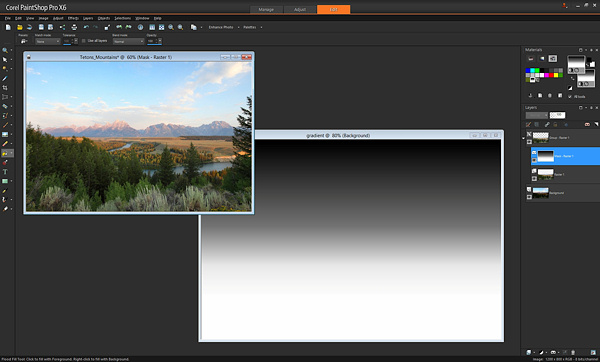
If instead of using a black brush to reveal the bottom photo, we used this gradient, we get an instant Neutral Density filter! Apply this gradient using the Fill tool on the mask instead of painting with a brush, and where the black is, the bottom photo will be revealed. Put the black part of the gradient over the area of the photo where you want to adjust exposure and you’ll have a beautiful transition.
You can also use other tools to apply black to the mask. In the earlier example with the view outside the window, rather than painting with a brush, you could use the “draw rectangle” tool to place a black rectangle over the window, revealing the view outside.
Hopefully you’ve seen just how simple it is to use layers in your work, and how powerful they are. From blending multiple exposures, to adjusting your photos and using special techniques, layers take your images to a whole new level.
Please feel free to ask any questions in the comments below.
The post A Beginners Introduction to Using Layers by Paul Timpa appeared first on Digital Photography School.
-
5 Easy but Amazing Light Painting Experiments for Beginners
Light painting is a photographic technique using a hand-held light source to “paint” on the film or sensor of your camera. Essentially, you’re waving lights in front of your camera, and you never know what you’ve made until you’re done, so trial and error is required. If this sounds like fun, you’ll find five light painting experiments below you can Continue Reading
The post 5 Easy but Amazing Light Painting Experiments for Beginners appeared first on Photodoto.
-
10 Incredible Bird Photography Tips for Beginners
What is the most important factor in getting your bird photographs noticed by a large audience? Is it the camera or the lens or the bird?
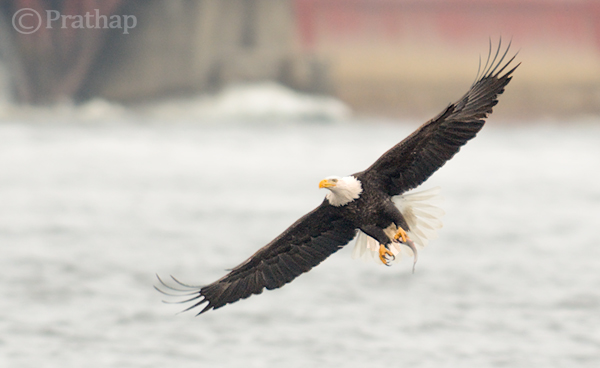
Imagine you have a Canon 1DX or Nikon D4 and 800mm lens. You have been to a place to photograph the magnificent Bald Eagles. Everything seems perfect! Isn’t it?
But, what if you do not know what makes a good bird photograph? Do you think just by shooting a burst of photographs will give you the best photographs? Definitely not…you may get snapshots but not photographs.
“There is nothing worse than a sharp image of a fuzzy concept.” – Ansel Adams
Today you will learn some of the core principles of Bird Photography that will give you an understanding of what makes a good bird photograph.
1. You Don’t Need Expensive Lenses for Great Bird Photography
A great bird photograph does need several factors such as:
- Quality and Direction of the light
- Composition
- Knowledge about the bird and its activities
- Background
- Knowledge about the gear you are using
- Proper Settings
- Proper Exposure
- Your position
- 3 + 1 Ps (Patience, Perseverance, Practice + Passion)
You see, it takes a lot more to become a good bird photographer. A decent APS-C or DX format camera body with telephoto lens of up to 300mm is more than sufficient to really get great bird photographs.
It is important to realize that bird photography is much more than just the camera or the lens. There is no denial of the fact that the longer the lens, the easier it is to photograph birds which are skittish. But, the lens itself cannot make a great bird photograph.
But, if you do not have a longer telephoto lens, nothing stops you from taking a great photograph of birds like Mallard ducks, geese, gulls, and herons that are easily approachable. If you cannot take a close-up of a Bald Eagle, nothing stops you from taking a unique photograph of a Bald Eagle in its habitat.
Everything boils down to how you view the situation. “Is the glass half empty or half full?”
2. Light and Composition
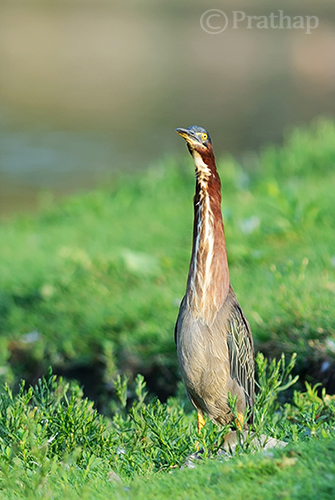 Photography is all about light. Light has few characteristics that will make a photograph wonderful.
Early morning and late afternoon light is usually the best time for bird photography. The light during these times is soft. As a bonus, the birds are very active as well.
Soft light has some wonderful characteristics like:
- It does not cast harsh shadows on the bird
- It brings out a glow to the bird’s plumage
- It gives the catch light in bird’s eye
Composing a bird photograph helps you to convey your message in the best possible way. Bird Photography composition is generally very simple. Following a few basic composition principles will help you make a difference:
- Use rule of thirds composition to place the bird off-center
- Use color contrast by aiming for complementary background
- Fill the frame with the bird
- Use a clean background
3. Transport the Viewer into the Bird’s World
We see our world at 5 to 6 feet high, but birds see the world in few inches to few feet. To get a feeling of the bird’s world, then you need to get down to their level!
Go Low and Go Slow…
Always try to photograph the birds from their eye level, except the birds in flight of course. It has greater benefits that will overshadow any of your complaints like I can’t bend down, lie down etc. Some of the obvious benefits are:
- You get more intimate photographs of birds since you will get an eye contact
- You will get pleasing blur both in the foreground and background
- You make the bird less scared since you can hardly move
- You will transport the viewer into the bird’s world
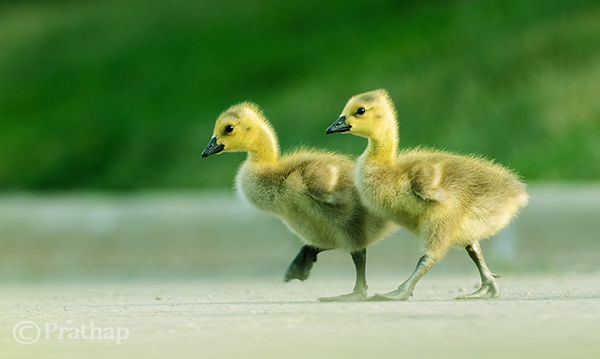
4. It’s all in the Eye
Take a look at any photograph of a bird. What is the first thing you want to see? It’s the eye…right?
We tend to make an eye connection with any living being. It is no different with birds. The eyes are the windows to the soul. If there is no light in the eyes, then they look dull or lifeless. Birds look lively when there is light in their eye.
This light in the eye is called a catch light.
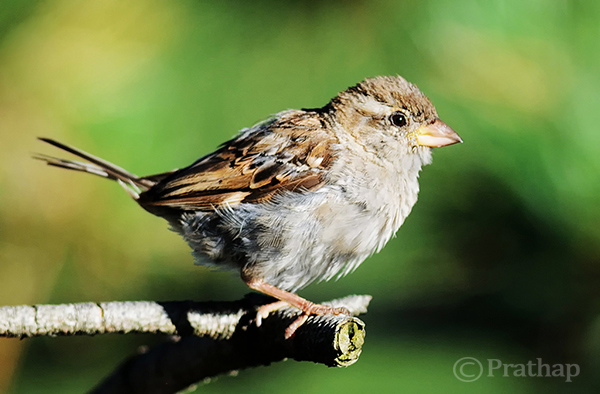
By following few guidelines you can easily get better bird photographs:
- Always keep the bird’s eye in sharp focus
- Check for a catch light in the bird’s eye (easy to get if the bird is front lit)
- Make sure to photograph from bird’s eye level
5. Fill the Frame
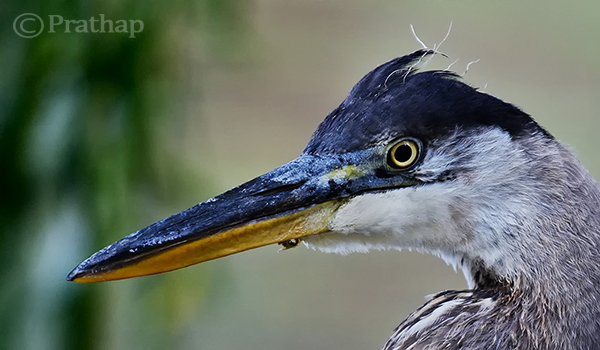
In bird photography, mostly we photograph an individual bird. While photographing individual birds, it is always a good idea to fill the frame with the bird.
Advantages of filling the frame with the bird are:
- It is easy to focus on the bird
- It is easy to achieve a pleasing blur or bokeh effect in the background
- It is easy to properly expose for the bird
- It is easy to compose in the field
6. Tell a Story
Storytelling in bird photography should not be confused with the stories that run for pages. Storytelling is a way to express the time of the day, mood, place or activity of the bird in one photograph. Viewers should be able to picture themselves in the scene.
Simply put, a photograph with bird and its surrounding will give a better sense of story than just the bird filling the frame. Though, it may not always be true.
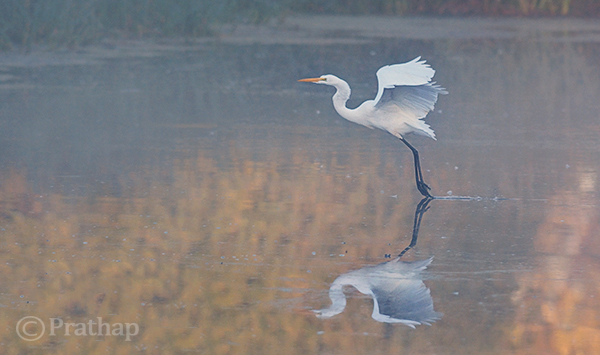
Here are few tips you can follow while you photograph a bird in its habitat:
- Make the bird an integral part of the photograph by including its natural habitat
- Show the interaction of birds if there is more than one bird in the photograph
- Indicate the weather conditions by including either snow, rain or mist
- Take photographs during sunrise and sunset
- Show season by including flowers in bloom, autumn colors, or snow
7. Capture their Action and Behaviour
Birds are always in action. They hardly sit idle. Capturing birds in action involves more effort and patience compared to photographing perched birds.
Here are few tips to capturing birds in action:
- Photograph early in the morning or late in the afternoon when birds are very active
- Use burst shot mode to take several photographs during the action
- Track the bird until focus is locked before pressing the shutter
- Learn to anticipate the action either by observing or reading about them
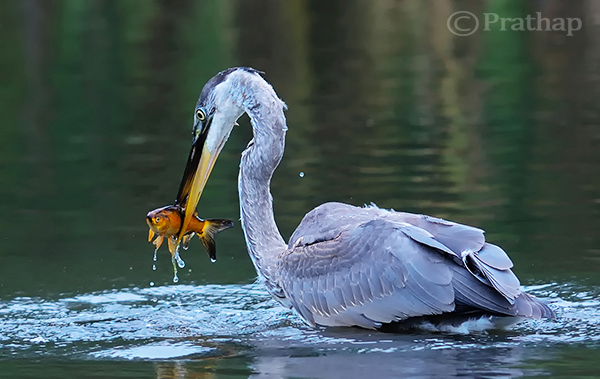
Birds tend to ignore you when they are very hungry. It is very easy to photograph them in action during these times. But, care should be taken not to disturb them and maintain considerable distance.
Capturing bird’s behaviour is much tougher than any other aspect. Generally because birds become alert the moment you are in their sight.
The alert bird is always trying to fly away and rarely will you see its behaviour. You can observe actual behaviours of a bird when it is comfortable. There are few ways to make the bird comfortable:
- Use a natural place to hide, like a bush or tree or something that obscures you
- Wait patiently until the bird ignores you
- Visit the location several days in a row, until the bird becomes comfortable with your presence or you get the right opportunity
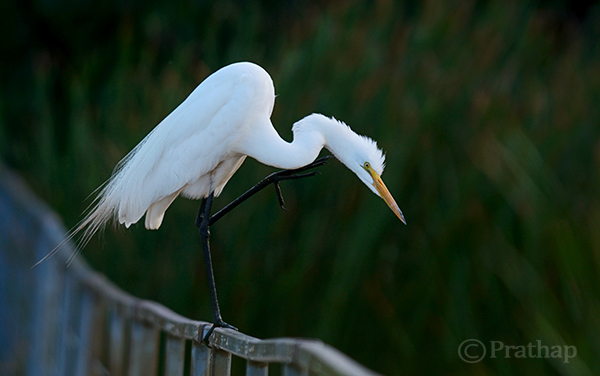
Remember to research and learn everything about the bird you are photographing. This will definitely make you a better bird photographer and also you will enjoy knowing about the bird.
8. Capture their Magnificent Flight
The most interesting part of bird photography is capturing their magnificent flight. This is a very tricky aspect for beginners and pros alike. It is not easy to take flight photographs that will wow viewers.
The success with birds in flight photography largely depends on the bird as well as the technique that one employs. Smaller birds are generally very erratic in their flight and also a bit difficult to track since they are generally too small in the frame. But the larger birds are slightly less swift and are not as difficult to track.
If you want to be successful with flight photography, start with the larger, slower moving birds. Learn all the field techniques to capture the perfect photographs of these birds.
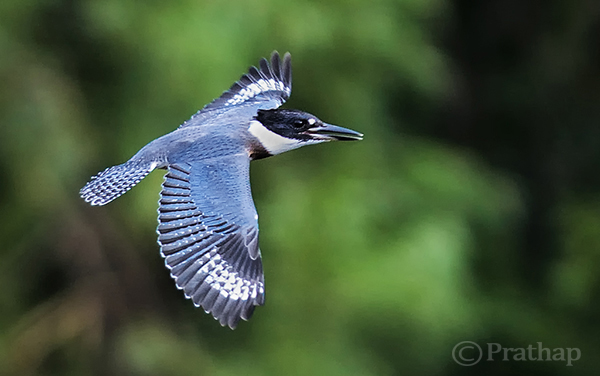
Here are simple tips that will help you capture those magnificent flight photographs:
- Learn about the bird’s flight patterns
- Know their landing and taking off patterns
- If there is more than one bird, it is almost always the case that if one flies, the rest will follow the suit
- Track the bird for a while and let the camera achieve focus before pressing the shutter
- Use Aperture Priority so that you do not have to worry much about the changing light conditions
9. The Background Makes the Picture
This is one of my favourite topics which I repeat often. What are your thoughts on this? – Is it the background or the bird which makes the picture?
Go through all your favourite bird photographs and see it for yourself. Let me know what you think, in the comments below.
Except extreme close-up portraits of birds, every other type of bird photograph will look great when the background is clean and complementing the bird.
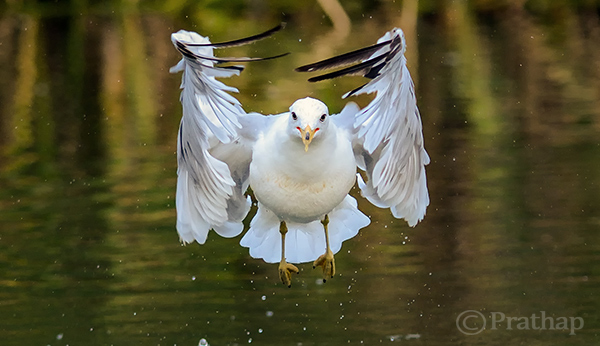
It is very important to keep a check on the background while taking bird photographs. Just follow these simple tips:
- Avoid taking bird photographs when the background is too distracting
- Avoid taking bird photographs when the background is plain and boring
- Wait for the bird to assume a good position or you change your position to get an interesting background
- Choose maximum aperture values to throw the background completely, or slightly out of focus
10. Practice with Common Birds
I urge you to practice with common birds. You might have understood by now that the techniques are not dependent on camera, lens or the bird. I was using 18-200mm lens for first 4 years. I learned and practiced most of my birding techniques with common birds like seagulls, Mallard ducks, geese and herons.
I spend most of my time photographing these common birds, and I gave myself a challenge to make some unique photographs of them, that has fuelled my passion so long. I put more importance on learning and practicing photography, than whatever gear I possess. I am very glad to say that I learned most of the photography basics here at Digital Photography School.
I hope my story so far is an inspiration to you to embrace the beauty of these common birds.
Wrap up
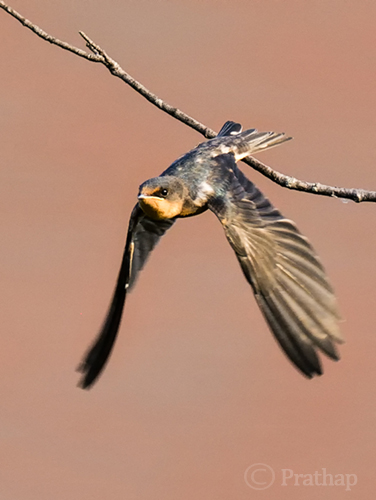 Focus your time and energy in learning all the core principles outlined above. Prove it to yourself that you have so much passion to go out and photograph the birds every day, or as often as you can.
Remember that proper techniques will always outsmart equipment. Make every attempt to make amazing photographs of the common birds. Enjoy photographing birds. That is the secret to success.
Share your experience with us. Do you go out very often to photograph birds? Do you think technique outsmarts the equipment? I would be glad to answer any questions you have. Do let us know if you have any other suggestions on bird photography.
The post 10 Incredible Bird Photography Tips for Beginners by Prathap DK appeared first on Digital Photography School.
-
5 Easy Photoshop Tips for Beginners
 Photoshop has changed the way we transform our imagination. If you are into any digital workplace, learning Photoshop can be a great help. Photoshop today is certainly a centre of creativity to which almost every digital domain; from web designing to animation; from photography to digital magazine, is deeply connected. Today, when it comes to photography, it is not possible to imagine it without Photoshop.
Good Photoshop skills can’t make a mediocre picture perfect unless you are into manipulation. However, it can certainly help you to enhance your best photo into an amazing masterpiece. Learning Photoshop is a slow process, and you should try it with enough practice, after all it is a digital art.
In this article I will walk you through some basic Photoshop retouching skills. These 5 easy Photoshop tips for beginners will be a great start to learning to proces your photographs.
1. Learning Keyboard Shortcuts
Learning keyboard shortcuts will help you to speed up your processing workflow. There are few key shortcuts for different tools in the tool bar. A few of the most widely used shortcuts are:
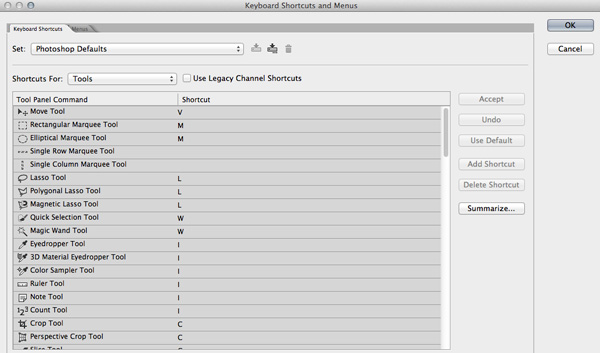
- V = move tool
- F – toggles through display screen modes
- Space bar = temporary hand key
- B – paintbrush tool
- D – sets the foreground/background colorss to default
- X – swaps between background and foreground color
- E – eraser tool
- S – stamp or cloning tool
- W – quick selection tool
- Ctrl+j – duplicates the selected layer
There are just few of the most regularly used Photoshop shortcuts. When you start using the program more, your knowledge of shortcuts will gradually increase. Once you are aware of the most used shortcuts retouching pace will be faster than ever.
2. Color Enhancing – Saturation versus Vibrance
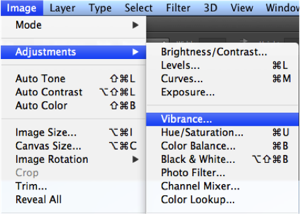
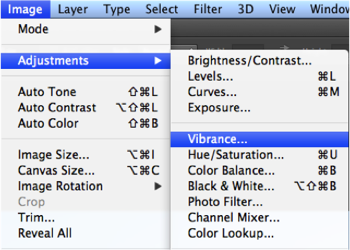
Color is another domain you can try while enhancing your photographs. Generally when you are beginning in photography, enhancing the color of every image looks good, as if the colors are speaking out of the photographs. It will be lot more helpful if you can understand the difference between how saturation and vibrance works. Go to Image menu and choose Adjustment under the menu
As shown in the image to the right, select the Vibrance option. You will get two options under the menu – Vibrance and Saturation. Vibrance increases the saturation of less saturated colors. This option avoids yellow and orange skin tones. Basically vibrance works best for portraits.
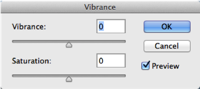
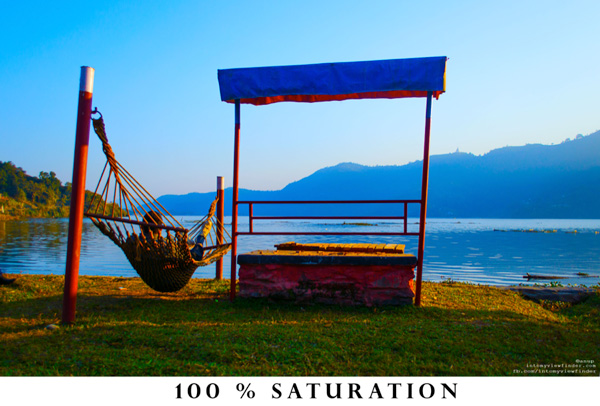
On the other hand, saturation increases the intensity of all the colors in your image equally. This may not be a good option for portraits or peoples photos. What I can recommend is this: slowly start with vibrance for the color enhancement and use saturation later if you want to pump up the color more.
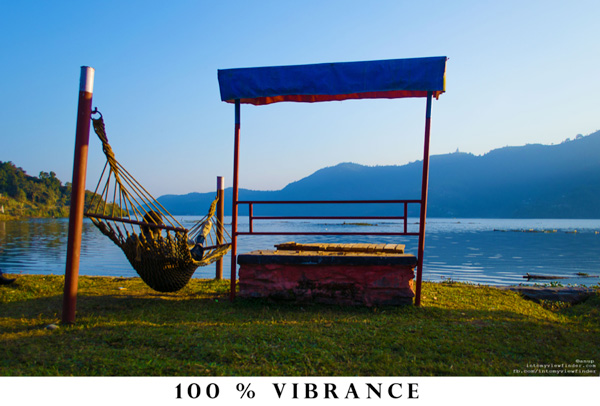
If you compare the two photos below, you will understand how vibrance is only responsible for increasing the intensity of less saturated colors, where as saturation increases the intensity of all colors equally.
3. Adding a Vignette

Vignetting is basically a technique to darken the edges of your frame so that the eyes move to the subject more easily. This procedure works best when you have a subject in the center. Our eyes tend to move towards the brighter part of the image and recede on the darker side. This technique will result in dark space around the subject.
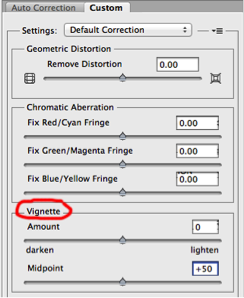
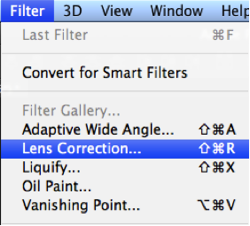
There are lots of manual ways you can add vignetting in your photos but I will talk about how to easily add vignetting in your images via Photoshop. Go to Filters Menu at the top and select “Lens Correction”, then choose the Custom Tab on the right. The third section down is for adding a vignette. Slide the Amount to the left to darken, and Midpoint to adjust the size of the circle.
4. Adding Sharpness and Details
Adding sharpness is another technique for beginners in Photoshop. This will make your image look more detailed. I would suggest detailing most of your images with appropriate values. But make sure you sharpen, or detail your images with a small value if you are going to upload images on Facebook because it compresses the images and adds some detail to make it took a bit sharper. So when an already sharpened image is uploaded in Facebook, there is a change of it looking too edgy.
Like any other technique, there are many ways you can add details in Photoshop. I will show you a very simple technique. Once you understand how this works you can experiment with some of the other techniques.
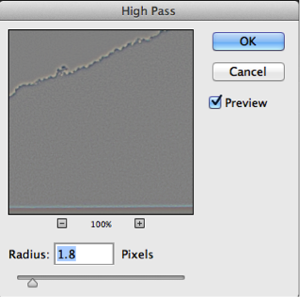 Step 1. Duplicate the selected layer with a keyboard shortcut Ctrl+J (PC) or Command+J oP MAC
- Step 2. Open the High Pass filter: Filter > Other > High Pass on the top layer
- Step 3. Apply an appropriate value (just to see the edges in the image) and click Okay
- Step 4. Change the blending mode of the top layer to Overlay
- Step 5. Adjust the opacity of that layer to your taste
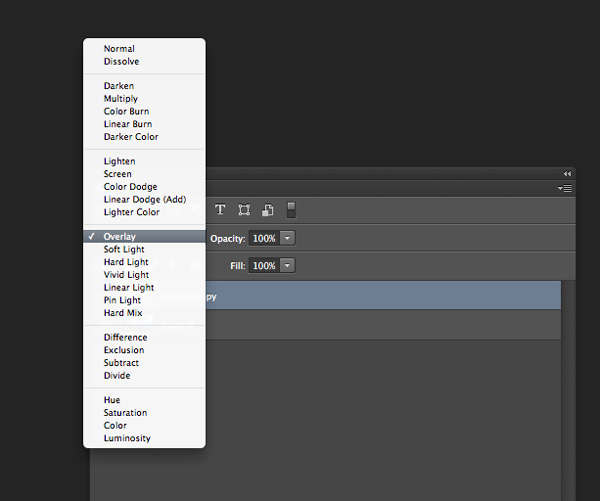
Layer blend mode
5. Photoshop Filter Gallery
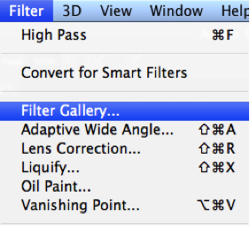
Filters are basically automated effects that you apply to your images with a few clicks. Filters can help you to achieve certain special effects or looks. There are various filters in Photoshop, which you can pick individually, each filter results in different effect when applied to different images. You an also apply more than one and stack them. Though I don’t use filters much, it’s good to explore if you are just starting out in Photoshop. Later, when you are more familiar with advanced tools and techniques you can try to create the similar effect from manual options and controls.
To apply a filter select the layer and go to Filter > Filter Gallery. Before you apply any filter in the gallery make sure to change your image to 8 bit. You can do that by going to Image > Mode > 8 bits/channel
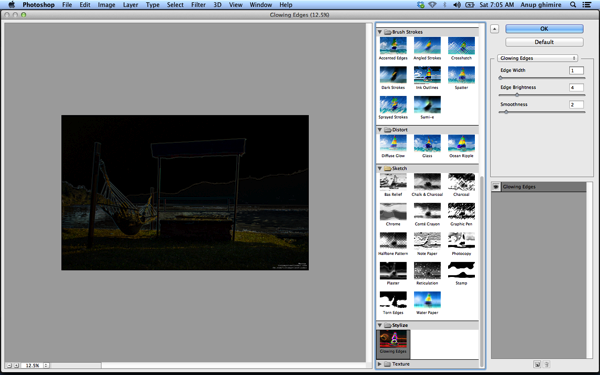
I hope these 5 basic Photoshop tips will help you to retouch and enhance your photos. If you have others suitable for beginners please share in the comments below.
For further reading on Photoshop head to:
- Photoshop Tips
- Photoshop “blend if” feature
- 18 Useful Photoshop shortcuts
- How to replace a face in 6 easy steps
The post 5 Easy Photoshop Tips for Beginners by Anup Ghimire appeared first on Digital Photography School.
-
Black-and-White Photography Tips for Beginners
There are some photographers who like to click images and convert them into black-and-white photos in the post-production phase. There’s nothing wrong with this procedure; it’s just that it is time consuming. So, instead of converting the photos into black and white later, wouldn’t it be better to shoot photos in black and white in the first place? In today’s Continue Reading
The post Black-and-White Photography Tips for Beginners appeared first on Photodoto.
-
Beginner’s Guide to Waterfall Photography
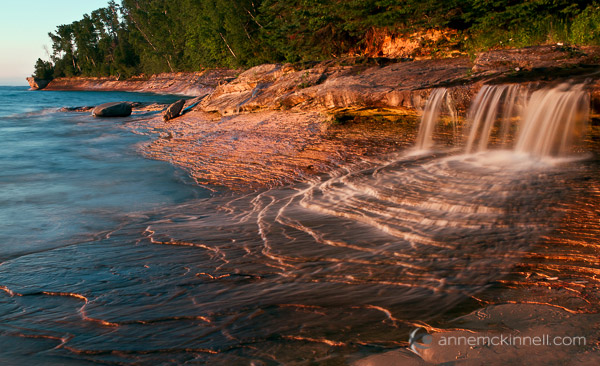
There are few things more majestic than a flowing waterfall, whether it’s on the Niagara river or the little stream behind your house. There are many ways to photograph these natural wonders, and I’ve compiled a few tips, tricks, and techniques to help you get waterfall images that do justice to their elegant beauty.
Equipment Choices
The equipment you need will depend on what type of photo you want to make. But you probably won’t make that decision until you are on location, so here is what I usually keep in my camera bag if I’m planning on shooting a waterfall.
- Tripod – As with most forms of landscape photography, a tripod is your best friend. It will allow you to compose your scene very precisely and give you the flexibility you need if you decide to shoot long exposures.
- Circular polarizing filter – This is an essential piece of equipment when photographing water to allow you to remove reflections and glare from the water’s surface. You might not need this if the frame is filled with the waterfall, but you will want it handy if you decide to include a pool of water in the foreground. It will remove the reflection and allow you to see through the water to any interesting rocks underneath.
- Neutral density (ND) filter – If you decide to shoot a long exposure and it happens to be the middle of the day when there is a lot of light, you will need this gray-tinted piece of glass placed in front of your lens. It blocks some of the light from hitting your sensor, allowing you to use a slower shutter speed. These are sold in varying strengths, and can be stacked for different levels of light absorption.
- Lens cloth – Useful for cleaning water spray off of your lens or filter. I like to use little pieces of ShamWow for absorbing water drops. They are helpful for cleaning water off the rest of your camera too, and even your tripod legs when you are done.
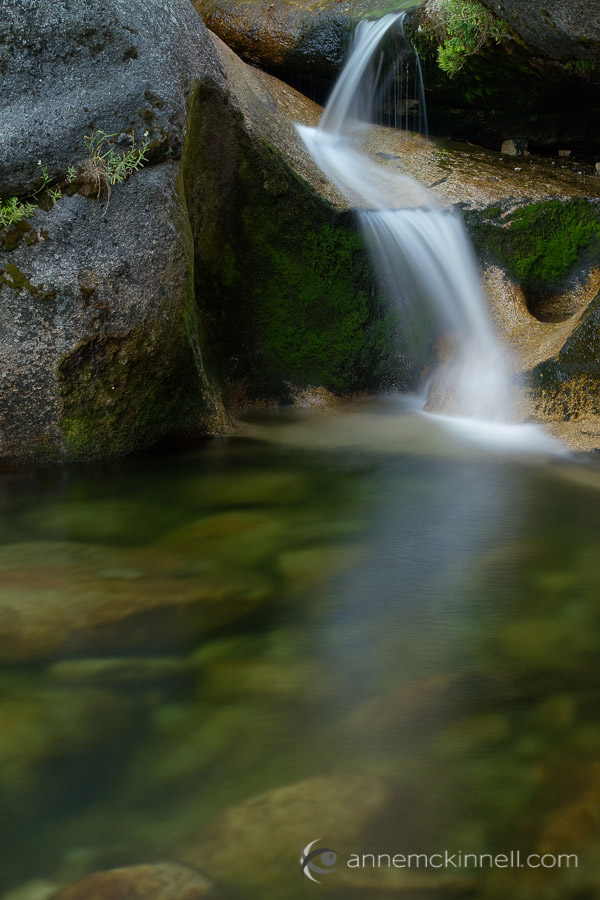
Camera Settings
The camera settings you use will depend on what kind of photo you’re after:
Silky waterfalls
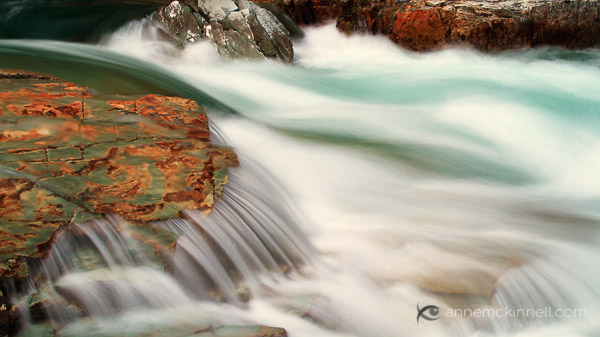
To create that silky smooth blur popular with waterfall photography, you’ll want to use a slow shutter speed for a long exposure. With your camera mounted firmly on a tripod, set it to shutter priority mode (usually “S” or “Tv” on your camera’s mode dial) and set your ISO as low as it will go (usually 100). Then, select a shutter speed between one half second to four seconds to achieve a nice amount of blur.
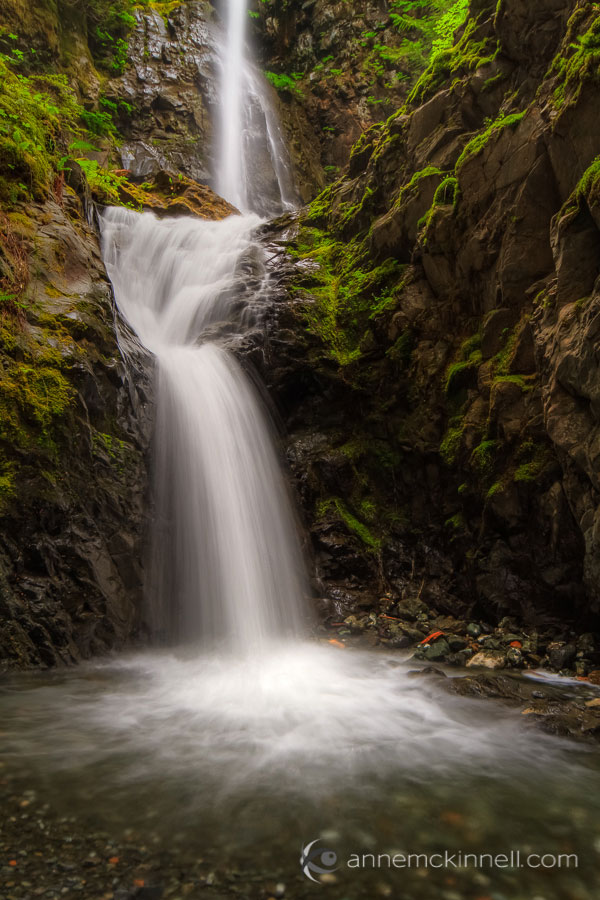
Experiment with different shutter speeds to get the amount of blur you want. The best shutter speed will depend on how fast the water is moving, so getting the shutter speed just right takes a bit of experimentation. If you cannot get a slow enough shutter speed for the effect you want, use a smaller aperture so that less light enters the camera. That will allow you to select a longer shutter speed. If you still need a slower shutter speed, that’s when you can use a neutral density filter to block some of the light.
Keep in mind that when using a long shutter speed, if there are any plants or trees in your frame they may have an opportunity to move if there is any wind, and then everything in the image will be blurry. For this type of a scene, it is usually better to photograph earlier in the day when there is little wind.
Freezing the motion
Especially interesting when photographing violent falls, this requires just the opposite technique – you want a fast shutter speed to capture a brief moment and suspend the water’s movement in the air. Use shutter priority mode and select a faster speed such as 1/500th of a second or faster.
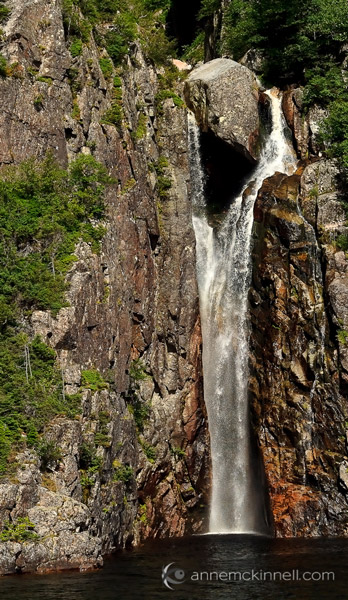
For this technique you wont need a neutral density filter and you might even be able to get away without using a tripod. If you are in a low light situation, to get a fast shutter speed you may need to use a larger aperture such as f/5.6 to let more light in, and you can increase the ISO to 200, 400 or as high as you need to go to allow a fast shutter speed.
Detail shots
Instead of getting a broad landscape style shot, you might want to close in on an interesting rock, plant, or other detail of your scene. For this, compose your shot (use a tripod if possible) and turn your camera to aperture priority mode – “A” or “Av” on your mode dial. This will allow you to have control over the depth of field, or how much of the picture is in focus from front to back.
The aperture value is shown as an f-stop. F-stop numbers are a little confusing because the smaller numbers represent a larger opening and vice versa. I find it helpful to think of it as a fraction. F/8 is smaller than f/4 because 1/8 is smaller than 1/4.
Small apertures let less light in, but they increase the sharpness in the foreground and background. Large (or “wide”) apertures, on the other hand, mean that only part of the picture is in focus, while the rest becomes soft and out of focus.
Look at your scene and decide what you want in focus and what should be blurry. If you want to isolate your main subject, choose a large aperture (small f/number) such as f/4 or f/2.8 to make the background out of focus. If the background is important to the picture, choose a small aperture (large f/number) like f/16 or f/22 to make the entire scene sharp and clear.
Composition
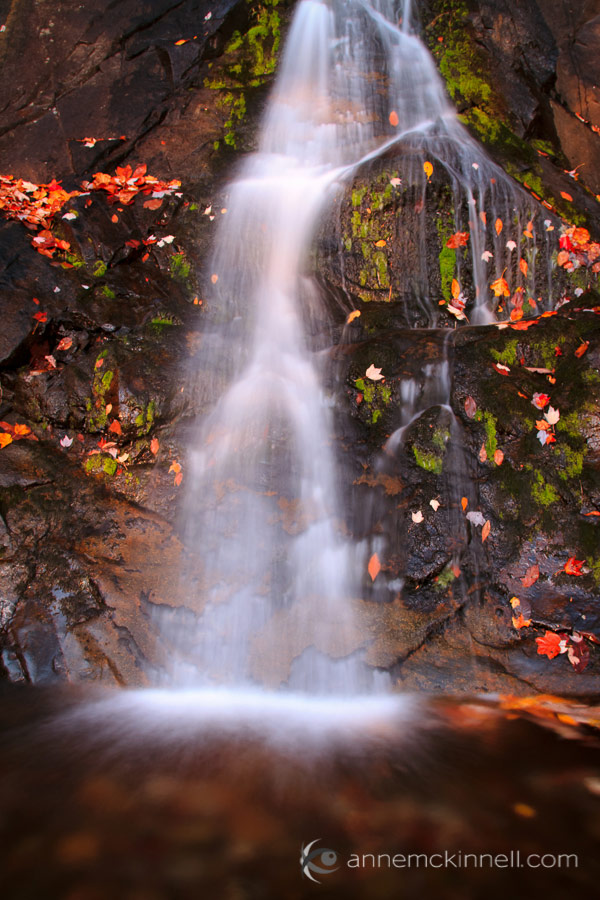
There are many compositional techniques to employ when creating waterfall images. First and foremost, remember the rule of thirds and how your eye is drawn through the image. Use the leading lines inherent in flowing water to create visual pathways for the viewer to follow, remembering that corners are very strong entry and exit points in the frame. Pay attention to both the foreground and background, and don’t forget to pay attention to what’s around the water, as well as the falls themselves.
Field techniques and summary
- When you arrive at any scene, the first thing to ask yourself is, “What makes this place unique?”. Pay special attention to that quality.
- Bracket your shots to make sure you get the best possible exposure – this means taking several pictures using different apertures and shutter speeds, and also making several different images using the camera’s exposure compensation (+/-) to brighten or darken each shot to a different degree. See your camera’s manual for specific instructions on how to use these features.
- Shoot in the uncompressed RAW format to allow for more flexible fine tuning in post processing. RAW images must be processed with a compatible photo editing program, or software that was included with your camera.
- Experiment – most of all, don’t get stuck making the same type of photograph all the time. Try to make a long exposure, a fast exposure, some detail shots, and try different perspectives so you come home with a variety of images from your photo shoot.
Gear mentioned in this article
- tripods – link to some of the best, and most popular brands
- neutral density filters – make sure to get the right filter size for your lens, or biggest one and a step down ring to your smaller ones
- lens cleaning cloth
The post Beginner’s Guide to Waterfall Photography by Anne McKinnell appeared first on Digital Photography School.