RSS
 

Posts Tagged ‘Adobe’

Adobe releases Revel for Android

07 Mar

revel4.jpg

Adobe has released an Android version of its Revel app. Previously the service had only been available on mobile devices running Apple’s iOS operating system. Revel is a cloud-based image and video management service that allows you to set up group libraries that are shared between friends or family members. Revel focuses on privacy, and you have full control over who can see the contents of your library. Learn more on connect.dpreview.com

News: Digital Photography Review (dpreview.com)

 
Comments Off on Adobe releases Revel for Android

Posted in Uncategorized


Adobe update adds Fujifilm color profiles to Adobe Camera Raw 8.4

22 Feb

shared:AdobeLogo.png

Adobe has updated Adobe Camera Raw, adding color profiles for Fujifilm cameras, as well as Raw support for some recent models. The Release Candidate versions of ACR 8.4 for Photoshop CS6 and CC are now better able to mimic Fujifilm’s Film Simulation modes – at least in terms of color response. We’ve prepared a comparison to see how well Adobe’s color profiles match those in the cameras. The camera and profile updates are available for CS6 customers, as well as Creative Cloud subscribers.

News: Digital Photography Review (dpreview.com)

 
Comments Off on Adobe update adds Fujifilm color profiles to Adobe Camera Raw 8.4

Posted in Uncategorized


Adobe leaks ‘Lightroom Mobile’ app

18 Jan

lightroom.png

Is Adobe planning to release a mobile version of its Lightroom editing program? It seems so, judging by an accidental leak on its own website earlier this week. A private page on Adobe’s website – quickly removed – appears to have revealed details of a planned iOS version of Lightroom, including a price of $ 99 for an annual license. Click through for more (albeit not much more) detail.

News: Digital Photography Review (dpreview.com)

 
Comments Off on Adobe leaks ‘Lightroom Mobile’ app

Posted in Uncategorized


Adobe adds Perspective Warp and 3D printing to Photoshop CC

16 Jan

shared:AdobeLogo.png

Adobe has released a major update to Photoshop for Creative Cloud subscribers. The most notable new features are Perspective Warp, Linked Smart Objects and 3D printing capability. Other improvements include enhancements to Scripted Patterns and fills, performance boosts for Smart Sharpen, Adobe Generator improvements for rescaling Smart Objects and adding padding, and font transformations and shape selections. Learn more

News: Digital Photography Review (dpreview.com)

 
Comments Off on Adobe adds Perspective Warp and 3D printing to Photoshop CC

Posted in Uncategorized


Adobe adds color profiles for Olympus cameras to ACR and Lightroom

13 Dec

P9150565-acrprof.jpg

Adobe’s latest versions of Camera Raw and Lightroom contained a pleasant surprise for Olympus owners – color profiles for image conversion. The company says the addition is a response to ‘a long standing customer request.’ We’ve re-processed one of the images from our Olympus OM-D E-M1 sample gallery to see how closely the profiles match the camera’s ‘Natural’ setting.

News: Digital Photography Review (dpreview.com)

 
Comments Off on Adobe adds color profiles for Olympus cameras to ACR and Lightroom

Posted in Uncategorized


Adobe releases final versions of Camera Raw 8.3 and Lightroom 5.3

12 Dec

shared:AdobeLogo.png

Adobe has announced the final versions of Camera Raw and DNG Converter 8.3, along with Lightroom 5.3. Different versions for ACR 8.3 are available for Photoshop CC and Photoshop CS6 – both from Adobe.com and through the update mechanisms in the software. DNG Converter is available for free for users of older versions of Photoshop. The latest versions brings support for 20 cameras, including the Nikon Df and Nokia Lumia 1020 that weren’t in the release candidate versions.

News: Digital Photography Review (dpreview.com)

 
Comments Off on Adobe releases final versions of Camera Raw 8.3 and Lightroom 5.3

Posted in Uncategorized


6. Türchen: Adobe

06 Dec

6. Türchen

Fotografie und Bildbearbeitung gehören unmittelbar zusammen. Die besten Produkte zur Fotobearbeitung stellt die Firma Adobe, mit den Programmen Adobe Photoshop Lightroom und Adobe Photoshop, her.

Adobe Photoshop Lightroom bietet verschiedenste Möglichkeiten zur Bildoptimierung. Durch Regler ist die Bedienung kinderleicht und die meisten Funktionen erschließen sich von selbst. Tipps und Tricks zum Programm gibt es natürlich auch bei uns, wie dieses HDR-Tutorial oder Patricias drei schnelle Lightroom-Tipps. Aber auch auf anderen Seiten und natürlich in der Fachliteratur gibt es Hilfe, die einen schnellen Einstieg in das Programm erleichtern.

Adobe Lightroom 5 - Screenshot

Mit einem Klick sind Staubflusen oder andere störende Elemente entfernt, ein weiterer behebt perspektivische Verzerrungen. Adobe Lightroom eignet sich aber nicht nur zur Postproduktion, sondern ist darüber hinaus auch ein Bilddatei-Manager. Mit der neuen Version Lightroom 5 ist es sogar möglich, eine videobasierte Dia-Show zu erstellen.

Sucht Ihr ein gutes und umfangreiches Bildbearbeitungsprogramm, in das man sich dennoch gut einarbeiten kann, dann empfehlen wir Euch ohne zu zögern Lightroom. Für ambitionierte Fotografen, die mit Ebenen arbeiten und Composings anfertigen möchten, ist jedoch Photoshop das ideale Program.

Adobe Lightroom 5 - Screenshot

Adobe hat uns für das heutige Türchen einmal Lightroom 5 zur Verfügung gestellt. Der Verkaufspreis liegt bei 122 €, falls Ihr heute kein Glück haben solltet, aber das Programm haben möchtet.

Um Lightroom 5 zu gewinnen, schreibe einen Kommentar unter bürgerlichem Namen und gültiger E-Mail-Adresse bis heute um 24 Uhr. Danach verlosen wir es per Zufallsgenerator unter allen Kommentatoren. Die genauen Gewinnspielregeln findest Du hier. Viel Glück!


kwerfeldein – Fotografie Magazin

 
Comments Off on 6. Türchen: Adobe

Posted in Equipment


Adobe Password Resets Definite Cause For Concern

28 Nov

Adobe Password Resets Definite Cause For Concern

A guest article by Kevin Yank

As a digital photographer, you have probably used Adobe software (be it Photoshop or Lightroom) to manage, tweak, or publish your photos at one time or another. If so, chances are you’ve also received an email like this one in the past few weeks:
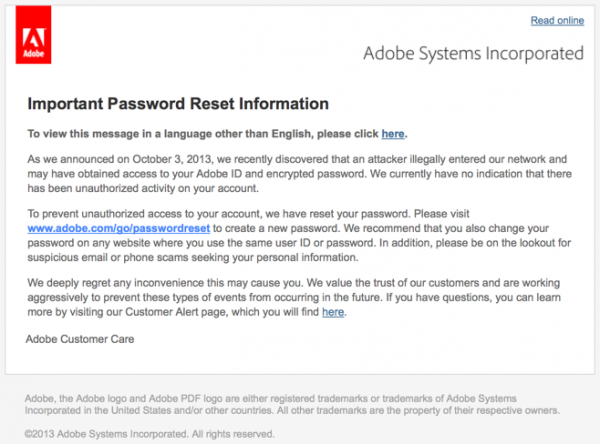
adobepasswordreset

Adobe is sending this message to just about everyone

If you’re thinking this might be cause for concern, you’re right. When I’m not out shooting photos with my trusty Panasonic GX1, I work on a site called Should I Change My Password, which tracks password security breaches, and I can tell you they don’t come much bigger than this one.

When we discovered the Adobe password database being shared among hackers earlier this month, we were stupefied by the size of the breach. Far greater than the 2.9 million customers Adobe had already announced were affected, the file contained the email addresses of over 152 million people. To give you an idea, the worst breach we had previously encountered contained “only” 34 million customer records.

How could Adobe be claiming only 2.9 million affected customers, you might ask? To hear Adobe tell it, most of the records stolen by hackers were “out-of-date”. Best as we can tell, if you gave Adobe an email address and password when downloading, say, Acrobat Reader ten years ago and haven’t been back since, Adobe figures that losing those details to hackers is no big deal. I beg to differ.

Besides the fact that you can pretty much guarantee every spammer worth his cut-price pharmaceuticals has now added your email address to his distribution list, the method Adobe had used to store your password has been discovered to be insecure. If you used the same password on multiple websites (and let’s face it—ten years ago, who didn’t?) your accounts on those other sites are now at serious risk. Particularly if you used a weak password (such as a date or an English dictionary word), or a password that someone else in those 152 million people might have also chosen (like a pop culture reference), you can pretty much assume hackers will be able to work out your password using the data that Adobe lost.

Pressure from sites like Should I Change My Password has forced Adobe to notify the full list of people in the database, which is why you and most everyone you know has now received an email from Adobe like the one above.

So, what do you do? Well, whether you have received an email from Adobe or not, you should check if your email address(es) have been compromised. Start by visiting Should I Change My Password, where you can check your email address against our database of breached addresses for free.

This is what you will probably see
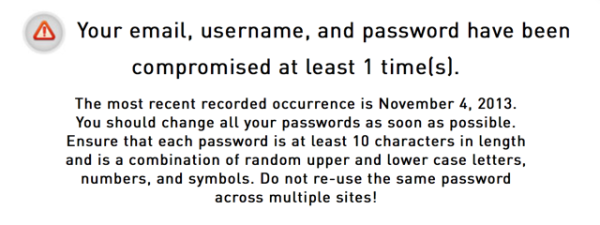
sicmyp-adobe-check

Assuming your address (and likely your password) has been compromised, you’ll want to follow our 10-step guide (also free!) for what to do if your password has been hacked.

In short, don’t rely on Adobe to provide you with complete information about its own failure to protect your privacy and security. Adobe is in full damage control mode right now, and part of that is playing down the scale of the disaster. Think of the most important account you might have shared your Adobe account’s password with, and take the steps necessary to protect it now.


Kevin Yank is Avalanche’s technology guru. He has a wealth of experience building and managing businesses, and is a world-class developer to boot.

He might know every programming language ever written and types at a thousand words per minute. When he’s not at his computer, he’s writing books, helping to run Impro Melbourne, or playing the latest Assassin’s Creed.


Join us for a special event to discuss this issue!

Next Tuesday December 3rd at 2pm MST (Mountain Standard Time – convert to your time here) Darlene Hildebrandt, our new Managing Editor will be hosting a special LIVE Google Hangout to discuss the Adobe issue.

LINK TO THE GOOGLE PLUS EVENT – sign up to ask a question

Here are the details:

  • you don’t need any special software to watch us live just click on the link or watch it here when the time comes (the link will become a live YouTube feed)
  • if you head over to the actual event page you can RSVP to get a reminder notice when it’s starting
  • you can also watch it streaming live on the event page and ask questions of the guest panel

Some of the things to be potentially discussed are;

  • how has is effected you as a photographer?
  • how do you feel about it?
  • have you taken any actions?
  • have you contacted Adobe? What has their response been?
  • how do you feel about how Adobe has handled it?

These are things we will be discussing. Join us live to listen in and add your comments in the chat.

This is a highly volatile and sensitive issue and the discussion will be carried out in a dignified, respectful manner for all parties involved, including Adobe. Hope to see you there!

Post originally from: Digital Photography Tips.

Check out our more Photography Tips at Photography Tips for Beginners, Portrait Photography Tips and Wedding Photography Tips.

Adobe Password Resets Definite Cause For Concern

The post Adobe Password Resets Definite Cause For Concern by Guest Contributor appeared first on Digital Photography School.


Digital Photography School

 
Comments Off on Adobe Password Resets Definite Cause For Concern

Posted in Photography


Adobe now offers Photoshop and Lightroom for everyone

21 Nov

shared:AdobeLogo.png

When Adobe announced a version of Creative Cloud for photographers in September, there was a catch — you had to already own Photoshop CS3 or later to qualify for the special pricing. Now Adobe is lifting that requirement for a limited time. Through December 2, 2013, the $ 9.99 per month subscription is available to everyone. Learn more 

News: Digital Photography Review (dpreview.com)

 
Comments Off on Adobe now offers Photoshop and Lightroom for everyone

Posted in Uncategorized


Adobe releases Camera Raw 8.3 and Lightroom 5.3 release candidates

09 Nov

shared:AdobeLogo.png

Adobe has issued Camera Raw and DNG Converter 8.3 release candidates, along with a similar preliminary version of Lightroom 5.3. ACR 8.3 is designed as different versions for Photoshop CC and Photoshop CS6. DNG Converter is available for free for users of older versions of Photoshop. The latest versions brings support for 15 additional cameras, including most of the latest models from Fujifilm, Nikon, Olympus and Sony. Eight lens correction modules are also added, including support for the Sigma 18-35mm F1.8.

News: Digital Photography Review (dpreview.com)

 
Comments Off on Adobe releases Camera Raw 8.3 and Lightroom 5.3 release candidates

Posted in Uncategorized