RSS
 

Posts Tagged ‘Adobe’

Adobe hack affects 38 million users, not 2.9 million

30 Oct

Adobe-Creative-Cloud-Logo.jpeg

A security breach at Adobe Systems earlier this month is more widespread than first reported. Adobe now says hackers stole information from at least 38 million customer accounts, including part of the source code to Photoshop, the widely used photo editing software. Earlier in the month, Adobe said data from 2.9 million user accounts were hacked. Learn more

News: Digital Photography Review (dpreview.com)

 
Comments Off on Adobe hack affects 38 million users, not 2.9 million

Posted in Uncategorized


Adobe Camera Raw (ACR) as a Photoshop Filter

09 Oct

Photoshop camera raw filter opener

One feature that is new to Photoshop CC is the Camera Raw filter. Using this filter you can make powerful nondestructive edits inside Photoshop.

What the Camera Raw Filter offers

The Camera Raw filter is new to the Creative Cloud version of Photoshop – Photoshop CC – so it’s not available in earlier Photoshop versions. It gives you access to most (but not all) of the features of Adobe Camera Raw (ACR) from inside Photoshop.

You can use it on any image – even those file formats that ACR doesn’t support – and on any layer. So, you don’t have to be working on an image that is in one of the formats that ACR can open. You can also use the Camera Raw filter at any point in your workflow not just when you first open an image.

Combining the Camera Raw filter with Smart Objects also means that you can make an edit using the filter and come back anytime to revisit and change those edits, if desired.

How the Camera Raw Filter works

To see how the Camera Raw filter works open any image in Photoshop CC.

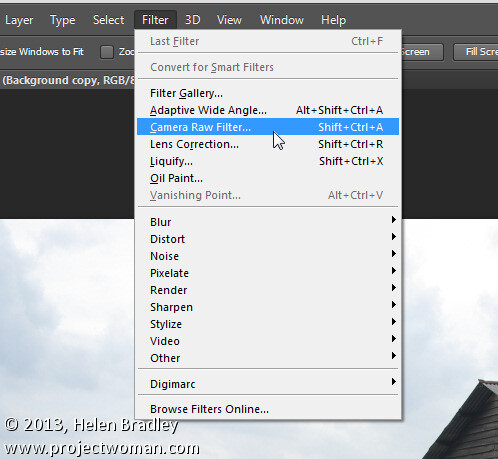
So that you can revisit and edit the changes made by the filter, start by converting the layer that you want the filter to act on into a smart object. To do this either right click the layer and choose Convert to Smart Object or choose Filter > Convert for Smart Filters.

Photoshop camera raw filter 1

Either way the result is the same and you will have a layer converted to a Smart Object. Using Smart Objects ensures that the adjustments that you are about to make can be edited later on.

If you have multiple layers that you want to apply the filter to, then select those layers in the Layers palette before converting them all to the one Smart Object.

To apply the Adobe Camera Raw filter choose Filter > Camera Raw Filter. This opens the current layer inside ACR.
Photoshop camera raw filter 2

Now you can make your adjustments to the image using any of the tools in ACR.

So you can, for example, adjust the white balance by clicking on the White Balance tool and click on something in the image which should be neutral gray. This is a fix that isn’t as easy to make in Photoshop itself. Other useful adjustments you can make include adjusting Highlights, Shadows, Whites and Blacks and Clarity – settings which are easy to access in ACR and less easy (or not available in the case of Clarity) in Photoshop.

The ACR filters are also available so you can use the Gradient Filter and the new Radial Filter to adjust the image. Once you have made your changes click Ok to apply the changes to the image and return to Photoshop.

Photoshop camera raw filter 3

Notice that the Smart Object layer in Photoshop has its own layer mask so you can, if desired, use the layer mask to adjust the effects that you just applied to the image. Paint with black on the mask to remove them and with white to reapply them. This feature is useful for adjusting the effect of a Gradient Filter where there are objects which fall inside the area affected by the filter that you don’t want to be affected by it.

Photoshop camera raw filter 4

You can also alter the Camera Raw Filter settings at any time by double clicking on the Camera Raw Filter entry in the layers palette. This reopens the layer in ACR so you can make changes to the settings.

The benefits of using the Camera Raw filter

The Camera Raw filter offers some real benefits to Photoshop users. One is that you can use the filter to sharpen an image and take advantage of the Masking slider when sharpening in ACR. This lets you limit the areas of the image which are sharpened to just the edges in the image and not areas of flat color.

Photoshop camera raw filter 5

You also get access to tools which aren’t available in Photoshop such as Clarity, and the Graduated Filter, Adjustment Brush and Radial Filter.

The Camera Raw Filter also provides a handy way to work with a JPG image in ACR. You can, of course, open a JPG in ACR but, if you forget to do so, the Camera Raw Filter offers pretty much the same functionality at any time in your workflow.

Other options that the Camera Raw Filter provides is access to the Split Toning effect sliders, presets, the new upright correction, post crop vignette, the new chromatic aberration and defringe tools, and the noise reduction sliders.

Photoshop camera raw filter 6

Provided that you save your image in a layered file format such as PSD then you’ll be able to come back at any time and edit the Camera Raw Filter adjustment that you made.

Chances are that if you are familiar with using ACR for processing your raw images you’ll find that the new Camera Raw Filter in Photoshop CC is a welcome addition to your workflow.

Post originally from: Digital Photography Tips.

Check out our more Photography Tips at Photography Tips for Beginners, Portrait Photography Tips and Wedding Photography Tips.

Adobe Camera Raw (ACR) as a Photoshop Filter

The post Adobe Camera Raw (ACR) as a Photoshop Filter by Helen Bradley appeared first on Digital Photography School.


Digital Photography School

 
Comments Off on Adobe Camera Raw (ACR) as a Photoshop Filter

Posted in Photography


Adobe accounts hacked, data exposed for 2.9 million customers

04 Oct

Adobe-Creative-Cloud-Logo.jpeg

Cyber attackers breached Adobe’s security recently, compromising data on 2.9 million customers. Data accessed includes ‘customer names, encrypted credit or debit card numbers, expiration dates, and other information relating to customer orders,’ according to a company blog post. The attack exposes a weakness in the company’s new Creative Cloud subscription model, which omits the ‘bits-in-a-box’ distribution method in favor of faster access to software downloads through a monthly subscription. Click through for more. 

News: Digital Photography Review (dpreview.com)

 
Comments Off on Adobe accounts hacked, data exposed for 2.9 million customers

Posted in Uncategorized


Adobe releases Camera Raw 8.2 and Lightroom 5.2

17 Sep

shared:AdobeLogo.png

Adobe has released Camera Raw 8.2 and Lightroom 5.2, as final versions of updates that were originally posted as ‘release candidates’. ACR 8.2 is designed to work with Photoshop CC but, as promised, is also compatible with Photoshop CS6. It brings support for 16 additional cameras, including the Canon EOS 70D, Fujifilm X-M1, and Sony RX100 II, along with new lens profiles and big fixes. For users of older Photoshop versions, Adobe DNG Converter 8.2 is also now available. Click through for more details and how to download.

News: Digital Photography Review (dpreview.com)

 
Comments Off on Adobe releases Camera Raw 8.2 and Lightroom 5.2

Posted in Uncategorized


Adobe introduces cheaper Creative Cloud with Photoshop + Lightroom

05 Sep

shared:AdobeLogo.png

Adobe has added a new pricing tier to the Creative Cloud product, possibly in response to the negative response from the photography community when it announced that all Creative Suite products would require a monthly subscription. The Photoshop Photography Program gives users Photoshop CC, Lightroom 5, Bridge CC, Behance, and 20GB of storage for $ 9.99 per month. That’s not a promotional price, either, as long as you sign up by the end of this year. You must already own Photoshop CS3 or newer to be eligible for this offer.

News: Digital Photography Review (dpreview.com)

 
Comments Off on Adobe introduces cheaper Creative Cloud with Photoshop + Lightroom

Posted in Uncategorized


Adobe announces ACR 8.2 and Lightroom 5.2 release candidates

01 Aug

shared:AdobeLogo.png

Adobe has announced the latest ‘release candidates’ of Adobe Camera Raw and Photoshop Lightroom, adding support for ten cameras – including preliminary support for the Canon EOS 70D and Sony RX100 II. The release candidates of Adobe Camera Raw v8.2 and Lightroom 5.2 also fix some bugs introduced in the previous versions. ACR v8.2 acts only as a camera and lens profile update for users of Photoshop CS6. Both are available to download from the Adobe Labs site, with the usual reliability caveats about release candidates. A release candidate of DNG converter 8.2 is also available.

News: Digital Photography Review (dpreview.com)

 
Comments Off on Adobe announces ACR 8.2 and Lightroom 5.2 release candidates

Posted in Uncategorized


Adobe releases subscription-only Photoshop CC

18 Jun

PS-CC.jpg

Adobe has released the latest version of Photoshop: CC for ‘Creative Cloud’. It’s the first to be made available solely though the company’s controversial subscription-only model, that requires users to pay an ongoing monthly charge of £17.58 /$ 19.99 for access to the software. New features include a revised ‘Smart Sharpen’ function, a ‘Camera Shake Reduction’ filter, and the ability to apply Camera Raw edits as layers. The latest versions of other Creative Cloud apps such the video editor Premier Pro are also now available to download.

News: Digital Photography Review (dpreview.com)

 
Comments Off on Adobe releases subscription-only Photoshop CC

Posted in Uncategorized


Adobe releases Camera Raw 8.1 and DNG Converter 8.1

10 Jun

shared:AdobeLogo.png

Adobe has released Camera Raw 8.1 and DNG Converter 8.1, as final versions of updates that were originally posted as ‘release candidates’. ACR 8.1 is designed to work with Photoshop CC but, as promised, is also compatible with Photoshop CS6. It brings support for 7 additional cameras, including the Olympus PEN E-P5 and E-PL5, Ricoh GR and Panasonic Lumix DMC-G6, along with profiles for 16 more lens, including Sigma and Zeiss’s latest models. Click through for more details and how to download.

News: Digital Photography Review (dpreview.com)

 
Comments Off on Adobe releases Camera Raw 8.1 and DNG Converter 8.1

Posted in Uncategorized


Adobe releases Photoshop Lightroom 5

10 Jun

shared:lr5box.png

Adobe has released Photoshop Lightroom 5, the latest version of its workflow and image editing software. Available as either an individual license or as part of a Creative Cloud subscription, Lightroom 5 adds a more advanced healing/cloning tool, automatic image leveling and perspective correction, a new selective editing tool and the ability to edit files that are offline. US pricing is $ 149 for new customers and $ 79 for the upgrade. Click here for more information, including our features preview and download links.

News: Digital Photography Review (dpreview.com)

 
Comments Off on Adobe releases Photoshop Lightroom 5

Posted in Uncategorized


Adobe issues Camera Raw v8.1 and DNG Converter ‘release candidates’

17 May

shared:AdobeLogo.png

Adobe has issued a ‘release candidates’ of Adobe Camera Raw 8.1 and DNG Converter 8.1 on its Adobe Labs site. The release is the first version of ACR designed to work with Photoshop CC but, as promised, is also compatible with Photoshop CS6. CS6 users will only gain camera compatibility, not any of the functions added in ACR 8 (and Lightroom 5), such as the perspective-correcting ‘Upright’ tool or the advanced healing brush. The latest version brings support for 7 additional cameras along with 16 lens profiles.

News: Digital Photography Review (dpreview.com)

 
Comments Off on Adobe issues Camera Raw v8.1 and DNG Converter ‘release candidates’

Posted in Uncategorized