RSS
 

Posts Tagged ‘Adobe’

Adobe Camera Raw 9.9 launches with new camera and lens profile support

08 Mar

Adobe has announced the release of Camera Raw 9.9 for Creative Cloud subscribers, adding expanded lens profile and camera raw support. In addition to the new support, ACR 9.9 fixes a trio of bugs, including a ‘rare crash’ associated with JPEGs, a bug that affected Lens Profile Auto Matching when used with Zeiss Batis 85mm lenses, and an Upright bug issue.

The latest version of Camera Raw adds support for the following cameras:

  • Canon PowerShot G9 X Mark II
  • Casio EX-ZR3200
  • Fujifilm GFX 50S
  • Fujifilm X100F
  • Fujifilm X-A10
  • Fujifilm X-T20
  • Leica M10
  • Olympus E-M1 Mark II
  • Panasonic DC-FZ80
  • Panasonic DC-GF9
  • Panasonic DC-GH5
  • Panasonic DMC-TZ82
  • Phase One IQ3 100MP (“S” compression mode not supported)

The update also adds support for another 28 lens profiles, including the iPhone 7 lenses, the DJI Mavic Pro FC220, several Nikon F and Canon EF lenses, and more. The full list can be found here. Existing Camera Raw users can update to the new version by selecting the ‘Help’ menu in the application, then ‘Update.’

Via: Adobe Blog

Articles: Digital Photography Review (dpreview.com)

 
Comments Off on Adobe Camera Raw 9.9 launches with new camera and lens profile support

Posted in Uncategorized


Adobe Creative Suite 6 has been officially retired

31 Jan

Adobe has officially put Creative Suite out to pasture, making Creative Cloud the exclusive means by which consumers can acquire Photoshop, Illustrator, and other Adobe creative applications. The move was inevitable, but not without its controversy. Confirmation of the transition comes from Adobe itself, which updated the CS6 Web page to announce that the product has been retired.

The Web page now states that, ‘Adobe creative apps are available exclusively through Creative Cloud.’ The page also reveals this change officially took place on January 9. Adobe announced its transition to a subscription-based model in 2013, and in 2015 provided the last CS6 Camera Raw update. 

For the moment, Lightroom 6 is still available for purchase as a standalone application. It’s priced at $ 149 for a full license.

Articles: Digital Photography Review (dpreview.com)

 
Comments Off on Adobe Creative Suite 6 has been officially retired

Posted in Uncategorized


Adobe brings Android CC apps to Chromebooks

25 Jan

Google opened up its Play app store to select Chromebook users last year, and now Adobe is offering versions of its Android Creative Cloud apps for the company’s browser-based notebook computers. The following apps will be available ‘in the coming weeks’ for certain Chromebook users:

  • Photoshop Mix
  • Lightroom Mobile
  • Illustrator Draw
  • Photoshop Sketch
  • Adobe Comp CC
  • Creative Cloud Mobile

The apps have been optimized for use on Chromebooks. They’re free to download and use without a Creative Cloud account, but certain features (such as exporting Raw files from Lightroom Mobile) are available only to CC subscribers. The apps can be downloaded to any Chromebook with access to the Google Play store (here’s a list of compatible devices,) including a group of Chromebooks being offered specifically for students as part of a beta program.

Articles: Digital Photography Review (dpreview.com)

 
Comments Off on Adobe brings Android CC apps to Chromebooks

Posted in Uncategorized


Adobe Photoshop CC gains new MacBook Pro Touch Bar support

14 Dec

Adobe has announced that Photoshop CC now supports the Touch Bar found on certain models of the new Apple MacBook Pro. Three categories of Touch Bar functions are currently supported, including brush selection, customized favorite actions and layer properties. The update that brings this new support is available to download now. 

When using the Layer Properties section with the Touch Bar, Photoshop CC users can access various tools and options related to layers, including Select & Mask, switching between blend modes, placing a Smart Object, clipping layers and scrolling through the layer history. The Brushes section is similar, lending access to brush settings like opacity and flow, size, color, and hardness.

Finally, the Touch Bar also provides access to Favorites, of which users can create their own favorite actions. Says Adobe, users can gain quick access to, for example, Flip Horizontal/Vertical, Full screen mode and the macOS share menu. Additionally, users can set up actions involving the Brushes and Layer Properties categories.

Via: Adobe Blogs

Articles: Digital Photography Review (dpreview.com)

 
Comments Off on Adobe Photoshop CC gains new MacBook Pro Touch Bar support

Posted in Uncategorized


Adobe Lightroom CC and iOS updates add Reference View and new edit interface

09 Dec

Adobe has announced updates to Lightroom CC 2015.8, Lightroom Mobile for iOS 2.6 and Adobe Camera Raw. The Adobe Lightroom CC update brings a new Reference View for comparing a pair of different images to each other, as well as zoom to fill, zoom to fit and performance improvements. This is joined by the Camera Raw update, which adds support for new cameras and lens profiles, as well as bug fixes.

The Lightroom for iOS update is the most extensive of the three, bringing with it a new edit interface that aims to make it easier and faster to find tools and use them to edit images via an iPhone. The new edit interface is complemented by a new info section with options for adding copyright data, captions and titles while on mobile. Additionally, the iOS app has a new capture interface that Adobe describes as similar to the interface in the Android app, and it gives users access to a new ‘Professional Mode’ with better control over the iPhone camera’s features.

All three updates are available now. You can view the full list of new camera and lens profile support in Lightroom CC here, and the full list of new camera and lens profile support in Adobe Camera Raw here.

Via: Adobe

Articles: Digital Photography Review (dpreview.com)

 
Comments Off on Adobe Lightroom CC and iOS updates add Reference View and new edit interface

Posted in Uncategorized


An Overview of 8 Adobe Creative Cloud Mobile Apps

02 Dec

If you currently have an Adobe Creative Cloud subscription, did you know that you have access to a variety of mobile apps developed by Adobe? Even their least expensive subscription plan (the Photography plan, which includes access to Photoshop and Lightroom for $ 9.99 per month) includes access to eight different mobile apps that have so much to offer! In this article, I’ll take you through an overview of all the Creative Cloud Mobile apps included in the Photography Plan, and explain some different ways that you can use them.

adobe-mobile-apps

1. Adobe Photoshop Fix

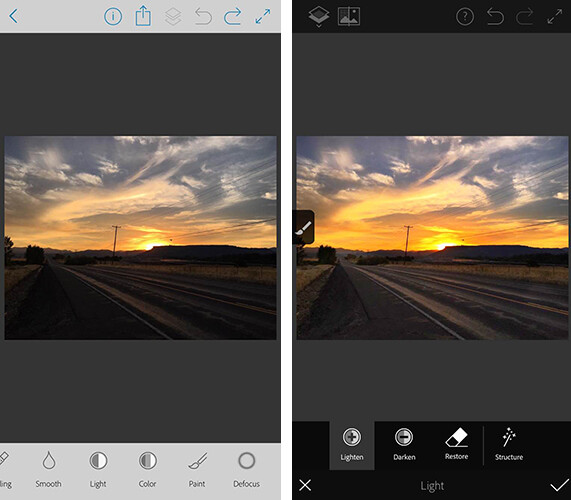
The first app is a mobile version of Photoshop (called Photoshop Fix) that includes simple retouching with the ability to liquify, heal, patch, smooth, lighten, and darken images. You can also do some basic image adjustments such as controlling exposure, adjusting contrast, and saturation. You also have the capability to send your image directly to the Photoshop CC desktop program with layers intact, to continue editing there if you’d like.

The mobile app is certainly a scaled-down version of the desktop program. But it does offer lots of options for simple retouching and adjustments of images you’ve taken with your cell phone, and is a fantastic (FREE) resource!
adobe-photoshop-fix-app

Screenshots of Adobe Photoshop Fix for iPhone.

2. Adobe Lightroom for Mobile

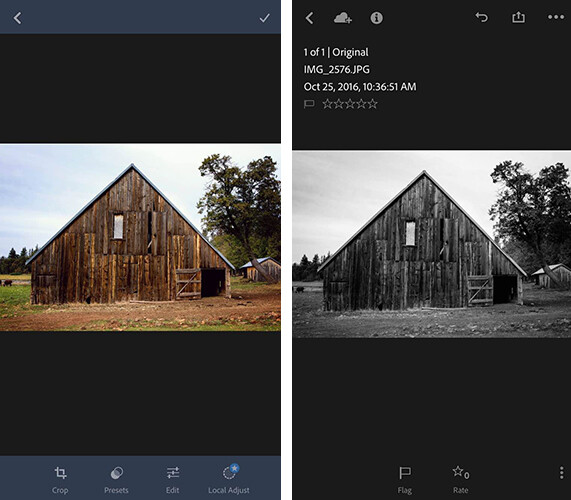
Once again, the Lightroom Mobile app is a scaled-down version of the desktop program which allows you to make basic adjustments to your images via your smartphone or tablet. Easily make adjustments to temperature, tint, exposure, contrast, highlights, shadows, whites, blacks, clarity, saturation, sharpness, noise, moire, color hue, and more. The real gem of the Lightroom mobile app is the access to 40

The real gem of the mobile app is access to 40 Lightroom presets that can help elevate your images in one touch. I especially enjoy the 11 black and white presets, which are significantly better (in my opinion) than other apps that offer one-touch editing. They also offer everything from low contrast to film versions.
adobe-lightroom-mobile-app

Screenshots of Adobe Lightroom app for iPhone

3. Adobe Photoshop Mix

Adobe Photoshop Mix allows for more creative editing than the original Photoshop Fix app. It specializes in cutting out portions of different images and merging them together into one image. I haven’t found this app to be particularly useful for the type of photography I prefer, but if you ever find yourself in the position of needing a photo of Santa on the beach, with no time to make a photo session happen, this app would be your go-to.

I found this app much more difficult to use with my finger than any of the other Adobe apps, but it may be easier to manage with a stylus. Like the other Adobe apps, it runs seamlessly with the desktop programs, so you can fine-tune your images on the computer later if you wish.

4. Adobe Spark Post (formerly Adobe Post)

Adobe Spark Post allows you to quickly create graphics combining photos and text for social media. You can begin using a number of different templates, import your own photo, or search from Adobe’s free photo library. Next, enter your text, choose your font, spacing preferences, and color palate. With one touch, you can select whether you’ll be posting to Facebook, Instagram, on a blog post, or a number of other options, and the app will automatically size the image for you.

I have found this app to be so useful in so many different ways. Need a quick graphic advertising mini-sessions? Check. Want to combine a photo with a quote you love? Check. Need a pinable image for a blog post or article? Check. All of these examples are things that I could certainly do from scratch in Photoshop, but the ease and speed with which I can create very similar graphics with Spark Post has completely won me over. It’s the app you didn’t know you were missing!

adobe-spark-post-mobile-app

Sample graphic created with Adobe Spark Post on iPhone.

5. Adobe Spark Page (formerly Adobe Slate)

Adobe Spark Page is a quick and easy way to create easy photo journals and web stories that are shareable on social media. It is suggested to use Spark Page to easily create newsletters, presentations, and travel journals. Once again, you can begin with a number of different layouts from Adobe that take all the guesswork (and time) out of the project. Spark pages automatically adjust to a plethora of different devices, and you can preview the way that your particular page will look on each. I haven’t implemented Adobe Spark Page into my process as of yet, but am currently contemplating using it as an avenue to share collections of images on social media.

6. Adobe Spark Video (formerly Adobe Voice)

All of the Adobe Spark apps are similar in that they are designed to elevate what you’re sharing on social media, while simultaneously streamlining the process. In this instance, Spark Video allows you to create simple and easy videos with lots of different options and layouts.

When you first begin creating a project with Spark Video, it asks whether you’re promoting an idea, sharing something that happened to you, telling a story about someone overcoming something difficult, telling about something important to you and attempting to engage your audience to participate, or sharing an experience that changed your view on the world. Depending on which option you select, Spark Video moves into a template that prompts you with what to include on each 2-second clip of your video. You also have the option to start from scratch and build your video from the ground up.

You can also record yourself narrating the video, or chose from a stock music library. There are so many different ways that you could think about utilizing Spark Video–whether making a video of a particular session, easily explaining what to wear for a family session, or creating a quick ad to use on social media. The possibilities are endless.

7. Adobe Portfolio

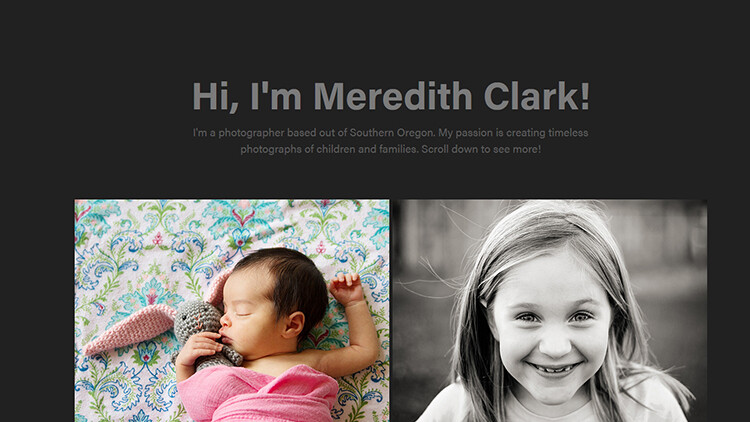
With Adobe Portfolio, you can build a website in just a few minutes. Again, there are many different templates available, including several designed especially for photographers. You can select images to act as feature images to link to albums, include some brief information about yourself, and gives you the ability to enable or disable right-clicking to save images. The process to build and edit your site is simple and requires no knowledge of HTML or CSS. You can even use your own domain name in conjunction with the portfolio you create. You can also achieve a similar but even more streamlined effect, by using Adobe Spark Page to create a portfolio of your work.
adobe-portfolio-app

An example of a basic portfolio created with Adobe Portfolio. More galleries could be included as you continue to scroll down past the header.

8. Adobe Premiere Clip

With Adobe Premiere Clip, you have access to some amazing video editing capability right from your phone. Drag and drop videos, trim them and arrange into a video. The app is smart enough that you can add music and set it to auto-fade during any dialogue. If you have an iPhone, you can also import an entire collection from Lightroom for mobile to Premiere Clip to easily create a video of your images.

Accessibility

In order to use these apps, simply search for them individually in the app store (or use the links provided for you above), and download them. Once you open the app, you’ll be prompted to sign in with your Adobe ID. Simply sign in using the same ID you used to purchase your Creative Cloud subscription, and you’ll have access to the app! Additionally, it’s worth mentioning that many of these apps (Spark Page, Spark Post, Spark Video, and Adobe Portfolio) are also available via web browser, so you aren’t necessarily limited exclusively to your mobile device.

In all, these apps pack a big punch and are a huge bonus to the desktop access to Photoshop and Lightroom! If you have a Creative Cloud subscription and are not already using the Adobe Creative Cloud Mobile Apps, I’d absolutely encourage you to check them out. Whether you’re a professional photographer or just someone who enjoys taking photos in their own backyard, there’s likely at least one app that you’ll find useful!

googletag.cmd.push(function() {
tablet_slots.push( googletag.defineSlot( “/1005424/_dPSv4_tab-all-article-bottom_(300×250)”, [300, 250], “pb-ad-78623” ).addService( googletag.pubads() ) ); } );

googletag.cmd.push(function() {
mobile_slots.push( googletag.defineSlot( “/1005424/_dPSv4_mob-all-article-bottom_(300×250)”, [300, 250], “pb-ad-78158” ).addService( googletag.pubads() ) ); } );

The post An Overview of 8 Adobe Creative Cloud Mobile Apps by Meredith Clark appeared first on Digital Photography School.


Digital Photography School

 
Comments Off on An Overview of 8 Adobe Creative Cloud Mobile Apps

Posted in Photography


Wacom Cintiq Pro 16 comes with UHD screen and 94% Adobe RGB gamut

18 Nov

Wacom has updated its Cintiq line of pen displays that allow you to work with a stylus directly on a screen that is connected to a Mac or PC. The 13″ Cintiq Pro 13 and the 16″ Cintiq Pro 16 differ mainly in terms of display size, resolution and color gamut. The larger model comes with a 3840 x 2160 UHD resolution and can display 94% of the Adobe RGB color space. The smaller variant offers a 1920 x 1080 Full-HD panel that covers 87% of Adobe RGB.

The ExpressKeys and TouchRing controls of previous models, that offered easy access to frequently used tools on the right side of the display, have been removed and replaced by an optional Express Key remote. The tablets also come with pop-out legs that allow you to angle them up. 

Both models support multi-touch gestures and come with Wacom’s new Pro Pen 2, which, according to Wacom, is four times more accurate and pressure sensitive than the previous version. The Cintiq Pro 13 will be available from next month for $ 1,000. The larger model will set you back an additional $ 500 when it arrives in February 2017. More information is available on the Wacom website.

Articles: Digital Photography Review (dpreview.com)

 
Comments Off on Wacom Cintiq Pro 16 comes with UHD screen and 94% Adobe RGB gamut

Posted in Uncategorized


Adobe SkyReplace promises to make swapping skies a breeze

12 Nov

During Adobe MAX 2016, the company gave a behind the scenes look at a new technology that they’re developing called SkyReplace. The new software makes it very easy to replace the sky and even adjust the overall look of a photo with little to no Photoshop knowledge. 

Adobe says SkyReplace uses deep machine learning to automatically figure out where the boundary lines lie between the sky and the rest of the elements in the photo such as trees, mountains and buildings. It can then not only swap out the old sky and insert a completely new one, but it can also adjust the rest of the photo to take on the same look and feel as the replaced sky by adjusting color, light and contrast thus creating a more realistic look.

Articles: Digital Photography Review (dpreview.com)

 
Comments Off on Adobe SkyReplace promises to make swapping skies a breeze

Posted in Uncategorized


Adobe updates Lightroom for Android and web, Photoshop Express for iOS

12 Nov

Adobe today dropped a fresh round of updates to its mobile and web photo app offerings.

A new version of Lightroom for Android features a Raw Technology Preview for the mobile app — like the one introduced for iOS in July — that lets you import Raw images directly from the camera into your device. With this update, you can now capture, edit, share and access full resolution Raw photos with your Android app, now at version 2.2. In addition to Raw image-processing advantages, the Android app also syncs files with Lightroom on your other devices, including the desktop app and web, complete with edits, ratings and flags.

As explained in a new Adobe blog post to pull this off, you’ll need a special USB adapter — an on-the-go or OTG cable — to connect your camera to your mobile device, and transfer images via PTP mode. OTG cables are inexpensive and come in different configurations, so you’ll want to search for one that matches the ports built into both your camera and your device.

As with the iOS app, Lightroom for Android supports the same Raw files as the desktop app and Adobe Camera Raw. Check to see whether your camera is supported.

Lightroom for web updates include enhancements to the app’s share feature, now letting you add a header graphic, sections and text to promote better engagement and storytelling. That hooks into updates to Adobe Portfolio, the company’s utility that lets you create professional online portfolios: You can now send images from Lightroom on the web to Portfolio. Just create a new project in Portfolio from within Lightroom’s Web app and copy photos into the project. You can also now download original images (if they are available in the cloud) from within Lightroom on the web.

In separate news, Adobe has also announced a major update to Photoshop Express app for iOS. New features include Adobe Photoshop Express Collages, which create high-quality collages with intelligent layout and style transfer automation choices. The update also features Google photo integration, letting you select and import images from a Google Photos account, edit them in Photoshop Express, and share or export them.

All new Lightroom and Photoshop Express features are available now.

Articles: Digital Photography Review (dpreview.com)

 
Comments Off on Adobe updates Lightroom for Android and web, Photoshop Express for iOS

Posted in Uncategorized


Adobe announces Reuters partnership, Creative Cloud app updates

02 Nov
 Adobe Stock brings Reuters images like this one straight into Creative Cloud.

Adobe is teaming up with Reuters in an effort to strengthen its Stock app offerings. The move will bring Reuters entire video and still editorial collection into Adobe Stock, where users can license content directly within Creative Cloud. The company also announces a name for its machine learning and AI-based technologies: Adobe Sensei. Driving features like ‘content-aware face liquify,’ Sensei is also behind a new visual search tool that allows Stock users to search for images with similar content or a look and feel that matches a particular image.

Photoshop CC users will get a new universal search tool, and updates to Premiere Pro CC aim to make creating VR and 3D content easier. A new social publishing panel in Premiere Pro will facilitate video sharing and data analysis within the application. Design professionals will be most interested in the rest of Adobe’s CC updates introduced leading up to the company’s MAX conference, as Adobe Experience Design brings Photoshop tools like layers to an app for UX designers, and Dreamweaver CC gets an interface update. Photoshop Fix, Photoshop Sketch and Adobe Comp CC apps also see an Android release.

Articles: Digital Photography Review (dpreview.com)

 
Comments Off on Adobe announces Reuters partnership, Creative Cloud app updates

Posted in Uncategorized