RSS
 

Posts Tagged ‘action’

‘Liking Isn’t Helping’ – ad campaign uses jarring press photos to spur action

03 Jul

flood_1.jpg

It’s all very well ‘liking’ a charitable cause on Facebook, but what difference does it make? Crisis Relief Singapore is running an ad campaign called ‘Liking Isn’t Helping’ which uses photos showing victims of war and natural disasters to encourage volunteerism – with an ironic twist. The images are composites of real press photos and Facebook-style thumbs ups, accompanied by the message that ‘Liking isn’t helping’. Click through for more details.

News: Digital Photography Review (dpreview.com)

 
Comments Off on ‘Liking Isn’t Helping’ – ad campaign uses jarring press photos to spur action

Posted in Uncategorized


Women Posing Guide in Action: 7 Sample Poses – 21 Different Photos

04 Jun

A post by Kaspars Grinvalds from Posing App.

Previously published articles in the Posing Guide series contained hand illustrated posing samples as a guide or reference during your photo shoots. Based upon feedback and questions I received about these guides, I wanted to describe the process in a little more detail and show some real photos created while using these posing techniques.

I’d like to begin by stating once again – the main purpose of using posing samples is only to get your model into some starting point. That’s it. You don’t need to (and quite often you wouldn’t be able to) precisely recreate even the simplified illustrated pose.

This will be a three part series looking at standing, sitting and laying down poses for female models. For the the first article I chose seven sample standing poses and by slightly adjusting each pose I got 21 different photos. Now, let’s take a look at this process.

Pose 1

Pose1

It is a good idea to start your photo shoot with some very basic, easy pose. That’s why I chose this one to begin with. It’s easy to describe and easy to understand – “portrait shot from a side”. So you might start with saying to your model “Ok, turn with your side towards me, turn your head to me and look right over the shoulder at the camera. Straighten your spine and keep hands loose by sides.”

7poses 1

Photo 1 – With these instructions you should get something like the first picture. The next thing without changing the pose, is to “find” the face expression you’re looking for. You may want to try moving from very subtle smirks to stronger smiles or even laughter. And once you have the expression (or different ones) you’re after, tell and show it to the model. Thereby it will be easy for the model to learn and repeat it.

Photo 2 – After I got the simple and kind expression I was looking for, I slightly changed my position and asked the model to keep looking back over her shoulder to the camera. Exactly the same pose, just taken from another angle and you already have a slightly different photo.

Photo 3 – Also many different looking directions and head tilts are possible. In this particular example I asked the model to look back down her body. This look works very well in many posing situations, creating yet another variation just by slightly adjusting the starting pose.

Pose 2

Pose2

Seeing this sample illustration you should grab only the basic idea – “portrait shot with hands around the face”. That’s all you need for playing around with initial sample pose. Eventually you will come up with some nice variations of your own.

7poses 2

Photo 4 – Before getting to the hands, ask the model to stand facing the camera and support her body weight on just one leg. This instantly curves her body and her shoulder line is shifted. After that ask her to gently move her hands around the face and in the hair. Generally look for asymmetrical hand placements, but as you can imagine – many variations are possible.

Photo 5 – In this shot the only difference is slight tilting of the head and putting one hand behind the hair.

Photo 6 – To differentiate the look and feel, I once again asked the model to look down her own body and cropped tighter around the face. And again with only minor adjustments from one pose we’ve got 3 different photos.

Pose 3
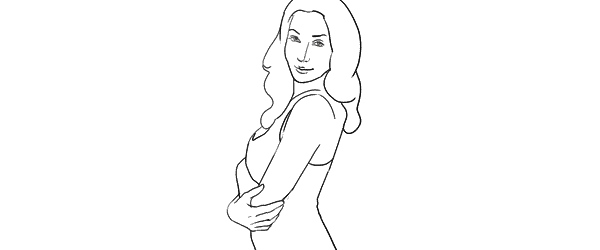
Pose3

Another easy pose with very simple idea – “hands connected on the chest”. Notice that hands are not really “crossed”, but “connected”. Also you should warn your model not to grip them too tight or press upper arms against the body. Simply put, the posture should feel comfortable and subtle.

7poses 3

Photo 7 – Before taking this shot, I showed the model the sample illustration and she tried to recreate it. This is as close as you usually get if you recreate the sample pose.

Photo 8 – The outlines don’t and won’t match perfectly. In this particular example I took a shot from higher angle aiming slightly down because I saw that this angle works better for the model.

Photo 9 – Another simple way of transforming the pose is simply mirroring it the other way around. And to even more differentiate it from the first shot, I asked the model to lean against a wall.

And then I moved closer and took a head shot for just another variation of the same pose.

Pose 4
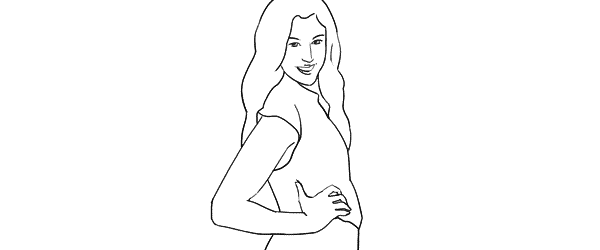
Pose4

This simple pose is again self-explanatory – “the model turned to the side with one hand on the waist”. That’s all I tried to recreate.

7poses 4

Photo 10 – Here I started straight away with mirroring the sample pose because this was the better looking side for my model. Remember that it is different for each person. If you are not sure, take both variations and ask your model which one she prefers.

Photo 11 – From side view I followed to 45 degree position and asked the model to keep looking to the camera.

Photo 12 – Lastly, I just moved farther away for wider frame. The same pose, but these minor variations provide you with greater choice of images to select from in post.

Pose 5
Pose5

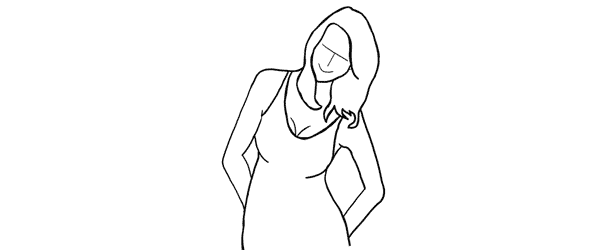
This pose provides simple yet elegant at the wall concept – “standing at the wall with hands behind the back”.

7poses 5

Photo 13 – Start with asking your model to support herself at the wall with her back. After that the first thing to take care of is shifting her body weight on one leg with the other crossed over it. Even if the legs are not visible in the frame, it is critical for forming the model’s body in S shape. Then ask her to place her hands behind her back asymmetrically. Finally ask her to lean forward slightly away from the wall with her upper body part.

Photo 14 – As usual I tried changing my shooting angle and took the next shot more from a side.

Photo 15 – And I continued to experiment with slightly different hand placement and head tilt. These images might be very similar, but most probably your subjects will be grateful for this kind of choice.

Pose 6
Pose6

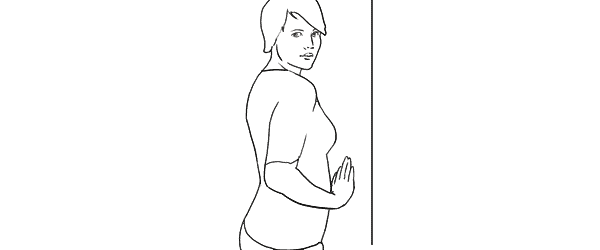
Another at the wall pose but this time with the model facing the wall. Easy to describe and recreate. Both hands are gently placed on the wall right in front of her just below the breast line.

7poses 6

Photo 16 – With the previous instructions the model easily achieved the described pose. And again I chose mirroring the sample illustration which already is one variation for any pose.

Photo 17 – Here I changed the shooting angle nearly parallel to the wall and cropped for a portrait shot.

Photo 18 – Finally the model changed the hand placement asymmetrically for just another variation.

Pose 7
Pose7

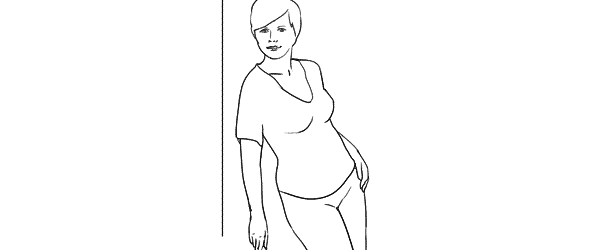
This is a bit more challenging pose than the previous ones, so definitely some guidance for the model is required in order to recreate it.

7poses 7

Photo 19 – The trick for the model here is to stand slightly off the wall and support herself against the wall with the front shoulder only. Front hand is loosened by the wall. After that the model should support the body weight on the outer leg, kicking the hip out with the inner leg crossed over. The back arm rests on the hip and the elbow is pulled behind her back.

Photo 20 – After managing the starting pose I started to variate it. Here I moved closer for tighter crop and asked the model to lean slightly forward along the wall.

Photo 21 – And finally I asked the model to turn sideways, supporting against the wall with both shoulders. And to further differentiate the shots I asked her to look down her body.

So, that’s it. Out of 7 sample poses we managed to get 21 different shots. And as you can easily imagine, even these are only samples, adjustments and variations are indeed endless.

All of these illustrations and many more posing samples are available on Posing App for your mobile devices.

Kaspars Grinvalds is a photographer working and living in Riga, Latvia. He is the author of Posing App where more poses and tips about people photography are available.

(function(d){
var f = d.getElementsByTagName(‘SCRIPT’)[0], p = d.createElement(‘SCRIPT’);
p.type = ‘text/javascript’;
p.setAttribute(‘data-pin-hover’, true);
p.async = true;
p.src = ‘//assets.pinterest.com/js/pinit.js’;
f.parentNode.insertBefore(p, f);
}(document));

Post originally from: Digital Photography Tips.

Check out our more Photography Tips at Photography Tips for Beginners, Portrait Photography Tips and Wedding Photography Tips.

Women Posing Guide in Action: 7 Sample Poses – 21 Different Photos


Digital Photography School

 
Comments Off on Women Posing Guide in Action: 7 Sample Poses – 21 Different Photos

Posted in Photography


Snapzoom aims to bring camera phones closer to the action

26 Apr

connect.png

Snapzoom is the brainchild of Daniel Fujikake and Mac Nguyen, two surfers (and brothers-in-law) from Hawaii looking for a better way to capture and share video of their themselves riding the waves. They’ve created a universal adapter that attaches most smartphones to most binoculars, spotting scopes, telescopes and microscopes, bringing camera phones closer to the action without relying on the devices’ digital zoom. Learn more at connect.dpreview.com.

News: Digital Photography Review (dpreview.com)

 
Comments Off on Snapzoom aims to bring camera phones closer to the action

Posted in Uncategorized


BBC and Forbes look at the booming action camera business

13 Mar

_66198768_brinno_bikecamera.jpg

Small, rugged, go-anywhere action cams have become increasingly popular. Both BBC news and Forbes magazine have taken a look at the booming action camera business over the last week. The BBC’s  Forbes posted an interesting story about GoPro’s Founder and CEO Nick Woodman with details on the company’s success. Click through to read more and for links to the posts.

News: Digital Photography Review (dpreview.com)

 
Comments Off on BBC and Forbes look at the booming action camera business

Posted in Uncategorized


Turn Your iPhone Into An Action Cam With The Optrix iPhone Adventure Suit

11 Mar

Extra photos for bloggers: 1, 2, 3

Your iPhone can be a bit of a scaredy-cat. It just can’t seem to get up the courage to join you on your kayaking expeditions! Until now…

The Optrix iPhone Adventure Suit will give your iPhone 5 the boldness it needs to transform into a go-anywhere action cam.

In this suit your iPhone will be able to withstand a 15 foot drop and snap photos safely, 15 feet underwater. It even has a built-in wide-angle lens, so your now-courageous cam can capture more of the action than ever before.

Combine it with the Super Sucker to give it an extra boost of bravery. This mount uses industrial strength suction to hold onto a car, kayak, surfboard, just about anything!

“Ha ha ha!” What’s that? Oh, just your phone laughing at danger.

The Optrix iPhone Adventure Suit
$ 130 at the Photojojo Store

 Tweet it!      Share

Related posts:

  1. The iPhone Scuba Suit Takes Your Phoneography To New Depths Warm summer months are upon us, which means you’ll adopt…
  2. The Polaroid iPhone Decal: Turn Your Phone into a OneStep! Your iPhone4 is the Swiss army knife of the mobile…
  3. The iPhone Rangefinder Adds a Shutter, Viewfinder, and Tripod Mount to Your iPhone Fifty years ago, photogs were all about the rangefinders. They’re…


Photojojo

 
Comments Off on Turn Your iPhone Into An Action Cam With The Optrix iPhone Adventure Suit

Posted in Equipment


Roundup: Three smartphone cases to turn your phone into an action cam

13 Feb

connect.png

While wearable, mountable cameras such as the GoPro have been the choice for capturing action-oriented stills and video, some camera phone cases enable users to achieve similar results safely from their smartphone – at a fraction of the cost. With the high-megapixel cameras and HD video recording capabilities of today’s advanced mobile devices, such accessories are becoming very viable options for extreme sports and action mobile photography. We look at three such products today on connect.dpreview.com.

News: Digital Photography Review (dpreview.com)

 
Comments Off on Roundup: Three smartphone cases to turn your phone into an action cam

Posted in Uncategorized


Apple Aperture 3 In Action Bill Frakes: Completing the Story

03 Feb

When Sports Illustrated photographer Bill Frakes isn’t photographing professional athletes, he heads to the flatlands of America to document life in Nebraska. From rodeo to diner, he captures peoples everyday lives by shooting a combination of still photos and motion picture. See how he creates a multimedia slideshow in Aperture 3 to tell his story.
Video Rating: 4 / 5

This movie was recorded with the Voigtlander NOKTON 58mm f/1.4 SL II lens.


Pool Action Shots

26 Jan

Taken with a Nikon D1 Digital SLR Camera My friend in it was D-ROCK
Video Rating: 2 / 5


Connect: Do these images show new 13MP Sony sensor in action?

24 Jan

xperia_z_ip5_oppo5_5.jpeg

A Vietnamese site is sharing what it claims are sample images from Sony’s new Xperia Z smartphone, compared with shots from both the Apple iPhone 5 and the Oppo Find 5, both of which will feature Sony’s new 13-megapixel Exmor RS stacked CMOS sensor. Although we can’t vouch for the integrity of the sample shots, if they’re genuine, the comparison provides an interesting look at what the Xperia and Oppo Find 5’s cameras may be capable of. Click through for the full story, and images, on connect.dpreview.com.

News: Digital Photography Review (dpreview.com)

 
Comments Off on Connect: Do these images show new 13MP Sony sensor in action?

Posted in Uncategorized


Showing Speed: Using Panning When Shooting Action

23 Jan

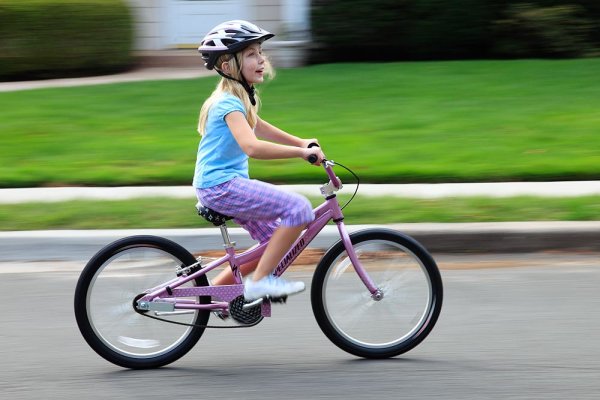
Panning is a great way to capture children at play. Exposure is 1/15, f/13, ISO 100. Canon EOS 5D Mark II with EF 24-105 f/4L IS at 84mm.

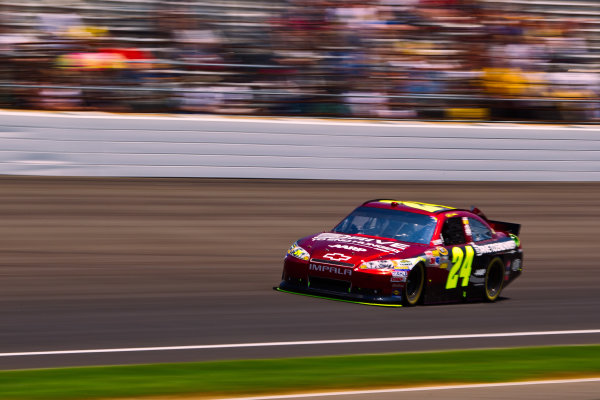
For the most part, photography is all about freezing a moment in time, stopping the action in front of you. But there are times when freezing the action fails to show the full story.  People move.  Often, at high speeds. Sometimes freezing the action fails to pay homage to the speed on display on the field, or the track.  Showing speed or motion is less important when shooting individual people in action, because a person in motion flexes muscles, contorts their expressions, creating a compelling image.  However, when photographing vehicles, such as in auto racing, the ability to show that speed is paramount.  If you use a fast shutter speed to stop the action, a car will simply appear as if it’s parked on the track.

Panning is a simple technique for showing speed, but it requires some practice, and a willingness to experiement a little.  First of all, you’ll want to slow your shutter speed way down.  Easy enough in poor light, but on a bright sunny day, it becomes a problem.  There are a few ways to handle this.  First off, lower the ISO on your camera to ISO 100.  For panning, I like to set the camera to Shutter Priority mode.  This allows me to choose the shutter speed I want, and the camera will then set the proper aperture.If stopping down the aperture and lowering the ISO still don’t give you a slow enough shutter speed,  try using a polarizing filter on the lens. A polarizer will lower your exposure by two stops.  Another option would be a neutral density filter, which can be found in greater than 2-stop densities when necessary.

A wide angle lens requires a slower shutter speed to create a dramatic panning effect, but with cars moving as fast as those at a NASCAR race, it doesn't have to be THAT slow! Exposure: 1/40, f/22, ISO 100. EOS 5D Mark II, EF 16-35L II at 35mm.

Your shutter speed will vary dependent on the subject and the speed at which it moves. For an athlete running, it could be as low as 1/15 or 1/20.  When shooting auto racing, your shutter speed could be as fast as 1/125.  The slower the shutter speed, the greater the illusion of speed will be.  You’ll have to match the speed of your subject with your speed of panning the camera as the subject passes.  This can take some practice. The best way to practice that I’ve found is to stand on the sidewalk of a busy street and photograph passing cars at various speeds.  Set your drive to Continuous shooting and hold the shutter button down to take several exposures of your subject as it passes.

It takes some practice, but try to pay attention to composition when positioning the subject in the frame.  When panning, it becomes very easy to focus solely on keeping pace with the subject, to the point that you end up simply placing it in the center of the frame.  Use the compositional aids in your camera to help you.  If your camera has a grid focusing screen, use that. If not, use the AF points that are etched in the viewfinder.

Lens choice also impacts the way the pan looks.  A telephoto lens that compresses perspective will create more dramatic effect than a wide angle will, which means the wide angle lens will require a longer shutter speed to create the same effect as a telephoto. Experiment a bit with both to create different effects.

Add panning to your action repertoire for a different take on motion in your photos!

Exposure: 1/60, f/16, ISO 100. EOS-1D Mark IV, EF 100-400mm f/4-5.6L IS at 210mm.

Post originally from: Digital Photography Tips.

Check out our more Photography Tips at Photography Tips for Beginners, Portrait Photography Tips and Wedding Photography Tips.

Showing Speed: Using Panning When Shooting Action


Digital Photography School

 
Comments Off on Showing Speed: Using Panning When Shooting Action

Posted in Photography