RSS
 

Archive for January, 2020

Minimalist Photography: A Powerful Medium That’s Not as Easy as You Think

05 Jan

The post Minimalist Photography: A Powerful Medium That’s Not as Easy as You Think appeared first on Digital Photography School. It was authored by Ana Mireles.

powerful-minimalist-Photography

Do you want to make more powerful minimalist photography? Then this is the article for you. Here, I’ll clarify what minimalism is, and more importantly, what is not. I’ll also give you some tips and tricks to improve your own images and share some quotes and links from the masters on the subject to get you inspired.

What is minimalist photography?

I find that some people use the term minimalism to describe a kind of photography, for example, when they are replying to what type of photography they do. That’s why it’s important to clarify that minimalism is a style of photography that you can apply to any genre of photography from landscape through to food photography.

Powerful minimalist photography

1/1000, f8, ISO 200

Actually, minimalism is a style that not only exists in photography but in everything from paintings through to design. It is even a way of life that has recently become popular. The one thing that minimalism has in common, no matter where you use it, is the idea that less is more. Because of this, the details are very important.

Know-how

While minimalism is simplistic in it’s visual aesthetic, it is not always easy to achieve. In fact, it can be more difficult because there’s really no place to hide. If it’s not a good photo, it will be fairly evident. One of the first rules of powerful minimalist photography is to isolate the subject and let the background be just that, a background. You can achieve this by using neutral backdrops or a shallow depth of field.

Image: 1/320, f11, ISO 400

1/320, f11, ISO 400

An isolated subject on a neutral background is not yet enough to qualify as minimalist because this description could include product photography from an e-commerce site and, of course, we are not talking about that.

So to achieve minimalism, you also have to give a message or emotion. Michael Kena, the great minimalist photographer says: “For me, approaching subject matter to photograph is a bit like meeting a person and beginning a conversation“.

Composition

You can use composition to give more impact to your image. There aren’t many elements in a minimalist image, so you have to be sure they are well-positioned and distributed correctly. You want to use composition to create a harmonic image and emphasize the subject. Always keep in mind the message and not just the aesthetics.

Composition for minimalist photography

1/60, f4, ISO 400

Using composition rules can really help you to master minimalist photography. Once you’re comfortable with them, keep experimenting because breaking the rules can sometimes be equally helpful.

Colors, shapes, and textures

You can try using only one color to emphasize the message or create an atmosphere and a feeling. There’s a long history in the arts about the cultural meaning and the psychological impact different colors have on the viewer. Use this to your advantage when doing minimalist images.

Urban powerful minimalist photography

1/640, f4.5, ISO 250

You can also go the other way and use bold, contrasting colors to create more compelling photographs.

Lea De Meulenaere said in an interview that she lives in a place that is not very colorful, so she does more profound research to use other characteristics of the minimalist style. Keeping this in mind, you can also use shapes and textures.

Constructing images

Minimalism can be found during long walks in the city for urban photography or nature for landscapes, but you can also construct it in still-life, food photography, advertising and other genres.

Image: 1/60, f11, ISO 400

1/60, f11, ISO 400

Some big brands like Disney or LG are using minimalism for their printed advertising. You can follow the creators of such campaigns on Instagram for inspiration. I particularly like Anna Devis and Daniel Rueda under the account name anniset.

Why you should give it a try

  • Trying new things will keep your photography improving. Going minimal doesn’t require you to buy any new equipment. You have nothing to lose and much to gain.
  • It will exercise your mind and creative process to give a clear and concise message with your images.
  • There’s such a big variety of minimalism that you can find your own. You can go about it as a meditative state or as a fun creative project. The choice is yours.

In conclusion

It’s not by chance that advertising is using minimalism. An image that clearly communicates what you want is something that stands out in between all the images we see every day. To make powerful minimalist photography is a skill that can take your work to the next level.

Powerful Minimalist photography monochrome nature

1/500, f5.6, ISO 100

Try it, practice it and most of all, enjoy it. Share with us your results in the comments section to get other readers inspired!

Want to read more about minimalist photography?

See these articles:

  • Tips for Minimalist Photography in an Urban Environment
  • Minimalist Photography ~ 4 Tips To Keep It Simple With A Maximum Impact
  • 21 Simple Images That Exemplify Minimalism
  • 4 Tips for the Minimalist Photographer
  • The Minimalist Landscape Photographer: What do you really need?
  • 5 Guidelines of Minimalist Photography to Help Improve Your Work
  • How to Embrace MINIMALISM for IMPROVED Landscape Photos
  • Tips for Achieving Minimalism in Photography


The post Minimalist Photography: A Powerful Medium That’s Not as Easy as You Think appeared first on Digital Photography School. It was authored by Ana Mireles.


Digital Photography School

 
Comments Off on Minimalist Photography: A Powerful Medium That’s Not as Easy as You Think

Posted in Photography


RAW Photo Editing in Lightroom: How to Make Your Photos Look Real to Life

05 Jan

The post RAW Photo Editing in Lightroom: How to Make Your Photos Look Real to Life appeared first on Digital Photography School. It was authored by Kevin Landwer-Johan.

dps-raw-photo-editing-in-lightroom

RAW photo editing in Lightroom is necessary to make your photos look realistic. Saving your photos as RAW files, they will not look like what you see with your eyes. Photos your camera captures look different than how we see. This is especially so in high-contrast lighting.

We can see more detail in highlights and shadows. This will change as camera technology advances.

RAW files are always flat and dull-looking before post-processing. RAW photo editing is necessary to balance the light and color to get your photos looking lifelike.

RAW Photo Editing Edited Beetle

Edited image made to look more vibrant and lifelike from the original RAW file. © Kevin Landwer-Johan

Don’t believe what you see

Chimping will rarely give you a true picture of the detail in your RAW images. What you see on your camera screen is a JPG photo that contains less information than the RAW file. This is different for each make and model of camera. You need to use your imagination and fill in where there appears to be no detail. You must also consult your histogram to keep your imagination in check.

You can extract more detail during RAW photo editing than is displayed on your camera’s monitor. Know your camera well and how the RAW files respond when you post-process them. Then you can have a better idea when you chimp your pictures.

What shows on your camera monitor after you take a photo may show loss of detail in the highlights or shadows. High contrast lighting exaggerates this. Learn to recognize the difference between what you are looking at and the way the pictures of it look. This will help you make better exposure choices.

Having presets active when you import photos to Lightroom will alter the images. Otherwise, images import as the camera recorded them. I prefer to have all my Lightroom settings at zero when I import. This means that when I start my RAW photo editing, I know precisely what I am dealing with.

RAW Photo Editing Zeroed Beetle

Original, unedited image showing all the Lightroom sliders zeroed. © Kevin Landwer-Johan

RAW photo editing from scratch

Lightroom has many presets. Some of them come with the software, others you can download and install. Many of them, when applied, will give your photos a somewhat surreal look. You can create:

  • Monotone images
  • Add a sepia look
  • Saturate or Desaturate
  • Colorize, Posterize and Solarize

Gimmicks abound. Sometimes applying a creative preset can enhance a photo. The ways you can transform your photos are endless.

RAW Photo Editing Cool Light Beetle

RAW image wit a ‘Cool Light’ preset applied. © Kevin Landwer-Johan

You can edit to make photos look however you want them to. It’s up to your creative ideas. But often you will want to edit your RAW photos to make them look realistic.

When you edit RAW photos for a natural-looking result, keep in mind how you saw what you photographed. How was the lighting? Was it high or low contrast? Did it have a warm or cold cast? Was it more neutral? What did the colors look like? If you consider the reality of a scene then you can recreate this during RAW photo editing.

Thinking about what you saw when you were taking your photos will help you edit them more realistically. It’s not always possible to remember clearly. This is when you need to think objectively and aim to find a balance in lighting, contrast, and color when you working on RAW photo editing.

Find a balance – what looks right?

Editing your photos so they look real to life means you must find the right balance. In Lightroom, the sliders I use most often to achieve this are (in no particular order):

  • White Balance Temp
  • Exposure
  • Highlights
  • Shadows
  • Blacks
RAW Photo Editing Edited Flower

Use the sliders on the Develop Module to make photos look life like. © Kevin Landwer-Johan

The other sliders in the Basic panel I will use less often. Their use depends on the lighting condition from when I took the photo. At times I will make alterations to individual colors using the Saturation and Luminance sliders. You can find these in the HSL/Color panel.

There are many ways to achieve similar results in Lightroom. The ones I mention here are the ones I find to give me the best results. If you prefer an alternative way of doing the same thing, please share it in the comments below.

Photos taken at different times of the day and night require editing to suit the lighting. Whether the light is high or low contrast will also make a difference. Photos taken on a sunny day require different editing to photos you take when it’s cloudy, or you’re indoors.

Don’t overdo any of the changes you make. Avoid pushing sliders to their extremes. This will help you keep a more realistic look to your photos. Once you start having to max out the sliders, you will find that image quality begins to deteriorate. Pixelation, banding, and other imperfections will begin to appear.

RAW Photo Editing Zeroed Farmer

Zeroed Settings

RAW Photo Editing Edited Farmer

Sliders adjusted to make the photo more realistic-looking. © Kevin Landwer-Johan

Contrast and exposure challenges

How well-exposed your photos are will affect the amount of effective RAW photo editing you can carry out. When you have to push sliders to their extremes, it’s usually a sign your photo was not well exposed. It can mean the contrast range in your composition is too broad for your sensor to capture detail in both the shadow areas and highlights.

RAW photo editing has its limits. You will not always be able to make a photo look like what you saw. This is most often true when contrast is high because camera sensors are still more limited than how we see.

Generally, aiming to bring down the highlights and draw up the detail in shadows will make a photo look more real to life. If an image was poorly exposed, in part or whole, it is more challenging to make it look how you remembered seeing it.

RAW Photo Editing Edited Orchid

Hard light with overexposed highlights. © Kevin Landwer-Johan

To avoid this, compose your photos so that the contrast range you capture is within the dynamic range of your camera. If there are very bright and dark areas in your composition, recompose. Aim to have the tone range narrower. This often means taking photos where there’s no bright lights or deep shadows in your frame.

If you can not do this, don’t be overly concerned about losing detail in the highlights, as this is not such a problem. In bright lighting conditions, our eyes will often not be able to see detail on light-colored or very reflective surfaces. We will still be able to see detail in the shadows.

Setting your exposure so you can capture shadow detail will make it easier to edit the RAW photos in Lightroom. This will help you get them looking realistic.

RAW Photo Editing Edited House

Edit each photo individually to get them looking most realistic. © Kevin Landwer-Johan

Think about Lightroom RAW photo editing when you take photos

When you take photos, consider the changes you can make to your RAW images later. The more photos you take and edit, the more naturally this will occur.

Thinking about what you can do in post-production might seem like cheating to some. I don’t see it that way. It’s a matter of working with the tools we have available to us. Modern digital technology gives us opportunities to make photos look more realistic.

When RAW photo editing well-exposed images, you can make them look real to life when this is your intention. Having well-exposed RAW files means you can balance light, contrast, and color.

Have a look back over some photos you have post-processed recently. Do they look how you remember seeing what you photographed? How could you alter them to make them look more real to life?

The post RAW Photo Editing in Lightroom: How to Make Your Photos Look Real to Life appeared first on Digital Photography School. It was authored by Kevin Landwer-Johan.


Digital Photography School

 
Comments Off on RAW Photo Editing in Lightroom: How to Make Your Photos Look Real to Life

Posted in Photography


2 Years with the Sony A7R III – Was it Worth Switching from Canon DSLR ?

05 Jan

The post 2 Years with the Sony A7R III – Was it Worth Switching from Canon DSLR ? appeared first on Digital Photography School. It was authored by Suzi Pratt.

sony-or-canon

It’s been almost two years since I purchased the Sony A7R III mirrorless camera as a second body to my Canon 5D Mark III DSLR. Since then, I’ve used the two cameras side-by-side to shoot a wide variety of professional events, from concerts to food to corporate conventions. There have been pluses and minuses to using both systems simultaneously, which I thought I’d share for those of you considering the switch.

Canon versus Sony

Why go mirrorless?

Prior to the A7R III, I had been using the Sony a6300 and was thoroughly impressed with its autofocus capabilities and video features. On both fronts, this tiny camera seemed lightyears ahead of my DSLR, so I was curious about how much better Sony’s full-frame cameras could be. I was also expanding my photography business to include video services and needed a camera that could shoot in 4K video resolution, which the 5D Mark III could not do.

Why keep both systems?

So why keep the Canon DSLRs at all?

I have a large library of Canon L glass that I intended to use on the Sony via a lens adapter. This worked with mixed results, but long story short, lens adapting did not work with my style of photography (more on that below). Given the significantly higher prices of Sony lenses, it made more financial sense to keep the DSLR kit and simply purchase a couple of Sony lenses to use. In the end, here’s what my resulting camera kit looked like:

  • Canon 5D Mark III with 16-35mm f/2.8, 24-70mm f/2.8, 70-200mm f/2.8, plus various prime lenses.
  • Sony A7R III with 24-70mm f/4 and 55mm f/1.8.

*The overlapping 24-70mm lenses might seem like overkill, but there is such a HUGE size difference between the two.

Canon V Sony

What was worth it

1. Video features

The Sony A7R III and A7 III are packed with video features including the ability to shoot in 4K resolution, 120 fps slow motion, in-camera timelapse, and in-body-stabilization (IBIS), to name a few. Since this is a photography site, I won’t go on more about the video features. But the specs are more than what the newer Canon 5D Mark IV offers. So from a video perspective, the Sony A7R III was completely worth it.

2. Having an Electronic Viewfinder (EVF)

One of the ways mirrorless cameras differ from DSLRs is that they tend to have an electronic viewfinder (EVF), while DSLRs have optical viewfinders (OVF). An OVF shows you what the camera lens sees, while an EVF shows you what the camera sensor sees. An EVF shows you almost exactly what your final image will look like before you press the shutter button.

There are pros and cons to using an EVF over an OVF, and most people prefer one over the other. For me, the EVF is preferred mainly because it allows for composing and shooting still photos with the LCD – something that is still hard to do with a DSLR.

Shooting with a tilting LCD has been a complete gamechanger, allowing me to find creative compositions that I wouldn’t have been able to do with a DSLR.

3. A truly silent shutter

Another advantage of mirrorless cameras is that they can have truly silent shutters. For the effort that Canon makes to offer a “silent shutter” on its DSLRs, it’s still a jarring sound compared to a mirrorless camera’s silent shutter.

The only thing to note is that silent shutters on mirrorless cameras can produce banding in images where LED lights are present, so be wary of that.

Sony A7R III with Sony 55mm f/1.8

Sony A7R III with Sony 55mm f/1.8

4. Insane and Accurate Autofocus

My experience with the Sony a6300 taught me that Sony autofocus was truly on another level compared to DSLRs. That’s still true on the Sony A7R III. Not only do you have phase detection and contrast detection autofocus with 5 focus modes, but you also get Sony’s acclaimed face detection and eye autofocus.

To be fair, Canon has upped their autofocus game with dual pixel autofocus, something that isn’t on the Canon 5D Mark III and thus isn’t a feature I can compare. However, there are reports that a recent firmware update to Canon’s new EOS R includes “Sony-like eye autofocus,” so that much seems to have always been in Sony’s favor.

5. Rapidly developing lens library with lots of third-party options

Compared to the Canon and Nikon mirrorless camera systems, Sony, by far, has the biggest lens library for both its full-frame and mirrorless cameras. Even third-party brands like Sigma and Tamron have latched on, currently offering high-quality lens options at a fraction of Sony’s prices.

Better yet, lens adapters, such as the excellent Metabones V, allow you to pull from Canon’s EF and EF-S lens library as well. So when it comes to lens options, the Sony mirrorless is hard to beat.

Sony A7R III with Sony 24-70mm f/4

Sony A7R III with Sony 24-70mm f/4. Look at the height of that stage – I couldn’t get this shot without the tilting LCD.

What wasn’t worth it

1. Size and weight savings

The argument of switching to mirrorless cameras to have a smaller and lighter system compared to DSLRs isn’t completely true. Sure, the Sony A7R III is smaller and lighter than any of the Canon 5D cameras. However, the fast Sony lenses that I would need to replace my DSLR equivalents are just as heavy and bulky. When it comes to full-frame cameras and fast glass packed with features such as image stabilization (IS), there’s not much of a size and weight difference.

2. Adapting lenses isn’t for every scenario

There are some great lens adapters out there, such as the Metabones V that I was initially sold on. In practice, the lens adapter worked 90% of the time, which was okay when shooting things like food or portraits. But that 10% failure rate wasn’t acceptable for the fast-moving concerts and events when it could mean missing THE shot of the night.

If you choose to adapt lenses, give yourself ample time for testing to make sure it works for your photography style.

Canon 5D Mark III with 24-70mm f/2.8

Canon 5D Mark III with 24-70mm f/2.8

3. Realizing they aren’t completely dead yet

While many photography news sites publish headlines proclaiming the death of DSLRs, Nikon and Canon prove otherwise. Both camera brands are rumored to be releasing new DSLRs in 2020, and there’s even supposed to be a 5D Mark V on the way! So if you shoot with DSLRs, there’s no pressure to make the switch yet.

4. Canon could make a mirrorless camera comeback

Actually, this part could already be true if you look at Canon’s crop-sensor mirrorless camera line.

Even though Canon seemed late to the mirrorless camera party, they are making big gains with their popular EOS M-Series APS-C mirrorless cameras, and the EOS R full-frame cameras continue getting better.

They are also developing innovative RF lenses (have you seen the RF 70-200mm f/2.8?!) and allowing Canon shooters to use DSLR lenses via their own lens adapter. It’s questionable if they will be able to catch up to and surpass Sony’s cameras and ever-growing lens library, but it is a good thing to see Canon continue to innovate.

Canon 5D Mark III with 16-35mm f/2.8.

Canon 5D Mark III with 16-35mm f/2.8.

In conclusion

So two years later, do I regret adding the Sony A7R III to my kit? Absolutely not.

The photos and videos that I’ve captured and the overall elevated experience of shooting with this camera have been worth it. However, I’d be lying if I said I wasn’t quietly rooting for Canon and hoping that they beef up their full-frame mirrorless line. When they do, it might be worth making yet another switch.

Sony A7R III with 24-70mm f/4

Sony A7R III with 24-70mm f/4

Canon 5D Mark III with 16-35mm f/2.8

Canon 5D Mark III with 16-35mm f/2.8

The post 2 Years with the Sony A7R III – Was it Worth Switching from Canon DSLR ? appeared first on Digital Photography School. It was authored by Suzi Pratt.


Digital Photography School

 
Comments Off on 2 Years with the Sony A7R III – Was it Worth Switching from Canon DSLR ?

Posted in Photography


PowerVision to launch PowerEgg X AI camera for drones at CES

05 Jan

PowerVision, a California-based robotics company, will launch its latest product, the PowerEgg X, at next week’s CES 2020 conference and trade show. The compact, egg-shaped device has multiple uses. It can operate as an autonomous personal AI camera, a handheld 3-axis AI camera, or as a drone. The PowerEgg X was created to fill a consumer demand for an all-in-one versatile and affordable camera that allows users to instantly share content, according to PowerVision.

The PowerEgg X took over 3 years to create, involved over 300 engineers, and 100 technology patents. The device weighs 522 grams (1.15 pounds) and measures at 165x100x100 mm (6.5×3.9×3.9 inches). Its 4K/60p camera has 1/2.8 inch CMOS 12MP sensor with a 78.4º field of view. It boasts facial recognition along with deep learning features that track and recall subjects, even if they’ve left the field view, plus it responds to hand gestures. In handheld mode, the device transforms into a 3-axis gimbal that produces stabilized UHD images with a battery life of up to 3.5 hours.

In drone mode, the PowerEgg X can fly up to 30 minutes in 19-24 mph winds. It features obstacle avoidance, precise landing, and comes with a waterproof case and landing pad allowing it to take off and land in the water. PowerVision claims it can fly in the rain, a first for the drone industry. Another is the ability for users to narrate in real-time by using their mobile phone’s microphone or a wireless earphone. Its proprietary SyncVoice technology automatically synchronizes with pictures, ‘effectively ending silent-aerial photography.’

“‘Innovate the Future’ is our mission and innovation is in our DNA,” said Wally Zheng, Founder and CEO of PowerVision. “Three years in development, PowerEgg X pulls together the technology consumers are seeking and puts it in a small, elegant egg shape. With smart-image recognition tracking, image mechanical stabilization, and simple video-editing tools, it is easy for anyone to shoot material as if they were a professional-grade videographer. By creating a multi-purpose device, PowerVision has reduced the user’s total purchase cost, storage requirement, increased ease-of-use, and giving the user unprecedented convenience.”

Starting at $ 899, the PowerEgg X will be available for purchase on PowerVision’s site along with other approved retailers including BestBuy, B&H Photo and Amazon on January 7th. Those attending the annual CES 2020 show can view it at the Las Vegas Convention Center in the South Hall, booth #26415, from January 7th – 10th.

Articles: Digital Photography Review (dpreview.com)

 
Comments Off on PowerVision to launch PowerEgg X AI camera for drones at CES

Posted in Uncategorized


Weekly Photography Challenge – Resolutions

04 Jan

The post Weekly Photography Challenge – Resolutions appeared first on Digital Photography School. It was authored by Caz Nowaczyk.

This week’s photography challenge topic is RESOLUTIONS!

Image: One of your resolutions may be to better your bird photography. Photo: Jaymes Dempsey.

One of your resolutions may be to better your bird photography. Photo: Jaymes Dempsey.

A new year is upon us (it’s hard to believe, I know). And it is that time where we make resolutions for the year ahead.

Your resolutions might include making a special trip to do some landscape photography, or to capture some of the world’s landmarks. It may be to do more bird photography, macro photography, a 365-project or just more photography in general. You may decide this is the year to take the leap into doing photography full time. Alternatively, it could be that you want to slow down and take more notice of the things going on around you close to home.

Whatever they are, we’d like to see them represented in photography.

It could simply be a photo of a written list of resolutions, it could be photos of places you have been and want to return to this year. It could be photos of your family if you plan to spend more time with them this year. You get the picture.

So, check out these inspiring pics, have fun, and I look forward to seeing what you come up with!

Image: You may decide you want to make your photography business and aim to get clients. Photo: Broo...

You may decide you want to make your photography business and aim to get clients. Photo: Brooke Cagle

Image: Alternatively, one of your resolutions may be to spend more time with your family. Photo Jack...

Alternatively, one of your resolutions may be to spend more time with your family. Photo Jackie Lamas

Image: Perhaps one of your resolutions is to upgrade your camera gear? Image by Canon Inc.

Perhaps one of your resolutions is to upgrade your camera gear? Image by Canon Inc.

Check out some of the articles below that give you tips on this week’s challenge.

Tips for Shooting RESOLUTIONS

5 Surprising Macro Photography Ideas to Jumpstart Your Creativity

10 Must-Use Bird Photography Camera Settings for Beginners

Why Goal Planning Is the Key to Growing as a Landscape Photographer

10 Quick Photography Business Tips to Kickstart The New Year

Jumpstart Your Photography – Start a 365 Project

How to do a Photography Alphabet Project


Simply upload your shot into the comment field (look for the little camera icon in the Disqus comments section) and they’ll get embedded for us all to see or if you’d prefer, upload them to your favorite photo-sharing site and leave the link to them. Show me your best images in this week’s challenge.

Share in the dPS Facebook Group

You can also share your images in the dPS Facebook group as the challenge is posted there each week as well.

If you tag your photos on Flickr, Instagram, Twitter or other sites – tag them as #DPSresolutions to help others find them. Linking back to this page might also help others know what you’re doing so that they can share in the fun.

The post Weekly Photography Challenge – Resolutions appeared first on Digital Photography School. It was authored by Caz Nowaczyk.


Digital Photography School

 
Comments Off on Weekly Photography Challenge – Resolutions

Posted in Photography


Gear of the Year: what we loved shooting with in 2019

04 Jan

Each year DPR staff pick the gear they most enjoyed shooting with over the past year – and that’s the only criteria. It doesn’t have to be the best or fastest, just enjoyable. Here are all of our 2019 picks in one place.

Articles: Digital Photography Review (dpreview.com)

 
Comments Off on Gear of the Year: what we loved shooting with in 2019

Posted in Uncategorized


Best Photos of 2019 by Jim M. Goldstein

04 Jan

Thanks for checking in to see my best photos of 2019. This year for a variety of reasons I didn’t have many opportunities to get out and pursue photography to the degree I’d have preferred. Some of the reasons why were good (new house, settling in, kid activities with both boys being in elementary school for the first time, etc.) and some were downright bummers (passing of my grandfather, getting used to this aging thing, etc.). Through it all though I got the kids out on some bigger trips this year beyond our regular trips to Yosemite. We drove from California to Yellowstone National Park in Wyoming and Glacier National Park in Montana. With my focus on the boys having a great experience my normal serious photographic endeavors were kept on the sideline. As always I felt good with that decision after hearing how much they loved Glacier National Park, especially given Glacier it is a personal favorite of mine. In 2020 I’m looking forward to exploring more of my favorite locations with them and seeing it all a new through their eyes.  All that being said enjoy my best of the year…


Landscapes & Wildlife

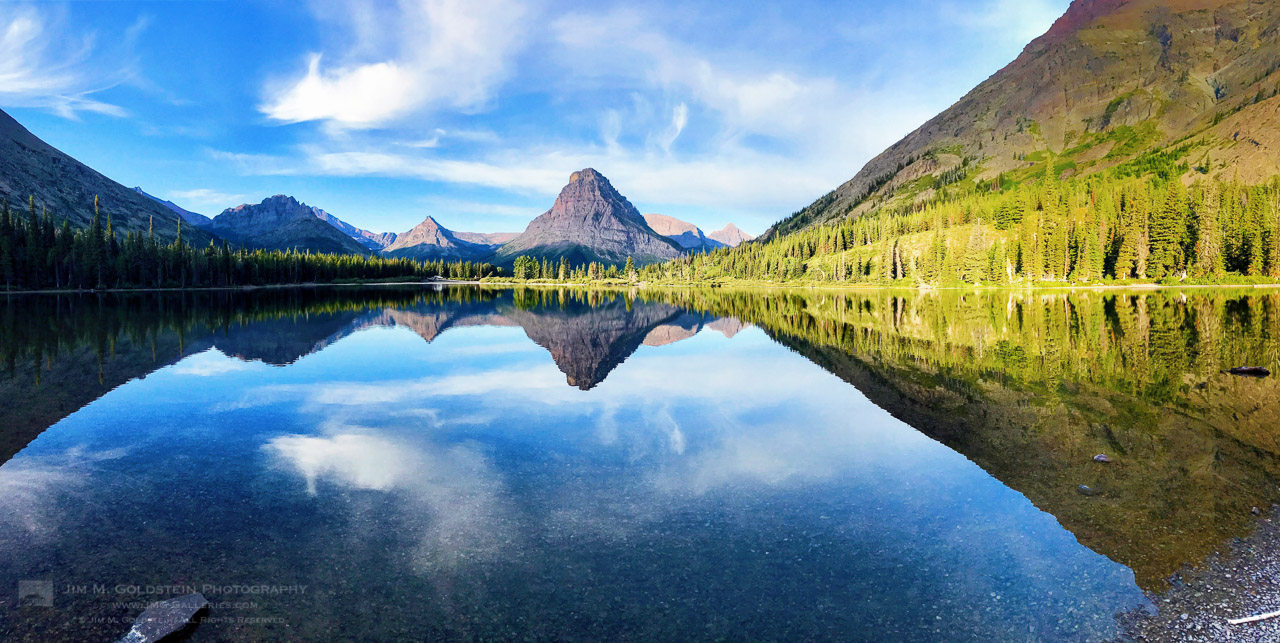
Much of my time outdoors this year was spent showing the boys more of my favorite locations and experiencing the great outdoors while indulging them with great views and of course many evenings of campfires and s’mores. The following view at Two Medicine lake in Glacier National Park was incredibly memorable as we explored the shore and skipped rocks.

Two Medicine Lake

A serene moment at Two Medicine Lake in Glacier National Park


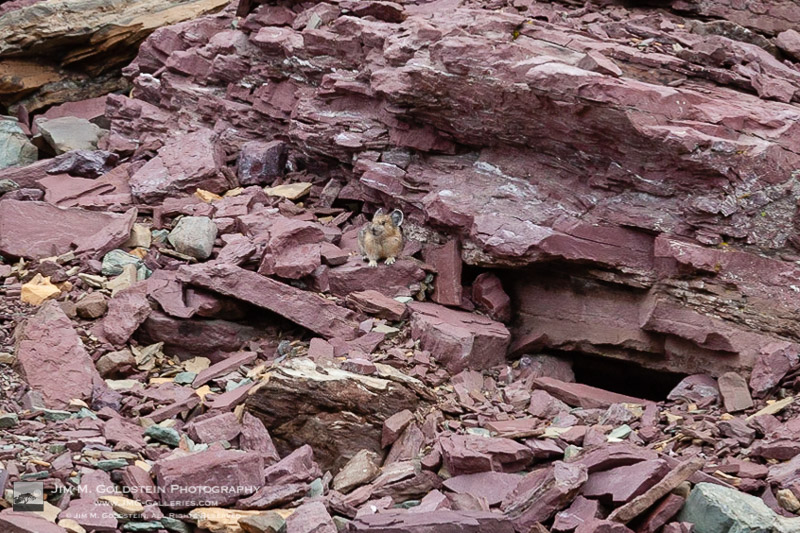
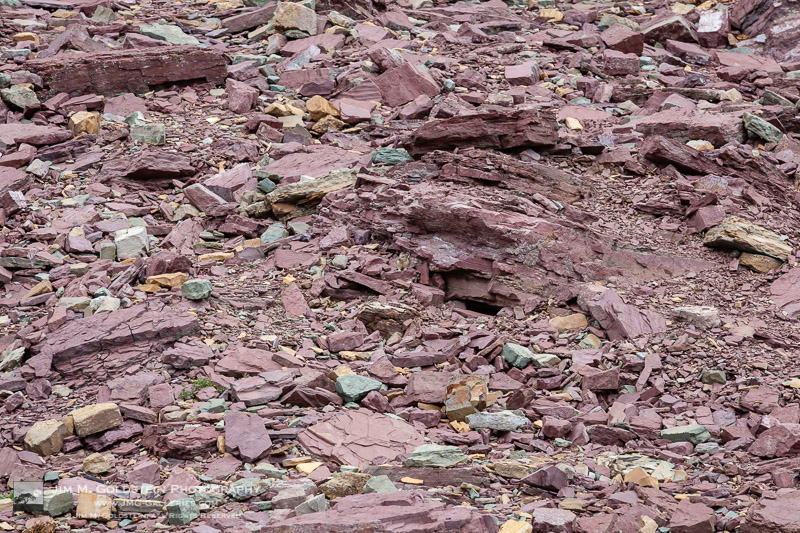
Of all my time at Glacier National Park I’ve never once seen a Pika… until this year. Not only are they well camouflaged and hard to see, but they’re incredibly fast. Being small even photographing them with a 400mm lens isn’t nearly enough magnification. The first photo below is a severely cropped photo taken at 400mm. The uncropped photos, 2 down, is included to give you an idea of how hard it is to find them in a rock pile. Add in their constant state of running, to forage food for the winter, you have an even tougher subject to photograph. That said I do have a good number of Pika butt photos now.

North American pika (Ochotona princeps)

North American pika (Ochotona princeps) at Logan Pass, Glacier National Park

North American pika (Ochotona princeps)

North American pika (Ochotona princeps) at Logan Pass, Glacier National Park


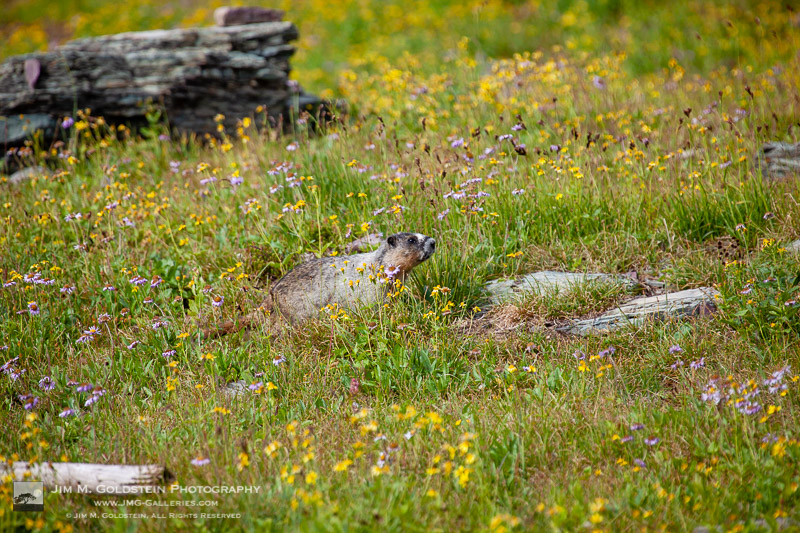
While in Glacier National Park it’s always fun to see marmots scurrying about. On a hike at Logan Pass my boys and I saw several. One of the more interesting was perched in a tree surveying his territory.

Hoary marmot – Glacier National Park, Montana

A hoary marmot (Marmota caligata) in wildflowers at Logan Pass, Glacier National Park in Montana.

Hoary marmot in a tree – Glacier National Park, Montana

A hoary marmot (Marmota caligata) resting on a fallen tree – Glacier National Park


Adventures with the Kids

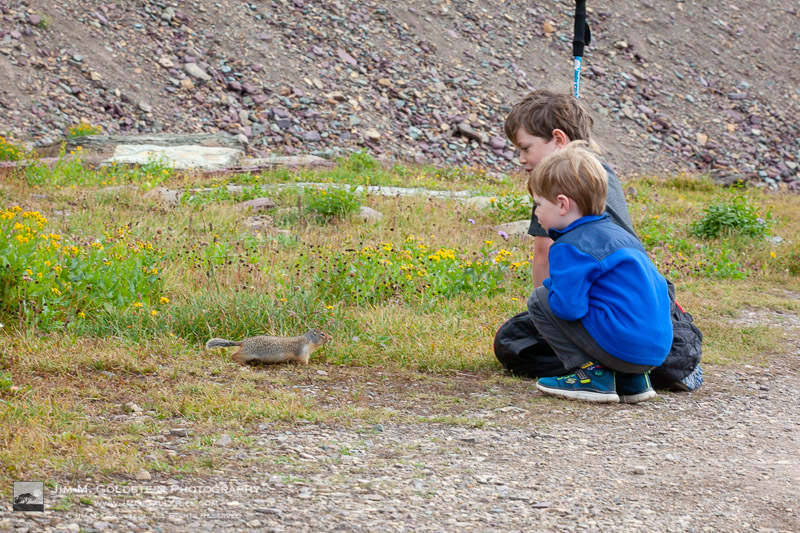
My boys enjoying a brief encounter with a curious ground squirrel was amusing. Even more amusing was the play structure my youngest son built for him with rocks near his den.

Kids meeting a ground squirrel

My kids meeting a ground squirrel while on a hike at Logan Pass, Glacier National Park in Montana


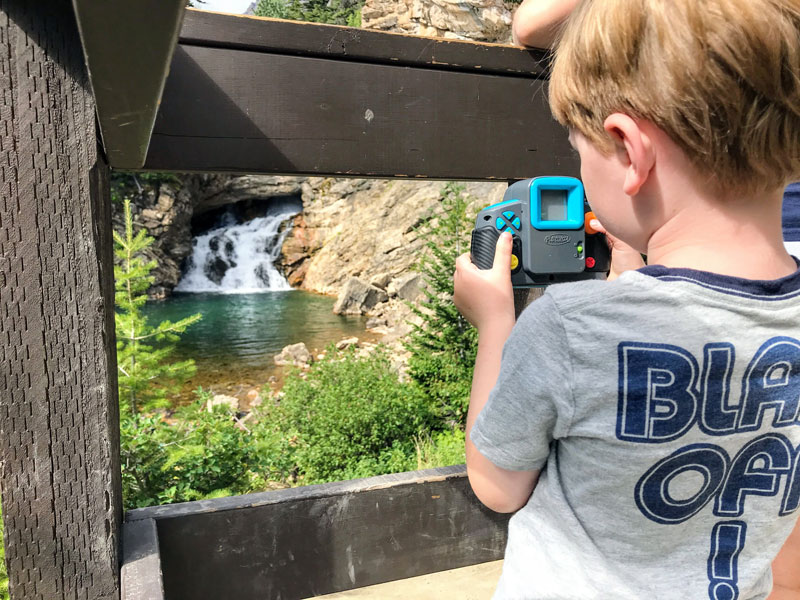
My youngest still has not shaken his interest in photography. While he wasn’t as steadfast about using a tripod this year he still seemed to enjoy taking some ‘serious’ photos.

Young Photographer

My son photographing a waterfall in Glacier National Park


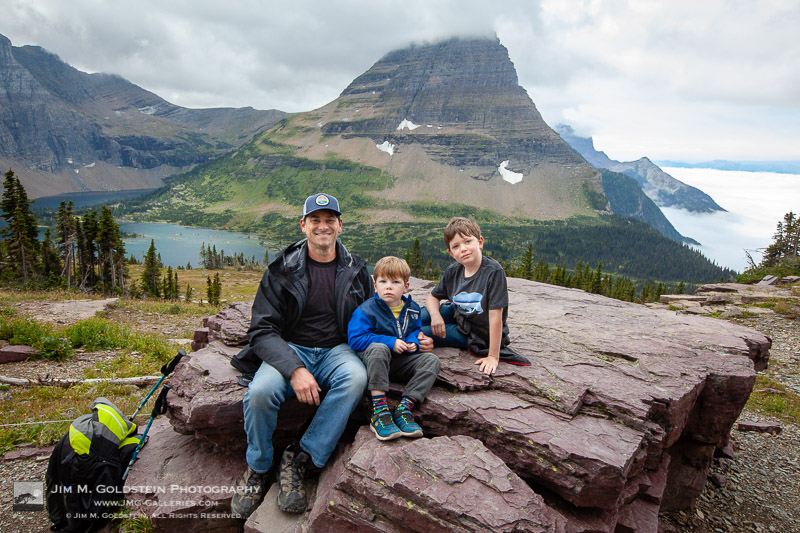
A brief moment my kids weren’t a blur from running around, tackling each other, and/or tackling me.The Dudes


A personal favorite of mine taken by a passing hiker. Thanks unknown hiker, I salute you and your ability to capture a well framed photo while maintaining focus. You’d be surprised how hard it is to get that even with an iPhone.The Dudes and I

Thanks for checking in and Happy New Year!


JMG-Galleries – Landscape, Nature & Travel Photography

 
Comments Off on Best Photos of 2019 by Jim M. Goldstein

Posted in Equipment


The 5 Best Portable Photo Printers in 2019

04 Jan

The post The 5 Best Portable Photo Printers in 2019 appeared first on Digital Photography School. It was authored by Caz Nowaczyk.

Do you like to print your photos? In this video from, 10BestOnes, they delve into the 5 Best portable photo printers in 2019. Starting from number 5 and working down to number 1.

Are there any others you would add to this list? If so, share with us in the comments!

?

The 5 Best portable photo printers in 2019

5. Kodak Mini 2

The 5 Best Portable Photo Printers in 2019

The Kodak Mini 2 is a small size, measuring 1x3x5.2 inches, and features a colorful print quality that uses a 5-step layered printing process. The images have great vibrancy and detail.

It has ease of use, a fast set-up, and great functionality with the mobile app. The Kodak Mini 2 comes in white, black, blue, pink, and purple and is small enough to fit in your pocket.

Its uncomplicated design consists of a power button and a USB port for charging the printer. There is a built-in lithium battery lasting for around 15 prints.

The Kodak Mini comes with a Kodak app for Android and IOS devices. It is great for editing and adjusting images for print, and has some great templates for printing business or greeting cards. It prints wirelessly at a speed of 1min15sec for a 2.1×3.4 inch photo.

4. Fujifilm Instax SP-3

The 5 Best Portable Photo Printers in 2019

Fujifilm is a leading expert in photography, bringing the retro look back to photography. The Fujifilm Instax SP-3 continues the retro vibes with prints that look like polaroids.

It’s portable, with great ease-of-use, and works great with smartphones.

It has an attractive design with a high-quality build made from soft plastic. It’s expertly constructed, as it should be with its premium price tag.

The device measures 6.1×6.1×3.7 inches (weighs 1.3 pounds) in total, meaning it can fit in most backpacks.

The Fujifilm Instax SP-3 has a rechargeable battery. LED lights on the printer let you know how many shots you have remaining before having to recharge the printer. It also has a reprint button so you can easily reprint the same image as many times as you like without having to go through the app each time.

The app is attractive and intuitive and has a history section, too, so you can go back and easily print photos you’ve previously printed.

Fujifilm Instax SP-3 print size is a square format at 2.4×2.4 inches at a resolution of about 800×800, which gives 318dpi. The color and reproduction are fantastic, and it takes around 13 seconds to print.

3. Kodak Mini Shot

kodak-minishot

The Kodak Mini Shot is an instant camera and printer in one retro-style device. Available in a range of colors, the camera comes in blue, pink, yellow, purple, black, and white.

Measuring 5.2x3x0.9 inches in size, the Kodak Mini Shot weighs only 0.5 pounds, meaning it can easily fit into your pocket.

On the back are a small LCD display and set of buttons that allow you to select and print your photos.

However, there are a few downsides to this device.

There is no way to save your photos to the device for printing later. It has no viewfinder, making it difficult to see if your subject is in focus. The battery life is not great, and the LCD screen takes a while to refresh when you move the camera.

Downsides aside, the print quality is still relatively good. It prints in a 2.1×3.4 inch format and takes about 30 seconds to print.

Also, the app delivers filters and customizations before printing.

2. The Polaroid Mint

The 5 Best Portable Photo Printers in 2019

The Polaroid Mint has amazing qualities in a hipster, light package. It has the best battery life and photo quality from a portable printer. It’s pocket-sized, measuring in at 4.5x3x0.7 inches and weighing 7.2 ounces.

It has a simple design with the Polaroid logo engraved on its body and is available in black, blue, yellow, red, and white.

The Polaroid Mint can house 50 print sheets in its body. It has a rechargeable, 900mah battery with amazing run time, with the ability to print about 40 photos on a single charge. It uses zinc zero-ink paper that can easily slide into the device. Moreover, you don’t need to replace ink cartridges because it doesn’t use them.

The Polaroid Mint has wireless connectivity, linking to the app on your phone. It can also lodge a micro SD card up to 256GB so that you can store photos in it.

The print size is the standard 2×3 inches. It prints with amazing quality and contrast.

1. HP X7NO7A Sprocket

The 5 Best Portable Photo Printers in 2019

The best overall printer in the market is the HP X7NO7A Sprocket. It’s a small and portable device with easy-to-use functions, quick print speed, and integration with its app, Facebook and Instagram, and other features to make your life easier.

Utilizing zinc sheets, the HP X7NO7A Sprocket doesn’t use ink cartridges. It has a well-made design with a sleek look, and rounded corners. The size of the HP X7NO7A Sprocket is 4.5x3x0.9 inches, and it weighs 6 ounces.

The white casing has copper details around the center and logo, and there are minimal details. It only has the power button and the USB socket. Its connectivity is only via Bluetooth.

The app is fool-proof and makes editing and printing your photos very easy. It can print a photo in 42 seconds. While the print quality is great, the color isn’t very saturated. However, overall, the device delivers tremendous value for the price.


You may also find the following helpful:

  • Practical Color Management – How to Set Up Your Printer to Match Your Monitor
  • How to get more from your printer – besides good quality prints!
  • Printers – Laser vs Inkjet
  • Polaroid PoGo Mobile Printer Review
  • Photo Printers: Choosing the Best One for Your Needs

The post The 5 Best Portable Photo Printers in 2019 appeared first on Digital Photography School. It was authored by Caz Nowaczyk.


Digital Photography School

 
Comments Off on The 5 Best Portable Photo Printers in 2019

Posted in Photography


Video: Adobe Lightroom trick makes it easy to search images for sensor spots

04 Jan

Professional photographer Anthony Morganti of ‘I Am Mr Photographer’ has published a new video that shows viewers how to systematically search for sensor spots (or water droplets and other unwanted specks) in an image using Adobe Lightroom Classic. The method is very simple and relies on a few keyboard shortcuts, as Morganti explains in his video.

Using this method, Lightroom users zoom in on the image and set the zoom box to the upper left-hand side of the image. From there, Morganti simply uses his computer’s Page Down function to scan through zoomed portions of the image in columns. The video includes instructions for viewers using Mac and viewers whose keyboards lack dedicated shortcut keys, among other things.

Articles: Digital Photography Review (dpreview.com)

 
Comments Off on Video: Adobe Lightroom trick makes it easy to search images for sensor spots

Posted in Uncategorized


Oppo patent shows camera module that pops out of the side of a smartphone

04 Jan

Smartphone manufacturers have come up with a variety of solutions to maximize the screen surface to size ration on smartphones, including hole-punch front cameras, camera notches and pop-up mechanisms of various kinds.

In a patent filing found in the CNIPA (China National Intellectual Property Administration) database Oppo is now adding a new variant: the sideways pop-out front camera.

In the reference images, we can see a motorized camera module placed on the right-hand side of the phone on roughly the same height as the rear camera. The power button is located on the same side of the phone while volume rockers and SIM-tray can be found on the left. The speaker and USB-C connectors are at the bottom.

As usual, there is no way of knowing if this idea ever makes it into an actual production device but it’s good to see manufacturers are looking into new ways of optimizing space in the thin bodies of modern smartphones.

Articles: Digital Photography Review (dpreview.com)

 
Comments Off on Oppo patent shows camera module that pops out of the side of a smartphone

Posted in Uncategorized