RSS
 

Archive for May, 2019

Nikon reports its Imaging Business revenue dropped nearly 18% year-over-year

10 May

Nikon Corporation held its latest earnings call earlier today and has since published the full financial details for its fiscal year (FY) 2019, which ran from April 1, 2018, to March 31, 2019. Though many numbers were positive, Nikon’s Imaging Products Business segment was the glaring exception with a substantial revenue decrease of 17.9% compared to FY 2018.

The Nikon Imaging Products Business reports revenue of ¥296.1B for its most recent fiscal year, a ¥64.6B decrease year-on-year. Though sales and revenue for full-frame cameras experienced growth over the last two years, Nikon reports falling ¥8.9B short of the sales forecast for its interchangeable lens cameras and lenses.

The Imaging business segment reports a fiscal year operating profit of ¥22.6B, a year-on-year drop of ¥8.2B. In comparison, Nikon saw revenue and operating profit increases across both its Precision Equipment and Healthcare businesses, and only a slight 1% drop in revenue across its other segments.

Looking forward, Nikon plans to expand its product line over the fiscal year that will end on March 31, 2020, but expects ‘substantial revenue reduction’ during the same time period ‘due to unit sales decrease of the existing products mainly in DSLR.’ In regards to the Imaging segment’s operating profit forecast, Nikon said, ‘Further cost-effective measures shall offset the profit reduction partially.’

The numbers follow a CIPA report published last month that revealed a year-on-year decrease in the interchangeable lens camera market, which fell from 798,014 global shipments in February 2018 to 521,217 shipments in February 2019. That decrease was part of an overall downward trend that saw total global digital camera shipments fall from 1,001,398 units in January 2019 to 935,148 units in February.

Articles: Digital Photography Review (dpreview.com)

 
Comments Off on Nikon reports its Imaging Business revenue dropped nearly 18% year-over-year

Posted in Uncategorized


Panasonic Lumix DC-FZ1000 II sample gallery

10 May

$ (document).ready(function() { SampleGalleryV2({“containerId”:”embeddedSampleGallery_4998982555″,”galleryId”:”4998982555″,”isEmbeddedWidget”:true,”selectedImageIndex”:0,”isMobile”:false}) });

Panasonic’s Lumix DC-FZ1000 II is a modest update to one of our favorite enthusiast long zoom cameras, with a touchscreen, additional controls, a larger EVF and Bluetooth being the main changes. Check out how the image quality looks in our initial sample gallery.

See our Panasonic FZ1000 II gallery

Articles: Digital Photography Review (dpreview.com)

 
Comments Off on Panasonic Lumix DC-FZ1000 II sample gallery

Posted in Uncategorized


Samsung launches 64MP image sensor for smartphones

09 May

The ‘megapixel wars’ on smartphone cameras stopped some time ago but recently we are seeing an uptick in smartphone image sensor pixel counts, not because consumers demand higher resolution images but because many modern sensors use Quad-Bayer technology which combines four pixels into one, for better detail, lower noise levels and increased dynamic range.

Samsung has now launched the ISOCELL Bright GW1, the world’s’ first 64-megapixel sensor for smartphones. It comes with the same .8-micrometer pixels as the current 48MP sensor which means it will have a larger sensor surface and therefore better light gathering capabilities.

Cameras equipped with the new sensor model will typically output 16MP images, much in the same way as the current 48MP models from Samsung and Sony deliver 12MP images. That said, engineers will also have the option to read out complete 64MP images, which can makes sense in good lighting where noise and/or dynamic range are less of an issue.

In addition to the 64MP model, Samsung is also launching a new 48MP variant. Mass production is expected to start in the second half of 2019.

Articles: Digital Photography Review (dpreview.com)

 
Comments Off on Samsung launches 64MP image sensor for smartphones

Posted in Uncategorized


The Red Bull Illume Image Quest 2019 competition is open for submissions

09 May

Red Bull has returned once again with its action and adventure sports photography competition, Red Bull Illume. This marks the fifth iteration of Red Bull’s photo competition and with it comes a few changes.

Most notably, the competition will now run once every two years instead of every three years. Additionally, Red Bull has added four new categories, bringing this year’s total to 11 individual categories.

A panel of 50 international photo editors and digital media experts will select the top 55 finalists—five per category—before ultimately deciding the 11 category winners and one overall winner. In November 2019, the winners will be unveiled at a winner award ceremony. Following the ceremony, the 55 finalist images will travel around the world to be showcased in indoor and outdoor exhibitions.

Below are the 11 categories in this year’s competition, with an explainer, provided by Red Bull, of what each category is (the new ones will be marked with an asterisk):

Best of Instagram by SanDisk* — Images submitted on Instagram – photographer’s most gram- worthy moments of show-stopping adventure and action sports. Stuff so cool you have to stop scrolling.
Creative by SkylumImages that have been enhanced digitally or in the darkroom through alterations made in the production or digital editing process. This is an open category so anything goes!
Emerging* — A fresh approach offers new angles. The up-and-coming category is for rising talents to compete on similar footing – submissions accepted only from photographers 25 years old or less. No video, no image manipulation. Show us your greatest capture!
Energy Images that demonstrate the force that powers an action and show the energy, speed and strength required for an athlete to perform.
Innovation by SonyImages that reveal a unique angle, a visual idea, a different format, light and flash effects… something never seen before! It‘s the purely creative image.
LifestyleImages that visually capture the creativity of the lifestyle, music and culture that surrounds action and freesports, or represents what happens before, between, and after the action.
MasterpieceImages that illuminate your artistic skill, your personal best, your unique style – give us your best shot!
Moving Images* — Images are no longer standing still. The Moving Image category is an open playing field for video sequences between 5 and 30 seconds. Ready… set… action!
Playground Images that showcase the landscapes, locations, platforms, and environments in which athletes play.
RAW* — Shots that are straight out of the camera showcasing the real image. Composition, exposure, lighting done in front of the lens and in the scene, not behind a screen. That’s the Raw category — un-cropped, un-touched, no filter.
Wings Images that capture the point in a performance in which the athlete jumps, catches air, free falls, soars.

The winners of the eleven individual category prizes will win a collection of prizes valued at that include a Sony a7 III with the 24-105 F4 G Master Lens, a ‘bundle’ of SanDisk memory cards, Skylum Luminar 3 with accompanying presets, and photography apparel/accessories from COOPH. Separately, the winner of the ‘Creative by Skylum’ category will be welcomed on as part of the Global Skylum Ambassador Team and the winner of the ‘Emerging by Red Bull Photography’ category will get a spot at the Red Bull Rising Talent photography workshop in 2020, travel, accommodation and boarding included.

Finally, the overall winner of the Red Bull Illume Image Quest 2019 will win ‘a shooting experience with the SanDisk Extreme Team and take home the Sony Alpha A9 camera with a 24-70mm f2.8 lens from the G-Master range.’

Any image captured after March 31, 2016 is eligible for the contest and submissions are open through July 31, 2019. After signing up for a Red Bull Illume account, you can submit up to 10 images in each of the eleven categories. An image can be used in no more than two categories; photographs must be JPEGs larger than 8MP and videos for the ‘Moving Image’ category must be Full HD (1080p) and between 5-30 seconds.

Red Bull has provided a thorough list of rules and regulations for the contest and the images submitted to it. Red Bull has also shared a video showing how to upload submissions to the contest. You can find the winners from past competitions on the Red Bull Illume website.

Articles: Digital Photography Review (dpreview.com)

 
Comments Off on The Red Bull Illume Image Quest 2019 competition is open for submissions

Posted in Uncategorized


How Do You Know When You’re Ready to Start Charging for Your Photography?

09 May

The post How Do You Know When You’re Ready to Start Charging for Your Photography? appeared first on Digital Photography School. It was authored by Carl Spring.

An image from my first wedding. One of the scariest days of my life.

How do you know when you’re ready to start charging for your photography?

When someone is willing to pay you for them.

There you go. In twenty-two words, I have answered one of the most-asked questions in photography.

In all seriousness though, that is pretty much it.

You only have to look at the story of many photographers and how they started. They simply took an offer to get paid, fearing they were not ready.

Let’s be honest right out of the gate. You will be nervous as hell – probably convinced you are a fraud – and will be fearful of delivering the images to the client. Awaiting their reaction, you may wonder why anyone would pay you to take photos. This is natural and is more commonly known as “imposter syndrome.”

Imposter syndrome

To put it simply, it is the feeling that your work isn’t very good and doesn’t deserve the attention it gets. Albert Einstein also suffered from this, so if this sounds like you, you are in good company.

The truth is, people who are highly skilled or accomplished tend to think others are just as skilled. Because you see what you do as simple, you don’t see the vast amount of skill involved in the work you do. You take it for granted because it comes so easily to you.

It is also human nature to be more critical of your own work than that of others. Put this into a world of social media where everyone is #livingtheirbestlife, and there is what appears to be a never-ending stream of amazing images you see as better than yours. Now you have the perfect storm.

The fact that Einstein suffered from this shows there seems to be no level of accomplishment that makes you able to see worth in what you do. In some cases, higher accolades and awards make things worse.

You just need to remember you are skilled in what you do and your work is good.

Unfortunately, if you suffer from imposter syndrome, you may never be able to rid yourself of it. However, there are things you can do to make it easier. Tactics include talking with others about your issues and taking note of the positive feedback you get. People don’t have to say nice things about your work; they say them because they mean it!

Most importantly, remember that almost everybody suffers from this in one respect or another. I suffer from this badly. Repeatedly, I think my work is awful and wonder why people want to pay me to take their photographs. I convince myself that unless I have taken the best photograph in the history of photography of whatever I am shooting, then it is a failure.

Luckily, I have a great family who support me through the tough times and remind me that people pay for my work because I am a good photographer.

Band portrait again grunge background

I had shot lots of bands, but few band portraits at this point. They were nervous as I had photographed artists they loved. I was nervous because they were paying me for portraits. Imposter syndrome at its finest.

Fake it til you make it – except for weddings! 

There is always a huge element of “fake it til you make it.” You sometimes need to have faith in yourself and go for it. Standing at the edge of the diving board is the worst place to be because you have time to think. Sometimes you need to jump off and try your best. At times it will be graceful, sometimes you may bellyflop. However, in reality, all that is hurt is your pride (and your belly obviously).

Let’s say a friend asks you to photograph their kids because they have seen photos on your Facebook and want some of their kids. They are happy to pay you for the photos too.

My advice is to go for it.

Let’s say the worst happens, and the photos turn out to all be awful (this is more than likely not going to happen. Even if you do not get loads of great shots, you should get a few keepers).  All you do is own up and say you are not happy with the photos and they deserve better. The only thing that is an issue is you have to give up more time to retake the photos.

Photographing a family portrait is the perfect example of when fake it until you make it is okay. Shooting a wedding, however, is not!

The fact that weddings are a one-off event and if you are not 100% certain you can deliver, then you shouldn’t do it.

I have seen (as I am sure many of you have) people on Facebook groups asking questions like “I’m photographing my first wedding next week, I have this lens and that lens. Which will be better? Also, do I need a flash?”

This is irresponsible. You need a certain level of skill and knowledge to photograph a wedding, especially if you are getting paid for it. You cannot gain the knowledge to photograph a wedding by asking questions in a Facebook group a few days before the event. You need to have it before you take on a wedding.

There are always news stories about a wedding photographer getting sued for ruining a couple’s wedding day. Please don’t become one of those. If you aren’t sure if you are ready to photograph a wedding, you probably aren’t.

With that said, your knowledge does not have to be in wedding photography. I know lots of photographers who have never photographed a wedding, but I am sure they would do an awesome job. As a starting point, you need to know how to photograph in a variety of lighting situations. You need to know how to solve exposure issues your camera may throw up, and you need some spare gear in case your main camera dies.

You need a headshot to apply to acting school? Of course, I can (I had no idea).

What equipment do I need if I’m NOT shooting a wedding?

For most photography there are three simple questions:

  • Do you have a camera?
  • Do you have a lens?
  • Do you have a memory card?

If you answered yes to the above three questions, then you have the right equipment to be paid for your photography. Will a variety of lenses and gear make things easier? Yes, but a beginner DSLR with a kit lens is more than capable of producing beautiful images people will be happy to pay you for. 

What equipment do I need if I’m shooting a wedding?

As with the knowledge requirements above, the gear requirements for shooting a wedding are different. A wedding requires a different amount of equipment. The most important is to have two camera bodies. If you have one camera body and something goes wrong, you are in a mess. A spare camera body may not be needed, but it is better not to need something and have it there than to need it desperately and it not be there.

In terms of lenses, most wedding photographers tend to go for two f/2.8 zoom lenses or two to three prime lenses. What is best for you depends on how you like to shoot. Fast lenses are always best for weddings as you can use wider apertures to get more light into the camera in low light scenarios such as dark churches.

For those of you looking for specifics, a zoom lens shooter will use a 24-70 f/2.8 and a 70-200 f/2.8. They may also have a prime lens with an even larger aperture for situations where there is really poor light.

A prime lens shooter mostly works with a 35mm and an 85mm. They may also have a 135mm or a 24mm. These are generally f/1.8 or faster.

Now again these are the basics. I have not included flashes, memory cards, hard drive backups, etc.

I will take this opportunity to remind you again; you really do need a high level of skill and equipment to be able to shoot a wedding. It is hard work if you know what you’re doing. If you don’t, it is like a 12-hour waking nightmare.

camping pods in rural England

Want me to shoot your camping space. Of course, I can. It will be…The first part of the sentence was easy. Asking for the money was always harder. In this case, the client said, “I was expecting to pay more than that.”

What should I charge?

Now for those of you starting to charge, you will always wonder how much should I ask? When you are first starting, you may photograph for an incredibly low rate, and that’s fine.

No matter what some may say, you are not ruining the photography industry by charging $ 100 including all the images when you are starting out. The truth is, people looking for photography at that price point are not going to be purchasing from photographers who charge thousands of dollars for a photo shoot.

There isn’t a right or wrong answer. My first family shoot I charged £50 including the images. My first full wedding I charged £500. Would I charge that now? Of course not. However, at the time, I got some cash, I built my portfolio, and most importantly it built my confidence.

The follow on question is how do you know when you are ready to charge more? Again this is down to you, your ability to deliver beautiful images and your confidence.

The moment I decided to raise my prices was when I was paid £600 to photograph a wedding where the couple had spent over £10,000. They didn’t book me for my price; they loved my work.

After that wedding, I doubled my wedding prices.

This led to more inquiries. Not only that, but I also received inquiries for the type of weddings I wanted to photograph. Was I convinced that raising my prices that much would mean no-one would book me? Of course, but they did, and I eventually raised them again. You just have to be confident, and remember, your prices are something you can easily change.

A photo from one of my first family photoshoots. I got paid the grand total of £50 including all images. Even then, I convinced myself I might be overcharging.

Conclusion

There you have it. You are now ready to start charging. Or, maybe you’re not.

The fact remains that in most situations when people offer to pay you, you are ready. The only thing that might mean you are not is you and your confidence.

You might be the type of person who will happily throw yourself off the 10m diving board and see what happens. Or, you might be the type of person who starts on the side of the pool and works your way up until you are at the 10m mark, confident you won’t bellyflop.

However, at some point, you need to leap. It will be scary, but I promise you, it won’t be as scary as it is in your head.


The post How Do You Know When You’re Ready to Start Charging for Your Photography? appeared first on Digital Photography School. It was authored by Carl Spring.


Digital Photography School

 
Comments Off on How Do You Know When You’re Ready to Start Charging for Your Photography?

Posted in Photography


How To Use an Outdoor Studio for Natural Portraits

09 May

The post How To Use an Outdoor Studio for Natural Portraits appeared first on Digital Photography School. It was authored by Kevin Landwer-Johan.

I’ve grown to really love making portraits of people. My preferred way of working is on location with my natural light outdoor studio.

How To Use an Outdoor Studio for Natural Portraits Two Karen Men

© Kevin Landwer-Johan

For many years I had a dedicated studio set up in my home. During this time I hosted many travelers who passed through Chiang Mai. I made photographs of them all and we had a lot of fun making them. However, I was never so comfortable using studio strobes inside as I am working with my outdoor studio.

How To Use an Outdoor Studio for Natural Portraits Indoor Studio Portraits

Indoor studio portraits. © Kevin Landwer-Johan

Inspired by Vogue photographer, Irving Penn

Early on in my photography experience, I became aware of American photographer Irving Penn (1917-2009). He’s celebrated as one of Vogue magazine’s top photographers. Penn produced more covers for them than any other photographer over the 60 years he worked with the magazine.

Fashion photography has never been much of an interest for me. What attracted me to Penn’s mastery was the portraits he made outside his magazine work. Often he would stay on in these exotic locations where his assignments took him, and he’d make portraits of the locals.

He outlines some of these experiences in his book ‘Worlds in a Small Room.’ In the book, he tells how he developed a portable daylight studio he could set up on location. This allowed him control of the background and lighting.

Living in northern Thailand, I have opportunities to visit mountain villages and photograph indigenous hill tribe peoples. So I decided to design and build my own portable daylight portrait studio.

Setting my studio up in villages allows me to make studio portraits of people as they remain in their own environments.

How To Use an Outdoor Studio for Natural Portraits Three Karen Men

© Kevin Landwer-Johan

How I designed and built my outdoor studio

This was a completely DIY project, so you could easily copy the idea and make your own.

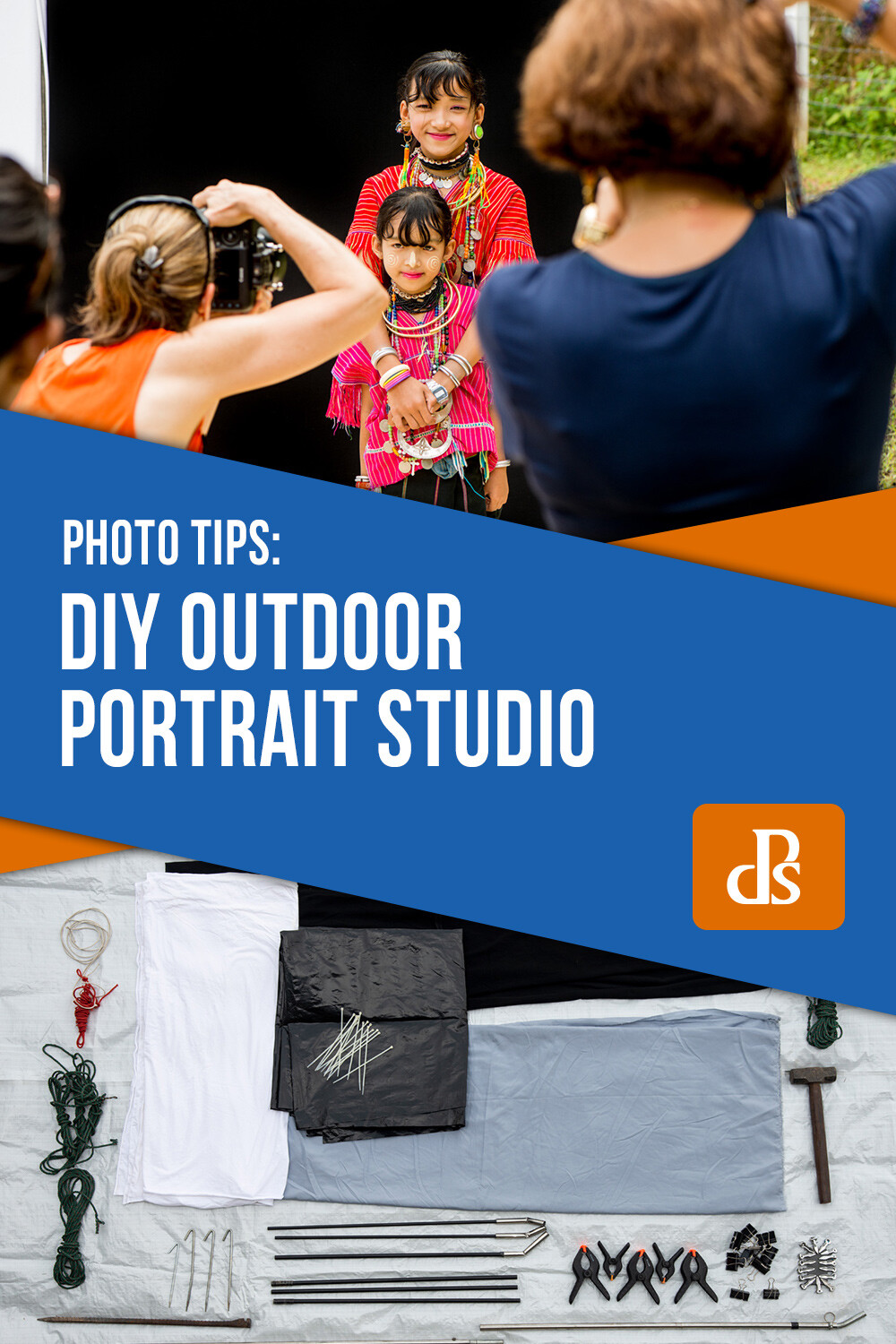
My studio has metamorphosed over the years. It now comprises of:

  • Three stainless steel tube uprights
  • One black and one white background
  • A shade cloth above the backgrounds
  • Reflectors
  • A bunch of clips, ropes, steel rods, and tent pegs
How To Use an Outdoor Studio for Natural Portraits Outdoor Studio Materials

Everything for my outdoor studio.

Because I often work alone my studio needed to be easily portable, unlike Penn’s which was large, bulky and required several assistants to set it up. I had to sacrifice size to make it practical. You could design a larger, less-portable studio for use in your backyard.

Originally I made upright supports using fiberglass tent poles. These proved too flimsy, so I replaced them with more sturdy stainless steel. I have also enlarged the background area and included a white background. My initial design only had a short black background. Now I also use reflectors to enhance and balance the light.

How To Use an Outdoor Studio for Natural Portraits

© Kevin Landwer-Johan

Control natural light using an outdoor studio

I prefer to set the studio up in the morning or later in the afternoon. If the sun is too high overhead, the light is more difficult to work with.

Choosing a location where the sun will be behind the backdrop is important. This helps to provide a hair light. The piece of thin grey nylon fabric I set up above the backdrops softens this hair light.

If the ground where I’m setting up is bare earth, that is perfect. Light reflects off the light colored soil up into the faces of my subjects. This is good for Asian skin tones, but not so good for Caucasians as it has a slight yellow/orange tone.

How To Use an Outdoor Studio for Natural Portraits Lahu Man Smoking

© Kevin Landwer-Johan

When I have to set up on a lawn, I lay down some white or light tan plastic sheeting to provide some uplighting. Without this, the grass would reflect an unpleasant green cast onto the people’s faces.

In the early days of using my studio, this was all I did to manipulate the light. Now I also use a large foldable reflector to bounce more light onto my subjects. This gives a little more control of the shadows.

The background fabric is a very stretchy polyester. It does not wrinkle and can be pulled tight between the uprights, so it’s flat. Behind the black background, I add a sheet of thick black polythene sheeting. This completely blocks out the sun which would otherwise partially shine through the fabric.

How To Use an Outdoor Studio for Natural Portraits Using the Outdoor Studio

© Kevin Landwer-Johan

Balancing the light

Your exposure settings are critical. A lot of light shines through the white background, while none shines through the black. Including too much of either background in your exposure calculations will result in an underexposed or overexposed subject.

You need to take your exposure reading from your subject’s face only. Using manual mode, once you have it set correctly, you won’t need to change it unless the light changes. This will happen if the sun goes behind a cloud or you bounce more light onto your subject with the reflector.

You can use the same exposure settings for both backgrounds because the light on your subject’s face does not change.

How To Use an Outdoor Studio for Natural Portraits Kayan Long Neck Woman on a White Background

© Kevin Landwer-Johan

If you take a light reading from the white background, you will see it is far brighter than your subject. Taking a reading from the black background will show there’s much less light reflecting off it than your subject. These contrasts help you achieve a pure white and pure black background.

The thin fabric above the background reduces the light and prohibits full sunshine from affecting your subject. You need to make sure your subject is not too far from the background; otherwise, the sunlight might hit their head directly.

How To Use an Outdoor Studio for Natural Portraits Two Kayan Long Neck Girls

© Kevin Landwer-Johan

Make your own outdoor studio

Putting together your own outdoor studio is relatively easy and cheap. You can use it anywhere there’s sufficient space. You don’t need to buy expensive lighting equipment or have a large studio space. The materials are inexpensive, and it’s portable so that you can use it anywhere.

Working outside you are reliant on good weather. It’s best when the sun is shining, but you can still use it under an overcast sky.

Photographing with available light is so much fun, especially when you have a little control over how it affects your subjects.

We’s love to see photos of your outdoor studio in the comments below.


The post How To Use an Outdoor Studio for Natural Portraits appeared first on Digital Photography School. It was authored by Kevin Landwer-Johan.


Digital Photography School

 
Comments Off on How To Use an Outdoor Studio for Natural Portraits

Posted in Photography


Canon announces the RF 85mm F1.2 L USM lens, the first RF lens to feature its BR optics

09 May

Canon has released the RF 85mm F1.2 L USM lens, a medium telephoto lens that’s the first RF lens, and only the company’s second lens, to feature Canon’s Blue Spectrum Refractive (BR) Optics. It will sell with a recommended price of $ 2699. There’s no news of the DS ‘Defocus Smoothing’ variant Canon has said is in development.

The lens features a new optical design compared to the EF version of the 85mm F1.2 II USM lens that includes one aspherical element, one ultra-low dispersion (UD) glass element and the aforementioned BR optics, which is placed between the concave and convex lenses and is designed to eliminate longitudinal chromatic aberration (typically seen as purple and green fringing in front of and behind the focal plane). In total, it contains 13 elements in 9 groups. Canon has also included its Air Sphere Coating (ASC), which helps to minimize lens flare and ghosting.

The RF 85mm F1.2 L USM lens has an aperture range of F1.2 through F16, a minimum focus distance of 85cm (2.79ft), an 82mm front filter thread and is weather-resistant with a dedicated fluorine coating. Like other RF lenses, the RF 85mm F1.2 features a customizable control ring at the front of the lens that can be used to adjust exposure compensation, aperture, ISO or shutter speed.

Below are three high-resolution sample photos provided by Canon:

$ (document).ready(function() { SampleGalleryV2({“containerId”:”embeddedSampleGallery_6495027054″,”galleryId”:”6495027054″,”isEmbeddedWidget”:true,”selectedImageIndex”:0,”isMobile”:false}) });

The lens measures in at 10.4cm (4.1″) diameter, 11.6cm (4.6″) long and it weighs 1.2kg (2.6lbs). Compared to its EF counterpart, it’s both wider, longer and heavier.

The Canon RF 85mm F1.2 L USM lens is currently available to pre-order (Adorama, B&H) for $ 2,699 and is set to ship in June 2019.


Canon RF 85mm F1.2 L USM Specifications

Principal specifications
Lens type Prime lens
Max Format size 35mm FF
Focal length 85 mm
Image stabilization No
Lens mount Canon RF
Aperture
Maximum aperture F1.2
Aperture ring No
Number of diaphragm blades 9
Aperture notes Circular aperture blades
Optics
Elements 13
Groups 9
Focus
Minimum focus 0.85 m (33.46)
Autofocus Yes
Motor type Ring-type ultrasonic
Full time manual Yes
Focus method Internal
Distance scale No
DoF scale No
Physical
Weight 1195 g (2.63 lb)
Diameter 103 mm (4.06)
Length 117 mm (4.62)
Sealing Yes
Power zoom No
Zoom lock No
Filter thread 82 mm
Hood product code ET-89
Tripod collar No

Articles: Digital Photography Review (dpreview.com)

 
Comments Off on Canon announces the RF 85mm F1.2 L USM lens, the first RF lens to feature its BR optics

Posted in Uncategorized


DIY Food Photography Props on a Budget

09 May

The post DIY Food Photography Props on a Budget appeared first on Digital Photography School. It was authored by Charlie Moss.

With the rise of Instagram, every meal has become a potential subject for a photographer. We’re sharing our food through photographs like never before, and higher quality imagery gets more likes in the world of #instafood.

But how do you create that styled look to your food photographs when you’re on a budget? Not everyone has the cash to drop on a whole styling kit of tableware, linens, and backgrounds. ‘Necessity is the mother of invention,’ as the proverb says, so let me tell you about a few creative ways I’ve made the money go a little further when it comes to food photography.

Take the suggestions in this article as a starting point and be creative with your own ideas. Bring in skills you’ve already got (or would love to learn) in your quest to DIY your food photography on a budget!

Shop your home

It seems so obvious, but you’d be amazed at what you can find at home (or in the homes of your friends and relatives). The best thing about shopping your home is that everything is free! Take a minute now to take a look around your house and see what you already own that might work for food photography.

The kitchen is the first place to start – but don’t just stop at crockery and flatware! Ancient old baking trays make fabulous backgrounds, and interesting glassware can make great detail in an out-of-focus background.

Don’t neglect the bathroom as you make your shopping trip. More than once I have put food on a (clean) soap dish that happened to be beautiful in color or texture. From the living room, vases can hold a freshly cut flower for a food photography scene. Bedrooms are a treasure trove of trinket dishes, baskets, boxes, and fabrics (more than one evening dress has found its way into my shots as a textile element). Finally, check outside – weathered old plant pots or interesting bits of wood can really bring life to your food stories (once they’ve been scrubbed, of course).

On a similar note to shopping your home, don’t forget to visit your local thrift shops regularly! The staff in my local shops know me so well that they put interesting flatware, linens and ceramics aside for me now. Moreover, each item costs very, very little compared to buying them new.

Creating backgrounds and surfaces with interest

When you’re setting your scene for a styled food photograph, the background can really make or break the shot. You can purchase pre-made background boards designed especially for photographers that replicate various textures. They’re very and good, and I use them often, but they’re also quite expensive! While homemade boards don’t replace textures such as wood or marble they can be very effective for the right shot.

Top: pink stripes created with a child’s foam painting roller.
Bottom: blue, black, and grey emulsion paints applied with a kitchen sponge.

Head along to your local DIY store that sells sheet materials. There you can buy sheets of plywood. If you are lucky, the store will also cut these sheets of plywood into manageable chunks either for free or at a minimal cost.

It works out to be extremely cost-effective to create backgrounds using these boards as a base. A sheet of plywood that is 2.4m by 1.2m costs about £25 here in the UK and that makes eight neat 60cm square boards. You can paint both sides too, so it works out to about £1.50 per background (plus whatever paint you use).

Usually, I use cheap emulsion paint samplers to create backgrounds. Don’t be restricted to brushes for applying the paint either – a sponge is my favorite tool followed closely by children’s painting toys! Go bold with your designs; once you’ve made the background out of focus with a shallow aperture, you won’t see small details. Experiment with color – dark backgrounds can be as interesting as light backgrounds.

Build the set

Once you’ve created some backdrops, put one on a table next to a window and prop the other up behind it vertically like a wall. You now have a table set for a fraction of what it would cost you to buy special backdrops marketed to photographers!

Floor tiles used as backgrounds for food photography.

While you’re at the DIY store buying your plywood, check out the flooring section too. Very often DIY shops will sell sample flooring tiles for people to try at home. For just £1.50 I bought all three of the flooring tiles in the pictures above. The boards are often quite small, but if you’re shooting close-ups, they can still work really well (they’re also good for jewelry photographs).

Customised table linens

Beautiful linens can help to make a food shot pop. They feel luxurious because they’re something you usually only use for special occasions. Plus if you keep your eye out, you can often find linens with unusual textures to the fabric or fancy trim around the edge, and these can help elevate your shots to be something quite special.

Two different colours of linen fabric used for food styling. Consider the mood of your final image when selecting colours.

Table linens are, at their most basic, just a square of interesting (or not-so-interesting) fabric. To create the simplest DIY napkin that really packs a punch, head to a fabric store that sells dressmaking fabrics. Have a look through their linen selection. You’re after something heavy with lots of texture, and you’ll want half a meter of the fabric. Use sharp scissors to cut it into a large square (you should get at least two out of half a meter of fabric) and you’ve created your first designer napkin!

You can either turn the raw edges over and sew them with some matching thread or start pulling the threads away to fray them. Both styles give a different look to your shots as you can see in the shots above. Think about color when you are purchasing fabric; it can really make a difference to the mood of your shots. I’d suggest purchasing neutral colors first and then venturing out into colors when you have some good basics.

Many shops sell a ‘fat quarter’ of fabric (it is a meter of fabric cut horizontally and then vertically to make a rectangle). These cuts are the perfect size for a single oversized napkin. Once you’ve built up a stash of beautiful plain napkins, you can try venturing out into something a little more complicated.

Embellish your DIY props

If you browse the designer homeware stores, you’ll find that table linens often have intricate detailing like trim or hand-stitching on the edges. Back to the fabric shop again, and this time shop for some coordinating trim that matches some fabric you’ve got.

You can sew the trim around the edges of your napkins, or you can take some fabric glue to it. Food styling props for photography don’t have to be perfectly functional; they just have to look good on camera! Make sure you arrange your props so that any mistakes are facing away from your camera!

In the photograph above is white linen. The linen was made with very cheap white cotton fabric with fancy pompom trim stitched around the edge. It cost me around £3 in total. Considerably less than buying the fancy version I’d had my eye on in a shop! Photography is all about illusion. If the trim is particularly expensive just buy enough to go around two edges. You can style it when you shoot so that the other side doesn’t show.

The proof is in the pudding

In any good food photograph, success is measured by how much your viewer wants to eat the subject. I followed my own advice: shopping at my house, creating backdrops, buying fabric and trim, and then I photographed the results.

For under £15, I put together two completely different food photography sets that I can reuse time and time again. Moreover, the bonus is that if I don’t like the backgrounds in the future, I can paint over them time and time again!

Now it’s your turn; have a go at building yourself some props and shooting some food photos. I’d love to see what backgrounds and props you create for your food photography shots. Perhaps you can apply a skill you already know and create something really special that you just can’t buy in the shops.

Please share with us in the comments below.


The post DIY Food Photography Props on a Budget appeared first on Digital Photography School. It was authored by Charlie Moss.


Digital Photography School

 
Comments Off on DIY Food Photography Props on a Budget

Posted in Photography


Aputure announces the Spotlight Mount, an add-on to shape light just right

09 May

New and unique in the world of light modifiers, Aputure have announced its new Spotlight. This unit interfaces with their range of C.O.B. lights, including the recently announced 120D MK II.

After the recent reveal at NAB 2019, more details have emerged for this unique light modifier. There are three lenses available at launch—19°, 26° and 36—each of which are user interchangeable to give either wider coverage or more pinpoint accuracy. This, together with the iris and shutter, allow more flexible creative options in shaping the beam.

Key features

  • Bowens mount to interface with Aputure’s 120D, 120D Mk II and 300D lights.
  • Available with a 19°, 26° or 36° lens.
  • Dual slots for included Gobo frame and gel holder or optional iris.
  • Internal shutters for precise beam shaping.
  • Lightweight aluminum die-cast alloy construction.
  • Dual Junior/Baby mount.
  • Includes B size Gobos
Precision lenses reduce chromatic aberrations and fall off

The Spotlight uses newly developed lenses to minimize color fringing at the edges of the projected beam circle down to less than 1 mm at 0.5 m. The new high resolution optics give 10x the native light output when used with a 120 D Mark II. This is combined with minimal light fall off and a color shift of less than 200° Kelvin.

The dual mount system also enables the spotlight to be mounted easily on C stands in the field or under slung on the lighting grid in the studio. Below is a quick video from Newsshooter detailing the new Aputure Spotlight:

The Aputure Spotlight is available to pre-order (Adorama, B&H) with one of the three lenses for $ 499. The lenses are also available separately at $ 259 (Adorama, B&H), as is the optional iris at $ 99 (Adorama, B&H). The Aputure Spotlight and accessories are expected to ship mid-May.

Articles: Digital Photography Review (dpreview.com)

 
Comments Off on Aputure announces the Spotlight Mount, an add-on to shape light just right

Posted in Uncategorized


Kickstarter campaign presents Bokeh, a platform for privately sharing images

09 May

A Kickstarter campaign seeks funding for Bokeh, a new photo sharing platform that enables users to privately share images with friends and family. Bokeh is presented as an alternative to traditional social media services, offering users a focus on privacy and a lack of ‘creepy ads,’ according to Bokeh creator Tim Smith.

Bokeh is an ad-free image sharing service where accounts are set to private by default (the option exists to make them public), accounts are only searchable by username, and followers are hidden from public view. The platform includes features to help keep content private and users safe, such as an automatic prompt to block a user after their follow requests have been declined three times.

The Boken interface resembles Twitter profiles, at least based on the Kickstarter previews. Rather than selling user data and showing advertisements to fund the platform, Bokeh will charge users a fee to use the service. Individual accounts will cost $ 3/month with the option to pay $ 30 per year. Family accounts (up to five users) will be offered for $ 5/month or $ 50 per year.

Smith explains in his campaign:

I believe that your data shouldn’t be mined to sell you targeted ads, that your timeline should be chronological and not based on some algorithm, that tech CEOs shouldn’t allow hate groups to flourish on their platforms, and that we need more social networks that are privacy-focused and ethically sustained.

The Kickstarter funds would be earmarked to develop the service. As with any crowdfunding campaign, there are risks involved and a final product may never reach the market.


Disclaimer: Remember to do your research with any crowdfunding project. DPReview does its best to share only the projects that look legitimate and come from reliable creators, but as with any crowdfunded campaign, there’s always the risk of the product or service never coming to fruition.

Articles: Digital Photography Review (dpreview.com)

 
Comments Off on Kickstarter campaign presents Bokeh, a platform for privately sharing images

Posted in Uncategorized