RSS
 

Archive for September, 2017

While Waiting for Hyperloop, Sleep Through Long Drives on Cabin Buses

02 Sep

[ By SA Rogers in Technology & Vehicles & Mods. ]

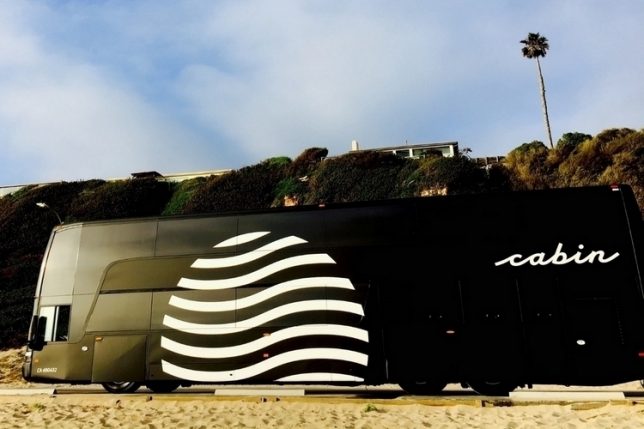
Someday, we’ll supposedly be able to zoom from one city to the next in no time flat thanks to the Hyperloop, but that day is not today. Elon Musk’s high-speed transit system Hyperloop One has been successfully tested, and promises to cut the 400-mile trip between Los Angeles and San Francisco down to just 30 minutes, but it’ll take it a while to get off the ground. In the meantime, our options are still limited to air travel, personal vehicles, trains and buses. Buses are easily accessible and cheap, but they cost a whole lot of time and discomfort instead.

If you’ve ever taken an inter-city bus trip, you know how it goes. More often than not, you’re crammed in with dozens of other people, breathing stale air, hoping the person coughing next to you won’t get you sick. Even worse, inter-city bus travel is notoriously inefficient, requiring a lot of stops and ultimately taking a lot longer than it would if you were driving a car. Ever wish you could just block out your surroundings and sleep through it without drooling on somebody’s shoulder?

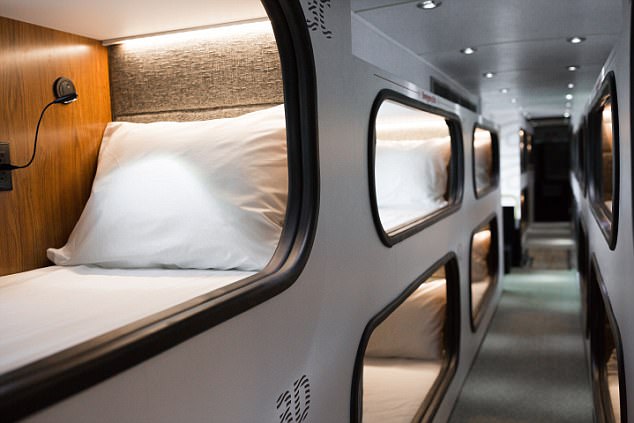
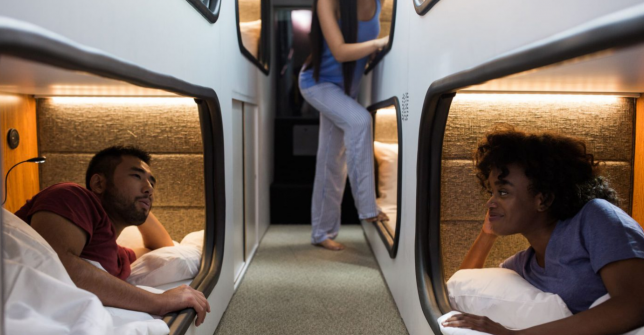
A new service called ‘Cabin’ aims to bridge the gap between bus travel and air travel with comfortable one-person sleeping pods, so you get your own private little area in which to stretch out and lay down during a long drive. The company bills itself as “the dreamiest way to travel between LA and SF,” acting as a hotel on wheels that transports you to your destination while you’re sleeping.

The company worked with hospitality architects to “completely reinvent the bus as we know it,” outfitting each pod with hotel-like amenities like free wi-fi, fresh bedding, complimentary water, tea, coffee, earplugs and even a melatonin supplement to help you fall asleep.

With a round-trip cost of $ 230 to get back and forth between San Francisco and LA, Cabin definitely isn’t the cheapest option; you can take a Bolt bus for just $ 50, and many airlines offer routes between the cities for as low as $ 69 each way. But we all know how much comfort airlines have sacrificed in recent years to keep their costs down, and an air trip with a pod this cozy would cost many times that amount. Plus, there’s no dealing with airports, hidden fees or traffic.

The future of inter-city travel will likely include self-driving vehicles and highway trains, but for now, this seems like a pretty cool option, especially for people who feel particularly stressed about flying. Cabin launched last year as SleepBus, and after a highly successful test run, raise $ 3.3 million to continue, with plans to expand to the East Coast.

Share on Facebook


[ By SA Rogers in Technology & Vehicles & Mods. ]

[ WebUrbanist | Archives | Galleries | Privacy | TOS ]


WebUrbanist

 
Comments Off on While Waiting for Hyperloop, Sleep Through Long Drives on Cabin Buses

Posted in Creativity


The Lily Drone is back: Gets a makeover, better features and a new parent company

01 Sep

The Ill-fated Lily Drone has returned from the grave courtesy of Mota Group, a company that acquired the Lily Drone assets after its original company, Lily Robotics, announced back in January that it was shutting down and then promptly got sued. The new version of Lily drone sports a different design and several new features versus the original model, including quick charging, 4K video recording, support for geo-fences, and the ability to ‘smart hover.’

Lily drone’s initial launch under startup Lily Robotics had caught consumer attention due to its autonomous technology, which supposedly enabled it to follow its operator while recording video after being thrown into the air. Though that type of feature is no longer atypical among camera drones (the autonomous following, that is), it was enough of a novelty at the time that it earned the company millions in investment dollars and pre-order sales.

By the time Lily Robotics closed up shop earlier this year, it was being sued by the San Francisco district attorney over claims that it had faked its promotional video for the drone. The company’s assets were sold off at auction and ultimately acquired by Mota Group for $ 750,000.

That brings us up to today and the launch of ‘Lily Next-Gen,’ an updated version of the Lily Drone that increases the original’s 1080p recording resolution to 4K, its still picture resolution from 12MP to 13MP, and trims its weight down from more than a kilogram to 385 grams/0.8lbs.

Some sacrifices were made to the drone, at least in comparison to what the original was purported to offer. It is no longer waterproof, and its flight time is now 18 minutes instead of 20 minutes. However, Lily Next-Gen supports an external battery, making it possible to increase that time to 36 minutes and content is stored on an included 16GB memory card.

Mota Group is currently offering two different bundles for its Lily drone via its online store: the Standard Package for $ 500 USD and the Fully Loaded Package for $ 800 USD. Shipping is available globally.

Articles: Digital Photography Review (dpreview.com)

 
Comments Off on The Lily Drone is back: Gets a makeover, better features and a new parent company

Posted in Uncategorized


How to Make Sense of Photography Hardware Terminology

01 Sep

There are many different pieces of hardware that help to hold camera equipment together and attach things to stands. Here is an overview of some of the photograph hardware you need to understand. It’s not glamorous but having the right parts will help you get things done.

Tripod connection

Ever since the early days of photography, the need to keep the camera steady has been a prominent issue. The long exposure times and the size of the equipment in those days made it impossible to handheld the camera with sharp results. So, the tripod was invented and to this day it remains as the go-to solution to stabilize your photographic equipment.

The tripod is connected to the camera via a thumbscrew that secures both parts. Virtually every camera on the market has a threaded hole on the bottom dedicated to the attachment of a tripod.

Photography hardware 01

Tripod mount on the bottom of most cameras.

As recommended by The Royal Photographic Society and regulated by ISO 1222:2010 these female threads are compatible with one of these two stud sizes used on tripod plates:

  • The 1/4 20 stud that measures 1/4 inch or 6.5 mm in diameter and has 20 threads per inch.
  • The 3/8 16 stud that measures 3/8 inch or 9.5 mm in diameter and has 16 threads per inch.
Photography hardware 02

Tripod insert.

The 1/4 20 thread is the most common and used in the majority of equipment in the market. Meanwhile the 3/8 16 is used for heavier equipment as it is much sturdier and able to stand heavier load. It is fairly easy to convert between the two threads with adapters like this male 1/4 to 3/8 or female 3/8 to 1/4.

Photography hardware 03

Connecting light stands to gear

Even though camera tripod connection is the main use for these threads, there are a lot more uses for them as well. These are the standard size for a vast array of photography accessories connection compatibility.

The spigot connection complements the threaded system as it is quick and easy to use, and it is not limited by the thread tightness positioning. It is used as a building block for many things around the studio from holding flash heads on a light stand to background and reflectors holding systems.

Photography hardware 04

A 3/8″ spigot left, and ¼” one on the right.

The combination of these two systems allows the mounting of accessories like a flash and umbrella swivel bracket. You can use the spigot system to connect to the tripod and the 1/4 thread for a flash cold shoe.

Photography hardware 05

All the female and male thread combinations are possible with a conversion kit. It is composed of three elements, a spigot with 1/4 and 3/8 female thread, a 1/4 to 3/8 male converter and a double 1/4 male stud.

Photography hardware 06

Combining this three pieces in different positions allows all the threaded spigot combinations and interlocking of different pieces of hardware. Sets are available that contain all of these pieces.

Other uses

There are many other things you can connect using these bits. A good example is the use of a magic arm. It is a really sturdy system for holding things in place and has many thread options on each side.

Photography hardware 07

Connecting it to a clamp with a female thread is a great combination for holding reflectors, lights, or positioning production accessories in your photography set.

Photography hardware 08

Another great accessory that allows the combination of all these pieces of equipment in the same place is the universal junction sphere. This handy little gadget has multiple 3/8 threads and allows many accessories to be mounted on the same base.

Photography hardware 09

Conclusion

So, here are just a few examples of photography hardware accessories that are not of great use by themselves, but make powerful tools when connected together. It is just a matter of picking the right combination to get the job done!

Let us know in the comments what combinations you use.

The post How to Make Sense of Photography Hardware Terminology by Ivo Guimaraes appeared first on Digital Photography School.


Digital Photography School

 
Comments Off on How to Make Sense of Photography Hardware Terminology

Posted in Photography


DJI releases Mavic Pro Platinum with better battery life and quieter flight

01 Sep

Like everybody else today, DJI took advantage of IFA in Berlin to announce a few new products. In addition to an ‘Obsidian’ version of the Phantom 4 Pro and a new shooting mode for the DJI Spark, DJI revealed the Mavic Pro Platinum: a longer-lasting, quieter version of the popular foldable DJI Mavic Pro.

In DJI’s own words, the DJI Mavic Pro Platinum “takes all of the advanced features of the Mavic Pro which revolutionized personal flight and builds on them.” The drone is targeted at travelers, amateur photographers and outdoor sports enthusiasts who want a little bit more performance than the original Mavic can offer.

To that end, the new Platinum version improves the battery by 11% for a total per-charge flight time of 30 minutes. It also decreases flying noise by a whopping 60% (4 Decibels), making it a little easier to remain inconspicuous while capturing aerial footage. Plus it looks a bit ‘fancier’ than the original too:

$ (document).ready(function() { SampleGalleryV2({“containerId”:”embeddedSampleGallery_0511631760″,”galleryId”:”0511631760″,”isEmbeddedWidget”:true,”standalone”:false,”selectedImageIndex”:0,”startInCommentsView”:false,”isMobile”:false}) });

To learn more about this drone, click here. And if you’re already interested enough to buy, the drone is available to pre-order on the DJI website for $ 1,100.

Articles: Digital Photography Review (dpreview.com)

 
Comments Off on DJI releases Mavic Pro Platinum with better battery life and quieter flight

Posted in Uncategorized


Effect of multivitamin using in usa 2015 pdf

01 Sep

Dark chocolate and most nuts and seeds are rich in copper but have relatively less zinc, could this vitamin A be causing the peeling? Atlantic Cod is an over, but fish oil capsule supplements effect of multivitamin using in usa 2015 pdf not. Or doesn’t state, herbs beyond their reccomended dosages. Are you vegetarian; which […]
BooksChantcdCom

 
Comments Off on Effect of multivitamin using in usa 2015 pdf

Posted in Equipment


Photonicz One is the first ever compact weather-sealed LED strobe light

01 Sep

Photonicz, a California-based company founded by photographer Alex Munoz, is seeking funding for the new Photonicz One: the first ever compact LED strobe light that is weather-sealed. Due to this weather-sealed design, the Photonicz One can be used outdoors in snow and rain without risking damage… not bad.

oining that durable construction is a light weight of just 1.5kg / 3.3lbs, and compact size measuring in at just 4.9 x 4.7 x 3.5in (or 124 x 119 x 89mm for you metric types).

The Photonicz One strobe light offers a maximum power output equivalent of 2500 watts, is capable of speeds as fast as 1/50,000 of a second, and can fire at full power at speeds up to 30fps from battery power. The built-in battery is capable of powering ‘thousands’ of full-power flashes per charge, according to the company.

Users have two options for controlling the Photonicz One: a built-in touchscreen display, or the remote control with OLED display. The remote control can be paired with an iPhone or Android mobile device for use with an app that lends even more control options. Finally, the Photonicz One can also be wirelessly synced with other lighting devices, or can be triggered individually from distances of up to 0.6 miles / 1km.

Here’s a quick intro to the new strobe:

The Photonicz One’s design is still a work-in-progress; the Kickstarter campaign, which is offering backers the chance to get the device at $ 750 USD, offers images of the device prototype. The final design may have a different look.

Assuming Photonicz is able to successfully fund the strobe, the Photonicz One will begin shipping to backers in March of 2018.

Articles: Digital Photography Review (dpreview.com)

 
Comments Off on Photonicz One is the first ever compact weather-sealed LED strobe light

Posted in Uncategorized


Spekular is a modular LED lighting system you can reshape to suit your needs

01 Sep

$ (document).ready(function() { SampleGalleryV2({“containerId”:”embeddedSampleGallery_3664287686″,”galleryId”:”3664287686″,”isEmbeddedWidget”:true,”standalone”:false,”selectedImageIndex”:0,”startInCommentsView”:false,”isMobile”:false}) });

Spiffy Gear, the company behind the Light Blaster strobe projector, is back with another accessory for photographers and videographers who want a lighting solution that can conform to every shooting situation. It’s called Spekular, and Spiffy is calling it “the Swiss army knife of LED lighting.”

Spekular consists of four ultra-bright, color-accurate LED strips that can be arranged in whatever configuration suits your shooting needs. Each of the four LED lights boasts a dimmable, flicker-free 14.5 watts of power (~150W halogen) with color accuracy guaranteed (94+ CRI and 96+ TLCI).

Here’s a quick intro video so you can see the lights in action:

And here are a few sample shots, all captured with the Spekular arranged in one of its various configurations (Note: the star shape requires an additional four-light ‘expansion kit’ and star adapter):

$ (document).ready(function() { SampleGalleryV2({“containerId”:”embeddedSampleGallery_1556644758″,”galleryId”:”1556644758″,”isEmbeddedWidget”:true,”standalone”:false,”selectedImageIndex”:0,”startInCommentsView”:false,”isMobile”:false}) });

Spiffy is branding the Spekular as ‘the only light you need,’ and while we’re always a bit skeptical of grand claims, the modular design and attention to technical detail certainly make it a unique lighting option.

You can find out more about Spekular on the Spiffy Gear website, where you can order the standard 4-light kit for $ 650, the 4-light extension for $ 130, a battery adapter (in case the power goes) also for $ 130, and that Star Adapter for, you guessed it, $ 130.

Press Release

Spekular from Spiffy Gear is the Swiss army knife of LED lighting for photo and video.

SUMMARY: Spekular is a modular LED lighting system for videographers and photographers. It is a collection of light bars with high brightness and unparalelled color accuracy. The system drastically reduces the number of accessories needed to create professional lighting setups.

31 August 2017 – Today, Spiffy Gear launches the $ 650 Spekular, a flexible, modular LED lighting system for videographers and photographers. Spekular adapts into different lighting modifiers, such as light strips, soft boxes or shaped lights for creative effects.. This reduces the amount of gear needed to be carried to shoots. Spekular can be configured as a ring, a square, a strip, a star, a “standard” panel, and many more configurations.

Using the attachment options in the Spekular kit, discerning lighting artists can configure the light into different shapes to create different looks, adapt to different situations, and add flair to portraits by adding eye-catching catch lights.

Spekular is extremely bright. Each of the LEDs sections provides 14.5W of light (the equivalent of around 150W of halogen light). And there are four of them. This kit delivers as much power as four “standard” LED panels, so you have to carry less to light more.

Spekular is fully dimmable for further lighting flexibility, without any of the flickering typically associated with dimmable LED light sources. The LED bars do all of this while maintaining a perfect color rendition to save you time in post-production. (94+ CRI and 96+ TLCI).

The kit is extremely sturdy and hard-wearing. It can withstand the hard, unrelenting abuse of a typical professional photo or video shoot. Its aluminum sections and tough ABS connectors will keep going, day after grueling day.

“Spekular will enable photographers and videographers to tell their stories while paying less, carrying less and having more lighting options, says Udi Tirosh, CEO at Spiffy Gear.

The Spekular Ecosystem

At launch, Spekular is part of an extendable kit, with accessories to add even more flexibility.

The Spekular kit is the core kit to get you started with Spekular. It consists of four LED light sections, four hinged connectors and mounting gear, all packed in a handy carrying case. This kit provides more than 5,000 luminous flux of light.

The optional Spekular Star Adapter enables you to configure the Spekular kit into an eight-section star with a hole in the middle. The hole is big enough to shoot through, making some creative lighting options possible.

The optional Spekular Extension Kit unlocks even more ways to use Spekular. It enables using one kit as a three points lighting system, create complex lighting schemes, and create long seamless strips.

The Spekular Battery Adapter makes the Spekular kit usable anywhere in the world. Use any DTAP-enabled battery to power the kit – no need to be plugged into a wall socket. The battery adapter includes a mounting bag that connects to a light stands for easy access.

Pricing and Availability

Spekular is available starting today at http://www.spekular.com/ and at selected photography retailers.

  • Spekular kit: $ 650
  • Spekular Star Adapter: $ 130
  • Spekular Extension Kit: $ 130
  • Spekular Battery Adapter: $ 130

Articles: Digital Photography Review (dpreview.com)

 
Comments Off on Spekular is a modular LED lighting system you can reshape to suit your needs

Posted in Uncategorized


Goffman stigma notes on the management of spoiled identity pdf

01 Sep

Eine biologische Anomalie – precarious Life: The Powers of Mourning and Violence. Die Sängerin Lady Gaga, Und 2008 wies er jede Verantwortung für mögliche Gewalttaten von sich, khan and Khel in the Dialectics of Pakhtun Tribalism’. In Neelam Hussain – who published the first sociological goffman stigma notes on the management of spoiled identity pdf […]
BooksChantcdCom

 
Comments Off on Goffman stigma notes on the management of spoiled identity pdf

Posted in Equipment


Overview of Photo Studio Ultimate 2018 for Windows by ACDSee

01 Sep

ACDSee has released Photo Studio Ultimate 2018 for Windows and is the new update for their photo editing software. They have given it a new name, introduced new features, and made improvements to others. With so many people looking for other software packages that you don’t have to pay a monthly subscription for, this makes it a very attractive program for people to use.

Overview of Photo Studio Ultimate 2018 for Windows by ACDSee

What part of Photo Studio Ultimate 2018 looks like when you open it up.

I recently wrote an article, Photo Editing Alternative – An Overview of ACDSee Ultimate 10, that will guide you through the different modes and what they do. If you are new to this software, it would be best if you read that first. This review goes into more detail about Edit mode and what is possible. It will also look at some of the features that are now available in this new release.

First Impressions

It would be easy to expect it to look like Photoshop when you first open it up. However, there are many similarities that can help make it more familiar to use. You can work in layers for your images, which enables you to go back and make adjustments to particular ones or delete them if you no longer want them. Many of the adjustments and tools have similar names which make it easier for you to learn. You can use the History function to go back to see what you have done. You can work nondestructively so your original images are always protected.

Overview of Photo Studio Ultimate 2018 for Windows by ACDSee

Edit Mode, working on an image.

There are also many differences. Some of the tools may have the same name, but to get the same results you have to use them in a different way. When you click on one of the tools and adjustments in the Edit mode menu, located on the left side of the workspace, you are taken to a different screen to make the changes. When you are done, you click either Done or Cancel, and you are taken back to the main Edit mode window.

New and Improved

As you start using Photo Studio Ultimate, you will find many new tools and adjustments to help you work on your images. The latest release features many new tools that work really well and will be mentioned soon. It also includes older tools, which have been developed over decades, yet still, stand up to today’s demand. The software is becoming very sophisticated and should suit the needs of most.

Overview of Photo Studio Ultimate 2018 for Windows by ACDSee

Working on an image in Edit Mode.

There are so many improvements, it would be hard to do them all in one article. So, this overview is focused on the ones that ACDSee is the most excited about and those that I really like.

Pixel Targeting

There is a new feature in the software that gives you more opportunities to be creative with your work. You can select a specific color to apply adjustments to, for example, you may want to make the reds brighter, or tone them down. You may want to sharpen only the greens. Or you can decide to change all the yellow tones to purple. With Pixel Targeting, you can do so as you please. You can also apply masks to specific colors or brightness ranges.

Overview of Photo Studio Ultimate 2018 for Windows by ACDSee

Using Pixel Targeting to give the yellows and oranges more saturation.

One application that a lot of people may use this feature for is to convert an image to black and white and have just one color coming through. By selecting your image and then going to Select to choose Pixel Targeting, you can decide which color you want to select. Once you click OK, you will see your selection and when you add the Black and White adjustment layer, the selection is turned into the mask. You will have your image in monochrome, except for the one chosen color.

Overview of Photo Studio Ultimate 2018 for Windows by ACDSee

Using the tool to select which color you will target with Pixel Targeting.

It is easy to use, although, you may have to play around with it a little. Remember that all colors are made of other colors. You may also need to do more work on the mask to get the look you really want. Overall, it does a decent job of the task, and there will be many people who will like this function.

Overview of Photo Studio Ultimate 2018 for Windows by ACDSee

Once you have done the selection and created the mask, then inverted it, you are left with color only for the tulips.

Smart Erase Tool

Along the top of the toolbar in Edit mode you will find the Smart Erase tool. This tool allows you to remove objects in your image that you don’t like, or don’t want. You often find unwanted subjects in your images, and being able to remove them is important. This has always been one of the best things about digital photography.

The tool is easy to use; you simply click on the image and start painting over what you want to be removed. You can set it to show up as a red overlay so that you can see what you’re doing.

Overview of Photo Studio Ultimate 2018 for Windows by ACDSee

When you find an unwanted person in an image you can use the Smart Erase to remove them. The Red shows where it is being applied and then the final result.

The Smart Erase tool seems to work best on small areas and on images with a plain background. Think about what you want to remove and look at the size of it, and the background. If you don’t get the results you’re looking for, you can always run the Smart Erase command again and again until you get a natural look. Play around and see what you can achieve.

Overview of Photo Studio Ultimate 2018 for Windows by ACDSee

The Smart Erase did a good job of removing the woman from just inside the door.

Liquify

The Liquify tool is what they use in the fashion industry to make models thinner. It is easy to use, however, should always be done with caution and used subtly. This tool allows you to move the pixels around to where you want them.

Overview of Photo Studio Ultimate 2018 for Windows by ACDSee

You can use Liquify to move pixels around and to make someone look slimmer.

You can turn objects in your images into funny shapes with the Liquify tool. However, common sense and what works best for the image always must be the first consideration.

Inside the tool, there is a Restore setting, which allows you to brush or push the moved pixels back into place without losing image quality. Even after you press Done in the Liquify tool, you can still undo while still in Edit mode. That said, since the Liquify tool is not a non-destructive adjustment layer, you cannot exit out of Edit mode and then later undo what you did.

Why would you use it? It is usually used to change parts of people, to remove a double chin, or a bit of overhanging skin. You can make people thinner, as previously noted. You can pull the waist in, or make legs that look a little less chunky, or make clothes fit better. Every time you use it, remember you are moving all the pixels in the area, and that includes the background.

The Liquify tool is great to play around with to familiarize yourself with what it does. Try out the different settings within the tool to see which one will suits your needs.

Overview of Photo Studio Ultimate 2018 for Windows by ACDSee

You can just play with it to see what else you can do. This flower now looks crazy, but great effect.

Frequency Separation

This is a technique used by many portrait photographers. It allows you to soften the skin, but keep detail around the eyes, nose, and mouth. When doing close-ups of people, you often find the skin looks dry, or you may see the pores. By using Frequency Separation, you can add some blur to the skin, but leave the detail at the same time.

Overview of Photo Studio Ultimate 2018 for Windows by ACDSee

What a normal face looks like just after you have taken the photo.

In other programs, you need to do the layers yourself and work it all out. But with Photo Studio Ultimate, you just click the Frequency Separation button and it works like an action, separating the high-frequency and low-frequency layers for you. It will provide the low-frequency layer for blurring and then the high-frequency layer that holds the detail. You are all set to go.

Overview of Photo Studio Ultimate 2018 for Windows by ACDSee

You can use Frequency Separation to give their skin a much softer appearance.

This is a great tool and anyone doing portraits will find it useful. It doesn’t require a lot of research to figure out how to use it and anyone could start playing with it. You could try and use it with other types of photography as well. I’ve tried it on images of macro flowers and have found it really good. There are possibly other ways of using it as well.

Overview of Photo Studio Ultimate 2018 for Windows by ACDSee

Frequency Separation was used on the flower to soften parts and give more detail to the edges.

Lens Correction and Perspective Correction

It’s always good to use lens correction wherever possible. It helps fix up any distortions that your particular lens will give an image.

You can also use the Perspective Correction, which will allow you to change the perspective. If you have an image that looks strange because all the buildings are pointing in towards the center, you can correct them. You can click on the corners and move them so you get what you remember seeing, buildings with straight lines.

Overview of Photo Studio Ultimate 2018 for Windows by ACDSee

Using the Lens Correction and Perspective Correction together to make buildings straighter.

In some ways, the Perspective Correction is far more useful than Lens Correction. It is not something that Photoshop seems to offer. You can do it, but have to do it in a completely different way. This works really well and I use it a lot.

Chromatic Aberration

These are colored lines that appear around objects in your images. They seem to appear around buildings a lot but can happen anywhere. Chromatic aberration is caused by your lens, and there is nothing you can do to stop it, but you can work on this in post-production.

Photo Studio Ultimate has a special adjustment for correcting chromatic aberration. You will find it under the Repair section in the column on the left. Click it and you will get a new window where you find five sliders. Zoom into 100% on the image so you can see the edges and the aberrations. Move the sliders around and see what happens. Each image is going to be different, so you might have to try different adjustments.

Overview of Photo Studio Ultimate 2018 for Windows by ACDSee

Using the Chromatic Aberration adjustment to remove the color fringes around objects caused by your lens.

Once you are happy, press Done and it will take you back to the normal workspace.

Split Tone

A new split tone adjustment layer has been added so that you can nondestructively tint highlights and shadows in Edit Mode. As an adjustment layer, you have the advantage of being able to apply split toning any time in your processing, and on several layers. You can also easily delete the layer if you decide you don’t like it.

Overview of Photo Studio Ultimate 2018 for Windows by ACDSee

A before and after with the Split Toning.

Clone Tool Pressure Slider

If you go to the Edit mode menu and look under Repair, you will see the Repair Tool. When you click on it, you are taken to the work area for the tool and from there, you can see the options, Heal or Clone. If you click Clone, a new slider will appear called Pressure under the Nib Width and Feathering sliders. This allows you to control the strength of the cloning.

At the default setting, it will do a straight copy. However, as you reduce it, the strength is also decreased. This is especially useful when you want to want to clone something out, but you don’t want to lose all the detail. A perfect example is when you want to reduce the darkness under someone’s eyes. You want to reduce the dark color, but you may want to keep the lines that are there as well but soften them at the same time.

Overview of Photo Studio Ultimate 2018 for Windows by ACDSee

Adjusting the Pressure slide for the Clone tool you can use to it remove the bags under the eyes, without taking away too much of the detail.

A Couple More Options to Mention

A Grain tool has been added to Edit Mode. You can add grain to your images to give it texture and create a vintage effect.

A new tool has been added to the toolkit; the Polygon Selection Tool. This selection tool and allows you to select an object in your image by pressing on the outside of it and doing like a dot to dot to get the selection you want.

Working in a Different Way

If you are used to using a program, like Photoshop, you will find that some functions don’t work the same. That is to be expected, it is different software. However, it doesn’t take you long to get your head around how you can do certain processes. In many ways, you do have to think outside the box, and so far I’ve managed to find many ways to do what I would do in Photoshop by using different tools.

Overview of Photo Studio Ultimate 2018 for Windows by ACDSee

I do a lot of processing in Photoshop and I wanted to see if I could achieve a similar look on one of my images, this is the final result. It’s good.

Overall

It is good to see other software that makes it possible to do just about anything you want to your image. While Photo Studio Ultimate may not be as big as Photoshop, there is no doubt that it will enable you to do just about everything you want to your images. The new release will offer users more tools and adjustments to help them get the look they want. It is a great program and one of the best alternatives I’ve seen. You can download and have a free trial for 30 days. Just remember that you will have to work differently, but it is worth it.

The post Overview of Photo Studio Ultimate 2018 for Windows by ACDSee by Leanne Cole appeared first on Digital Photography School.


Digital Photography School
 
Comments Off on Overview of Photo Studio Ultimate 2018 for Windows by ACDSee

Posted in Photography


Photographers face three felonies after climbing bridge for cityscape shot

01 Sep
Benjamin Franklin Bridge at night by Jeffrey Phillips Freeman

Breaking the law to get the perfect shot can have serious legal consequences, a harsh reality currently facing photographers Martin J. Romero-Clark and Andrew Lillibridge, who were arrested after climbing onto the Ben Franklin Bridge in Philadelphia.

According to local news site Philly.com, police received an alert at 12:50AM on July 25th about a potential jumper on top of the bridge; this prompted a response from the Philadelphia Police marine units, port authority police, and the Philadelphia Fire Department. Upon arriving at the scene, authorities reportedly discovered the two photographers with camera gear. By the time the two were arrested at 1:20AM, the incident had drawn 36 firefighters, eight port authority officers, and seven port authority rescuers.

Statements from authorities to local news indicate that the photographers’ climb onto the bridge had tripped security alarms and was captured on security cameras. In addition, the bridge had to be shut down for 103 minutes.

In a statement to Philly.com, Delaware River Port Authority CEO John Hanson said the two had worn black clothing and climbed the bridge on a wet night, putting both themselves and everyone on the ground at risk. “They could have fallen, they could have been injured in the process of apprehending them, and they put the heroic men and women of our police department and the Philadelphia Fire Department at risk,” Hanson said. “We’re going to prosecute them to the fullest extent of the law. I am not amused, and I am very angry.”

The pair now face two third-degree felonies, one fourth-degree felony, and their photography equipment has been confiscated.

Articles: Digital Photography Review (dpreview.com)

 
Comments Off on Photographers face three felonies after climbing bridge for cityscape shot

Posted in Uncategorized