RSS
 

Archive for June, 2017

Water Splash Photography Made Easy

22 Jun

How exciting is it to freeze things in action? High-speed photography and water make the perfect recipe to get stunning images – and creating them is incredibly fun and easy too! Here are some tips for doing your own water splash photography.

Water Splash Photography Made Easy

What will you need to do splash photography?

You will definitely need an assistant. He/she will make your life much easier. It’s true that you can do everything by yourself but it’s way more productive if you have some help, a person who can throw the objects into the water, get them out and then throw them again. And again. And again.

Water Splash Photography Made Easy

  • Next you want a glass aquarium with a minimum size of 24x12x16”, preferably made of transparent glass.
  • Set up a table covered in black fabric.
  • Use a black background (paper or textile) standing at a minimum of six feet away from the aquarium.

Setup

Fill the aquarium with tap water, half or 2/3 full, depending on how deep you prefer the subjects to fall. Please keep in mind that if you fill the tank too high, every splash will probably result in water spilling. Please be careful with both flashes and your camera, when working with water.

Gear

Setup Water Splash Photography Made Easy

Any decent camera will be okay, but to obtain better quality you would probably like to use a crop-sensor or full-frame DSLR – or a mirrorless camera, with a good lens. Shooting from a distance, I used a 70-200mm f/2.8 lens at 200mm in order to obtain as much depth of field as I could.

As subjects you can use anything you like. I personally prefer fruits and vegetables because they vary in size, shape, and color.

Water Splash Photography Made Easy

Always use a tripod for your camera. Set the camera at a position where you have the desired framing of the aquarium, leaving enough space up, down and on both sides to capture most of the splashes. After you have positioned the camera, set the focus manually.

Focusing

For this step, ask your assistant to hold the subject in the water approximately where you want to make the splashes happen. Leave the camera on manual focus (or use back button focus). This way, the camera won’t need to refocus every time you make a picture, and you’ll know that the subject will be in focus every time the object is thrown into the same location.

Freezing the water splash

You have to know that freezing the motion (in this case) is done by the flash and not by the camera. Here’s a little bit of theory to explain this.

You have probably already made pictures where you stopped a human or an animal in motion. You’ve achieved that result by using a really quick shutter speed, somewhere between 1/4000th or 1/8000th of a second. But in the studio, where you use flashes or strobes, things change.

Water Splash Photography Made Easy

Your camera has to be in sync with the flashes (sync speed) and in most cases, this results in a shutter speed of 1/125th – 1/200th which is way too slow to freeze fast action. Luckily, there is this magic word called “flash duration”. This is the short period of time when the flash emits light which, if short enough, gives you the freezing effect you wanted.

You can use hot shoe flashes (speedlights) as they generally have pretty short flash duration, but only at very reduced power settings of 1/32 or 1/64 of full power. That results in low light, but you can compensate for that by increasing the ISO and opening the aperture.

The other option I prefer is using strobes with short flash durations. Most manufacturers make the flash duration of their strobes public information and the power at which you get the shortest flash duration. For the pictures of this article, I used Elinchrom ELC Pro HD 500 strobes, which have the shortest flash duration – 1/4000th of a second – at power 3.1.

Setting up the flash and camera

For your water splash setup, you will need two flashes, one on each side of the aquarium, aimed directly at your subject. I prefer to use light shapers which restrict the light to hit only the subject, so it doesn’t spill all over the scene, thus avoiding unwanted reflections and highlights.

For this shoot, my camera settings were ISO 100, 200mm, f/16, at 1/125th of a second.

Water Splash Photography Made Easy

Taking the pictures

This is the fun part! If you an assistant you’ll have to synchronize your movements. As he drops the objects in the water you’ll need to capture the perfect moments. In practice, this means that you will count to three, after which he’ll drop the object while you press the shutter release and pray to get the moment just right!

I sincerely suggest you repeat these four steps for a few hours. I prefer to set my camera to continuous or burst mode (my flashes recycle very fast) and record three or four pictures per drop. That way I increase the probability of capturing the subject and the splash of the water.

Water Splash Photography Made Easy

Some quick tips:

  • Use subjects with vivid color, this way you will have good separation of the subject from the black background and the white/blueish splash. This makes your pictures really pop.
  • If you photograph small subjects, try to use a minimum of 6-10 pieces at once.
  • Try to combine subjects of different sizes, colors, and shapes.
  • The heavier the subject, the faster it will fall, making it harder to capture at the right moment. So take that into consideration.
  • To get larger splashes, use subjects with a larger surface are, or let them fall from a higher position.
  • Wash the fruits and vegetables well before you use them, this way you can keep the water cleaner for a longer period of time.
  • If the water starts becoming dirty, change it. It’s pretty unpleasant as the tank is heavy and you’ll have to do that a couple of times. But the good news is that by doing so, you’ll have to work less in the post-processing phase, while also getting sharper, more cleaner images.
  • Frequently clean the front glass of the tank to get rid of the water drops that tend to accumulate on it.

Water Splash Photography Made Easy

Post-processing tips

This part is crucial! Despite all the efforts you have made to capture the perfect splash, the raw images you’ll get will definitely still need a little bit of polishing and processing.

Water Splash Photography Made Easy

Raw unprocessed image.

I only use Lightroom and Photoshop for post-processing, but you can achieve the desired effects in any preferred image processing application.

Clean up the water

After you’ve selected the image you want to retouch, you’ll first need to clean the water. I suggest that you use the Adjustments Brush, with Blacks set to -100. Apply this brush everywhere on the image except the subjects (that would make the subject too dark).

Water Splash Photography Made Easy

Adjustment Brush settings to apply to the water.

You can use the brush even on the splash itself, because this will make it cleaner and sharper, but be careful not to over do it because you can lose some details on the splash.

Water Splash Photography Made Easy

After the Adjustment Brush has been applied.

Final touches

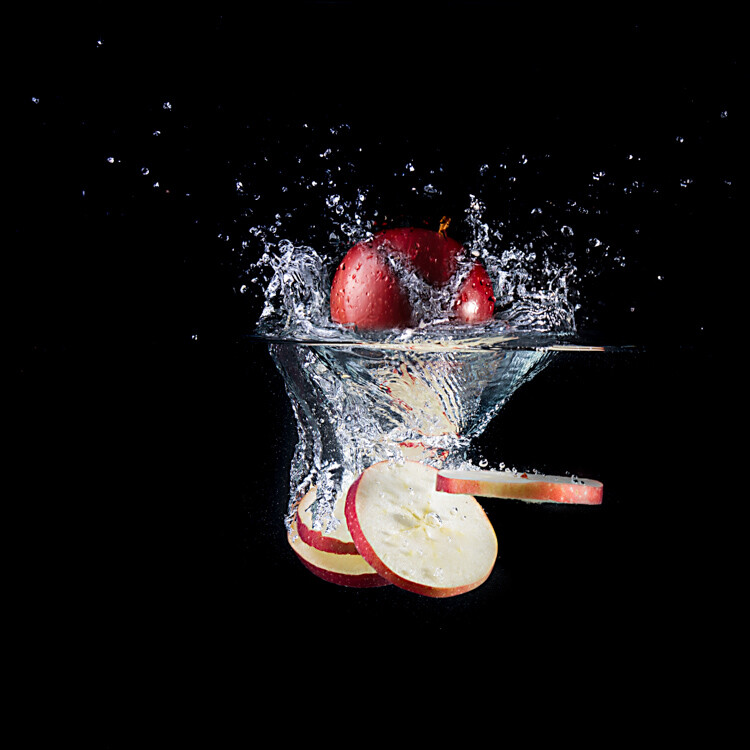
Now open the image in Photoshop, create a new empty layer, select the brush color black, and start painting the new layer black. Be careful near the subjects, to avoid painting them also. This way you can achieve a clean black background around the subject. You can even paint away small drops of water that you consider unnecessary. Try to preserve a little bit of the surface of the water though.

If you like the painting you applied, it’s time to add sharpness to the image using the Unsharp mask at the level of your taste. You can also add some contrast or saturation depending on the final look you want to get.

Water Splash Photography Made Easy

Water Splash Photography Made Easy

Water Splash Photography Made Easy

Your turn

Are you ready to give water splash photography a try? Here’s another dPS article that can give you some more splash tips, How to do Creative Water Splash Photography with Off-Camera Flash.

If you have any questions please post them in the comments section below, and also share your images so we can see your results.

Bio

Stefan Mogyorosi is a photographer based in Oradea, Romania. He works mostly on commercial projects for the beauty industry, but also likes to do personal projects photographing still life, macro, fashion, portraits, or glamour. Experimenting with freezing motion and working with liquids are his top priorities right now.

Personal page – http://www.mogyorosistefan.ro
Facebook page – https://www.facebook.com/mogyorosistefanphotography/
Instagram page – https://www.instagram.com/mogyorosistefan/

The post Water Splash Photography Made Easy by Stefan Mogyorosi appeared first on Digital Photography School.


Digital Photography School

 
Comments Off on Water Splash Photography Made Easy

Posted in Photography


Video: mesmerizing stop motion film of raw wood being shaved away layer-by-layer

22 Jun

Photographer and animator Brett Foxwell teamed up with friend and musician Conor Grebel to create something awesome. Together, they painstakingly milled their way through several pieces of wood, layer by layer, capturing one frame of video at a time to create a stop motion film they’re calling WoodSwimmer.

As you can imagine, the process of actually capturing this film was incredibly time-consuming, and at times grueling.

‘[The final video] involved endless hours of shooting, cutting, and prepping for each frame,’ Brett tells DPReview. ‘Which involved either clearing all the wood chips away or keeping them looking consistent and pretty, and finally applying wood oil to the sample for each frame.’

You can see the mess this process created in some behind the scenes images Brett shared with us. Unfortunately, he only captured a couple of these BTS shots, because, in his words, ‘It was just such a grueling process that I never got around to getting proper documentation of the process.’

Regarding gear, Brett tells us he used a Canon EOS 60D with Tamron 90mm macro lens attached. This setup was tethered to DragonFrame, a stop-motion capture software that Brett says is “a great tethering application even if you’re not shooting specifically stop-motion.”

Tons of work and a nightmare to clean up, but well worth it when you get a load of the final product. Here are a couple of stills Brett sent our way:

Several stills from WoodSwimmer are available as prints from Brett’s website, and you can see more of his stop motion, nature photography, and other artistic work by following him on Instagram.

Articles: Digital Photography Review (dpreview.com)

 
Comments Off on Video: mesmerizing stop motion film of raw wood being shaved away layer-by-layer

Posted in Uncategorized


There’s no ‘right way’ to use Instagram as a professional

22 Jun

Okay so it might not be super minimalist….it might not fit the feed… but rules are meant to be broken right?! ???

A post shared by Jennifer Moher (@jennifermoher) on

I don’t view my Instagram feed very seriously. I put some ‘work’ photos on there that I’m proud of, both from reviewing cameras and my freelance work. I definitely don’t do a very good job of curating – people who are interested in both motorcycles and cats would probably like my feed, but I’m not sure how much overlap there really is for those audiences.

So for those who are full-time, working professional photographers who need to hustle clients for a paycheck, how does Instagram fit in? Rangefinder Magazine asked five photographers about their posting philosophies, and got five pretty different results.

Jennifer Moher likes to show people that she’s more than just a wedding photographer, so while her feed has a pretty consistent visual aesthetic, there’s a lot of her personal life on there, with everything from hikes to coffee cups. Caroline Briggs, on the other hand, says ‘a random snap of my coffee cup would be too jarring and off-topic,’ and therefore keeps her personal and professional photography in two separate accounts.

Are you on Instagram? How does it fit into your photographic world? Let us know in the comments, and head on over to Rangefinder for the full writeup.

Via: Rangefinder

Articles: Digital Photography Review (dpreview.com)

 
Comments Off on There’s no ‘right way’ to use Instagram as a professional

Posted in Uncategorized


Hyperloop Hotel: Zoom from City to City in a Luxury Lodging Pod

22 Jun

[ By SA Rogers in Drawing & Digital. ]

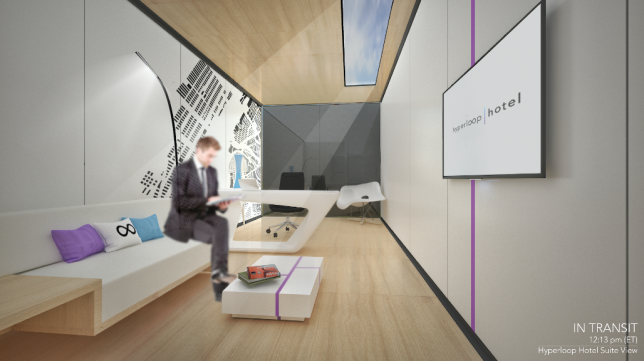
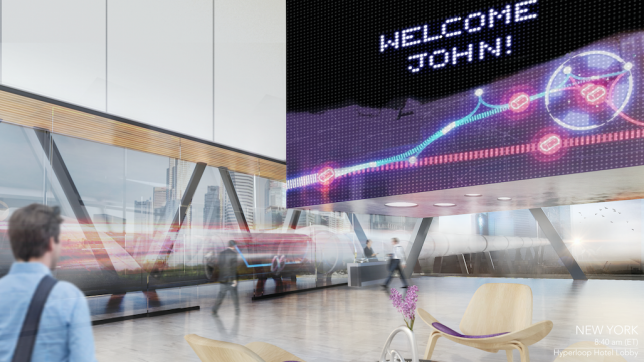
Hyperloop transit is about to make the world a whole lot smaller, and with it could come a system of luxurious private pods outfitted like high-end hotel rooms so you can zoom from one city to the next in unprecedented comfort. While it might seem like there’s little need for such cush train cars when your trip takes less time than ever, the Hyperloop Hotel aims to solve the problem of where you’re going to stay while traveling.

Developed by Radical Innovation Award winner Brendan Siebrecht, the Hyperloop Hotel consists of shipping containers that double as traveling guest suites, able to ‘dock’ themselves at any of 13 different hotel stations in cities like Seattle, Portland, Las Vegas, Los Angeles, Austin and New York City. While the nightly fee hasn’t been set yet, Siebrecht reveals that for a fee of $ 1,200, guests can even visit multiple cities in a single day. That’s right, you could maintain a comfy home base while having breakfast on the East Coast, lunch in the South and dinner on the West Coast.

It might sound too futuristic to be real, but Hyperloop One is already being tested in Las Vegas and could be carrying passengers by the year 2020, so it’s actually not that far away, assuming the technology stays on track (pun intended.) But the hotels definitely wouldn’t come cheap – it would cost about $ 10 million to build each one. The pods themselves feature a bedroom, office, bathroom and living room, with a glazed wall that can be covered while you’re in motion.

“I believe the Hyperloop One is the next big innovation in transportation in the United States and possibly the world,” Siebrecht told Business Insider. “I wanted to explore ways in which this technology could transform the overall travel experience and hospitality.”

Share on Facebook


[ By SA Rogers in Drawing & Digital. ]

[ WebUrbanist | Archives | Galleries | Privacy | TOS ]


WebUrbanist

 
Comments Off on Hyperloop Hotel: Zoom from City to City in a Luxury Lodging Pod

Posted in Creativity


Meeting Owl robotic video offers 360-degree views of conferences

22 Jun

Owl Labs, a startup backed by Android co-founder Andy Rubin, has launched a new camera called the Meeting Owl. This 360-degree camera is designed specifically for companies and groups, enabling them to hold video conferences without the burden of manually operating the cameras. The Owl does the hard work itself, automatically focusing the video feed on the person who is talking. Oh, and guess what it looks like? Yep, an adorable, productivity-increasing owl.

The device features a 360-degree camera on the top of its cylindrical body, as well as a total of 8 omnidirectional beam-forming microphones for capturing audio from all directions. The combination of the two enables Owl to capture everyone around a table at the same time, presenting viewers with a full view of the conference room. The camera shifts focus onto whomever is speaking, and presents split-views if multiple people are engaging in a conversation. The microphones isolate important noise from unwanted ambient sounds.

Owl Labs has designed its conferencing camera to work with major video conferencing platforms, including Slack, Skype, Google Hangouts, Zoom, and GoToMeeting; the camera is plug-and-play via a USB cable. According to the company’s website, ‘limited quantities’ of the Meeting Owl are available at this time, with shipping starting within the next four weeks. The camera is priced at $ 799.

Via: The Verge

Articles: Digital Photography Review (dpreview.com)

 
Comments Off on Meeting Owl robotic video offers 360-degree views of conferences

Posted in Uncategorized


Living Light: 11 Transforming Kinetic & Illuminated Art Installations

22 Jun

[ By SA Rogers in Art & Installation & Sound. ]

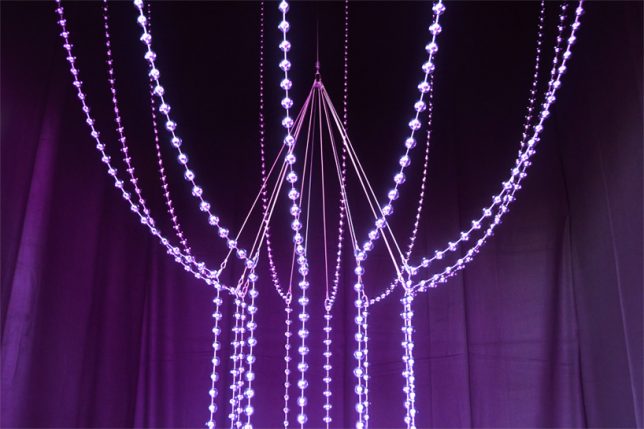
Rippling, unfolding, slithering and glowing like bioluminescent creatures, these kinetic and illuminated works of art are mesmerizing to watch. We can’t help being fascinated by the combination of light and motion, especially when it’s integrated into clothing, responds to our gaze or voices, or is engineered into monumental interactive installations of laser beams for our slack-jawed amusement.

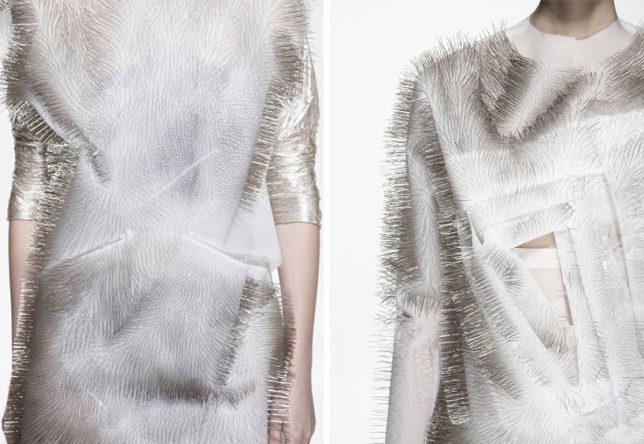
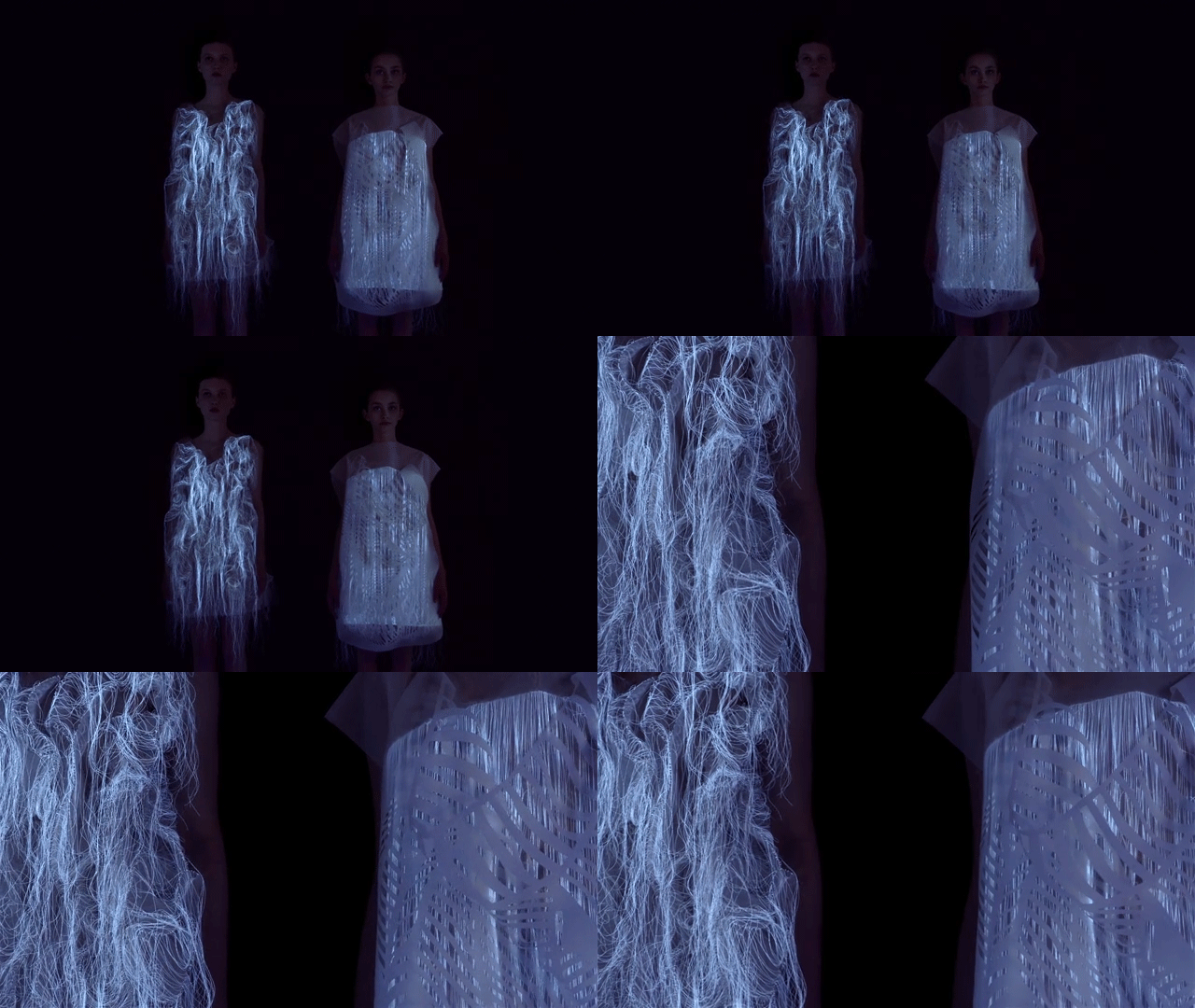
Sound Activated Clothing by Ying Gao

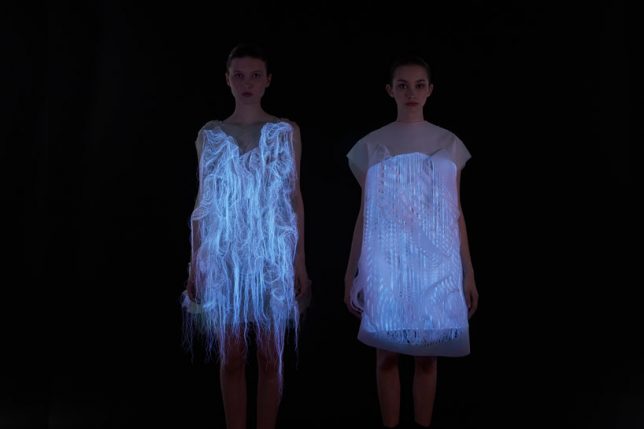
‘Incertitudes’ and ‘(NO)Where (NOW)here’ by fashion designer Ying Gao are two series of unusual reactive garments – the former covered in rippling dressmaker pins, and the latter moving like a living creature while glowing eerily in the dark. The photo luminescent thread works with eye tracking technology to activate movement by the gaze of spectators, while the pins respond to spectators’ voices.

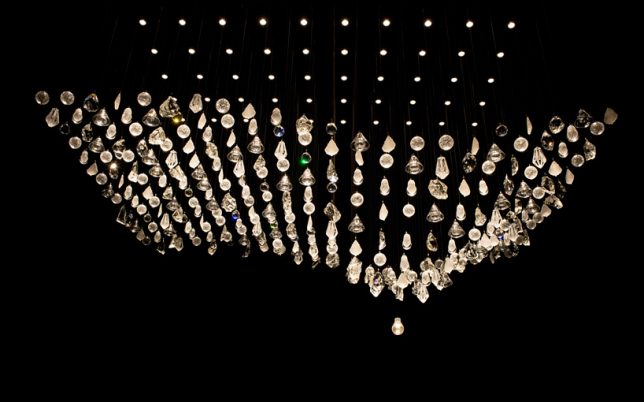
Experimental Kinetic Glass Installations by LASVIT

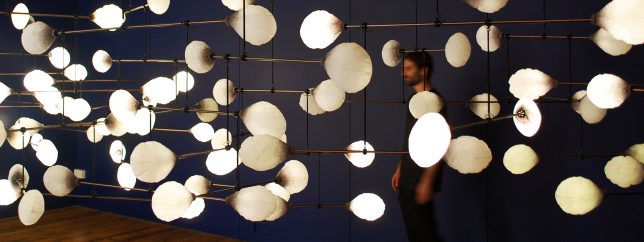
Czech lighting company LASVIT presents a series of experimental kinetic glass installations during Milan Design Week, creating immersive illuminated environments that move and shift in synchronized rhythms.

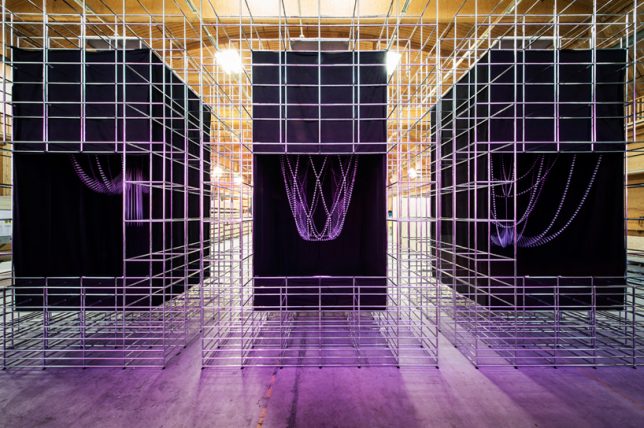
La Vie en Rose by Atelier Öi & USM

A company called USM produces a network of industrial components known as USM Haller Systems that offer infinite reuse and reconfiguration possibilities. For Designer’s Saturday 2014 in Switzerland, the company commissioned Atelier Öi to use these parts as a base for a kinetic art installation expressing these possibilities. ‘La Vie en Rose’ is the result.

CL:OC Installation by GROSSE 8

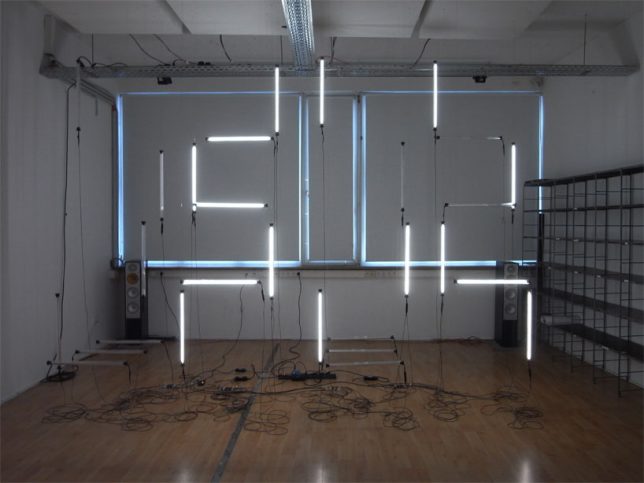
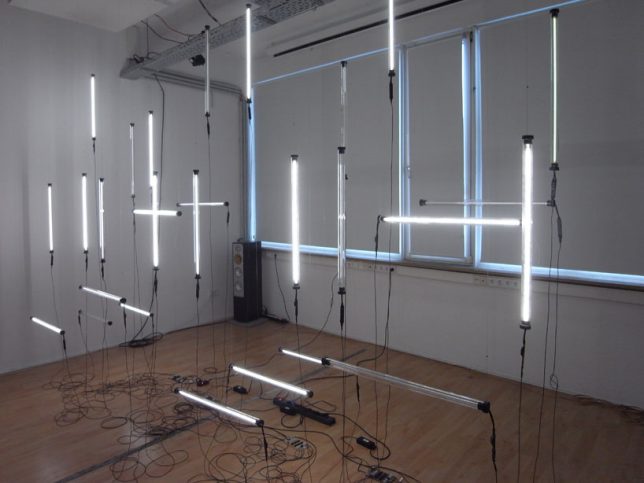
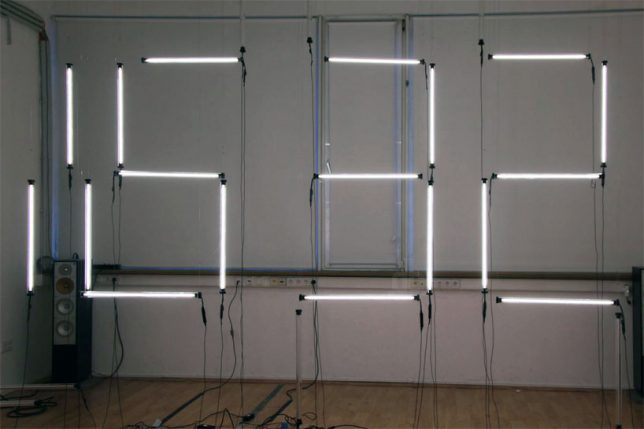
Hanging flurorescent tubes powered by twenty-eight motors hang in the air, constantly rearranging themselves to display the time in digital numbers. Created by German design collective GROSSE 8, the sculpture debuted at Interior Design Week Cologne.

Big Dipper: Helical Kinetic Sculpture by Michael Candy

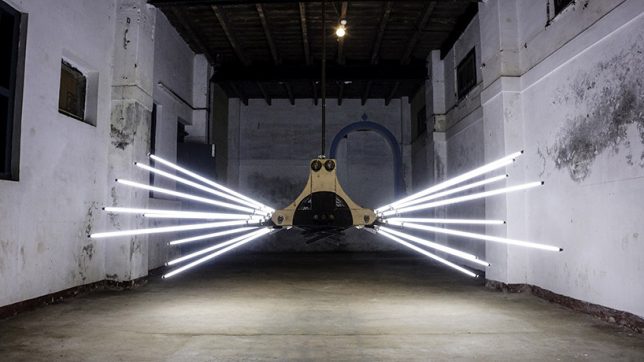
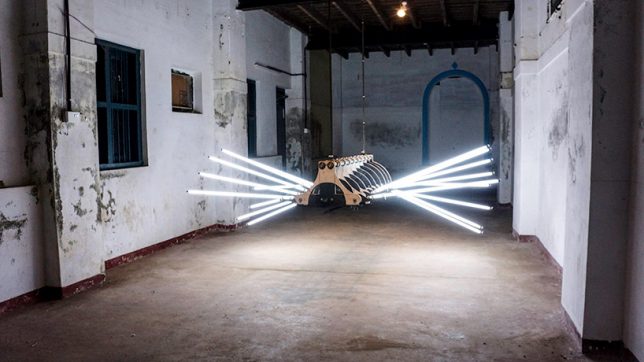
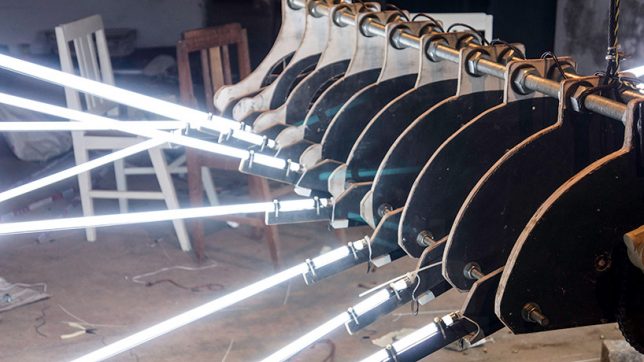
Looming in the air like some kind of monstrous mechanical spider, BIG DIPPER by Michael Candy is suspended within an old warehouse in India, just waiting to scare the pants off a passerby. It features 18 fluorescent tubes sticking out of a plywood and metal body.

Next Page – Click Below to Read More:
Living Light 11 Transforming Kinetic Illuminated Art Installations

Share on Facebook


[ By SA Rogers in Art & Installation & Sound. ]

[ WebUrbanist | Archives | Galleries | Privacy | TOS ]


WebUrbanist

 
Comments Off on Living Light: 11 Transforming Kinetic & Illuminated Art Installations

Posted in Creativity


Quick Review of the Sigma 135mm F1.8 DG HSM Art Lens

22 Jun

In this quick review of the Sigma 135mm f1.8 Art Lens, I will go over some of its features and give you my overall impression of this lens.

Photographers like gear

I belong to several photography groups, both online as well as within my local area, and often times when we meet, we end up talking about our gear. Conversations typically revolve around the gear we have, what we would like to have, and what we want to sell off. On several occasions, I have heard my fellow photographers talk about the Sigma Art series of lenses. They always start the conversation with, “Oh, I absolutely love my Sigma Art lens. The bokeh is so dreamy!” Now, I am a Canon shooter – always have been and always will be. But that does not mean that every once in a while, I don’t like to test out gear from other companies to compare performance, specifications, and price.

Quick Review of the Sigma 135mm F1.8 DG HSM Art Lens

The Sigma 135mm F1.8 DG HSM Art Lens comes with a case and a lens hood.

So when I had the opportunity to test out the Sigma 135mm 1.8 DG HSM Art lens, I jumped at the chance. I spent about three weeks with this lens and used it for a variety of photography assignments – both indoors and outdoors. Here is my review based on my personal experiences with this lens.

Technical Specifications

As per Sigma’s website, the Sigma 135mm F1.8 DG HSM Art is a medium range telephoto prime lens designed for modern high-megapixel DSLRs. A new large Hyper Sonic Motor (HSM) delivers ample torque to the focusing group for outstanding speed, ensuring exceptionally stable performance even at lower speeds. This state-of-the-art prime lens touts a dust and splash proof mount for guaranteed performance in any condition and its large 1.8 aperture allows for more creative control over imagery.

Quick Review of the Sigma 135mm F1.8 DG HSM Art Lens

The Sigma 135mm F1.8 DG HSM Art Lens attached to my Canon 1V film camera.

My telephoto lens of choice is my Canon EF 70-200L lens. It’s heavy and bulky but gives me some of the best picture quality in its class. Compared to that lens, the 135mm felt lightweight and comfortable to carry around all day. Being a fixed lens, there are no moving parts, unlike the zoom ring on the 70-200mm. While this meant that I had to move around to get shots at various distances, it was not an inconvenience. I just used pretended to have a zoom lens by moving my feet!

The lens looks very sharp and clean. The smooth matte black finish of the lens gives it a certain visual appeal. The build quality is very clean and it feels like a solid piece of glass. The lens is a little heavy (at about 2.56 pounds or 1.2 kg) but if you are used to walking around with other telephoto lenses, it’s not any different compared to using those.

Sharpness of the Sigma 135mm F1.8 Art Lens

The legendary quality of having the dreamiest bokeh is very true with this lens. It is super sharp even when shooting absolutely wide open. I typically shoot very wide opened with all my Canon L-lenses which fits my style of photography. The aperture of f/2.0 is my personal sweet spot – the one that I really trust to give me a shallow depth of field and dreamy bokeh (blurry background). This lens did not disappoint at my favorite f-stop.

But even at f/1.8 (the widest aperture on the Sigma 135mm), the lens was tack sharp with very shallow depth of field. Once it was stopped down to f/16, there was some softness on the edges of the frame but it’s not very prominent. With a lens of this quality, the best aperture would be between f/1.8 to f/4 (in my opinion) to get the best of the shallow depth of field and bokeh that we all love.

Quick Review of the Sigma 135mm F1.8 DG HSM Art Lens

Shot at ISO 200, f/1.8 – wide open – look at that dreamy bokeh.

Quick Review of the Sigma 135mm F1.8 DG HSM Art Lens

ISO 200 at f/2.0

Quick Review of the Sigma 135mm F1.8 DG HSM Art Lens

ISO 200 at f/9 – more of the entire scene is clear and visible – with a wider (deeper) depth of field here.

Vignetting

The Sigma 135mm at f/1.8 Art Lens showed slight edge vignetting when shot wide open. But for my style of photography, it’s minimal and nothing I could not fix in post-processing. I was very impressed with the number of tack sharp images that I could keep even when I used the lens completely wide open at f/1.8.

Quick Review of the Sigma 135mm F1.8 DG HSM Art Lens

The image above left was shot at ISO 200, f/2.0 and on the right, the same scene was shot at ISO 200, f/9. There is no visible softness or vignetting at either aperture. The bokeh at f/2.0 is so dreamy (shallow depth of field) and at f/9 more of the background is visible.

Autofocus

The Sigma 135mm has an electronic hypersonic motor. This makes the autofocus very fast and smooth. I found that the lens locked focus easily and did not hunt while focusing. The AF motor was also relatively quiet and smooth as compared to other telephoto lenses like the Canon 85mm f/1.2L II USM that is really slow while hunting for focus in the AF mode.

Quick Review of the Sigma 135mm F1.8 DG HSM Art Lens

While hiking my two boys decided they would lead the pack. I really wanted to capture this independent streak and both images are shot less than 2 seconds apart. The Sigma 135mm had no problems tracking focus as they moved up the trail. Both images were shot at ISO 200, f/2.0 and both have the subjects tack sharp and in focus in spite of the movement.

Macro capabilities

While the Sigma 135mm is not described as a macro lens, it did offer 0.2x magnification with a minimum focusing distance of just under three feet. Since I have a dedicated macro lens that I use for my detail shots, I did not pay much attention to this feature. However, in a pinch, this lens could be used to provide some magnification.

Karthika Gupta Memorable Jaunts DPS Article - Sigma 135mm lens review-11

The 135mm zoom was a little tight when I had to take in-studio headshots but once I got the focus locked, it turned out beautifully. Both images were shot at f/2.0 ISO 640, 1/125th.

Summary

Overall I was really very impressed with the Sigma 135mm 1.8 DG HSM Art lens. It is a superbly built piece of gear that was incredibly fast, easy to carry, handle, and use.

The only thing I needed to get used to was the fact that it was a prime lens and not a zoom, unlike my favorite 70-200mm telephoto lens. This meant I had to move around to get shots at different angles and different focal lengths, but I don’t consider that a con. Instead, I feel that shooting with a prime lens makes you more careful and thoughtful about your compositions since you have to physically move around to get a diverse range of shots.

The Sigma 135mm lens is definitely something to look into if you are in the market for a good quality telephoto lens.

The post Quick Review of the Sigma 135mm F1.8 DG HSM Art Lens by Karthika Gupta appeared first on Digital Photography School.


Digital Photography School

 
Comments Off on Quick Review of the Sigma 135mm F1.8 DG HSM Art Lens

Posted in Photography


10 Reasons Why it’s a Good Idea to Start Producing Video Content

22 Jun

If you spend any amount of time online you’ll be well aware of the rapid expansion of access to video content that has happened over recent years. Being largely user driven, this content varies from professionally produced through to home videos of cats, puppies and everything in between.

With the increase in internet speeds and processing power of viewing devices, we have the ability to watch countless hours of video content where and when we like. This provides some interesting opportunities for you as a photographer to consider, either through creating video content, or using video as a platform to show your work in a different way.

Ultimately it allows you to connect with people differently, using elements of storytelling and emotional connection that can only exist through the use of motion and sound. Here are some reasons why I have embraced video as a way of communicating.

Reasons to produce Video 01

1. Video allows you to tell stories in a more immersive way

Anyone who has been to see a film or documentary and become heavily invested in the story and its characters will be able to relate to this. While still images can communicate much of a subject, the depth of which you can tell stories through motion is effective in a different way.

Hearing the person’s voice rather than reading a quote, listening to them describe a situation or speak to another person and feeling the emotion in what they are saying and how they are presenting it. There is the element of moving images that cannot be replicated through stills. It is not to say that motion is a better way, just a different way to tell stories.

It also allows the viewer to have a different experience in seeing environments through motion. Seeing the elements that exist move and interact is again difficult to replicate through stills. Wildlife photos versus wildlife footage is an excellent example of how your understanding of an environment can shift based on the way you are viewing it.

Case study: Karma Coffee

2. Music can introduce a different kind of emotional pull

Music plays a significant role in every piece of film or TV content, from the news to drama to documentary. It has incredibly strong pulling power with our emotions and this is something anyone can take advantage of. The immediate tone that is set with music helps to identify what we can expect to feel, the anticipation of a lion hunting its prey, the feeling of accomplishment for a climber reaching a summit, or a family coming together after a long time apart. The ability to pull your audience further into a story with the emotive power of music is something we should look at seriously if producing video content.

While we may not have the budget for commercial music or large-scale productions, there are a lot of options available through stock music sites that will give you the style of music you are after. By using music that is available for licensing, you are free to have your video projects available for public viewing with no concern of copyright infringement as long as the music is licensed for the correct use.

Case study: Mates in Construction – Kokoda

3. Creating slide shows of your images adds a more dynamic element to your portfolio

This is a great way to bring a collection of images together and show them in a more dynamic way. The collection of images may simply be your portfolio, or it could be from a wedding you have shot, an overseas trip, or a family event. There are many benefits to presenting still images in this way as it allows you to include music and some animation or movement of your images within the frame as opposed to just a static position.

It also means your photographic portfolio can now be viewed on platforms that would otherwise be unavailable for still images, such as YouTube.

Case study: Damian Caniglia Photography Slideshow

4. You can bring together a collection of images and video that are connected

Producing video content doesn’t have to include exclusively just video. Incorporating stills and animation can help tell stories in a more complete way, as well as utilizing content that may already exist.

An example of this may be a short story telling project about a person’s life growing up. Using old photos as part of the visual elements means you are able to give greater context to that person’s life, their story, and what they were like at this time. It also brings a greater level of authenticity to the person’s story as the viewer is able to see a visual representation of what they are talking about.

Another example of this is you may be telling the story of an artist. Using images of their art as they describe their motivation, process, and aims allows to help show their work as they are discussing it. Again, giving better context to who they are as well as a visual representation of their work within the video piece.

5. You can develop character-driven stories and documentaries

Many documentaries have a narrator or voice-over directing the flow and narrative of the story. Character driven stories only allow the voice and vision of the person the story is about, to appear.

While often there is an interviewer involved, the voice of the person asking the questions is removed from the final edit leaving only the people appearing in the video as the ones directing the story.

This has some considerations when asking questions during an interview, and more specifically, the way in which the person being interviewed responds.

Case study: Kokoda 2013

6. Most social media channels favor video content

A quick look across the most popular social media platforms will show how much video content is being favored. In fact, doing a few tests will show you that the current algorithms being used by these platforms favor video content above almost all others.

While YouTube is still the king of video, other platforms such as Facebook and Instagram are definitely showing great reach and interaction with its users and video content. This can be a big advantage for those producing video as you have the potential to reach a bigger audience based on this shift.

Case study: Preserving the Ancient

7. You can offer more options to existing clients including time-lapse videos

It used to be the case that if a client wanted photographic work done, they hired a photographer and if they wanted video content produced, they hired a video producer or production company. But, there has been a shift in recent years with clients having the option of choosing one person who is capable of producing both. This has a number of benefits for the client as well as the supplier.

For the client, they only have to deal with one person or company. This is especially important if the styled approach needs to match across different content (photo still and video, for example. For the producer of content, it means you are able to offer more solutions for your clients, giving them a turnkey solution for production and more reasons to use you instead of anyone else.

Case study: PODS time-lapse

8. You can produce video for stock licensing

There has never been a greater demand for video content. That demand is only set to rise as video content is embraced across all sectors of our society and more online platforms.

Here lies the opportunity for content creators. While there is nothing better than custom footage made specifically for a story, film, or documentary project, there is not always the budget or easy access to what is needed. Stock content is an excellent way for producers to obtain content for their respective projects. This is not a new concept as stock content has been around for a long time.

By looking through the libraries of some of the larger stock libraries, you can quickly determine the style of content that is accepted by stock libraries, and what is the most popular for purchase and download. There are many options for your approach to creating stock video content. However, maximizing your existing connection or access to local areas or industries means you can take a more strategic approach to what you produce based on your knowledge of said industries or areas.

Case study: Sample Footage, Tasmania, Australia

9. You can start doing a regular vlog (video log) to showcase your work

This is almost like a behind the scenes process of telling your story. It is a great way for your audience to get a better idea of who you are as an artist and producer. It will allow your followers to become better invested in your work and your story so they become better connected to you.

By understanding your process in a transparent way, your followers can not only understand the amount of effort and resources that go in to producing your work, they will also develop a better understanding of what it takes to be a successful artist.

10. Producing video is a good skill to have

Even if you are not using video production within your business or work, it is a good skill to develop for the future. As mentioned earlier, there is no doubt we are consuming more video content than ever before.

Organizations that traditionally would not consider producing video content in-house are starting to do so. Developing the skill and understanding for what is needed to produce this content will give you a better understanding of the strategy needed, whether you are producing it personally, or engaging the services of an external producer.

This will often lead to better planning and execution of a project, which results in better quality outcomes.

Conclusion

If producing video content is of interest then get out there and start experimenting with this medium. As most, if not all cameras for photography also shoot video now, it means there is little or no investment in equipment to get started. Be sure to check out some articles on how to get started shooting video and hit the record button and start experimenting.

The post 10 Reasons Why it’s a Good Idea to Start Producing Video Content by Damian Caniglia appeared first on Digital Photography School.


Digital Photography School

 
Comments Off on 10 Reasons Why it’s a Good Idea to Start Producing Video Content

Posted in Photography


How to Have Fun with Shutter Speed and Added Motion Blur

21 Jun

If you think learning is a boring task, you definitely haven’t studied photography. To make this point, I decided to explain the relationship between shutter speed and movement by spending the day at a theme park.

Image blur – unwanted or not

When you get an unwanted blur in your photograph it can be very frustrating. However, this shouldn’t stop you from experimenting with your camera’s shutter speed. Perfectly sharp images can be great for composition and color but they don’t really reflect everything that’s going on and can fail to convey the atmosphere.

Composition - shutter speed

Shutter speed 1/640th, f/9, ISO 200.

Movement shutter speed

Shutter speed 1/50th, f/22, ISO 200.

Theme parks can be the most fun, but even so, they can appear a bit dull in still images. However, just adding a little movement can do the trick. Don’t you agree?

Still shutter speed

Shutter speed 1/1000th, f/3.5, ISO 200.

Moving shutter speed

Shutter speed 1/15th, f/22, ISO 200.

If you are comfortable using Manual Mode on your camera, then please do so. However, if you are not used to adjusting your settings you can always do these exercises by using Shutter Priority Mode. To do this you have to set the dial of your camera to the S (Nikon, Sony) or Tv (Canon) symbol on your mode dial. This mode gives you the flexibility to choose the shutter speed that you want, and the camera figures out the rest of the settings for you in order to have a well-exposed photo.

However, there is one thing that you do need to know first . . .

What is shutter speed?

The shutter is a curtain inside your camera that opens to allow light to enter the camera and hit the digital sensor (or film) in order to create your photo. Shutter speed refers to how fast or slowly it opens and closes. The longer you leave the shutter open, the more light will come in.

Therefore, as long as it’s opened everything in front of your lens is leaving an imprint. In the case of a moving object, this results as a halo or a ghost and is why you get blurry photos when using slower shutter speeds. The longer the exposure time, the blurrier the subject will be.

Faster shutter speed

Shutter speed 1/60th, f/22, ISO 200.

Slower shutter speed

Shutter speed 1/30th, f/29, ISO 200.

Creative effects of shutter speed

#1 Blurry subject sharp background

Now that you have that clear, let’s dive into the fun part and start doing some creative effects with this knowledge. First, we’ll start with a sharp background and a blurry object/subject, as this is the easiest one to achieve. For this one, you need to be standing still and have something or someone in motion in the scene in front of you. As for your camera, you need to use a slow shutter speed. How slow depends on the speed your subject is moving, so just make a few tries.

Note: All movement gets registered in the image when you are using slow speeds, including your own. So if your subject requires for you to shoot lower than the length of your lens (i.e. slower than 1/50th with a 50mm lens) it’s better if you use a tripod or else your fixed background will look blurry as well.

Cars shutter speed

Shutter speed, 1/6th, f/22, ISO 200 and an 18mm lens.

Twirls shutter speed

Shutter speed, 1/50th, f/29, ISO 200 and a lens focal length of 33mm.

#2 Blurry background sharper subject

For the second effect, let’s do the opposite; a blurry background and a sharper subject. You don’t want the moving subject completely sharp because then you can lose the purpose and it will look dull or worse, fake (as in Photoshopped into the image). So it’s always better for the subject to have a small halo around it that shows its movement, direction, and speed.

This one is a little bit trickier because, on top of choosing the correct shutter speed, you also need to follow the moving subject with your camera, matching its speed (this is called panning). So please don’t get frustrated if you don’t get it right on the first try because the results are worth the effort!

Follow Circular shutter speed

Shutter speed, 1/50th, f/29, ISO 200. The camera was moved in a circular motion to follow the subject.

Follow Vertical shutter speed

Shutter speed, 1/40th, f/32, ISO 200. The camera was moved in a vertical motion to follow the subject.

Follow Horizontal panning shutter speed

Shutter speed, 1/60th, f/22, ISO 200. The camera was moved in a horizontal motion to follow the subject.

#3 Mix it up

When you feel comfortable with the previous techniques, try introducing some mixed movements. In other words, your subject moving one way and you in another.

Mix shutter speed

Shutter speed, 1/50th, f/22, ISO 200.

Mix shutter speed

Shutter speed, 1/40th, f/32, ISO 200.

#4 Still objects

Liking it so far? It gets better! You can even put some movement into photos of still subjects.

Ducks shutter speed

Shutter speed, 1/50th, f/22, ISO 200 with an 18-35mm lens.

To achieve this effect you need to use a zoom lens. What you have to do is to twist (zoom) so that you go from one focal length to another while the shutter is still open. The bigger the zoom, the more intense the effect.

Barrel zooming shutter speed

Shutter speed, ½ a second, f/29, ISO 200, focal length 18-28mm.

Barrell shutter speed

Shutter speed, 1/50th, f/29, ISO 200, focal length 18-45mm.

Barrell shutter speed zoom

Shutter speed, ½ a second, f/29, ISO 200, focal length 18-55mm.

Your turn to go try it

There you go, you are ready to enjoy your day in the park while making some amazing looking shots. Take a ride, have fun, and let all your problems all blur away!

Blur

Shutter speed, 1/15th, f/22, ISO 200.

Please share your comments, questions, and motion blurry images below.

The post How to Have Fun with Shutter Speed and Added Motion Blur by Ana Mireles appeared first on Digital Photography School.

Digital Photography School

 
Comments Off on How to Have Fun with Shutter Speed and Added Motion Blur

Posted in Photography


The Kennel Club 2017 photo contest winners are cute as h*ck

21 Jun

The Kennel Club Dog Photographer of the Year

The Kennel Club has announced the 2017 winners of its annual ‘Dog Photographer of the Year’ photo contest. Now in its 12th year, the international competition received almost 10,000 entries from 74 countries around the world, and was sponsored by SmugMug and Nikon School. As the internet would say, that’s a lot of h*ckin’ good puppers.

We present the 1st place winners from each of the ten categories in the competition. To see all the winners in each category, head over to the Dog Photographer of the Year website.

Above:

Overall winner and ‘Man’s Best Friend’ category winner: Maria Davison Ramos (Portugal)

About the photo: For me, capturing real and candid moments is what photography is all about. This is one of those moments. My friend had just adopted Yzma and while we were chatting in the kitchen I was taking some photographs. The location and the light were far from perfect, but I ended taking one of the photos I’m most proud of.

About the dog(s): The dog’s name is Yzma and she’s a Golden Retriever cross. She was adopted by one of the photographer’s closest friends.

The Kennel Club Dog Photographer of the Year

‘Assistance Dogs’ category winner: Alasdair Macleod (Ayrshire, Scotland)

About the photo: Megan was photographed during her weekly visit to South Beach Care home in Saltcoats, with one of the residents, 95 year old RAF veteran Mr Duncan Currie (a pilot for the Royal Air Force No. 617 Squadron, Dam Busters) who has Dementia.

About the dog(s): Megan is a rescued Greyhound and was the top Therapet for 2016.

The Kennel Club Dog Photographer of the Year

‘Dogs at Play’ category winner: Kalyee Greer (United States)

About the photo: Petey and I stood there together on the water’s edge in awe as the day bowed out to the night and the sun slipped its yellow head behind the horizon. Pastel colours painted themselves across the Summer sky above our shoulders in stripes of pink and cobalt blue as we quietly revelled in that perfect, endless moment. Then, just as suddenly as the sky had lit itself on fire, Petey clumsily jumped into the water with a joyful little sparkle in his eye, beckoning me to come along. I followed him in and giggled until my sides hurt as he would push his paw down into the warm, salty water, sending little crystal droplets flying through the air all around him. With each happy splash came the realization of the perfection in those tiny moments, and of the unmatched purity of the canine heart.

About the dog(s): The dog in the photo is named Petey. A cuddly and endlessly sweet Wheaten Terrier who belongs to a previous client of Kaylee’s.

The Kennel Club Dog Photographer of the Year

‘Rescue Dog’ category winner: Alexandra Robins (Wiltshire, England)

About the photo: When I went to Bath Cats and Dogs home to photograph some of their animals, Chloe and Tess were the first on my list. We took them out to one of the large, grassy paddocks for them to have a run around. Both dogs flew across the field together, I managed to get some fun action shots of them playing. However, it was this image of Chloe looking up at her carer that has always been my favourite. Chloe was a little timid towards strangers; she was probably looking for reassurance with a strange photographer present!

About the dog(s): Chloe came to Bath Cats and Dogs home with her friends, Tess and Diego, when their owner died. Chloe the brindle greyhound was a timid dog and used to hide away from strangers but was gentle and caring to her friends. All three dogs found loving homes.

The Kennel Club Dog Photographer of the Year

‘Dogs at Work’ category winner: Sarah Caldecott (Yorkshire, England)

About the photo: The photograph of Rita was taken during a training day in February this year on the moors in County Durham the weather hadn’t been kind and the light was fading fast.

About the dog(s): The dog in the photograph is a pointer called Rita owned by a friend who Sarah met during training sessions with her dog.

The Kennel Club Dog Photographer of the Year

‘Puppy’ category winner: Mirjam Schreurs (Netherlands)

About the dog(s): Mirjam placed a call out on Facebook for dogs to photograph and the owner of Tyson the Boxer puppy responded to it. Mirjam photographed Tyson when he was 14 weeks.

The Kennel Club Dog Photographer of the Year

‘I Love Dogs Because…’ category winner: Julian Gottfried (Chicago, US)

About the photo: I especially enjoy this photo because it exemplifies what I love about my dog. In the image you can easily see his cuteness, personality, and playful manner. Combined with the snow, they create a truly lively photo.

About the dog(s): Pippin, a terrier-mix. Julian’s family adopted him on Valentine’s Day in 2010. He and his brother had been wanting a dog for a really long time, and their parents finally decided to adopt one. Pippin had been found wandering around Missouri with his mother in a poor state, and was staying at a shelter. He was only seven pounds, but the most adorable dog there, and he has since become an integral part of the family.

The Kennel Club Dog Photographer of the Year

‘Oldies’ category winner: John Liot (St. Helier, Jersey)

About the photo: This image was taken as part of a commissioned shoot with three rescue dogs. It was a beautiful and bright November day and the Sun was creating an intense light through the windows, warming the client’s house. Kelly, an apprehensive 12 year-old collie-cross, found her spot in the God rays heating up the arm of a sofa and had a nap. She was a cautious girl with a sad backstory and had challenging behavioural issues prior to being adopted. Happily though, she has found rejuvenated life with her new family in Jersey who are giving her all the love and attention she sorely missed in her younger years.

About the dog(s): Kelly is rescue and her breed is unknown. She was 12 when the photo was taken. She was adopted by Bex D., a worker at Jersey’s animal shelter, who has two other rescue dogs that she’s also adopted from the JSPCA.

The Kennel Club Dog Photographer of the Year

‘Young Pup Photographer’ category winner: Dylan Jenkins (Swansea)

About the photo: I took this photo in my garden. We had some cake and Mosey came to sniff it. I took about twenty photos and this was the best and the funniest.

About the dog(s): Mosey is the older of our two hounds. She’ll be 10 in October. She has had some scent training (truffles!) and has appeared in a few dog shows but is happiest as a pet/companion dog She is incredibly gentle and sweet-natured and hilariously funny. Mosey and Dylan have an incredible bond.

The Kennel Club Dog Photographer of the Year

‘Dog Portrait’ category winner: Anastasia Vetkovskaya (Russia)

About the photo: This magnificent Afghan was incredibly nice to shoot – he is very expressive and emotional.

About the dog(s): SISLEY- SHOU GERAT GRANT AHTIAR AK JAR, Afghan Hound

Articles: Digital Photography Review (dpreview.com)

 
Comments Off on The Kennel Club 2017 photo contest winners are cute as h*ck

Posted in Uncategorized