RSS
 

Archive for May, 2017

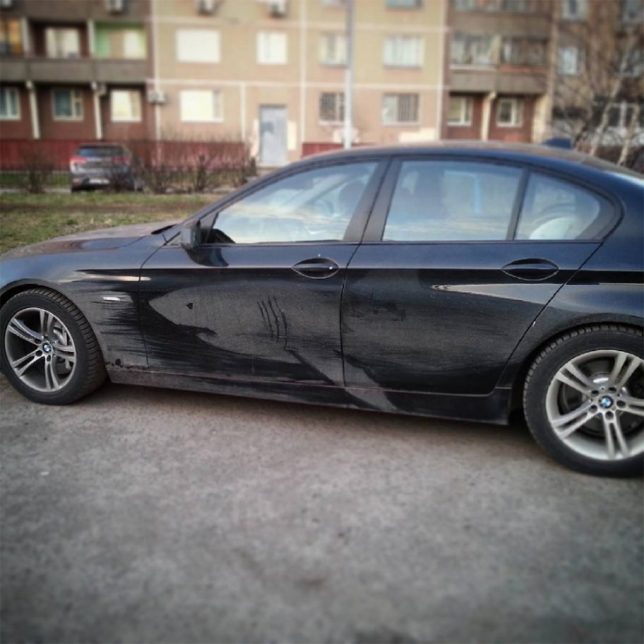
Dirty Car & Truck Art: Moscow Street Artist Adds Critters to Filthy Vehicles

14 May

[ By WebUrbanist in Art & Street Art & Graffiti. ]

Massive deep sea monsters, jungle predators and swamp creatures lurk in the grimey shadows on the backs of trucks, thanks to interventions by illustrator Nikita Golubev. Most of the featured critters are of the potentially creepy variety, including a deep-sea angler fish, octopus, shark, alligator, lion, owl and orangutan.

Based in Russia, the artist works on cars sometimes as well, but finds the broad doors and long sides on larger vehicles particularly inviting as blank canvasses for light-on-dark works of art.

As a subtractive strategy, there is less risk associated with these impermanent pieces as well — at worst, some truck driver may be less than amused to find their dirty vehicle highlighted in such a way.

Reverse graffiti is nothing new, but most artists who work in that vein operate at smaller scales, cleaning up sections of door and rear windows rather than tall trucks. Naturally, these pieces are all temporary, destined to come off in the wash or rinse out in the rain (but live on in photographs).

Share on Facebook


[ By WebUrbanist in Art & Street Art & Graffiti. ]

[ WebUrbanist | Archives | Galleries | Privacy | TOS ]


WebUrbanist

 
Comments Off on Dirty Car & Truck Art: Moscow Street Artist Adds Critters to Filthy Vehicles

Posted in Creativity


2017 Roundup: Interchangeable Lens Cameras around $500

14 May

Entry-level interchangeable lens cameras have never been so affordable or more capable. There are plenty of choices around the $ 500 mark that will take better pictures than most cameras ever made.

They don’t always have the very latest sensors or the premium build quality of their more expensive midrange siblings – and their controls tend to err on the side of simple, rather than extensive – but they tend to be excellent value and comparatively easy to use.

All of these cameras – both mirrored and mirrorless – produce good image quality, offer respectable performance and can record Full HD video. The majority have Wi-Fi to make it easier to share images to a smartphone. Many of them are targeted toward beginners, with ‘help’ systems that point out the best settings to use for various shooting situations.

Those unfamiliar with DSLR and mirrorless cameras may be wondering what advantages and disadvantages each brings to the table. DSLRs are larger cameras, with a more ‘traditional’ shape and control layout, as well as an optical viewfinder. While they’re great for shooting stills, they’re not as well suited to video capture, and focusing using live view tends to be sluggish. Mirrorless cameras are typically smaller and are very capable video shooters, and live view focusing is much faster than most DSLRs. Two negatives about mirrorless cameras are that battery life isn’t nearly as good as a DSLR and – especially true in this class – they often lack a viewfinder.

Let’s take a look at several entry-level ILCs, with US MSRPs in the $ 500 region, kit lens included:

  • Canon EOS M10
  • Canon EOS Rebel T6
  • Fujifilm X-A3
  • Fujifilm X-A10
  • Nikon 1 J5
  • Nikon D3400
  • Olympus PEN E-PL8
  • Sony Alpha a5100
  • YI M1

Articles: Digital Photography Review (dpreview.com)

 
Comments Off on 2017 Roundup: Interchangeable Lens Cameras around $500

Posted in Uncategorized


Canon 6D II rumors and a B&W medium format back: ‘Fro rounds up the week’s news

14 May

In this his most recent photo news ‘fix’, Jared Polin, AKA ‘Fro Knows Photo’ tackles rumors of a forthcoming replacement for the Canon EOS 6D, and the announcement of Phase One’s pricey new 100MP black and white back. What would you buy with $ 50,000? Fro wants to know.

Articles: Digital Photography Review (dpreview.com)

 
Comments Off on Canon 6D II rumors and a B&W medium format back: ‘Fro rounds up the week’s news

Posted in Uncategorized


This video from an action cam strapped to a dog will make you laugh or make you sick, possibly both

14 May

Few things are as unshakable as the bond between humanity and our canine companions, except, perhaps, the bond between those canine companions and some good old tennis balls. Of course, the Sony X3000 action camera has optical stabilization, so it should be pretty unshakable too, but you’ll just have to watch the video to find out how it does. 

The video is part of an action camera roundup The Wirecutter did earlier this year, which includes the GoPro Hero5 Black, the Sony FDR-X3000 that’s used above, and the Yi 4K Action Camera, which was actually one of our favorites.

For the full scoop, head on over to the The Wirecutter, or catch the highlights on Engadget.

Articles: Digital Photography Review (dpreview.com)

 
Comments Off on This video from an action cam strapped to a dog will make you laugh or make you sick, possibly both

Posted in Uncategorized


FilmLab is a film negative scanning app for smartphones

14 May

Thanks to cheap secondhand cameras and a general ‘retro trend’ film photography is experiencing a true revival. However, most photographers who shoot film still need digital versions of their images to show them off online or send to friends and family, which is why film-scanning hardware and software is a necessary part of the equipment.

Software developer Abe Fettig has found current solutions too expensive and slow and has therefore used his spare time to start working on the FilmLab app as a side-project. FilmLab now exists as a prototype and is impressively simple. Negatives or slides of any size have to be placed on a light table and can then be scanned using your smartphone. 

Pointing the app at the roll of film automatically identifies the images, corrects for distortion and converts negatives into positives. A tap on the shutter then records several Raw files which are merged for optimal image quality. Alternatively, if you want better image quality and/or higher resolution, you can also load images taken with a DSLR or other camera into the app for conversion into digital positives.

Abe is now hoping to work full-time on the app for a while to iron out the bugs and make it work with more types of film stock and phones. You can support this project by donating $ 3 to the app’s development and getting access to ongoing updates, or by donating $ 18 for access to the first Beta builds that will let you be among the first users to try out new features.

The plan is to offer the app as a $ 2/month subscription service once it is finished, with a one month free trial period. This would make it inexpensive, or even free, for those users who do a short-term project digitizing film. You can find out more about the project and see some scanning samples on the FilmLab Kickstarter page.

Articles: Digital Photography Review (dpreview.com)

 
Comments Off on FilmLab is a film negative scanning app for smartphones

Posted in Uncategorized


StarTech.com releases two new USB 3.0 CFast card readers

13 May

StarTech.com has released two new card reader/writers for CFast 2.0 and 1.0 memory cards with data transfer speeds up to 5Gbps over USB 3.0 (USB 3.1 Gen 1). The new readers feature a compact and portable design and come in either USB-C or USB-A versions. They connect to laptops, desktops or compatible mobile devices via an integrated cable. 

Both readers support hot-swap and plug-and-play and are backwards compatible with USB 2.0 and 1.x standards. They will retail in the US for $ 61.99. More information is available on the Startech.com website. 

Articles: Digital Photography Review (dpreview.com)

 
Comments Off on StarTech.com releases two new USB 3.0 CFast card readers

Posted in Uncategorized


Week in Review: Hungry Birds

13 May

Sony a9 Raw support arrives

We started the week in much the same way as the previous one ended, with more coverage of Sony’s new a9 mirrorless monster. Thanks to a prerelease version of Adobe Camera Raw, we were able to go back and process the a9’s sample photos ‘to taste’. 

You can view our updated gallery, and read some analysis about the IQ, right here.

Interview with Panasonic’s Yosuke Yamane

Recently, Yosuke Yamane, the Director of Panasonic’s imaging business, stopped by the DPReview offices to talk about the GH5, the wonders of 8K, rumors of downsizing and more. Read the full interview.

Olympus firmware updates

If there’s one thing you can say about Olympus it’s that they take care of their customers – even those with cameras now several years old. We saw that with last Monday’s major firmware updates for the E-M1 (original and Mark II), E-M5 II and PEN-F. In addition to adding support for Profoto’s wireless flash system (the TTL-O transmitter is pictured above), improvements ranged from selecting autofocus points to EVF color reproduction. Two lenses, the 12-100 F4 and 300mm F4, also received an update.

Sigma 100-400mm F5-6.3 DG OS HSM gallery

Do you like bird photos? Sure, we all do. DPR’s Sam Spencer drove halfway across the country with the Sigma 100-400mm F5-6.3 lens and sent back some shots of cardinals chowing down at the feeder. Our initial sample gallery is now available for viewing, and look for more photos from the Sigma 100-400 in the days and weeks to come.

Sony 100mm F2.8 STF GM OSS gallery

The Sigma 100-400 wasn’t the only telephoto lens gallery this week. We also posted a gallery from Sony’s 100mm F2.8 STF lens, which promised smooth, ‘buttery’ bokeh. According to our own Rishi Sanyal, the bokeh might be a little too smooth for some people. You’ll find our 46-image gallery plus Rishi’s analysis right here.

Panasonic DC-GX850 / GX800 review

There was some sadness in the office last year when it appeared that the Panasonic GM series had been left to die. The good news is that it’s back, mostly, in the form of the GX850/GX800. The bad news? It didn’t knock our socks off. Read the review to find out why.

Throwback Thursday: Eye Control AF

Part of the fun of writing Throwback Thursday articles is going back and finding cameras with some really unusual features. We jumped back to the film era for this one, but we think you’ll agree with Dale Baskin about how clever (though not always reliable) Canon’s Eye Control AF was. You might not agree with Dale’s desire to see it return on modern ILCs (which has a likelihood in the neighborhood of zero).

Jump back to the days of the EOS Elan II E in this week’s TBT.

Budget ILC roundup

Over the last month we’ve been going back and updating our camera roundups. This week we looked at nine interchangeable lens cameras that sell for around $ 500. You might be surprised which cameras offer the most bang for the buck. If you’re looking for the perfect Mother’s Day gift, then the $ 500 ILC roundup might be a good place to start.

Watch for additional updates to our roundups over the next several weeks!

Articles: Digital Photography Review (dpreview.com)

 
Comments Off on Week in Review: Hungry Birds

Posted in Uncategorized


Karsh, Beaton and Swannell featured as Camera Press celebrates 70 years with exhibition of famous faces

13 May

$ (document).ready(function() { SampleGalleryV2({“containerId”:”embeddedSampleGallery_9619767340″,”galleryId”:”9619767340″,”isEmbeddedWidget”:true,”standalone”:false,”selectedImageIndex”:0,”startInCommentsView”:false,”isMobile”:false}) });

An exhibition of portraits that chart the last seven decades of celebrity photography will mark the 70th birthday of British photo agency Camera Press. Emma Blau, granddaughter of founder Tom Blau, has searched the 12 million images of the agency’s archive to find the photographs that demonstrate how portrait photography has changed since the agency started in 1947. The first photographer to join the business was Yousuf Karsh and the first event covered was the wedding of the Queen of England by society photographer Baron.

The exhibition ‘Camera Press at 70 – a lifetime in pictures’ will feature archival work by Karsh, Cecil Beaton, Baron and Jane Bowen, as well as by more recent photographers such as John Swannell, Clive Arrowsmith, Jason Bell and Chris Floyd.

Celebrities caught by the lenses of the exhibited photographers will include Kate Bush, The Queen, the Gallagher brothers from Oasis, Amy Winehouse, Marilyn Monroe, Winston Churchill and JFK.

The free exhibition will be held the Olympus-sponsored Art Bermondsey Project Space in London from 17th May to 10th June 2017. For more information see the Camera Press website, and for more of the images see the Daily Mail website. 

Information from Camera Press

Founded in 1947, Camera Press celebrates its Platinum anniversary this year with Camera Press at 70 – a lifetime in pictures. Drawing on an unparalleled collection of images, and featuring work by some of the most iconic names in the industry this exhibition offers a fascinating insight into photography from the 1940s to the present day.

On display will be the work of photographic legends such as Yousuf Karsh, Cecil Beaton and Jane Bown through to contemporary names that include Andy Gotts, John Swannell, Jason Bell, Jillian Edelstein, Chris Floyd and Laura Pannack.

The exhibition will feature two further 70th anniversaries: 1947 was the year the young Princess Elizabeth wed Prince Philip and the British Academy of Film and Television Arts (BAFTA) was founded. The first photographs distributed by Camera Press were of the wedding of the future Queen, and this famous image by Baron will sit alongside more recent unique portraits of Princess Diana, The Queen’s Jubilee and the christening of Prince George. The exclusive BAFTA portrait collection will shine a light on many of our best loved actors from the worlds of TV and film.

Also included in the show are photographs by three generations of the Blau family: founder Tom Blau, his son Jon and granddaughter Emma.

Articles: Digital Photography Review (dpreview.com)

 
Comments Off on Karsh, Beaton and Swannell featured as Camera Press celebrates 70 years with exhibition of famous faces

Posted in Uncategorized


Polaroid sold to new owner

13 May
Photo by Martin Martinsson licensed under Creative Commons

PLR IP Holdings, LLC, the company that owns the Polaroid brand, is under new ownership. Wiaczeslaw (Slava) Smolokowski is a Polish investor and businessman who owns a majority share in the Impossible Project, the company that continues to produce Polaroid’s legacy instant film. A press release issued today mentions that Polaroid headquarters will remain in Minnesota and maintain its Hong Kong and New York City offices, with ‘plans for expansion into other international offices.’

Polaroid first filed for Chapter 11 bankruptcy in 2001. It was acquired in 2005 by Petters Group Worldwide, but more trouble followed and the brand filed for Chapter 11 again in 2008. It was acquired as a joint venture by Hilco Global and Gordon Brothers in 2009. Since then, the company has overseen licensing of its name on a range of digital cameras and accessories, from colorful action cams to an ill-advised Nikon 1 imitator. 

Polaroid Acquired by New Ownership Group

Minneapolis, MN—May 12, 2017— PLR IP Holdings, LLC, the owner of the Polaroid brand and related intellectual property, has been acquired by a group of investors led by the Smolokowski family. The new owners acquired 100% of the shares, effective May 5, 2017, from the Pohlad family, Gordon Brothers, Hilco Global and others.

The lead investor in the new ownership group, Wiaczeslaw (Slava) Smolokowski, is a Polish businessman and investor with holdings in the energy, biotech and real estate sectors. He is the cofounder of Mercuria Energy Group Limited, one of the world’s largest commodity trading houses.

Mr. Smolokowski is also the majority shareholder of The Impossible Project, the company that purchased the last remaining Polaroid factory in 2008 and continues to manufacture instant film for legacy Polaroid cameras.

Polaroid is an iconic brand known the world over for pioneering and perfecting instant photography – both in the analog and digital eras. 2017 marks the 80th anniversary of the venerable company’s founding. Today, Polaroid products are sold in over 100,000 retail stores in more than 100 countries throughout the world.

“I’d like to thank the outgoing board members and shareholders for their outstanding leadership and support over the last several years,” said Scott Hardy, President and CEO of Polaroid. “Under their stewardship, we achieved the tremendous growth and success that has led us to where we are today. We are also very pleased to welcome the new ownership group to the Polaroid family, and excited to begin writing the next chapter in the story of the Polaroid brand.”

“We are very pleased that this strategic transaction unites the Polaroid brand with its heritage – a move that’s exciting for both the buyer and the Twin Cities-based Polaroid team,” said Jann Ozzello Wilcox, chief investment officer for the Pohlad organization. “It was important to us that the headquarters remain here, and that management and the employees not only retain, but expand their roles with the new owner’s exciting plans for the brand’s future.”

“The transformation Polaroid has achieved is a credit to the brand’s strength. We’re proud to have been a part of it and know it will be in good hands under its new ownership,”said Ken Frieze, CEO of Gordon Brothers.

Polaroid’s headquarters and management team will remain in Minnetonka, Minnesota. The company also maintains offices in New York City and Hong Kong, with plans for expansion into other international offices.

Articles: Digital Photography Review (dpreview.com)

 
Comments Off on Polaroid sold to new owner

Posted in Uncategorized


Why There are 6 Types of Lightroom Previews and How to Use Them

13 May

Previews are an essential part of the Lightroom workflow. But with so many different types of Lightroom previews, it’s easy to get confused. For example, do you know the difference between minimal, standard and 1:1 previews? Or what a Smart Preview does? Or why 1:1 previews are useless in the Develop module?

The differences are more than academic. The way you use previews makes a big difference to Lightroom’s speed and efficiency. If you want Lightroom to run at optimal speed, you need to build the right previews. Let’s take a look at how to do that.

Lightroom Previews

Why does Lightroom build previews?

If you open a photo in Photoshop, there is no preview. You are looking at the photo itself. So why does Lightroom need previews? The answer lies in the fact that Photoshop and Lightroom edit photos in different ways.

Photoshop is a pixel editor. It changes the pixels of your photo and saves those changes in the file. Lightroom is a parametric editor. It doesn’t change the original photo file in any way. Instead, it keeps a record of any changes made to the photo in the Catalog. As the original photo is unchanged, Lightroom needs to use previews to show you how your photos look after you have edited them.

Let’s take a look at each of the different types of Lightroom previews.

Library module previews

There are several types of preview you can build in the Library module. Previews are used by Lightroom to display your photos in the Library module. They help you view, zoom, rate, and flag photos – all the organizational stuff you want to do in this section.

Whenever you import photos into Lightroom it gives you the option of selecting the type of preview to build. There are four choices. The first two (Minimal and Embedded & Sidecar) are relevant if you want to import photos quickly and are happy with a low-resolution preview.

Lightroom previews

Minimal previews:

These are the smallest previews possible. Minimal previews save space and time but don’t give you a high-quality Library module preview.

Embedded & Sidecar previews:

This option uses the preview built into the Raw file if there is one.

Minimal and Embedded & Sidecar previews are temporary. If you choose either of these options Lightroom builds its own better quality previews as soon as it can. This slows down the browsing process in the Library module. For this reason, I only recommend selecting Minimal or Embedded & Sidecar previews when you need to import photos rapidly.

The next two options are ones you are most likely to use. They give you good quality previews that you can use to view photos.

Standard previews

Builds a preview for viewing images in Loupe View, but without zooming in. You can set the size of standard previews in the Catalog Settings. The best option to pick is Auto. With Auto, Lightroom builds previews that match your monitor resolution.

Lightroom takes longer to build Standard previews than it does to create Minimal or Embedded & Sidecar previews. But the benefit is that the Library module runs much faster.

Lightroom previews

The only problem with Standard previews is that they are not designed for zooming into your photos. When you zoom in, Lightroom has to build a 1:1 preview. So there’s a delay that slows the Library module down in displaying your image full size.

1:1 previews

The best quality previews of all are 1:1, but it’s the one that takes longest to build. This is a full-size preview that lets you zoom into your photos at 100% when looking at them in Loupe view. With 1:1 previews there is no delay when you zoom into a photo.

The only drawback of 1:1 previews is that they take up a lot of hard drive space. Lightroom handles that by discarding 1:1 previews after a set amount of time. The default is 30 days, but you can change that in the Catalog settings if you need to.

Lightroom previews

Smart Previews

Adobe introduced Smart Previews in Lightroom 5. A Smart Preview is a high-quality, highly compressed preview that measures 2540 pixels along the longest edge. Smart Previews are used by Lightroom CC to synchronize with Lightroom mobile and Lightroom web.

The option to create Smart Previews is available in the Import window.

Lightroom previews

Smart Previews are different from the other Library module previews because they can also be used in the Develop module. The advantage of this is that you can develop photos using Smart Previews when the hard drive containing your original photo files isn’t connected to your hard drive.

This feature lets you use Smart Previews to develop photos while you are traveling. All you need is a laptop, a copy of your Lightroom Catalog and the preview files containing Library module previews (1:1, standard, etc.) and Smart Previews. So you don’t have to take the hard drive containing the original photos and worry about losing it while on the road.

If you’re a Lightroom CC subscriber Smart Previews also let you use Lightroom mobile and Lightroom web.

Lightroom previews

The Lightroom folder contains the Lightroom Catalog and the preview folders you need to run Lightroom on any computer.

Smart previews save space and can be built later as well

Earlier I said that Smart Previews are both highly compressed and high-quality. This sounds like a contradiction but it’s true. I don’t know how Adobe have done it but the result is that you can’t tell a Smart Preview apart from a full-size preview in terms of image quality. The only difference is that a Smart Preview is smaller.

You can build Standard, 1:1, or Smart Previews at any time in the Library module by selecting the images and going to Library > Previews and selecting the preview type required. The option to build Minimal or Embedded & Sidecar previews only appears in the Import window.

Lightroom previews

Develop module previews

When you switch from the Library module to the Develop module the preview Lightroom uses to display your photos changes. Lightroom renders high-quality previews that let you see the result of actions like adding sharpening, applying noise reduction, and retouching images.

These previews are cached rather than saved in a preview file, otherwise, they would rapidly eat up most of your hard drive space.

Creating 1:1 previews in the Library module makes no difference to the speed at which Lightroom renders previews in the Develop module. But if a Smart Preview exists for the photo Lightroom uses the Smart Preview instead of rendering a Develop module preview under one of two conditions.

a. The hard drive containing the original photo file is disconnected from the computer.

b. You have Lightroom CC 2015.7 or Lightroom 6.7 or later, the hard drive containing the original photo file is connected to the computer, and you have the Use Smart Previews instead of Original for image editing preference enabled in Preferences (see below). Note that if you zoom into 1:1 Lightroom stops using the Smart Preview and renders a full-size preview instead.

Lightroom previews

Smart Previews are smaller than full-size previews. That enables Lightroom to run faster when Smart Previews are used in the Develop module. The speed increase can be quite significant. If you don’t need to zoom into your photos at 100% magnification then the benefits are considerable.

Conclusion

Lightroom previews are somewhat confusing, especially for newcomers to the software. This is hardly surprising considering there are six types of them! So let’s keep things simple. These are my recommended previews to use.

When you import images into Lightroom, choose either Standard or 1:1 previews. If you intend to zoom into your images while viewing them in Loupe view, you definitely want to pick 1:1 previews. Otherwise, pick Standard.

If you’re a Lightroom CC subscriber and you want to view the images in Lightroom mobile or Lightroom web then tick the Build Smart Previews box. Do the same if you intend to use Smart Previews in the Develop module.

Any questions? Let me know in the comments section below.


If you’d like to learn more about Lightroom, then please check out my popular Mastering Lightroom ebooks.

The post Why There are 6 Types of Lightroom Previews and How to Use Them by Andrew S. Gibson appeared first on Digital Photography School.


Digital Photography School

 
Comments Off on Why There are 6 Types of Lightroom Previews and How to Use Them

Posted in Photography