RSS
 

Archive for April, 2017

Movie Maven: Panasonic Lumix DC-GH5 Review

11 Apr

The Panasonic Lumix DC-GH5 is the fifth in the company’s industry-changing video and stills ‘hybrid’ lineup. With its 20MP Four Thirds sensor and deep video-centric feature set, it looks likely to pick up where the GH4 left off as a favorite of indie filmmakers and photographers whose interests venture into the realm of motion picture work.

The GH5’s feature set moves on suitably far from its predecessor that the company says the GH4 will remain in its lineup as a lower-cost option for users who don’t need the additional capability that the GH5 brings.

For many users, the addition of in-body stabilization and 4K video without cropping might be enough to make the camera a worthwhile upgrade, but Panasonic has revised and improved almost every aspect of the camera’s behavior and performance.

Key Features

  • 20MP Four Thirds sensor (no OLPF)
  • 5-axis in-body image stabilization system with ‘Dual IS 2’ support
  • All 4K footage taken using full width of sensor (oversampled from 5.1K footage)
  • Internal 4K/30p 10-bit 4:2:2 video capture
  • 4K/59.94p and 50p shooting with 10-bit 4:2:2 output or 8-bit, 4:2:0 internal recording
  • 1080 video at up to 180p, enabling 7.5x slow-motion
  • 9 fps shooting with continuous autofocus
  • Advanced DFD autofocus
  • Dual UHS II card slots (V60 ready)
  • Autofocus point joystick
  • 802.11ac Wi-Fi, NFC and Bluetooth
  • Pre-configurable rack focus mode
  • Waveform and vectorscope monitors
  • Paid upgrade to enable V-LogL video capture with LUT-based preview display

Two pre-announced firmware updates

It’s worth noting that Panasonic already has two firmware updates planned for the camera, one expected around April, which will bring 10-bit 4:2:2 1080p capture, and a second at some point during the summer.

The summer firmware update promises some very big improvements, including DCI/UHD 4K 4:2:2 10-bit recording at 400Mbps, and 1080/60p 4:2:2 10-bit recording at 200Mbps, both using All-Intra compression. Support for anamorphic 4K capture will also be added at that point.

With attachments such as the DMW-XLR1 accessory microphone unit, the GH5 promises to be a great tool for video enthusiasts and pros.

4K 60p video

The eye-catching feature on the GH5 is its ability to shoot 4K footage at up to 59.94p and 48p (or 50p if you’re shooting for PAL). Footage is oversampled from 5.1K, thanks to full sensor readout, meaning sharp footage that takes advantage of the full size of the sensor. Internal recording will be limited to 8-bit 4:2:0 IPB encoding at up to 150Mbps but with higher quality available if an external recorder is used. 4K video is shot using the full width of the sensor and has no time restrictions.

At lower frame rates, the camera can capture 10-bit, 4:2:2 footage internally: the kind of quality you needed an external recorder to capture from the GH4.

To understand the distinction (and much of what is significant about the GH5), read our basic explanation of video capture terminology.

Advanced DFD

The GH5 features the latest iteration of Panasonic’s Depth From Defocus autofocus system, which uses pairs of images and an understanding of a lens’s out-of-focus rendering to create a depth map of the scene, to speed up focusing. The latest version samples the scene more often and builds up a higher-resolution depth map, for faster, more decisive focus.

The GH5 also gains a more advanced algorithm for interpreting movement within the scene, to reduce the risk of the camera getting confused by movement as it builds its depth map. This, combined with faster sensor readout, should mean faster and more accurate autofocus. Further to this, Panasonic has added more AF configuration options to help the camera understand subject movement and the correct response to it.

Still image processing

Panasonic is keen to stress the GH5 is intended for stills as well as video. The greater processing power of the GH5 allows the camera to consider a wider area of the image when calculating the color values from each pixel. Panasonic says this makes it possible to extract greater JPEG resolution from the captured image.

The GH5’s greater processing power also allows more sophisticated sharpening, promising reduced over-shoot that can cause unnatural-looking ‘halos’ on high-contrast edges.

Updated noise reduction is also supposed to be better at distinguishing between noise and detail, meaning that detail is better preserved during the noise reduction process.

‘6K’ Photo and advanced video-derived shooting modes

Also on the stills side of things, the GH5 offers higher resolution versions of its video-derived stills features such as 4K Photo, Post Focus and Focus Stacking. The GH5 uses its higher pixel count sensor and more powerful processor to add ‘6K Photo’ modes at up to 30 fps, in addition to 4K Photo at up to 60 fps. As before, there are various ways of triggering the mode to ensure you have a short video clip from which you can extract exactly the moment you wanted to capture.

However, don’t go assuming that ‘6K Photo’ mode is taking images from an area of the sensor 6000 pixels across: it isn’t. Instead it’s capturing images with the roughly the same number of pixels as a very widescreen 6000 x 3000 video clip would have. It’s not the most misleading marketing statement we’ve ever seen, but be aware that 6K may not mean quite what you might expect.

Availability

The Panasonic GH5 will be available in late March for $ 1999 (body only).

Articles: Digital Photography Review (dpreview.com)

 
Comments Off on Movie Maven: Panasonic Lumix DC-GH5 Review

Posted in Uncategorized


Filling the Void: 25 Resin-Inlaid Wood Furniture Designs Become Whole Again

11 Apr

[ By SA Rogers in Design & Furniture & Decor. ]

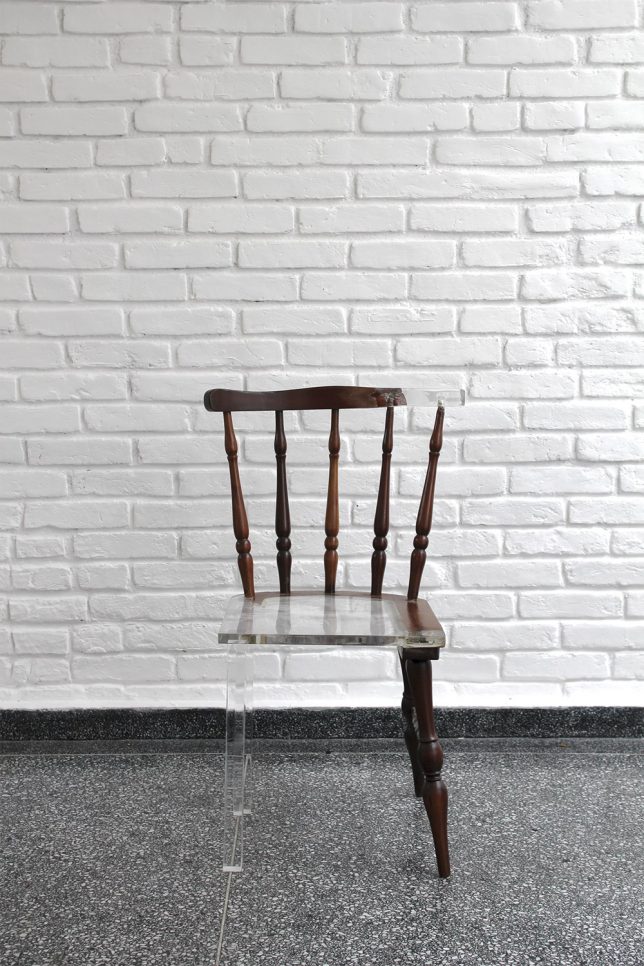
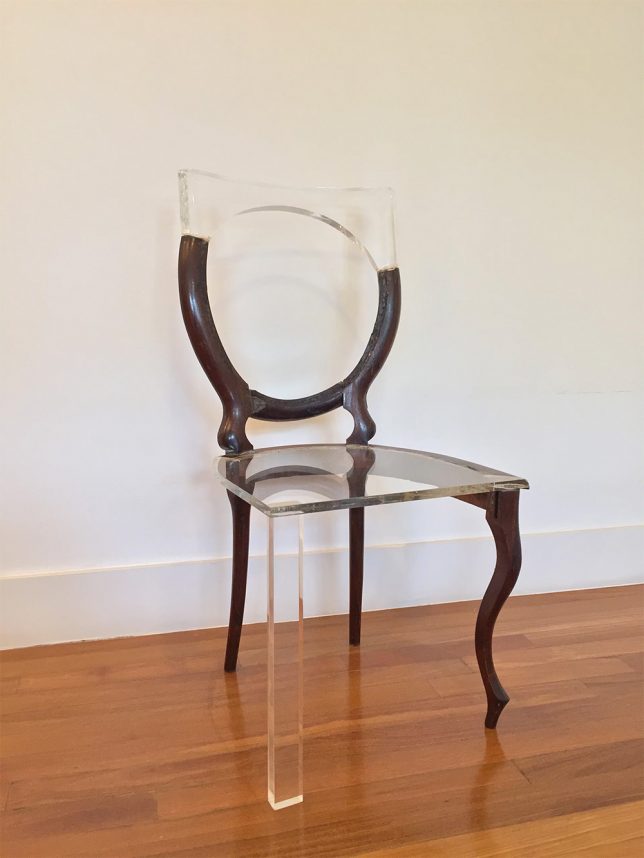
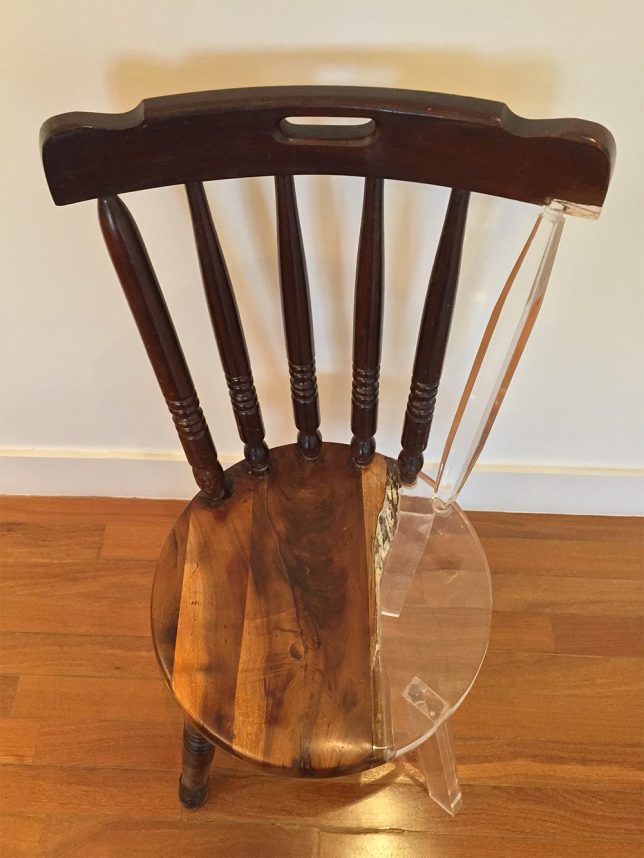
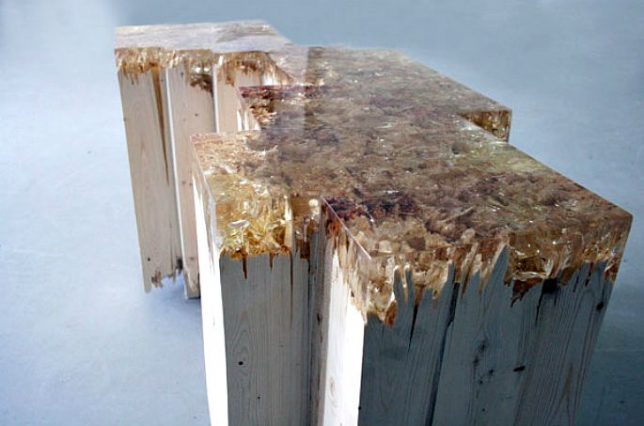
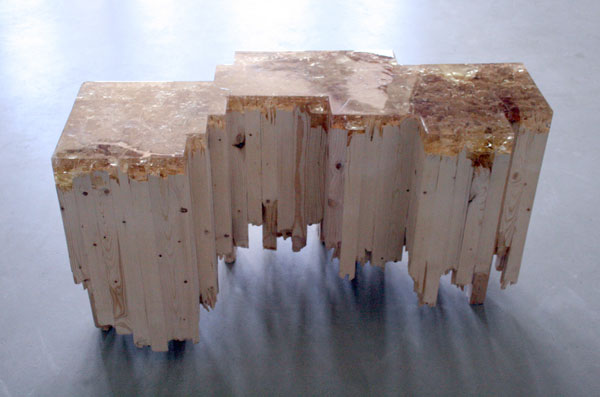
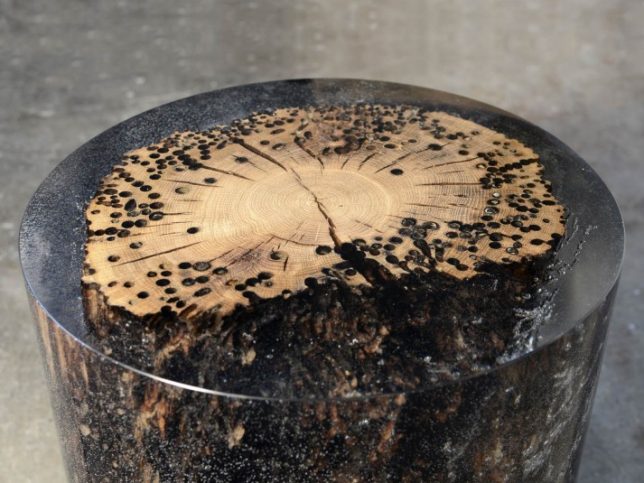
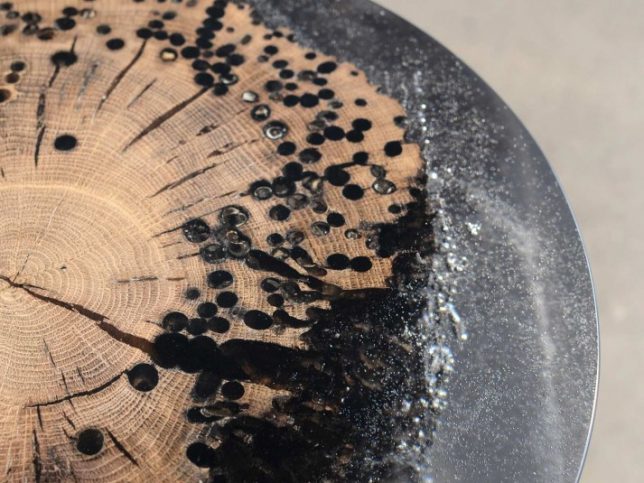
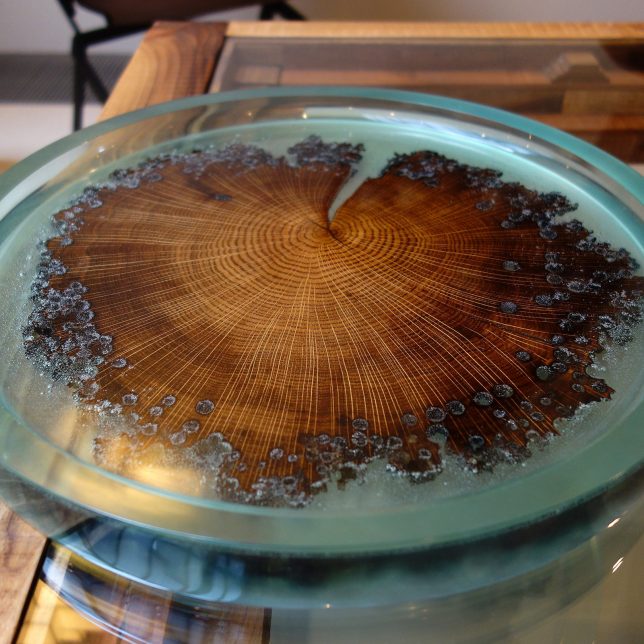
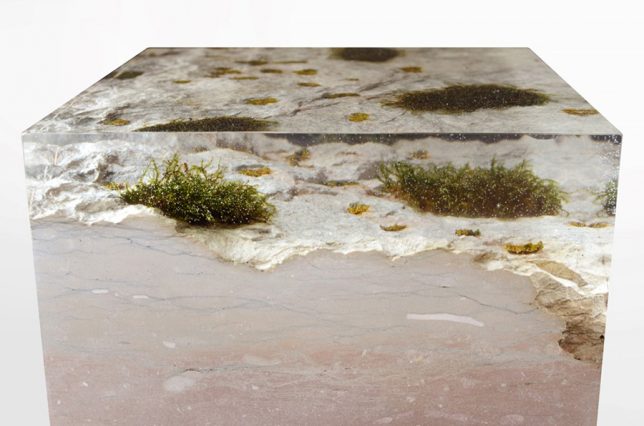
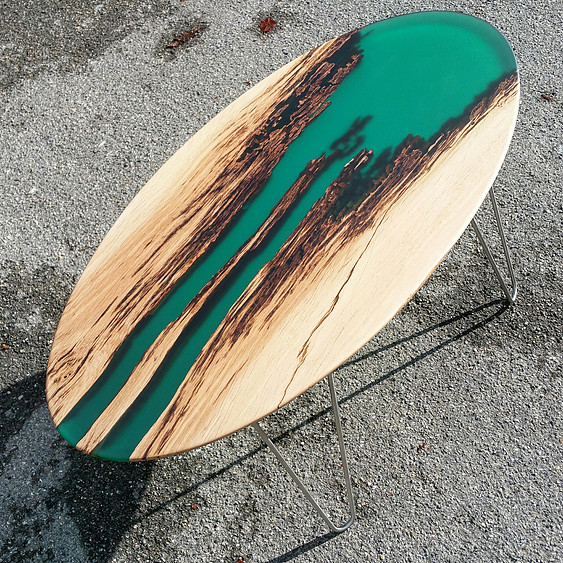
When married with clear resin, voids in wood or stone created by years of use, natural burls, intentional damage and even shipworms are made whole again, while leaving their ‘wounds’ visible. Broken furniture is repaired with ghostly additions, splintery snapped boards are made smooth and literally ancient time-worn wood is preserved for posterity like insects caught in amber. The results not only salvage items though to be beyond repair, but also make them feel like museum-worthy artifacts.

Disappearing Furniture: Broken Pieces Healed with Resin

Pieces of furniture that seem broken beyond repair are proven salvageable after all, with their missing pieces seemingly made invisible. Tatiane Freitas created the series ‘My Old New chair’ using translucent acrylic, the new elements matching the scale of the older pieces but not the style. The results intentionally leave the ‘wounds’ of the old furniture visible and highly noticeable, as if the acrylic is a ghost of what once was or a hint at what it could evolve into.

Broken Board Series by Jack Craig

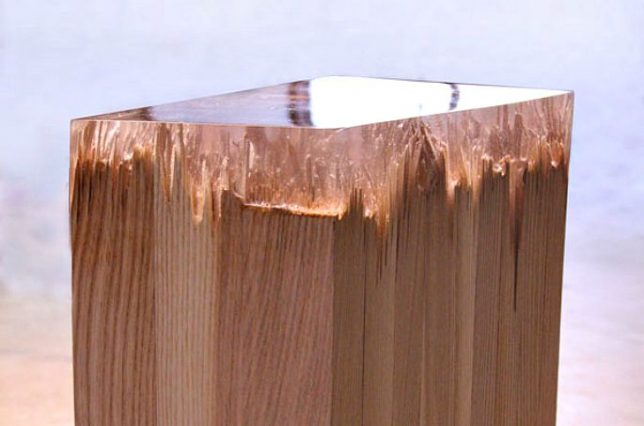
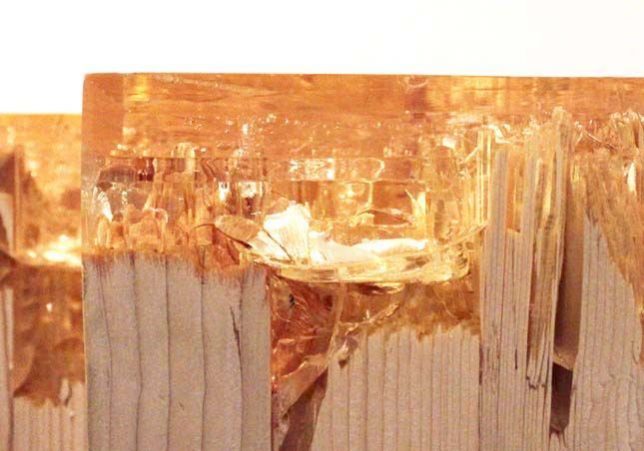
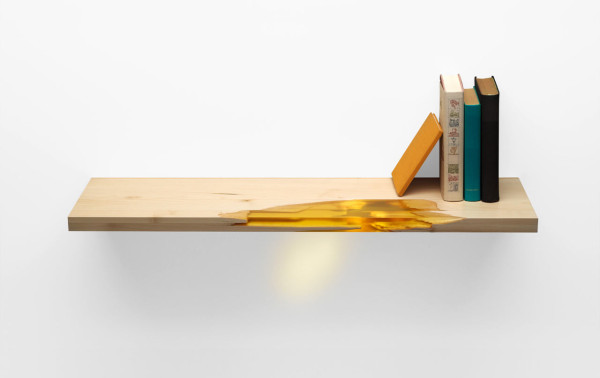
Smashed and reconstituted pine wood gets a whole new purpose – and surface – thanks to Detroit-based industrial designer Jack Craig, who seals them with caramelized resin for his ‘Broken Board Series.’ The splintered ends of the wood are visible through the resin for an interesting textural effect.

Forest Artifacts by Alcarol

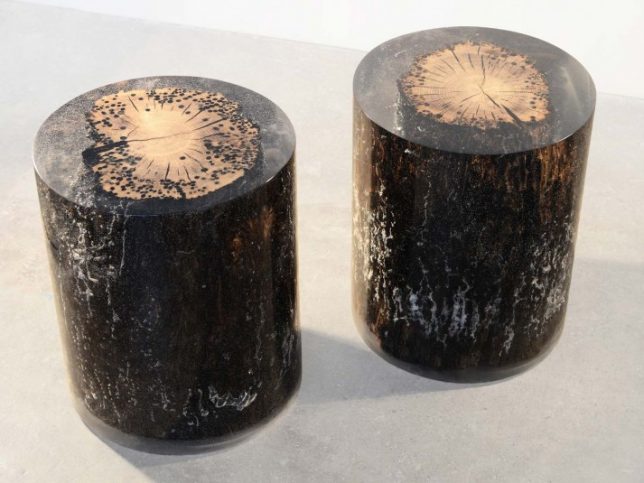
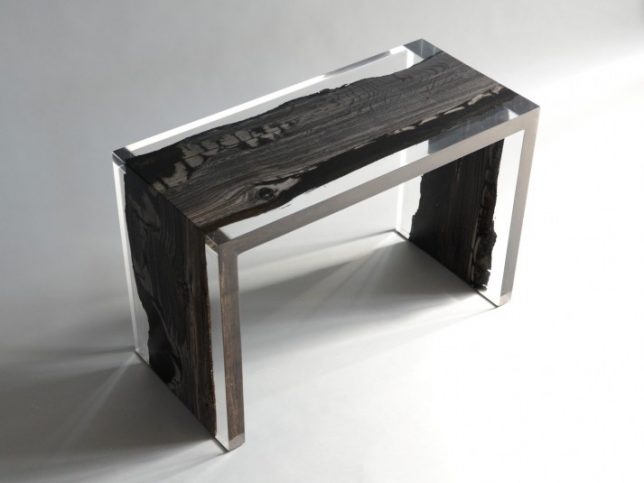
Design duo Alcarol creates ‘forest artifacts’ by pairing wood and resin in various designs, from an irregular wooden bench made sharply rectilinear to ‘fisheye stools,’ the latter of which features timber poles salvaged from the foundations of the city of Venice. The poles, the designers explain, were “driven into the lagoon’s caranto layer – a mixture of solid clay and sand situated at great depths. In spite of everything, Venice continues its fight against the muddy ground and ever increasing water levels. Fish Eye, which is sculpted by water, salt, shipworms and time, is a tribute to this epic submarine struggle that has transcended millennia. During their stay in the Laguna, these Oak logs are deeply sculpted by Teredo Navalis, shipworms that leave traces of their passing on the wooden surface producing striking patterns of circular holes, whilst avoiding the inner core of the log, allowing it to maintain its health and strength. This creates a beautiful contrast between other decay and inner robustness.”

MANUFRACT Furniture Inspired by Self-Healing Trees

The MANUFRACT series of furniture by Marcel Dunger mimics the way trees heal themselves by releasing resin into their ‘wounds.’ The hand-crafted furniture is made of broken wood patched with tinted resin in a manner reminiscent of kintsugi, the Japanese art of repairing a broken piece of pottery with gold.

VOLIS by Atelier Insolite

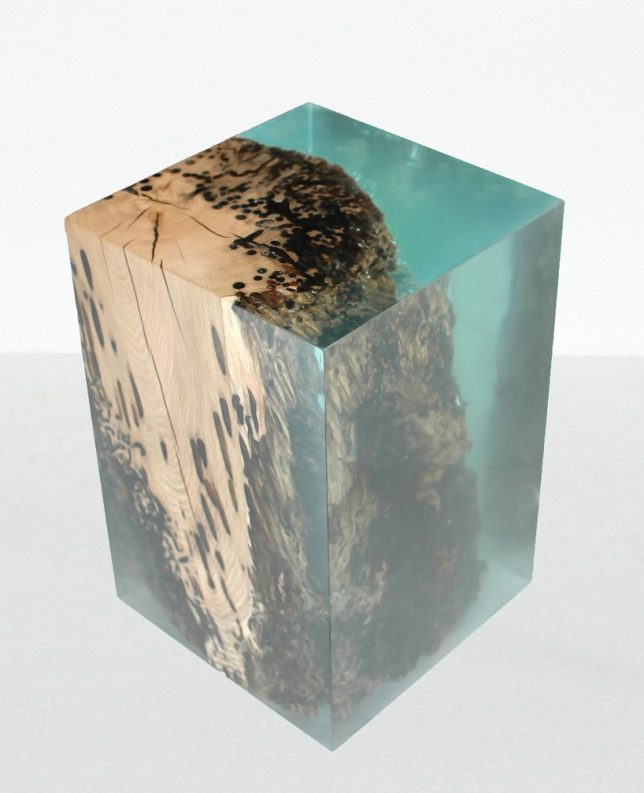
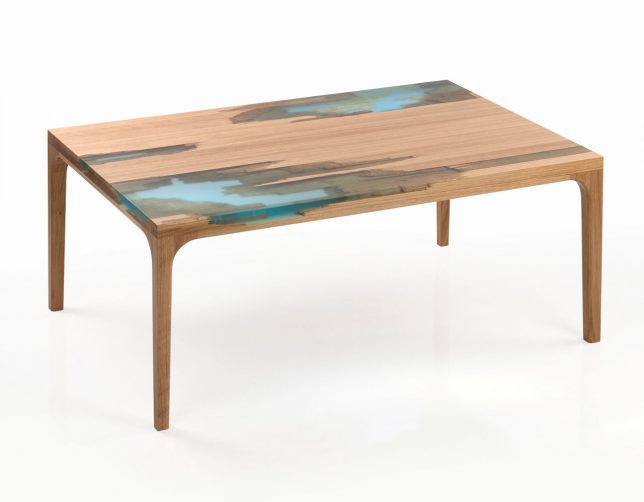
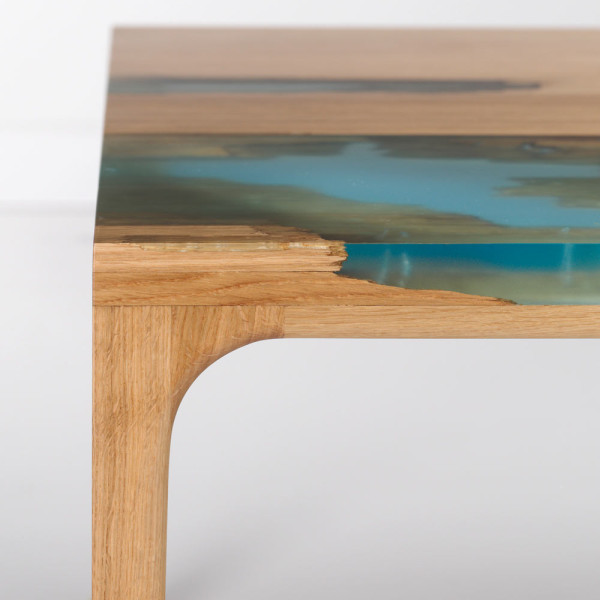
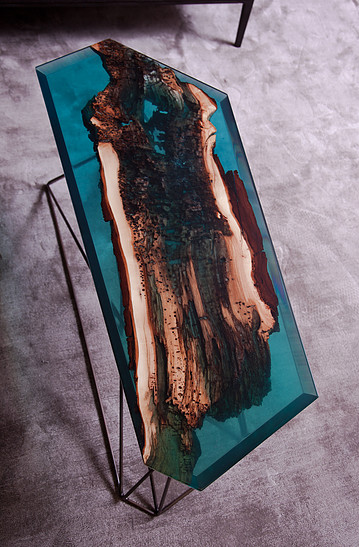
The ‘VOLIS’ series by Atelier Insolite embeds objects with resin, including shelves, side tables, coffee tables, consoles and other furniture items. The designers intentionally seek out wood with natural voids and broken-off elements so they can fill in the spaces with blue-tinted resin, giving the finished pieces an oceanic feel.

Next Page – Click Below to Read More:
Filling The Void 25 Resin Inlaid Wood Stone Furniture Designs

Share on Facebook


[ By SA Rogers in Design & Furniture & Decor. ]

[ WebUrbanist | Archives | Galleries | Privacy | TOS ]


WebUrbanist

 
Comments Off on Filling the Void: 25 Resin-Inlaid Wood Furniture Designs Become Whole Again

Posted in Creativity


KeyMission 360 firmware update improves stability under iOS 10.2

11 Apr

Nikon has issued a firmware update for its shockproof and waterproof KeyMission 360 spherical 360-degree action camera that improves stability under iOS 10.2. It specifically solves an issue with unstable connections between the camera and Apple devices running the iOS 10.2-compatible version of the Nikon SnapBridge 360/170 app.

The new firmware can be installed by selecting Camera > Camera settings > Firmware version in the SnapBridge 360/170 app or Set > Firmware version in the KeyMission 360/170 Utility and checking the camera firmware version. More details and the firmware itself is available in the Nikon Download Center.

Articles: Digital Photography Review (dpreview.com)

 
Comments Off on KeyMission 360 firmware update improves stability under iOS 10.2

Posted in Uncategorized


A Drunkard’s Dream: This Cloud Rains Tequila Whenever it’s Rainy Outside

11 Apr

[ By SA Rogers in Design & Guerilla Ads & Marketing. ]

It rains more in Berlin than it does in England, especially during the cold and dreary months of winter, so enticing Germans to vacation in Mexico with a cloud that literally rains tequila is probably pretty effective. And this isn’t just a cloud-shaped installation that pours a mist of tequila out of a showerhead or something equally predictable – it’s a real cloud of tequila condensation that turns liquid in response to vibration, timed to coincide with real-life rain outside.

United States-based creative agency LAPIZ teamed up wit the Mexico Tourism Board to create an ad specifically tailored to boost German tourism to the sunny, margarita-soaked nation. Installed in Urban Spree, a Berlin art gallery, the project mimics the look of natural clouds by containing condensation within a cumulus-shaped sculpture. You can see the mist rolling off the cloud in Instagram videos of the installation.

#tequilacloud Serving free shots of delicious Silver Tequila since 2016. Come to Urban Spree, Revaler Strasse 99 for a taste #mexico #travel #tequila #art #berlin

A post shared by Ernesto Adduci (@eadduci) on

this is how @pojpojberlin spends feierabend. with #tequilacloud @urban_spree come by. #pøjpøj #feierabend #feierabendtequila #mexico #olé #avocado #tequila

A post shared by pøj pøj (@pojpojberlin) on

Make it rain tequila. #tequila #cloud #artistic #installation #vapor #alcohol #mexico #agave #makeitrain #pouritup #kunst #innovation #wowfactor #cloudydrink #tequilacloud #liquid #tequilashots #shot #urbanspree #weather #cloudy #smoke #vape

A post shared by Cristina Zambet (@cristinazambet) on

A flash of lightning heralds an oncoming tequila storm, and onlookers gather to hold a shot glass under the cloud. It’s the third year in a row that Lapiz teamed up with the tourism board to get Germans to Mexico, and it seems certain that this would be their most successful effort yet. Who doesn’t like free tequila? “This time, we combined the Mexican thing Germans love most, tequila, with the type of weather they like the least, rain, and created the Tequila Cloud,” they explain.

Share on Facebook


[ By SA Rogers in Design & Guerilla Ads & Marketing. ]

[ WebUrbanist | Archives | Galleries | Privacy | TOS ]


WebUrbanist

 
Comments Off on A Drunkard’s Dream: This Cloud Rains Tequila Whenever it’s Rainy Outside

Posted in Creativity


2017 Pulitzer Prize winners for photography announced

11 Apr

The winners of the 2017 Pulitzer Prize for photography have been announced, which illustrate violence in two locations on opposite sides of the world.

The award for breaking news photography went to freelancer Daniel Berehulak, whose work published in The New York Times showed the violence in the Philippines during a government crackdown on drug dealers and users.

The other finalists include the AP Photography Staff and freelancer Jonathan Bachman.


The Chicago Tribune’s E. Jason Wambsgans won the award for feature photography. His photos document the story of a 10-year-old boy and his mother as they try to recover from the child’s shooting in Chicago.

The other contenders in this category were Katie Falkenberg of the LA Times and Jake May of The Flint Journal.

Each prize winner receives a $ 15,000 prize as well as the famous Pulitzer medal.

Via: The Pulitzer Prizes

Articles: Digital Photography Review (dpreview.com)

 
Comments Off on 2017 Pulitzer Prize winners for photography announced

Posted in Uncategorized


Boxfish 360 Micro Four Thirds camera can record 5K spherical videos

11 Apr

Boxfish Research has announced the launch of its new Boxfish 360, a 5K camera equipped with multiple Panasonic Micro Four Thirds sensors able to capture spherical photos and video. This model is designed for professional use and, according to the company, offers better clarity and colors than similar 360-degree rigs created using multiple action cameras. The camera made its debut at CES 2017.

Boxfish 360 features 185-degree circular fisheye lenses with an F1.8 maximum aperture, an internal battery offering up to 90 minutes of recording per charge and both 1/4-inch and 3/8-inch mounting threads. Though the cameras are secured within a fully waterproof housing, Boxfish Research says the battery and microSD cards (up to six supported) can be quickly accessed without using tools via a hatch.

Videos are recorded using the H.264 codec with a bit rate of 60Mbps, and still images are saved as JPGs and DNGs. Boxfish 360 offers up to a claimed 10 stops of dynamic range and records camera metrics such as water temperature, water depth and camera orientation during recording. Operators are given various elements of control, such as underwater start/stop and manual aperture control. 

Boxfish released the camera for preorder last week and will begin shipping the next batch starting May 15. Interested buyers can pay a 50% balance of the $ 14,990 USD price tag to secure a unit, or buyers can pay outright ahead of the shipment date. A total of ten cameras are offered in the next batch, some of which are already reserved.

Via: Boxfish Research

Articles: Digital Photography Review (dpreview.com)

 
Comments Off on Boxfish 360 Micro Four Thirds camera can record 5K spherical videos

Posted in Uncategorized


Fujifilm GFX 50S vs Pentax 645Z vs Hasselblad X1D

10 Apr

Introduction

Digital medium format has previously been the preserve of professional photographic businesses; commercial concerns that can justify investing tens of thousands of dollars on a tool that offers resolution and image quality beyond the capabilities of consumer cameras (or, at least, those that can recoup the rental cost). These cameras have tended to have 54 x 40mm (essentially the 645 film format) or 44 x 33mm sensors: considerably larger than used in most DSLRs. They were also often based on CCD chips, since these are easier to build on large scales and small volumes and cleaner at low ISO settings (though with limited dynamic range by modern standards).

As full frame cameras have become less expensive, this has put pressure on the medium format market (particularly the smaller variant) but has also seen CMOS technology filter upwards. This has led to us starting to see the first sub-$ 10,000 medium format cameras. The first that a dedicated hobbyist might consider, as well as wider professional market. So, as we keep being asked, which of these cameras is best?

Introducing the contenders

Launched in 2014 The Pentax 645Z is the granddaddy of ‘affordable’ medium format. After the somewhat fitful development process of the original 645D, the arrival of CMOS technology brought us the 645Z. Built around a 50MP 44 x 33mm sensor, Ricoh’s flagship camera is a traditional DSLR that uses the film-era Pentax 645 mount (hence the name).

In the past year, two more companies with medium format heritage have unveiled their offerings, but both Hasselblad and Fujifilm have developed new, mirrorless systems, rather than continuing to use existing mounts. This allows the Fujifilm G and Hasselblad XCD systems to be considerably smaller with shorter flange back distances (especially in the case of the Hasselblad, which does without a focal plane shutter). As well as size, this shorter flange back distance leaves room to adapt all sorts of legacy lenses: something both Hasselblad and Fujifilm have promised.

We’ve been shooting all three cameras and look at their relative strengths in different shooting scenarios.

Landscape work – durability

One of the most obvious requirements a camera needs for landscape work is a degree of solidity and resilience. As soon as you venture into the outdoors, rain, mud and grit will all feature to a varying degrees.

All three of these cameras claim they’ve been designed with a degree of environmental sealing in mind. None of the makers go so far as to guarantee any degree of weather resistance, so it’s difficult to know whether any one of these has the edge over the others. There are plenty of stories of Pentax DSLRs surviving all sorts of mistreatment, so we’d be fairly confident of the 645Z. The Fujifilm and Hasselblad it’s harder to know about, especially since both are likely to sell in small enough quantities that it’ll always be difficult to establish a statistically useful sample size.

Landscape work – battery life

Another major factor is battery life. While it’s quite possible to carry spare batteries with you, it’s not always practical to change them in ‘the field.’ It can also be frustrating to find yourself having to worry about battery level or change batteries with any kind of frequency, especially as temperatures and battery endurance drop.

The 645Z’s DSLR design gives it a huge advantage in terms of battery life. Given you can do most of your shot setup using the optical viewfinder, the camera gains a rating of around 650 shots per charge from its relatively small battery.

The Fujifilm GFX 50S requires either the rear screen or electronic viewfinder to be active making it rather harder on batteries. Thankfully its powerpack is a lot larger, helping it to a still respectable 400 shot per charge rating. The Hasselblad does least well in this respect, despite it doing everything it can to reduce usage by constantly shutting its screen off. A smaller battery than the Fujifilm and no percentage indicators mean it’s the camera I’d most worry about staying alive, when I was working off the grid.

Operability (with gloves)

Another aspect of outdoor photography is that it can often be cold: even in summer the best light tends to come first thing in the morning and last thing in the evening, which means colder temperatures in many parts of the world.

Of the three, the Pentax is the camera I’d be happiest operating with gloves. It has rather a lot of external controls but all of them are large and distinct enough to be controlled with gloves. The Hasselblad does well in this respect, too. Most of its buttons and dials are distinct enough to be operated without error and there’s no function that necessitates touchscreen control.

This leaves Fujifilm’s buttons and dials are rather small and recessed but most of its principle controls are easily operated with gloves. That said, its AF point joystick is arguably the easiest way to control AF positioning with gloves on.

Camera stability

To get anything like the full resolution out of these cameras, you need to keep them very steady. We’ve experienced shutter shock across a range of cameras, as higher resolutions highlight the issue in ever greater detail.

Large, high-resolution sensors are especially susceptible, since the mass of the shutter and mirror mechanisms involved are so much greater and the ability to discern any shake is that much higher. The Pentax offers a mirror-up mode, which allows you to separate the lifting of the mirror and the firing of the shutter, to allow the mirror-induced shake to dissipate (which is reassuring, given the camera’s Ikea-furniture-being demolished mirror/shutter sound). It also has a mounting point to allow stable attachment to a tripod when in the portrait orientation, however, there’s no electronic first curtain mode to reduce the impact of shake from the shutter mechanism.

The other two cameras don’t even have mirrors to worry about. On top of this, the Fujifilm offers an electronic first curtain shutter mode, which means there’s minimal mechanical movement before the exposure starts, all but eliminating the risk of shock and with no delay added before the exposure. The Hasselblad takes this philosophy one step further and contains no moving parts in the camera body at all (though there’s still a little clunk and click as the leaf shutter moves).

Landscape work – Portability

Perhaps the greatest benefit for a landscape shooter, though, is any reduction in size and weight makes it easier to work with. For all the internet bravado about real men liking big cameras, most people having to lug cameras around on a regular basis will appreciate any saving in size and weight they can get.

The Hasselblad X1D has a clear edge, here. It’s significantly smaller and lighter than any of the other three cameras here (it’s lighter than most full frame DSLRs). The Fujifilm is only 200g (7oz) heavier but will demand a considerably larger bag to house it. Then there’s the Pentax 645Z, which is the size of some European cars and, at over twice the weight of the X1D, is about as easy to carry. I jest, of course, but I’d still rather not have to hike any great distance with one.

Studio shooting – Operability

In the studio, there’s more time to consider and control your shot. The Pentax’s proliferation of direct controls takes sometime to learn, but there’s a control for just about everything. The Fujifilm, meanwhile, takes after its mass market cameras: direct controls for most exposure settings, then a handful of customizable buttons and an editable Q menu for less frequently changed options.

The Hasselblad takes the most minimalist approach and consequently is the one most likely to require menu diving. It does give direct access to most core features though.

All three cameras can be shot, tethered, using proprietary software or third-party plugins for Adobe Lightroom (the 645Z was the first camera we encountered to include a USB 3.0 connection, for exactly this reason). Sadly we’ve not yet had time to try them all.

Studio shooting – AF Coverage

Even if studio work buys you a little more time, as soon as you include a human subject, that luxury is curtailed. The more complex the pose, the less time you have to shoot it (assuming you’re not a monster to your models). Similarly, that perfect facial expression that you’ve been coaxing out of your subject with increasingly fanciful invocations won’t necessarily last long enough to switch to live view, zoom in and manually focus.

What you need is the best possible AF coverage which give you high precision AF points exactly where you need them. Fujifilm does best in this respect, giving you choice of 117 or 425 very fine AF points across a large area of the image. The Hasselblad offers slightly less coverage and only 35 fairly large AF regions.

The Pentax’s phase-detection system offers a very limited coverage, but in live view allows the AF point to be moved into 2030 positions. This number of positions means it takes a fraction longer to position your AF point but does mean you can be certain of being able to put the AF point where you need it.

Outdoor fashion – Flash Sync

Outdoor fashion photography combines many of the demands we’ve already seen in landscape and studio shooting and then adds some more. Away from the controllable lighting of the studio, a battle between ambient and supplemental lighting breaks out, a battle for which the best weapon is a high flash sync speed.

Sure, there are High-speed sync options that provide lighting for a long enough duration that they can successfully light an image even though the camera’s shutter is never fully open, but these tend to require increasing amounts of power the higher your shutter speed, which is not what you need if you’re using large lights and heavy battery packs. You may even hit the limits of your strobe’s capability, which then limits your ability to separately control ambient and subject exposure. Also, the relatively slow-moving shutters implied by the low sync speeds on the Pentax and Fujifilm cameras may limit even the use of some high-speed sync systems.

The Hasselblad is the clear winner here. Its use of leaf shutters gives greater control over ambient light without having to resort to specialist lighting and keeps control of light sources decoupled. Fujifilm has built an adapter for using its own leaf-shutter Fujinon HC lenses, allowing flash sync at up to 1/800th but there are no native leaf shutter lenses on the roadmap at present. Until that time, the Fujifilm tops out at 1/125 sec, as does the Pentax, unless you can find one of the seemingly discontinued 75 or 135mm ‘LS’ leaf shutter lenses. Meanwhile the X1D can sync all the way up to 1/2000th of a second, giving it a huge advantage.

Outdoor fashion – AF Coverage and speed

For outdoor posed shooting the urgency of capturing the moment before your model gets frustrated is made more pressing by the additional risk of pneumonia and heatstroke. Or just the need to catch the light you want, if you’re shooting away from the poles or equator. This requires fairly swift AF.

Try to shoot dynamic poses, dancing or action of any sort and the need for fast autofocus becomes even greater. None of these cameras excel in this respect. The Hasselblad is currently the slowest of the three, with the Fujifilm being the fastest in CDAF mode. The Pentax is a little quicker when shot through the viewfinder using its dedicated phase-detection AF system, but this limits you to focus right near the center of the image and introduces a degree of inaccuracy and imprecision that tends to come from secondary-sensor AF. And we wouldn’t exactly recommend focus and recompose in studio setups or with the shallow depth of field and high resolutions of medium format.

Realistically, none of these cameras is great for fast-moving subjects, so the photographer’s technique for working around these limitations is likely to play just as much of a role.

The value of good JPEG/TIFFs

More so than the general consumer audience, the audience for this camera is likely to shoot Raw, with the expectation that post-processing will be a necessary part of the final image. So why would we care whether these cameras produce good JPEGs?

For a start, a good-looking JPEG can be used as a proof for a client almost as soon as you shoot the image.

Clearly this puts the Pentax and Fujifilm at an advantage, since these companies have more experience of delivering customer-friendly JPEGs. However, the GFX benefits further, not only gaining the results of Fujifilm’s well respected color response in JPEG, but also in that some of that color knowledge has been shared with Adobe, meaning that Film Simulation-simulating profiles are available in Lightroom and Camera Raw, to provide an attractive starting point for processing.

Ultimately, the nearer you can get to your preferred output at the start of the process, the less post-processing you need to do; saving time and money on every image.

Conclusion

Overall, there’s little to choose between these cameras in terms of image quality. This should be no great surprise, given they’re likely to be using sensors with similar underpinnings (even if we know some of the specifics of microlenses and ISO behavior differ).

However, that isn’t to say there’s nothing to choose between them. The Pentax 645Z is the immediate choice for anyone who wants an optical viewfinder. It also exists as part of a longer-established system (though some of the lenses significantly pre-date the demands of high-res digital).

Somewhat perversely, for all its compactness, the Hasselblad X1D’s high sync speeds and limited battery life mean it’s more comfortable in the studio whereas, despite its greater bulk, the Fujifilm’s faster focus and greater endurance makes it more tempting for shooting in further flung locations.

Some of these strengths and weaknesses aren’t set in stone: leaf shutter lenses for the Fujifilm would greatly extend its capability, as would updated firmware for the X1D (especially if it could result in faster and easier to position autofocus).

Overall, of course, these are exotic pieces of kit. Expensive and, despite the mass-market roots of the Pentax and Fujifilm’s interfaces, still more complex to shoot with than the full frame cameras that are probably the more sensible choice for most mortals, given the price, image quality and performance offered. That said, there’s something special about shooting with such daunting machines, and something that’s likely to immediately impress most would-be clients.

Articles: Digital Photography Review (dpreview.com)

 
Comments Off on Fujifilm GFX 50S vs Pentax 645Z vs Hasselblad X1D

Posted in Uncategorized


Artistically Enabled: 18 Weird & Creative Handicapped Parking Signs

10 Apr

[ By Steve in Culture & History & Travel. ]

Blue & white Handicapped Parking signs and stencils are one of urban life’s most familiar icons… and then there are those that have been creatively hacked.

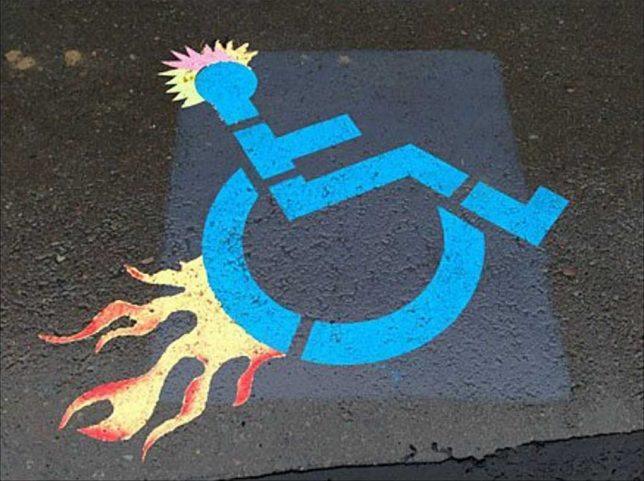
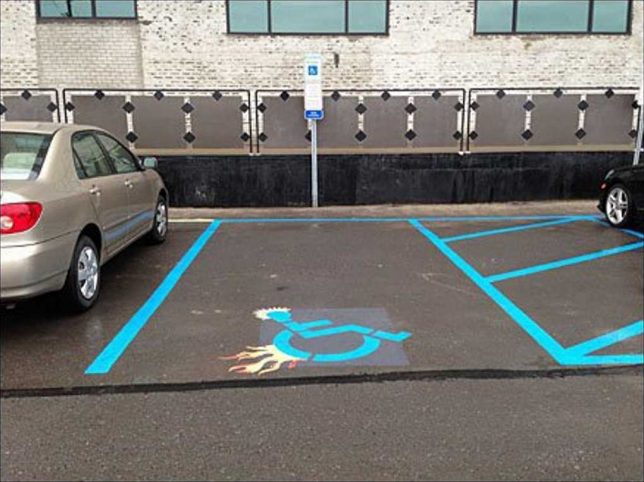
There’s a fine line between amusement and mean-spiritedness but when it comes to visual imagery, outrage is often in the eye of the beholder. With that in mind, this edgy, spiky, flame-enhanced “Parking Space Designator” (is that what the kids are calling them these days?) follows the road blazed by TV’s Dr House and his boss flame-graphic walking cane. You’ll find the stencil on steroids above outside a Retail Boutique Incubator, tentatively attributed to Sean McDougal of Disfunctional Design Store.

Interlocked & Loaded

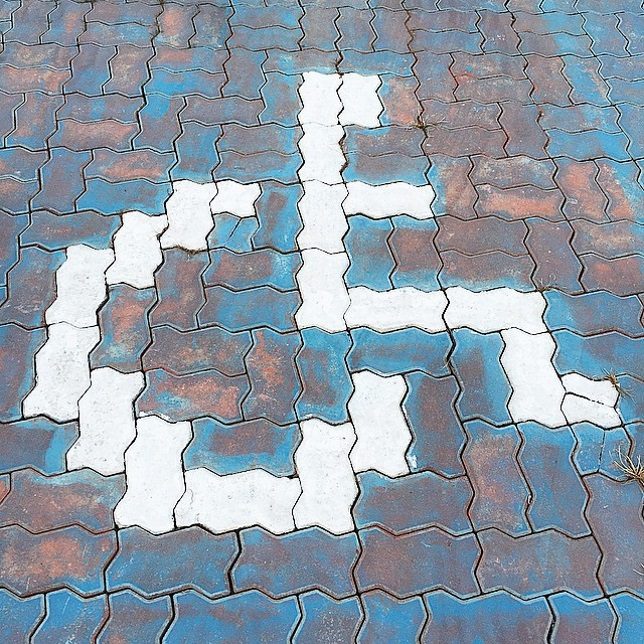
Those interlocking driveway paving stones can be fit together in any number of patterns, including a reasonable, recognizable facsimile of the accessible parking graphic. Flickr user zwei zwei (zwei1189) captured this image on February 5th of 2015.

Brazil Not

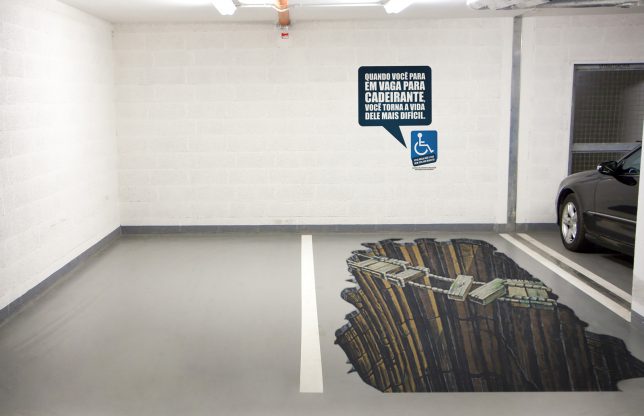
A parking spot reserved for the “Sorcerer” truck, we assume? Not quite – this clever conjunction of a designated handicapped parking space and some awesome eye-fooling 3D graphic art comes from Brazil, where there’s an ongoing problem of able-bodied people parking in handicapped spaces “just for a minute”. Yeah, riiight. The explanatory text on the wall roughly translates from Portuguese to read “When you stop in place for disabled, you make his life more difficult”. It’s a theme we’ll revisit further on in this post.

Hold My Beer And Park This

Flickr user Mike Klassen snapped this mildly yet distinctively modified accessible parking sign behind a BC Liquor store in late September of 2008. As for that “fine line” we mentioned previously, well, this edges close to it but we’ll leave the last word to Nathan Ridge, one of the commenters at Klassen’s photo page: “I’ve heard of discrimination against disabled persons, but this is the first time I’ve heard of it the other way around! I love it, especially since I’m in a wheelchair myself!”

Triple Chair Lift

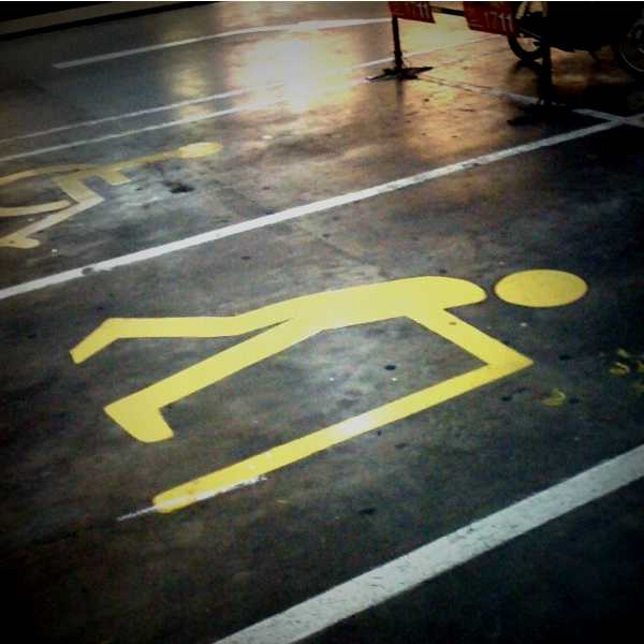
When Mexico sends us their handicapped parking place stencils, they’re not… actually sometimes they ARE sending us their best. Take the “EXCLUSIVO” stencil above, snapped by Flickr user Mary Doyle (buffoonmeatmary) on August 5th of 2007. We can’t say whether this awesome graphic shows a disabled person getting into or out of their wheelchair but either way, the image demands a Six Million Dollar Man bionic sound effect to accompany it.

Elderly Man Driver

Elderly man driver, that elderly man driver, he don’t say nothing but he must know something, he just keeps rolling along… at 10mph under the speed limit until he (or she) parks, right on top of this designated Elderly-only parking space. Who knew this even existed? One might state just being a senior citizen isn’t actually a “disability” in the strict sense, though don’t try convincing any grouchy cane-wielding oldster of that. Flickr user Wee Viraporn snapped what appears to be a standardized stencil on January 3rd of 2010.

Next Page – Click Below to Read More:
Enabled 18 Weird Creative Handicapped Parking Signs

Share on Facebook


[ By Steve in Culture & History & Travel. ]

[ WebUrbanist | Archives | Galleries | Privacy | TOS ]


WebUrbanist

 
Comments Off on Artistically Enabled: 18 Weird & Creative Handicapped Parking Signs

Posted in Creativity


Sigma sd Quattro H real world samples gallery

09 Apr
ISO 200 | 1/500 sec | F5.6
Photo by Carey Rose

With a large APS-H sized Foveon sensor, Sigma’s sd Quattro H promises a lofty 51MP of equivalent resolution when compared to more traditional Bayer-sensor cameras. The sd Quattro lineup is also the first series of Sigma cameras ever to output Raw files in an accessible DNG format, meaning you can open them with almost any Raw converter, as opposed to being locked into Sigma’s Photo Pro software. Take a look through our gallery of cherry blossoms, cars, cityscapes and studio shots and download a few files to check out the impressively sharp Foveon rendering for yourself.

Check out our Sigma sd Quattro H sample gallery

$ (document).ready(function() { SampleGalleryStripV2({“galleryId”:”4388344015″}) })

Sample photoSample photoSample photoSample photoSample photo

Articles: Digital Photography Review (dpreview.com)

 
Comments Off on Sigma sd Quattro H real world samples gallery

Posted in Uncategorized


Opinion: Shooting DNG on the Sigma sd Quattro H is a game changer

09 Apr

Introduction

With the changing of the seasons comes a big change in how I shoot Sigma cameras.
ISO 100 | 1/1600 sec | F5.6
Photo by Carey Rose

Fifteen years.

That’s how long it’s been since the release of the SD9, Sigma’s first digital camera, which was also the first camera to use the layered Foveon sensor design. From then on, for better or for worse, Sigma has continued to refine its unique layered sensors. While no one will argue that their cameras are capable of insanely sharp output, you still have to put up with an awful lot of shortcomings.

Early on, there was the low pixel density. And there’s still poor battery life. And Huge file sizes. Long card write times. Heat. Lots of heat. (And there’s plenty of other image quality concerns, as well).

But significantly, fifteen years is also the length of time we’ve had to use Sigma’s Photo Pro software to get any sort of decent results from these cameras. In the early days, you were almost forced into it, as the SD9 didn’t shoot JPEGs and Adobe Camera Raw support that was present up until the Merrills was laughable or simply non-existent. So until now, if you wanted to shoot Raw on a Sigma digital camera, you’d have to fire up Sigma Photo Pro and wait. And wait. And wait some more. And then relaunch it once it crashes, because crashing was a foregone conclusion (though to be fair, it is far less stable on Mac OS than Windows).

We as a staff collectively find, even above and beyond all of Foveon’s shortcomings, that the biggest hurdle to using Sigma cameras is their very own software. Even now, in the year 2017, Sigma Photo Pro is just painfully slow and unstable.

But Sigma is that rare company that listens to its customers. Last year while at CP+ in Japan our Technical Editor Rishi Sanyal was afforded a rare opportunity to sit down with the ever-charming, warmly receptive and almost unusually frank Sigma CEO Kazuto Yamaki and talk all things camera and optics. One of the topics covered was the usability of Sigma cameras, where we re-stressed the common request for wider Raw support of Sigma cameras but, more importantly, outlined what might go into making the most flexible DNG possible from Foveon Raw data. Just a short year later, the new sd Quattro interchangeable lens cameras can shoot DNG format Raw files straight out of the camera.

A hearty thank you.

And this just might be what Sigma needed to do to bring Foveon tech to the mass market – a place it really hasn’t been before.

Sigma + DNG = <3

The sd Quattro cameras’ ability to shoot in DNG means is that you can finally edit your Foveon Raw files using a converter other than Sigma Photo Pro. As you might expect, there’s a few caveats. When you enable DNG capture on the Quattro H, you don’t have an option to simultaneously capture a JPEG (although there is a whopping 13MB JPEG embedded in every DNG, should you want to dig it out).

The highest resolution output you can get from these is 25.6MP, which is the same resolution as the top sensor layer, as opposed to the upscaled 51MP files that are possible when shooting JPEG in-camera or using Sigma Photo Pro with an X3F file (but if you think you might want those files, check out the comparison at the end of our samples gallery). And while upscaled 51MP may sound suspect, the pixel-level sharpness of the Foveon files means it may not be as gimmicky as it initially sounds (we’ll reserve final judgement until after our in-depth testing).

Lastly, you’d better have a big memory card – the DNG files weigh in at around ~150MB each*. For comparison, uncompressed Raw files from the Nikon D810, Sony a7R II and Fujifilm GFX 50S weigh in at around 70MB, 85MB and 110MB, respectively (and two out of those three offer lossless compression to bring those sizes down anyhow).

Out-of-camera white balance Adjusted in Adobe Camera Raw
Despite setting the white balance manually in-camera, the default DNG output was too yellow for my taste, but adjustments in ACR were a breeze. Click through to see the crazy sharpness.

Okay, enough with the caveats. Opening these DNG files in Adobe Camera Raw is an almost surreal experience. You still get the absolutely astounding crystalline sharpness Sigma’s cameras are known for, but now you can make any adjustment you’d ordinarily make to a Raw file, and with a decently powerful computer, it all happens in real time. No more making a small adjustment and waiting ten seconds (or thirty) for a full re-render.

So far, the files appear as flexible as one would expect from Raw: white balance works wonderfully, and you can turn all noise reduction and sharpening off. We’re still examining if the 12 bit DNGs are losslessly gamma compressed 14-bit data as we’d asked for, but it’s not clear this would matter anyway: 12-bit DNGs and 14-bit X3Fs show similar flexibility thus far, which makes sense given the comparatively lower base ISO dynamic range of these cameras.

The fun factor

So editing the DNG files is great, even if you need to pick up a couple extra hard drives to store them. But the real kicker for me is that it changed the way I shoot this camera relative to previous Sigmas. It’s just more fun.

ISO 100 | 1/500 sec | F4
Photo by Carey Rose

I ended up using the camera more and taking more photos just to see how the camera would render various scenes – and I was regularly blown away. I no longer had to worry about living with the JPEGs and poor white balance, and I didn’t have to go through a whole batch of X3F files over the span of an entire evening with Sigma Photo Pro.

Previous Foveon cameras I’ve used were good for some quirky fun, but I never really considered picking them up off the shelf after we’d put the wraps on our older sample gallery. But now, without the workflow woes of the past, the sd Quattro H is something I’m going to be using a lot more often. If you’ve never tried a Sigma camera before, now is the time to pick one up and have a go for yourself.

See our Sigma sd Quattro H sample gallery

$ (document).ready(function() { SampleGalleryStripV2({“galleryId”:”4388344015″}) })

Sample photoSample photoSample photoSample photoSample photo

*Foveon sensors don’t directly capture red, green and blue information, nor do they require the demosaicing process required by Bayer sensors, so they require totally different processing (hence the historic lack of good Raw support). The Quattro H performs the necessary deconvolution and interpolation process required to derive red, green and blue information for each pixel, so that the Raw processing software doesn’t need to. Unfortunately that means having to save three 12-bit values for every pixel (which, given the lower resolution of the camera’s lower two layers, means storing twice as much data as was actually captured), resulting in 150MB files.

Articles: Digital Photography Review (dpreview.com)

 
Comments Off on Opinion: Shooting DNG on the Sigma sd Quattro H is a game changer

Posted in Uncategorized