RSS
 

Archive for April, 2017

How to Get the Most Out of Photographing at Golden Hour

09 Apr

The infamous golden hour is a photographer’s dream. That one key period of time that could make even the most stringent artist swoon with inspiration. The sun will dance across your viewfinder, and an endless array of possibilities will present themselves. Regardless of whether your photographic style is vibrant, monochrome, gentle, or contrasted, the golden hour will grant you the ultimate canvas upon which to paint your vision.

So, what is golden hour exactly?

golden hour

The golden hours include the first hour after sunrise and the last hour of light before sunset. Predicting this short window of time depends upon your geographical location and the current season. What makes this lighting situation so ideal for photography is the sun’s positioning relative to what you are photographing.

Due to the sun beginning its speedy rise or setting in the sky, the light source is now closer in relation to your subject. It is also going through more of the earth’s atmosphere at this low angle. When this occurs, soft diffused light is produced.

Generally speaking, soft light is considered the best canvas for a photographer. It does not create harsh shadows and tends to be very dynamic-range-friendly, as your images will not feature harsh shadows or blown-out highlights. The golden hour casts a warm color temperature as well, which can be enhanced upon or corrected via post-processing. This warm color cast lends itself to being a flattering illumination upon any subject of your choosing.

golden hour portrait

Five key lighting situations at golden hour

Any type of photography, from portraits to landscapes to action, can benefit from the use of the golden hour. There are five key lighting situations you can create during this time:

Front-Lighting

This is when your subject faces the sun directly. During the golden hour, this lighting gives a very warm feel to images. Because the sun is not directly above them, in many cases, your subject will not have to suffer the intensely bright light and need to squint. This lighting situation is very easy to photograph in and will make a lasting impression.

golden hour front-lighting

An example of front-lighting at golden hour.

Back-Lighting

Back-lighting occurs when the sun is behind your subject. During the golden hour, this lighting situation creates a soft, warm, hazy, glowing effect. Be sure to expose for your subject’s proper tones, and enjoy the masterpiece that you create.

Golden hour back lighting.

An example of back-lighting.

Rim Lighting:

Rim lighting is when the sun is positioned in such a way to create a halo around your subject. This halo is especially prevalent when placed against a dark background. The sun doesn’t need to be directly behind your subject to achieve this effect, though, as long as the background is dark. You will have to move around to find the sweet spot to achieve this effect, but a good way to start is by shooting from a lower camera angle.

golden hour - rim lighting

Sun Flare

A sun flare occurs when light hits your lens. Different lenses render different types of flares, so this effect is very fun to try with different types of equipment. To achieve a flare, just move your lens around until you see the light hit it through the viewfinder.

During the golden hour, the sun is at its optimal height for this exact outcome. A simple way to achieve a flare is to move your camera and lens so that your subject is only partially covering the sun. Move around (sometimes you only need to move an inch or two left or right) to find the angle that best creates a sun flare. Another way to achieve a flare is to position your lens and camera so the sun is just out of the frame.

Read more on sun flares: How to Photograph Sun Flares: 14 Tips for Beginners

Golden hour sun flare

An example of a sun flare.

golden hour

A different type of sun flare.

Silhouette

A silhouette is created when your subject is completely black without detail, against a bright background. When the sun is near the end of the golden hour, it becomes fairly easy to achieve a silhouette. Photograph your subject directly against the light, and add some contrast in post-processing.

Golden hour silhouette.

An example of a silhouette at golden hour.

There are several tips to truly take advantage of the golden hour. Here are a few to help you:

1. Observe the sky the day before

The best way to figure out when the golden hour will be at its peak is by observation! Peek out of the window the day before your photo session, and see how the sun moves and how the light changes. This will allow you to get a better idea of what the lighting situation will be like on the day of your shoot.

golden hour

2. Plan your photo session around golden hour

No one wants to feel stressed, anxious or rushed when doing photography, so be sure to plan well ahead of time! It is a good idea to begin setting up for your photo session an hour before the golden hour. That way you have plenty of time to ensure that your subject and equipment are ready for that perfect moment.

Golden hour portrait

Anani Inaru with Trinket photographed at golden hour.

3. Watch out for clouds!

Depending on the level of cloud coverage in the sky, your golden hour can change (or not appear at all!). Clouds can enhance the brilliant sunrise or sunset, or they can block your view.

golden hour

4. Set your White Balance to Cloudy

By changing your White Balance setting, you ensure that the images you produce hold true to the colors you want to appear. This allows you to get the warm look the golden hour is famous for – choose Cloudy or Shade to add even more warmth and golden hues to your images.

golden hour

5. Shoot with a wide aperture

How the light dances during this brilliant hour can make for an incredible bokeh (the aesthetic quality of the out-of-focus parts of a photograph). The dazzling yellows, reds, oranges, and golds make a rather exceptional backdrop.

Golden hour

Golden hour bokeh.

6. Keep photographing, because the light will change every couple of minutes!

The sun moves faster than you may expect, so keep shooting and don’t stop! Every position of the sun will create a brand new image for you to take.

golden hour

7. Try different angles and positions.

The sun flares, colors, and intensity of the light in your image are all affected by how you angle your lens. Experiment and try as many different positions as humanly possible! The best way to get the absolute most out of the golden hour is to take advantage of how easy it is to manipulate this unique lighting situation.

golden hour

8. Underexpose a bit to add more vibrancy

You can always lighten up your subject(s) in post-processing, but it is harder to darken an overexposed image. Underexpose just a bit to bring out the beautiful vibrancy of the sunset or sunrise.

Golden hour

9. Explore the use of HDR

Photograph multiple exposures and then layer them on top of one another in post-processing, and see how many incredible lighting details you can achieve. Read more on HDR: Step by Step How to Use HDR Merge in Lightroom

HDR golden hour

10. Play with post-processing

What colors can you bring out in your image? Use post-processing to really enhance the colors that you capture. You will be surprised at what colors you can see when the sky has a few clouds in it.

Conclusion

The golden hour is full of limitless possibilities, and no two photographs will look the same. Experimentation is key, explore the light. How do you use golden hour for your photography? Share your thoughts and images below.

The post How to Get the Most Out of Photographing at Golden Hour by Anabel DFlux appeared first on Digital Photography School.

Digital Photography School

 
Comments Off on How to Get the Most Out of Photographing at Golden Hour

Posted in Photography


Dockless Bike Shares: Convenience of Uber & Car2Go for Urban Cyclists

08 Apr

[ By WebUrbanist in Technology & Vehicles & Mods. ]

dockless share

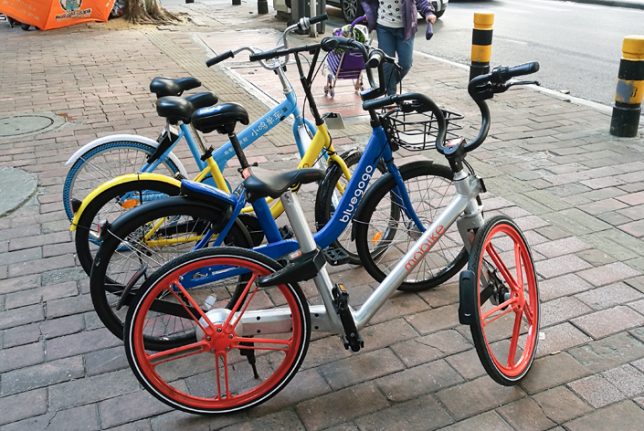
Promising the convenient pick-ups of Uber (found all over) and drop-offs of Car2Go (which can be parked anywhere), new cycle-sharing services aim to overturn paradigm of dock-to-ride-to-dock. A single company in China has already put more than a million such bicycles on the streets. Users simply pull up an app to locate the closest bike then unlock it digitally (by scanning a QR code) and head on their way.

Anyone who has used dock-based bike sharing systems know they come with problems — they might not be close by, or could be filled (when you’re dropping off) or empty (when you’re picking up). On the automobile front, similar issues with some sharing companies have been solved by allowing users to leave cars wherever they want. This can result in concentrations of cars, though, that need to be spread back out — and a similar problem exists for bikes.

While small but similar programs exist elsewhere, The Guardian describes the problem as it has unfolded in China: “Seven hundred miles to the south-west, on the streets of the fast-growing Pearl River manufacturing hub of Guangzhou, the colourful dockless share bikes are everywhere. They are parked up by the hundred outside shopping malls and metro stations, often blocking the pavement; others, rendered useless by missing saddles, broken locks.” In other places, the shared bikes are piled up in alleys and vacant lots.

Some companies believe that docking stations are the long-term solution, but others continue to experiment with alternative approaches, like: marking out preferred spots on the sidewalk then adding or deducting credits based on bike drop-off placement. For now, though, these reports have to be done manually, relying on crowd-sourced participants. As GPS gets more accurate, though, it may be possible to do this automatically. In a way, this method would replace physical stations by creating virtual ones in the form of acceptable micro-areas on the digital map.

Share on Facebook


[ By WebUrbanist in Technology & Vehicles & Mods. ]

[ WebUrbanist | Archives | Galleries | Privacy | TOS ]


WebUrbanist

 
Comments Off on Dockless Bike Shares: Convenience of Uber & Car2Go for Urban Cyclists

Posted in Creativity


Headed to Havana? Check out these photo spots

08 Apr

$ (document).ready(function() { SampleGalleryV2({“containerId”:”embeddedSampleGallery_6485310145″,”galleryId”:”6485310145″,”isEmbeddedWidget”:true,”standalone”:false,”selectedImageIndex”:0,”startInCommentsView”:false,”isMobile”:false}) });

Resource Travel has shared some helpful tips for photographers headed to Cuba, and now they’re offering a handy guide to Havana’s most photogenic spots. Photographer Edin Chavez shares his go-to spots for photographing the vibrant colors and culture that make up the fabric of Havana. Included are helpful tips, like the best time of day to go, and Google Map locations so you can save them for reference later.

Read the full post on Resource Travel

Have you been to Havana? Let us know what your favorite photo spots are in the comments.

Articles: Digital Photography Review (dpreview.com)

 
Comments Off on Headed to Havana? Check out these photo spots

Posted in Uncategorized


Lensrentals: Tamron 70-200 F2.8 G2’s resolution is excellent

08 Apr

Roger Cicala over at LensRentals has put Tamron’s new SP 70-200mm F2.8 Di VC USD G2 lens to the test. 

Cicala notes that on its own, the Tamron is impressively sharp all the way to the edges at its wide end, and even better in the middle of its focal range. Sharpness drops a bit at full telephoto, but Cicala still says the 70-200 ‘puts in a very good performance.’

The Tamron SP 70-200 F2.8 G2 impresses at its wide end of 70mm.

The Tamron’s performance is comparable to Canon’s 70-200 F2.8L II, though a bit softer at the wide end. When put up against what Cicala calls ‘the best 70-200 zoom on the planet’ – the Nikon F2.8 FL ED VR – the Tamron struggles to keep up, though the gap narrows at 200mm.

Sample variation from ten Tamron SP 70-200 G2 lenses at 70mm.

In addition to lots of MTF charts, Cicala provides some helpful information about copy variation using ten of the new Tamron 70-200mms.

Read the full story on the
LensRentals blog

See our Tamron 70-200mm F2.8 Di VC USD G2 sample gallery

Articles: Digital Photography Review (dpreview.com)

 
Comments Off on Lensrentals: Tamron 70-200 F2.8 G2’s resolution is excellent

Posted in Uncategorized


At the market: Panasonic GH5 sample video

08 Apr

We’ve been hard at work testing the new Panasonic GH5, and while we put the finishing touches on our review, we wanted to share a video we shot with the camera at Seattle’s Pike Place Market.

The video was recorded in UHD 4K with the GH5’s 4:2:2 10-bit color settings. To capture the wide dynamic range in many of the scenes, we filmed using VLog gamma and used a VLog to Rec.709 LUT as a starting point for color grading. We also wanted to see how well the GH5’s white balance worked, so the entire video was captured using auto WB, and we haven’t made any white balance corrections, allowing you to see how the camera did in this regard. Audio was recorded using the built-in microphones.

Enjoy this little slice of life in Seattle as we finish up our review of the GH5!

Articles: Digital Photography Review (dpreview.com)

 
Comments Off on At the market: Panasonic GH5 sample video

Posted in Uncategorized


Everypixel Aesthetics uses neural networks to judge your photographs

08 Apr

Designers and image editors often have to browse through large numbers of low-quality photographs before they find the stock image that is most suitable for their purposes. Now, a new algorithm has been created to filter images based on their aesthetic value and get rid of the junk before it clogs up your search results. 

Everypixel uses neural networks for ranking stock images and for this purpose has trained the algorithms to judge the aesthetic value of a stock image in the same way as a human would do.

Everypixel’s CEO Dmitry Shironosov said: “Designers, editors and experienced stock photographers helped us generate a training dataset with 946,894 positive and negative patterns. We wanted to create a technology that can measure not only aesthetics of stock images, but their commercial potential as well. This is the main difference between our smart filter and other solutions that exist today.”

The neural network is capable of estimating the visual quality of an image and applies a score to every file which, if working properly, could save many man hours of human image curation. The algorithm is currently in beta stage but you can already test it with your own images on Everypixel. We’re not so sure about the scoring, but the system already looks pretty good at assigning correct keywords. How did your images do? Let us know in the comments.

Articles: Digital Photography Review (dpreview.com)

 
Comments Off on Everypixel Aesthetics uses neural networks to judge your photographs

Posted in Uncategorized


Leica offers free fix for faulty AF in some S lenses

08 Apr

Leica has finally announced that it has found a reliable replacement for the defective focus drive units in some of the S lenses from its medium-format system. The faulty units created complete AF failure in affected lenses and it has taken the company some time to find a permanent solution.

In what Leica describes as an act of ‘goodwill’ users with lenses that have already stopped working can have the AF drive units replaced for free, as can anyone whose unit fails up to five years from the date of purchase. Those whose drive units are still functioning can also have theirs replaced but for a charge of around $ 400 according to Red Dot Forum. That fee includes an extra year of product warranty for all lenses, no matter how old.

The free replacement service has been on offer since the end of 2015 but until now the company was replacing broken units with the same kind of drive motor. This new announcement relates to a new drive unit that is said to be more reliable.

Press release

Official Release from Leica AG

In some cases, a defect may appear in the autofocus drive unit of Leica S-Lenses. Under certain unfavorable conditions, this may lead to a complete loss of the autofocus function.

We are pleased to inform you that we have successfully completed the development and stringent quality assurance testing of a new generation of autofocus drive units under practical conditions.

Leica Camera AG is prepared to offer a free replacement of the autofocus drive unit of S-Lenses affected by this problem within the terms of a goodwill arrangement.

In light of this, we would like to remind our customers that we can offer free replacement of the autofocus drive unit only for S-Lenses affected by this concrete defect. The goodwill arrangement will remain valid for a period of five years from the date of purchase of the respective S-Lens.

Preventive replacement of the autofocus drive unit (including a warranty extension of 12 months) may be requested at your own expense.

Should the defect described above occur in one of your S-Lenses, we recommend that you send it directly to Leica’s Customer Care or the authorized Customer Care department of your country’s Leica subsidiary.

Contact:
customer.care@leica-camera.com or Telephone: +49 (0)6441 2080 189.
http://en.leica-camera.com/Service-Support/Repair-Maintenance

We consider it our obligation to provide only technically faultless products. We therefore particularly regret that the functions of one of your S-Lenses could have been be impaired by this defect. We hope that the goodwill arrangement we are offering will allow us to resolve this issue as soon as possible and rebuild and maintain the trust you have always placed in the Leica brand and its products.

Articles: Digital Photography Review (dpreview.com)

 
Comments Off on Leica offers free fix for faulty AF in some S lenses

Posted in Uncategorized


Mini Living: Breathable Cylindrical Home Slots Into a Tiny Alleyway

07 Apr

[ By SA Rogers in Architecture & Houses & Residential. ]

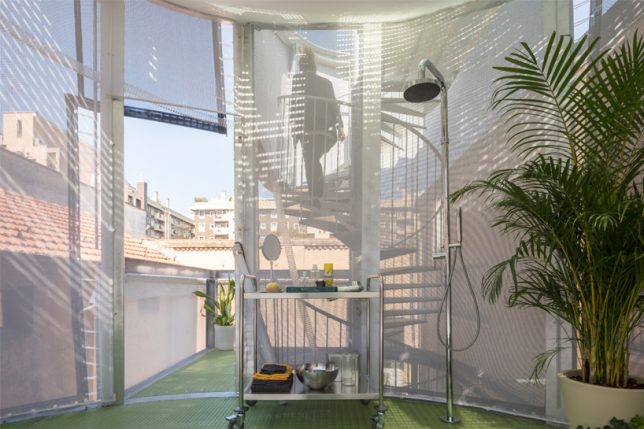
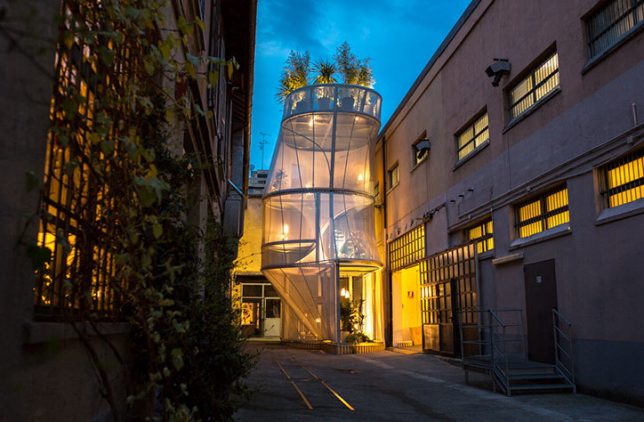
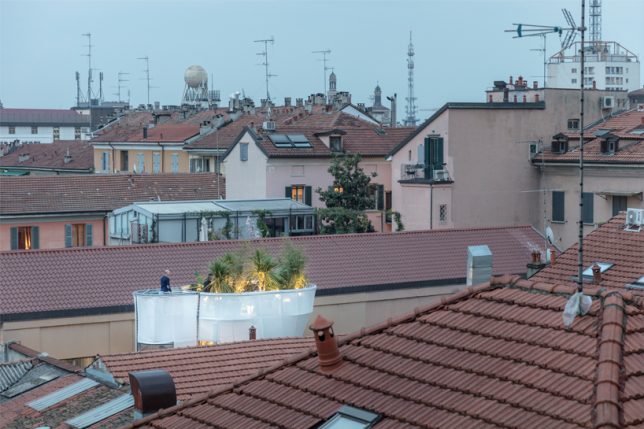
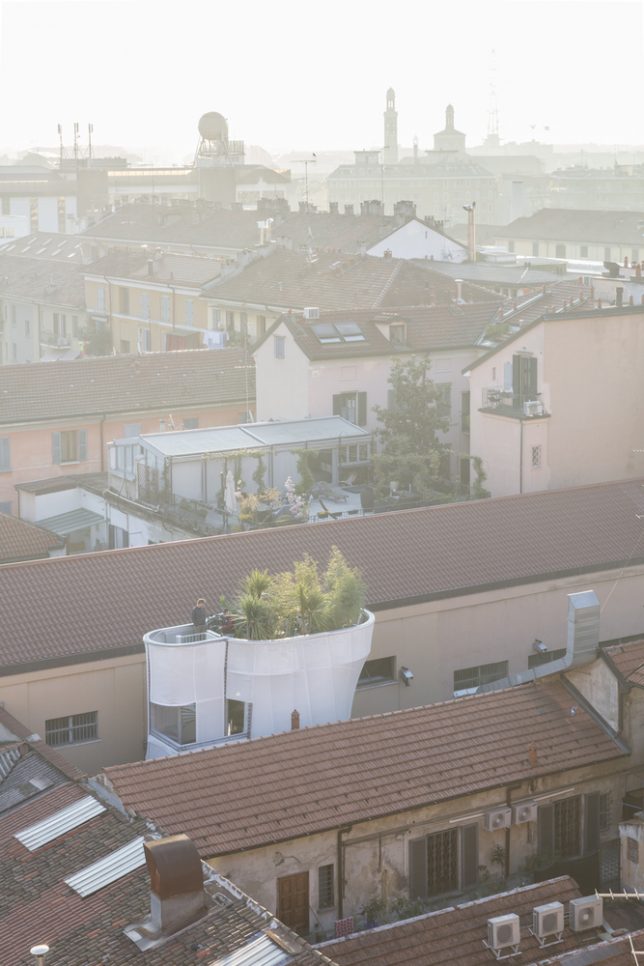
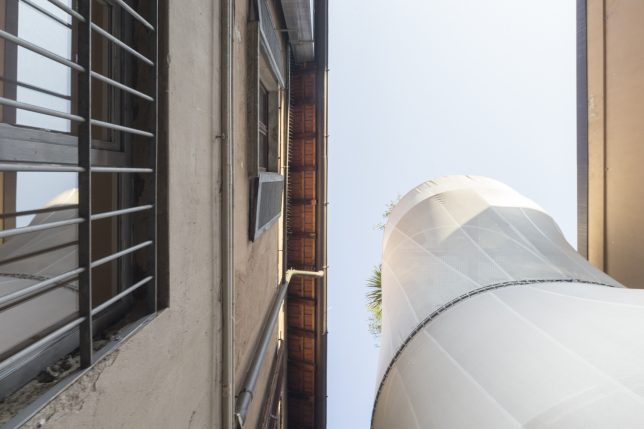
Extending beyond the existing rooftops like a fast-growing plant, this compact cylindrical home slotted into an unused urban plot in Milan features a breathable ‘skin’ connecting the interiors to the outdoors. Designed by New York-based architects SO-IL for Milan Design Week 2017, the MINI LIVING ‘Breathe’ installation is a response to the growing challenge to maximize available space in cities to comfortably accommodate more residences.

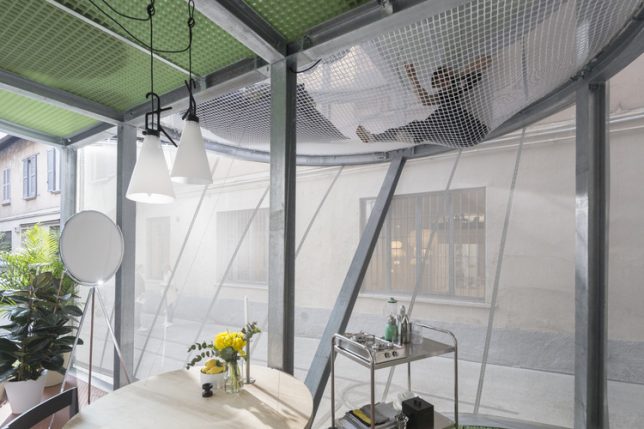
Built on a modular metal frame covered with a flexible, semi-translucent envelope that reacts organically to the environment, the home was designed for a family of three, and features six rooms and a lush rooftop garden. The ground floor is transparent to encourage interaction with the world outside; climb the spiraling staircase and you’ll find a series of private spaces for relaxation, work and sleeping, all separated by fabric canopies.

The outer skin lets in filtered sunlight, while the rooftop garden collects rainwater and helps filter the city air. Hammock-like nets suspended from the upper levels look out onto both the city outside and the interiors below. The architects describe the skin as a ‘jacket’ that can be zipped and arranged differently to protect against various external conditions. The more you layer it, the more privacy or water resistance it offers, so inhabitants can customize the needs of different rooms.

The idea, in part, was to ‘tune’ the interiors to the rhythms of the city, the weather and the sun outside, eliminating the closed-off feel that many homes tend to have. While the tent-like design may not be viable for many urban centers where cold weather, rain and theft might be a problem, it’s an intriguing idea for layering with more solid and secure materials like glass.

Share on Facebook


[ By SA Rogers in Architecture & Houses & Residential. ]

[ WebUrbanist | Archives | Galleries | Privacy | TOS ]


WebUrbanist

 
Comments Off on Mini Living: Breathable Cylindrical Home Slots Into a Tiny Alleyway

Posted in Creativity


MagMod and MagBeam Speedlight Modifiers – Thoughts and Field Test

07 Apr

MagMod made their debut on the photography scene in 2013 with their original speedlight flash modifiers. Recently, they debuted their latest lighting product for photographers, the MagBeam. Functioning as a fresnel lens for your flash, the MagBeam provides a creative boost by easily adding a blast of color or patterns to your images. This article will highlight some of MagMod’s newest products with a special emphasis on the new MagBeam.

What is MagMod?

MagMod (short for MagnetMod) is a company which offers a series of compact, super durable flash modifiers that easily attach to your speedlight flash via ultra strong magnets. The magnets make it super simple to switch out modifiers, or even add color gels without having to pause and interrupt your photo shoot for too long. We first introduced this unique speedlight modifier in a MagMod review awhile back (read it to learn more about the MagGrip, MagGrid, and MagGels).

Since that initial review, MagMod has expanded its product line to include the products below (the MagSphere, MagSnoot, MagBouce, and MagGrip). All of them have a built-in slot for easily adding color-correcting gels.

MagMod and MagBeam Speedlight Modifiers - Thoughts and Field Test

Basic MagMod kit with MagSphere, MagSnoot, MagBouce, MagGrip, and color gels.

MagSphere

MagSphere is an omnidirectional modifier that transforms your speedlight’s harsh flash into a bare-bulb light source by increasing the size of your flash over 250%. Use it like a small bounce card or on-camera diffuser.

The MagSphere

MagMod and MagBeam Speedlight Modifiers - Thoughts and Field Test

Food photo, taken with the MagSphere.

MagBounce

Made from a large piece of silicone, the MagBounce increases the size of your flash by 300%. It delivers incredibly soft light and is akin to having a small softbox that is super easy to setup.

MagMod and MagBeam Speedlight Modifiers - Thoughts and Field Test

A portrait, taken with the MagBounce.

MagSnoot

This unique, collapsible snoot can easily be expanded or contracted to deliver a focused beam of light. MagSnoot is perfect for using as a hair light or highlight in product or portrait photography.

MagMod and MagBeam Speedlight Modifiers - Thoughts and Field Test

Left to right: MagSnoot (collapsed), MagBounce, MagSphere.

MagBeam

If you’ve ever wanted to project a variable spotlight pattern as a photography supplement or background, MagBeam has you covered. This compact system gives you a portable Fresnel spotlight that produces an even light with soft edges and a soft shadow. Since this product is a little more complex that the above-mentioned modifiers, we’ll be doing a deeper dive into its features.

Two main uses of the MagBeam

MagBeam can be paired with one of two different lenses that produce very distinct effects. The MagBeam Tele Lens is used to project a focused beam of light, similar to a spotlight. It also gives you two to three extra stops of usable light. This is handy for wildlife photographers to light subjects in the distance. You might also use this Tele Lens to get a tight, concentrated, beam of light for creative portrait or product photography.

The other option is a MagBeam Wide Lens. Use it in conjunction with custom-made metal disks known as MagMasks and you can create projected light patterns for creative backgrounds or lighting effects. You can also stick MagMod color gels into the MagBeam to add a blast of color.

MagMod and MagBeam Speedlight Modifiers - Thoughts and Field Test

MagMod and MagBeam Speedlight Modifiers - Thoughts and Field Test

Taken with MagBeam, wide fresnel lens, MagMask, and creative color gels.

What’s in the MagBeam Kit box?

The MagBeam can be purchased in several different ways, but the most comprehensive way is to order the whole MagBeam Kit. It comes with the MagBeam itself, a tele lens, wide lens, and MagMask Standard Set. You can add on extra MagMasks as accessories, and load up on colored artistic and creative gels as optional accessories.

MagMod and MagBeam Speedlight Modifiers - Thoughts and Field Test

What’s in the box of the MagBeam kit.

MagBeam in Practice

The MagBeam itself is like a bigger, wider version of the MagSnoot. It’s made of black silicone and can be easily collapsed or extended. When collapsed, the MagBeam is super compact and easy to stick in your camera bag. Using the MagBeam is simple. All you have to do is attach the magnetic end to your speedlight flash via a MagGrip (NOTE: this is not included with the MagBeam you need to buy it separately), then stick a plastic fresnel lens on the wide end.

MagMod and MagBeam Speedlight Modifiers - Thoughts and Field Test

Collapsed MagBeam with a patterned MagMask and red color gel attached on one end. The wide fresnel lens is on the other end.

Speaking of the two Fresnel lenses, they look identical but are actually quite technical, so you must use them correctly to get the right effect. As an example, the wide fresnel lens must be used when the MagBeam is fully collapsed in order to use the included MagMasks (described in detail below) to create a light pattern. It’s not complicated, but you might have to do some experimenting and read some manuals before jumping right in.

Pratt_MagMod MagBeam Review_001

Things to Consider

There is only one possible thing to consider about the MagMod before investing in this system. MagMod magnets that attach to your flash are impressively strong. Once you attach the modifier, it certainly isn’t going to fall off by accident. But sometimes the magnets are a little too strong. I often have to use two hands to carefully pull the MagMod modifiers off to avoid accidentally breaking my flash. I also have to make sure the MagMod units aren’t too close to other magnetic items in my camera bag otherwise, they’ll stick together.

NOTE: If you have any concerns about using magnets next to your electronic equipment this video should answer your concerns. Items they do say to keep away from magnets include: 

  • Older spinning hard drives
  • Credit cards and bank cards
  • Older televisions
  • Speakers
  • Most importantly, pacemakers!

In Conclusion

Overall, I love the MagMod system and always have it in my on-the-go photography kit. In particular, I’ve been using the MagSphere for event photography and the MagBounce as a replacement to my Westcott Rapidbox softbox for food and portrait photography. In both cases, I appreciate how compact the modifiers are. They’re so convenient that I can stash them in my camera bag and simply pull them out whenever I need them.

While the MagBeam took a little more trial and error to figure out, I’ve also been using the wide fresnel lens and gobos to add a splash of color and creativity to my product and food shots.

If you shoot a lot with speedlights and are looking for compact and flexible lighting modifiers to add to your kit, I highly recommend the MagMod system!

The post MagMod and MagBeam Speedlight Modifiers – Thoughts and Field Test by Suzi Pratt appeared first on Digital Photography School.


Digital Photography School

 
Comments Off on MagMod and MagBeam Speedlight Modifiers – Thoughts and Field Test

Posted in Photography


Canon EOS Rebel T7i / EOS 800D Sample Gallery

07 Apr

We’ve posted an assortment of photos from Canon’s EOS Rebel T7i / 800D, which is the midrange camera in Canon’s lower-end DSLR lineup. The T7i features a 24MP APS-C sensor with Dual Pixel autofocus, fully articulating LCD and snappy DIGIC 7 processor.

It’s Spring here in Seattle, so expect plenty of flower photos!

Articles: Digital Photography Review (dpreview.com)

 
Comments Off on Canon EOS Rebel T7i / EOS 800D Sample Gallery

Posted in Uncategorized