RSS
 

Archive for April, 2017

Trends to watch at NAB 2017

21 Apr

Trends to watch at NAB 2017

Next week is the annual National Association of Broadcasters show, or NAB, in Las Vegas, Nevada. NAB is primarily an industry conference, and isn’t generally focused on consumer products, but we go to NAB because it often gives us a window into the future. Tools and technologies created for Hollywood or the broadcast industry have a funny way of tricking down to everyman products over the next few years, and that’s usually a good thing (3D television being a notable exception, in my opinion).

So, let’s take a look at a few of the product categories we’ll be watching at NAB next week that have the potential to impact us not-named-Spielberg types in the coming years.

Tools for Emerging Filmmakers

The filmmaking industry has changed a lot in the past few years: technology has become better, costs have come down, and tools suitable for serious content creation are now accessible to anyone with a dream of producing films and the passion to make it happen. This transformation has ushered in an explosion of what are often referred to as ’emerging filmmakers.’

These are people who often started making films with DSLRs or mirrorless cameras, but have grown their skills or businesses to the point where they need better, dedicated tools. They include independent filmmakers, small businesses working for commercial clients, or any number of other filmmaking roles. Some things they have in common are that they care about creating high quality content, have high expectations for production value, and they don’t have upwards of $ 20,000 to buy a single cinema lens.

This category has grown large enough that we’re seeing more companies which have historically catered to the high end cinema market now looking to meet emerging filmmakers’ needs. Whether it’s to drive revenue or create brand loyalists, we’re seeing more tools designed and priced for these users. By way of example, in the past year we’ve seen cinema lenses such as Cookes and Fujinons with sub-$ 5,000 price points. We expect to see even more products aimed at emerging filmmakers at NAB. 

Virtual Reality (VR)

Virtual reality is a technology that everyone, from manufacturers to content creators, seems to want to succeed, but which hasn’t quite managed to do so. There’s clearly a lot of unrealized promise, and even Hollywood executives will tell you they’re spending a lot of money trying to figure out how to make it work. Will this be the year VR makes the leap?

NAB will once again feature a dedicated Virtual and Augmented Reality Pavillion where the VR community can show off its latest technology. And there are clearly a lot of businesses betting big money on it, ranging from consumer-focused companies like Yi Technologies, which plans to announce VR capture devices at the show, to the likes of 360 Designs, whose Flying EYE drone system will livestream 360º 6K content from miles away for a cool $ 75,000. 

The big question is whether any of the VR products or technologies we see at NAB this year will be enough to get significant traction in the market, or collectively move the needle toward wider adoption of VR by consumers, but the industry isn’t giving up on this one yet.

8K Technology

We actually saw 8K display technology for the first time at NAB a couple years ago. And yes, it’s good bleeping amazing. Last year, Canon had an 8K reference display in its booth with a magnifying glass next to it, teasing you to try to see the pixels. After all, with 8K you’re collecting about the same number of pixels as a Nikon D810. In bursts of 24 or 30 frames. Every second. Think of the memory cards you’re going to need… but I digress…

What does 8K mean for photographers, videographers, and emerging filmmakers? Right now, not a lot. In fact, it’s unlikely we’ll even see 8K TVs being widely marketed to consumers for a number of years. But on the content creation side, there’s a lot to be said for 8K. With 4K quickly moving in the direction of becoming a standard for viewing content, 8K will give content creators the same advantages that 4K acquisition has for creating 1080p content. Right now we’re still talking about very expensive, high end pro cinema and broadcast equipment, but what we see at NAB is often a preview to what we’ll see in less expensive gear a few years down the road.

And 8K technology may come faster than we expect. We’ve seen 4K gain fairly wide adoption very quickly, and most of the industry seems hell-bent on a collision course between full 8K broadcast and the 2020 Tokyo Olympics (having already demonstrated it at London 2012 and run test broadcasts from Rio 2016). Some of this 8K goodness (or massive data storage overhead, if you’re the glass-half-empty type) may start filtering its way into our cameras in the next few years.

HDR Video

HDR video is pretty much what it sounds like: high dynamic range video that lets us see brighter brights, darker darks, and more shades in between. It’s like HDR photos, but with motion, and done well it can look pretty amazing. From a consumer perspective, most talk about HDR video these days relates to TVs, but the market is still sorting itself out. As the old adage goes, ‘The great thing about standards is that we have so many to choose from.’ Between HDR10, Dolby Vision, and Hybrid Log-Gamma, there’s plenty of room for the marketers to fight it out and educate consumers on the jargon.

But what we’re most interested in is content creation, or HDR video capture. Admittedly, there’s not a lot here for the enthusiast or prosumer at the moment. But… (and you know there’s always a ‘but’) Panasonic has already told us to expect Hybrid Log-Gamma to be included in the mother of all firmware updates – or, as we affectionately know it, MOAFU (really rolls off your tongue, doesn’t it) – that’s coming for the Panasonic GH5 in summer 2017. We look forward to testing it. Once we figure out how to test it.

Drones

Love ’em or hate ’em, people are going to use drones for all kinds of things. (At least until Skynet, and we all know how that ends.) Of course, what we care about at DPReview is aerial imaging, whether it’s still photography or video. The drone industry has exploded in the past few years, with tools ranging from octocopters that nonchalantly ferry around RED and Arri cameras to consumer products you can buy off the shelf and use to make your own movies.

As with other video categories, what started out as technology available only to well-funded production studios has quickly started to filter down to the emerging filmmaker or prosumer level. In fact, less than six months ago DJI introduced the Inspire 2 drone and Zenmuse X5S camera. That combo uses a Micro Four Thirds camera to shoot 5.2K CinemaDNG Raw video with a bit rate of 4.2Gbps. All for the price of a Canon 1D X II. This is Hollywood-level stuff. They even got cinematographer Claudio Miranda, ASC (Life of Pi) to make a film with it, though he had to carry it around in his hands for some shots.

Why do I bring up a product that was announced a few months ago? First, because it’s an indication of where the technology is going, and competitors will need to find a way to respond. We’ll be watching to see if that happens at NAB. And second, because for the love of God, DJI, can you please put this combination of tech into a regular camera? I don’t care if it’s a Micro Four Thirds camera the size of a Canon 1D X II, I will write you a check tomorrow.

Such is my plea.

Live Streaming

It used to be that we recorded home movies which we then forced our friends and family to watch over Thanksgiving. Later came the internet, so we could just send aunt Mabel a Vimeo link, or start a YouTube channel about cats with millions of followers.

Today that’s no longer adequate. Things must be on the internet, and they must be on now! Whether it’s Vloggers broadcasting live from a tradeshow floor using their iPhones, or sites like DPReview doing live webcasts from a studio, live streaming has gained a lot of momentum, and viewers are demanding higher quality live streams as time goes on.

We’ve already seen products to meet this need at a consumer level, whether it’s a DJI Osmo that uses your phone to broadcast on Facebook Live, or the Blackmagic Web Presenter, which allows you to turn virtually any high quality camera into a streaming broadcast camera. We’ll be on the watch for other products and technologies that will fuel our live streaming future. Though we can’t promise to stream them to you live.

Articles: Digital Photography Review (dpreview.com)
 
Comments Off on Trends to watch at NAB 2017

Posted in Uncategorized


How to Overcome Difficult Lighting Scenarios at Weddings

21 Apr

A wedding photographer has to be prepared for pretty much anything. Big belly laughs, impromptu outbursts of song and bear hugs can happen at any moment. Not to mention that the light is constantly changing and you’ve got yourself a schedule to keep. Let’s just say weddings keep you on your toes.

That’s why it’s always worth planning ahead and being prepared. Weddings rarely take place in just one location and moving from indoors to outside, or from sunshine to shade can cause a huge change in exposure. When not competing with the sun, indoor lighting poses new problems. Tungsten bulbs mixed with daylight causes all sorts of white balance issues. But this is why we love weddings, they keep us sharp.

Being prepared and practice is key to achieving consistent results. Here are three top tips on how to make the most of difficult lighting situations.

Couple portraits – How to find good light on a dull day

Believe it or not, it is raining at the point of capture in the image below. This photograph was taken in July in Surrey, UK. The British weather was doing all it could to play up to the stereotype it would seem.

Couple portrait weddings

Not every wedding takes place on a gorgeous sunny day and it’s not always feasible to shoot at sunset to capture the golden hour of light. What can you do to create images that your clients will love and to which you’re proud to put your name? Especially when the heavens decide to play against you. Here is the process I use when assessing lighting conditions and how this photograph was taken.

Understanding the principles of lighting is fundamental in any photographer’s quest to a beautifully lit photograph. Fortunately, these principles are consistent regardless of where you are located in the world or how expensive your equipment is. Whether you’re using the latest Canon or a generation old Smartphone, light can be manipulated to your advantage.

Approaching every scenario with the same set of questions can radically change how you see light and ultimately how you take pictures. Where is the light coming from, where is the even light and where are the greatest differences in the light?

Place the subjects in shade

Shade weddings

Here you can see the scene exposed to what the human eye sees. The background is correctly exposed which throws the foreground into darkness. What we want is to do is correctly expose the foreground to create a clean canvas with an overexposed background. In this scenario, there is about three stops difference in exposure, which is perfect.

Shade overexposed weddings

By placing the couple under the branches of the tree they are instantly evenly lit. There are no stray light rays coming through branches or dappled light on faces, and the pebbles on the driveway aid in reflecting light back onto the subjects. By exposing for the skin tones the background will be overexposed, providing a clean canvas.

A few tweaks in Lightroom to warm the skin and recover some of the highlights and voila! An evenly lit portrait on a rainy day. The added benefit of the tree branches is that they, of course, provide shelter from the wind and rain. This technique of using trees as shelter can also be employed on dry days that are windy. Even if the sun is shining, a venue on a hill can increase the risk of a veil blowing away!

Confetti

Why is this difficult? Depending on the location of the venue or church, you may be competing with changing light that the couple will walk through as they process down the confetti line. This is problematic as you are going to be walking backward, trying to capture the action, as well as tracking the changing light.

It is quite common in the UK for churches to have tree lined pathways, this creates a lighting issue as a break in the trees will cause the couple to walk from light to shade to light, etc. This can mean a dramatic jump in exposure.

Confetti lighting weddings

Take pictures of your hand

This is probably the easiest method to test the exposure of skin tones which can and should be used to test all of the techniques in this article. Take a photograph of your hand, inspect the screen and adjust accordingly. The wedding guests may look at you in an odd way, but when you’re working at a fast pace this can be a life saver.

Take images of your hand in both the light and the shade and note the difference in exposure before the bride and groom appear. Depending on how you shoot, it makes sense to only change one setting as you will be multi-tasking. The control for shutter speed on Canon cameras is located where the index finger naturally rests, and logically is the easiest of the settings to change.

Pay attention as the couple moves from light to shade, remembering the readings of your hand. The camera settings are displayed in the viewfinder and alternate between the two as the light changes. Where possible, pre-plan your shots, performing a mental run through of where people are likely to be and what lighting difficulties you may encounter.

Confetti lighting 2 weddings

First dance

Who knows what kind of lighting setup the DJ will have. Will they make a beautiful white spotlight for the first dance, or will they bust out some crazy laser snowflakes? Anything could happen. One method to overcome this is to shoot into the DJ’s lights and use them as compositional features rather than compete with them.

This isn’t the only option, sometimes shooting with the lights are beneficial as it gives you scope to capture the guest’s reactions. To create this shot, one flashgun at both corners of the stage (pointing at the center of the dance floor), elevated on tripods, and attached to Yongnuo wireless triggers were used.

First dance weddings

This setup offers two things. Firstly, by backlighting the subject even exposure on the skin can be achieved with no unwanted shadows. Secondly, you don’t have to worry about what the DJ is doing with their lighting setup.

It pays to ask the DJ before any dancing commences, what they plan to do and work with them. You would certainly be unlucky should you encounter anyone who wasn’t amiable in having a discussion. However, the point remains that they have a job to do. If they feel the song warrants a change in lighting then they will adapt it for the benefit of the wedding, not for your advantage. This is completely understandable, however, lighting surprises aren’t often welcome. This is why it makes sense to pre-plan and take control of the lighting.

Lens chimping technique

A caveat to shooting in this way is that it is possible to end up with equipment or the DJ themselves in the background. For this reason, an interesting tactic to employ is Sam Hurd’s lens chimping technique. By placing a convex lens element in front of your lens it creates cool flares and throws the background out of focus.

First dance 2 lens chimping technique

Practice is certainly recommended as an incorrect application of this technique can result in the lens element focussing all lights onto your sensor and completely blowing out the shot. The first dance is often a tricky one to shoot, it would be interesting to hear about your ideas and innovations below. Happy shooting!

Conclusion

Hopefully, these quick tips will help you deal with challenging lighting situations at weddings or any other photography opportunities. Do you have any others you want to share? Please do so in the comments below.

The post How to Overcome Difficult Lighting Scenarios at Weddings by Liam Smith appeared first on Digital Photography School.


Digital Photography School

 
Comments Off on How to Overcome Difficult Lighting Scenarios at Weddings

Posted in Photography


Ricoh to show-off 4K-capable Theta 360-degree camera at NAB

21 Apr

Ricoh will be showcasing a prototype Theta 360 camera that can capture 4K clips and live-stream video at the annual NAB show next week. In addition to its video capture and streaming capabilities, the Theta concept will also have four microphones, allowing it to capture ‘spatial surround-sound audio.’

In an interview at Photokina last year Ricoh told our Richard Butler that putting such features into the current form factor would be difficult due to processing power and heat management, so it will be interesting to see how they pulled it off.

DPReview will be at NAB and will drop by the Ricoh booth to see if we can take a closer look.

Press Release

RICOH TO SHOWCASE THETA 360-DEGREE CAMERA WITH 4K VIDEO AND LIVESTREAMING AT 2017 NAB SHOW

WEST CALDWELL, NJ, April 20, 2017 — Ricoh today announced it will be showcasing a prototype of its newest Theta 360-degree camera, capable of capturing high-resolution 4K video in a single shot, at the upcoming 2017 NAB Show, April 24-27, in Las Vegas. The camera will be featured at the Ricoh booth, C11139, located in the Central Hall of the Las Vegas Convention Center.

In addition to capturing 4K video at 30 frames per second, the new camera will enable 4K 360-degree livestreaming, and a built-in 4-channel microphone will record spatial “surround-sound” audio.

The new camera is expected to be launched later in the year.

Ricoh offers the industry’s most extensive line of spherical imaging cameras, known for their high image quality, sleek design and ease of use. First introduced in 2013, Theta cameras allow consumers to record fully spherical images that show the entirety of a scene in photos or videos. The camera line’s combination of small size, high quality imagery and incredible functionality are a result of Ricoh’s many decades of experience in advanced imaging and optical technologies. The company has long been a leader in professional printers and copiers, and is known for its high-quality optics and optical components. A key achievement with the Theta series is an ultra-small twin-lens folded-optical system capable of capturing two wide-angle images and then marrying them into a single spherical image.

Articles: Digital Photography Review (dpreview.com)
 
Comments Off on Ricoh to show-off 4K-capable Theta 360-degree camera at NAB

Posted in Uncategorized


How to Shoot and Stitch a Panorama Photo

21 Apr

Sometimes the landscape is just too big. Sometimes, just one image won’t do the trick. Then it’s time to create a panorama!

How to Create a Panorama photo

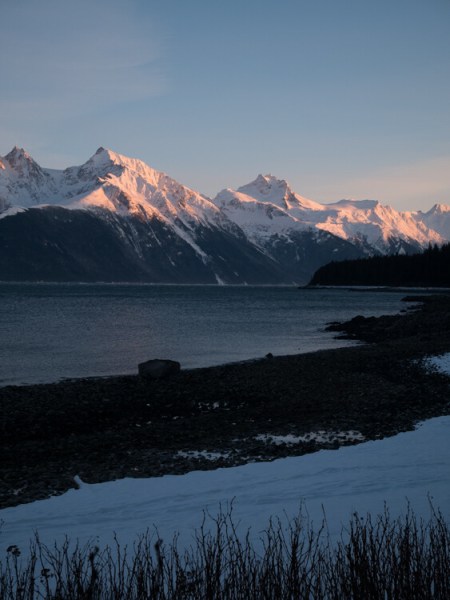
I’m fortunate to spend a lot of time in the grand landscapes of Alaska. But often, camera in hand, I’ve stood there, unable to create the image I wanted. There was just too much going on, or things were happening in a way that just didn’t match a typical single-image format. I was photographing along a gravel beach near Haines, Alaska this winter, while the alpenglow was lighting up the peaks across the inlet. The glaciers and spires were painted in peach light. Going super wide to capture it all, with my 14mm, made the mountains too small and distant, and left too much empty space. I wanted the details in the

I was photographing along a gravel beach near Haines, Alaska this winter, while the alpenglow was lighting up the peaks across the inlet (see image above). The glaciers and spires were painted in peach light. Going super wide to capture it all, with my 14mm, made the mountains too small and distant, and left too much empty space. I wanted the details in the mountains while maintaining a sense of the vast landscape. A panorama was the only way to go.

How to Create a Panorama Photo

Panoramas are hardly a novelty, Smartphones and many point and shoots can create them in-camera. But stitching together images from a DSLR or other high-resolution camera will yield better results if you do it right. Sadly, panoramas are easy to screw up. Here are a few tips for making an effective panorama from a series of images.

What lens to use to make a panorama

Making a panorama isn’t the time to use a wide angle lens. The optical distortion inherent in these lenses tends to mess with the process of stitching them together. Pick a standard lens or a short telephoto; something between 40mm and 100mm will work well, though I’ve occasionally gone as high as 200mm if the situation warrants.

How to Create a Panorama

Remove all filters from your lens, especially polarizers. They can cause gradations across an image that are impossible to work with later, so get that thing off your camera.

Cameras and settings

I shoot all panorama images in RAW format. This allows me greater flexibility in post-processing to make sure that exposures, white balance, and other settings match from one image to the next. That said if you are careful in-camera, and manually select all your settings from ISO to exposure and white balance, you can get by with JPGs.

How to Create a Panorama Photo

Exposure

Take a few sample shots of your subject. If you are shooting a landscape that varies in tones, meter off the brightest part of your scene and make the image as bright as possible without blowing out the highlights. Take note of those numbers (exposure settings), then using Manual Mode set your aperture and shutter speed accordingly.

How to Create a Panorama Photo

Focus

Turn off autofocus. As you pan across your scene, you don’t want your camera grabbing a new focus point each time. Set the focus so that your subject is sharp, then don’t touch it again until you’ve finished the series.

How to Create a Panorama Photo

White Balance

There are two options for white balance. The first, and easiest, is to set your white balance in camera, using one of the presets. Don’t use auto white balance, because the camera may decide each image varies slightly, and the colors will shift within the final panorama. Pick something appropriate and stick with it. The second option is to set the white balance of your RAW images in post-processing (see below).

How to Create a Panorama Photo

Making the images for the panorama

Composition

Almost all of my panoramas are created using vertically formatted photos (i.e. the camera is oriented vertically). First, this allows me to stitch together a greater number of photos for the same scene. Second, it allows me to compose with more negative at the top and bottom. This dead space is important to allow for cropping later.

Here is a series and final image to show you how I took the shots:

Notice how there is overlap from one image to the next, and they are all shot vertically. So nine images were stitched to make this final panorama image.

Shooting

How to Create a Panorama Photo

A level tripod is very useful, but not absolutely essential. If you are using a tripod, level it. With a level tripod, as you pan, your camera’s angle will not shift up and down. If you are hand-holding be very careful to keep your camera level as you move across your scene shooting your images for the panorama.

Start a full frame to the side of where you expect your final image to begin. This assures that you have some negative on the sides of the image. Then begin making your series as you pan right or left. Overlap each shot by between a third to one-half of the frame each time. The overlap is what allows the computer to detect which images go where and line them up, so make sure to leave plenty of overlap.

Move across the scene making as many images as necessary to fully capture the landscape. Take a breath.

How to Create a Panorama Photo

Post-processing your panorama

Continuity

In the computer (I use Lightroom), go through each your series and confirm that the white balance of each image is identical. If you shot in RAW, assuring white balance continuity is as easy as checking that they each have the same color tone. Check the numbers, if they aren’t all exactly the same, change them so that they match. If you set your white balance in camera, you can skip this step.

How to Create a Panorama Photo

Don’t edit the images separately, leave your photos as they are out of the camera (except to make sure the white balance is the same). Any additional post-processing is best done once the panorama has been created.

Stitching

There are many programs that can create panoramas. These include specialty programs like PTGui, which is designed to create enormous images involving hundreds of individual photos. However, both Photoshop and Lightroom have merge to panorama capabilities which work great in most situations. As an example, I’ll go through the steps in Lightroom:

Select your images by clicking the first one in your series, pressing and holding the Shift key, then selecting the final image. All the ones in between will now be selected as well.

Right-click (PC) or Control-Click (Mac) and select Photomerge > Panorama.

How to Create a Panorama Photo
A preview window will pop up offering three options; Spherical, Cylindrical, and Perspective. For most simple panoramas, Cylindrical will work, but feel free to click back and forth between these options to find the best option for your image. Click Merge.

How to Create a Panorama Photo

The stitched image will appear in your Lightroom Library, or as a new image in Photoshop. The result will likely have some jagged edges from your base images not quite lining up. Select the crop tool and cut the jagged edges away. (This is why the negative space I noted earlier is so important.) Note: you can also check off “Auto Crop” in the panorama popup box and it will be done automatically for you. 

Once you’ve got your image cropped you can post-process as you would any other photo in your collection.

How to Create a Panorama Photo

Conclusion

Panoramic photos, while definitely not the best option in all scenarios are a great tool to keep in mind for those moments when a landscape is just too big, too dramatic, or too epic to be captured in a single photo. When I first started shooting panoramas many years ago, I regularly overlooked simple things like remembering to remove my polarizer, or failing to assure the same white balance from image to image. Screw up a setting or forget a filter and the final image just won’t work, and there is nothing you can do about it. Pay attention to those annoying little details and you won’t miss your chance to create some epic panorama images.

Do you shoot panoramas? If so, show them off below, or share some of your own tips for success.

The post How to Shoot and Stitch a Panorama Photo by David Shaw appeared first on Digital Photography School.


Digital Photography School

 
Comments Off on How to Shoot and Stitch a Panorama Photo

Posted in Photography


Apple is releasing its Live Photos API, which means more moving photos in more places

21 Apr

Apple has revealed the API for its Live Photos feature, meaning more app and web developers will be able to support the company’s short 1.5 second video ‘moving photo’ video clips. Apps like Facebook are already able to display Live Photos for users running iOS 9, but making the API available will allow any developer who wants to put a Live Photos viewer on their website or in their iOS app to do so.

Live Photos debuted in 2015 with the iPhone 6S. Owners of recent iPhones including the 7 and 7 Plus can capture the moving images in the stock camera app, and anyone running iOS 9 or later can play the video clip by pressing and holding the image.

Articles: Digital Photography Review (dpreview.com)

 
Comments Off on Apple is releasing its Live Photos API, which means more moving photos in more places

Posted in Uncategorized


A Passion for Wrecks and Images Give a Photography Enthusiast a Second Career

21 Apr

photography-wrecks

Image: Pongsatorn Sukhum

Pongsatorn Sukhum was on his way to becoming a professional photographer. A long-time camera enthusiast, he took a year off college while studying in the UK to work in a studio that shot advertising photography. He then moved into editorial photography, shooting for travel magazines and building up a collection of underwater stock images that combined his love of photography with his passion for Scuba diving. In the mid-nineties, his work was shown in a group exhibition in his native Thailand. Today, Pongsatorn runs an engineering business in Bangkok but his continued work in underwater photography, and in particular, his images of World War II wrecks off the coast of Thailand are an example of how talented enthusiasts can keep their professions while maintaining their passion for image-making and even contributing to the preservation of the subjects they love to shoot.

Pongsatorn now produces fine art prints of his photography which he sells through his website. But publications call him whenever they need images to complement their editorials on wrecks in the region and he is still commissioned occasionally for advertising work. If he’s not working on an engineering project, he’ll dive one or two weekends each month and when he’s not on the water, he’ll find time each week to process images and research ships.

Artistry Meets Expertise

That demand for professional imagery from a photographer who only works in the profession part-time continues for a couple of reasons. The quality of Pongsatorn’s photographs is certainly one factor. Pongsatorn may not be a full-time photographer but his images are professional quality. He shoots in black and white to convey the sense of being in an environment in which color has been stripped away by the water, and to convey the mood at the depths where the ships rest.

“I feel that the characteristics of high-speed b/w film faithfully capture the light and ambiance at these great depths,” he told us by email. “I also believe that entering the water loaded with b/w film is a mindset.”

The result is a collection of atmospheric shots in which the fragility and graceful lines of the diver are set against the solidity of a slowly decaying steel hulk placed in front of a backdrop of silty grays.

But the continued demand among buyers for Pongsatorn’s skills can also be put down to his expertise. Underwater photography is demanding. Photographers have to be skilled in diving as well as in image-making. They need to understand their equipment and the environment as well as the subject of the shoot.

“Underwater, we can’t change lenses, add filters, or replace batteries so advanced planning is required,” says Pongsatorn. “Familiarity with the layout of the wreck is crucial to avoid delays associated with orientation.”

Pongsatorn keeps a collection of construction blueprints related to the wreck he’s about to shoot, as well as sketches that he updates regularly. Before the dive, those plans are transferred to a waterproof slate for use underwater so that he’s not trying to communicate a new idea to a co-diver or assistant while they’re swimming. The choice of shots, too, poses a range of different problems. Wide angle images mean keeping other divers and their bubbles away from the scene long enough for Pongsatorn to get his shots. That’s not usually an issue when shooting wrecks that aren’t popular dive sites but for well-known locations, Pongsatorn usually pleads for a ten-minute head start. Before some shoots, he’s even asked the Thai Navy to cordon off a wreck for a day.

While underwater photographers don’t have the same daylight worries as landscape photographers, they do have to cope with other challenges. Weather conditions can restrict accessibility to remote sites to certain times of the year, and sediment raised by the actions of a swimming photographer can reduce visibility.

“This happens frequently as the wrecks are naturally on the sea bed (with the exception of the so-called vertical wreck) where there is a great deal of sediment just waiting to be disturbed,” says Pongsatorn. “Diver buoyancy control and proper finning techniques need to be practiced.”

Learn How to Fin

Often, the constraints of time and the limitations of depth mean that Pongsatorn can only make one or two dives to a low-lying wreck on any given day. Some dive profiles, he says, are so deep that he’ll only be able to stay at the site for as little as five minutes.

“As you can imagine, deep wreck photography is a very low-yield activity. However, these challenges make it exciting and create opportunities for some truly creative work.”

For other photographers looking to specialize in underwater photography, Pongsatorn notes that while no official training is required, there are numerous basic courses and workshops available that will explain how light behaves underwater and how to set up and look after equipment. Photographers who happen to live in tropical areas can start by photographing clown fish, he recommends, as they’re easy to find and tend to stay in one place. Once they’ve mastered finning and have control over their stability, photographers can pick a subject and study its behavior.

Most important though is to respect the environment in which you’re shooting. On his blog, Pongsatorn has highlighted campaigns for shark preservation and attacked dive operators who remove artifacts from the wrecks they visit.

“There are several operators who specifically set out to loot. It’s in their literature. They abuse the legal loopholes and lack of enforcement. It’s sad to see all these artifacts being hauled up day after day. These people need to be educated.”

Similarly, divers who venture into a wreck exhale bubbles which can get trapped below decks and under bulkheads. In time, these air pockets corrode the metal and exert an upward pressure on the metal plates, causing them to collapse, Pongsatorn warns.

It’s that kind of knowledge and that level of concern that combines with creativity and artistry to produce images that are attractive to buyers — both of art prints and for commercial use. Find a subject for which you feel passionate enough to want to study and understand completely, bring to it your photography skills, and you also won’t need to give up the day job to earn money from your photography.


Photopreneur – Make Money Selling Your Photos

 
Comments Off on A Passion for Wrecks and Images Give a Photography Enthusiast a Second Career

Posted in Equipment


Sigma announces 14mm T2 and 135mm T2 Cine Prime lenses

21 Apr
Sigma Cine FF High Speed 14mm T2

Just in time for NAB, Sigma has announced an expansion to its Cine Prime line of lenses, adding the Cine High Speed 14mm T2 and Cine FF High Speed 135mm T2.

The Cine FF High Speed 14mm T2 and Cine FF High Speed 135mm T2 lenses are designed for use with full frame cameras, and join five existing prime lenses in Sigma’s Cine Prime product line. With the addition of these lenses, Sigma now offers cine prime lenses covering a very useful focal length range of 14mm to 135mm.

As with the other lenses in the set, both new lenses are available PL-mount, EF-mount, and E-mount.

Sigma Cine FF High Speed 135mm T2

In addition to the lenses, Sigma is now offering customers the option to order their cine lenses in metric or imperial measurements, as well as standard or full luminous paint markings. Sigma says that existing customers can swap from one measurement system to another for a fee.

Finally, Sigma is now offering its mount conversion services for owners of its cine lenses, allowing users to switch lenses between EF- and E-mounts.

We’re planning to get some hands-on time with these lenses next week at NAB next week and will share our experience with you.

Press release:

NAB 2017: Sigma Unveils Two New Cine Prime Lenses; Adds New Product Options?

Sigma introduces brand new Sigma Cine FF High Speed 14mm T2 and 135mm T2 Prime Lenses

April 20, 2017 – Sigma Corporation of America, a leading DSLR lens, camera, flash and accessory manufacturer, today announced its brand new Cine FF High Speed 14mm T2 and 135mm T2 prime lenses and new Cine Prime and Zoom product options.

Sigma is expanding its Cine Prime line to include two brand new lenses: the Sigma Cine FF High Speed 14mm T2 and the Sigma Cine FF High Speed 135mm T2. The high-performance Sigma Cine Prime product line, which now includes the following focal lengths and apertures – 14mm T2, 20mm T1.5, 24mm T1.5, 35mm T1.5, 50mm T1.5, 85mm T1.5 and 135mm T2 – is compatible with the latest full-frame camera sensor technology. Compact in design, the Cine Prime line offers outstanding optical performance and is ready for higher resolution shooting (up to 6K-8K). Both the 14mm T2 and 135mm T2, along with the previously announced Sigma Cine Prime and Zoom lenses, will be available for test-shooting at the Sigma NAB booth C11525.

In addition to this expansion of its Cine Lens Prime line, Sigma is now offering customers the option to order Cine lenses in metric or imperial measurements as well as standard or full luminous paint on markings. Existing customers who wish to swap from one measurement system to the other can do so for a paid fee.

Also, Sigma is now offering its sought-after Mount Conversion Services for the Cine lens customers. The highly successful program ensures continued return on investment for customers, allowing them to convert their lenses to and from EF and E mounts.

You can read the full Sigma announcement including tech specs here as well as download the new Sigma Cine 14mm T2 and 135mm T2 product images here.

Articles: Digital Photography Review (dpreview.com)

 
Comments Off on Sigma announces 14mm T2 and 135mm T2 Cine Prime lenses

Posted in Uncategorized


Lighting 103: Using Gels to Shift the Ambient

21 Apr

Abstract: By combining a white balance shift in your camera with a complimentary gelling of your flash, you can easily and efficiently alter the ambient color temperature of an entire environment.

In addition to controlling the color of light from your flash, gels can also allow you to control the color of the ambient areas of your frame. This can allow you to tweak, enhance or drastically an ambient color environment. Read more »
Strobist

 
Comments Off on Lighting 103: Using Gels to Shift the Ambient

Posted in Photography


7 Secrets of Black and White Photography

20 Apr

We’ve all heard it … “to master black and white photography you must learning to see in black and white” – but just how do you do that?

It can sometimes seem like actually learning to see in black and white is a skill for only the chosen few. But trust us, it’s for you too!

Here are seven (not-so-secret-anymore) secrets that will help you train your brain and expand your eye for the art of black and white photography.

(…)
Read the rest of 7 Secrets of Black and White Photography (844 words)


© Meg for Photojojo, 2017. |
Permalink |
No comment |
Add to
del.icio.us

Post tags:


Photojojo

 
Comments Off on 7 Secrets of Black and White Photography

Posted in Equipment


Collecting Inspiration: 3 Must-See Data Artists & Designers at Eyeo 2017

20 Apr

[ By WebUrbanist in Art & Drawing & Digital. ]

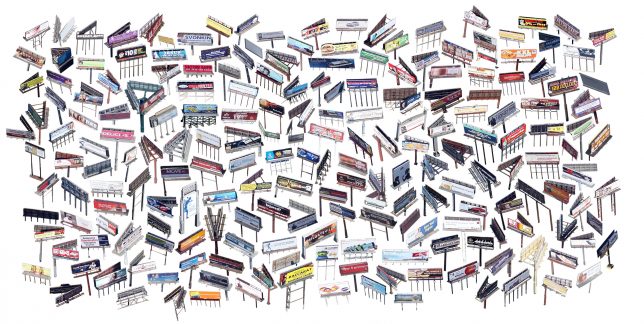
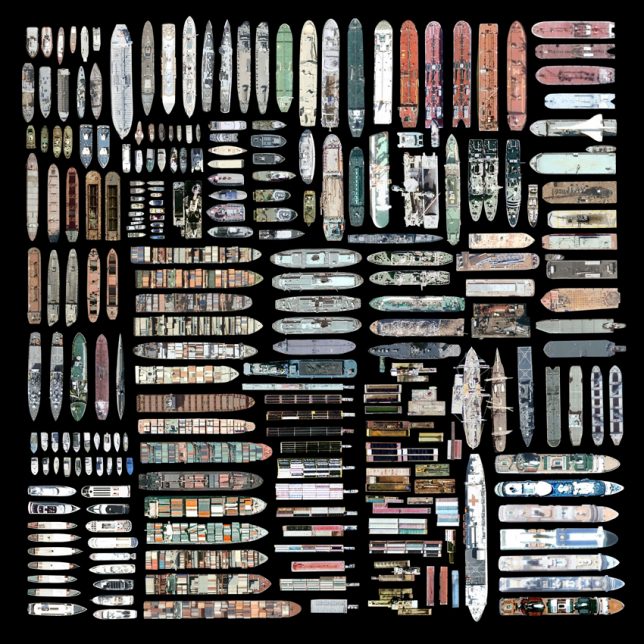
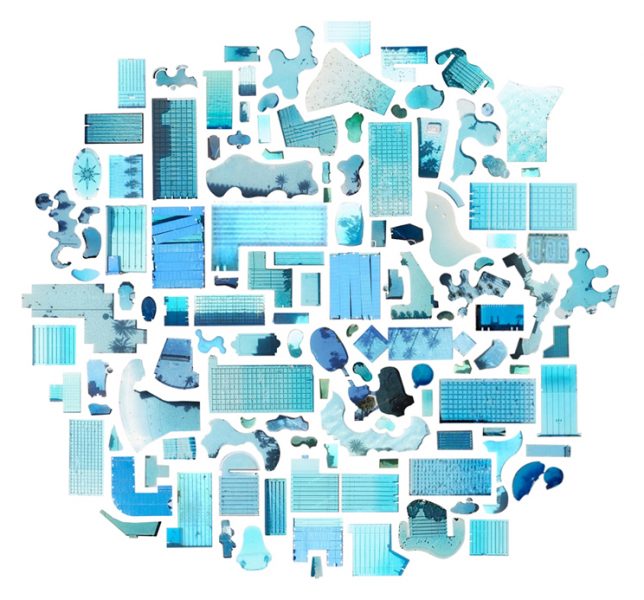
Jenny Odell collects and organizes all kinds of things, from meticulously sorting digital finds on Google Maps to tracing the origins of everything she used, wore, ate or bought on one particular day in 2013.

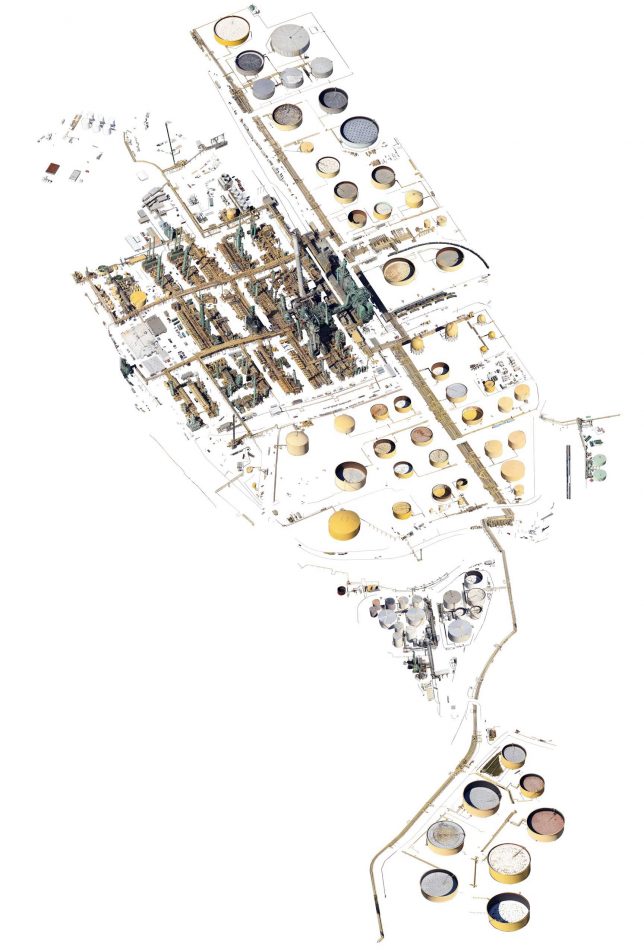
Her work often pulls objects out of context, aggregating and arranging something like a set of pools against a neutral backdrop (as seen above) or taking an entire industrial complex and carefully stripping it of its surroundings (like the facility below).

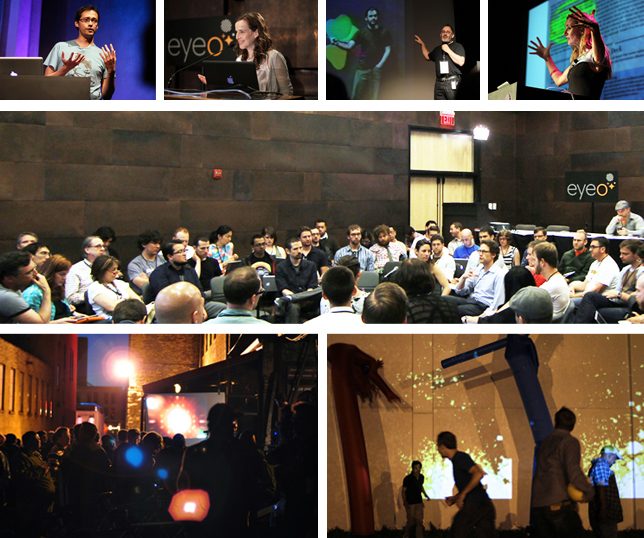
On June 26th, she will join an assortment of other unusual, curious and brilliant creatives — experts in the realms of art, design, interaction and information — as a speaker at the annual Eyeo Festival in Minneapolis, MN.

Designer, entrepreneur and artist Nicholas Felton, creator of the famously detailed and introspective data visualizations, will be back this year as well to talk about his recent work. His numerous personal annual reports condense the events of a year into a tapestry of maps, graphs and statistics.

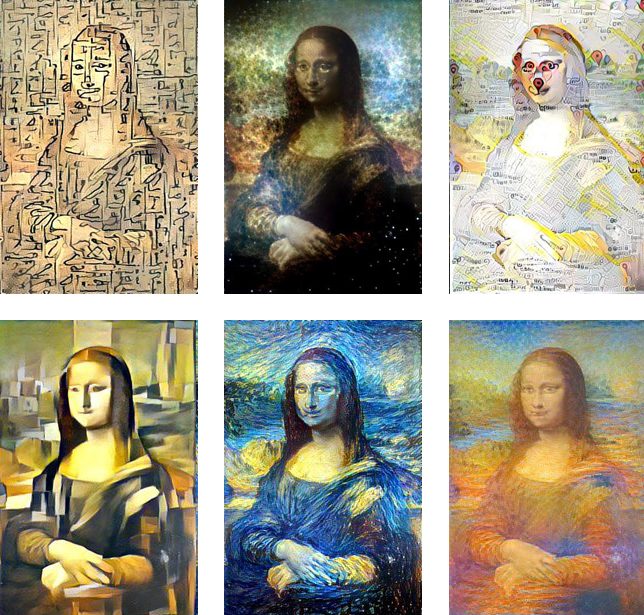
Artist and programmer Gene Kogan will bring his interest in “generative systems, artificial intelligence, and software for creativity and self-expression.” He has collaborated on various open-source software projects, working at the “intersection of code, art, and technology activism.”

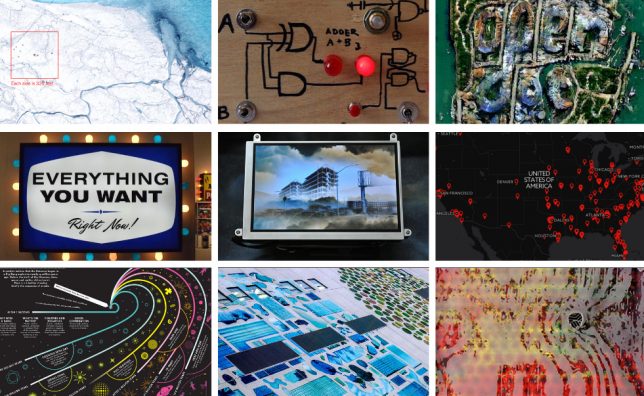
Others include: a smell researcher and artist with a collection of over 7,000 scents, a designer and software designer pursuing machine learning and news automation, and dozens of other fascinating folks from all over the world.

Eyeo asks: “What data is, where it comes from, and how we utilize it, looks different than ever before. What can we do with it all? What can’t we do? Artists, designers and coders build and bend technology to see what’s possible. What’s next with interaction, what’s revealed by the data. Eyeo brings together the most intriguing and exciting people in these arenas today.” If you haven’t been, this is as good a year as any to go for the first time — it is a wonderful and unique experience. Get tickets here.

Share on Facebook


[ By WebUrbanist in Art & Drawing & Digital. ]

[ WebUrbanist | Archives | Galleries | Privacy | TOS ]


WebUrbanist

 
Comments Off on Collecting Inspiration: 3 Must-See Data Artists & Designers at Eyeo 2017

Posted in Creativity