RSS
 

Archive for April, 2017

Ricoh releases Pentax 645Z and K-1 firmware updates and IMAGE Transmitter 2 software v2.3

22 Apr

Ricoh Imaging has released new firmware for its Pentax 645Z medium format camera and K-1 full-format DSLR. The new firmware makes the cameras compatible with the also freshly released version 2.3 of the company’s IMAGE Transmitter 2 software package.

The latter allows the cameras to  be controlled when tethered to a PC or Mac via USB cable and after the update now offers a range of new tethered control options, including drive mode, white balance, image format, size and quality, memory card slot selection, live view magnification and focus fine adjustment in live view. 

As before, you can also adjust essential settings, such as  aperture, shutter-speed, ISO and exposure compensation, or trigger the shutter. Image Transmitter 2 version 2.3 as well as firmware version 1.41 for the K-1 and 1.23 for the 645Z are now available to download on the Ricoh Imaging website.

Articles: Digital Photography Review (dpreview.com)

 
Comments Off on Ricoh releases Pentax 645Z and K-1 firmware updates and IMAGE Transmitter 2 software v2.3

Posted in Uncategorized


GoPro unveils Fusion, a 5.2K spherical VR camera

22 Apr

GoPro has unveiled Fusion, a new pro-grade spherical camera capable of capturing regular and VR video at a 5.2K resolution. The camera will be released this fall, but ahead of the launch comes a pilot program that GoPro will introduce this summer. Interested professional content creators can apply to take part in the pilot program, which GoPro says will be used to ‘refine the user experience.’

The company hasn’t revealed many details about Fusion, saying only that it capable of recording 5.2K spherical video at 30fps.Operators will also be able to produce ordinary non-VR videos from spherical videos using GoPro’s OverCapture technology. GoPro’s CEO Nicholas Woodman explains that Fusion can ‘capture every angle simultaneously… as though you had six GoPro cameras fused into one.’

Via: GoPro

Articles: Digital Photography Review (dpreview.com)

 
Comments Off on GoPro unveils Fusion, a 5.2K spherical VR camera

Posted in Uncategorized


7 Tips for Urban Landscape Photography

22 Apr

When you ask people what is landscape photography they have no trouble defining it. But ask what urban landscape photography is and you will get conflicting answers. People have an idea, but often don’t really understand what it is, or how to go about doing it. One of the first things to do is work out what it is, and then how you can do your own urban landscapes.

7 Tips for Urban Landscape Photography

Urban landscape photograph, taken in the early evening from a rooftop looking back towards the city.

What is urban landscape photography?

Before you can start taking specific urban landscape images it is good if you understand what it is. If urban refers to cities and towns, then it is generally understood that landscapes of these would be defined as that. Any image within those places where humans live, work and play would be considered in that category.

Cities are very popular for this kind of photography. You will find that many of you are already doing urban landscapes, especially when you travel. However, when you ask others what it is you are often told cityscapes. Yes they are, but there is so much more to the genre than that.

Here are seven tips to help you get better urban landscapes and, hopefully, help you to understand what it is as well.

1 – Street photography

Street photography can fall into two categories, one is street portraits, and the other looks more at the scene and what is going on. The first is not what you would typically find in urban landscapes, but the second is.

Look for scenes where people are, groups, or individuals, but place them in their environment so you get a context of where they are and what is happening. You could photograph people shopping and take a look at consumerism. Perhaps go to sporting events and photograph how people carry on at them. There are parks where people may be sitting on their own with no one around. Anywhere that people hang out is going to make for some interesting urban landscape photography.

7 Tips for Urban Landscape Photography

A street scene showing the landscape and what people are doing in it.

2 – From above

There are many ways to photograph above the city now. You can see the tops of the buildings looking straight down to the streets below. You can get amazing views that are unique.

Observation decks allow you to look down onto the city. They aren’t always easy to shoot from, as you sometimes have to take photos through glass or some sort of security mesh.

Another way is a helicopter ride over a city. It is an option that many cities offer now. You can take a 15-minute ride if you want to pay for it. If you are lucky to live somewhere like Melbourne, you can also take early morning balloon rides over the city. You will get some views of the city that are available no other way.

7 Tips for Urban Landscape Photography

A view from above, this was taken from Eureka Deck, an observation deck looking over Melbourne.

3 – Long exposure photography

Without a doubt, there aren’t many types of photography that long exposures don’t suit. You can use it for individual buildings or for groups and streets. It allows you to create some magical scenes.

The most common one that people think of is using Neutral Density filters so you can get very long exposures, anything from 30-seconds to several minutes. They can help create movement with getting blurred clouds, or you can remove people and cars from streets. You can get some interesting effects with the filters. Whether you use it for one building or many, and over water you will get some different images.

7 Tips for Urban Landscape Photography

A long exposure of Melbourne taken across the river.

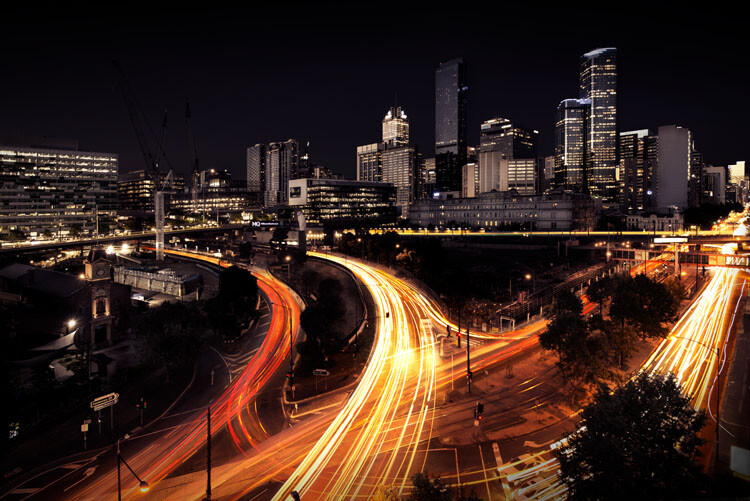
4 – Night photography and light trails

Night photography is another way. Urban environments are great when the sun goes down. As the lights come on you can get a completely different view. The camera will pick up a lot more than you can see with your eyes. Depending on how bright or dim it is you may be able to take some exposures for a minute to two, even longer.

You can also get great light trails at night. Look for interesting streets that have some great buildings in the background that you can use when capturing the trails.

7 Tips for Urban Landscape Photography

Light trails of cars moving around captured during the night.

5 – Interesting architecture

Every city strives to build interesting buildings. Architects like to show off as much as anyone. No matter where you are, see if you can find the most interesting structures to photograph.

You could figure out why a building was designed for an area; if there is something unique about it. Churches were often built on hills so the congregations were still looking up to them when they weren’t attending.

Look for buildings that are nestled in with others that are very different. Perhaps there is an old building somewhere that is surrounded by new ones. Scenes like that can give your images an interesting story.

7 Tips for Urban Landscape Photography

One of the most distinctive buildings in Melbourne, Flinders Street Station.

6 – Weather and seasons

People often forget how a city or town can look completely different in each season and how the weather can change it as well. If you only go to a place once, you don’t get a lot of choices. But if you live or visit them often then you can get a wide variety of shots when you photograph it at other times and in various conditions.

Throughout the year, the seasons will give you numerous opportunities to get scenes that are unique to that time. Autumn will have the colors, so any trees in the streets or parks can make them colorful. Winter will have people rugged up against the cold and public places are empty. In summer everyone is in lighter clothing and those same spaces are filled with people. Consider what sort of photos you want and then choose the season accordingly.

Rain, hail or shine, well perhaps not hail, but each will give your urban landscape a distinct look. The weather is not something you can control but you can take advantage of it. Photos of cities that are white from the snow can be magical. Rain will make all the surfaces reflective and make it look bigger and shinier. Don’t underestimate how much bad weather can make your photos that bit different.

7 Tips for Urban Landscape Photography

Rain has given Hosier Lane a shiny appearance.

7 – Leading lines

Bridges are beautiful, but they can be used for so much more than traveling. They can be the perfect way to help your viewer enter your image. Leading lines are fantastic for helping your audience know where you want them to look. Though bridges are one type, there are lots of others as well.

Really anything that will lead people into an image will work. Look for roads that enter and leave cities and towns. Using the light trails of cars or other vehicles can be great for the same thing. Don’t just think road and bridges, consider train tracks, a moving bus, anything that will take or point your viewer to the area where you want them to focus.

7 Tips for Urban Landscape Photography

Using the bridge as a leading line to take you into the early morning light in Melbourne.

Taking the tips

You don’t have to do all of these, but using one or a few will help you get good urban landscape photography images. Consider what you are taking and think about the environment around you. Make the most of it and give your images a purpose.

Share your urban landscape photography in the comments below!

The post 7 Tips for Urban Landscape Photography by Leanne Cole appeared first on Digital Photography School.


Digital Photography School

 
Comments Off on 7 Tips for Urban Landscape Photography

Posted in Photography


Bought Your First DSLR? 6 Tips for Learning How to Use Your New Camera

22 Apr

After a lot of thought and research, you finally pull the trigger. You bring home your first digital camera, pull the sleek marvel of engineering out of the box, and stare at it excitedly. Then you look at all the buttons and controls, and the excitement turns into fear… You realize that you have no idea how to use your new camera!

Bought Your First DSLR? 6 Tips for Learning How to Use Your New Camera

So what’s next? Well, the most important thing is to not be intimidated. It’s not nearly as complicated to learn photography as it might seem – despite what all those buttons might make you think. You will thankfully never need half of those buttons.

This article is going to cover the technical aspects of using your new camera; what you need to know right away to get up and running. The three other aspects to becoming a good photographer are the conceptual, composition, and the editing aspect, but we can cover those another time.

1. Light

Before we get into how to use your new camera, there is an important ingredient that will make thinking about using it much more intuitive. What does the light look like? I want you to spend some time looking at light, without a camera over the next few days. A camera is a tool that records this light. You can’t figure out what settings to use if you don’t look at the light first. This is why many new photographers get confused when trying to figure out the best settings. They were never taught to start with the light.

Where is the light coming from in relation to the camera? How strong is it? Are you in direct sunlight, is it diffused, are there multiple light sources, are you in the shadows, is it late in the day, is there artificial light, and what color is the light? The technical side of photography is really all about the light.

Bought Your First DSLR? 6 Tips for Learning How to Use Your New Camera

As you get more experienced, you can start looking into using your own light sources, such as flashes and strobes, but that can come later. Don’t be afraid of this part either. It is not as hard as it looks, as long as you get good at looking at the light.

Now it’s time to look at your new camera and figure out the settings.

2. Shutter Speed, Aperture, and ISO

Besides white balance, if your camera only had three dials on it, one for the shutter, one for the aperture, and one for the ISO, that is all you would need. These three factors all come together to record the light. Here is what they each do:

ISO:

The ISO is your camera sensor’s ability to capture light. The higher the ISO, the more light it can capture, but it also means that your image will look grainier (digital noise). Landscape photographers or anyone using a tripod often prefers to use a low ISO, such as 100 or 200 so the images have as little grain as possible. High ISOs are primarily used when handholding the camera in medium strength light and in dark situations, such as indoors or at dusk. This is why concert and event photographers, street photographers, or even travel photographers will often shoot at high ISOs. They often find themselves shooting in low-light situations.

Bought Your First DSLR? 6 Tips for Learning How to Use Your New Camera

It is important to know that newer cameras can easily shoot good quality images at an ISO of 1600, and many at 3200 – 6400 for the higher end cameras. A lot of the grain/digital noise will not even show up when making smaller prints, such as 8x10s. The large prints are where grain shows more, but even with this, most viewers will not notice it, and many will even consider it beautiful. I rarely go below ISO 400, unless I am on a tripod. When you get the chance, take a few similar shots at different ISOs and zoom in on the computer to look at the differences.

Aperture (F-number):

The aperture is a hole that opens in your lens to allow light to hit the sensor. Changing the aperture adjusts the size of the hole. The larger the hole, the more light that hits the sensor, but it also means that you will have a shallower depth of field (i.e. a smaller range in your image will be in focus). A large hole corresponds to a small f-number, such as f/2. The smaller the hole, the less light that hits the sensor, but more of your image will be in focus. A small hole corresponds to a large f-number, such as f/16.

I am overgeneralizing here, but often portrait photographers will shoot at very low f-numbers such as f/2.8. This is because they can focus on the subject’s eyes and have the sharpness fall off quickly to  separate the subject from the background. Landscape photographers, on the other hand, typically use tripods and try to shoot around f/11 or f/16 to have as much of the image as sharp as possible, from the foreground to the background.

Shutter Speed:

Bought Your First DSLR? 6 Tips for Learning How to Use Your New Camera

Using a slow shutter speed and a tripod allowed me to blur the moving trains.

The shutter is a curtain inside your camera body that opens and closes. The amount of time the shutter is opened to expose the sensor to the light is referred to as the shutter speed. 1/160 refers to 1/160th of a second. So an exposure of 1/10th of a second is a slower shutter speed than 1/160th, and allows more light to hit the sensor.

As you get to slower and slower shutter speeds, you start to see more motion blur in your images, depending on whether or not subjects are moving. How much motion blur will depend on the shutter speed and the speed of the subject. While 1/200th of a second would freeze a person walking, you might need 1/1000th of a second to freeze a car driving past.

Minimum shutter speed

Keep in mind that when you are handholding your new camera your hands will shake a tiny amount, which can introduce blur into your images. So you need to use a fast enough shutter speed to offset this. The rule is that your shutter speed needs to be at least one over your focal length. Look at your lens. You see those numbers on the front (i.e. 35mm)? That is your focal length.

The smaller the number means a wider field of view, while the larger numbers mean more of a telephoto. If you are shooting at 24mm, then you would need your shutter speed to be at least 1/24th of a second, whereas at 70mm you need to shoot at 1/70th of a second (or faster) to not have any handheld camera shake. It makes sense when you think about this. If you are zoomed in on a small part of the background, your slight hand movements will be much more obvious in that small area versus a wide angle of view.

If your new camera has an APS-C (cropped) sensor, which is normal for most entry-level cameras, the true focal length of your lens is actually 1.5 (Nikon)  or 1.6 (Canon) times what it says (the crop factor). So if you are at 24mm, your actual focal length is 24×1.6=38.4mm, so you would want to be shooting at 1/40th of a second or faster. Micro-4/3rds cameras have a crop factor of 2x instead of 1.6. Full-frame sensors are 1-1.

3. Manual versus Aperture Priority versus Shutter priority

In photography, there are three ways to skin a cat. You will want to set your camera to either Manual, Aperture Priority, or Shutter Priority. Once you learn your new camera well, you can use any of these settings to get to the same endpoint.

Set the ISO first

Of these settings, the first thing you will do is to set your ISO. Turn ISO Auto off (or read this for a different perspective: How I Learned to Stop Worrying and Love Auto ISO). If you are shooting with a tripod – set the ISO to 100 or 200. Are you handheld in bright sunlight –  an ISO of 100-400 will do. In the shade, an ISO of 400-1600 will be ideal depending on the brightness levels. At dusk, at night, or indoors without a strong window light – usually, ISOs of 1600-6400 are ideal. So for any photography session, step 1 is to assess the light and step 2 is to set the ISO.

Bought Your First DSLR? 6 Tips for Learning How to Use Your New Camera

What mode to use next

Next, you need to figure out if you want to shoot in Manual (M), Aperture Priority (A/Av), or Shutter Priority (S/Tv) mode.

In Manual mode, you set both the aperture and shutter speed yourself. Some people think it’s macho to only shoot in Manual, but in many situations, Manual can slow you down significantly. For this reason, I use this mode the least of the three. With Aperture Priority, you choose the aperture and the camera uses an internal light meter to guess the correct shutter speed to expose the scene correctly. It usually does a good job at this, except for situations with a lot of bright or dark tones. In Shutter Priority, you choose the shutter speed and the camera chooses the aperture.

Except for when I’m using studio lighting or in a situation where the lighting is consistent, I mostly shoot in Aperture or Shutter Priority modes. I prefer Aperture Priority mode for portraiture, landscapes, most images on a tripod, or any situation where I want a lot of bokeh (the background blur due to a shallow depth of field). I prefer Shutter Priority for street photography, sports, or anything where either the subject is moving and I want to freeze the motion, or where I purposely want to show motion blur, such as panning.

While I personally prefer to only shoot in Manual in very specific situations, I suggest you go out for a couple of your first sessions and only shoot in Manual Mode. Guess the ISO, the shutter speed, and the aperture. Take the shot and look at the picture. Is it too dark, too light, is it blurry, or is there motion blur? At first, you will have no idea what you are doing, but you will quickly learn. This is a great way to learn how your settings will affect the scene.

4. Exposure Compensation (+/-)

Bought Your First DSLR? 6 Tips for Learning How to Use Your New Camera

Scenes like this will require you to use Exposure Compensation as the camera will attempt to make the snow gray.

We’re almost there – I promise. Exposure Compensation is your best friend when shooting in Aperture or Shutter Priority Mode. When using these modes, the camera will use its light meter to guess the correct exposure. Its goal is to render your scene as a neutral gray tone, so sometimes it will get the exposure wrong from what you want. You can use Exposure Compensation to offset this issue. You can raise or lower the exposure compensation (+/-) on your camera to lighten or darken a scene. Use it!

Some situations where you might need to use Exposure Compensation are scenes with lots of light or dark tones, such as an image with a lot of bright white sky or white snow (like the image above), or in a dark alleyway or at night. For a scene with white snow, the camera would see all that white and try to make it neutral gray – ultimately darkening the image too much. So you have to raise the Exposure Compensation (use + to increase the exposure) to brighten the scene back to normal. For a dark alleyway, the camera will try to brighten the dark walls to be a neutral gray, so you have to adjust the Exposure Compensation (use – to lower the exposure) to make those grays look much darker and more realistic (true to tone).

5. White Balance

Bought Your First DSLR? 6 Tips for Learning How to Use Your New Camera

White balance is how your camera portrays the color of the light in a scene. Different light sources have completely different colors, and the camera has many settings for the most typical ones, such as a sunny or shady day. However, start off by setting your white balance to auto. Auto white balance usually works great. Once you become comfortable with everything else in this article, then start learning more about white balance. It’s a more advanced thing to learn down the road, and auto can take you a long way. I still use auto white balance a majority of the time.

6. Autofocusing and Taking the Picture (Finally!)

Bought Your First DSLR? 6 Tips for Learning How to Use Your New Camera

This is the last thing! I promise!

Your focus area is the spot that your camera chooses to be sharp. When you set your camera to autofocus and look through the viewfinder, you will see many boxes (squares or circles depending on your camera) that you can select from to choose the area where you want the camera to focus. Figure out how to move this box around (you do not want the focus area to be set to auto or zone) and select one. You will want to move it to focus on the subject in your image.

Many photographers, myself included, will often just keep the focus box in the middle. I will then aim the middle box at the subject that I want in sharp focus, press the shutter halfway to lock the focus, then recompose the image while holding the shutter halfway pressed. When the composition is right, I will take the photo. This is a great way to focus if you do not feel like constantly moving the focus point around.

When you press the shutter down halfway, it will focus the camera using the point you select. Pressing it all the way will take the picture. Be careful, because sometimes when you are focusing on the edge of a subject, a subject that is small, or a subject that is far away, the camera can mistakenly focus on the background instead. This is a very common problem called back-focus that happens frequently to newer photographers.

Note: your camera needs contrast to focus. So make sure you select an area that has an edge so that the camera can focus. It cannot focus on a plain white wall, for example.

Wrapping up

Bought Your First DSLR? 6 Tips for Learning How to Use Your New Camera

I know this was a lot to cover, especially if this is one of your first lessons. It’s a lot to be taken in right away, but it’s really not that hard to learn all of this in real life. It seems much more daunting to read about it all than to see it in person. Really, if I were to show you all of this in real life – in three hours, you would have it down.

So let’s stop here. Read over what I wrote five or seven times in the next few weeks and play around with the settings. Take photos indoors and outdoors and at different times of day and figure out how to expose them well. Create sharp images, try creating bokeh, and mess around with motion blur. Take your time and change the settings to see how the images look. Look at them on the back of your camera right after you take them. Zoom into the details as well.

Once you have this all down, then it’s time to move on to the more advanced stuff!

The post Bought Your First DSLR? 6 Tips for Learning How to Use Your New Camera by James Maher appeared first on Digital Photography School.


Digital Photography School

 
Comments Off on Bought Your First DSLR? 6 Tips for Learning How to Use Your New Camera

Posted in Photography


Selective Hearing: These Earplugs Let You Turn Down Sounds of the World

22 Apr

[ By SA Rogers in Gadgets & Geekery & Technology. ]

We’ve all had moments where we wished we could tune out a particular person or muffle loud music without losing the ability to hear a friend’s voice, but standard earplugs don’t exactly allow for a lot of fine-tuning. But with a new product called ‘Knops,’ you can literally turn the volume of the world up or down in an instant. Founded by musicians, the Dutch startup aims to help you hear what you want to hear and ignore what you don’t with the twist of a tiny knob.

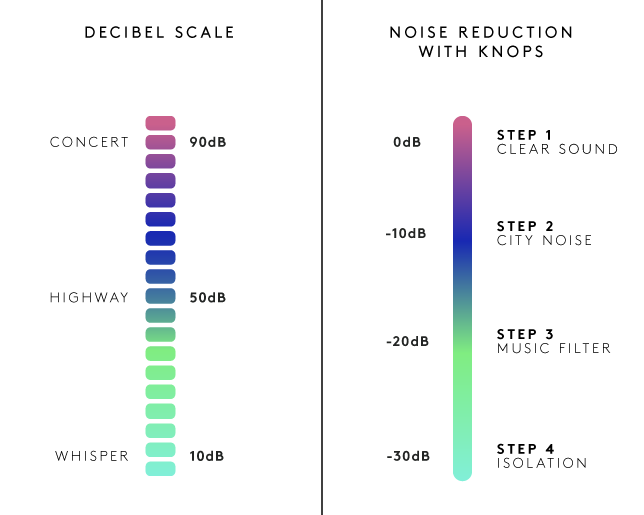
Each pair of knots has four modes you can switch between: the first is clear sound, the second reduces ambient ‘city noise’ by 10 decibels, the third muffles live music by 20 decibels, and the fourth is ‘isolation,’ blocking out 30 decibels. You can easily switch between the four levels whenever you want, eliminating the need to constantly pull out and reinsert your earplugs.

Noting that most earbuds are “downright ugly as hell,” the designers gave Knops a minimalist look available in four different colors and trims. You might imagine that they’d be unnecessarily high-tech, turning a simple product like earplugs into an expensive, high-maintenance gadget that requires syncing to electronic devices or battery charging. Surprisingly, that’s not the case. The creators wanted control over external sounds without the distortion that can come with electronic solutions.

How does it work? According to the creators, “Knops uses no electronics, no apps and no batteries. Instead our earbuds are acoustically engineered. The real sound is filtered using gold old physics. With the help of computer simulations and real-world prototypes tested in acoustic labs, we tuned Knops. We spend a lot of time fine-tuning the sound, so we can provide the best quality sound at every volume level. Working with the natural response of the ear canal.”

You can pre-order a pair by backing the project on Kickstarter for 58 Euros (about $ 62 USD) or more.


Share on Facebook


[ By SA Rogers in Gadgets & Geekery & Technology. ]

[ WebUrbanist | Archives | Galleries | Privacy | TOS ]


WebUrbanist

 
Comments Off on Selective Hearing: These Earplugs Let You Turn Down Sounds of the World

Posted in Creativity


Lower cost of image sensor business lifts Sony’s annual income estimate

22 Apr

According to a report by Reuters Japanese electronics manufacturer Sony has lifted its operating income estimate for the financial year ended March 31. Sony says it now expects an income of around ¥285 billion ($ 2.6 billion), which is up from a 240 billion yen estimate in February.

The main reason for the adjustment of the estimate are lower amortization costs for Sony’s financial services segment but the company also cites lower-than-anticipated costs for its image sensor business. The company doesn’t provide any more detail than that, so we can only speculate what those anticipated costs were. 

Sony’s semiconductor business has been a market leader for years with a dominating market share of around 40 percent. Sony sensors have been deployed in the cameras and smartphones of a large number of vendors. The company will report its full-year results on April 28.

Articles: Digital Photography Review (dpreview.com)

 
Comments Off on Lower cost of image sensor business lifts Sony’s annual income estimate

Posted in Uncategorized


Samyang Lens Station USB dock spotted in the wild

22 Apr

Samyang recently showed off a new Lens Station device at the 2017 Seoul International Photo & Imaging Show, according to Photo Rumors.

The Lens Station is described as a USB docking station for lens customization and firmware upgrades, one said to be similar to Sigma’s own USB dock. Unfortunately, no details about availability or pricing have been released at this time.

Articles: Digital Photography Review (dpreview.com)

 
Comments Off on Samyang Lens Station USB dock spotted in the wild

Posted in Uncategorized


Samyang announces VDSLR 16MM T2.6 cine lens

21 Apr

Lens maker Samyang has launched the new VDSLR 16mm T2.6 cine lens, which is designed for video shooting with uncoupled gear rings with T numbers. This latest launch takes the South Korean manufacturer’s  number of cine lenses up to 19. 13 of those are designed for use with DSLRs, varying from an 8mm fisheye up to a 135mm telephoto, and six for mirrorless system cameras, ranging from 8 to 50mm in focal length.

The new 16mm T2.6 will be available globally from June at a price of 599 Euros in Europe (USD 640). No information on US pricing has been released yet. 

Press Release:

Samyang Introduces VDSLR 16mm T2.6

April 21st, 2017, Seoul, South Korea – Global optics brand, Samyang Optics (http://www.samyanglensglobal.com) announce a new 16mm T2.6 cine lens, designed specifically for video shooting with uncoupled gear rings with T numbers. This launch adds one more lens to the existing 18 cine lenses for DSLR and mirrorless cameras. 

Since 2012, Samyang Optics has released its cine lenses based on the needs of professional videographers. Satisfied with the image quality of Samyang lenses, videographers continuously requested for cine lenses and as an answer, Samyang launched cine lens line up. 

This new launch expands the cine lens line up to a total of 19 lenses: 13 for DSLR cameras varying from 8mm fisheye to 135mm telephoto and 6 for mirrorless cameras varying from 8mm to 50mm. 

Inheriting the renowned image quality of Samyang’s wide-angle lenses, the 16mm angle of view is commonly used by directors of photography around the globe for its versatile usage for wide-angled emotional scenes in film and videos. Along with the existing 14mm, 20mm and 24mm, this new lens will realise the delicate changes in the scenes. 

As a ‘Total Imaging Solution’ optics brand, Samyang Optics now offers 51 lenses: 2 premium XP photo lenses, 2 autofocus lenses, 19 manual focus photo lenses, 19 cine lenses and 9 professional cinema lenses specifically under XEEN brand. 

Launched to complete the Samyang cine lens line up, this new 16mm T2.6 will be available globally from June and will carry a suggested retail price of EUR 599. For more information, visit the Samyang social media channels.

Articles: Digital Photography Review (dpreview.com)

 
Comments Off on Samyang announces VDSLR 16MM T2.6 cine lens

Posted in Uncategorized


Frederik Buyckx named Sony World Photography Awards 2017 Photographer of the Year

21 Apr

$ (document).ready(function() { SampleGalleryV2({“containerId”:”embeddedSampleGallery_7331693783″,”galleryId”:”7331693783″,”isEmbeddedWidget”:true,”standalone”:false,”selectedImageIndex”:0,”startInCommentsView”:false,”isMobile”:false}) });

Belgian photographer Frederik Buyckx has been named the Sony World Photography Awards 2017 Photographer of the Year. Buyckx is a freelance photographer for the Belgian newspaper De Standaard and will receive the $ 25,000 prize for his winning series of images entitle ‘Whiteout’, which was shot in the Balkans, Scandinavia and Central Asia, all remote areas where people often live in isolation and in close contact with nature.

“There is a peculiar transformation of nature when winter comes, when snow and ice start to dominate the landscape and when humans and animals have to deal with the extreme weather,” Buyckx says. “The series investigates this struggle against disappearance.”

Chosen from the winners of the Awards’ 10 Professional categories, Chair of Judges Zelda Cheatle said of Buyckx’s images: “I have chosen a series of landscapes so that we may return to the essence of looking at photography. Landscape is often overlooked but it is central to our existence. These are beautiful pictures made by a serious photographer, and they are to be enjoyed.”

This year the contest received more 227,000 entries from 183 countries, making it the world’s largest photography competition. An exhibition of all winning and shortlisted images and a selection of rare photographs by British photographer Martin Parr, who is this year’s recipient of the Outstanding Contribution to Photography prize, will run at Somerset House in London from now until 7 May. 

The annual Sony World Photography Awards are free to enter and open to all photographers. The 2018 Sony World Photography Awards open for entries on 1 June 2017. You can find the full list of of this year’s winners below and see a selection of shortlisted and winning images on the World Photography Organisation website. 

Professional  Category Winners and Finalists

An expert panel of international judges were challenged to find the best photography series (between 5-10 images) across the ten Professional categories. The winning and finalist photographers are:

Architecture winner: Dongni, China
2nd – Julien Chatelin, France / 3rd – Diego Mayon, Italy

Conceptual winner – Sabine Cattaneo, Switzerland
2nd – Gao Peng, China / 3rd – Alexander Anufriev, Russian Federation

Contemporary Issues winner – Tasneem Alsultan, Saudi Arabia
2nd – Li Sony, China / 3rd – Lorzenzo Maccotta, Italy

Current Affairs & News winner – Alessio Romenzi, Italy
2nd – Joe Raedle, United States / 3rd – Ivor Prickett, Ireland

Daily Life winner: Sandra Hoyn, Germany
2nd – Christina Simons, Iceland / 3rd – Alice Cannara Malan, Italy

Landscape winner: Frederik Buyckx, Belgium
2nd – Kurt Tong, United Kingdom / 3rd – Peter Franck, Landscape

Natural World winner: Will Burrard-Lucas, United Kingdom
2nd – Ami Vitale, United States / 3rd – Christian Vizl, Mexico

Portraiture winner: George Mayer, Russian Federation
2nd – Romina Ressia, Argentina / 3rd – Ren shi Chen, China

Still Life winner: Henry Agudelo , Columbia
2nd – Shinya Masuda, Japan / 3rd – Christoffer Askman, Denmark

Sport winner: Yuan Peng, China
2nd – Eduard Korniyenko, Russian Federation / 3rd – Jason O’Brien, Australia

OPEN PHOTOGRAPHER OF THE YEAR – Alexander Vinogradov, Russia
YOUTH PHOTOGRAPHER OF THE YEAR – Katelyn Wang, US
STUDENT PHOTOGRAPHER OF THE YEAR – Michelle Daiana Gentile, Argentina

Articles: Digital Photography Review (dpreview.com)

 
Comments Off on Frederik Buyckx named Sony World Photography Awards 2017 Photographer of the Year

Posted in Uncategorized


LaCie reveals 2big 2-bay RAID storage solution with Thunderbolt 3 technology

21 Apr

Today LaCie announced a new version of its 2big professional 2-bay RAID storage solution that now comes with Thunderbolt 3 technology. The 2big Dock not only offers fast transfer speeds and up to 20TB of storage, making it an interesting storage solution for professional photographers and video-shooters, but also serves as a docking station that helps simplify the workflow.

At the front, SD and CF Card readers allow for easy file transfer from your camera and a USB 3.0 hub can charge a smartphone or other mobile devices or lets you connect a shuttle drive or digital camera an an additional image transfer options. In addition, the LaCie 2big Dock can be connected to displays with up to 4K resolution via DisplayPort technology.

Dual Thunderbolt 3 ports can also power a compatible laptop while simultaneously daisy-chaining up to five additional Thunderbolt or one USB-C drive. In addition a USB 3.1 port allows for compatibility with USB-C and USB 3.0 computers via the included adapter cable. The new LaCie 2big Dock will be available in 12TB, 16TB or 20TB capacities this summer and will be showcased at the NAB Show in Las Vegas next week.

Press Release:

LaCie 2big Dock Thunderbolt 3 Bridges the Port Gap and Delivers Massive Capacity to Streamline Creative Workflows

Today LaCie announced the next evolution of its popular 2big professional 2-bay RAID storage solution. Now with Thunderbolt™ 3 technology, the LaCie® 2big Dock delivers fast speeds and massive capacity, making it a powerhouse tool for photographers and videographers. Designed by Neil Poulton, the LaCie 2big Dock is also a sleek yet powerful docking station that provides ports for connecting other devices, a feature that many laptops have sacrificed in recent years. Through a single cable, the LaCie 2big Dock simplifies and centralizes the desktop by directly connecting to a laptop, SD Cards, Compact Flash Cards and other devices. The result is a simplified, more efficient creative workflow.

Creative professionals juggle massive amounts of data and tight timelines, so capacity and speed are critical. With up to 20TB of storage—a twenty five percent increase over the previous version—the LaCie 2big Dock offers professionals enough space for large video and photo libraries including up to 650 hours of 4K 30fps footage* or 200,000 raw images**. With speeds of up to 440MB/s, users can transfer one hour of 4K footage in one minute***. It also means almost zero lag time when browsing photo libraries in Adobe® Lightroom. Working with compressed 4K or HD footage, videographers can edit quickly and smoothly in Adobe Premiere®Pro.

More than storage, the LaCie 2big Dock is a powerful docking station that helps photographers and videographers simplify their workflows. Front-facing SD and CF Card slots allow the pro to directly ingest files off memory cards from a drone, DSLR, GoPro® and other devices into Adobe Lightroom or Premiere Pro. The USB 3.0 hub charges a phone or connects a shuttle drive or digital camera to offload footage or files. Via DisplayPort, professionals can connect the LaCie 2big Dock to high-resolution 720-1080p or even 4K displays. Dual Thunderbolt 3 ports can also power a compatible laptop while simultaneously daisy-chaining up to five additional Thunderbolt or one USB-C drive. Plus, the USB 3.1 port enables universal compatibility with USB-C and USB 3.0 computers via the included adapter cable. Thunderbolt 2 compatibility is also possible with an adapter (sold separately).

Other key features of the new LaCie 2big Dock include:

  • Seagate® IronWolf Pro enterprise-class drives and RAID optimization for superior power management and reliability
  • LaCie RAID Manager that easily monitors system’s health with audible alarm and email alerts
  • Efficient cooling with aluminum enclosure and thermoregulated fan for professional reliability
  • A five-year limited warranty

The new LaCie 2big Dock will be available in 12TB, 16TB or 20TB capacities through LaCie Resellers this summer. It will be showcased for the first time at the NAB Show in Las Vegas next week. Attendees can stop by the LaCie booth (SL4527) to see the LaCie 2big Dock in action. For more information, visit www.lacie.com.

* On average, 1 hour of 4K 30fps compressed footage creates 30GB of data.
** 20TB can store approximately 200K raw photos.

Articles: Digital Photography Review (dpreview.com)

 
Comments Off on LaCie reveals 2big 2-bay RAID storage solution with Thunderbolt 3 technology

Posted in Uncategorized